Dynamco TX111 Remote Relay (Transmitter) User Manual P275 TX111
Dynamco Pty. Ltd. Remote Relay (Transmitter) P275 TX111
Dynamco >
Users Manual

PARALYSER 275
USER INSTRUCTIONS
CYCL PS
R
U
I
C
T
Y
E
S
S
S
Y
S
M
T
E
Proudly designed and engineered in
Australia by Dynamco Pty Ltd.

Immobiliser Vehicle
Security System
CYCLOPS PARALYSER 275
User Instructions
Congratulations on having one of the world's most advanced
and unique Australian designed and engineered vehicle security
systems, installed in your vehicle!
The Cyclops Paralyser 275 has been tested to and meets
Australian Standards 4601:1999.
CYCL PS
R
U
I
C
T
Y
E
S
S
S
Y
S
M
T
E
- 2 -
ARMING AND DISARMING
To arm or disarm the system, press the button on the remote control. Arming the system
is accompanied by two flashes from the indicators and one flash for disarming
(indicator connection is an optional extra).
AUTO-ARMING
The system is designed to automatically immobilise the vehicle. The engine will be
immobilised within 40 seconds after the ignition switch has been turned off. If
disarmed by remote control, the system will re-arm (immobilise) itself within the same
time period.
ENGINE IMMOBILISATION
When the system is armed the engine is immobilised. The two independent, normally
open circuits of immobilisation ensures the engine is starved of either fuel or spark.
Immobilisation points vary from vehicle to vehicle; common engine kill places include
fuel injection, fuel pump, fuel cut-off solenoids, main ignition feed, low-tension
distributor supplies and starter motor solenoids, etc.
- 3 -
OVERRIDE
The system can be overridden by means of a Personal Identification Number (PIN). Every unit is supplied
with its own PIN. It is important to make a note of this PIN or keep the card supplied with the unit in a safe
p1ace as it also has the PIN detailed on it.
** Any digit marked '0', indicates 10 flashes.
OVERRIDE PROCEDURE
!Insert the ignition key into the ignition switch and turn to the ON position. The red status LED mounted on
the dash will glow constantly.
!Turn the ignition key back to the ACC position, the status LED will begin to flash slowly. Count the number
of flashes for the first digit in the PIN of the P275. Return the key to the ON position when the correct
number is counted.
Repeat step 2 for the remaining digits in the PIN. When all four digits are entered, the indicators / status LED
will flash once, the P275 will then disarm. NB: If the engine is not started with 40 seconds of over-riding,
the P275 with immobilise the engine.
PROBLEM SOLVING
Unit won't arm/disarm
!Make sure that ignition switch is in the OFF position.
!Make sure the vehicle battery is not flat.
!Try your spare remote transmitter unit. - 4 -
The remote fails to operate
If the LED does not light up when a remote control button is pressed, change the battery
BATTERY REPLACEMENT
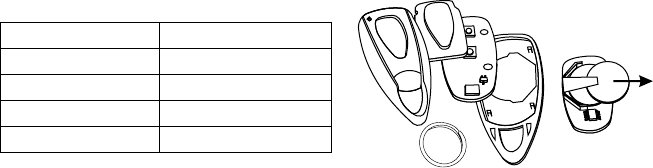
Using a small flat-head screwdriver, to pry apart the two halves of the remote case take care not to disturb the
circuit board. Remove the old batteries whilst paying attention to the orientation of the positive and negative
terminals. Insert new batteries in identical fashion to the original and re-assemble remote. Snap the case
halves back together. For further information, please contact your local Cyclops service centre.
Remote battery type CR2016.
SPECIFICATIONS
Manufactured by Dynamco Pty Ltd
Model number Paralyser 275
Standards met AS/NZS 4601:1999
Supply voltage +12VDC
Current consumption <10 mA (while armed)
- 5 -
REMOVE BATTERIES
IN THIS DIRECTION
CASE TOP MEMBRANE
PCB
CASE BOTTOM
KEYRING

ANNUAL INSPECTION
Dynamco prides itself on the durability and integrity of its car security systems. We
welcome users to contact a Cyclops service centre every twelve months for an annual
inspection. (Please note a charge may be levied for this inspection)
1st Inspection
Date:
Venue:
Comment:
Signed:
2nd Inspection
Date:
Venue:
Comment:
Signed:
- 6 -
WARRANTY
Subject to the conditions stated below, to be free from manufacturing defects and faulty material within the warranty period
stated below.
CONDITIONS
!That the warranty registration has been completed in full at the time of purchase and / or installation and is produced when
warranty service is sought.
!The warranty does not cover general maintenance such as cleaning of bonnet switches, door switches, light switches etc,
nor replacement of consumable items such as pilot lamps or transmitter batteries.
!This warranty shall be null and void if: -
!The product has been repaired by any other person other than by an authorised Cyclops service centre.
!Should a defect become apparent within the warranty period Dynamco Pty Ltd will repair the product free of charge for
parts and labour. Should a mobile service be required, a call-out charge may apply.
!The product has been altered or tampered with in any way or the serial number altered, defaced or removed.
!The defect has been caused by negligence by the owner or their agent.
!The product has not been operated correctly, installed by an authorised Cyclops installer or has been subjected to misuse or
undue wear and tear.
!Siren, control module or any system part is damaged by water.
THE WARRANTY DOES NOT COVER THE FOLLOWING COSTS: -
!Transport of the product to and from Cyclops service centres.
!Insurance of the produce in transit to or from the Cyclops service centres.
!Cost of any service call where the product is found by Cyclops to be in good working order.
The benefits conferred by this warranty are in addition to all other rights and remedies, which the consumer has conferred
by law.
- 7 -

WARRANTY REGISTRATION
PURCHASED FROM
OWNER’S NAME
TYPE OF VEHICLE
VEHICLE REGO
MODULE OF UNIT
DATE OF INSTALL’
WARRANTY PERIOD :
AFTER HOURS EMERGENCY PHONE
CONTROL MODULE
REMOTES
CYCL PS
R
U
I
C
T
Y
E
S
S
S
Y
S
M
T
E
- 8 -