Dynex DX 24L200A12 24L200A12_11 0765_MAN_IMP INFO_V2 User Manual To The 4ba2f3ac 5df1 44f1 B295 8c4e02e7d42b
User Manual: Dynex DX-24L200A12 to the manual
Open the PDF directly: View PDF  .
.
Page Count: 12
24" LCD TV
DX-24L200A12
IMPORTANT INFORMATION
DX-24L200A12_11-0765_MAN_IMP INFO_V2.book Page 1 Thursday, July 21, 2011 11:34 AM
ii
Dynex DX-24L200A12
24" LCD TV
Contents
CHILD SAFETY . . . . . . . . . . . . . . . . . . . . . . . . . . . . . . . . . . . . . . . . . . . . . . . . 1
Important safety instructions . . . . . . . . . . . . . . . . . . . . . . . . . . . . . . . . . . 2
Warnings . . . . . . . . . . . . . . . . . . . . . . . . . . . . . . . . . . . . . . . . . . . . . . . . . . . . . . . . . . . . . . . . . .2
Cautions . . . . . . . . . . . . . . . . . . . . . . . . . . . . . . . . . . . . . . . . . . . . . . . . . . . . . . . . . . . . . . . . . . .2
Online User Manual . . . . . . . . . . . . . . . . . . . . . . . . . . . . . . . . . . . . . . . . . . . 3
Troubleshooting . . . . . . . . . . . . . . . . . . . . . . . . . . . . . . . . . . . . . . . . . . . . . . 3
Video and audio . . . . . . . . . . . . . . . . . . . . . . . . . . . . . . . . . . . . . . . . . . . . . . . . . . . . . . . . . . .3
Remote control . . . . . . . . . . . . . . . . . . . . . . . . . . . . . . . . . . . . . . . . . . . . . . . . . . . . . . . . . . . .5
General . . . . . . . . . . . . . . . . . . . . . . . . . . . . . . . . . . . . . . . . . . . . . . . . . . . . . . . . . . . . . . . . . . . .5
Maintenance . . . . . . . . . . . . . . . . . . . . . . . . . . . . . . . . . . . . . . . . . . . . . . . . . 5
Cleaning . . . . . . . . . . . . . . . . . . . . . . . . . . . . . . . . . . . . . . . . . . . . . . . . . . . . . . . . . . . . . . . . . . .5
Specifications . . . . . . . . . . . . . . . . . . . . . . . . . . . . . . . . . . . . . . . . . . . . . . . . . 6
Legal notices . . . . . . . . . . . . . . . . . . . . . . . . . . . . . . . . . . . . . . . . . . . . . . . . . 7
One-year limited warranty . . . . . . . . . . . . . . . . . . . . . . . . . . . . . . . . . . . . 9
US and Canada Markets . . . . . . . . . . . . . . . . . . . . . . . . . . . . . . . . . . . . . . . . . . . . . . . . . . . .9
Online User Manual
WE ARE GOING GREEN!
A copy of your User Guide is not provided in the box but is
available online. Go to www.dynexproducts.com, click
Support & Service, enter your model number in the Search
eld, then press ENTER. Click Support/Downloads.
DX-24L200A12_11-0765_MAN_IMP INFO_V2.book Page ii Thursday, July 21, 2011 11:34 AM
1
DX-24L200A12
As you enjoy your new product, keep these
safety tips in mind
The issue
The home theater entertainment experience is a growing trend, and larger TVs are popular
purchases. However, TVs are not always supported on the proper stands or installed
according to the manufacturer’s recommendations. We and the consumer electronics
industry are committed to making home entertainment enjoyable and safe.
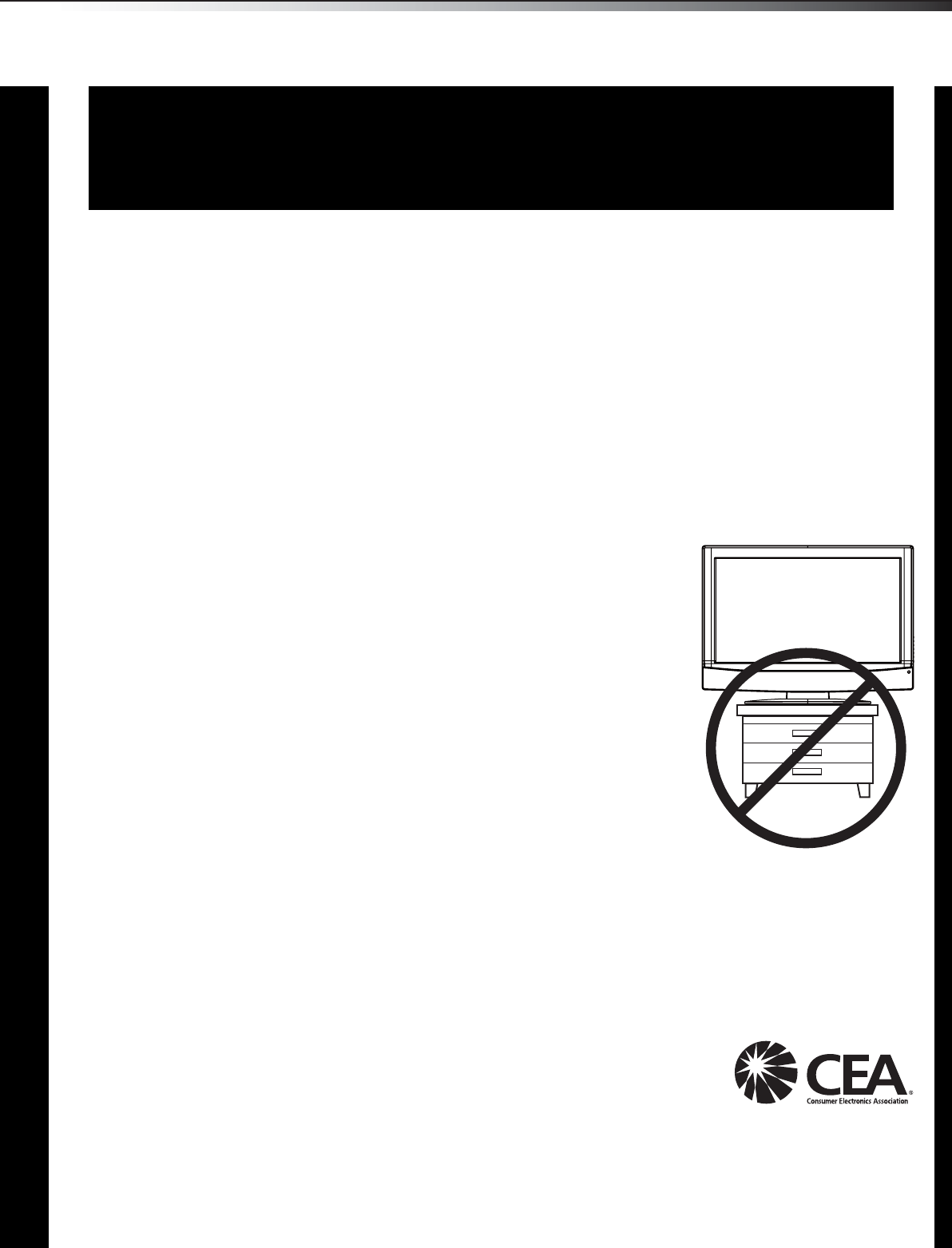
TVs that are inappropriately placed on dressers, bookcases, shelves, desks, speakers,
chests, or carts may fall over and cause injury.
Tune into safety
•One size of TV stand does not fit all. Use only a TV stand
rated for the weight of your TV.
•Carefully read and understand all enclosed instructions for
proper use of this product.
•Don’t let children climb on or play with entertainment system
furniture and TVs.
•Don’t place TVs on furniture that can easily be used as
steps, such as a chest of drawers.
•Remember that children can become excited while watching
a program, especially on a “larger-than-life” TV. Make sure
that you place or install the TV where it cannot be pushed,
pulled over, or knocked down.
•Make sure that you route all cords and cables so that they
cannot be pulled or grabbed by curious children.
Wall mounting
If you decide to wall mount your TV, always remember:
•One size of wall mount does not fit all. Use only a wall mount rated for the weight of your
TV and that has been recommended by this TV manufacturer, listed in this manual, or
otherwise listed by an independent laboratory as suitable for your TV.
•Follow all instructions supplied by the TV and wall mount manufacturers.
•If you have any doubts about your ability to safely wall mount your TV, get help from a
professional installer.
•Make sure that the wall where you are mounting the TV is
appropriate. Some wall mounts are not designed to be mounted
to walls backed with steel studs or cinder blocks. If you are
unsure, ask a professional installer.
•TVs can be heavy. At least two people are required for safe wall mount installation.
This apparatus is intended to be supported by a UL listed Wall Mount bracket.
f
CHILD SAFETY
It makes a difference how and where you use
your flat panel display
DX-24L200A12_11-0765_MAN_IMP INFO_V2.book Page 1 Thursday, July 21, 2011 11:34 AM
2Important safety instructionsDX-24L200A12
Important safety instructions
1Read these instructions.
2Keep these instructions.
3Heed all warnings.
4Follow all instructions.
5Do not use this apparatus near water.
6Clean only with a dry cloth.
7Do not block any ventilation openings. Install in accordance with
the manufacturer's instructions.
8Do not install near any heat sources such as radiators, heat
registers, stoves, or other apparatus (including amplifiers) that
produce heat.
9Do not defeat the safety purpose of the polarized or
grounding-type plug. A polarized plug has two blades with one
wider than the other. A grounding type plug has two blades and
a third grounding prong. The wide blade or the third prong are
provided for your safety. If the provided plug does not fit into
your outlet, consult an electrician for replacement of the obsolete
outlet.
10 Protect the power cord from being walked on or pinched
particularly at plugs, convenience receptacles, and the point
where they exit from the apparatus.
11 Only use attachments/accessories specified by the manufacturer.
12 Use only with a cart, stand, tripod, bracket, or table
specified by the manufacturer, or sold with the
apparatus. When a cart is used, use caution when
moving the cart/apparatus combination to avoid
injury from tip-over.
13 Unplug this apparatus during lightning storms or when unused
for long periods of time.
14 Refer all servicing to qualified service personnel. Servicing is
required when the apparatus has been damaged in any way, such
as power-supply cord or plug is damaged, liquid has been spilled
or objects have fallen into the apparatus, the apparatus has been
exposed to rain or moisture, does not operate normally, or has
been dropped.
15 The wall plug is the disconnecting device. The plug must remain
readily operable.
16 An apparatus with a three-prong, grounding-type plug is a Class I
apparatus, which needs to be grounded to prevent possible
electric shock. Make sure that you connect this Class I television
to a grounding-type, three-prong outlet.
17 Remote control batteries should not be exposed to excessive heat
such as sunshine, fire, or the like.
18 The apparatus should not be exposed to dripping or splashing,
and no objects filled with liquids, such as vases, should be placed
on the apparatus.
Warnings
Electric shock hazard
To reduce the risk of fire or electric shock, do not remove any cover or
expose the device to rain or moisture. No user-serviceable parts are
inside. Refer servicing to qualified service technicians.
Lightning
For added protection for your device receiver during a lightning storm,
or when it is left unattended and unused for long periods of time,
unplug it from the power outlet and disconnect any antenna or cable
system. This helps prevent property damage and personal injury from
lightning and power line surges.
Power lines
An outside antenna system should not be located in the vicinity of
overhead power lines or other electric light or power circuits, or where it
can fall into such power lines or circuits. When installing an outside
antenna system, extreme care should be taken to keep from touching
such power lines or circuits as contact with them might be fatal.
Handling the LCD panel
• Your TV’s screen is made of glass. Do not drop your TV or hit, jolt,
or press hard against the LCD panel. If the screen breaks, be
careful of broken glass.
• If the LCD panel is broken, make absolutely sure that you do not
touch the liquid in the panel. This may cause skin inflammation.
• If the liquid gets in your mouth, immediately gargle, rinse, and
consult with your doctor. Also, if the liquid gets in your eyes or
touches your skin, consult with your doctor after rinsing for at
least 15 minutes or longer in clean water.
Replacement parts
When replacement parts are required, make sure that the service
technician uses replacement parts specified by the manufacturer that
have the same characteristics as the original part. Unauthorized
substitutions may result in fire, electric shock, personal injury, or other
hazards.
Safety check
After completing any service or repair to this device, ask the service
technician to perform routine safety checks to determine that your TV is
in correct operating condition.
Power source
Operate your TV only from the type of power source indicated on the
marking label. If you are not sure of the type of power supplied to your
home, consult an electrician or your local power company.
Cautions
Damage requiring service
Unplug this TV from the power outlet and refer servicing to qualified
service personnel under the following conditions:
• When the power supply cord or plug is damaged or frayed.
• If liquid has been spilled or objects have fallen into your TV.
• If your TV has been exposed to rain or water.
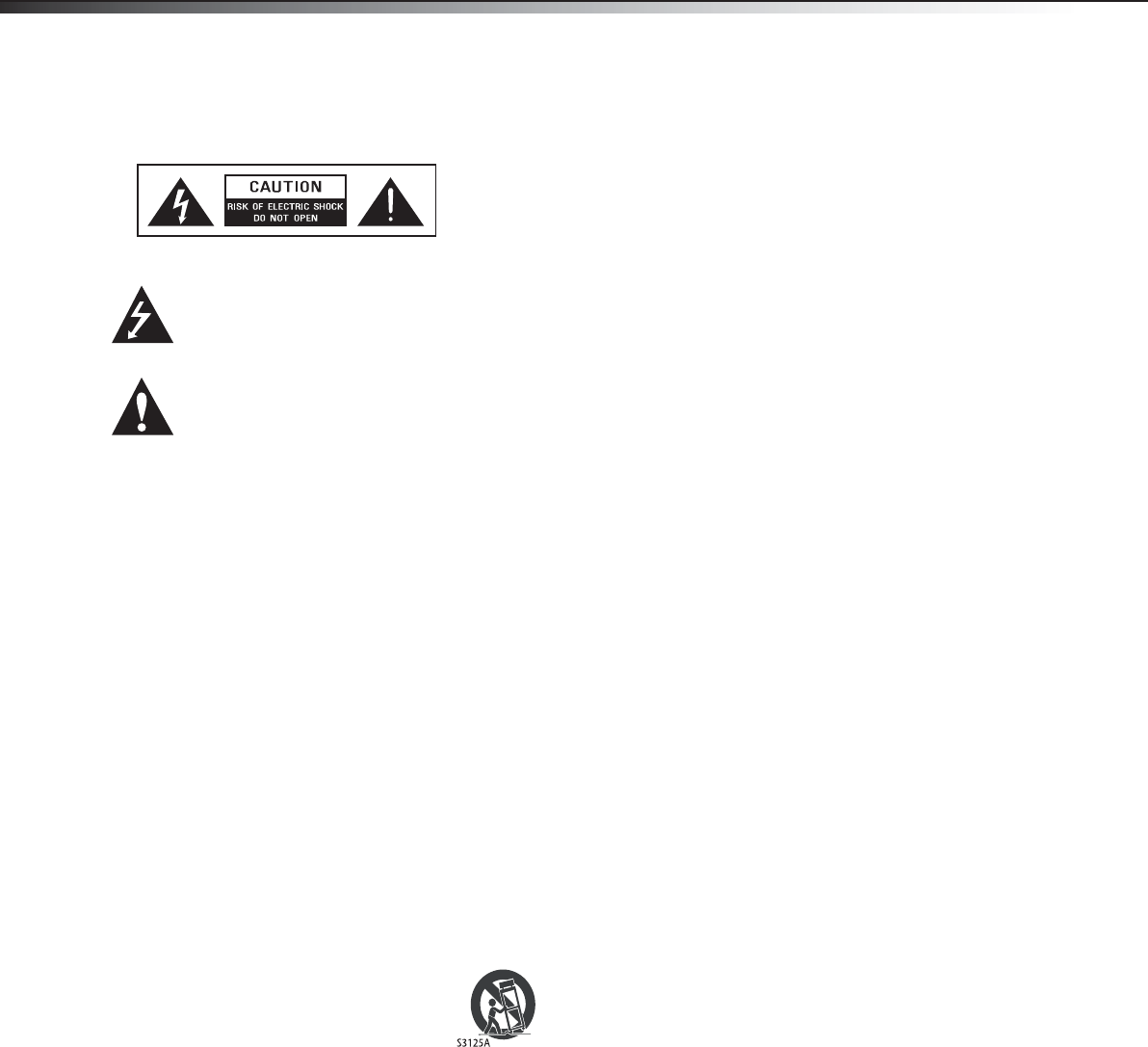
This symbol indicates that dangerous
voltage constituting a risk of electric
shock is present within your TV. This
label is located on the back of your TV.
This symbol indicates that there are
important operating and maintenance
instructions in the literature
accompanying your TV.
DX-24L200A12_11-0765_MAN_IMP INFO_V2.book Page 2 Thursday, July 21, 2011 11:34 AM
Online User Manual3
DX-24L200A12
• If your TV does not operate normally by following the operating
instructions. Adjust only those controls that are covered by the
operating instructions because incorrect adjustment of other
controls may result in damage and will often require extensive
work by a qualified technician to restore your TV to its normal
operation.
• If your TV has been dropped or damaged in any way.
• When your TV exhibits a distinct change in performance.
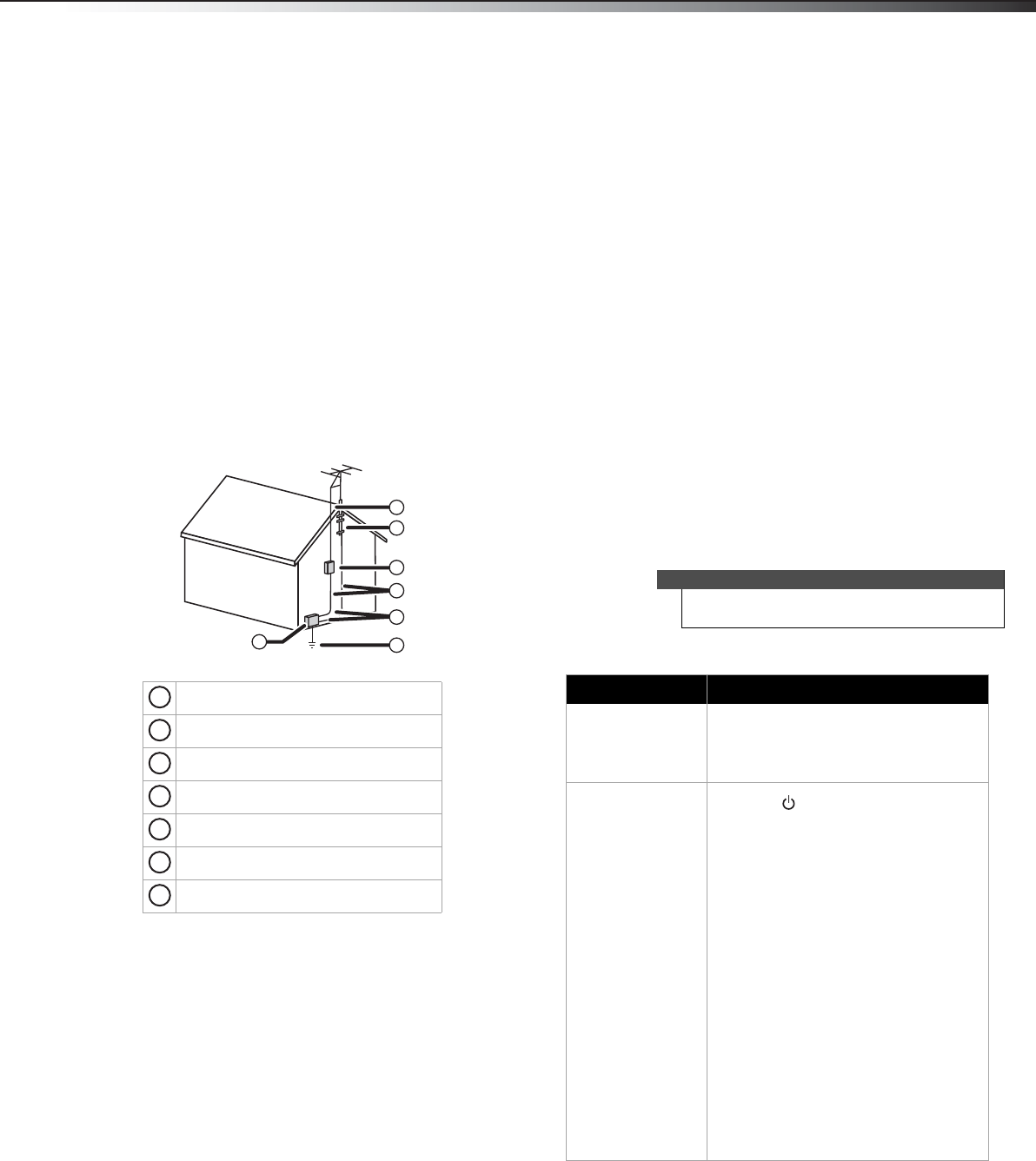
Outdoor antenna grounding
If an outside antenna or cable system is connected to your TV, make sure
that the antenna or cable system is grounded to provide some
protection against voltage surges and built-up static charges. Article
810 of the National Electrical Code, ANSI/NFPA No. 70, provides
information with respect to correct grounding of the mast and
supporting structure, grounding of the lead-in wire to an antenna
discharge unit, size of grounding conductors, location of the
antenna-discharge unit, connection to grounding electrodes, and
requirements for the grounding electrode.
Note to CATV system installer
Article 820 of the National Electrical Code, ANSI/NFPA No. 40 provides
guidance for correct grounding. Specifically, it states that the cable
ground must be connected to the grounding system of the building as
close to the point of cable entry as practical.
Condensation
Moisture will form on the TV if the TV is brought from cool surroundings
into a warm room or if the temperature of the room rises suddenly.
When this happens, the TV's performance may be impaired. To prevent
this, let the TV stand in its new surroundings for about an hour before
switching it on, or make sure that the room temperature rises gradually.
Condensation may also form during the summer if the TV is exposed to
the breeze from an air conditioner. In such cases, change the location of
the TV.
Mobile telephone warning
To avoid interference with your TV picture and sound, operating
problems, or even damage, keep your cordless and cellular telephones
away from the TV.
End of life directives
Your TV contains tin-lead solder. Disposal of this material may be
regulated for environmental reasons. Your TV also contains material
that can be recycled and reused.
Non-active pixels
The LCD panel contains almost 3 million thin film transistors, which
provide exceptionally sharp video quality. Occasionally, a few
non-active pixels may appear on the screen as a fixed blue, green, or red
point. These non-active pixels do not adversely affect the performance
of your TV, and are not considered defects.
Online User Manual
WE ARE GOING GREEN! For the full user manual, go
towww.dynexproducts.com, click Support & Service. Enter your
model number in the Search field, then press Enter. Click
Support/Downloads.
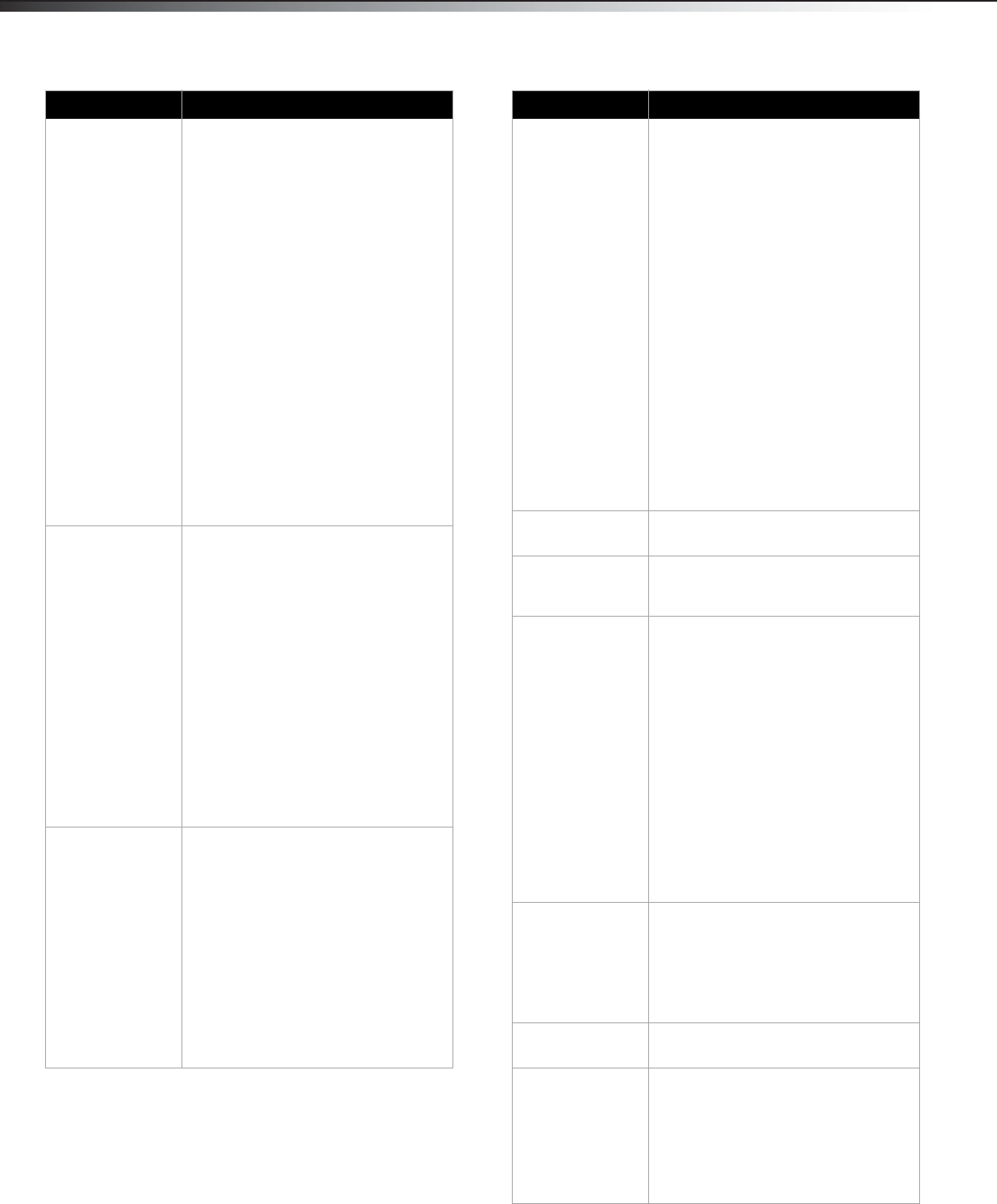
Troubleshooting
Video and audio
Antenna lead-in wire
Grounding clamp
Antenna discharge unit
Grounding conductors
Ground clamps
Power service grounding electrode system
Electric service equipment
2
1
3
4
5
6
7
1
2
3
4
5
6
7
Warning
Do not try to repair your TV yourself. Contact
authorized service personnel.
Problem Solution
Picture does not fill the
screen. There are black bars
around the picture.
• Change the aspect ratio. An increasing amount
of digital TV and movies are presented in wide
screen (16:9). See “Adjusting the TV picture” in
the online User Guide.
No picture (screen is not lit)
and no sound. • Press on the TV or the remote control.
•Make sure that the Audio Only option is set to
Off. See “Playing TV audio only” in the online
User Guide.
• Make sure that the video cables are connected
securely to the back of your TV.
• Adjust the contrast and brightness. See
“Adjusting the TV picture” in the online User
Guide.
• Make sure that the power cord is plugged in.
• Make sure that the correct video input source is
selected. See “Selecting the video input source”
in the online User Guide.
• Try another channel. The station may be
experiencing problems.
• Make sure that the incoming signal is
compatible.
• Make sure the antenna or cable TV is connected
correctly and securely. See “Connecting a cable
or satellite box” or “Connecting an antenna or
cable TV (no box)” in the online User Guide.
• Check the closed caption settings. Some TEXT
modes can block the screen.
DX-24L200A12_11-0765_MAN_IMP INFO_V2.book Page 3 Thursday, July 21, 2011 11:34 AM
4TroubleshootingDX-24L200A12
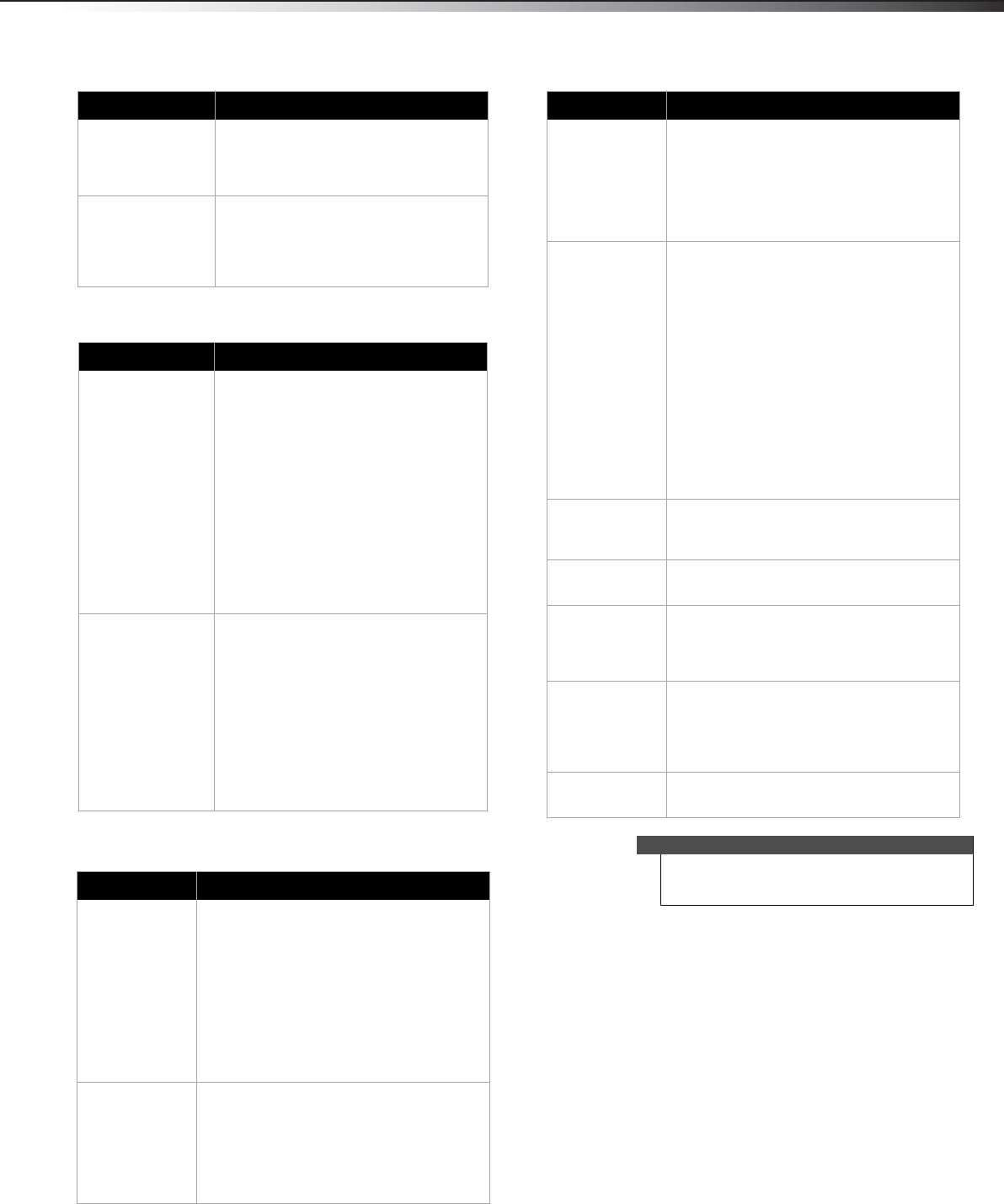
Dark, poor, or no picture
(screen is lit), but sound is
good.
• Try another channel. The station may be
experiencing problems.
• Make sure that the antenna or cable TV is
connected correctly and securely. See
“Connecting a cable or satellite box” or
“Connecting an antenna or cable TV (no box)” in
the online User Guide.
• Adjust the brightness. See “Adjusting the TV
picture” in the online User Guide.
• Make sure that the correct picture mode is
selected. See “Adjusting the TV picture” in the
online User Guide.
• If you are using an antenna, the digital channel
signal may be low. To check the digital channel
signal strength, see “Checking the digital signal
strength” in the online User Guide.
• If you are using an antenna and the signal
strength is low, adjust the antenna or use a
highly directional outdoor antenna or set-top
antenna with a built-in amplifier.
• Make sure that the video cables are connected
securely to the back of your TV.
• The video cable(s) you are using may be bad. Try
a new set.
• Try another channel. The station may be
experiencing problems.
No color, dark picture, or
color is not correct. • Try another channel. The station may be
experiencing problems.
• Adjust the color saturation. See “Adjusting the
TV picture” in the online User Guide.
• Make sure that the video cables are connected
correctly and securely to the back of your TV.
• Make sure that the antenna or cable TV is
connected correctly and securely. See
“Connecting a cable or satellite box” or
“Connecting an antenna or cable TV (no box)” in
the online User Guide.
• If you are using an antenna, the digital channel
signal may be low. To check the digital channel
signal strength, see “Checking the digital signal
strength” in the online User Guide.
• If you are using an antenna and the signal
strength is low, adjust the antenna or use a
highly directional outdoor antenna or set-top
antenna with a built-in amplifier.
Only snow (noise) appears
on the screen. • Try another channel. The station may be
experiencing problems.
• Make sure that the antenna or cable TV is
connected correctly and securely. See
“Connecting a cable or satellite box” or
“Connecting an antenna or cable TV (no box)” in
the online User Guide.
• If you are using an antenna, the digital channel
signal may be low. To check the digital channel
signal strength, see “Checking the digital signal
strength” in the online User Guide.
• If you are using an antenna and the signal
strength is low, adjust the antenna or use a
highly directional outdoor antenna or set-top
antenna with a built-in amplifier.
Problem Solution
Dotted lines or stripes
appear on the screen. • Make sure that the antenna or cable TV is
connected correctly and securely. See
“Connecting a cable or satellite box” or
“Connecting an antenna or cable TV (no box)” in
the online User Guide.
• If you are using an antenna, the digital channel
signal may be low. To check the digital channel
signal strength, see “Checking the digital signal
strength” in the online User Guide.
• If you are using an antenna and the signal
strength is low, adjust the antenna or use a
highly directional outdoor antenna or set-top
antenna with a built-in amplifier.
• Make sure that the video cables are connected
securely to the back of your TV.
• The video cable(s) you are using may be bad. Try
a new set.
• Other devices (for example, surround sound
receiver, external speakers, fans, or hair dryers)
may be interfering with your TV. Try turning off
one device at a time to determine which device
is causing interference. Once you have
determined which device is causing
interference, move it further from the TV to
eliminate the interference.
Double images. • Use a highly directional outdoor antenna, cable
TV, or satellite TV.
The picture has a few bright
or dark spots. • A few bright or dark spots on an LCD screen is
normal. It does not affect the operation of this
TV.
Good picture, but no sound. • Increase the volume.
• Unplug the headphones.
• Make sure that the sound is not muted.
• Make sure that the correct audio mode is
selected.
• Make sure that the audio cables are connected
correctly and securely to the back of your TV.
• Make sure that the antenna or cable TV is
connected correctly and securely. See
“Connecting a cable or satellite box” or
“Connecting an antenna or cable TV (no box)” in
the online User Guide.
• If you are using an antenna, the digital channel
signal may be low. To check the digital channel
signal strength, see “Checking the digital signal
strength” in the online User Guide.
• The audio cable(s) you are using may be bad. Try
a new set.
Poor picture • Make sure that the room is not too bright. Light
reflecting off the screen can make the picture
difficult to see.
• If an S-VHS camera or a camcorder is connected
while another connected device is turned on,
the picture may be poor. Turn off one or more
devices.
Good sound but poor color • Adjust the contrast, color, and brightness
settings.
Audio noise • Other devices (for example, surround sound
receiver, external speakers, fans, or hair dryers)
may be interfering with your TV. Try turning off
one device at a time to determine which device
is causing interference. Once you have
determined which device is causing
interference, move it further from the TV to
eliminate the interference.
Problem Solution
DX-24L200A12_11-0765_MAN_IMP INFO_V2.book Page 4 Thursday, July 21, 2011 11:34 AM
Maintenance 5
DX-24L200A12
Remote control
General
Maintenance
Cleaning
• Clean your TV with a soft, dry cloth. If surfaces are extremely
dirty, use a soft cloth dampened with a weak detergent solution.
• Use an eyeglass cleaner to clean the screen. Never use alcohol,
paint thinner, or benzine.
• Before using a chemically treated cloth, read the instructions that
came with the cloth.
No output from one of the
speakers • Adjust the audio balance. See “Adjusting sound
settings” in the online User Guide.
• Make sure that the audio cables are connected
correctly and securely to the back of your TV.
After images appear • Do not display a still image, such as a logo,
game, or computer image, for an extended
period of time. This can cause a permanent
after-image to be burned into the screen. This
type of damage is not covered by your warranty.
Problem Solution
Remote control does not
work. • Make sure that the power cord is correctly
connected to your TV and a power outlet.
• Make sure that there are no obstructions
between the remote control and the remote
control sensor on the front of the TV.
• Point the remote control directly at the remote
control sensor on your TV. For the location of the
remote control sensor, see “Front” in the online
User Guide.
• Make sure that the batteries are installed
correctly. See “Installing remote control
batteries” in the online User Guide.
• Replace dead batteries with new batteries. See
“Installing remote control batteries” in the
online User Guide.
Trouble programming your
existing universal remote
control.
• See instructions and a table of common codes in
“Programming a different universal remote
control” in the online User Guide.
• Codes are subject to change. For up to date
codes, go to
www.dynexproducts.com/remotecodes.
• Replace dead batteries with new batteries. See
“Installing remote control batteries” in the
online User Guide.
• Refer to the User Guide that accompanied your
universal remote control and contact the
manufacturer if problems persist.
Problem Solution
No power • Make sure that the power cord is correctly connected
to your TV and a power outlet.
• Unplug the power cord, wait 60 seconds, then plug
the cord back in and turn on your TV.
• Other devices (for example, surround sound receiver,
external speakers, fans, or hair dryers) may be
interfering with your TV. Try turning off one device at
a time to determine which device is causing
interference. Once you have determined which
device is causing interference, move it further from
the TV to eliminate the interference.
“No signal” error
message is displayed •Press INPUT and make sure that you have selected
the correct input for the device or service you are
trying to use.
• If you are using a cable or satellite box, use the
remote that came with that box to change channels.
• Make sure you have the correct input selected to
view channels from the cable or satellite box.
Problem Solution
After Auto Channel
Search, there are no
channels
• Reception can vary by channel depending on the
broadcast power level of a given station. Contact
your cable or satellite TV provider.
• Make sure the antenna or cable/satellite TV is
connected securely to your TV.
• Try replacing the cable between the antenna/cable
or cable/satellite box and your TV.
One or more channels
do not display. • Make sure that the channels are not blocked. See
“Setting parental control levels.”
• Make sure that the channels are not hidden. The
channel may have been deleted from the channel
list. You can tune to the channel by pressing the
number buttons or you can add the channel back to
the channel list. See “Hiding channels” in the online
User Guide.
• If you are using a cable or satellite box, use the
remote that came with that box to change channels.
• Make sure you have the correct input selected to
view channels from the cable or satellite box.
• If you are using an antenna, the digital channel
signal may be low. To check the digital channel
signal strength, see “Checking the digital signal
strength” in the online User Guide.
Password is lost. •Enter 9999 to access parental controls, then set a
new password. See “Setting or changing the
password” in the online User Guide.
Some settings cannot be
accessed. • If a setting is grayed, the setting is not available in
the current video input mode.
TV cabinet creaks. • When the TV is in use, the temperature rises
naturally and may cause the cabinet to expand or
contract which can cause a creaking noise. This is not
a malfunction.
Control buttons do not
work • Make sure that the Button Lock option is set to Off.
See “Locking control buttons” in the online User
Guide.
• Unplug the power cord, wait a few seconds, then
plug the cord back in and turn on your TV.
TV keeps turning off • Make sure that the sleep timer is not turned on. See
“Setting the sleep timer” in the online User Guide.
Note
If the problem is not solved by using these
troubleshooting instructions, turn off your TV, then
turn it on again.
Problem Solution
DX-24L200A12_11-0765_MAN_IMP INFO_V2.book Page 5 Thursday, July 21, 2011 11:34 AM
6SpecificationsDX-24L200A12
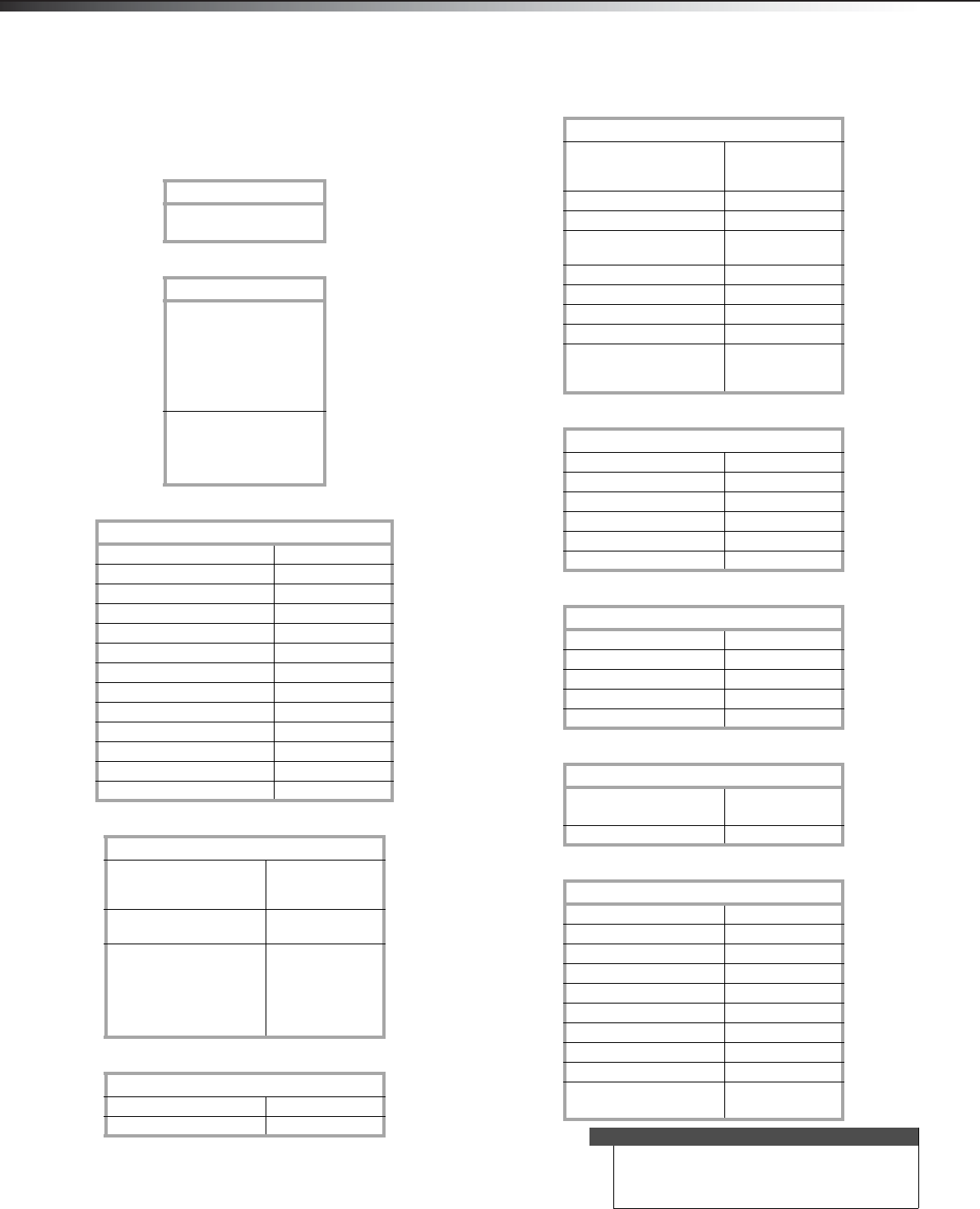
Specifications
Specifications are subject to change without notice.
Warranty
Dimensions and weight
Screen
Display resolutions/VGA scan rates
Tuner
Inputs
Outputs
Audio
Power
Miscellaneous
DX-24L200A12
Parts: 1 year
Labor: 1 year
DX-24L200A12
Without stand:
23.03 x 3.98 x 15.59in.
(58.5 x 10.1 x 39.6cm)
With stand:
23.03 x 7.87 x 17.17 in.
(58.5 x 20 x 43.6 cm)
Without stand:
10.56 lbs. (4.8 kg)
With stand:
11.22 lbs. (5.1 kg)
DX-24L200A12
Screen size measured diagonally 23.6"
Display type LCD
Panel 60 Hz vs.120 Hz 60Hz
Display resolution 1080p
Panel resolution 1920 (H) × 1080 (V)
Aspect ratio 16:9
Contrast ratio (typical)–panel 800:1
Dynamic contrast ratio–list value N/A
Brightness (center typical) cd/m2 300 nits
Comb filter 3d y/c digital
Response time 5 ms
Horizontal viewing angle 160
Vertical viewing angle 150
DX-24L200A12
HDMI 1.3 Suggested Resolutions:
1080p, 1080i, 720p,
480p, 480i
Component video Suggested Resolutions:
1080i, 720p, 480p, 480i
PC/VGA Suggested scan rates:
640 × 480/60Hz,
800 × 600/60Hz,
1024 × 768/60Hz,
1280 × 1024/60Hz
1920 × 1080/60Hz
DX-24L200A12
Analog NTSC
Digital ATSC, 8-VSB, Clear-QAM
DX-24L200A12
HDMI 1.3 2 (bottom)
E - E D ID c o m p li a n t
HDCP compliant
Component video 1 (bottom)
Composite video 1 (bottom)
Shared audio (component
and composite)
Yes
S-Video No
PC/VGA 1 (bottom)
3.5mm PC audio input 1 (bottom)
DVI 1 (HDMI port 1 - bottom)
USB 1 (bottom)
Supports firmware
upgrade only
DX-24L200A12
Video No
Analog audio No
Digital audio 1 (bottom)
WiFi No
Ethernet No
Headphone 1 (bottom)
DX-24L200A12
Simulated Surround Sound No
Audyssey Dynamic Volume No
Sound Leveler No
Watts/Channel 3W
Number of Speakers 2
DX-24L200A12
Power consumption On: 58 W
Standby: <1 W
Power input 120V/60Hz
DX-24L200A12
OSD languages English, French, Spanish
INlink No
Game Mode No
ENERGY STAR qualified No
Internet connectable No
TV base screws No
V-Chip (version 2.0) Yes
Sleep timer Yes
Channel labeling Yes
VESA mount (mm)
(horizontal × vertical)
200 × 100
Note
The length of the wall-mount screws vary depending
on the wall-mount bracket you purchased. See the
instructions that came with the wall-mount bracket
for screw lengths.
DX-24L200A12_11-0765_MAN_IMP INFO_V2.book Page 6 Thursday, July 21, 2011 11:34 AM
Legal notices 7
DX-24L200A12
Legal notices
FCC Part 15
This device complies with Part 15 of the FCC Rules. Operation of this
product is subject to the following two conditions: (1) this device may
not cause harmful interference, and (2) this device must accept any
interference received, including interference that may cause undesired
operation.
This equipment has been tested and found to comply within the limits
for a class B digital device, pursuant to Part 15 of the FCC Rules. These
limits are designed to provide reasonable protection against harmful
interference in a residential installation. This equipment generates,
uses, and can radiate radio frequency energy and, if not installed and
used in accordance with the instructions, may cause harmful
interference to radio communications. However, there is no guarantee
that interference will not occur in a particular installation. If this
equipment does cause harmful interference to radio or television
reception, which can be determined by turning the equipment off and
on, the user is encouraged to try to correct the interference by one or
more of the following measures:
• Reorient or relocate the receiving antenna.
• Increase the separation between the equipment and receiver.
• Connect the equipment into an outlet on a circuit different from
that to which the receiver is connected.
• Consult the dealer or an experienced technician for help.
FCC warning
Changes or modifications not expressly approved by the party
responsible for compliance with the FCC Rules could void the user’s
authority to operate this equipment.
Cables
Connections to this device must be made with shielded cables with
metallic RF/EMI connector hoods to maintain compliance with FCC
Rules and Regulations.
Canada ICES-003 statement
This Class B digital apparatus complies with Canadian ICES-003.
Cet appareil numerique de la classe B est conforme a la norme NMB-003
du Canada.
Standard Television Receiving Apparatus — Appareil de réception
télévision ordinaire, Canada BETS-7 / NTMR-7
HDMI
HDMI, the HDMI logo, and High-Definition Multimedia Interface are
trademarks or registered trademarks of HDMI Licensing LCC.
Dolby Laboratories
Manufactured under license from Dolby Laboratories.
Dolby and the double-D symbol are trademarks of
Dolby Laboratories.
DX-24L200A12_11-0765_MAN_IMP INFO_V2.book Page 7 Thursday, July 21, 2011 11:34 AM

8Legal noticesDX-24L200A12
DX-24L200A12_11-0765_MAN_IMP INFO_V2.book Page 8 Thursday, July 21, 2011 11:34 AM

Legal notices 9
DX-24L200A12
One-year limited warranty -
Dynex Televisions
Definitions:
Dynex Products ("Dynex") warrants to you, the original purchaser of this new
Dynex-branded television ("Product"), that the Product shall be free of defects in the
original manufacturer of the material or workmanship for a period of one (1) year from
the date of your purchase of the Product ("Warranty Period"). For this warranty to apply,
your Product must be purchased in the United States or Canada from a Best Buy or
Future Shop authorized dealer of Dynex brand products only that are packaged with this
warranty statement.
How long does the coverage last?
The Warranty Period lasts for 1 year (365 days) from the date you purchased the
Product. Your purchase date is printed on the receipt you received with the Product.
What does this warranty cover?
During the Warranty Period, if the original manufacture of the material or workmanship
of the Product is determined to be defective by an authorized Dynex repair center or
store personnel, Dynex will (at its sole option): (1) repair the Product with new or
rebuilt parts; or (2) replace the Product at no charge with new or rebuilt comparable
products or parts. Products and parts replaced under this warranty become the property
of Dynex and are not returned to you. If service of Products or parts are required after
the Warranty Period expires, you must pay all labor and parts charges. This warranty
lasts as long as you own your Dynex Product during the Warranty Period. Warranty
coverage terminates if you sell or otherwise transfer the Product.
How to obtain warranty service?
If you purchased the Product at a Best Buy or Future Shop retail store location and your
television Product has a screen size of less than 37 inches, please take your original
receipt and the Product to any Best Buy or Future Shop store. Make sure that you place
the Product in its original packaging or packaging that provides the same amount of
protection as the original packaging. If you purchased the Product from a Best Buy or
Future Shop online web site, mail your original receipt and the Product to the address
listed on the web site. Make sure that you put the Product in its original packaging or
packaging that provides the same amount of protection as the original packaging.
To obtain in-home warranty service for a television with a screen 37 inches or larger, in
the United States call 1-888-BESTBUY, Canada call 1-866-BESTBUY for Future Shop call
1-800-663-2275. Call agents will diagnose and correct the issue over the phone or will
have a Dynex-approved repair technician dispatched to your home.
Where is the warranty valid?
This warranty is valid only to the original purchaser of the product in the United States
and Canada at Best Buy or Future Shop branded retail stores or websites.
What does the warranty not cover?
This warranty does not cover:
• Customer instruction/education
•Installation
• Set up adjustments
• Cosmetic damage
• Damage due to acts of God, such as power surges
•Accident(s)
•Misuse
•Abuse
•Negligence
• Commercial purposes/use, including but not limited to use in a place of business
or in communal areas of a multiple dwelling condominium or apartment
complex, or otherwise used in a place of other than a private home.
• Modification of any part of the Product, including the antenna
• Plasma display panel damaged by static (non-moving) images applied for
lengthy periods (burn-in).
• Damage due to incorrect operation or maintenance
• Connection to an incorrect voltage or power supply
• Attempted repair by any person not authorized by Dynex to service the Product
• Products sold "as is" or "with all faults"
• Consumables, including but not limited to batteries (i.e. AA, AAA, C etc.)
• Products where the factory applied serial number has been altered or removed
• Loss or Theft of this product or any part of the product
• Up to three (3) pixel failures (dots that are dark or incorrectly illuminated)
grouped in an area smaller than one tenth (1/10) of the display size or up to five
(5) pixel failures throughout the display. (Pixel based displays may contain a
limited number of pixels that may not function normally.)
• Failures or Damage caused by any contact including but not limited to liquids,
gels or pastes.
REPAIR REPLACEMENT AS PROVIDED UNDER THIS WARRANTY IS YOUR EXCLUSIVE
REMEDY FOR BREACH OF WARRANTY. DYNEX SHALL NOT BE LIABLE FOR ANY INCIDENTAL
OR CONSEQUENTIAL DAMAGES FOR THE BREACH OF ANY EXPRESS OR IMPLIED
WARRANTY ON THIS PRODUCT, INCLUDING, BUT NOT LIMITED TO, LOST DATA, LOSS OF
USE OF YOUR PRODUCT, LOST BUSINESS OR LOST PROFITS. DYNEX PRODUCTS MAKES NO
OTHER EXPRESS WARRANTIES WITH RESPECT TO THE PRODUCT, ALL EXPRESS AND
IMPLIED WARRANTIES FOR THE PRODUCT, INCLUDING, BUT NOT LIMITED TO, ANY
IMPLIED WARRANTIES OF AND CONDITIONS OF MERCHANTABILITY AND FITNESS FOR A
PARTICULAR PURPOSE, ARE LIMITED IN DURATION TO THE WARRANTY PERIOD SET FORTH
ABOVE AND NO WARRANTIES, WHETHER EXPRESS OR IMPLIED, WILL APPLY AFTER THE
WARRANTY PERIOD. SOME STATES, PROVINCES AND JURISDICTIONS DO NOT ALLOW
LIMITATIONS ON HOW LONG AN IMPLIED WARRANTY LASTS, SO THE ABOVE LIMITATION
MAY NOT APPLY TO YOU. THIS WARRANTY GIVES YOU SPECIFIC LEGAL RIGHTS, AND YOU
MAY ALSO HAVE OTHER RIGHTS, WHICH VARY FROM STATE TO STATE OR PROVINCE TO
PROVINCE.
Contact Dynex:
For customer service please call 1-800-305-2204
www.Dynexproducts.com
Distributed by Best Buy Purchasing, LLC
7601 Penn Avenue South, Richfield, Minnesota, U.S.A. 55423-3645
© 2011 BBY Solutions, Inc.
All rights reserved. DYNEX is a trademark of BBY Solutions, Inc. Registered in some
countries. All other products and brand names are trademarks of their respective
owners.
DX-24L200A12_11-0765_MAN_IMP INFO_V2.book Page 9 Thursday, July 21, 2011 11:34 AM
www.dynexproducts.com
US and Canada Market - (800) 305-2204
Distributed by Best Buy Purchasing, LLC
7601 Penn Ave. South, Richfield, MN 55423 U.S.A.
© 2011 BBY Solutions, Inc. All rights reserved.
DYNEX is a trademark of BBY Solutions, Inc. Registered in some countries. All other products and
brand names are trademarks of their respective owners.
11-0765
ENGLISH
DX-24L200A12_11-0765_MAN_IMP INFO_V2.book Page 1 Thursday, July 21, 2011 11:34 AM
