E Power 7198-26 Bluetooth speaker User Manual
E-Power Limited Bluetooth speaker Users Manual
E Power >
User Manual
User Manual:7198-26
Wireless Water Resistant Bluetooth Speaker
Please read user manual carefully before use
Package Content
1 Bluetooth Water Resistant Speaker
1 Micro USB Charging Cable
1 Aux in audio cable
1 User’s Manual
Safety instructions
Never dissemble the Bluetooth Speaker in an attempt to make any repairs as this
could result in electrical shock, burns or product failure;
Use extra caution in high temperatures;
Do not use product in a hospital or on an airplane;
This speaker is waterproof grade is IPX6, which means that the product remains
functional only from splashing water. Please do not submerge into water.
Do not expose the device to direct sunlight, heat or flame;
Product is not covered under warranty when the product has metal rust, surface
spalling and any other natural oxidation;
Damage, shock, and/or injury can occur if these warnings are not heeded;
Device may become warm while charging;
Make sure you always turn the product off and the power outlet off completely
before unplugging the product;
Make sure the product has plenty of ventilation;
Do not press the buttons too hard as it could damage the product;
Only use dry cloth to keep product clean from dust;
Do not use chemicals on this product;
Never try to repair this product yourself, take it to a certified technician. Trying to
remove panels or repairing the unit yourself could lead to electric shock. When the
unit is not in use, make sure it is correctly turned off and stored in a cool dry place;
Do not insert foreign objects into the product;
Avoid dropping the product, as harsh impacts could damage the product.
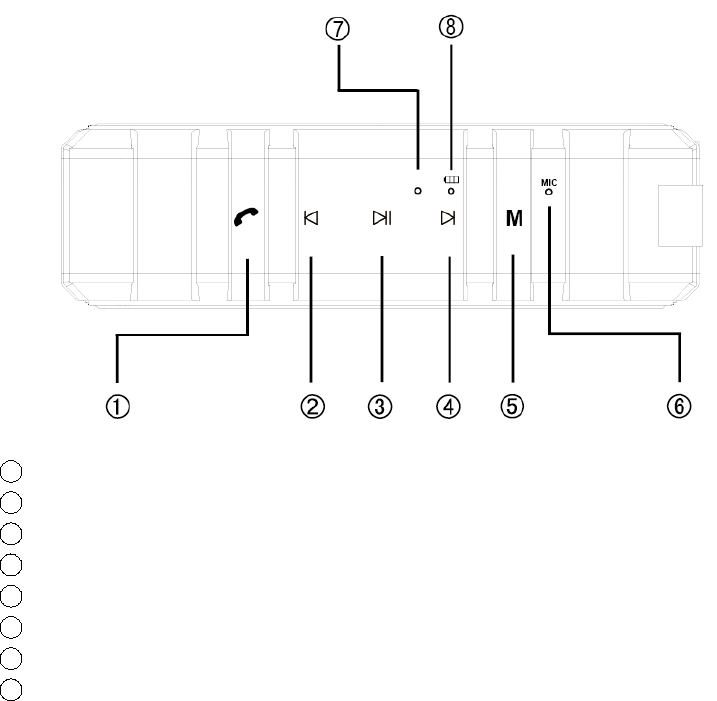
Controls Index
1Phone
2Move to Previous song/Decrease volume (long press)
3Play or pause
4Move to Next song/Increase volume(long press)
5Mode
6Microphone
7Working Status Indicator
8Charging Indicator
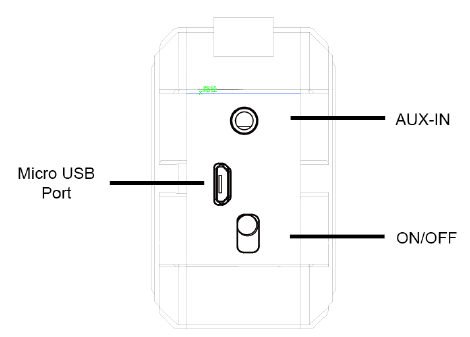
General Operation
Charging
Connect the small end of the Micro USB charging cable (included) to the Micro
USB port located on the back of the speaker. Connect the larger end of the cable
to your computer’s USB port or an AC adaptor (not included);
The LED indicator will turn red while charging;
Once fully charged, the red LED will turn off.
Power On/Off
1. To turn on the unit, switch ON/OFF button until the working status indicator blue
lights turn on and hear the alert sound.
2. To turn off the unit, switch ON/OFF button, until alert sound can be hear and
blue lights turned off.
Pairing
1. Place speaker within 30 feet of the Bluetooth enabled device.
2. Slide the ON/OFF button to the ON position. The blue LED will flash rapidly to
indicate that the speaker is in Bluetooth pairing mode;
3. On your Bluetooth enabled smartphone, tablet or media player, navigate to the
Bluetooth setting menu, turn on the Bluetooth feature, and search for new
devices;
4. Search for “Brick”on the pairing device. Type Password “0000” or”1234” if
requested;
5. Tap this model to select it and successfully pair it with the speaker. The blue LED
will flash slowly when the pairing is successful. You are now paired, connected
and ready to play music.
Playing Music
To enjoy wireless music on your speaker, make sure you are connected to a
Bluetooth enabled device;
Once connected, press PLAY on your Bluetooth device;
After playback starts, you can control the music with your connected device or the
buttons of the Bluetooth speaker;
Auxiliary Line-in (AUX-IN)
For other compatible music player devices, or MP3/MP4 players, please use the
an auxiliary audio line cable (included) to connect from your external device’s
“LINE OUT” jack to the “AUX-IN” jack of this speaker;
Receiving and Ending Calls
When there is incoming call, the unit will pause the playback and ring to alert you of the
call. To answer the call, press the phone button. To end a call, press the phone button
again.
FCC STATEMENT :
This device complies with Part 15 of the FCC Rules. Operation is subject to the following
two conditions:
(1) This device may not cause harmful interference, and
(2) This device must accept any interference received, including interference that may
cause undesired operation.
Warning: Changes or modifications not expressly approved by the party responsible for
compliance could void the user's authority to operate the equipment.
NOTE: This equipment has been tested and found to comply with the limits for a Class B
digital device, pursuant to Part 15 of the FCC Rules. These limits are designed to provide
reasonable protection against harmful interference in a residential installation. This
equipment generates uses and can radiate radio frequency energy and, if not installed
and used in accordance with the instructions, may cause harmful interference to radio
communications. However, there is no guarantee that interference will not occur in a
particular installation. If this equipment does cause harmful interference to radio or
television reception, which can be determined by turning the equipment off and on, the
user is encouraged to try to correct the interference by one or more of the following
measures:
Reorient or relocate the receiving antenna.
Increase the separation between the equipment and receiver.
Connect the equipment into an outlet on a circuit different from that to which the
receiver is connected.
Consult the dealer or an experienced radio/TV technician for help.
RF warning statement:
The device has been evaluated to meet general RF exposure requirement. The device
can be used in portable exposure condition without restriction.