ELCON Systemtechnik 6600 E-TRIP ® 6600 User Manual Mounting Manual

ELCON Systemtechnik GmbH E-TRIP ® 6600 Mounting Manual

Contents

Mounting Manual

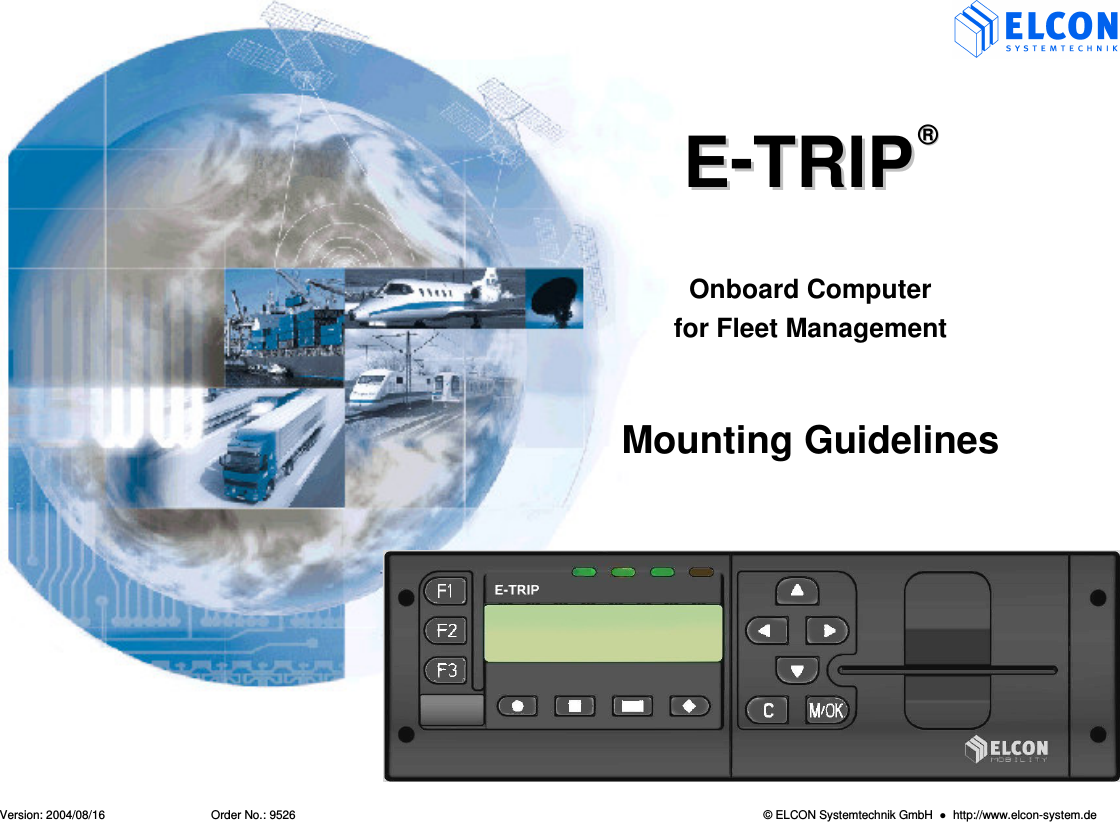
   Version: 2004/08/16  Order No.: 9526  © ELCON Systemtechnik GmbH    http://www.elcon-system.de  EE--TTRRIIPP  ®®   Onboard Computer for Fleet Management   Mounting Guidelines
Scope of supply    E-TRIP ®      Version: 2004/08/16                       Order No.: 9526  Page 2 1) E-TRIP Onboard Unit 2) E-TRIP Operating Manual  3) Cable set  4) Built-in frame 5) Clamps 6) PSRR antenna  7) GPS antenna 8) GSM antenna 9) Driver card
TABLE OF CONTENTS    E-TRIP ®      Version: 2004/08/16                       Order No.: 9526  Page 3 1 INTRODUCTION............................................4 1.1 System architecture and components.............4 1.2 Functions........................................................5 2 STATEMENTS...............................................6 3 INSTALLATION .............................................7 3.1 Antennas........................................................7 3.2 Maintenance...................................................8 3.3 Connection of the device ................................9 3.4 Description of signals ...................................10 3.4.1 SAE J1708 Interface.....................................11 3.4.2 Digital Input ..................................................11 3.4.3 Digital Output................................................12 3.4.4 Temperature sensor .....................................13 3.4.5 NMEA interface ............................................13 3.4.6 Auxiliary Serial Port ......................................13 3.5 Installation of the Onboard Unit ....................14 3.6 SIM card installation .....................................17 3.7 Installation of Orbcomm modem (Option) .....18 3.7.1 LED Codes of Stella ST 2500.......................19 3.8 Configuration of the Onboard Unit ................20 3.8.1 Setting of date and time................................20 3.8.2 Setting of time zone......................................20 3.8.3 Check GPS function .....................................20 4 AGENCY INFORMATION............................21 5 DEALERS ....................................................22
1. INTRODUCTION   E-TRIP ®      Version: 2004/08/16                       Order No.: 9526  Page 4 1  INTRODUCTION E-TRIP® is a high-performance onboard computer for motor vehicles such as trucks, buses or cars. Having the size of a car radio, the onboard unit collects vehicle operation data, driver and environmental data and transfers them to the fleet via GSM (Global System for Mobile Communications, SMS - Short Message Service). It supports all administration tasks occurring in a modern fleet and is a basic part of a digital fleet management system. E-TRIP® may also serve for toll collection or work as accident data recorder. The unit is able to display limit and threshold values as well as indicate alarm conditions. E-TRIP® is a manipulation-safe unit. You are able to analyze the fuel economy of your vehicle's fleet while the driver can check the vehicle's operating data. E-TRIP® has been designed as a modular unit. You can configure the unit according to your individual requirements.  1.1  System architecture and components E-TRIP® comprises the following components: •  LCD (Liquid Crystal Display) •  Operation keys •  Signal generator •  LED´s •  GPS module for the exact location and tracing of vehicles, RSE (Road Side Equipment) is not required •  GSM (Global System for Mobile Communications) module for the data transfer through the mobile telephone network •  PSRR module •  OrbComm module (option) •  E-TRIP Service Tool – the E-TRIP® configuration program that runs under MS Windows® on your PC •  System cards - one system card for the company -  supplied by your service center •  Driver cards - one driver card for each driver
1. INTRODUCTION   E-TRIP ®      Version: 2004/08/16                       Order No.: 9526  Page 5 1.2  Functions Using the full range E-TRIP® allows you to: •  log  to  vehicle  data,  tracking  data  and environmental data securely, •  store these data securely, •  transfer these data automatically and securely,  •  display data "driver-friendly", i.e. clearly and easily legible, •  check data, and •  control engine, fuel consumption and efficiency.  LCD (Liquid Crystal Display): two lines, each of 16 characters length, for digital readouts, menu functions and submenus, messages Operation  keys:  for  manual  inputs,  menu  control, operations. Acoustic  signals:  to  confirm  correct  operation actions or signal errors. RTC  (Real-Time  Clock):  battery-backed, For  the correct time information. Switches  between standard time and daylight saving time. GPS  receiver:  Use  of  the  GPS  (Global  Positioning System)  satellite  signals  for  vehicle's  positioning, either upon request or at adjustable intervals.  PSRR:  (Private  Short  Range  Radio).  The  automatic data  transfer  between  the  onboard  unit  and  the dispatcher  can  be  realized  in  a  short  range (approximately 150 ft.). Serial  external  interface:  allows  the  connection  of  a temperature sensor, for example in the loading space of the vehicle. SAEJ1708 interface: collection of vehicle data  Acceleration  and  gyro  sensors  for  three  axles  are important if you would like to use E-TRIP® as accident data recorder (future implementation). Digital  input  0/12 V:    storage  and  recall  of  the  brake block erosion by using the brake pedal ARO  (Auxiliary  Relay  Output):  Customized  relay function to switch a relay via GSM (see signal: ARO_A and ARO_B in chapter 3.4). It  is  not  allowed  to  control  the  motor management via this function!  Smart  card  reader:  for  bringing  into  service,  driver identification, programming, service application
STATEMENTS    E-TRIP ®      Version: 2004/08/16                       Order No.: 9526  Page 6 2  STATEMENTS  1.  Statement according to FCC part 15.19:  This  device  complies  with  Part  15  of  the  FCC Rules.  Operation  is  subject  to  the  following  two conditions: (1) this device may not cause harmful interference, and (2) this device must accept any interference  received,  including interference  that may cause undesired operation. 2.  Statement according to FCC part 15.21:  Modifications  not  expressly  approved  by  this company  could  void  the  user's  authority  to operate the equipment.  3.  Statement according to FCC part 15.105:  NOTE:  This  equipment  has  been  tested  and found  to  comply  with  the  limits  for  a  Class  B digital  device,  pursuant  to  Part  15  of  the  FCC Rules.  These  limits  are  designed  to  provide reasonable  protection  against  harmful interference  in  a  residential  installation.  This equipment generates, uses and can radiate radio frequency energy and, if not installed and used in accordance  with  the  instructions,  may  cause harmful  interference  to  radio  communications. However, there is no guarantee that interference will  not  occur  in  a  particular  installation.  If  this equipment  does  cause  harmful  interference  to radio  or  television  reception,  which  can  be determined by turning the equipment off and on, the user is encouraged to try to correct the interference by one or more of the following measures:    Reorient or relocate the receiving antenna.   Increase the separation between the equip-ment and receiver.   Connect the equipment into an outlet on a circuit different  from  that  to  which  the  receiver  is connected.   Consult  the  dealer  or  an  experienced  radio/TV technician for help.   4.  RF Exposure mobile:  The  external  antennas  used  for  this  mobile transmitter must provide a separation distance of at least  20 cm from all persons and must not be co-located  or  operating  in  conjunction  with  any  other antenna or transmitter.  5.  Statement according to road safety:  The  use  of  the  function  ARO  (Auxiliary  Relay Output)  of  the  E-TRIP®  is  not  permissible  in  the member countries of the Economic Commission for Europe  (ECE)  to  control  the  engine.  It  is  not permitted,  with  the  help  of  relay  functions,  to influence  the  control  of  engine  management  or  to influence  other  functions  affecting  vehicle  or  road safety, in vehicles participating in public transport.
INSTALLATION   E-TRIP ®      Version: 2004/08/16                       Order No.: 9526  Page 7 3  INSTALLATION E-TRIP® has to be installed by service personnel of a special workshop only. The correct connection and first software installation as well as configuration are reserved to specialists and mandatory for the proper and fault-free function of the unit. The location of installation is optional and can be chosen according to your individual requirements. Please ask your dealer for more information. The detailed description of the installation is given in a separate document. This document is available from your vendor or service partner. 3.1  Antennas  For the installation of the antennas for E-TRIP only the following two antennas are permissible: 1)  AEB 2400 for PSRR (DECT)  Technical Data: Frequencies:   2.1/2.8 GHz UMTS-BLUETOOTH Impedance:  50 Ohms Gain:  2.65 dBi 2)  MCA 18 90 STRIPE for GSM Technical Data: Frequency range:   AMPS:   824 - 894 MHz   GSM 900:   880 - 960 MHz   GSM 1800:   1710 - 1880 MHz   GSM 1900:  1850 – 1990 MHz  Impedance:  50 Ohms Gain:  2.1 dBi
INSTALLATION   E-TRIP ®      Version: 2004/08/16                       Order No.: 9526  Page 8 3.2  Maintenance To clean the unit's front panel, use a clean cloth only. It should be soft, dust-laying and antistatic. Don't apply any cleaning agents, in order to prevent the surface from being damaged.  Special cleaning measures or procedures are not required.
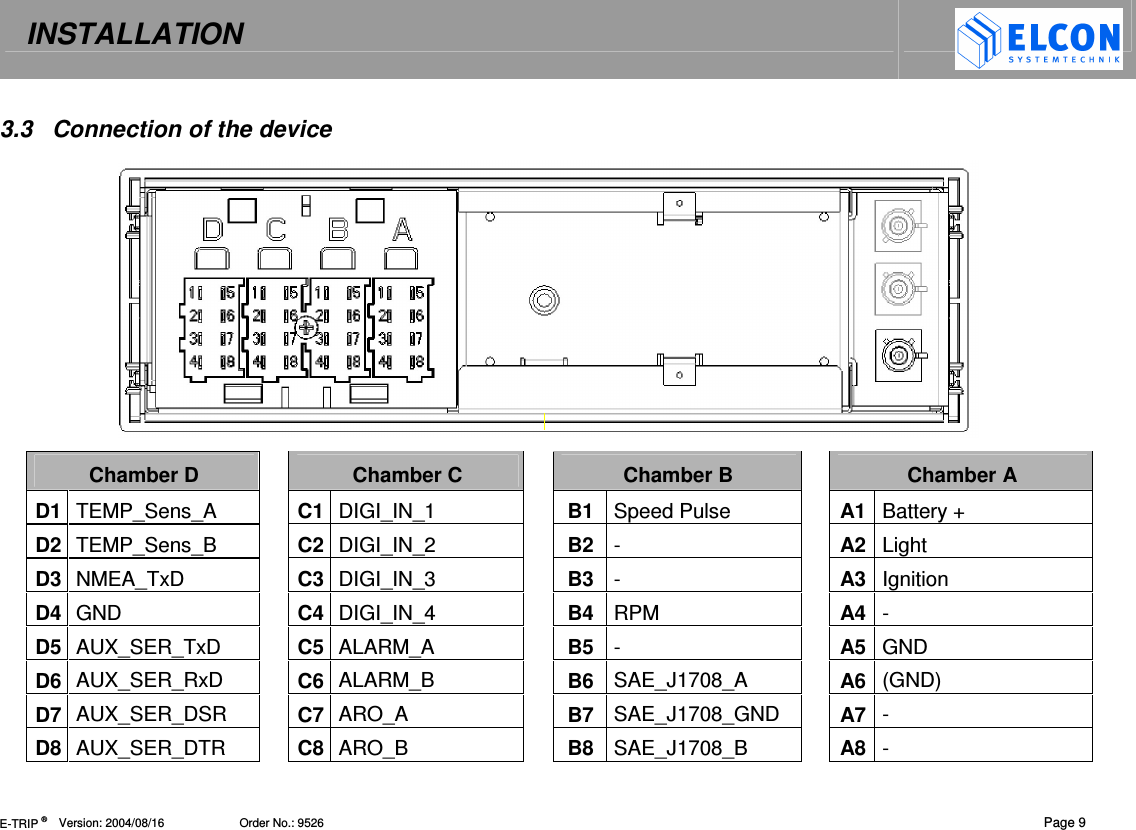
INSTALLATION   E-TRIP ®      Version: 2004/08/16                       Order No.: 9526  Page 9 3.3  Connection of the device              Chamber D    Chamber C    Chamber B    Chamber A D1 TEMP_Sens_A    C1 DIGI_IN_1    B1  Speed Pulse    A1 Battery + D2 TEMP_Sens_B    C2 DIGI_IN_2    B2  -    A2 Light D3 NMEA_TxD    C3 DIGI_IN_3    B3  -    A3 Ignition D4 GND    C4 DIGI_IN_4    B4  RPM    A4 - D5 AUX_SER_TxD    C5 ALARM_A    B5  -    A5 GND D6 AUX_SER_RxD    C6 ALARM_B    B6  SAE_J1708_A    A6 (GND) D7 AUX_SER_DSR    C7 ARO_A    B7  SAE_J1708_GND    A7 - D8 AUX_SER_DTR    C8 ARO_B    B8  SAE_J1708_B    A8 -
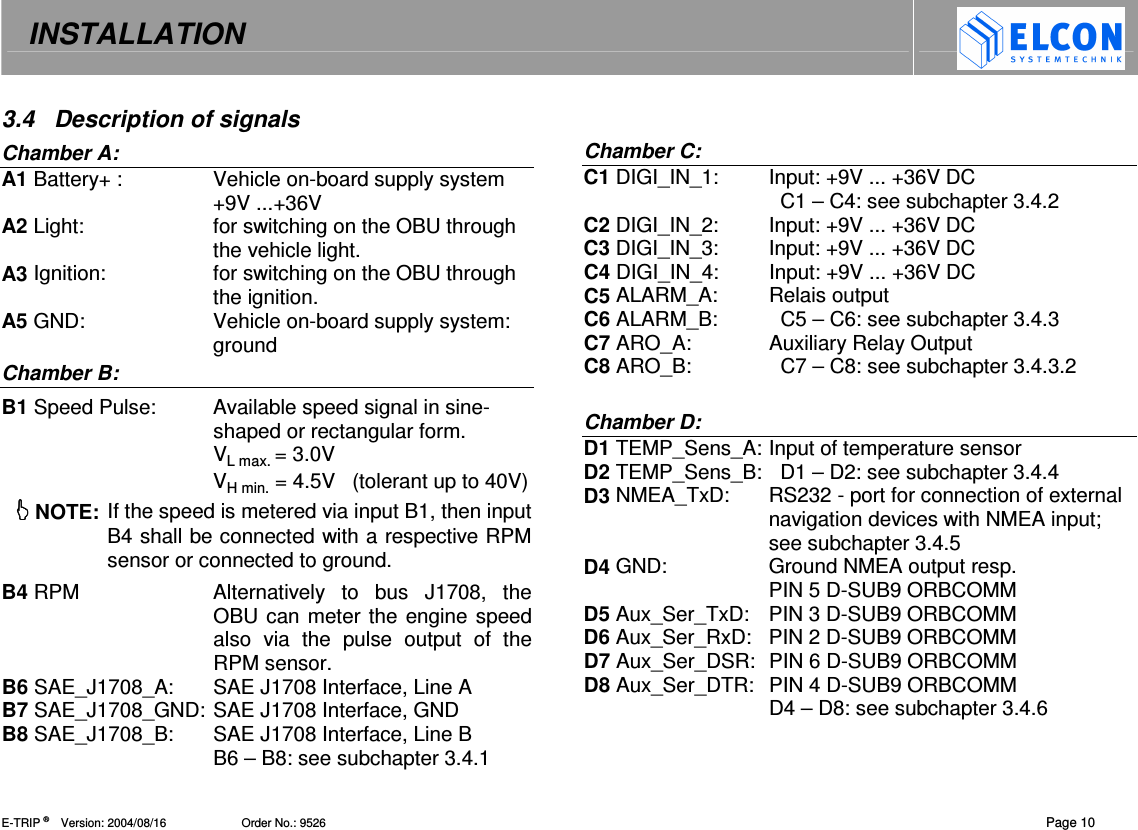
INSTALLATION   E-TRIP ®      Version: 2004/08/16                       Order No.: 9526  Page 10 3.4  Description of signals Chamber A: A1 Battery+ :  Vehicle on-board supply system +9V ...+36V  A2 Light:  for switching on the OBU through the vehicle light. A3 Ignition:  for switching on the OBU through the ignition. A5 GND:  Vehicle on-board supply system: ground Chamber B: B1 Speed Pulse:  Available speed signal in sine-shaped or rectangular form. VL max. = 3.0V VH min. = 4.5V   (tolerant up to 40V)  NOTE: If the speed is metered via input B1, then input B4 shall be connected with a respective RPM sensor or connected to ground. B4 RPM  Alternatively  to  bus  J1708,  the OBU can meter the engine speed also  via  the  pulse  output  of  the RPM sensor. B6 SAE_J1708_A:  SAE J1708 Interface, Line A B7 SAE_J1708_GND: SAE J1708 Interface, GND B8 SAE_J1708_B:  SAE J1708 Interface, Line B B6 – B8: see subchapter 3.4.1  Chamber C: C1 DIGI_IN_1:  Input: +9V ... +36V DC   C1 – C4: see subchapter 3.4.2  C2 DIGI_IN_2:  Input: +9V ... +36V DC C3 DIGI_IN_3:  Input: +9V ... +36V DC C4 DIGI_IN_4:  Input: +9V ... +36V DC C5 ALARM_A:  Relais output  C6 ALARM_B:    C5 – C6: see subchapter 3.4.3 C7 ARO_A:  Auxiliary Relay Output  C8 ARO_B:    C7 – C8: see subchapter 3.4.3.2  Chamber D: D1 TEMP_Sens_A: Input of temperature sensor D2 TEMP_Sens_B:   D1 – D2: see subchapter 3.4.4 D3 NMEA_TxD:  RS232 - port for connection of external navigation devices with NMEA input; see subchapter 3.4.5 D4 GND:  Ground NMEA output resp. PIN 5 D-SUB9 ORBCOMM D5 Aux_Ser_TxD:  PIN 3 D-SUB9 ORBCOMM D6 Aux_Ser_RxD:  PIN 2 D-SUB9 ORBCOMM D7 Aux_Ser_DSR:  PIN 6 D-SUB9 ORBCOMM D8 Aux_Ser_DTR:  PIN 4 D-SUB9 ORBCOMM D4 – D8: see subchapter 3.4.6
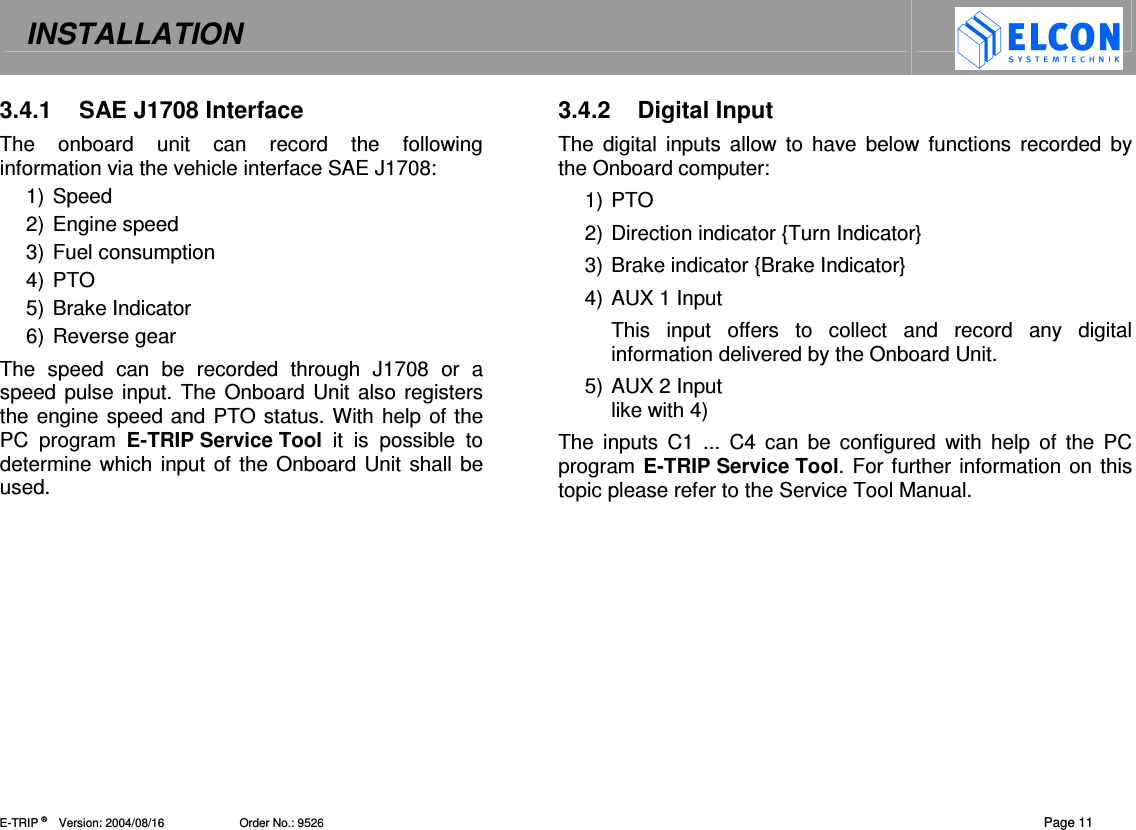
INSTALLATION   E-TRIP ®      Version: 2004/08/16                       Order No.: 9526  Page 11 3.4.1  SAE J1708 Interface The  onboard  unit  can  record  the  following information via the vehicle interface SAE J1708: 1) Speed 2) Engine speed 3) Fuel consumption 4) PTO 5) Brake Indicator 6) Reverse gear The  speed  can  be  recorded  through  J1708  or  a speed pulse input. The Onboard Unit also registers the engine speed and PTO status. With help of the PC  program  E-TRIP Service Tool  it  is  possible  to determine which input of the Onboard Unit shall be used.  3.4.2  Digital Input The  digital  inputs  allow  to  have  below functions recorded  by the Onboard computer: 1) PTO 2) Direction indicator {Turn Indicator} 3) Brake indicator {Brake Indicator} 4) AUX 1 Input This  input  offers  to  collect  and  record  any  digital information delivered by the Onboard Unit. 5) AUX 2 Input like with 4) The  inputs  C1  ...  C4  can  be  configured  with  help  of  the  PC program E-TRIP Service Tool. For further information on this topic please refer to the Service Tool Manual.
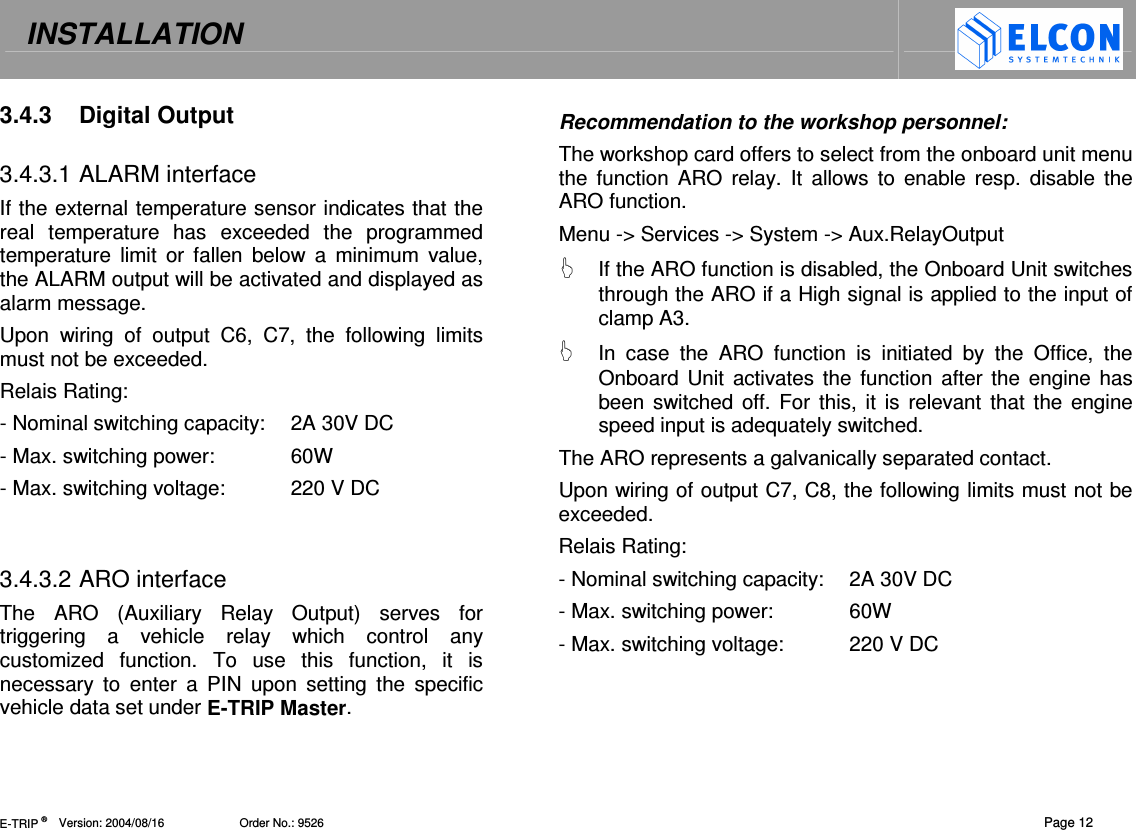
INSTALLATION   E-TRIP ®      Version: 2004/08/16                       Order No.: 9526  Page 12 3.4.3  Digital Output  3.4.3.1 ALARM interface If the external temperature sensor indicates that the real  temperature  has  exceeded  the  programmed temperature  limit  or fallen  below  a  minimum  value, the ALARM output will be activated and displayed as alarm message.  Upon  wiring  of  output  C6,  C7,  the  following  limits must not be exceeded. Relais Rating: - Nominal switching capacity:  2A 30V DC - Max. switching power:  60W - Max. switching voltage:  220 V DC   3.4.3.2 ARO interface The  ARO  (Auxiliary  Relay  Output)  serves  for triggering  a  vehicle  relay  which  control  any customized  function.  To  use  this  function,  it  is necessary  to  enter  a  PIN  upon  setting  the  specific vehicle data set under E-TRIP Master.  Recommendation to the workshop personnel: The workshop card offers to select from the onboard unit menu the  function ARO  relay. It  allows  to  enable  resp.  disable the ARO function. Menu -> Services -> System -> Aux.RelayOutput   If the ARO function is disabled, the Onboard Unit switches through the ARO if a High signal is applied to the input of clamp A3.   In  case  the  ARO  function  is  initiated  by  the  Office,  the Onboard Unit  activates the  function  after the engine  has been switched off. For  this,  it is relevant that  the engine speed input is adequately switched. The ARO represents a galvanically separated contact. Upon wiring of output C7, C8, the following limits must not be exceeded. Relais Rating: - Nominal switching capacity:  2A 30V DC - Max. switching power:  60W - Max. switching voltage:  220 V DC
INSTALLATION   E-TRIP ®      Version: 2004/08/16                       Order No.: 9526  Page 13 3.4.4  Temperature sensor The clip contacts D1 and D2 permit connection of an external  temperature  sensor  that  can  be  acquired from  your  supplier  under  order  no. 9514.  After installation  of  the  hardware  and  activation  through the  PC  program  E-TRIP Service Tool,  the temperature value can be indicated by the Onboard Unit. The activation is carried out with help of Cargo Temperature on the register card HW Settings.    3.4.5  NMEA interface The  control  of  peripheral  PC  equipment  (laptops, PDAs,  etc.)  by  using  navigation  software  can  be executed via output D3/D4 of the Onboard Unit in a way  that  the  current  vehicle  position  is  transmitted via this interface. In addition to the output D3/D4, the vehicle  position  is  also  sent  out  via  the  service interface on the front panel of the Onboard Unit. The vehicle position data can be sent only then if below smart cards:  System  Card and Workshop  Card are not  inserted  und  the  E-TRIP  Service Tool  is  not linked with the Onboard Unit.  The  following  NMEA  0183  records  will  be  sent  to  the navigation software: 1) $GPGGA 2) $GPVTG 3) $GPRMC   3.4.6  Auxiliary Serial Port The  „Auxiliary  Serial  Port“  represents  a  serial  interface (RS232) with two control wires DSR and DTR. This interface allows,  i.a.,  connection  of  an  ORBCOMM  module.  For  this, please  use  the  cable  set  provided  as  part  of  the  OrbComm supply package.
INSTALLATION   E-TRIP ®      Version: 2004/08/16                       Order No.: 9526  Page 14 3.5  Installation of the Onboard Unit   Safety precautions :  Upon  device  installation  make  sure  to  keep  a  minimum  distance  of  20  cm  between  the  radio antenna(e) and the workplace.  Any  application  of  the  device  other  than  for  its contractual  use  may  cause  not  only  property damage.  Therefore  always  make  sure  to  apply our product only for the intended use ! During  installation  and  connection  please  observe  the following safety precautions: •  Disconnect negative pole of the battery! Observe  the  safety  instructions  from  the  respective  car manufacturer. Note that,  upon disconnecting, devices with volatile  memory  will  lose  their  information.  Therefore  it  is necessary, before disconnection, to write down all relevant data and to notify the car owner that there may be need for reprogramming. •  When drilling holes, make sure not to damage any car parts or electric wires. •  The cross section of both positive and negative cable must not be less than 0.5 mm². •  Improper  installation  may  cause  interferences  with  the Onboard Unit and other electronic systems of the vehicle. •  E-TRIP  shall  be  connected  to  the  in-car  outlets  as recommended  by  the  car  manufacturer  only  through  the cable set provided as part of the supply.
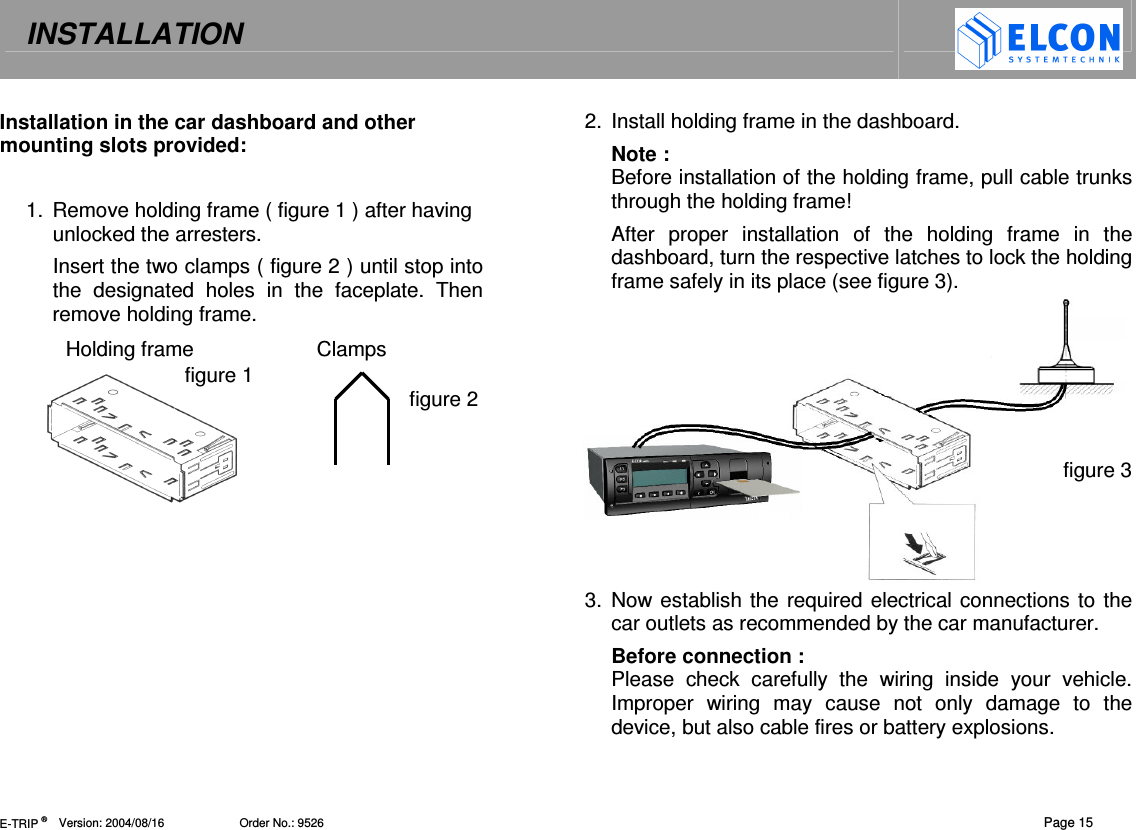
INSTALLATION   E-TRIP ®      Version: 2004/08/16                       Order No.: 9526  Page 15 Installation in the car dashboard and other mounting slots provided:  1.  Remove holding frame ( figure 1 ) after having unlocked the arresters. Insert the two clamps ( figure 2 ) until stop into the  designated  holes  in  the  faceplate.  Then remove holding frame. Holding frame  Clamps figure 1   figure 2   2.  Install holding frame in the dashboard.  Note :  Before installation of the holding frame, pull cable trunks through the holding frame! After  proper  installation  of  the  holding  frame  in  the dashboard, turn the respective latches to lock the holding frame safely in its place (see figure 3).      figure 3    3.  Now establish the required electrical connections to the car outlets as recommended by the car manufacturer. Before connection : Please  check  carefully  the  wiring  inside  your  vehicle. Improper  wiring  may  cause  not  only  damage  to  the device, but also cable fires or battery explosions.
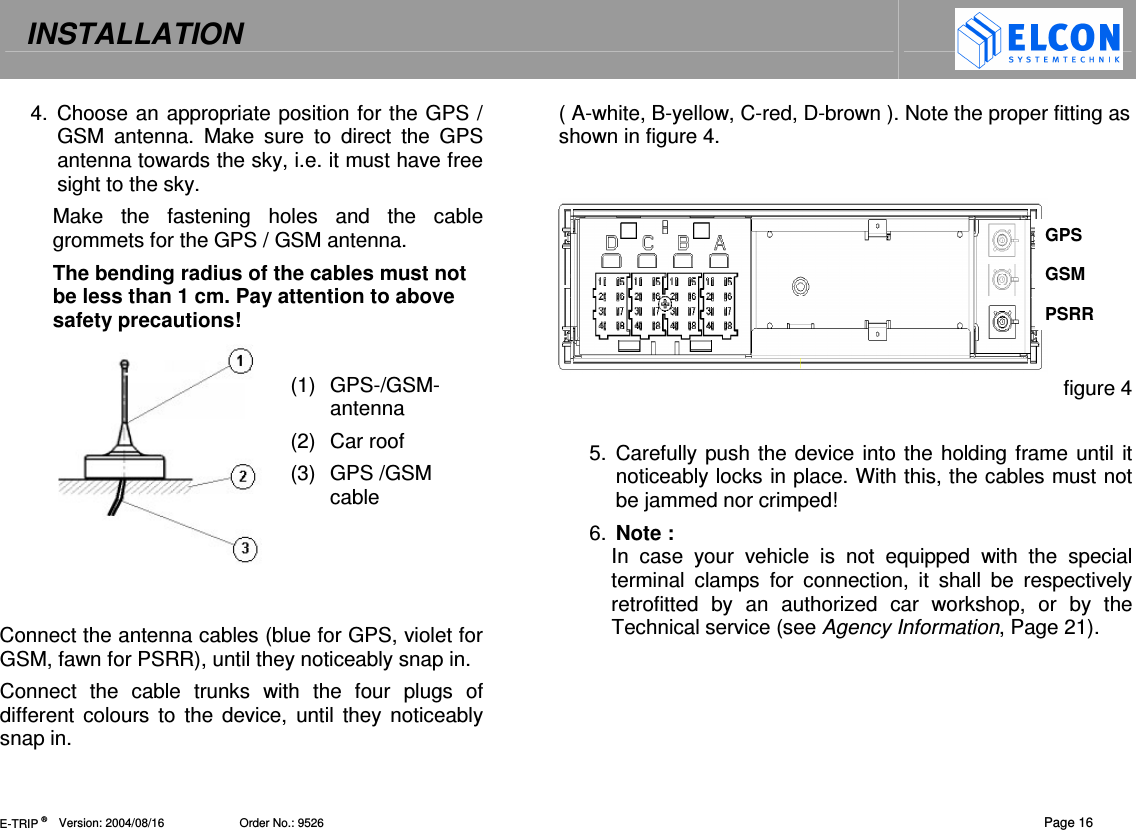
INSTALLATION   E-TRIP ®      Version: 2004/08/16                       Order No.: 9526  Page 16 4.  Choose an appropriate position for the GPS / GSM  antenna.  Make  sure  to  direct  the  GPS antenna towards the sky, i.e. it must have free sight to the sky. Make  the  fastening  holes  and  the  cable grommets for the GPS / GSM antenna. The bending radius of the cables must not be less than 1 cm. Pay attention to above safety precautions!  (1)  GPS-/GSM-antenna (2)  Car roof (3)  GPS /GSM cable    Connect the antenna cables (blue for GPS, violet for GSM, fawn for PSRR), until they noticeably snap in. Connect  the  cable  trunks  with  the  four  plugs  of different  colours  to  the  device,  until they noticeably snap in.  ( A-white, B-yellow, C-red, D-brown ). Note the proper fitting as shown in figure 4.     figure 4  5.  Carefully push the device into the holding frame until it noticeably locks in place. With this, the cables must not be jammed nor crimped!  6.  Note :  In  case  your  vehicle  is  not  equipped  with  the  special  terminal  clamps  for  connection,  it  shall  be  respectively retrofitted  by  an  authorized  car  workshop,  or  by  the Technical service (see Agency Information, Page 21). GPS GSM PSRR
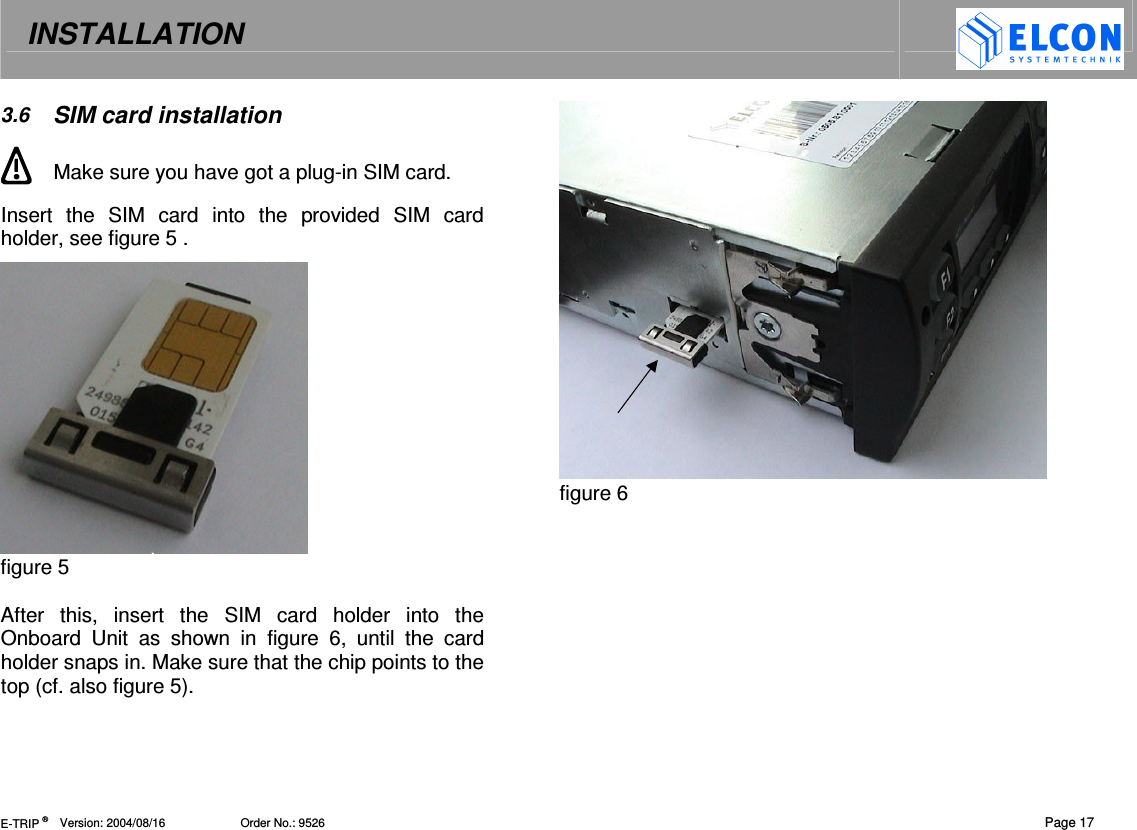
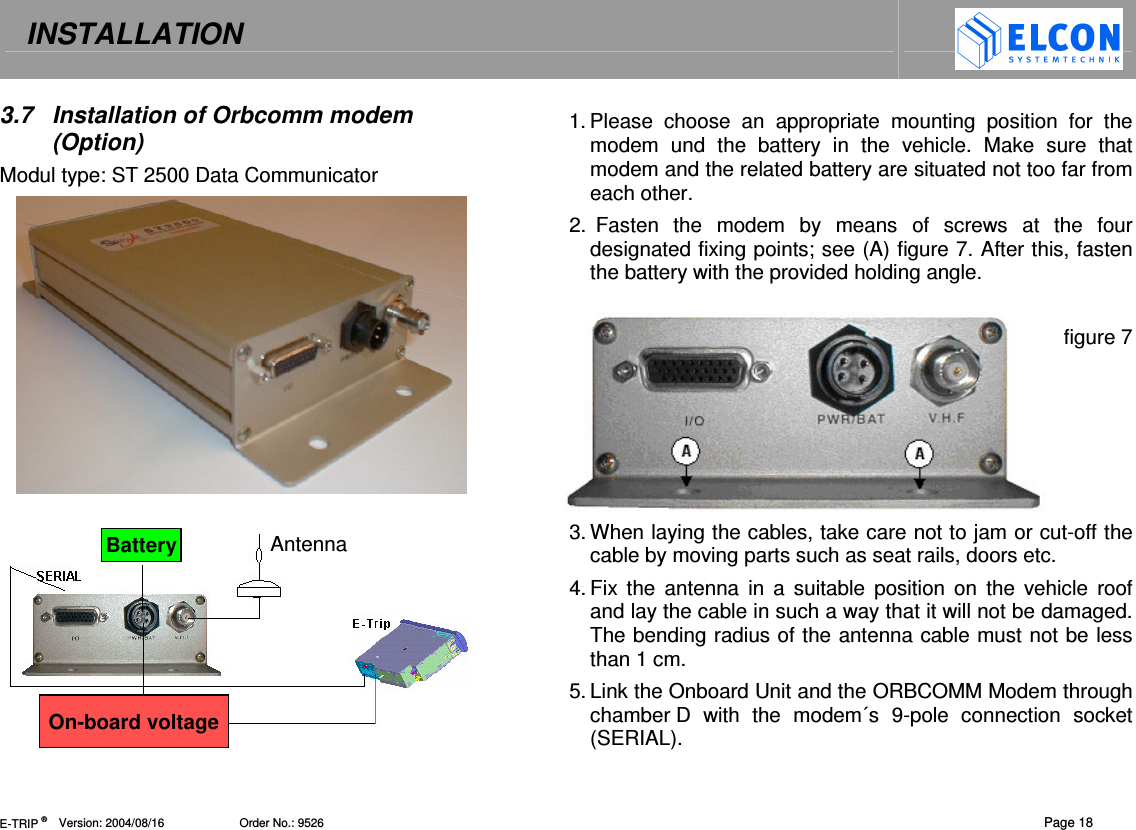
INSTALLATION   E-TRIP ®      Version: 2004/08/16                       Order No.: 9526  Page 17 3.6  SIM card installation  Make sure you have got a plug-in SIM card. Insert  the  SIM  card  into  the  provided  SIM  card holder, see figure 5 .   figure 5  After  this,  insert  the  SIM  card  holder  into  the Onboard  Unit  as  shown  in  figure  6,  until  the  card holder snaps in. Make sure that the chip points to the top (cf. also figure 5).  figure 6
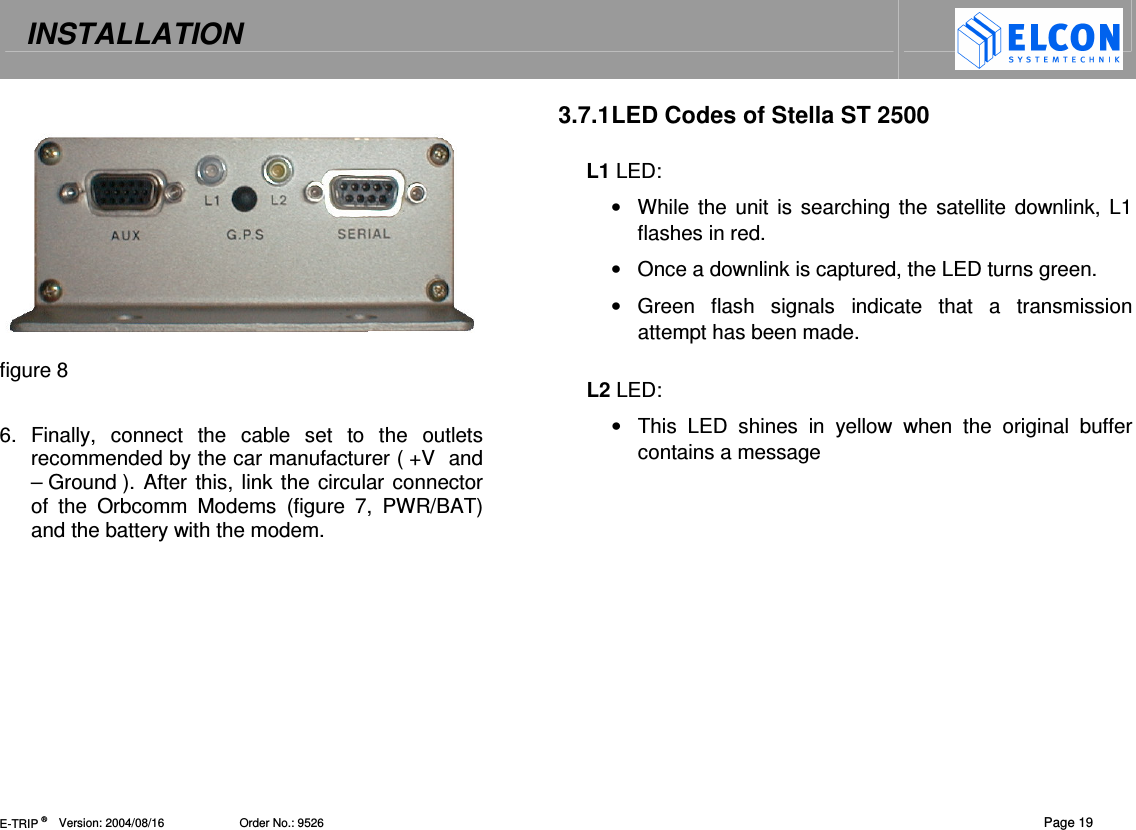
INSTALLATION   E-TRIP ®      Version: 2004/08/16                       Order No.: 9526  Page 18 3.7  Installation of Orbcomm modem (Option) Modul type: ST 2500 Data Communicator    1. Please  choose  an  appropriate  mounting  position  for  the modem  und  the  battery  in  the  vehicle.  Make  sure  that modem and the related battery are situated not too far from each other. 2.  Fasten  the  modem  by  means  of  screws  at  the  four designated fixing points; see (A) figure 7. After this, fasten the battery with the provided holding angle.  figure 7      3. When laying the cables, take care not to jam or cut-off the cable by moving parts such as seat rails, doors etc. 4. Fix  the  antenna in  a  suitable  position  on  the  vehicle  roof and lay the cable in such a way that it will not be damaged. The bending radius of the antenna cable must not be less than 1 cm.  5. Link the Onboard Unit and the ORBCOMM Modem through chamber D  with  the  modem´s  9-pole  connection  socket (SERIAL). Battery. On-board voltage Antenna
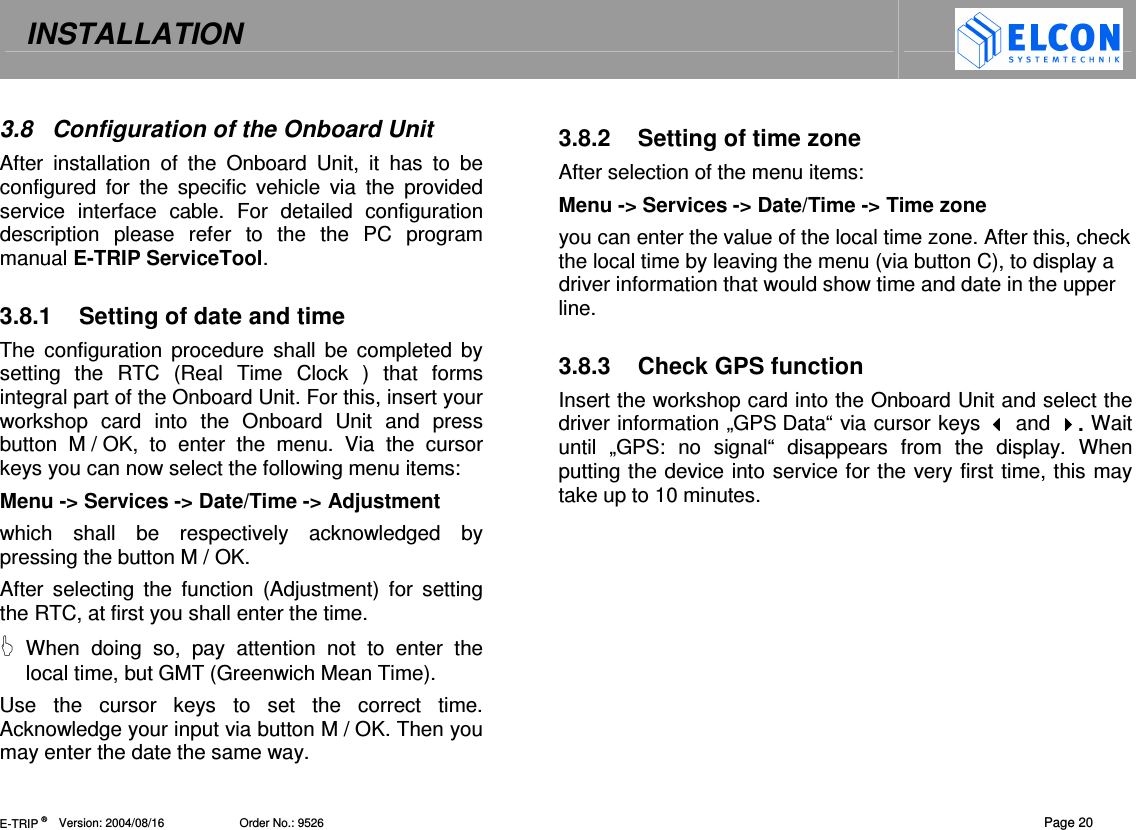
INSTALLATION   E-TRIP ®      Version: 2004/08/16                       Order No.: 9526  Page 19   figure 8  6.  Finally,  connect  the  cable  set  to  the  outlets recommended by the car manufacturer ( +V  and – Ground ). After this, link the circular connector of  the  Orbcomm  Modems  (figure  7,  PWR/BAT) and the battery with the modem.    3.7.1 LED Codes of Stella ST 2500  L1 LED: •  While  the  unit is searching the satellite downlink, L1 flashes in red. •  Once a downlink is captured, the LED turns green. •  Green  flash  signals  indicate  that  a  transmission attempt has been made.   L2 LED:  •  This  LED  shines  in  yellow  when  the  original  buffer contains a message
INSTALLATION   E-TRIP ®      Version: 2004/08/16                       Order No.: 9526  Page 20 3.8  Configuration of the Onboard Unit  After  installation  of  the  Onboard  Unit,  it  has  to  be configured  for  the  specific  vehicle  via  the  provided service  interface  cable.  For  detailed  configuration description  please  refer  to  the  the  PC  program manual E-TRIP ServiceTool.  3.8.1  Setting of date and time The  configuration  procedure  shall  be  completed  by setting  the  RTC  (Real  Time  Clock  )  that  forms integral part of the Onboard Unit. For this, insert your workshop  card  into  the  Onboard  Unit  and  press button  M / OK,  to  enter  the  menu.  Via  the  cursor keys you can now select the following menu items: Menu -> Services -> Date/Time -> Adjustment which  shall  be  respectively  acknowledged  by pressing the button M / OK.  After  selecting  the  function  (Adjustment)  for  setting the RTC, at first you shall enter the time.    When  doing  so,  pay  attention  not  to  enter  the local time, but GMT (Greenwich Mean Time). Use  the  cursor  keys  to  set  the  correct  time. Acknowledge your input via button M / OK. Then you may enter the date the same way.   3.8.2  Setting of time zone After selection of the menu items: Menu -> Services -> Date/Time -> Time zone you can enter the value of the local time zone. After this, check the local time by leaving the menu (via button C), to display a driver information that would show time and date in the upper line.   3.8.3  Check GPS function Insert the workshop card into the Onboard Unit and select the driver information „GPS Data“ via cursor keys  and . Wait until  „GPS:  no  signal“  disappears  from  the  display.  When putting the device into service for the very first time, this may take up to 10 minutes.
AGENCY INFORMATION   E-TRIP ®      Version: 2004/08/16                        Order No.: 9526   Page 21 4  AGENCY INFORMATION     AVC SYSTEMS INC.  ONBOARD TECHNOLOGIES Canada, 115 Midpark Road, Unit #1, London, ON      N6N 1B2 Phone:  001 519  681-2700 Fax:  001 519  681-3782 Mail:  a.v.c@bellnet.c   Kelland International Ltd. China, Beijing 100020 Room 1512B, No. 22  Chao wai Street, Chaoyang District  Phone:  0086 10 65 88 50 58 62 Fax:  0086 10 65 88 50 63 Mail:  elcon@kellandinternational.com
  E-TRIP ®      Version: 2004/08/16                       Order No.: 9526 5  DEALERS   BaTaLog GmbH  Germany, D-21394 Westergellersen  Drosselweg 4 Phone:  +49(0) 41 35 / 80 07 97 Fax:  +49(0) 41 35 / 80 07 37 Mail:  info@BaTaLog.de    GESTECH 2001 Canada, 478, St.-Hubert, Laval (Québec) H7G 2Y9 Phone:  001 450  629 23 76 Fax:  001 450  629 26 13 Mail:  RenaldLabrie@AOL.com
  E-TRIP ®      Version: 2004/08/16                       Order No.: 9526
 E-TRIP ®      Version: 2004/08/16                       Order No.: 9526     D – 09232 Hartmanndorf Obere Hauptstrasse 10 Germany                        www.elcon-system.de

Navigation menu