ELDAT RT24 Remote Control Transmitter User Manual 73904 0505
ELDAT GmbH Remote Control Transmitter 73904 0505
ELDAT >
Users Manual
RT24
Hand Transmitter
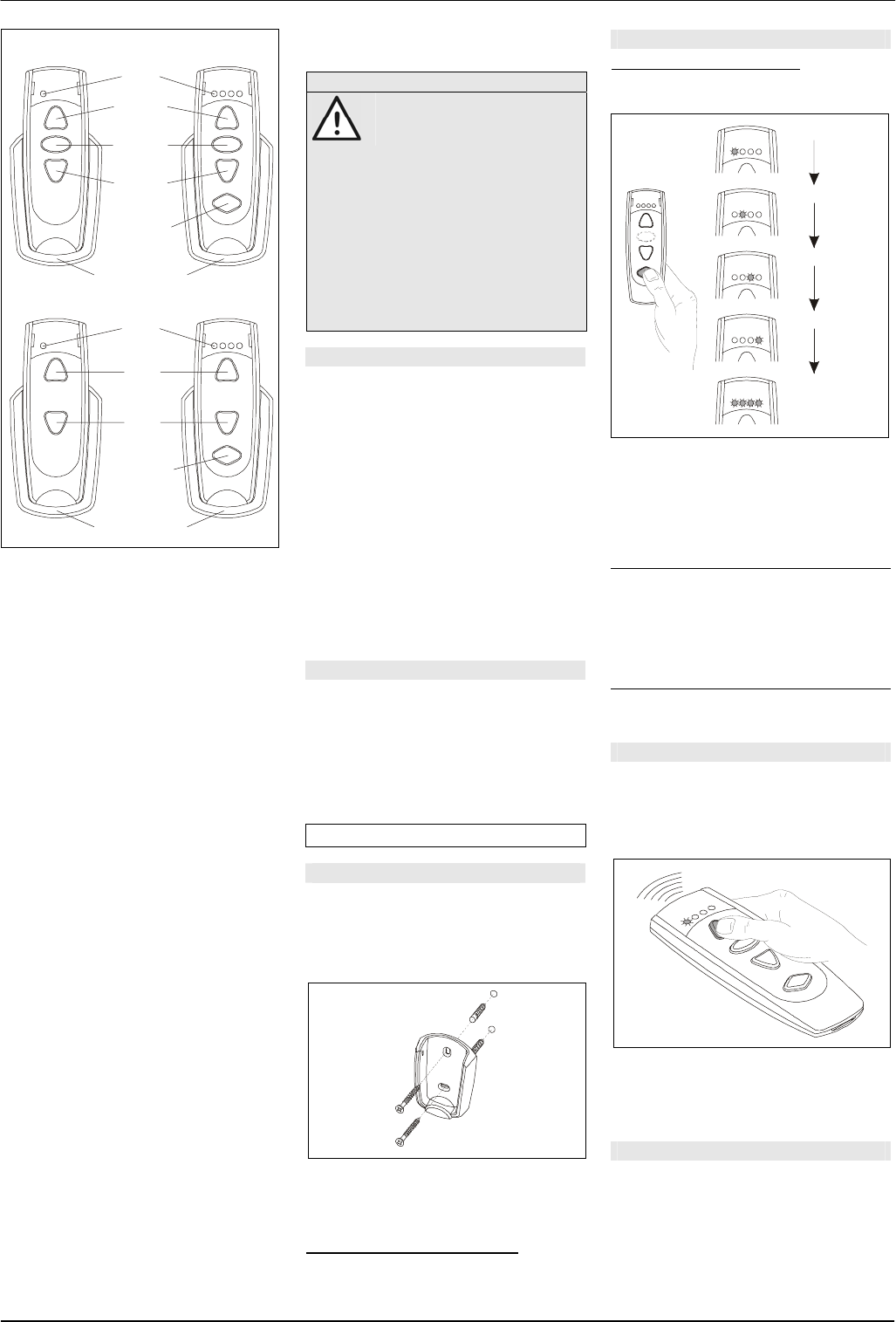
RT24-3101M-01 RT24-3104M-01
LED
OPEN
STOP
Channel
selector
Mounting plate
CLOSE
RT24-3101M-03 RT24-3104M-03
LED
ON
Channel
selector
Mounting plate
OFF
Operating instructions
Safety advice
Carefully read through these
instructions before using the
transmitter!
Note also the operating instructions of the
radio control(s)!
The hand transmitter should only be oper-
ated within sight of the devices to be con-
trolled! Otherwise persons could be placed
in danger!
Have faulty hand transmitters checked by
the manufacturer!
Do not make any unauthorized alterations
or modifications to the hand transmitter!
Models / Features
RT24-3101M-01:
1 radio channel for controlling one device,
Functions: OPEN, STOP, CLOSE
RT24-3101M-03:
1 radio channel for controlling one device,
Functions: ON and OFF
RT24-3104M-01:
4 radio channels for separate or contempo-
raneous controlling (group function) of four
devices,
Functions: OPEN, STOP, CLOSE
RT24-3104M-03:
4 radio channels for separate or contempo-
raneous controlling (group function) of four
devices,
Functions: ON and OFF
Package content
- Hand transmitter incl. battery
- Mounting plate
- Programming connector
- Screws and anchors
- Adhesive pad
- Operating instructions
Using the hand transmitter
Start-up
The hand transmitter comes with a battery
already installed so, once unpacked, it is
ready for immediate use.
• Mount the transmitter to the wall using
the mounting plate.
• Transmit the channel(s) to the radio
controls of the devices to be operated.
For this read the operating instructions
supplied with the radio controls.
Note for 4-channel transmitters: channel
selection is described in the chapter "Select-
ing channel".
Selecting channel
Only 4-channel transmitters:
Using the channel selector button, select the
channel of the device to be operated.
2s
2s
2s
2s
2s
Channel 1
Channel 2
Channel 3
Channel 4
Channels 1-4
(Group function)
Each time you press the channel selector
button, you switch to the next channel or to
the group function (channel 1 > channel 2 >
channel 3 > channel 4 > channels 1-4/ group
function > channel 1 etc.).
The selected channel is signalled via the
LED’s as follows:
Channel 1: LED 1 lights up for approx. 2 secs.
Channel 2: LED 2 lights up for approx. 2 secs.
Channel 3: LED 3 lights up for approx. 2 secs.
Channel 4: LED 4 lights up for approx. 2 secs.
Channels
1-4: LED’s 1-4 light up for approx 2 secs.
(group function)
After the first pressing of the channel selector
button, the channel used last is selected.
Transmitting
• Press one of the function buttons (OPEN,
STOP, CLOSE or ON, OFF) in order to
control the corresponding device. The
LED of the corresponding channel briefly
lights up.
(Only 4-channel transmitters) If the group
function is selected, all 4 devices are con-
trolled and all 4 LED’s briefly light up at the
same time.
Troubleshooting
• If the LED(s) light up too faintly:
change the battery.
• If the LED(s) don't light up at all:
check that the battery is correctly poled.
• If the device still doesn't react:
go closer to the radio control or re-
transmit the transmitter channels to the
radio control.

© 2005 Al
73904 0505 US l rights reserved
Replacing the battery
• Insert a small coin into the slot on the
underside of the transmitter. Turn the
coin diagonally and carefully press the
two halves of the housing apart.
• Replace the battery.
Use only batteries of type CR2032.
Make sure the polarity is correct!
• Press the two housing halves together
again.
Caution! Keep batteries out of reach of
children!
Changing transmitter codes
The hand transmitter comes factory coded.
An individual transmitter code is assigned to
every channel. You can duplicate or change
the coding by transferring the transmitter
codes of another transmitter to the hand
transmitter.
Source transmitter Target transmitter
• Connect the source transmitter and target
transmitter using the programming con-
nector.
• (Only 4-channel transmitters) Select on
the source transmitter the channel whose
code is to be transferred.
• Press and hold one of the function but-
tons (OPEN, STOP, CLOSE, ON or OFF)
on the source transmitter.
• (Only 4-channel transmitters) Select on
the target transmitter the channel whose
code is to be changed.
• Press and hold one of the function but-
tons on the target transmitter. If the code
has been transferred, the LED’s 1 and 4
(on 4-channel transmitters) or the LED 1
(on single-channel transmitters) on the
target transmitter light up. Release the
buttons on both transmitters.
• (Only 4-channel transmitters) Repeat the
code transfer for the other channels.
• Remove the programming connector.
Note: You can also transfer the codes of
other transmitters (e.g. mini transmitters) to
the hand transmitter or transmitter codes of
the hand transmitter to other transmitters.
For each hand transmitter channel only one
code is to be transferred. The same transmit-
ter code is assigned to every function button
of the hand transmitter.
Random coding
You can also assign a new random code to
each channel:
• Put the programming connector into the
socket and short-circuit one of the outer
pins with the middle pin.
• (Only 4-channel transmitters) Select the
channel whose code is to be changed.
• Press and hold one of the function but-
tons (OPEN, STOP, CLOSE, ON or
OFF). While the new code is generated,
the LED’s 1 and 4 (on 4-channel transmit-
ters) or the LED 1 (on single-channel
transmitters) light up. After 5 secs. re-
lease the function button.
• (Only 4-channel transmitters) Repeat the
random coding for the other channels.
• Remove the programming connector.
Note: After re-coding you have to transfer
the transmitter codes to the radio controls.
General information
Disposal
Dispose of the waste product via a
collection point for electronic scrap
or via your specialist dealer.
Put packaging material into a recycling bin
for cardboard and paper.
Dispose of used batteries in a container for
used batteries or via the specialist trade.
Waste electrical products and
batteries should not be dis-
posed of with household
waste!
Technical data
Power supply: 1 x 3 V battery, CR2032
Current consumption: approx. 10 mA
Frequency: 315 MHz
Modulation: ASK
Operating temperature: -20°C to +60°C
Range: free-field: approx. 100 m
buildings: approx. 30 m
Dimensions: 110 x 38 x 14 mm
(without mounting plate)
Weight: 37 g (incl. battery,
without mounting plate)
Warranty
Within the statutory warranty period we
undertake to rectify free of charge by repair
or replacement any product defects arising
from material or production faults.
Any unauthorized tampering with, or modifi-
cations to, the product shall render this
warranty null and void.
Certification
FCC Certified: This device complies with
Part 15 of the FCC rules. Operation is
subject to the following two conditions:
(1) this device may not cause harmful
interference, and (2) this device must
accept any interference received, including
interference that may cause undesired
operation.
Changes or modifications not expressly
approved by the party responsible for
compliance could void the user´s authority
to operate the equipment.
Customer service
If, despite correct handling, faults or malfunc-
tions occur or if the product was damaged,
please contact the company at the address
below: