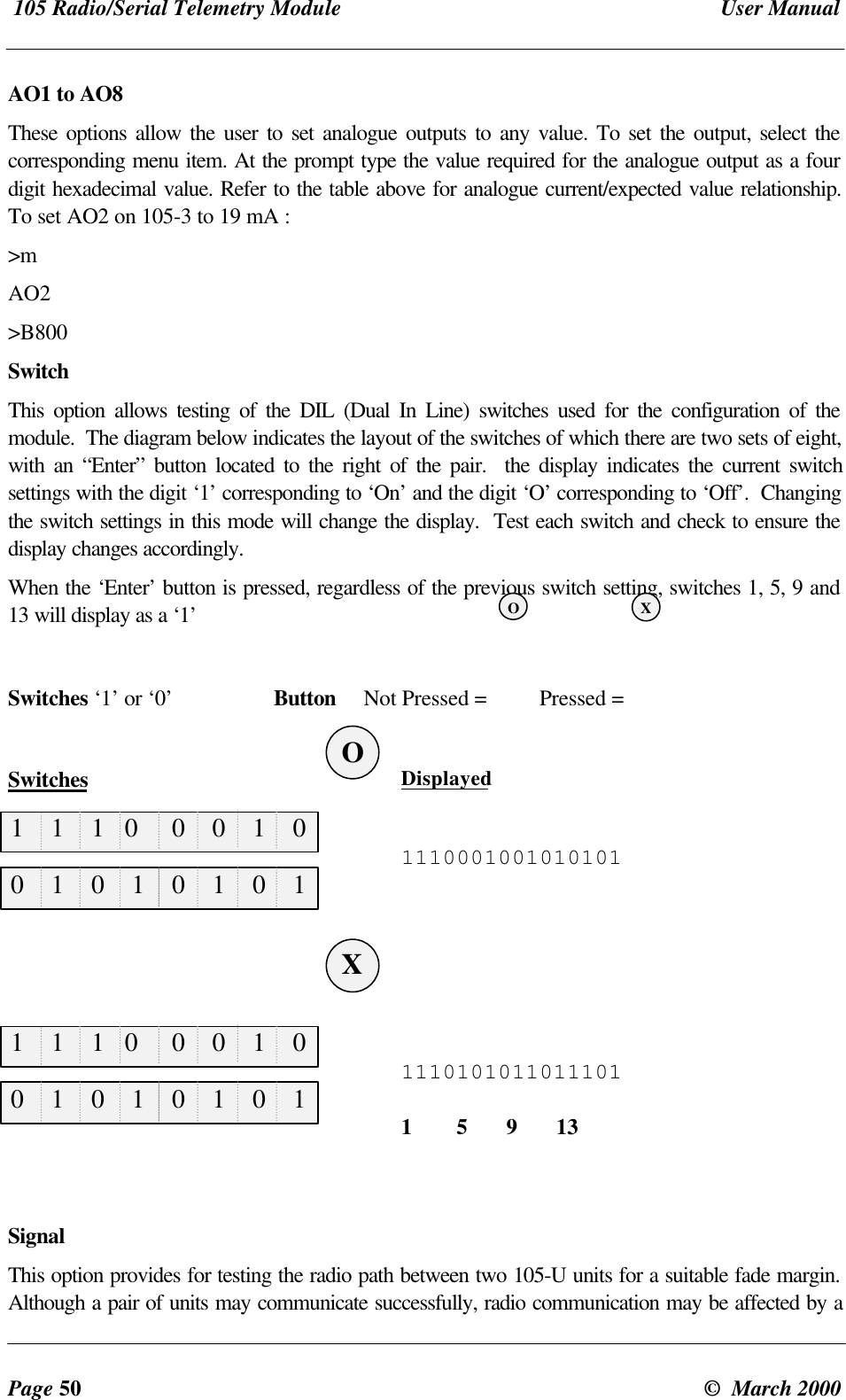
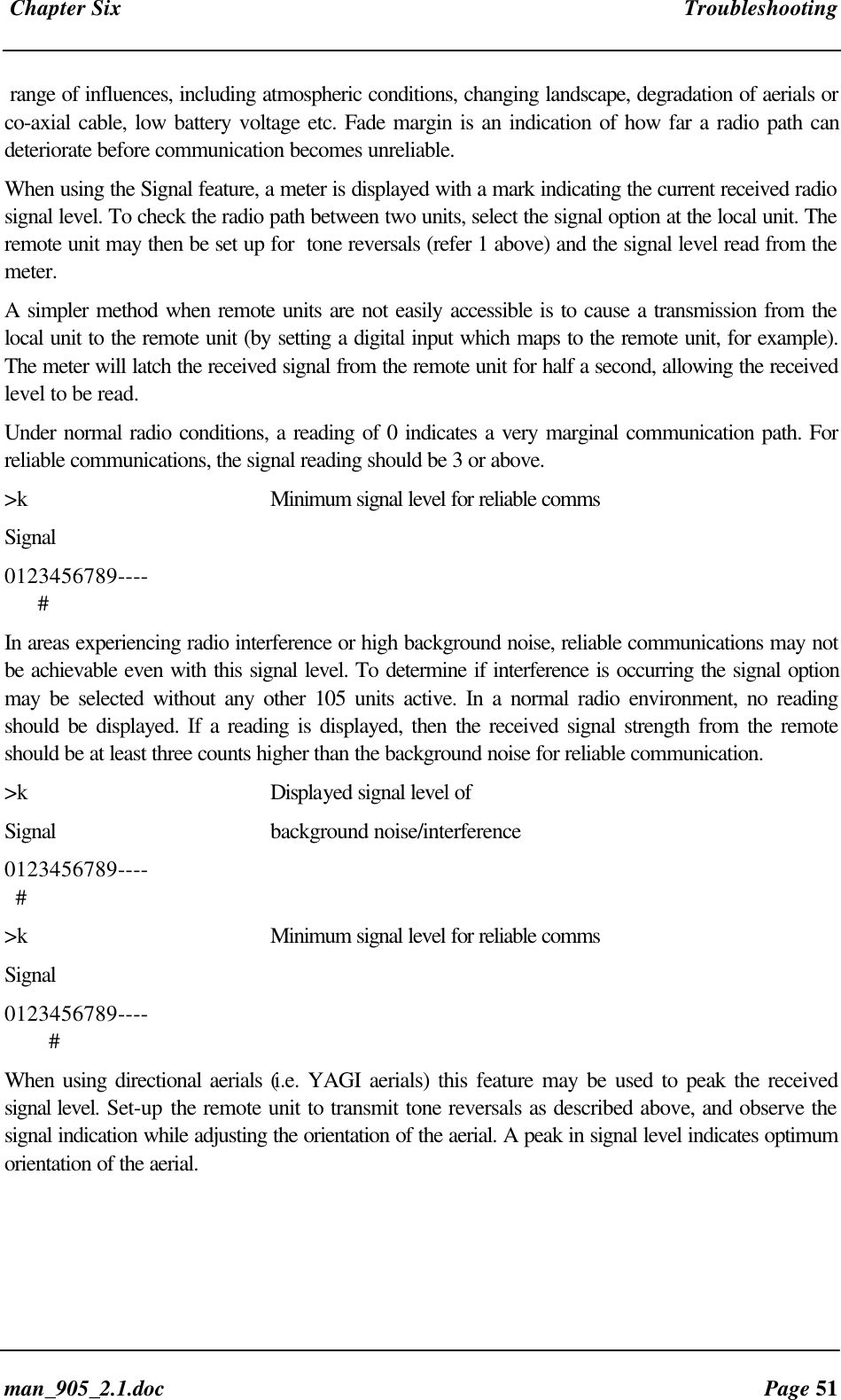
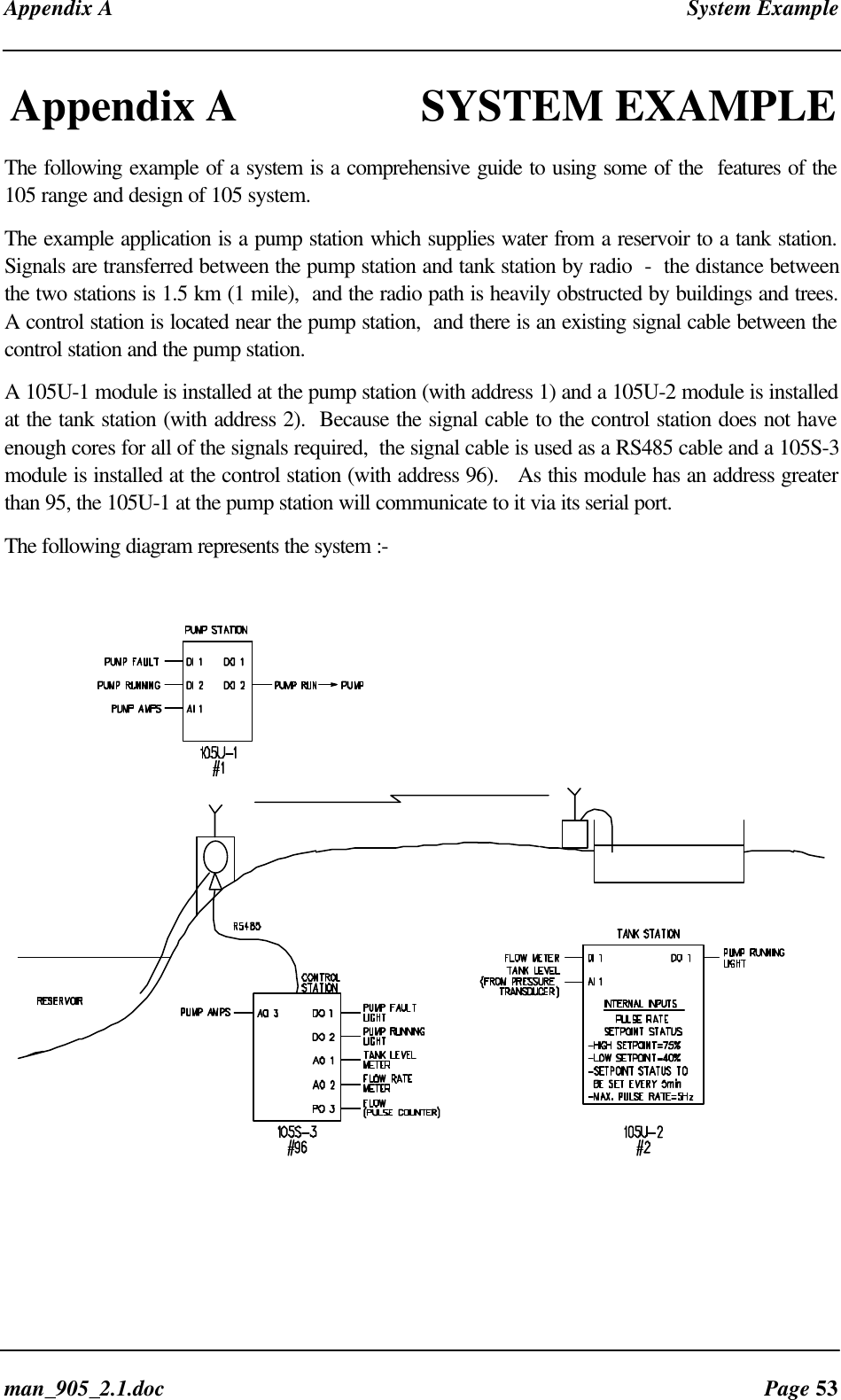
ELPRO Technologies ELPS01 Spread spectrum transmitter with input / output de User Manual man 905 2 1

ELPRO Technologies Pty Ltd Spread spectrum transmitter with input / output de man 905 2 1

New users manual
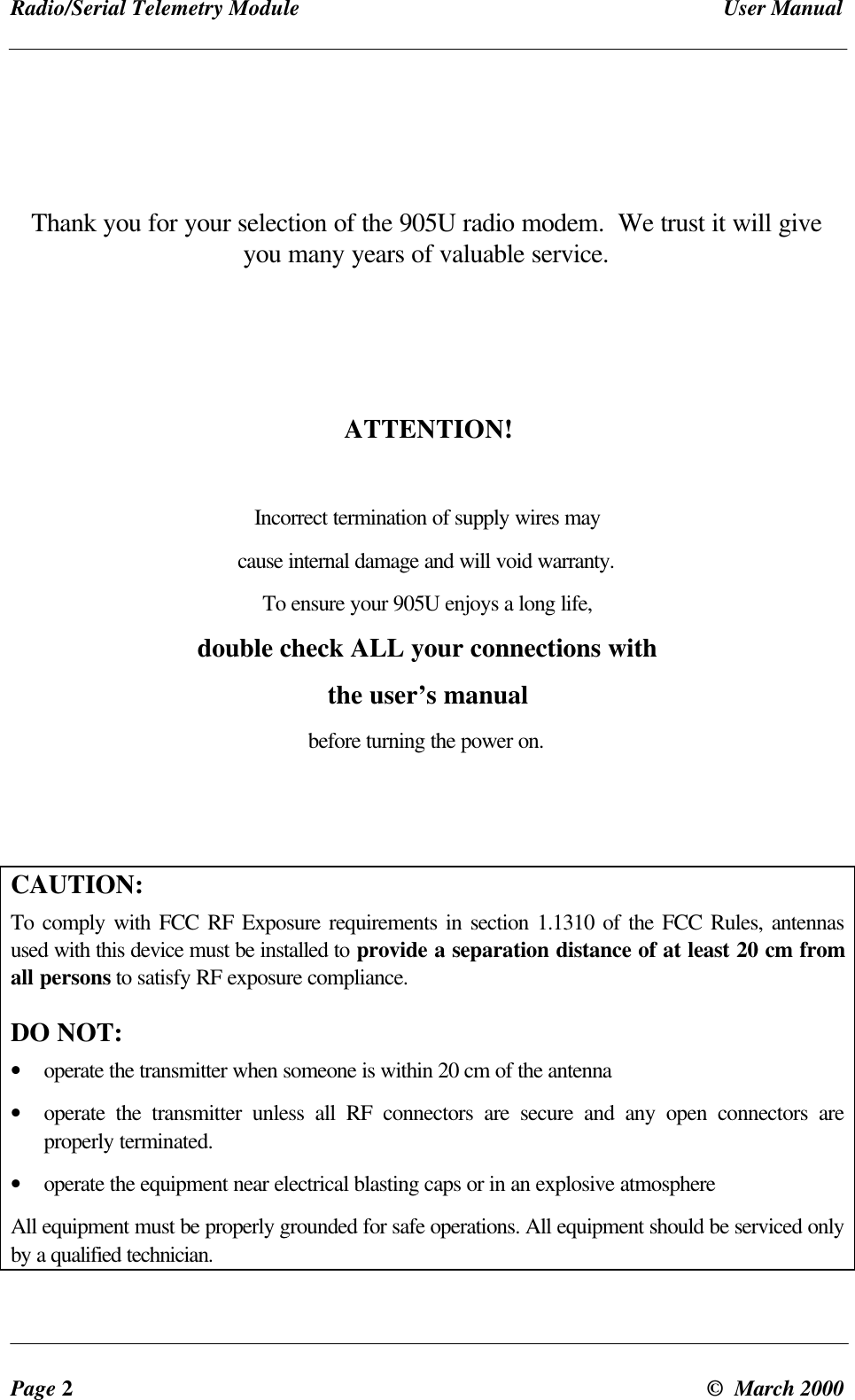
Radio/Serial Telemetry Module User ManualPage 2©  March 2000Thank you for your selection of the 905U radio modem.  We trust it will giveyou many years of valuable service.ATTENTION!Incorrect termination of supply wires maycause internal damage and will void warranty.To ensure your 905U enjoys a long life,double check ALL your connections withthe user’s manualbefore turning the power on.CAUTION:To comply with FCC RF Exposure requirements in section 1.1310 of the FCC Rules, antennasused with this device must be installed to provide a separation distance of at least 20 cm fromall persons to satisfy RF exposure compliance.DO NOT:• operate the transmitter when someone is within 20 cm of the antenna• operate the transmitter unless all RF connectors are secure and any open connectors areproperly terminated.• operate the equipment near electrical blasting caps or in an explosive atmosphereAll equipment must be properly grounded for safe operations. All equipment should be serviced onlyby a qualified technician.
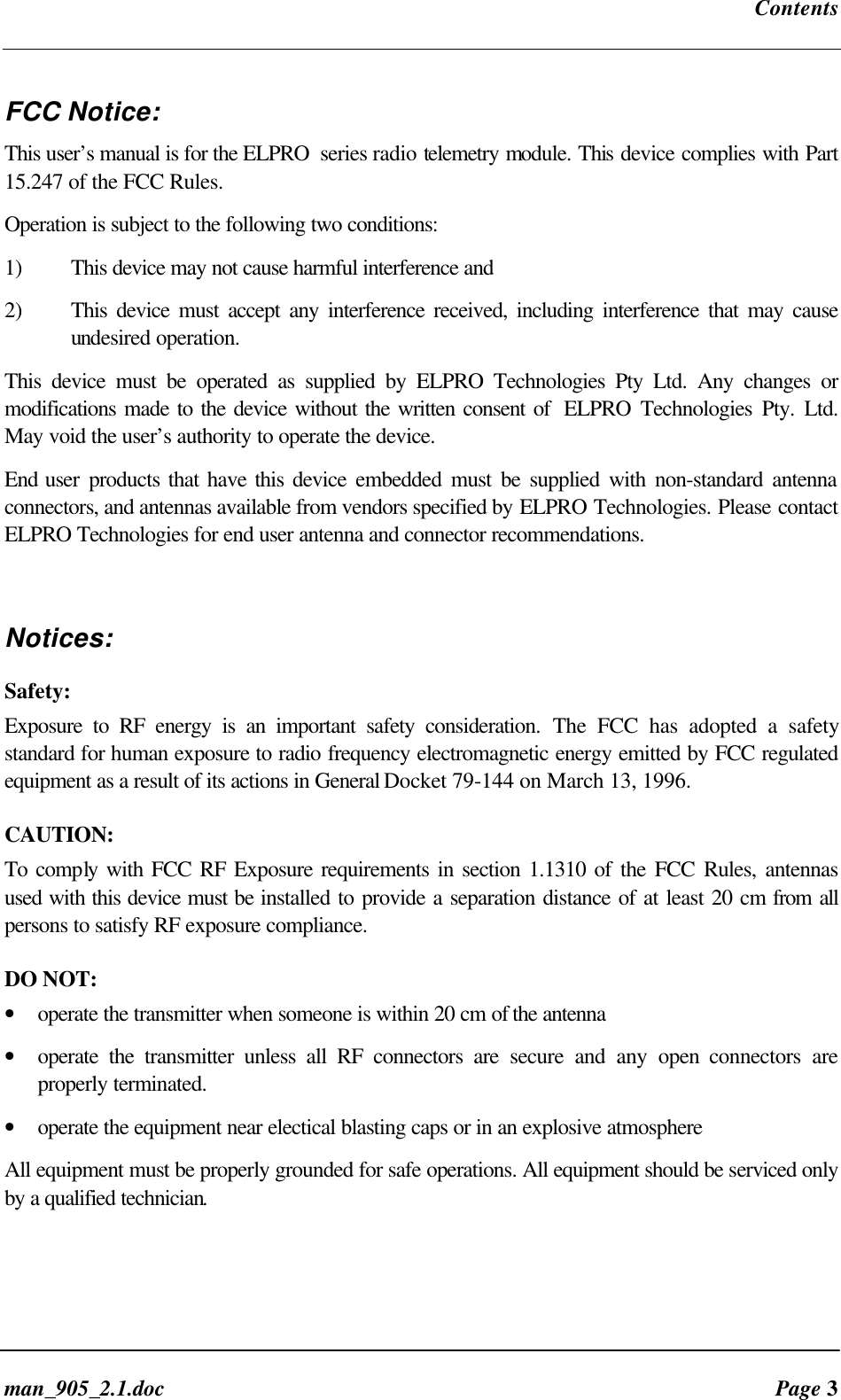
Contentsman_905_2.1.doc Page 3FCC Notice:This user’s manual is for the ELPRO  series radio telemetry module. This device complies with Part15.247 of the FCC Rules.Operation is subject to the following two conditions:1) This device may not cause harmful interference and2) This device must accept any interference received, including interference that may causeundesired operation.This device must be operated as supplied by ELPRO Technologies Pty Ltd. Any changes ormodifications made to the device without the written consent of  ELPRO Technologies Pty. Ltd.May void the user’s authority to operate the device.End user products that have this device embedded must be supplied with non-standard antennaconnectors, and antennas available from vendors specified by ELPRO Technologies. Please contactELPRO Technologies for end user antenna and connector recommendations.Notices:Safety:Exposure to RF energy is an important safety consideration. The FCC has adopted a safetystandard for human exposure to radio frequency electromagnetic energy emitted by FCC regulatedequipment as a result of its actions in General Docket 79-144 on March 13, 1996.CAUTION:To comply with FCC RF Exposure requirements in section 1.1310 of the FCC Rules, antennasused with this device must be installed to provide a separation distance of at least 20 cm from allpersons to satisfy RF exposure compliance.DO NOT:• operate the transmitter when someone is within 20 cm of the antenna• operate the transmitter unless all RF connectors are secure and any open connectors areproperly terminated.• operate the equipment near electical blasting caps or in an explosive atmosphereAll equipment must be properly grounded for safe operations. All equipment should be serviced onlyby a qualified technician.
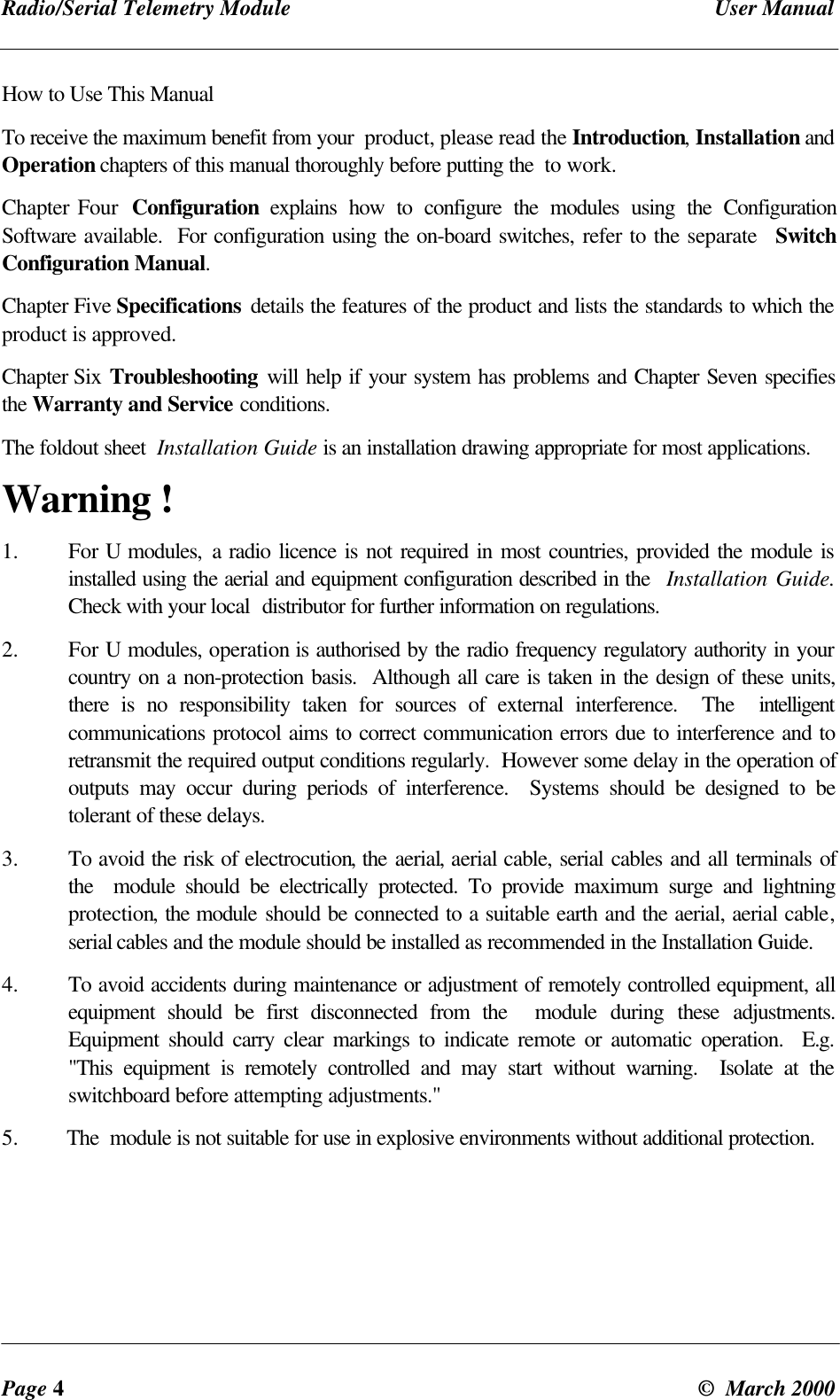
Radio/Serial Telemetry Module User ManualPage 4©  March 2000How to Use This ManualTo receive the maximum benefit from your  product, please read the Introduction, Installation andOperation chapters of this manual thoroughly before putting the  to work.Chapter Four  Configuration explains how to configure the modules using the ConfigurationSoftware available.  For configuration using the on-board switches, refer to the separate  SwitchConfiguration Manual.Chapter Five Specifications details the features of the product and lists the standards to which theproduct is approved.Chapter Six Troubleshooting will help if your system has problems and Chapter Seven specifiesthe Warranty and Service conditions.The foldout sheet  Installation Guide is an installation drawing appropriate for most applications.Warning !1.  For U modules, a radio licence is not required in most countries, provided the module isinstalled using the aerial and equipment configuration described in the  Installation Guide.Check with your local  distributor for further information on regulations.2. For U modules, operation is authorised by the radio frequency regulatory authority in yourcountry on a non-protection basis.  Although all care is taken in the design of these units,there is no responsibility taken for sources of external interference.  The  intelligentcommunications protocol aims to correct communication errors due to interference and toretransmit the required output conditions regularly.  However some delay in the operation ofoutputs may occur during periods of interference.  Systems should be designed to betolerant of these delays.3. To avoid the risk of electrocution, the aerial, aerial cable, serial cables and all terminals ofthe   module should be electrically protected. To provide maximum surge and lightningprotection, the module should be connected to a suitable earth and the aerial, aerial cable,serial cables and the module should be installed as recommended in the Installation Guide.4. To avoid accidents during maintenance or adjustment of remotely controlled equipment, allequipment should be first disconnected from the  module during these adjustments.Equipment should carry clear markings to indicate remote or automatic operation.  E.g."This equipment is remotely controlled and may start without warning.  Isolate at theswitchboard before attempting adjustments."5. The  module is not suitable for use in explosive environments without additional protection.
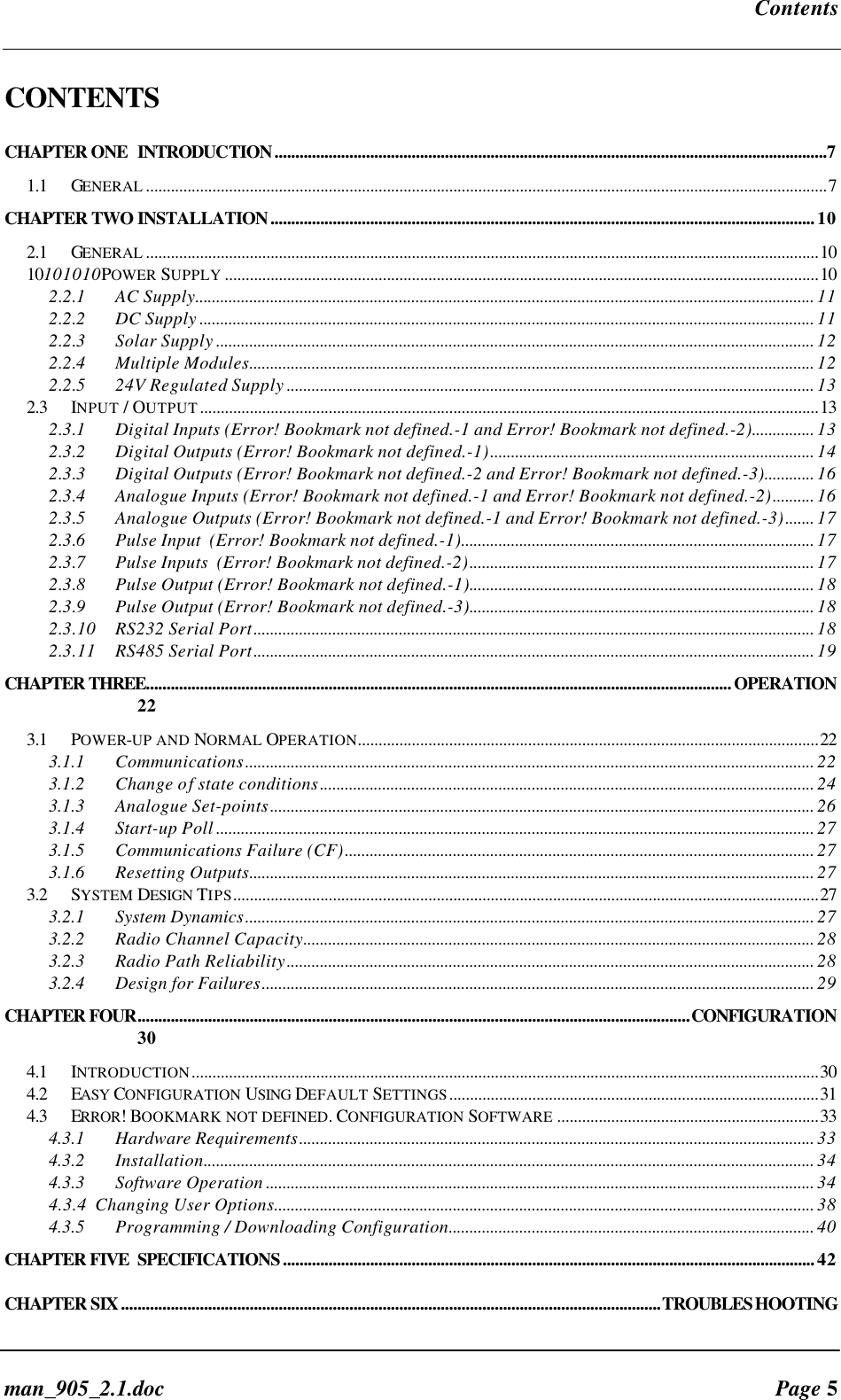
Contentsman_905_2.1.doc Page 5CONTENTSCHAPTER ONE INTRODUCTION.....................................................................................................................................71.1 GENERAL ....................................................................................................................................................................7CHAPTER TWO INSTALLATION...................................................................................................................................102.1 GENERAL ..................................................................................................................................................................1010101010POWER SUPPLY ...............................................................................................................................................102.2.1 AC Supply..................................................................................................................................................... 112.2.2 DC Supply .................................................................................................................................................... 112.2.3 Solar Supply ................................................................................................................................................ 122.2.4 Multiple Modules........................................................................................................................................ 122.2.5 24V Regulated Supply ............................................................................................................................... 132.3INPUT / OUTPUT.....................................................................................................................................................132.3.1 Digital Inputs (Error! Bookmark not defined.-1 and Error! Bookmark not defined.-2)............... 132.3.2 Digital Outputs (Error! Bookmark not defined.-1).............................................................................. 142.3.3 Digital Outputs (Error! Bookmark not defined.-2 and Error! Bookmark not defined.-3)............ 162.3.4 Analogue Inputs (Error! Bookmark not defined.-1 and Error! Bookmark not defined.-2).......... 162.3.5 Analogue Outputs (Error! Bookmark not defined.-1 and Error! Bookmark not defined.-3)....... 172.3.6 Pulse Input  (Error! Bookmark not defined.-1)..................................................................................... 172.3.7 Pulse Inputs  (Error! Bookmark not defined.-2)................................................................................... 172.3.8 Pulse Output (Error! Bookmark not defined.-1)................................................................................... 182.3.9 Pulse Output (Error! Bookmark not defined.-3)................................................................................... 182.3.10 RS232 Serial Port....................................................................................................................................... 182.3.11 RS485 Serial Port....................................................................................................................................... 19CHAPTER THREE.............................................................................................................................................OPERATION223.1 POWER-UP AND NORMAL OPERATION...............................................................................................................223.1.1 Communications......................................................................................................................................... 223.1.2 Change of state conditions....................................................................................................................... 243.1.3 Analogue Set-points................................................................................................................................... 263.1.4 Start-up Poll ................................................................................................................................................ 273.1.5 Communications Failure (CF)................................................................................................................. 273.1.6 Resetting Outputs........................................................................................................................................ 273.2 SYSTEM DESIGN TIPS.............................................................................................................................................273.2.1 System Dynamics......................................................................................................................................... 273.2.2 Radio Channel Capacity........................................................................................................................... 283.2.3 Radio Path Reliability............................................................................................................................... 283.2.4 Design for Failures..................................................................................................................................... 29CHAPTER FOUR.....................................................................................................................................CONFIGURATION304.1 INTRODUCTION.......................................................................................................................................................304.2 EASY CONFIGURATION USING DEFAULT SETTINGS.........................................................................................314.3 ERROR! BOOKMARK NOT DEFINED. CONFIGURATION SOFTWARE ...............................................................334.3.1 Hardware Requirements............................................................................................................................ 334.3.2 Installation................................................................................................................................................... 344.3.3 Software Operation .................................................................................................................................... 344.3.4  Changing User Options.................................................................................................................................. 384.3.5 Programming / Downloading Configuration........................................................................................ 40CHAPTER FIVE SPECIFICATIONS................................................................................................................................42CHAPTER SIX..................................................................................................................................TROUBLESHOOTING
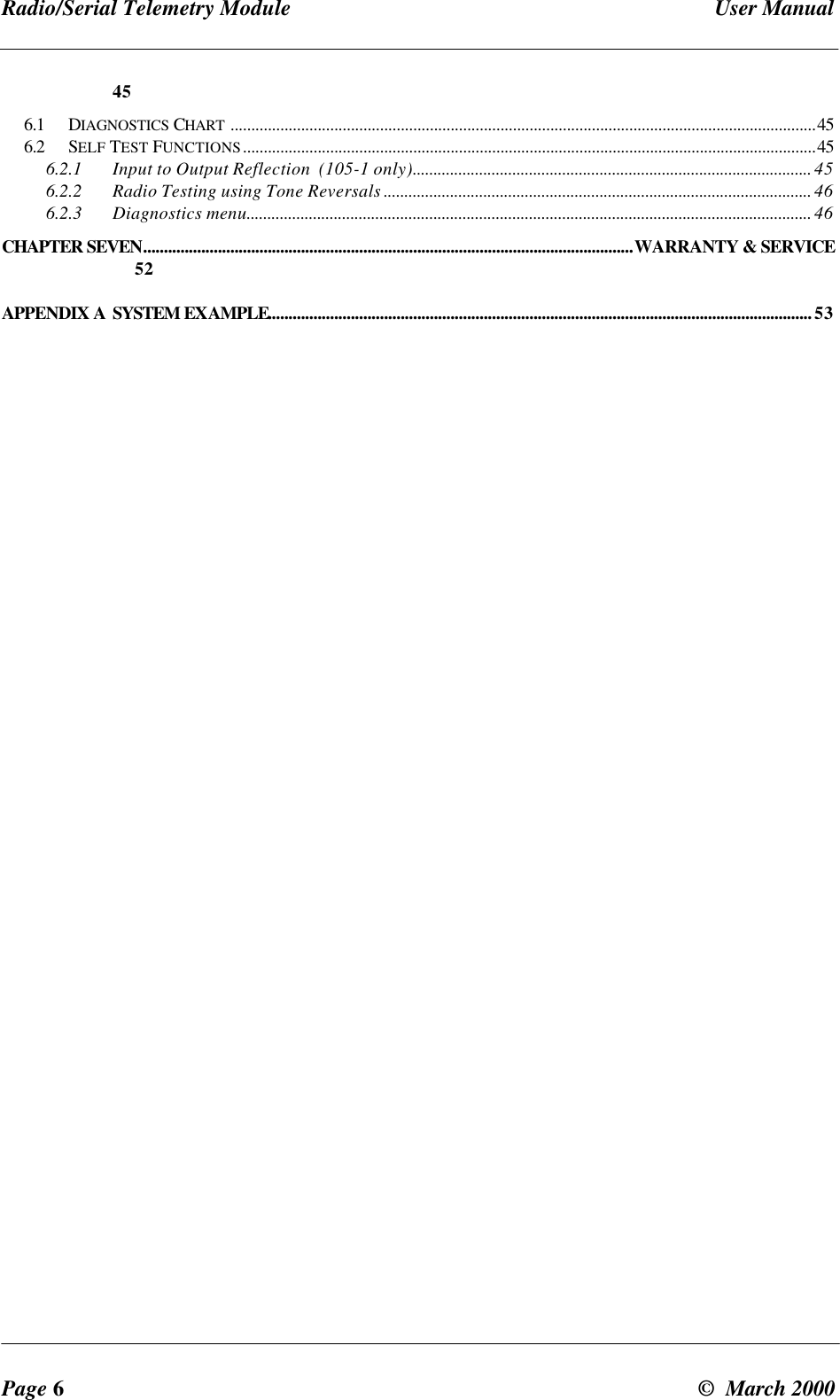
Radio/Serial Telemetry Module User ManualPage 6©  March 2000456.1 DIAGNOSTICS CHART .............................................................................................................................................456.2 SELF TEST FUNCTIONS..........................................................................................................................................456.2.1 Input to Output Reflection  (105-1 only)................................................................................................ 456.2.2 Radio Testing using Tone Reversals ....................................................................................................... 466.2.3 Diagnostics menu........................................................................................................................................ 46CHAPTER SEVEN......................................................................................................................WARRANTY & SERVICE52APPENDIX A SYSTEM EXAMPLE...................................................................................................................................53
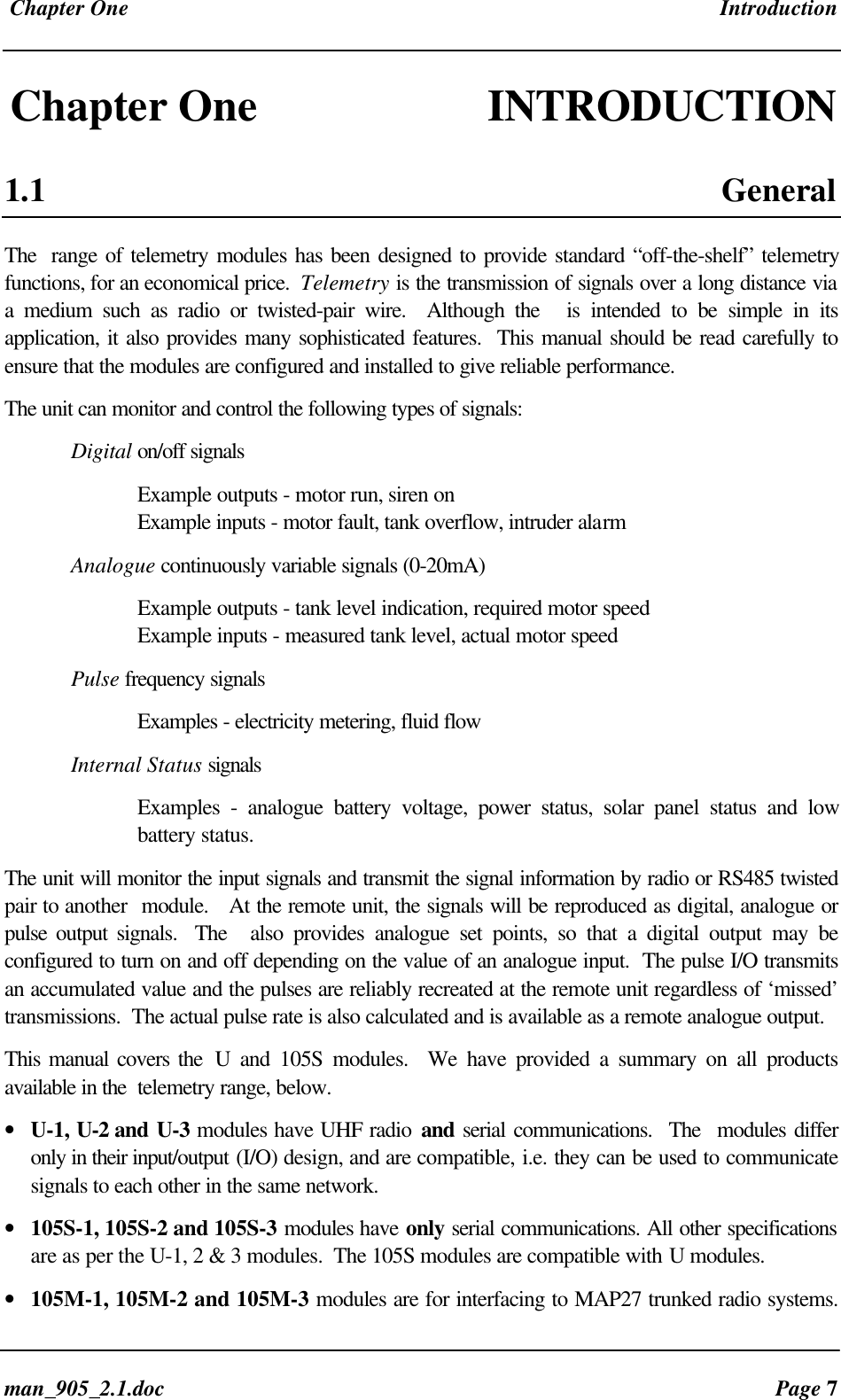
 Chapter One Introductionman_905_2.1.doc Page 7Chapter One INTRODUCTION1.1 GeneralThe  range of telemetry modules has been designed to provide standard “off-the-shelf” telemetryfunctions, for an economical price.  Telemetry is the transmission of signals over a long distance viaa medium such as radio or twisted-pair wire.  Although the   is intended to be simple in itsapplication, it also provides many sophisticated features.  This manual should be read carefully toensure that the modules are configured and installed to give reliable performance.The unit can monitor and control the following types of signals:Digital on/off signalsExample outputs - motor run, siren onExample inputs - motor fault, tank overflow, intruder alarmAnalogue continuously variable signals (0-20mA)Example outputs - tank level indication, required motor speedExample inputs - measured tank level, actual motor speedPulse frequency signalsExamples - electricity metering, fluid flowInternal Status signalsExamples - analogue battery voltage, power status, solar panel status and lowbattery status.The unit will monitor the input signals and transmit the signal information by radio or RS485 twistedpair to another  module.   At the remote unit, the signals will be reproduced as digital, analogue orpulse output signals.  The   also provides analogue set points, so that a digital output may beconfigured to turn on and off depending on the value of an analogue input.  The pulse I/O transmitsan accumulated value and the pulses are reliably recreated at the remote unit regardless of ‘missed’transmissions.  The actual pulse rate is also calculated and is available as a remote analogue output.This manual covers the  U and 105S modules.  We have provided a summary on all productsavailable in the  telemetry range, below.• U-1, U-2 and U-3 modules have UHF radio and serial communications.  The  modules differonly in their input/output (I/O) design, and are compatible, i.e. they can be used to communicatesignals to each other in the same network.• 105S-1, 105S-2 and 105S-3 modules have only serial communications. All other specificationsare as per the U-1, 2 & 3 modules.  The 105S modules are compatible with U modules.• 105M-1, 105M-2 and 105M-3 modules are for interfacing to MAP27 trunked radio systems.
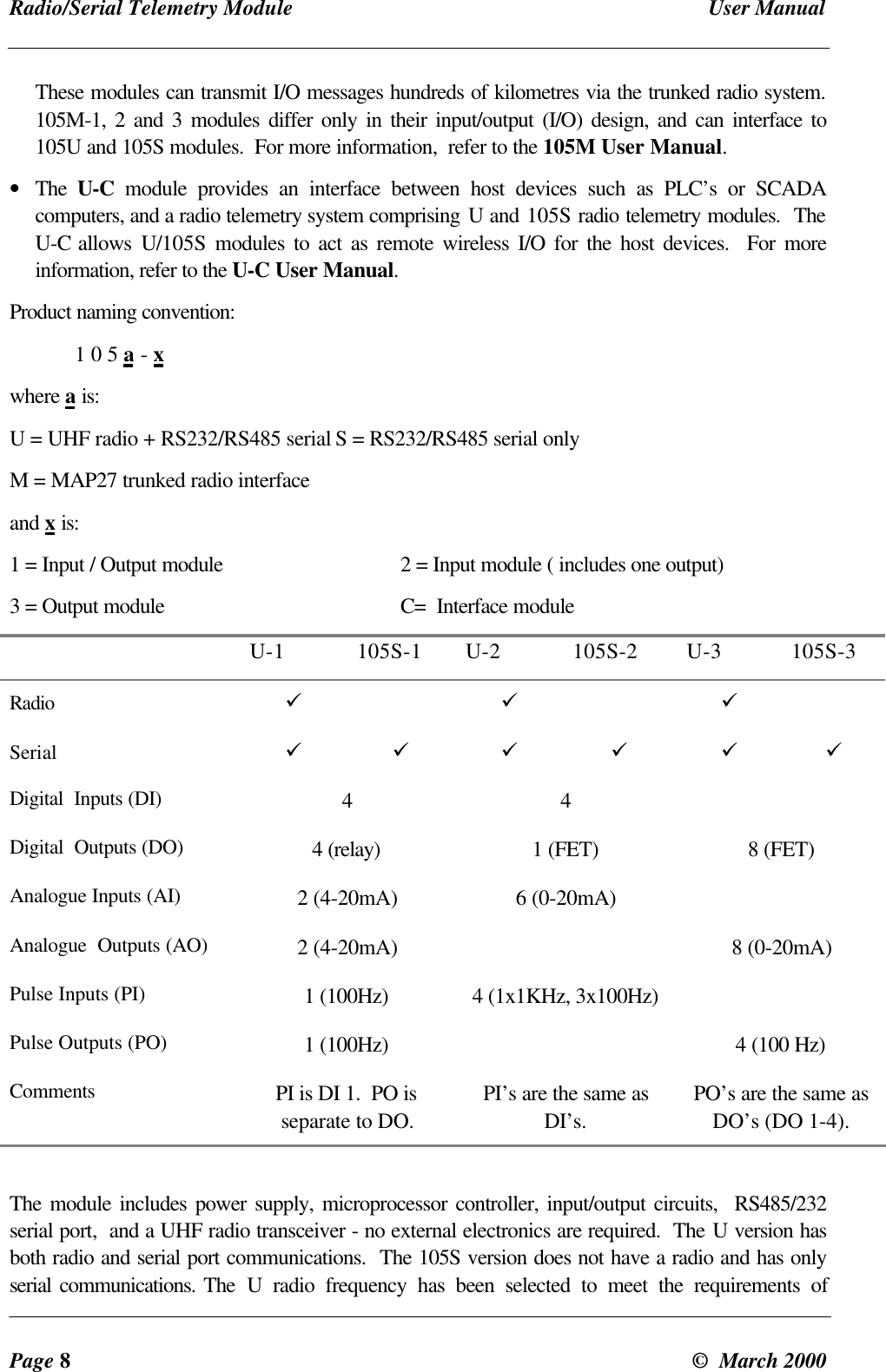
Radio/Serial Telemetry Module User ManualPage 8©  March 2000These modules can transmit I/O messages hundreds of kilometres via the trunked radio system.105M-1, 2 and 3 modules differ only in their input/output (I/O) design, and can interface to105U and 105S modules.  For more information,  refer to the 105M User Manual.• The  U-C module provides an interface between host devices such as PLC’s or SCADAcomputers, and a radio telemetry system comprising U and 105S radio telemetry modules.  TheU-C allows U/105S modules to act as remote wireless I/O for the host devices.  For moreinformation, refer to the U-C User Manual.Product naming convention:1 0 5 a - xwhere a is:U = UHF radio + RS232/RS485 serial S = RS232/RS485 serial onlyM = MAP27 trunked radio interfaceand x is:1 = Input / Output module 2 = Input module ( includes one output)3 = Output module C=  Interface moduleU-1 105S-1 U-2 105S-2 U-3 105S-3Radio ü ü üSerial ü ü ü ü ü üDigital  Inputs (DI) 4 4Digital  Outputs (DO) 4 (relay) 1 (FET) 8 (FET)Analogue Inputs (AI) 2 (4-20mA) 6 (0-20mA)Analogue  Outputs (AO) 2 (4-20mA) 8 (0-20mA)Pulse Inputs (PI) 1 (100Hz) 4 (1x1KHz, 3x100Hz)Pulse Outputs (PO) 1 (100Hz) 4 (100 Hz)Comments PI is DI 1.  PO isseparate to DO.PI’s are the same asDI’s.PO’s are the same asDO’s (DO 1-4).The module includes power supply, microprocessor controller, input/output circuits,  RS485/232serial port,  and a UHF radio transceiver - no external electronics are required.  The U version hasboth radio and serial port communications.  The 105S version does not have a radio and has onlyserial communications. The  U radio frequency has been selected to meet the requirements of
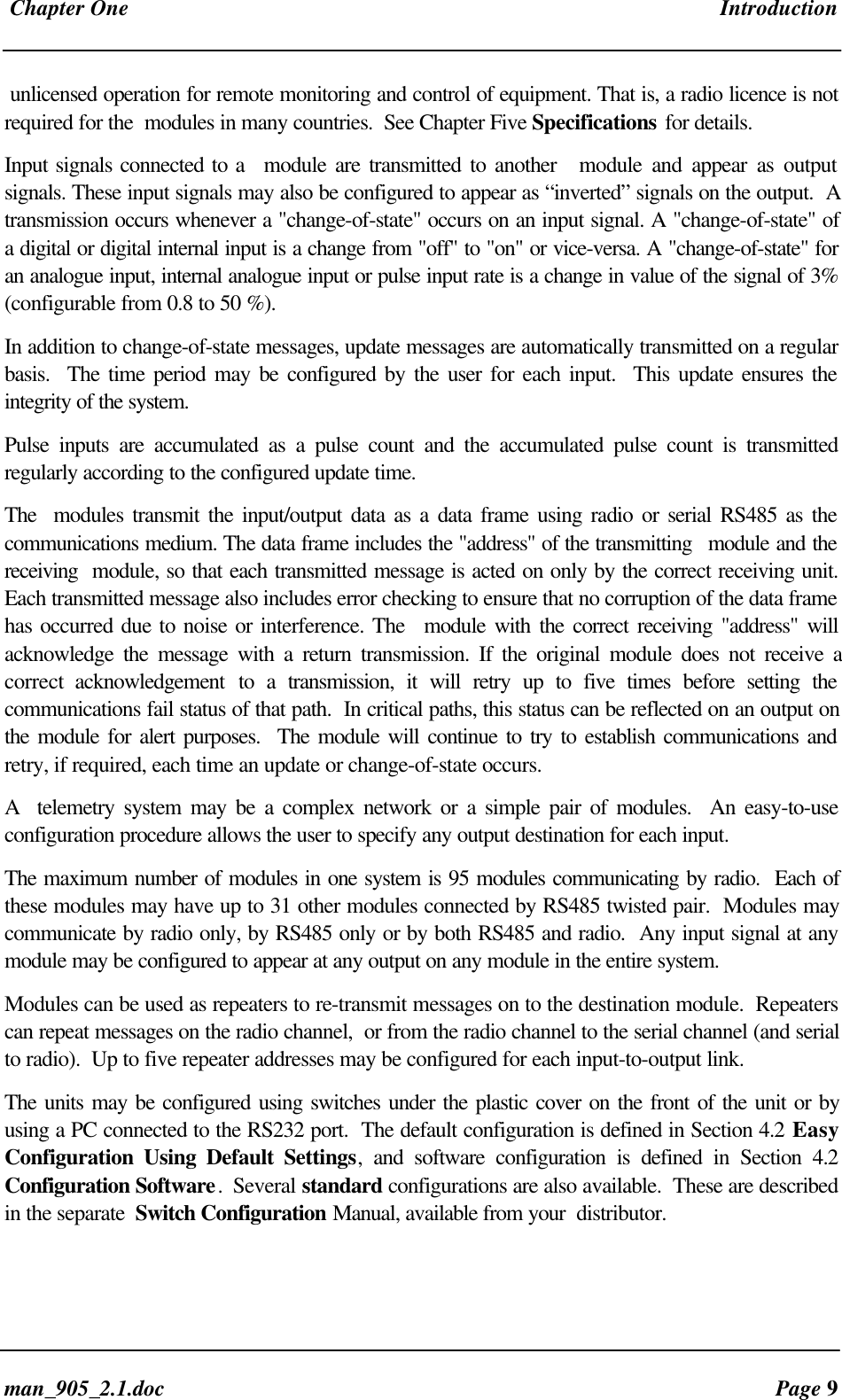
 Chapter One Introductionman_905_2.1.doc Page 9unlicensed operation for remote monitoring and control of equipment. That is, a radio licence is notrequired for the  modules in many countries.  See Chapter Five Specifications for details.Input signals connected to a  module are transmitted to another   module and appear as outputsignals. These input signals may also be configured to appear as “inverted” signals on the output.  Atransmission occurs whenever a "change-of-state" occurs on an input signal. A "change-of-state" ofa digital or digital internal input is a change from "off" to "on" or vice-versa. A "change-of-state" foran analogue input, internal analogue input or pulse input rate is a change in value of the signal of 3%(configurable from 0.8 to 50 %).In addition to change-of-state messages, update messages are automatically transmitted on a regularbasis.  The time period may be configured by the user for each input.  This update ensures theintegrity of the system.Pulse inputs are accumulated as a pulse count and the accumulated pulse count is transmittedregularly according to the configured update time.The  modules transmit the input/output data as a data frame using radio or serial RS485 as thecommunications medium. The data frame includes the "address" of the transmitting  module and thereceiving  module, so that each transmitted message is acted on only by the correct receiving unit.Each transmitted message also includes error checking to ensure that no corruption of the data framehas occurred due to noise or interference. The  module with the correct receiving "address" willacknowledge the message with a return transmission. If the original module does not receive acorrect  acknowledgement to a transmission, it will retry up to five times before setting thecommunications fail status of that path.  In critical paths, this status can be reflected on an output onthe module for alert purposes.  The module will continue to try to establish communications andretry, if required, each time an update or change-of-state occurs.A   telemetry system may be a complex network or a simple pair of modules.  An easy-to-useconfiguration procedure allows the user to specify any output destination for each input.The maximum number of modules in one system is 95 modules communicating by radio.  Each ofthese modules may have up to 31 other modules connected by RS485 twisted pair.  Modules maycommunicate by radio only, by RS485 only or by both RS485 and radio.  Any input signal at anymodule may be configured to appear at any output on any module in the entire system.Modules can be used as repeaters to re-transmit messages on to the destination module.  Repeaterscan repeat messages on the radio channel,  or from the radio channel to the serial channel (and serialto radio).  Up to five repeater addresses may be configured for each input-to-output link.The units may be configured using switches under the plastic cover on the front of the unit or byusing a PC connected to the RS232 port.  The default configuration is defined in Section 4.2 EasyConfiguration Using Default Settings, and software configuration is defined in Section 4.2Configuration Software.  Several standard configurations are also available.  These are describedin the separate  Switch Configuration Manual, available from your  distributor.
Radio/Serial Telemetry Module User ManualPage 10 ©  March 2000Chapter Two INSTALLATION2.1 GeneralThe  module is housed in a rugged aluminium case, suitable for DIN-rail mounting. Terminals aresuitable for cables up to 2.5 sqmm in size.Normal 110/220/240V mains supply should not be connected to any input terminal of themodule.   Refer to Section 2.3 Power Supply.Before installing a new system, it is preferable to bench test the complete system.  Configurationproblems are easier to recognise when the system units are adjacent.  Following installation, themost common problem is poor communications on the radio channel or the serial channel.  For radiomodules, problems are caused by incorrectly installed aerials, or radio interference on the samechannel, or the radio path being inadequate.  If the radio path is a problem (i.e. path too long, orobstructions in the way), then higher performance aerials or a higher mounting point for the aerialmay fix the problem.  Alternately, use an intermediate  module as a repeater.For serial modules, poorly installed serial cable, or interference on the serial cable is a commonproblem.The foldout sheet  Installation Guide provides an installation drawing appropriate to mostapplications. Further information is detailed below.Each  module should be effectively earthed via a "GND" terminal on the  module - this is to ensurethat the surge protection circuits inside the  module are effective.2.2 Power SupplyThe  power supply is a switch-mode design which will accept either AC or DC supply. The  modulemay also be powered from a solar panel without an external solar regulator.The  module accepts supply voltages in the following ranges :12 - 24 volts AC RMS   or   15 - 30 volts DC  at the “supply” terminals,  or10.8 -15 volts DC  at the “battery” terminals.
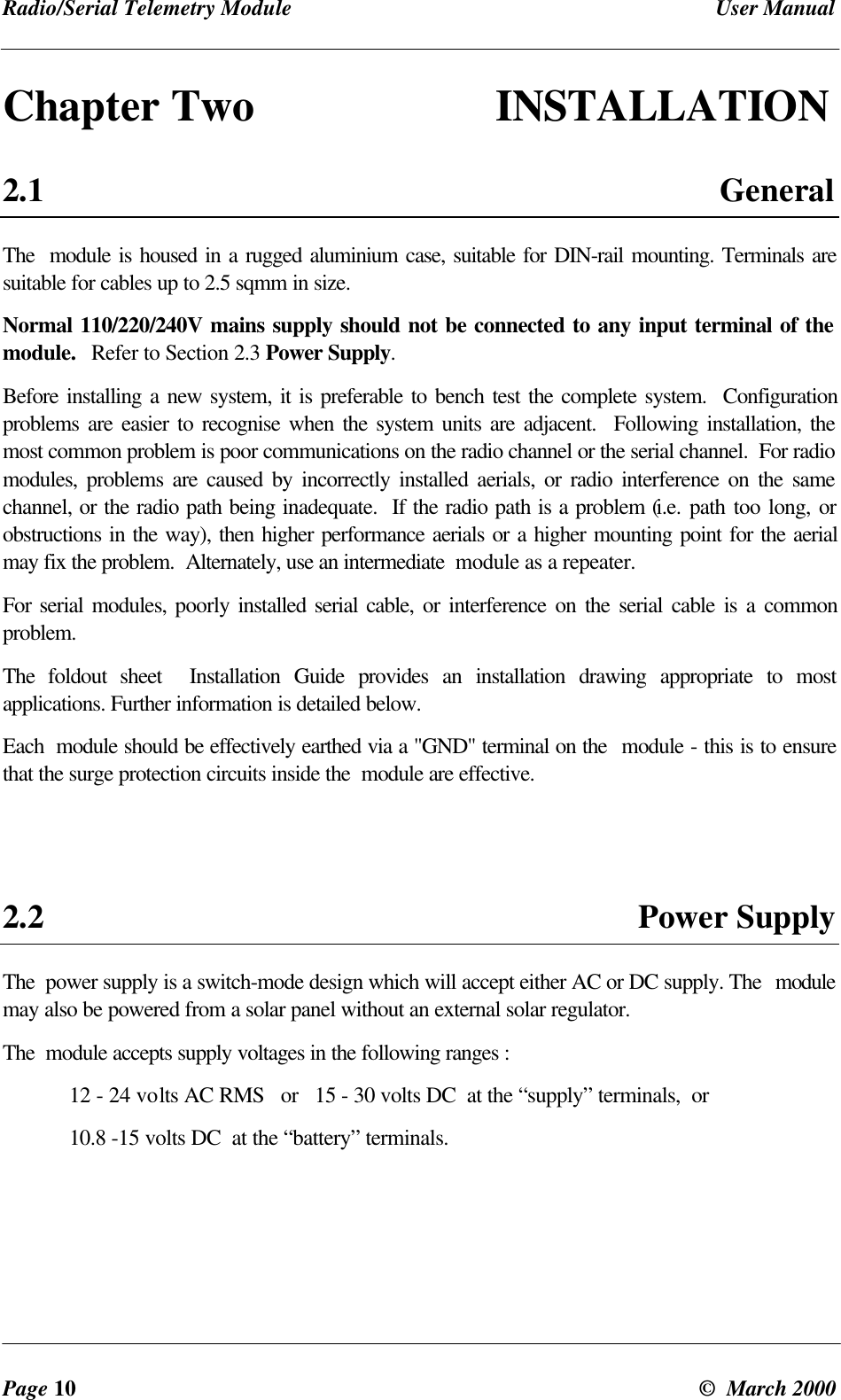
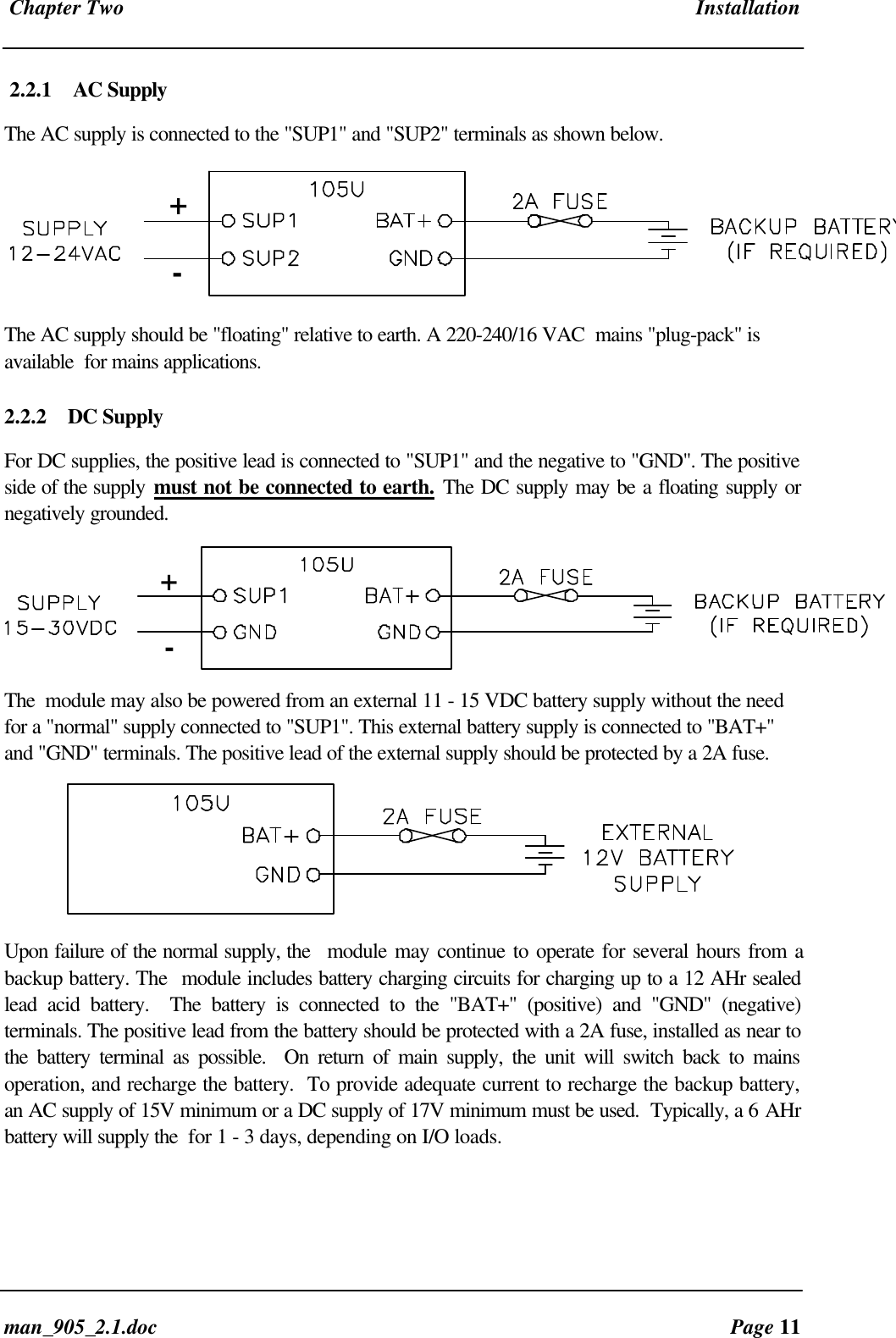
 Chapter Two Installationman_905_2.1.doc Page 112.2.1 AC SupplyThe AC supply is connected to the "SUP1" and "SUP2" terminals as shown below.+-The AC supply should be "floating" relative to earth. A 220-240/16 VAC  mains "plug-pack" isavailable  for mains applications.2.2.2 DC SupplyFor DC supplies, the positive lead is connected to "SUP1" and the negative to "GND". The positiveside of the supply must not be connected to earth. The DC supply may be a floating supply ornegatively grounded.+-The  module may also be powered from an external 11 - 15 VDC battery supply without the needfor a "normal" supply connected to "SUP1". This external battery supply is connected to "BAT+"and "GND" terminals. The positive lead of the external supply should be protected by a 2A fuse.Upon failure of the normal supply, the  module may continue to operate for several hours from abackup battery. The  module includes battery charging circuits for charging up to a 12 AHr sealedlead acid battery.  The battery is connected to the "BAT+" (positive) and "GND" (negative)terminals. The positive lead from the battery should be protected with a 2A fuse, installed as near tothe battery terminal as possible.  On return of main supply, the unit will switch back to mainsoperation, and recharge the battery.  To provide adequate current to recharge the backup battery,an AC supply of 15V minimum or a DC supply of 17V minimum must be used.  Typically, a 6 AHrbattery will supply the  for 1 - 3 days, depending on I/O loads.
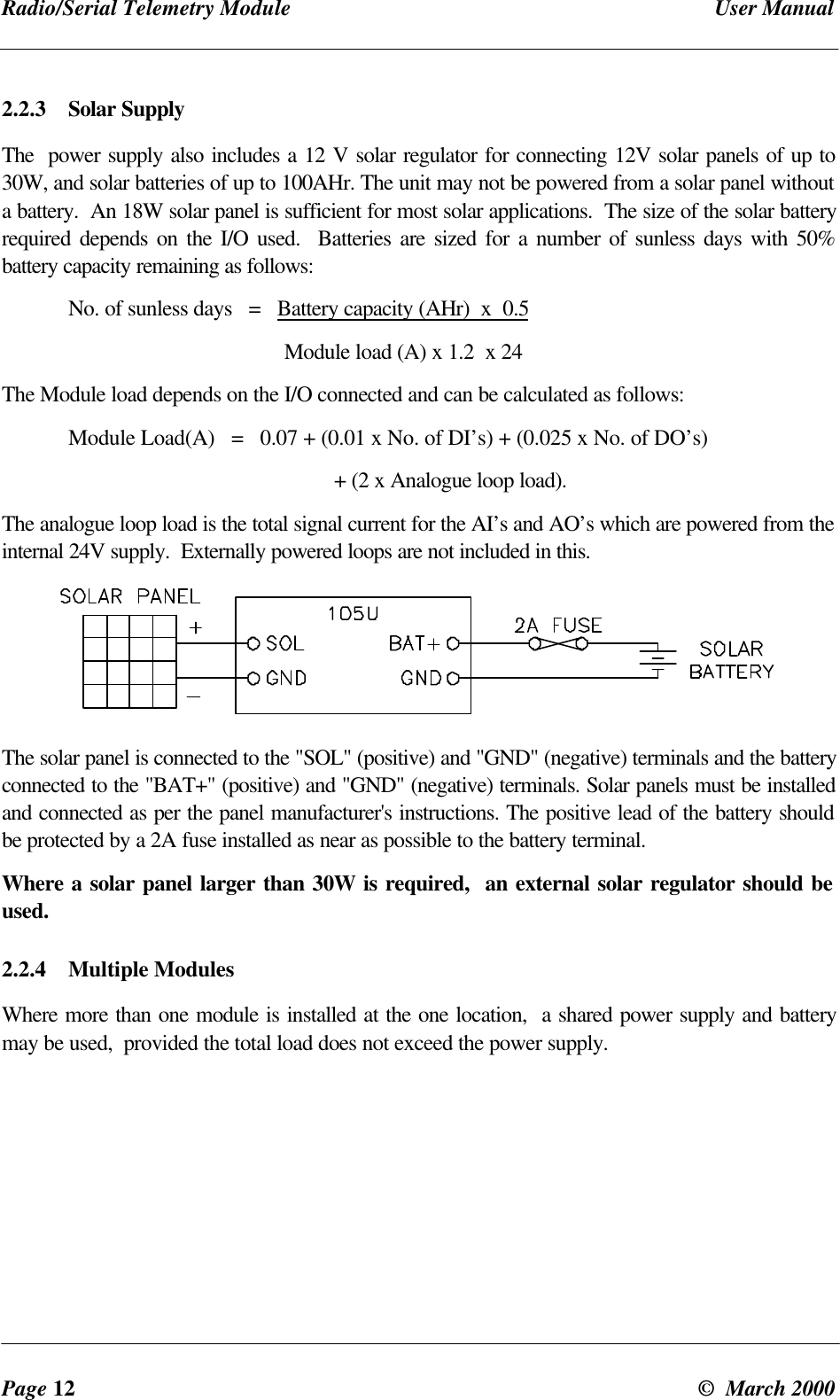
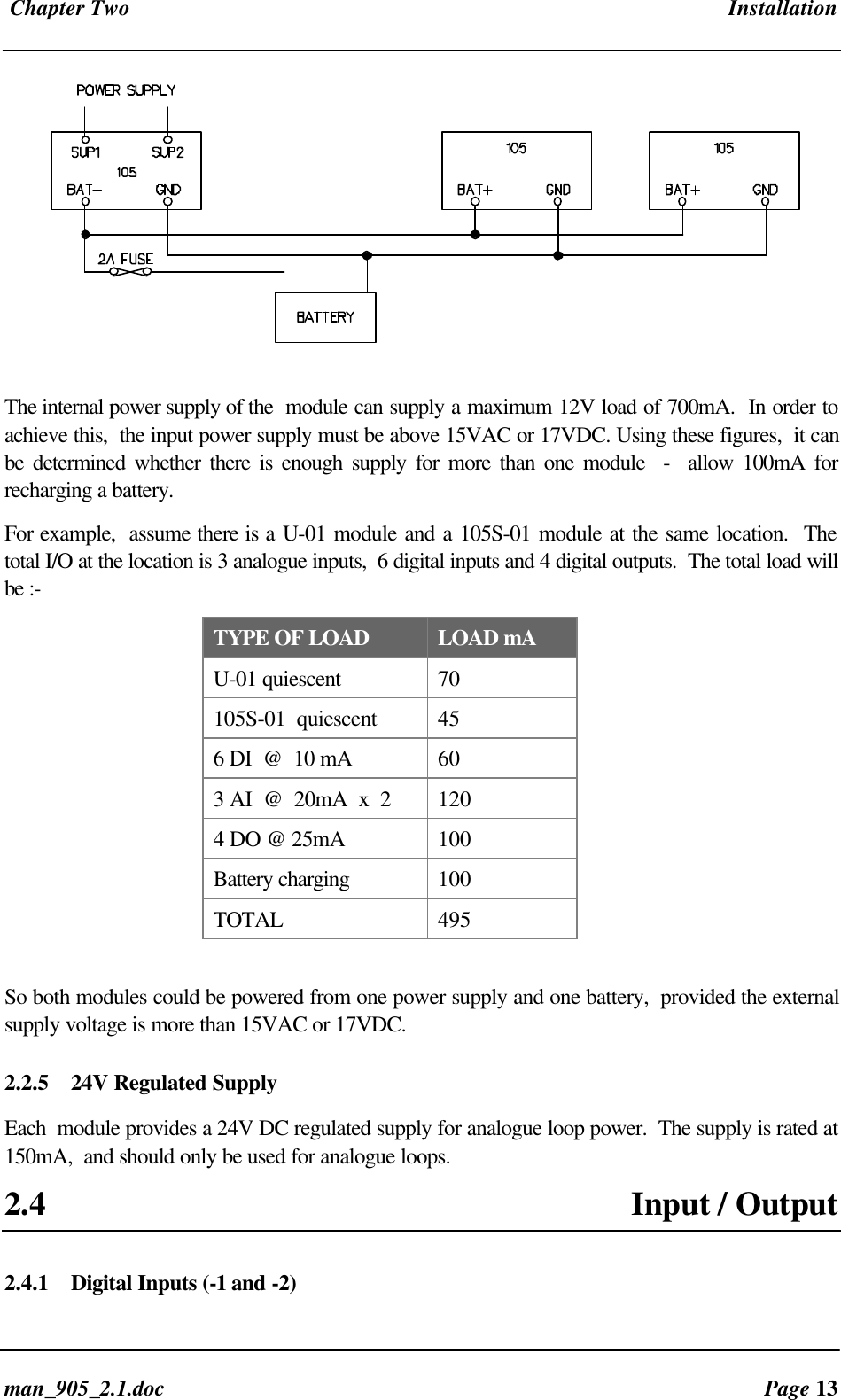
Radio/Serial Telemetry Module User ManualPage 12 ©  March 20002.2.3 Solar SupplyThe  power supply also includes a 12 V solar regulator for connecting 12V solar panels of up to30W, and solar batteries of up to 100AHr. The unit may not be powered from a solar panel withouta battery.  An 18W solar panel is sufficient for most solar applications.  The size of the solar batteryrequired depends on the I/O used.  Batteries are sized for a number of sunless days with 50%battery capacity remaining as follows:No. of sunless days   =   Battery capacity (AHr)  x  0.5                                                   Module load (A) x 1.2  x 24The Module load depends on the I/O connected and can be calculated as follows:Module Load(A)   =   0.07 + (0.01 x No. of DI’s) + (0.025 x No. of DO’s)+ (2 x Analogue loop load).The analogue loop load is the total signal current for the AI’s and AO’s which are powered from theinternal 24V supply.  Externally powered loops are not included in this.The solar panel is connected to the "SOL" (positive) and "GND" (negative) terminals and the batteryconnected to the "BAT+" (positive) and "GND" (negative) terminals. Solar panels must be installedand connected as per the panel manufacturer's instructions. The positive lead of the battery shouldbe protected by a 2A fuse installed as near as possible to the battery terminal.Where a solar panel larger than 30W is required,  an external solar regulator should beused.2.2.4 Multiple ModulesWhere more than one module is installed at the one location,  a shared power supply and batterymay be used,  provided the total load does not exceed the power supply.
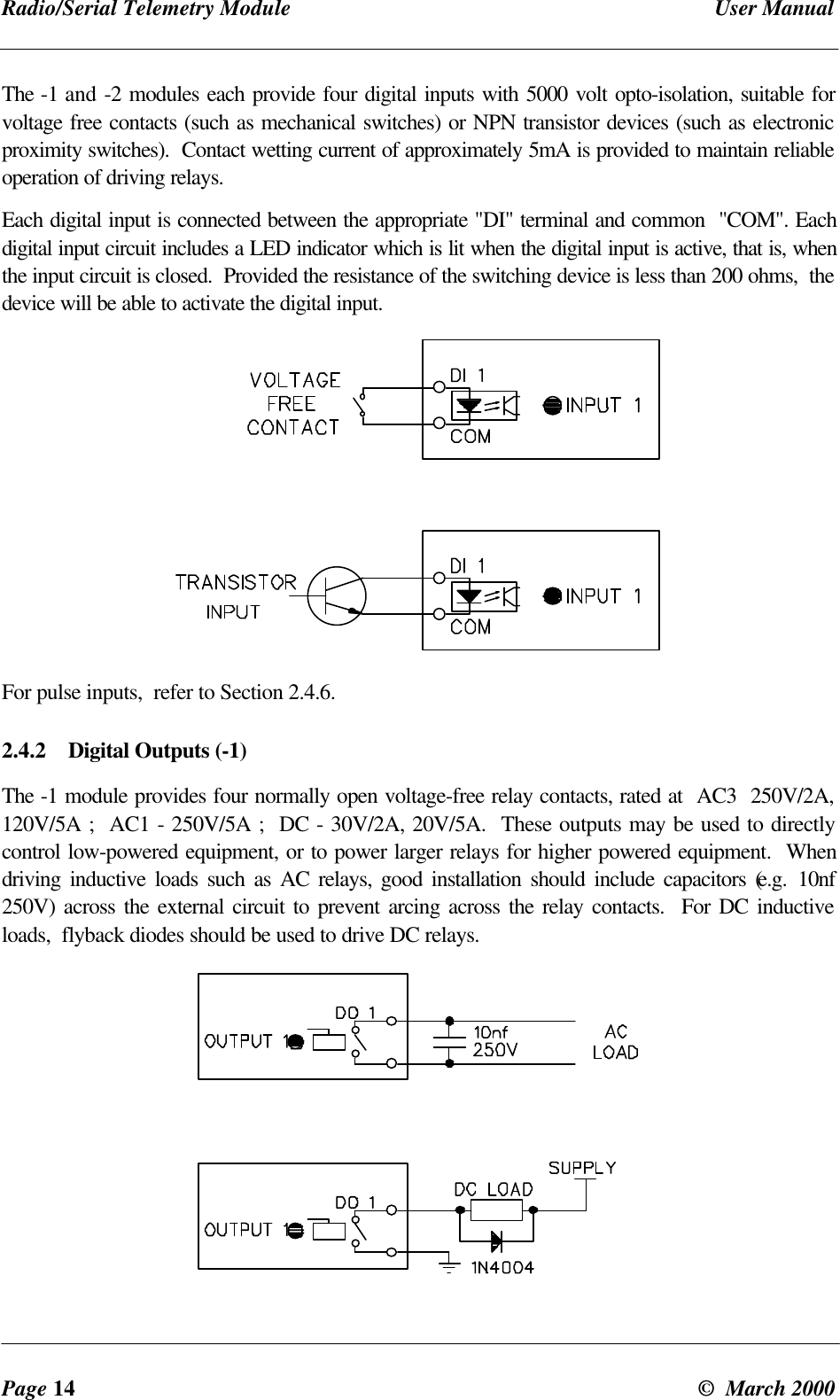
 Chapter Two Installationman_905_2.1.doc Page 13The internal power supply of the  module can supply a maximum 12V load of 700mA.  In order toachieve this,  the input power supply must be above 15VAC or 17VDC. Using these figures,  it canbe determined whether there is enough supply for more than one module  -  allow 100mA forrecharging a battery.For example,  assume there is a U-01 module and a 105S-01 module at the same location.  Thetotal I/O at the location is 3 analogue inputs,  6 digital inputs and 4 digital outputs.  The total load willbe :-TYPE OF LOAD LOAD mAU-01 quiescent 70105S-01  quiescent 456 DI  @  10 mA 603 AI  @  20mA  x  2 1204 DO @ 25mA 100Battery charging 100TOTAL 495So both modules could be powered from one power supply and one battery,  provided the externalsupply voltage is more than 15VAC or 17VDC.2.2.5 24V Regulated SupplyEach  module provides a 24V DC regulated supply for analogue loop power.  The supply is rated at150mA,  and should only be used for analogue loops.2.4 Input / Output2.4.1 Digital Inputs (-1 and -2)
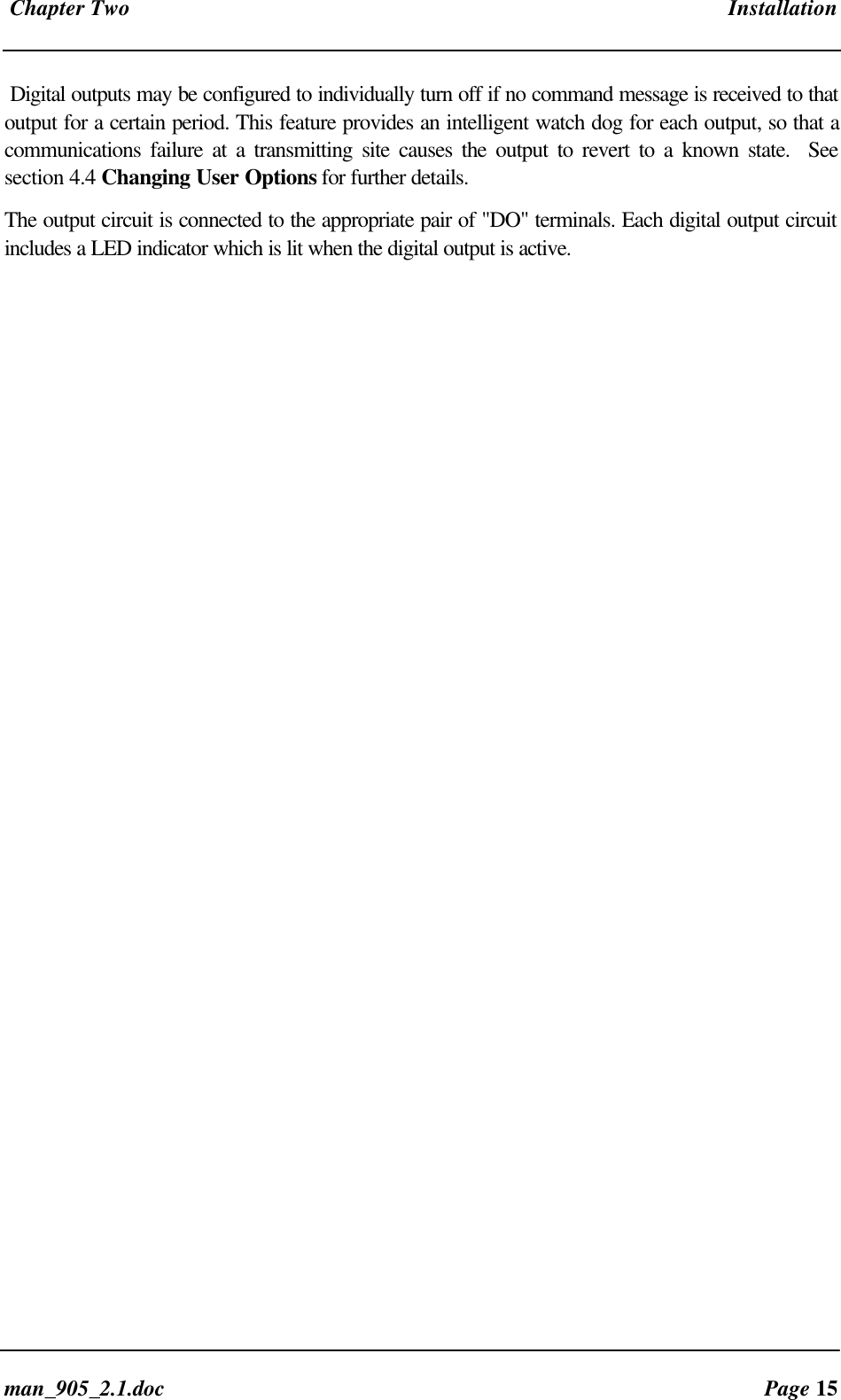
Radio/Serial Telemetry Module User ManualPage 14 ©  March 2000The -1 and -2 modules each provide four digital inputs with 5000 volt opto-isolation, suitable forvoltage free contacts (such as mechanical switches) or NPN transistor devices (such as electronicproximity switches).  Contact wetting current of approximately 5mA is provided to maintain reliableoperation of driving relays.Each digital input is connected between the appropriate "DI" terminal and common  "COM". Eachdigital input circuit includes a LED indicator which is lit when the digital input is active, that is, whenthe input circuit is closed.  Provided the resistance of the switching device is less than 200 ohms,  thedevice will be able to activate the digital input.For pulse inputs,  refer to Section 2.4.6.2.4.2 Digital Outputs (-1)The -1 module provides four normally open voltage-free relay contacts, rated at  AC3  250V/2A,120V/5A ;  AC1 - 250V/5A ;  DC - 30V/2A, 20V/5A.  These outputs may be used to directlycontrol low-powered equipment, or to power larger relays for higher powered equipment.  Whendriving inductive loads such as AC relays, good installation should include capacitors (e.g. 10nf250V) across the external circuit to prevent arcing across the relay contacts.  For DC inductiveloads,  flyback diodes should be used to drive DC relays.
 Chapter Two Installationman_905_2.1.doc Page 15Digital outputs may be configured to individually turn off if no command message is received to thatoutput for a certain period. This feature provides an intelligent watch dog for each output, so that acommunications failure at a transmitting site causes the output to revert to a known state.  Seesection 4.4 Changing User Options for further details.The output circuit is connected to the appropriate pair of "DO" terminals. Each digital output circuitincludes a LED indicator which is lit when the digital output is active.
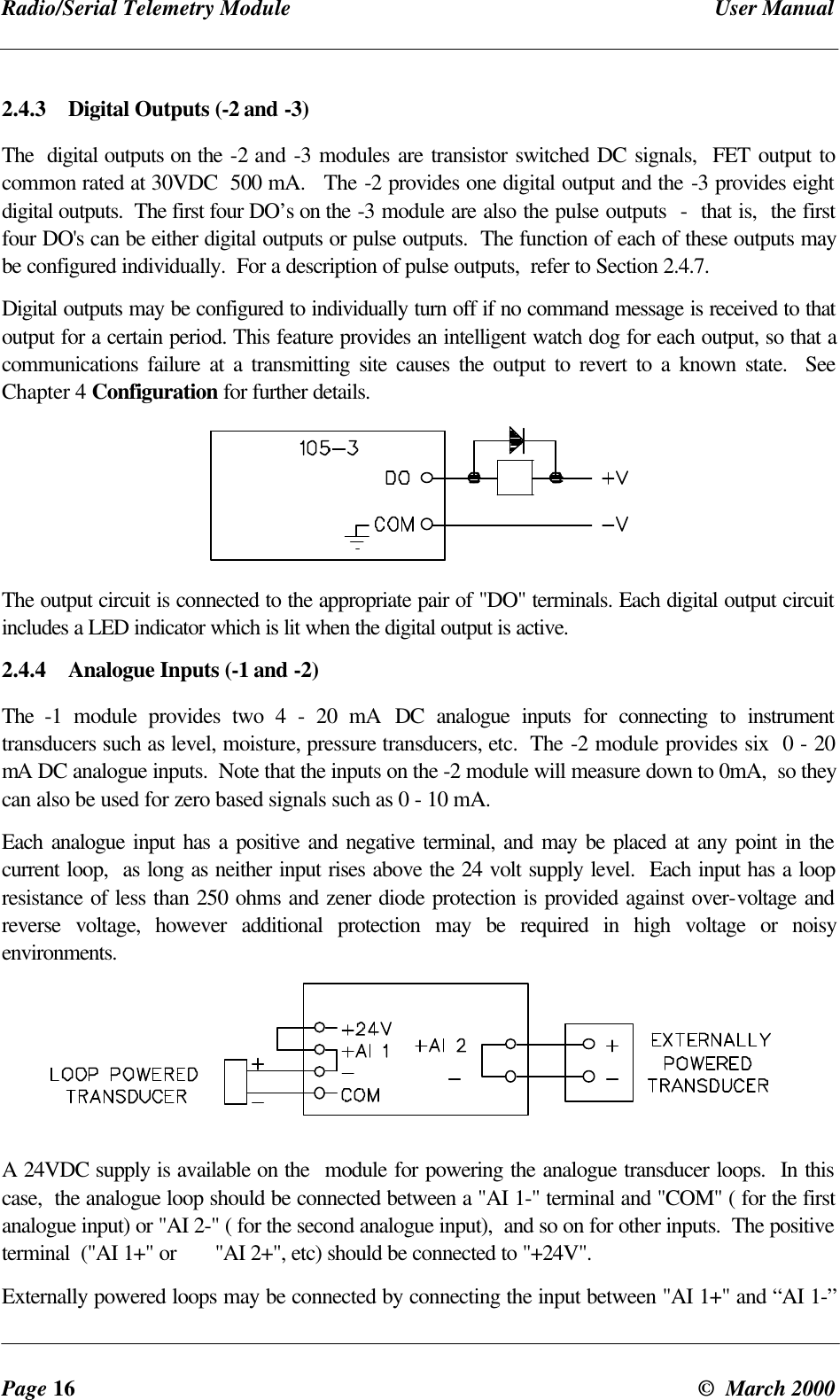
Radio/Serial Telemetry Module User ManualPage 16 ©  March 20002.4.3 Digital Outputs (-2 and -3)The  digital outputs on the -2 and -3 modules are transistor switched DC signals,  FET output tocommon rated at 30VDC  500 mA.   The -2 provides one digital output and the -3 provides eightdigital outputs.  The first four DO’s on the -3 module are also the pulse outputs  -  that is,  the firstfour DO's can be either digital outputs or pulse outputs.  The function of each of these outputs maybe configured individually.  For a description of pulse outputs,  refer to Section 2.4.7.Digital outputs may be configured to individually turn off if no command message is received to thatoutput for a certain period. This feature provides an intelligent watch dog for each output, so that acommunications failure at a transmitting site causes the output to revert to a known state.  SeeChapter 4 Configuration for further details.The output circuit is connected to the appropriate pair of "DO" terminals. Each digital output circuitincludes a LED indicator which is lit when the digital output is active.2.4.4 Analogue Inputs (-1 and -2)The  -1 module provides two 4 - 20 mA DC analogue inputs for connecting to instrumenttransducers such as level, moisture, pressure transducers, etc.  The -2 module provides six  0 - 20mA DC analogue inputs.  Note that the inputs on the -2 module will measure down to 0mA,  so theycan also be used for zero based signals such as 0 - 10 mA.Each analogue input has a positive and negative terminal, and may be placed at any point in thecurrent loop,  as long as neither input rises above the 24 volt supply level.  Each input has a loopresistance of less than 250 ohms and zener diode protection is provided against over-voltage andreverse voltage, however additional protection may be required in high voltage or noisyenvironments.A 24VDC supply is available on the  module for powering the analogue transducer loops.  In thiscase,  the analogue loop should be connected between a "AI 1-" terminal and "COM" ( for the firstanalogue input) or "AI 2-" ( for the second analogue input),  and so on for other inputs.  The positiveterminal  ("AI 1+" or       "AI 2+", etc) should be connected to "+24V".Externally powered loops may be connected by connecting the input between "AI 1+" and “AI 1-”
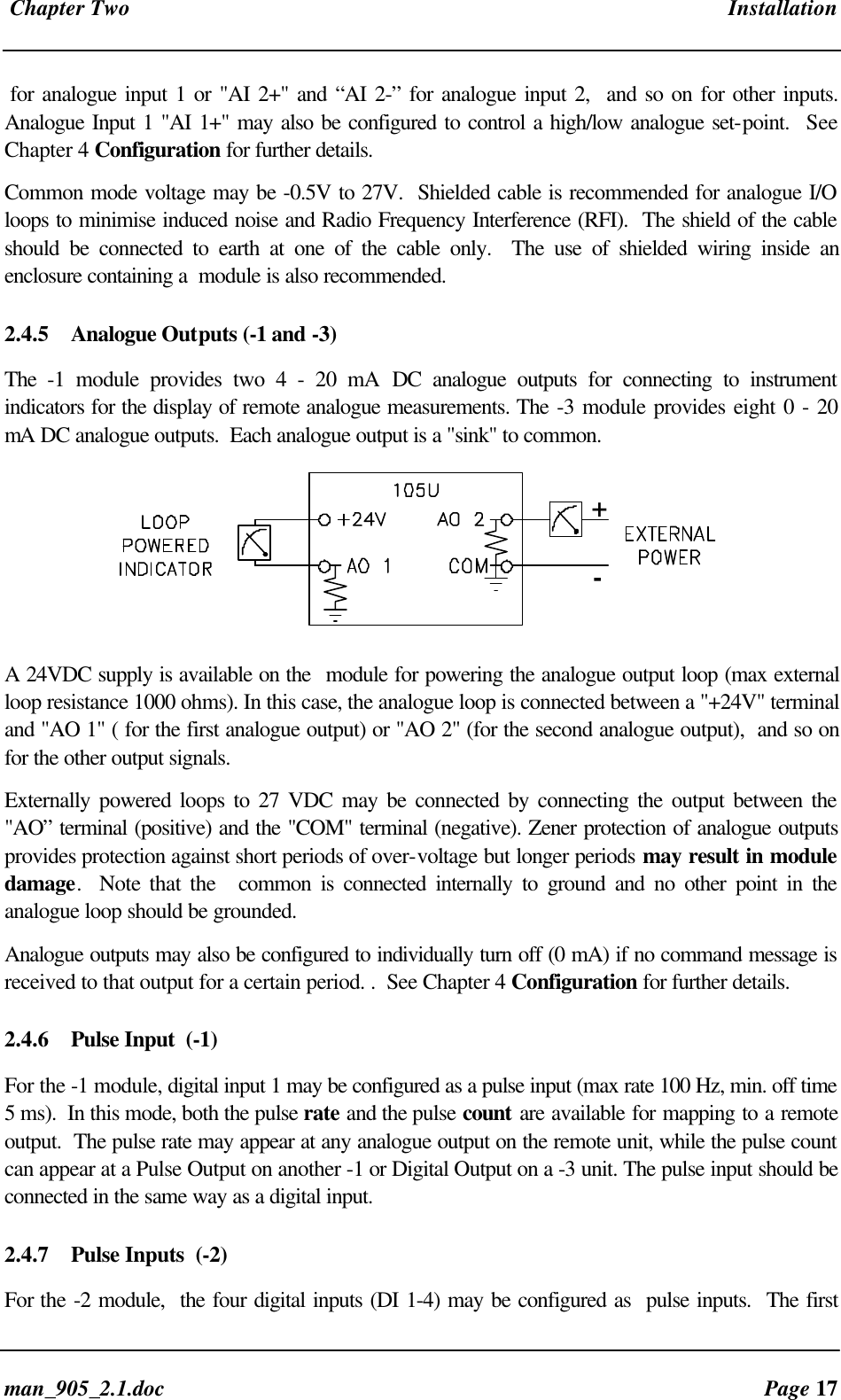
 Chapter Two Installationman_905_2.1.doc Page 17for analogue input 1 or "AI 2+" and “AI 2-” for analogue input 2,  and so on for other inputs.Analogue Input 1 "AI 1+" may also be configured to control a high/low analogue set-point.  SeeChapter 4 Configuration for further details.Common mode voltage may be -0.5V to 27V.  Shielded cable is recommended for analogue I/Oloops to minimise induced noise and Radio Frequency Interference (RFI).  The shield of the cableshould be connected to earth at one of the cable only.  The use of shielded wiring inside anenclosure containing a  module is also recommended.2.4.5 Analogue Outputs (-1 and -3)The  -1 module provides two 4 - 20 mA DC analogue outputs for connecting to instrumentindicators for the display of remote analogue measurements. The -3 module provides eight 0 - 20mA DC analogue outputs.  Each analogue output is a "sink" to common.+-A 24VDC supply is available on the  module for powering the analogue output loop (max externalloop resistance 1000 ohms). In this case, the analogue loop is connected between a "+24V" terminaland "AO 1" ( for the first analogue output) or "AO 2" (for the second analogue output),  and so onfor the other output signals.Externally powered loops to 27 VDC may be connected by connecting the output between the"AO” terminal (positive) and the "COM" terminal (negative). Zener protection of analogue outputsprovides protection against short periods of over-voltage but longer periods may result in moduledamage.  Note that the   common is connected internally to ground and no other point in theanalogue loop should be grounded.Analogue outputs may also be configured to individually turn off (0 mA) if no command message isreceived to that output for a certain period. .  See Chapter 4 Configuration for further details.2.4.6 Pulse Input  (-1)For the -1 module, digital input 1 may be configured as a pulse input (max rate 100 Hz, min. off time5 ms).  In this mode, both the pulse rate and the pulse count are available for mapping to a remoteoutput.  The pulse rate may appear at any analogue output on the remote unit, while the pulse countcan appear at a Pulse Output on another -1 or Digital Output on a -3 unit. The pulse input should beconnected in the same way as a digital input.2.4.7 Pulse Inputs  (-2)For the -2 module,  the four digital inputs (DI 1-4) may be configured as  pulse inputs.  The first
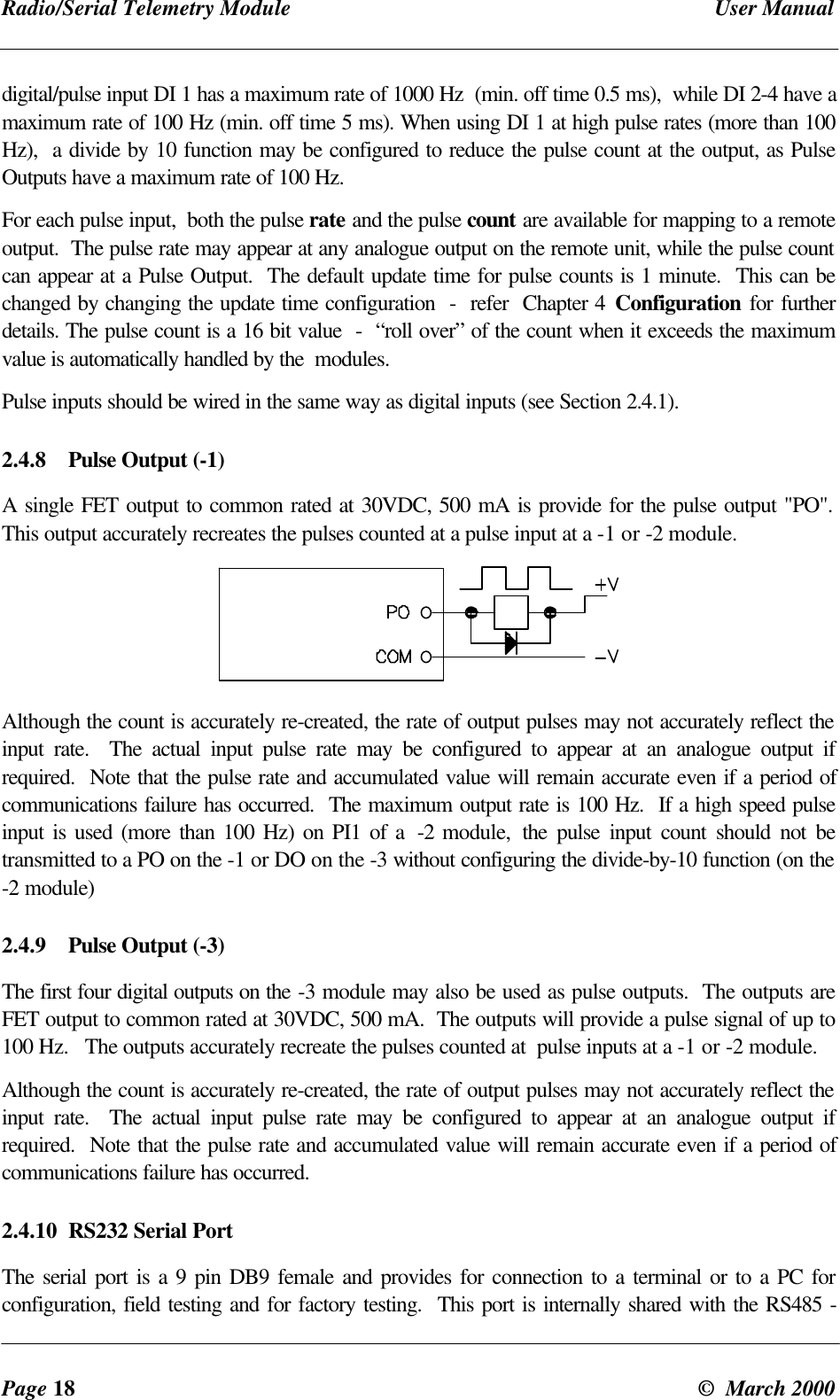
Radio/Serial Telemetry Module User ManualPage 18 ©  March 2000digital/pulse input DI 1 has a maximum rate of 1000 Hz  (min. off time 0.5 ms),  while DI 2-4 have amaximum rate of 100 Hz (min. off time 5 ms). When using DI 1 at high pulse rates (more than 100Hz),  a divide by 10 function may be configured to reduce the pulse count at the output, as PulseOutputs have a maximum rate of 100 Hz.For each pulse input,  both the pulse rate and the pulse count are available for mapping to a remoteoutput.  The pulse rate may appear at any analogue output on the remote unit, while the pulse countcan appear at a Pulse Output.  The default update time for pulse counts is 1 minute.  This can bechanged by changing the update time configuration  -  refer  Chapter 4 Configuration  for furtherdetails. The pulse count is a 16 bit value  -  “roll over” of the count when it exceeds the maximumvalue is automatically handled by the  modules.Pulse inputs should be wired in the same way as digital inputs (see Section 2.4.1).2.4.8 Pulse Output (-1)A single FET output to common rated at 30VDC, 500 mA is provide for the pulse output "PO".This output accurately recreates the pulses counted at a pulse input at a -1 or -2 module.Although the count is accurately re-created, the rate of output pulses may not accurately reflect theinput rate.  The actual input pulse rate may be configured to appear at an analogue output ifrequired.  Note that the pulse rate and accumulated value will remain accurate even if a period ofcommunications failure has occurred.  The maximum output rate is 100 Hz.  If a high speed pulseinput is used (more than 100 Hz) on PI1 of a  -2 module,  the pulse input count should not betransmitted to a PO on the -1 or DO on the -3 without configuring the divide-by-10 function (on the-2 module)2.4.9 Pulse Output (-3)The first four digital outputs on the -3 module may also be used as pulse outputs.  The outputs areFET output to common rated at 30VDC, 500 mA.  The outputs will provide a pulse signal of up to100 Hz.   The outputs accurately recreate the pulses counted at  pulse inputs at a -1 or -2 module.Although the count is accurately re-created, the rate of output pulses may not accurately reflect theinput rate.  The actual input pulse rate may be configured to appear at an analogue output ifrequired.  Note that the pulse rate and accumulated value will remain accurate even if a period ofcommunications failure has occurred.2.4.10 RS232 Serial PortThe serial port is a 9 pin DB9 female and provides for connection to a terminal or to a PC forconfiguration, field testing and for factory testing.  This port is internally shared with the RS485 -
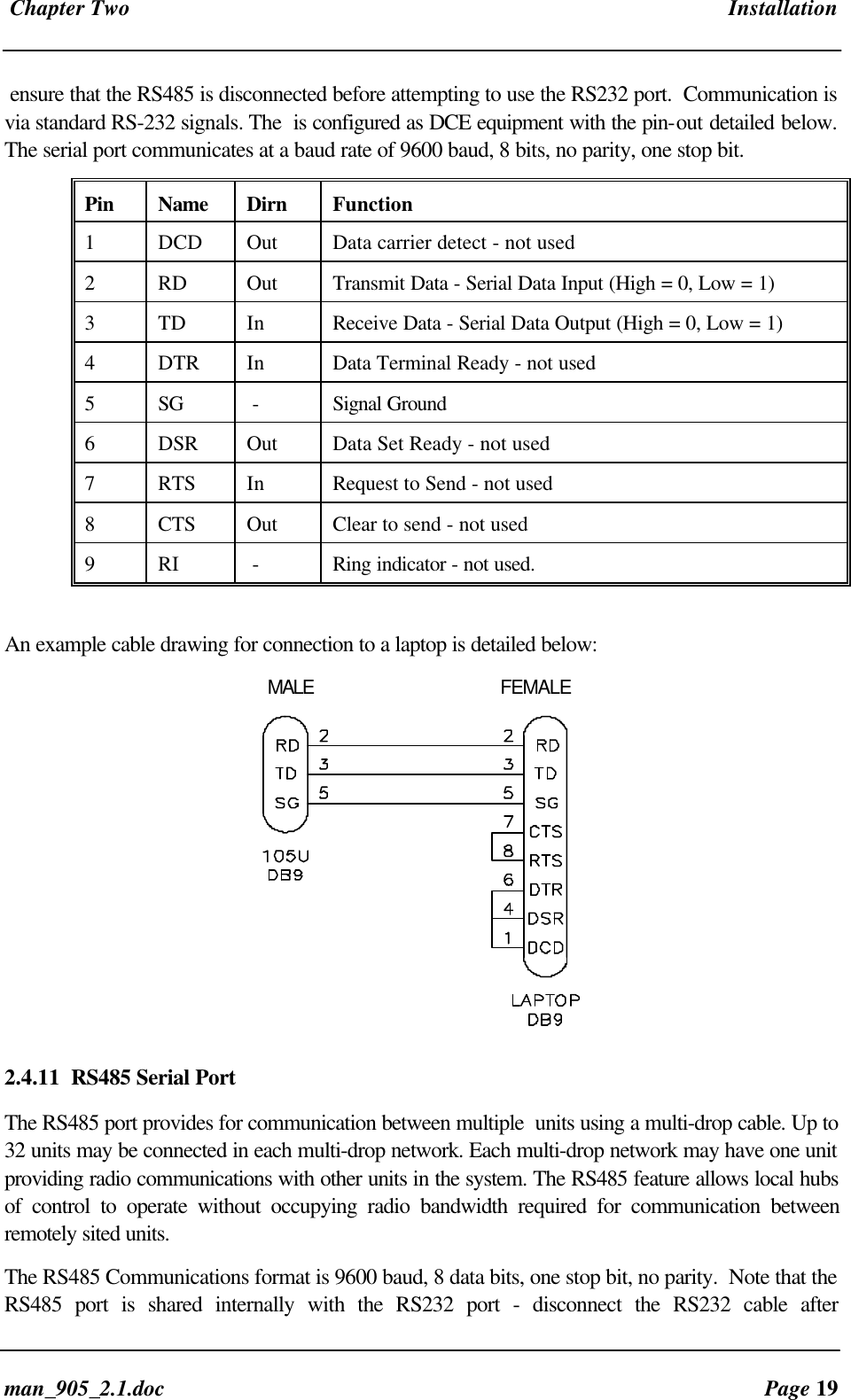
 Chapter Two Installationman_905_2.1.doc Page 19ensure that the RS485 is disconnected before attempting to use the RS232 port.  Communication isvia standard RS-232 signals. The  is configured as DCE equipment with the pin-out detailed below.The serial port communicates at a baud rate of 9600 baud, 8 bits, no parity, one stop bit.Pin Name Dirn Function1DCD Out Data carrier detect - not used2RD Out Transmit Data - Serial Data Input (High = 0, Low = 1)3TD In Receive Data - Serial Data Output (High = 0, Low = 1)4DTR In Data Terminal Ready - not used5SG  - Signal Ground6DSR Out Data Set Ready - not used7RTS In Request to Send - not used8CTS Out Clear to send - not used9RI  - Ring indicator - not used.An example cable drawing for connection to a laptop is detailed below:   MALE FEMALE2.4.11 RS485 Serial PortThe RS485 port provides for communication between multiple  units using a multi-drop cable. Up to32 units may be connected in each multi-drop network. Each multi-drop network may have one unitproviding radio communications with other units in the system. The RS485 feature allows local hubsof control to operate without occupying radio bandwidth required for communication betweenremotely sited units.The RS485 Communications format is 9600 baud, 8 data bits, one stop bit, no parity.  Note that theRS485 port is shared internally with the RS232 port - disconnect the RS232 cable after
Radio/Serial Telemetry Module User ManualPage 20 ©  March 2000configuration is complete.
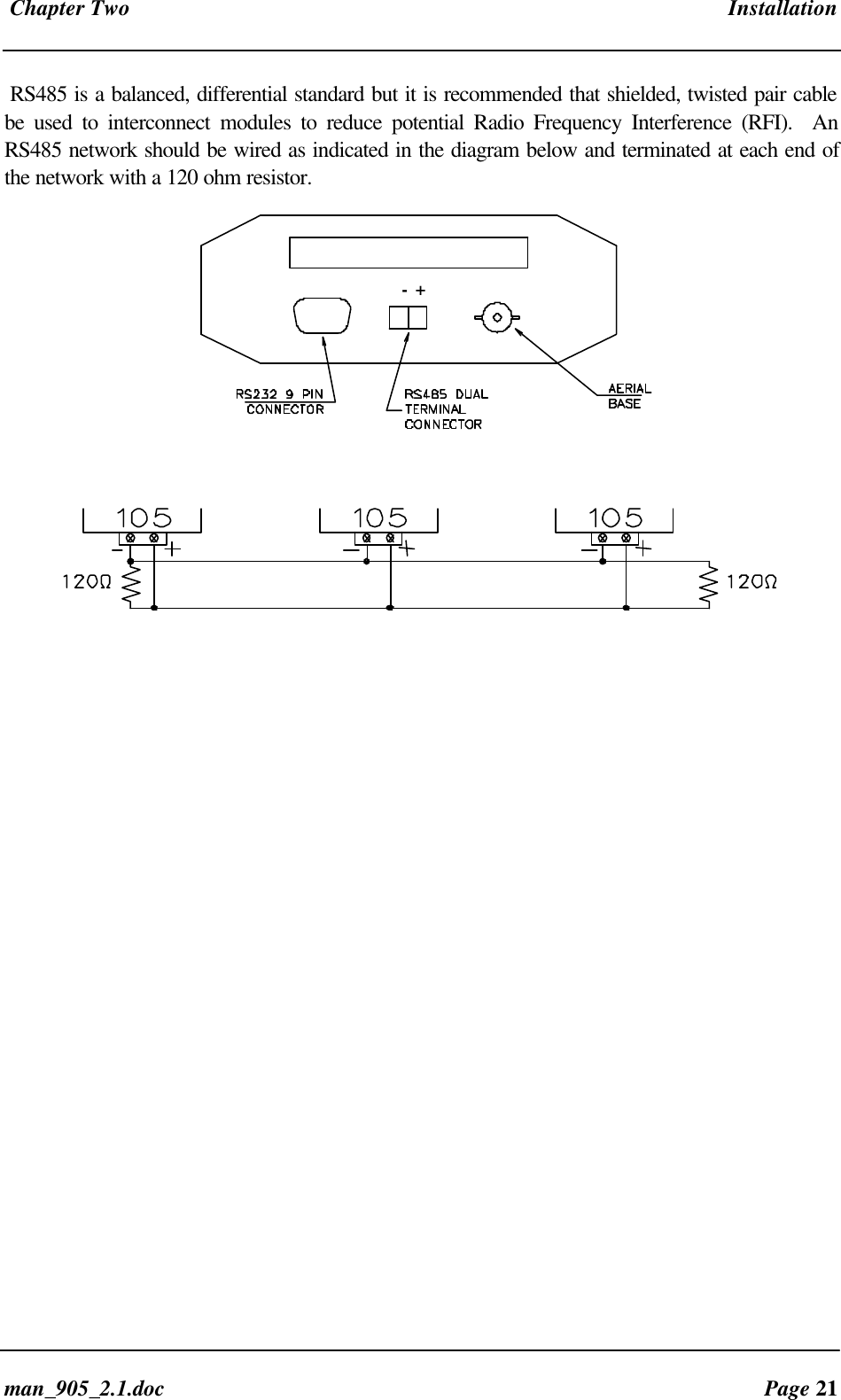
 Chapter Two Installationman_905_2.1.doc Page 21RS485 is a balanced, differential standard but it is recommended that shielded, twisted pair cablebe used to interconnect modules to reduce potential Radio Frequency Interference (RFI).  AnRS485 network should be wired as indicated in the diagram below and terminated at each end ofthe network with a 120 ohm resistor.   -  +
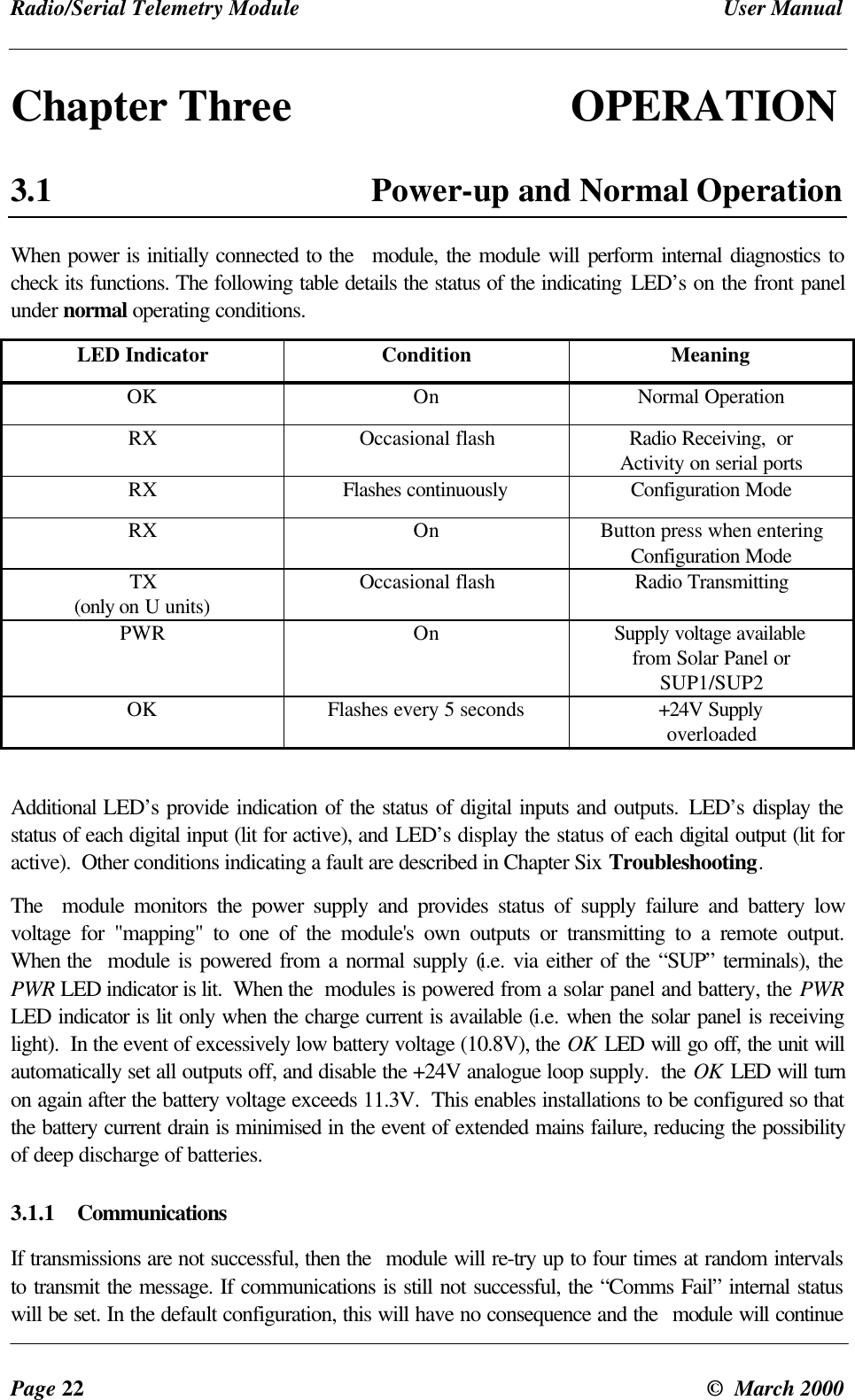
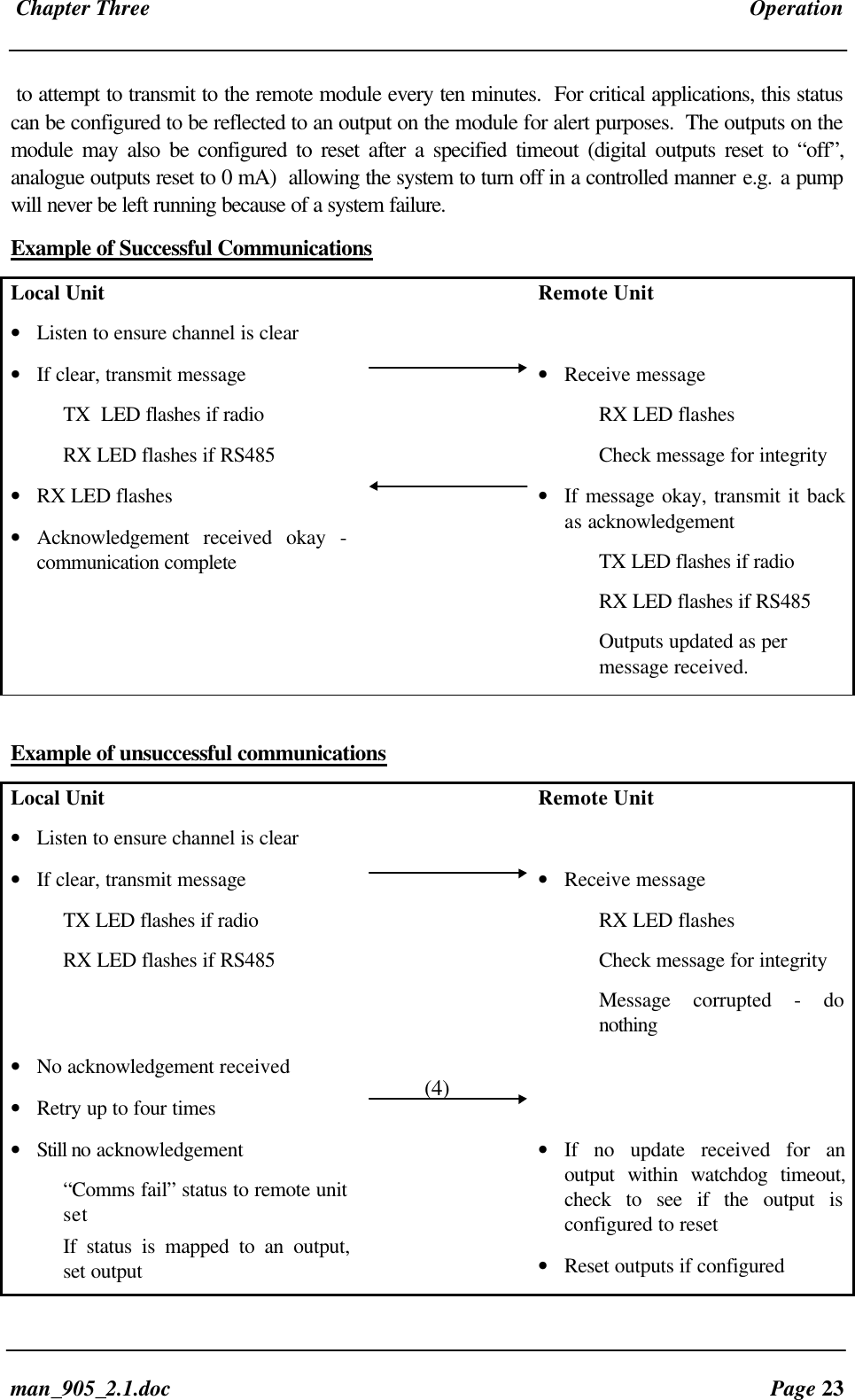
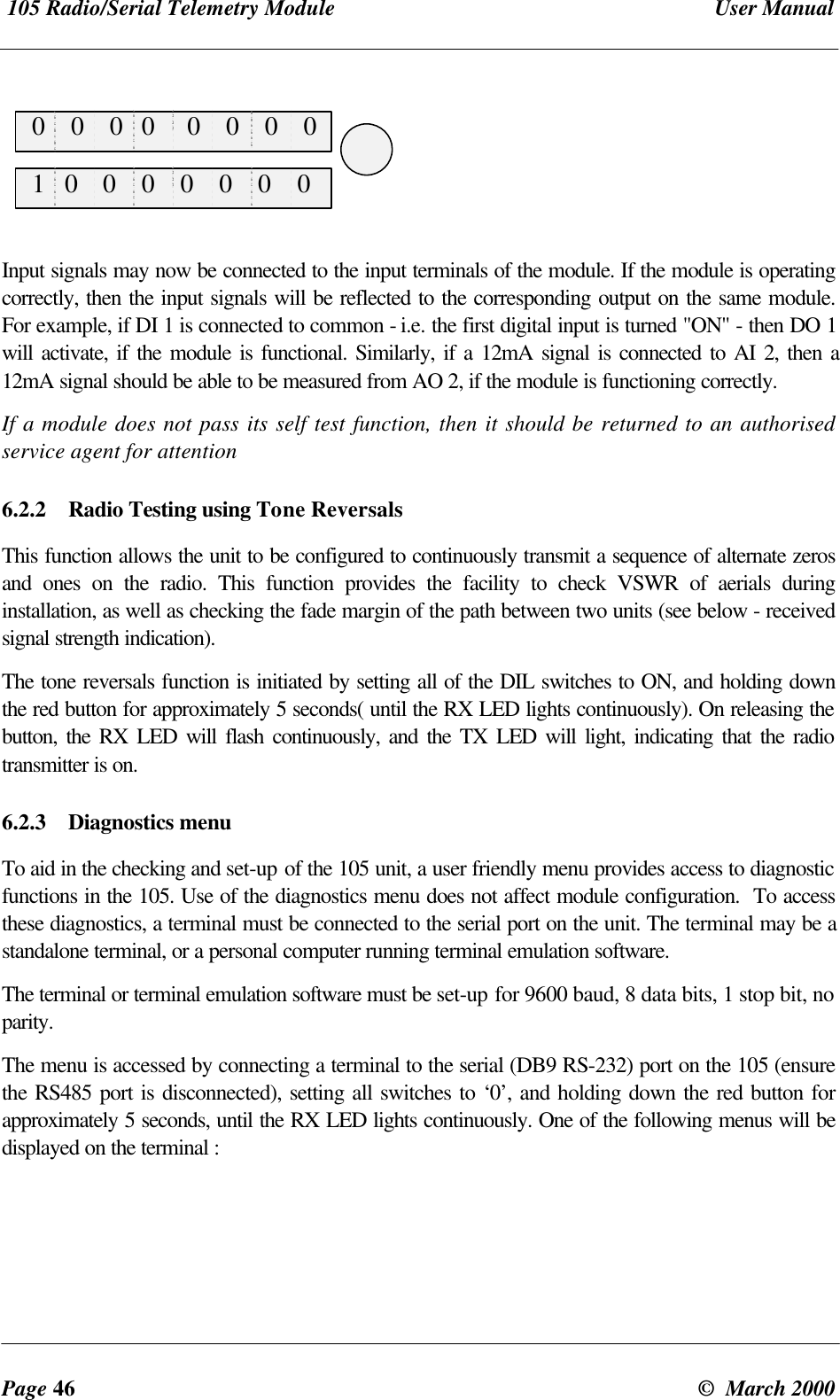
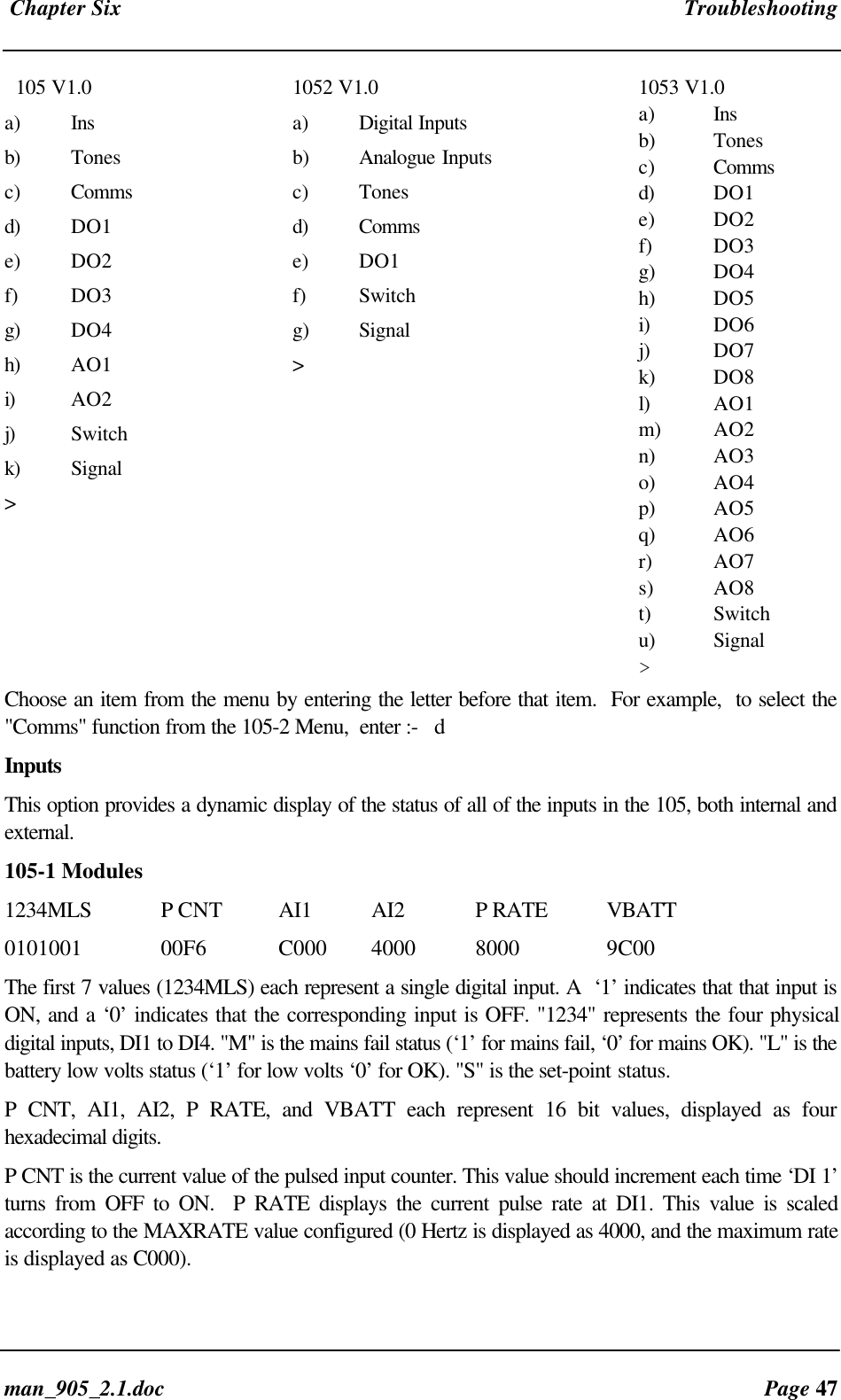
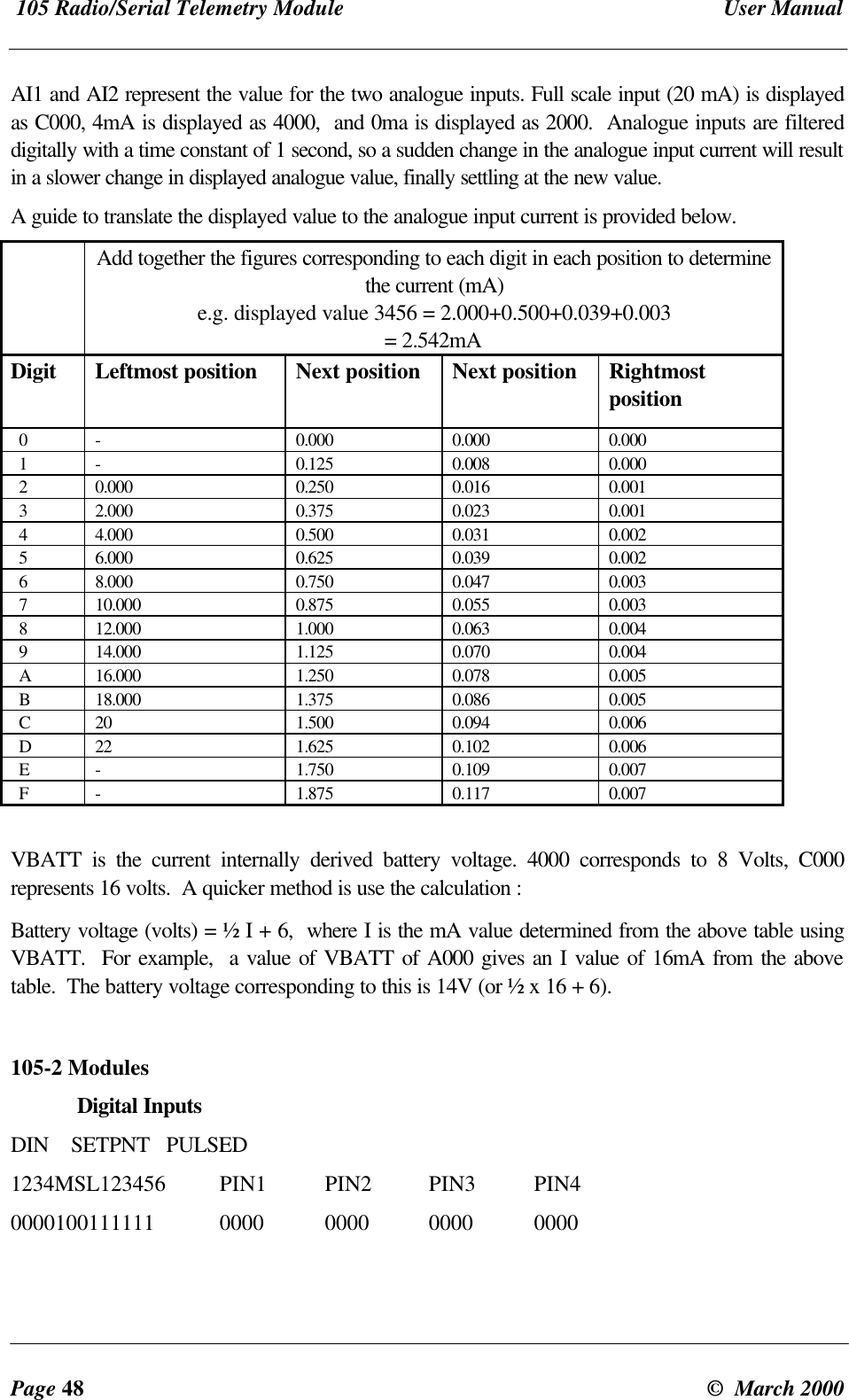
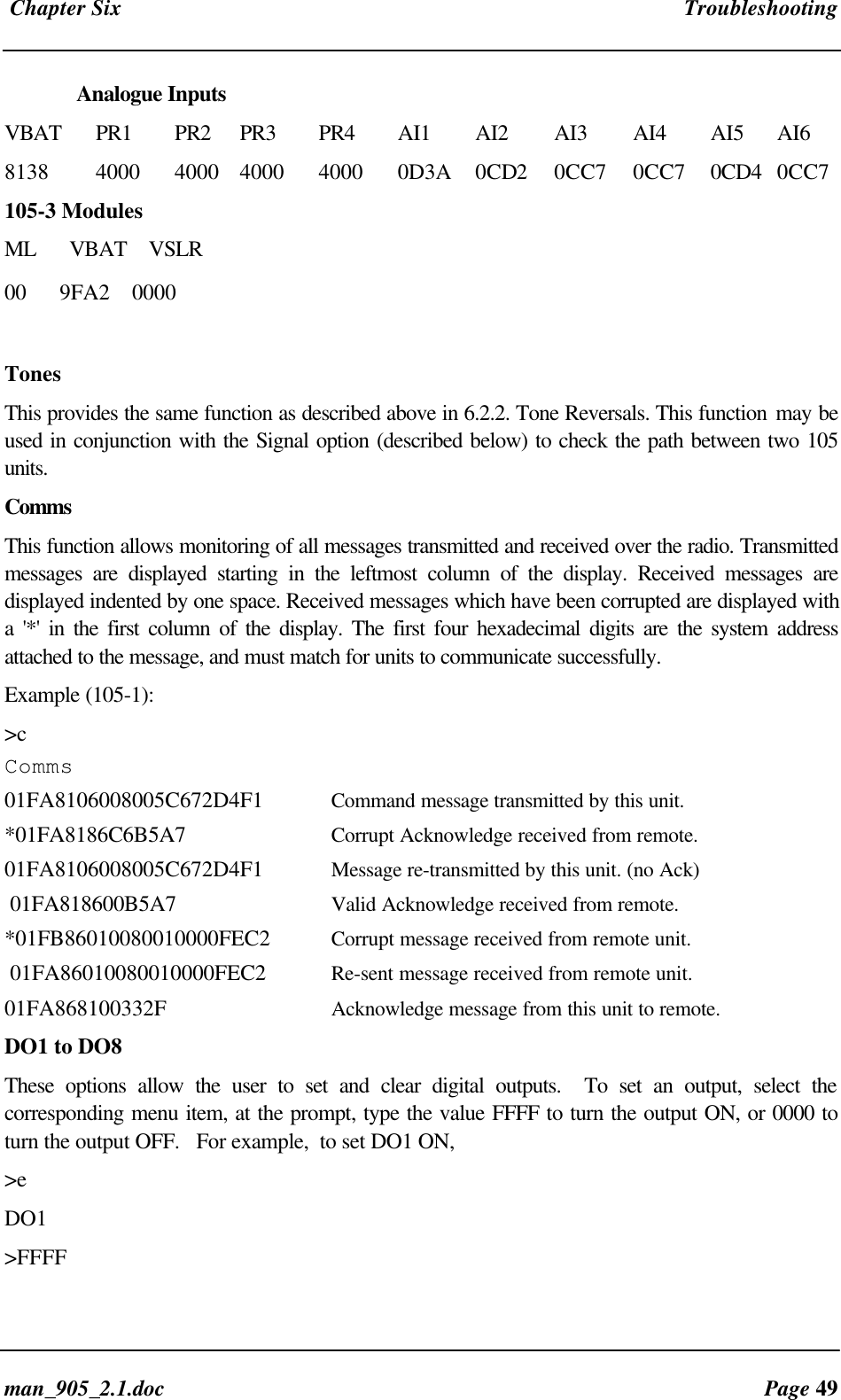
Radio/Serial Telemetry Module User ManualPage 22 ©  March 2000Chapter Three OPERATION3.1 Power-up and Normal OperationWhen power is initially connected to the  module, the module will perform internal diagnostics tocheck its functions. The following table details the status of the indicating LED’s on the front panelunder normal operating conditions.LED Indicator Condition MeaningOK On Normal OperationRX Occasional flash Radio Receiving,  orActivity on serial portsRX Flashes continuously Configuration ModeRX On Button press when enteringConfiguration ModeTX(only on U units) Occasional flash Radio TransmittingPWR On Supply voltage availablefrom Solar Panel orSUP1/SUP2OK Flashes every 5 seconds +24V SupplyoverloadedAdditional LED’s provide indication of the status of digital inputs and outputs. LED’s display thestatus of each digital input (lit for active), and LED’s display the status of each digital output (lit foractive).  Other conditions indicating a fault are described in Chapter Six Troubleshooting.The   module monitors the power supply and provides status of supply failure and battery lowvoltage for "mapping" to one of the module's own outputs or transmitting to a remote output.When the  module is powered from a normal supply (i.e. via either of the “SUP” terminals), thePWR LED indicator is lit.  When the  modules is powered from a solar panel and battery, the PWRLED indicator is lit only when the charge current is available (i.e. when the solar panel is receivinglight).  In the event of excessively low battery voltage (10.8V), the OK LED will go off, the unit willautomatically set all outputs off, and disable the +24V analogue loop supply.  the OK LED will turnon again after the battery voltage exceeds 11.3V.  This enables installations to be configured so thatthe battery current drain is minimised in the event of extended mains failure, reducing the possibilityof deep discharge of batteries.3.1.1 CommunicationsIf transmissions are not successful, then the  module will re-try up to four times at random intervalsto transmit the message. If communications is still not successful, the “Comms Fail” internal statuswill be set. In the default configuration, this will have no consequence and the  module will continue
 Chapter Three Operationman_905_2.1.doc Page 23to attempt to transmit to the remote module every ten minutes.  For critical applications, this statuscan be configured to be reflected to an output on the module for alert purposes.  The outputs on themodule may also be configured to reset after a specified timeout (digital outputs reset to “off”,analogue outputs reset to 0 mA)  allowing the system to turn off in a controlled manner e.g. a pumpwill never be left running because of a system failure.Example of Successful CommunicationsLocal Unit• Listen to ensure channel is clearRemote Unit• If clear, transmit messageTX  LED flashes if radioRX LED flashes if RS485• Receive messageRX LED flashesCheck message for integrity• RX LED flashes• Acknowledgement received okay -communication complete• If message okay, transmit it backas acknowledgementTX LED flashes if radioRX LED flashes if RS485Outputs updated as permessage received.Example of unsuccessful communicationsLocal Unit• Listen to ensure channel is clearRemote Unit• If clear, transmit messageTX LED flashes if radioRX LED flashes if RS485• Receive messageRX LED flashesCheck message for integrityMessage corrupted - donothing• No acknowledgement received• Retry up to four times• Still no acknowledgement“Comms fail” status to remote unitsetIf status is mapped to an output,set output• If no update received for anoutput within watchdog timeout,check to see if the output isconfigured to reset• Reset outputs if configured(4)
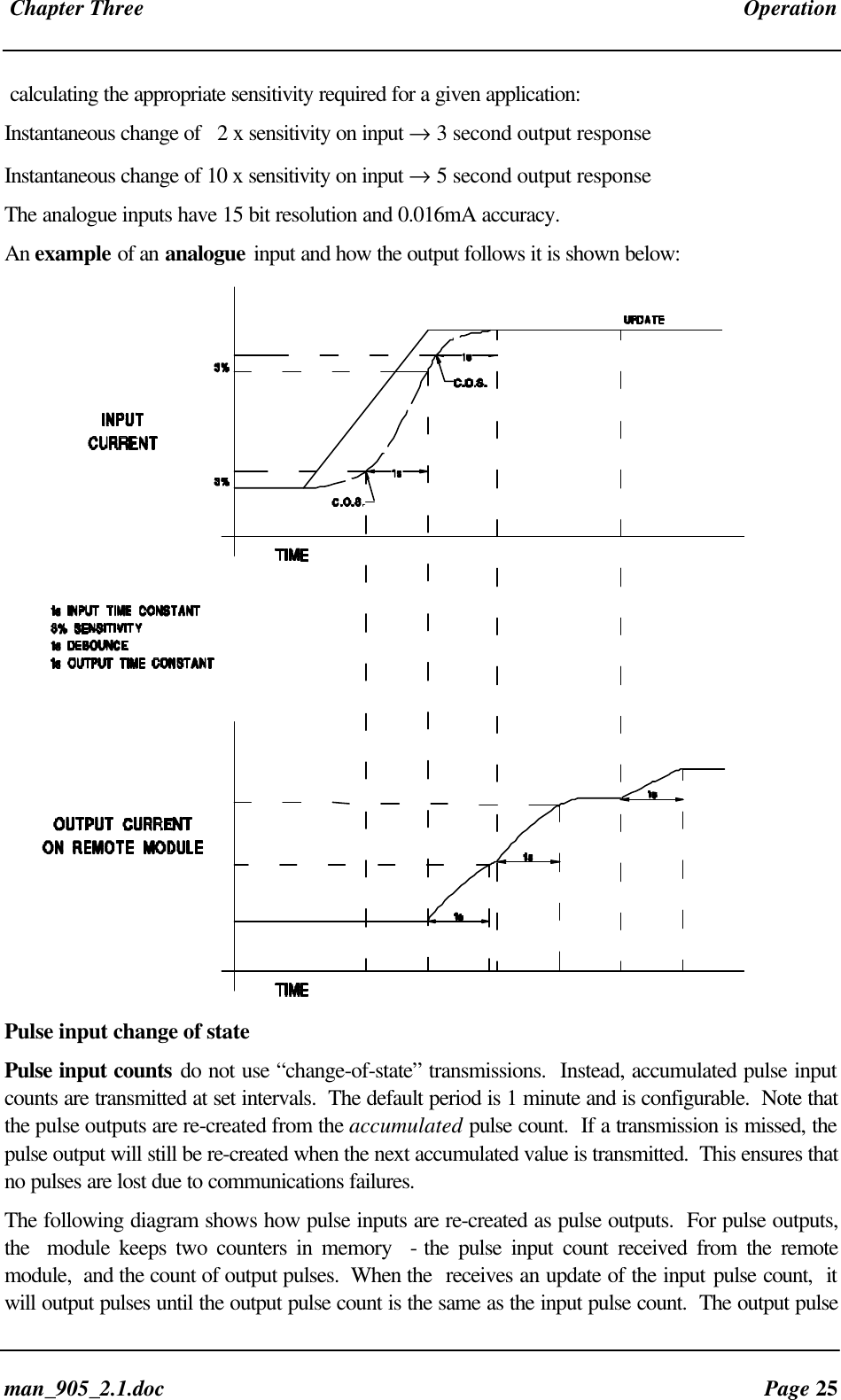
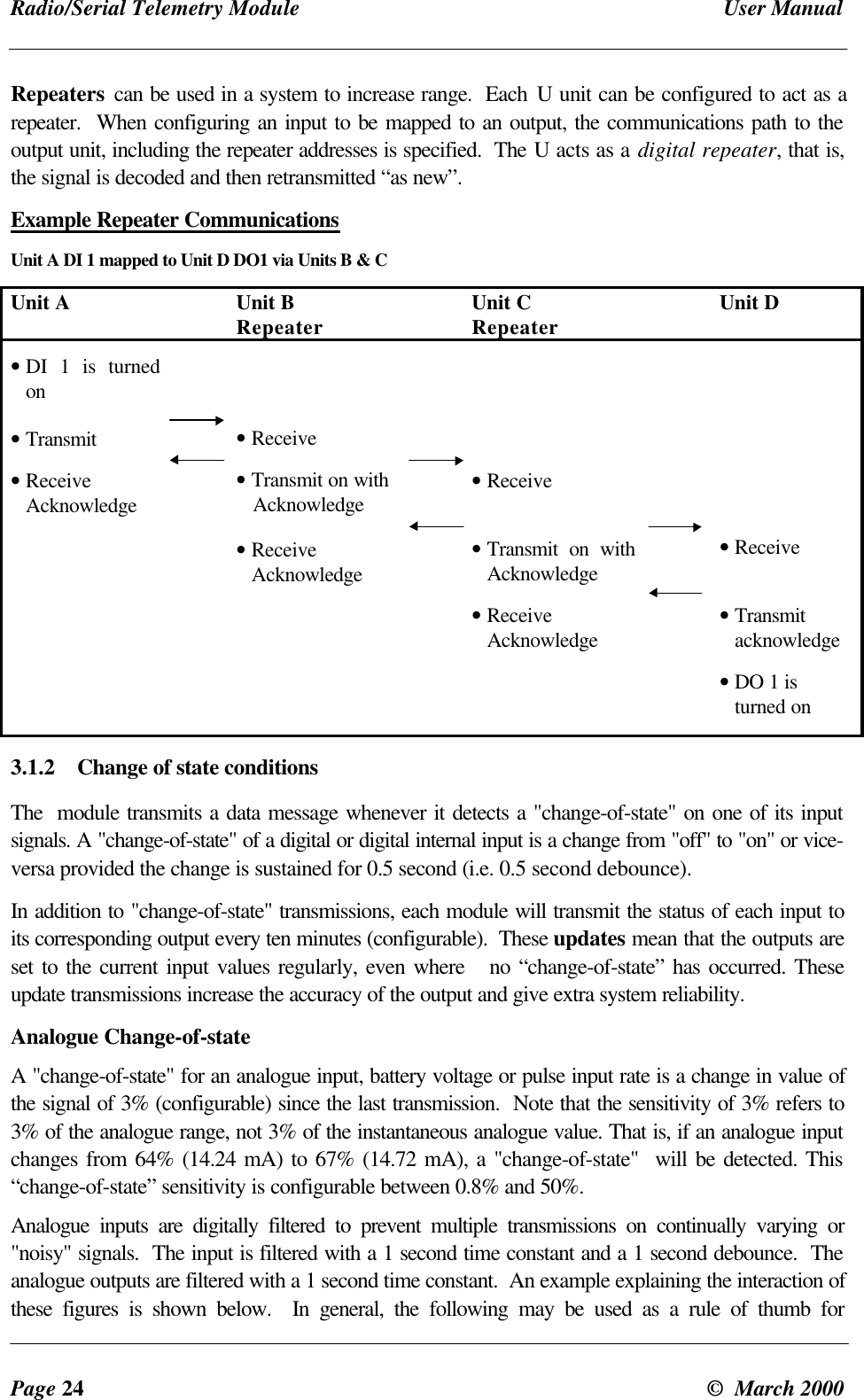
Radio/Serial Telemetry Module User ManualPage 24 ©  March 2000Repeaters can be used in a system to increase range.  Each U unit can be configured to act as arepeater.  When configuring an input to be mapped to an output, the communications path to theoutput unit, including the repeater addresses is specified.  The U acts as a digital repeater, that is,the signal is decoded and then retransmitted “as new”.Example Repeater CommunicationsUnit A DI 1 mapped to Unit D DO1 via Units B & CUnit A Unit BRepeater Unit CRepeater Unit D• DI 1 is turnedon• Transmit• ReceiveAcknowledge• Receive• Transmit on with   Acknowledge• ReceiveAcknowledge• Receive• Transmit on withAcknowledge• ReceiveAcknowledge• Receive• Transmitacknowledge• DO 1 isturned on3.1.2 Change of state conditionsThe  module transmits a data message whenever it detects a "change-of-state" on one of its inputsignals. A "change-of-state" of a digital or digital internal input is a change from "off" to "on" or vice-versa provided the change is sustained for 0.5 second (i.e. 0.5 second debounce).In addition to "change-of-state" transmissions, each module will transmit the status of each input toits corresponding output every ten minutes (configurable).  These updates mean that the outputs areset to the current input values regularly, even where   no “change-of-state” has occurred. Theseupdate transmissions increase the accuracy of the output and give extra system reliability.Analogue Change-of-stateA "change-of-state" for an analogue input, battery voltage or pulse input rate is a change in value ofthe signal of 3% (configurable) since the last transmission.  Note that the sensitivity of 3% refers to3% of the analogue range, not 3% of the instantaneous analogue value. That is, if an analogue inputchanges from 64% (14.24 mA) to 67% (14.72 mA), a "change-of-state"  will be detected. This“change-of-state” sensitivity is configurable between 0.8% and 50%.Analogue inputs are digitally filtered to prevent multiple transmissions on continually varying or"noisy" signals.  The input is filtered with a 1 second time constant and a 1 second debounce.  Theanalogue outputs are filtered with a 1 second time constant.  An example explaining the interaction ofthese figures is shown below.  In general, the following may be used as a rule of thumb for
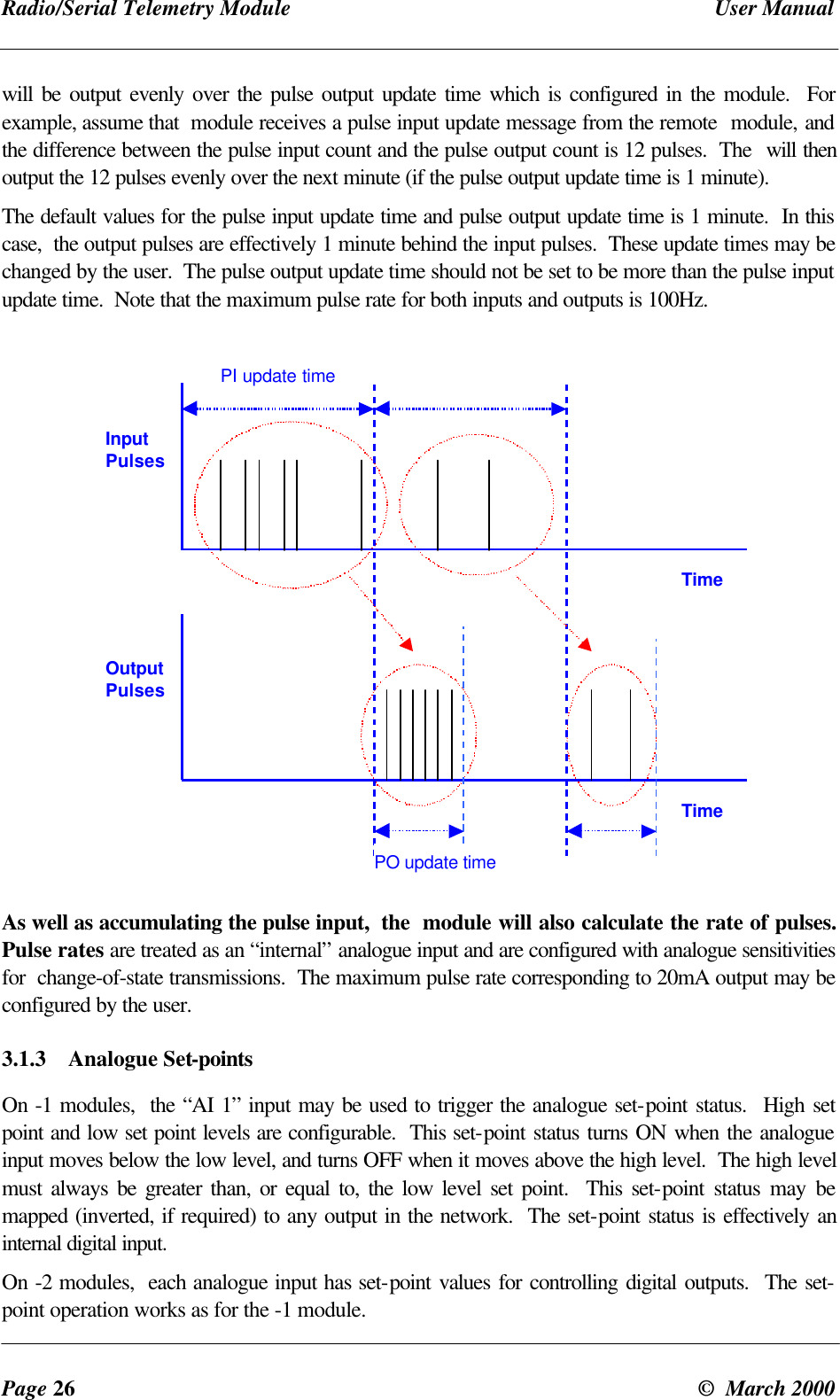
 Chapter Three Operationman_905_2.1.doc Page 25calculating the appropriate sensitivity required for a given application:Instantaneous change of   2 x sensitivity on input → 3 second output responseInstantaneous change of 10 x sensitivity on input → 5 second output responseThe analogue inputs have 15 bit resolution and 0.016mA accuracy.An example of an analogue input and how the output follows it is shown below:Pulse input change of statePulse input counts do not use “change-of-state” transmissions.  Instead, accumulated pulse inputcounts are transmitted at set intervals.  The default period is 1 minute and is configurable.  Note thatthe pulse outputs are re-created from the accumulated pulse count.  If a transmission is missed, thepulse output will still be re-created when the next accumulated value is transmitted.  This ensures thatno pulses are lost due to communications failures.The following diagram shows how pulse inputs are re-created as pulse outputs.  For pulse outputs,the  module keeps two counters in memory  - the pulse input count received from the remotemodule,  and the count of output pulses.  When the  receives an update of the input pulse count,  itwill output pulses until the output pulse count is the same as the input pulse count.  The output pulse
Radio/Serial Telemetry Module User ManualPage 26 ©  March 2000will be output evenly over the pulse output update time which is configured in the module.  Forexample, assume that  module receives a pulse input update message from the remote  module, andthe difference between the pulse input count and the pulse output count is 12 pulses.  The  will thenoutput the 12 pulses evenly over the next minute (if the pulse output update time is 1 minute).The default values for the pulse input update time and pulse output update time is 1 minute.  In thiscase,  the output pulses are effectively 1 minute behind the input pulses.  These update times may bechanged by the user.  The pulse output update time should not be set to be more than the pulse inputupdate time.  Note that the maximum pulse rate for both inputs and outputs is 100Hz.InputPulsesTimeOutputPulsesPI update timePO update timeTimeAs well as accumulating the pulse input,  the  module will also calculate the rate of pulses.Pulse rates are treated as an “internal” analogue input and are configured with analogue sensitivitiesfor  change-of-state transmissions.  The maximum pulse rate corresponding to 20mA output may beconfigured by the user.3.1.3 Analogue Set-pointsOn -1 modules,  the “AI 1” input may be used to trigger the analogue set-point status.  High setpoint and low set point levels are configurable.  This set-point status turns ON when the analogueinput moves below the low level, and turns OFF when it moves above the high level.  The high levelmust always be greater than, or equal to, the low level set point.  This set-point status may bemapped (inverted, if required) to any output in the network.  The set-point status is effectively aninternal digital input.On -2 modules,  each analogue input has set-point values for controlling digital outputs.  The set-point operation works as for the -1 module.
 Chapter Three Operationman_905_2.1.doc Page 273.1.4 Start-up PollAfter a  module has completed its initial diagnostics following power up,  it will transmit updatemessages to remote modules based on the values of the module’s inputs.  The module’s outputs willremain in the reset/off/zero condition until it receives update or “change-of-state” messages from theremote modules.The  module can transmit a special “start-up poll” message to another module.  The remote modulewill then immediately send update messages to this module such that its outputs can be set to thecorrect value.  Start-up polls will only occur if they are configured.  It is necessary to configure astart-up poll to each remote module which controls the module’s outputs.  For further information,refer to Chapter 4 Configuration.3.1.5 Communications Failure (CF)The internal communications failure (CF) status is set if a module does not receive anacknowledgement message after five attempts at transmitting a message.  The CF status may beconfigured to set a local digital output for an external alarm.Although the CF status can set an output,  it will not reset the output.  That is,  once communicationsis re-established (and the CF status is reset),  the output will stay “on”.  The Reset Output feature(see below) is used to reset the output.The output will reset only when no communications failures occur within the configured “ResetOutput Time”  for the output that CF status is mapped to.  Note that if the reset output time is notenabled, the CF status will remain set forever, once an unsuccessful transmission occurs. SeeChapter 4 Configuration for further details.3.1.6 Resetting OutputsEach digital and analogue output may be individually configured to reset if that output has notreceived a change-of-state or an update message within a certain time period.  Generally this time isset to twice the update period,  so at least one update can be missed before an output is reset.In most cases it is desirable to reset outputs which are controlling equipment if there is a systemfailure,  however alarm or indication outputs are not reset so the last valid indication remains shown.See Chapter 4 Configuration for further details.3.2 System Design TipsThe following tips will help to ensure that your system operates reliably.3.2.1 System DynamicsIt is important to be aware of the dynamics of the   system.  Digital inputs have a minimum“debounce” delay of 0.5 sec  -  that is,  a change message will not be sent for 0.5 sec after a changehas occurred.  Analogue inputs and outputs have time delays of 1 to 2 seconds.
Radio/Serial Telemetry Module User ManualPage 28 ©  March 2000Messages transmitted via serial link are received in less than 20 mSec,  however a message sent byradio takes approx 100 mSec.These delays are not significant is most applications,  however if your application requires fasterresponses, then the above delays need to be considered.3.2.2 Radio Channel CapacityMessages sent on a cable link are much faster than on a radio channel,  and the capacity of the radiochannel must be considered when designing a system.  This becomes more important as the I/O sizeof a system increases.The  modules are designed to provide “real-time” operation.  When an input signal changes,  achange message is sent to change the output.  The system does not require continuous messages toprovide fast operation (as in a polling system).  Update messages are intended to check the integrityof the system,  not to provide fast operation.  Update times should be selected based on thisprinciple.  The default update time is 10 minutes  -  we recommend that you leave these times as 10minutes unless particular inputs are very important and deserve a smaller update time.It is important that radio paths be reliable.  For large systems,  we recommend a maximum radiochannel density of 100 messages per minute,  including change messages and update messages.  Wesuggest that you do not design for an average transmission rate of greater than 50 per minute  -  thiswill give a peak rate of approx 100 per minute.  Note that this peak rate assumes that all radio pathsare reliable  -  poor radio paths will require re-try transmissions and will reduce the peak channeldensity.  If there are other users on the radio channel,  then this peak figure will also decrease.The  modules will only transmit one message at a time.  If re-tries are necessary,  another messagecannot start.  The time between re-tries is a random time between 1 and 5 seconds.  The time forfive tries is between 5 and 21 seconds.  Another message cannot be sent until the last one hasfinished.  This delay will obviously have an affect on a busy system.3.2.3 Radio Path ReliabilityRadio paths over short distances can operate reliably with a large amount of obstruction in the path.As the path distance increases,  the amount of obstruction which can be tolerated decreases.  At themaximum reliable distance,  “line-of-sight” is required for reliable operation.  If the path is overseveral kilometres (or miles),  then the curvature of the earth is also an obstacle and must be allowedfor.  For example,  the earth curvature over 10 km is approx 3m,  requiring aerials to be elevated atleast 4m to achieve “line-of-sight” even if the path is flat.A radio path may act reliably in good weather,  but poorly in bad weather  -  this is called a“marginal” radio path.  If the radio path is more than 20% of the maximum reliable distance (seeSpecification section for these distances),  we recommend that you test the radio path beforeinstallation.  Each U module has a radio path testing feature  -  refer to section 6.2 of this manual.
 Chapter Three Operationman_905_2.1.doc Page 29There are several ways of improving a marginal path  :-• Relocate the unit to a better position.  If there is an obvious obstruction causing the problem,then locating the unit to the side or higher will improve the path.• If it is not practical to improve a marginal path,  then the last method is to use another module asa repeater.  A repeater does not have to be between the two modules (although often it is).  Ifpossible,  use an existing module in the system which has good radio path to both modules.  Therepeater module can be to the side of the two modules,  or even behind one of the modules,  ifthe repeater module is installed at a high location (for example,  a tower or mast).  Repeatermodules can have their own I/O and act as a “normal” U module in the system.3.2.4 Design for FailuresAll well designed systems consider system failure.   I/O systems operating on a wire link will faileventually, and a radio system is the same.  Failures could be short-term (interference on the radiochannel or power supply failure) or long-term (equipment failure).The  modules provide the following features for system failure :-• Outputs can reset if they do not receive a message within a configured time.  If an output shouldreceive an update or change message every 10 minutes,  and it has not received a message withinthis time,  then some form of failure is likely.  If the output is controlling some machinery,  then itis good design to switch off this equipment until communications has been re-established.The  modules provide a “drop outputs on comms fail” time.  This is a configurable time value foreach output.  If a message has not been received for this output within this time,  then the outputwill reset (off,  in-active,  “0”).  We suggest that this reset time be a little more than twice theupdate time of the input.  It is possible to miss one update message because of short-term radiointerference,  however if two successive update messages are missed,  then long term failure islikely and the output should be reset.  For example,  if the input update time is 3 minutes,  set theoutput reset time to 7 minutes.• A  module can provide an output which activates on communication failure to another module.This can be used to provide an external alarm that there is a system fault.
Radio/Serial Telemetry Module User ManualPage 30 ©  March 2000Chapter Four CONFIGURATION4.1 IntroductionThe  modules may be configured by connecting a computer (PC) using the  Configuration Softwareprogramme.  Alternatively, the module may be configured by the on-board miniature switcheslocated under the blue cover on the front of the module.  This chapter describes the defaultconfiguration of the module and using the Configuration Software Programme.  For details on switchconfiguration, please refer to the separate  Switch Configuration Manual, available from  distributors.Each   module is configured with a system address and a unit address.  The system address iscommon to every module in the same system,  and is used to prevent "cross-talk" between modulesin different systems.  Separate networks with different system addresses may operate independentlyin the same area without affecting each other.  The system address may be any number between 1and 32 767.  The actual value of the system address is not important,  provided all modules in thesame system have the same system address value.  A system address of zero should not beused.Each unit must have a unique unit address within the one system.  A valid unit address is 1 to 127.A network may have up to 95 individual modules communicating via radio (unit addresses 1 to 95),each with up to 31 modules communicating via RS485 (unit addresses 96 to 127). In the network,any individual input signal may be "mapped" to one or more outputs anywhere in the system.  Theunit address determines the method of communication to a module.  Any module with a unit addressbetween 96 and 127 will communicate by RS485 only.  Other units with a unit address below 95may communicate by radio  or RS485 - the unit will determine which way to communicatedepending upon the unit address of the destination module.  For example, Unit 31 will talk to Unit97 by RS485 only, but will talk to unit 59 by radio only.  105S units must always have a unitaddress between 96 and 127 as serial communication is the only method of communicationavailable.  A unit address of zero should not be used.The three different products in the range can be used together in the same system.  Inputs to oneproduct type can be transmitted to outputs of another product type.  For example,  an analogueinput to a -2 may be transmitted to an analogue output of a -1 or -3.  Repeaters may be any producttype.The -1 and -2 modules require only one unit address.  The -3 module uses two addresses, howeveronly one unit address has to be entered. The -3 module requires two addresses because of the largenumber of output channels. If the “entered" unit address is an even number, then the second addressis the next number.  If the "entered" address is an odd number,  then the second address is theprevious number.  So the two addresses are two subsequent numbers, starting with an even number.If a -3 module is given a unit address of 10, then it will also take up the unit address 11 and willaccept messages addressed to either 10 or 11.   It is important to remember this when allocating unitaddresses to other modules in the system.Warning  - do not allocate the address number 1 to a -3 module.
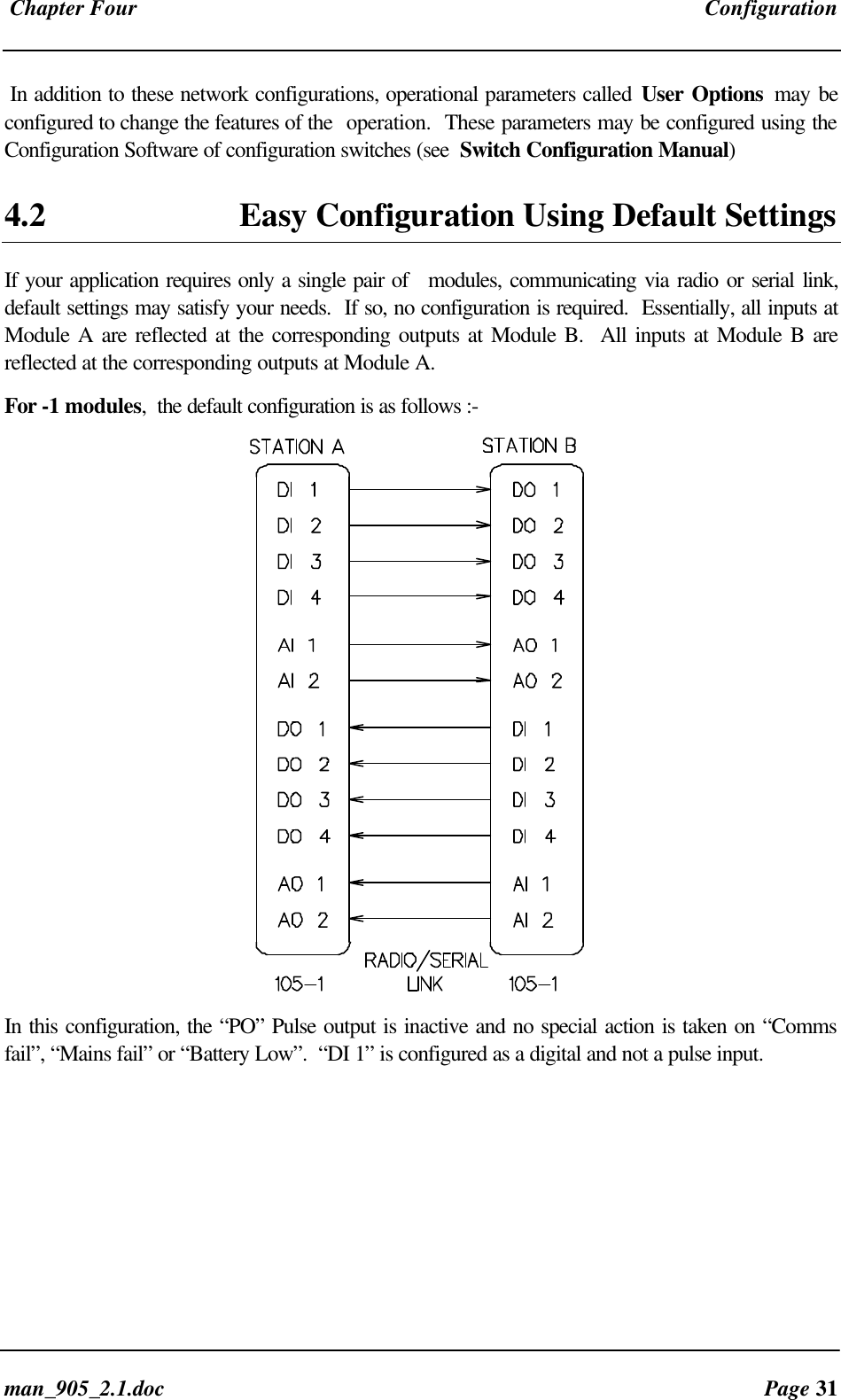
 Chapter Four Configurationman_905_2.1.doc Page 31In addition to these network configurations, operational parameters called User Options may beconfigured to change the features of the  operation.  These parameters may be configured using theConfiguration Software of configuration switches (see  Switch Configuration Manual)4.2 Easy Configuration Using Default SettingsIf your application requires only a single pair of   modules, communicating via radio or serial link,default settings may satisfy your needs.  If so, no configuration is required.  Essentially, all inputs atModule A are reflected at the corresponding outputs at Module B.  All inputs at Module B arereflected at the corresponding outputs at Module A.For -1 modules,  the default configuration is as follows :-In this configuration, the “PO” Pulse output is inactive and no special action is taken on “Commsfail”, “Mains fail” or “Battery Low”.  “DI 1” is configured as a digital and not a pulse input.
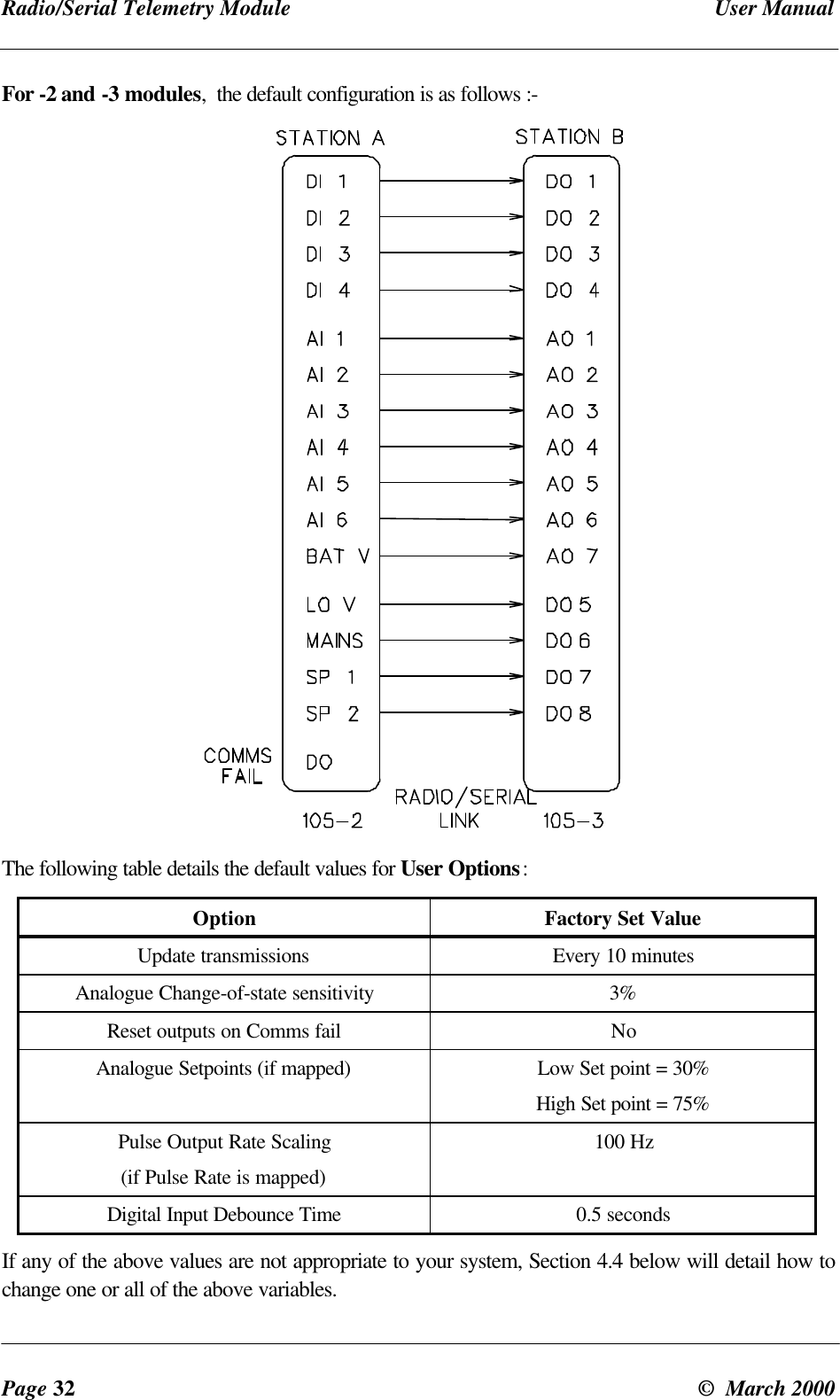
Radio/Serial Telemetry Module User ManualPage 32 ©  March 2000For -2 and -3 modules,  the default configuration is as follows :-The following table details the default values for User Options:Option Factory Set ValueUpdate transmissions Every 10 minutesAnalogue Change-of-state sensitivity 3%Reset outputs on Comms fail NoAnalogue Setpoints (if mapped) Low Set point = 30%High Set point = 75%Pulse Output Rate Scaling(if Pulse Rate is mapped)100 HzDigital Input Debounce Time 0.5 secondsIf any of the above values are not appropriate to your system, Section 4.4 below will detail how tochange one or all of the above variables.
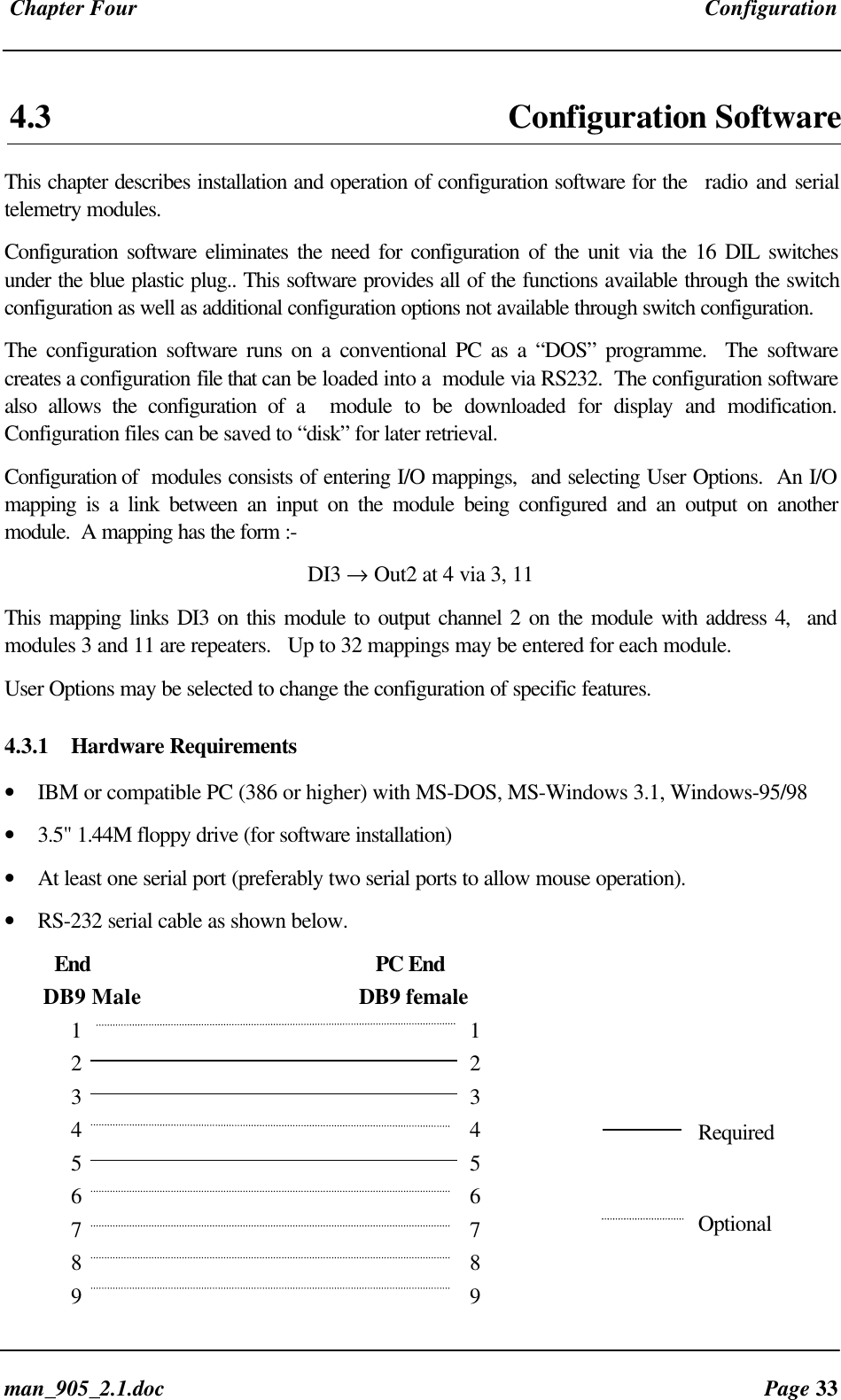
 Chapter Four Configurationman_905_2.1.doc Page 334.3  Configuration SoftwareThis chapter describes installation and operation of configuration software for the  radio and serialtelemetry modules.Configuration software eliminates the need for configuration of the unit via the 16 DIL switchesunder the blue plastic plug.. This software provides all of the functions available through the switchconfiguration as well as additional configuration options not available through switch configuration.The configuration software runs on a conventional PC as a “DOS” programme.  The softwarecreates a configuration file that can be loaded into a  module via RS232.  The configuration softwarealso allows the configuration of a  module to be downloaded for display and modification.Configuration files can be saved to “disk” for later retrieval.Configuration of  modules consists of entering I/O mappings,  and selecting User Options.  An I/Omapping is a link between an input on the module being configured and an output on anothermodule.  A mapping has the form :-DI3 → Out2 at 4 via 3, 11This mapping links DI3 on this module to output channel 2 on the module with address 4,  andmodules 3 and 11 are repeaters.   Up to 32 mappings may be entered for each module.User Options may be selected to change the configuration of specific features.4.3.1 Hardware Requirements• IBM or compatible PC (386 or higher) with MS-DOS, MS-Windows 3.1, Windows-95/98• 3.5" 1.44M floppy drive (for software installation)• At least one serial port (preferably two serial ports to allow mouse operation).• RS-232 serial cable as shown below.         End                                           PC End       DB9 Male                                       DB9 female1                                                  12    23    34                                                  45    56                                                  67                                                  78                                                  89                                                  9RequiredOptional
Radio/Serial Telemetry Module User ManualPage 34 ©  March 20004.3.2 InstallationRunning from floppy diskThe software may be run directly from the distribution disk. If the software is to be used in thismanner, a copy of the distribution disk should be made, and the copy used to run the software.Installing to a hard diskMost users will want to install the configuration software to the hard disk of their computer. Thismay be simply achieved by creating a directory on the destination hard disk and copying thecontents of the distribution disk to the hard disk.For example, if the destination hard disk is drive C: and the distribution floppy is in drive A: thefollowing sequence of instructions may be used.C:> MKDIR  CFG105C:> COPY  A:\*.EXE  CFG105Hints for Windows UsersFor slower machines, the software should be run in “Full Screen” and “Exclusive” mode underWindows. If problems are experienced, exit windows and run the program from DOS.4.3.3 Software OperationRunning from MS-DOSStart the software by entering the directory where the configuration program is stored, and enteringthe executable file name. For example, if the executable is stored in C:\CFG105 type the followingC:\> CD CFG105C:\CFG105> CFG105-1   To configure a -1 moduleC:\CFG105> CFG105-2   To configure a -2 moduleC:\CFG105> CFG105-3   To configure a -3 moduleand press the <ENTER> key.Running from MS-WindowsSelect the “Run...” option from the Start menu. In the Command Line Box type:C:\CFG105\CFG105-1    To configure a -1 module,C:\CFG105\CFG105-2    To configure a -2 module,C:\CFG105\CFG105-3    To configure a -3 module,and press the <ENTER> key.The Initial screen will appear as below.
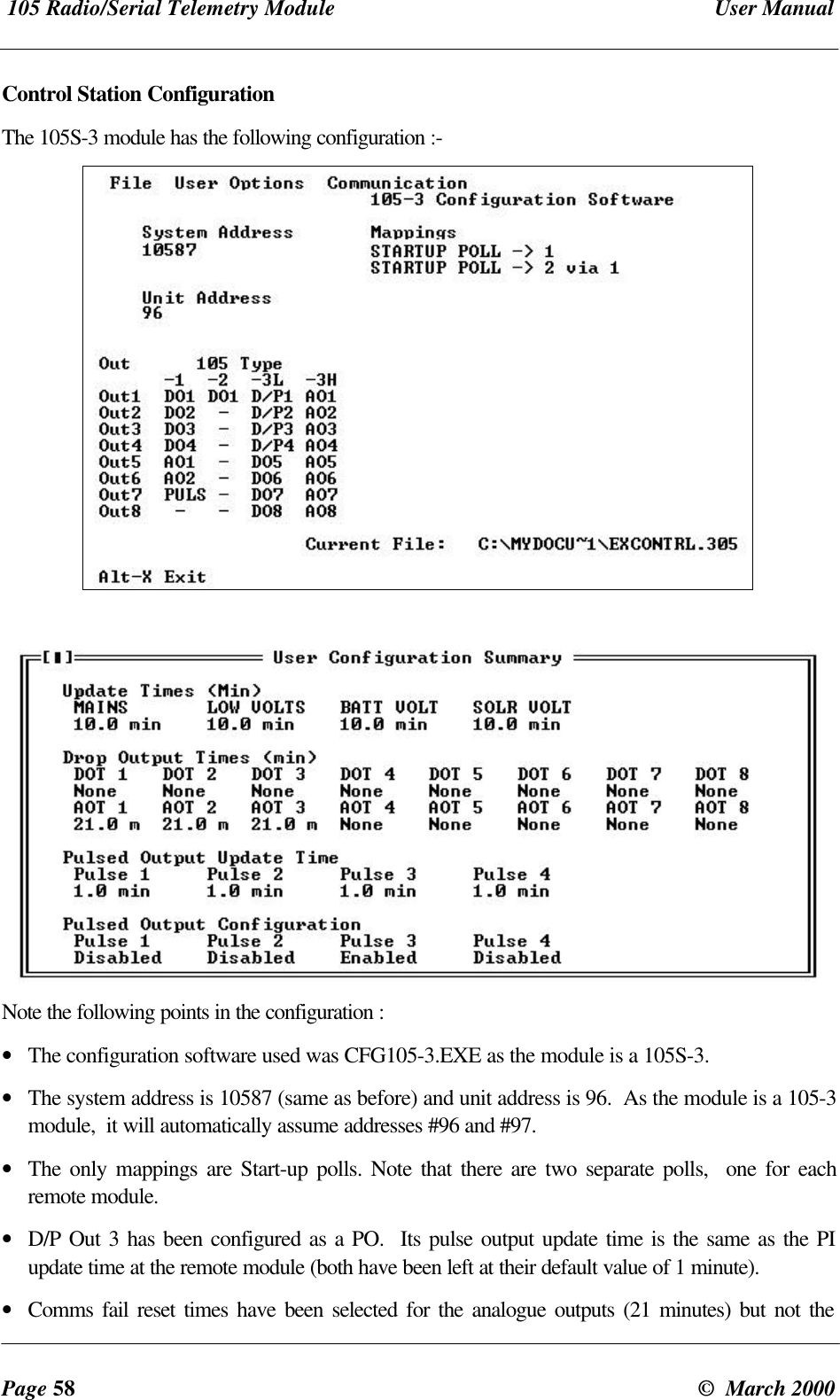
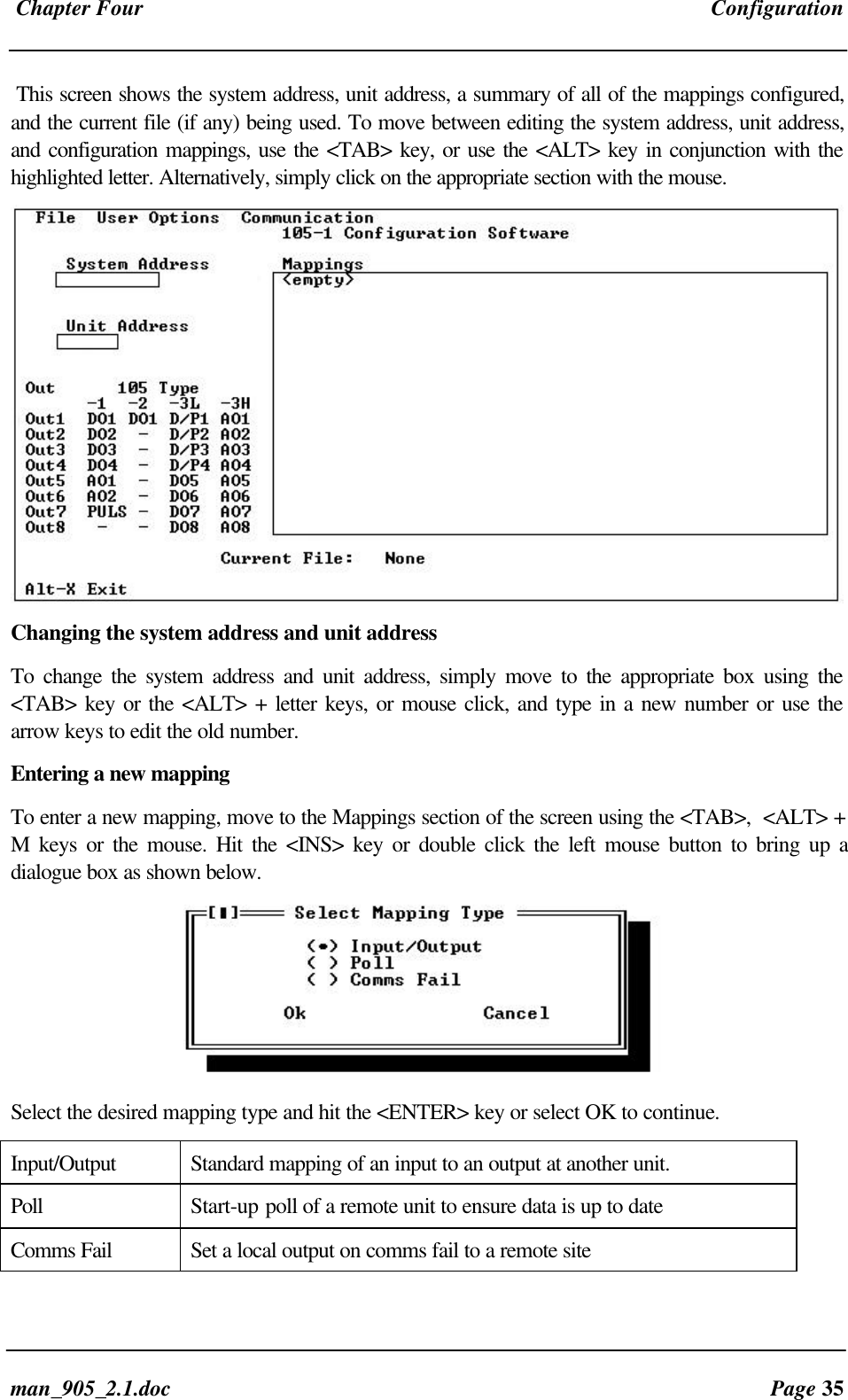
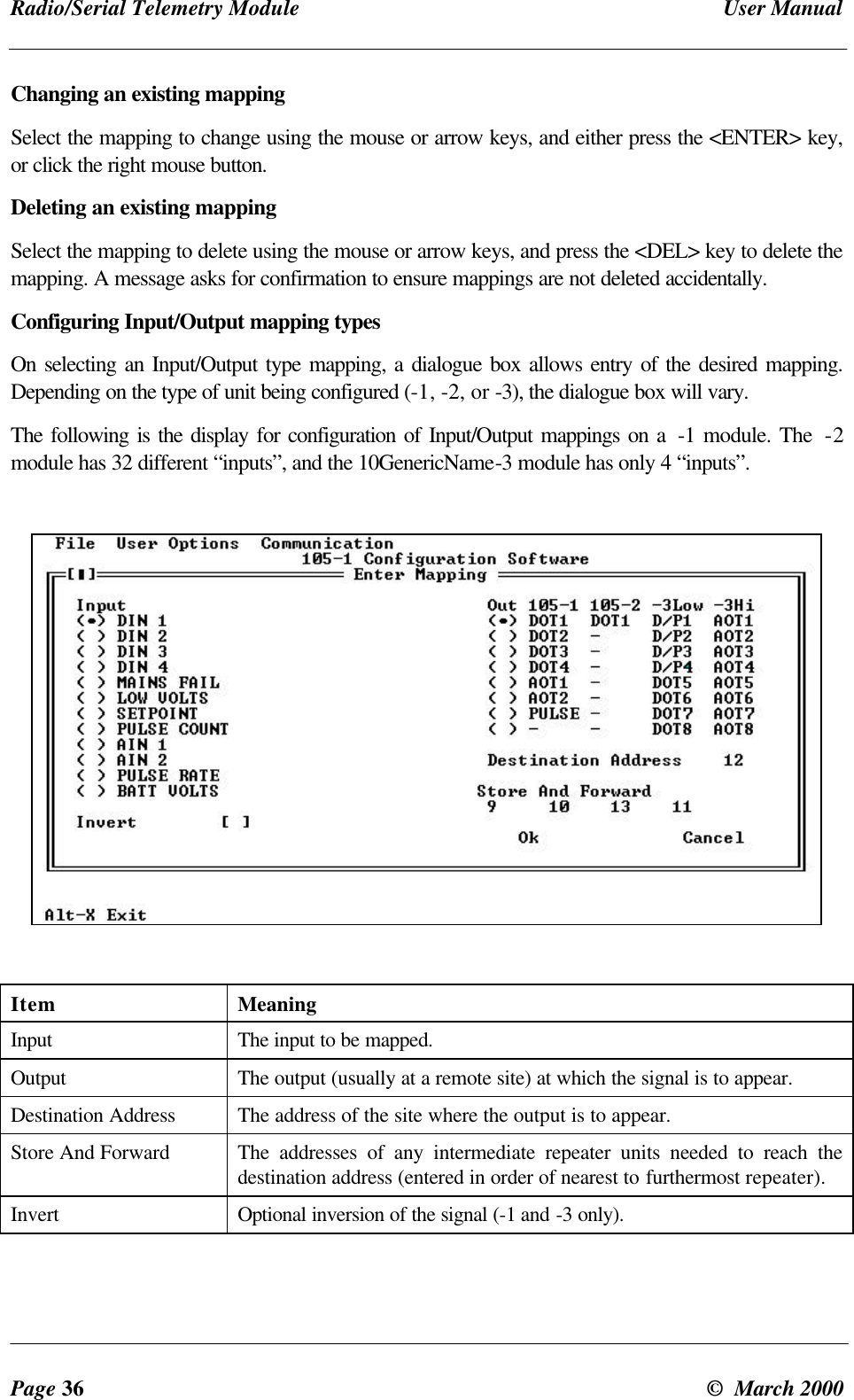
 Chapter Four Configurationman_905_2.1.doc Page 35This screen shows the system address, unit address, a summary of all of the mappings configured,and the current file (if any) being used. To move between editing the system address, unit address,and configuration mappings, use the <TAB> key, or use the <ALT> key in conjunction with thehighlighted letter. Alternatively, simply click on the appropriate section with the mouse.Changing the system address and unit addressTo change the system address and unit address, simply move to the appropriate box using the<TAB> key or the <ALT> + letter keys, or mouse click, and type in a new number or use thearrow keys to edit the old number.Entering a new mappingTo enter a new mapping, move to the Mappings section of the screen using the <TAB>,  <ALT> +M keys or the mouse. Hit the <INS> key or double click the left mouse button to bring up adialogue box as shown below.Select the desired mapping type and hit the <ENTER> key or select OK to continue.Input/Output Standard mapping of an input to an output at another unit.Poll Start-up poll of a remote unit to ensure data is up to dateComms Fail Set a local output on comms fail to a remote site
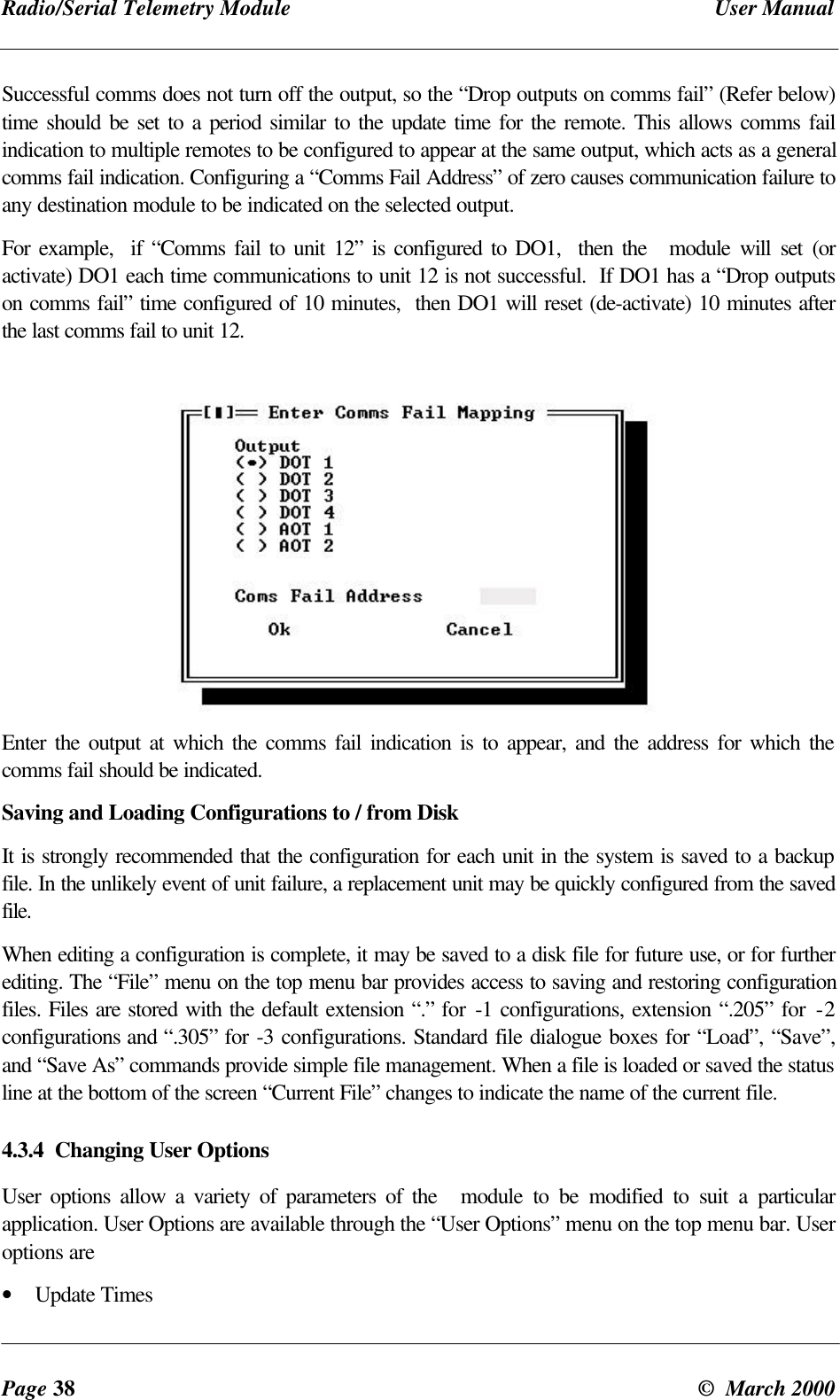
Radio/Serial Telemetry Module User ManualPage 36 ©  March 2000Changing an existing mappingSelect the mapping to change using the mouse or arrow keys, and either press the <ENTER> key,or click the right mouse button.Deleting an existing mappingSelect the mapping to delete using the mouse or arrow keys, and press the <DEL> key to delete themapping. A message asks for confirmation to ensure mappings are not deleted accidentally.Configuring Input/Output mapping typesOn selecting an Input/Output type mapping, a dialogue box allows entry of the desired mapping.Depending on the type of unit being configured (-1, -2, or -3), the dialogue box will vary.The following is the display for configuration of Input/Output mappings on a  -1 module. The  -2module has 32 different “inputs”, and the 10GenericName-3 module has only 4 “inputs”.Item MeaningInput The input to be mapped.Output The output (usually at a remote site) at which the signal is to appear.Destination Address The address of the site where the output is to appear.Store And Forward The addresses of any intermediate repeater units needed to reach thedestination address (entered in order of nearest to furthermost repeater).Invert Optional inversion of the signal (-1 and -3 only).
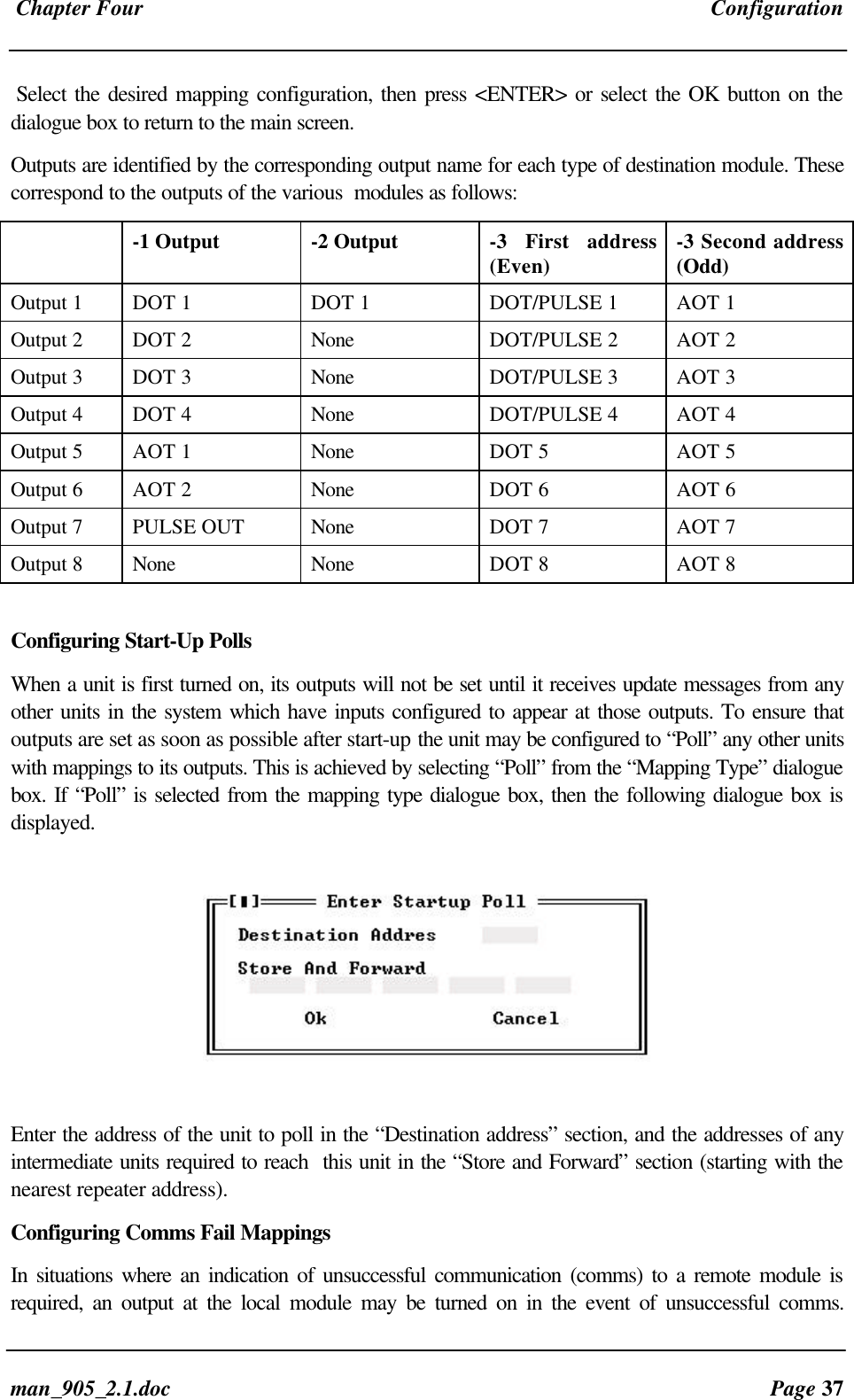
 Chapter Four Configurationman_905_2.1.doc Page 37Select the desired mapping configuration, then press <ENTER> or select the OK button on thedialogue box to return to the main screen.Outputs are identified by the corresponding output name for each type of destination module. Thesecorrespond to the outputs of the various  modules as follows:-1 Output -2 Output -3 First address(Even) -3 Second address(Odd)Output 1 DOT 1 DOT 1 DOT/PULSE 1 AOT 1Output 2 DOT 2 None DOT/PULSE 2 AOT 2Output 3 DOT 3 None DOT/PULSE 3 AOT 3Output 4 DOT 4 None DOT/PULSE 4 AOT 4Output 5 AOT 1 None DOT 5 AOT 5Output 6 AOT 2 None DOT 6 AOT 6Output 7 PULSE OUT None DOT 7 AOT 7Output 8 None None DOT 8 AOT 8Configuring Start-Up PollsWhen a unit is first turned on, its outputs will not be set until it receives update messages from anyother units in the system which have inputs configured to appear at those outputs. To ensure thatoutputs are set as soon as possible after start-up the unit may be configured to “Poll” any other unitswith mappings to its outputs. This is achieved by selecting “Poll” from the “Mapping Type” dialoguebox. If “Poll” is selected from the mapping type dialogue box, then the following dialogue box isdisplayed.Enter the address of the unit to poll in the “Destination address” section, and the addresses of anyintermediate units required to reach  this unit in the “Store and Forward” section (starting with thenearest repeater address).Configuring Comms Fail MappingsIn situations where an indication of unsuccessful communication (comms) to a remote module isrequired, an output at the local module may be turned on in the event of unsuccessful comms.
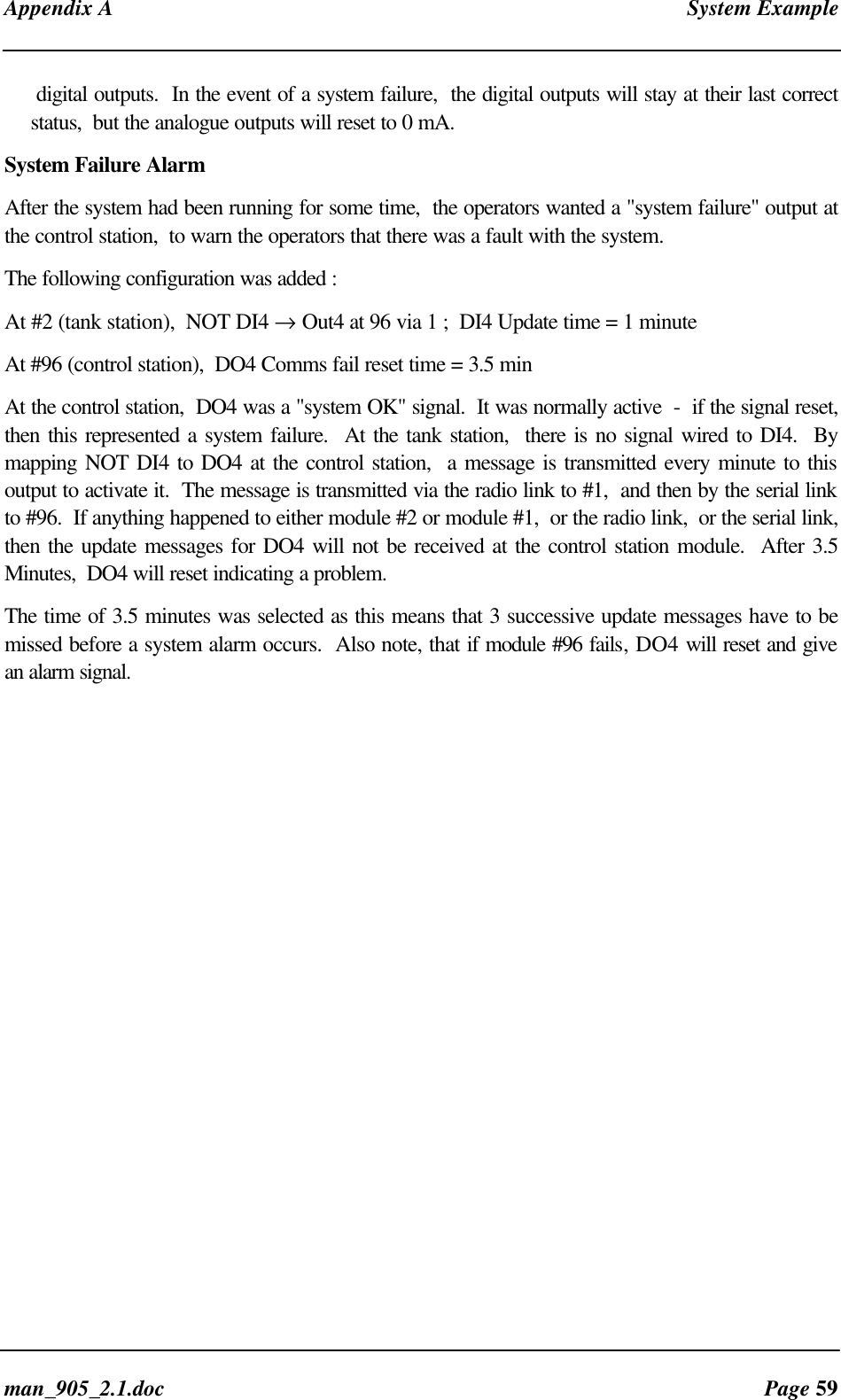
Radio/Serial Telemetry Module User ManualPage 38 ©  March 2000Successful comms does not turn off the output, so the “Drop outputs on comms fail” (Refer below)time should be set to a period similar to the update time for the remote. This allows comms failindication to multiple remotes to be configured to appear at the same output, which acts as a generalcomms fail indication. Configuring a “Comms Fail Address” of zero causes communication failure toany destination module to be indicated on the selected output.For example,  if “Comms fail to unit 12” is configured to DO1,  then the   module will set (oractivate) DO1 each time communications to unit 12 is not successful.  If DO1 has a “Drop outputson comms fail” time configured of 10 minutes,  then DO1 will reset (de-activate) 10 minutes afterthe last comms fail to unit 12.Enter the output at which the comms fail indication is to appear, and the address for which thecomms fail should be indicated.Saving and Loading Configurations to / from DiskIt is strongly recommended that the configuration for each unit in the system is saved to a backupfile. In the unlikely event of unit failure, a replacement unit may be quickly configured from the savedfile.When editing a configuration is complete, it may be saved to a disk file for future use, or for furtherediting. The “File” menu on the top menu bar provides access to saving and restoring configurationfiles. Files are stored with the default extension “.” for -1 configurations, extension “.205” for -2configurations and “.305” for -3 configurations. Standard file dialogue boxes for “Load”, “Save”,and “Save As” commands provide simple file management. When a file is loaded or saved the statusline at the bottom of the screen “Current File” changes to indicate the name of the current file.4.3.4  Changing User OptionsUser options allow a variety of parameters of the   module to be modified to suit a particularapplication. User Options are available through the “User Options” menu on the top menu bar. Useroptions are• Update Times
 Chapter Four Configurationman_905_2.1.doc Page 39• Analogue Sensitivity• Reset Output on Comms Fail• Digital/Analogue Debounce (-1 and -2 only)• Analogue Debounce (-2 only)• Set-points (-1 and -2 only)• Pulse Rate Scale (-1 and -2 only)• Pulse Output Update (-1 and -3 only)Update Times  allows configuration of how frequently each configured mapping is updated(Integrity Update).The period of update (check) transmissions may be configured individually for each input.  Thedefault period is 10 minutes for all inputs, except for pulse inputs (1 minute).  Note that this is thecheck transmission time - updates will also be sent on any change-of-state on each input.  It isimportant here to keep in mind the principle - “Less radio traffic means better communications”.Short update times should only be used in special circumstances, or when an RS-485 network isused, and the message is not transmitted over a radio link. Frequent updates from multiple unitscauses congestion of the radio channel, which results in increased communication failures andgeneral performance degradation of the system.Analogue Sensitivity allows configuration of the change required in an analogue input before a“Change Of State” is detected, and the new analogue value is transmitted. For input signals whichvary widely over a short period of time or have a normal oscillation, the analogue sensitivity shouldbe set to an appropriately large value. This ensures that many change messages are not transmittedin too short a time. This will result in channel congestion, as described in the preceding section.Reset Output on Comms Fail  allows the Comms Fail Time to be selected  -  this is the time  foran output to reset if it has not received an update or change message.Each output on the unit, either analogue or digital,  may be configured to reset (off or 0mA) when noupdate transmission has been received for a certain time. The default condition is zero (no reset).This option can be used to ensure that communications failure will not result in loss of control.  Forexample, outputs connected to pumps should be configured to reset on communications failure sothat the pump will turn off.If the reset time is less than the update time,  then the output will reset when the reset time expires,and then set again when the update message is received.  We recommend that the reset time be alittle more than twice the update time.Debounce is the time which an input must stay stable before the  module decides that a change ofstate has occurred.  If the input changes (say 0 → 1) and changes again (1 → 0) in less than thedebounce time,  then the  module will ignore both changes.  Debounce may be configured for digitalinputs on the -1 and -2 modules (0.5 - 8 seconds) and the analogue inputs on the -2 module (0.5 -8 seconds).  The default value of 0.5 seconds is suitable for most applications. In applications wherea digital input may turn on and off several times slowly (for example,  security switches or float
Radio/Serial Telemetry Module User ManualPage 40 ©  March 2000switches) a debounce time of up to 8 seconds may be configured.  The configured debounce timehas no affect on pulse inputs.Note that the analogue debounce is not configurable for the -1, but is configurable in the -2.Set-points allow a remote digital output to be turned on and off depending on the value of ananalogue input.  The “set-point status” internal input  must be mapped to an output for this option tohave effect.  When the AI is less than the Low Set-point (LSP),  the set-point status will be active(on,  “1”)  -  when the AI is more than the High Set Point (HSP),  the set-point status will be reset(off, “0”).  Note that the High Set Point (HSP) must always be higher than the Low Set Point(LSP).  For the -1 module,  only AI1 has set-point values.  For -2 modules, all six analogue inputshave set-points.Debounce time operates on the set-point status in the same way as digital inputs.Pulse Rate Scale is used when pulse rate is mapped to an analogue output.  The pulse rate scaleconfigures the maximum expected pulse input frequency. This is the frequency for which the pulserate input indicates the maximum value (20 mA if mapped to an analogue output). On the -1, themaximum value is 100 Hz. On the 105-2, the maximum value is 1000 Hz for input 1, and 100 Hzfor inputs 2-4.Pulse input 1 on the -2 module can measure pulse signals up to 1000 Hz,  however all pulse outputshave a maximum rate of only 100 Hz.  For pulse inputs greater than 100 Hz,  a Divide-by-10function should be configured.  The input count is then divided by 10 before transmitting.  Thedefault is 100Hz (no divide-by-10).  Where the 1000Hz option is configured,  then each outputpulse means 10 pulses (or 10 counts).Pulse Output Update is the time  which pulses are output after a PI update is received.  It shouldbe configured to correspond to the pulse input update time for the corresponding pulse input. Thisensures that the pulse output rate matches as closely as possible the pulse input rate which it isreflecting.For example,  if the PI update time is 1 minute,  then the PO update time should also be 1 minute.  Ifthe PI update time is changed,  then the PO update time at the remote module should be alsochanged.  The PO will still operate if the time is not changed,  however pulses may be output fasteror slower than the input pulses.4.3.5 Programming / Downloading ConfigurationTransferring configuration to the  ModuleOnce editing of the configuration is complete, the configuration must be loaded into the  before thenew configuration takes effect.   Before proceeding,  close any other programmes on the PC that isusing the communications port.• Connect the cable from the PC’s serial port to the  serial port.• From the Communication menu, select “Select Comms Port”• Select the appropriate serial port from the list provided (COM1 - COM4)
 Chapter Four Configurationman_905_2.1.doc Page 41• From the Communication menu, select “Program The 105”The configuration program will now attempt to download the configuration data to the  module. If allgoes well, a “Programming” prompt will appear. This prompt will remain until programming of the  iscomplete. If the  is not correctly connected, or is not turned on, it may take up to a minute for theconfiguration program to stop trying to connect to the .Loading existing Configuration from theTo download the configuration from a  for editing or simply for checking, follow the following steps:• Connect the cable from the PC’s serial port to the  serial port.• From the Communication menu, select “Select Comms Port”• Select the appropriate serial port from the list provided (COM1 - COM4)• From the Communication menu, select “Load Config from 105”The configuration program will now attempt to upload the configuration data from the . If all goeswell, a “Loading” prompt will appear. This prompt will remain until loading of data from the   iscomplete. If the  is not correctly connected, or is not turned on, it may take up to a minute for theconfiguration program to stop trying to connect to the .
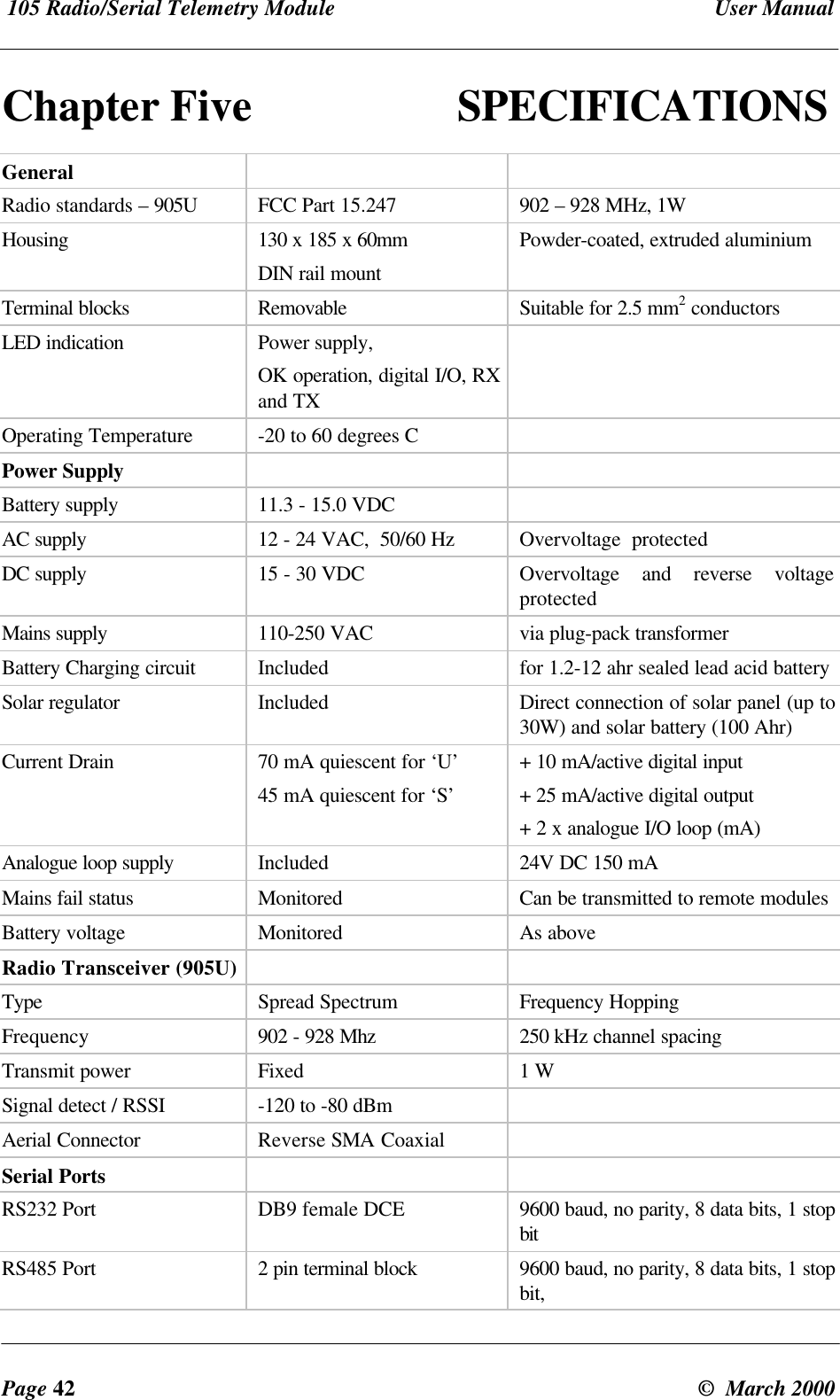
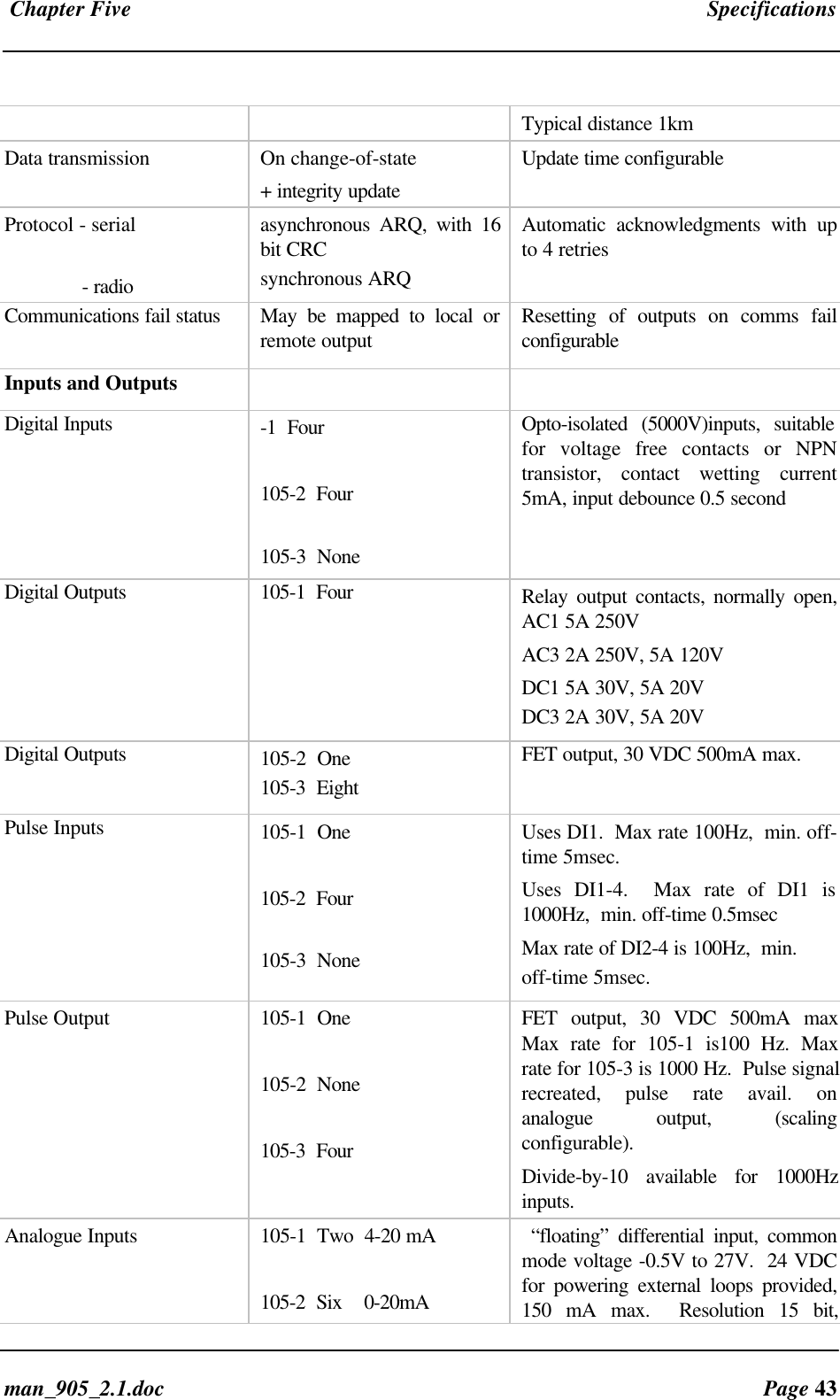
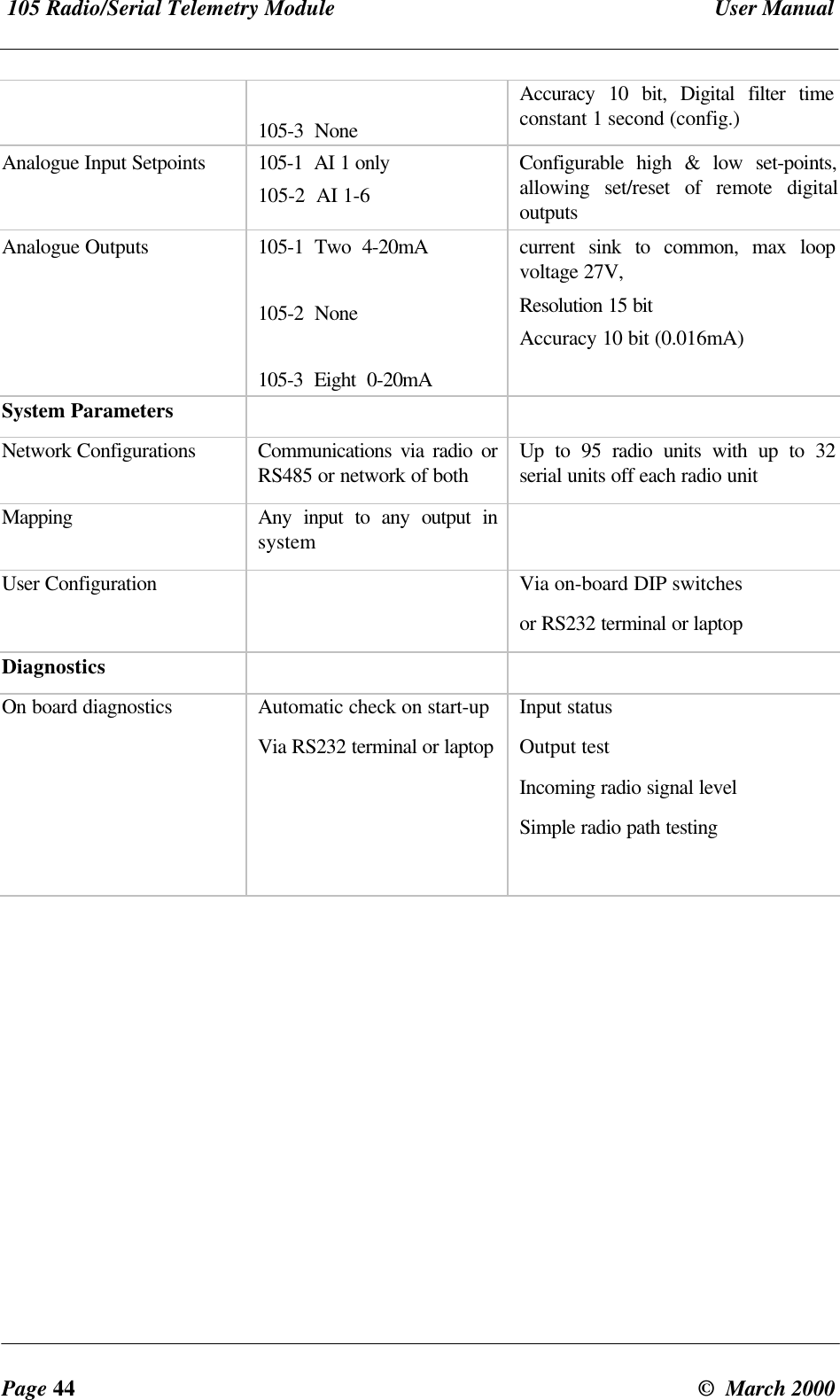
 105 Radio/Serial Telemetry Module  User ManualPage 42 ©  March 2000Chapter Five SPECIFICATIONSGeneralRadio standards – 905U FCC Part 15.247 902 – 928 MHz, 1WHousing 130 x 185 x 60mmDIN rail mountPowder-coated, extruded aluminiumTerminal blocks Removable Suitable for 2.5 mm2 conductorsLED indication Power supply,OK operation, digital I/O, RXand TXOperating Temperature -20 to 60 degrees CPower SupplyBattery supply 11.3 - 15.0 VDCAC supply 12 - 24 VAC,  50/60 Hz Overvoltage  protectedDC supply 15 - 30 VDC Overvoltage and reverse voltageprotectedMains supply 110-250 VAC via plug-pack transformerBattery Charging circuit Included for 1.2-12 ahr sealed lead acid batterySolar regulator Included Direct connection of solar panel (up to30W) and solar battery (100 Ahr)Current Drain 70 mA quiescent for ‘U’45 mA quiescent for ‘S’+ 10 mA/active digital input+ 25 mA/active digital output+ 2 x analogue I/O loop (mA)Analogue loop supply Included 24V DC 150 mAMains fail status Monitored Can be transmitted to remote modulesBattery voltage Monitored As aboveRadio Transceiver (905U)Type Spread Spectrum Frequency HoppingFrequency 902 - 928 Mhz 250 kHz channel spacingTransmit power Fixed 1 WSignal detect / RSSI -120 to -80 dBmAerial Connector Reverse SMA CoaxialSerial PortsRS232 Port DB9 female DCE 9600 baud, no parity, 8 data bits, 1 stopbitRS485 Port 2 pin terminal block 9600 baud, no parity, 8 data bits, 1 stopbit,
 Chapter Five Specificationsman_905_2.1.doc Page 43Typical distance 1kmData transmission On change-of-state+ integrity updateUpdate time configurableProtocol - serial              - radioasynchronous ARQ, with 16bit CRCsynchronous ARQAutomatic acknowledgments with upto 4 retriesCommunications fail status May be mapped to local orremote output Resetting of outputs on comms failconfigurableInputs and OutputsDigital Inputs -1  Four105-2  Four105-3  NoneOpto-isolated (5000V)inputs, suitablefor voltage free contacts or NPNtransistor, contact wetting current5mA, input debounce 0.5 secondDigital Outputs 105-1  Four Relay output contacts, normally open,AC1 5A 250VAC3 2A 250V, 5A 120VDC1 5A 30V, 5A 20VDC3 2A 30V, 5A 20VDigital Outputs 105-2  One105-3  EightFET output, 30 VDC 500mA max.Pulse Inputs 105-1  One105-2  Four105-3  NoneUses DI1.  Max rate 100Hz,  min. off-time 5msec.Uses DI1-4.  Max rate of DI1 is1000Hz,  min. off-time 0.5msecMax rate of DI2-4 is 100Hz,  min.off-time 5msec.Pulse Output 105-1  One105-2  None105-3  FourFET output, 30 VDC 500mA maxMax rate for 105-1 is100 Hz. Maxrate for 105-3 is 1000 Hz.  Pulse signalrecreated, pulse rate avail. onanalogue output, (scalingconfigurable).Divide-by-10 available for 1000Hzinputs.Analogue Inputs 105-1  Two  4-20 mA105-2  Six    0-20mA “floating” differential input, commonmode voltage -0.5V to 27V.  24 VDCfor powering external loops provided,150 mA max.  Resolution 15 bit,
 105 Radio/Serial Telemetry Module  User ManualPage 44 ©  March 2000105-3  NoneAccuracy 10 bit, Digital filter timeconstant 1 second (config.)Analogue Input Setpoints 105-1  AI 1 only105-2  AI 1-6Configurable high & low set-points,allowing set/reset of remote digitaloutputsAnalogue Outputs 105-1  Two  4-20mA105-2  None105-3  Eight  0-20mAcurrent sink to common, max loopvoltage 27V,Resolution 15 bitAccuracy 10 bit (0.016mA)System ParametersNetwork Configurations Communications via radio orRS485 or network of both Up to 95 radio units with up to 32serial units off each radio unitMapping Any input to any output insystemUser Configuration Via on-board DIP switchesor RS232 terminal or laptopDiagnosticsOn board diagnostics Automatic check on start-upVia RS232 terminal or laptopInput statusOutput testIncoming radio signal levelSimple radio path testing
 Chapter Six Troubleshootingman_905_2.1.doc Page 45Chapter Six TROUBLESHOOTING6.1 Diagnostics ChartINDICATOR CONDITION MEANINGOK LED OFF Continuously • Battery Voltage low• CPU failure• +24V supply failure/overloadOK LED ON Continuously • Normal OperationPWR LED ON Continuously • Supply available from SUP1/SUP2• Supply available from solar  panelTX LED ON Flashes briefly • Radio transmittingRX LED ON Flashes briefly • Radio Receiving• Serial port communicatingRX LED ON Flashes continuously • Module in Configuration ModeRX LED ON Continuously • Test Button press in ConfigurationModeNo transmission on change ofstate• Unit not configured correctly - re-configure and check operationThe green OK LED on the front panel indicates correct operation of the unit. This LED extinguisheson failure as described above. When the OK LED extinguishes shutdown state is indicated. In thisstate, all digital outputs turn OFF and the +24V supply turns off.On processor failure, or on failure during start-up diagnostics, the unit shuts down, and remains inshutdown until the fault is rectified.  The unit also shuts down if the battery voltage falls below 10.8volts. This is a protection feature designed to protect the battery from deep discharge in case ofextended period without supply voltage.6.2 Self Test Functions6.2.1 Input to Output Reflection  (105-1 only)The unit will require re-configuration after SELF TEST.  Ensure you know the requiredoperational configuration including system and unit addresses so that the network can berestored after testing.Remove the cover in the front panel, and set the DIP switches as shown below. Hold down the redbutton for five seconds, or until the Rx LED glows yellow, release the Red button (the Rx LED nowflashes), then press and release the Red button (the flashing Rx LED extinguishes).
 105 Radio/Serial Telemetry Module  User ManualPage 46 ©  March 2000 0    0    0   0     0    0    0    0 1   0    0    0    0    0    0    0Input signals may now be connected to the input terminals of the module. If the module is operatingcorrectly, then the input signals will be reflected to the corresponding output on the same module.For example, if DI 1 is connected to common - i.e. the first digital input is turned "ON" - then DO 1will activate, if the module is functional. Similarly, if a 12mA signal is connected to AI 2, then a12mA signal should be able to be measured from AO 2, if the module is functioning correctly.If a module does not pass its self test function, then it should be returned to an authorisedservice agent for attention6.2.2 Radio Testing using Tone ReversalsThis function allows the unit to be configured to continuously transmit a sequence of alternate zerosand ones on the radio. This function provides the facility to check VSWR of aerials duringinstallation, as well as checking the fade margin of the path between two units (see below - receivedsignal strength indication).The tone reversals function is initiated by setting all of the DIL switches to ON, and holding downthe red button for approximately 5 seconds( until the RX LED lights continuously). On releasing thebutton, the RX LED will flash continuously, and the TX LED will light, indicating that the radiotransmitter is on.6.2.3 Diagnostics menuTo aid in the checking and set-up of the 105 unit, a user friendly menu provides access to diagnosticfunctions in the 105. Use of the diagnostics menu does not affect module configuration.  To accessthese diagnostics, a terminal must be connected to the serial port on the unit. The terminal may be astandalone terminal, or a personal computer running terminal emulation software.The terminal or terminal emulation software must be set-up for 9600 baud, 8 data bits, 1 stop bit, noparity.The menu is accessed by connecting a terminal to the serial (DB9 RS-232) port on the 105 (ensurethe RS485 port is disconnected), setting all switches to ‘0’, and holding down the red button forapproximately 5 seconds, until the RX LED lights continuously. One of the following menus will bedisplayed on the terminal :
 Chapter Six Troubleshootingman_905_2.1.doc Page 47 105 V1.0a) Insb) Tonesc) Commsd) DO1e) DO2f) DO3g) DO4h) AO1i) AO2j) Switchk) Signal>1052 V1.0a) Digital Inputsb)  Analogue Inputsc) Tonesd) Commse) DO1f) Switchg)  Signal>1053 V1.0a)  Insb)  Tonesc)  Commsd) DO1e)  DO2f)  DO3g)  DO4h)  DO5i)  DO6j)  DO7k)  DO8l)  AO1m)  AO2n)  AO3o)  AO4p)  AO5q)  AO6r)   AO7s)   AO8t)   Switchu)  Signal>Choose an item from the menu by entering the letter before that item.  For example,  to select the"Comms" function from the 105-2 Menu,  enter :-   dInputsThis option provides a dynamic display of the status of all of the inputs in the 105, both internal andexternal.105-1 Modules1234MLS P CNT  AI1 AI2 P RATE VBATT0101001   00F6  C000 4000 8000 9C00The first 7 values (1234MLS) each represent a single digital input. A  ‘1’ indicates that that input isON, and a ‘0’ indicates that the corresponding input is OFF. "1234" represents the four physicaldigital inputs, DI1 to DI4. "M" is the mains fail status (‘1’ for mains fail, ‘0’ for mains OK). "L" is thebattery low volts status (‘1’ for low volts ‘0’ for OK). "S" is the set-point status.P CNT, AI1, AI2, P RATE, and VBATT each represent 16 bit values, displayed as fourhexadecimal digits.P CNT is the current value of the pulsed input counter. This value should increment each time ‘DI 1’turns from OFF to ON.  P RATE displays the current pulse rate at DI1. This value is scaledaccording to the MAXRATE value configured (0 Hertz is displayed as 4000, and the maximum rateis displayed as C000).
 105 Radio/Serial Telemetry Module  User ManualPage 48 ©  March 2000AI1 and AI2 represent the value for the two analogue inputs. Full scale input (20 mA) is displayedas C000, 4mA is displayed as 4000,  and 0ma is displayed as 2000.  Analogue inputs are filtereddigitally with a time constant of 1 second, so a sudden change in the analogue input current will resultin a slower change in displayed analogue value, finally settling at the new value.A guide to translate the displayed value to the analogue input current is provided below.Add together the figures corresponding to each digit in each position to determinethe current (mA)e.g. displayed value 3456 = 2.000+0.500+0.039+0.003= 2.542mADigit Leftmost position Next position Next position Rightmostposition  0 -0.000 0.000 0.000  1 -0.125 0.008 0.000  2 0.000 0.250 0.016 0.001  3 2.000 0.375 0.023 0.001  4 4.000 0.500 0.031 0.002  5 6.000 0.625 0.039 0.002  6 8.000 0.750 0.047 0.003  7 10.000 0.875 0.055 0.003  8 12.000 1.000 0.063 0.004  9 14.000 1.125 0.070 0.004  A 16.000 1.250 0.078 0.005  B 18.000 1.375 0.086 0.005  C 20 1.500 0.094 0.006  D 22 1.625 0.102 0.006  E -1.750 0.109 0.007  F -1.875 0.117 0.007VBATT is the current internally derived battery voltage. 4000 corresponds to 8 Volts, C000represents 16 volts.  A quicker method is use the calculation :Battery voltage (volts) = ½ I + 6,  where I is the mA value determined from the above table usingVBATT.  For example,  a value of VBATT of A000 gives an I value of 16mA from the abovetable.  The battery voltage corresponding to this is 14V (or ½ x 16 + 6).105-2 ModulesDigital InputsDIN    SETPNT   PULSED1234MSL123456 PIN1 PIN2 PIN3 PIN40000100111111 0000 0000 0000 0000
 Chapter Six Troubleshootingman_905_2.1.doc Page 49Analogue InputsVBAT PR1 PR2 PR3 PR4 AI1 AI2 AI3 AI4 AI5 AI68138 4000 4000 4000 4000 0D3A 0CD2 0CC7 0CC7 0CD4 0CC7105-3 ModulesML      VBAT    VSLR00      9FA2    0000TonesThis provides the same function as described above in 6.2.2. Tone Reversals. This function may beused in conjunction with the Signal option (described below) to check the path between two 105units.CommsThis function allows monitoring of all messages transmitted and received over the radio. Transmittedmessages are displayed starting in the leftmost column of the display. Received messages aredisplayed indented by one space. Received messages which have been corrupted are displayed witha '*' in the first column of the display. The first four hexadecimal digits are the system addressattached to the message, and must match for units to communicate successfully.Example (105-1):>cComms01FA8106008005C672D4F1 Command message transmitted by this unit.*01FA8186C6B5A7 Corrupt Acknowledge received from remote.01FA8106008005C672D4F1 Message re-transmitted by this unit. (no Ack) 01FA818600B5A7 Valid Acknowledge received from remote.*01FB86010080010000FEC2 Corrupt message received from remote unit. 01FA86010080010000FEC2 Re-sent message received from remote unit.01FA868100332F Acknowledge message from this unit to remote.DO1 to DO8These options allow the user to set and clear digital outputs.  To set an output, select thecorresponding menu item, at the prompt, type the value FFFF to turn the output ON, or 0000 toturn the output OFF.   For example,  to set DO1 ON,>eDO1>FFFF
 105 Radio/Serial Telemetry Module  User ManualPage 50 ©  March 2000AO1 to AO8These options allow the user to set analogue outputs to any value. To set the output, select thecorresponding menu item. At the prompt type the value required for the analogue output as a fourdigit hexadecimal value. Refer to the table above for analogue current/expected value relationship.To set AO2 on 105-3 to 19 mA :>mAO2>B800SwitchThis option allows testing of the DIL (Dual In Line) switches used for the configuration of themodule.  The diagram below indicates the layout of the switches of which there are two sets of eight,with an “Enter” button located to the right of the pair.  the display indicates the current switchsettings with the digit ‘1’ corresponding to ‘On’ and the digit ‘O’ corresponding to ‘Off’.  Changingthe switch settings in this mode will change the display.  Test each switch and check to ensure thedisplay changes accordingly.When the ‘Enter’ button is pressed, regardless of the previous switch setting, switches 1, 5, 9 and13 will display as a ‘1’Switches ‘1’ or ‘0’ Button     Not Pressed =  Pressed =Switches Displayed11100010010101011110101011011101                      1        5       9       13SignalThis option provides for testing the radio path between two 105-U units for a suitable fade margin.Although a pair of units may communicate successfully, radio communication may be affected by a1    1    1   0     0    0    1    01    1    1   0     0    0    1    00    1    0    1    0    1    0    10    1    0    1    0    1    0    1XOXO
 Chapter Six Troubleshootingman_905_2.1.doc Page 51range of influences, including atmospheric conditions, changing landscape, degradation of aerials orco-axial cable, low battery voltage etc. Fade margin is an indication of how far a radio path candeteriorate before communication becomes unreliable.When using the Signal feature, a meter is displayed with a mark indicating the current received radiosignal level. To check the radio path between two units, select the signal option at the local unit. Theremote unit may then be set up for  tone reversals (refer 1 above) and the signal level read from themeter.A simpler method when remote units are not easily accessible is to cause a transmission from thelocal unit to the remote unit (by setting a digital input which maps to the remote unit, for example).The meter will latch the received signal from the remote unit for half a second, allowing the receivedlevel to be read.Under normal radio conditions, a reading of 0 indicates a very marginal communication path. Forreliable communications, the signal reading should be 3 or above.>k Minimum signal level for reliable commsSignal0123456789----      #In areas experiencing radio interference or high background noise, reliable communications may notbe achievable even with this signal level. To determine if interference is occurring the signal optionmay be selected without any other 105 units active. In a normal radio environment, no readingshould be displayed. If a reading is displayed, then the received signal strength from the remoteshould be at least three counts higher than the background noise for reliable communication.>k Displayed signal level ofSignal background noise/interference0123456789----  #>k Minimum signal level for reliable commsSignal0123456789----        #When using directional aerials (i.e. YAGI aerials) this feature may be used to peak the receivedsignal level. Set-up the remote unit to transmit tone reversals as described above, and observe thesignal indication while adjusting the orientation of the aerial. A peak in signal level indicates optimumorientation of the aerial.
 105 Radio/Serial Telemetry Module  User ManualPage 52 ©  March 2000Chapter Seven WARRANTY & SERVICEWe are pleased that you have purchased this product. Your purchase is guaranteed against defectsfor a 365 day warranty period, commencing from the date of purchase.This warranty does not extend to:-Failures caused by the operation of the equipment outside the particular product'sspecification.-use of the 105 module not in accordance with this User Manual, or-abuse, misuse, neglect or damage by external causes, or-repairs, alterations, or modifications undertaken other than by an authorised Service Agent.Full product specifications and maintenance instructions are available from your Service Agent,  yoursource of purchase,  or from the master distributor in your country upon request and should benoted if you are in any doubt about the operating environment for your equipment purchaseIn the unlikely event of your purchase being faulty, your warranty extends to free repair orreplacement of the faulty unit, after its receipt at the master distributor in your country. Our warrantydoes not include transport or insurance charges relating to a warranty claim.This warranty does not indemnify the purchaser of  products for any consequential claim fordamages or loss of operations or profits.Should you wish to make a warranty claim, or obtain service, please forward the module to thenearest authorised Service Agent along with proof of purchase. For details of authorised ServiceAgents, contact your sales distributor.
Appendix A System Exampleman_905_2.1.doc Page 53Appendix A SYSTEM EXAMPLEThe following example of a system is a comprehensive guide to using some of the  features of the105 range and design of 105 system.The example application is a pump station which supplies water from a reservoir to a tank station.Signals are transferred between the pump station and tank station by radio  -  the distance betweenthe two stations is 1.5 km (1 mile),  and the radio path is heavily obstructed by buildings and trees.A control station is located near the pump station,  and there is an existing signal cable between thecontrol station and the pump station.A 105U-1 module is installed at the pump station (with address 1) and a 105U-2 module is installedat the tank station (with address 2).  Because the signal cable to the control station does not haveenough cores for all of the signals required,  the signal cable is used as a RS485 cable and a 105S-3module is installed at the control station (with address 96).   As this module has an address greaterthan 95, the 105U-1 at the pump station will communicate to it via its serial port.The following diagram represents the system :-
 105 Radio/Serial Telemetry Module  User ManualPage 54 ©  March 2000The following design points should be noted :-• A test of the radio path between the pump station and the tank station indicated that the radiopath would be reliable provided aerials were installed at 6 m above the ground.   At each site,the coaxial cable would be approx 10 m in length,  so it was decided to use 3 element Yagiaerials with RG58 coaxial cable  -  the Yagi aerials would compensate for the loss in the cable.The system was installed in a country which permitted the use of 500mW radio power.  If thishad not been the case,  then an intermediate repeater station would have been required.• At the tank station,  there was an existing light pole with a mains power supply   -  the light polewas 10m high.  Permission was obtained to mount the aerial from the pole and to use the powersupply for the radio telemetry module.As there was no existing electrical panel at this station,  a small steel enclosure was installed onthe light pole.  A 2 Amp-Hour sealed battery was installed to provide power during any mainsfailure.  The flow and level transducer were powered from the 24VDC loop supply provided bythe 105 module.• At the pump station,  the aerial was mounted on a 3 m J-bracket installed on the roof of thepump station building.  The final height of the aerial was approx 6 m.  Care was taken to align theYagi aerials so they pointed at each other.  The Yagi aerials were installed with horizontal polarity- that is,  with the elements horizontal.  These aerials will not "hear" other radio users on the sameradio channel which generally use vertical polarity.There was an existing electrical enclosure at the pump station, and the 105U module wasinstalled inside this enclosure.  The module was powered from 220VAC mains with a 2 AmpHour sealed battery as backup.• At the control station,  the 105S module was installed inside the existing control panel enclosure.The module was powered from an existing 24VDC power supply.
Appendix A System Exampleman_905_2.1.doc Page 55Tank Station ConfigurationThe 105U-2 module has the following configuration :-Note the following points in the configuration :• The configuration software used was CFG105-2.EXE as the module is a 105U-2.• The system address is 10587 (a random selection) and unit address is 2.• PIN1 (the flow meter) is mapped to Out3 (D/P output 3) at #96 which is the control station  -#1 is a repeater.• The pulse rate for this PIN (PLSR1) is mapped to Out2 at #97 via #1.  This is AO2 of the105S-3 at the control station.  Remember that the 105S-3 has two addresses  -  the loweraddress is used for the digital outputs, and the higher address is used for the analogue outputs.
 105 Radio/Serial Telemetry Module  User ManualPage 56 ©  March 2000• The pulse rate scaling for PIN1 has been set to 5 Hz to match the maximum flow rate of the flowmeter.  Note that PIN1 has not been configured for "divide by 10" (for 1000 Hz  pulse signals).• AIN1 (the level transducer) is mapped to Out1 at #97 via #1.  The analogue debounce has beenset to 2 sec.  This is to avoid any wave action on the surface of the tank causing un-necessarychange transmissions.  This debounce time will also operate on the PLSR1 value,  but as the flowrate changes slowly,  this will not affect the performance of this signal.• SETPT1 (the set-point status for AI1) is mapped to Out2 (DO2) of #1 (pump station).  The set-point values for SETPT1 have been set to 40% and 75%.  When the tank level drops to 40%,DO2 at the pump station will activate to start the pump.  When the level rises above 75%,  DO2will reset to stop the pump.• The update time for SETPT1 has been changed to 5 minute,  as required.• An additional mapping has been entered  -  LOW VOLT has been mapped to Out7 at #96 via#1 (DO7 at the control station).  This mapping is for future use  -  it will provide a low batteryvoltage alarm for the tank station.  The update time for this mapping has been set to the maximumtime of 15 minutes to reduce loading of the radio channel.• A Start-up poll has been configured for #1, as DO1 at the tank station is controlled from thepump station.  Note that no comms fail reset time has been configured for DO1.  As this outputdrives an indication only,  the indication will show the last correct status even duringcommunication failures.Pump Station ConfigurationThe 105U-1 module has the following configuration :-
Appendix A System Exampleman_905_2.1.doc Page 57Note the following points in the configuration :• The configuration software used was CFG105-1.EXE as the module is a 105U-1.• The system address is 10587 (same as before) and unit address is 1.• DIN1 (pump fault signal) is mapped to Out1 (DO1) at #96 which is the control station.  Notethat no repeater address is necessary as there is a direct link between #1 and #96.• DIN2 (pump running signal) has two mappings  -  a mapping to DO1 at #2 (tank station) andDO2 at #96 (control station).  When DIN2 changes,  there will be two separate changemessages transmitted  -  one by radio to #2 and one by serial link to #96.• AIN1 (pump amps) is mapped to Out3 at #97 (AO3 at control station).• An additional mapping has been entered  -  LOW VOLT has been mapped to Out8 at #96(DO8 at the control station).  This mapping is for future use  -  it will provide a low batteryvoltage alarm for the pump station.• A Start-up poll has been configured for #2, as DO2 at the pump station is controlled from thetank station.  Note that a comms fail reset time of 11 minutes has been configured for DO2.  Thismeans that if a message has not been received for DO2 within 11 minutes,  DO2 will reset andswitch off the pump.  The 11 min time was chosen as it means that two successive updatemessages have to be missed before the pump is reset,  and there is no problems if the pump runsfor 11 minutes during a system failure (the tank will not overflow during this time).
 105 Radio/Serial Telemetry Module  User ManualPage 58 ©  March 2000Control Station ConfigurationThe 105S-3 module has the following configuration :-Note the following points in the configuration :• The configuration software used was CFG105-3.EXE as the module is a 105S-3.• The system address is 10587 (same as before) and unit address is 96.  As the module is a 105-3module,  it will automatically assume addresses #96 and #97.• The only mappings are Start-up polls. Note that there are two separate polls,  one for eachremote module.• D/P Out 3 has been configured as a PO.  Its pulse output update time is the same as the PIupdate time at the remote module (both have been left at their default value of 1 minute).• Comms fail reset times have been selected for the analogue outputs (21 minutes) but not the
Appendix A System Exampleman_905_2.1.doc Page 59digital outputs.  In the event of a system failure,  the digital outputs will stay at their last correctstatus,  but the analogue outputs will reset to 0 mA.System Failure AlarmAfter the system had been running for some time,  the operators wanted a "system failure" output atthe control station,  to warn the operators that there was a fault with the system.The following configuration was added :At #2 (tank station),  NOT DI4 → Out4 at 96 via 1 ;  DI4 Update time = 1 minuteAt #96 (control station),  DO4 Comms fail reset time = 3.5 minAt the control station,  DO4 was a "system OK" signal.  It was normally active  -  if the signal reset,then this represented a system failure.  At the tank station,  there is no signal wired to DI4.  Bymapping NOT DI4 to DO4 at the control station,  a message is transmitted every minute to thisoutput to activate it.  The message is transmitted via the radio link to #1,  and then by the serial linkto #96.  If anything happened to either module #2 or module #1,  or the radio link,  or the serial link,then the update messages for DO4 will not be received at the control station module.  After 3.5Minutes,  DO4 will reset indicating a problem.The time of 3.5 minutes was selected as this means that 3 successive update messages have to bemissed before a system alarm occurs.  Also note, that if module #96 fails, DO4 will reset and givean alarm signal.

Navigation menu