ELPRO Technologies ELPSS0D Frequency hopping spreadspectrum transmitter User Manual Man 905UD 2 0

ELPRO Technologies Pty Ltd Frequency hopping spreadspectrum transmitter Man 905UD 2 0

Contents

Revised user manul
 905U-D Radio Modem  Module  User ManualPage 2©   May 2000Thank you for your selection of the 905U-D radio modem.  We trust itwill give you many years of valuable service.ATTENTION!Incorrect termination of supply wires maycause internal damage and will void warranty.To ensure your 905U-D enjoys a long life,double check ALL your connections withthe user’s manualbefore turning the power on.
ContentsMan_905UD_2.0.doc Page 3FCC Notice:This user’s manual is for the ELPRO 905U-D radio modem. This device complies with Part15.247 of the FCC Rules.Operation is subject to the following two conditions:1) This device may not cause harmful interference and2) This device must accept any interference received, including interference that maycause undesired operation.This device must be operated as supplied by ELPRO Technologies Pty Ltd. Any changes ormodifications made to the device without the written consent of ELPRO Technologies Pty.Ltd. May void the user’s authority to operate the device.End user products that have this device embedded must be supplied with non-standardantenna connectors, and antennas available from vendors specified by ELPROTechnologies. Please contact ELPRO Technologies for end user antenna and connectorrecommendations.Notices:Safety:Exposure to RF energy is an important safety consideration. The FCC has adopted a safetystandard for human exposure to radio frequency electromagnetic energy emitted by FCCregulated equipment as a result of its actions in General Docket 79-144 on March 13, 1996.CAUTION:To comply with FCC RF Exposure requirements in section 1.1310 of the FCC Rules,antennas used with this device must be installed to provide a separation distance of at least20 cm from all persons to satisfy RF exposure compliance.DO NOT:• operate the transmitter when someone is within 20 cm of the antenna• operate the transmitter unless all RF connectors are secure and any open connectorsare properly terminated.• operate the equipment near electical blasting caps or in an explosive atmosphereAll equipment must be properly grounded for safe operations.  All equipment should beserviced only by a qualified technician.
 905U-D Radio Modem  Module  User ManualPage 4©   May 2000How to Use This ManualTo receive the maximum benefit from your 905U-D product,please read the Introduction,  Installation and Operationchapters of this manual thoroughly before putting the 905U-D towork.Chapter Four Configuration details the configurations availableand explains the diverse operation of the product in detail.Chapter Five Specifications details the features of the productand lists the standards to which the product is approved.Chapter Six Troubleshooting will help if your system hasproblems and Chapter Seven specifies the Warranty andService conditions.The foldout sheet  905U-D Installation Guide is an installationdrawing appropriate for most applications.
ContentsMan_905UD_2.0.doc Page 5WARNING1.  In some countries, a radio licence is not required for the 905U-D telemetry modulesprovided the module is installed using the aerial and equipment configurationdescribed in the 905U-D Installation Guide.  In other countries, refer to the relevantRegulatory Authority.  Check the Installation Guide for your country listing.2. Where a radio  licence is not required,  operation is  authorised by the relevantAuthority in your country on a non-protection basis.  Although all care is taken in thedesign of these units, there is no responsibility taken for sources of externalinterference.   Some delay in the operation of  the module may occur during periods ofinterference.  Systems should be designed to be tolerant of these delays.3. To avoid the risk of electrocution,  the aerial, and all terminals of the 905U-D moduleshould be electrically protected. To provide maximum surge and lightning protection,the  module should be connected to a suitable earth and the aerial, aerial cable, andthe module should be installed as recommended in the Installation Guide.4. To avoid accidents during maintenance or adjustment of remotely controlledequipment, all equipment should be first disconnected from the  905U-D moduleduring these adjustments.  Equipment should carry clear markings to indicate remoteor automatic operation.  eg. "This equipment is remotely controlled and may startwithout warning.  Isolate at the switchboard before attempting adjustments."5. The  905U-D module is not suitable for use in explosive environments withoutadditional protection.
 905U-D Radio Modem  Module  User ManualPage 6©   May 2000CONTENTSCHAPTER ONE INTRODUCTION..........................................................................................81.1 GENERAL .........................................................................................................................81.2 TRANSPARENT MODE .......................................................................................................91.3 CONTROLLED MODE ......................................................................................................101.4 REPEATER UNITS ...........................................................................................................11CHAPTER TWO INSTALLATION..........................................................................................122.1 GENERAL .......................................................................................................................12POWER SUPPLY.........................................................................................................................132.3SERIAL CONNECTIONS ...................................................................................................132.3.1  RS232 Serial Port.............................................................................................132.3.2  RS485 Serial Port.............................................................................................14CHAPTER THREE OPERATION ..........................................................................................163.1 POWER-UP AND NORMAL OPERATION .............................................................................163.2 SERIAL AND RADIO DATA ................................................................................................173.2.1 Character Type.................................................................................................173.2.2 Serial Data Rate...............................................................................................173.2.3 Radio Data Rate...............................................................................................183.3 TRANSPARENT MODE .....................................................................................................193.4 CONTROLLED MODE ......................................................................................................193.5 WHAT OPERATING MODE TO USE ?.................................................................................233.6 OPERATING PROBLEMS ..................................................................................................24CHAPTER FOUR CONFIGURATION...................................................................................264.1 BEFORE CONFIGURING ..................................................................................................264.2 CONFIGURATION MODE ..................................................................................................264.3 HAYES COMMANDS .........................................................................................................264.3.1 Unit Reset.........................................................................................................274.3.2 Storing Configuration Parameters - Write Registers.......................................274.3.3 Default Values - Restore Factory Defaults ......................................................274.3.4 S-Registers ......................................................................................................274.3.5 Changing Destination/Repeater Address   - autodial.......................................324.3.6 Connecting to a Remote Module  – single dial.................................................324.3.7 Reading Configuration Parameters..................................................................324.3.8 Unit Test commands   - AT&Tx........................................................................324.3.9 Version Information   -  ATI...............................................................................334.3.10 Character Type  - AT&Bx.................................................................................344.3.11 Character Type  - AT&Mx.................................................................................344.3.12 Verbose mode control, Local Echo control, and Quiet mode..........................344.3.13 Responses .......................................................................................................344.4 CONFIGURATION EXAMPLES............................................................................................35
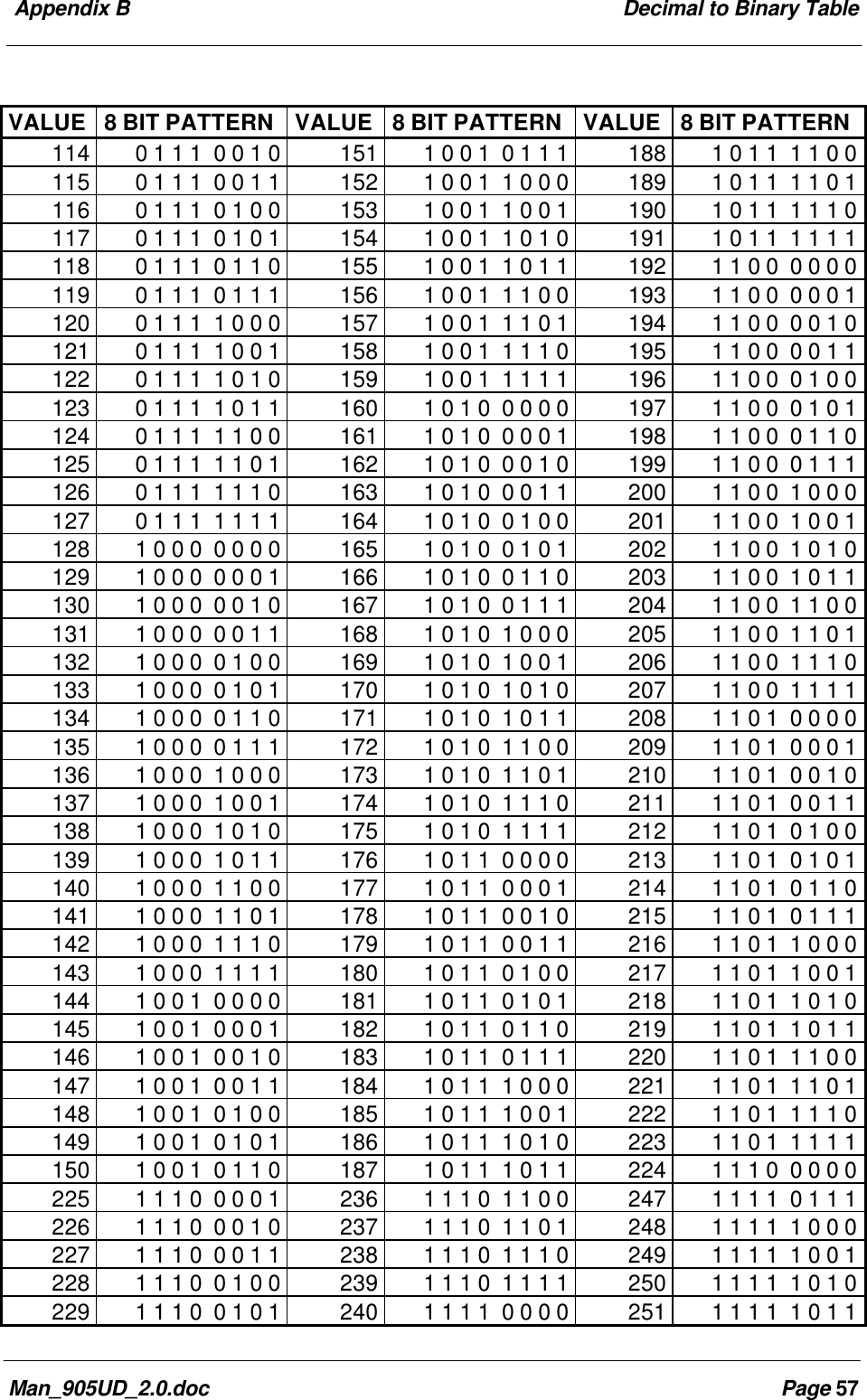
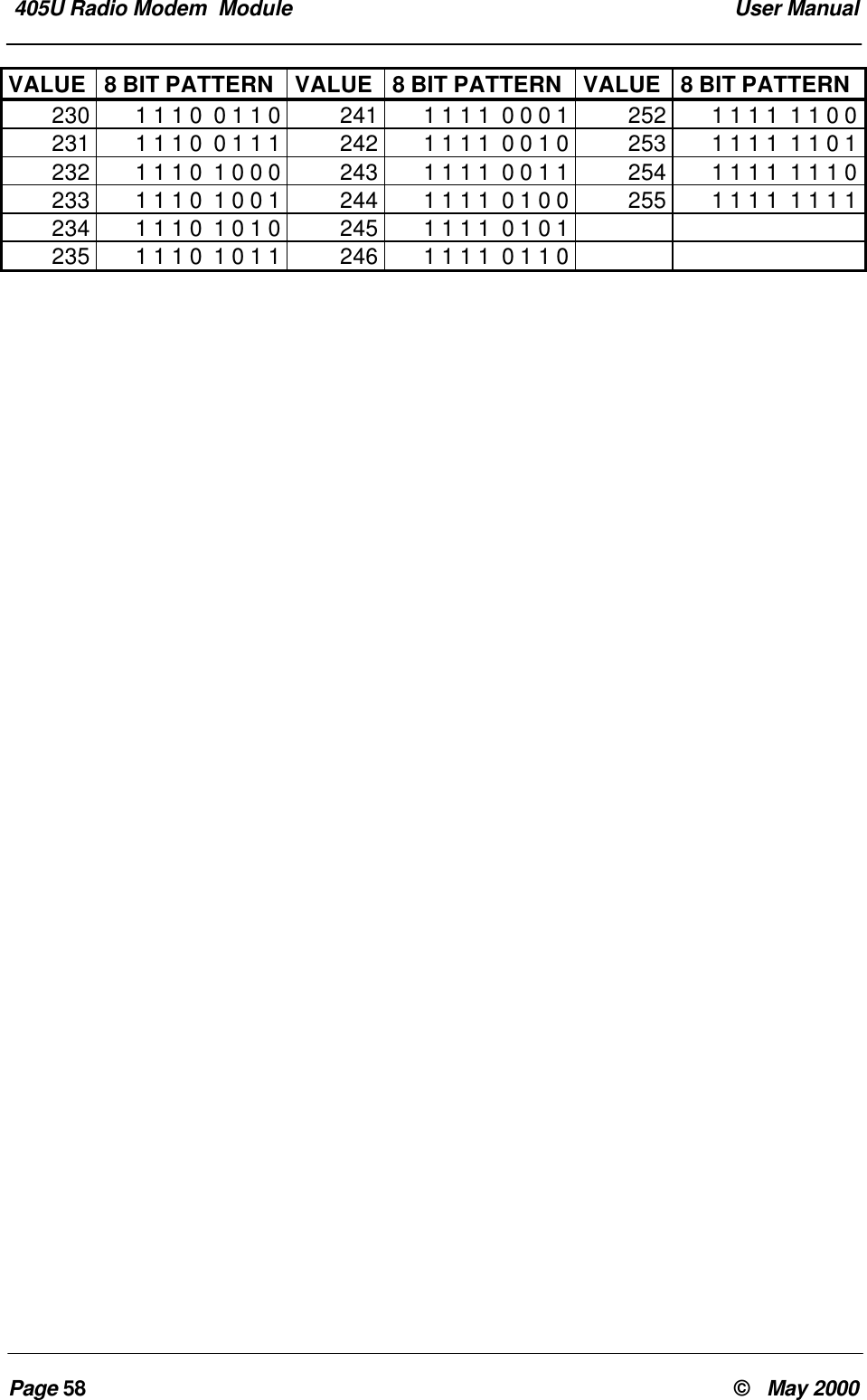
ContentsMan_905UD_2.0.doc Page 7CHAPTER FIVE SPECIFICATIONS ......................................................................................38CHAPTER SIX TROUBLESHOOTING.................................................................................406.1 DIAGNOSTICS CHART .....................................................................................................406.2 TEST FUNCTIONS...........................................................................................................406.2.1Diagnostic Functions  -  AT&Tx .......................................................................406.2.2Bit Error Rate Test (BER)................................................................................43CHAPTER SEVEN WARRANTY & SERVICE.......................................................................44APPENDIX A  SWITCH CONFIGURATION..........................................................................451.0 INTRODUCTION...............................................................................................................451.0.1 Default Configuration........................................................................................461.0.2 Transparent Mode ............................................................................................461.0.3 Controlled Mode................................................................................................461.1 CONFIGURATION PARAMETERS .......................................................................................501.1.1 Operating Mode................................................................................................511.1.2 Tail Time...........................................................................................................511.1.3 Message Length...............................................................................................511.1.4 Serial Data Rate...............................................................................................521.1.5 Radio Data Rate...............................................................................................521.1.6 Transmit Hold-off Time.....................................................................................521.1.7 Receive Hold-off Time......................................................................................531.1.8 Character Type.................................................................................................531.1.9 Connect Update Time......................................................................................541.1.10 Reset to Factory Default Settings ....................................................................541.2 CONFIGURATION EXAMPLE..............................................................................................54APPENDIX B DECIMAL TO BINARY TABLE.......................................................................57
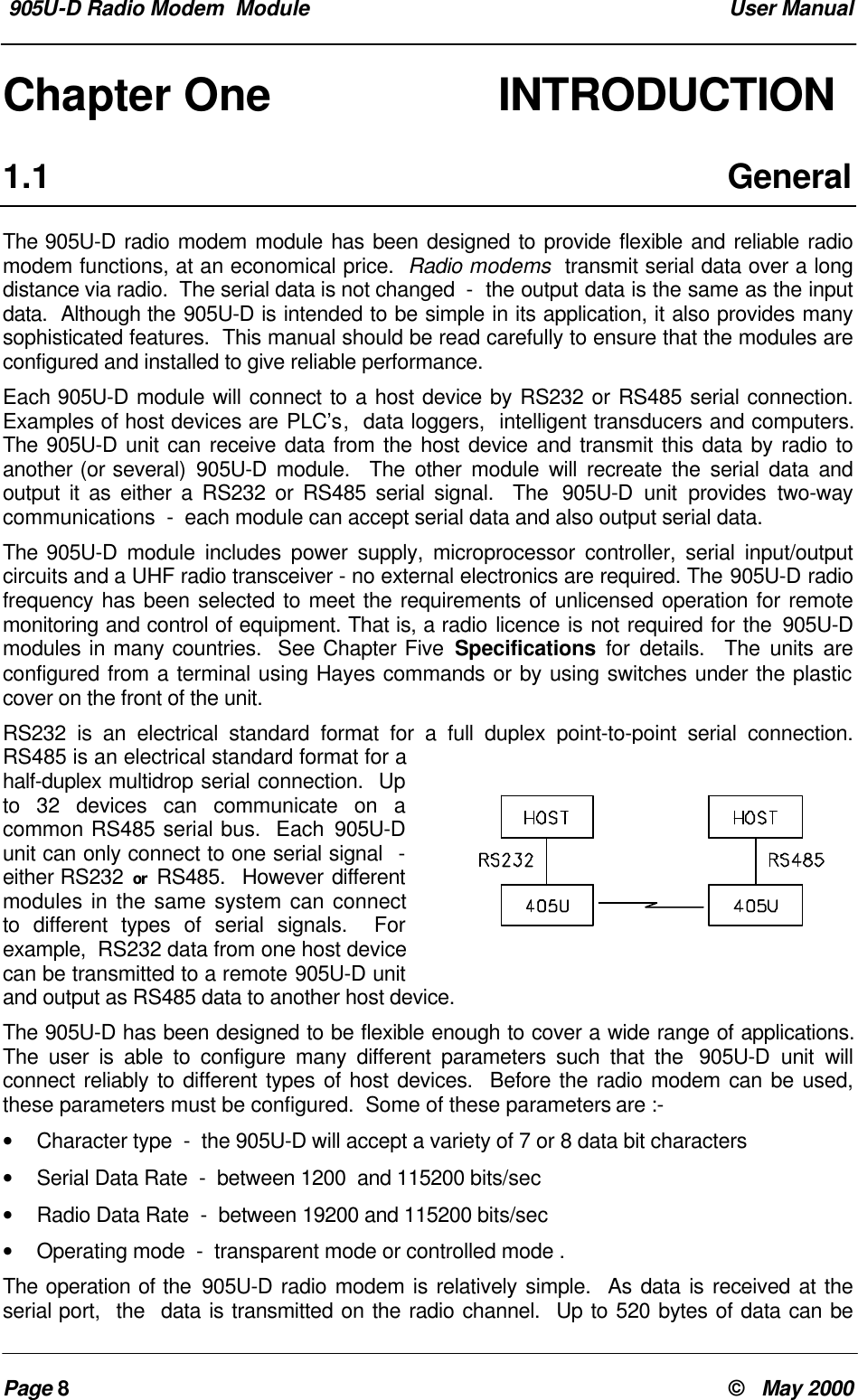
 905U-D Radio Modem  Module  User ManualPage 8©   May 2000Chapter One        INTRODUCTION1.1 GeneralThe 905U-D radio modem module has been designed to provide flexible and reliable radiomodem functions, at an economical price.  Radio modems  transmit serial data over a longdistance via radio.  The serial data is not changed  -  the output data is the same as the inputdata.  Although the 905U-D is intended to be simple in its application, it also provides manysophisticated features.  This manual should be read carefully to ensure that the modules areconfigured and installed to give reliable performance.Each 905U-D module will connect to a host device by RS232 or RS485 serial connection.Examples of host devices are PLC’s,  data loggers,  intelligent transducers and computers.The 905U-D unit can receive data from the host device and transmit this data by radio toanother (or several) 905U-D module.  The other module will recreate the serial data andoutput it as either a RS232 or RS485 serial signal.  The  905U-D unit provides two-waycommunications  -  each module can accept serial data and also output serial data.The 905U-D module includes power supply, microprocessor controller, serial input/outputcircuits and a UHF radio transceiver - no external electronics are required. The 905U-D radiofrequency has been selected to meet the requirements of unlicensed operation for remotemonitoring and control of equipment. That is, a radio licence is not required for the 905U-Dmodules in many countries.  See Chapter Five Specifications for details.  The units areconfigured from a terminal using Hayes commands or by using switches under the plasticcover on the front of the unit.RS232 is an electrical standard format for a full duplex point-to-point serial connection.RS485 is an electrical standard format for ahalf-duplex multidrop serial connection.  Upto 32 devices can communicate on acommon RS485 serial bus.  Each 905U-Dunit can only connect to one serial signal  -either RS232 or RS485.  However differentmodules in the same system can connectto different types of serial signals.  Forexample,  RS232 data from one host devicecan be transmitted to a remote 905U-D unitand output as RS485 data to another host device.The 905U-D has been designed to be flexible enough to cover a wide range of applications.The user is able to configure many different parameters such that the  905U-D unit willconnect reliably to different types of host devices.  Before the radio modem can be used,these parameters must be configured.  Some of these parameters are :-• Character type  -  the 905U-D will accept a variety of 7 or 8 data bit characters• Serial Data Rate  -  between 1200  and 115200 bits/sec• Radio Data Rate  -  between 19200 and 115200 bits/sec• Operating mode  -  transparent mode or controlled mode .The operation of the 905U-D radio modem is relatively simple.  As data is received at theserial port,  the  data is transmitted on the radio channel.  Up to 520 bytes of data can be
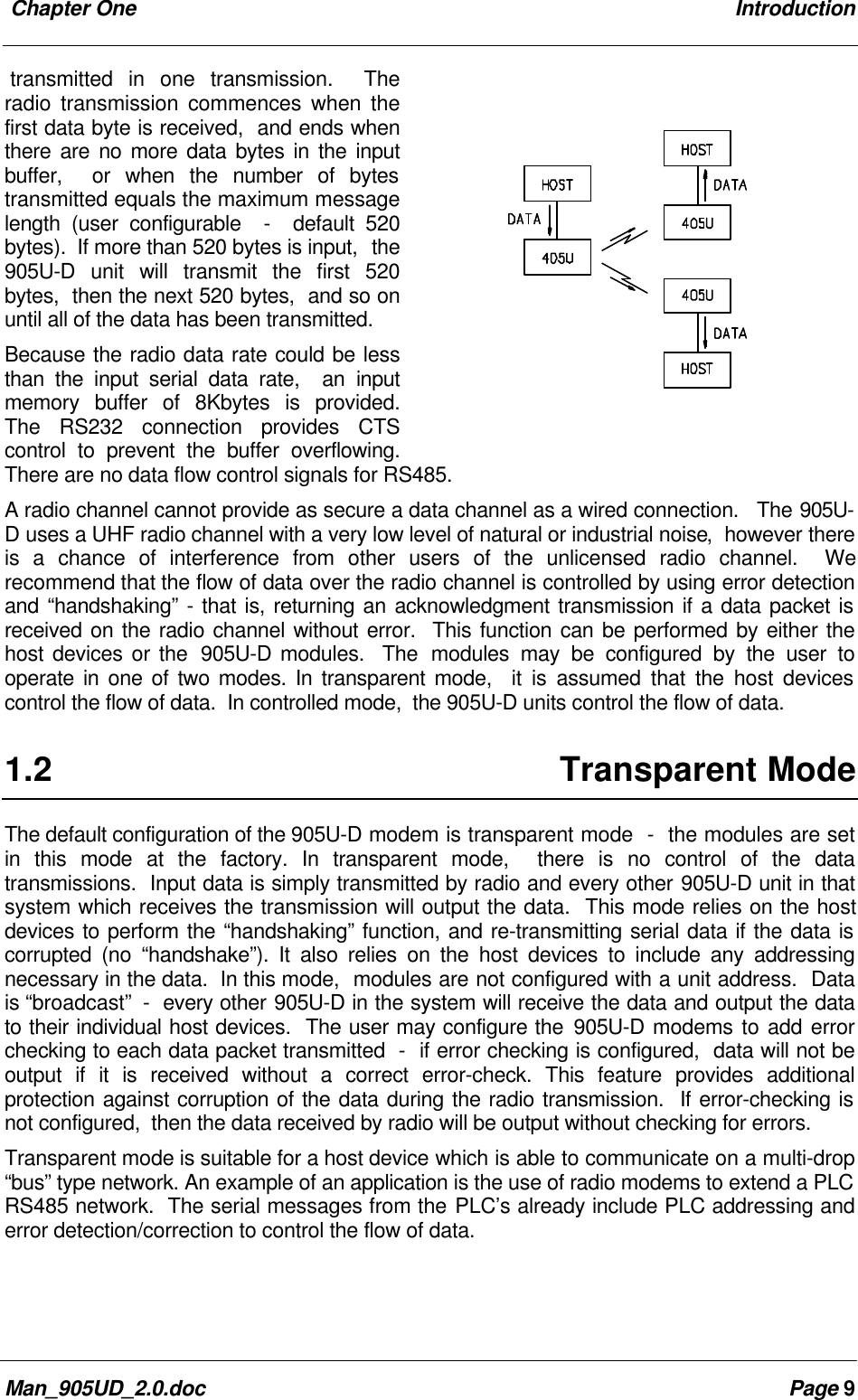
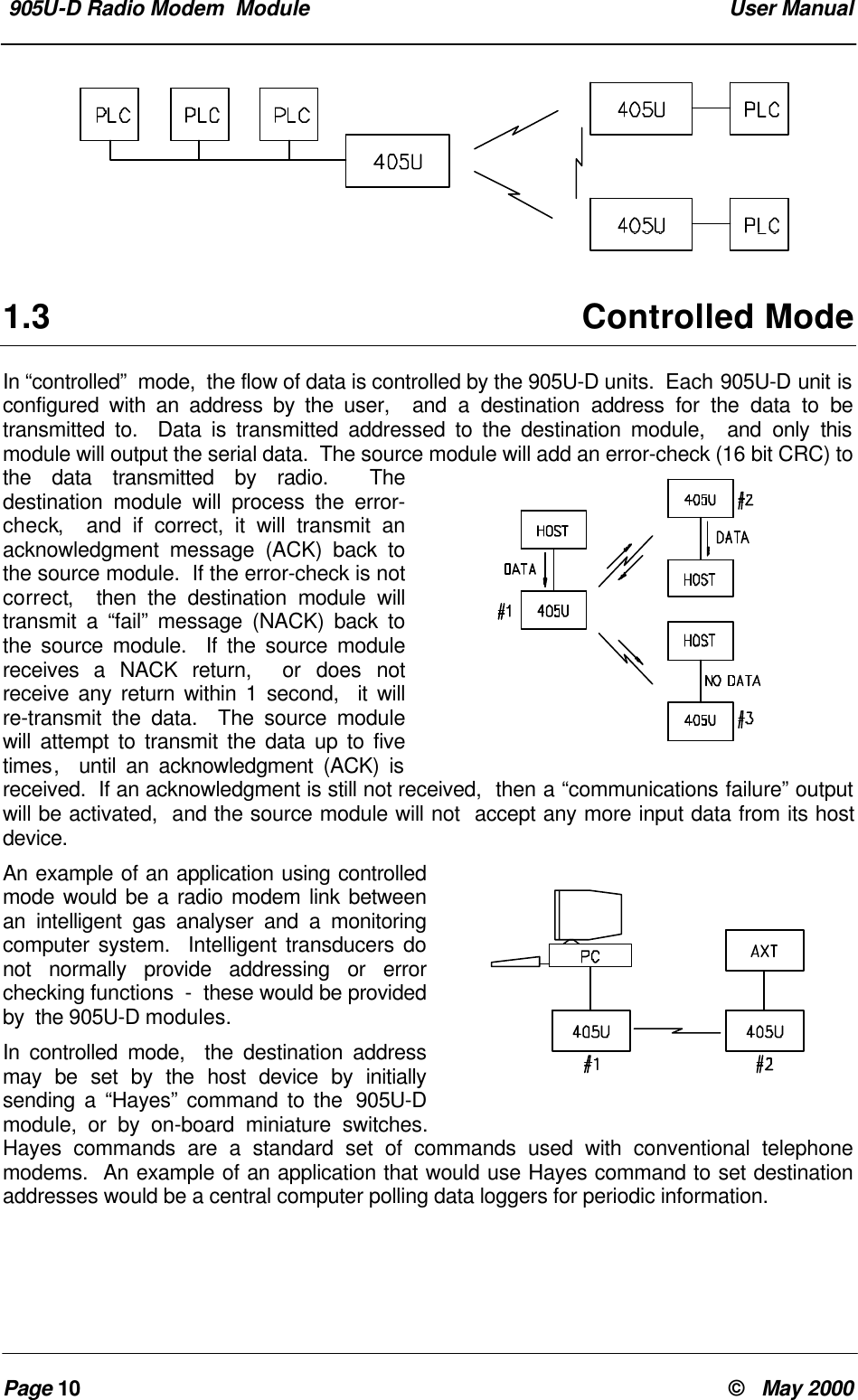
 Chapter One IntroductionMan_905UD_2.0.doc Page 9transmitted in one transmission.  Theradio transmission commences when thefirst data byte is received,  and ends whenthere are no more data bytes in the inputbuffer,  or when the number of bytestransmitted equals the maximum messagelength (user configurable  -  default 520bytes).  If more than 520 bytes is input,  the905U-D unit will transmit the first 520bytes,  then the next 520 bytes,  and so onuntil all of the data has been transmitted.Because the radio data rate could be lessthan the input serial data rate,  an inputmemory buffer of 8Kbytes is provided.The RS232 connection provides CTScontrol to prevent the buffer overflowing.There are no data flow control signals for RS485.A radio channel cannot provide as secure a data channel as a wired connection.   The 905U-D uses a UHF radio channel with a very low level of natural or industrial noise,  however thereis a chance of interference from other users of the unlicensed radio channel.  Werecommend that the flow of data over the radio channel is controlled by using error detectionand “handshaking” - that is, returning an acknowledgment transmission if a data packet isreceived on the radio channel without error.  This function can be performed by either thehost devices or the  905U-D modules.  The  modules may be configured by the user tooperate in one of two modes. In transparent mode,  it is assumed that the host devicescontrol the flow of data.  In controlled mode,  the 905U-D units control the flow of data.1.2 Transparent ModeThe default configuration of the 905U-D modem is transparent mode  -  the modules are setin this mode at the factory. In transparent mode,  there is no control of the datatransmissions.  Input data is simply transmitted by radio and every other 905U-D unit in thatsystem which receives the transmission will output the data.  This mode relies on the hostdevices to perform the “handshaking” function, and re-transmitting serial data if the data iscorrupted (no “handshake”). It also relies on the host devices to include any addressingnecessary in the data.  In this mode,  modules are not configured with a unit address.  Datais “broadcast”  -  every other 905U-D in the system will receive the data and output the datato their individual host devices.  The user may configure the 905U-D modems to add errorchecking to each data packet transmitted  -  if error checking is configured,  data will not beoutput if it is received without a correct error-check. This feature provides additionalprotection against corruption of the data during the radio transmission.  If error-checking isnot configured,  then the data received by radio will be output without checking for errors.Transparent mode is suitable for a host device which is able to communicate on a multi-drop“bus” type network. An example of an application is the use of radio modems to extend a PLCRS485 network.  The serial messages from the PLC’s already include PLC addressing anderror detection/correction to control the flow of data.
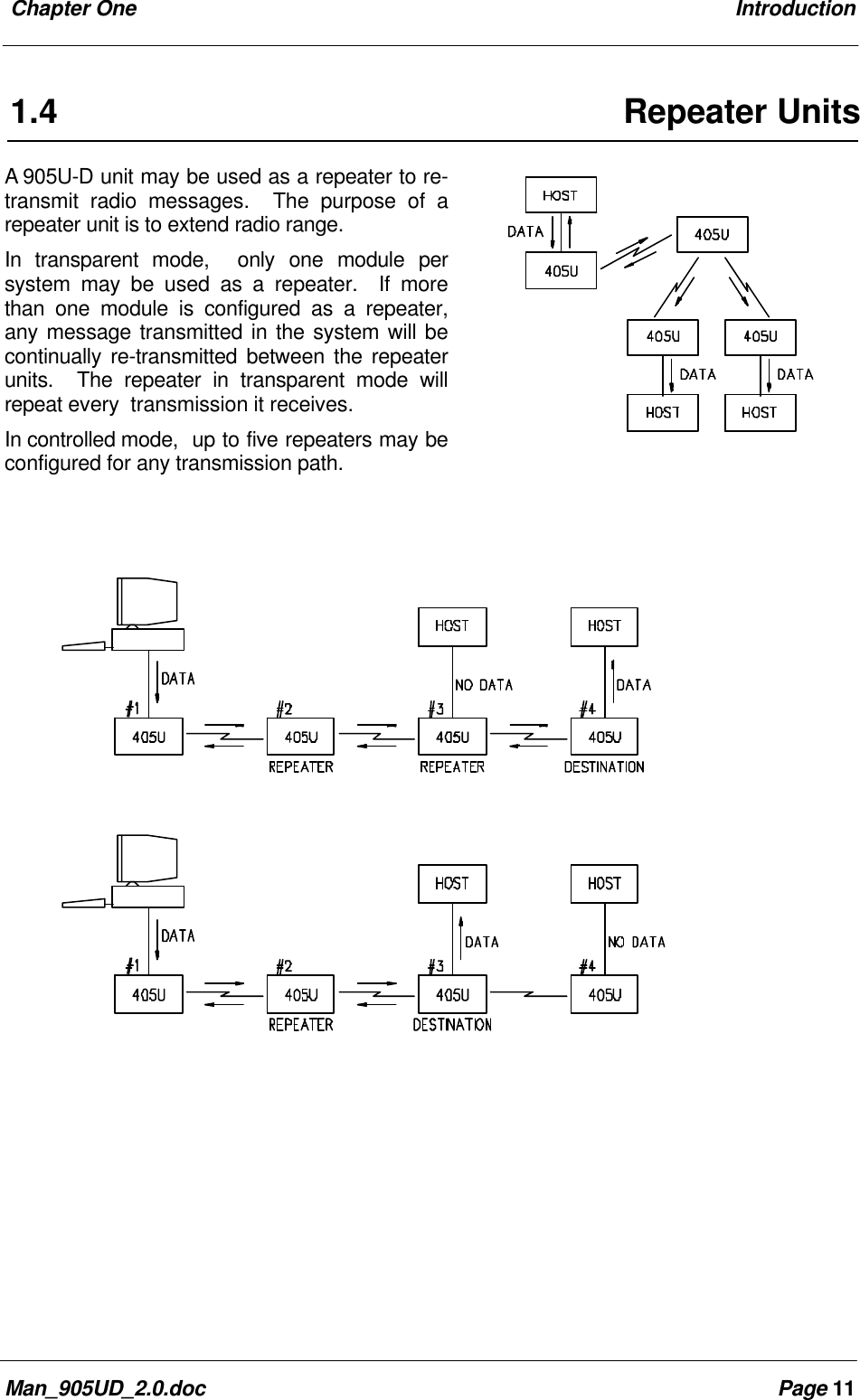
 905U-D Radio Modem  Module  User ManualPage 10 ©   May 20001.3 Controlled ModeIn “controlled”  mode,  the flow of data is controlled by the 905U-D units.  Each 905U-D unit isconfigured with an address by the user,  and a destination address for the data to betransmitted to.  Data is transmitted addressed to the destination module,  and only thismodule will output the serial data.  The source module will add an error-check (16 bit CRC) tothe data transmitted by radio.  Thedestination module will process the error-check,  and if correct, it will transmit anacknowledgment message (ACK) back tothe source module.  If the error-check is notcorrect,  then the destination module willtransmit a “fail” message (NACK) back tothe source module.  If the source modulereceives a NACK return,  or does notreceive any return within 1 second,  it willre-transmit the data.  The source modulewill attempt to transmit the data up to fivetimes,  until an acknowledgment (ACK) isreceived.  If an acknowledgment is still not received,  then a “communications failure” outputwill be activated,  and the source module will not  accept any more input data from its hostdevice.An example of an application using controlledmode would be a radio modem link betweenan intelligent gas analyser and a monitoringcomputer system.  Intelligent transducers donot normally provide addressing or errorchecking functions  -  these would be providedby  the 905U-D modules.In controlled mode,  the destination addressmay be set by the host device by initiallysending a “Hayes” command to the  905U-Dmodule, or by on-board miniature switches.Hayes commands are a standard set of commands used with conventional telephonemodems.  An example of an application that would use Hayes command to set destinationaddresses would be a central computer polling data loggers for periodic information.
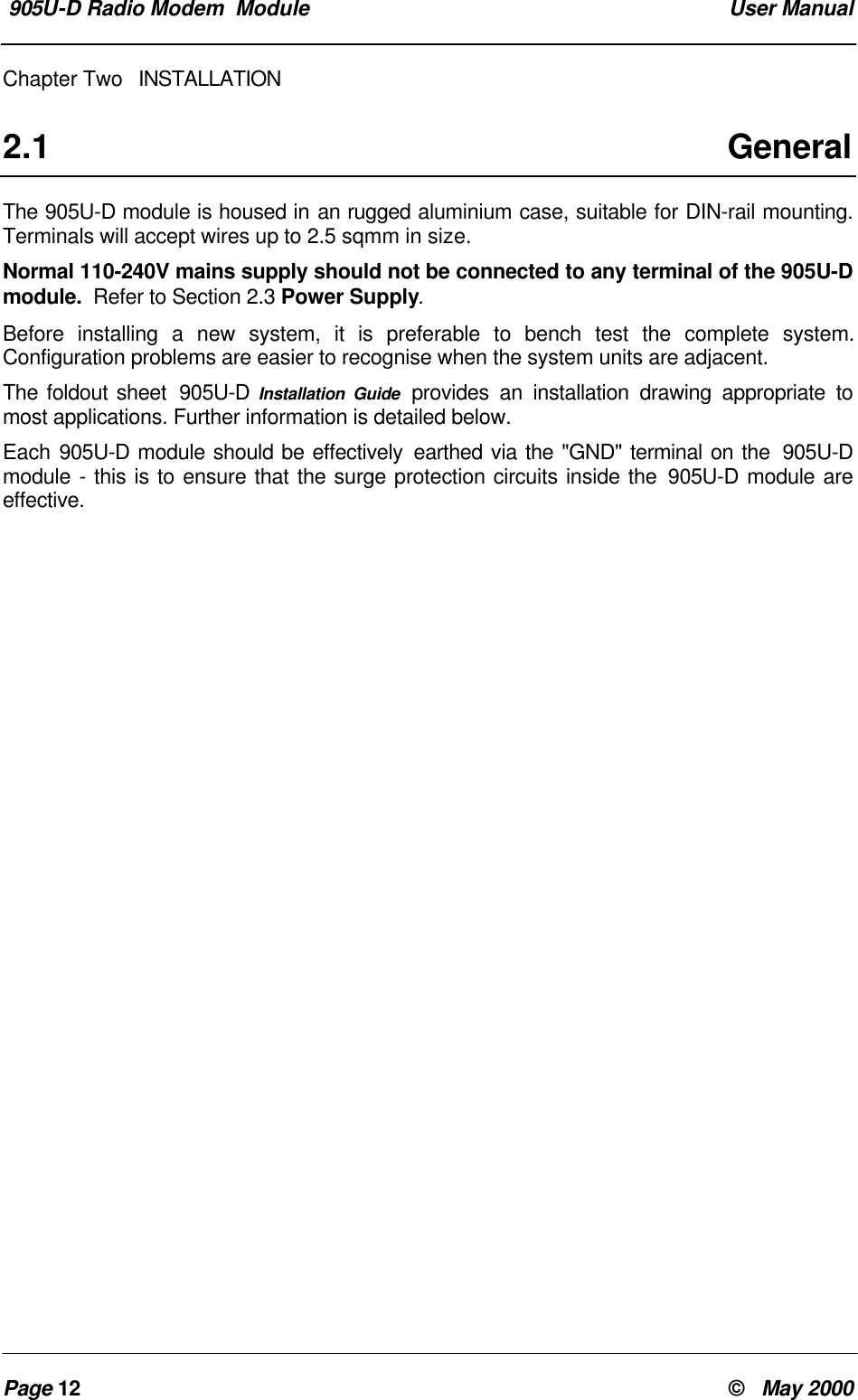
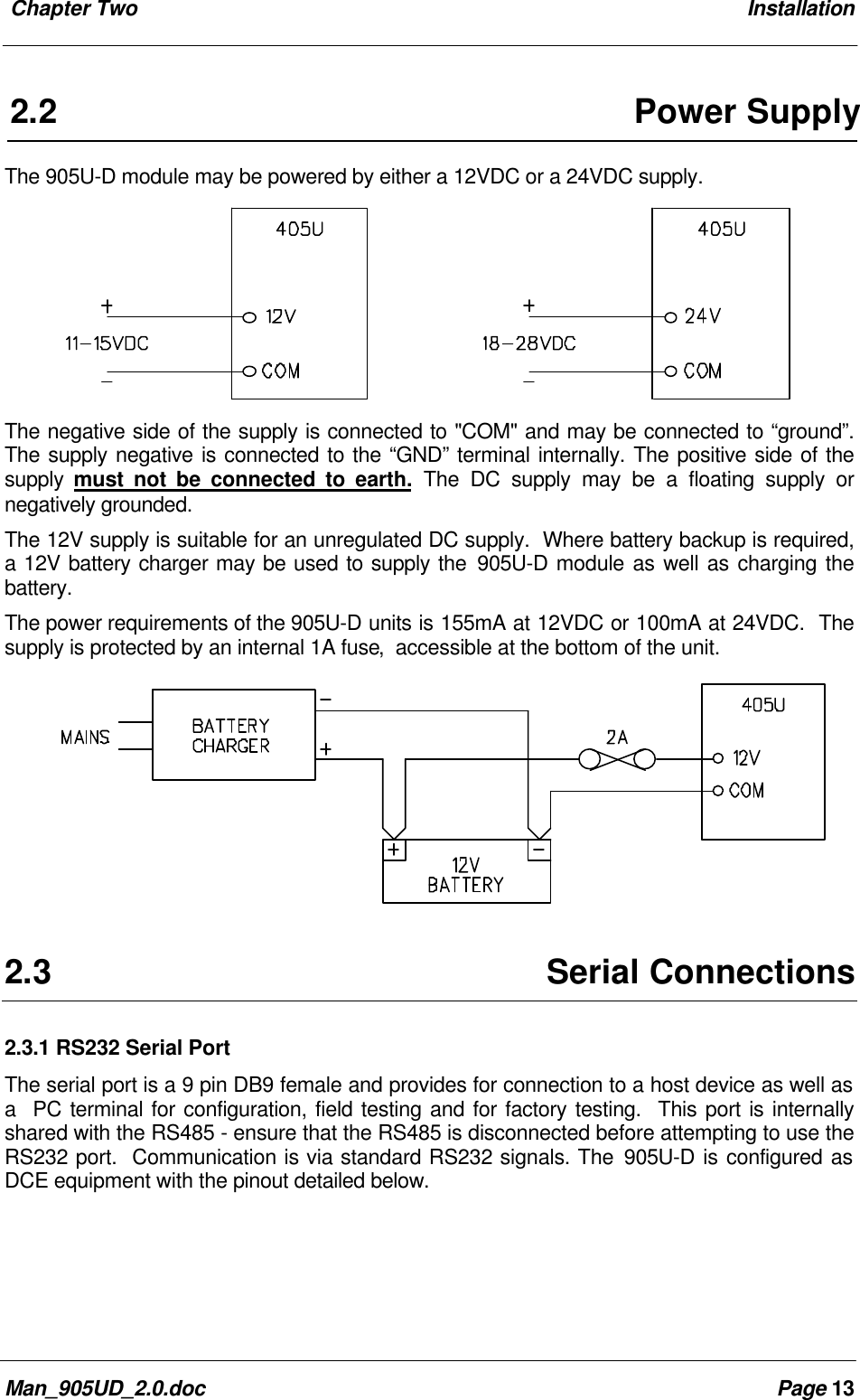
 Chapter One IntroductionMan_905UD_2.0.doc Page 111.4 Repeater UnitsA 905U-D unit may be used as a repeater to re-transmit radio messages.  The purpose of arepeater unit is to extend radio range.In transparent mode,  only one module persystem may be used as a repeater.  If morethan one module is configured as a repeater,any message transmitted in the system will becontinually re-transmitted between the repeaterunits.  The repeater in transparent mode willrepeat every  transmission it receives.In controlled mode,  up to five repeaters may beconfigured for any transmission path.
 905U-D Radio Modem  Module  User ManualPage 12 ©   May 2000Chapter Two INSTALLATION2.1 GeneralThe 905U-D module is housed in an rugged aluminium case, suitable for DIN-rail mounting.Terminals will accept wires up to 2.5 sqmm in size.Normal 110-240V mains supply should not be connected to any terminal of the 905U-Dmodule.  Refer to Section 2.3 Power Supply.Before installing a new system, it is preferable to bench test the complete system.Configuration problems are easier to recognise when the system units are adjacent.The foldout sheet  905U-D Installation Guide provides an installation drawing appropriate tomost applications. Further information is detailed below.Each 905U-D module should be effectively earthed via the "GND" terminal on the  905U-Dmodule - this is to ensure that the surge protection circuits inside the 905U-D module areeffective.
 Chapter Two InstallationMan_905UD_2.0.doc Page 132.2Power SupplyThe 905U-D module may be powered by either a 12VDC or a 24VDC supply.The negative side of the supply is connected to "COM" and may be connected to “ground”.The supply negative is connected to the “GND” terminal internally. The positive side of thesupply  must not be connected to earth. The DC supply may be a floating supply ornegatively grounded.The 12V supply is suitable for an unregulated DC supply.  Where battery backup is required,a 12V battery charger may be used to supply the 905U-D module as well as charging thebattery.The power requirements of the 905U-D units is 155mA at 12VDC or 100mA at 24VDC.  Thesupply is protected by an internal 1A fuse,  accessible at the bottom of the unit.2.3Serial Connections2.3.1 RS232 Serial PortThe serial port is a 9 pin DB9 female and provides for connection to a host device as well asa  PC terminal for configuration, field testing and for factory testing.  This port is internallyshared with the RS485 - ensure that the RS485 is disconnected before attempting to use theRS232 port.  Communication is via standard RS232 signals. The 905U-D is configured asDCE equipment with the pinout detailed below.
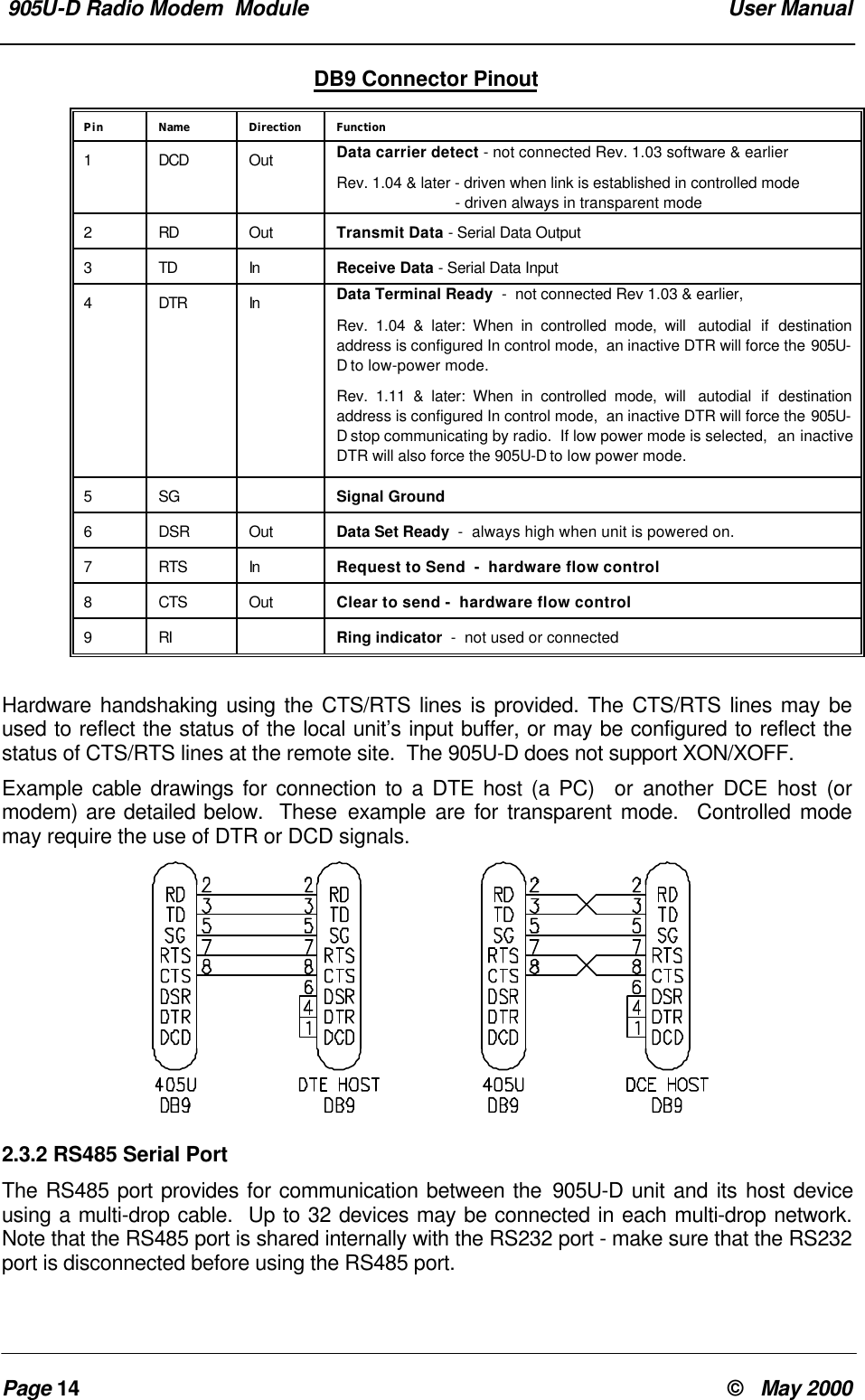
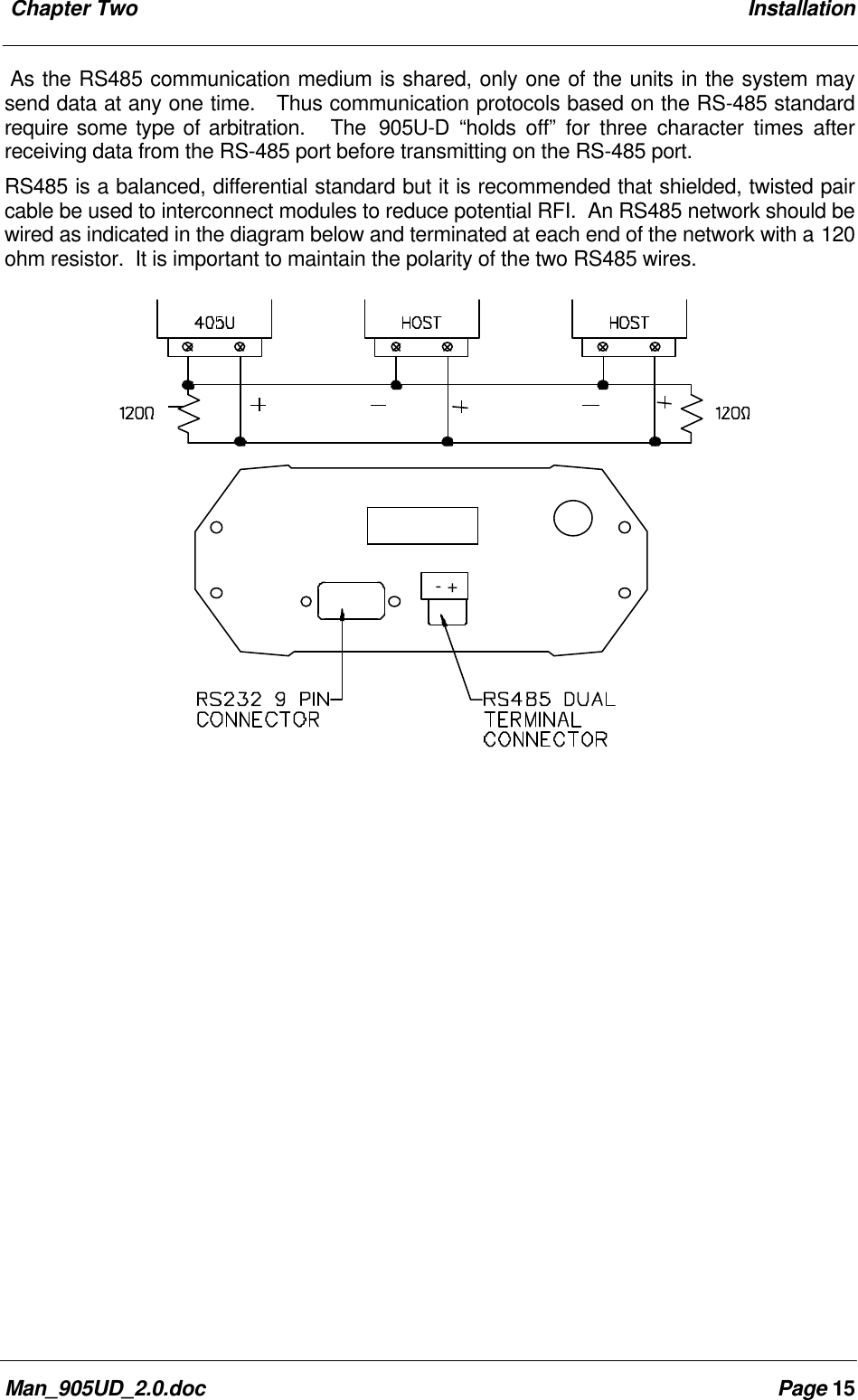
 905U-D Radio Modem  Module  User ManualPage 14 ©   May 2000DB9 Connector PinoutPin Name Direction Function1DCD Out Data carrier detect - not connected Rev. 1.03 software & earlierRev. 1.04 & later - driven when link is established in controlled mode                            - driven always in transparent mode2RD Out Transmit Data - Serial Data Output3TD In Receive Data - Serial Data Input4DTR In Data Terminal Ready  -  not connected Rev 1.03 & earlier,Rev. 1.04 & later: When in controlled mode, will  autodial if destinationaddress is configured In control mode,  an inactive DTR will force the 905U-D to low-power mode.Rev. 1.11 & later: When in controlled mode, will  autodial if destinationaddress is configured In control mode,  an inactive DTR will force the 905U-D stop communicating by radio.  If low power mode is selected,  an inactiveDTR will also force the 905U-D to low power mode.5SG Signal Ground6DSR Out Data Set Ready  -  always high when unit is powered on.7RTS In Request to Send  -  hardware flow control8CTS Out Clear to send -  hardware flow control9RI Ring indicator  -  not used or connectedHardware handshaking using the CTS/RTS lines is provided. The CTS/RTS lines may beused to reflect the status of the local unit’s input buffer, or may be configured to reflect thestatus of CTS/RTS lines at the remote site.  The 905U-D does not support XON/XOFF.Example cable drawings for connection to a DTE host (a PC)  or another DCE host (ormodem) are detailed below.  These example are for transparent mode.  Controlled modemay require the use of DTR or DCD signals.2.3.2 RS485 Serial PortThe RS485 port provides for communication between the 905U-D unit and its host deviceusing a multi-drop cable.  Up to 32 devices may be connected in each multi-drop network.Note that the RS485 port is shared internally with the RS232 port - make sure that the RS232port is disconnected before using the RS485 port.
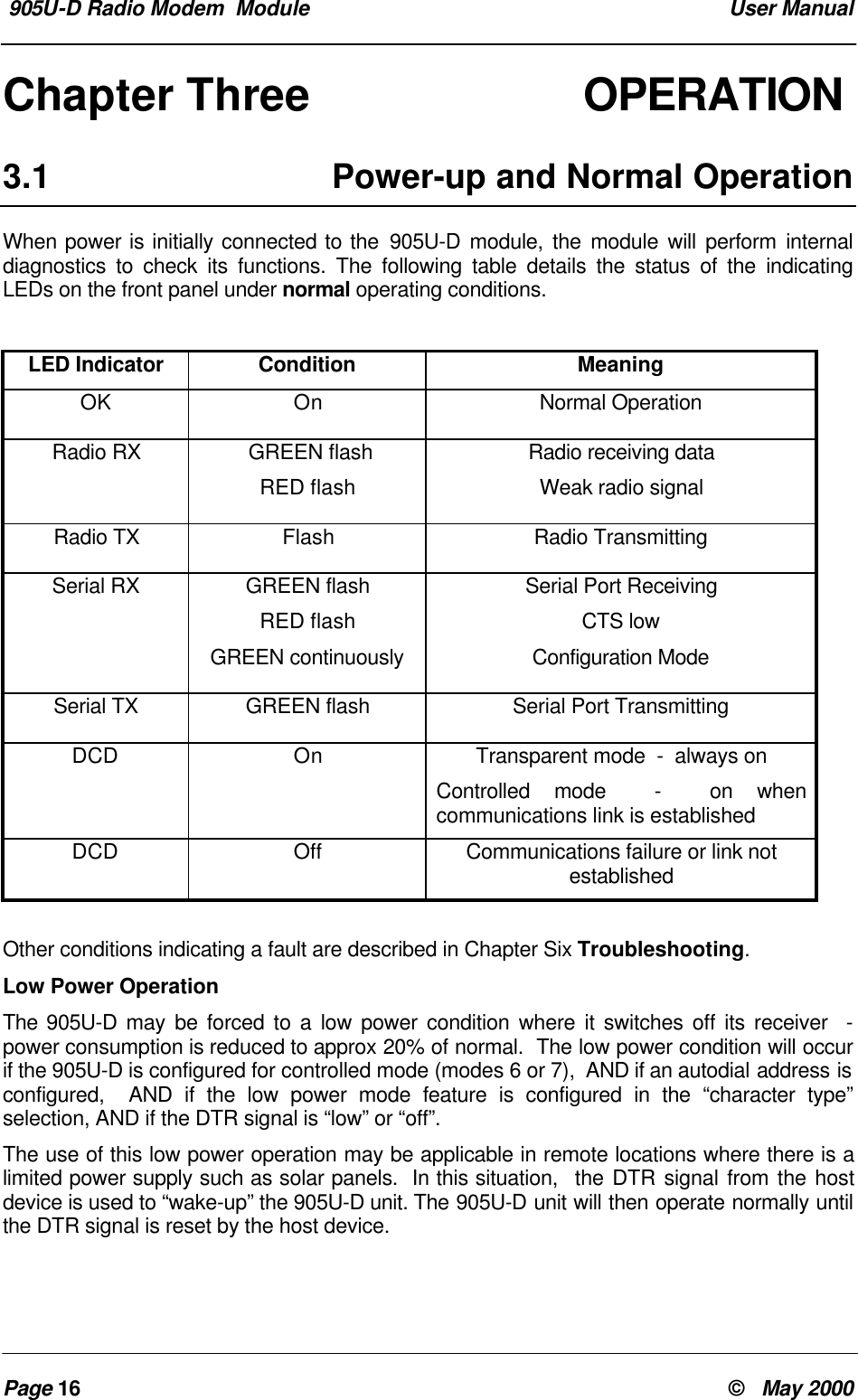
 Chapter Two InstallationMan_905UD_2.0.doc Page 15As the RS485 communication medium is shared, only one of the units in the system maysend data at any one time.   Thus communication protocols based on the RS-485 standardrequire some type of arbitration.   The  905U-D “holds off” for three character times afterreceiving data from the RS-485 port before transmitting on the RS-485 port.RS485 is a balanced, differential standard but it is recommended that shielded, twisted paircable be used to interconnect modules to reduce potential RFI.  An RS485 network should bewired as indicated in the diagram below and terminated at each end of the network with a 120ohm resistor.  It is important to maintain the polarity of the two RS485 wires.  - +
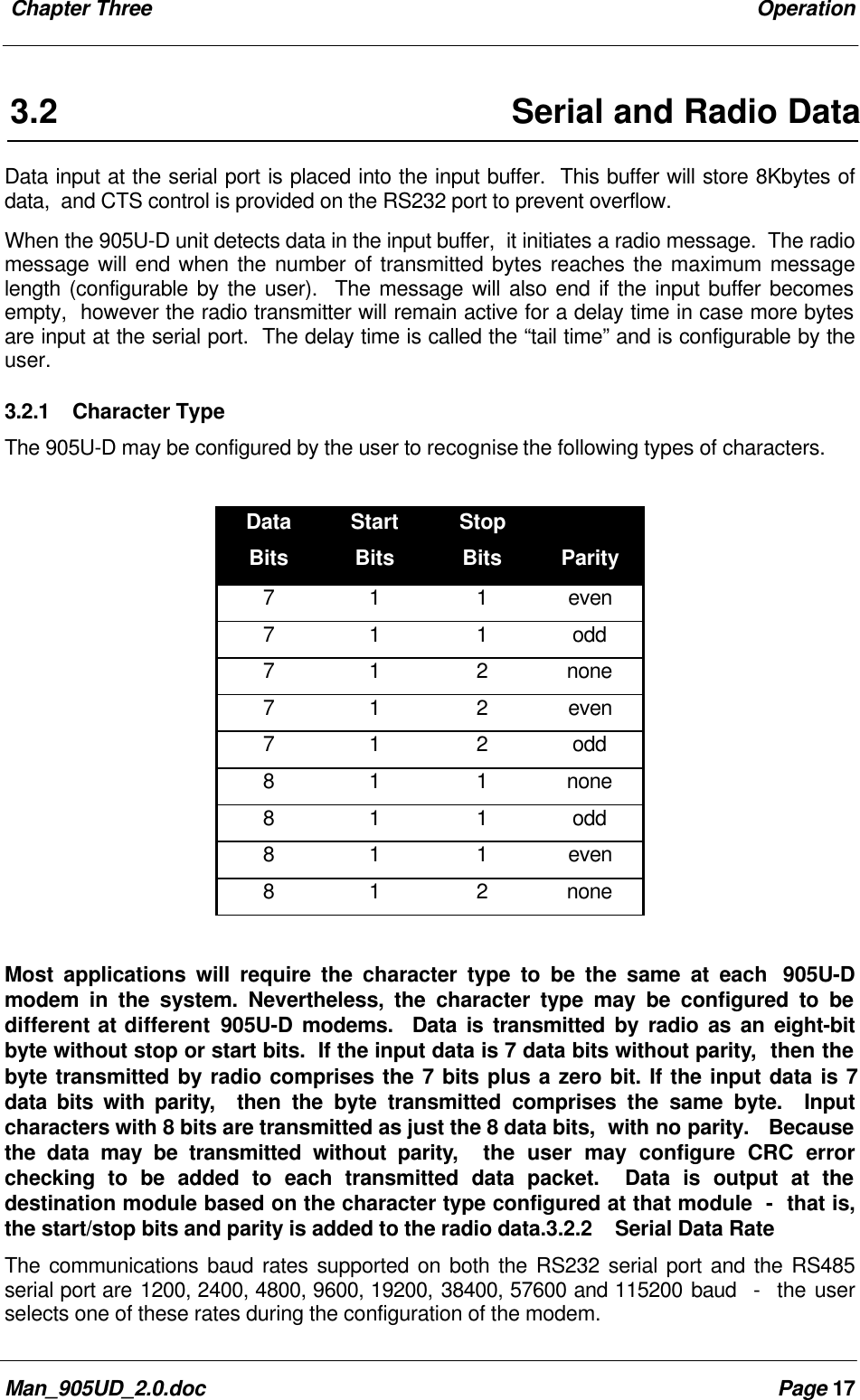
 905U-D Radio Modem  Module  User ManualPage 16 ©   May 2000Chapter Three OPERATION3.1 Power-up and Normal OperationWhen power is initially connected to the 905U-D module, the module will perform internaldiagnostics to check its functions. The following table details the status of the indicatingLEDs on the front panel under normal operating conditions.LED Indicator Condition MeaningOK On Normal OperationRadio RX  GREEN flashRED flashRadio receiving dataWeak radio signalRadio TX Flash Radio TransmittingSerial RX GREEN flashRED flashGREEN continuouslySerial Port ReceivingCTS lowConfiguration ModeSerial TX GREEN flash Serial Port TransmittingDCD On Transparent mode  -  always onControlled mode  -  on whencommunications link is establishedDCD Off Communications failure or link notestablishedOther conditions indicating a fault are described in Chapter Six Troubleshooting.Low Power OperationThe 905U-D may be forced to a low power condition where it switches off its receiver  -power consumption is reduced to approx 20% of normal.  The low power condition will occurif the 905U-D is configured for controlled mode (modes 6 or 7),  AND if an autodial address isconfigured,  AND if the low power mode feature is configured in the “character type”selection, AND if the DTR signal is “low” or “off”.The use of this low power operation may be applicable in remote locations where there is alimited power supply such as solar panels.  In this situation,  the DTR signal from the hostdevice is used to “wake-up” the 905U-D unit. The 905U-D unit will then operate normally untilthe DTR signal is reset by the host device.
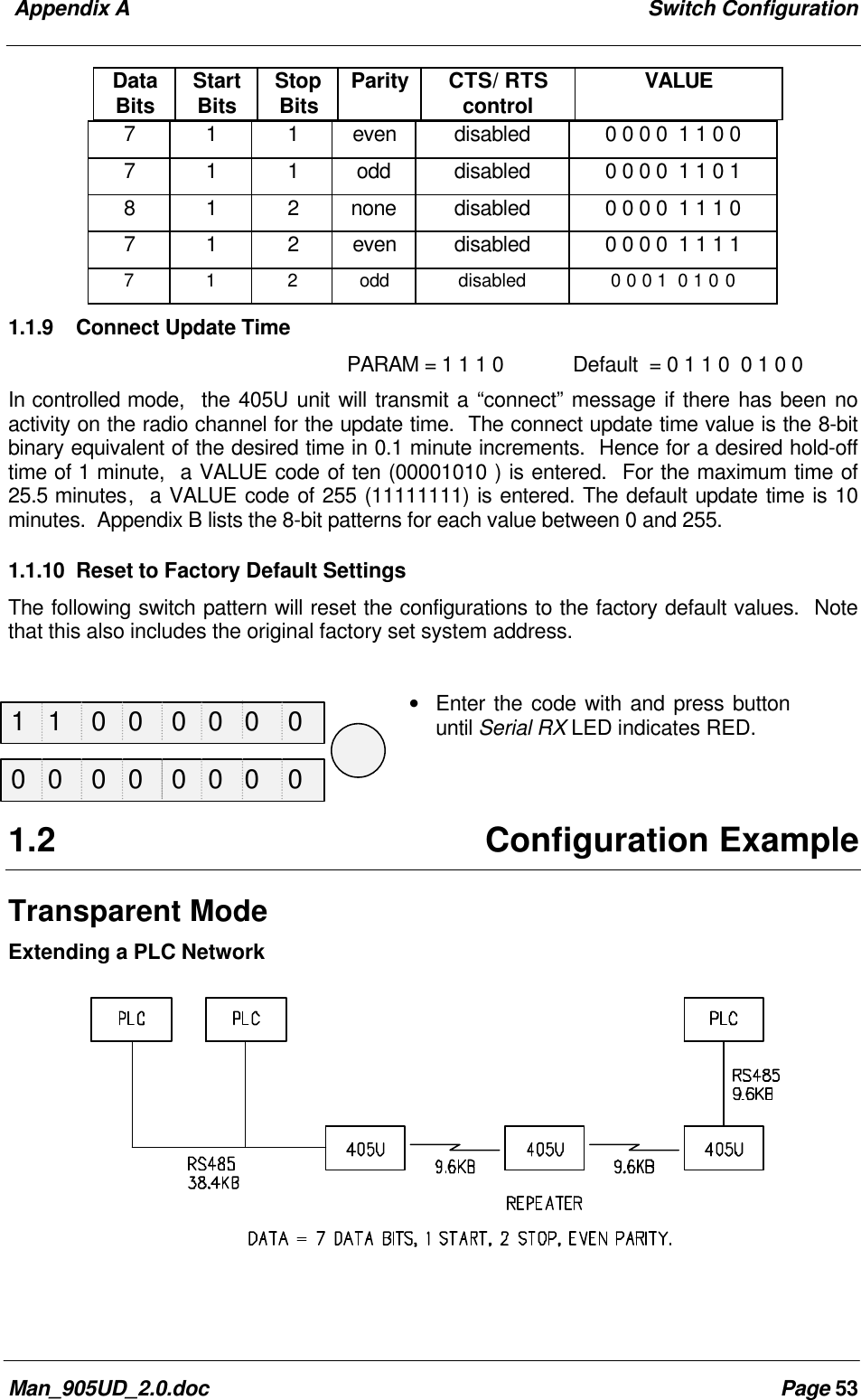
 Chapter Three OperationMan_905UD_2.0.doc Page 173.2 Serial and Radio DataData input at the serial port is placed into the input buffer.  This buffer will store 8Kbytes ofdata,  and CTS control is provided on the RS232 port to prevent overflow.When the 905U-D unit detects data in the input buffer,  it initiates a radio message.  The radiomessage will end when the number of transmitted bytes reaches the maximum messagelength (configurable by the user).  The message will also end if the input buffer becomesempty,  however the radio transmitter will remain active for a delay time in case more bytesare input at the serial port.  The delay time is called the “tail time” and is configurable by theuser.3.2.1 Character TypeThe 905U-D may be configured by the user to recognise the following types of characters.DataBitsStartBitsStopBits Parity7 1 1 even7 1 1 odd7 1 2 none7 1 2 even7 1 2 odd8 1 1 none8 1 1 odd8 1 1 even8 1 2 noneMost applications will require the character type to be the same at each  905U-Dmodem in the system. Nevertheless, the character type may be configured to bedifferent at different 905U-D modems.  Data is transmitted by radio as an eight-bitbyte without stop or start bits.  If the input data is 7 data bits without parity,  then thebyte transmitted by radio comprises the 7 bits plus a zero bit. If the input data is 7data bits with parity,  then the byte transmitted comprises the same byte.  Inputcharacters with 8 bits are transmitted as just the 8 data bits,  with no parity.   Becausethe data may be transmitted without parity,  the user may configure CRC errorchecking to be added to each transmitted data packet.  Data is output at thedestination module based on the character type configured at that module  -  that is,the start/stop bits and parity is added to the radio data.3.2.2 Serial Data RateThe communications baud rates supported on both the RS232 serial port and the RS485serial port are 1200, 2400, 4800, 9600, 19200, 38400, 57600 and 115200 baud  -  the userselects one of these rates during the configuration of the modem.
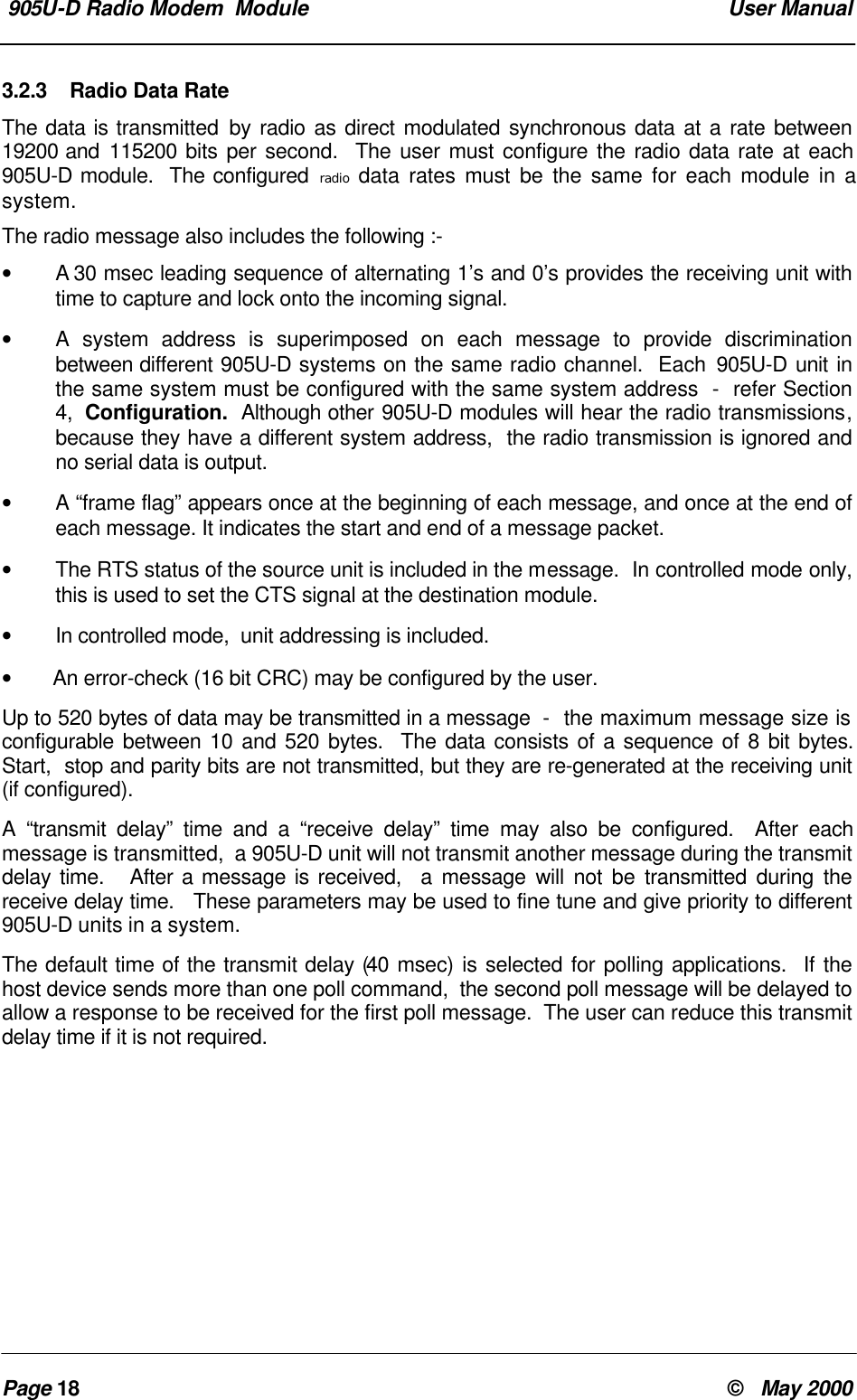
 905U-D Radio Modem  Module  User ManualPage 18 ©   May 20003.2.3 Radio Data RateThe data is transmitted by radio as direct modulated synchronous data at a rate between19200 and 115200 bits per second.  The user must configure the radio data rate at each905U-D module.  The configured radio data rates must be the same for each module in asystem.The radio message also includes the following :-•   A 30 msec leading sequence of alternating 1’s and 0’s provides the receiving unit withtime to capture and lock onto the incoming signal.•A system address is superimposed on each message to provide discriminationbetween different 905U-D systems on the same radio channel.  Each 905U-D unit inthe same system must be configured with the same system address  -  refer Section4,  Configuration.  Although other 905U-D modules will hear the radio transmissions,because they have a different system address,  the radio transmission is ignored andno serial data is output.•A “frame flag” appears once at the beginning of each message, and once at the end ofeach message. It indicates the start and end of a message packet.•The RTS status of the source unit is included in the message.  In controlled mode only,this is used to set the CTS signal at the destination module.•In controlled mode,  unit addressing is included.• An error-check (16 bit CRC) may be configured by the user.Up to 520 bytes of data may be transmitted in a message  -  the maximum message size isconfigurable between 10 and 520 bytes.  The data consists of a sequence of 8 bit bytes.Start,  stop and parity bits are not transmitted, but they are re-generated at the receiving unit(if configured).A “transmit delay” time and a “receive delay” time may also be configured.  After eachmessage is transmitted,  a 905U-D unit will not transmit another message during the transmitdelay time.   After a message is received,  a message will not be transmitted during thereceive delay time.   These parameters may be used to fine tune and give priority to different905U-D units in a system.The default time of the transmit delay (40 msec) is selected for polling applications.  If thehost device sends more than one poll command,  the second poll message will be delayed toallow a response to be received for the first poll message.  The user can reduce this transmitdelay time if it is not required.
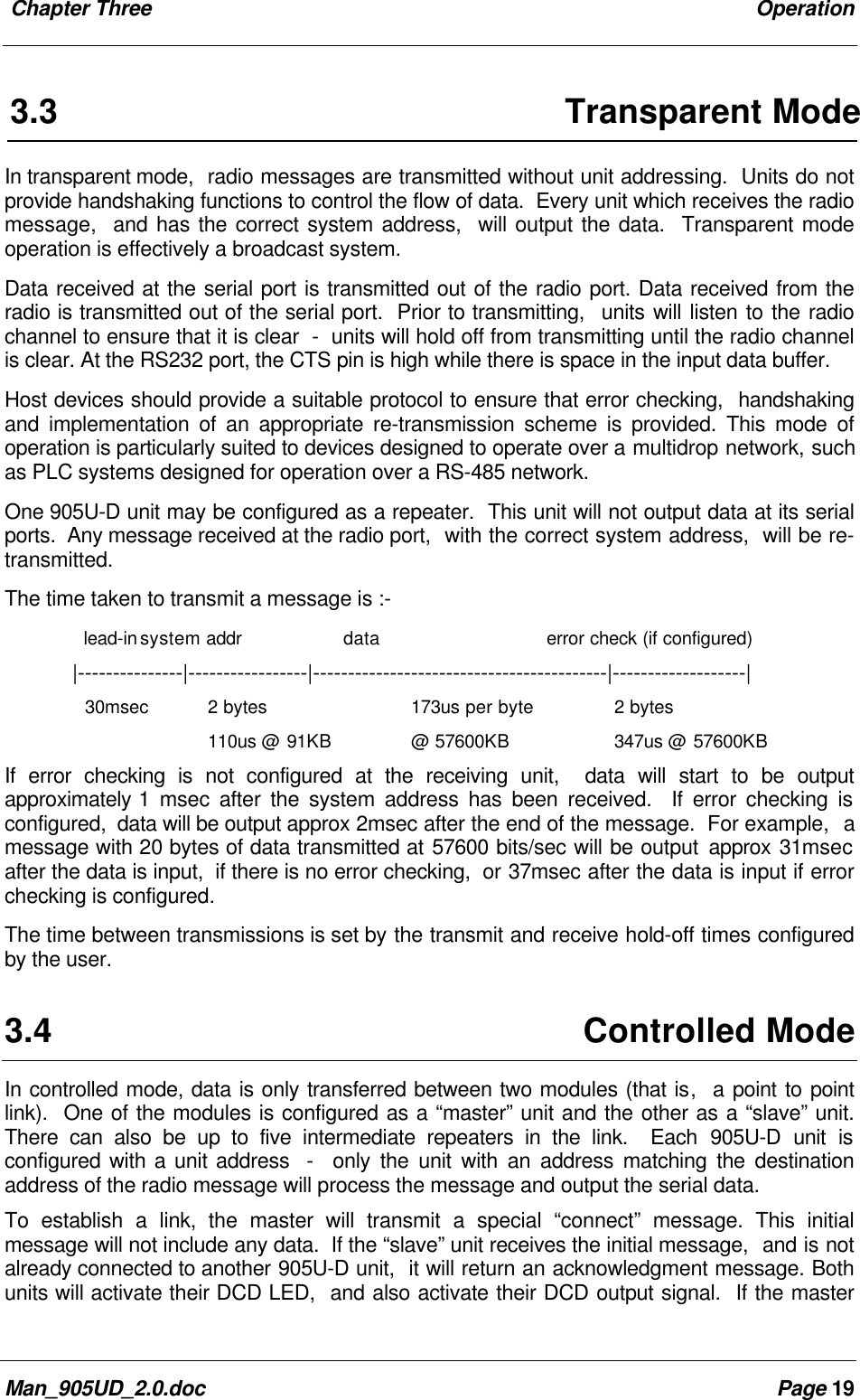
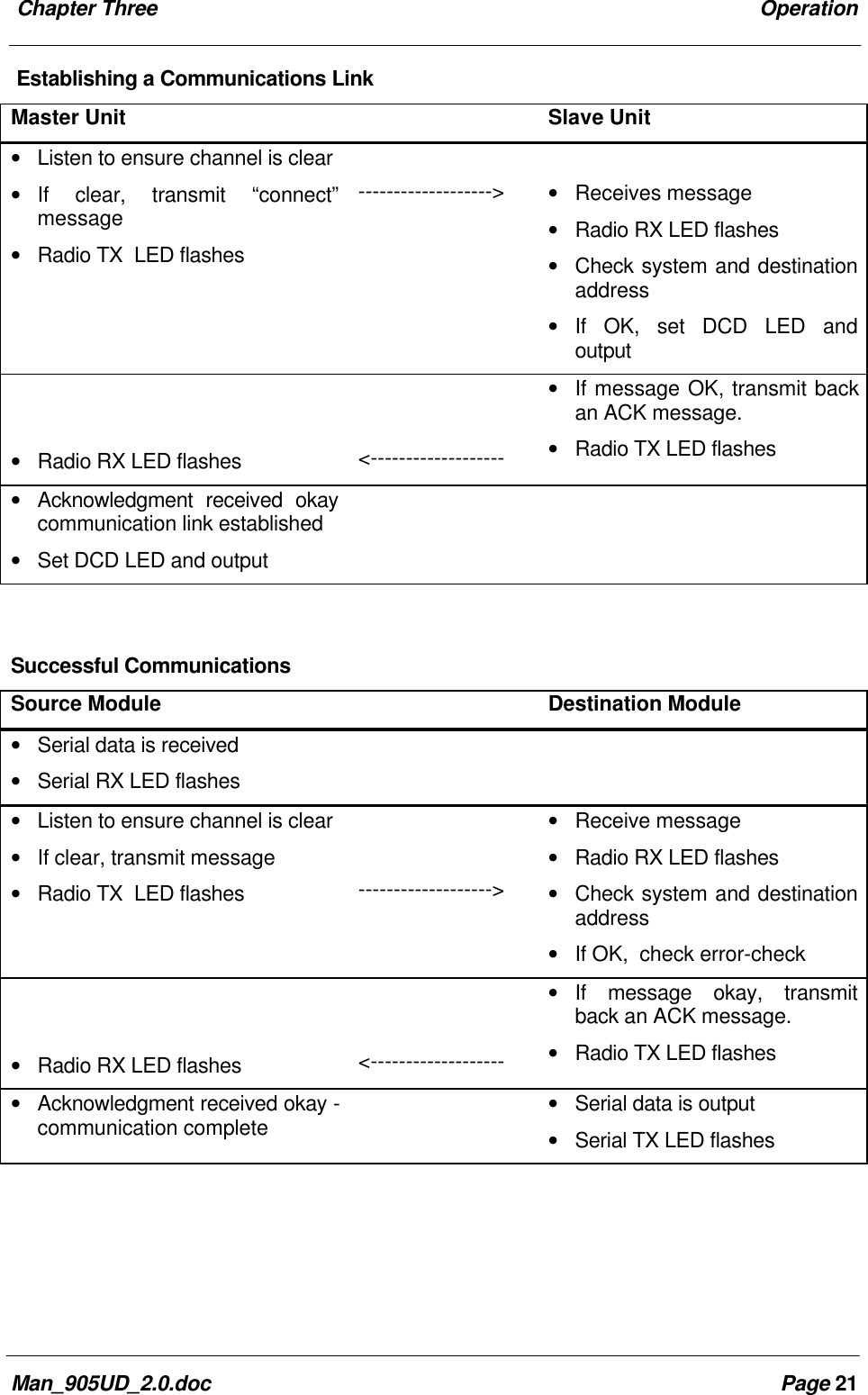
 Chapter Three OperationMan_905UD_2.0.doc Page 193.3 Transparent ModeIn transparent mode,  radio messages are transmitted without unit addressing.  Units do notprovide handshaking functions to control the flow of data.  Every unit which receives the radiomessage,  and has the correct system address,  will output the data.  Transparent modeoperation is effectively a broadcast system.Data received at the serial port is transmitted out of the radio port. Data received from theradio is transmitted out of the serial port.  Prior to transmitting,  units will listen to the radiochannel to ensure that it is clear  -  units will hold off from transmitting until the radio channelis clear. At the RS232 port, the CTS pin is high while there is space in the input data buffer.Host devices should provide a suitable protocol to ensure that error checking,  handshakingand implementation of an appropriate re-transmission scheme is provided. This mode ofoperation is particularly suited to devices designed to operate over a multidrop network, suchas PLC systems designed for operation over a RS-485 network.One 905U-D unit may be configured as a repeater.  This unit will not output data at its serialports.  Any message received at the radio port,  with the correct system address,  will be re-transmitted.The time taken to transmit a message is :-  lead-insystem addr data error check (if configured)|---------------|-----------------|------------------------------------------|-------------------|30msec 2 bytes 173us per byte 2 bytes110us @ 91KB @ 57600KB 347us @ 57600KBIf error checking is not configured at the receiving unit,  data will start to be outputapproximately 1 msec after the system address has been received.  If error checking isconfigured,  data will be output approx 2msec after the end of the message.  For example,  amessage with 20 bytes of data transmitted at 57600 bits/sec will be output approx 31msecafter the data is input,  if there is no error checking,  or 37msec after the data is input if errorchecking is configured.The time between transmissions is set by the transmit and receive hold-off times configuredby the user.3.4 Controlled ModeIn controlled mode, data is only transferred between two modules (that is,  a point to pointlink).  One of the modules is configured as a “master” unit and the other as a “slave” unit.There can also be up to five intermediate repeaters in the link.  Each 905U-D unit isconfigured with a unit address  -  only the unit with an address matching the destinationaddress of the radio message will process the message and output the serial data.To establish a link, the master will transmit a special “connect” message. This initialmessage will not include any data.  If the “slave” unit receives the initial message,  and is notalready connected to another 905U-D unit,  it will return an acknowledgment message. Bothunits will activate their DCD LED,  and also activate their DCD output signal.  If the master
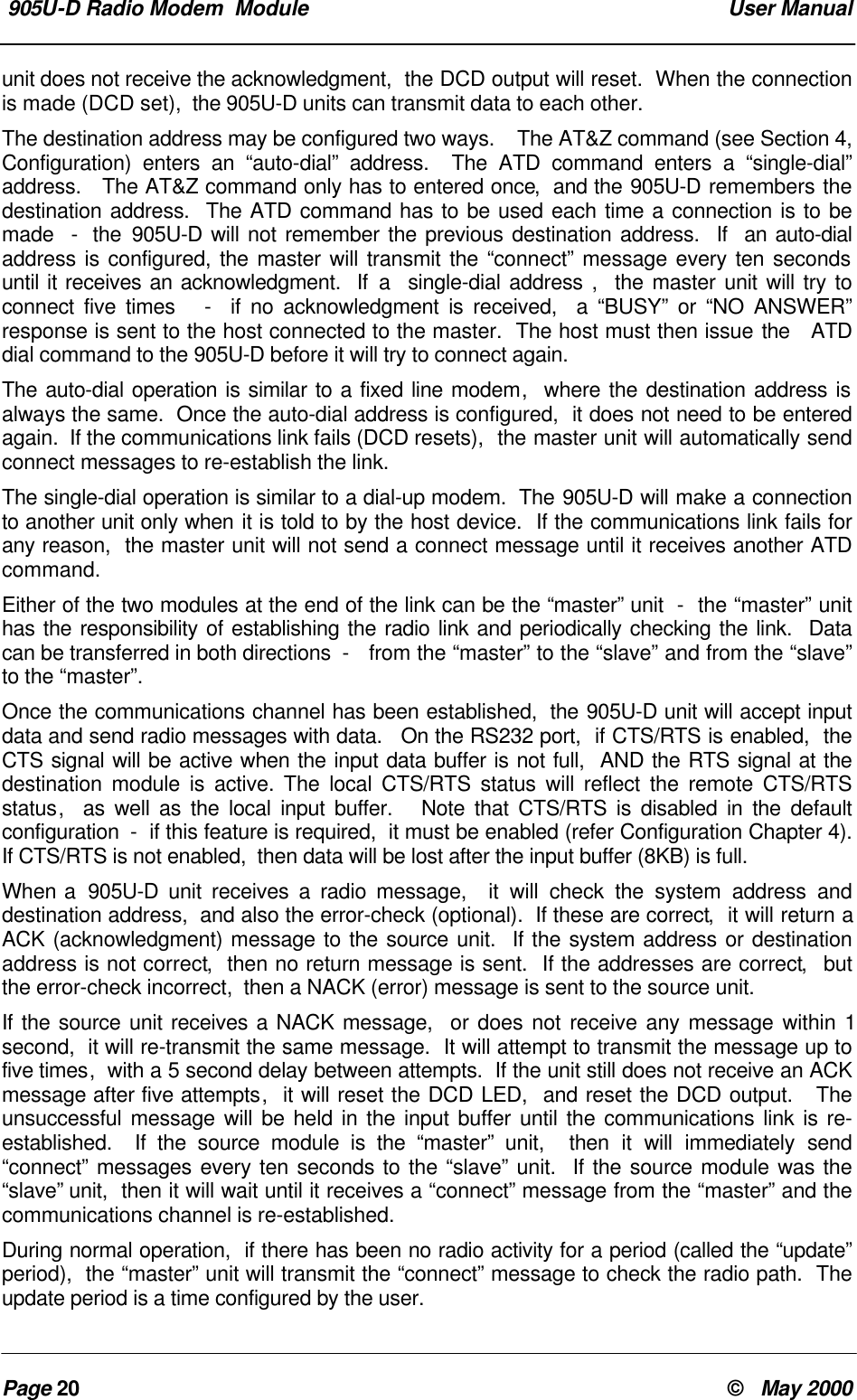
 905U-D Radio Modem  Module  User ManualPage 20 ©   May 2000unit does not receive the acknowledgment,  the DCD output will reset.  When the connectionis made (DCD set),  the 905U-D units can transmit data to each other.The destination address may be configured two ways.    The AT&Z command (see Section 4,Configuration) enters an “auto-dial” address.  The ATD command enters a “single-dial”address.   The AT&Z command only has to entered once,  and the 905U-D remembers thedestination address.  The ATD command has to be used each time a connection is to bemade  -  the 905U-D will not remember the previous destination address.  If  an auto-dialaddress is configured, the master will transmit the “connect” message every ten secondsuntil it receives an acknowledgment.  If a  single-dial address ,  the master unit will try toconnect five times   -  if no acknowledgment is received,  a “BUSY” or “NO ANSWER”response is sent to the host connected to the master.  The host must then issue the   ATDdial command to the 905U-D before it will try to connect again.The auto-dial operation is similar to a fixed line modem,  where the destination address isalways the same.  Once the auto-dial address is configured,  it does not need to be enteredagain.  If the communications link fails (DCD resets),  the master unit will automatically sendconnect messages to re-establish the link.The single-dial operation is similar to a dial-up modem.  The 905U-D will make a connectionto another unit only when it is told to by the host device.  If the communications link fails forany reason,  the master unit will not send a connect message until it receives another ATDcommand.Either of the two modules at the end of the link can be the “master” unit  -  the “master” unithas the responsibility of establishing the radio link and periodically checking the link.  Datacan be transferred in both directions  -   from the “master” to the “slave” and from the “slave”to the “master”.Once the communications channel has been established,  the 905U-D unit will accept inputdata and send radio messages with data.   On the RS232 port,  if CTS/RTS is enabled,  theCTS signal will be active when the input data buffer is not full,  AND the RTS signal at thedestination module is active. The local CTS/RTS status will reflect the remote CTS/RTSstatus,  as well as the local input buffer.   Note that CTS/RTS is disabled in the defaultconfiguration  -  if this feature is required,  it must be enabled (refer Configuration Chapter 4).If CTS/RTS is not enabled,  then data will be lost after the input buffer (8KB) is full.When a  905U-D unit receives a radio message,  it will check the system address anddestination address,  and also the error-check (optional).  If these are correct,  it will return aACK (acknowledgment) message to the source unit.  If the system address or destinationaddress is not correct,  then no return message is sent.  If the addresses are correct,  butthe error-check incorrect,  then a NACK (error) message is sent to the source unit.If the source unit receives a NACK message,  or does not receive any message within 1second,  it will re-transmit the same message.  It will attempt to transmit the message up tofive times,  with a 5 second delay between attempts.  If the unit still does not receive an ACKmessage after five attempts,  it will reset the DCD LED,  and reset the DCD output.   Theunsuccessful message will be held in the input buffer until the communications link is re-established.  If the source module is the “master” unit,  then it will immediately send“connect” messages every ten seconds to the “slave” unit.  If the source module was the“slave” unit,  then it will wait until it receives a “connect” message from the “master” and thecommunications channel is re-established.During normal operation,  if there has been no radio activity for a period (called the “update”period),  the “master” unit will transmit the “connect” message to check the radio path.  Theupdate period is a time configured by the user.
 Chapter Three OperationMan_905UD_2.0.doc Page 21Establishing a Communications LinkMaster Unit Slave Unit• Listen to ensure channel is clear• If clear, transmit “connect”message• Radio TX  LED flashes-------------------> • Receives message• Radio RX LED flashes• Check system and destinationaddress• If OK, set DCD LED andoutput• Radio RX LED flashes <-------------------• If message OK, transmit backan ACK message.• Radio TX LED flashes• Acknowledgment received okaycommunication link established• Set DCD LED and outputSuccessful CommunicationsSource Module Destination Module• Serial data is received• Serial RX LED flashes• Listen to ensure channel is clear• If clear, transmit message• Radio TX  LED flashes ------------------->• Receive message• Radio RX LED flashes• Check system and destinationaddress• If OK,  check error-check• Radio RX LED flashes <-------------------• If message okay, transmitback an ACK message.• Radio TX LED flashes• Acknowledgment received okay -communication complete • Serial data is output• Serial TX LED flashes
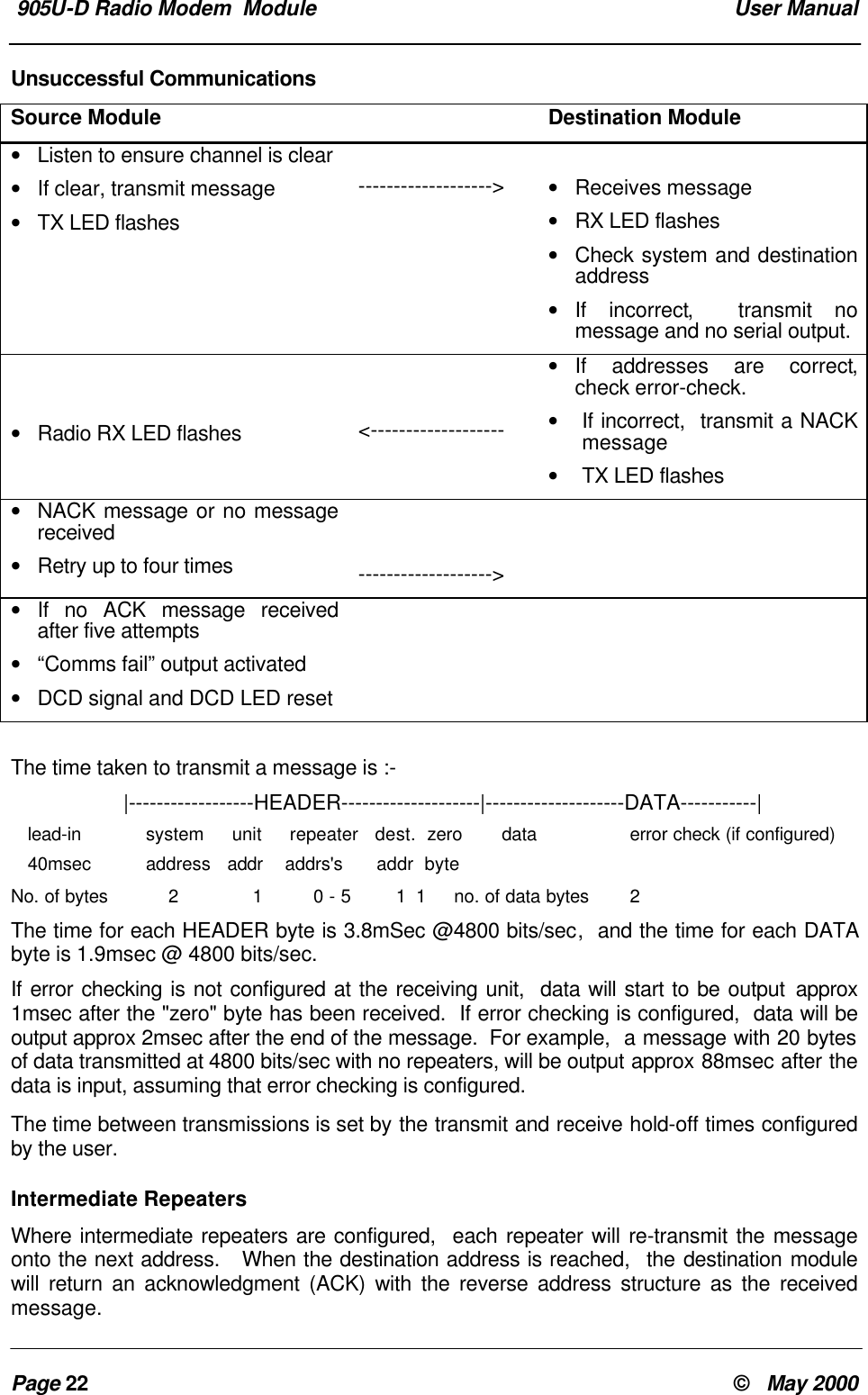
 905U-D Radio Modem  Module  User ManualPage 22 ©   May 2000Unsuccessful CommunicationsSource Module Destination Module• Listen to ensure channel is clear• If clear, transmit message• TX LED flashes-------------------> • Receives message• RX LED flashes• Check system and destinationaddress• If incorrect,  transmit nomessage and no serial output.• Radio RX LED flashes <-------------------• If addresses are correct,check error-check.• If incorrect,  transmit a NACKmessage• TX LED flashes• NACK message or no messagereceived• Retry up to four times ------------------->• If no ACK message receivedafter five attempts• “Comms fail” output activated• DCD signal and DCD LED resetThe time taken to transmit a message is :-        |------------------HEADER--------------------|--------------------DATA-----------|   lead-in        system     unit     repeater   dest.  zero       data             error check (if configured)   40msec address   addr    addrs's      addr  byteNo. of bytes     2           1         0 - 5        1 1     no. of data bytes   2The time for each HEADER byte is 3.8mSec @4800 bits/sec,  and the time for each DATAbyte is 1.9msec @ 4800 bits/sec.If error checking is not configured at the receiving unit,  data will start to be output approx1msec after the "zero" byte has been received.  If error checking is configured,  data will beoutput approx 2msec after the end of the message.  For example,  a message with 20 bytesof data transmitted at 4800 bits/sec with no repeaters, will be output approx 88msec after thedata is input, assuming that error checking is configured.The time between transmissions is set by the transmit and receive hold-off times configuredby the user.Intermediate RepeatersWhere intermediate repeaters are configured,  each repeater will re-transmit the messageonto the next address.   When the destination address is reached,  the destination modulewill return an acknowledgment (ACK) with the reverse address structure as the receivedmessage.
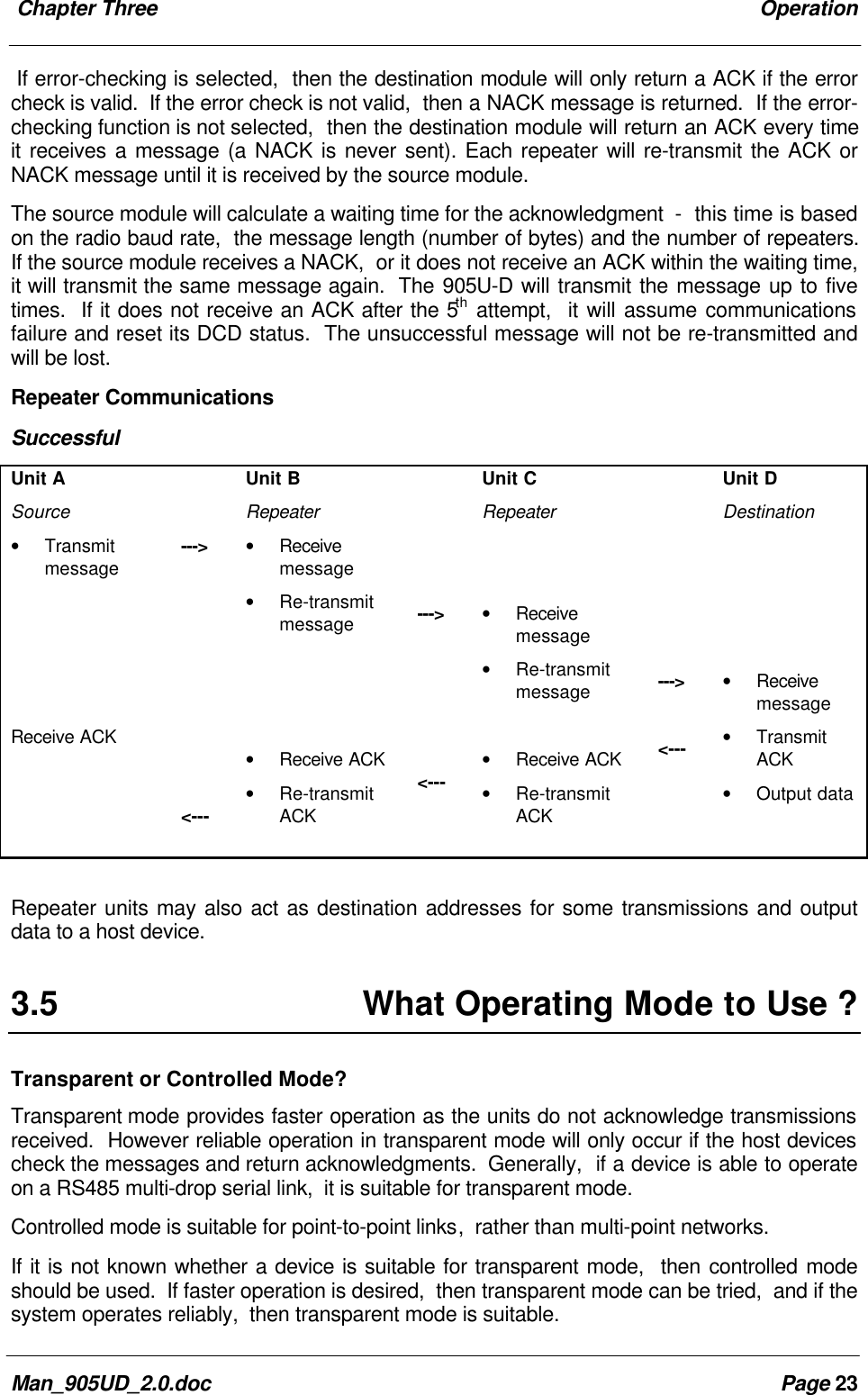
 Chapter Three OperationMan_905UD_2.0.doc Page 23If error-checking is selected,  then the destination module will only return a ACK if the errorcheck is valid.  If the error check is not valid,  then a NACK message is returned.  If the error-checking function is not selected,  then the destination module will return an ACK every timeit receives a message (a NACK is never sent). Each repeater will re-transmit the ACK orNACK message until it is received by the source module.The source module will calculate a waiting time for the acknowledgment  -  this time is basedon the radio baud rate,  the message length (number of bytes) and the number of repeaters.If the source module receives a NACK,  or it does not receive an ACK within the waiting time,it will transmit the same message again.  The 905U-D will transmit the message up to fivetimes.  If it does not receive an ACK after the 5th attempt,  it will assume communicationsfailure and reset its DCD status.  The unsuccessful message will not be re-transmitted andwill be lost.Repeater CommunicationsSuccessfulUnit ASource• TransmitmessageReceive ACK---><---Unit BRepeater• Receivemessage• Re-transmitmessage• Receive ACK• Re-transmitACK---><---Unit CRepeater• Receivemessage• Re-transmitmessage• Receive ACK• Re-transmitACK---><---Unit DDestination• Receivemessage• TransmitACK• Output dataRepeater units may also act as destination addresses for some transmissions and outputdata to a host device.3.5 What Operating Mode to Use ?Transparent or Controlled Mode?Transparent mode provides faster operation as the units do not acknowledge transmissionsreceived.  However reliable operation in transparent mode will only occur if the host devicescheck the messages and return acknowledgments.  Generally,  if a device is able to operateon a RS485 multi-drop serial link,  it is suitable for transparent mode.Controlled mode is suitable for point-to-point links,  rather than multi-point networks.If it is not known whether a device is suitable for transparent mode,  then controlled modeshould be used.  If faster operation is desired,  then transparent mode can be tried,  and if thesystem operates reliably,  then transparent mode is suitable.
 905U-D Radio Modem  Module  User ManualPage 24 ©   May 2000It is possible to configure different units in the same system with different operating modes,however the system will not operate.  A 905U-D unit configured in one mode will not processa message received from a unit in the alternate mode.Error Check ?Error-checking may be configured in both transparent and controlled mode.  When the error-check is configured,  two additional bytes are attached to the end of each message.  Thesebytes are used to detect any corruption of the data when it is received at another 905U-D unit.When a unit with error-check configured receives a radio message,  it will not output datauntil it has received the whole message and ensures that the error-check is correct.  If theunit does not have error-check configured,  then it will output data as it is received.  Henceoperation of the units is faster if error-check is not configured.We recommend that units in the same system have the same error-check configuration,however it is possible for users to configure the units differently.  If a unit without error-checkconfigured receives a message which includes an error-check,  then the unit will treat theadditional two bytes as data and output them to the host device.  If a unit with error-checkconfigured,  receives a message without an error-check,  it will treat the last two data bytesas the error check  -  the error-check will always be incorrect and no data will be output.Error-check is strongly recommended for controlled mode operation.  If error-check is notconfigured,  then a 905U-D unit will transmit an acknowledgment message (ACK) wheneverit receives a radio message,  without checking for errors.  If error-check is configured,  theunit will only transmit an ACK message if the error-check is correct.  If it is incorrect,  an errormessage (NACK) is returned to the source address.Autoconnect or Host-connect modes?If the 905U-D is connected to a PC and the PC will automatically set-up the 905U-D on start-up,  then a host-connect mode should be used (modes 0 – 3).  In host-connect,  the 905U-Dwill start up in configuration mode.If you want the 905U-D to start up in operating mode,  then use the autoconnect modes (4 –7).3.6 Operating ProblemsMost operating problems relate to an inadequate radio path,  or radio interference.  Beforeinstalling a system,   bench test the complete system with the 905U-D units near each other.This test eliminates the radio path or interference as a factor,  and ensures that the systemwill operate in the way that you want.If the bench test does not give adequate performance,  then you need to adjust theconfiguration parameters.  We recommend that you do not install the system until you arehappy with the bench test performance.If a system gives poor performance after it is installed,  check the adequacy of the radio path-  refer to the Diagnostics Section 6.Interference will only cause a problem if the amplitude of the interference is comparable tothe radio signal from the 905U-D units.  If the interference level is relatively small,  then it willnot affect the performance of the system.  If interference is causing a problem,  try to improve
 Chapter Three OperationMan_905UD_2.0.doc Page 25the normal radio level by mounting the aerials higher or in a better location.  This not alwayspossible.System performance may be improved by changing the following parameters :-• If in transparent mode, try controlled mode.• If configured for a radio data rate of 115200 bits/sec,  reduce the rate to 57600 bits/sec or19200 bits/sec.• If large radio messages are being transmitted,  reduce the maximum message length,and transmit the data in more messages of smaller size.
 905U-D Radio Modem  Module  User ManualPage 26 ©   May 2000Chapter Four CONFIGURATION4.1 Before ConfiguringConfiguration comprises selecting parameter values for the operation of the  905U-D unit.Before you start configuration,  parameter settings must be decided.The main parameters are :-• Character type.  You need to find out the character type of the host devices connected tothe 905U-D units.  The most common character type is 8 data bits,  no parity,  1 start bitand 1 stop bit.• Serial Data Rate.  You need to find out the serial data rate used by the host devices.  Themost common serial data rate is 9600 bits/sec.• Radio Data Rate.  You need to decide what radio data rate you wish to use.  It does nothave to be the same as the serial data rate.  Remember that the radio range for 115200bits/sec will not be as good as that for lower data rates.  Generally the data sent betweenprocess control equipment is small,  and 115200 bit/sec is not required.  We recommendthat you use 19200 bits/sec unless your application requires the faster data rate.• Operating mode .  You need to decide which operating mode you wish to use. Modes aretransparent or controlled, error-checked or no-error-check, and  autoconnect or host-connect. These modes are discussed in more detail in following sections.The other configuration parameters do not need to be selected,  and are provided as ameans of "fine tuning" the operation of the 905U-D units.Configuration may be performed from a terminal using Hayes commands, or by using theminiature switches under the blue cover on the front of the unit.The first step in configuration is to put the radio modem into Configuration Mode.4.2 Configuration ModeA 905U-D network comprises modules with the same "system" address. In controlled mode,each module is also configured with a unit address between 0 and 127  -  there can only be127 modules in the one system. In transparent mode,  modules are not configured with a unitaddress, and there is no limit to the number of modules in a system (except for the capacityof the radio channel).4.3 Hayes CommandsThe  905U-D unit may be configured by a host device using Hayes AT commands.Configuration may be done by a user (with a PC terminal as the host device) or it can bedone automatically by a host device such as PLC or SCADA. The AT  commands are ASCIImessages designed for use with conventional telephone modems.
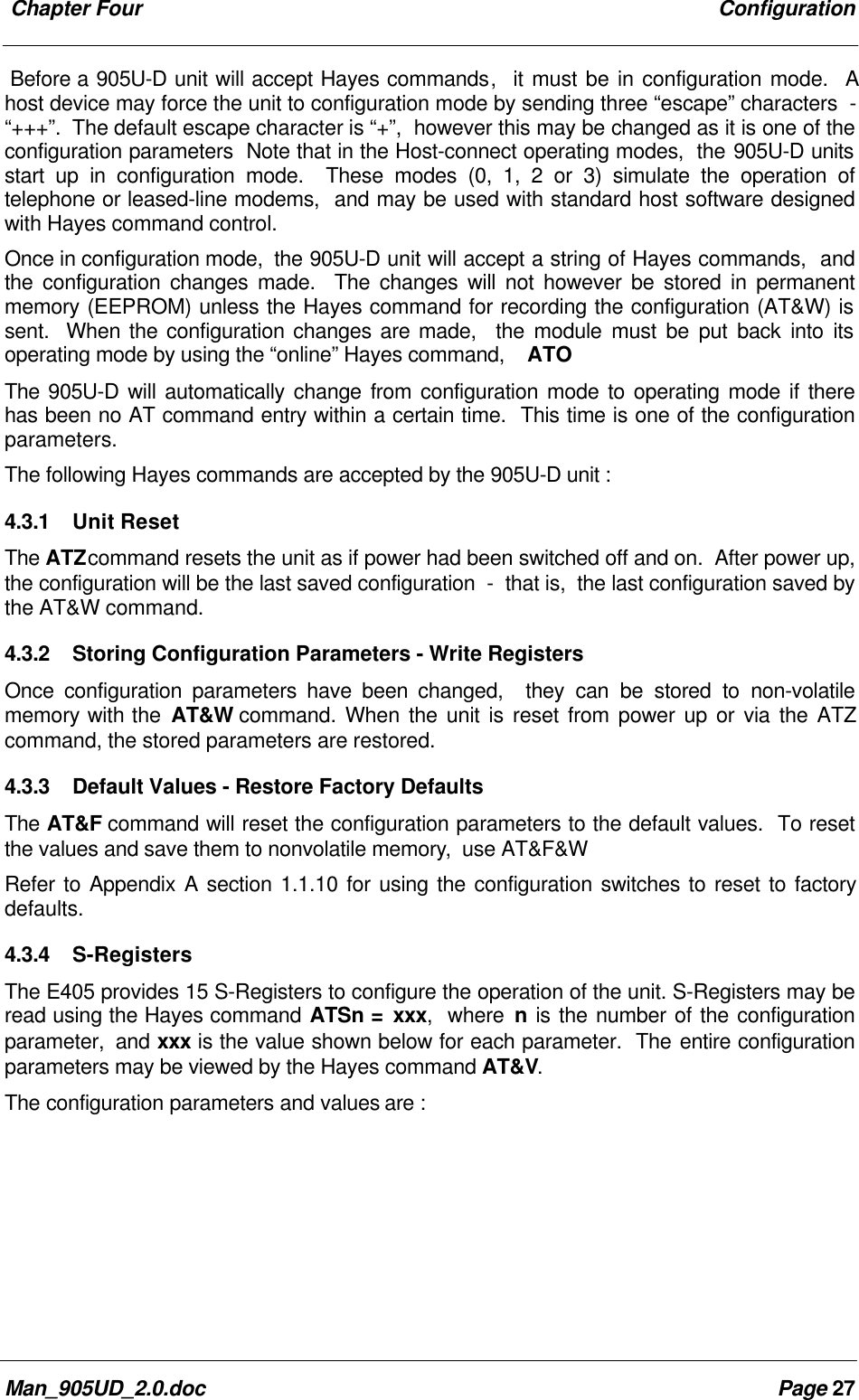
 Chapter Four ConfigurationMan_905UD_2.0.doc Page 27Before a 905U-D unit will accept Hayes commands,  it must be in configuration mode.  Ahost device may force the unit to configuration mode by sending three “escape” characters  -“+++”.  The default escape character is “+”,  however this may be changed as it is one of theconfiguration parameters  Note that in the Host-connect operating modes,  the 905U-D unitsstart up in configuration mode.  These modes (0, 1, 2 or 3) simulate the operation oftelephone or leased-line modems,  and may be used with standard host software designedwith Hayes command control.Once in configuration mode,  the 905U-D unit will accept a string of Hayes commands,  andthe configuration changes made.  The changes will not however be stored in permanentmemory (EEPROM) unless the Hayes command for recording the configuration (AT&W) issent.  When the configuration changes are made,  the module must be put back into itsoperating mode by using the “online” Hayes command,    ATOThe 905U-D will automatically change from configuration mode to operating mode if therehas been no AT command entry within a certain time.  This time is one of the configurationparameters.The following Hayes commands are accepted by the 905U-D unit :4.3.1 Unit ResetThe ATZ command resets the unit as if power had been switched off and on.  After power up,the configuration will be the last saved configuration  -  that is,  the last configuration saved bythe AT&W command.4.3.2 Storing Configuration Parameters - Write RegistersOnce configuration parameters have been changed,  they can be stored to non-volatilememory with the AT&W command. When the unit is reset from power up or via the ATZcommand, the stored parameters are restored.4.3.3 Default Values - Restore Factory DefaultsThe AT&F command will reset the configuration parameters to the default values.  To resetthe values and save them to nonvolatile memory,  use AT&F&WRefer to Appendix A section 1.1.10 for using the configuration switches to reset to factorydefaults.4.3.4 S-RegistersThe E405 provides 15 S-Registers to configure the operation of the unit. S-Registers may beread using the Hayes command ATSn = xxx,  where n is the number of the configurationparameter,  and xxx is the value shown below for each parameter.  The entire configurationparameters may be viewed by the Hayes command AT&V.The configuration parameters and values are :
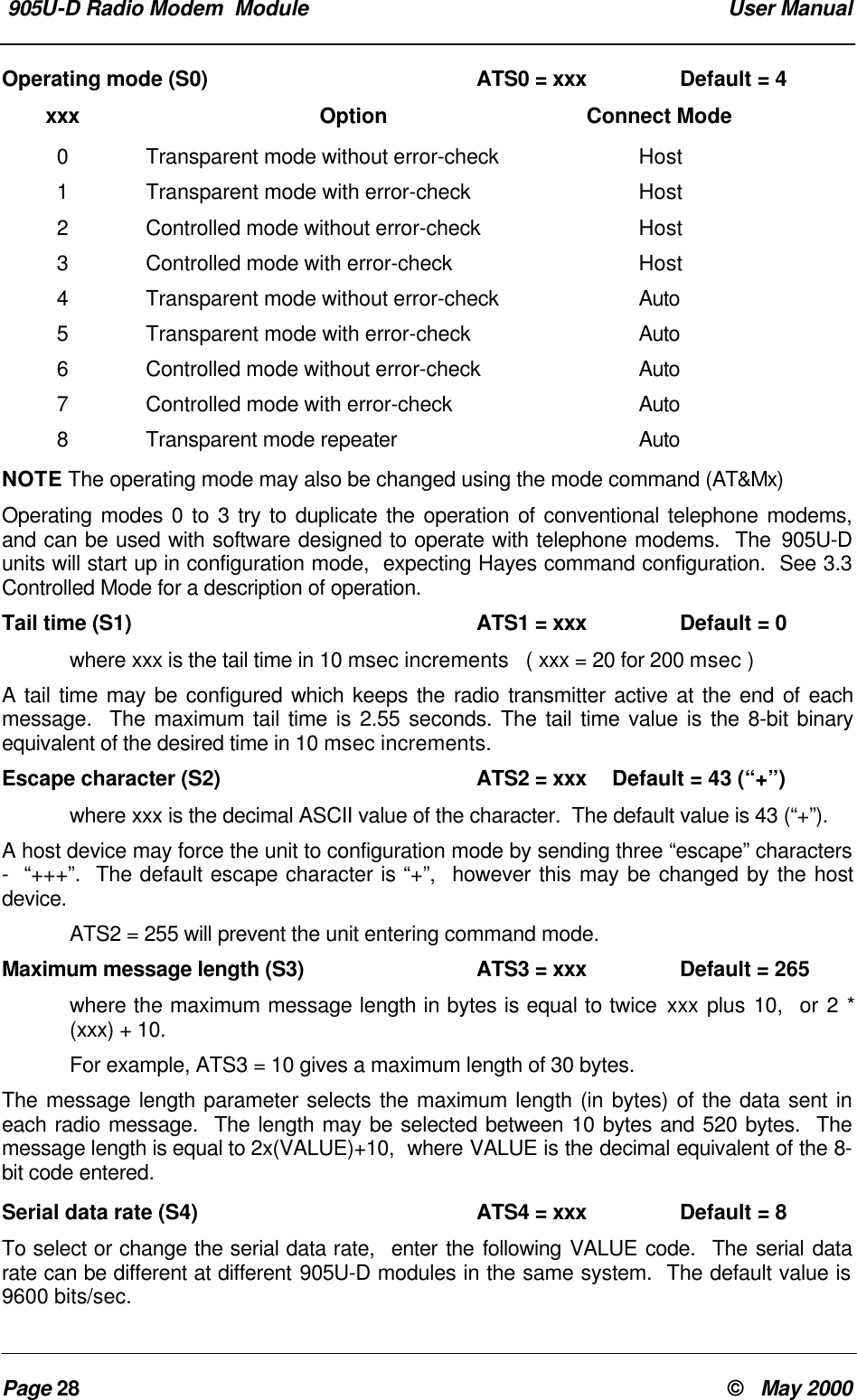
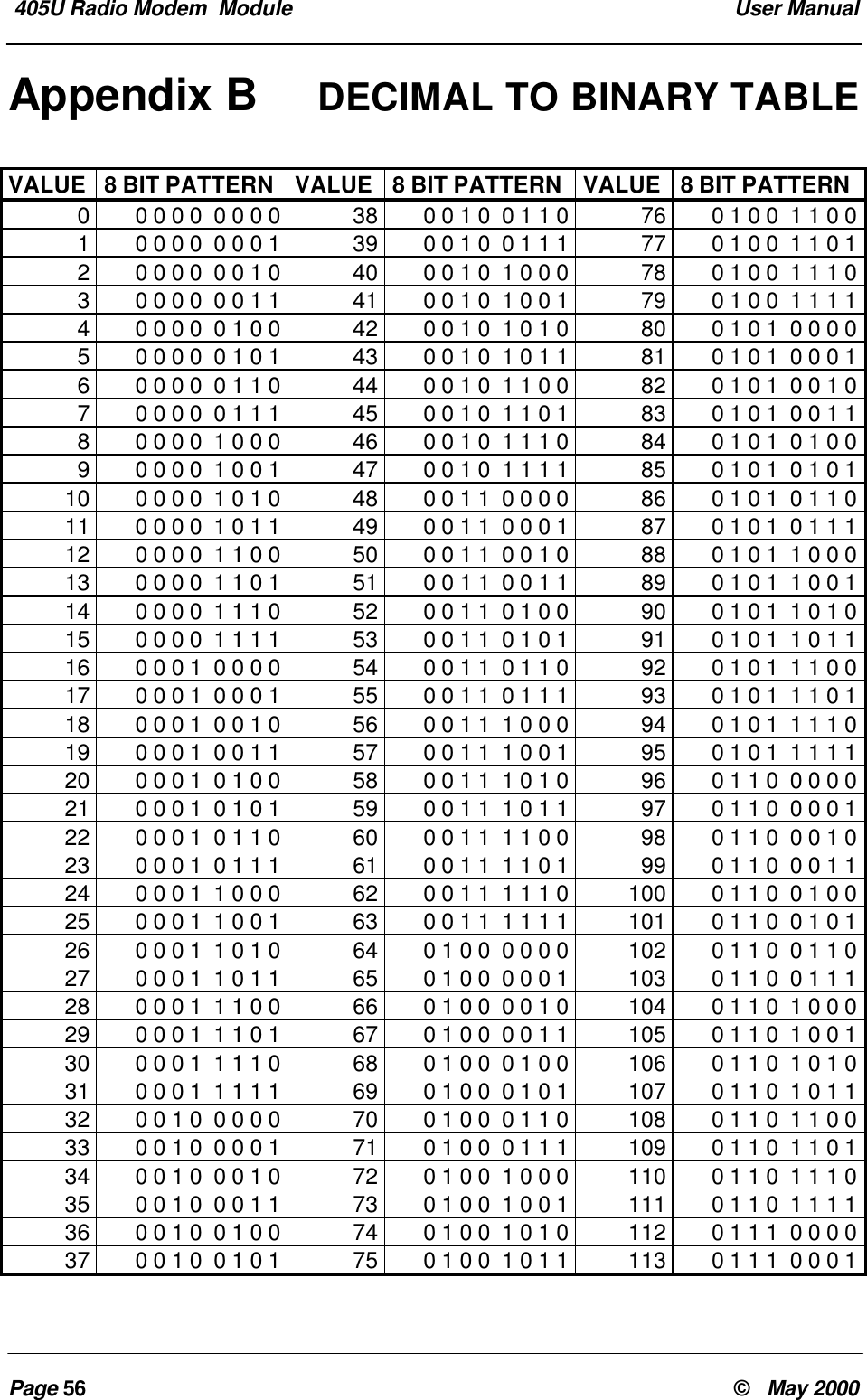
 905U-D Radio Modem  Module  User ManualPage 28 ©   May 2000Operating mode (S0) ATS0 = xxx Default = 4xxx Option Connect Mode0Transparent mode without error-check Host1Transparent mode with error-check Host2Controlled mode without error-check Host3Controlled mode with error-check Host4Transparent mode without error-check Auto5Transparent mode with error-check Auto6Controlled mode without error-check Auto7Controlled mode with error-check Auto8Transparent mode repeater AutoNOTE The operating mode may also be changed using the mode command (AT&Mx)Operating modes 0 to 3 try to duplicate the operation of conventional telephone modems,and can be used with software designed to operate with telephone modems.  The 905U-Dunits will start up in configuration mode,  expecting Hayes command configuration.  See 3.3Controlled Mode for a description of operation.Tail time (S1) ATS1 = xxx Default = 0where xxx is the tail time in 10 msec increments   ( xxx = 20 for 200 msec )A tail time may be configured which keeps the radio transmitter active at the end of eachmessage.  The maximum tail time is 2.55 seconds. The tail time value is the 8-bit binaryequivalent of the desired time in 10 msec increments.Escape character (S2) ATS2 = xxx Default = 43 (“+”)where xxx is the decimal ASCII value of the character.  The default value is 43 (“+”).A host device may force the unit to configuration mode by sending three “escape” characters-  “+++”.  The default escape character is “+”,  however this may be changed by the hostdevice.ATS2 = 255 will prevent the unit entering command mode.Maximum message length (S3) ATS3 = xxx Default = 265where the maximum message length in bytes is equal to twice xxx plus 10,  or 2 *(xxx) + 10.For example, ATS3 = 10 gives a maximum length of 30 bytes.The message length parameter selects the maximum length (in bytes) of the data sent ineach radio message.  The length may be selected between 10 bytes and 520 bytes.  Themessage length is equal to 2x(VALUE)+10,  where VALUE is the decimal equivalent of the 8-bit code entered.Serial data rate (S4) ATS4 = xxx Default = 8To select or change the serial data rate,  enter the following VALUE code.  The serial datarate can be different at different 905U-D modules in the same system.  The default value is9600 bits/sec.
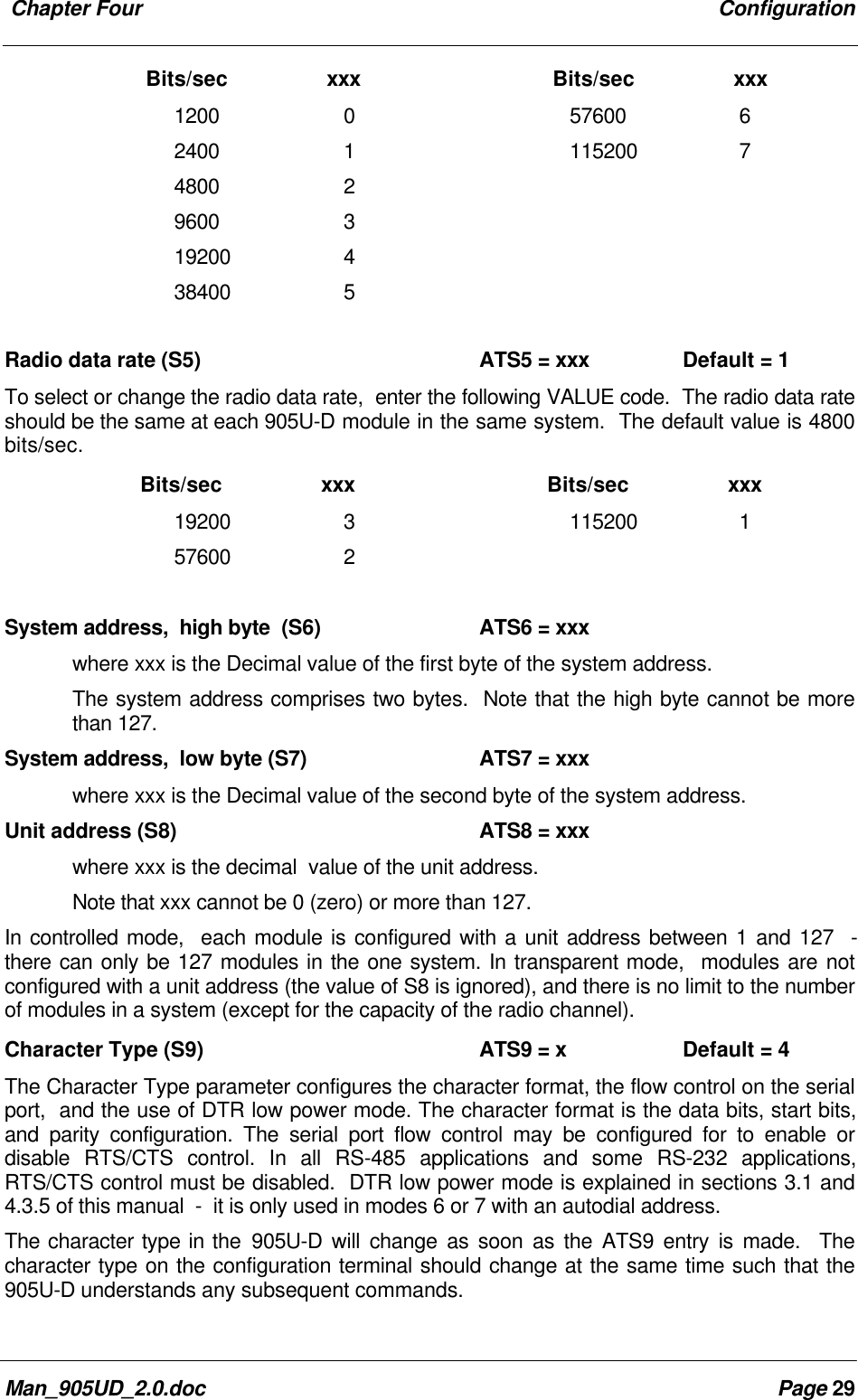
 Chapter Four ConfigurationMan_905UD_2.0.doc Page 29      Bits/sec         xxx Bits/sec         xxx1200 0 57600 62400 1 115200 74800 29600 319200 438400 5Radio data rate (S5) ATS5 = xxx Default = 1To select or change the radio data rate,  enter the following VALUE code.  The radio data rateshould be the same at each 905U-D module in the same system.  The default value is 4800bits/sec.      Bits/sec         xxx Bits/sec         xxx19200 3 115200 157600 2System address,  high byte  (S6) ATS6 = xxxwhere xxx is the Decimal value of the first byte of the system address.The system address comprises two bytes.  Note that the high byte cannot be morethan 127.System address,  low byte (S7) ATS7 = xxxwhere xxx is the Decimal value of the second byte of the system address.Unit address (S8) ATS8 = xxxwhere xxx is the decimal  value of the unit address.Note that xxx cannot be 0 (zero) or more than 127.In controlled mode,  each module is configured with a unit address between 1 and 127  -there can only be 127 modules in the one system. In transparent mode,  modules are notconfigured with a unit address (the value of S8 is ignored), and there is no limit to the numberof modules in a system (except for the capacity of the radio channel).Character Type (S9) ATS9 = x Default = 4The Character Type parameter configures the character format, the flow control on the serialport,  and the use of DTR low power mode. The character format is the data bits, start bits,and parity configuration. The serial port flow control may be configured for to enable ordisable RTS/CTS control. In all RS-485 applications and some RS-232 applications,RTS/CTS control must be disabled.  DTR low power mode is explained in sections 3.1 and4.3.5 of this manual  -  it is only used in modes 6 or 7 with an autodial address.The character type in the 905U-D will change as soon as the ATS9 entry is made.  Thecharacter type on the configuration terminal should change at the same time such that the905U-D understands any subsequent commands.
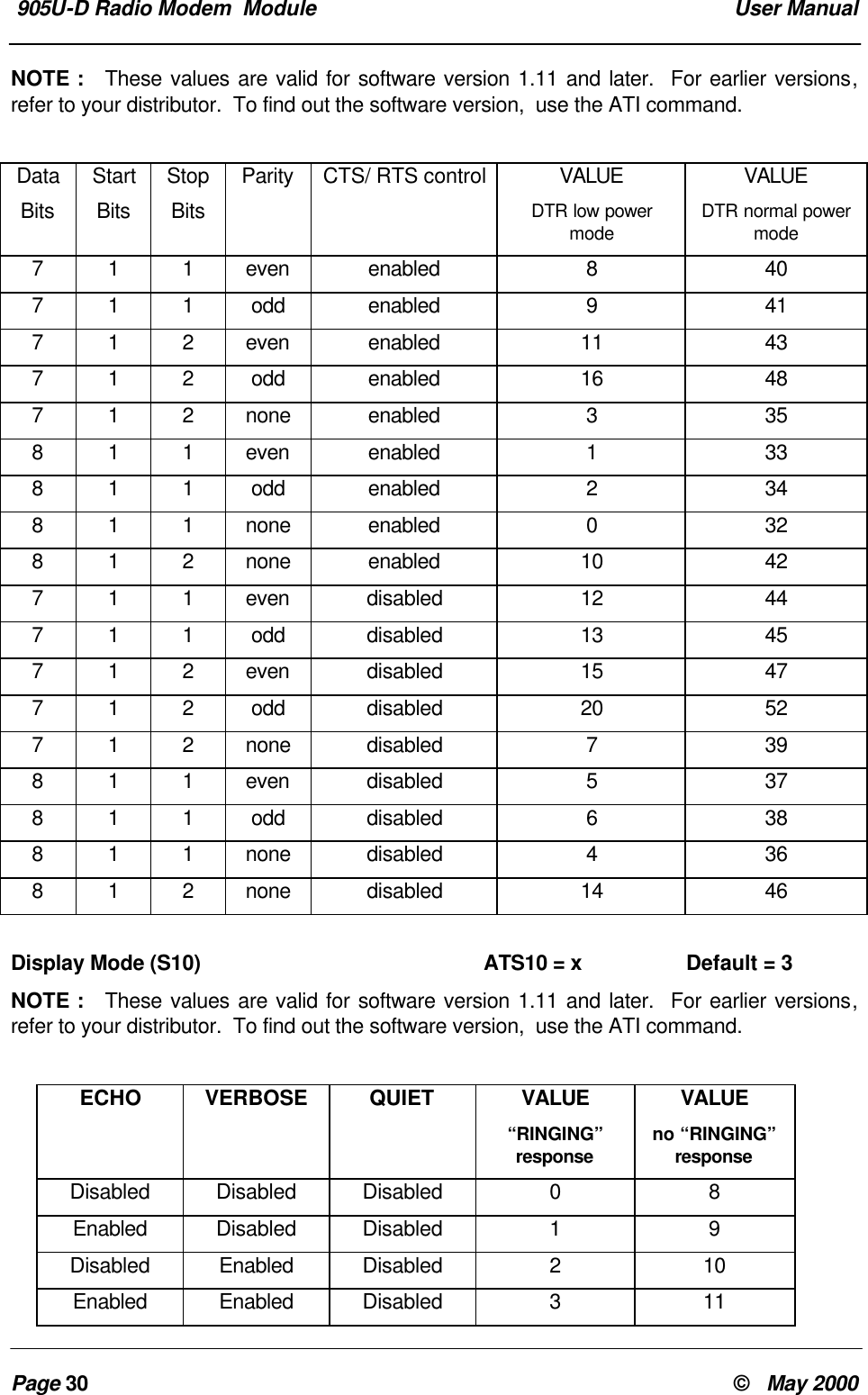
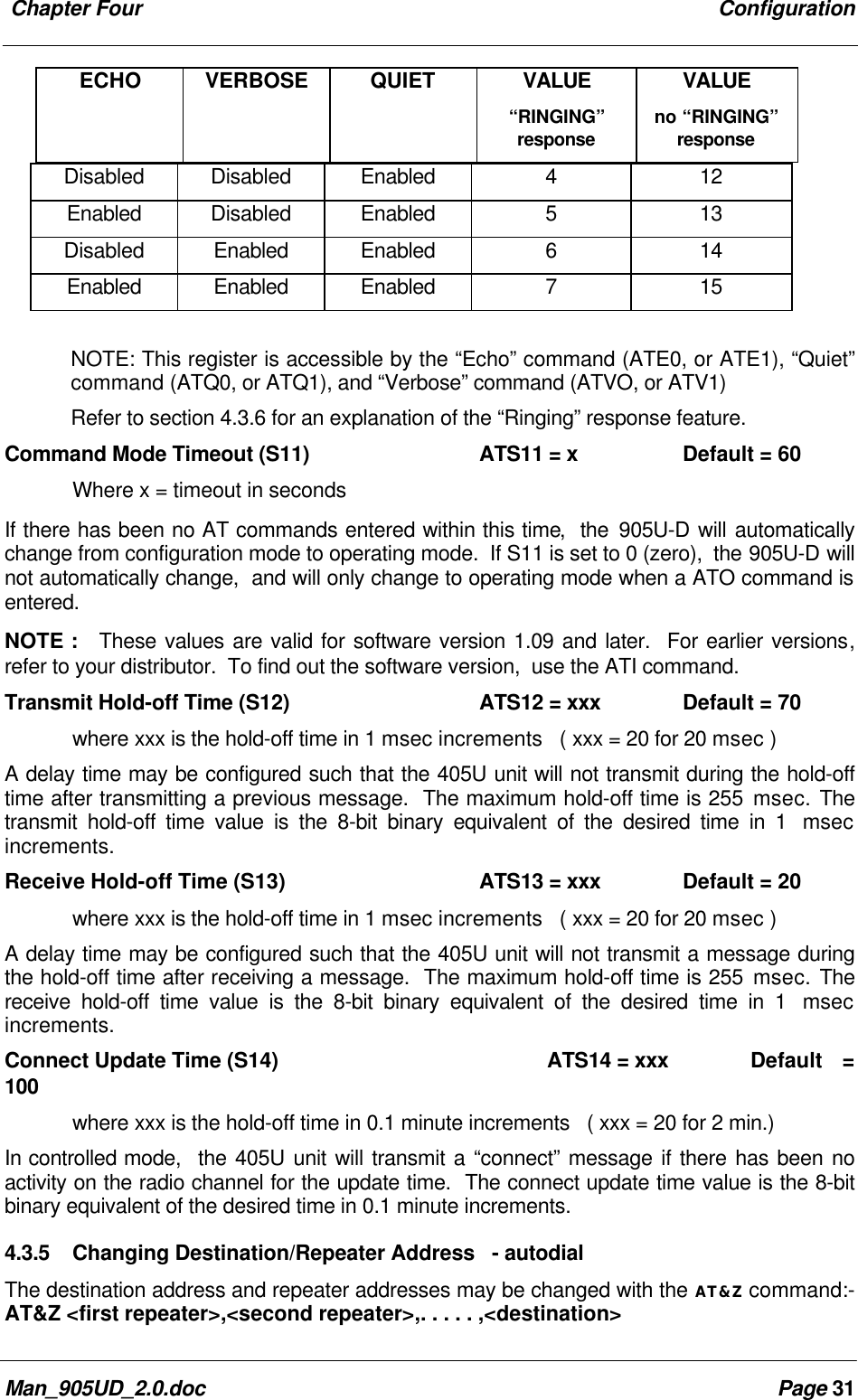
 905U-D Radio Modem  Module  User ManualPage 30 ©   May 2000NOTE :   These values are valid for software version 1.11 and later.  For earlier versions,refer to your distributor.  To find out the software version,  use the ATI command.DataBitsStartBitsStopBitsParity CTS/ RTS control VALUEDTR low powermodeVALUEDTR normal powermode7 1 1 even enabled 8 407 1 1 odd enabled 9 417 1 2 even enabled 11 437 1 2 odd enabled 16 487 1 2 none enabled 3 358 1 1 even enabled 1 338 1 1 odd enabled 2 348 1 1 none enabled 0 328 1 2 none enabled 10 427 1 1 even disabled 12 447 1 1 odd disabled 13 457 1 2 even disabled 15 477 1 2 odd disabled 20 527 1 2 none disabled 7 398 1 1 even disabled 5 378 1 1 odd disabled 6 388 1 1 none disabled 4 368 1 2 none disabled 14 46Display Mode (S10) ATS10 = x Default = 3NOTE :   These values are valid for software version 1.11 and later.  For earlier versions,refer to your distributor.  To find out the software version,  use the ATI command.ECHO VERBOSE QUIET VALUE“RINGING”responseVALUEno “RINGING”responseDisabled Disabled Disabled 0 8Enabled Disabled Disabled 1 9Disabled Enabled Disabled 2 10Enabled Enabled Disabled 3 11
 Chapter Four ConfigurationMan_905UD_2.0.doc Page 31ECHO VERBOSE QUIET VALUE“RINGING”responseVALUEno “RINGING”responseDisabled Disabled Enabled 4 12Enabled Disabled Enabled 5 13Disabled Enabled Enabled 6 14Enabled Enabled Enabled 7 15NOTE: This register is accessible by the “Echo” command (ATE0, or ATE1), “Quiet”command (ATQ0, or ATQ1), and “Verbose” command (ATVO, or ATV1)Refer to section 4.3.6 for an explanation of the “Ringing” response feature.Command Mode Timeout (S11) ATS11 = x Default = 60Where x = timeout in secondsIf there has been no AT commands entered within this time,  the 905U-D will automaticallychange from configuration mode to operating mode.  If S11 is set to 0 (zero),  the 905U-D willnot automatically change,  and will only change to operating mode when a ATO command isentered.NOTE :   These values are valid for software version 1.09 and later.  For earlier versions,refer to your distributor.  To find out the software version,  use the ATI command.Transmit Hold-off Time (S12) ATS12 = xxx Default = 70where xxx is the hold-off time in 1 msec increments   ( xxx = 20 for 20 msec )A delay time may be configured such that the 405U unit will not transmit during the hold-offtime after transmitting a previous message.  The maximum hold-off time is 255 msec. Thetransmit hold-off time value is the 8-bit binary equivalent of the desired time in 1  msecincrements.Receive Hold-off Time (S13) ATS13 = xxx Default = 20where xxx is the hold-off time in 1 msec increments   ( xxx = 20 for 20 msec )A delay time may be configured such that the 405U unit will not transmit a message duringthe hold-off time after receiving a message.  The maximum hold-off time is 255 msec. Thereceive hold-off time value is the 8-bit binary equivalent of the desired time in 1  msecincrements.Connect Update Time (S14) ATS14 = xxx Default =100where xxx is the hold-off time in 0.1 minute increments   ( xxx = 20 for 2 min.)In controlled mode,  the 405U unit will transmit a “connect” message if there has been noactivity on the radio channel for the update time.  The connect update time value is the 8-bitbinary equivalent of the desired time in 0.1 minute increments.4.3.5 Changing Destination/Repeater Address   - autodialThe destination address and repeater addresses may be changed with the AT&Z command:-AT&Z <first repeater>,<second repeater>,. . . . . ,<destination>
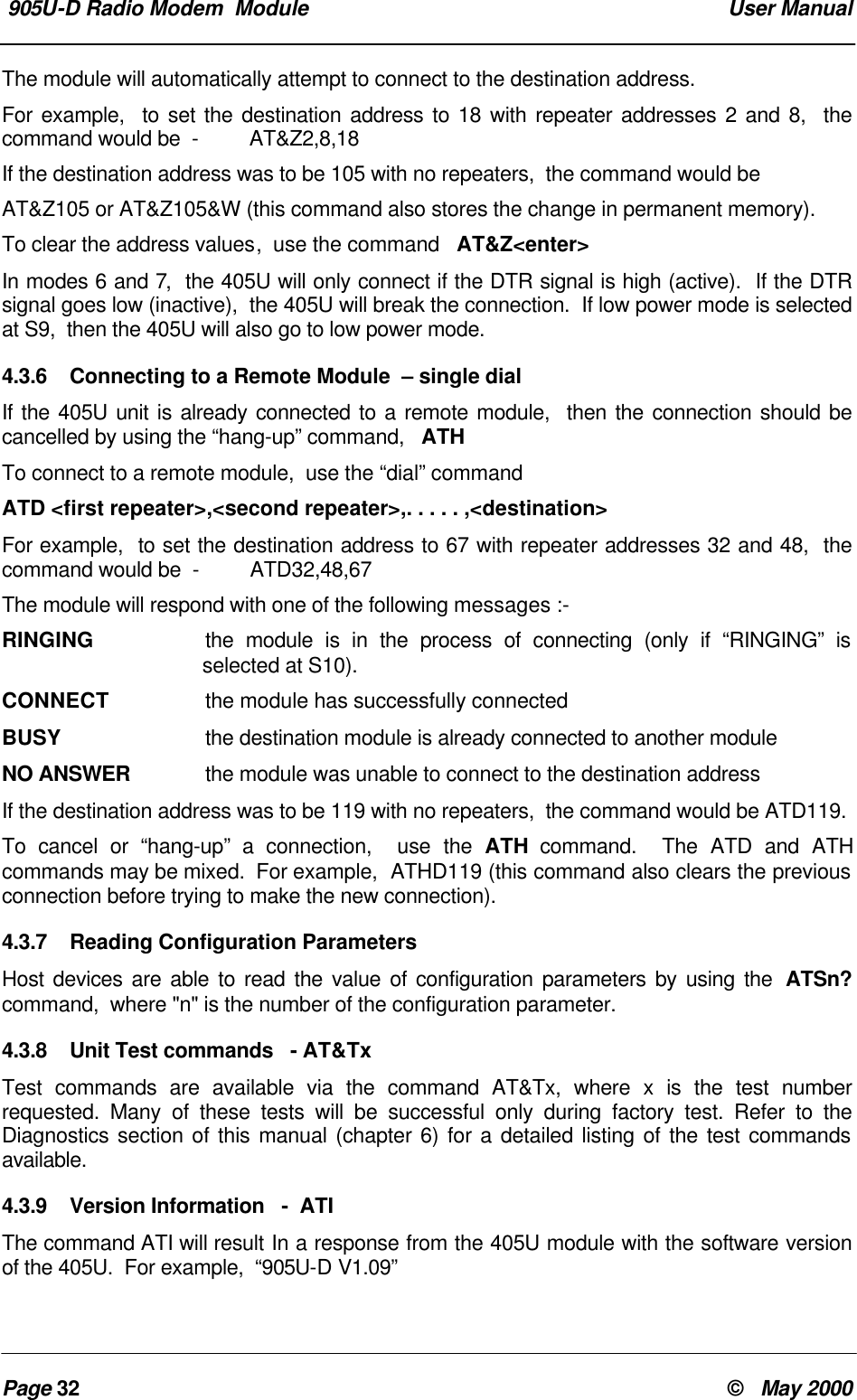
 905U-D Radio Modem  Module  User ManualPage 32 ©   May 2000The module will automatically attempt to connect to the destination address.For example,  to set the destination address to 18 with repeater addresses 2 and 8,  thecommand would be  -         AT&Z2,8,18If the destination address was to be 105 with no repeaters,  the command would beAT&Z105 or AT&Z105&W (this command also stores the change in permanent memory).To clear the address values,  use the command   AT&Z<enter>In modes 6 and 7,  the 405U will only connect if the DTR signal is high (active).  If the DTRsignal goes low (inactive),  the 405U will break the connection.  If low power mode is selectedat S9,  then the 405U will also go to low power mode.4.3.6 Connecting to a Remote Module  – single dialIf the 405U unit is already connected to a remote module,  then the connection should becancelled by using the “hang-up” command,   ATHTo connect to a remote module,  use the “dial” commandATD <first repeater>,<second repeater>,. . . . . ,<destination>For example,  to set the destination address to 67 with repeater addresses 32 and 48,  thecommand would be  -         ATD32,48,67The module will respond with one of the following messages :-RINGING the module is in the process of connecting (only if “RINGING” isselected at S10).CONNECT  the module has successfully connectedBUSY  the destination module is already connected to another moduleNO ANSWER  the module was unable to connect to the destination addressIf the destination address was to be 119 with no repeaters,  the command would be ATD119.To cancel or “hang-up” a connection,  use the ATH command.  The ATD and ATHcommands may be mixed.  For example,  ATHD119 (this command also clears the previousconnection before trying to make the new connection).4.3.7 Reading Configuration ParametersHost devices are able to read the value of configuration parameters by using the  ATSn?command,  where "n" is the number of the configuration parameter.4.3.8 Unit Test commands   - AT&TxTest commands are available via the command AT&Tx, where x is the test numberrequested. Many of these tests will be successful only during factory test. Refer to theDiagnostics section of this manual (chapter 6) for a detailed listing of the test commandsavailable.4.3.9 Version Information   -  ATIThe command ATI will result In a response from the 405U module with the software versionof the 405U.  For example,  “905U-D V1.09”
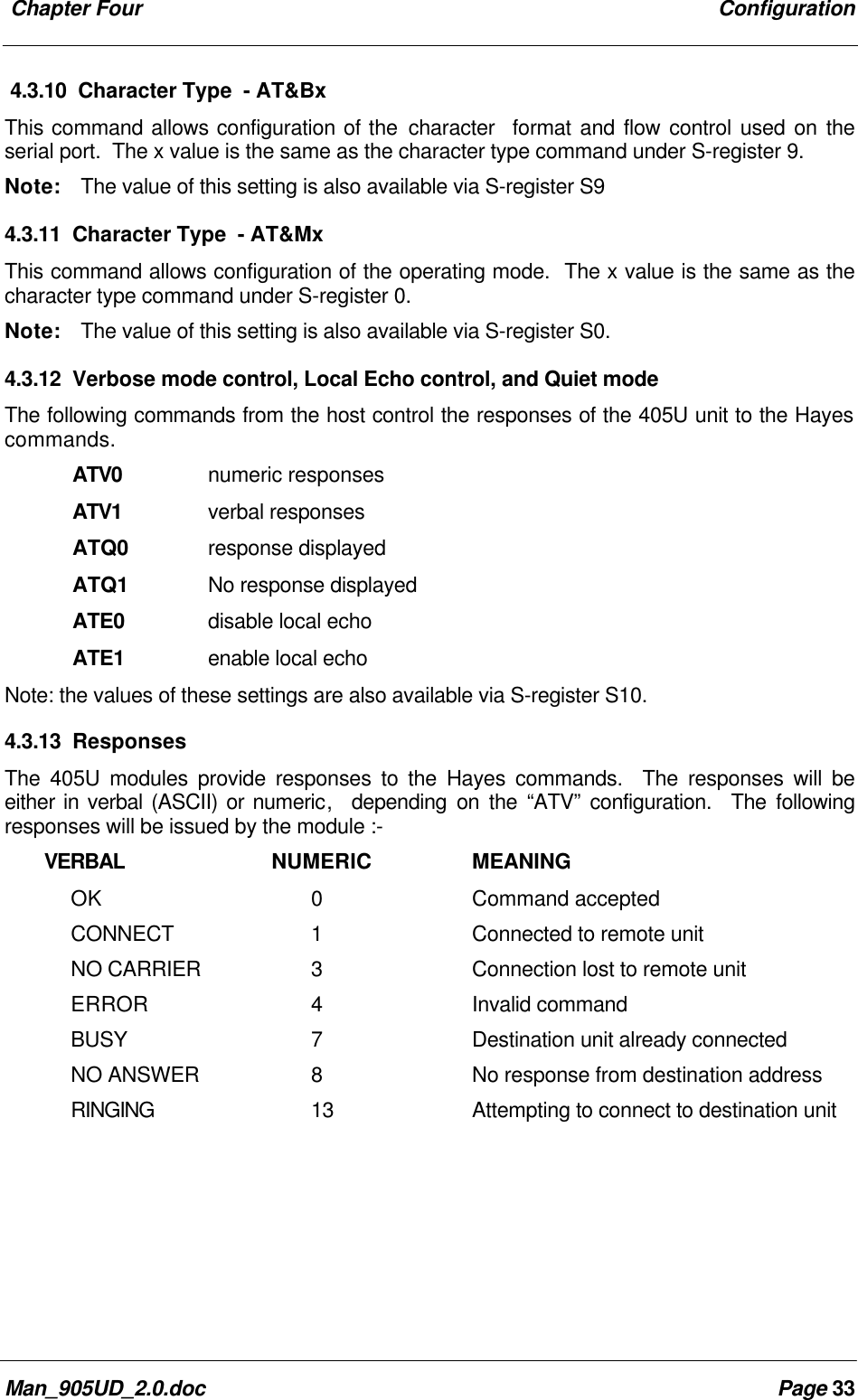
 Chapter Four ConfigurationMan_905UD_2.0.doc Page 334.3.10 Character Type  - AT&BxThis command allows configuration of the character  format and flow control used on theserial port.  The x value is the same as the character type command under S-register 9.Note:    The value of this setting is also available via S-register S94.3.11 Character Type  - AT&MxThis command allows configuration of the operating mode.  The x value is the same as thecharacter type command under S-register 0.Note:    The value of this setting is also available via S-register S0.4.3.12 Verbose mode control, Local Echo control, and Quiet modeThe following commands from the host control the responses of the 405U unit to the Hayescommands.ATV0 numeric responsesATV1 verbal responsesATQ0 response displayedATQ1 No response displayedATE0 disable local echoATE1 enable local echoNote: the values of these settings are also available via S-register S10.4.3.13 ResponsesThe 405U modules provide responses to the Hayes commands.  The responses will beeither in verbal (ASCII) or numeric,  depending on the “ATV” configuration.  The followingresponses will be issued by the module :-       VERBAL NUMERIC MEANINGOK 0Command acceptedCONNECT 1Connected to remote unitNO CARRIER 3Connection lost to remote unitERROR 4Invalid commandBUSY 7Destination unit already connectedNO ANSWER 8No response from destination addressRINGING13 Attempting to connect to destination unit
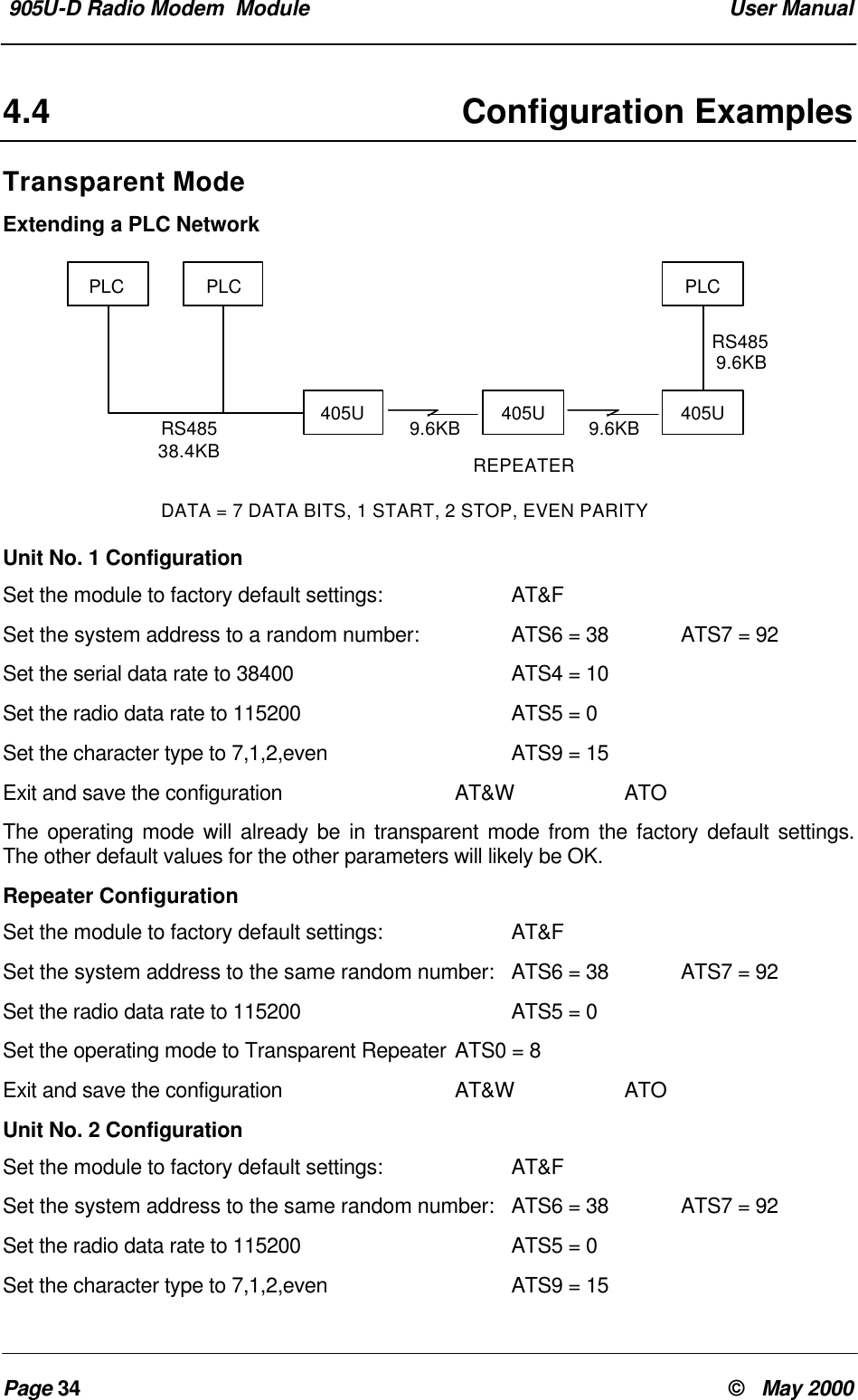
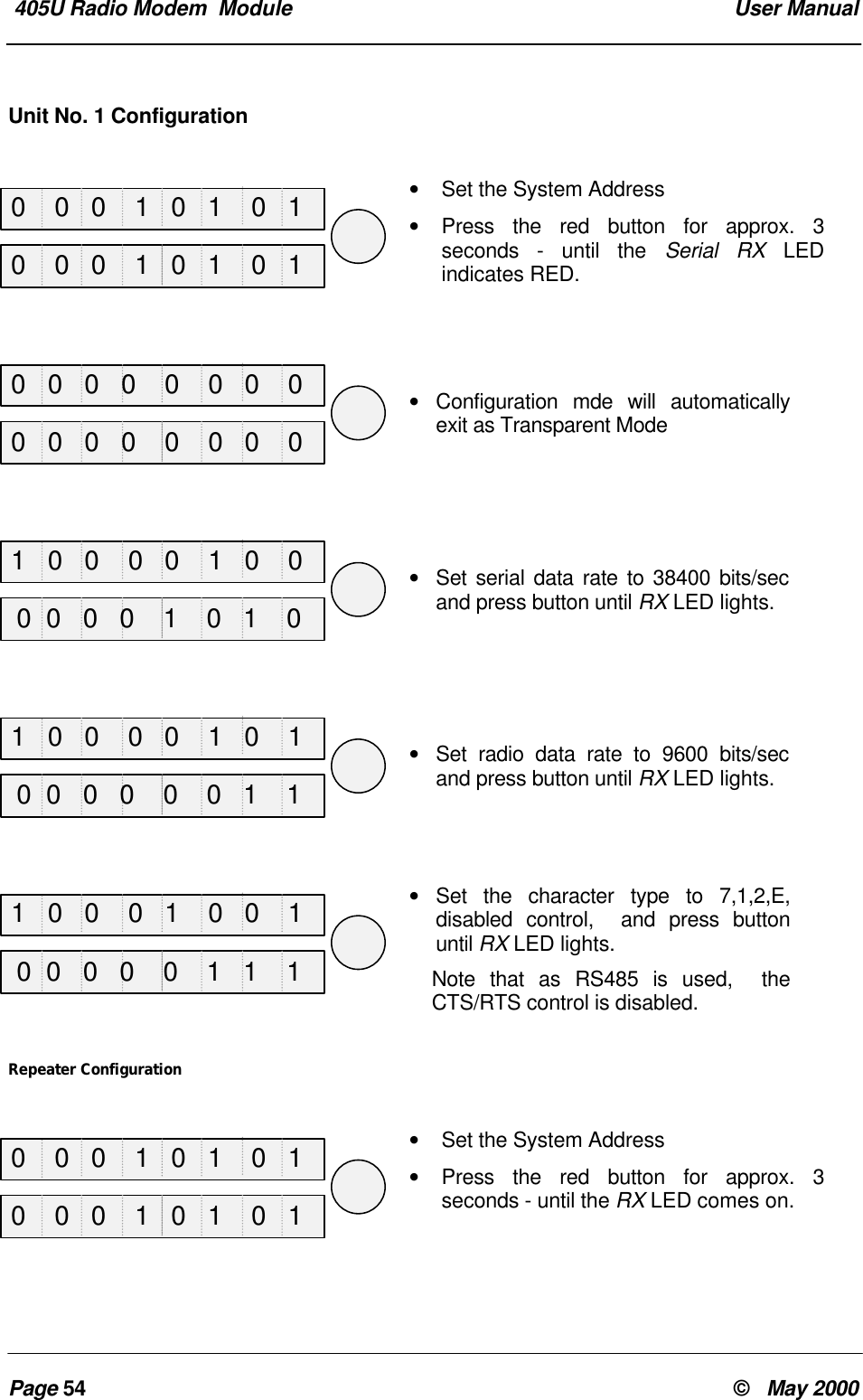
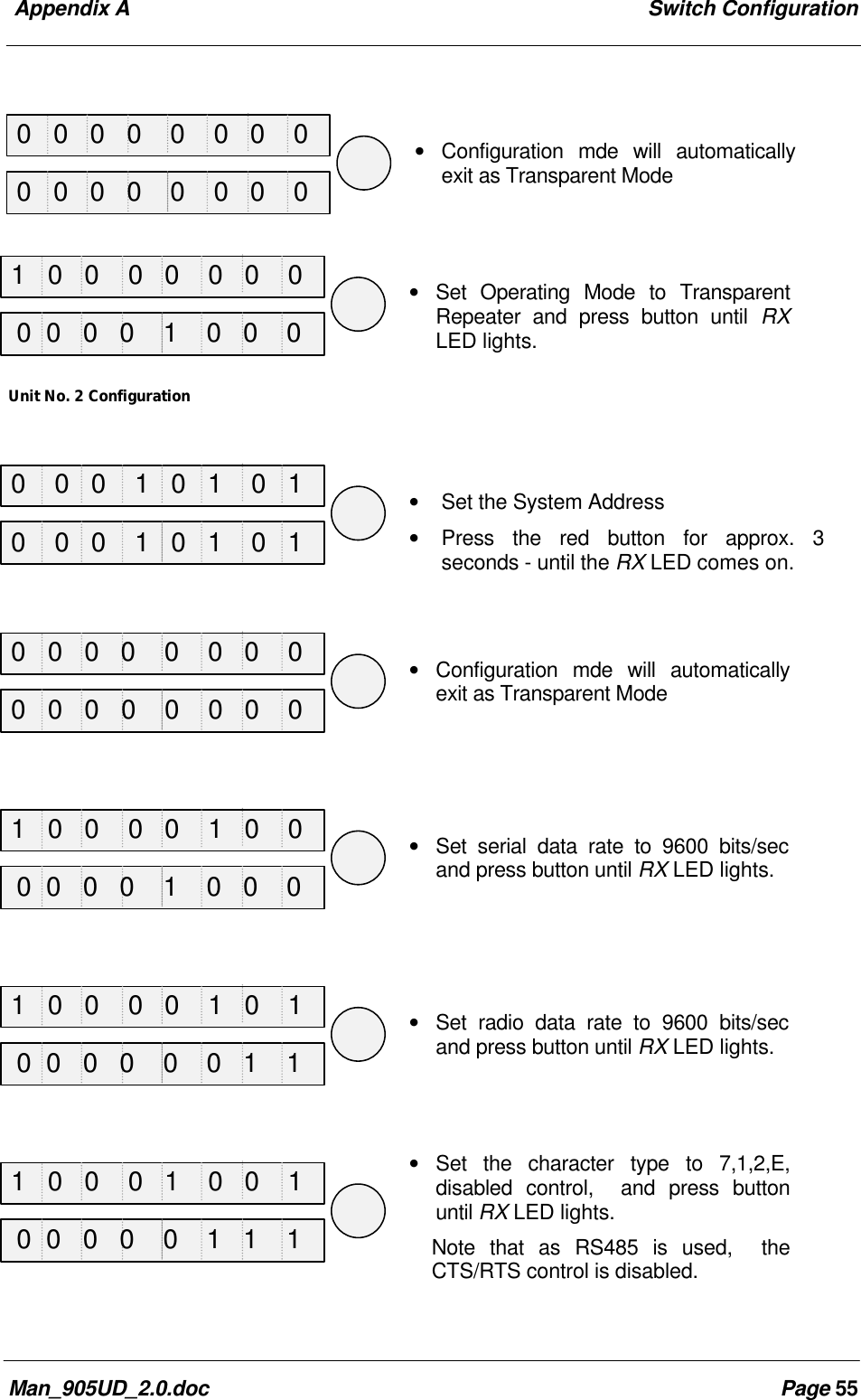
 905U-D Radio Modem  Module  User ManualPage 34 ©   May 20004.4 Configuration ExamplesTransparent ModeExtending a PLC NetworkUnit No. 1 ConfigurationSet the module to factory default settings: AT&FSet the system address to a random number: ATS6 = 38 ATS7 = 92Set the serial data rate to 38400 ATS4 = 10Set the radio data rate to 115200 ATS5 = 0Set the character type to 7,1,2,even ATS9 = 15Exit and save the configuration AT&W ATOThe operating mode will already be in transparent mode from the factory default settings.The other default values for the other parameters will likely be OK.Repeater ConfigurationSet the module to factory default settings: AT&FSet the system address to the same random number: ATS6 = 38 ATS7 = 92Set the radio data rate to 115200 ATS5 = 0Set the operating mode to Transparent Repeater ATS0 = 8Exit and save the configuration AT&W ATOUnit No. 2 ConfigurationSet the module to factory default settings: AT&FSet the system address to the same random number: ATS6 = 38 ATS7 = 92Set the radio data rate to 115200 ATS5 = 0Set the character type to 7,1,2,even ATS9 = 15PLC PLCRS48538.4KB405U 405U9.6KB 9.6KB 405UPLCRS4859.6KBREPEATERDATA = 7 DATA BITS, 1 START, 2 STOP, EVEN PARITY
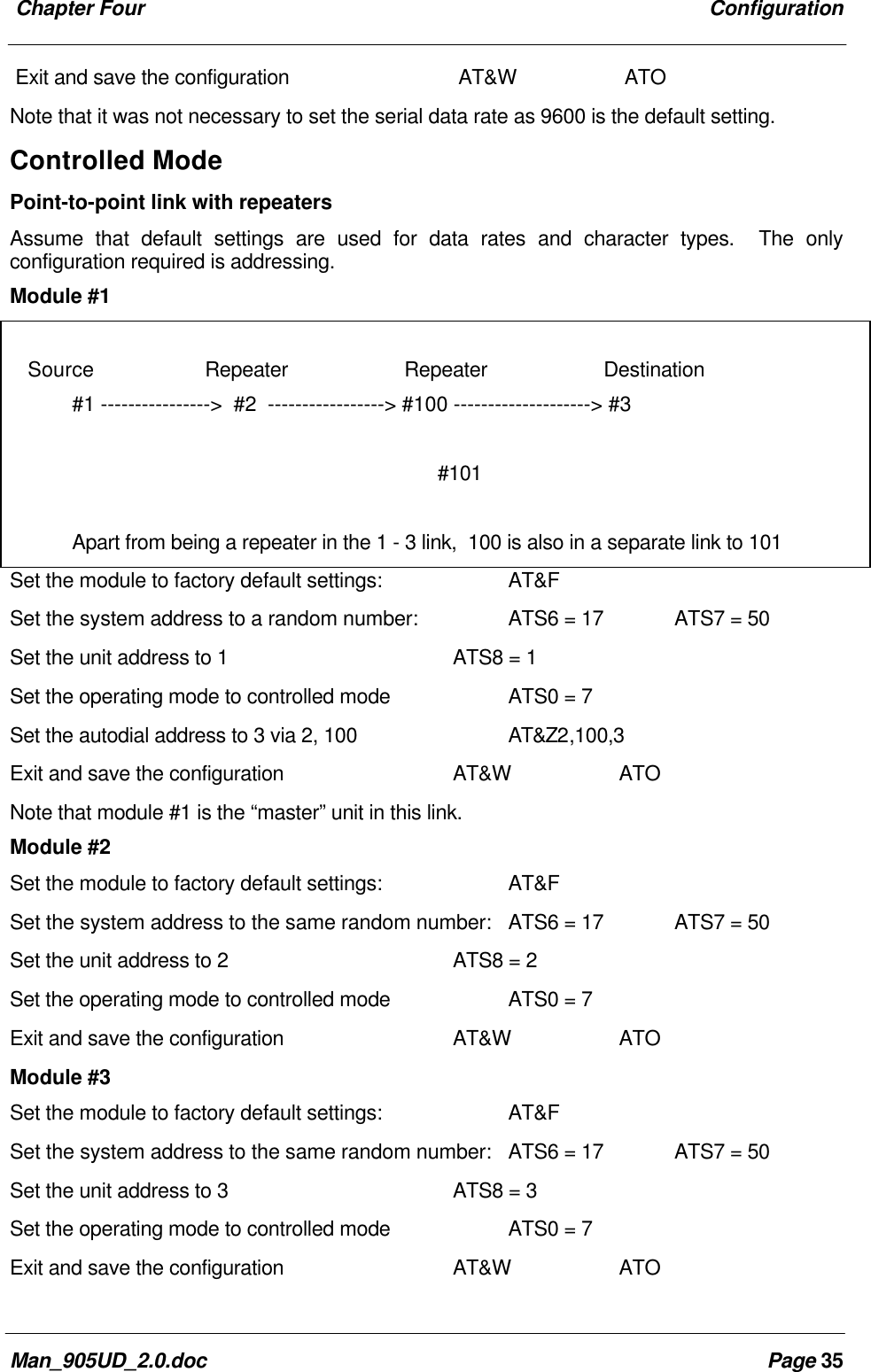
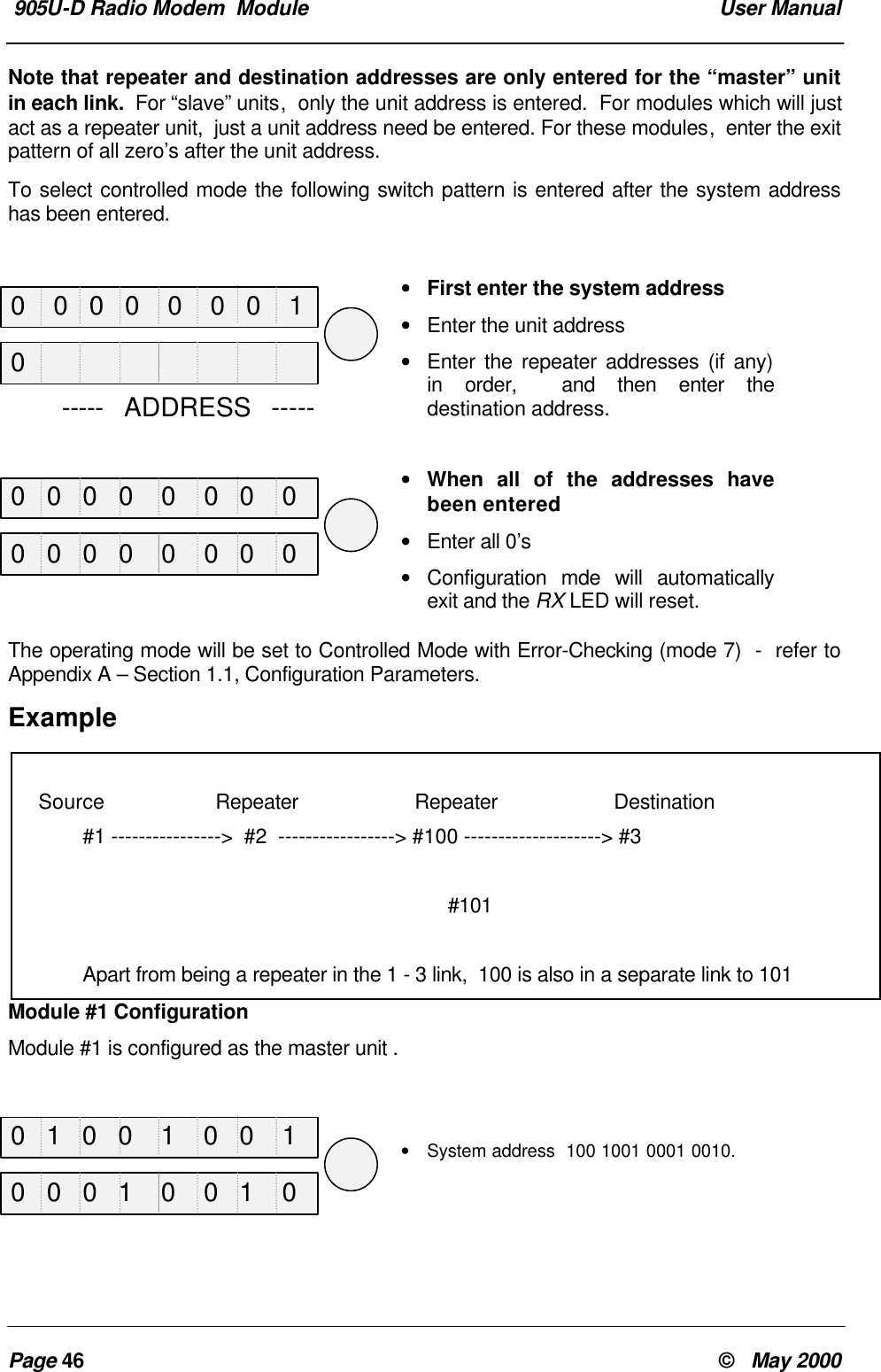
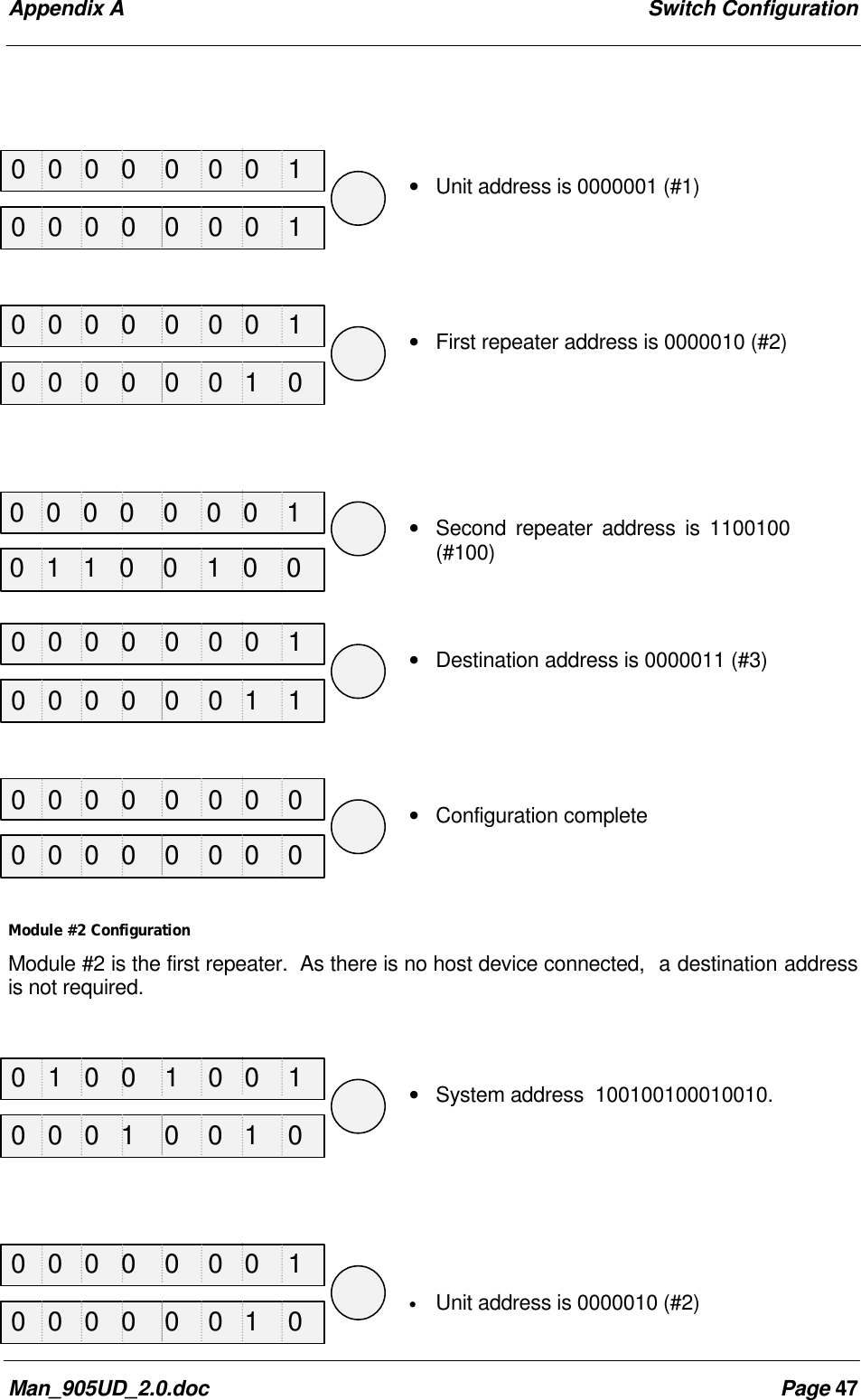
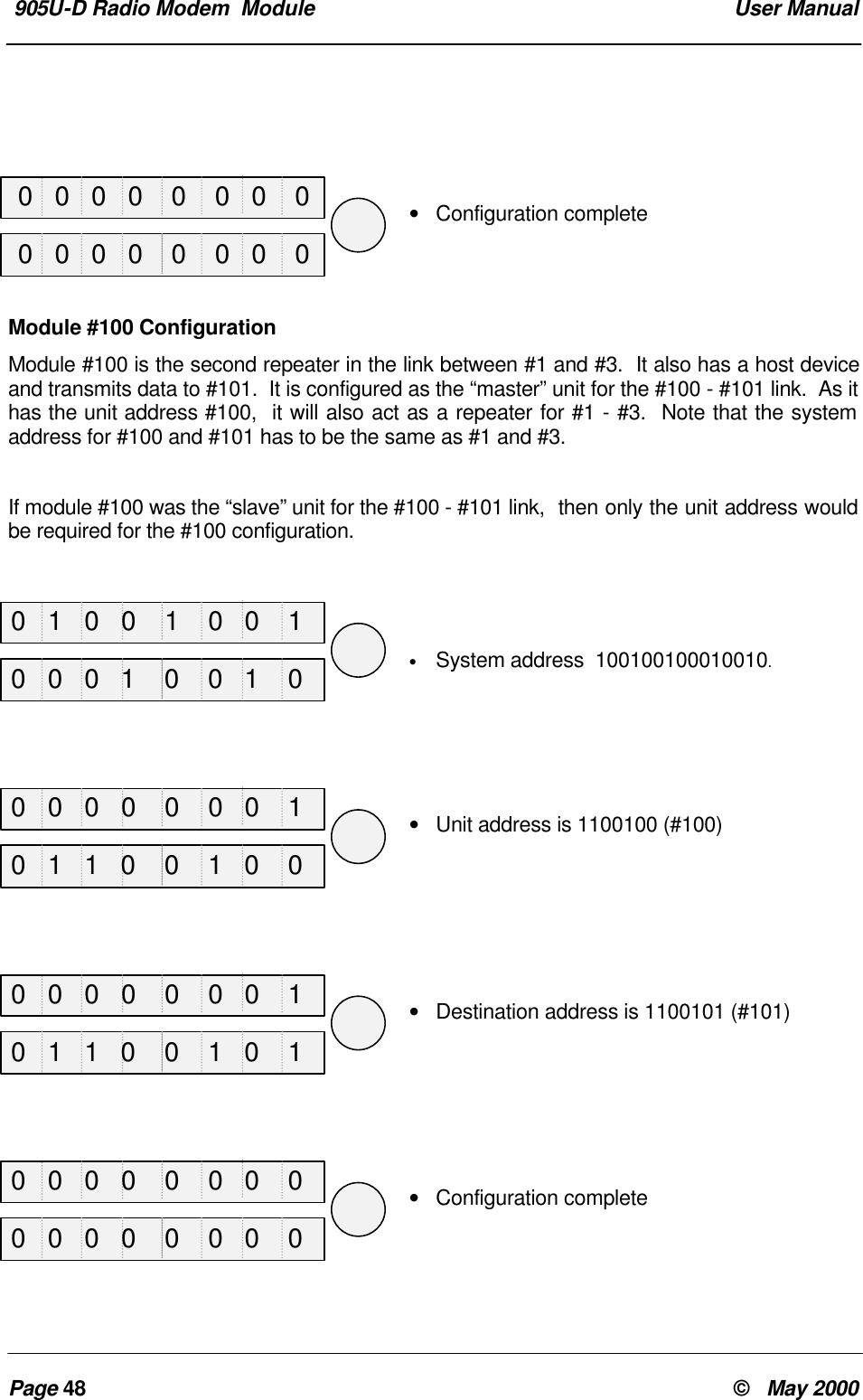
 Chapter Four ConfigurationMan_905UD_2.0.doc Page 35Exit and save the configuration AT&W ATONote that it was not necessary to set the serial data rate as 9600 is the default setting.Controlled ModePoint-to-point link with repeatersAssume that default settings are used for data rates and character types.  The onlyconfiguration required is addressing.Module #1Set the module to factory default settings: AT&FSet the system address to a random number: ATS6 = 17 ATS7 = 50Set the unit address to 1 ATS8 = 1Set the operating mode to controlled mode ATS0 = 7Set the autodial address to 3 via 2, 100 AT&Z2,100,3Exit and save the configuration AT&W ATONote that module #1 is the “master” unit in this link.Module #2Set the module to factory default settings: AT&FSet the system address to the same random number: ATS6 = 17 ATS7 = 50Set the unit address to 2 ATS8 = 2Set the operating mode to controlled mode ATS0 = 7Exit and save the configuration AT&W ATOModule #3Set the module to factory default settings: AT&FSet the system address to the same random number: ATS6 = 17 ATS7 = 50Set the unit address to 3 ATS8 = 3Set the operating mode to controlled mode ATS0 = 7Exit and save the configuration AT&W ATO    Source Repeater Repeater Destination#1 ---------------->  #2  -----------------> #100 --------------------> #3                   #101Apart from being a repeater in the 1 - 3 link,  100 is also in a separate link to 101
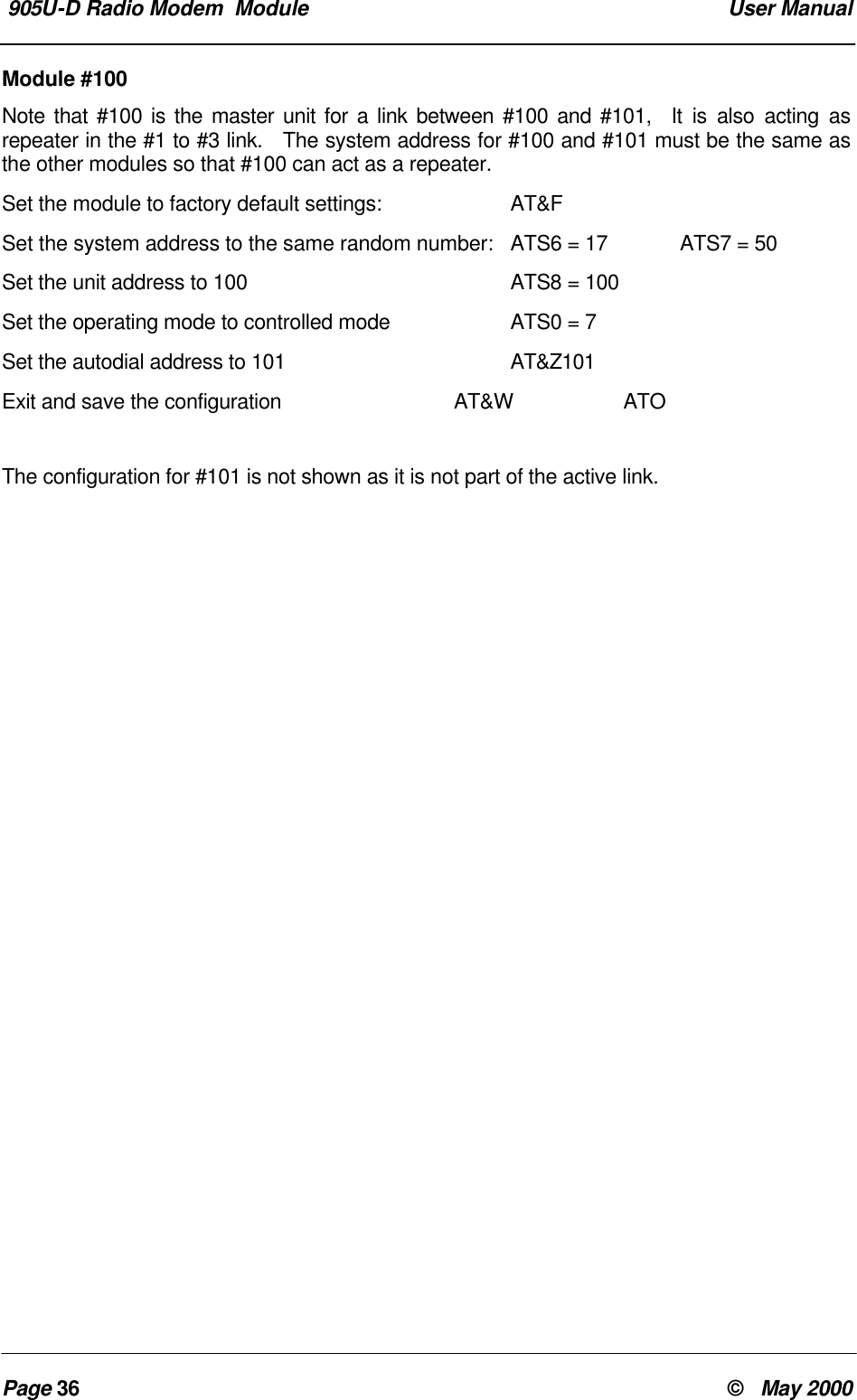
 905U-D Radio Modem  Module  User ManualPage 36 ©   May 2000Module #100Note that #100 is the master unit for a link between #100 and #101,  It is also acting asrepeater in the #1 to #3 link.   The system address for #100 and #101 must be the same asthe other modules so that #100 can act as a repeater.Set the module to factory default settings: AT&FSet the system address to the same random number: ATS6 = 17 ATS7 = 50Set the unit address to 100 ATS8 = 100Set the operating mode to controlled mode ATS0 = 7Set the autodial address to 101 AT&Z101Exit and save the configuration AT&W ATOThe configuration for #101 is not shown as it is not part of the active link.
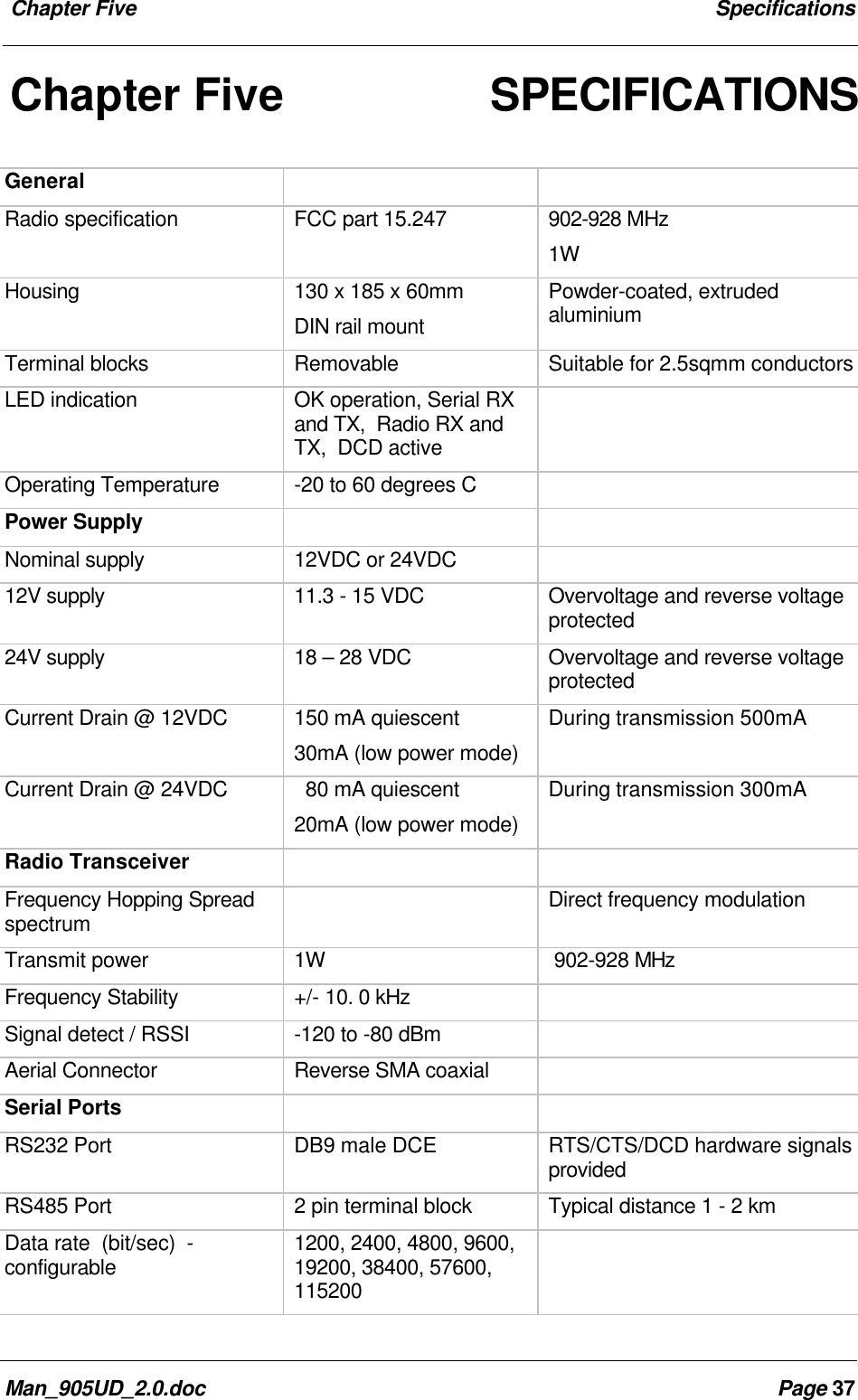
 Chapter Five SpecificationsMan_905UD_2.0.doc Page 37Chapter Five SPECIFICATIONSGeneralRadio specification FCC part 15.247 902-928 MHz1WHousing 130 x 185 x 60mmDIN rail mountPowder-coated, extrudedaluminiumTerminal blocks Removable Suitable for 2.5sqmm conductorsLED indication OK operation, Serial RXand TX,  Radio RX andTX,  DCD activeOperating Temperature -20 to 60 degrees CPower SupplyNominal supply 12VDC or 24VDC12V supply 11.3 - 15 VDC Overvoltage and reverse voltageprotected24V supply 18 – 28 VDC Overvoltage and reverse voltageprotectedCurrent Drain @ 12VDC 150 mA quiescent30mA (low power mode)During transmission 500mACurrent Drain @ 24VDC   80 mA quiescent20mA (low power mode)During transmission 300mARadio TransceiverFrequency Hopping Spreadspectrum Direct frequency modulationTransmit power 1W 902-928 MHzFrequency Stability +/- 10. 0 kHzSignal detect / RSSI -120 to -80 dBmAerial Connector Reverse SMA coaxialSerial PortsRS232 Port DB9 male DCE RTS/CTS/DCD hardware signalsprovidedRS485 Port 2 pin terminal block Typical distance 1 - 2 kmData rate  (bit/sec)  -configurable 1200, 2400, 4800, 9600,19200, 38400, 57600,115200
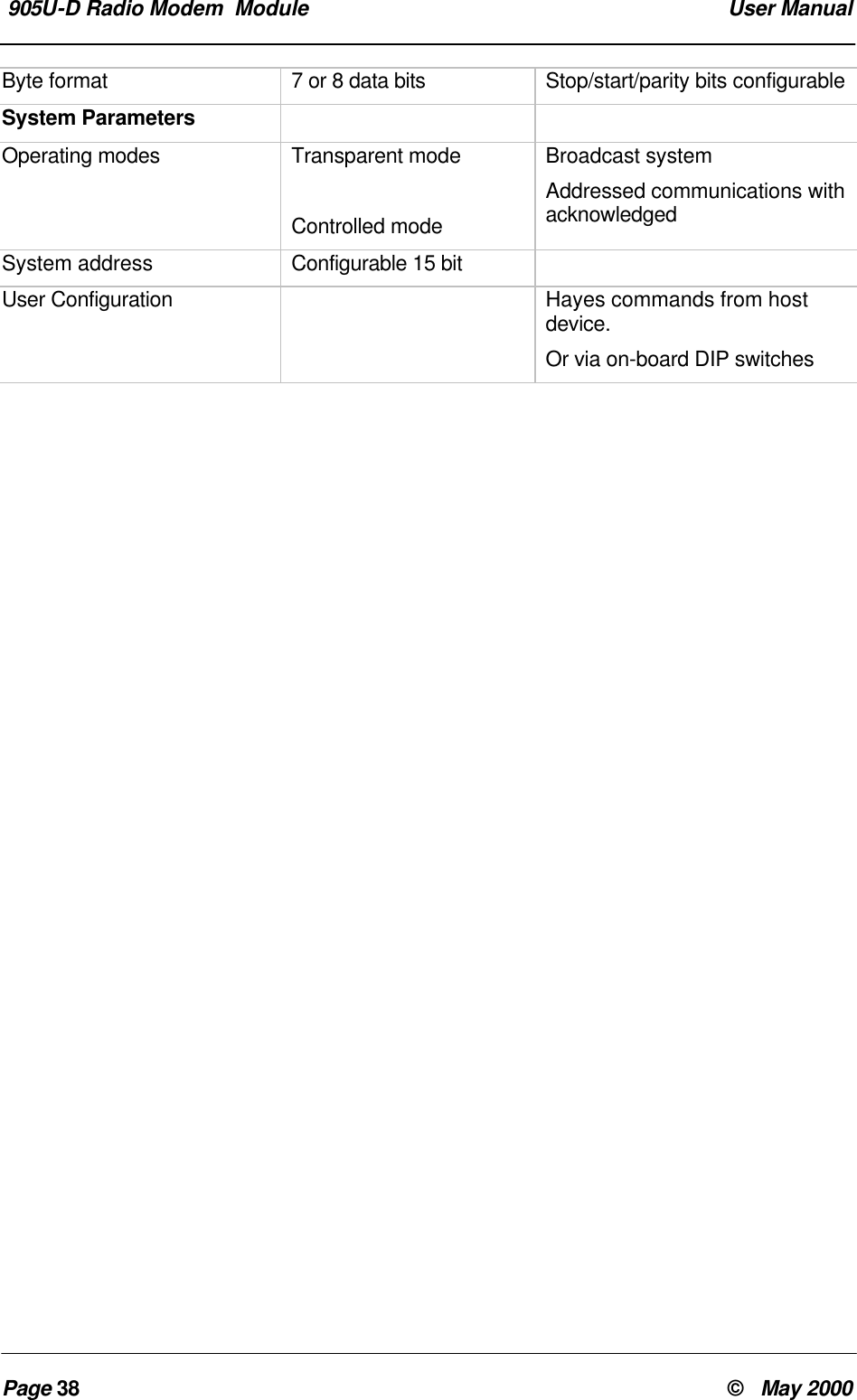
 905U-D Radio Modem  Module  User ManualPage 38 ©   May 2000Byte format 7 or 8 data bits Stop/start/parity bits configurableSystem ParametersOperating modes Transparent modeControlled modeBroadcast systemAddressed communications withacknowledgedSystem address Configurable 15 bitUser Configuration Hayes commands from hostdevice.Or via on-board DIP switches
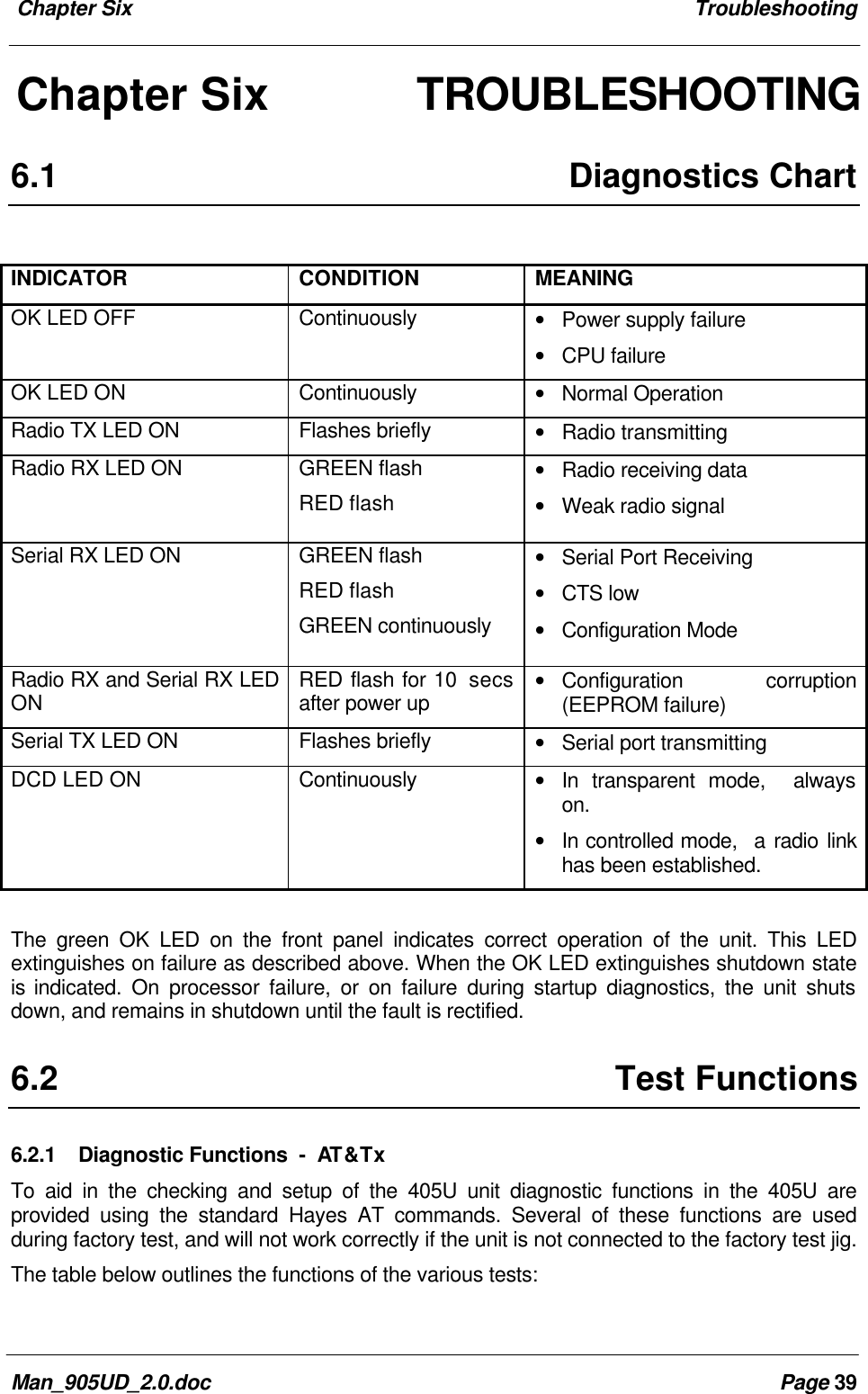
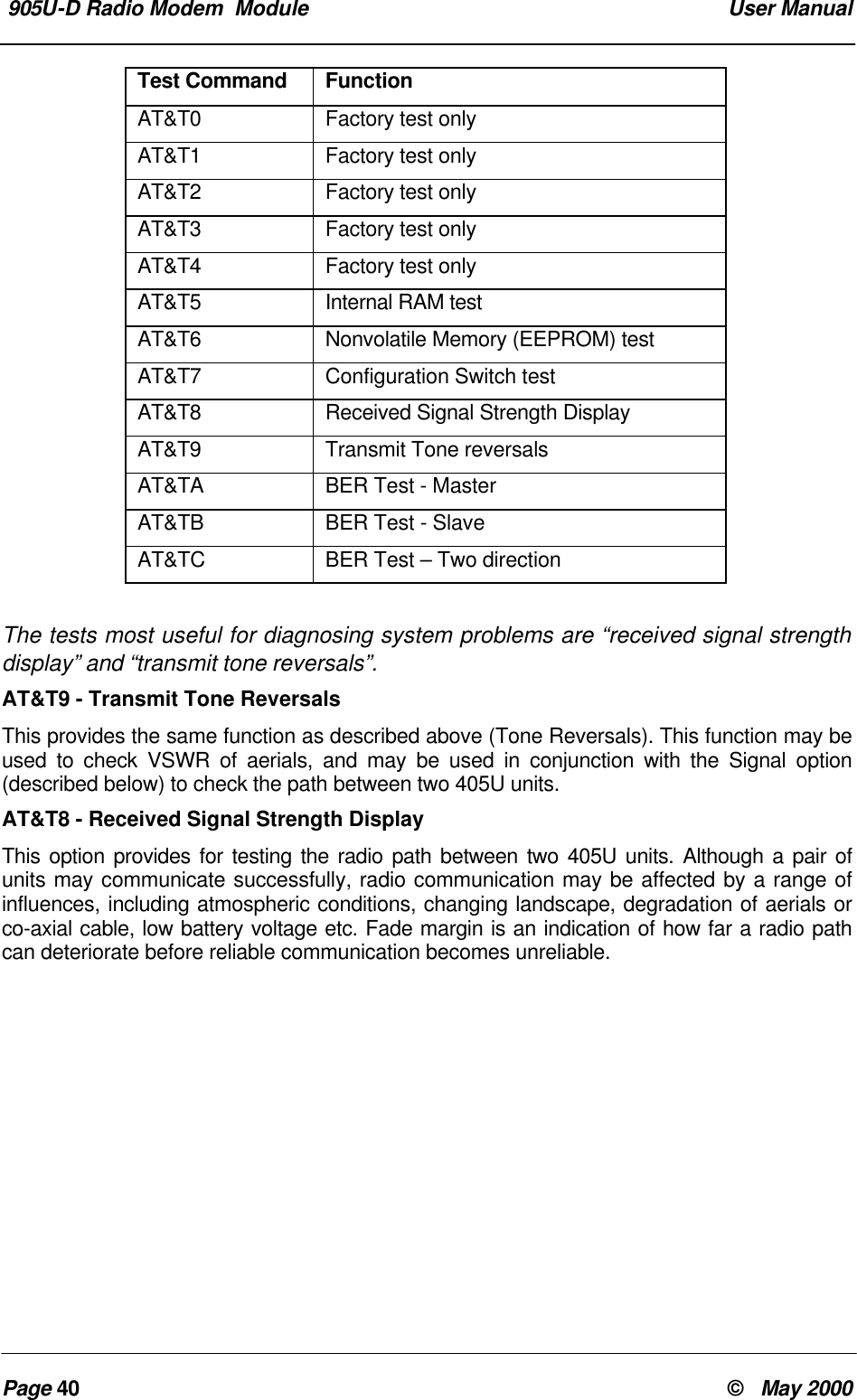
 Chapter Six TroubleshootingMan_905UD_2.0.doc Page 39Chapter Six TROUBLESHOOTING6.1 Diagnostics ChartINDICATOR CONDITION MEANINGOK LED OFF Continuously • Power supply failure• CPU failureOK LED ON Continuously • Normal OperationRadio TX LED ON Flashes briefly • Radio transmittingRadio RX LED ON GREEN flashRED flash• Radio receiving data• Weak radio signalSerial RX LED ON GREEN flashRED flashGREEN continuously• Serial Port Receiving• CTS low• Configuration ModeRadio RX and Serial RX LEDON RED flash for 10  secsafter power up• Configuration corruption(EEPROM failure)Serial TX LED ON Flashes briefly • Serial port transmittingDCD LED ON Continuously• In transparent mode,  alwayson.• In controlled mode,  a radio linkhas been established.The green OK LED on the front panel indicates correct operation of the unit. This LEDextinguishes on failure as described above. When the OK LED extinguishes shutdown stateis indicated. On processor failure, or on failure during startup diagnostics, the unit shutsdown, and remains in shutdown until the fault is rectified.6.2 Test Functions6.2.1Diagnostic Functions  -  AT &TxTo aid in the checking and setup of the 405U unit diagnostic functions in the 405U areprovided using the standard Hayes AT commands. Several of these functions are usedduring factory test, and will not work correctly if the unit is not connected to the factory test jig.The table below outlines the functions of the various tests:
 905U-D Radio Modem  Module  User ManualPage 40 ©   May 2000Test Command FunctionAT&T0 Factory test onlyAT&T1 Factory test onlyAT&T2 Factory test onlyAT&T3 Factory test onlyAT&T4 Factory test onlyAT&T5 Internal RAM testAT&T6 Nonvolatile Memory (EEPROM) testAT&T7 Configuration Switch testAT&T8 Received Signal Strength DisplayAT&T9 Transmit Tone reversalsAT&TA BER Test - MasterAT&TB BER Test - SlaveAT&TC BER Test – Two directionThe tests most useful for diagnosing system problems are “received signal strengthdisplay” and “transmit tone reversals”.AT&T9 - Transmit Tone ReversalsThis provides the same function as described above (Tone Reversals). This function may beused to check VSWR of aerials, and may be used in conjunction with the Signal option(described below) to check the path between two 405U units.AT&T8 - Received Signal Strength DisplayThis option provides for testing the radio path between two 405U units. Although a pair ofunits may communicate successfully, radio communication may be affected by a range ofinfluences, including atmospheric conditions, changing landscape, degradation of aerials orco-axial cable, low battery voltage etc. Fade margin is an indication of how far a radio pathcan deteriorate before reliable communication becomes unreliable.
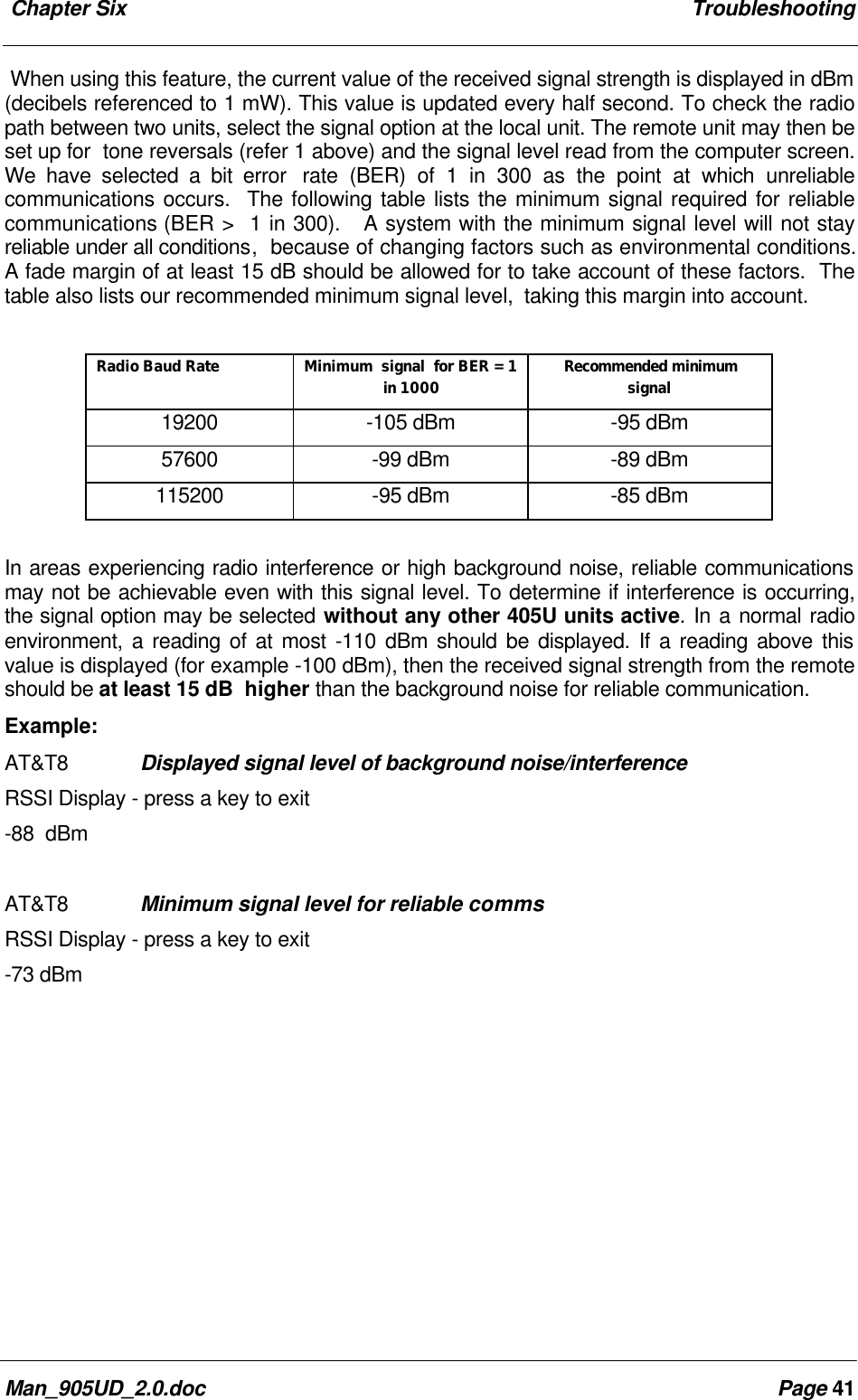
 Chapter Six TroubleshootingMan_905UD_2.0.doc Page 41When using this feature, the current value of the received signal strength is displayed in dBm(decibels referenced to 1 mW). This value is updated every half second. To check the radiopath between two units, select the signal option at the local unit. The remote unit may then beset up for  tone reversals (refer 1 above) and the signal level read from the computer screen.We have selected a bit error  rate (BER) of 1 in 300 as the point at which unreliablecommunications occurs.  The following table lists the minimum signal required for reliablecommunications (BER >  1 in 300).   A system with the minimum signal level will not stayreliable under all conditions,  because of changing factors such as environmental conditions.A fade margin of at least 15 dB should be allowed for to take account of these factors.  Thetable also lists our recommended minimum signal level,  taking this margin into account.Radio Baud Rate Minimum  signal  for BER = 1in 1000 Recommended minimumsignal19200 -105 dBm -95 dBm57600 -99 dBm -89 dBm115200 -95 dBm -85 dBmIn areas experiencing radio interference or high background noise, reliable communicationsmay not be achievable even with this signal level. To determine if interference is occurring,the signal option may be selected without any other 405U units active. In a normal radioenvironment, a reading of at most -110 dBm should be displayed. If a reading above thisvalue is displayed (for example -100 dBm), then the received signal strength from the remoteshould be at least 15 dB  higher than the background noise for reliable communication.Example:AT&T8 Displayed signal level of background noise/interferenceRSSI Display - press a key to exit-88  dBmAT&T8 Minimum signal level for reliable commsRSSI Display - press a key to exit-73 dBm
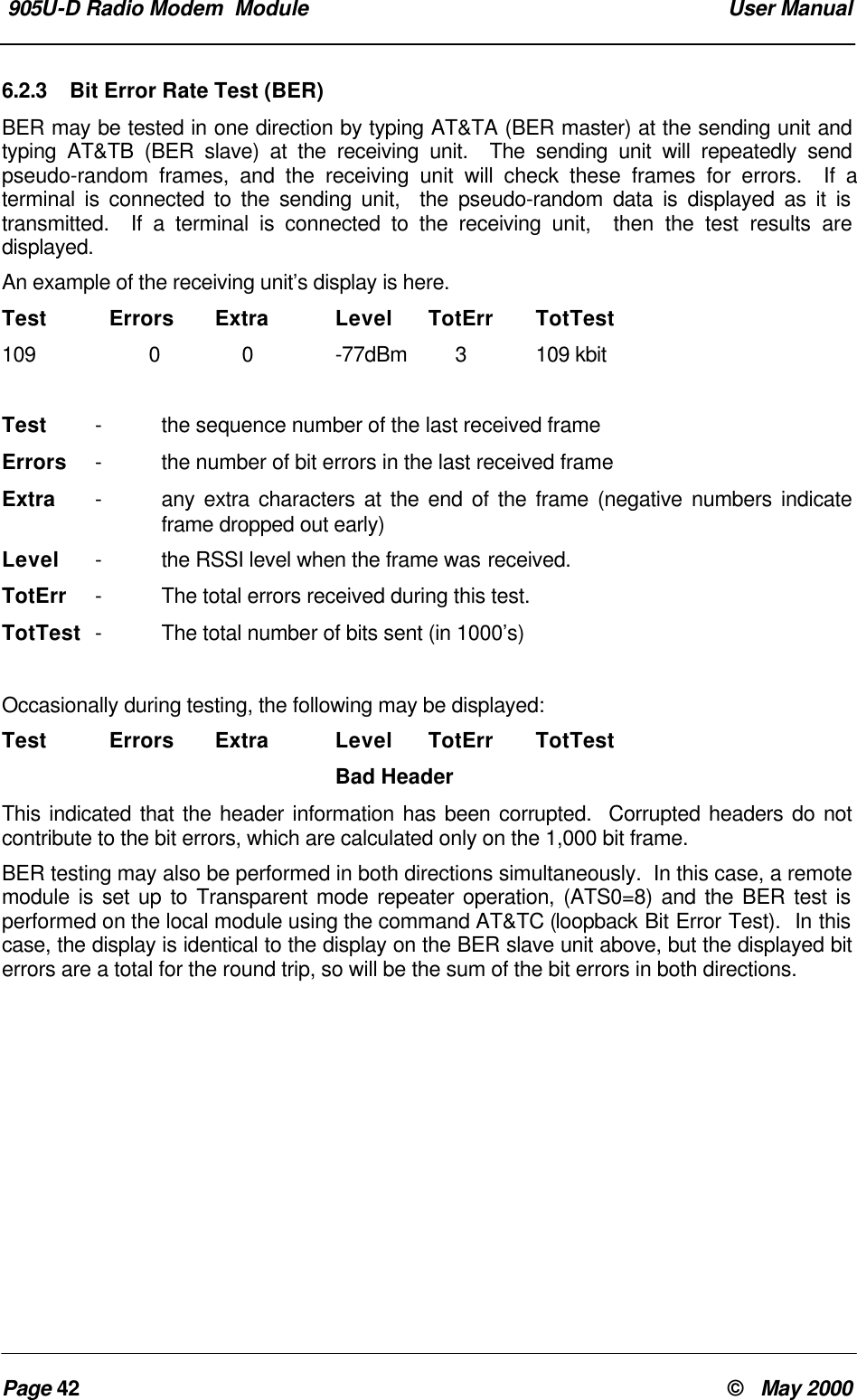
 905U-D Radio Modem  Module  User ManualPage 42 ©   May 20006.2.3 Bit Error Rate Test (BER)BER may be tested in one direction by typing AT&TA (BER master) at the sending unit andtyping AT&TB (BER slave) at the receiving unit.  The sending unit will repeatedly sendpseudo-random frames, and the receiving unit will check these frames for errors.  If aterminal is connected to the sending unit,  the pseudo-random data is displayed as it istransmitted.  If a terminal is connected to the receiving unit,  then the test results aredisplayed.An example of the receiving unit’s display is here.Test Errors Extra Level TotErr TotTest109 0 0 -77dBm 3109 kbitTest -the sequence number of the last received frameErrors -the number of bit errors in the last received frameExtra -any extra characters at the end of the frame (negative numbers indicateframe dropped out early)Level -the RSSI level when the frame was received.TotErr -The total errors received during this test.TotTest -The total number of bits sent (in 1000’s)Occasionally during testing, the following may be displayed:Test Errors Extra Level TotErr TotTestBad HeaderThis indicated that the header information has been corrupted.  Corrupted headers do notcontribute to the bit errors, which are calculated only on the 1,000 bit frame.BER testing may also be performed in both directions simultaneously.  In this case, a remotemodule is set up to Transparent mode repeater operation, (ATS0=8) and the BER test isperformed on the local module using the command AT&TC (loopback Bit Error Test).  In thiscase, the display is identical to the display on the BER slave unit above, but the displayed biterrors are a total for the round trip, so will be the sum of the bit errors in both directions.
Chapter Seven Warranty and ServiceMan_905UD_2.0.doc Page 43Chapter Seven WARRANTY & SERVICEWe are pleased that you have purchased this product. Your purchase is guaranteed againstdefects for a 365 day warranty period, commencing from the date of purchase.This warranty does not extend to:-Failures caused by the operation of the equipment outside the particular product'sspecification.-use of the 405U module not in accordance with this User Manual, or-abuse, misuse, neglect or damage by external causes, or-repairs, alterations, or modifications undertaken other than by an  authorised ServiceAgent.Full product specifications and maintenance instructions are available from your ServiceAgent,  your source of purchase,  or from the master distributor in your country upon requestand should be noted if you are in any doubt about the operating environment for yourequipment purchaseIn the unlikely event of your purchase being faulty, your warranty extends to free repair orreplacement of the faulty unit, after its receipt at the master distributor in your country. Ourwarranty does not include transport or insurance charges relating to a warranty claim.This warranty does not indemnify the purchaser of  products for any consequential claim fordamages or loss of operations or profits.Should you wish to make a warranty claim, or obtain service, please forward the module tothe nearest authorised Service Agent along with proof of purchase. For details of authorisedService Agents, contact your sales distributor.
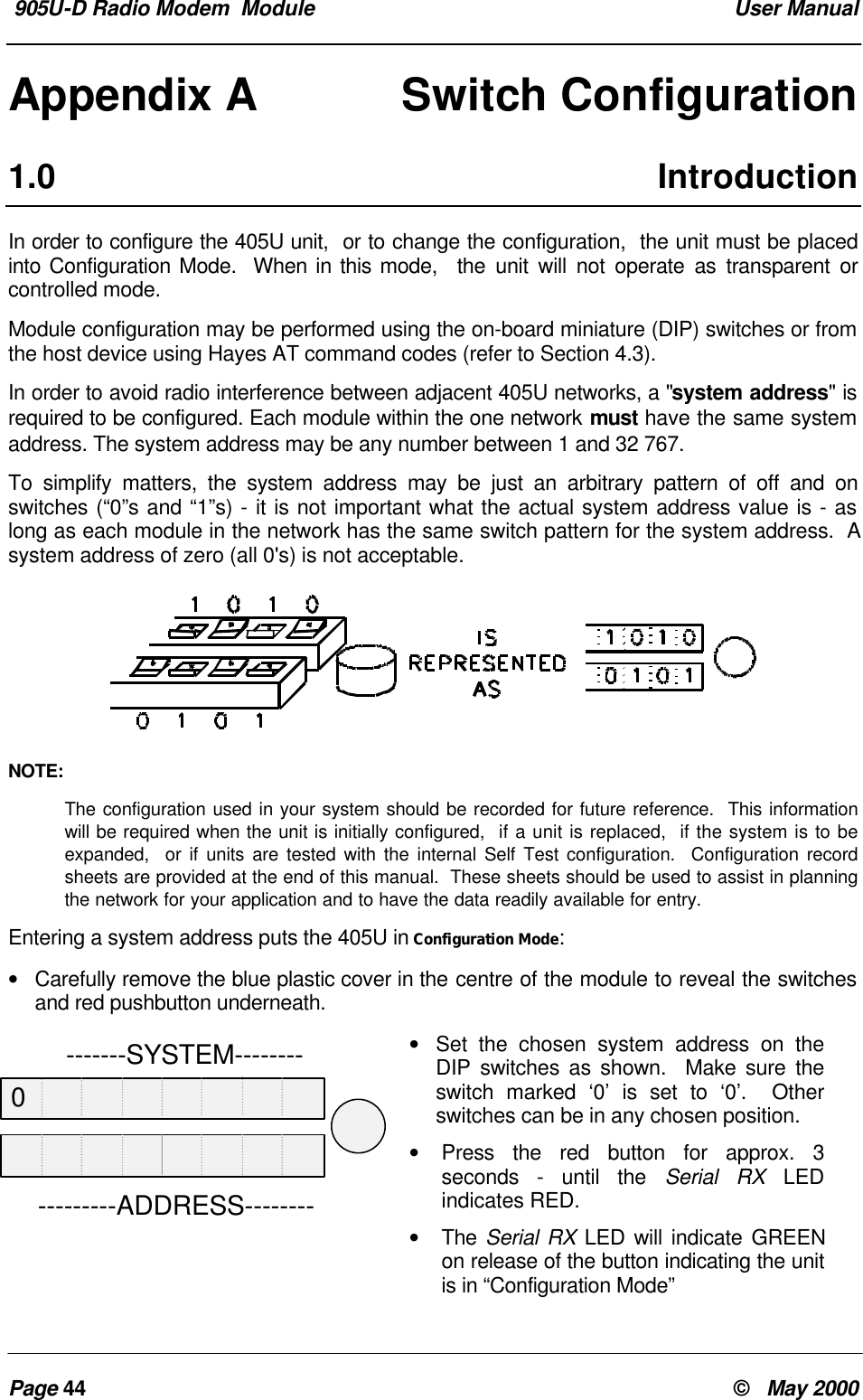
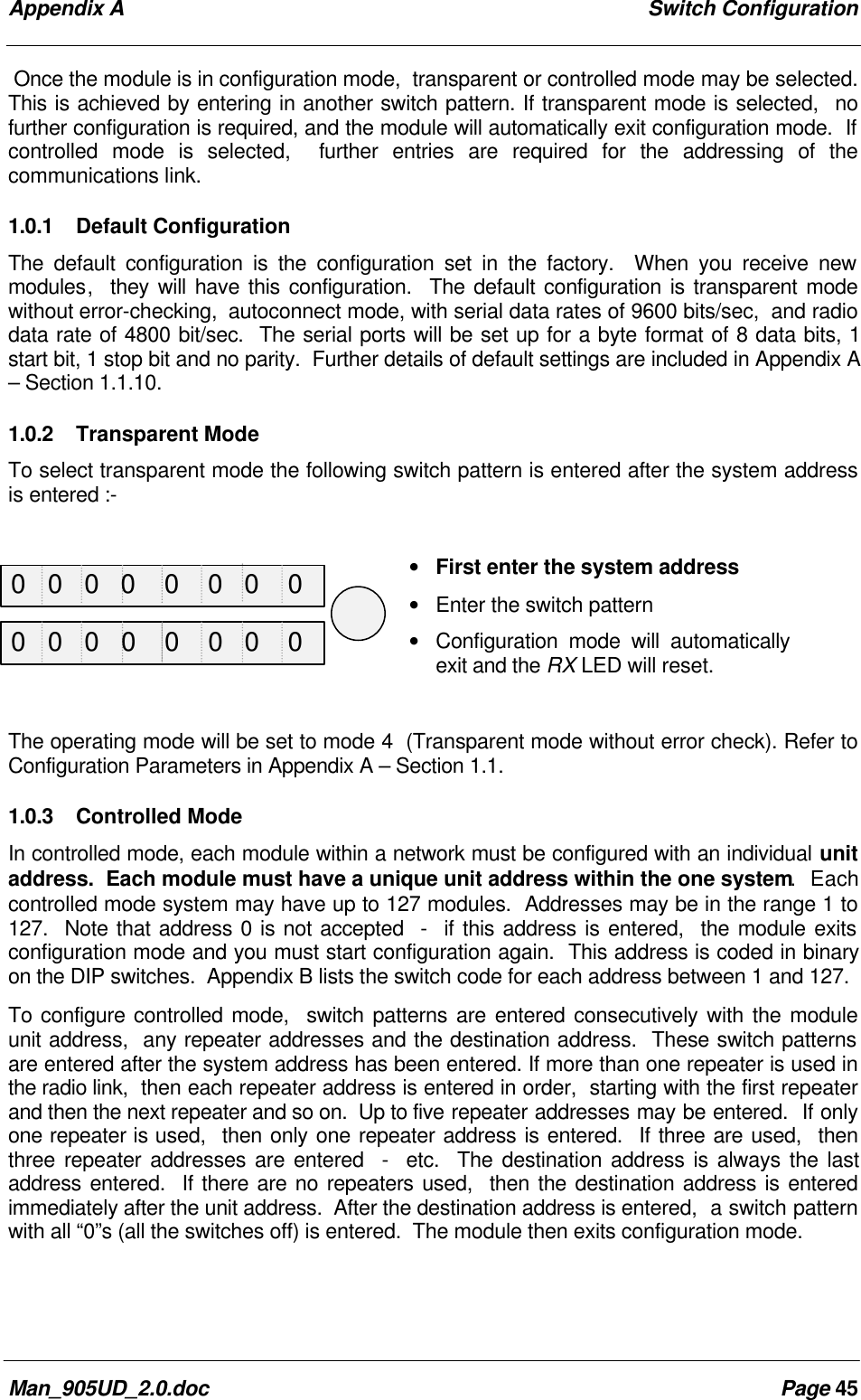
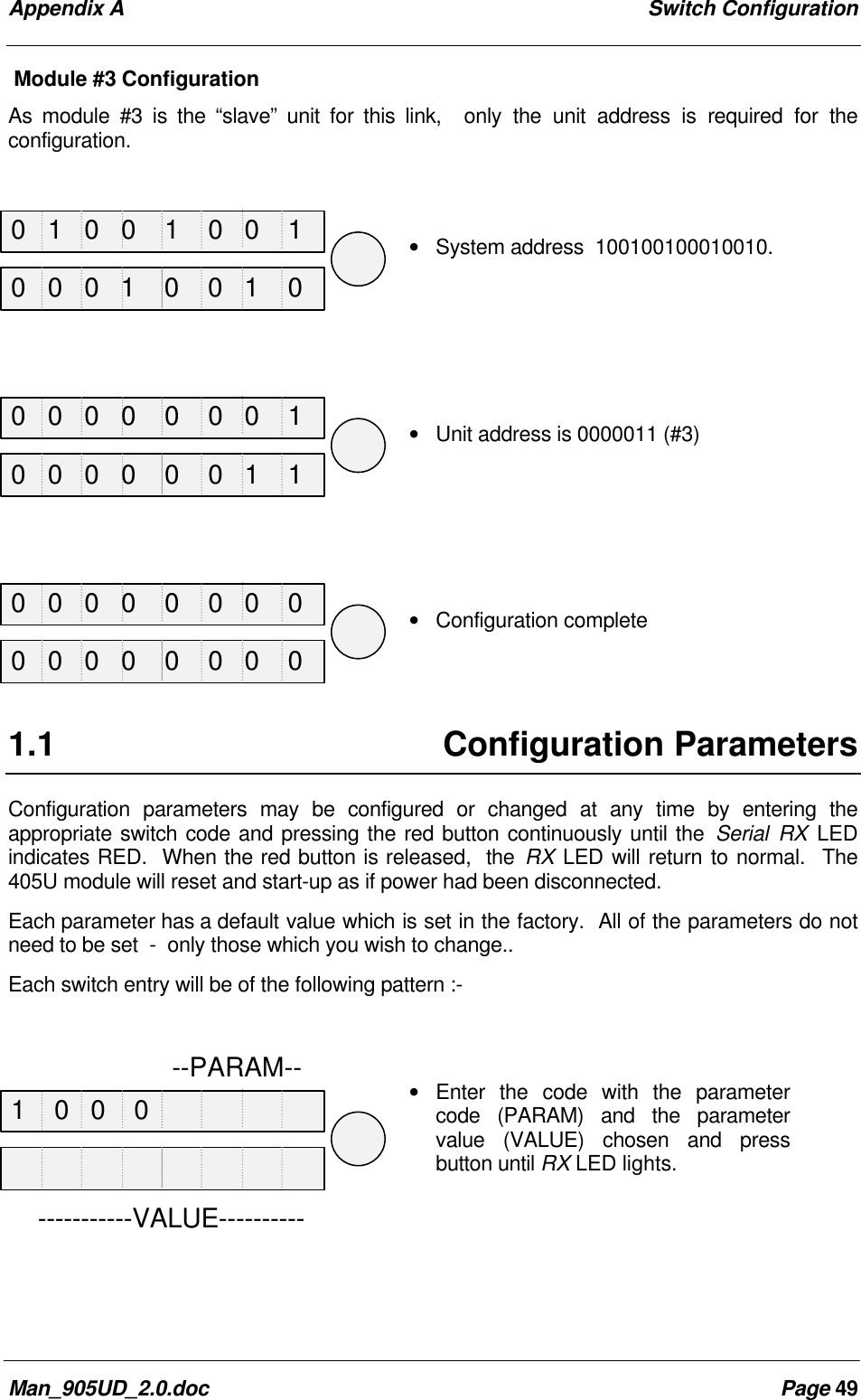
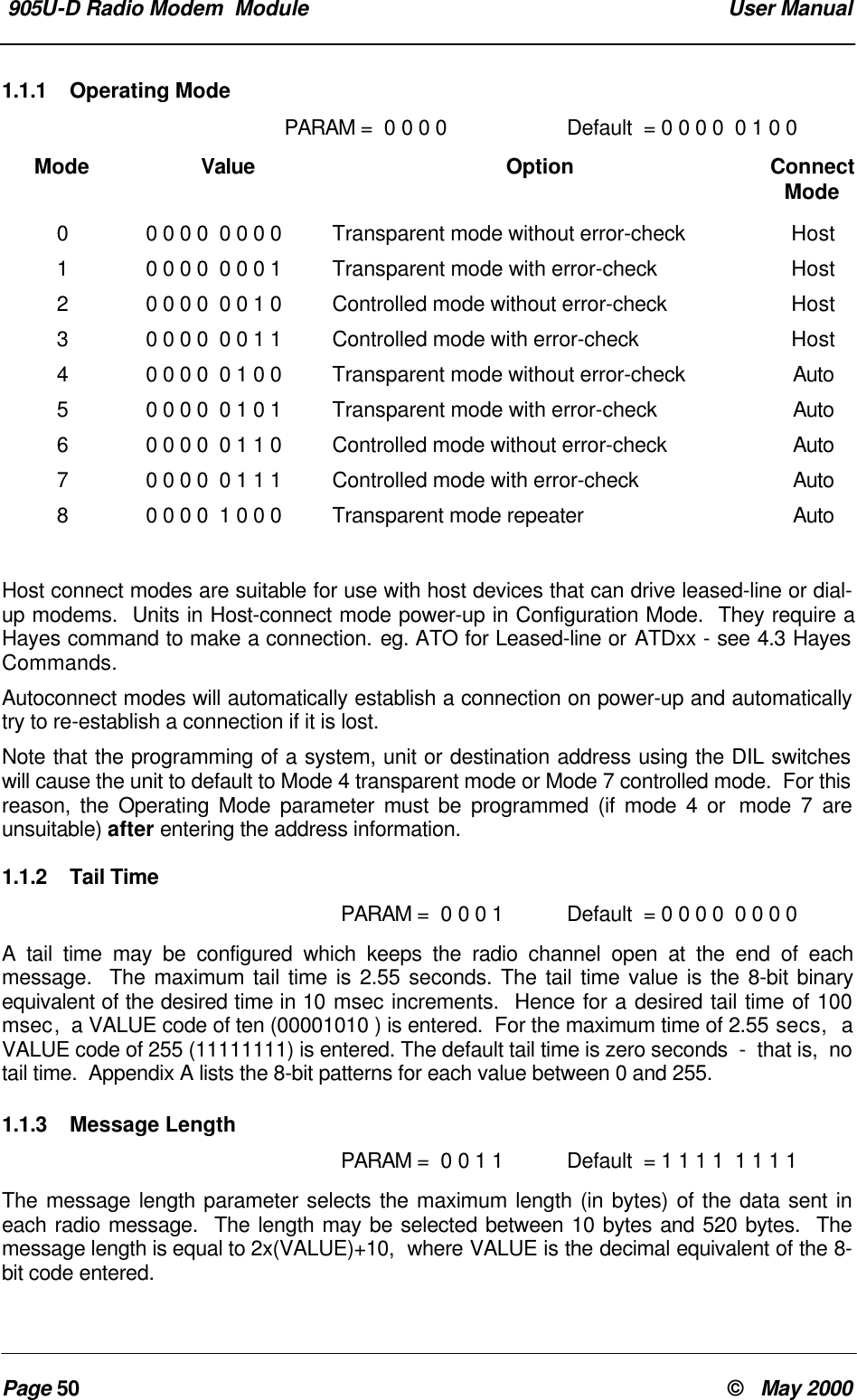
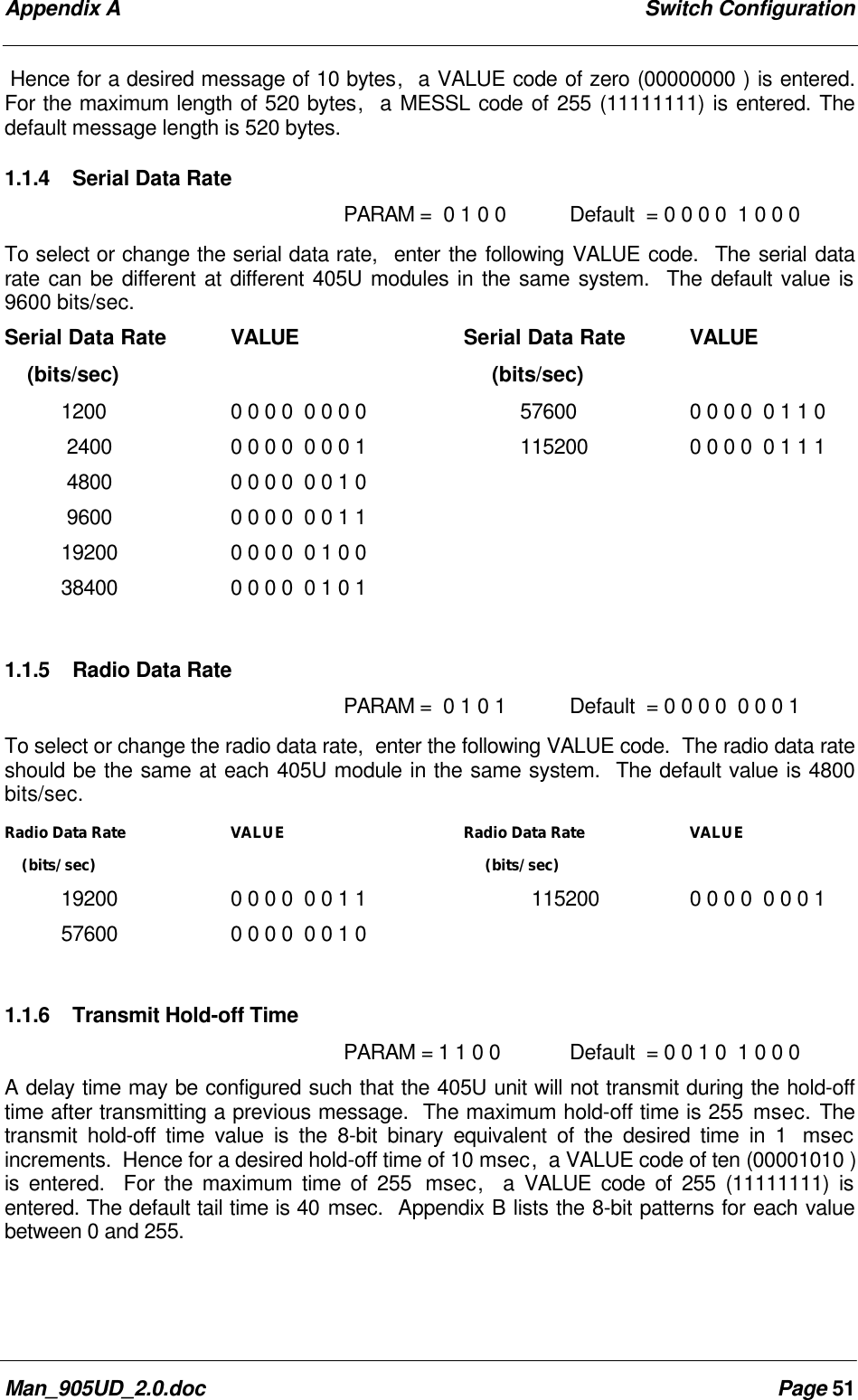
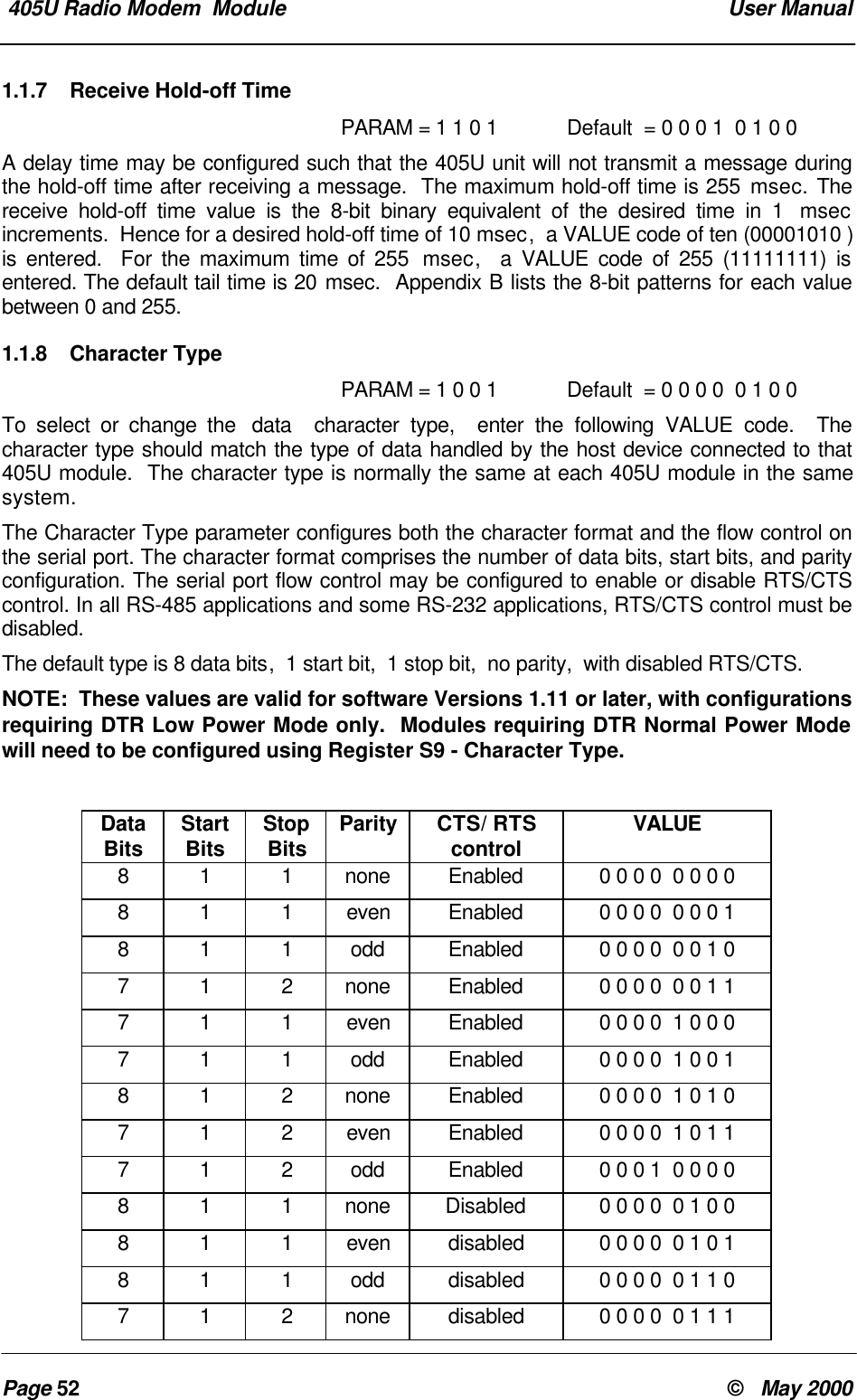
 905U-D Radio Modem  Module  User ManualPage 44 ©   May 2000Appendix A  Switch Configuration1.0 IntroductionIn order to configure the 405U unit,  or to change the configuration,  the unit must be placedinto Configuration Mode.  When in this mode,  the unit will not operate as transparent orcontrolled mode.Module configuration may be performed using the on-board miniature (DIP) switches or fromthe host device using Hayes AT command codes (refer to Section 4.3).In order to avoid radio interference between adjacent 405U networks, a "system address" isrequired to be configured. Each module within the one network must have the same systemaddress. The system address may be any number between 1 and 32 767.To simplify matters, the system address may be just an arbitrary pattern of off and onswitches (“0”s and “1”s) - it is not important what the actual system address value is - aslong as each module in the network has the same switch pattern for the system address.  Asystem address of zero (all 0's) is not acceptable.NOTE:The configuration used in your system should be recorded for future reference.  This informationwill be required when the unit is initially configured,  if a unit is replaced,  if the system is to beexpanded,  or if units are tested with the internal Self Test configuration.  Configuration recordsheets are provided at the end of this manual.  These sheets should be used to assist in planningthe network for your application and to have the data readily available for entry.Entering a system address puts the 405U in Configuration Mode:• Carefully remove the blue plastic cover in the centre of the module to reveal the switchesand red pushbutton underneath.• Set the chosen system address on theDIP switches as shown.  Make sure theswitch marked ‘0’ is set to ‘0’.  Otherswitches can be in any chosen position.• Press the red button for approx. 3seconds - until the Serial RX LEDindicates RED.• The Serial RX LED will indicate GREENon release of the button indicating the unitis in “Configuration Mode”       -------SYSTEM-----------------ADDRESS--------0
Appendix A Switch ConfigurationMan_905UD_2.0.doc Page 45Once the module is in configuration mode,  transparent or controlled mode may be selected.This is achieved by entering in another switch pattern. If transparent mode is selected,  nofurther configuration is required, and the module will automatically exit configuration mode.  Ifcontrolled mode is selected,  further entries are required for the addressing of thecommunications link.1.0.1 Default ConfigurationThe default configuration is the configuration set in the factory.  When you receive newmodules,  they will have this configuration.  The default configuration is transparent modewithout error-checking,  autoconnect mode, with serial data rates of 9600 bits/sec,  and radiodata rate of 4800 bit/sec.  The serial ports will be set up for a byte format of 8 data bits, 1start bit, 1 stop bit and no parity.  Further details of default settings are included in Appendix A– Section 1.1.10.1.0.2 Transparent ModeTo select transparent mode the following switch pattern is entered after the system addressis entered :-• First enter the system address• Enter the switch pattern• Configuration mode will automaticallyexit and the RX LED will reset.The operating mode will be set to mode 4  (Transparent mode without error check). Refer toConfiguration Parameters in Appendix A – Section 1.1.1.0.3 Controlled ModeIn controlled mode, each module within a network must be configured with an individual unitaddress.  Each module must have a unique unit address within the one system.  Eachcontrolled mode system may have up to 127 modules.  Addresses may be in the range 1 to127.  Note that address 0 is not accepted  -  if this address is entered,  the module exitsconfiguration mode and you must start configuration again.  This address is coded in binaryon the DIP switches.  Appendix B lists the switch code for each address between 1 and 127.To configure controlled mode,  switch patterns are entered consecutively with the moduleunit address,  any repeater addresses and the destination address.  These switch patternsare entered after the system address has been entered. If more than one repeater is used inthe radio link,  then each repeater address is entered in order,  starting with the first repeaterand then the next repeater and so on.  Up to five repeater addresses may be entered.  If onlyone repeater is used,  then only one repeater address is entered.  If three are used,  thenthree repeater addresses are entered  -  etc.  The destination address is always the lastaddress entered.  If there are no repeaters used,  then the destination address is enteredimmediately after the unit address.  After the destination address is entered,  a switch patternwith all “0”s (all the switches off) is entered.  The module then exits configuration mode.0   0   0   0    0    0   0    00   0   0   0    0    0   0    0
 905U-D Radio Modem  Module  User ManualPage 46 ©   May 2000Note that repeater and destination addresses are only entered for the “master” unitin each link.  For “slave” units,  only the unit address is entered.  For modules which will justact as a repeater unit,  just a unit address need be entered. For these modules,  enter the exitpattern of all zero’s after the unit address.To select controlled mode the following switch pattern is entered after the system addresshas been entered.• First enter the system address• Enter the unit address• Enter the repeater addresses (if any)in order,  and then enter thedestination address.• When all of the addresses havebeen entered• Enter all 0’s• Configuration mde will automaticallyexit and the RX LED will reset.The operating mode will be set to Controlled Mode with Error-Checking (mode 7)  -  refer toAppendix A – Section 1.1, Configuration Parameters.ExampleModule #1 ConfigurationModule #1 is configured as the master unit .• System address  100 1001 0001 0010.    Source Repeater Repeater Destination#1 ---------------->  #2  -----------------> #100 --------------------> #3                   #101Apart from being a repeater in the 1 - 3 link,  100 is also in a separate link to 101         -----  ADDRESS  -----0    0   0   0    0    0   0    10   0   0   0    0    0   0    00   1   0   0    1    0   0    100   0   0   0    0    0   0    00   0   0   1    0    0   1    0
Appendix A Switch ConfigurationMan_905UD_2.0.doc Page 47• Unit address is 0000001 (#1)• First repeater address is 0000010 (#2)• Second repeater address is 1100100(#100)• Destination address is 0000011 (#3)• Configuration completeModule #2 ConfigurationModule #2 is the first repeater.  As there is no host device connected,  a destination addressis not required.• System address  100100100010010.• Unit address is 0000010 (#2)0   0   0   0    0    0   0    10   0   0   0    0    0   0    10   0   0   0    0    0   0    10   0   0   0    0    0   0    10   0   0   0    0    0   0    00   1   0   0    1    0   0    10   0   0   0    0    0   0    10   0   0   0    0    0   0    10   0   0   0    0    0   1    00   1   1   0    0    1   0    00   0   0   0    0    0   1    10   0   0   0    0    0   0    00   0   0   1    0    0   1    00   0   0   0    0    0   1    0
 905U-D Radio Modem  Module  User ManualPage 48 ©   May 2000• Configuration completeModule #100 ConfigurationModule #100 is the second repeater in the link between #1 and #3.  It also has a host deviceand transmits data to #101.  It is configured as the “master” unit for the #100 - #101 link.  As ithas the unit address #100,  it will also act as a repeater for #1 - #3.  Note that the systemaddress for #100 and #101 has to be the same as #1 and #3.If module #100 was the “slave” unit for the #100 - #101 link,  then only the unit address wouldbe required for the #100 configuration.• System address  100100100010010.• Unit address is 1100100 (#100)• Destination address is 1100101 (#101)• Configuration complete0   0   0   0    0    0   0    00   1   0   0    1    0   0    10   0   0   0    0    0   0    10   0   0   0    0    0   0    10   0   0   0    0    0   0    00   0   0   0    0    0   0    00   0   0   1    0    0   1    00   1   1   0    0    1   0    00   1   1   0    0    1   0    10   0   0   0    0    0   0    0
Appendix A Switch ConfigurationMan_905UD_2.0.doc Page 49Module #3 ConfigurationAs module #3 is the “slave” unit for this link,  only the unit address is required for theconfiguration.• System address  100100100010010.• Unit address is 0000011 (#3)• Configuration complete1.1 Configuration ParametersConfiguration parameters may be configured or changed at any time by entering theappropriate switch code and pressing the red button continuously until the Serial RX LEDindicates RED.  When the red button is released,  the RX LED will return to normal.  The405U module will reset and start-up as if power had been disconnected.Each parameter has a default value which is set in the factory.  All of the parameters do notneed to be set  -  only those which you wish to change..Each switch entry will be of the following pattern :-• Enter the code with the parametercode (PARAM) and the parametervalue (VALUE) chosen and pressbutton until RX LED lights.                      --PARAM-------------VALUE----------0   1   0   0    1    0   0    10   0   0   0    0    0   0    10   0   0   0    0    0   0    01    0   0    00   0   0   1    0    0   1    00   0   0   0    0    0   1    10   0   0   0    0    0   0    0
 905U-D Radio Modem  Module  User ManualPage 50 ©   May 20001.1.1 Operating ModePARAM =  0 0 0 0  Default  = 0 0 0 0  0 1 0 0Mode Value Option ConnectMode00 0 0 0  0 0 0 0Transparent mode without error-check Host10 0 0 0  0 0 0 1 Transparent mode with error-check Host20 0 0 0  0 0 1 0 Controlled mode without error-check Host30 0 0 0  0 0 1 1Controlled mode with error-check Host40 0 0 0  0 1 0 0Transparent mode without error-check Auto50 0 0 0  0 1 0 1 Transparent mode with error-check Auto60 0 0 0  0 1 1 0 Controlled mode without error-check Auto70 0 0 0  0 1 1 1Controlled mode with error-check Auto80 0 0 0  1 0 0 0Transparent mode repeater AutoHost connect modes are suitable for use with host devices that can drive leased-line or dial-up modems.  Units in Host-connect mode power-up in Configuration Mode.  They require aHayes command to make a connection. eg. ATO for Leased-line or ATDxx - see 4.3 HayesCommands.Autoconnect modes will automatically establish a connection on power-up and automaticallytry to re-establish a connection if it is lost.Note that the programming of a system, unit or destination address using the DIL switcheswill cause the unit to default to Mode 4 transparent mode or Mode 7 controlled mode.  For thisreason, the Operating Mode parameter must be programmed (if mode 4 or  mode 7 areunsuitable) after entering the address information.1.1.2 Tail TimePARAM =  0 0 0 1 Default  = 0 0 0 0  0 0 0 0A tail time may be configured which keeps the radio channel open at the end of eachmessage.  The maximum tail time is 2.55 seconds. The tail time value is the 8-bit binaryequivalent of the desired time in 10 msec increments.  Hence for a desired tail time of 100msec,  a VALUE code of ten (00001010 ) is entered.  For the maximum time of 2.55 secs,  aVALUE code of 255 (11111111) is entered. The default tail time is zero seconds  -  that is,  notail time.  Appendix A lists the 8-bit patterns for each value between 0 and 255.1.1.3 Message LengthPARAM =  0 0 1 1Default  = 1 1 1 1  1 1 1 1The message length parameter selects the maximum length (in bytes) of the data sent ineach radio message.  The length may be selected between 10 bytes and 520 bytes.  Themessage length is equal to 2x(VALUE)+10,  where VALUE is the decimal equivalent of the 8-bit code entered.
Appendix A Switch ConfigurationMan_905UD_2.0.doc Page 51Hence for a desired message of 10 bytes,  a VALUE code of zero (00000000 ) is entered.For the maximum length of 520 bytes,  a MESSL code of 255 (11111111) is entered. Thedefault message length is 520 bytes.1.1.4 Serial Data RatePARAM =  0 1 0 0Default  = 0 0 0 0  1 0 0 0To select or change the serial data rate,  enter the following VALUE code.  The serial datarate can be different at different 405U modules in the same system.  The default value is9600 bits/sec.Serial Data Rate  VALUE    (bits/sec)1200 0 0 0 0  0 0 0 0 2400 0 0 0 0  0 0 0 1 4800 0 0 0 0  0 0 1 0 9600 0 0 0 0  0 0 1 119200 0 0 0 0  0 1 0 038400 0 0 0 0  0 1 0 1Serial Data Rate  VALUE     (bits/sec)57600 0 0 0 0  0 1 1 0115200 0 0 0 0  0 1 1 1  1.1.5 Radio Data RatePARAM =  0 1 0 1 Default  = 0 0 0 0  0 0 0 1To select or change the radio data rate,  enter the following VALUE code.  The radio data rateshould be the same at each 405U module in the same system.  The default value is 4800bits/sec.Radio Data Rate  VALUE    (bits/sec)19200 0 0 0 0  0 0 1 157600 0 0 0 0  0 0 1 0Radio Data Rate  VALUE     (bits/sec)  115200 0 0 0 0  0 0 0 11.1.6 Transmit Hold-off Time PARAM = 1 1 0 0Default  = 0 0 1 0  1 0 0 0A delay time may be configured such that the 405U unit will not transmit during the hold-offtime after transmitting a previous message.  The maximum hold-off time is 255 msec. Thetransmit hold-off time value is the 8-bit binary equivalent of the desired time in 1  msecincrements.  Hence for a desired hold-off time of 10 msec,  a VALUE code of ten (00001010 )is entered.  For the maximum time of 255  msec,  a VALUE code of 255 (11111111) isentered. The default tail time is 40 msec.  Appendix B lists the 8-bit patterns for each valuebetween 0 and 255.
 405U Radio Modem  Module  User ManualPage 52 ©   May 20001.1.7 Receive Hold-off TimePARAM = 1 1 0 1 Default  = 0 0 0 1  0 1 0 0A delay time may be configured such that the 405U unit will not transmit a message duringthe hold-off time after receiving a message.  The maximum hold-off time is 255 msec. Thereceive hold-off time value is the 8-bit binary equivalent of the desired time in 1  msecincrements.  Hence for a desired hold-off time of 10 msec,  a VALUE code of ten (00001010 )is entered.  For the maximum time of 255  msec,  a VALUE code of 255 (11111111) isentered. The default tail time is 20 msec.  Appendix B lists the 8-bit patterns for each valuebetween 0 and 255.1.1.8 Character TypePARAM = 1 0 0 1 Default  = 0 0 0 0  0 1 0 0To select or change the  data  character type,  enter the following VALUE code.  Thecharacter type should match the type of data handled by the host device connected to that405U module.  The character type is normally the same at each 405U module in the samesystem.The Character Type parameter configures both the character format and the flow control onthe serial port. The character format comprises the number of data bits, start bits, and parityconfiguration. The serial port flow control may be configured to enable or disable RTS/CTScontrol. In all RS-485 applications and some RS-232 applications, RTS/CTS control must bedisabled.The default type is 8 data bits,  1 start bit,  1 stop bit,  no parity,  with disabled RTS/CTS.NOTE:  These values are valid for software Versions 1.11 or later, with configurationsrequiring DTR Low Power Mode only.  Modules requiring DTR Normal Power Modewill need to be configured using Register S9 - Character Type.DataBits StartBits StopBits Parity CTS/ RTScontrol VALUE8 1 1 none Enabled 0 0 0 0  0 0 0 0811even Enabled 0 0 0 0  0 0 0 18 1 1 odd Enabled 0 0 0 0  0 0 1 07 1 2 none Enabled 0 0 0 0  0 0 1 1711even Enabled 0 0 0 0  1 0 0 07 1 1 odd Enabled 0 0 0 0  1 0 0 18 1 2 none Enabled 0 0 0 0  1 0 1 0712even Enabled 0 0 0 0  1 0 1 17 1 2 odd Enabled 0 0 0 1  0 0 0 08 1 1 none Disabled 0 0 0 0  0 1 0 0811even disabled 0 0 0 0  0 1 0 18 1 1 odd disabled 0 0 0 0  0 1 1 07 1 2 none disabled 0 0 0 0  0 1 1 1
 Appendix A Switch ConfigurationMan_905UD_2.0.doc Page 53DataBits StartBits StopBits Parity CTS/ RTScontrol VALUE711even disabled 0 0 0 0  1 1 0 07 1 1 odd disabled 0 0 0 0  1 1 0 18 1 2 none disabled 0 0 0 0  1 1 1 0712even disabled 0 0 0 0  1 1 1 17 1 2 odd disabled 0 0 0 1  0 1 0 01.1.9 Connect Update TimePARAM = 1 1 1 0 Default  = 0 1 1 0  0 1 0 0In controlled mode,  the 405U unit will transmit a “connect” message if there has been noactivity on the radio channel for the update time.  The connect update time value is the 8-bitbinary equivalent of the desired time in 0.1 minute increments.  Hence for a desired hold-offtime of 1 minute,  a VALUE code of ten (00001010 ) is entered.  For the maximum time of25.5 minutes,  a VALUE code of 255 (11111111) is entered. The default update time is 10minutes.  Appendix B lists the 8-bit patterns for each value between 0 and 255.1.1.10 Reset to Factory Default SettingsThe following switch pattern will reset the configurations to the factory default values.  Notethat this also includes the original factory set system address.• Enter the code with and press buttonuntil Serial RX LED indicates RED.1.2 Configuration ExampleTransparent ModeExtending a PLC Network1   1    0   0    0   0   0    00   0    0   0    0   0   0    0
 405U Radio Modem  Module  User ManualPage 54 ©   May 2000Unit No. 1 Configuration• Set the System Address• Press the red button for approx. 3seconds - until the Serial RX LEDindicates RED.• Configuration mde will automaticallyexit as Transparent Mode• Set serial data rate to 38400 bits/secand press button until RX LED lights.• Set radio data rate to 9600 bits/secand press button until RX LED lights.• Set the character type to 7,1,2,E,disabled control,  and press buttonuntil RX LED lights.Note that as RS485 is used,  theCTS/RTS control is disabled.Repeater Configuration• Set the System Address• Press the red button for approx. 3seconds - until the RX LED comes on.0    0   0    1   0   1    0   10   0   0   0    0    0   0    01   0   0    0   0    1   0    01   0   0    0   0    1   0    11   0   0    0   1    0   0    10    0   0    1   0   1    0   10    0   0    1   0   1    0   10   0   0   0    0    0   0    0 0  0   0   0    1    0   1    0 0  0   0   0    0    0   1    1 0  0   0   0    0    1   1    10    0   0    1   0   1    0   1
 Appendix A Switch ConfigurationMan_905UD_2.0.doc Page 55• Configuration mde will automaticallyexit as Transparent Mode• Set Operating Mode to TransparentRepeater and press button until RXLED lights.Unit No. 2 Configuration• Set the System Address• Press the red button for approx. 3seconds - until the RX LED comes on.• Configuration mde will automaticallyexit as Transparent Mode• Set serial data rate to 9600 bits/secand press button until RX LED lights.• Set radio data rate to 9600 bits/secand press button until RX LED lights.• Set the character type to 7,1,2,E,disabled control,  and press buttonuntil RX LED lights.Note that as RS485 is used,  theCTS/RTS control is disabled.0   0   0   0    0    0   0    01   0   0    0   0    0   0    00    0   0    1   0   1    0   10   0   0   0    0    0   0    01   0   0    0   0    1   0    01   0   0    0   0    1   0    11   0   0    0   1    0   0    10   0   0   0    0    0   0    0 0  0   0   0    1    0   0    00    0   0    1   0   1    0   10   0   0   0    0    0   0    0 0  0   0   0    1    0   0    0 0  0   0   0    0    0   1    1 0  0   0   0    0    1   1    1
 405U Radio Modem  Module  User ManualPage 56 ©   May 2000Appendix B DECIMAL TO BINARY TABLEVALUE 8 BIT PATTERN VALUE 8 BIT PATTERN VALUE 8 BIT PATTERN00 0 0 0  0 0 0 0 38 0 0 1 0  0 1 1 0 76 0 1 0 0  1 1 0 010 0 0 0  0 0 0 1 39 0 0 1 0  0 1 1 1 77 0 1 0 0  1 1 0 120 0 0 0  0 0 1 0 40 0 0 1 0  1 0 0 0 78 0 1 0 0  1 1 1 030 0 0 0  0 0 1 1 41 0 0 1 0  1 0 0 1 79 0 1 0 0  1 1 1 140 0 0 0  0 1 0 0 42 0 0 1 0  1 0 1 0 80 0 1 0 1  0 0 0 050 0 0 0  0 1 0 1 43 0 0 1 0  1 0 1 1 81 0 1 0 1  0 0 0 160 0 0 0  0 1 1 0 44 0 0 1 0  1 1 0 0 82 0 1 0 1  0 0 1 070 0 0 0  0 1 1 1 45 0 0 1 0  1 1 0 1 83 0 1 0 1  0 0 1 180 0 0 0  1 0 0 0 46 0 0 1 0  1 1 1 0 84 0 1 0 1  0 1 0 090 0 0 0  1 0 0 1 47 0 0 1 0  1 1 1 1 85 0 1 0 1  0 1 0 110 0 0 0 0  1 0 1 0 48 0 0 1 1  0 0 0 0 86 0 1 0 1  0 1 1 011 0 0 0 0  1 0 1 1 49 0 0 1 1  0 0 0 1 87 0 1 0 1  0 1 1 112 0 0 0 0  1 1 0 0 50 0 0 1 1  0 0 1 0 88 0 1 0 1  1 0 0 013 0 0 0 0  1 1 0 1 51 0 0 1 1  0 0 1 1 89 0 1 0 1  1 0 0 114 0 0 0 0  1 1 1 0 52 0 0 1 1  0 1 0 0 90 0 1 0 1  1 0 1 015 0 0 0 0  1 1 1 1 53 0 0 1 1  0 1 0 1 91 0 1 0 1  1 0 1 116 0 0 0 1  0 0 0 0 54 0 0 1 1  0 1 1 0 92 0 1 0 1  1 1 0 017 0 0 0 1  0 0 0 1 55 0 0 1 1  0 1 1 1 93 0 1 0 1  1 1 0 118 0 0 0 1  0 0 1 0 56 0 0 1 1  1 0 0 0 94 0 1 0 1  1 1 1 019 0 0 0 1  0 0 1 1 57 0 0 1 1  1 0 0 1 95 0 1 0 1  1 1 1 120 0 0 0 1  0 1 0 0 58 0 0 1 1  1 0 1 0 96 0 1 1 0  0 0 0 021 0 0 0 1  0 1 0 1 59 0 0 1 1  1 0 1 1 97 0 1 1 0  0 0 0 122 0 0 0 1  0 1 1 0 60 0 0 1 1  1 1 0 0 98 0 1 1 0  0 0 1 023 0 0 0 1  0 1 1 1 61 0 0 1 1  1 1 0 1 99 0 1 1 0  0 0 1 124 0 0 0 1  1 0 0 0 62 0 0 1 1  1 1 1 0 100 0 1 1 0  0 1 0 025 0 0 0 1  1 0 0 1 63 0 0 1 1  1 1 1 1 101 0 1 1 0  0 1 0 126 0 0 0 1  1 0 1 0 64 0 1 0 0  0 0 0 0 102 0 1 1 0  0 1 1 027 0 0 0 1  1 0 1 1 65 0 1 0 0  0 0 0 1 103 0 1 1 0  0 1 1 128 0 0 0 1  1 1 0 0 66 0 1 0 0  0 0 1 0 104 0 1 1 0  1 0 0 029 0 0 0 1  1 1 0 1 67 0 1 0 0  0 0 1 1 105 0 1 1 0  1 0 0 130 0 0 0 1  1 1 1 0 68 0 1 0 0  0 1 0 0 106 0 1 1 0  1 0 1 031 0 0 0 1  1 1 1 1 69 0 1 0 0  0 1 0 1 107 0 1 1 0  1 0 1 132 0 0 1 0  0 0 0 0 70 0 1 0 0  0 1 1 0 108 0 1 1 0  1 1 0 033 0 0 1 0  0 0 0 1 71 0 1 0 0  0 1 1 1 109 0 1 1 0  1 1 0 134 0 0 1 0  0 0 1 0 72 0 1 0 0  1 0 0 0 110 0 1 1 0  1 1 1 035 0 0 1 0  0 0 1 1 73 0 1 0 0  1 0 0 1 111 0 1 1 0  1 1 1 136 0 0 1 0  0 1 0 0 74 0 1 0 0  1 0 1 0 112 0 1 1 1  0 0 0 037 0 0 1 0  0 1 0 1 75 0 1 0 0  1 0 1 1 113 0 1 1 1  0 0 0 1
 Appendix B Decimal to Binary TableMan_905UD_2.0.doc Page 57VALUE 8 BIT PATTERN VALUE 8 BIT PATTERN VALUE 8 BIT PATTERN114 0 1 1 1  0 0 1 0 151 1 0 0 1  0 1 1 1 188 1 0 1 1  1 1 0 0115 0 1 1 1  0 0 1 1 152 1 0 0 1  1 0 0 0 189 1 0 1 1  1 1 0 1116 0 1 1 1  0 1 0 0 153 1 0 0 1  1 0 0 1 190 1 0 1 1  1 1 1 0117 0 1 1 1  0 1 0 1 154 1 0 0 1  1 0 1 0 191 1 0 1 1  1 1 1 1118 0 1 1 1  0 1 1 0 155 1 0 0 1  1 0 1 1 192 1 1 0 0  0 0 0 0119 0 1 1 1  0 1 1 1 156 1 0 0 1  1 1 0 0 193 1 1 0 0  0 0 0 1120 0 1 1 1  1 0 0 0 157 1 0 0 1  1 1 0 1 194 1 1 0 0  0 0 1 0121 0 1 1 1  1 0 0 1 158 1 0 0 1  1 1 1 0 195 1 1 0 0  0 0 1 1122 0 1 1 1  1 0 1 0 159 1 0 0 1  1 1 1 1 196 1 1 0 0  0 1 0 0123 0 1 1 1  1 0 1 1 160 1 0 1 0  0 0 0 0 197 1 1 0 0  0 1 0 1124 0 1 1 1  1 1 0 0 161 1 0 1 0  0 0 0 1 198 1 1 0 0  0 1 1 0125 0 1 1 1  1 1 0 1 162 1 0 1 0  0 0 1 0 199 1 1 0 0  0 1 1 1126 0 1 1 1  1 1 1 0 163 1 0 1 0  0 0 1 1 200 1 1 0 0  1 0 0 0127 0 1 1 1  1 1 1 1 164 1 0 1 0  0 1 0 0 201 1 1 0 0  1 0 0 1128 1 0 0 0  0 0 0 0 165 1 0 1 0  0 1 0 1 202 1 1 0 0  1 0 1 0129 1 0 0 0  0 0 0 1 166 1 0 1 0  0 1 1 0 203 1 1 0 0  1 0 1 1130 1 0 0 0  0 0 1 0 167 1 0 1 0  0 1 1 1 204 1 1 0 0  1 1 0 0131 1 0 0 0  0 0 1 1 168 1 0 1 0  1 0 0 0 205 1 1 0 0  1 1 0 1132 1 0 0 0  0 1 0 0 169 1 0 1 0  1 0 0 1 206 1 1 0 0  1 1 1 0133 1 0 0 0  0 1 0 1 170 1 0 1 0  1 0 1 0 207 1 1 0 0  1 1 1 1134 1 0 0 0  0 1 1 0 171 1 0 1 0  1 0 1 1 208 1 1 0 1  0 0 0 0135 1 0 0 0  0 1 1 1 172 1 0 1 0  1 1 0 0 209 1 1 0 1  0 0 0 1136 1 0 0 0  1 0 0 0 173 1 0 1 0  1 1 0 1 210 1 1 0 1  0 0 1 0137 1 0 0 0  1 0 0 1 174 1 0 1 0  1 1 1 0 211 1 1 0 1  0 0 1 1138 1 0 0 0  1 0 1 0 175 1 0 1 0  1 1 1 1 212 1 1 0 1  0 1 0 0139 1 0 0 0  1 0 1 1 176 1 0 1 1  0 0 0 0 213 1 1 0 1  0 1 0 1140 1 0 0 0  1 1 0 0 177 1 0 1 1  0 0 0 1 214 1 1 0 1  0 1 1 0141 1 0 0 0  1 1 0 1 178 1 0 1 1  0 0 1 0 215 1 1 0 1  0 1 1 1142 1 0 0 0  1 1 1 0 179 1 0 1 1  0 0 1 1 216 1 1 0 1  1 0 0 0143 1 0 0 0  1 1 1 1 180 1 0 1 1  0 1 0 0 217 1 1 0 1  1 0 0 1144 1 0 0 1  0 0 0 0 181 1 0 1 1  0 1 0 1 218 1 1 0 1  1 0 1 0145 1 0 0 1  0 0 0 1 182 1 0 1 1  0 1 1 0 219 1 1 0 1  1 0 1 1146 1 0 0 1  0 0 1 0 183 1 0 1 1  0 1 1 1 220 1 1 0 1  1 1 0 0147 1 0 0 1  0 0 1 1 184 1 0 1 1  1 0 0 0 221 1 1 0 1  1 1 0 1148 1 0 0 1  0 1 0 0 185 1 0 1 1  1 0 0 1 222 1 1 0 1  1 1 1 0149 1 0 0 1  0 1 0 1 186 1 0 1 1  1 0 1 0 223 1 1 0 1  1 1 1 1150 1 0 0 1  0 1 1 0 187 1 0 1 1  1 0 1 1 224 1 1 1 0  0 0 0 0225 1 1 1 0  0 0 0 1 236 1 1 1 0  1 1 0 0 247 1 1 1 1  0 1 1 1226 1 1 1 0  0 0 1 0 237 1 1 1 0  1 1 0 1 248 1 1 1 1  1 0 0 0227 1 1 1 0  0 0 1 1 238 1 1 1 0  1 1 1 0 249 1 1 1 1  1 0 0 1228 1 1 1 0  0 1 0 0 239 1 1 1 0  1 1 1 1 250 1 1 1 1  1 0 1 0229 1 1 1 0  0 1 0 1 240 1 1 1 1  0 0 0 0 251 1 1 1 1  1 0 1 1
 405U Radio Modem  Module  User ManualPage 58 ©   May 2000VALUE 8 BIT PATTERN VALUE 8 BIT PATTERN VALUE 8 BIT PATTERN230 1 1 1 0  0 1 1 0 241 1 1 1 1  0 0 0 1 252 1 1 1 1  1 1 0 0231 1 1 1 0  0 1 1 1 242 1 1 1 1  0 0 1 0 253 1 1 1 1  1 1 0 1232 1 1 1 0  1 0 0 0 243 1 1 1 1  0 0 1 1 254 1 1 1 1  1 1 1 0233 1 1 1 0  1 0 0 1 244 1 1 1 1  0 1 0 0 255 1 1 1 1  1 1 1 1234 1 1 1 0  1 0 1 0 245 1 1 1 1  0 1 0 1235 1 1 1 0  1 0 1 1 246 1 1 1 1  0 1 1 0

Navigation menu