ELPRO Technologies P450H FIXED / BASE UHF TRANSCEIVER User Manual Man 455U 1 4
ELPRO Technologies Pty Ltd FIXED / BASE UHF TRANSCEIVER Man 455U 1 4
USERS MANUAL

ELPRO Technologies Pty Ltd, 9/12 Billabong Street, Stafford Q 4053, Australia.
Tel: +61 7 33524533 Fax: +61 7 33524577 Email: sales@elprotech.com
Web: www.elprotech.com
User Manual
455U Radio Modem

Contents
Man_455U Rev 1.0 Page 3
Thank you for your selection of the 455U radio modem. We trust it will give
you many years of valuable service.
ATTENTION!
Incorrect termination of supply wires may
cause internal damage and will void warranty.
To ensure your 455U enjoys a long life,
double check ALL your connections with
the user’s manual
before turning the power on.
Important Regulatory Information
FCC
Part 15 – This device has been tested and found to comply with the limits for a Class
B digital device, pursuant to Part15 of the FCC rules (Code of Federal
Regulations 47CFR Part 15). Operation is subject to the condition that this
device does not cause harmful interference.
Part 90 – This device has been type accepted for operation by the FCC in accordance
with Part90 of the FCC rules (47CFR Part 90). See the label on the unit for
the specific FCC ID and any other certification designations.
Industry Canada
RSS-119 - This device has been type accepted for operation by Industry Canada in
accordance with RSS-119 of the Industry Canada rules. See the label on the
unit for the specific Industry Canada certification number and any other
certification designations.
Notice
Any changes or modifications not expressly approved by ELPRO
Technologies P/L could void the user’s authority to operate this equipment.
To operate this equipment legally the user must obtain a radio operating
license from the government agency. This is done so the government can
coordinate radio users in order to minimize interference.

455U Radio Modem Module User Manual
Page 4 © November 2004
How to Use This Manual
To receive the maximum benefit from your 455U product, please read the
Introduction, Installation and Operation chapters of this manual thoroughly
before putting the 455U to work.
Chapter Four Configuration details the configurations available and explains
the diverse operation of the product in detail.
Chapter Five Specifications details the features of the product and lists the
standards to which the product is approved.
Chapter Six Troubleshooting will help if your system has problems and
Chapter Seven specifies the Warranty and Service conditions.
The foldout sheet 455U Installation Guide is an installation drawing
appropriate for most applications.
WARNING
1. To avoid the risk of electrocution, the antenna, antenna cable, and all
terminals of the 455U module should be electrically protected. To
provide maximum surge and lightning protection, the module should be
connected to a suitable earth and the antenna, antenna cable, and the
module should be installed as recommended in the Installation Guide.
2. To avoid accidents during maintenance or adjustment of remotely
controlled equipment, all equipment should be first disconnected from
the 455U module during these adjustments. Equipment should carry
clear markings to indicate remote or automatic operation. eg. "This
equipment is remotely controlled and may start without warning. Isolate
at the switchboard before attempting adjustments."
3. The 455U module is not suitable for use in explosive environments
without additional protection.
4. All antenna installation and servicing should be done by qualified
personal only. When installing or working near the antenna it is
important to ensure that the transmitter is not operating, ensure the
transmitter is disabled.
5. The antenna can have very high RF radiating fields and must be installed
so that under normal operating conditions that a person cannot approach
within 2.3 metres (7.5 feet) of the antenna. See chapter 2 for antenna
installation guidelines.

Contents
Man_455U Rev 1.0 Page 5
CONTENTS
WARNING ...............................................................................................................................4
CHAPTER ONE INTRODUCTION .....................................................................7
1.1 G
ENERAL
........................................................................................................................ 7
1.2 U
NACKNOWLEGED
M
ODE
............................................................................................... 8
1.3 A
CKNOWLEDGED
M
ODE
................................................................................................. 9
1.4 R
EPEATER
U
NITS
..........................................................................................................10
CHAPTER TWO INSTALLATION .................................................................. 11
2.1 G
ENERAL
......................................................................................................................11
2.2 A
NTENNA
I
NSTALLATION
..............................................................................................11
2.2.1 3dB/6dB Collinear antenna......................................................................................13
2.2.2 Yagi antennas...........................................................................................................13
2.3 P
OWER
S
UPPLY
.............................................................................................................14
2.4 S
ERIAL
C
ONNECTIONS
................................................................................................... 14
2.4.1 RS232 Serial Port........................................................................................................15
2.4.2 RS232 Configuration Port...........................................................................................16
2.4.3 RS485 Serial Port........................................................................................................16
2.5 D
ISCRETE
I/O
P
OINT
.....................................................................................................16
2.5 D
ISCRETE
I/O
P
OINT
.....................................................................................................17
2.5.1 Using The discrete I/O point as an Input.....................................................................17
2.5.1 Using The discrete I/O point as an Output..................................................................17
CHAPTER THREE OPERATION................................................................................... 18
3.1 P
OWER
-
UP AND
N
ORMAL
O
PERATION
...........................................................................18
3.2 S
ERIAL AND
R
ADIO
D
ATA
............................................................................................. 18
3.2.1 Character Type ......................................................................................................... 19
3.2.2 Serial Data Rate ....................................................................................................... 19
3.2.3 Radio Data Rate ....................................................................................................... 20
3.2.4 Radio Message .........................................................................................................20
3.3 A
DDRESSING
.................................................................................................................21
3.4 U
NACKNOWLEDGED
M
ODE
........................................................................................... 21
3.5.1 Auto-Connect Unacknowledged mode ................................................................22
3.52 Single-Connect Unacknowledged mode..................................................................22
3.5.3 Unacknowledged mode Repeaters .......................................................................22
3.5.3 RS-485 Unacknowledged mode...........................................................................23
3.6 A
CKNOWLEDGED MODE
................................................................................................23
3.6.1 Auto-Connect Acknowledged mode........................................................................... 25
3.6.2 Low Power Auto-Connect Mode ............................................................................. 25
3.6.3 Single-Connect Acknowledged mode..................................................................26

455U Radio Modem Module User Manual
Page 6 © November 2004
3.7 W
HAT
O
PERATING
M
ODE TO
U
SE
? ..............................................................................26
3.7.1 Unacknowledged or Acknowledged mode? ............................................................ 26
3.7.2 Error Check ? ........................................................................................................... 26
3.7.3 Data Encryption Option ...........................................................................................27
3.8 S
ERIAL
/
R
ADIO
R
ATES
..................................................................................................27
3.9 O
PERATING
P
ROBLEMS
................................................................................................. 28
CHAPTER FOUR CONFIGURATION........................................................................... 29
4.1 B
EFORE
C
ONFIGURING
..................................................................................................29
4.2 A
DDRESSING
.................................................................................................................29
4.3 D
EFAULT
C
ONFIGURATION
............................................................................................30
4.4 C
ONFIGURATION
P
ROGRAM
..........................................................................................30
4.4.1 Unacknowledged Mode ........................................................................................... 31
4.4.2 Acknowledged mode................................................................................................ 33
4.4.3 Other Parameters......................................................................................................34
4.5 H
AYES
C
OMMANDS
......................................................................................................37
4.6 S
WITCH
C
ONFIGURATION
..............................................................................................38
4.7 C
ONFIGURATION
E
XAMPLES
......................................................................................... 39
CHAPTER FIVE SPECIFICATIONS .............................................................................43
CHAPTER SIX TROUBLESHOOTING.........................................................................45
6.1 D
IAGNOSTICS
C
HART
....................................................................................................45
6.2 T
EST
F
UNCTIONS
...........................................................................................................46
6.2.1 Radio Testing - AT&Tx...........................................................................................46
6.2.2 Bit Error Rate Test (BER)........................................................................................ 47
6.2.3 On-line diagnostics .................................................................................................. 47
CHAPTER SEVEN WARRANTY & SERVICE............................................................. 48
APPENDIX A HAYES COMMANDS............................................................................. 49
APPENDIX B RESPONSE CODES ................................................................................ 63
APPENDIX C S-REGISTERS..........................................................................................64
Chapter One Introduction
Man_455U Rev 1.0 Page 7
Chapter One INTRODUCTION
1.1 General
The 455U radio modem module has been designed to provide flexible and reliable radio
modem functions, at an economical price. Radio modems transmit serial data over a long
distance via radio. The serial data is not changed - the output data is the same as the input
data. Although the 455U is intended to be simple in its application, it also provides many
sophisticated features. This manual should be read carefully to ensure that the modules are
configured and installed to give reliable performance.
Each 455U module will connect to a host device by RS232 or RS485 serial connection.
Examples of host devices are PLC’s, data loggers, intelligent transducers and computers. The
455U unit can receive data from the host device and transmit this data by radio to another (or
several) 455U module. The other module will recreate the serial data and output it as either a
RS232 or RS485 serial signal. The 455U unit provides two-way communications - each
module can accept serial data and also output serial data.
The 455U module includes power supply, microprocessor controller, serial input/output
circuits and a fixed frequency radio transceiver (range from 360Mhz to 520Mhz) - no external
electronics are required. The units are configured from a PC using a Microsoft Windows
“free-ware” configuration package, or from a PC terminal using Hayes commands.
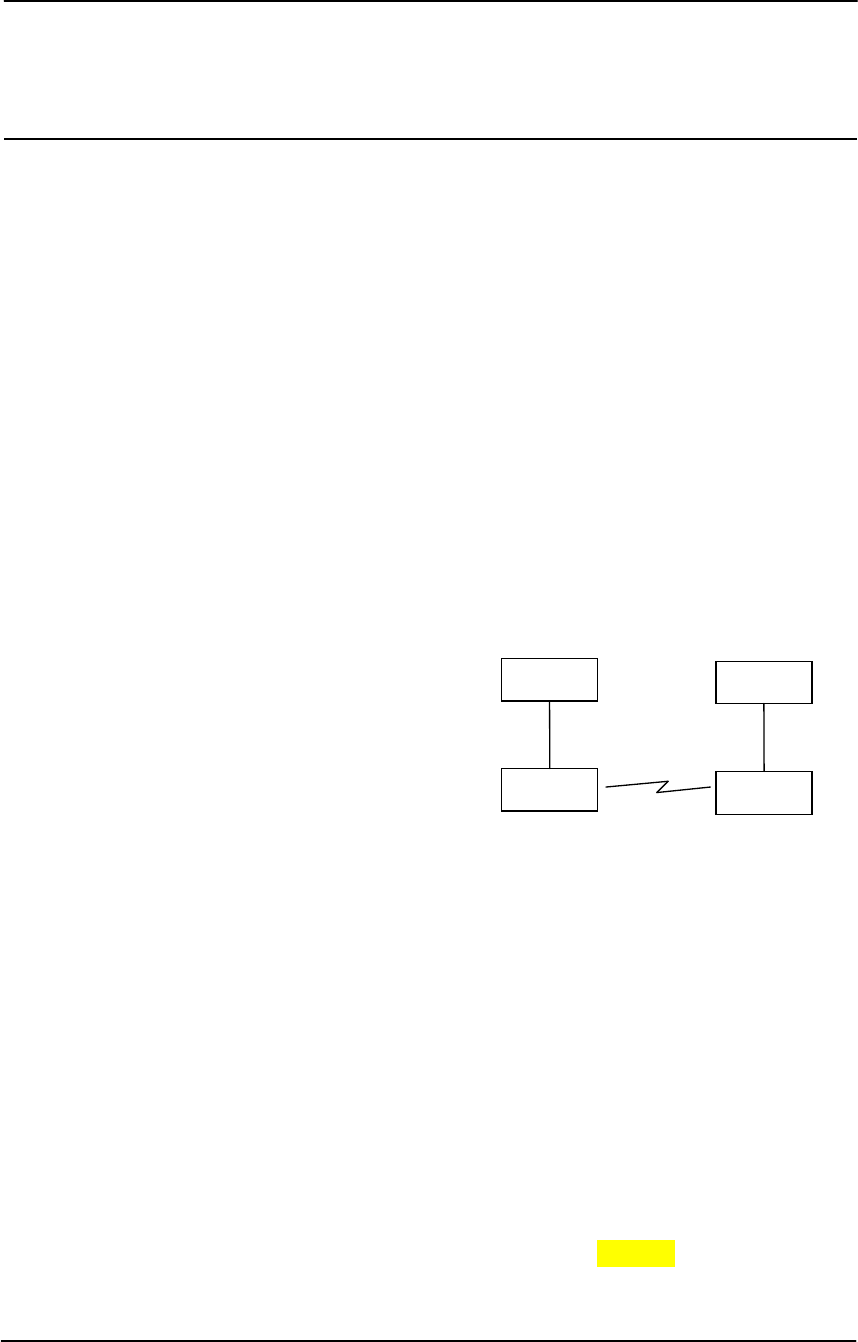
RS232 is an electrical standard format for a full
duplex point-to-point serial connection. RS485
is an electrical standard format for a half-duplex
multidrop serial connection. Up to 32 devices
can communicate on a common RS485 serial
bus. Each 455U can simultaneously connect to
signals from both RS232 and RS485. In
addition, RS232 data from one host device can be
transmitted to a remote 455U unit and output as RS485 data to another host device.
The 455U has been designed to be flexible enough to cover a wide range of applications. The
user is able to configure many different parameters such that the 455U unit will connect
reliably to different types of host devices. Before the radio modem can be used, these
parameters must be configured. Some of these parameters are :-
• Character type - the 455U will accept a variety of 7 or 8 data bit characters
• RS232 Serial Data Rate - between 1200 and 115,200 bits/sec
• RS485 Serial Data Rate - between 1200 and 187,500 bits/sec
• Radio Data Rate - 1200 to 19,200 bits/sec
• Operating mode - unacknowledged mode, Acknowledged mode, Host Protocol Specific
modes (DF1, Modbus, Profibus, DNP3), Remote Configuration and Diagnostics mode.
The operation of the 455U radio modem is relatively simple. As data is received at the serial
port, the data is transmitted on the radio channel. Up to 1024 bytes of data can be
transmitted in one transmission. The radio transmission commences when the first data byte
is received, and ends when there are no more data bytes in the input buffer, or when the
HOST
455U
RS232
HOST
455U
RS485
455U Radio Modem Module User Manual
Page 8 © November 2004
number of bytes transmitted equals the maximum message length (user configurable - default
1024 bytes). If more than 1024 bytes is input, the 455U unit will transmit the first 1024
bytes, then the next 1024 bytes, and so on until all of the data has been transmitted.
Because the radio data rate could be less than the input serial data rate, an input memory
buffer of up to 8Kbytes is provided. The RS232 connection provides CTS control to prevent
the buffer overflowing. There are no data flow control signals for RS485.
A radio channel cannot provide as secure a data channel as a wired connection. The 455U
uses a radio band with a low level of natural or industrial noise, however there is a chance of
interference from other (unlicensed) users of the licensed radio channel. We recommend that
the flow of data over the radio channel is controlled by using error detection and
“handshaking” - that is, returning an acknowledgment transmission if a data packet is
received on the radio channel without error. This function can be performed by either the
host devices or the 455U modules. The modules may be configured by the user to operate in
one of two modes. In unacknowledged mode, it is assumed that the host devices control the
flow of data. In Acknowledged mode, the 455U units control the flow of data.
The modem supports encryption of data sent over the air to prevent eavesdropping. AES-128
encryption provides a high level of security and immunity to hacking.
1.2 Unacknowleged Mode
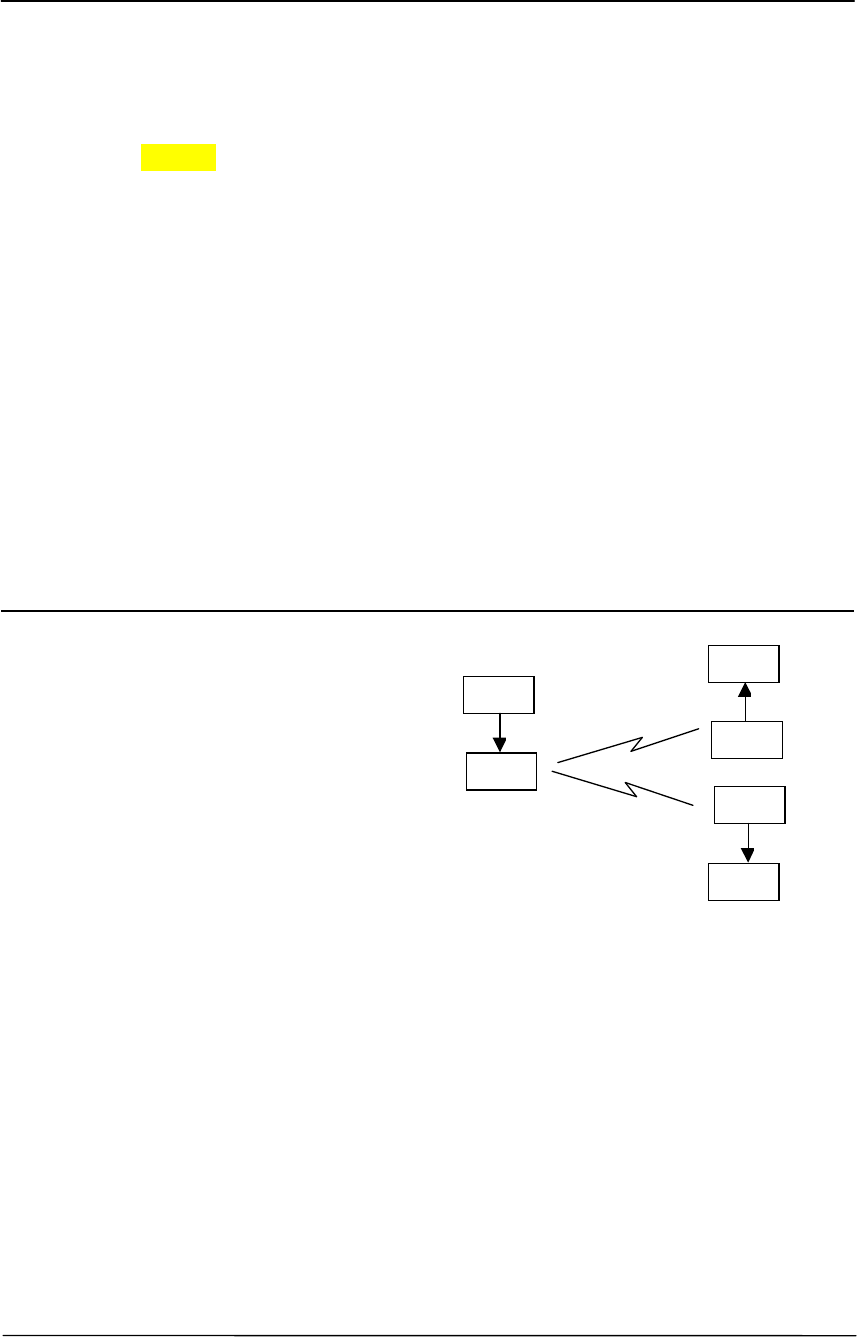
The default configuration of the 455U
modem is unacknowledged mode - the
modules are set in this mode at the factory.
In unacknowledged mode, the 455U
provides no control of the data
transmissions (no error correction). Input
data is simply transmitted by radio and
every other 455U unit in that system which
receives the transmission will output the
data. This mode relies on the host devices
to perform the “handshaking” function, and
re-transmitting serial data if the data is corrupted (no “handshake”). It also relies on the host
devices to include any addressing necessary in the data. In this mode, modules are not
configured with a unit address. Data is “broadcast” - every other 455U in the system will
receive the data and output the data to their individual host devices. The user may configure
the 455U modems to add error checking to each data packet transmitted - if error checking is
configured, data will not be output if it is received without a correct error-check. This feature
provides additional protection against corruption of the data during the radio transmission. If
error-checking is not configured, then the data received by radio will be output without
checking for errors.
Unacknowledged mode is “point-to-multipoint” communications, suitable for a host device
which is able to communicate on a multi-drop “bus” type network. An example of an
application is the use of radio modems to extend a PLC RS485 network. The serial messages
from the PLC’s already include PLC addressing and error detection/correction to control the
flow of data
HOST
455U
DATA
HOST
455U
DATA
HOST
455U
DATA
Chapter One Introduction
Man_455U Rev 1.0 Page 9
.
1.3 Acknowledged Mode
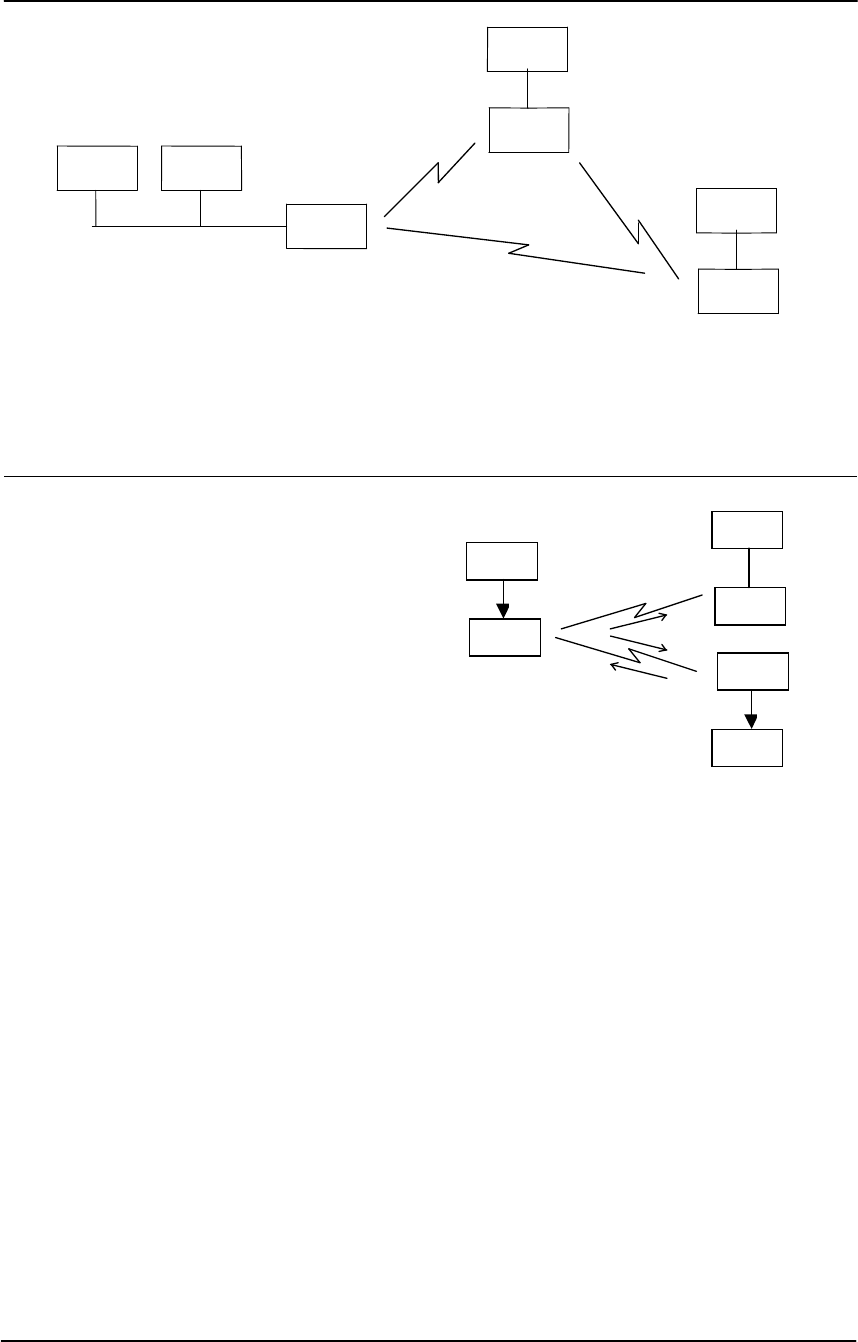
“Acknowledged mode” provides “point-to-
point” communications similar to telephone
modems. In Acknowledged mode, the flow
of data is Acknowledged by the 455U units.
Each 455U unit is configured with an
address by the user, and a destination
address for the data to be transmitted to.
Data is transmitted addressed to the
destination module, and only this module
will output the serial data. The source
module will add an error-check (16 bit
CRC) to the data transmitted by radio. The destination module will process the error-check,
and if correct, it will transmit an acknowledgment message (ACK) back to the source module.
If the source module does not receive a ACK, it will re-transmit the data. The source module
will attempt to re-transmit the data, until an acknowledgment (ACK) is received or the
configured number of re-tries has expired. If an acknowledgment is still not received, then
the DCD signal on the RS232 port will be reset and an alarm message can be sent to the host
via the serial port.
An example of an application using Acknowledged mode would be a radio modem link
between an intelligent gas analyser and a monitoring computer system. Intelligent
transducers do not normally provide addressing or error checking functions - these would be
provided by the 455U modules.
In Acknowledged mode, the destination address may be pre-set, or set on-line by the host
device using “Hayes” commands. Hayes commands are a standard set of commands used
with conventional telephone modems. An example of an application that would use Hayes
command to set destination addresses would be a central computer polling data loggers for
periodic information.
PLC
455U
455U
RS485
PLC
PLC
455U
PLC
HOST
455U
DATA
HOST
455U
NO DATA
HOST
455U
DATA
#1
#2
#3
455U Radio Modem Module User Manual
Page 10 © November 2004
1.4 Repeater Units
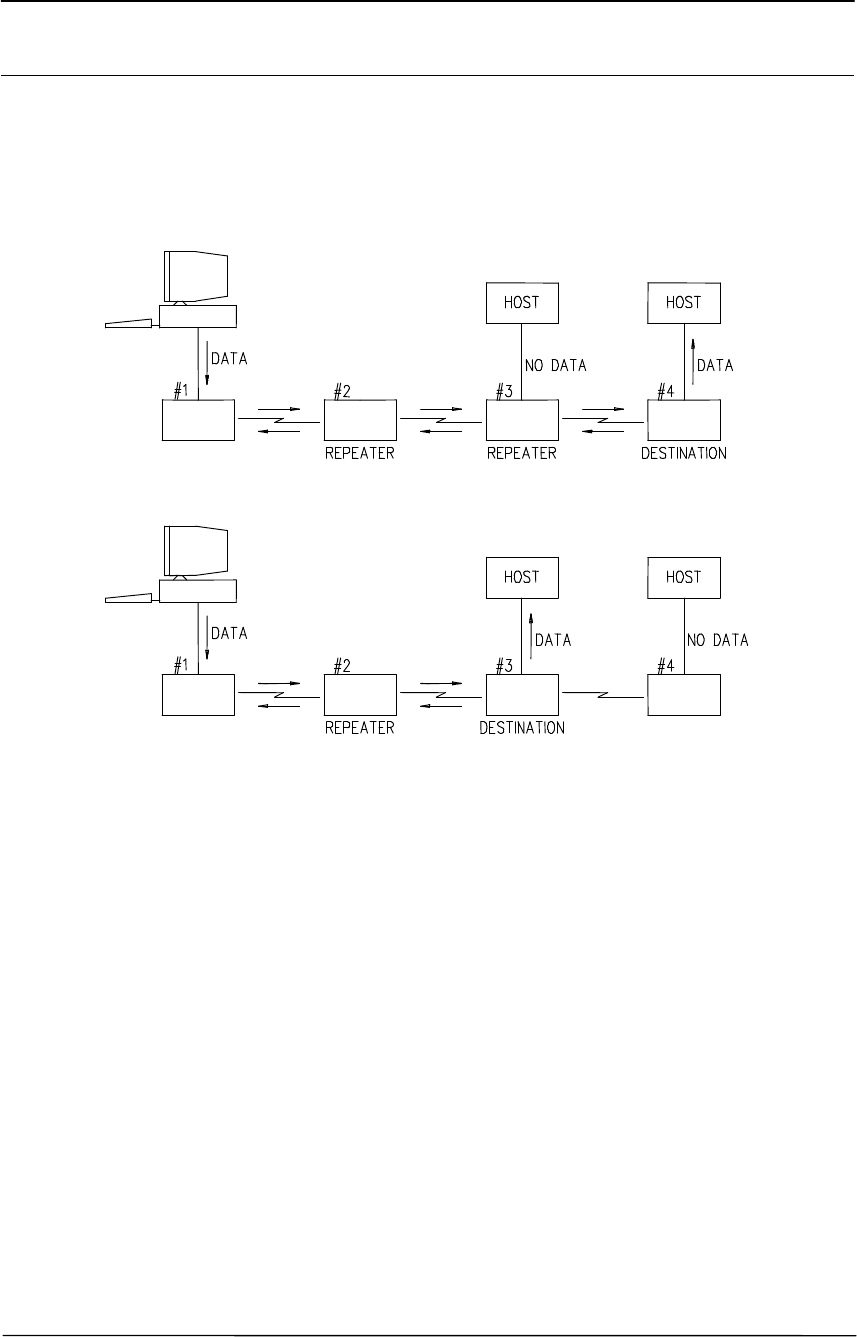
A 455U unit may be used as a repeater to re-transmit radio messages. The purpose of a
repeater unit is to extend radio range.
Up to six repeaters may be configured for any transmission path. The repeaters are
configured by address.
455U
455U
455U
455U
455U
455U
455U
455U

Chapter Two Installation
Man_455U Rev 1.0 Page 11
Chapter Two INSTALLATION
2.1 General
The 455U module has is housed in a rugged aluminium case suitable for DIN-rail mounting.
Terminals will accept wires up to 2.5 mm
2
in size.
Normal 110-240V AC supply should not be connected to any terminal of the 455U
module. Refer to Section 2.3 Power Supply.
To operate this equipment legally the user must obtain a radio operating license from the
government agency. This is done so the government can coordinate radio users in order to
minimize interference.
Before installing a new system, it is preferable to bench test the complete system.
Configuration problems are easier to recognize when the system units are adjacent.
Following installation, the most common problem is poor communications caused by
incorrectly installed antennas, or radio interference on the same channel, or the radio path
being inadequate. If the radio path is a problem (ie path too long, or obstructions in the way)
then higher performance antennas or a higher mounting point for the antenna may rectify the
problem. Alternately, use an intermediate 455U Module as a repeater.
The foldout sheet 455U Installation Guide provides an installation drawing appropriate to
most applications. Further information is detailed below.
Each 455U module should be effectively earthed via the "GND" terminal on the 455U
module - this is to ensure that the surge protection circuits inside the 455U module are
effective.
2.2 Antenna Installation
The 455U module will operate reliably over large distances. The distance which may be
reliably achieved will vary with each application - depending on the type and location of
antennas, the degree of radio interference, and obstructions (such as hills or trees) to the radio
path. The expected range for radio data rates of 19200 bits/sec (with 25Khz bandwidth) is 30
km line-of-sight. At 9600 bit/sec (with 12.5Khz), the expected distance will be approx 35
km.
Where it is not possible to achieve reliable communications between two 455U modules, then
a third 455U module may be used to receive the message and re-transmit it. This module is
referred to as a repeater.
An antenna must be connected to each 455U module using the female SMA connector at the
top of the module.
To achieve the maximum transmission distance, the antennas should be raised above
intermediate obstructions such that the radio path is true “line of sight”. Because of the
curvature of the earth, the antennas will need to be elevated at least 5 metres above ground for
paths of 5 km. For short distances, the modules will operate reliably with some obstruction of
the radio path. Obstructions which are close to either antenna will have more of a blocking
455U Radio Modem Module User Manual
Page 12 © November 2004
effect than obstructions in the middle of the radio path. For example, a group of trees around
the antenna is a large obstruction, and the antenna should be raised above the trees. However
if there is at least 100 metres of clear path before a group of trees, the trees will have less
affect on the radio path. To help in planning radio systems, ELPRO provides a free utility for
estimating path performance.
The modules provide test diagnostics to test the radio path and display radio signal strength.
An antenna should be connected to the module via 50 ohm coaxial cable (eg RG58, Cellfoil
or RG213) terminated with a male SMA connector. The higher the antenna is mounted, the
greater the transmission range will be, however as the length of coaxial cable increases so do
cable losses. For use on unlicensed frequency channels, there are several types of antennas
suitable for use. It is important antennas are chosen carefully to avoid contravening the
maximum allowed power limit on the on the radio channel - if in doubt refer to an authorized
service provider.
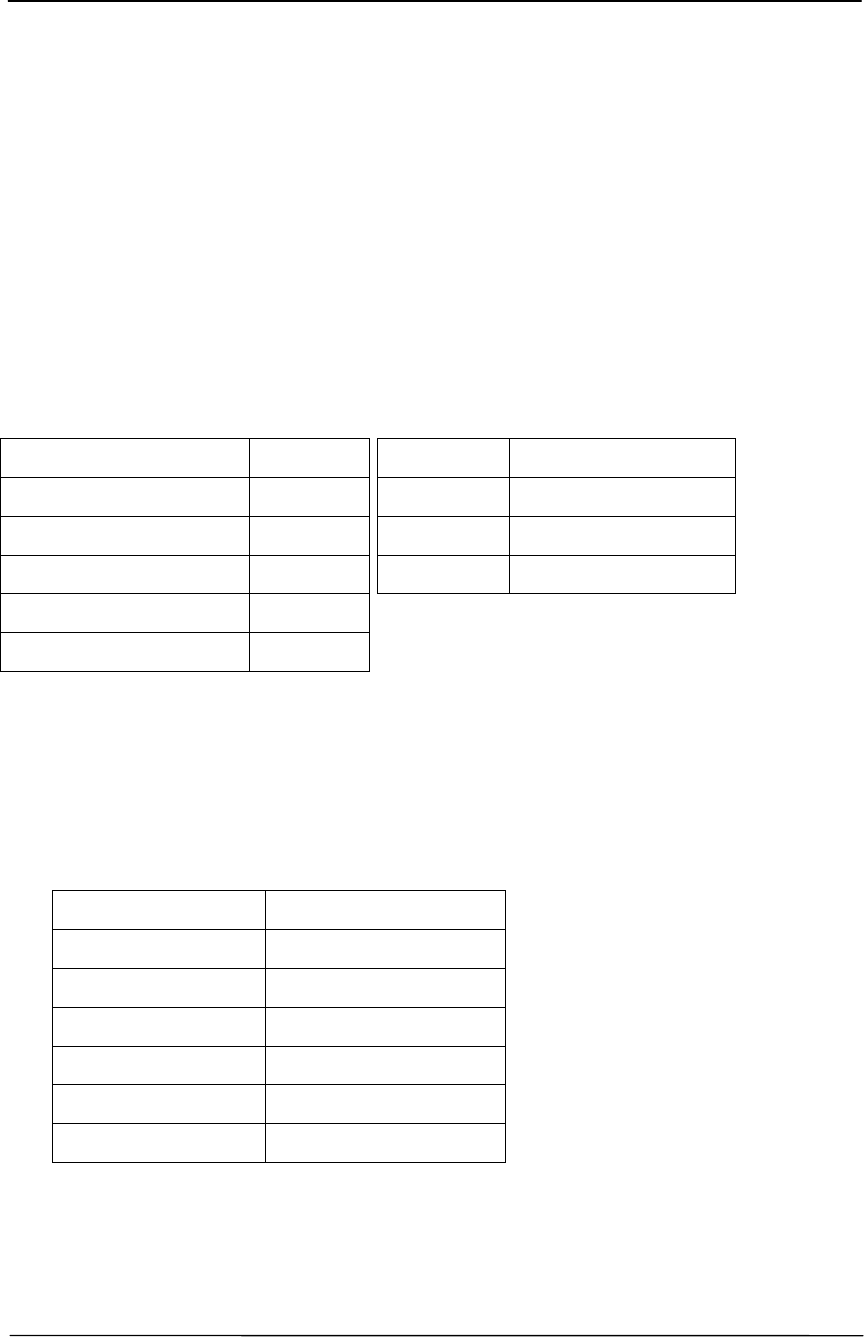
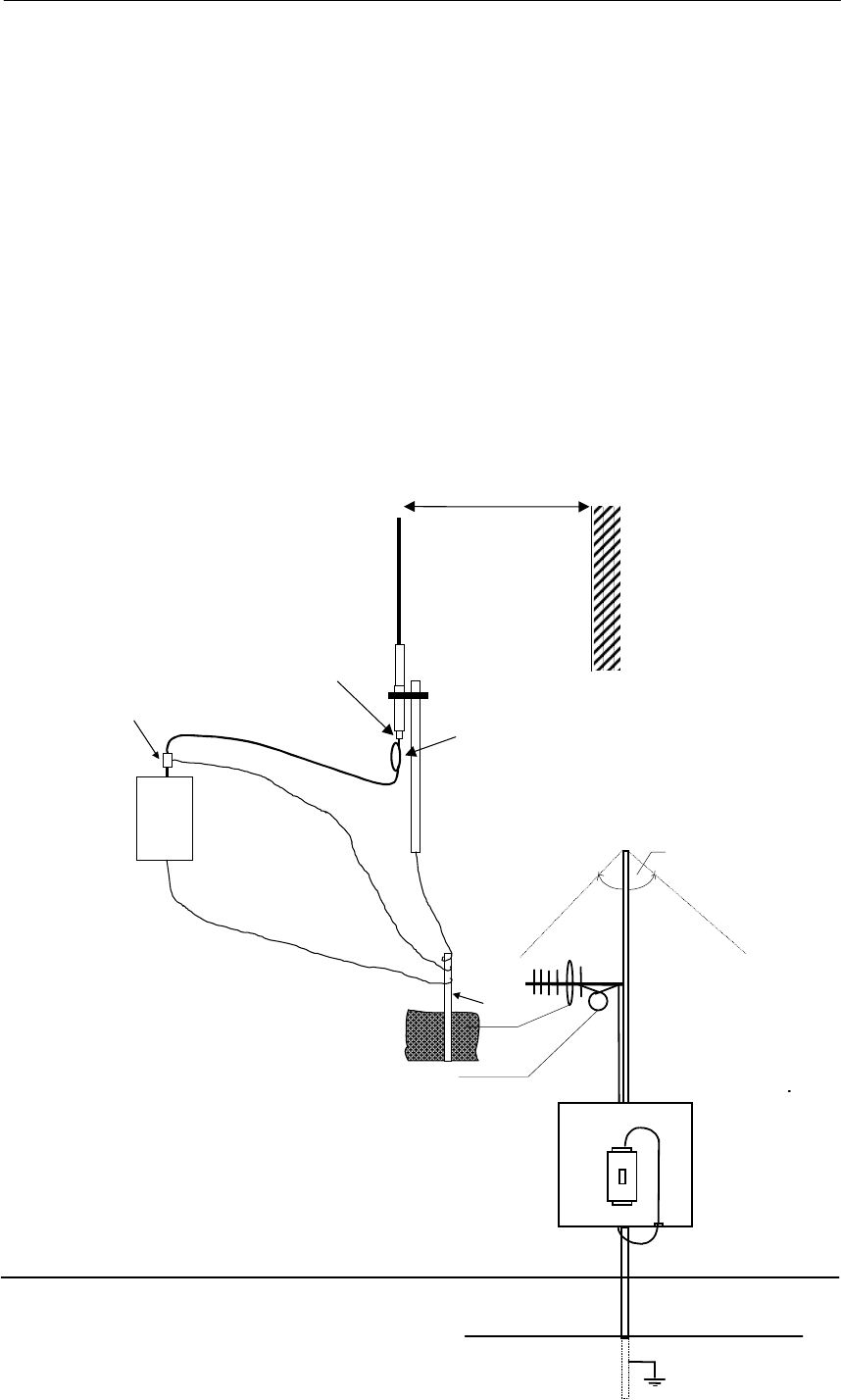
The gains and losses of some typical antennas and cable types are
Cable type Loss (dB per 10 m)
RG58 -4.5
RG213 -1.65
Cellfoil -2.25
The net gain of the antenna/cable configuration is determined by adding the antenna gain and
the cable loss. For example, a 6dBd Collinear with 20 metres of RG58 has a net loss of 1 dB
(8dB – ((20/10) x 4.5) dB) = 8dB – 9dB = -1dB
Another important consideration when installing the antenna system is RF exposure. The
antenna can radiate a large amount of RF energy. It is important to ensure that a person
approach the antennas within the recommended minimum safe distances in the table below.
Antenna Type Minimum safe distance
Dipole 0.4 metres
3dBd Collinear 0.7 metres
6dBd Collinear 0.9 metres
6 element Yagi 1.2 metres
9 element Yagi 1.5 metres
16 element Yagi 2.3 metres
Connections between the antenna and coaxial cable should be carefully taped to prevent
ingress of moisture. Moisture ingress in the coaxial cable is a common cause for problems
with radio systems, as it greatly increases the radio losses. We recommend that the
connection be taped with a layer of PVC insulating tape, then a layer of vulcanizing tape such
Antenna Gain (dB)
3dBd Collinear 5
6dBd Collinear 8
6 element Yagi 9
9 element Yagi 12
16 element Yagi 15
Chapter Two Installation
Man_455U Rev 1.0 Page 13
as “3M 23 tape”, with a final layer of PVC insulating tape.
Where antennas are mounted on elevated masts, the masts should be effectively earthed to
avoid lightning surges. Although the 455U module is fitted with surge protection, additional
surge suppression devices are recommended if lightning surge problems are experienced. If
the antenna is not already shielded from lightning strike by an adjacent earthed structure, a
lightning rod may be installed above the antenna to provide shielding.
2.2.1 3dB/6dB Collinear antenna.
A collinear antenna transmits the same amount of radio power in all directions - as such they
are easy to install and use. For marginal radio paths, the following lengths are the
recommended maximum for the coaxial cable to the antenna. RG58 -10 metres RG213 -
20 metres. Note that this applies to marginal paths only - if the radio path has a strong radio
signal, then longer lengths of cable ( and hence more cable loss) can be tolerated. If more
than 20 metres of cable is required for a marginal path installation, then a low loss cable such
as 10D-FB, or a higher gain antenna should be used. Collinear antennas should be mounted
vertically, at least 1 metre away from a wall or mast.
2.2.2 Yagi antennas.
A Yagi antenna provides high gain
in the forward direction, but lower
gain in other directions. This may
be used to compensate for coaxial
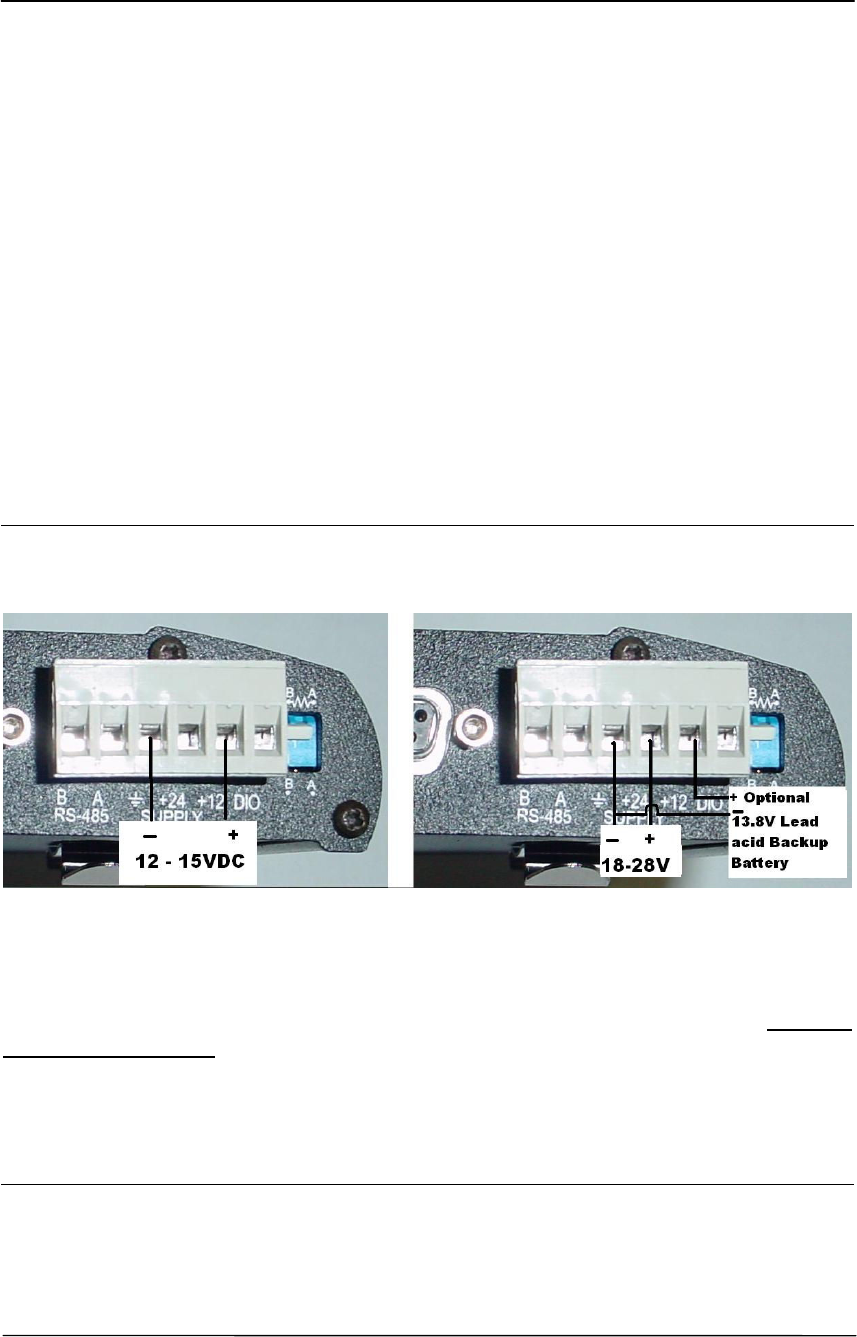
1m minimum
COLINEAR
ANTENNA
MAST
EARTH STAKE
IF GROUND CONDITIONS ARE
POOR, INSTALL MORE THAN
ONE STAKE
INSTALL AERIAL ABOVE
LOCAL OBSTRUCTIONS
ANT
455U
SURGE
ARRESTOR
(OPTIONAL)
COAXIAL CABLE
WEATHERPROOF
CONNECTORS WITH
“3M 23” TAPE
STRESS RELIEF LOOP
PROVIDE GOOD
GROUND
CONNECTION TO
MAST, MODULE
AND SURGE
ARRESTOR
GND
455U
Antenna installed
with drain holes
down
Coax feed looped
at connection
90
o
455U Radio Modem Module User Manual
Page 14 © November 2004
cable loss for installations with marginal radio path.
The Yagi gain also acts on the receiver, so adding Yagi antennas at both ends of a link
provides a double improvement.
Yagi antennas are directional. That is, they have positive gain to the front of the antenna, but
negative gain in other directions. Hence Yagi antennas should be installed with the central
beam horizontal and must be pointed exactly in the direction of transmission to benefit from
the gain of the antenna. The Yagi antennas may be installed with the elements in a vertical
plane (vertically polarized) or in a horizontal plane (horizontally polarized). For a two station
installation, with both modules using Yagi antennas, horizontal polarization is recommended.
If there are more than two stations transmitting to a common station, then the Yagi antennas
should have vertical polarization, and the common (or “central” station should have a
collinear (non-directional) antenna.
Also note that Yagi antennas normally have a drain hole on the folded element - the drain
hole should be located on the bottom of the installed antenna.
2.3 Power Supply
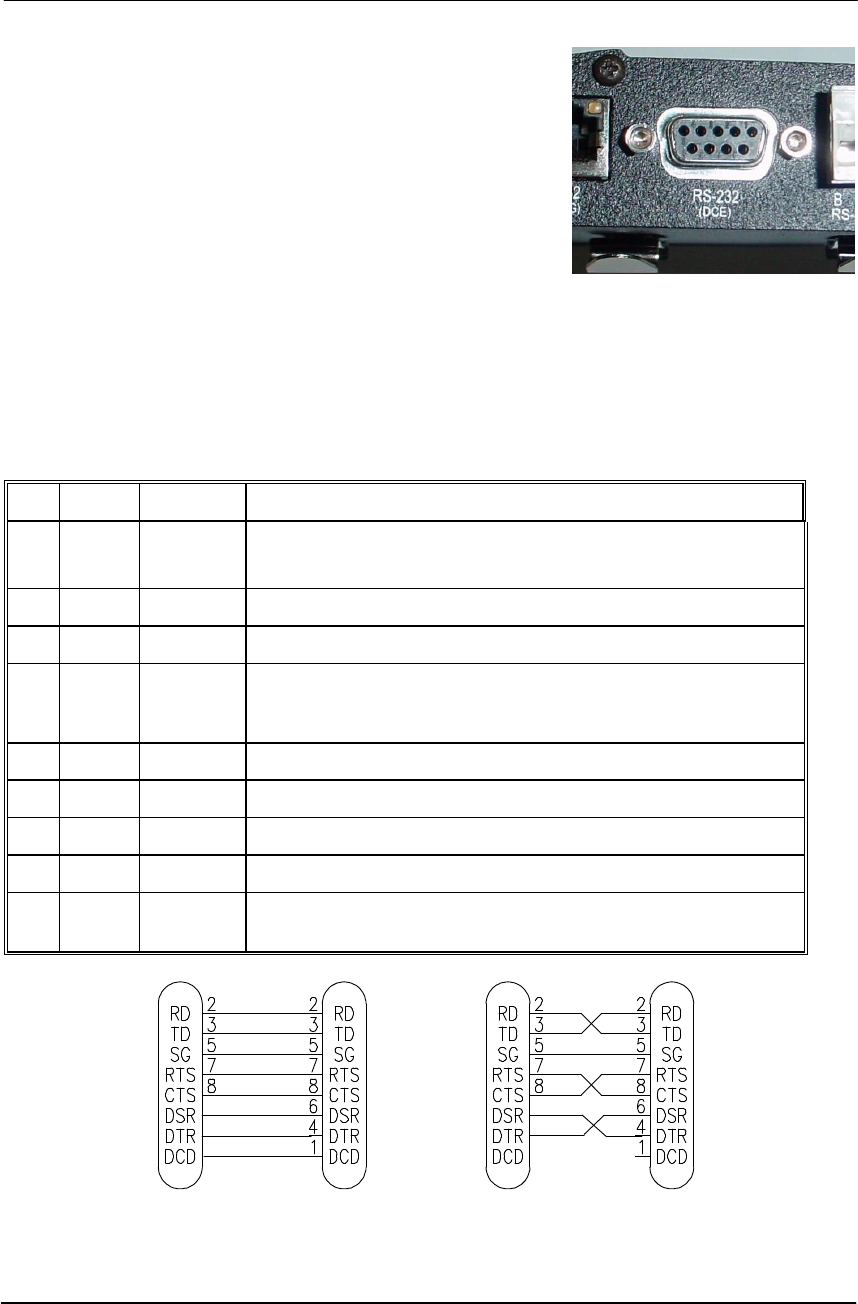
The 455U module is powered either by an 12 - 15VDC supply, or a 18-28VDC supply.
minmum 24 Watt capacity.
The 12-15 V Supply may be used to charge a backup battery (12V Lead-acid) when the main
supply is available, and the module will automatically change over to run from the backup
battery in the case of main supply failure.
For DC supplies, the negative side of the supply is connected to “ground”. The supply
negative is connected to the module case internally. The positive side of the supply must not
be connected to earth. The DC supply may be a floating supply or negatively grounded.
The power requirements of the 455U units is 90mA at 12VDC (Quiescent) and 2A at 12VDC
when transmitting (5Watt).
2.4 Serial Connections
Chapter Two Installation
Man_455U Rev 1.0 Page 15
2.4.1 RS232 Serial Port
The serial port is a 9 pin DB9 female and provides for
connection to a host device as well as a PC terminal for
configuration, field testing and for factory testing.
Communication is via standard RS232 signals. The 455U is
configured as DCE equipment with the pinout detailed
below.
Hardware handshaking using the CTS/RTS lines is provided. The CTS/RTS lines can be
configured to reflect the status of the local unit’s input buffer. The 455U supports
XON/XOFF flow control.
Example cable drawings for connection to a DTE host (a PC) or another DCE host (or modem)
are detailed below.
DB9 Connector Pinout
Pin Name Direction Function
1 DCD Out Data carrier detect –
- driven when link is established in Acknowledged mode
- driven always in unacknowledged mode
2 RD Out Transmit Data from modem – Serial Data Output
3 TD In Receive Data into modem – Serial Data Input
4 DTR In Data Terminal Ready - DTR can be configured to initiate low power
mode, or to force a link disconnection (“hang up” in Acknowledged
mode.
5 SG Signal Ground
6 DSR Out Data Set Ready - always high when unit is powered on.
7 RTS In Request to Send - hardware flow control configurable
8 CTS Out Clear to send - hardware flow control configurable
9 RI Out Ring indicator - indicates another module is attempting to connect in
Acknowledged mode.
455U
DB9
MALE
DTE HOST
DB9
FEMALE
455U
DB9
MALE
DCE HOST
DB9
MALE
455U Radio Modem Module User Manual
Page 16 © November 2004
2.4.2 RS232 Configuration Port
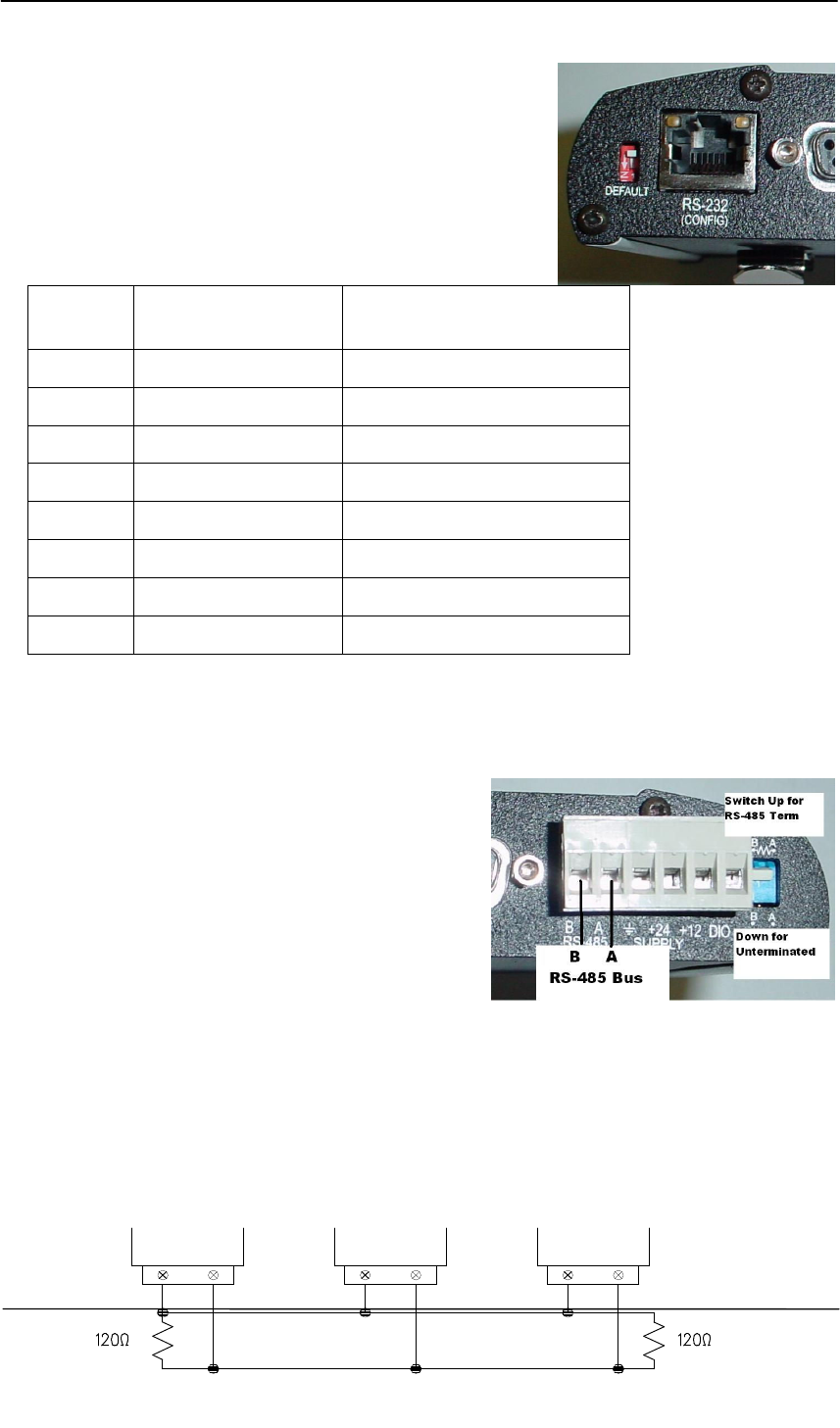
The serial port is a 9 pin DB9 female and provides
configuration and diagnostics of both the local module and
of other modules in the system wile the primary RS232 port
is active. This port is wired as a DCE according to EIA-561.
The following table describes the connections required to
connect to a PC serial port. The highlighted entries in this
table are those essential for operation of the Configuration
port.
RJ-45
Pin
E455U Modem
Function
EIA-561 Signal Name
1 None Ring Indicator
2 None Data Carrier Detect
3 Input Data Terminal Ready
4 Common Signal Common
5 Output Receive Data (from Modem)
6 Input Transmit Data (to Modem)
7 None Clear to Send
8 None Request to Send
2.4.3 RS485 Serial Port
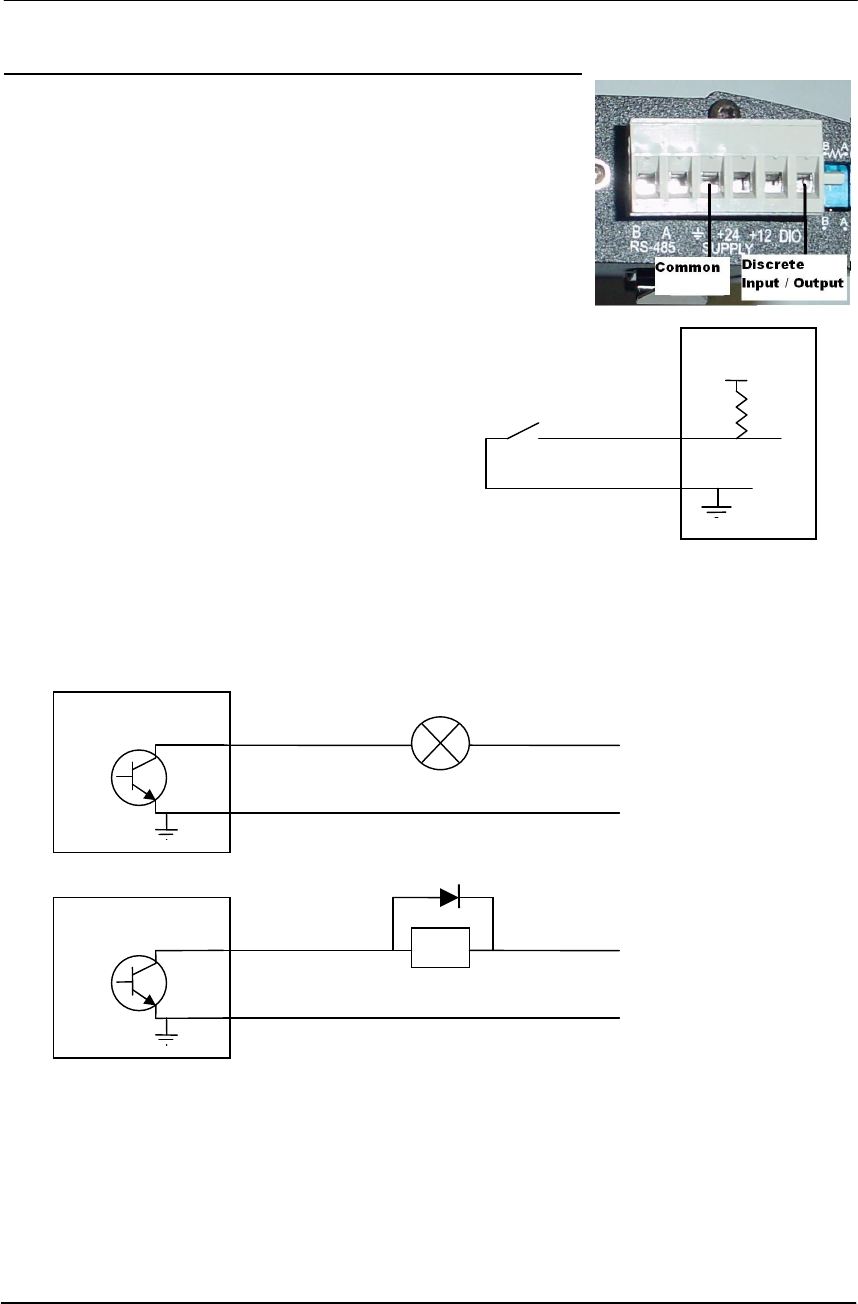
The RS485 port provides for communication between the 455U unit and its host device using a
multi-drop cable. Up to 32 devices may be connected
in each multi-drop network.
As the RS485 communication medium is shared,
only one of the units on the RS485 cable may send
data at any one time. Thus communication protocols
based on the RS-485 standard require some type of
arbitration. RS485 is a balanced, differential
standard but it is recommended that shielded, twisted
pair cable be used to interconnect modules to reduce
potential RFI. It is important to maintain the polarity of the two RS485 wires. An RS485
network should be wired as indicated in the diagram below and terminated at each end of the
network with a 120 ohm resistor. On-board 120 ohm resistors are provided and may be
engaged by operating the single DIP switch in the end plate next to the RS485 terminals. The
DIP switch should be in the “1” or “on” position to connect the resistor. If the module is not
at one end of the RS485 cable, the switch should be off.
HOST
455U
HOST
RS485 CONNECTIONS
Chapter Two Installation
Man_455U Rev 1.0 Page 17
2.5 Discrete I/O Point
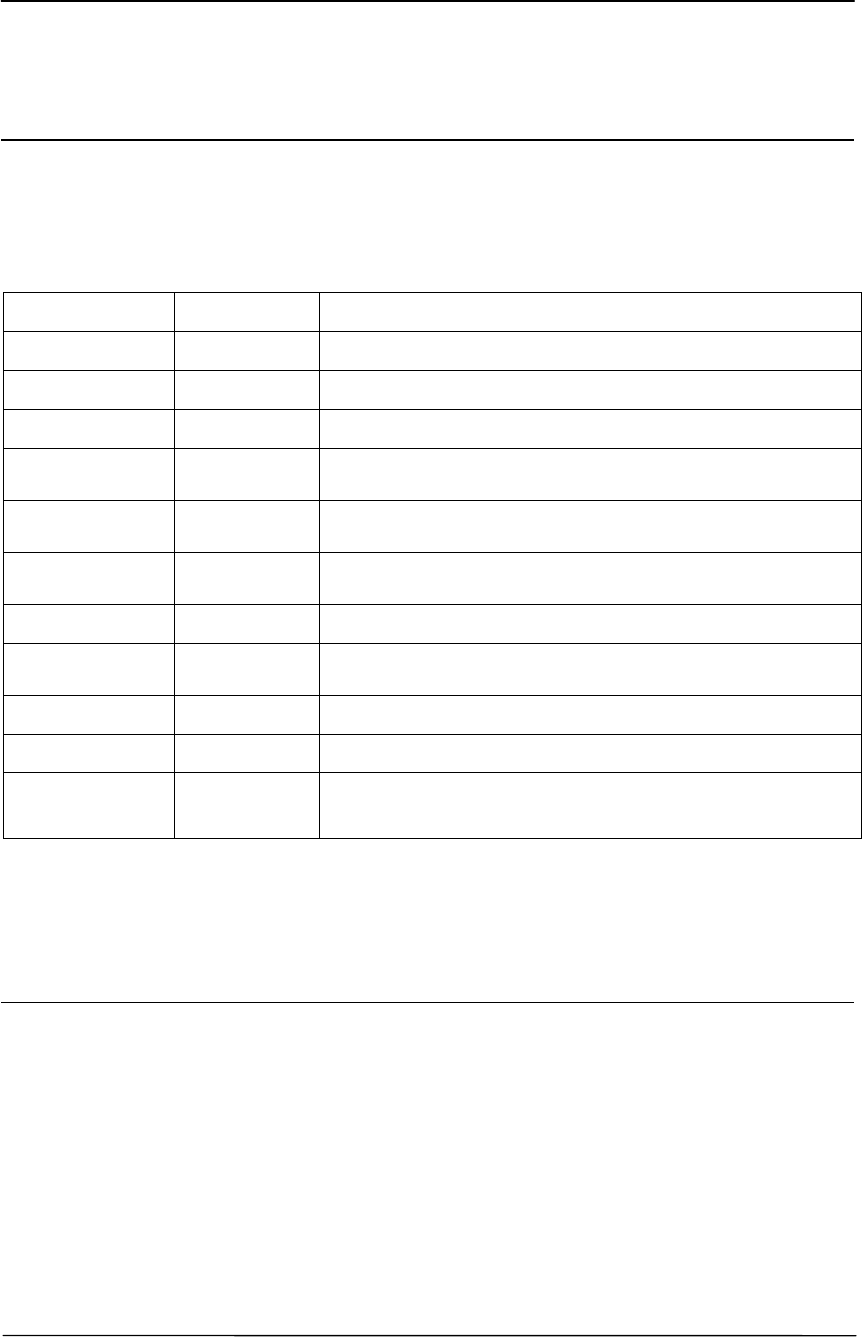
The 455U provides a single connection which can be used as a
discrete input for alarms, or a discrete output, to control remote
equipment,
2.5.1 Using The discrete I/O point as an Input
When using the DIO pin as an input, it is activated by
connecting the DIO pin to COMMON, This can be done using
a voltage free contact (Relay or Switch) or a
NPN transistor to common. To read the status of
the Input, ensure the output function is disabled
(AT#O0) and read S-Register S33.
2.5.1 Using The discrete I/O point as an
Output
When using the DIO pin as an output, it acts as an NPN transistor to common. It can be wired
to an indicator or alarm (Max 24VDC, 500mA) or to a relay to remotely operate equipment.
The output is controlled using the AT#O command (AT#O0 turns off, AT#O1 turns on).
455U
DIO
COM
455U
DIO
COM
+
30V Max
-
Inductive Load
+
30V Max
-
Non
-Inductive Load
455U
DIO
COM
455U Radio Modem Module User Manual
Page 18 © November 2004
Chapter Three OPERATION
3.1 Power-up and Normal Operation
When power is initially connected to the 455U module, the module will perform internal
diagnostics to check its functions. The following table details the status of the indicating
LEDs on the front panel under normal operating conditions.
LED Indicator Condition Meaning
OK Green Normal Operation
OK Off Power Disconnected or Battery Over-voltage
OK Red Low Supply voltage or Internal Module fault
Radio RX Green flash Radio receiving data
Radio RX Red flash Weak radio signal
Radio TX Flash Radio Transmitting
RS232 flash RS232 Serial Port Activity
RS485 flash RS485 Serial Port Activity
DCD Green Modem is Online and ready to send data.
DCD Red Modem is Online but Currently in Command Mode
DCD Off Communications failure or data connection not
established
Other conditions indicating a fault are described in Chapter Six Troubleshooting.
3.2 Serial and Radio Data
The 455U module provides a full-duplex RS232 serial port and half-duplex RS485 serial
port. The radio communications is half-duplex - this means that the 455U operates at half
duplex. Many applications use full duplex RS232 communications but do not require full
duplex - the protocol used operates at half-duplex and will operate with the 455U without
problems. If an application really requires full duplex communications, then the 455U should
not be used.
Data input at the serial port is placed into the input buffer. This buffer will store up to
8Kbytes of data, and CTS/RTS control can be configured on the RS232 port to prevent
overflow.

Chapter Three Operation
Man_455U Rev 1.0 Page 19
When the 455U unit detects data in the input buffer, it initiates a radio message. The radio
message will end when the number of transmitted bytes reaches the maximum message
length (configurable by the user), or if the input buffer becomes empty.
If the configured serial data rate is the same or more than the radio data rate, then data is
transmitted as soon as it enters the input buffer - data “streams” from the input buffer to the
radio port. If the serial rate is less than the radio rate, then the transmission will be delayed
for a period to allow sufficient data to build up in the input buffer to avoid the radio emptying
the input buffer before a complete serial message has been input. This delay is configurable
separately for the RS232 and RS485 serial ports.
The radio transmission will stop when the input buffer is empty or when the radio has
transmitted the maximum number of bytes (user configurable - maximum 1024 bytes). If
there is still data in the input buffer, the 455U will start another radio transmission.
If error checking is configured, then a 16 bit CRC error-check is added to the end of the
transmitted data packet. The receiving module will receive the full data packet and check the
CRC before outputting the data.
The maximum size of the data packet is configurable by the user (maximum is 1024 bytes).
If less data than the maximum size is input to the 455U, then the 455U will transmit the
actual data input. If more data is input than the maximum size, then the 455U will transmit
multiple packets until all of the data is transmitted.
Because of radio start-up delays, the effective radio data rate will be lower than the
transmitted data rate. If you are sending large blocks of data, and the serial rate is equal or
more than the radio rate, we recommend that you use CTS/RTS flow control to prevent the
input buffer from overflowing.
3.2.1 Character Type
The 455U may be configured by the user to recognize the following types of characters - 7 or
8 data bits, even or odd or no parity, 1 or 2 stop bits.
Most applications will require the character type to be the same at each 455U modem in the
system. Nevertheless, the character type may be configured to be different at different 455U
modems. Data is transmitted by radio as an eight-bit byte without stop or start bits. If the
input data is 7 data bits, then the byte transmitted by radio comprises the 7 bits plus a zero bit.
Input characters with 8 bits are transmitted as just the 8 data bits, with no parity. Because the
data is transmitted without parity, the user may configure CRC error checking to be added to
each transmitted data packet. Data is output at the destination module based on the character
type configured at that module - that is, the start/stop bits and parity is added to the radio data.
Use the AT&A command to set the RS485 port Character type. AT&B to select the RS-232
port character type.
3.2.2 Serial Data Rate
The communications baud rates supported on both the RS232 serial port and the RS485 serial
port are 600, 1200, 2400, 4800, 9600, 14400, 19200, 28800, 31250, 38400, 57600, 76800,
93750, 115200 and 187500 baud - the user selects one of these rates during the configuration of
the modem. The RS232 and RS485 ports may be configured with separate data rates. ATC
command selects RS232 baud rate. ATR selects the RS485 baud rate.

455U Radio Modem Module User Manual
Page 20 © November 2004
3.2.3 Radio Data Rate
The data is transmitted by radio as direct modulated synchronous data at 1200, 2400 4800 or
9600 bits/second. The user must configure the radio data rate at each 455U module. The
configured radio data rates must be the same for each module in a system. Radio data rate is
set via the ATB command.
3.2.4 Radio Message
The radio message includes the following :-
• A 20 mSec leading sequence of alternating 1’s and 0’s provides the receiving unit
with time to capture and lock onto the incoming signal (Configurable for systems using talk-
through repeaters).
• A system address is superimposed on each message to provide discrimination between
different 455U systems on the same radio channel. Each 455U unit in the same system must
be configured with the same system address - refer Section 4, Configuration. Although other
455U modules may hear the radio transmissions, because they have a different system
address, the radio transmission is ignored and no serial data is output.
• Addressing for the sending unit, any repeater units, and the final destination unit
indicates where the message is to be sent and how to get there.
An error-check (16 bit CRC) and security encryption (AES128) may be configured by the
user. Error checking is configured with the AT&E command, Data Encryption is configured
with the AT#E and AT#S commands.
Up to 1024 bytes of data may be transmitted in a message - the maximum message size is
configurable between 4 and 1024 bytes. The data consists of a sequence of 8 bit bytes. Start,
stop and parity bits are not transmitted, but they are re-generated at the receiving unit (if
configured).
The time taken to transmit a message is :-
Section Item Number Time (At 9600 Baud)
PEAMBLE Lead-in 20 mSec Default
(Configurable)
20 mSec
HEADER System Address 2 Bytes 2.08 mSec
Header Control 2 Bytes 2.08 mSec
Source Address 1 Byte 1.04 mSec
Destination Address 1 Byte 1.04 mSec
Intermediate
Addresses
1 Byte per address 1.04 mSec for each
intermediate address
Header Error Check 1 Byte 1.04 mSec
ENCRYPTION
Initialisation Vector 16 Bytes (if data
Encryption is enabled)
16.64 mSec (If
configured)
DATA Message Data Data Bytes 1.04 mSec x no of
data bytes
CHECK CRC Error Check 2 bytes (If CRC
checking is configured)
2.08 mSec (If CRC
configured).

Chapter Three Operation
Man_455U Rev 1.0 Page 21
The time for each byte is 1.04msec @9600 bits/sec, 2.08 mSec ant 4800 baud, and 4.16
mSec at 2400 baud.. If error checking is not configured at the receiving unit, data will start
to be output approx 1msec after the first data byte has been received. If error checking is
configured, data will be output approx 2msec after the end of the message. For example, a
message with 20 bytes of data transmitted at 9600 bits/sec with no repeaters, will be output
approx 52msec after the data is input, if error checking is configured, and will be output
approx 29 mSec after the data is input if no error checking is configured. Error checking is
configured with the AT&E command, Data Encryption is configured with the AT#E and
AT#S commands.
A “transmit delay” time and a “receive delay” time may also be configured. These parameters
may be used to fine tune and give priority to different 455U units in a system.
• After each message is transmitted, a 455U unit will not transmit another message during the
transmit delay time. This could be used to allow a reply message to be received before the
next message is sent.
• After a message is received, a message will not be transmitted during the receive delay time.
This could be used to delay a reply message until other messages have been sent.
3.3 Addressing
A 455U network comprises modules with the same "system" address. Only modules with the
same system address will communicate with each other. This feature allows more than one
system to operate in the same area on the same radio channel.
A 455U must also be configured with a “unit” address - this gives the module a unique
identification. The Unit address is used when issuing a “Dial” command to the modem (ATD)
and when configuring the RS232 path, The RS485 path and the Stored Numbers (AT&Z)
Each 455U has two addresses, the RS232 port is accessed by addressing the configured unit
address. The RS485 port is accessed by addressing the configured unit address +128. So, to
access the RS232 port on unit 7, use address 7. To access the RS485 port on this unit, use
address 135 (128+7).
Addresses 0 and 128 are reserved as “wildcard” addresses. Sending a message to address 0
results in all modules accepting the message. Address 0 refers to every RS232 port in the
system. Address 128 is the wildcard address for every RS485 port in the system.
Every modem can also act as a repeater unit for other modems in the system. If the modem
is expected to repeat messages to the wildcard address, the repeater mode should be set to
“wild card” (AT&R1)
3.4 Unacknowledged Mode
In unacknowledged mode, units do not provide handshaking functions to control the flow of
data. Messages are not acknowledged, and are sent on a “Best attempt” basis. It is up to the
host equipment to determine if data is lost or corrupted.

455U Radio Modem Module User Manual
Page 22 © November 2004
To improve reliability in this mode, Units may be configured to send each message multiple
times (S-Register S29) (The receiving unit will detect repeat messages and only send the data
out the serial port once).
In Unacknowledged mode, messages may be sent to a particular modem (Message is
addressed to that modem), or to all modems in the system (Messages is addressed to wildcard
address 0). Each modem is configured with a separate unit address. The wildcard address is
used to send a message to a group of modems.
Data received at the serial port is transmitted out of the radio port, addressed to the configured
destination module. Data received from the radio with the correct addressing is transmitted
out of one of the serial ports (RS232 or RS485). Prior to transmitting, units will listen to the
radio channel to ensure that it is clear - units will hold off from transmitting until the radio
channel is clear. At the RS232 port, the CTS pin can be configured to go high while there is
space in the input data buffer - otherwise it is always high.
Host devices should provide a suitable protocol to ensure that error checking, handshaking
and implementation of an appropriate re-transmission scheme is provided. This mode of
operation is particularly suited to devices designed to operate over a multidrop network, such
as PLC systems designed for operation over a RS-485 network.
If error checking is not configured at the receiving unit, data will start to be output
approximately 1 msec after the system address has been received. If error checking is
configured, data will be output approx 2msec after the end of the message. For example, a
message with 20 bytes of data transmitted at 19200 bits/sec will begin to be output approx
23msec after the data is input, if there is no error checking, or 47msec after the data is input if
error checking is configured.
3.5.1 Auto-Connect Unacknowledged mode
This operating mode is selected by selecting Unacknowledged mode (AT&M0) and leased
line mode (AT&L1) and by configuring a destination address into auto dial location 0
(AT&Z0). In this mode, the modem will go Online as soon as it is powered up. This will be
indicated by the LINK LED going green. All messages received at the RS-232 serial port are
sent to the destination address configured in the auto dial setting (&Z0). Use the wildcard
address (0 or 128) to send messages to multiple units in the system.
3.52 Single-Connect Unacknowledged mode.
This operating mode is selected by selecting Unacknowledged mode (AT&M0) and
deselecting leased line mode (AT&L0) In this mode, the modem will go to command mode as
soon as it is powered up. The RS232 port will print the message “OK” and wait for
commands. The host software chooses which remote module to configure by issuing a dial
command (ATD). As soon as the Dial command is issued, the modem will issue a “Connect”
message and go on-line. This will be indicated by the LINK LED going green. All messages
received at the RS-232 serial port are sent to the dialled address. Use the wildcard address (0
or 128) to send messages to multiple units in the system.
3.5.3 Unacknowledged mode Repeaters
Every 455U module automatically acts as a repeater by including its address in the address
list. To provide more flexibility, the modules may be configured to repeat messages sent to

Chapter Three Operation
Man_455U Rev 1.0 Page 23
the wildcard address, and to send repeated messages out their own serial port (AT&R). This
allows networks where messages are repeated several times throughout a complex network
of modems.
3.5.3 RS-485 Unacknowledged mode
The RS-485 serial port on the 455U always operates in unacknowledged mode. This mode is
best suited to broadcast-oriented protocols which use RS-485. Messages received at the
RS485 port of the modem are sent to the address configured in auto dial location 3 (AT&Z3).
Use the wildcard address (0 or 128) to send messages to multiple units in the system. The RS-
485 port becomes functional as soon as the module is powered up.
3.6 Acknowledged mode
In Acknowledged mode, data is only transferred between the RS-232 ports of two modules
(that is, a point to point link). One of the modules is configured as an initiator unit and the
other as a responder unit. There can also be up to five intermediate repeaters in the link.
Each 455U unit is configured with a unit address - only the unit with an address matching the
destination address of the radio message will process the message and output the serial data.
Note that Acknowledged mode only applies to the RS-232 port. The RS-485 port always
operates in Unacknowledged mode.
To establish a link, the initiator transmits a special “connect” message. This initial message
does not include any data. If the responder unit receives the initial message, and is not
already connected to another 455U unit, it will return an acknowledgment message. Both
units will activate their DCD LED, and also activate their DCD output signal (If configured –
AT#O2). If the master unit does not receive the acknowledgment, the DCD output will reset.
When the connection is made (DCD set), the 455U units can transmit data to each other.
Once the communications channel has been established, the 455U unit will accept input data
and send radio messages with data. When a 455U unit receives a radio message, it will check
the system address and destination address, and also the error-check (optional). If these are
correct, it will return a ACK (acknowledgment) message to the source unit. If the system
address or destination address is not correct, or if the error-check is not correct, then no return
message is sent.

455U Radio Modem Module User Manual
Page 24 © November 2004
Establishing a Communications Link
Master Unit Slave Unit
• Listen to ensure channel is clear
• If clear, transmit “connect”
message
• Radio TX LED flashes
----------------->
• Receives message
• Radio RX LED flashes
• Check system and destination
address
• If OK, set DCD LED and
output
• Radio RX LED flashes
<-----------------
• If message OK, transmit back
an ACK message.
Radio TX LED flashes
• Acknowledgment received okay
communication link established
• Set DCD LED and output
If the source unit does not receive an ACK message, it will re-transmit the same message. It
will attempt to transmit the message the configured number of times (S-Register S30). If the
unit still does not receive an ACK message after the configured number of attempts, it will
reset the LINK LED, and reset the DCD output on the DB9 RS232 port (AT&C) and reset the
DIO output if configured (AT#O).
During normal operation, if there has been no radio activity for a period (called the “link
check” period), the initiator will transmit a “check” message to check the radio path. The link
check period is a time configured by the user (S-Register S6). If the responder doesn’t receive
any messages within the configured link check timeout (AT\T), it will drop the radio link.
(Turn off the LINK LED, and reset the DIO and DCD signals if configured).
Successful Communications
Source Module Destination Module
• Serial data is received
• Serial LED flashes
• Listen to ensure channel is clear
• If clear, transmit message
• Radio TX LED flashes
----------------->
• Receive message
• Radio RX LED flashes
• Check system and destination
address
• If OK, check error-check
• Radio RX LED flashes
<-----------------
• If message okay, transmit back
an ACK message.
• Radio TX LED flashes
• Acknowledgment received okay
- communication complete
• Serial data is output
• Serial LED flashes

Chapter Three Operation
Man_455U Rev 1.0 Page 25
Unsuccessful Communications
Source Module Destination Module
• Listen to ensure channel is clear
• If clear, transmit message
• TX LED flashes
----------------->
• Receives message
• RX LED flashes
• Check system and destination
address
• If incorrect, transmit no
message and no serial output.
• No ACK received
• Retry up to four times
----------------->
• If no ACK message received
after five attempts
• “NO CARRIER” message sent
to host
• DCD signal and DCD LED reset
There are several configurations for Acknowledged mode:
3.6.1 Auto-Connect Acknowledged mode
Auto-connect mode is similar to “fixed line” modem operation. The master unit wants to
connect to only one slave address. Normally the slave address is preconfigured. On power
up, the master unit continuously tries to connect to the slave address. The slave unit, on
power up, does not try to connect but waits for a connect message. Once a connection is
made, the DCD status at both ends is set and data can be transferred in either direction. If
there is no data transfer within the preconfigured “link check” time, the master will send a
connect message to check the communications link.
The connection will be broken if a communication failure occurs, or if one of the hosts issues
a “disconnect” AT command (although this would be unusual for this mode). When the
master is disconnected, it will continuously try to connect to its auto-connect address.
Up to five repeater addresses may be configured as part of the auto-connect address. That is,
up to 5 intermediate modules can act as repeaters between the master and slave modules.
3.6.2 Low Power Auto-Connect Mode
For special installations, the 455U may be operated in a low power condition where it
switches off its receiver - power consumption is reduced to approx 30% of normal. The low
power condition will occur if the 455U is configured for auto-connect mode AND if the low
power mode feature is configured (AT&D). The DTR signal on the RS232 port will control
switching between low power and normal operation. When DTR is “low”, the module will
change to low power operation, reset any connected link and switch off its receiver. When
DTR goes “high”, the module will revert to normal operation and will auto-connect to its
slave address.
The use of this low power operation may be applicable in remote locations where there is a
limited power supply such as solar panels. In this situation, the DTR signal from the host

455U Radio Modem Module User Manual
Page 26 © November 2004
device is used to “wake-up” the 455U unit. The 455U unit will then operate normally until
the DTR signal is reset by the host device.
3.6.3 Single-Connect Acknowledged mode
Single-connect is similar to a dial-up modem. In this mode, the module will only make one
attempt to connect to a destination address. A host device will issue a connect (ATD)
command, and the module will send a connect message to the destination address. If the
destination module responds, then the link is connected and the DCD status is set (LINK LED
comes on, DCD signal and DIO signal turn on if configured). If the destination module does
not respond, then the link is not established and no data can be transferred. The module will
not attempt to reconnect again until it receives another connect command from its host.
The link is normally disconnected by the host issuing a disconnect command. In this mode, it
is normal for a host to connect and disconnect to several slave modules using AT commands.
A common example is a PC polling several analyzers or dataloggers. The PC connects to a
remote station one at a time, transfers data, disconnects and connects to the next station.
Up to five repeater addresses may be configured as part of the remote address. That is, up to
5 intermediate modules can act as repeaters between the master and slave modules.
The RS232 DTR signal can be configured to act as a disconnect signal. If so configured
(AT&D), the DTR signal will force a hang-up (DCD reset) if the host device resets the DTR
signal.
3.7 What Operating Mode to Use ?
3.7.1 Unacknowledged or Acknowledged mode?
Unacknowledged mode provides simpler operation as the units do not acknowledge
transmissions received. However confirmed operation in unacknowledged mode will only
occur if the host devices check the messages and return acknowledgments. Generally, if a
device is able to operate on a RS485 multi-drop serial link, it is suitable for unacknowledged
mode.
The RS-485 port only operates in Unacknowledged mode. It is possible for the RS-485 port to
be operating at the same time as the RS-232 port is sending data to another location, using either
Acknowledged or Unacknowledged mode.
Acknowledged mode is suitable for point-to-point RS-232 links. For multi-point networks, a
“master” host device must control connecting and disconnecting to remote units.
It is possible to configure different units in the same system with different operating modes,
however this requires care. A 455U unit configured in one mode will act as a repeater for
messages sent between two 455U units configured in the other mode, and it is always possible
to send Unacknowledged mode messages to the RS-485 port on a module regardless of the
configuration of the RS-232 port.
3.7.2 Error Check ?
Error-checking may be configured in both unacknowledged and Acknowledged mode. When
the error-check is configured, a 16-bit CRC (Cyclic Redundancy Check) attached to the end of

Chapter Three Operation
Man_455U Rev 1.0 Page 27
each message. These bytes are used to detect any corruption of the data when it is received at
another 455U unit.
Error checking is configured using the AT&E command. This allows error checking to be
individually selected for the RS232 port and the RS485 port.
When a unit receives a radio message with error-check, it will not output data until it has
received the whole message and ensured that the error-check is correct. If the unit does not have
error-check configured, then it will output data as it is received. Hence operation of the units is
faster if error-check is not configured.
Usually units in the same system will have the same error-check configuration, however it is
possible for users to configure the units differently. Each message sent indicates within the
message header whether it uses error-checking or not., so a single modem can receive messages
with and without error checking without requiring changes to the configuration.
Error-check is strongly recommended for Acknowledged mode operation. If error-check is not
configured, then a 455U unit will transmit an acknowledgment message (ACK) whenever it
receives a radio message, without checking for errors. If error-check is configured, the unit will
only transmit an ACK message if the error-check is correct.
3.7.3 Data Encryption Option
Some applications require that the system be made secure from eavesdropping and hacking.
To provide for these applications, the modem supports AES-128 data encryption. This is
enabled by setting the the encryption option (AT Command AT#E) and by setting the
encryption key (AT Command AT#S). The modem may be configured to transmit messages
with or without encryption, accept messages without encryption, or to require that received
messages are encrypted.
3.8 Serial / Radio Rates
The 455U will operate most efficiently when the serial and radio data are configured to the
same value. If the serial data rate is less than the radio rate, there is a risk that the radio will
empty the input buffer too quickly, resulting in a single input message being broken into more
than one output messages. Many host protocols such as those used by PLC’s, will not accept
a message being broken.
To avoid this occurring, the 455U will automatically delay the radio transmission starting.
This is called “PLC Mode”. The radio will not start transmitting until a certain number of
bytes have been input into the input buffer. The 455U calculates the number of starting bytes
depending on the values of the configured serial and radio rates. The number of bytes to start
transmitting is stored in register S18 (refer section 4 “Configuration”) - when a configuration
is entered whereby the serial rate is less than the radio rate, the 455U will automatically enter
an appropriate value in S18. The user can change this value. If the serial rate is the same as
the radio rate, or more, than there is no delay.
There is an automatic protection - if a certain time has elapsed and the number of starting
bytes has not been input, then the radio will start transmitting. This is an override protection.
The 455U will automatically calculate the override time based on the configured serial rate

455U Radio Modem Module User Manual
Page 28 © November 2004
and S18 (the number of bytes required to start). The override time is stored in register S19 -
this value can also be changed by the user.
3.9 Operating Problems
Most operating problems relate to an inadequate radio path, or radio interference. Before
installing a system, bench test the complete system with the 455U units near each other. This
test eliminates the radio path or interference as a factor, and ensures that the system will
operate in the way that you want. It is not necessary to connect antennas, however a small
length of wire should be inserted into the middle pin of the coaxial connector - this will act as
an antenna.
If the bench test does not give adequate performance, then you need to adjust the
configuration parameters. We recommend that you do not install the system until you are
happy with the bench test performance.
If a system gives poor performance after it is installed, check the adequacy of the radio path -
refer to the Diagnostics Section 6.
Interference will only cause a problem if the amplitude of the interference is comparable to
the radio signal from the 455U units. If the interference level is relatively small, then it will
not affect the performance of the system. If interference is causing a problem, try to improve
the normal radio level by mounting the antennas higher or in a better location. This not
always possible.
System performance may be improved by changing the following parameters :-
• If in unacknowledged mode, try Acknowledged mode.
• If configured for a radio data rate of 9600 bits/sec, reduce the rate to 4800 bits/sec.
• If large radio messages are being transmitted, reduce the maximum message length, and
transmit the data in more messages of smaller size.
Another common problem is the response time of the host software. Some hosts operate by
sending a message from one end and require a response to that message within a certain time.
If this time is less than the turn-around time of the radio modem, then the system will not
operate. It may be possible to lengthen the response time in the host software.

Chapter Five Specifications
Man_455U Rev 1.0 Page 29
Chapter Four CONFIGURATION
4.1 Before Configuring
Configuration comprises selecting parameter values for the operation of the 455U unit. Four
pre-set configurations may be achieved using the four DIP switches. These configurations
cover most applications - refer section 4.7.
Before you start configuration, parameter settings must be decided. The main parameters
are:-
• Addressing - system address, group address, unit address.
• Character type. You need to find out the character type of the host devices connected to
the 455U units. The most common character type is 8 data bits, no parity, 1 start bit and 1
stop bit.
• Serial Data Rate. You need to find out the serial data rate used by the host devices. It is
possible to have different serial rates configured at different modules in the same system.
• Radio Data Rate. You need to decide what radio data rate you wish to use. It does not
have to be the same as the serial data rate. Remember that the radio range for 9600
bits/sec will not be as good as that for 4800. We recommend that you use 4800 bits/sec
unless your application requires the faster data rate.
• Operating mode . You need to decide which operating mode you wish to use. Modes are
unacknowledged or controlled (auto-connect, single-connect, low power mode), error-
checked or no-error-check,. These modes are discussed in more detail in following
sections.
The other configuration parameters do not need to be selected, and are provided as a means of
"fine tuning" the operation of the 455U units.
Configuration may be achieved by three different methods:
1. Using a Windows configuration program run on a PC. This is the most common way of
configuring.
2. Using Hayes AT commands. This method can be performed manually by the user from a
PC terminal (for example, Hyperterminal), or can be performed automatically by the host
device.
3. Using the four DIP switches located in the end-plate of the module. It is not possible to
select addressing using these switches, so these switches are normally used as a quick way
to try other configuration modes or data rates.
4.2 Addressing
A 455U network comprises modules with the same "system" address. The system address is
a 16 bit value (Two registers, each with values 0 to 255). Only modules with the same system
address will communicate with each other. If you are adding another module to an existing
system, use the same value as the existing modules. If you are starting a new system, select
random values and use the same value for each module.
455U Radio Modem Module User Manual
Page 30 © November 2004
Each module is also configured with a unit address between 1 and 127 - there can be up to
127 modules in the one Acknowledged mode system.
4.3 Default Configuration
The default configuration of the 455U is unacknowledged mode, no error check, no CTS/RTS
flow control, serial rate 19200, radio rate 4800, character type 8/n/1. The system address will
be set in the factory according to the module serial number.
The module may be forced to factory default setting by using any of the three configuration
methods.
4.4 Configuration Program
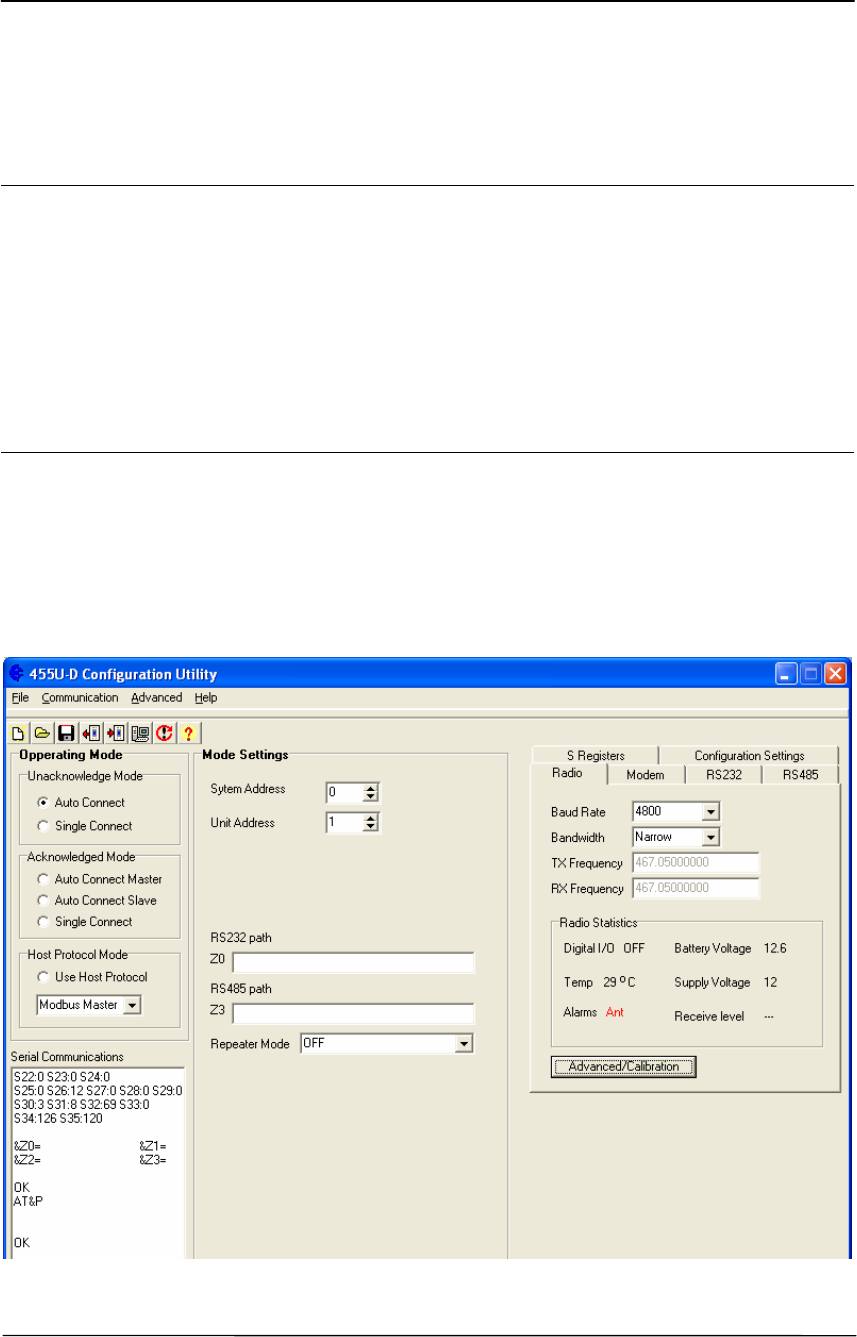
The configuration program is Cfg_455UD. This program will run under Windows 95, 98,
NT, or 2000. The program may be obtained from the Product CD which came with your
purchase, or can be downloaded from our web page (www.elprotech.com). When you use
this program, you create a configuration in the PC and then load or program the configuration
into the 455U module. You can also read the configuration from a module to edit.
The opening screen will show default settings with a random number for the system address.
Chapter Five Specifications
Man_455U Rev 1.0 Page 31
Reading and Configuring a module
You will need a connection cable between the PC and the 455U. The cable may connect to
either the DB9 port or the RJ45 configuration port. Connecting to the RJ45 configuration port
allows the modem to be configured while the DB9 port remains connected to the functioning
host system.
The cable to connect to the DB9 should have straight-through connections as per section 2.4.1
of this manual. If your PC only has USB serial connections with no RS232 port, you will
need to purchase a USB to RS232 converter cable.
The cable to connect to the RJ45 Config port should be wired as described in section 2.4.2 of
this manual.
Select the communications port that you will be using on the PC - make sure that no other
program is using this com port. The program default is COM1 - if you are using a different
com port, select the “Com Port Settings” icon from the toolbar and select the com port.
If connecting to the DB9 port, Make sure that the serial data rate and character type is the
same as that already configured in the module. If you are configuring a new module, then this
will be the case. If you are configuring a module which has already been in service, and you
do not know this information, then you will need to force the module to factory default
settings using the DIP switch in the module end plate (see section 4.7 of this manual).
If connecting to the RJ45 port, the serial data rate is fixed at 9600 baud. The character type is
8 data, No parity, 1 stop bit.
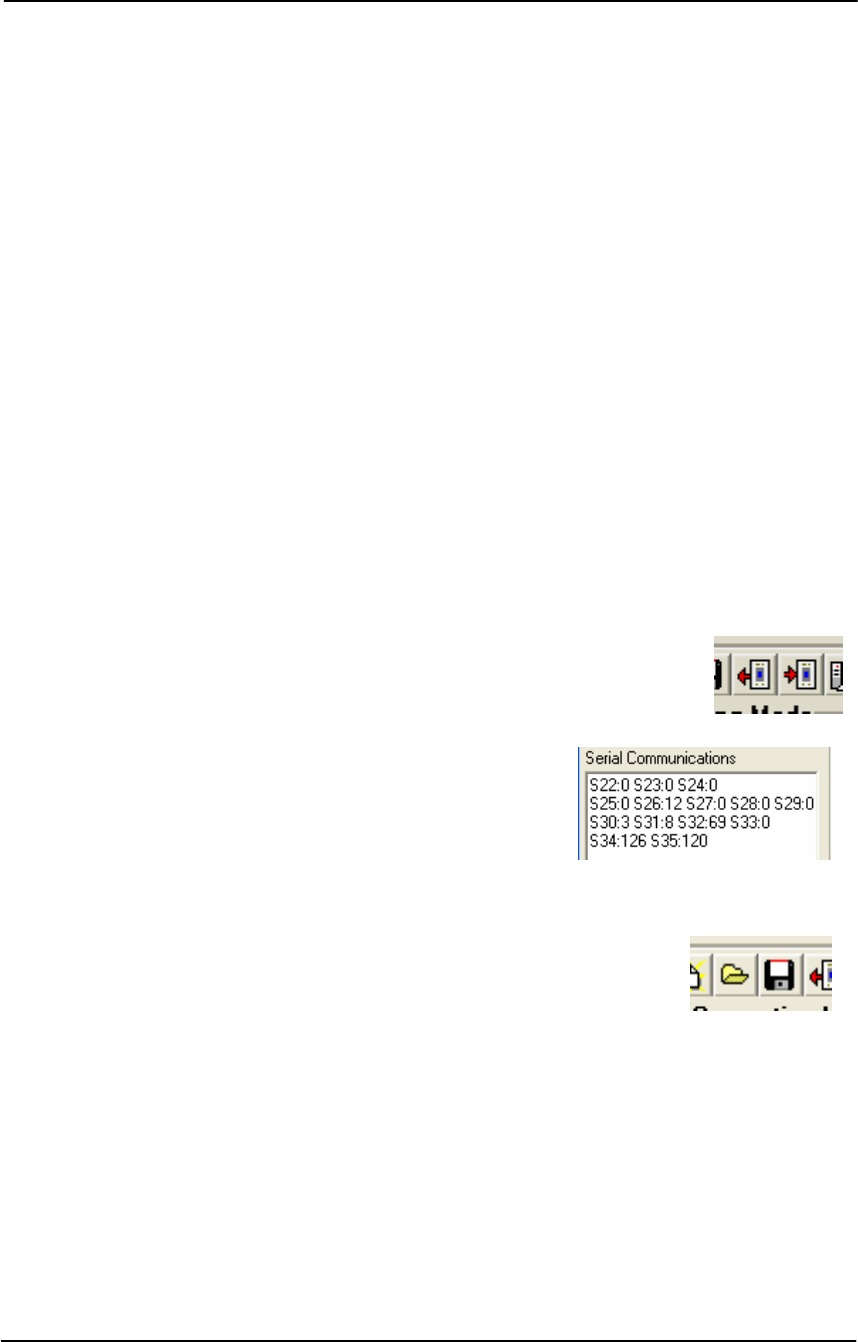
To read the configuration in a module, connect the cable and select the
“Upload” icon on the toolbar. To configure a module, select the
“Download” icon on the toolbar.
When you read or configure a program, you will see the
communication messages between the program and the
module in the “Serial Communications” box in the bottom
left hand corner of the program. The communication
messages are Hayes AT commands being generated or read
by the program.
Saving and Opening a configuration file
Configuration details may be saved to disk or read from disk.. To save a
configuration file, select the “Save” icon on the toolbar. The program
will ask you for a filename and will give a file extension of “.55D”. For
example, “PLC57.55D”. To open an archived file, select the “Open” icon on the toolbar.
Modifying an existing configuration
If you read a configuration from a module or a saved file, the program will display the
configuration parameters. You can change these parameters, and then program the module
and/or save the file.
4.4.1 Unacknowledged Mode
The default setting of the program is unacknowledged mode. Select the system address or use
the random value already selected - if the module is to become part of an existing system then
you must select the same system address as the existing modules.
455U Radio Modem Module User Manual
Page 32 © November 2004
Select a Unit address for the module. Giving each module a unique unit address allows the
modules to be accessed over the radio using remote configuration and diagnostics
The “Auto Connect” button will normally be selected for unacknowledged mode. This causes
the modem to go directly online. Usually the RS232 path will be set to “0” to broadcast to all
RS232 ports in the system, and the RS485 path will be set to 128 to broadcast to all RS485
ports in the system. If you select “Single Connect”, then the module will start-up in
command mode, and will not operate until the host device sends it an AT command to go on-
line.
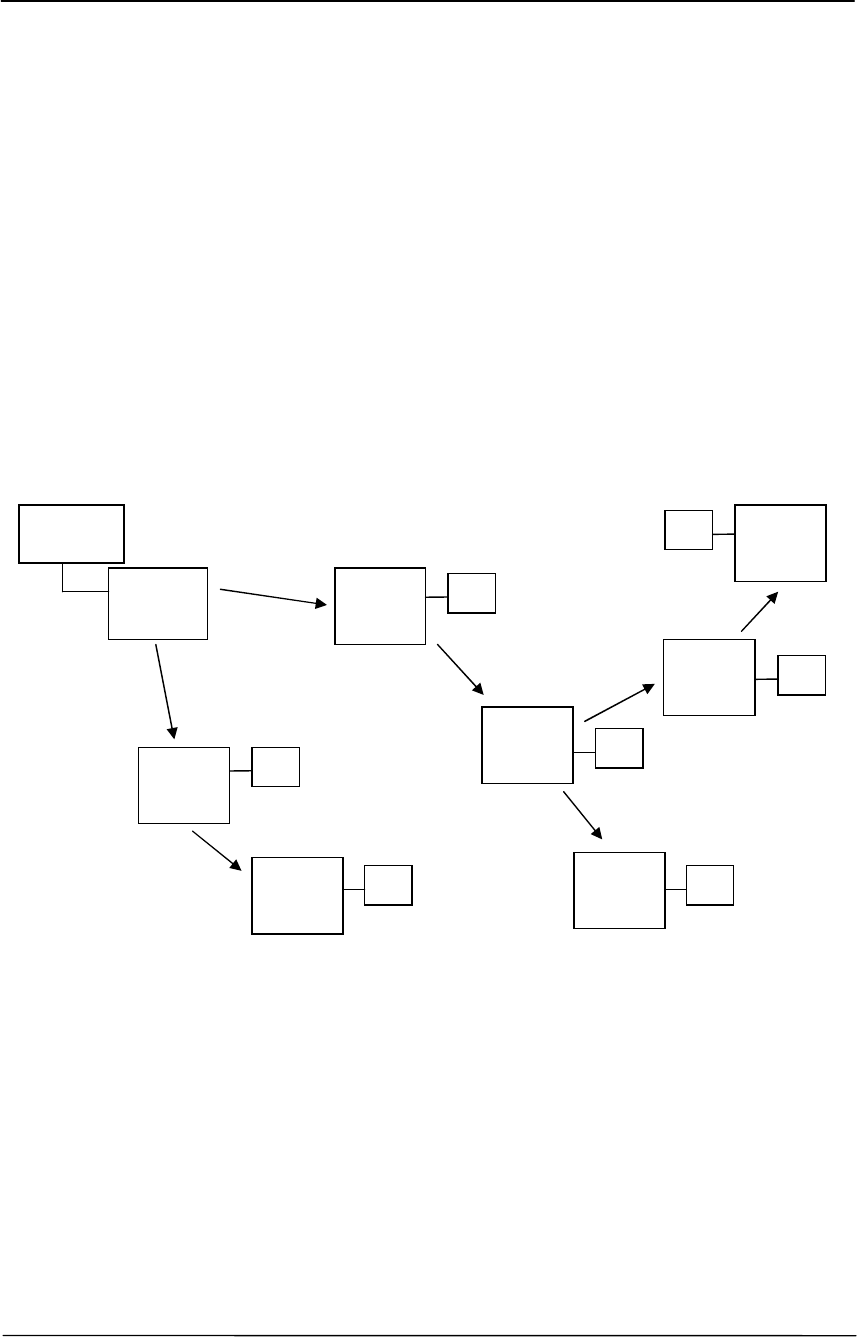
Broadcast Repeater
Selecting the broadcast repeater mode to causes the modem to become part of the a broadcast
backbone. Setting the repeater mode to “Hop 1” causes the modem repeat all messages which
have completed one hop, and have a “0” in the first intermediate address position of the
address. Similarly, setting Setting the repeater mode to “Hop 2” causes the modem repeat all
messages which have completed two hop, and have a “0” in the second intermediate address
position of the address.
455U
Rptr Mode
= Hop1
455U
Rptr Mode
= Disabled
Computer
PLC
PLC
PLC
PLC
PLC
PLC
PLC
455U
Rptr Mode
= Hop1
455U
Rptr Mode
= Hop2
455U
Rptr Mode
= Disabled
455U
Rptr Mode
= Hop3
455U
Rptr Mode
= Disabled
455U
Rptr Mode
= Disabled

Chapter Five Specifications
Man_455U Rev 1.0 Page 33
4.4.2 Acknowledged mode
If you select any of the Acknowledged mode options, you will be asked to select a unit
address for the module. This should be a unique address for that module (0 – 127).
Auto-Connect Master
In auto-connect mode, the “master” will automatically attempt to connect to the slave address.
Once connected, the link can transfer data in either direction, with error-checking,
acknowledgement messages, and automatic re-transmissions if necessary. If the link
connection fails (indicated by the LINK led), then the master unit will automatically try to
reconnect to the slave.
At the master unit, you need to enter the address of the slave. Select the “RS232 Path”
section.. The address of the slave is entered by clicking on the “Z0” box. Up to five repeater
addresses may be entered. Repeater modules may be configured in any Acknowledged mode
option, but they must have the same system address. The repeater addresses are entered in
order from the master - that is, the leftmost address is the first repeater after the master.
You can enter address structures for four slaves - “Dest 1” to “Dest 4”. However the host
must use AT command to select which slave is required. Without the use of AT commands,
the master will only attempt to connect to the address configured in “Dest 1”.
Auto-Connect Slave
The only configuration required for a auto-connect slave module is to enter its unit address.
Single-Connect
In single-connect Acknowledged mode, the host devices use AT commands to select
destination addresses to connect to. Normally the only configuration required is a unit
address.
Acknowledged mode Options
For each Acknowledged mode, there are some options. In the “Advanced” page, there are
some timing parameters.
If you enter a “Link Check Time”, then the master unit will send a “check message” if the
check time has elapsed without any data transmissions. For example, if you enter 10 seconds,
then if there is a 10 second period without a data transmission, then the master module will
transmit a check message. If the slave does not acknowledge, then the master will transmit
the check message up to five times. If there is still no ACK, then the master will reset the
link (DCD reset).
If you enter an “Inactivity Timeout” value, then the 455U will automatically reset the link if
there has been no data transmissions within this time. If you use the link check feature, you
should enter an “Inactivity Timeout” value to reset the link at the slave unit.
It is a good idea to use these timers as it provides a higher level of security for the
Acknowledged mode system. Normally a link check time will be entered at the master unit
(for example, 10 seconds), and a inactivity timeout will be entered at the slave unit (for
example, 15 seconds). It is important that the inactivity timeout is greater than the link check
time.
A value of zero disables these parameters.

455U Radio Modem Module User Manual
Page 34 © November 2004
4.4.3 Other Parameters
Radio Data Rate
Select the radio data rate which you want to use. Note that modules will only communicate
with each other if they have the same radio data rate. If you select a rate which is faster than
the serial rate, the 455U will automatically set transmission delay parameters in registers S18
and S19 (refer section 3.8). To disable this, deselect the “PLC Mode” box in the Serial
configuration window.
Note that modules will only communicate with each other if they have the same radio data
rate.
CRC Error Checking for transmitted messages
It is normal for error checking to be disabled for unacknowledged mode and enabled for
controlled. However you can select either for either mode, and separately select for the RS-
232 port and the RS485 port. The modem is always able to receive messages both with and
without error checking, so different modems in the system may be configured with different
error checking options. (AT&E).
Data Encryption
Data Encryption may be set to “Disabled”, “Enabled on TX”, or “Forced on RX”. “Disabled”
setting allows the modem to receive both encrypted and unencrypted messages, but the
modem will only transmit unencrypted messages. “Enabled on TX” causes the modem to
transmit encrypted messages and to receive both encrypted and unencrypted messages.
“Forced on RX” causes the modem to transmit encrypted messages and only accept messages
which are encrypted. Note that the encryption keys must be set up in each modem to the same
values to allow the modem to decrypt encrypted data correctly. If incorrect encryption keys
are entered, the data will be forwarded out the correct port, but will be garbled.
Packet Size (bytes)
This selects the maximum number of bytes which will be transmitted in one message. If
more than this number of bytes is input into the 455U, then the module will transmit more
than one message.
The default value is 1024 bytes which is the largest packet value. If you are operating in a
noisy radio environment, then the system may be more reliable if you reduce the maximum
packet size and transmit a larger number of small messages rather than a lesser number of
large messages.
Transmit and Receive Hold-off delay times
A “transmit delay” time and a “receive delay” time can be configured. These parameters may be
used to fine tune and give priority to different 455U units in a system.
• After each message is transmitted, a 455U unit will not transmit another message during the
transmit delay time. This could be used to allow a reply message to be received before the
next message is sent.
• After a message is received, a message will not be transmitted during the receive delay time.
This could be used to delay a reply message until other messages have been sent.

Chapter Five Specifications
Man_455U Rev 1.0 Page 35
Serial Port settings
The serial port settings should be selected to match the host device. Different port settings
may be selected for different modules in the same system.
Serial data rate can be selected between 600 and 187,500 baud. If you select a rate which is
slower than the radio rate, the 455U configuration software will automatically set
transmission delay parameters in registers S18 and S19 (refer section 3.8).
To disable this feature, deselect the “PLC Mode” box. Then there will be no delay - data
bytes will be transmitted as soon as they appear in the input buffer.
The number of Data Bits can be selected as 7 or 8. The number of stop bits can be 1 or 2.
Parity can be none, even or odd.
Flow Control
“Flow control” affects the use of the CTS and RTS signals on the RS232 port. These signals
can be used to prevent overflow of the input buffer or output buffer of the 455U. The settings
should be selected to match the host device. The options for this setting are :
“None” - The RTS signal from the host is ignored and the 455U sets the CTS signal
always on.
“CTS/RTS” - input buffer flow control - the 455U will reset the CTS signal when its
input buffer is full
“XON / XOFF” the modem uses the XON and XOFF symbols to control flow of data.
This protocol should not be used with raw binary data, as the raw data may contain the
XON and XOFF characters. This flow control method is only suitable for use with ASCII
data.
DTR Control
The DTR signal on the RS232 port can be used for different functions in Acknowledged
mode:
“Ignore DTR” - the DTR signal does not perform any function
“Command Mode” - if the host resets DTR, the 455U will go into command mode - when
DTR is activated, the module will revert to on-line mode
“Command Mode, Disconnect” - as above except that the module will also force a
disconnection of the communications link
“Low Power, Disconnect” - when the host resets DTR, the module will disconnect the link
and go to low power mode. If you select the “Low Power” option in the Acknowledged mode
page, this selection of DTR will be automatically made.
DCD Control
The DCD signal on the RS232 port can be used to give an indication of communications link
status in Acknowledged mode. Note that the link is always connected in unacknowledged
mode.
“Always On” - the 455U sets the DCD to be always on

455U Radio Modem Module User Manual
Page 36 © November 2004
“Only High When Connected” - the DCD signal will be on when the link is connected
and off when the link is reset
“Pulse Low on Disconnect” - the DCD signal will be normally on but will switch off
momentarily (for 0.5 sec) when the link is reset.
Advanced Settings
These settings may be adjusted if the host device is using AT commands - refer to Appendix
A for an explanation of the different parameters.
S Registers
These are parameter registers settable by AT commands. They do not normally need to be
changed. Refer to Appendix A for an explanation of these parameters.

Chapter Five Specifications
Man_455U Rev 1.0 Page 37
4.5 Hayes Commands
The 455U unit may be configured by a host device using Hayes AT commands.
Configuration may be done “off-line” by a user (with a PC terminal as the host device) or it
can be done automatically “on-line” by a host device such as PLC or SCADA. The AT
commands are ASCII messages designed for use with conventional telephone modems.
Before a 455U unit will accept Hayes commands, it must be in “command” mode. A host
device may force the unit to command mode by sending a sequence of three “escape”
characters - “+++”. The default escape character is “+”, however this may be changed as it is
one of the configuration parameters. There must be a 1 second break of data before and after
the escape sequence. The 455U can be configured to start up in command mode (or
alternately in operating mode). It would be normal for the modem to start up in command
mode when used in single-connect Acknowledged mode.
Once in configuration mode, the 455U unit will accept a string of Hayes commands, and the
configuration changes made. The changes will not however be stored in permanent memory
(EEPROM) unless the Hayes command for recording the configuration (AT&W) is sent.
When the configuration changes are made, the module must be put back into its operating
mode by using the “online” Hayes command, ATO
Commands are entered in the format ATxy, where x selects the parameter, and y the value of
the parameter. For example, ATB2 sets the radio data rate to 4800 baud. B selects the radio
rate parameter and 2 is the value corresponding to 4800 baud.
Summary
Enter command mode <1sec break> + + + <1 sec break>
Response from 455U OK
Enter configuration commands ATxy
Response from 455U OK
Save configuration AT&W
Exit command mode ATO
Note that some commands will automatically exit command mode. Several commands can
be run together, for example, ATB2&WO is the same as ATB2 and AT&W and ATO
Prior to Configuration
Before configuring a module initially, force the module to its factory default configuration -
either by using the DIP switch (refer section 4.3), or by using the AT&F command. If you
are making a change to an existing configuration, this step is not necessary.
Appendix A details all of the Hayes commands accepted by the 455U. The following
commands are the most common.

455U Radio Modem Module User Manual
Page 38 © November 2004
4.6 Switch Configuration
Factory default configuration may be restored to the modem by setting the DIL switch on the
end plate to “Default” setting. This will not change the configuration
settings in non-volatile memory, but will set the volatile configuration to
factory default settings. This is equivalent to entering the command
“AT&F” to the modem. To restore Factory defaults, perform the following
1. Set the switch to “Default” (down) position
2. Turn off module power
3. Turn module power back on
4. Return the switch to the up position
The module will now be configured for 19,200 baud communication on the RS232 DB9 port.

Chapter Five Specifications
Man_455U Rev 1.0 Page 39
4.7 Configuration Examples
Typical Applications
The following section describes some typical applications and the configuration of the
modems involved.
4.7.1 Data Logger Network with Central Computer
In this application, the computer connects to each logger on a regular basis, and uploads
information from the logger. The logger protocol does not support error checking, and the PC
application software is designed to work with telephone modems. The PC software issues
ATD commands to the central modem to make connection with each logger. When it has
finished communicating with the logger, it issues an ATH command to terminate the
connection.
4.7.1.1 Central Modem configuration
AT&M1 – Configure Acknowledged Mode
AT&E1 – Enable Error checking
AT&U1 – Set unit address to 1.
4.7.1.2 Remote Modems configuration
AT&M1 – Configure Acknowledged Mode
AT&E1 – Enable Error checking
ATS0=1 – Enable Auto Answering on first attempt.
AT&U2, AT&U3, etc – Set unit address to 2, 3, 4, etc for each remote modem.
4.7.2 Unsupported Protocol, with broadcast messages and repeaters.
This example demonstrates how to operate with an unsupported protocol, and demonstrates
how to broadcast messages to the entire system.
This example incorporates a single station connected to Master host device, two repeater
stations with connected slave host devices, and three remote stations each with a connected
slave host device. The master station is address 1. The two repeater stations are address 2 and
3. The remote stations are addresses 4, 5 and 6.
Remote station 4 communicates directly to the master station. Remote stations 5 and 6
communicate with the master via repeater stations 2 and 3 respectively. Messages from the
Master host device must be delivered to all of the slave devices, and messages from each of
the slave devices must be delivered to the master station.
This example uses operating mode 0, which routes all messages according to the path set with
the &Z0 command.
The host protocol is packet based, with message packets of up to 100 bytes. The master
station initiates all communication, and waits for a response from the slave devices.
4.7.2.1 Master Host site Modem configuration
AT&M0 - Configure mode 0 – Unacknowledged mode.

455U Radio Modem Module User Manual
Page 40 © November 2004
AT&L1 – Go directly online at startup
AT&U1 - Set Modem’s address to 1
AT&Z0=0,0 - Set all messages to go to the wildcard address, and repeat once
4.7.2.2 Slave Repeater stations address 2 and 3
AT&M0 - Configure mode 0 – Unacknowledged mode.
AT&L1 – Go directly online at startup
AT&U2 (or &U3)- Set Modem’s address to 2(or 3)
AT&Z0=1 - Set all messages to go directly to master station, address 1.
AT&R1 - Set Broadcast Repeater mode – Repeat messages on first hop to wildcard address 0.
ATS17=20 or 40 – Set the receive hold-off to a different value for each repeater. This ensures
that the repeated messages from the repeaters don’t clash with each other. Also this ensures
the repeated messages don’t clash with responses from any of the directly communicating
devices. This command sets one repeater to 200 mSec hold-off and the other to 400 mSec
hold-off.
4.7.2.3 Slave device Site address 4
AT&M0 - Configure mode 0 – Unacknowledged mode.
AT&L1 – Go directly online at startup
AT&U4 - Set Modem’s address to 4
AT&Z0=1 - Set all messages to go directly to master station, address 1.
4.7.2.4 Slave device Site addresses 5 and 6
AT&M0 - Configure mode 0 – Unacknowledged mode.
AT&U5(or U6)- Set Modem’s address to 5(or 6)
AT&P0=:1 - Set all messages to go directly to master station, address 1..
4.7.3 Modbus Network, including repeaters
This example applies to both a modbus network and to a DF1 half duplex network. The
difference will be the of &M setting (mode).
The application requires the following configuration
• Master station. modem address 99 (No modbus address).
• Remote stations 1-4 communicate directly to master station. Modbus addresses 11-14
are connected to these stations.
• Remote stations 5-6 communicate to master station through remote station 3. Modbus
addresses 25-26 are connected to these stations.
• Remote station 7 communicates to master station through remote stations 6 and 3.
Modbus address 27 is connected to this stations.
4.6.2.1 Master station configuration

Chapter Five Specifications
Man_455U Rev 1.0 Page 41
AT&M4 – Configure Modbus specific mode – master
AT&U99 - Set unit address to 99
AT&P0=11-14:1 - To communicate to modbus addresses 11-14, transmit the message
directly to modems 1 through 4 respectively.
AT&P4=25-26:3,5 - Communicate to modbus address 25 and 26, transmit to station 5 via
station 3 and to station 6 via station 3 respectively.
AT&P6=27:3,6,7 - Communicate to modbus address 27 via stations 3,6, and 7.
4.6.2.2 Remote stations 1-4 Configuration
AT&M5 - Configure Modbus specific mode – slave
AT&U1 to AT&U4 - Set the station address 1 to 4
AT&P0=0:99 - Send all messages to station 99.
4.6.2.3 Remote stations 5-6 Configuration
AT&M5 - Configure Modbus specific mode – slave
AT&U5 to AT&U6 - Set the station address 5 or 6
AT&P0=0:3,99 - Send all messages to station 99 via station 3.
4.6.2.4 Remote station 7 Configuration
AT&M5 - Configure Modbus specific mode – slave
AT&U7 - Set the station address 7
AT&P0=0:6,3,99 - Send all messages to station 99 via stations 6 and 3.
4.7.4 DNP3 network with repeaters
The DNP protocol is a peer-to-peer protocol, with both the source and destination address
encoded in the data frame. This example describes a network with 5 stations. Station
addresses are 1-5, with connected DNP devices having addresses 1001 – 1005 respectively.
Stations 1, 2 and 4 can communcate to station 3. Station 4 can also communicate to station 5.
This example also applies to Profibus networks, except that the mode setting (&M) will have
a different value.
4.6.3.1 Stations 1&2 configuration
AT&M8 - Configure DNP3 protocol mode
AT&U1 or AT&U2 - Set station address to 1 or 2.
AT&P0=1002:3,2 - To talk to 1002, communicate via 3 and station 2 (For station 1)
AT&P0=1001:3,1 - To talk to 1001, communicate via 3 and station 1 (For station 2)
AT&P1=1003:3 - To talk to 1003, go via station 3
AT&P2=1004:3,4 - To talk to 1004, go via station 3 then 4
AT&P3=1005:3,4,5 - To talk to 1005, go via station 3, 4 then 5
4.6.3.2 Station 3 configuration

455U Radio Modem Module User Manual
Page 42 © November 2004
AT&M8 - Configure DNP3 protocol mode
AT&U3 - Set station address to 3.
AT&P0=1001-1002:1 - To talk to 1001 or 1002, communicate via station 1 or station 2
respectively
AT&P2=1004:4 - To talk to 1004, go directly to station 4
AT&P3=1005:4,5 - To talk to 1005, go via station 4 then 5
4.6.3.3 Station 4 configuration
AT&M8 - Configure DNP3 protocol mode
AT&U4 - Set station address to 4.
AT&P0=1001-1002:3,1 - To talk to 1001 or 1002, communicate via 3 then to stations 1 and 2
respectively.
AT&P1=1003:3 - To talk to 1003, go directly via station 3
AT&P3=1005:5 - To talk to 1005, go directly via station 5

Chapter Five Specifications
Man_455U Rev 1.0 Page 43
Chapter Five SPECIFICATIONS
General
EMC specification EN 300 279 89/336/EEC
Radio specification EN-300-219/1 360 – 520 MHz, 5W
Housing 130 x 145 x 40mm
DIN rail mount
Powder-coated, extruded
aluminium or plastic
Terminal blocks Removable Suitable for 2.5sqmm conductors
LED indication OK operation, Serial RX
and TX, Radio RX and
TX, DCD active
Operating Temperature -30 to +60 degrees C
-40 to +70 degrees C
0 – 99% RH non-
condensing
Full performance
Typical performance
Power Supply
Nominal supply 11 to 15VDC – Backup
Lead Acid Battery
15-30 VDC – Main
Supply
Overvoltage and reverse voltage
protected. Provides Battery
charging features from main
supply.
Reverse current protected.
Current Drain @ 12VDC 90 mA quiescent
During transmission up to 1.5A
Radio Transceiver
Single channel synthesized, fixed band
12.5 or 25KHz
360 –520 MHz (In 20 MHz
bands)
Transmit power Four levels 5W, 2W, 1W
and 0.5W
Configurable
Receive Sens (BER 10
-3
) -106 dBm
-112 dBm
-114 dBm
-116 dBm
9600 Baud
4800 Baud
2400 Baud
1200 Baud
Signal detect / RSSI -120 to -60 dBm

455U Radio Modem Module User Manual
Page 44 © November 2004
Expected line-of-sight range
30 km @ 19200 baud
(25Khz)
35 km @ 9600 baud
(12.5Khz)
60 km @ 4800 baud
Range may be extended by up to
6 intermediate modules as
repeaters, in Acknowledged
mode
Antenna Connector Female SMA coaxial
Serial Ports
RS232 Port DB9 female DCE RTS/CTS/DTR/DCD hardware
signals provided
RS485 Port 2 pin terminal block Maximum distance 1.2 km
Data rate (bit/sec) -
configurable
600, 1200, 2400, 4800,
9600, 14400, 19200,
28800, 31250, 38400,
57600, 76800, 93750,
115200, 187500
Byte format 7 or 8 data bits Stop/start/parity bits configurable
System Parameters
Operating modes Unacknowledged mode
Acknowledged mode
Broadcast or Addressed
Addressed communications with
retry – acknowledge protocol
System address Configurable 16 bit
User Configuration Hayes commands from local or
remote host device.
Configuration Software Utility
Factory Default via switch
Diagnostics OK and PWR leds
Low signal receive led
CTS/RTS indication
RSSI measurement in
dBm
BER test

Chapter Six Troubleshooting
Man_455U Rev 1.0 Page 45
Chapter Six TROUBLESHOOTING
6.1 Diagnostics Chart
INDICATOR CONDITION MEANING
OK LED OFF Continuously • Power supply failure
• Battery Supply Overvoltage
OK LED RED Continuously • CPU Failure
• Low Supply Voltage
OK LED ON Continuously • Normal Operation
Radio TX LED ON Flashes briefly • Radio transmitting
Radio RX LED ON GREEN flash
RED flash
• Radio receiving data
• Weak radio signal (<-95dBm)
RS232 LED ON Flash • RS232 Serial Port Receiving or transmitting
RS485 LED ON Flash • RS485 Serial Port Receiving or transmitting
DCD LED OFF Continuously • No Radio Link established.
DCD LED GREEN Continuously • Modem is online & ready to transmit.
• In Acknowledged mode, a radio link has been
established.
DCD LED RED Continuously • Modem is in Command mode, but has a radio
link established.
• Must send “Online” command to modem before
communicating to other modems.
The green OK LED on the front panel indicates correct operation of the unit. This LED
becomes red on failure as described above. When the OK LED becomes red shutdown state is
indicated. On processor failure, or on failure during startup diagnostics, the unit shuts down, and
remains in shutdown until the fault is rectified.

455U Radio Modem Module User Manual
Page 46 © November 2004
6.2 Test Functions
6.2.1 Radio Testing - AT&Tx
To aid in the checking and setup of the 455U unit, diagnostic functions are provided using the
standard Hayes AT commands. To perform the tests, you will need a terminal (PC + hyper-
terminal) set-up to match the module (same character type and serial speed). The table below
outlines the functions of the various tests:
AT&T Radio Self Tests. Allows in-field diagnostics, and factory testing.
&T0 Stop Tone Reversals.
&T1 Tone Reversals – 200 HZ modulation
&T2 Tone Reversals – 2400 HZ modulation
&T3 Tone Reversals – No modulation
&T4 Random Tone Reversals. Generates pseudo random data and sends out radio.
&T5 RSSI Measurement. Monitors the received signal strength, and displays in dBm
Most radio tests are carried out using the AT&T2 test as this is the easiest to accomplish.
AT&T5 - Received Signal Strength Display
This option provides for testing the radio path between two 455U units. Although a pair of
units may communicate successfully, radio communication may be affected by a range of
influences, including atmospheric conditions, changing landscape, degradation of antennas or
co-axial cable, low battery voltage etc. Fade margin is an indication of how far a radio path
can deteriorate before reliable communication becomes unreliable.
When using this feature, the current value of the received signal strength is displayed in dBm
(decibels referenced to 1 mW). This value is updated every half second. To check the radio
path between two units, force the remote unit to generate data and read the signal level from
the local terminal. The remote unit can be forced to transmit by selecting AT&T2.
Also measure the background noise by stopping transmission from the remote module and
reading the value from the terminal. For reliable operation (that is, a bit error rate of more
than 1 in 300) the transmitted signal should be better than the following margins:
Radio Baud Rate Margin above Noise Minimum Value (dBm)
9600 10 -95
4800 10 -105
When using directional antennas (YAGI antennas) this feature may be used to align the
antenna in the correct direction by selecting the peak signal when moving the antenna. Setup
the remote unit to transmit, and observe the signal indication while adjusting the orientation
of the antenna. A peak in signal level indicates optimum orientation of the antenna.

Chapter Six Troubleshooting
Man_455U Rev 1.0 Page 47
6.2.2 Bit Error Rate Test (BER)
BER may be tested by typing AT#B (BER master) The sending unit will repeatedly send
pseudo-random frames, and the receiving unit will check these frames for errors. The
receiving unit returns a response message indicating how many (if any) errors were found.
The test results are displayed on the sending unit.
An example of the sending unit’s display is here.
Test Errors Extra Level TotErr TotMissed TotTest
109 0 0 -77dBm 3 0 109 kbit
Test - the sequence number of the last received frame
Errors - the number of bit errors in the last received frame
Extra - any extra characters at the end of the frame (negative numbers indicate
frame dropped out early)
Level - the RSSI level when the frame was received.
TotErr - The total errors received during this test.
TotMissed The number of missed frames during this test
TotTest - The total number of bits sent (in 1000’s)
Occasionally during testing, the following may be displayed:
Test Errors Extra Level TotErr TotTest
Bad Header
This indicated that the header information has been corrupted. Corrupted headers do not
contribute to the bit errors, which are calculated only on the 1,000 bit frame.
The BER test will automatically end if a test time has been entered at S8 register (refer
Appendix A). If S8 has a zero value (default), the timer is inactive and the BER test will
continue until manually stopped.
6.2.3 On-line diagnostics
Some diagnostic values may be read by a host device, using AT commands. These values
include the radio signal strength of the last message received (ATS9?) and the reason for the
communication link resetting in Acknowledged mode (ATS12?) - refer Appendix 1.
Other Diagnostic registers are :
S-Register Meaning
S31 Radio Flags, 0 for All OK, Otherwise some Radio faults. (8 indicates no antenna)
S32 Module Temperature (Subtract 50 to get temp in deg C)
S33 State of Digital I/O point
S34 Battery Input Voltage (Units 0.1Volt)
S35 Supply Input Voltage (Units 0.1Volt) (0-25.5 Volts)

455U Radio Modem Module User Manual
Page 48 © November 2004
Chapter Seven WARRANTY & SERVICE
We are pleased that you have purchased this product.
ELPRO products are warranted to be free from manufacturing defects for a period of 12
months from the effective date of purchase by the end user. The effective date of purchase is
decided solely by ELPRO Technologies.
This warranty does not extend to:
- failures caused by the operation of the equipment outside the particular product's
specification, or
- use of the module not in accordance with this User Manual, or
- abuse, misuse, neglect or damage by external causes, or
- repairs, alterations, or modifications undertaken other than by an authorized Service
Agent.
ELPRO’s liability under this warranty is limited to the replacement or repair of the product.
This warranty is in lieu of and exclusive of all other warranties. This warranty does not
indemnify the purchaser of products for any consequential claim for damages or loss of
operations or profits and ELPRO is not liable for any consequential damages or loss of
operations or profits resulting from the use of these products. ELPRO is not liable for
damages, losses, costs, injury or harm incurred as a consequence of any representations,
warranties or conditions made by ELPRO or its representatives or by any other party, except as
expressed solely in this document.
Full product specifications and maintenance instructions are available from your Service
Agent, your source of purchase, or from the master distributor in your country upon request
and should be noted if you are in any doubt about the operating environment for your
equipment purchase
In the unlikely event of your purchase being faulty, your warranty extends to free repair or
replacement of the faulty unit, after its receipt at the master distributor in your country. Our
warranty does not include transport or insurance charges relating to a warranty claim.
Should you wish to make a warranty claim, or obtain service, please forward the module to
the nearest authorized Service Agent along with proof of purchase. For details of authorized
Service Agents, contact your sales distributor.

Appendix A Hayes Commands
Man_455U Rev 1.0 Page 49
Appendix A Hayes Commands
The following details all of the Hayes commands supported by the 455U. Default settings are
shown by a “dot”, •
Command
Function
ATA Answer Incoming Call – The modem can also be set to answer incoming calls
immediately or after a certain number of attempts. (See S-Register S0)
ATB Set Radio Baud Rate – Radio Baud rates are 1200, 2400, 4800, 9600 and 19200
baud. Some baud rates may not be possible for some country codes. The baud
rate selected depends on the radio bandwidth setting (AT\N0 or AT\N1)
With Narrowband radio
(AT\N1 selected)
With wideband radio (AT\N0 selected)
B0 Set 1200 baud Set 2400 baud
B1 Set 2400 baud Set 4800 baud
B2• Set 4800 baud Set 9600 baud
B3 Set 9600 baud Set 19200 baud
ATC Serial Baud Rate selection / Automatic Baud Detection control ( These
commands refer to the RS-232 serial port. ATR commands refer to RS-485
port).
C0• Set automatic baud rate detection
C1 Set 600 baud
C2 Set 1200 baud
C3 Set 2400 baud
C4 Set 4800 baud
C5 Set 9600 baud
C6 Set 14,400 baud
C7 Set 19,200 baud
C8 Set 28,800 baud
C9 Set 31,250 baud (Foundation Fieldbus + Profibus FMS)
C10 Set 38,400 baud
C11 Set 57,600 baud
C12 Set 76,800 baud
C13 Set 93,750 baud (For Profibus)
C15 Set 115,200 baud
C16 Set 187,500 baud (For Profibus)
ATD Connection/Dialling Control. Dial a specific remote or a stored number. This

455U Radio Modem Module User Manual
Page 50 © November 2004
command has a different effect depending on whether it is issued from the RS-
232 main serial port (connects to the remote modem’s serial ports) or from the
Diagnostic serial port (Connects to the remote modems diagnostic functions).
ATE Local Echo Control. Enable/Disable Command Echo.
E0 Disable Local Echo
E1• Enable Local Echo
ATH Hang up/Hook control. End a call, or disable incoming calls.
ATI Modem Identity / Firmware version
ATO Go to on-line
ATQ Quiet mode (Suppress/enable response codes)
Q0• Enable response codes
Q1 Disable response codes
ATR RS-485 Serial Baud Rate selection.
R1 Set 600 baud
R2 Set 1200 baud
R3 Set 2400 baud
R4 Set 4800 baud
R5• Set 9600 baud
R6 Set 14,400 baud
R7 Set 19,200 baud
R8 Set 28,800 baud
R9 Set 31,250 baud
R10 Set 38,400 baud
R11 Set 57,600 baud
R12 Set 76,800 baud
R13 Set 93,750 baud (For Profibus)
R14 Set 115,200 baud
R15 Set 187,500 baud (For Profibus)
ATSn? Read value from S-Register n
ATSn=xx Set value of S-Register n to xx
ATV Verbal/Numeric Response Codes
V0 Numeric response codes
V1• Verbose response codes
ATX Extended Response Codes. Allows more detailed response codes, including

Appendix A Hayes Commands
Man_455U Rev 1.0 Page 51
connection speed.
X0• Basic response codes only
X1 X0 + Connection Baud rate codes (CONNECT 19200, CONNECT 57600)
X2 X1 + BUSY Message
X3 X2 + RINGING Message
ATZ Reset the modem, and re-load the configuration stored in non-volatile memory.
AT#A Remote Configuration and Diagnostics Access Mode
#A0• Disallow Remote Access
#A1 Allow Remote Access (Password required if configured in security menu) (Use
security Menu AT#S to change password)
AT#B Perform BER (Bit Error Rate) test to specified address (AT#B1,2,3,4 to do BER
test to site 4 via 1, 2 and 3).
AT#C Radio Calibration Options (Can only be accessed when #R Password entered)
#C0 Calibrate Power level for Power setting 0.
#C1 Calibrate Power level for Power setting 1.
#C2 Calibrate Power level for Power setting 2.
#C3 Calibrate Power level for Power setting 3.
#C4 Calibrate Radio Frequency offset
#C5 Calibrate Radio Deviation
#C6 Calibrate Radio Modulation Balance
#C7 Calibrate Radio RSSI Using Radio TestSet
#C8 Calibrate Radio RSSI (Set default Calibration or enter actual values)
AT#E Encryption Mode (Use security menu AT#S to change encryption key)
#E0• Disable security encryption
#E1 Enable security encryption on transmitted messages
#E2 Enable security encryption on transmitted messages and enforce encryption on
received msgs.
AT#O Control digital I/O point
#O0 Turn digital I/O point off (And enable as an input)
#O1 Turn digital I/O point on
#O2 Digital I/O point reflects communications link
AT#R Enter Radio Access Password – Enables radio commands until next reset.
(Password is ELPROTech).
AT#S Enter AES Security key.

455U Radio Modem Module User Manual
Page 52 © November 2004
AT&Axx RS-485 Serial port Character Type (Data bits, Stop bits, Parity)
0• 8 data, No parity, 1 Stop Bit
1 8 data, No parity, 2 Stop Bits
2 7 Data Bits, Even Parity, 1 Stop bit
3 7 Data Bits, Odd Parity, 1 Stop bit
4 8 Data Bits, Even Parity, 1 Stop bit
5 8 Data Bits, Odd Parity, 1 Stop bit
AT&Bxx RS-232 Serial port Character Type
0• 8 data, No parity, 1 Stop Bit
1 8 data, No parity, 2 Stop Bits
2 7 Data Bits, Even Parity, 1 Stop bit
3 7 Data Bits, Odd Parity, 1 Stop bit
4 8 Data Bits, Even Parity, 1 Stop bit
5 8 Data Bits, Odd Parity, 1 Stop bit
AT&C Data Carrier Detect (DCD) Control.
&C0 DCD Always on.
&C1• DCD High when connected (Acknowledged Mode) or when online
(Unacknowledged mode). Low otherwise.
&C2 DCD Always on, Pulses low on Disconnect (Acknowledged Mode) or on
Hangup (Unacknowledged mode).
AT&D Data Terminal Ready (DTR) Behaviour. The host controls DTR. This command
controls how the modem reacts to the state of DTR.
&D0• Modem ignores DTR, and acts as if it is asserted.
&D1 If the host lowers DTR, the modem returns to command mode, but does not
disconnect.
&D2 If the host lowers DTR, the modem disconnects and returns to command mode.
&D3 If the host lowers DTR, the modem disconnects and goes to low power mode.
Raising DTR will cause the modem to dial if the leased line settings are correct
(&L1).
AT&E CRC Error Checking
&E0• Disable CRC Error Checking
&E1 Enable CRC Error Checking for RS-232 port
&E2 Enable CRC Error Checking for RS-485 port
&E3 Enable CRC Error Checking for both RS-232 and RS-485 port
AT&F Restore Factory Defaults. This function is also available from the external DIP

Appendix A Hayes Commands
Man_455U Rev 1.0 Page 53
Switch.
AT&K RS-232 Serial port Flow Control Configuration. Flow control options are: none,
CTS/RTS and XON/XOFF.
In Acknowledged mode, flow control passes across the modem link, as the local
buffers become full, then back to the remote host device as the remote modem’s
buffers become full.
No Flow control is provided on the RS-485 port.
&K0• Flow Control Disabled. CTS Always high. Modem ignores RTS.
&K1 CTS/RTS Flow Control. CTS follows RTS high if there is space in the local
buffer. Otherwise CTS goes low. On Serial Transmit, CTS goes high, and waits
for RTS to go high before transmitting. Note: Currently not implemented
(Behaviour is as for &K3)
&K2 CTS/RTS Flow Control. CTS Reflects the state of the remote buffer, AND the
local buffer, AND the remote RTS input. The modem only transmits serial data
when RTS is high. RTS input is transferred to the remote modem. Note:
Currently not implemented (Behaviour is as for &K3)
&K3 CTS/RTS Flow Control. CTS Reflects the state of the local buffer. Modem only
transmits serial data when RTS is high.
&K4 XON – XOFF Flow Control. Modem uses XON (Hex value 0x17) and XOFF
(Hex value 0x19) to control flow of information between modem and host.
AT&L Leased Line Mode Control. Allows configuration for answer, originate, or
command mode.
&L0• Normal Mode. At power-up, the modem enters command mode and waits for
commands.
&L1 Leased Line mode. For Acknowledged mode, ATD automatically dials the
number stored in Z0, ATA answers an incoming call. For Unacknowledged
modes, the modem automatically goes online, and sends messages to the modem
configured in Z0.
&L2 Leased Line Originate mode. The modem dials the number stored in &Z0
automatically. It continuously attempts to connect to that number. Use DTR with
the AT&D command to control the connection. This mode is only allowed when
operating in Acknowledged mode.
&L3 Leased Line Answer mode. The modem continuously attempts to answer any
incoming call. Use DTR with the AT&D command to control the connection.
This mode is only allowed when operating in Acknowledged mode.
AT&M Operating Mode. This allows selection between unacknowledged mode,
acknowledged mode and the different protocol specific modes.
&M0• Unacknowledged Mode. All serial data is sent to the configured destination
address (In Z0 or specified in a dial command). No Acknowledgement is
required, and broadcast messages are allowed by using the wildcard address “0”.

455U Radio Modem Module User Manual
Page 54 © November 2004
In this mode, Messages on the RS-485 port are sent the the address configured in
register &Z1. Messages on the RS-232 port are sent to the address dialled from
the command line, or configured in the auto-dial register &Z0.
&M1 Acknowledged mode. This mode simulates telephone modems, with a single
connection being made to a remote modem in the system, and each message is
acknowledged before more data is sent. If no Acknowledgement is received, the
message is re-transmitted.
&M3
&M4
etc
Host protocol specific modes.
AT&N Abort Connection Control. Controls whether the modem will abort a connection
attempt if a character is entered. This item is only meaningful with the
acknowledged mode of operation.
&N0 Ignore characters entered while attempting to make a connection.
&N1• If a key is hit while attempting to connect, abort the connection attempt and
return to command mode.
AT&P Protocol Routing Paths – Up to 100 paths can be stored. Routing paths are used
in conjunction with host protocol specific routing, so that device addresses may
be extracted from the data frame and used to direct the message. Each path
consists of a destination address extracted from the protocol frame, a radio
destination address and up to 6 store and forward addresses.
Format:
1. “AT&Pxx= a[-a]:{n,}f”.
“xx” = 0 to 99. “a” = 0 to 65535 (depending on protocol). “n” = 0 to 127,
“f” = 0 to 255. This indicates the path to send the message. “a” is the
protocol address to match. (“a-a” indicates a range of addresses) “n”
indicates a repeater address in the radio network, and “f” indicates the
final address (0-127 indicates RS232 port, 128-255 indicates RS485 port)
2. “AT&Px=” “x” = 0 to 99. Clear path number “x”
3. “AT&Px?”. “x” = 0 to 99. Display setting for Path “x”
4. “AT&P?” or “AT&P” – Display all configured paths
5. “AT&P=” Clear all paths
These paths may apply to either the RS-232 port or the RS-485 port depending
on the modem’s operating mode
AT&R Repeater Functionality– Enable or disable repeating of messages to the wildcard
addresses 0 and 128, and enable or disable sending messages to serial port.
&R0• Don’t repeat messages to the “Wildcard” address, and don’t copy repeated
messages out the local serial port..
&R1 Repeat Messages sent to the wildcard address.
&R2 Send A copy of repeated messages out the serial port (RS-232 or RS-485 port

Appendix A Hayes Commands
Man_455U Rev 1.0 Page 55
depending on whether the message destination address is greater than 127).
&R3 Do both of R2 and R3. (Send A copy of repeated messages out the serial port
AND repeate messages to the wildcard address).
AT&T Self Tests. Allows in-field diagnostics, and factory testing. Tests time out after
the period configured in S-Register S8 (if not zero).
&T0 Stop Tone reversals (See T1 to T4 below).
&T1 Transmit tones Modulated at 200 Hz
&T2 Transmit tones Modulated at 2400 Hz
&T3 Transmit Tones Unmodulated
&T4 Transmite Random Modulated tones at current radio baud rate
&T5 RSSI Measurement. Monitors the received signal strength, and displays in dBm.
AT&V View Current Configuration – List the value of all settings as well as S-Registers
(except &P settings).
&V0 Same as AT&V
&V1 Only show settings that are different from the defaults.
&V2 Show all settings, including &P settings.
&V10 View configuration in non-volatile memory
&V11 As for V1, but configuration in non-volatile memory
&V12 As for V2, but configuration in non-volatile memory
AT&U Set modem’s Unit Address Range 0-127. Default 1. The Unit address is used to
identify the module in the system. It should always be set to a unique number
within the modems in the system. This address is also used to access to the
module using the remote diagnostics protocol.
AT&W Write Current Configuration to non-volatile storage
AT&Z Stored Numbers – Up to 4 stored numbers, also “Auto Connect” number for
leased-line mode.
Format: “AT&Zx=nn,nn,nn,nn”. “x” = 0 to 3. “nn” = 1 to 127. Z0 is used for the
autoconnect number.
Z0 contains the autoconnect number for the RS232 port (If Leased Line &L1 is
selected)
Z3 contains the destination addressing for the RS485 port.
AT\B Generate Break signal at remote modem. (Currently not implemented)
\Bn “n” is the break length in units of 0.1 seconds.
AT\F Set Radio Frequency (Can only be set when #R Password entered)
\FT xxx.xxxx Set Transmit Frequency xxx.xxxx MHz – Returns ERROR if
outside radio range.

455U Radio Modem Module User Manual
Page 56 © November 2004
\FR xxx.xxxx Set Receive Frequency xxx.xxxx MHz – Returns ERROR if
outside radio range.
AT\C Radio Frequency Increment (Can only be set when #R Password entered)
\C5 Set Radio frequency increment to 5.00 kHz.
\C6 Set Radio frequency increment to 6.25 kHz.
AT\N Radio Bandwidth (Can only be set when #R Password entered)
\N1 Set Radio to 2400 HZ bandwidth.
\N0 Set Radio to 4800 HZ bandwidth.
AT\P Radio Power (Can only be set when #R Password entered)
\P0 Set Radio to 500 mW
\P1 Set Radio to 1 W.
\P2 Set Radio to 2 W.
\P3 Set Radio to 5 W.
AT\K Break signal handling control
AT\B command
from online
Host sends break on serial Receive break from
remote
\K0 Purge Buffers & send
break
Enter command state & purge
buffers. Don’t send Break.
Purge buffers and
send break to host.
\K1 As for \K0 Purge Buffers and send break As for \K0
\K2 Send Break ahead of
buffered data.
As for \K0 Transfer break to host
ahead of buffered
data.
\K3 As for \K2 Send break ahead of buffered
data.
As for \K2
\K4 Queue Break behind
buffered data.
As for \K0 Queue Break behind
buffered data.
\K5 As for \K4 Queue break behind buffered
data.
As for \K4
AT\S Radio Statistics
\S Display stats including last received signal strength from all module addresses –
1 – 127 (only modules that have been received are displayed).
1 Rssi: -98dBm Rx: 95 Fwd: 0 Err: 72 Last: 0d03h19m18s
Stats are: Last Received signal strength, Number of Messages Received from
this address, Number of messages Forwarded from this address, and Number of
received messages with errors from this address. Also indicates the time since
last received a message from this address.
\Snn Display Stats for remote number nn only

Appendix A Hayes Commands
Man_455U Rev 1.0 Page 57
AT\T Inactivity Timeout – Units Seconds. Value 0-255. 0 = Disable. If there is no
activity within this time, the modem drops the connection. See also S Register
S6.
ATA Answer Incoming Call – The modem can also be set to answer incoming calls
immediately or after a certain number of attempts. (See S-Register S0)
ATB Set Radio Baud Rate – Radio Baud rates are 1200, 2400, 4800, 9600 and 19200
baud. Some baud rates may not be possible for some countries. In this case, ERROR
is returned. The Bell 202 and V.23 encodings allow use with existing systems that
use these schemes.
B0 Set 1200 baud
B1 Set 2400 baud
B2• Set 4800 baud
B3 Set 9600 baud (Available in some countries only)
B4 Set 19200 baud (Available in some countries only)
ATC Serial Baud Rate selection / Automatic Baud Detection control ( These commands
refer to the RS-232 serial port. ATR commands refer to RS-485 port).
C0• Set automatic baud rate detection
C1 Set 1200 baud
C2 Set 2400 baud
C3 Set 4800 baud
C4 Set 9600 baud
C5 Set 14,400 baud
C6 Set 19,200 baud
C7 Set 28,800 baud
C8 Set 31,250 baud
C9 Set 38,400 baud
C10 Set 57,600 baud
C11 Set 76,800 baud
C12 Set 93,750 baud (For Profibus)
C13 Set 115,200 baud
C14 Set 187,500 baud (For Profibus)
ATD Connection/Dialling Control. Dial a specific remote or a stored number. This
command has a different effect depending on whether it is issued from the RS-232
main serial port (connects to the remote modem’s serial ports) or from the
Diagnostic serial port (Connects to the remote modems diagnostic functions).
ATE Local Echo Control. Enable/Disable Command Echo.
E0 Disable Local Echo
E1• Enable Local Echo
ATH Hang up/Hook control. End a call, or disable incoming calls.
ATI Modem Identity / Firmware version
ATO Go to on-line
ATQ Quiet mode (Suppress/enable response codes)
Q0• Enable response codes
Q1 Disable response codes
ATR RS-485 Serial Baud Rate selection.
R1 Set 1200 baud
R2 Set 2400 baud

455U Radio Modem Module User Manual
Page 58 © November 2004
R3 Set 4800 baud
R4• Set 9600 baud
R5 Set 14,400 baud
R6 Set 19,200 baud
R7 Set 28,800 baud
R8 Set 31,250 baud
R9 Set 38,400 baud
R10 Set 57,600 baud
R11 Set 76,800 baud
R12 Set 93,750 baud (For Profibus)
R13 Set 115,200 baud
R14 Set 187,500 baud (For Profibus)
ATSn? Read value from S-Register n
ATSn=xx Set value of S-Register n to xx
ATV Verbal/Numeric Response Codes
V0 Numeric response codes
V1• Verbose response codes
ATX Extended Response Codes. Allows more detailed response codes, including
connection speed.
X0• Basic response codes only
X1 X0 + Connection Baud rate codes (CONNECT 4800, CONNECT 19200)
X2 X1 + BUSY Message
X3 X2 + RINGING Message
ATZ Reset the modem, and re-load the configuration stored in non-volatile memory.
AT#A Remote Configuration an Diagnostics Access Mode
#A0• Disallow Remote Access
#A1 Allow Remote Access (Password required if configured in security menu) (Use
security Menu AT#S to change password)
AT#E Encryption Mode (Use security menu AT#S to change encryption key)
#E0• Disable security encryption
#E1 Enable security encryption on transmitted messages
#E2 Enable security encryption on transmitted messages and enforce encryption on
received messages.
AT#S Enter AES-128 Encryption Key.
AT&A RS-485 Serial port Character Type (Data bits, Stop bits, Parity).
&A0• 8 data, No parity, 1 Stop Bit
&A1 8 data, No parity, 2 Stop Bits
&A2 7 Data Bits, Even Parity, 1 Stop bit
&Α3 7 Data Bits, Odd Parity, 1 Stop bit
&Α4 8 Data Bits, Even Parity, 1 Stop bit
&A5 8 Data Bits, Odd Parity, 1 Stop bit
AT&Bxx RS-232 Serial port Character Type (Data bits, Stop bits, Parity).
&B0• 8 data, No parity, 1 Stop Bit
&B1 8 data, No parity, 2 Stop Bits
&B2 7 Data Bits, Even Parity, 1 Stop bit
&Β3 7 Data Bits, Odd Parity, 1 Stop bit
&Β4 8 Data Bits, Even Parity, 1 Stop bit
&B5 8 Data Bits, Odd Parity, 1 Stop bit

Appendix A Hayes Commands
Man_455U Rev 1.0 Page 59
AT&C Data Carrier Detect (DCD) Control. DCD is always on in Unacknowledged mode.
&C0 DCD Always on.
&C1• DCD High when connected (Acknowledged Mode). Low otherwise.
&C2 DCD Always on, Pulses low on Disconnect (Acknowledged Mode).
AT&D Data Terminal Ready (DTR) Behaviour. The host controls DTR. This command
controls how the modem reacts to the state of DTR.
&D0• Modem ignores DTR, and acts as if it is asserted.
&D1 If the host lowers DTR, the modem returns to command mode, but does not
disconnect.
&D2 If the host lowers DTR, the modem disconnects and returns to command mode.
&D3 If the host lowers DTR, the modem disconnects and goes to low power mode.
Raising DTR will cause the modem to dial if the leased line settings are correct
(&L1).
AT&E CRC Error Checking
&E0• Disable CRC Error Checking
&E1 Enable CRC Error Checking
AT&F Restore Factory Defaults. This function is also available from the external DIP
Switch. Changed to S-Register
AT&H Broadcast Repeater Hops Setting – Set the number of hops for a message to
activate the broadcast repeater function (AT&R).
&H0• Don’t repeat messages to the “Wildcard” address, and don’t copy repeated
messages out the local serial port, regardless of the AT&R setting.
&H1 Perform the action specified by the AT&R setting when the wildcard address is
the first Store&Forward address, and the message has completed one hop.
&H2 Perform the action specified by the AT&R setting when the wildcard address is
the second Store&Forward address, and the message has completed two hops.
&H3
.. &H6
Repeat Messages when the wildcard address is the third (.. sixth) Store&Forward
address, and the message has completed three (..six) hops.
AT&K RS-232 Serial port Flow Control Configuration. Flow control options are: none,
CTS/RTS, XON/XOFF and RS-485 mode. In Acknowledged mode, flow control
passes across the modem link, as the local buffers become full, then back to the
remote host device as the remote modem’s buffers become full. No Flow control is
provided on the RS-485 port.
&K0• Flow Control Disabled. CTS Always high. Modem ignores RTS.
&K1
CTS/RTS Flow Control. CTS Reflects the state of the local buffer. Modem only
transmits serial data when RTS is high.
&K2 As for &K1
&K3 As for &K1
&K4
XON – XOFF Flow Control. Modem uses XON (Hex value 0x17) and XOFF
(Hex value 0x19) to control flow of information between modem and host.
AT&L Leased Line Mode Control. Allows configuration for answer, originate, or
command mode.
&L0• Normal Mode. At power-up, the modem enters command mode and waits for
commands.

455U Radio Modem Module User Manual
Page 60 © November 2004
&L1
Leased Line mode. For Acknowledged mode, The modem automatically dials
the number stored in Z0, ATA answers an incoming call. For Unacknowledged
modes, the modem automatically goes online, and sends messages to the modem
configured in Z0.
&L2
Leased Line Answer mode. The modem continuously attempts to answer any
incoming call. Use DTR with the AT&D command to control the connection.
This mode is only allowed when operating in Acknowledged mode.
AT&M Operating Mode. This allows selection between unacknowledged mode,
acknowledged mode and the different protocol specific modes.
&M0•
Unacknowledged Mode. All serial data is sent to the configured destination
address (In Z0 or specified in a dial command). No Acknowledgement is
required, and broadcast messages are allowed by using the wildcard address “0”.
In this mode, Messages on the RS-485 port are sent the the address configured in
register &Z1. Messages on the RS-232 port are sent to the address dialled from
the command line, or configured in the auto-dial register &Z0.
&M1 Acknowledged mode. This mode simulates telephone modems, with a single
connection being made to a remote modem in the system, and each message is
acknowledged before more data is sent. If no Acknowledgement is received, the
message is re-transmitted.
&M2 Host protocol specific modes.
&M3
etc
AT&N “Abort Connection” Control. Controls whether the modem will abort a connection
attempt if a character is entered. This item is only meaningful with the
acknowledged mode of operation.
&N0 Ignore characters entered while attempting to make a connection.
&N1• If a key is hit while attempting to connect, abort the connection attempt and return
to command mode.
AT&P
Protocol Routing Paths – Up to 100 paths can be stored. Routing paths are used
in conjunction with host protocol specific routing, so that device addresses may
be extracted from the data frame and used to direct the message. Each path
consists of a destination address extracted from the protocol frame, a radio
destination address and up to 6 store and forward addresses.
Format:
1 “AT&Pxx= a[-a]:{n,}f”.
“xx” = 0 to 99. “a” = 0 to 65535 (depending on protocol). “n” = 0 to 127,
“f” = 0 to 255. This indicates the path to send the message. “a” is the
protocol address to match. (“a-a” indicates a range of addresses) “n”
indicates a repeater address in the radio network, and “f” indicates the
final address (0-127 indicates RS232 port, 128-255 indicates RS485 port)
2 “AT&Px=” “x” = 0 to 99. Clear path number “x”
3 “AT&Px?”. “x” = 0 to 99. Display setting for Path “x”
4 “AT&P?” or “AT&P” – Display all configured paths
5 “AT&P=” Clear all paths
These paths may apply to either the RS-232 port or the RS-485 port depending

Appendix A Hayes Commands
Man_455U Rev 1.0 Page 61
on the modem’s operating mode
AT&R
Repeater Functionality– Enable or disable repeating of messages to the wildcard
addresses 0 and 128, and enable or disable sending messages to serial port. (Also
see AT&H command)
&R0•
Don’t repeat messages to the “Wildcard” address (0), and don’t copy repeated
messages out the local serial port..
&R1
Repeat Messages when the wildcard address is the next un-visited
Store&Forward address in the message, and message has done the number of
hops specified by the AT&H setting.
&R2 Send a copy of the message out the local serial port when the wildcard address is
the next un-visited Store&Forward address in the message, and message has
done the number of hops specified by the AT&H setting.
&R3 Do both Actions – Forward the message and send a copy of the message out the
local port – when the next store & Forward address is the wildcard address and
the message has done the number of hops specified in the AT&H setting.
AT&T Self Tests. Allows in-field diagnostics, and factory testing.
&T0 Transmit Bit Error Rate Test. Generates pseudo random data and sends out radio.
&T1 Receive Bit Error Rate Test. Receives data from &T0 modem, and records BER
statistics.
&T2 Transmit & Receive BER Test. Used with a second module configured as a
transparent repeater.
&T3 RSSI Measurement. Monitors the received signal strength, and displays in dBm.
AT&V View Current Configuration – List the value of all settings as well as S-Registers
(except &P settings).
&V0 Same as AT&V
&V1 Only show settings that are different from the defaults.
&V2 Show all settings, including &P and &Q settings.
&V10 View configuration in non-volatile memory
&V11 As for V1, but configuration in non-volatile memory
&V12 As for V2, but configuration in non-volatile memory
AT&U Set modem’s Unit Address (non-standard command for E455U only) Range 0-127.
Default 1. The Unit address is used to identify the module in the system. It should
always be set to a unique number within the modems in the system. This address is
also used to access to the module using the remote diagnostics protocol.
AT&W Write Current Configuration to non-volatile storage
AT&Z Stored Numbers – Up to 4 stored numbers, also “Auto Connect” number for leased-
line mode. Format: “AT&Zx=nn,nn,nn,nn”. “x” = 0 to 3. “nn” = 1 to 127. Z0 is
used for the auto-connect number.
AT\B Generate Break signal at remote modem.
\Bn “n” is the break length in units of 0.1 seconds.
ATF Set Radio Frequency (Requires Radio access Password)
FT=xxx.xxxx Set Transmit Frequency xxx.xxxx MHz – Returns ERROR if outside radio
range.
FR=xxx.xxxx
Set Receive Frequency xxx.xxxx MHz – Returns ERROR if outside radio
range.
AT\K Break signal handling control
AT\B command from online Host sends break on serial Receive break from remote

455U Radio Modem Module User Manual
Page 62 © November 2004
\K0 Purge Buffers & send break Enter command state & purge buffers.
Don’t send Break.
Purge buffers and send break to host.
\K1 As for \K0 Purge Buffers and send break As for \K0
\K2 Send Break ahead of buffered
data.
As for \K0 Transfer break to host ahead of
buffered data.
\K3 As for \K2 Send break ahead of buffered data. As for \K2
\K4 Queue Break behind buffered
data.
As for \K0 Queue Break behind buffered data.
\K5 As for \K4 Queue break behind buffered data. As for \K4
AT\S Display last received signal strength from all module addresses – 1 –
127.
AT\T Inactivity Timeout – Units Seconds. Value 0-255. 0 = Disable. If there
is no activity within this time, the modem drops the connection. See
also S Register S6.

Appendix A Hayes Commands
Man_455U Rev 1.0 Page 63
Appendix B Response Codes
Response codes display the status of the module in response to user commands. The response
code displayed depends on the ATV setting, the ATX setting and the ATQ setting. ATV0
selects numeric response codes. ATV1 selects verbal response codes. The ATXn command
selects extended response codes. ATQ0 disables all response messages. ATQ1 enables
response messages. The following table describes the messages. A • symbol indicates that
messages is displayed for the corresponding ATX setting.
Numeric
Code
Verbal Message ATX setting Comments
X0 X1 X2 X3
0 OK • • • • Valid Command Entered
1 CONNECT • Connection established.
CONNECT baud is displayed for
X1,X2,X3
2 RING • • • • Module Received an incoming
connection request
3 NO CARRIER • • • • Connection with remote module
lost, or not initiated.
4 ERROR • • • • Invalid Hayes command entered.
7 BUSY • • X0, X1 display NO CARRIER
instead of BUSY
13 RINGING • X0, X1, X2 Don’t display
RINGING message
14 CONNECT 1200 • • • CONNECT at 1200 baud
15 CONNECT 2400 • • • CONNECT at 2400 baud
16 CONNECT 4800 • • • CONNECT at 4800 baud
17 CONNECT 9600 • • • CONNECT at 9600 baud
18 CONNECT 19200 • • • CONNECT at 19200 baud

455U Radio Modem Module User Manual
Page 64 © November 2004
Appendix C S-Registers
The following table lists the S-Registers supported by the 455U modem.
No. Range
Function Comment
S0 0-255 Attempts before Answering
Call
Should normally be set to 1. 0 disables auto
answering of calls (ATA command to answer
calls only).
S1 3-255 Escape Sequence Guard Time Units 20 milliseconds. Min. Delay before and
after entering the escape sequence (“+++”)
also Max. Delay between characters of the
escape sequence.
S2 1-255 Escape Sequence Character Normally 43 = “+”
S3 0-127 Carriage Return Character Normally 13 = <CR>
S4 0-127 Line Feed Character Normally 10 = <LF>
S5 0-127 Back Space Character Normally 8 = <BS>
S6 0-255 Inactivity Timer/Link Check
Timer
Units Seconds. 0 disables. How frequently to
send a “Link Check” message. Usually set
less than the timeout set by the AT\T
command. Default 0.
S7 1-255 Number of Connection
attempts (Acknowledged
Mode)
How many times to attempt a connection
after an ATD command. Default 5.
S8 0-255 Test Timer Units Seconds – How long to run tests
(AT&Tx)
S9 0-255 Modem Receive Level Units (-)dBm – RSSI indication of last
received message. AT&T5 command may be
more useful.
S10 0-255 DTR Loss Detection Time Units 10 milliseconds (Not Implemented)
S11 0-255 Spare Function Not Implemented
S12 read-
only
Command Mode
Diagnostic
Reason modem last returned to command
mode, i.e. connection lost.
S12 = 0 Reset (ATZ or Power Up).
S12 = 1 Escape sequence (“+++”)
S12 = 2 DTR lowered.
S12 = 3 No ACK from remote modem after connected.
S12 = 4 Activity timer timed out.
S12 = 5 No response to dial request to remote modem.
S12 = 6 “BUSY” response from remote modem on dial request.

Appendix A Hayes Commands
Man_455U Rev 1.0 Page 65
S12 = 7 Character received from host while attempting to connect
S12 = 8 Hang-up from remote modem.
S13 0-255 Spare Function Not Implemented
S14 0-255 Max Packet (0–1020 bytes) Max Packet size = S14 x 4. Default 255.
S15 0-255 Break Length Minimum time to send “BREAK” signal.
Units 20 milliseconds.
S16 0-255 Transmit Hold-off (0-12.75
Sec)
How long to disable transmitting after
transmitting a message (Units 50
milliseconds)
S17 0-255 Receive Hold-off (0-12.75
Sec)
How long to disable transmitting after
receiving a message (Units 50 milliseconds)
S18 0-255 RS-232 Serial Rx Buffer
Threshold
This register indicates the number of
characters to be received into the RS-232
serial receive buffer before beginning radio
trasmission. (default 0)
S19 0-255 RS-232 Serial Rx Timeout If there is data in the RS-232 serial receive
buffer, and no data is received on the serial
port for this time, radio transmission will
begin regardless of the setting of S18. A
value of zero disables the timeout, so the
modem will not transmit until there are at
least S18 characters in the receive buffer.
S20 0-255 RS-485 Serial Rx Buffer
Threshold
This register indicates the number of
characters to be received into the RS-485
serial receive buffer before beginning radio
trasmission.
S21 0-255 RS-485 Serial Rx Timeout If there is data in the RS-485 serial receive
buffer, and no data is received on the serial
port for this time, radio transmission will
begin regardless of the setting of S20. A
value of zero disables the timeout, so the
modem will not transmit until there are at
least S20 characters in the receive buffer
S22 0-255 Default System Address –
High Byte
System address is set to this value when
factory defaults restored. This register is not
affected by the AT&F command.
S23 0-255 Default System Address –
Low Byte
System address is set to this value when
factory defaults restored. This register is not
affected by the AT&F command.
S24 0-255 System Address –High Byte The 16-bit system address uniquely identifies
the radio network

455U Radio Modem Module User Manual
Page 66 © November 2004
S25 0-255 System Address –Low Byte The 16-bit system address uniquely identifies
the radio network
S26 0-255 Lead-In Tone Time This selects the Lead-In tone period – units 4
mSec. The default (10) should not normally
be changed.
S27 0-255 Transmitter Hold-Up Time Selects How long the transmitter will stay on
waiting for more data before starting to send
the tail (mSec)
S28 0-255 Transmitter Tail Time Selects how long the transmitter will send a
“Tail” at the end of transmision. New data is
ignored during the tail time
S29 0-255 Unack Retries How many times to ret-transmit each
message in unacknowledged mode. Each
message is transmitted this number of times.
The sequence number and source address
ensure that repeat messages are ignored by
the receiver.
S30 0-255 Ackmode retries Number of times to re-try in acknowledged
mode if no Acknowledge response is
received..
S31 0-255 Radio Flags This read-Only register indicates radio Tx
error flags
- 1 => Overtemperature Shutdown on
- 2 => PTT Timeout
- 4 => PLL Out of lock
- 8 => Antenna failure
S32 0-255 Module Temperature This read-Only register indicates the module
temperature +50 (units °C)
S33 0-1 State of Digital Input read-Only 0 for off, 1 for on.
S34 0-255 Battery Voltage This read-Only register indicates the voltage
at the battery input (Units 0.1V)
S33 0-255 Supply Voltage This read-Only register indicates the voltage
at the Supply input (Units 0.1V)