ENUSTECH BHF300 WIRELESS HANDSFREE CARKIT User Manual BHF 300 USERS MANUAL JSKIM

ENUSTECH WIRELESS HANDSFREE CARKIT BHF 300 USERS MANUAL JSKIM

users manual

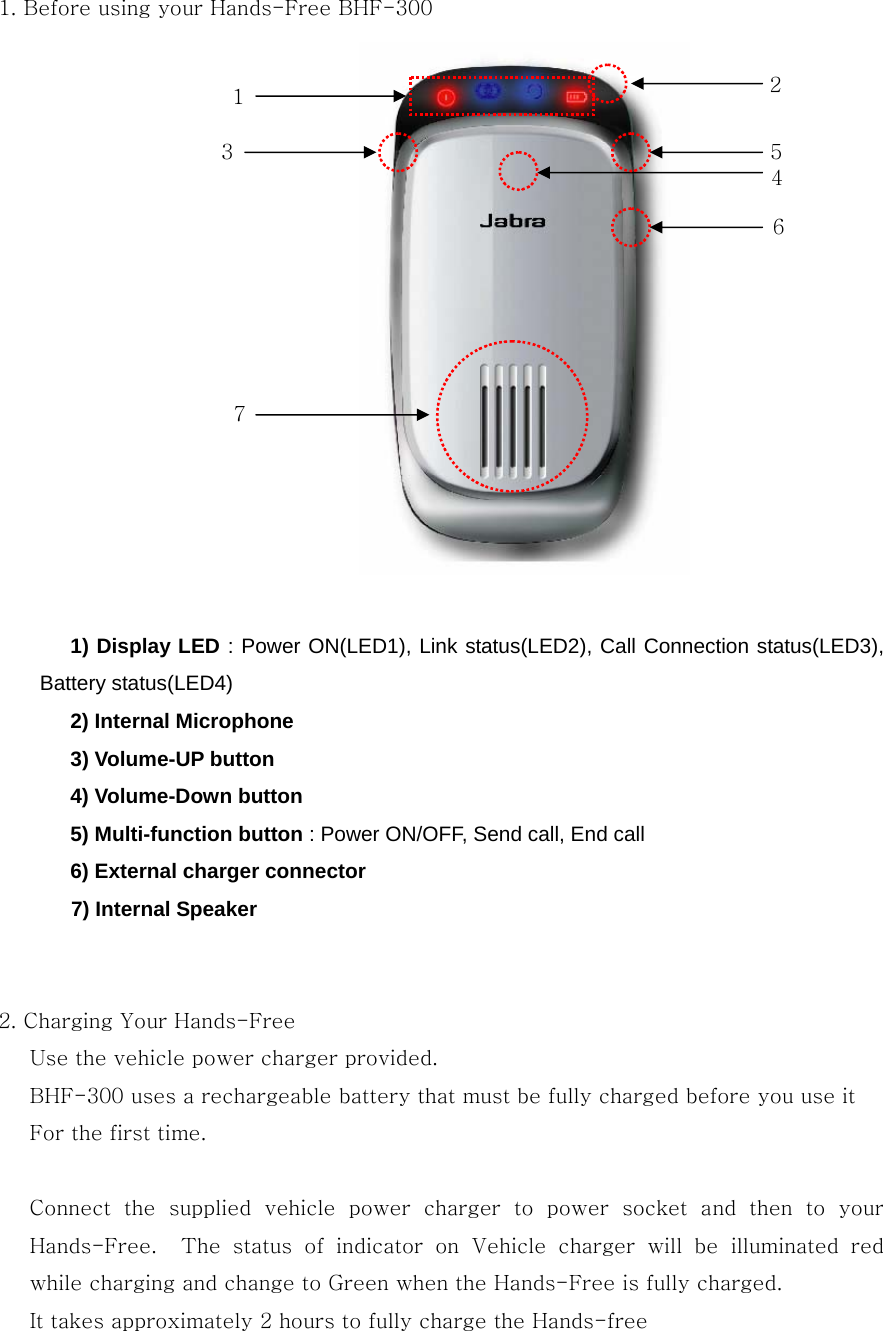
1. Before using your Hands-Free BHF-300                1) Display LED : Power ON(LED1), Link status(LED2), Call Connection status(LED3), Battery status(LED4)    2) Internal Microphone    3) Volume-UP button    4) Volume-Down button    5) Multi-function button : Power ON/OFF, Send call, End call       6) External charger connector    7) Internal Speaker   2. Charging Your Hands-Free       Use the vehicle power charger provided.       BHF-300 uses a rechargeable battery that must be fully charged before you use it         For the first time.        Connect  the  supplied  vehicle  power  charger  to  power  socket  and then to your Hands-Free.    The  status  of  indicator  on  Vehicle  charger  will  be  illuminated  red while charging and change to Green when the Hands-Free is fully charged. It takes approximately 2 hours to fully charge the Hands-free 1  2 5 6 7 4 3
 NOTICE: If battery is Low(1~2 hours Talk time) , Red light of the LED4 will blink in every five seconds. If battery is Very Low(0~1 hours Talk time), Red light of the LED4 will blink in every second.   3. BLUETOOTH PAIRING Before  using  your  hands-free  for  the  first  time  with  a  mobile  phone  or  another Bluetooth device, you must first pair it with the device. Follow the steps below for most devices. You can also refer your phone user guide.   1) Turn off the Hands-free, if Hands-free turned on. 2) Place  the  Hands-free  in  pairing  mode  by  pressing  and  holding  the  Multi-function  Button  for  seven  seconds.    Release  the  button  when  the status indicator begin to flash with beep sound.  NOTICE: If  the  pairing  is  not  success  for  two  minutes,  the  Hands–free  becomes  to stands-by mode. Hands-free enter pairing mode automatically if you use your hands-free for the first time or paired list empty  3) Use  your  phone’s menu to search for Bluetooth audio devices and select “BHF-300” 4) When the phone display asks for a pass key, enter “0000”. The  Bluetooth  icon  appears  on  the  display,  once  the  hands-free  successfully paired. If the Hands-free stops responding to button presses, you must reset  the Hands-free.   4. USING YOUR HANDS-FREE 1) Power On / Off Press the Multi-function buttons for two seconds in order to turn on the device.
Press the multifunction buttons for four seconds in order to turn off the device. 2) Connect the Hands-free to the phone     When  disconnected,  the  Hands-free  can  be  re-connected  to  the  phone  by  simply short pressing the Multi-function button. 3) Answer / End / Place a call             To answer a call, short press the Multi-function button.             To end a call, short press the Multi-function button.   To place a call using voice dialing, pressing and holding the Multi-function  button until you heard the short beep, and then release the Multi-function button. If you are on a calling using your phone handset, you can transfer the call to your hands-free by press and hold the Multi-function button for a second 4) Call transfer back to phone        To transfer a call from your Hands-free back to your phone,  press  and  hold  the Multi-function button for a second         5) Call reject                 To reject a call without answering when the Hands-free is ringing, press and hold the Multi-function button for a second 6) Last number redial             To redial the last number, two times press the multifunction button.         7) Volume Up / Down       Press the Volume-Up / Volume-Down button to adjust the volume     8) Mute the microphone             To  mute  the  microphone  when  you  are  on  a  calling  by  hands-free,  short  press  the Volume-up and Volume-down buttons simultaneously.     Note : To un-mute, short press the Volume-Up or Volume-Down button.   9) Clear paired list         If you want to delete the paired list, press and hold the Volume-Up, Volume-Down and Multi-function buttons simultaneously for seven seconds.   Note : If pairing list cleared , the hands-free becomes to pairing mode 10) Blind Mode    If you don’t want to see LED indication, press and hold the Volume-Up and Volume-Down buttons simultaneously for a second.   Note : To escape the blind mode, press and hold the Volume-Up and Volume-Down buttons simultaneously for a second again
User’s Information  Cautions   Modifications not expressly approved by the party responsible for compliance could   void the user’s authority to operate the equipment.   FCC compliance Information   This device complies with part 15 of FCC Rules. Operation is subject to the following two conditions: 1. This device may not cause harmful interference, and 2. This device must accept any interference received. Including interference that may cause undesired operation.  Information to User   This equipment has been tested and found to comply with the limits for a Class B digital device,    Pursuant to part 15 of the FCC Rules. These limits are designed to provide reasonable protection against harmful interference in a residential installation. This equipment generates, uses and can radiate radio Frequency energy and, if not installed and    used in accordance with the instructions, may cause harmful interference to radio communications. However, there is no guarantee that interference will not occur in a particular installation. If this equipment does cause harmful interference to radio or television reception, which can be determined by turning the equipment off and on, the user is encouraged to try to correct the interference by one or    more of the following measures:  - Reorient or relocate the receiving antenna.   - Increase the separation between the equipment and receiver- Connect the equipment into an outlet on a circuit different from that to which the receiver is connected.   - Consult the dealer or an experienced radio/TV technician for help.

Navigation menu