ENUSTECH JABRACRUISER WIRELESS BLUETOOTH CARKIT User Manual CRUISER Manual Draft
ENUSTECH WIRELESS BLUETOOTH CARKIT CRUISER Manual Draft
ENUSTECH >
Users Manual
81-03026 A
NEED MORE HELP?
See www.jabra.com/CRUISER for full user manual or contact your local
customer service department. TOLL FREE Customer Contact Details:
Quick start manual
www.jabra.com
© 2009 GN Netcom A/S. All rights reserved. Jabra® is a registered
trademark of GN Netcom A/S. All other trademarks included herein
are the property of their respective owners. The Bluetooth® word
mark and logos are owned by the Bluetooth SIG, Inc. and any use
of such marks by GN Netcom A/S is under license. (Design and
specifications subject to change without notice).
www.jabra.com
Made in Korea
TYPE: HFS001
For more information please visit
www.jabra.com
Jabra® CRUISER
GN Netcom A/S • Lautrupbjerg 7 • 2750 Ballerup • Denmark
EUROPE
Belgique/Belgie 00800 722 52272
Danmark 702 52272
Deutschland 0800 1826756
España 900 984572
France 0800 900325
Italia 800 786532
Luxembourg 00800 722 52272
Nederland 0800 0223039
Norge 800 61272
Österreich 00800 722 52272
Polska 0801 800 550
Portugal 00800 722 52272
Schweiz 00800 722 52272
Suomi 00800 722 52272
Sverige 020792522
United Kingdom 0800 0327026
Россия +7 495 660 71 51
International 00800 722 52272
EMAIL ADDRESSES
Deutsch support.de@jabra.com
English support.uk@jabra.com
Español support.es@jabra.com
Français support.fr@jabra.com
Italiano support.it@jabra.com
Nederlands support.nl@jabra.com
Polska support.pl@jabra.com
Scandinavian support.no@jabra.com
Россия support.ru@jabra.com
EN NB: Chapter headings and illustra-
tions share the same number to
aid understanding.
DK NB: Et kapitels overskrift og illus-
trationer har det samme nummer
for at gøre det lettere at forstå.
FR Remarque : Les mêmes numéros
pour les têtes de chapitre et les
illustrations sont utilisés pour
raison de compréhension.
DE Anmerkung: Kapitelüberschriften
und Abbildungen verfügen über
die gleiche Nummer, um das
Verständnis zu erleichtern.
RU ОБРАТИТЕ ВНИМАНИЕ:
для удобства пользования
руководством разделы и
иллюстрации имеют одинаковую
нумерацию.
UA Зверніть увагу: Задля зручності
заголовки розділів та ілюстрації
мають однакову нумерацію.
NL Opmerking: Voor uw gebruiksgemak
komen de nummers van de hoofd-
stukken en de afbeeldingen overeen.
FI HUOMIO: Lukujen otsikoissa ja
kuvissa käytetään samoja numeroita
havainnollisuuden lisäämiseksi.
SE
OBS: Kapitlens rubriker och
illustrationerna följer samma
numrering för att göra det lättare
att förstå.
IT NOTA: I titoli dei capitoli e le
illustrazioni sono numerati in
modo identico per agevolare la
comprensione.
ES NB: Los encabezados de los capítulos
y las ilustraciones comparten la
misma numeración para facilitar la
comprensión.
CZ Poznámka: Názvy kapitol a ilustrace
mají pro lepší pochopení stejná čísla.
PL UWAGA: Aby ułatwić zrozumienie,
nagłówki rozdziałów i ilustracje
mają te same numery.
GR Σηείωση: Οι επικεφαλίδες
κεφαλαίων και οι εικόνες
χρησιμοποιούν τον ίδιο αριθμό,
για καλύτερη κατανόηση.
TR Not: Kolay anlaşılması için bölüm
başlıklarının ve resimlerinin
numaraları aynıdır.
HU Megjegyzés: Az egyértelműség
kedvéért a fejezetek címsorainak és
ábráinak számozása megegyezik.
RO NB: Titlurile de capitole şi ilustraţiile
au acelaşi număr pentru a facilita
înţelegerea.
FA
AR
56
-
+
2
4
1
6
2
4
8
1
7
10
3
5
911
12
3
13
PIN code:
0000
FCC Information to User
This equipment has been tested and found to comply with the limits
for a Class B digital device, pursuant to Part 15 of the FCC Rules.
These limits are designed to provide reasonable protection against
harmful interference in a residential installation. This equipment
generates, uses and can radiate radio frequency energy and, if not
installed and used in accordance with the instructions, may cause
harmful interference to radio communications. However, there is no
guarantee that interference will not occur in a particular installation. If
this equipment does cause harmful interference to radio or television
reception, which can be determined by turning the equipment off and
on, the user is encouraged to try to correct the interference by one of
the following measures:
• Reorient or relocate the receiving antenna.
• Increase the separation between the equipment and receiver.
• Connect the equipment into an outlet on a circuit different from that
to which the receiver is con-nected.
• Consult the dealer or an experienced radio/TV technician for help.
Caution
Modifications not expressly approved by the party responsible for
compliance could void the user’s authority to operate the equipment.
FCC Compliance Information : This device complies with Part 15 of
the FCC Rules. Operation is subject to the following two conditions:
(1) This device may not cause harmful interference, and (2) this
device must accept any interference received, including interference
that may cause undesired operation
IMPORTANT NOTE:
FCC RF Radiation Exposure Statement:
This equipment complies with FCC RF radiation exposure limits set
forth for an uncontrolled environment. This equipment should be
installed and operated with a minimum distance of 20 centimeters
between the radiator and your body.This transmitter must not be co-
located or operating in conjunction with any other antenna or
transmitter.
==================================================
====================
RF Exposure Statement :
The equipment complies with FCC RF radiation exposure limits set
forth for an uncontrolled environment. This device and its antenna
must not be co-located or operation in conjunction with any other
antenna or transmitter.
==================================================
=====================

EN
please
N
o
T
e
:
B
ef
or
e
using your new Jabra
CRUISER
Speaker
phone
,
you must
fully
charge it and set it up by
‘
pair
ing
it
’
with your
selec
t
ed
devic
e
.
1
.
About
y
our
J
A
br
A
C
ru
ISE
r
SPEAKE
r
PH
o
NE
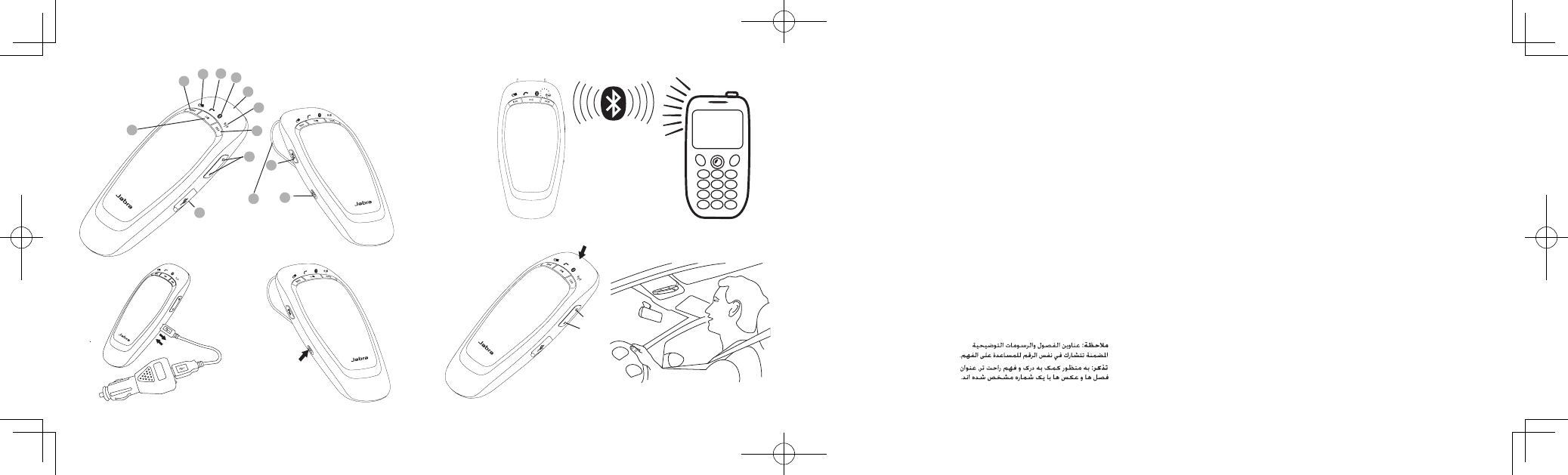
1 Answer/end
butt
on
2
FM
butt
on
3
V
olume
up/volume
down
butt
on
4 Charging
socket
5 On/off
butt
on
6
Play/pause/stop
butt
on
7 Next
tr
ack
8 Previous
tr
ack
9 Battery status
ic
on
10
Call
status
ic
on
11 Connection status
ic
on
12
FM
status
ic
on
13
Visor
clip
2
.
CHA
r
GING
y
our
SPEAKE
r
PH
o
NE
I
nser
t
charger and remove when
fully
charged and the Battery
status
icon turns
g
r
een.
EN
3
.
t
ur
NING
y
our
SPEAKE
r
PH
o
NE
o
N
AN
d
off
Slide the on/off
button
to turn the
speakerphone
on or
off
.
4
.
P
AI
r
ING
t
HE
SPEAKE
r
PH
o
NE
WI
t
H
y
our
PH
o
NE
First
time
pair
ing:
T
ur
n
the
speakerphone
on and it
will
automatically be in pairing
mode
.
T
he
Connection status icon
will
flash
r
apidly
.
l
a
t
er
pairing
:
-
T
u
r
n
the
speakerphone
on and press
answer/end button
for 5
s
e
c
o
nd
s
.
-
R
elease
the
button
when the Connection status light flashes
r
apidly
and you hear the voice
announcement
“
pair
ing
mode
”
.
- Activate on your
phone
.
- Search for devices and select Jabra
CRUISER.
- Press
“
OK
”
on the phone and confirm with
PIN
code 0000 (4 zeros).
5
.
uSING
y
our
SPEAKE
r
PH
o
NE
answer
a
c
all
-
T
he
name of the incoming caller is
announced
if
phonebook
access is
supported
by your
phone
.
If
not
,
only the number
will
be
announc
ed
.
-
T
ap
the
answer/end button
on your
speakerphone
to answer a
call
.

EN
end a
c
all
-
T
ap
the
answer/end button
on your
speakerphone
to end an
ac
tiv
e
call
.
make a
c
all
-
T
he
call
will
automatically transfer to your
speakerphone*.
If
not
tap
the
answer/end
butt
on.
play or pause
music
-
T
ap
the
play/pause/stop button
to play or pause
music
.
stop music
- Press (approximately 2 seconds) the
play/pause/stop
butt
on.
C
hange
between
music tracks*
-
T
ap
next track or previous track
butt
on.
adjust
sound and
v
olume*
-
T
ap
volume
up/volume
down
button
to adjust the volume
level.
(I
n
FM
mode your are not able to adjust volume via Jabra
CRUISER
–
use
your car
st
er
eo
).
sleep
mo
de
- When
disconnected
from the
phone
,
the
speakerphone
turns off
automatically after 10
minutes
.
T
ap
the
answer/end button
to turn
the
speakerphone
on
again.
*Phone
depend
ent
EN
using
Fm
tr
ansmitt
er
T
he
FM
transmitter in the
speakerphone
allows you to transmit calls
and
music from your phone to the car
st
er
eo
.
- Connect your phone and your
speaker
phone
.
-
T
ap
the
FM
button
to enter
FM
mode
.
T
he
FM
status icon
will
tur
n
solid red and an
FM
frequency
will
be
announc
ed
.
- Manually turn your radio into the same
FM
frequency and you
ar
e
now ready to transmit calls or music from your phone to your
car
st
er
eo
.
-
T
he
FM
transmitter
will
automatically turn off after 10 minutes
if
the
function is not
used
.
C
hange
Fm
fr
equenc
y
Jabra
CRUISER will
always transmit calls and music on the most
r
e
c
e
n
t
l
y
used
FM
f
r
e
q
u
e
n
c
y
.
However
if
sound
pe
r
f
o
r
ma
n
c
e
is unsatisfactory it is
possible to select a new
FM
fr
equenc
y
.
- Enter
FM
mode
.
- Press volume up
button
until
“
searching
”
is
announc
ed
.
- When a new frequency is found and
announc
ed
,
tune your
r
adio
manually into the same
FM
fr
equenc
y
.
A
tap on the volume
up/volume
down
button
will
change the
fr
equenc
y
on your Jabra
CRUISER
by 0.1 MHz.

EN
C
hange
voice
announcement
language
V
oic
e
announcements
give you a more
convenient
and safe use of
Jabr
a
CRUISER.
T
her
e
are 5
supported
languages:
English,
Spanish
,
F
r
ench,
German and
Russian.
Default language is English.
- Enter pairing mode by pressing the
answer/end button
for 5
sec
onds
.
- Press the
FM
button
for 2 seconds and the current language
will
be
announc
ed
.
- Press the volume
up/volume
down to select a new
language
.
- Select preferred language and press the
FM
button
for 2
sec
onds
.
T
he
new language
will
be
announc
ed
.
For
I
talian,
P
or
tuguese
,
Chinese Mandarine please go to
www.jabr
a.c
om
and download an alternative software
v
ersion.
6
.
Pl
ACE
t
HE
J
A
br
A
C
ru
ISE
r
IN
y
our
v
EHIC
l
E
T
he
Jabra
CRUISER
sits discreetly and conveniently on the sun
visor.
For
optimal sound quality place the Jabra
CRUISER
right in front of you
and
speak directly into the
speaker
phone
.
Note: Use of the
FM
transmitter portion of this product is restricted
in
some
c
oun
tr
ies
.
Please check your local
leg
isla
tion.
Calls
and music
streamed
to your
FM
radio using the
FM
transmitter
can
potentially be picked up by another radio in close
pr
o
ximit
y
.
This
is
only
relevant when using the
FM
transmitter
mode
.
Visit
www.jabra.com for
full
user
manual
.
d
K
B
em
Æ
r
K:
Inden du bruger din nye Jabra
CRUISER-højtalertelefon,
skal
du først lade den helt op og konfigurere den ved at 'parre den' med
den
enhed.
1.
om
d
IN
J
A
b
r
A
C
r
u
I
S
E
r
-HØJ
t
A
l
E
rt
E
l
E
fo
N
1
Besvar/afslut-knap
2 FM-knap
3
Lydstyrke
op/ned-knap
4
Opladerstik
5
Tænd/sluk-knap
6
Afspil/pause/stop-knap
7 Næste
nummer
8 Forrige
nummer
9 Ikon for
batteristatus
10 Ikon for
opkaldsstatus
11 Ikon for
forbindelsesstatus
12 Ikon for FM-status
13
Solskærmclips
2.
o
P
l
A
d
NING
A
f
d
IN
HØJ
t
A
l
E
rt
E
l
E
fo
N
Isæt
opladeren
og fjern den igen, når
batteriet
er fuldt opladt og
ikonet
for
batteristatus
lyser
grønt.