ENUSTECH KLAT8-RC WIRELESS REMOTE CONTROLLER User Manual Product Description

ENUSTECH WIRELESS REMOTE CONTROLLER Product Description

Users Manual

 User’s Guide KlaT 8                                    1 of 25                      Confidential Proprietary            User’s Guide [KlaT 8]   Mar 24th, 2011
 User’s Guide KlaT 8                                    2 of 25                      Confidential Proprietary   REVISION HISTORY  Version  Date  Name  Revision History 00.10 29th Mar, 2011  OJ Sim  Initial release
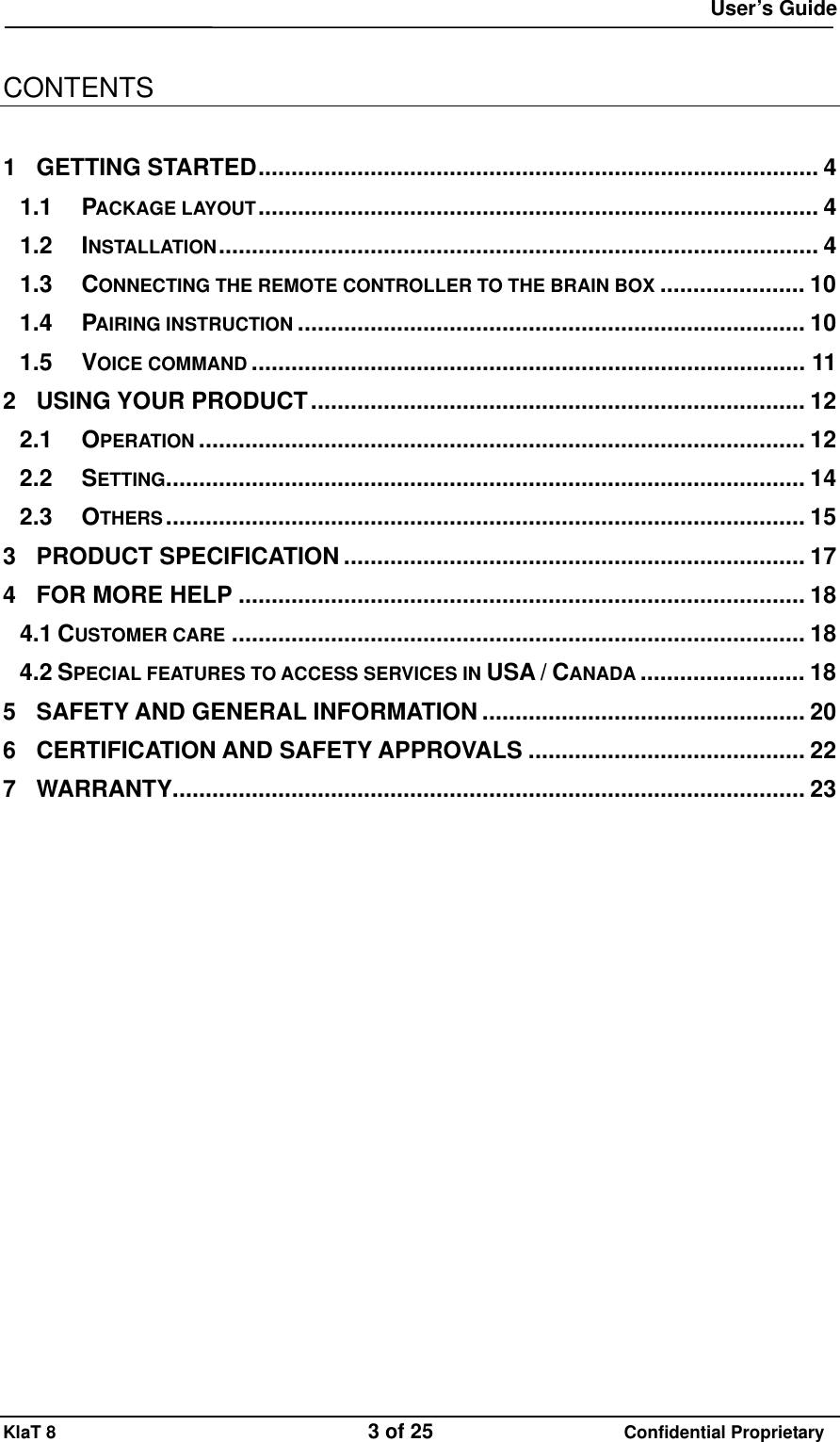
 User’s Guide KlaT 8                                    3 of 25                      Confidential Proprietary  CONTENTS  1 GETTING STARTED..................................................................................... 4 1.1 PACKAGE LAYOUT..................................................................................... 4 1.2 INSTALLATION........................................................................................... 4 1.3 CONNECTING THE REMOTE CONTROLLER TO THE BRAIN BOX ...................... 10 1.4 PAIRING INSTRUCTION ............................................................................. 10 1.5 VOICE COMMAND .................................................................................... 11 2 USING YOUR PRODUCT........................................................................... 12 2.1 OPERATION ............................................................................................ 12 2.2 SETTING................................................................................................. 14 2.3 OTHERS................................................................................................. 15 3 PRODUCT SPECIFICATION ...................................................................... 17 4 FOR MORE HELP ...................................................................................... 18 4.1 CUSTOMER CARE ....................................................................................... 18 4.2 SPECIAL FEATURES TO ACCESS SERVICES IN USA / CANADA ......................... 18 5 SAFETY AND GENERAL INFORMATION ................................................. 20 6 CERTIFICATION AND SAFETY APPROVALS .......................................... 22 7 WARRANTY................................................................................................ 23
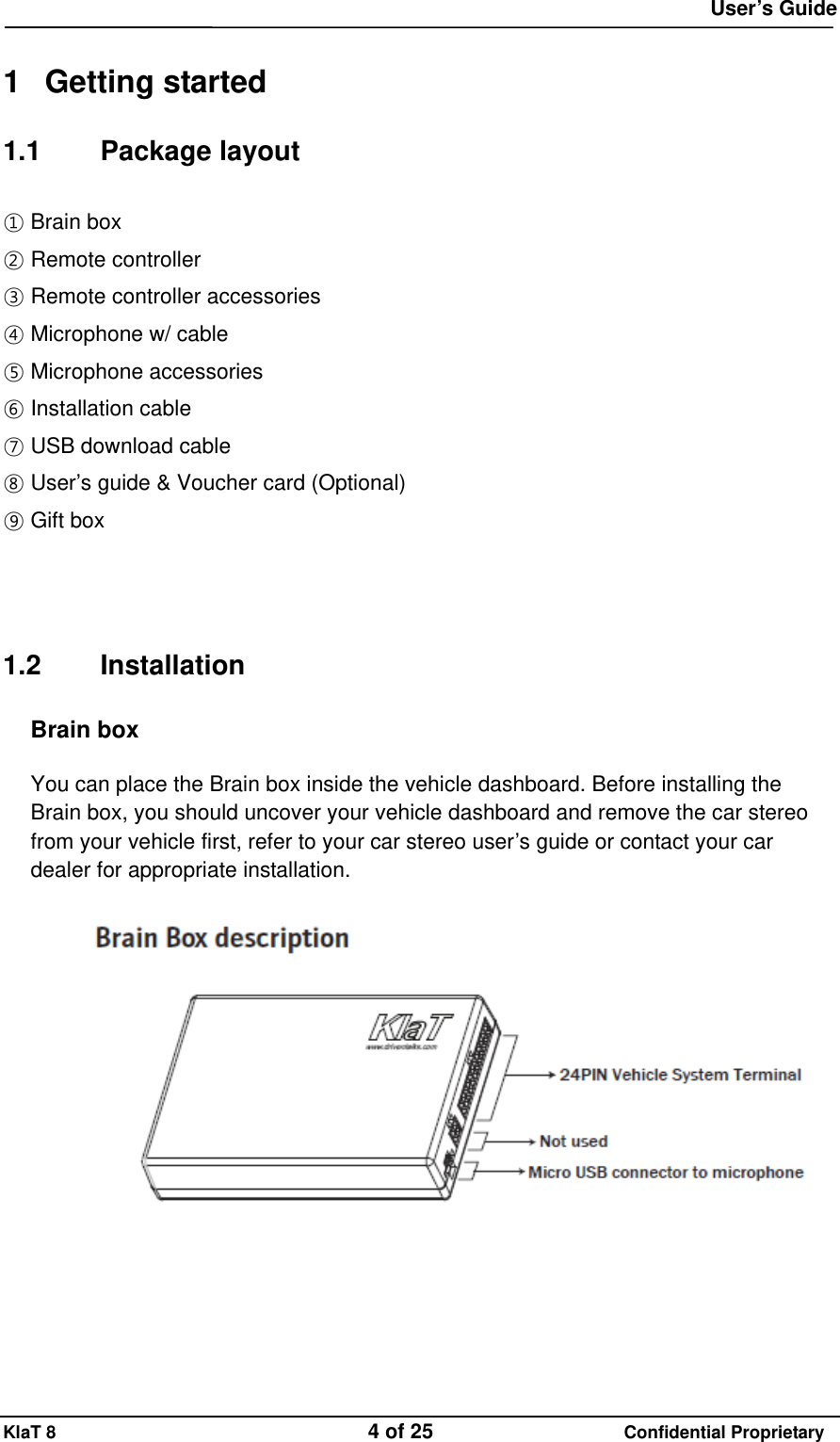
 User’s Guide KlaT 8                                    4 of 25                      Confidential Proprietary  1 Getting started 1.1 Package layout ① Brain box ② Remote controller ③ Remote controller accessories ④ Microphone w/ cable ⑤ Microphone accessories ⑥ Installation cable ⑦ USB download cable ⑧ User’s guide & Voucher card (Optional) ⑨ Gift box       1.2 Installation Brain box  You can place the Brain box inside the vehicle dashboard. Before installing the Brain box, you should uncover your vehicle dashboard and remove the car stereo from your vehicle first, refer to your car stereo user’s guide or contact your car dealer for appropriate installation.
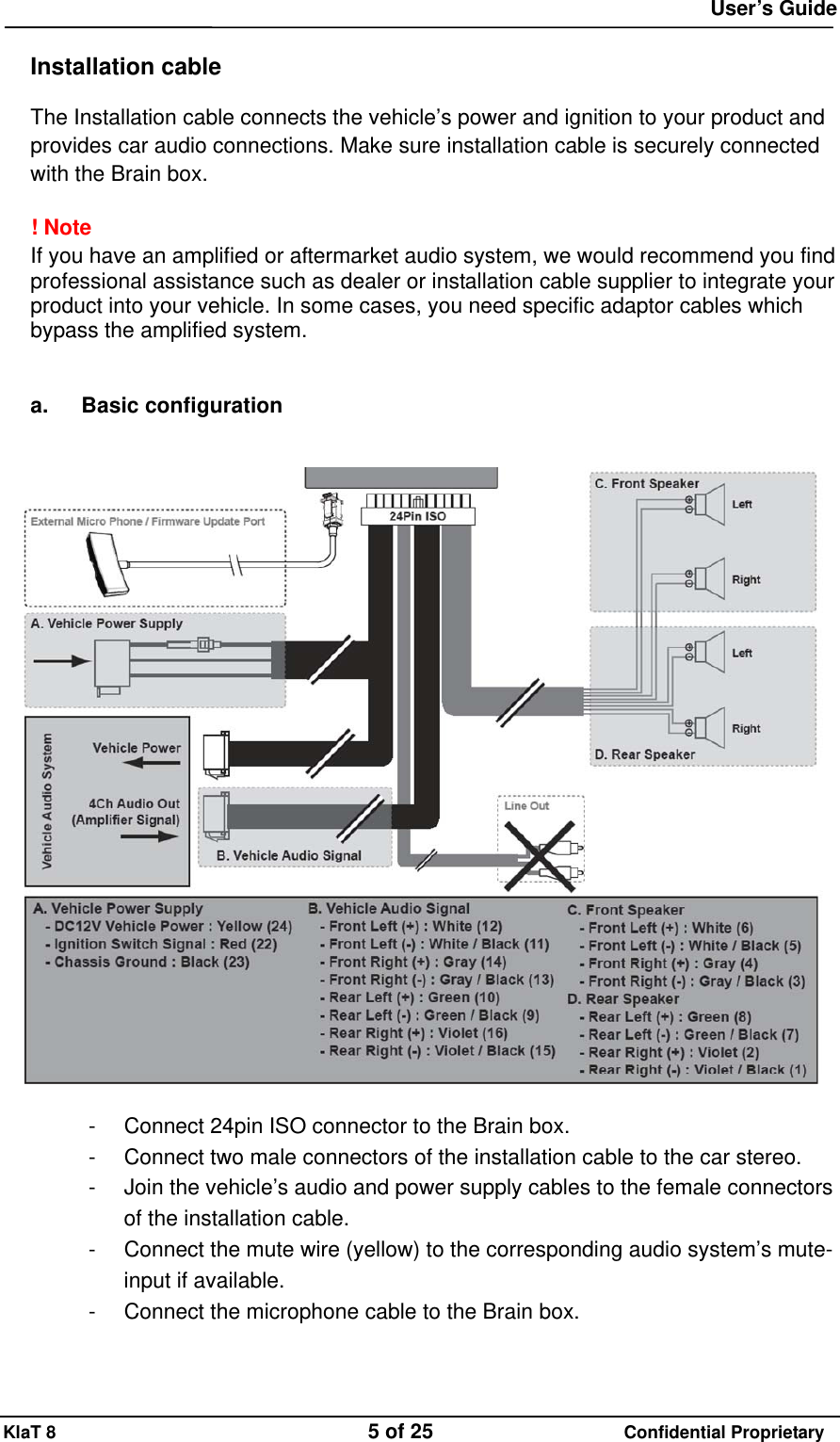
 User’s Guide KlaT 8                                    5 of 25                      Confidential Proprietary  Installation cable  The Installation cable connects the vehicle’s power and ignition to your product and provides car audio connections. Make sure installation cable is securely connected with the Brain box.  ! Note If you have an amplified or aftermarket audio system, we would recommend you find professional assistance such as dealer or installation cable supplier to integrate your product into your vehicle. In some cases, you need specific adaptor cables which bypass the amplified system.   a. Basic configuration     -  Connect 24pin ISO connector to the Brain box. -  Connect two male connectors of the installation cable to the car stereo. -  Join the vehicle’s audio and power supply cables to the female connectors of the installation cable. -  Connect the mute wire (yellow) to the corresponding audio system’s mute-input if available. -  Connect the microphone cable to the Brain box.
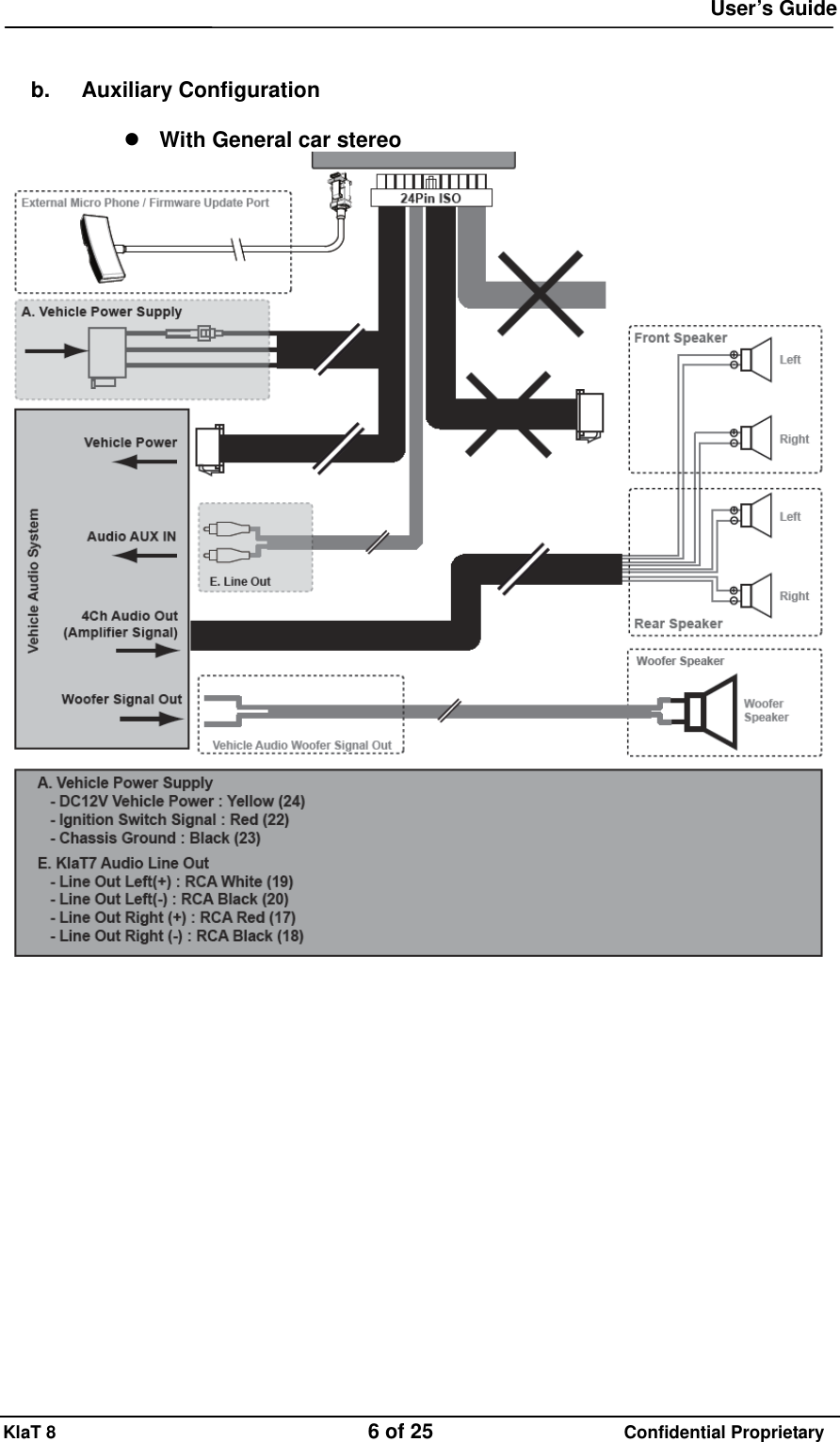
 User’s Guide KlaT 8                                    6 of 25                      Confidential Proprietary   b. Auxiliary Configuration   With General car stereo
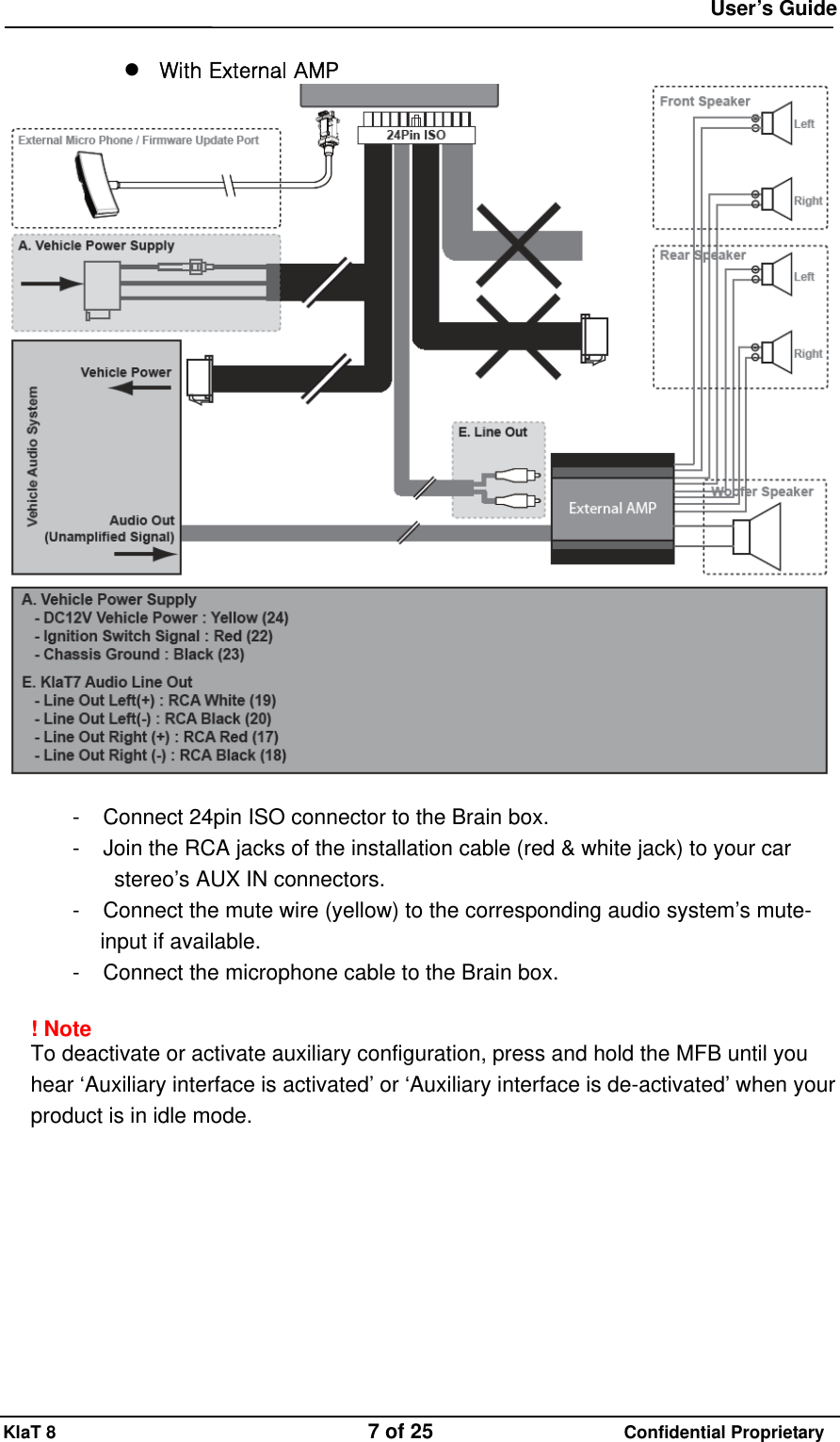
 User’s Guide KlaT 8                                    7 of 25                      Confidential Proprietary   With External AMP   -     Connect 24pin ISO connector to the Brain box. -     Join the RCA jacks of the installation cable (red & white jack) to your car stereo’s AUX IN connectors. -     Connect the mute wire (yellow) to the corresponding audio system’s mute-input if available. -     Connect the microphone cable to the Brain box.  ! Note  To deactivate or activate auxiliary configuration, press and hold the MFB until you hear ‘Auxiliary interface is activated’ or ‘Auxiliary interface is de-activated’ when your product is in idle mode.
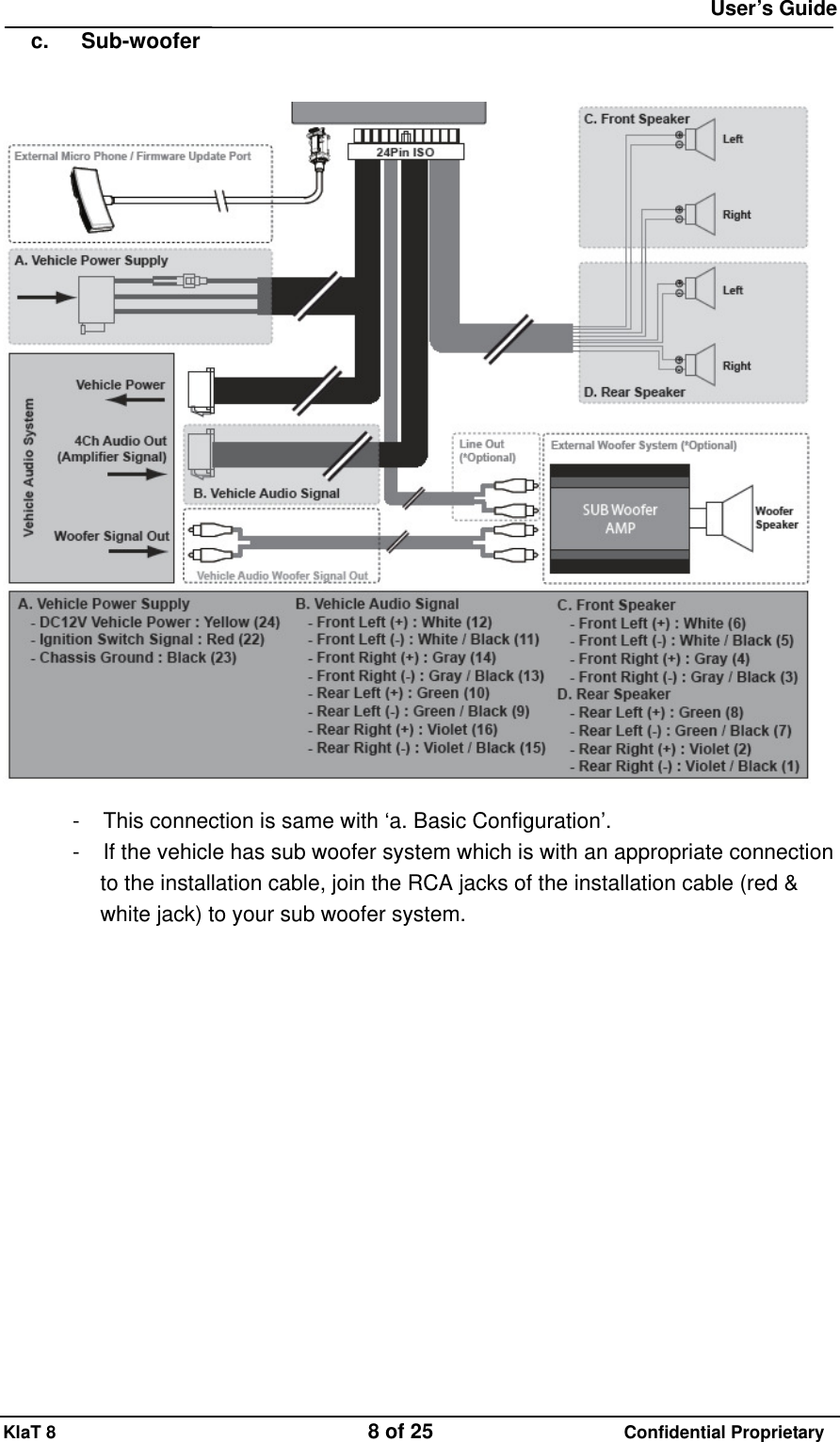
 User’s Guide KlaT 8                                    8 of 25                      Confidential Proprietary c. Sub-woofer     -     This connection is same with ‘a. Basic Configuration’. -     If the vehicle has sub woofer system which is with an appropriate connection to the installation cable, join the RCA jacks of the installation cable (red & white jack) to your sub woofer system.
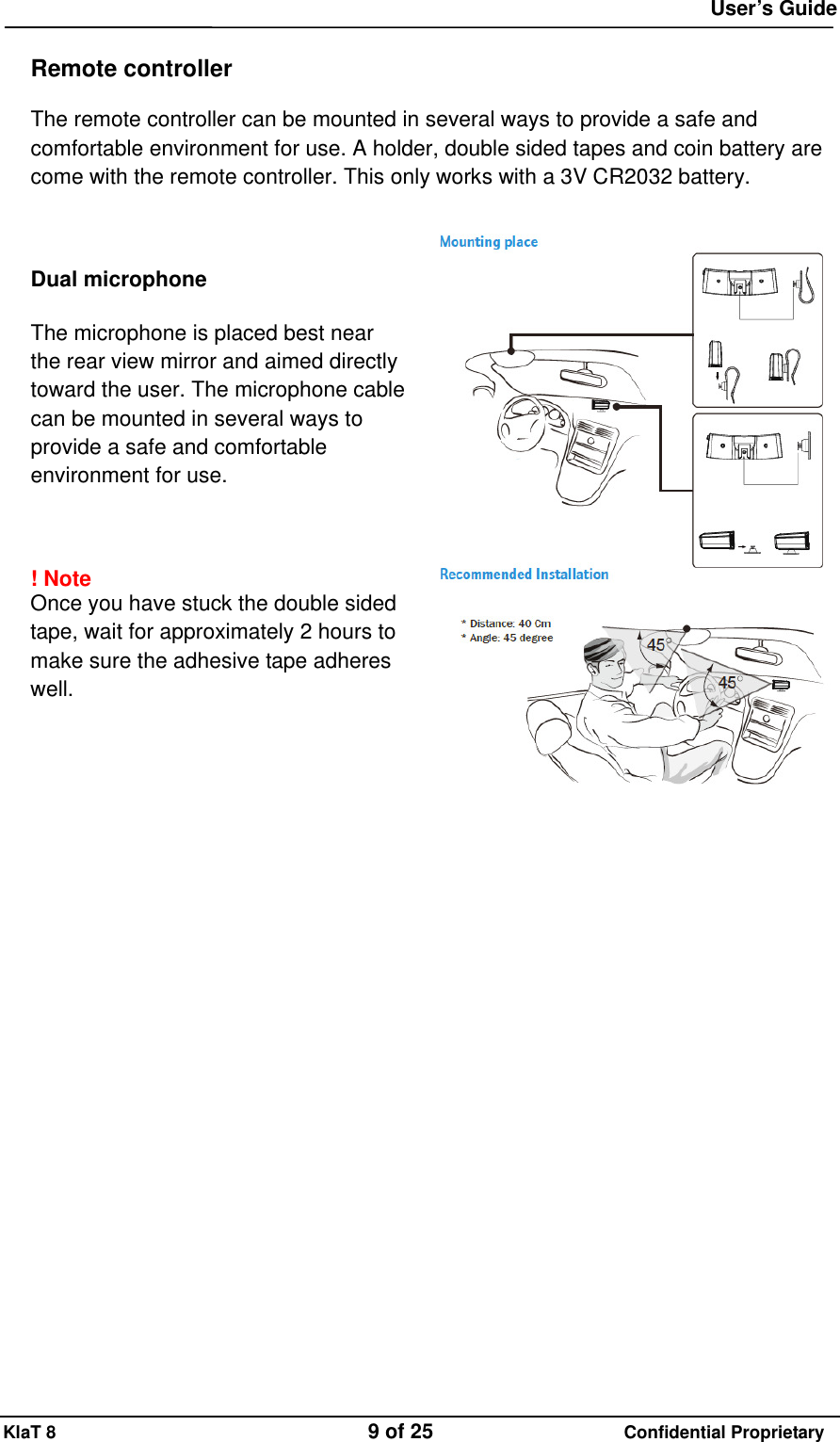
 User’s Guide KlaT 8                                    9 of 25                      Confidential Proprietary  Remote controller  The remote controller can be mounted in several ways to provide a safe and comfortable environment for use. A holder, double sided tapes and coin battery are come with the remote controller. This only works with a 3V CR2032 battery.      Dual microphone  The microphone is placed best near the rear view mirror and aimed directly toward the user. The microphone cable can be mounted in several ways to provide a safe and comfortable environment for use.    ! Note  Once you have stuck the double sided tape, wait for approximately 2 hours to make sure the adhesive tape adheres well.
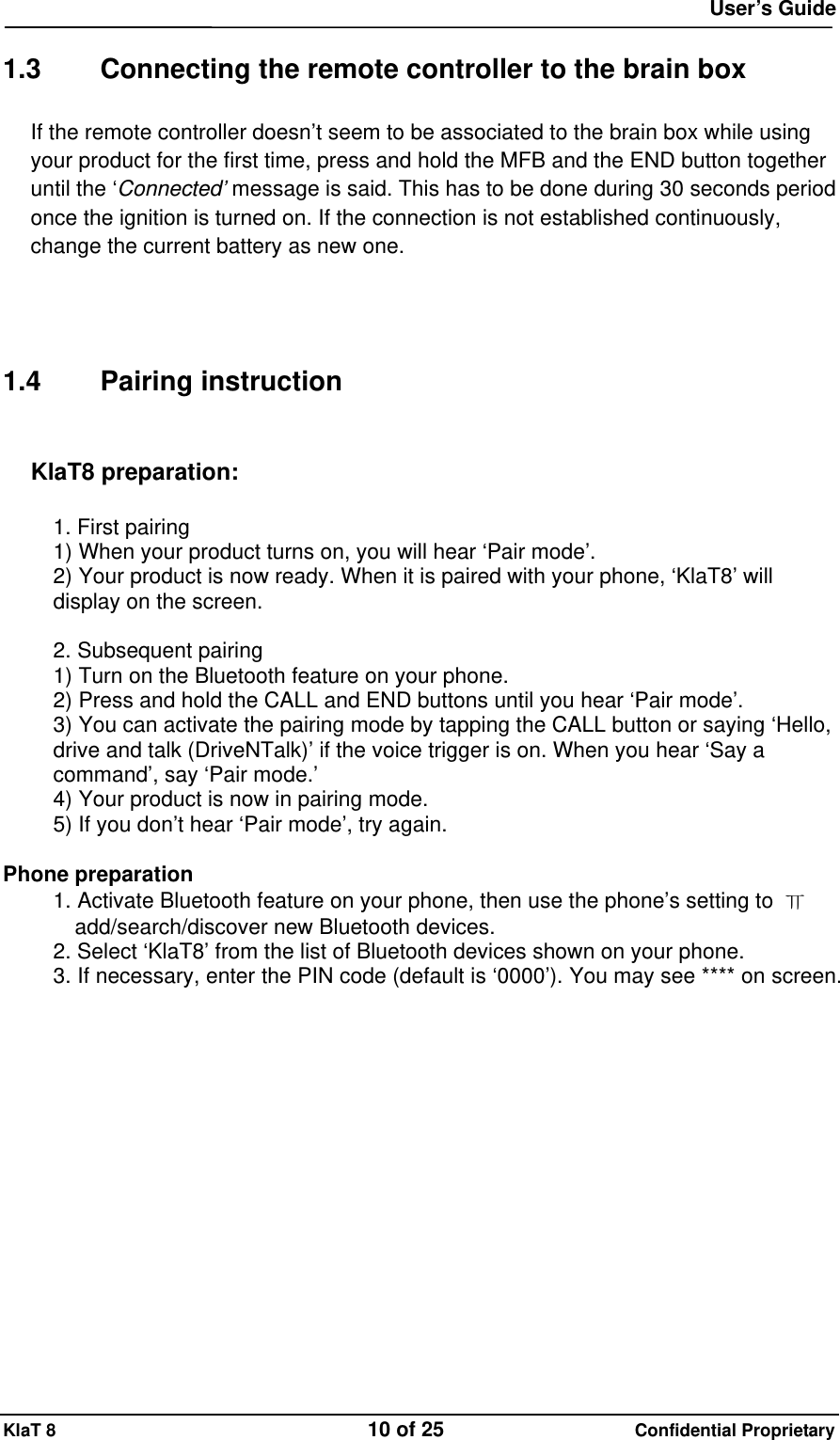
 User’s Guide KlaT 8                                    10 of 25                      Confidential Proprietary  1.3  Connecting the remote controller to the brain box If the remote controller doesn’t seem to be associated to the brain box while using your product for the first time, press and hold the MFB and the END button together until the ‘Connected’ message is said. This has to be done during 30 seconds period once the ignition is turned on. If the connection is not established continuously, change the current battery as new one.     1.4 Pairing instruction  KlaT8 preparation:  1. First pairing 1) When your product turns on, you will hear ‘Pair mode’. 2) Your product is now ready. When it is paired with your phone, ‘KlaT8’ will display on the screen.  2. Subsequent pairing 1) Turn on the Bluetooth feature on your phone. 2) Press and hold the CALL and END buttons until you hear ‘Pair mode’. 3) You can activate the pairing mode by tapping the CALL button or saying ‘Hello, drive and talk (DriveNTalk)’ if the voice trigger is on. When you hear ‘Say a command’, say ‘Pair mode.’ 4) Your product is now in pairing mode. 5) If you don’t hear ‘Pair mode’, try again.  Phone preparation 1. Activate Bluetooth feature on your phone, then use the phone’s setting to  ㅠ add/search/discover new Bluetooth devices. 2. Select ‘KlaT8’ from the list of Bluetooth devices shown on your phone. 3. If necessary, enter the PIN code (default is ‘0000’). You may see **** on screen.
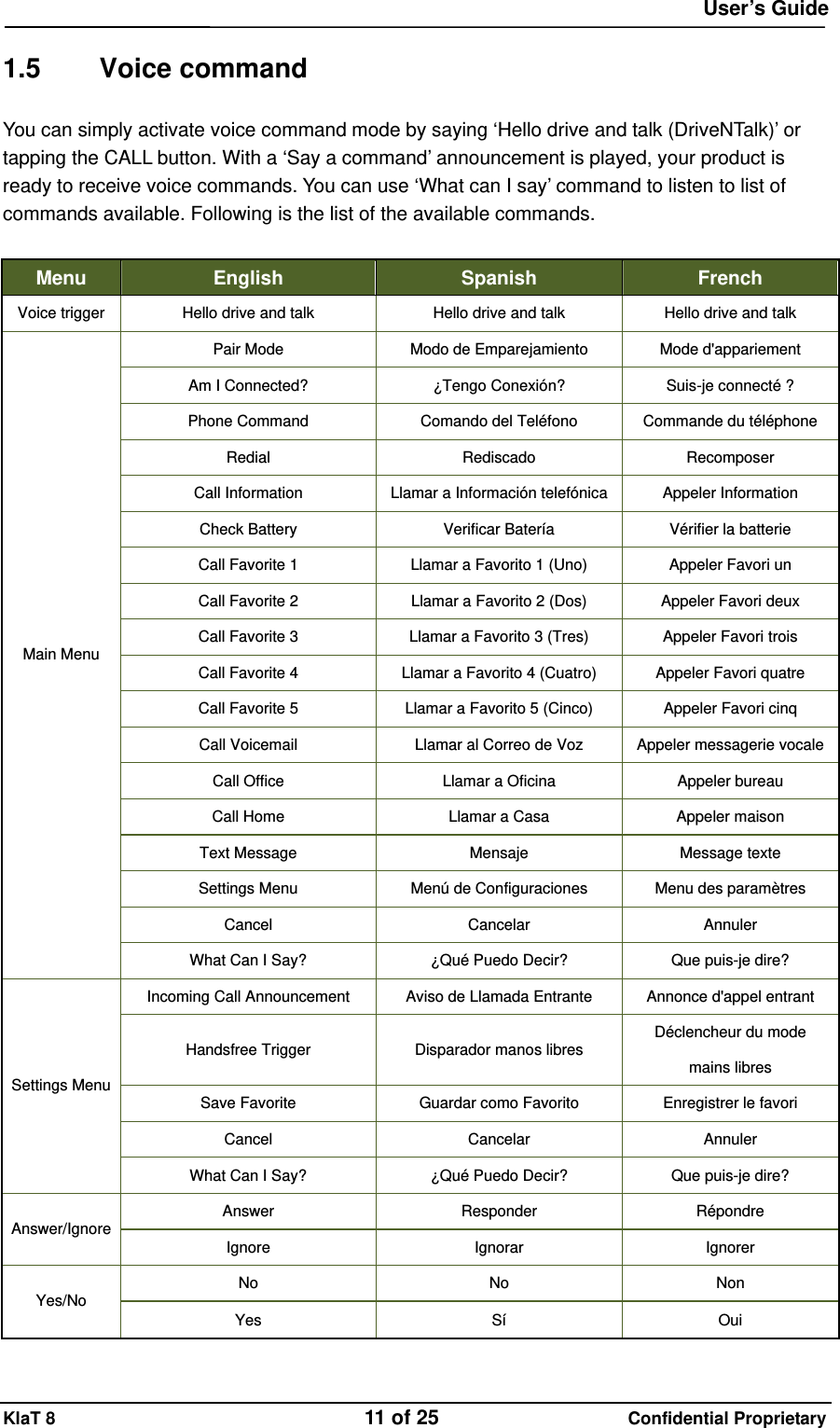
 User’s Guide KlaT 8                                    11 of 25                      Confidential Proprietary  1.5 Voice command You can simply activate voice command mode by saying ‘Hello drive and talk (DriveNTalk)’ or tapping the CALL button. With a ‘Say a command’ announcement is played, your product is ready to receive voice commands. You can use ‘What can I say’ command to listen to list of commands available. Following is the list of the available commands.  Menu  English  Spanish  French Voice trigger  Hello drive and talk  Hello drive and talk  Hello drive and talk Pair Mode  Modo de Emparejamiento  Mode d'appariement Am I Connected?  ¿Tengo Conexión?  Suis-je connecté ? Phone Command  Comando del Teléfono  Commande du téléphone Redial  Rediscado  Recomposer Call Information  Llamar a Información telefónica Appeler Information Check Battery  Verificar Batería  Vérifier la batterie Call Favorite 1  Llamar a Favorito 1 (Uno)  Appeler Favori un Call Favorite 2  Llamar a Favorito 2 (Dos)  Appeler Favori deux Call Favorite 3  Llamar a Favorito 3 (Tres)  Appeler Favori trois Call Favorite 4  Llamar a Favorito 4 (Cuatro)  Appeler Favori quatre Call Favorite 5  Llamar a Favorito 5 (Cinco)  Appeler Favori cinq Call Voicemail  Llamar al Correo de Voz  Appeler messagerie vocaleCall Office  Llamar a Oficina  Appeler bureau Call Home  Llamar a Casa  Appeler maison Text Message  Mensaje  Message texte Settings Menu  Menú de Configuraciones  Menu des paramètres Cancel  Cancelar  Annuler Main Menu What Can I Say?  ¿Qué Puedo Decir?  Que puis-je dire? Incoming Call Announcement  Aviso de Llamada Entrante  Annonce d'appel entrant Handsfree Trigger  Disparador manos libres  Déclencheur du mode mains libres Save Favorite  Guardar como Favorito  Enregistrer le favori Cancel  Cancelar  Annuler Settings Menu What Can I Say?  ¿Qué Puedo Decir?  Que puis-je dire? Answer  Responder  Répondre Answer/Ignore  Ignore  Ignorar  Ignorer No  No  Non Yes/No  Yes  Sí  Oui
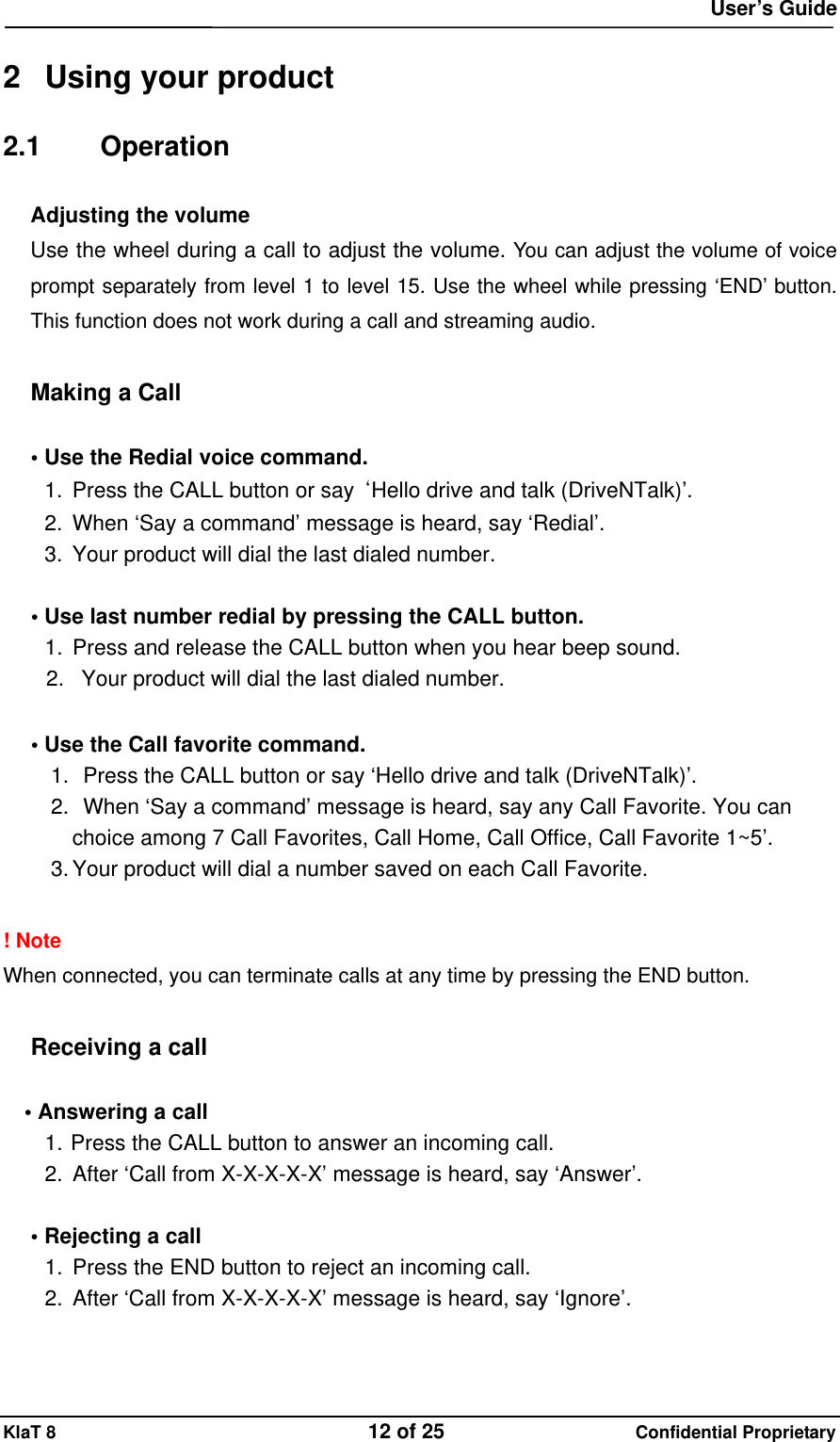
 User’s Guide KlaT 8                                    12 of 25                      Confidential Proprietary  2  Using your product 2.1 Operation Adjusting the volume  Use the wheel during a call to adjust the volume. You can adjust the volume of voice prompt separately from level 1 to level 15. Use the wheel while pressing ‘END’ button. This function does not work during a call and streaming audio.  Making a Call  • Use the Redial voice command. 1.  Press the CALL button or say  ‘Hello drive and talk (DriveNTalk)’. 2.  When ‘Say a command’ message is heard, say ‘Redial’. 3.  Your product will dial the last dialed number.  • Use last number redial by pressing the CALL button. 1.  Press and release the CALL button when you hear beep sound. 2.  Your product will dial the last dialed number.  • Use the Call favorite command. 1.   Press the CALL button or say ‘Hello drive and talk (DriveNTalk)’. 2.   When ‘Say a command’ message is heard, say any Call Favorite. You can choice among 7 Call Favorites, Call Home, Call Office, Call Favorite 1~5’. 3. Your product will dial a number saved on each Call Favorite.  ! Note When connected, you can terminate calls at any time by pressing the END button.  Receiving a call  • Answering a call   1. Press the CALL button to answer an incoming call. 2.  After ‘Call from X-X-X-X-X’ message is heard, say ‘Answer’.    • Rejecting a call 1.  Press the END button to reject an incoming call. 2. After ‘Call from X-X-X-X-X’ message is heard, say ‘Ignore’.
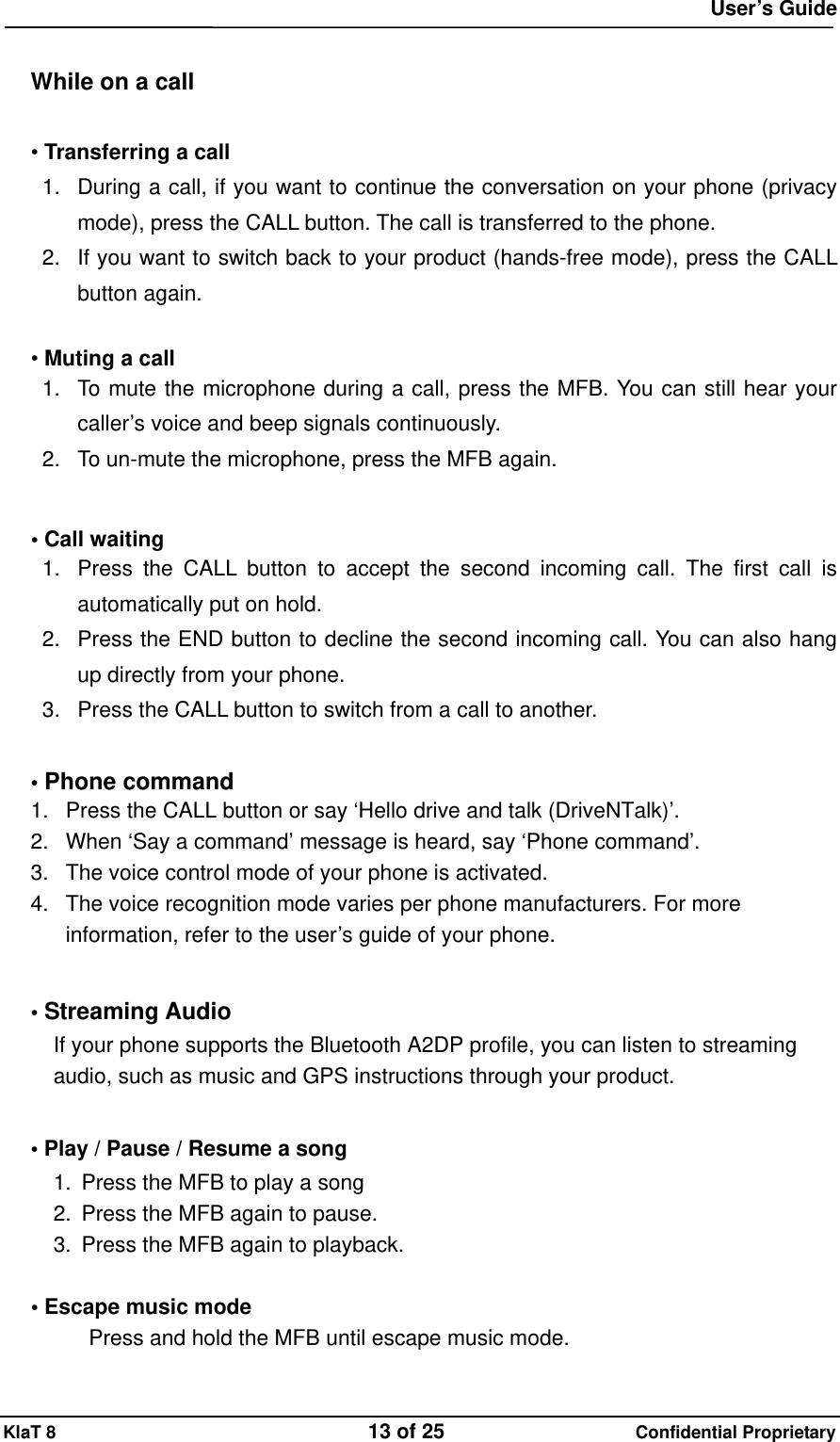
 User’s Guide KlaT 8                                    13 of 25                      Confidential Proprietary  While on a call  • Transferring a call 1.  During a call, if you want to continue the conversation on your phone (privacy mode), press the CALL button. The call is transferred to the phone. 2.  If you want to switch back to your product (hands-free mode), press the CALL button again.  • Muting a call 1.  To mute the microphone during a call, press the MFB. You can still hear your caller’s voice and beep signals continuously. 2.  To un-mute the microphone, press the MFB again.    • Call waiting 1.  Press the CALL button to accept the second incoming call. The first call is automatically put on hold. 2.  Press the END button to decline the second incoming call. You can also hang up directly from your phone. 3.  Press the CALL button to switch from a call to another.  • Phone command 1.  Press the CALL button or say ‘Hello drive and talk (DriveNTalk)’. 2.  When ‘Say a command’ message is heard, say ‘Phone command’. 3.  The voice control mode of your phone is activated. 4.  The voice recognition mode varies per phone manufacturers. For more information, refer to the user’s guide of your phone.  • Streaming Audio If your phone supports the Bluetooth A2DP profile, you can listen to streaming audio, such as music and GPS instructions through your product.  • Play / Pause / Resume a song 1.  Press the MFB to play a song 2.  Press the MFB again to pause. 3.  Press the MFB again to playback.  • Escape music mode Press and hold the MFB until escape music mode.
 User’s Guide KlaT 8                                    14 of 25                      Confidential Proprietary  • Previous / Next song 1. Press the    button, to the previous song. 2. Press the    button, to the next song.  • Rewind / Fast forward 1.  Press and hold the    button for rewinding. 2.  Press and hold the    button for fast forwarding.  2.2 Setting Entering Setting Menu  1.  Press the CALL button or say ‘Hello drive and talk (DriveNTalk)’. 2.  When ‘Say a command’ message is played, say ‘Settings menu’. 3.  Once you hear ‘Settings menu, you can say ‘incoming call announcement’, ‘hands-free trigger’, ‘save favorite’ or ‘cancel.’’ Say what you want to do or cancel to exit the setting.  Incoming Call Announcement  Enable or disable incoming call announcement.  1.  Say ‘Incoming call announcement’. 2. Depending on current setting, you will hear either ‘The incoming call announcement is on. Do you want to turn it off?’ or ‘The incoming call announcement is off. Do you want to turn it on?’ 3. Say ‘Yes’ or ‘No’. 4. Depending on your answer, you will hear ‘The incoming call announcement is on’ or ‘The incoming call announcement is off.’  Hands-free trigger  You can also enable or disable hands-free trigger feature with voice command  1.    Say ‘Hands-free trigger’. 2.    Depending on current setting, you will hear either ‘Hands-free trigger setting. Do you want to turn it off?’ or ‘Hands-free trigger setting. Do you want to turn it on?’ 3.  Say ‘Yes’ or ‘No’. 4.  Depending on your answer, you will hear ‘Trigger off’ or ‘Trigger always on.’  Save favorites  This feature allows you to save the last incoming call number as your favorite
 User’s Guide KlaT 8                                    15 of 25                      Confidential Proprietary number.     1.  Say ‘Save favorite’. 2.  You will hear ‘A phone number can be saved as a favorite after you have received an incoming call from that number ‘XXXXXX’. ‘Tell me which favorite you want me to save it as’ followed by. You will also hear ‘You can say ‘Call Home’, ‘Call Office’, ‘Call Favorite followed by numbers 1 through 5’, or ‘Cancel.’’ 3.  You should specify the favorite number’s location by saying ‘Call Home’, ‘Call Office’, or ‘Call Favorite the number X (choose a number 1 through 5)’, or ‘Cancel.’ 4.  If ‘Call home’ was chosen, you will hear ‘Phone number saved as call home’ followed by ‘Is that right?’, asking for your confirmation. 5.  If you say ‘Yes’, you will hear ‘Phone number saved’ and exit setting. If you say ‘No’, it will exit the setting without saving.  !Note  Quick Voice Dial Editor Visit www.driventalks.com and download ‘Quick Voice Dial Editor’ from ‘Support & Download’ menu. You can save phone numbers set as ‘Favorite 1~5’, ‘Office’, ‘Home’ and service numbers of ‘Call Information’ and ‘Text Message’. This program is compatible with Microsoft Windows XP, Windows Vista and Windows 7 (32bit) only.  Language selection  Press MFB more than 5 seconds (very long press) during pair mode to activate the language selection menu. You will hear the current language setting and the default language is English. If you want to change the language, volume up or down. Press MFB again when you hear the language you want to change.  2.3 Others Multi point BHF2000 supports multipoint technology, allowing you to use one headset with two different Bluetooth enabled phones.  When multipoint is in use, the last connected phone is the primary phone and the phone was connected before the primary phone is the second phone. Your product controls, initiates or redials a call from the primary phone. To use the second paired phone instead, make the call using the controls on that phone.  ! Note Re-connect by using phone menu or subsequent paring. In this case the previous primary
 User’s Guide KlaT 8                                    16 of 25                      Confidential Proprietary phone will be the second phone and the last connected phone will be the primary phone.  Multi pairing BHF2000 supports multi pairing feature up to 8 phones. To delete the phone connection list, press and hold the MFB for 5 seconds during pair mode. When deleted, pairing is activated automatically.  Download phonebook and caller ID*   Your product supports Bluetooth PBAP profile. You can download up to 2,000 contacts from your phone to your product. When your product is connected to your phone for the first time, your contacts will be transferred automatically to your product.  !Note Your product can save up to 1,000 contacts per connected phone. If you add contacts to your phone and need to update your downloaded phonebook, press very long the mode key to download again.  Firmware upgrade You can also download ‘DriveNTalk firmware updater’ and the latest firmware at ‘www.driventalks.com’. Once latest firmware is downloaded to your PC, use the USB download cable to download it to your product. For more detail, refer to the program user’s guide.
 User’s Guide KlaT 8                                    17 of 25                      Confidential Proprietary  3 Product Specification Product Name  KlaT8 73 x 107 x 21.1(Brainbox)Dimension(mm)  x  (RC)103.5 (Brainbox)Weight(g) (RC) Bluetooth  V 2.1 / EDR compliantRF power  Class 2Supported Profile  H F P,   H S P,   P B A P,   A 2 DP, AVRCPOutput : Max. 10w (per channel)Voice : Front 2channel / Music : 4channel (Front, Rear) Full duplex / Noise suppression / Echo cancellation Acoustic features Dual Microphone (Beam Forming)Voice user interface Voice trigger, Voice Command, TTS, Voice prompt Voice to test  SMS, E-mail, etc.(Optional Service)Voice language  English / Spanish / FrenchMulti point   Multi pairing Up to 8 phonesAuto Mute   Interface : Wireless (FSK 433Mhz)Controller 5 buttons, 1 wheelHarness cable 24pin ISO standard typeUSB connector  Micro USB I/O, Firmware upgradable
 User’s Guide KlaT 8                                    18 of 25                      Confidential Proprietary  4  For more help 4.1 Customer care If you are having trouble getting your product to work, please visit our website www.driventalks.com for help and support. Please contact us before returning your product to a store and we will help you through any difficulty you may have.  4.2 Special features to access services in USA / Canada  1. Call information  You can say ‘Call information’ to search for local and business listings with Bing™ 411 to access updated news, directions, restaurant locations, weather forecasts, movie show times, and many more.  For more information, visit to the following web-site, http://www.discoverbing.com/mobile/411/  ! Note   Bing is a free US based information service. Long distance charges may apply when using this service outside a US calling area.   2.  Text message (Voice to text service)  You can say ‘text message’ to use voice to text service. Send SMS, e-mail and more by using your voice. DriveNTalk provides a 90 days free voucher card of the voice to text service to its users which voucher codes need to be registered before using this service. All rights and responsibilities of the services are belonging with Dial2Do service provider. For more information, please go to www.driventalks.com and search Voice to Text, Dial2Do.  ! Note   Before you use this service, please check if a proper service number is stored in your product according to where you are. You can set the 'Text message' number through Quick Voice Dial Editor program. Please visit at www.driventalks.com to download the program.   [Dial2Do Service No.] * USA         6503600959   * Canada          Ontario: 4168002218            Quebec: 5149073174
 User’s Guide KlaT 8                                    19 of 25                      Confidential Proprietary          Alberta: 7806281814           Calgary, Alberta: 4037751217           Vancouver, British Columbia: 6044841955
 User’s Guide KlaT 8                                    20 of 25                      Confidential Proprietary 5  Safety and general information For the efficient and safe operation of your product, observe these manual-lines.  We advise only qualified personnel should install your product. If necessary, contact the vehicle manufacturer for air bag information specific to the vehicle.  Mount components securely on strong surfaces to prevent shifting that could cause injury or interfere with safe vehicle operation. Always use the supplied mounting hardware.  Mounted components and attached wires or cables must not interfere with seating or leg space.  Pair your product with the phone and adjust the settings before driving to ensure your attention and focus remain on driving safely.  All air bag inflates with great force. Do not place your product in the area over the air bag area. If your product is improperly placed and the air bag inflates, serious injury could result.  Keep your product away from small children and pets. Small parts may cause chocking or serious injury if swallowed.  Observe all signs and instructions regarding the use of an electrical device or RF radio product in designated areas, such as gas stations, hospitals, potentially explosive atmospheres or aircraft.  Use only provided chargers specifically designed for your product. Do not use the chargers for any other purpose.  Never place your product on or in heating devices, such as microwave ovens, stoves, or radiators. Battery may explode when overheated.  Do not allow your product to get wet. Liquid and moisture can cause serious damage to electric devices.  Do not separate, repair nor remodel your product arbitrarily. If repair is needed, please contact us or your dealer.  Do not use any chemical solvents or detergent. The use of chemicals on your product may cause damage to it. If you use any other medical devices, please consult a physician or the manufacturer of
 User’s Guide KlaT 8                                    21 of 25                      Confidential Proprietary the medical devices to determine if they are adequately shielded from external RF energy.
 User’s Guide KlaT 8                                    22 of 25                      Confidential Proprietary 6  Certification and safety approvals This product is CE marked according to the provisions of the R&TTE Directive (99/5/EC). We declare that this product is in compliance with the essential requirements and other relevant provisions of Directive 1999/5/EC. For further information, please refer to website.  FCC Information to User This equipment has been tested and found to comply with the limits for a Class B digital device, pursuant to Part 15 of the FCC Rules. These limits are designed to provide reasonable protection against harmful interference in a residential installation. This equipment generates, uses and can radiate radio frequency energy and, if not installed and used in accordance with the instructions, may cause harmful interference to radio communications. However, there is no guarantee that interference will not occur in a particular installation. If this equipment does cause harmful interference to radio or television reception, which can be determined by turning the equipment off and on, the user is encouraged to try to correct the interference by one of the following measures: • Reorient or relocate the receiving antenna. • Increase the separation between the equipment and receiver. • Connect the equipment into an outlet on a circuit different from that to which the receiver is con-nected. • Consult the dealer or an experienced radio/TV technician for help.  Caution Modifications not expressly approved by the party responsible for compliance could void the user’s authority to operate the equipment.  FCC Compliance Information : This device complies with Part 15 of the FCC Rules. Operation is subject to the following two conditions: (1) This device may not cause harmful interference, and (2) this device must accept any interference received, including interference that may cause undesired operation   Note on environmental protection: After the implementation of the European Directive 2002/96/EU in the national legal system, the following applies: Electrical and electronic devices may not be disposed of with domestic waste. Consumers are obliged by law to return electrical and electronic devices at the end of their service lives to the public collecting points set up for this purpose or point of sale. Details to this are defined by the national law of the respective country. This symbol on the product, the instruction manual or the package indicates that a product is subject to these regulations. By recycling, reusing the materials or other forms of utilizing old devices, you are making an important contribution to protecting our environment.
 User’s Guide KlaT 8                                    23 of 25                      Confidential Proprietary 7 Warranty Limited One (1) Year Warranty DriveNTalk (“DNT”) warrants this product to be free from defects in materials and workmanship (subject to the terms set forth below) for a period of one (1) year from the date of purchase (“Warranty Period”).  During the Warranty Period, DNT will repair or replace (at DNT’s sole discretion) this product or any defective parts (“Warranty Service”).    If repair or replacement is not commercially practicable or cannot be timely made, DNT may choose to refund to you the purchase price paid for the affected product. Repair or replacement under the terms of this Warranty does not give right to any extension or a new beginning of the period of warranty.  Claims under the Warranty To obtain Warranty Service, please contact the DNT’s dealer from which you purchased this product. You will need to return the product to the dealer in either its original packaging or packaging affording an equal degree of protection.    The following information must be presented to obtain Warranty Service: (a) the product, (b) proof of purchase, which clearly indicates the name and address of the dealer, the date of purchase and the product type, and (c) reason for return.  As part of DNT’s efforts to reduce environmental waste you understand that the product may consist of reconditioned equipment that contains used components, some of which have been reworked. The used components all live up to DNT’s high quality standards and comply with DNT’s product performance and reliability specifications. You understand that replaced parts or components will become the property of DNT.   Limitation of Warranty This Warranty is only valid for the original purchaser and will automatically terminate prior to expiration, if this product is sold or otherwise transferred to another party. The warranty provided by DNT in this statement applies only to products purchased for use, and not for resale. It does not apply to open box purchases, which are sold “as is” and without any warranty.
 User’s Guide KlaT 8                                    24 of 25                      Confidential Proprietary Specifically exempt from warranty are limited-life consumable components subject to normal wear and tear, such as cables, mount, clip, tapes, cushions, modular plugs, decorative finishes, batteries, and other accessories.  This Warranty is invalid if the factory-applied serial number, date code label, or product label has been altered or removed from the product.  This Warranty does not cover defects or damages that result from: (a) improper storage, misuse or abuse, accident or neglect, such as physical damage (cracks, scratches, etc.) to the surface of the product resulting from misuse; (b) contact with water, extreme humidity, sand, dirt or the like or extreme heat; (c) use of the product or accessories for commercial purposes or subjecting the product or accessories to abnormal usage or conditions; or (d) other acts which are not the fault of DNT.  Furthermore, this Warranty does not cover damage due to improper operation, maintenance or installation, or attempted repair by anyone other than DNT or a DNT’s dealer which is authorized to do DNT warranty work. Any unauthorized repairs will void this Warranty. Neither does this Warranty cover defects or damages that result from the use of non-DNT branded or certified products, accessories, or other peripheral equipment, nor does this Warranty apply to products which have not been charged for six (6) months.    DNT does not offer any warranty for such performance. REPAIRS OR REPLACEMENTS AS PROVIDED UNDER THIS WARRANTY ARE THE EXCLUSIVE REMEDY OF THE BUYER. DNT SHALL NOT BE LIABLE FOR ANY INCIDENTAL OR CONSEQUENTIAL DAMAGES FOR BREACH OF ANY EXPRESS OR IMPLIED WARRANTY ON THIS PRODUCT.    EXCEPT TO THE EXTENT PROHIBITED BY LAW, THIS WARRANTY IS EXCLUSIVE AND IN LIEU OF ALL OTHER EXPRESS AND IMPLIED WARRANTIES WHATSOEVER, INCLUDING BUT NOT LIMITED TO THE WARRANTY OF MERCHANTABILITY AND FITNESS FOR A PRACTICAL PURPOSE.  ! NOTE This Warranty gives you specific legal rights. You may have other rights which vary from location to location. Some jurisdictions do not allow the exclusion or limitation of incidental or consequential damages or implied warranties, so the above exclusions may not apply to you. This Warranty does not affect your legal statutory rights under your applicable national or local laws.
 User’s Guide KlaT 8                                    25 of 25                      Confidential Proprietary   © 2010 Enustech Inc. The driventalk is a registered trademark of Enustech Inc. All rights reserved.

Navigation menu