Elita VAL60012BT Bluetooth Speaker User Manual VF60018BT Manual
Elita International Limited Bluetooth Speaker VF60018BT Manual
Elita >
User Manual
VAL60012BT
USER’S MANUAL
When using your Bluetooth Speaker, basic safety precautions should always be followed, including the
Important Safety Precautions
following:
1. READ ALL INSTRUCTIONS BEFORE USING YOUR SPEAKER.
2. Do not use your speaker near water. Clean using a soft cloth or paper towel.
3. Do not place your speaker on any wet surfaces.
4. Do not allow children or the infirm to play with your speaker without adult supervision.
5. Do not expose your speaker to excessive heat, flames or fire.
6. Always press all buttons or switches carefully. Do not manhandle your speaker.
7. Do not use in extremely dry environments, as this can lead to static discharge during usage.
8. Do not expose your speaker to temperatures above 40°C. Keep out of direct sunlight.
9. Do not attempt to repair this product yourself. Contact a qualified service center if your speaker is in need of
service.
10. Do not drop, puncture or expose your speaker to excessive trauma.
11. Your speaker is not intended for commercial use.
12. Do not place near objects that generate a strong magnetic field.
13. Unplug this device when not in use for long periods of time or during lightning storms.
BATTERY WARNING:
-The device is equipped with an integrated lithium ion battery. The
battery cannot be replaced. Do not attempt to remove the battery
from the device.
-Do not dispose of in fire or expose to excessive heat.
-Do not crush, puncture, incinerate, or short circuit external contacts.
-Please recycle or dispose of the battery properly. Contact your local
recycling facilities and/or the manufacturer for further information.
CAUTION
-VAL60012BT Bluetooth Speaker
Thank you for purchasing your Bluetooth Speaker, item
Introduction
VAL60012BT. You can use your
speaker with most smartphones and Bluetooth devices to stream music. In order to get the best
results when using this device, please read this manual first before using.
Package Contents
-USB Charging Cable
-User’s Manual with Warranty Information
Specifications
Bluetooth Version: V4.2
Bluetooth Range: Up to 33 feet (10 meters)
Power Supply: DC 5V
Battery Type: 400mAh rechargeable lithium ion battery
Charge Time: Approximately 1-2 Hours
Playback Time: Approximately 1-2 Hours*
*Applicable at 50% of maximum volume. Results will be lower when volume is higher.
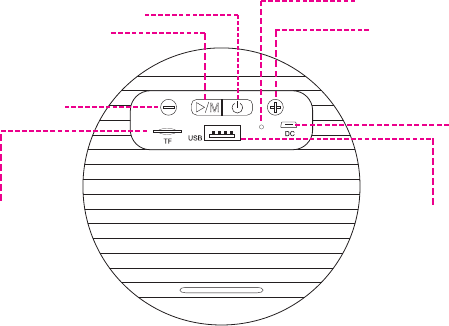
A Quick Look at Your Device
TF Card
Reader**
Power
Microphone
Previous Track/Volume Down
Next Track/Volume Up
Charging Port
Play/Pause/Answer/Mode
USB
Port*
**The TF Card Reader can read TF
or Micro SD memory cards up to
32GB in size. Your speaker can play
.MP3, or .WAV music files
stored on your memory card.
*You can insert most thumb
drives or jump drives into the USB
Port. Your speaker can play .MP3,
or .WAV music files stored
on your drive. Note that the USB
port cannot be used to charge your
electronic devices.
Charging Your Speaker
Your speaker has a built-in, rechargeable lithium ion battery. To avoid damage, do not attempt to
remove the battery. The full performance of the battery is only achieved after a few charging-dis-
charging cycles. Charge the battery fully before first use. To do so, follow the steps below:
1. Connect one end of the included USB charging cable to the charging port on the rear of your
speaker. Then plug the other end of the USB charging cable into a USB port on your computer or
a suitable power adapter in order to recharge the internal rechargeable battery.
2. When the battery is charging, an LED indicator light on the front of your speaker will turn red.
The internal battery of your speaker takes approximately two hours to charge when completely
drained. Unplug when charging is complete.
NOTE: Overcharging could reduce the life of the battery. A charged battery will lose its capacity
if it is not used on a regular basis.
Important!
To avoid a complete discharge of the battery, charge your speaker at least once every six
months.
ently listed as “
Pairing Your Speaker with a Bluetooth Device
Your speaker can be paired with most Bluetooth devices and smartphones. In order to pair your
speaker with a phone, follow the steps below:
1. Press and hold the Power button until your speaker powers on. Once your speaker is powered
on, the LED indicator light on the front of your speaker will turn blue and blink rapidly. This
indicates that your speaker is in pairing mode.
2. Go to the Bluetooth Manager of your Bluetooth device.
3. Search Bluetooth devices and select your speaker (most frequ
VAL60012BT”) to start connecting.
4. Enter “0000” if your device asks for the PIN code.
5. Once paired, the LED indicator light will stop blinking and steadily shine blue. Note that
anytime music is playing, the Pairing Status LED indicator light will slowly blink blue every few
seconds.
NOTE: If a memory card is inserted in the TF Card Reader slot, or a thumb drive is inserted in the
USB port, your speaker will automatically go into music mode in which music is played from the
respective inserted device. Repeatedly press and hold the mode button to switch between
modes.
Using Your Speaker
Powering Your Speaker On and OFF
1. To power on your speaker, press and hold the Power button until your speaker powers on. If
you have already paired your speaker to your Bluetooth device, they will automatically remain
paired each time you power on your speaker.
2. Press and hold the Power button in order to power off your speaker.
Listening to Music
• Play/Pause/Answer/Mode Button: Press to play or pause a track.
• Quickly tap the “NEXT TRACK/VOLUME UP” button to advance to the next song in a playlist.
• Quickly tap the “PREVIOUS TRACK/VOLUME DOWN” button to go back to the previous song in
a playlist.
• Press and hold the “NEXT TRACK/VOLUME UP” button to increase the volume.
• Press and hold the “PREVIOUS TRACK/VOLUME DOWN” button to decrease the volume.
Using the Phone Function
• Answering a Call: Quickly press the ANSWER button to answer an incoming call.
• Reject an Incoming Call: Press and hold the ANSWER button to reject an incoming call.
• Ending a Call: Quickly press the ANSWER button to end a call.

Maintenance and Care
-Before using your speaker, inspect the ports to make sure that they are clear of dust and debris
before charging.
-Use a soft cloth to clean your speaker. Never use any harsh chemicals or detergents. Make sure
your speaker is dry before using.
-When your speaker is not in use, it should be stored in a cool, dry place.
-Never tug or yank on any charging cableswhile they are connected to your speaker. Connect
and disconnect these cables as carefully as possible.
-Never expose your speaker to high temperatures, extreme cold, high humidity or excessive
moisture or water.
-Please recycle or dispose of your speaker properly based on the laws and rules of your munici-
pality. Contact local recycling facilities and/or the manufacturer of your speaker for further
information.

FCC Statement
This device complies with the part 15 of the FCC rules. Operation is subject to the following two
conditions:(1) this device may not cause harmful interference, and (2) this device must accept any
interference received, including interference that may cause undesired operation.
Caution: changes or modifications not expressly approved by the party responsible for compli-
ance could void the user's authority to operate the equipment.
NOTE: This equipment has been tested and found to comply with the limits for a Class B digital
device, pursuant to Part 15 of the FCC Rules. These limits are designed to provide reasonable
protection against
harmful interference in a residential installation. This equipment generates. Uses and can radiate
radio frequency energy and, if not installed and used in accordance with instructions may cause
harmful interference to radio or -television reception, which can be
determined by turning the equipment off and on, the user is encouraged to try to correct the
interference by one or more of the following measures:
__ Reorient or relocate the receiving antenna.
__ Increase the separation between the equipment and receiver.
__ Connect the equipment into an outlet on a circuit different from that to which the receiver is
connected.
__ Consult the dealer or experienced radio/ TV technician for help.
FCC Radiation Exposure Statement:
This equipment complies with FCC radiation exposure limits set forth for an uncontrolled environment.
This transmitter must not be co-located or operating in conjunction with any other antenna or transmitter.
One Year Warranty
This warranty covers the original consumer purchaser only and is not transferable.
This warranty covers products that fail to function properly UNDER NORMAL USAGE, due to
defects in material or workmanship. Your product will be repaired or replaced at no charge for
parts or labor for a period of one year.
What Is Not Covered by Warranty
Damages or malfunctions not resulting from defects in material or workmanship and damages or
malfunctions from other than normal use, including but limited to, repair by unauthorized parties,
tampering, modification or accident.
To Obtain Warranty Service and Troubleshooting Information:
To receive Warranty service along with the name and address of an authorized product service
center, the original consumer purchaser must contact us for problem determination and service
procedures. Proof of purchase in the form of a bill of sale or receipted invoice, evidencing that the
product is within the applicable Warranty period(s), MUST be presented in order to obtain the
requested service. It is your responsibility to properly package and send any defective products
along with a dated copy of proof of purchase, a written explanation of the problem, and a valid
return address to the authorized service center at your expense. Do not include any other items
or accessories with the defective product. Any products received by the authorized service
center that are not covered by warranty will be returned unrepaired.
One Year Warranty (continued)
NO WARRANTIES, WHETHER EXPRESS OR IMPLIED, INCLUDING, BUT NOT LIMITED TO, ANY
IMPLIED WARRANTIES OF MERCHANTABILITY OR FITNESS FOR A PARTICULAR PURPOSE,
OTHER THAN THOSE EXPRESSLY DESCRIBED ABOVE SHALL APPLY. DISTRIBUTOR FURTHER
DISCLAIMS ALL WARRANTIES AFTER THE EXPRESS WARRANTY PERIOD STATED ABOVE. NO
OTHER EXPRESS WARRANTY OR GUARANTY GIVEN BY ANY PERSON, FIRM OR ENTITY WITH
RESPECT TO THE PRODUCT SHALL BE BINDING ON DISTRIBUTOR. REPAIR, REPLACEMENT,
OR REFUND OF THE ORIGINAL PURCHASE PRICE - AT DISTRIBUTOR’S SOLE DISCRETION
-ARE THE EXCLUSIVE REMEDIES OF THE CONSUMER. IN NO EVENT WILL DISTRIBUTOR, ITS
MANUFACTURERS, OR SAKAR INT. BE LIABLE FOR ANY INCIDENTAL, DIRECT, INDIRECT,
SPECIAL, PUNITIVE OR CONSEQUENTIAL DAMAGES (SUCH AS, BUT NOT LIMITED TO,
DAMAGES FOR LOSS OF PROFITS, BUSINESS, SAVINGS, DATA OR RECORDS) CAUSED BY THE
USE, MISUSE OR INABILITY TO USE THE PRODUCT. EXCEPT AS STATED HEREIN, NO OTHER
WARRANTIES SHALL APPLY. NOTWITHSTANDING THE FOREGOING, CONSUMER’S RECOV-
ERY AGAINST DISTRIBUTOR SHALL NOT EXCEED THE PURCHASE PRICE OF THE PRODUCT
SOLD BY DISTRIBUTOR. THIS WARRANTY SHALL NOT EXTEND TO ANYONE OTHER THAN
THE ORIGINAL CONSUMER WHO PURCHASED THE PRODUCT AND IS NOT TRANSFERABLE.
Some countries, states or provinces do not allow the exclusion or limitation of incidental or
consequential damages or allow limitations on warranties, so limitation or exclusions may not
apply to you. This warranty gives you specific legal rights, and you may have other rights that
vary from state to state or province to province. Contact your authorized retailer to determine
if another warranty applies. This product is manufactured, distributed and sold by SAKAR
International, Inc. All other trademarks are the property of the respective owner, who has not
sponsored, endorsed or approved this product.
.