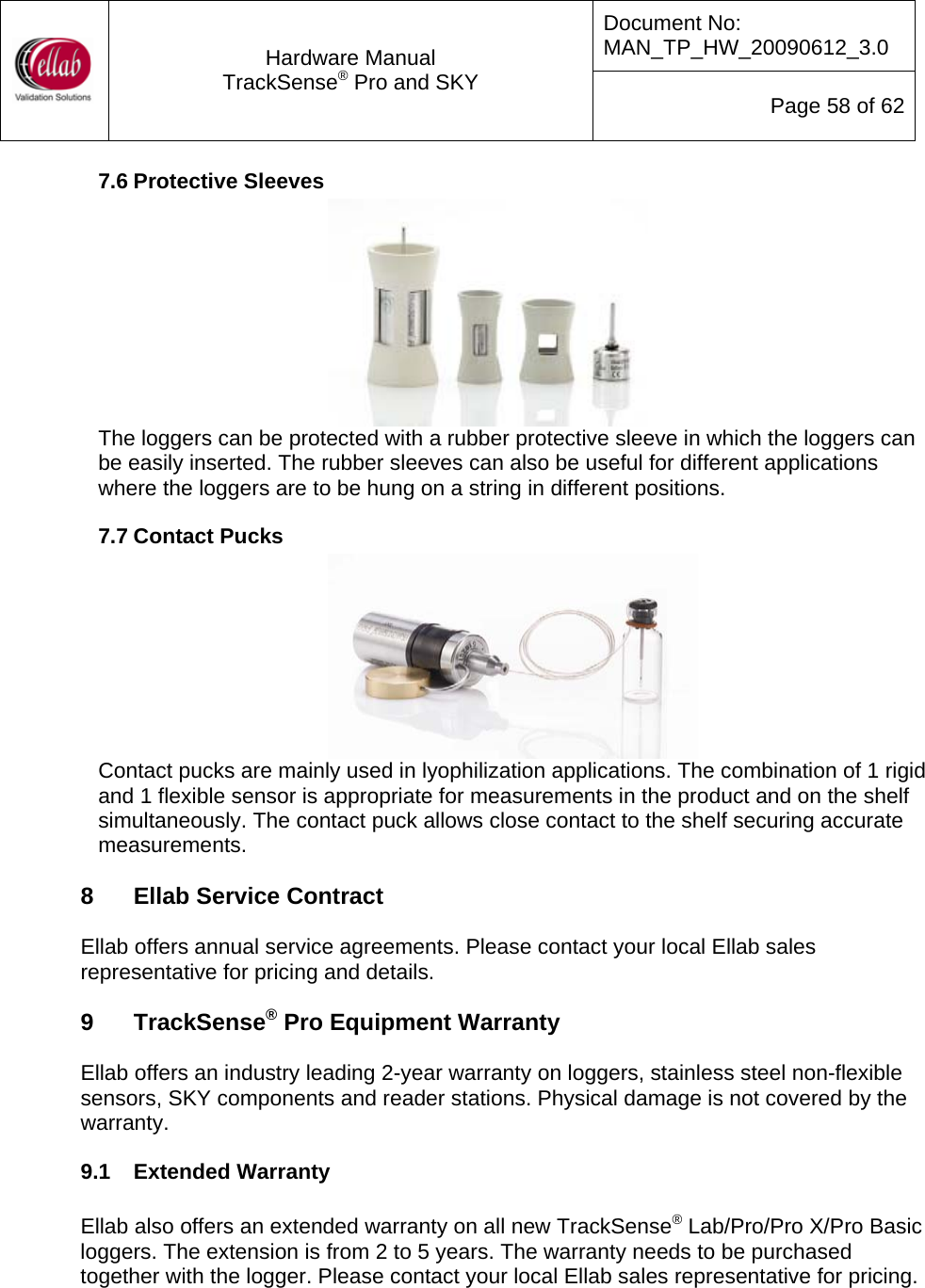
Ellab A S SKYAP1 TrackSense Pro User Manual ValSuite 2

Ellab A/S TrackSense Pro ValSuite 2

Exhibit 8

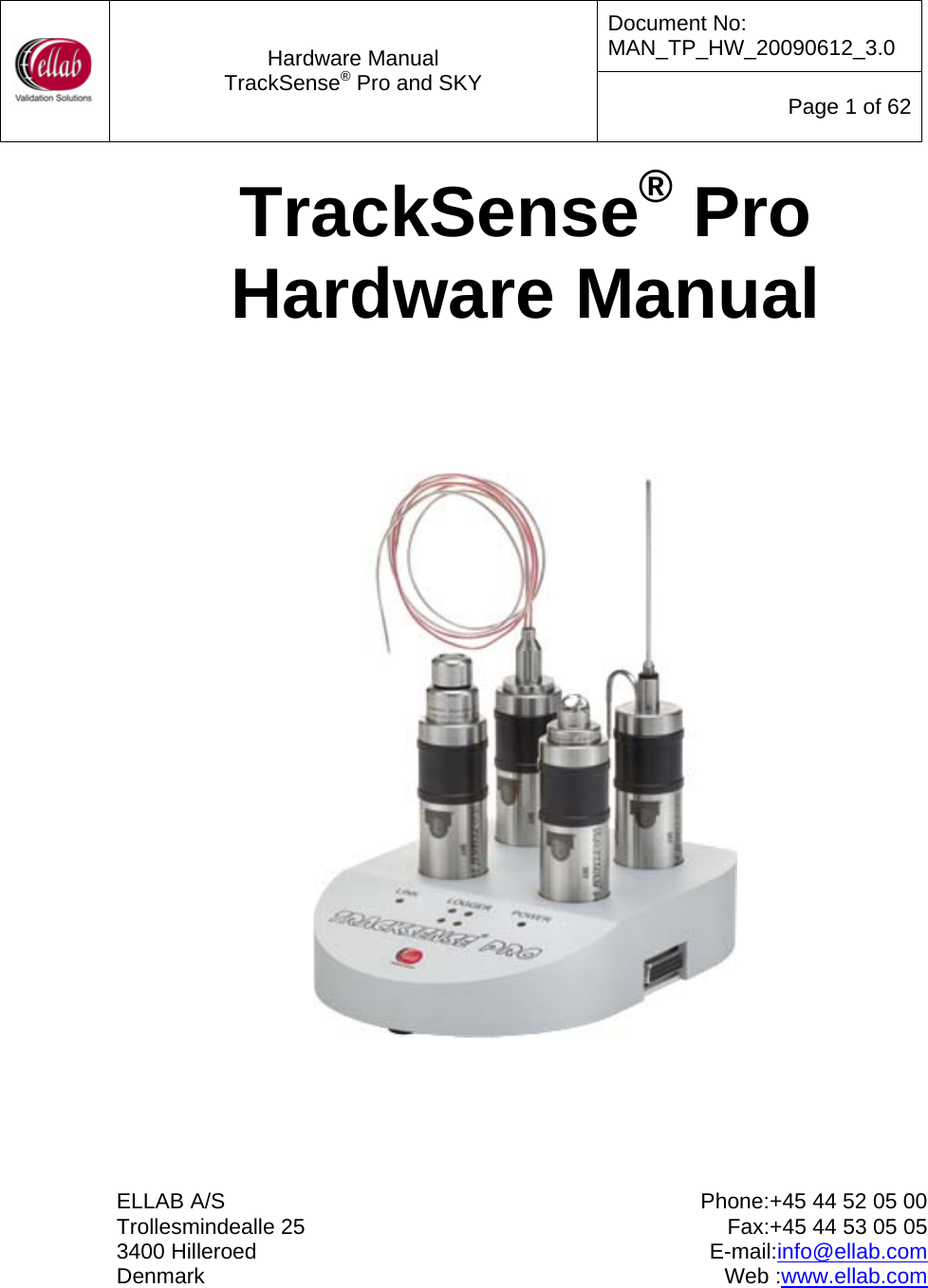
Document No: MAN_TP_HW_20090612_3.0  Hardware Manual TrackSense® Pro and SKY  Page 1 of 62 TrackSense® Pro Hardware Manual            ELLAB A/S Trollesmindealle 25  3400 Hilleroed  Denmark Phone:+45 44 52 05 00 Fax:+45 44 53 05 05E-mail:info@ellab.comWeb :www.ellab.com
Document No: MAN_TP_HW_20090612_3.0  Hardware Manual TrackSense® Pro and SKY  Page 2 of 62 CONTENTS 1 SAFETY INFORMATION ................................................................................ 5 1.1 WARNINGS....................................................................................................5 1.2 GENERAL ......................................................................................................5 1.3 ELECTRICAL HAZARDS...................................................................................5 1.4 DIRECTIVES ..................................................................................................6 1.5 IMPORTANT NOTICE REGARDING ELLAB SKY EQUIPMENT...............................7 1.6 ELLAB SERVICE.............................................................................................8 2 NEW ORDER CONTENTS.............................................................................. 8 2.1 TRACKSENSE® PRO ORDERS.........................................................................8 2.2 SKY ORDERS ...............................................................................................8 3 TRACKSENSE® PRO READER STATIONS............................................... 9 3.1 PROPER USE OF READER STATIONS..............................................................9 3.2 READER STATION TYPES...............................................................................9 3.2.1 Master Reader Station.....................................................................9 3.2.2 Expansion Module ...........................................................................9 3.2.3 Single Reader Station......................................................................9 3.2.4 Lab Reader Station........................................................................10 3.3 COMMUNICATION SETUP..............................................................................10 3.3.1 RS232 (PC) ...................................................................................11 3.3.2 USB ...............................................................................................12 4 TRACKSENSE® PRO LOGGERS............................................................... 17 4.1 TRACKSENSE® PRO MINI LOGGER ...............................................................17 4.1.1 Logger Specifications ....................................................................17 4.1.2 Sensors..........................................................................................17 4.1.3 Proper Use.....................................................................................17 4.1.4 Logger / Sensor Serial Numbers ...................................................17 4.1.5 Disassembling / Assembling Mini Logger......................................18 4.1.6 TrackSense® Pro Mini Battery .......................................................18 4.1.7 Changing Mini Battery ...................................................................18 4.1.8 Procedure for Changing Mini Logger O- Rings..............................19 4.1.9 Procedure for Cleaning Mini Loggers ............................................20 4.2 TRACKSENSE® PRO MICRO LOGGER............................................................20 4.2.1 Logger Specifications ....................................................................20 4.2.2 Sensors..........................................................................................20 4.2.3 Proper Use.....................................................................................21 4.2.4 Logger / Sensor Serial Numbers ...................................................21 4.2.5 Disassembly / Assembly of Micro Logger......................................21 4.2.6 TrackSense® Pro Micro Battery .....................................................21 4.2.7 Changing Micro Batteries ..............................................................22 4.2.8 Procedure for Changing Micro Logger O-Rings ............................23 4.2.9 Procedure for Cleaning Micro Loggers..........................................23 4.3 TRACKSENSE® PRO / PRO X / PRO BASIC LOGGER.......................................24
Document No: MAN_TP_HW_20090612_3.0  Hardware Manual TrackSense® Pro and SKY  Page 3 of 62 4.3.1 Logger Specifications 2nd Generation ............................................24 4.3.2 Proper Use.....................................................................................24 4.3.3 Logger Serial Numbers..................................................................24 4.3.4 Disassembling / Assembling Logger..............................................25 4.3.5 TrackSense® Pro Batteries ............................................................27 4.3.6 Activating / Changing TrackSense® Pro Battery............................29 4.3.7 Procedure for Changing Logger O-Rings ......................................29 4.3.8 Procedure for Cleaning Loggers....................................................30 4.3.9 Extended Warranty........................................................................30 4.3.10 Sensors..........................................................................................30 4.3.11 -30 to -80°C Application Recommendations..................................35 4.3.12 Thermal Barriers............................................................................36 4.4 TRACKSENSE® LAB LOGGER........................................................................39 4.4.1 Logger Specifications 2nd Generation ............................................40 4.4.2 Lab Sensors...................................................................................40 5 SKY SYSTEM.................................................................................................. 41 5.1 SKY COMPONENTS .....................................................................................41 5.2 SKY MODULE .............................................................................................42 5.2.1 Specifications.................................................................................42 5.2.2 Connecting SKY Module to Logger ...............................................42 5.3 ACCESS POINT............................................................................................43 5.3.1 Specifications.................................................................................43 5.3.2 Access Point: Sensitivity to ESD ...................................................43 5.3.3 Communication Setup ...................................................................43 6 CALIBRATION................................................................................................ 44 6.1 ELLAB FACTORY CALIBRATION.....................................................................44 6.1.1 Calibration Types: TrackSense® Pro .............................................44 6.1.2 Calibration Types: TrackSense® Lab.............................................45 6.2 IN-HOUSE CALIBRATION SOLUTIONS ............................................................46 6.2.1 Ellab Temperature Standard (ETS) ...............................................46 6.2.2 LiquiCal™ Baths............................................................................51 6.2.3 Ellab Dry Block ..............................................................................52 6.3 VALSUITE™ CALIBRATION OPTIONS ............................................................52 6.3.1 Manual Calibration.........................................................................52 6.3.2 Semi-Automatic Calibration ...........................................................52 6.3.3 Full Automatic Calibration..............................................................53 7 ACCESSORIES .............................................................................................. 53 7.1 PACKING GLANDS .......................................................................................53 7.1.1 Packing Glands for Filled Containers ............................................54 7.1.2 Packing Glands for Bottles ............................................................54 7.1.3 Packing Gland for Pouches ...........................................................54 7.1.4 Packing Glands for Ampoules .......................................................54 7.1.5 Packing Glands for Vials................................................................55 7.1.6 Packing Glands for Internal Mounting............................................55
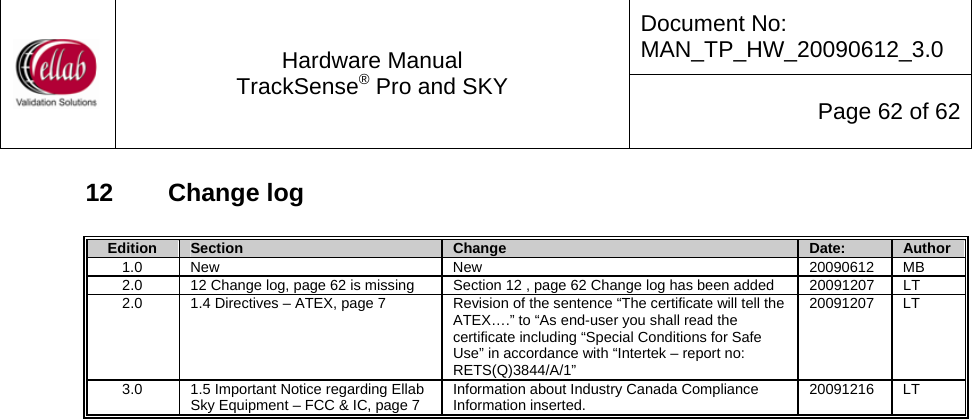
Document No: MAN_TP_HW_20090612_3.0  Hardware Manual TrackSense® Pro and SKY  Page 4 of 62 7.1.7 Stainless Steel Tip System for TPT Teflon Sensors......................55 7.2 SPACE BARS...............................................................................................56 7.3 DISTANCE PIECES .......................................................................................56 7.4 CUSTOM INTERNAL FIXTURES ......................................................................56 7.5 CUTTING TOOLS..........................................................................................57 7.5.1 Cutting Tool Types.........................................................................57 7.6 PROTECTIVE SLEEVES.................................................................................58 7.7 CONTACT PUCKS ........................................................................................58 8 ELLAB SERVICE CONTRACT.................................................................... 58 9 TRACKSENSE® PRO EQUIPMENT WARRANTY................................... 58 9.1 EXTENDED WARRANTY................................................................................58 10 FAQ................................................................................................................... 59 11 ELLAB LOCATIONS...................................................................................... 61 12 CHANGE LOG ................................................................................................ 62
Document No: MAN_TP_HW_20090612_3.0  Hardware Manual TrackSense® Pro and SKY  Page 5 of 62 1  Safety Information  Use this equipment only as specified in this manual. Otherwise, the protection provided by the equipment may be impaired.  •  “Warning” identifies conditions and actions that may pose hazards to the user. •  “Caution” identifies conditions and actions that may damage the equipment being used. 1.1 Warnings  Disclaimer: Ellab manufactures equipment intended for use in thermal validation, monitoring and stability studies. Equipment used for applications other than these studies is used at the discretion and sole responsibility of the customer. Ellab cannot accept any responsibility for the use of equipment for any application other than thermal validation, monitoring and stability studies. The customer needs to verify the temperature range of the equipment being used before placing it into an application. 1.2 General  DO NOT use the equipment for any application other than thermal validation, monitoring and stability studies. Any other use of the equipment may cause unknown hazards to the user.  DO NOT use the equipment in environments other than those listed in this user’s guide and follow all safety guidelines. Only trained personnel should use the equipment.  Inspect the equipment for damage before each use.   DO NOT use the equipment if it appears damaged or operates abnormally. Before initial use, after transport, or after storage in humid or semi-humid environments the equipment needs to be dried for a period of at least 2 hours before it can be assumed that it will meet all of the safety requirements of the IEC 1010-1. If the equipment is wet or has been in a wet environment, take necessary measures to remove moisture prior to applying power. The equipment is intended for indoor use only. 1.3 Electrical Hazards  These guidelines must be followed to ensure that the safety mechanisms in the equipment will operate properly. Equipment, when applicable, must be plugged into a 115 VAC (± 10%) or 230 VAC (± 10%) 50/60 Hz electric outlet as indicated on the front panel. The power cord of the instrument is equipped with a three-pronged grounding plug for your protection against electrical shock hazards. It must be plugged directly into a properly grounded three-prong receptacle. The receptacle must be installed in accordance with local codes and ordinances.
Document No: MAN_TP_HW_20090612_3.0  Hardware Manual TrackSense® Pro and SKY  Page 6 of 62 DO NOT use an extension cord. Consult a qualified electrician. Always inspect the power cord before use for any damage to the insulation due to contact with hot surfaces, cuts or abrasions.  Always replace the power cord with an approved cord of the correct rating and type. If you have questions, contact an Ellab Authorized Service.  Cautions Always operate TrackSense® Pro Reader Stations at room temperature between 5°C to 40°C (41°F and 104°F).   DO NOT operate this equipment in an excessively wet, oily, dusty, or dirty environment.  The equipment is a precision instrument. Although it has been designed for optimum durability and trouble free operation, it must be handled with care. The equipment including any probes or loggers are sensitive instruments that can be easily damaged. Always handle these devices with care. Do not allow them to be dropped, struck, stressed, or overheated.  TrackSense® Clock (Internal) When using TrackSense® Lab / Pro / Pro X / Pro Basic loggers, ValSuite™ will start an internal clock in the logger. Beware that the max time deviation at 23 °C will be +/- 5 seconds over 24 hours.  Logger / Sensor Environment Using TrackSense® Pro equipment, if the logger house is not used in the same environment as the sensor this can have an impact on the measurement. There can be a deviance of approximately 0.25°C when the logger is exposed to ambient temperature and the sensor is at 121.1°C. Calibrations should be performed based on the manner the loggers / sensors will be used. 1.4 Directives  EMC Ellab equipment has been tested to meet the European Electromagnetic Compatibility Directive (EMC Directive, 2004/108/EF). The Declaration of Conformity for your instrument lists the specific standards at which the unit was tested.  Low Voltage (Safety) In order to comply with the European Low Voltage Directive (LVD) 2006/95/EC), Ellab equipment has been designed to meet the IEC 1010-1 (EN 61010-1) and the IEC 1010-2-010 (EN 61010-2-010) standards.  Waste Electrical and Electronic Equipment Ellab meets the European Community directive 2002/96/EC on waste electrical and electronic equipment (WEEE), and is in accordance with the RoHS Directive 2002/95/EC, which is European Law since February 2003.
Document No: MAN_TP_HW_20090612_3.0  Hardware Manual TrackSense® Pro and SKY  Page 7 of 62 ATEX Ellab ATEX equipment has been tested to meet European requirements for equipment and protective systems intended for use in potentially explosive atmospheres (94/9/EF). The Declaration of Conformity for your instrument lists the specific standards at which the unit was tested. As end-user you shall read the certificate including “Special Conditions for Safe Use”. All new TrackSense® Pro / Pro X / Pro Basic loggers and SKY modules are ATEX certified.  1.5 Important Notice regarding Ellab SKY Equipment & IC Compliance Information: FCC ID: XUS-SKYDL1 and FCC ID: XUS-SKYAP1 IC ID: 8758A-SKYDL1 and IC ID: 8758A-SKYAP1  Ellab SKY equipment has been tested and found to comply with the limits for a Class B digital device pursuant to Part 15 of the FCC Rules and Industry Canada ICES-003.   These limits are designed to provide reasonable protection against harmful interference in a residential installation. This equipment generates, uses, and can radiate radio frequency energy and, if not installed and used in accordance with the manufacturer's instruction manual, may cause interference with radio and television reception. However, there is no guarantee that interference will not occur in a particular installation. If this equipment does cause harmful interference with radio or television reception, which can be determined by turning the equipment off and on, you are encouraged to try to correct the interference by one or more of the following measures:   •  Reorient or relocate the antenna of the radio/television receiver.  •  Increase the separation between this equipment and the radio/television receiver. •  Plug the equipment into a different outlet so that the equipment and the radio/television receiver are on different power mains branch circuits.  •  Consult a representative of Ellab A/S or an experienced radio/television technician for additional suggestions.   Ellab SKY equipment complies with part 15 Subpart B and C of the FCC Rules and Industry Canada ICES-003 and RSS-Gen.  Operation is subject to the following two conditions: (1) The device may not cause harmful interference, and (2) The device must accept any interference received, including interference that may cause undesired operation  Changes or modifications of the device can void the FCC and Industry Canada certification and user's authority to operate the equipment.
Document No: MAN_TP_HW_20090612_3.0  Hardware Manual TrackSense® Pro and SKY  Page 8 of 62 ARIB  Ellab SKY equipment has been tested to comply with the requirements in the Japanese standard ARIB STD-T66 (Low-Power Data Communication System/Wireless LAN System). 1.6 Ellab Service   Please contact your local Ellab sales representative for the proper service center location.  When contacting Ellab for support, please have the following information available: • Model Number • Serial Number • Voltage •  Complete description of the problem •  ValSuite™ Software Version  2  New Order Contents  When a new system (either TrackSense® Pro or SKY) is ordered, equipment is shipped in a custom Ellab suitcase. The contents of the suitcases are included below: 2.1 TrackSense® Pro Orders • Suitcase • Reader Station • Software • Accessories Box • Battery Removal Tool (for Mini and Micro orders) • Logger Wrench • O-Ring Sealant • USB Cable • TSP Battery Management Sheet • USB Warning Information Sheet • Customer Survey 2.2 SKY Orders  • Suitcase • SKY Access Point • SKY Access Point Antenna • SKY Access Point Remote Antenna (if purchased) • Accesories Box • USB Cable
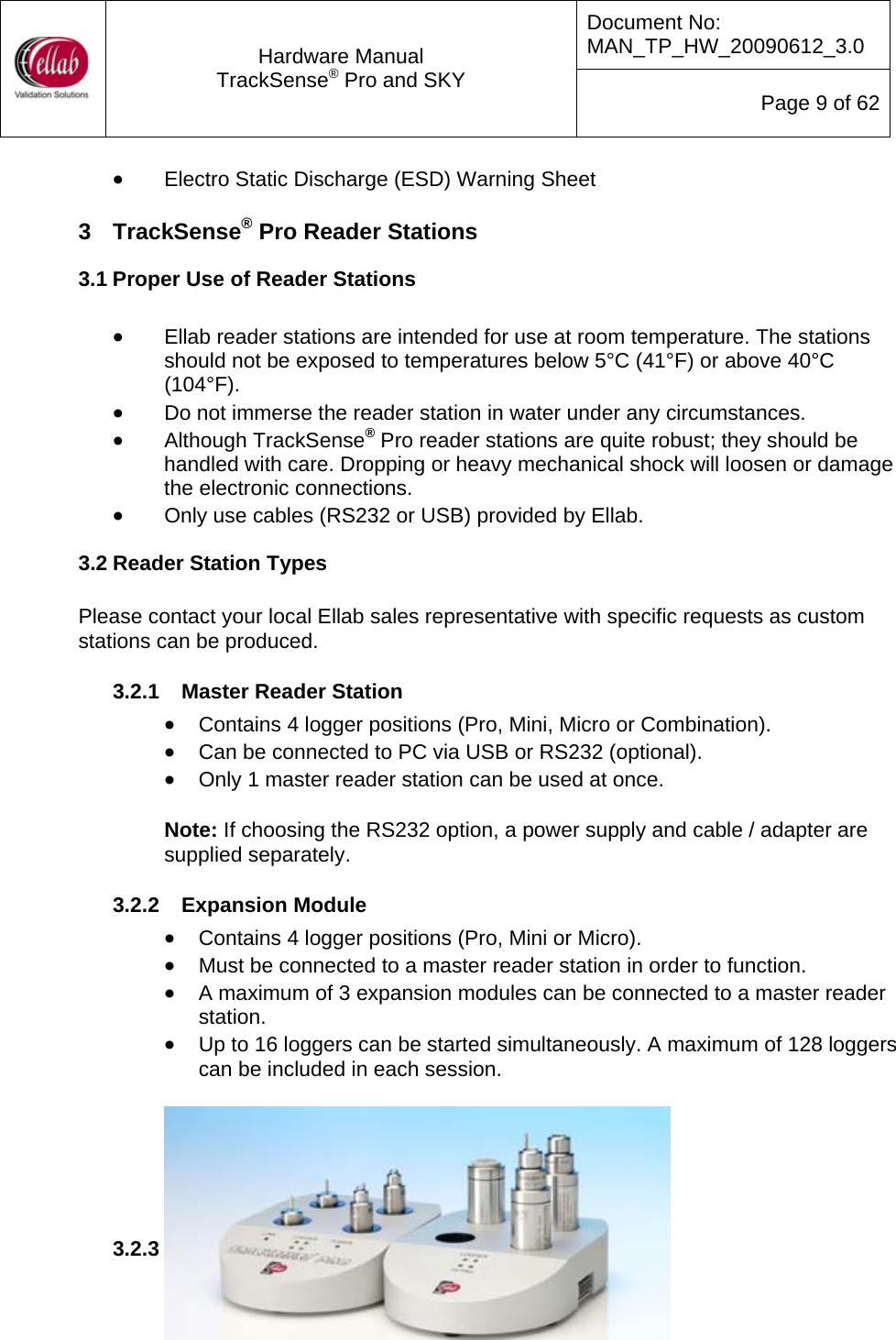
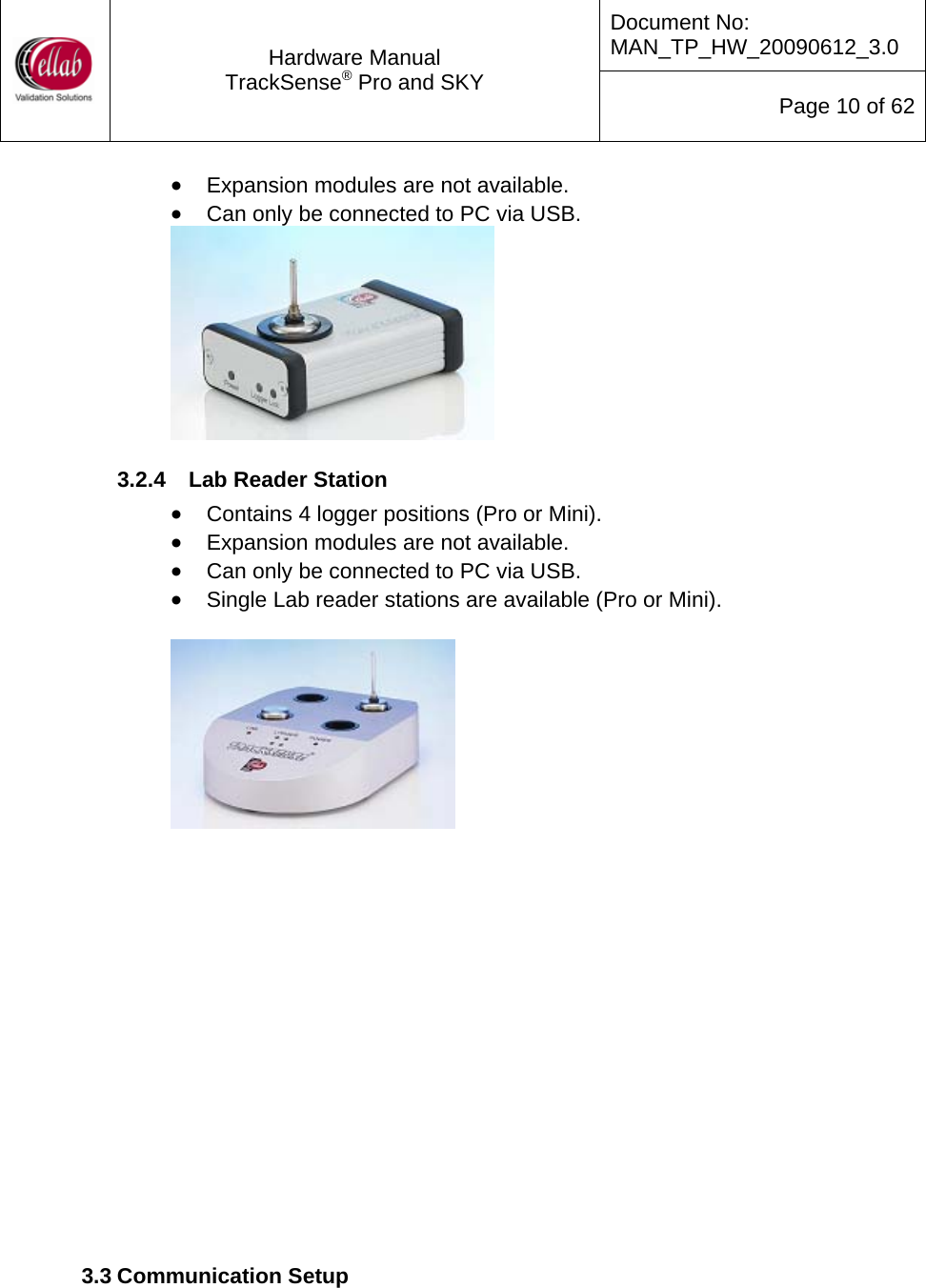
Document No: MAN_TP_HW_20090612_3.0  Hardware Manual TrackSense® Pro and SKY  Page 9 of 62 • Electro Static Discharge (ESD) Warning Sheet  3  TrackSense® Pro Reader Stations 3.1 Proper Use of Reader Stations  • Ellab reader stations are intended for use at room temperature. The stations should not be exposed to temperatures below 5°C (41°F) or above 40°C (104°F).   • Do not immerse the reader station in water under any circumstances. • Although TrackSense® Pro reader stations are quite robust; they should be handled with care. Dropping or heavy mechanical shock will loosen or damage the electronic connections. • Only use cables (RS232 or USB) provided by Ellab. 3.2 Reader Station Types  Please contact your local Ellab sales representative with specific requests as custom stations can be produced.  3.2.1  Master Reader Station • Contains 4 logger positions (Pro, Mini, Micro or Combination). • Can be connected to PC via USB or RS232 (optional). • Only 1 master reader station can be used at once.  Note: If choosing the RS232 option, a power supply and cable / adapter are supplied separately.  3.2.2  Expansion Module • Contains 4 logger positions (Pro, Mini or Micro). • Must be connected to a master reader station in order to function. • A maximum of 3 expansion modules can be connected to a master reader station. • Up to 16 loggers can be started simultaneously. A maximum of 128 loggers can be included in each session.        3.2.3  Single Reader Station • Contains 1 logger position (Pro, Mini or Micro).
Document No: MAN_TP_HW_20090612_3.0  Hardware Manual TrackSense® Pro and SKY  Page 10 of 62 • Expansion modules are not available. • Can only be connected to PC via USB.    3.2.4  Lab Reader Station • Contains 4 logger positions (Pro or Mini).  • Expansion modules are not available. • Can only be connected to PC via USB.  • Single Lab reader stations are available (Pro or Mini).                  3.3 Communication Setup
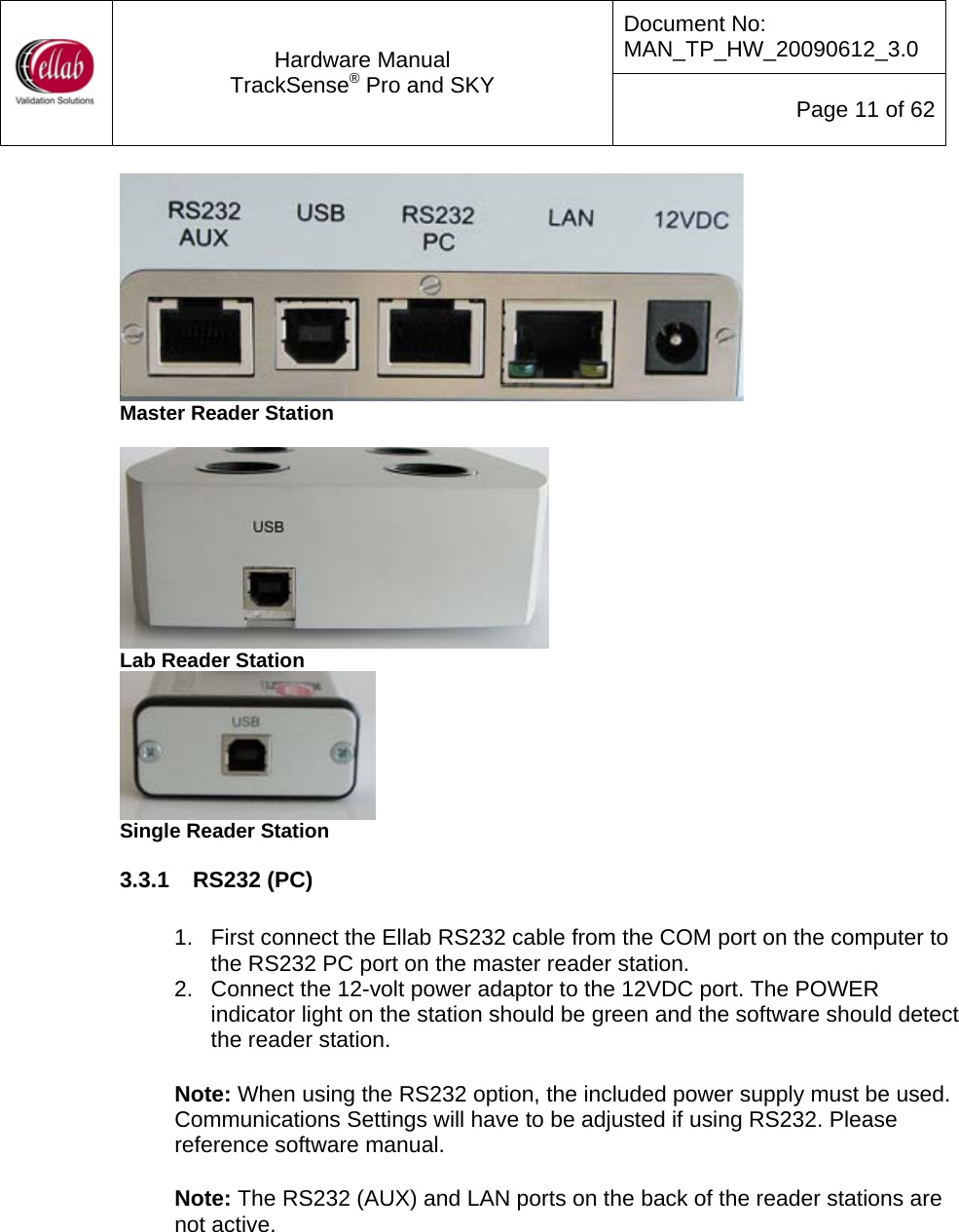
Document No: MAN_TP_HW_20090612_3.0  Hardware Manual TrackSense® Pro and SKY  Page 11 of 62  Master Reader Station   Lab Reader Station  Single Reader Station 3.3.1  RS232 (PC)   1.  First connect the Ellab RS232 cable from the COM port on the computer to the RS232 PC port on the master reader station.   2.  Connect the 12-volt power adaptor to the 12VDC port. The POWER indicator light on the station should be green and the software should detect the reader station.  Note: When using the RS232 option, the included power supply must be used.  Communications Settings will have to be adjusted if using RS232. Please reference software manual.     Note: The RS232 (AUX) and LAN ports on the back of the reader stations are not active.
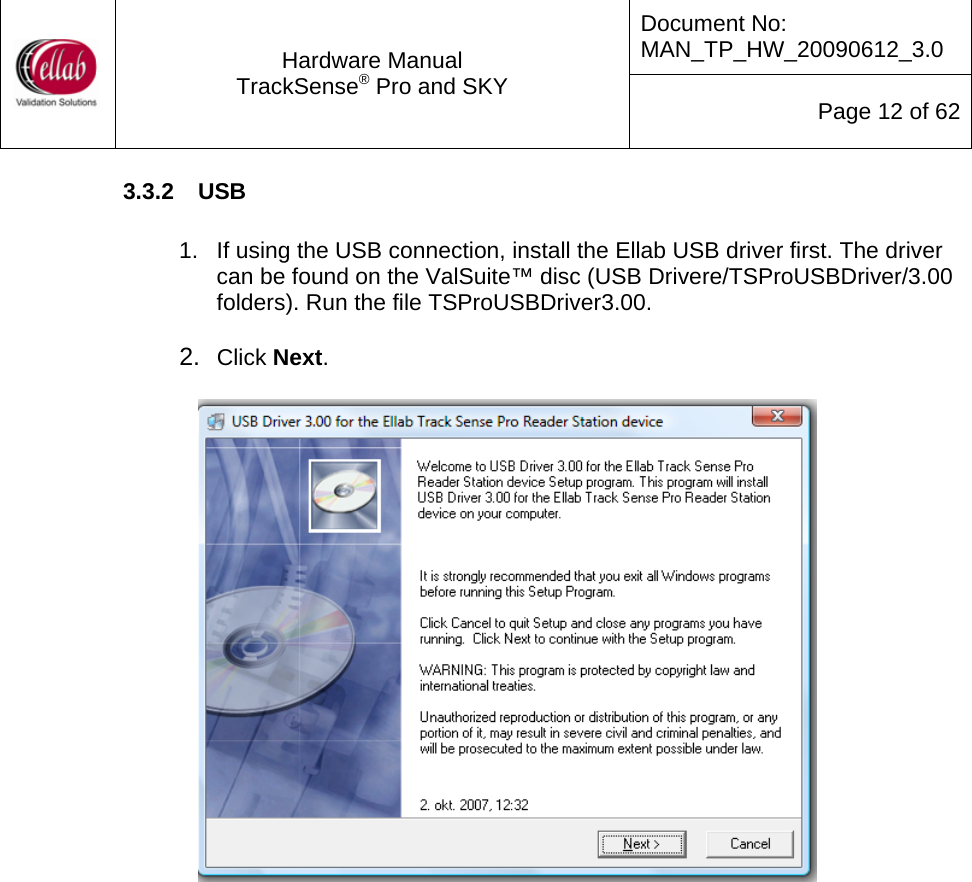
Document No: MAN_TP_HW_20090612_3.0  Hardware Manual TrackSense® Pro and SKY  Page 12 of 62 3.3.2  USB  1.  If using the USB connection, install the Ellab USB driver first. The driver can be found on the ValSuite™ disc (USB Drivere/TSProUSBDriver/3.00 folders). Run the file TSProUSBDriver3.00.  2.  Click Next.
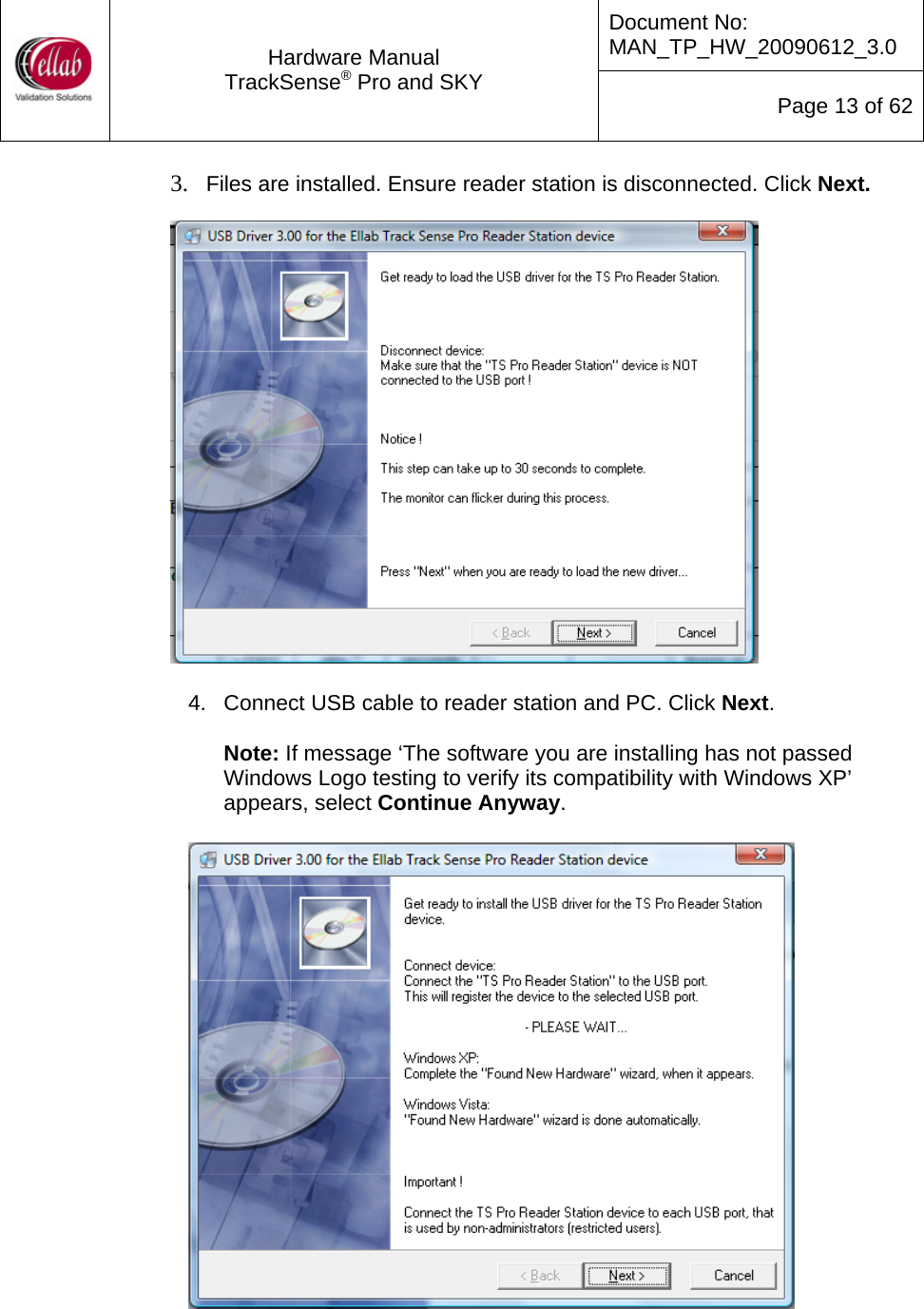
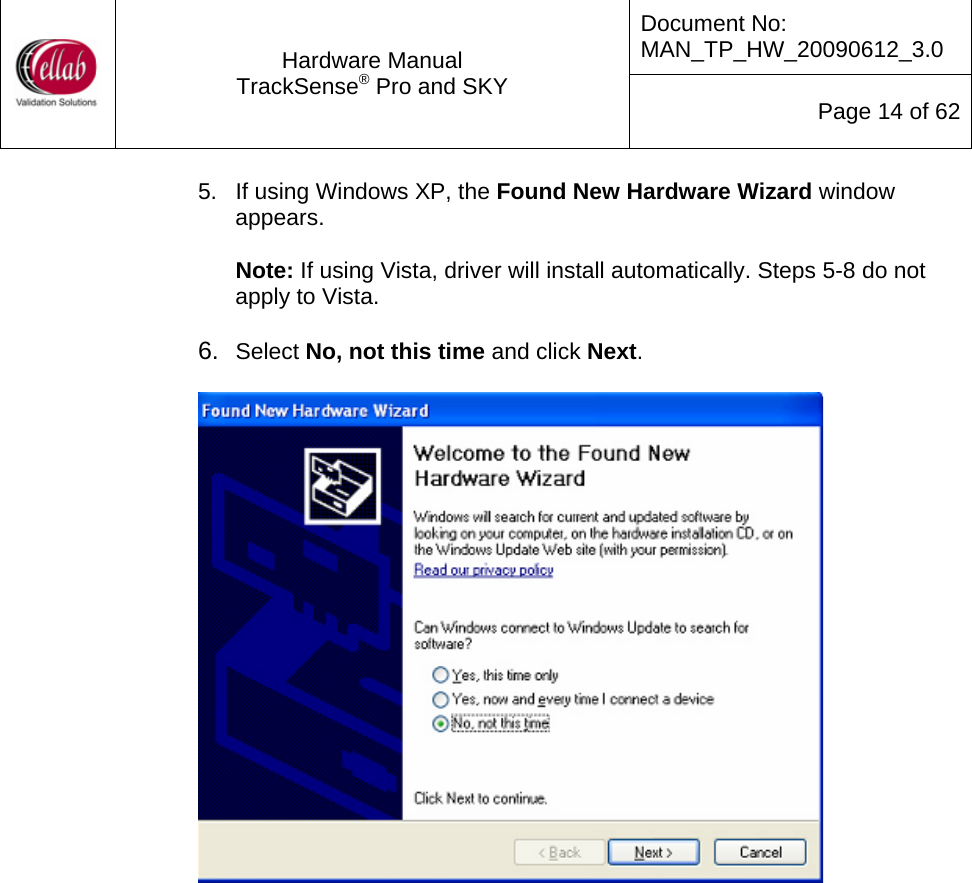
Document No: MAN_TP_HW_20090612_3.0  Hardware Manual TrackSense® Pro and SKY  Page 13 of 62 3. Files are installed. Ensure reader station is disconnected. Click Next.    4.  Connect USB cable to reader station and PC. Click Next.  Note: If message ‘The software you are installing has not passed Windows Logo testing to verify its compatibility with Windows XP’ appears, select Continue Anyway.
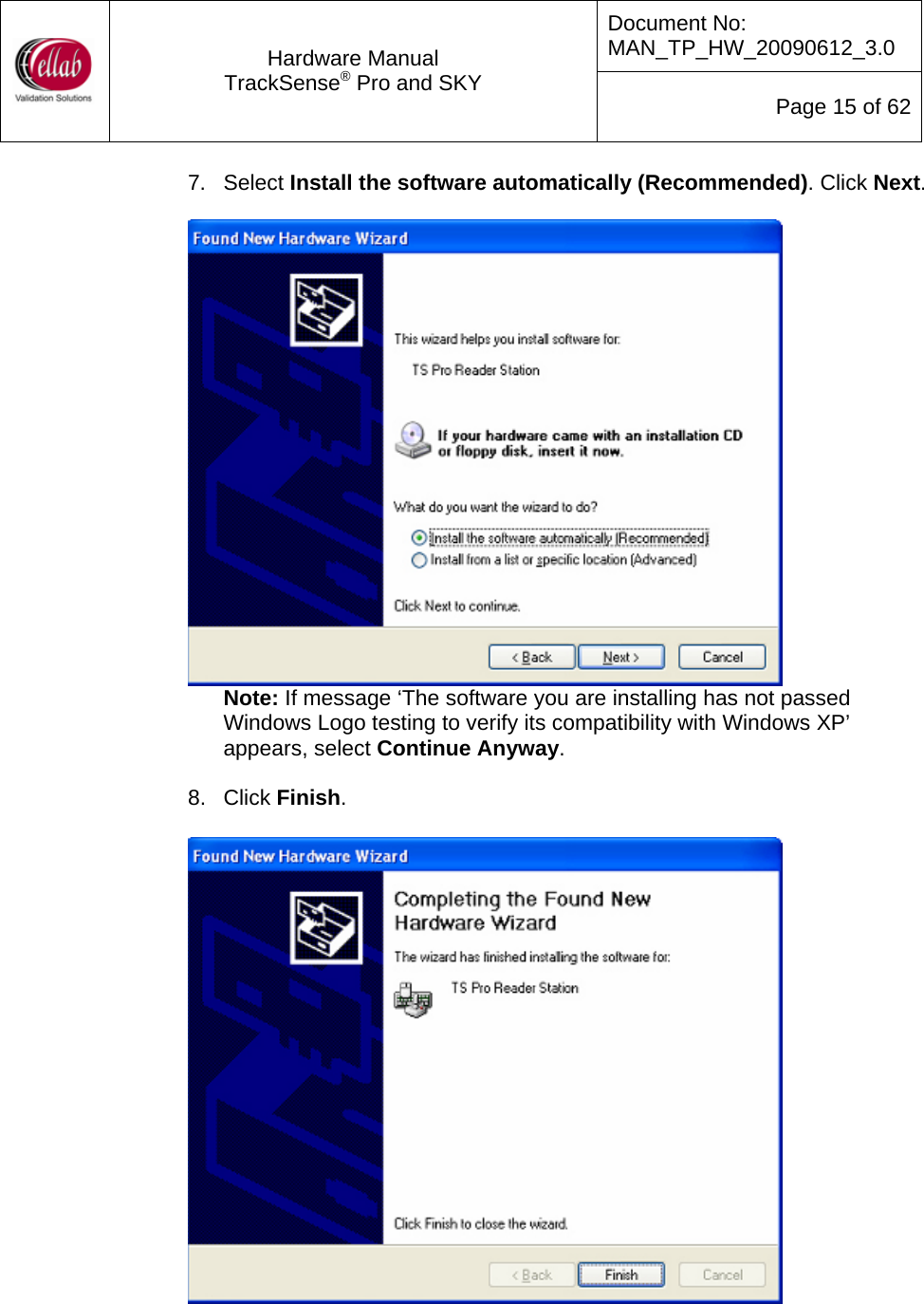
Document No: MAN_TP_HW_20090612_3.0  Hardware Manual TrackSense® Pro and SKY  Page 14 of 62 5.  If using Windows XP, the Found New Hardware Wizard window appears.   Note: If using Vista, driver will install automatically. Steps 5-8 do not apply to Vista.    6.  Select No, not this time and click Next.
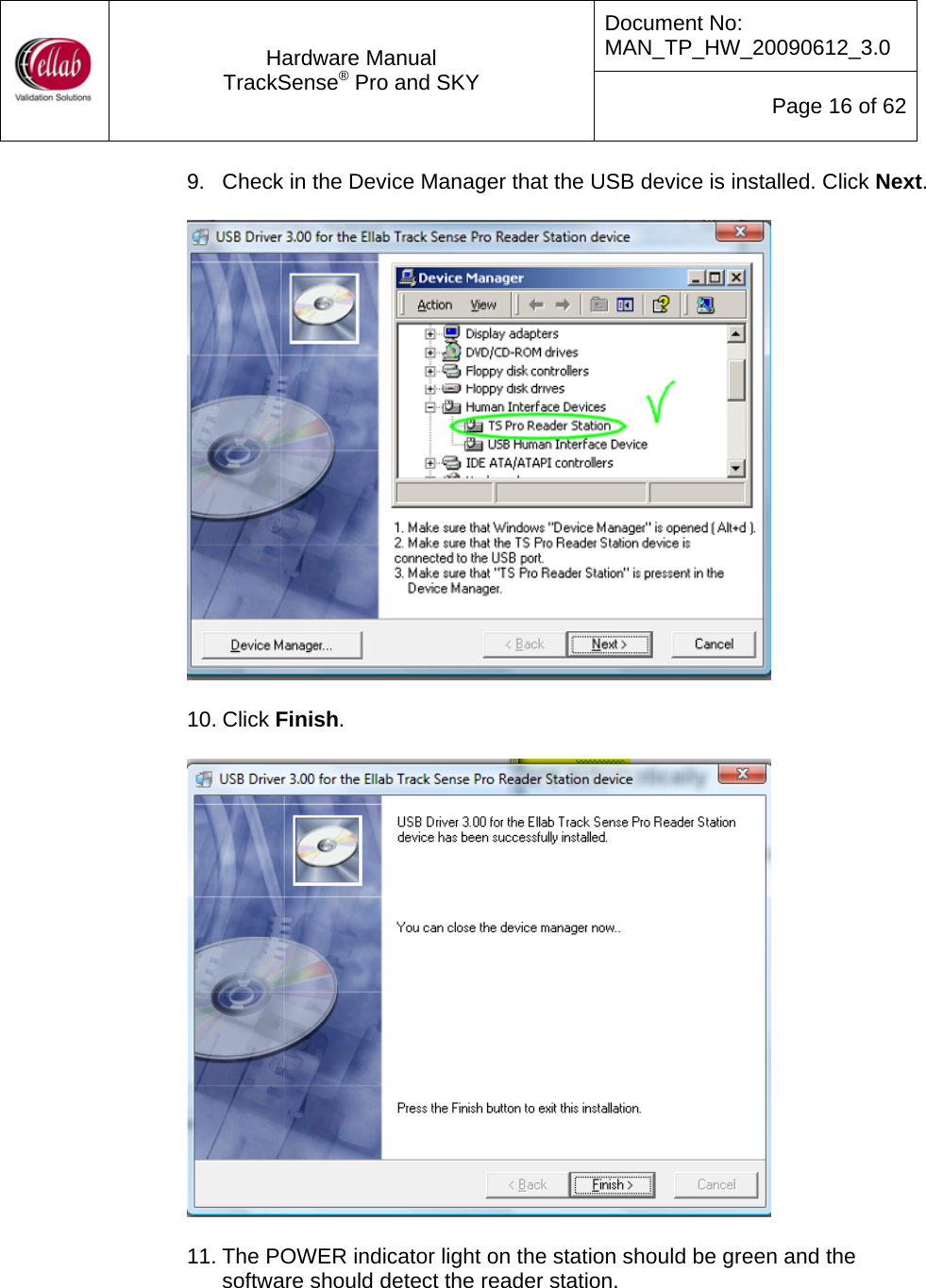
Document No: MAN_TP_HW_20090612_3.0  Hardware Manual TrackSense® Pro and SKY  Page 15 of 62 7. Select Install the software automatically (Recommended). Click Next.   Note: If message ‘The software you are installing has not passed Windows Logo testing to verify its compatibility with Windows XP’ appears, select Continue Anyway.  8. Click Finish.
Document No: MAN_TP_HW_20090612_3.0  Hardware Manual TrackSense® Pro and SKY  Page 16 of 62 9.  Check in the Device Manager that the USB device is installed. Click Next.    10. Click Finish.    11. The POWER indicator light on the station should be green and the software should detect the reader station.
Document No: MAN_TP_HW_20090612_3.0  Hardware Manual TrackSense® Pro and SKY  Page 17 of 62 4  TrackSense® Pro Loggers  Warning: Substitution of components may impair the intrinsic safety of the equipment. 4.1 TrackSense® Pro Mini Logger 4.1.1  Logger Specifications   Logger type  Range  Operating Pressure  Data Points  Dimensions  Estimated Battery life  Min / Max.  Sample rate TSP Mini  0 to +140°C  1 mbar to 10 bar abs.  14.500  Ø20×16mm  100 hours / 36.000 samples* Min. 1 sec. Max. 23:59  Hours: Min * Tested at +121°C with a 15 second sample rate (single channel) 4.1.2  Sensors  • Standard lengths: 0, 25, 50, 75 and 100 mm. • Custom lengths are available. 4.1.3  Proper Use  • Never use the logger outside the measuring range. •  Treat the loggers as you would any other sensitive electronic equipment.  Dropping or heavy mechanical shock will loosen or damage the electronic connections. • Only use the special tool provided by Ellab together with the battery removal tool to disassemble / assemble loggers. Never use any other tools as this can damage the housing assembly as well as the threads. •  Do not remove the logger from the reader station while loggers are being read. Loss of data may occur. •  Store loggers in a dry, cool place. •  If corrosion is present near battery contacts, verify the logger is not leaking.  Lightly clean area with Q-tip and alcohol. Change O-ring if necessary.  •  Any logger with recurring problems should be returned to Ellab for service.  •  If loggers have not been used for an extended period of time, they must be tested by running a short test at room temperature.   4.1.4  Logger / Sensor Serial Numbers  All loggers have a unique serial number. The serial numbers allow compliance with GMP & GDP regulations. The serial number for Mini loggers appears on the top and the side of the logger.
Document No: MAN_TP_HW_20090612_3.0  Hardware Manual TrackSense® Pro and SKY  Page 18 of 62 4.1.5  Disassembling / Assembling Mini Logger  1.  Place the Mini logger in the battery removal tool and affix the logger wrench around the outside of the removal tool.            2.  Be sure that the bottom of the Mini logger is visible when placed in the tool.  Apply minimum pressure and turn tool with Mini logger around and screw / unscrew the lid of the logger with a suitable coin. 4.1.6  TrackSense® Pro Mini Battery  4.1.6.1  Battery Specifications  • Temperature range: 0 to 140°C. • Life expectancy a maximum of 100 hours in applications at 121°C with a 15 second sample rate.  4.1.6.2  Proper Use  • Only use Ellab batteries. Use of other batteries will void any warranty on equipment. Other batteries have not been tested in extreme temperatures / environments and they can potentially cause damage to the logger. • When changing the battery, only use the logger wrench along with battery removal tool provided by Ellab to disassemble loggers. Never use any other tools as this can damage the housing assembly as well as the threads. • To extend battery life, remove battery when logger is not in use. 4.1.7  Changing Mini Battery  1.  Place the Mini logger in the battery removal tool and affix the logger wrench around the battery removal tool. Be sure that the bottom of the Mini logger is visible when placed in the tool. Turn tool with Mini logger around and unscrew the lid of the logger with a suitable coin. Release Mini logger from tool.    2.  Remove the old battery and leave Mini logger without a battery for 120 seconds.     3.  Following the procedures listed in section 4.1.8, change the o-ring.
Document No: MAN_TP_HW_20090612_3.0  Hardware Manual TrackSense® Pro and SKY  Page 19 of 62 4.  Wash hands before insertion of the battery and before the logger is closed.  Insert the new battery (+ pole against the bottom) in Mini logger and press it for a few seconds to insure proper contact.      5.  When closing the Mini logger after inserting the new battery, make sure the lid is tight. If the O-ring is visible, tighten further.      Note: If the logger is not detected by the software, please clean the battery and inside the Mini logger (see section 4.1.9 for the procedure for cleaning Mini Loggers). When inserting the battery hold battery down to ensure contact.  Ordering codes for Mini batteries: • Mini Battery (Single): 35300001 • Mini Battery (10 pcs): 35300010 • Mini Battery (100 pcs): 35300100 4.1.8  Procedure for Changing Mini Logger O- Rings  The O-ring is placed around the lid for Mini logger. It is crucial for the lifetime of the Mini logger that the O-ring is kept in proper condition. To avoid leakage, the O-ring must be changed every time battery is changed. The ordering code for the Mini O-ring is 35900010 (set of 10).  1.  Use the tool for Mini Loggers to remove the O-ring. At the end of the legs of the tool there is a small recess. Place the lid in the recess and keep it firm.  Push the tool against the edge of the lid until the O-ring is loose. Pull the O-ring off the lid. Throw away the used O-ring.
Document No: MAN_TP_HW_20090612_3.0  Hardware Manual TrackSense® Pro and SKY  Page 20 of 62 2.  Clean and grease the O-ring thread of the lid. Grease new O-ring and place it in the thread. The O-ring is very flexible and can be mounted without the tool.    3.  Wash hands before insertion of the battery and before the logger is closed. 4.1.9  Procedure for Cleaning Mini Loggers  To assure proper contact between the Mini logger and battery, it is necessary to clean the golden contact points inside the logger.       Moisten a cotton bud with alcohol and clean contacts inside the logger carefully.  Leave the logger open to dry for 120 seconds. The battery and O-ring thread of the lid can be cleaned this way as well. 4.2 TrackSense® Pro Micro Logger 4.2.1  Logger Specifications  Logger type  Range  Operating Pressure  Data Points  Dimensions  Estimated Battery life  Min / Max.  Sample rate TSP Micro TMP  -20 to +140°C  1 mbar to 10 Bar Abs  14.500  Ø15×22mm  75 hours  Min. 1 sec. Max. 23:59  Hours: Min TSP Micro PRS  10 mBar to 6 bar ABS  1 mbar to 10 Bar Abs  7.200  Ø15×40mm  50 hours  Min. 0,333 sec. Max. 23:59  Hours: Min TSP Micro TMP & PRS -20 to +140 °C & 10 mBar to 6 Bar ABS 1 mbar to 10 Bar Abs  2 * 4.800  Ø15×40mm  40 hours  Min. 0,333 sec. Max. 23:59  Hours: Min TSP Micro Rotation    14.500 Ø15×24mm  40 hours  1 Sec.~4 Hours  of Operation  4.2.2  Sensors • Standard length (Micro temperature):10 mm. • Custom lengths are available.
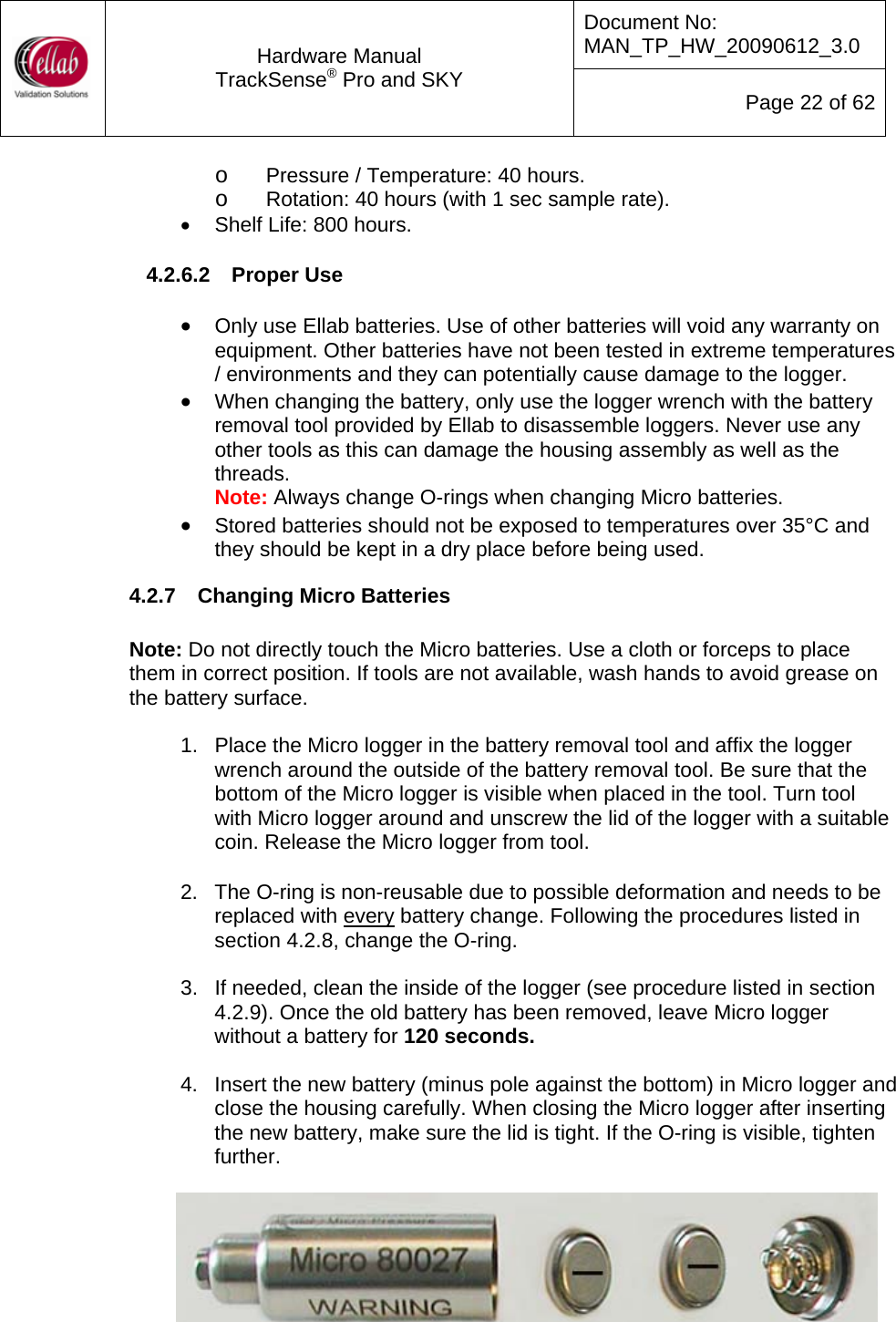
Document No: MAN_TP_HW_20090612_3.0  Hardware Manual TrackSense® Pro and SKY  Page 21 of 62 4.2.3  Proper Use • Never use the logger outside the measuring range. •  Treat the loggers as you would any other sensitive electronic equipment.  Dropping or heavy mechanical shock will loosen or damage the electronic connections. • Only use the special tool provided by Ellab together with the battery removal tool to disassemble / assemble loggers. Never use any other tools as this can damage the housing assembly as well as the threads. •  Do not remove the logger from the reader station while loggers are being read. Loss of data may occur. •  Store loggers in a dry, cool place. •  If corrosion is present near battery contacts, verify the logger is not leaking.  Lightly clean area with Q-tip and alcohol. Change O-ring if necessary.  •  Any logger with recurring problems should be returned to Ellab for service.  •  If loggers have not been used for an extended period of time, they must be tested by running a short test at room temperature. 4.2.4  Logger / Sensor Serial Numbers  All loggers have a unique serial number. The serial numbers allow compliance with GMP & GDP regulations. The serial number for Micro loggers appears on the top and the side of the logger. 4.2.5  Disassembly / Assembly of Micro Logger  1.  Place the Micro logger in the battery removal tool and affix logger wrench around the outside of the removal tool.            2.  Be sure that the bottom of the Micro logger is visible when placed in the tool. Turn tool with Micro logger around and screw/unscrew the lid of the logger with a suitable coin. 4.2.6  TrackSense® Pro Micro Battery   4.2.6.1  Micro Battery Specifications  •  Temperature Range of Micro Battery: -20 to 140°C. •  Expected lifetime in applications at 121°C with a 15 second sample rate: o Temperature: 75 hours. o Pressure: 50 hours.
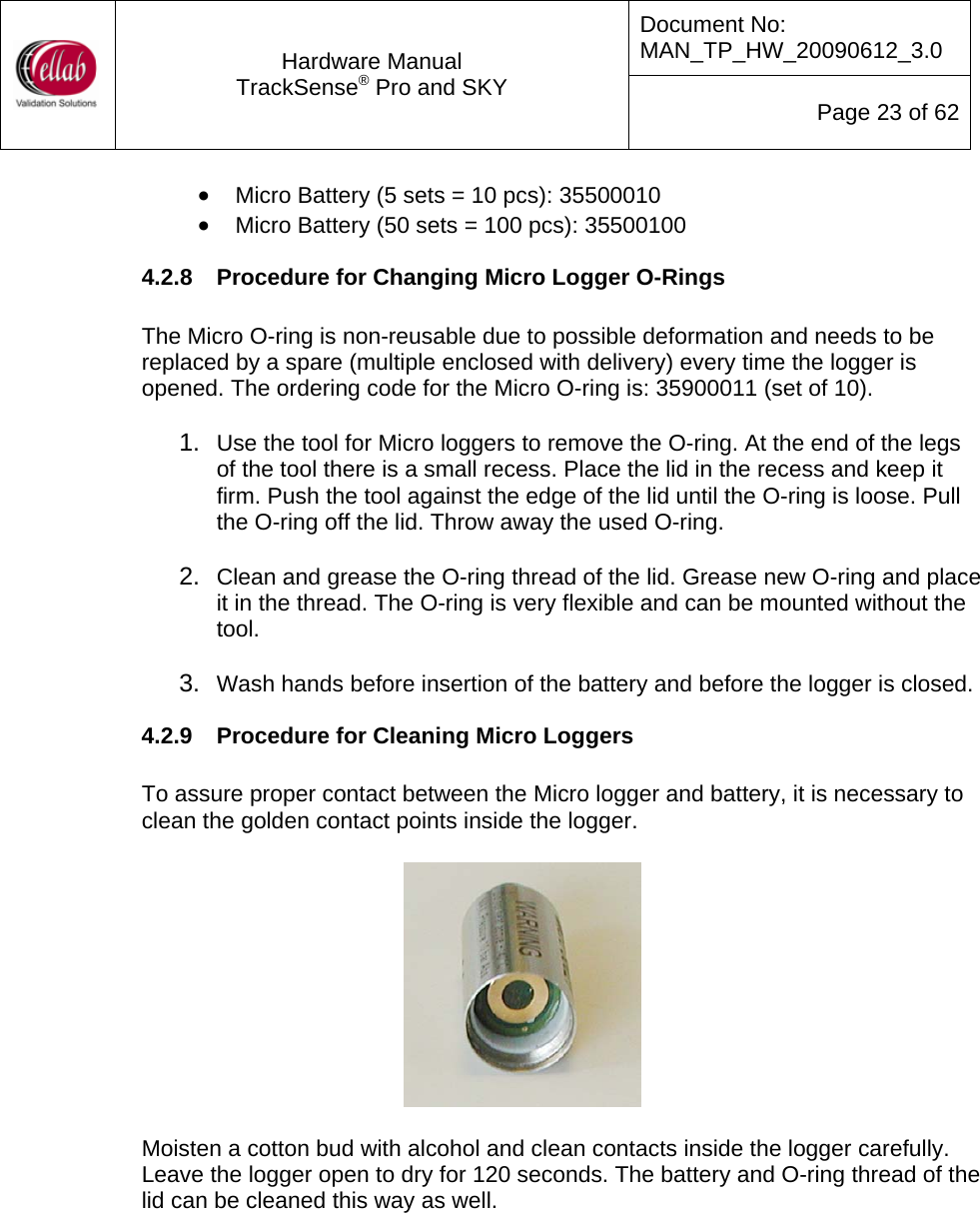
Document No: MAN_TP_HW_20090612_3.0  Hardware Manual TrackSense® Pro and SKY  Page 22 of 62 o Pressure / Temperature: 40 hours. o Rotation: 40 hours (with 1 sec sample rate). •  Shelf Life: 800 hours.  4.2.6.2  Proper Use  • Only use Ellab batteries. Use of other batteries will void any warranty on equipment. Other batteries have not been tested in extreme temperatures / environments and they can potentially cause damage to the logger. • When changing the battery, only use the logger wrench with the battery removal tool provided by Ellab to disassemble loggers. Never use any other tools as this can damage the housing assembly as well as the threads. Note: Always change O-rings when changing Micro batteries. • Stored batteries should not be exposed to temperatures over 35°C and they should be kept in a dry place before being used. 4.2.7  Changing Micro Batteries  Note: Do not directly touch the Micro batteries. Use a cloth or forceps to place them in correct position. If tools are not available, wash hands to avoid grease on the battery surface.  1.  Place the Micro logger in the battery removal tool and affix the logger wrench around the outside of the battery removal tool. Be sure that the bottom of the Micro logger is visible when placed in the tool. Turn tool with Micro logger around and unscrew the lid of the logger with a suitable coin. Release the Micro logger from tool.    2.  The O-ring is non-reusable due to possible deformation and needs to be replaced with every battery change. Following the procedures listed in section 4.2.8, change the O-ring.      3.  If needed, clean the inside of the logger (see procedure listed in section 4.2.9). Once the old battery has been removed, leave Micro logger without a battery for 120 seconds.    4.  Insert the new battery (minus pole against the bottom) in Micro logger and close the housing carefully. When closing the Micro logger after inserting the new battery, make sure the lid is tight. If the O-ring is visible, tighten further.      Ordering codes for Micro batteries: • Micro Battery (1 set = 2 pcs): 35500001
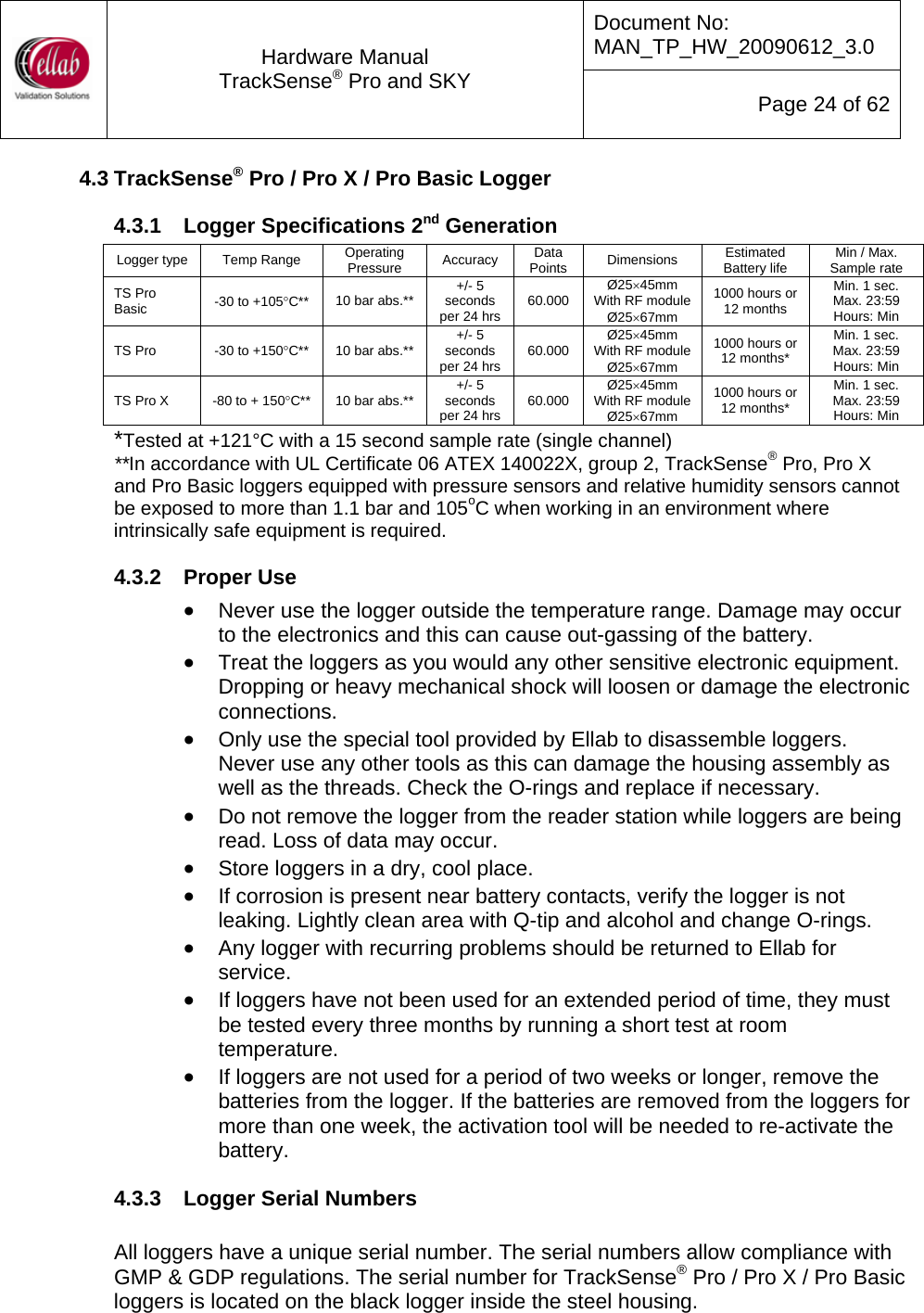
Document No: MAN_TP_HW_20090612_3.0  Hardware Manual TrackSense® Pro and SKY  Page 23 of 62 • Micro Battery (5 sets = 10 pcs): 35500010 • Micro Battery (50 sets = 100 pcs): 35500100 4.2.8  Procedure for Changing Micro Logger O-Rings  The Micro O-ring is non-reusable due to possible deformation and needs to be replaced by a spare (multiple enclosed with delivery) every time the logger is opened. The ordering code for the Micro O-ring is: 35900011 (set of 10).  1.  Use the tool for Micro loggers to remove the O-ring. At the end of the legs of the tool there is a small recess. Place the lid in the recess and keep it firm. Push the tool against the edge of the lid until the O-ring is loose. Pull the O-ring off the lid. Throw away the used O-ring.  2.  Clean and grease the O-ring thread of the lid. Grease new O-ring and place it in the thread. The O-ring is very flexible and can be mounted without the tool.  3.  Wash hands before insertion of the battery and before the logger is closed. 4.2.9  Procedure for Cleaning Micro Loggers  To assure proper contact between the Micro logger and battery, it is necessary to clean the golden contact points inside the logger.    Moisten a cotton bud with alcohol and clean contacts inside the logger carefully.  Leave the logger open to dry for 120 seconds. The battery and O-ring thread of the lid can be cleaned this way as well.
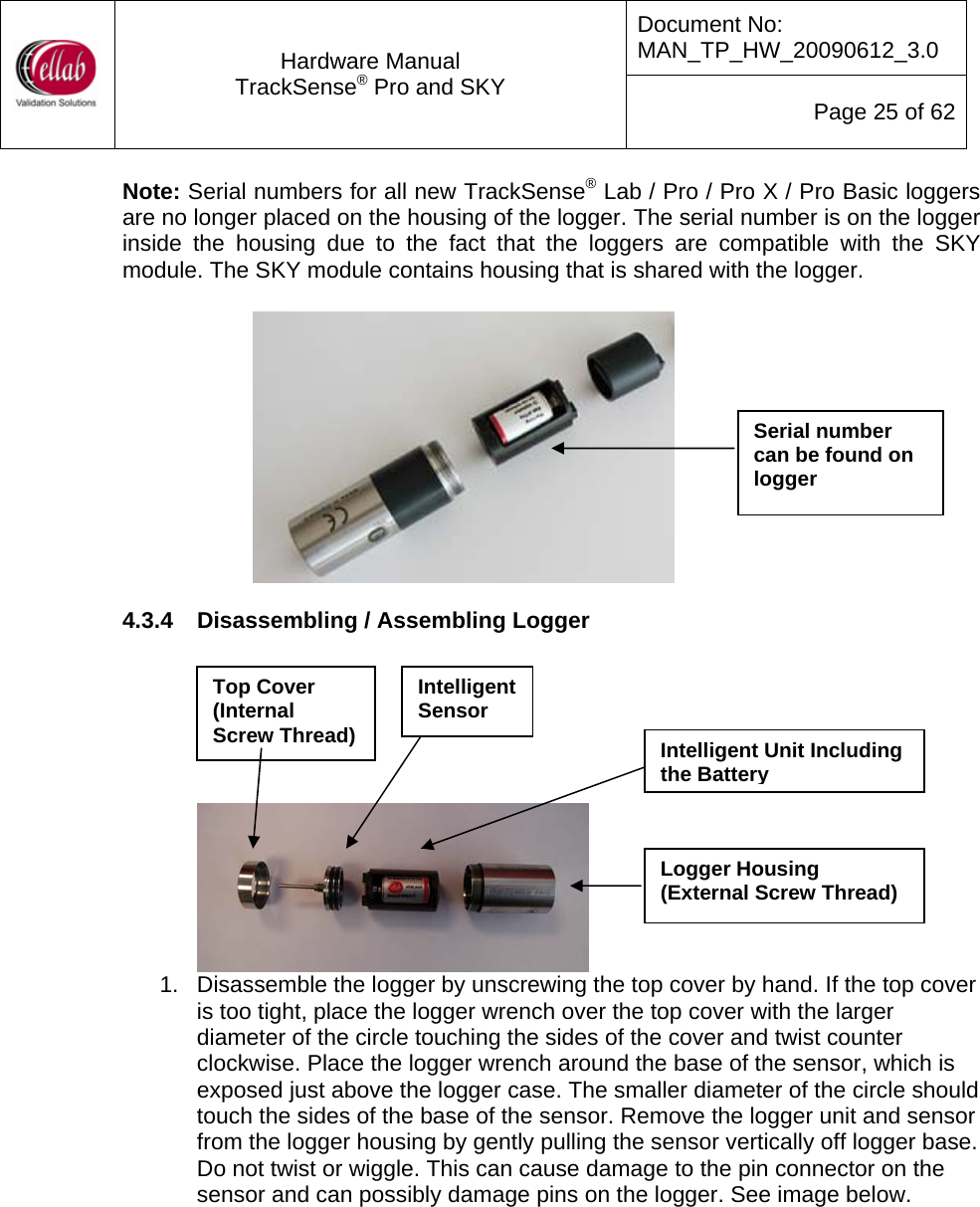
Document No: MAN_TP_HW_20090612_3.0  Hardware Manual TrackSense® Pro and SKY  Page 24 of 62 4.3 TrackSense® Pro / Pro X / Pro Basic Logger 4.3.1  Logger Specifications 2nd Generation Logger type  Temp Range  Operating Pressure   Accuracy  Data Points  Dimensions  Estimated Battery life  Min / Max.  Sample rate TS Pro Basic  -30 to +105°C**  10 bar abs.**  +/- 5 seconds per 24 hrs  60.000  Ø25×45mm With RF module Ø25×67mm 1000 hours or 12 months Min. 1 sec. Max. 23:59 Hours: Min TS Pro  -30 to +150°C**  10 bar abs.**  +/- 5 seconds per 24 hrs  60.000  Ø25×45mm With RF module Ø25×67mm 1000 hours or 12 months* Min. 1 sec. Max. 23:59 Hours: Min TS Pro X  -80 to + 150°C**  10 bar abs.**  +/- 5 seconds per 24 hrs  60.000  Ø25×45mm With RF module Ø25×67mm 1000 hours or 12 months* Min. 1 sec. Max. 23:59 Hours: Min *Tested at +121°C with a 15 second sample rate (single channel) **In accordance with UL Certificate 06 ATEX 140022X, group 2, TrackSense® Pro, Pro X and Pro Basic loggers equipped with pressure sensors and relative humidity sensors cannot be exposed to more than 1.1 bar and 105oC when working in an environment where intrinsically safe equipment is required.  4.3.2  Proper Use • Never use the logger outside the temperature range. Damage may occur to the electronics and this can cause out-gassing of the battery. • Treat the loggers as you would any other sensitive electronic equipment.  Dropping or heavy mechanical shock will loosen or damage the electronic connections. • Only use the special tool provided by Ellab to disassemble loggers.  Never use any other tools as this can damage the housing assembly as well as the threads. Check the O-rings and replace if necessary. • Do not remove the logger from the reader station while loggers are being read. Loss of data may occur. • Store loggers in a dry, cool place. • If corrosion is present near battery contacts, verify the logger is not leaking. Lightly clean area with Q-tip and alcohol and change O-rings.    • Any logger with recurring problems should be returned to Ellab for service.  • If loggers have not been used for an extended period of time, they must be tested every three months by running a short test at room temperature.   • If loggers are not used for a period of two weeks or longer, remove the batteries from the logger. If the batteries are removed from the loggers for more than one week, the activation tool will be needed to re-activate the battery. 4.3.3  Logger Serial Numbers   All loggers have a unique serial number. The serial numbers allow compliance with GMP & GDP regulations. The serial number for TrackSense® Pro / Pro X / Pro Basic loggers is located on the black logger inside the steel housing.
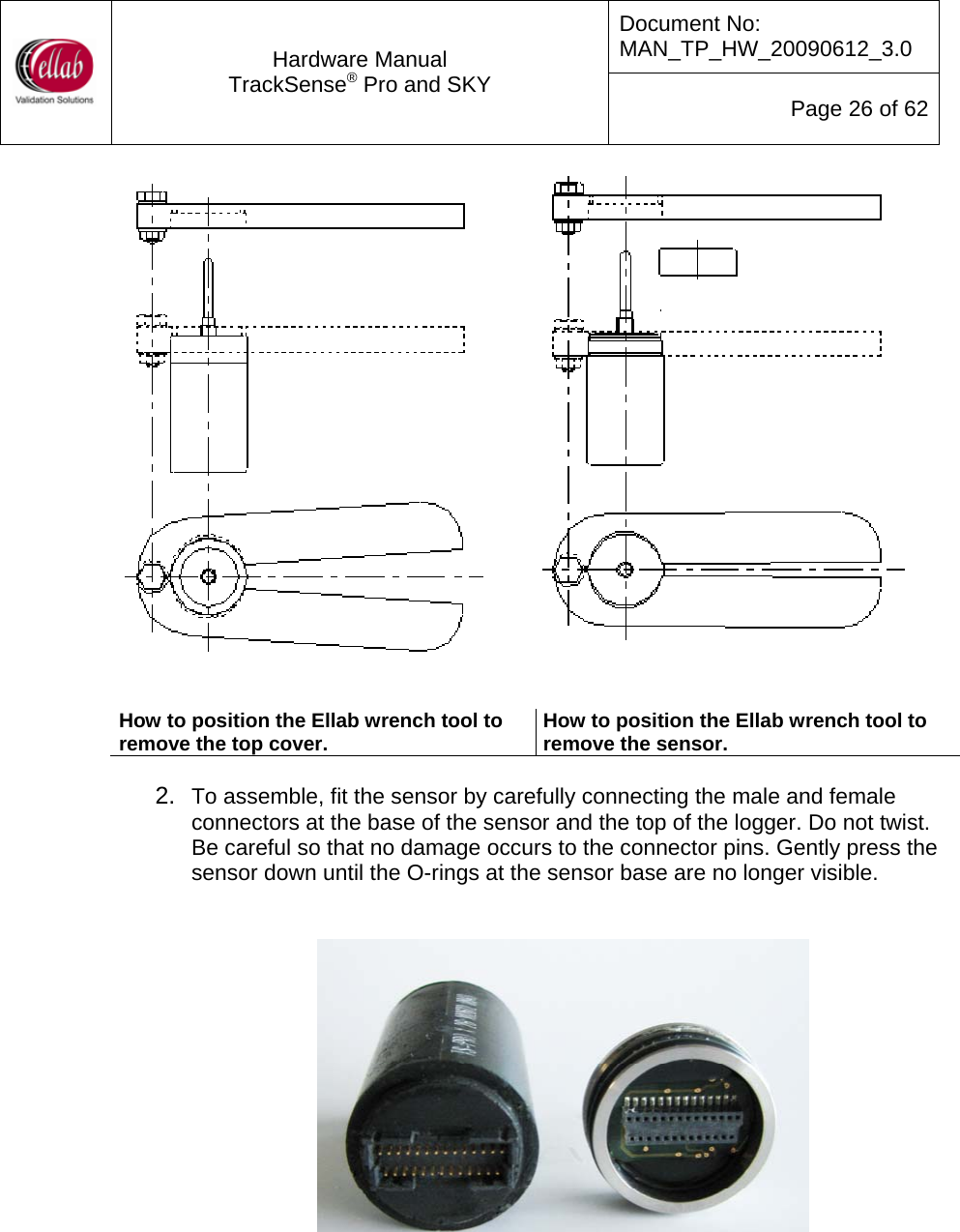
Document No: MAN_TP_HW_20090612_3.0  Hardware Manual TrackSense® Pro and SKY  Page 25 of 62 Note: Serial numbers for all new TrackSense® Lab / Pro / Pro X / Pro Basic loggers are no longer placed on the housing of the logger. The serial number is on the logger inside the housing due to the fact that the loggers are compatible with the SKY module. The SKY module contains housing that is shared with the logger.      Serial number can be found on logger 4.3.4  Disassembling / Assembling Logger   Top Cover (Internal Screw Thread) Intelligent Sensor      1.  Disassemble the logger by unscrewing the top cover by hand. If the top cover is too tight, place the logger wrench over the top cover with the larger diameter of the circle touching the sides of the cover and twist counter clockwise. Place the logger wrench around the base of the sensor, which is exposed just above the logger case. The smaller diameter of the circle should touch the sides of the base of the sensor. Remove the logger unit and sensor from the logger housing by gently pulling the sensor vertically off logger base.  Do not twist or wiggle. This can cause damage to the pin connector on the sensor and can possibly damage pins on the logger. See image below.   Intelligent Unit Including the BatteryLogger Housing (External Screw Thread)
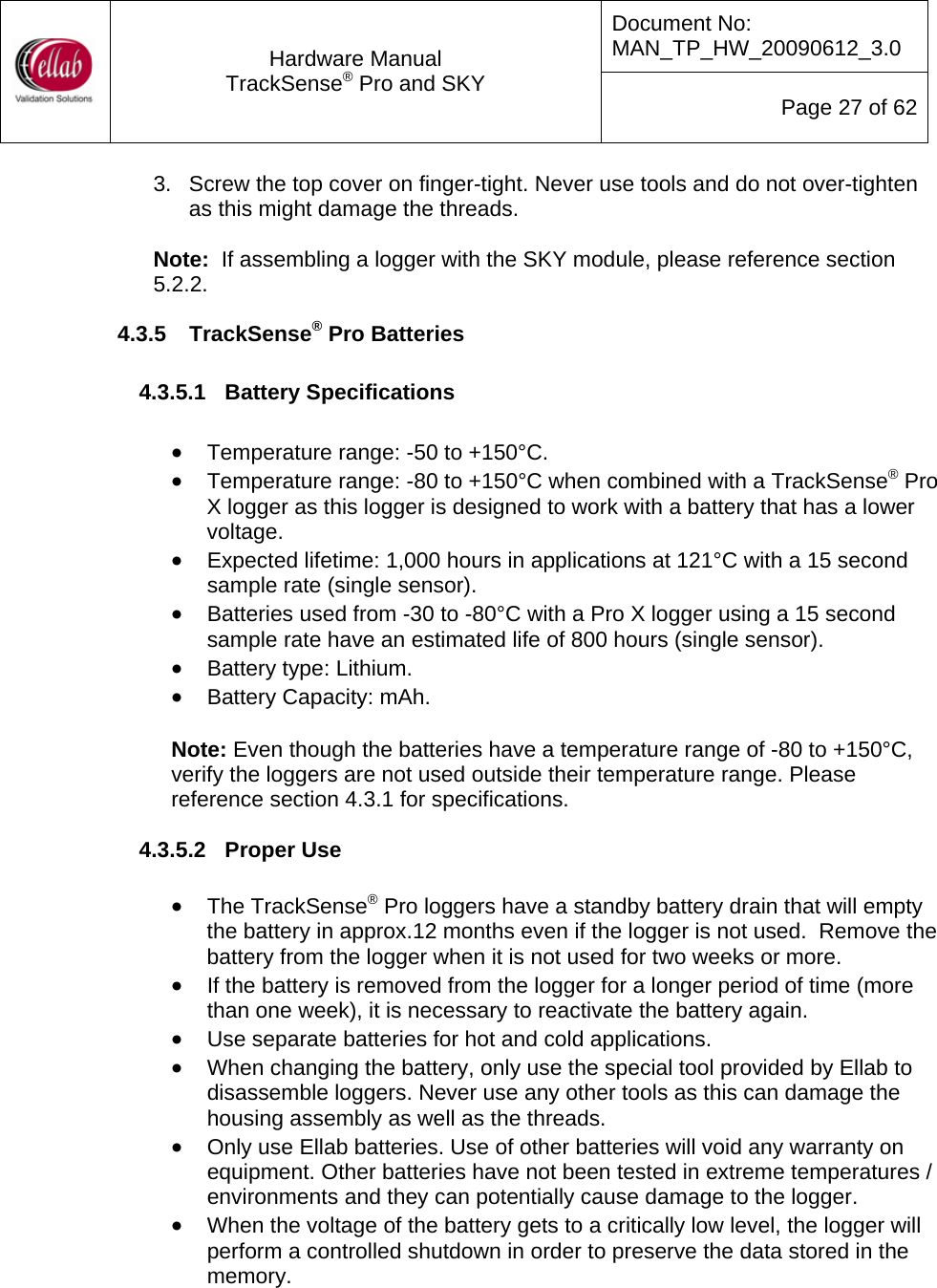
Document No: MAN_TP_HW_20090612_3.0  Hardware Manual TrackSense® Pro and SKY  Page 26 of 62      How to position the Ellab wrench tool to remove the top cover.  How to position the Ellab wrench tool to remove the sensor.   2.  To assemble, fit the sensor by carefully connecting the male and female connectors at the base of the sensor and the top of the logger. Do not twist.  Be careful so that no damage occurs to the connector pins. Gently press the sensor down until the O-rings at the sensor base are no longer visible.
Document No: MAN_TP_HW_20090612_3.0  Hardware Manual TrackSense® Pro and SKY  Page 27 of 62 3.  Screw the top cover on finger-tight. Never use tools and do not over-tighten as this might damage the threads.  Note:  If assembling a logger with the SKY module, please reference section 5.2.2. 4.3.5  TrackSense® Pro Batteries  4.3.5.1  Battery Specifications   • Temperature range: -50 to +150°C.  • Temperature range: -80 to +150°C when combined with a TrackSense® Pro X logger as this logger is designed to work with a battery that has a lower voltage. • Expected lifetime: 1,000 hours in applications at 121°C with a 15 second sample rate (single sensor). • Batteries used from -30 to -80°C with a Pro X logger using a 15 second sample rate have an estimated life of 800 hours (single sensor). • Battery type: Lithium. • Battery Capacity: mAh.  Note: Even though the batteries have a temperature range of -80 to +150°C, verify the loggers are not used outside their temperature range. Please reference section 4.3.1 for specifications.  4.3.5.2  Proper Use  • The TrackSense® Pro loggers have a standby battery drain that will empty the battery in approx.12 months even if the logger is not used.  Remove the battery from the logger when it is not used for two weeks or more. • If the battery is removed from the logger for a longer period of time (more than one week), it is necessary to reactivate the battery again. • Use separate batteries for hot and cold applications.   • When changing the battery, only use the special tool provided by Ellab to disassemble loggers. Never use any other tools as this can damage the housing assembly as well as the threads. • Only use Ellab batteries. Use of other batteries will void any warranty on equipment. Other batteries have not been tested in extreme temperatures / environments and they can potentially cause damage to the logger. • When the voltage of the battery gets to a critically low level, the logger will perform a controlled shutdown in order to preserve the data stored in the memory.
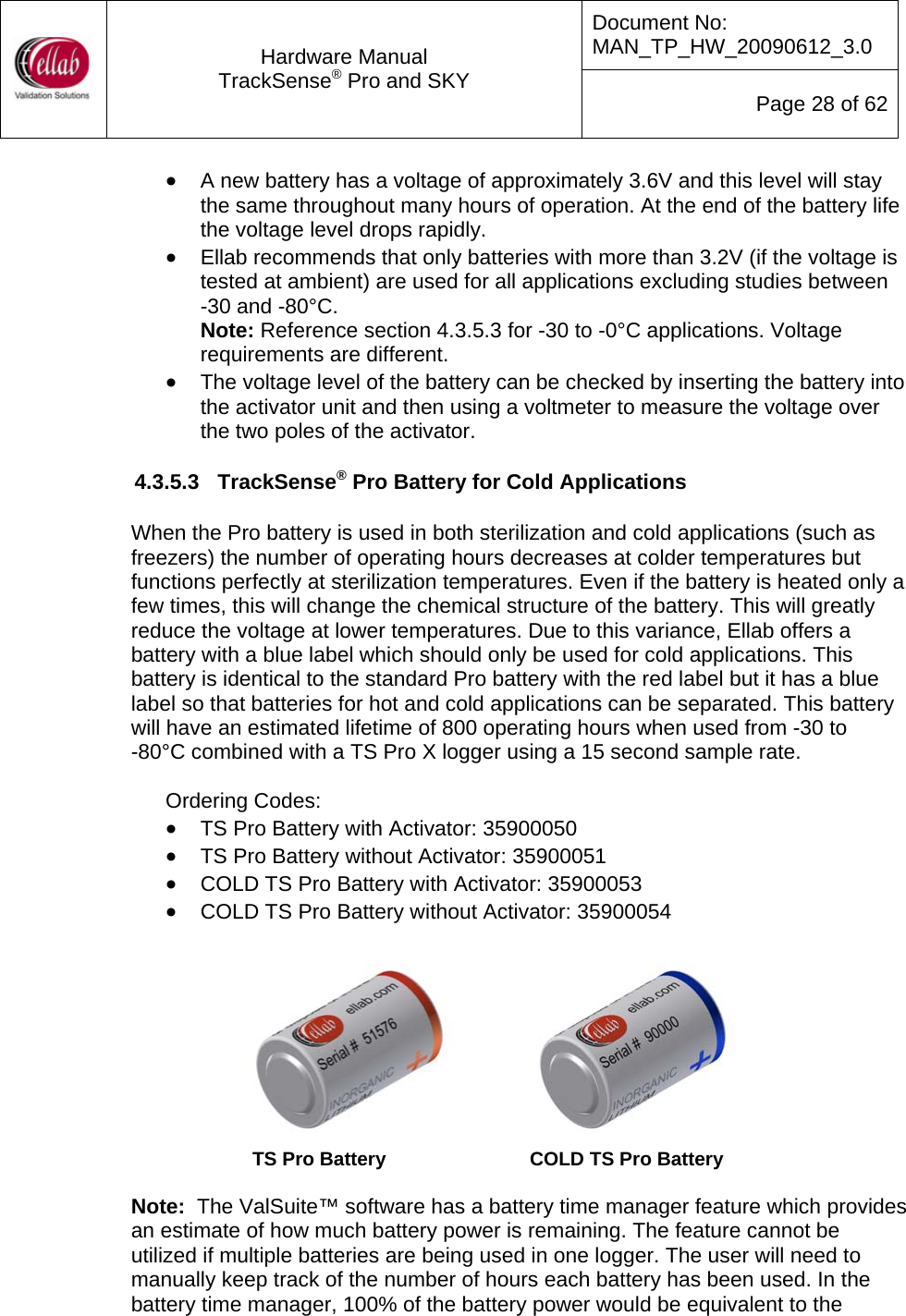
Document No: MAN_TP_HW_20090612_3.0  Hardware Manual TrackSense® Pro and SKY  Page 28 of 62 • A new battery has a voltage of approximately 3.6V and this level will stay the same throughout many hours of operation. At the end of the battery life the voltage level drops rapidly.   • Ellab recommends that only batteries with more than 3.2V (if the voltage is tested at ambient) are used for all applications excluding studies between  -30 and -80°C. Note: Reference section 4.3.5.3 for -30 to -0°C applications. Voltage requirements are different. • The voltage level of the battery can be checked by inserting the battery into the activator unit and then using a voltmeter to measure the voltage over the two poles of the activator.  4.3.5.3  TrackSense® Pro Battery for Cold Applications  When the Pro battery is used in both sterilization and cold applications (such as freezers) the number of operating hours decreases at colder temperatures but functions perfectly at sterilization temperatures. Even if the battery is heated only a few times, this will change the chemical structure of the battery. This will greatly reduce the voltage at lower temperatures. Due to this variance, Ellab offers a battery with a blue label which should only be used for cold applications. This battery is identical to the standard Pro battery with the red label but it has a blue label so that batteries for hot and cold applications can be separated. This battery will have an estimated lifetime of 800 operating hours when used from -30 to         -80°C combined with a TS Pro X logger using a 15 second sample rate.  Ordering Codes: • TS Pro Battery with Activator: 35900050 • TS Pro Battery without Activator: 35900051 • COLD TS Pro Battery with Activator: 35900053 • COLD TS Pro Battery without Activator: 35900054            TS Pro Battery               COLD TS Pro Battery   Note:  The ValSuite™ software has a battery time manager feature which provides an estimate of how much battery power is remaining. The feature cannot be utilized if multiple batteries are being used in one logger. The user will need to manually keep track of the number of hours each battery has been used. In the battery time manager, 100% of the battery power would be equivalent to the
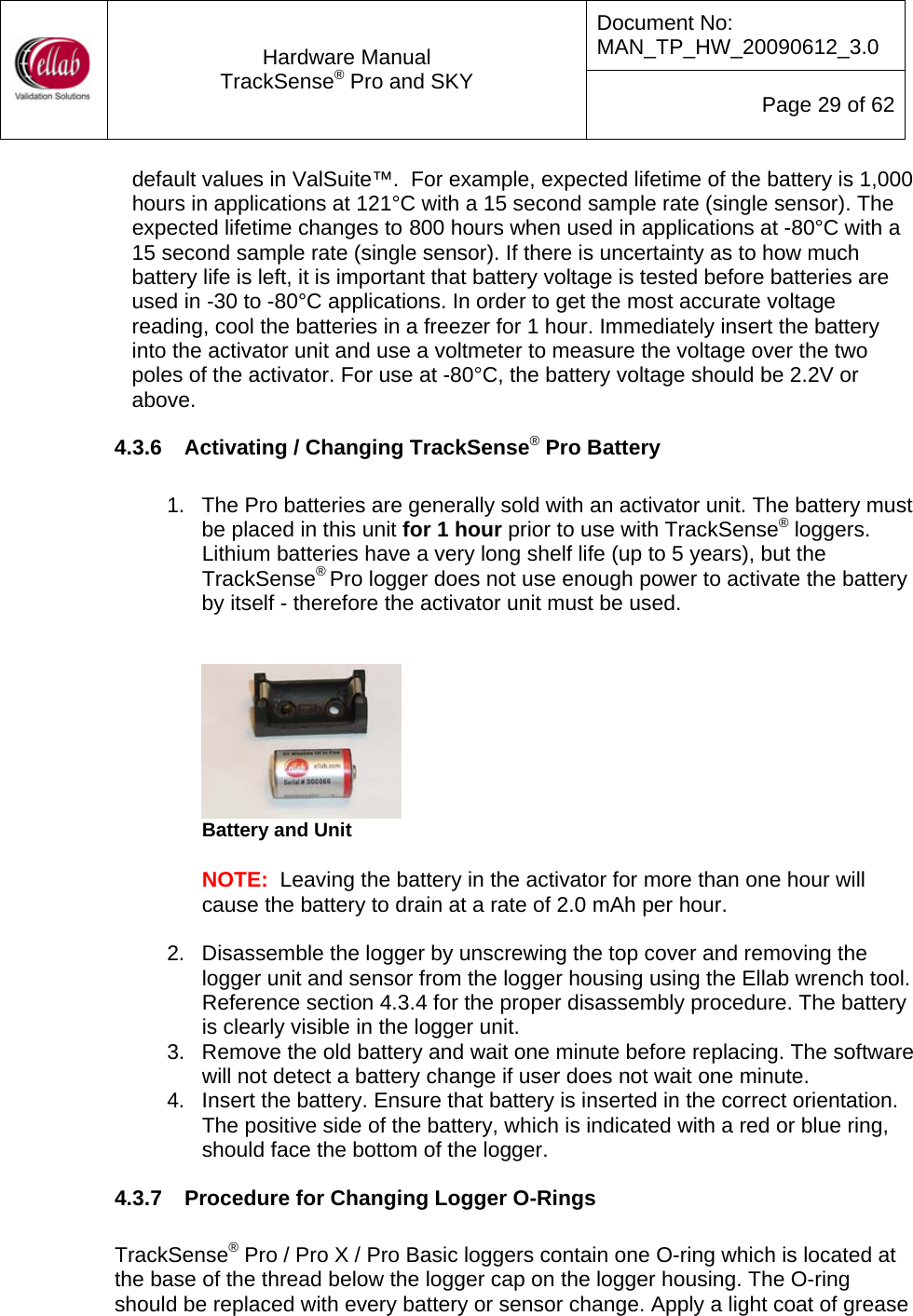
Document No: MAN_TP_HW_20090612_3.0  Hardware Manual TrackSense® Pro and SKY  Page 29 of 62 default values in ValSuite™.  For example, expected lifetime of the battery is 1,000 hours in applications at 121°C with a 15 second sample rate (single sensor). The expected lifetime changes to 800 hours when used in applications at -80°C with a 15 second sample rate (single sensor). If there is uncertainty as to how much battery life is left, it is important that battery voltage is tested before batteries are used in -30 to -80°C applications. In order to get the most accurate voltage reading, cool the batteries in a freezer for 1 hour. Immediately insert the battery into the activator unit and use a voltmeter to measure the voltage over the two poles of the activator. For use at -80°C, the battery voltage should be 2.2V or above. 4.3.6  Activating / Changing TrackSense® Pro Battery  1.  The Pro batteries are generally sold with an activator unit. The battery must be placed in this unit for 1 hour prior to use with TrackSense® loggers.  Lithium batteries have a very long shelf life (up to 5 years), but the TrackSense® Pro logger does not use enough power to activate the battery by itself - therefore the activator unit must be used.      Battery and Unit  NOTE:  Leaving the battery in the activator for more than one hour will cause the battery to drain at a rate of 2.0 mAh per hour.  2.  Disassemble the logger by unscrewing the top cover and removing the logger unit and sensor from the logger housing using the Ellab wrench tool.  Reference section 4.3.4 for the proper disassembly procedure. The battery is clearly visible in the logger unit. 3.  Remove the old battery and wait one minute before replacing. The software will not detect a battery change if user does not wait one minute.   4.  Insert the battery. Ensure that battery is inserted in the correct orientation.  The positive side of the battery, which is indicated with a red or blue ring, should face the bottom of the logger. 4.3.7  Procedure for Changing Logger O-Rings  TrackSense® Pro / Pro X / Pro Basic loggers contain one O-ring which is located at the base of the thread below the logger cap on the logger housing. The O-ring should be replaced with every battery or sensor change. Apply a light coat of grease
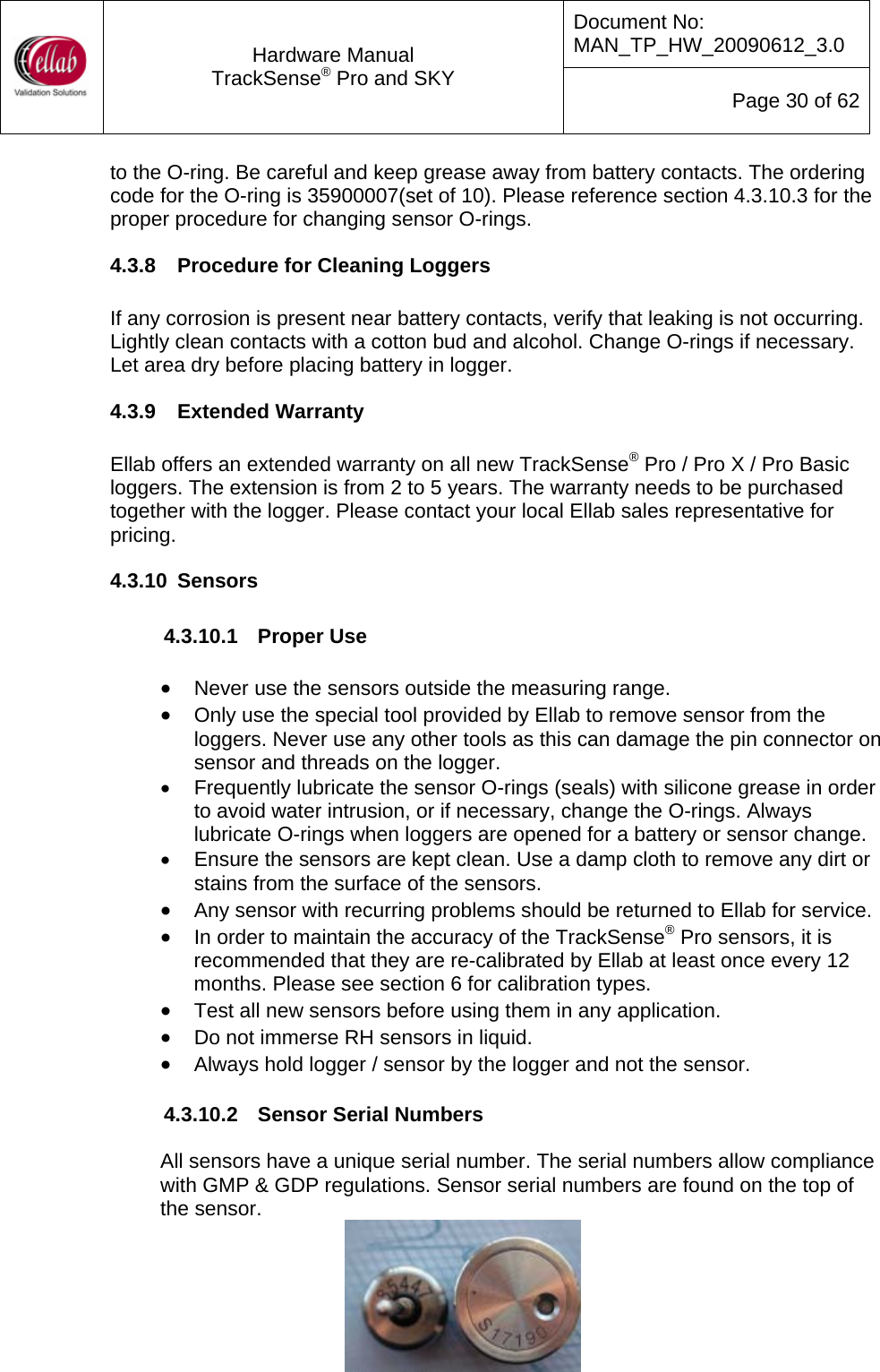
Document No: MAN_TP_HW_20090612_3.0  Hardware Manual TrackSense® Pro and SKY  Page 30 of 62 to the O-ring. Be careful and keep grease away from battery contacts. The ordering code for the O-ring is 35900007(set of 10). Please reference section 4.3.10.3 for the proper procedure for changing sensor O-rings. 4.3.8  Procedure for Cleaning Loggers  If any corrosion is present near battery contacts, verify that leaking is not occurring.  Lightly clean contacts with a cotton bud and alcohol. Change O-rings if necessary.  Let area dry before placing battery in logger. 4.3.9  Extended Warranty  Ellab offers an extended warranty on all new TrackSense® Pro / Pro X / Pro Basic loggers. The extension is from 2 to 5 years. The warranty needs to be purchased together with the logger. Please contact your local Ellab sales representative for pricing. 4.3.10  Sensors  4.3.10.1  Proper Use  • Never use the sensors outside the measuring range. • Only use the special tool provided by Ellab to remove sensor from the loggers. Never use any other tools as this can damage the pin connector on sensor and threads on the logger. •  Frequently lubricate the sensor O-rings (seals) with silicone grease in order to avoid water intrusion, or if necessary, change the O-rings. Always lubricate O-rings when loggers are opened for a battery or sensor change. •  Ensure the sensors are kept clean. Use a damp cloth to remove any dirt or stains from the surface of the sensors. • Any sensor with recurring problems should be returned to Ellab for service. • In order to maintain the accuracy of the TrackSense® Pro sensors, it is recommended that they are re-calibrated by Ellab at least once every 12 months. Please see section 6 for calibration types. • Test all new sensors before using them in any application.   • Do not immerse RH sensors in liquid. • Always hold logger / sensor by the logger and not the sensor.  4.3.10.2  Sensor Serial Numbers  All sensors have a unique serial number. The serial numbers allow compliance with GMP & GDP regulations. Sensor serial numbers are found on the top of the sensor.
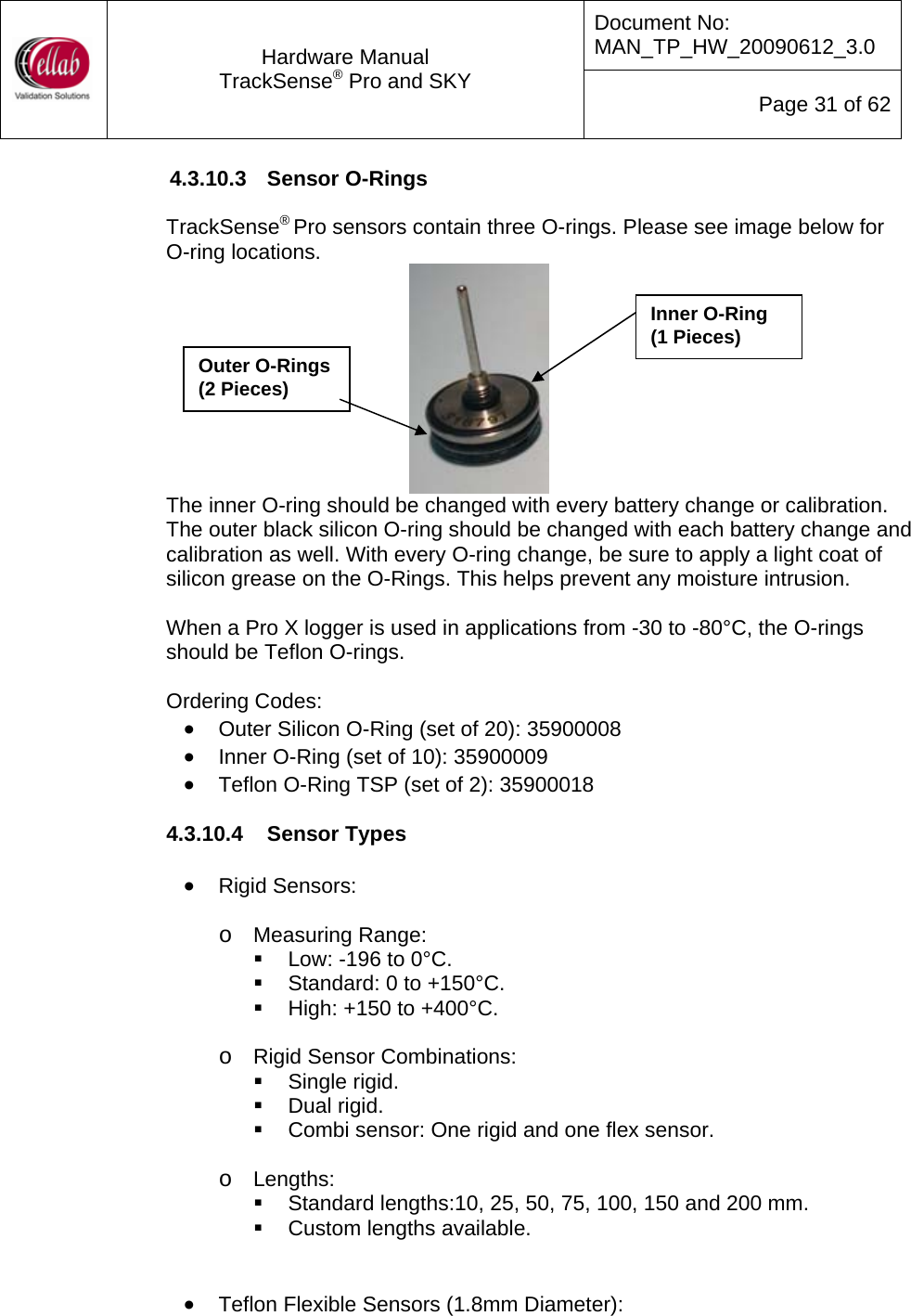
Document No: MAN_TP_HW_20090612_3.0  Hardware Manual TrackSense® Pro and SKY  Page 31 of 62 4.3.10.3  Sensor O-Rings  TrackSense® Pro sensors contain three O-rings. Please see image below for  O-ring locations.    Inner O-Ring (1 Pieces) Outer O-Rings    (2 Pieces) The inner O-ring should be changed with every battery change or calibration.  The outer black silicon O-ring should be changed with each battery change and calibration as well. With every O-ring change, be sure to apply a light coat of silicon grease on the O-Rings. This helps prevent any moisture intrusion.    When a Pro X logger is used in applications from -30 to -80°C, the O-rings should be Teflon O-rings.   Ordering Codes: • Outer Silicon O-Ring (set of 20): 35900008 • Inner O-Ring (set of 10): 35900009 • Teflon O-Ring TSP (set of 2): 35900018  4.3.10.4  Sensor Types  • Rigid Sensors:  o Measuring Range:   Low: -196 to 0°C.   Standard: 0 to +150°C.   High: +150 to +400°C.  o Rigid Sensor Combinations:  Single rigid.  Dual rigid.   Combi sensor: One rigid and one flex sensor.   o Lengths:   Standard lengths:10, 25, 50, 75, 100, 150 and 200 mm.   Custom lengths available.   • Teflon Flexible Sensors (1.8mm Diameter):
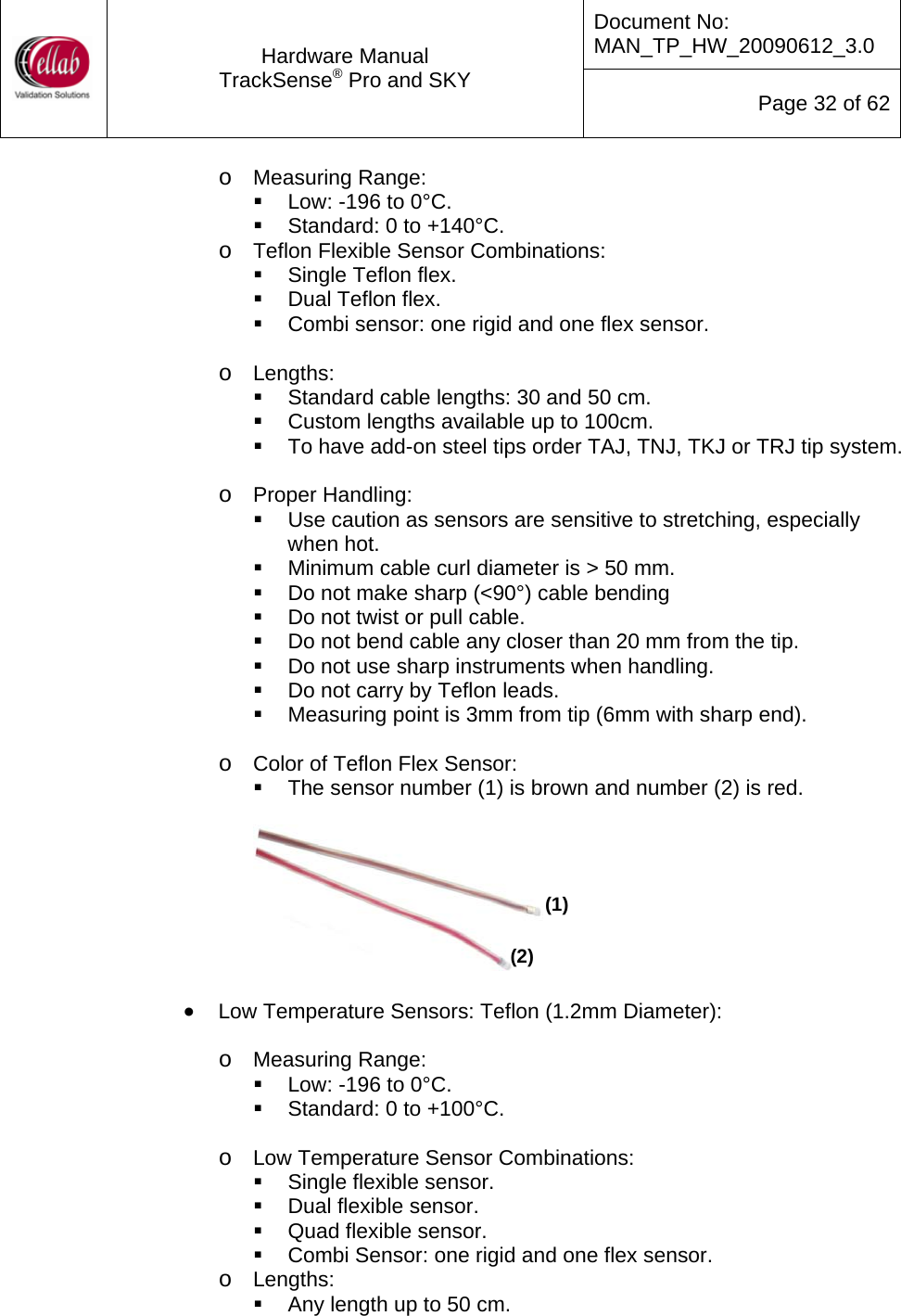
Document No: MAN_TP_HW_20090612_3.0  Hardware Manual TrackSense® Pro and SKY  Page 32 of 62 o Measuring Range:   Low: -196 to 0°C.   Standard: 0 to +140°C. o Teflon Flexible Sensor Combinations:   Single Teflon flex.  Dual Teflon flex.   Combi sensor: one rigid and one flex sensor.  o Lengths:   Standard cable lengths: 30 and 50 cm.   Custom lengths available up to 100cm.   To have add-on steel tips order TAJ, TNJ, TKJ or TRJ tip system.  o Proper Handling:    Use caution as sensors are sensitive to stretching, especially when hot.   Minimum cable curl diameter is > 50 mm.   Do not make sharp (<90°) cable bending   Do not twist or pull cable.   Do not bend cable any closer than 20 mm from the tip.   Do not use sharp instruments when handling.   Do not carry by Teflon leads.   Measuring point is 3mm from tip (6mm with sharp end).  o Color of Teflon Flex Sensor:   The sensor number (1) is brown and number (2) is red.     (1) (2) • Low Temperature Sensors: Teflon (1.2mm Diameter):  o Measuring Range:   Low: -196 to 0°C.   Standard: 0 to +100°C.  o Low Temperature Sensor Combinations:   Single flexible sensor.   Dual flexible sensor.   Quad flexible sensor.   Combi Sensor: one rigid and one flex sensor. o Lengths:   Any length up to 50 cm.
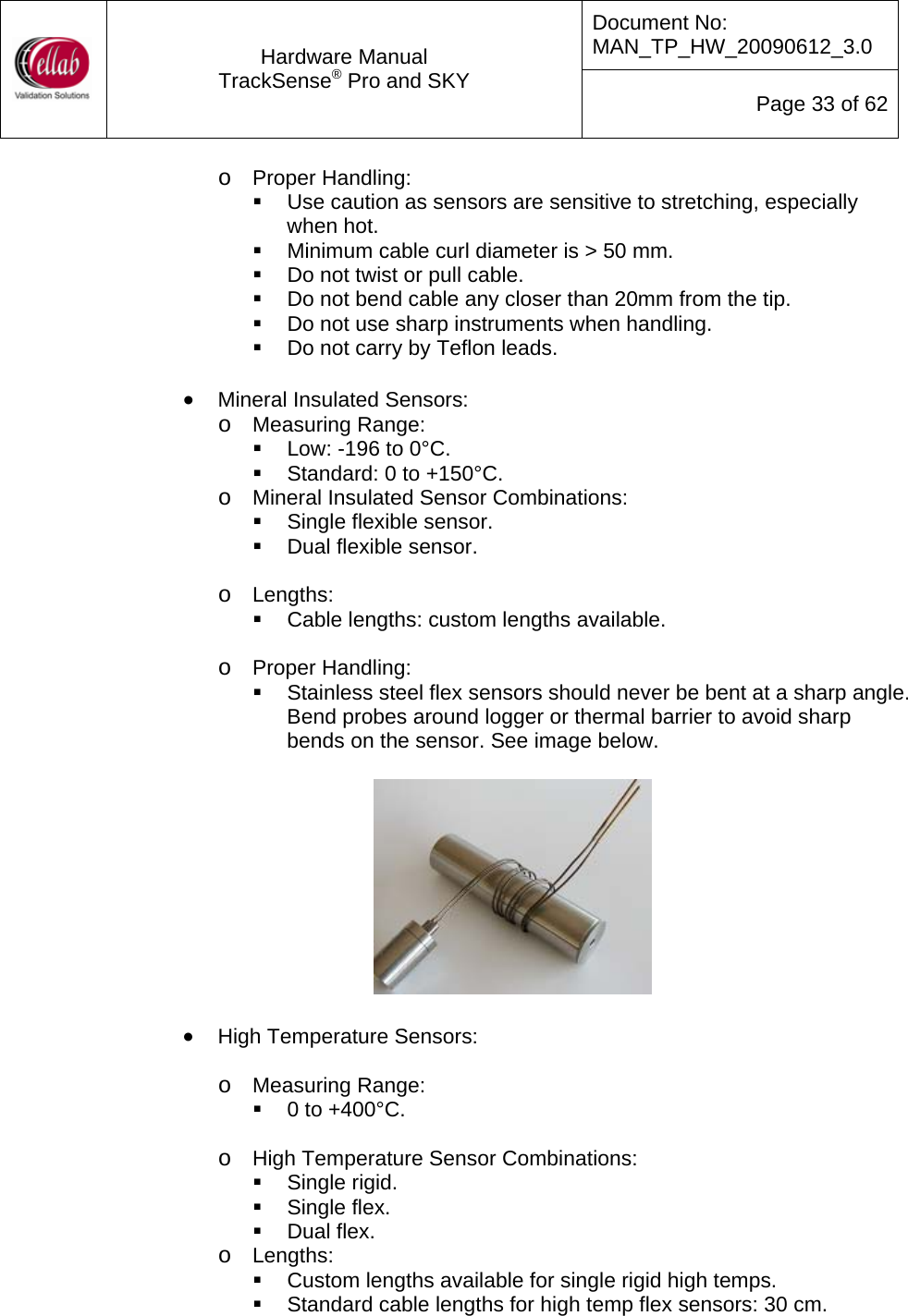
Document No: MAN_TP_HW_20090612_3.0  Hardware Manual TrackSense® Pro and SKY  Page 33 of 62 o Proper Handling:   Use caution as sensors are sensitive to stretching, especially when hot.   Minimum cable curl diameter is > 50 mm.   Do not twist or pull cable.   Do not bend cable any closer than 20mm from the tip.   Do not use sharp instruments when handling.   Do not carry by Teflon leads.  • Mineral Insulated Sensors: o Measuring Range:   Low: -196 to 0°C.   Standard: 0 to +150°C. o Mineral Insulated Sensor Combinations:   Single flexible sensor.   Dual flexible sensor.  o Lengths:   Cable lengths: custom lengths available.  o Proper Handling:   Stainless steel flex sensors should never be bent at a sharp angle.  Bend probes around logger or thermal barrier to avoid sharp bends on the sensor. See image below.    • High Temperature Sensors:  o Measuring Range:   0 to +400°C.  o High Temperature Sensor Combinations:  Single rigid.   Single flex.  Dual flex. o Lengths:   Custom lengths available for single rigid high temps.   Standard cable lengths for high temp flex sensors: 30 cm.
Document No: MAN_TP_HW_20090612_3.0  Hardware Manual TrackSense® Pro and SKY  Page 34 of 62   Standard electrode lengths for high temp flex sensors: 30 mm.   Custom cable lengths available for high temp flex sensors.  o Proper Handling:   Stainless steel flex sensors should never be bent at a sharp angle.  Bend probes around logger or thermal barrier to avoid sharp. bends on the sensor. See image above.  Note:  When using the sensors at temperatures higher than 150°C, a thermal barrier is required. Confirm the temperature range of the logger before utilizing in any application.  • Pressure Sensors:   o Measuring Range:   10 mBar to 6 Bar Absolute (Up to 7 bar can be ordered).   Temperature Range: 0 to +150°C.  o Pressure Sensor Combinations:   Pressure Sensor only.   Pressure / temperature sensor (1 temperature channel).   Pressure / temperature sensor (2 temperature channels).  o Proper Handling   To clean the pressure sensor membrane, remove protective cap and spray it with water. Do not touch the membrane itself.  • RH Sensors:  o Measuring Range:   RH for Stability:  Temperature: -40 to +100°C.  RH: 0 to 100%.    RH 2.4 (For ValSuite™ Version 2.4 or Newer):  Temperature: -40 to +100°C.  RH: 0 to 100%.    RH for EtO:   Temperature: +40 to +90°C.  RH: 0 to 100%.   o Proper Handling:   Reconditioning can be performed on RH sensors to remove any contamination but consult an Ellab technician before doing so.
Document No: MAN_TP_HW_20090612_3.0  Hardware Manual TrackSense® Pro and SKY  Page 35 of 62   When shipping RH sensors in for service / calibration, make certain that the sensor is not exposed to any dust particles.  • AutoMarker Sensor:  o Operating Range:   Temperature: +5 to +50°C.  Note: Sensor is placed outside of application.  4.3.10.5  Sensor LED  LED indicators can be purchased with all TrackSense® temperature sensors (1 and 2 channel). The color of the LED indicates different statuses for TrackSense® Pro temperature sensors with the SKY module and TrackSense® Pro temperature sensors without the SKY module. Please see below for a description:  • TrackSense® Pro/Pro X/Pro Basic loggers with SKY module: o Green Blink: Logger is active and SKY module is communicating with the Access Point. o Red Blink: Loss of communication between the SKY module and the Access Point. o No Blink: Battery is dead or logger is inactive.  • TrackSense® Pro / Pro X / Pro Basic loggers without SKY module: o Quick Green Blink: Logger is active. o Slow Green Blink: Delayed start and logger is not collecting data, o Blue Blink: Memory is full or battery voltage is low. o Red Blink: Sensor error.  o No Blink: Battery is dead or logger is inactive. 4.3.11  -30 to -80°C Application Recommendations   When using TrackSense® Pro X loggers in -30 to -80°C applications, Ellab has a few recommendations to ensure that the validation / calibration process is ran as efficiently as possible:  • Verify that the Pro batteries being used have not previously been used in hot applications and are only used in cold applications. When batteries are ran in hot applications, the chemical structure of the battery changes and this greatly reduces the voltage at lower temperatures. Please see section 4.3.5.3 for information on the Ellab COLD TS Pro battery.   • If there is uncertainty as to how much battery life is left, it is important that battery voltage is tested before batteries are used in -30 to -80°C applications. In order to get the most accurate voltage reading, cool the
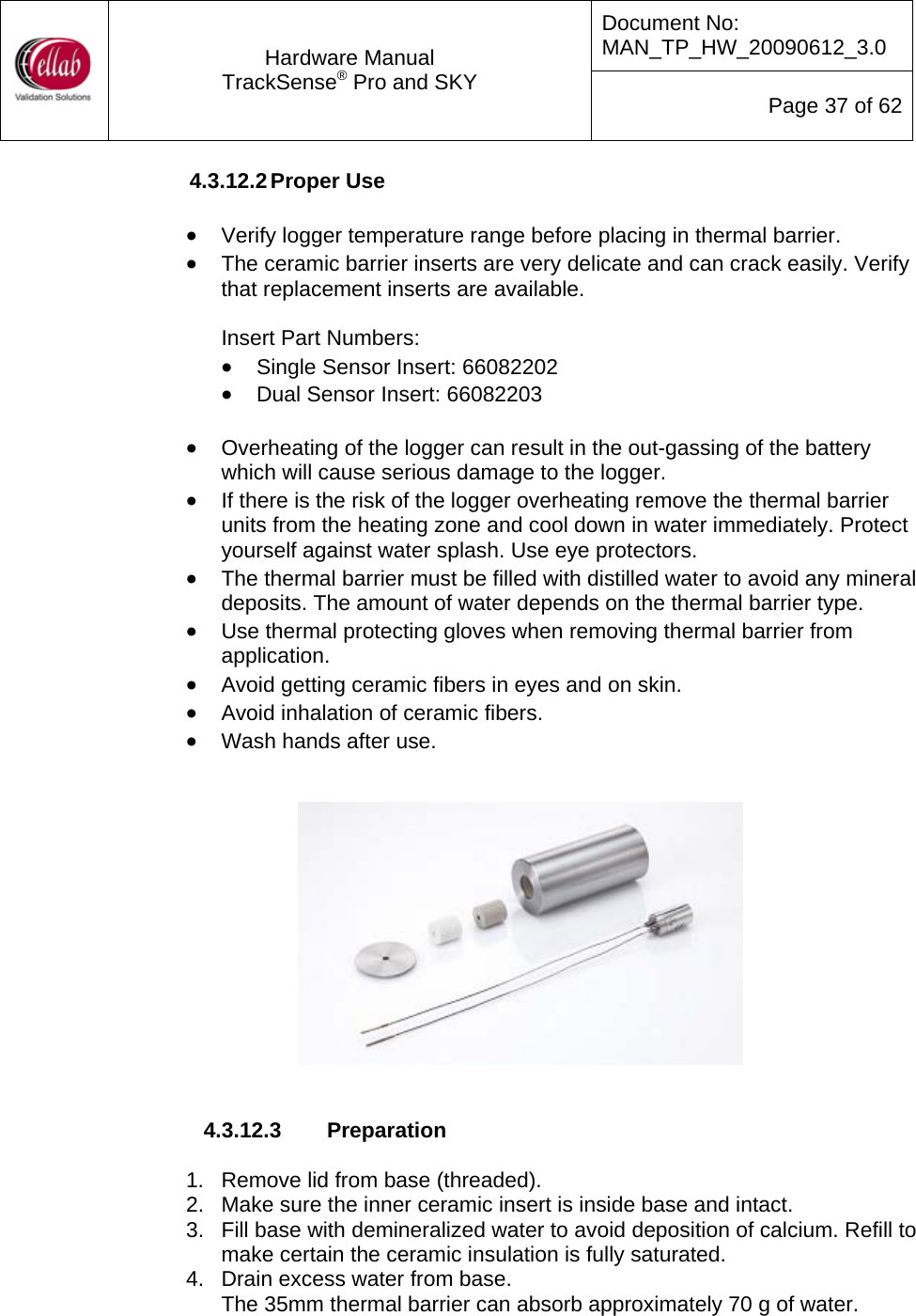
Document No: MAN_TP_HW_20090612_3.0  Hardware Manual TrackSense® Pro and SKY  Page 36 of 62 batteries in a freezer for 1 hour. Immediately insert the battery into the activator unit and use a voltmeter to measure the voltage over the two poles of the battery. At temperatures between -30 and -80°C the battery voltage should be 2.2V or above. • When a Pro X logger is used in applications from -30 to -80°C please use Teflon O-rings. The ordering code for Teflon O-rings is 35900018 (set of 2). 4.3.12  Thermal Barriers  Ellab has constructed a data logger acquisition system to collect data at high temperatures. The logger upper temperature limit is 150°C (Pro and Pro X). To exceed this limit the data acquisition system needs special protection. The protection, a thermal barrier, consists of a metal cylinder or flat pack with ceramic inserts and a metal lid. If a dual sensor is used, a plastic protective piece is also used. The ceramic material must be saturated with distilled water before use. The system is designed to meet the requirements for measuring temperatures between  0 to +400°C / +32 to +750°F. A high temperature sensor must be used in combination with the logger and thermal barrier.    Functioning principle: The thermal barrier is filled with distilled water. The system utilizes the effect of evaporating water. As long as there is water left in the thermal barrier, the temperature of the logger is approximately 100°C. When all of the water has evaporated, the temperature of the logger will rise quickly up to the ambient temperature.  4.3.12.1 Thermal Barrier Types  The required size of the thermal barrier depends on the temperature and exposure time in the application. Please reference section 4.3.12.5 below for exposure limits.    • 35 mm Thermal Barrier for High Temp Sensor: o  For single and dual sensors. o  Dimensions: 35mm x 148mm. • 64 mm Thermal Barrier for High Temp Sensor: o  For single and dual sensors. o  Dimension: 64mm x 148mm. • 80 mm Thermal Barrier for High Temp Sensor: o  For single and dual sensors. o  Dimensions: 80mm x 173mm. • Thermal Barrier Flat Pack:  o  For single and dual sensors. o Dimensions: 40mm x 100mm x 153mm.
Document No: MAN_TP_HW_20090612_3.0  Hardware Manual TrackSense® Pro and SKY  Page 37 of 62 4.3.12.2 Proper Use  • Verify logger temperature range before placing in thermal barrier. • The ceramic barrier inserts are very delicate and can crack easily. Verify that replacement inserts are available.    Insert Part Numbers: • Single Sensor Insert: 66082202 • Dual Sensor Insert: 66082203  • Overheating of the logger can result in the out-gassing of the battery which will cause serious damage to the logger. • If there is the risk of the logger overheating remove the thermal barrier units from the heating zone and cool down in water immediately. Protect yourself against water splash. Use eye protectors. • The thermal barrier must be filled with distilled water to avoid any mineral deposits. The amount of water depends on the thermal barrier type. • Use thermal protecting gloves when removing thermal barrier from application. • Avoid getting ceramic fibers in eyes and on skin. • Avoid inhalation of ceramic fibers. • Wash hands after use.      4.3.12.3  Preparation  1.   Remove lid from base (threaded). 2.   Make sure the inner ceramic insert is inside base and intact. 3.   Fill base with demineralized water to avoid deposition of calcium. Refill to make certain the ceramic insulation is fully saturated. 4.   Drain excess water from base. The 35mm thermal barrier can absorb approximately 70 g of water.
Document No: MAN_TP_HW_20090612_3.0  Hardware Manual TrackSense® Pro and SKY  Page 38 of 62 The 64 and 80 mm thermal barrier can absorb approximately 300 g of water. The flat pack can absorb around 310 g of water. 5.   Verify the absorption by weighing the container dry and wet. The 35 mm thermal barrier shall absorb a minimum 55 g and the 64 and 80 mm thermal barrier shall absorb a minimum 225 g. The flat pack should absorb a minimum of 240 g. Do not use the barrier if the minimum absorption is not obtained. 6.   Remove the inner ceramic cylinder. 7.   Carefully insert the sensor(s) through the hole of the protection cap and place it on top of the logger.  Note: Step 7 only pertains to dual sensors. 8.   Carefully insert the programmed data logger mounted with high temperature sensor and protection cap (if needed) into the thermal base. 9.   Saturate the inner ceramic cylinder with demineralized water. 10. Carefully insert the sensor(s) through the hole in the inner ceramic cylinder and slide the cylinder down into the thermal base. 11. Screw on the lid lightly by hand. Do not tighten. 12. Place the unit in the process environment.  4.3.12.4 Removing Thermal Barriers from Application  1.  Remove the High Temperature System from the heating zone using thermal protecting gloves. 2.  Screw off the lid and remove the logger unit. 3.  Allow the logger unit to cool down before downloading the data. If the logger is too hot to touch, it is too hot to be placed in the reader station. 4.  Let the insulation body dry naturally before screwing on the lid.
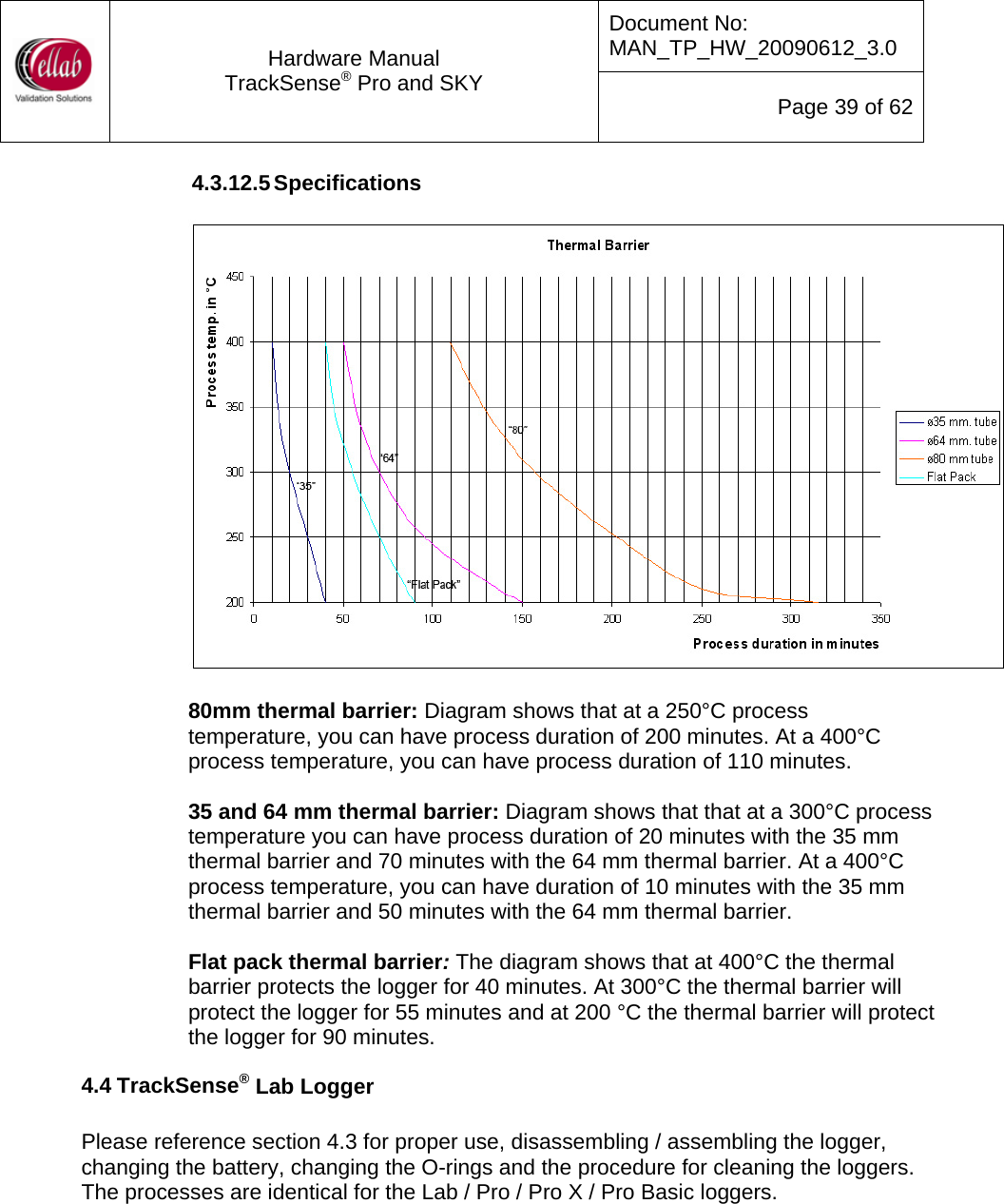
Document No: MAN_TP_HW_20090612_3.0  Hardware Manual TrackSense® Pro and SKY  Page 39 of 62 4.3.12.5 Specifications    80mm thermal barrier: Diagram shows that at a 250°C process temperature, you can have process duration of 200 minutes. At a 400°C process temperature, you can have process duration of 110 minutes.  35 and 64 mm thermal barrier: Diagram shows that that at a 300°C process temperature you can have process duration of 20 minutes with the 35 mm thermal barrier and 70 minutes with the 64 mm thermal barrier. At a 400°C process temperature, you can have duration of 10 minutes with the 35 mm thermal barrier and 50 minutes with the 64 mm thermal barrier.  Flat pack thermal barrier: The diagram shows that at 400°C the thermal barrier protects the logger for 40 minutes. At 300°C the thermal barrier will protect the logger for 55 minutes and at 200 °C the thermal barrier will protect the logger for 90 minutes.   4.4 TrackSense® Lab Logger  Please reference section 4.3 for proper use, disassembling / assembling the logger, changing the battery, changing the O-rings and the procedure for cleaning the loggers.  The processes are identical for the Lab / Pro / Pro X / Pro Basic loggers.
Document No: MAN_TP_HW_20090612_3.0  Hardware Manual TrackSense® Pro and SKY  Page 40 of 62 4.4.1  Logger Specifications 2nd Generation  Logger type  Range  Operating Pressure  Accuracy  Data Points  Dimensions  Estimated Battery life  Min / Max.  Sample rate TS Lab  -30 to +100 °C  10 mBar to 2 Bar Abs. +/- 5 seconds per 24 hrs 60,000 or  continuous  Ø25×45mm + Sensor 1000 hours or 12 months Min. 1 sec. Max. 23:59 Hours: Min TS Lab RH/TMP  -30 to +100 °C, 0 to 100% RH  10 mBar to 2 Bar Abs. +/- 5 seconds per 24 hrs 30,000 per channel or continuous Ø25×45mm + Sensor  700-800 hours Min. 1 sec. Max. 23:59 Hours: Min TS Lab Quad Temp*  -30 to +100 °C  10 mBar to 2 Bar Abs. +/- 5 seconds per 24 hrs 15,000 per channel or continuous Ø25×45mm + Sensor  250-300 hours Min. 1 sec. Max. 23:59 Hours: Min Note: Continuous sampling cannot be used when Lab logger is used with the SKY module. * TS Lab Quad can not be used with SKY and has no LED  Logger Specifications Lab Mini TS Lab Mini  0 to +100 °C  1 mBar to 10 Bar Abs.   14,500 or continuous  Ø20×16mm + Sensor  100 hours  Min. 1 sec. Max. 23:59 Hours: Min 4.4.2  Lab Sensors  4.4.2.1  Sensor Types  • Lab Temperature (Internal or Rigid Sensor): o  Available lengths: 0 and 35mm.  • Lab Mini Temperature (Internal or Rigid): o  Available lengths: 0 and 35mm. • Lab Quad Sensor (Teflon): o Available cable lengths: 50 cm.  o Proper Handling:    Use caution as sensors are sensitive to stretching, especially when hot.   Minimum cable curl diameter is > 50 mm.   Do not make sharp (<90°) cable bending   Do not twist or pull cable.   Do not bend cable any closer than 20 mm from the tip.   Do not use sharp instruments when handling.   Do not carry by Teflon leads.   Measuring point is 3mm from tip (6mm with sharp end).
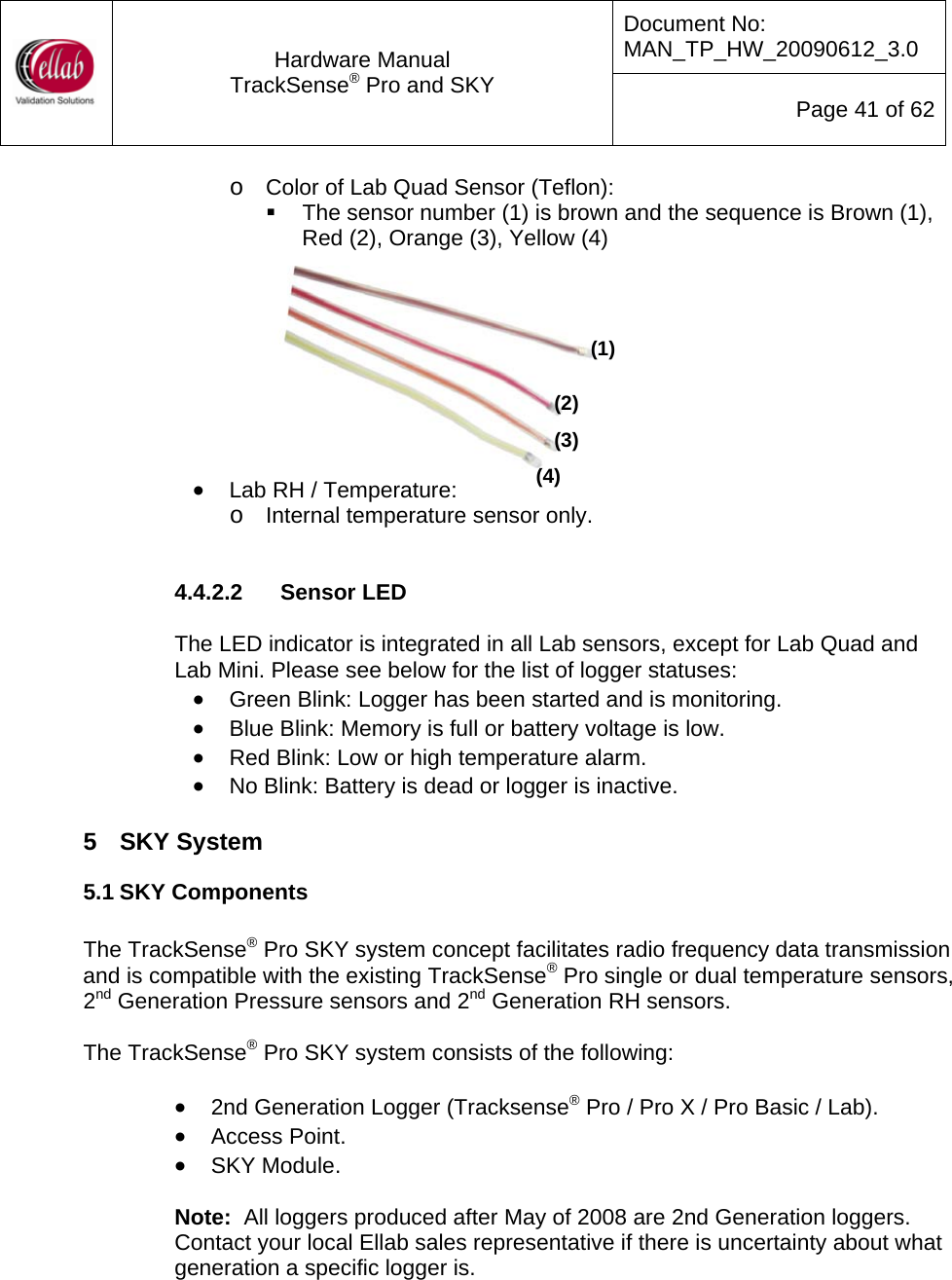
Document No: MAN_TP_HW_20090612_3.0  Hardware Manual TrackSense® Pro and SKY  Page 41 of 62 o Color of Lab Quad Sensor (Teflon):   The sensor number (1) is brown and the sequence is Brown (1), Red (2), Orange (3), Yellow (4)   (1) (2) (3) (4) • Lab RH / Temperature: o Internal temperature sensor only.   4.4.2.2  Sensor LED  The LED indicator is integrated in all Lab sensors, except for Lab Quad and Lab Mini. Please see below for the list of logger statuses: • Green Blink: Logger has been started and is monitoring. • Blue Blink: Memory is full or battery voltage is low. • Red Blink: Low or high temperature alarm. • No Blink: Battery is dead or logger is inactive.  5  SKY System 5.1 SKY Components  The TrackSense® Pro SKY system concept facilitates radio frequency data transmission and is compatible with the existing TrackSense® Pro single or dual temperature sensors, 2nd Generation Pressure sensors and 2nd Generation RH sensors.  The TrackSense® Pro SKY system consists of the following:  • 2nd Generation Logger (Tracksense® Pro / Pro X / Pro Basic / Lab). • Access Point. • SKY Module.  Note:  All loggers produced after May of 2008 are 2nd Generation loggers.  Contact your local Ellab sales representative if there is uncertainty about what generation a specific logger is.
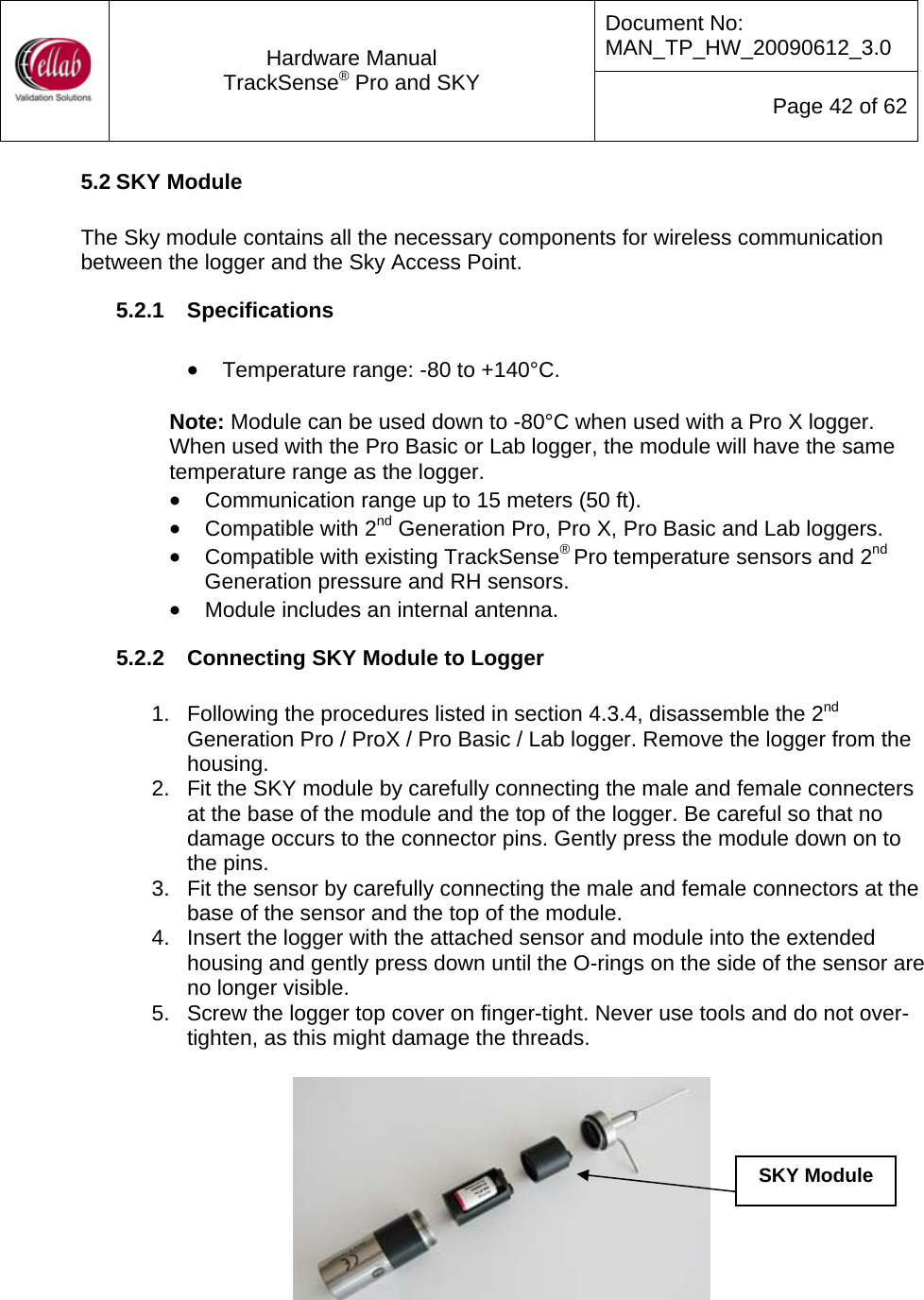
Document No: MAN_TP_HW_20090612_3.0  Hardware Manual TrackSense® Pro and SKY  Page 42 of 62 5.2 SKY Module  The Sky module contains all the necessary components for wireless communication between the logger and the Sky Access Point.  5.2.1  Specifications  • Temperature range: -80 to +140°C.   Note: Module can be used down to -80°C when used with a Pro X logger.  When used with the Pro Basic or Lab logger, the module will have the same temperature range as the logger. • Communication range up to 15 meters (50 ft). • Compatible with 2nd Generation Pro, Pro X, Pro Basic and Lab loggers. • Compatible with existing TrackSense® Pro temperature sensors and 2nd Generation pressure and RH sensors. • Module includes an internal antenna. 5.2.2  Connecting SKY Module to Logger  1.  Following the procedures listed in section 4.3.4, disassemble the 2nd Generation Pro / ProX / Pro Basic / Lab logger. Remove the logger from the housing. 2.  Fit the SKY module by carefully connecting the male and female connecters at the base of the module and the top of the logger. Be careful so that no damage occurs to the connector pins. Gently press the module down on to the pins. 3.  Fit the sensor by carefully connecting the male and female connectors at the base of the sensor and the top of the module.   4.  Insert the logger with the attached sensor and module into the extended housing and gently press down until the O-rings on the side of the sensor are no longer visible. 5.  Screw the logger top cover on finger-tight. Never use tools and do not over-tighten, as this might damage the threads.   SKY Module
Document No: MAN_TP_HW_20090612_3.0  Hardware Manual TrackSense® Pro and SKY  Page 43 of 62 5.3 Access Point 5.3.1  Specifications  • Temperature Range: +5 to +50°C. • Stainless Steel Housing. • LED indicators. • Supports up to 32 logger with a maximum of 64 channels. • 1 session per Access Point. • PC connection by either USB or Ethernet (either crossed Ethernet cable or standard Ethernet cable). • Access Point includes a standard antenna but a remote antenna can be purchased for more difficult transmission environments. 5.3.2  Access Point: Sensitivity to ESD  The Access Point system is sensitive to Electro Static Discharge (ESD) when the antenna connector is open. The following techniques should be used to help to reduce the risk of component damage caused by static electricity.  1.  Immediately before handling any antenna / Access Point, drain off any electro static charge on your body by touching a grounded object. Alternatively, obtain and wear a commercially available wrist strap device, which should be removed for potential shock reasons prior to applying power to the unit. 2.  The antenna should be removed / connected only when the Access Point is powered off and no other cables are connected to the Access Point.  3.  Do not ever touch the center pin in the open antenna connector.  4.  Re-locating the Access Point should only occur while the antenna is mounted.   In the event of a failure due to ESD, the Access Point will obtain a permanently reduced sensitivity. 5.3.3  Communication Setup  5.3.3.1 USB  1.  Connect USB cable to Access Point and PC. 2.  Verify USB is providing power to the Access Point (Power light should be green). 3.  Once a SKY session has started, verify the Wireless LED light on the Access Point is blinking green. If so, communication between the logger and Access Point is occurring.
Document No: MAN_TP_HW_20090612_3.0  Hardware Manual TrackSense® Pro and SKY  Page 44 of 62 5.3.3.2 LAN  Note: If setting up an IP address on the Access Point, a USB cable must be connected between the Access Point and PC.  1.  Connect Ethernet cable to Access Point and LAN network. 2.  Connect power supply to Access Point and, if needed, USB cable.  Reference the software manual for proper setup of IP address in ValSuite™ software. 3.  Once a SKY session has started, verify the Wireless LED light on the Access Point is blinking green. If so, communication between the logger and Access Point is occurring. Note: A 12V power supply must be purchased separately if connecting the Access Point to PC via Ethernet.  6  Calibration 6.1 Ellab Factory Calibration It is recommended that all Ellab sensors are returned to Ellab at least once a year for factory calibration. Ellab performs the factory calibration which adjusts and writes a new calibration date to the sensor. A certificate is generated and historic data is included. All certifications issued by Ellab are NIST and NPL traceable. Logger, SKY module and ETS firmware will also be updated. The software will (by default) automatically warn the user 12 months after the last calibration date. The factory calibration cannot be changed by the user and the factory calibration is not affected by any of the possible user calibration procedures done in ValSuite™.    Note: When shipping equipment back to Ellab for calibration / inspection; please be sure that the equipment is packaged well. Use extra care when shipping RH sensors. Keep dust particles away from the sensors. Ellab is not responsible for any equipment damaged in the shipment from the customer. 6.1.1  Calibration Types: TrackSense® Pro  6.1.1.1 Standard Calibration (Single or Dual): • Calibration Points: 0, 60, 90, 120 and 140°C.  6.1.1.2 Low Temperature Calibration (Single, Dual or Quad Sensors): • Calibration Points: 0, 25, 50, 90 and 100°C.  6.1.1.3 High Temperature Calibration (Single or Dual Sensors): • Calibration Points: 0, 90, 160, 240, 360 and 400°C.  6.1.1.4 RH/Temperature Calibration: • RH Calibration Points:10, 30, 50, 70 and 90%RH. • Temperature Calibration Points: 10, 30, 50, 75 and 90°C.
Document No: MAN_TP_HW_20090612_3.0  Hardware Manual TrackSense® Pro and SKY  Page 45 of 62 6.1.1.5 Additional Temperature Checkpoints: • Standard Additional Checkpoints: -50, -80 and -196°C. • Additional custom checkpoints can be added.  Note: There is an additional cost per checkpoint and this cost is per channel. There is an additional start-up fee for additional checkpoints other than -50 and -80. Please contact your local Ellab sales representative for more information.  6.1.1.6  Chronometric Calibration: Time Accuracy of Loggers: • Standard: +23°C for approximately 16 hours. • Special:+70°C for approximately 5 hours.  6.1.1.7  Pressure Calibration  There are two types of pressure calibrations. One is for pressure sensors that are to be used with ValSuite™ software 2.34 or older and the other is for new pressure sensors.  • Pressure Calibration Points (2.34 or older): 1000, 2250, 2500, 3500, 4000, 4750, 5500, 6000 and 7000 mBar. • Temperature Calibration Points (2.34 or older): 0, 12, 25, 35, 70, 95, 120 and 140°C. • Pressure Calibration Points(newer sensors): 1000, 3500, 6000, 7000 and 50 mBar. • Temperature Calibration Points (newer sensors): 0, 90 and 140°C. • Additional calibration points can be added.  6.1.1.8  Rotation Calibration:  • Calibrated using a 1,000 rotations. 6.1.2  Calibration Types: TrackSense® Lab  6.1.2.1  Temperature Calibration (TS Lab): • Calibration Points: -30, 0, 40, 70 and 100°C.  6.1.2.2  Temperature Calibration (TS Lab Mini): • Calibration Points: 0, 21, 42, 63 and 85°C.  6.1.2.3  RH / Temperature Calibration: • Temperature Calibration Points: 10, 30, 60, 75 and 90°C. • RH Calibration Points: 10, 30, 60, 70 and 90%.
Document No: MAN_TP_HW_20090612_3.0  Hardware Manual TrackSense® Pro and SKY  Page 46 of 62 6.2 In-House Calibration Solutions 6.2.1  Ellab Temperature Standard (ETS)  The ETS can be operated as an integrated part of ValSuite™. It is a temperature standard which can be started and stopped and used in reports analysis and calibration.    6.2.1.1  ETS Versions and Measuring Ranges  • ETS10 o Temperature Range: -80 to +250°C. o Accuracy between -50 to +150°C: ±0.011°C. o Accuracy (All other temperature): ±0.025°C. • ETS20: o Temperature Range: -50 to +150°C. o Accuracy: ±0.020°C.  • ETS25: o Temperature Range: -196 to +420°C. o Accuracy: ±0.025°C.  6.2.1.2  Proper Use  • Although the ETS is quite robust, it should be handled with care.  Dropping or mechanical shock will loosen or damage the electronic connections. The platinum resistor is extremely sensitive and drift can occur if not handled properly. • Only use cables (USB) provided by Ellab. • ETS system must be properly grounded. • Never use the ETS outside the measuring range. •  Any ETS with recurring problems should be returned to Ellab for service.  • In order to maintain the accuracy of the ETS, it is recommended that they are re-calibrated by Ellab at least once every 12 months.  6.2.1.3  Setting up the ETS  The ETS can be setup 3 different ways. It can be used as a stand alone unit with a display, in connection with ETS Suite software or it can be setup in connection with the ValSuite™ software.  • Set Up For Stand Alone Unit w/ Display.
Document No: MAN_TP_HW_20090612_3.0  Hardware Manual TrackSense® Pro and SKY  Page 47 of 62 1.  Connect the ETS using a USB cable to the ETS display. 2.  Connect the display to the power supply.   • Set Up For ETS Using ETS Suite.  Note: The USB driver must be installed first.  1.  Connect the ETS to the PC via USB cable. 2.  Verify that ETI Suite is detecting the connected ETS.   • Set Up for ETS Using ValSuite™  1.  If using the USB connection, install the Ellab USB driver first. The driver can be found on the ValSuite™ disc (USB Drivere/ETSUSBDriver/3.00 folders).  Run the file ETSProUSBDriver3.00.  2. Click Next.
Document No: MAN_TP_HW_20090612_3.0  Hardware Manual TrackSense® Pro and SKY  Page 48 of 62 3.  Files are installed.  Click Next.    4.  Connect the ETS to the PC via USB cable. Click Next.    5.  If using Windows XP, the Found New Hardware Wizard window appears.  Note: If using Vista, driver will install automatically. Steps 5-8 do not apply to Vista.
Document No: MAN_TP_HW_20090612_3.0  Hardware Manual TrackSense® Pro and SKY  Page 49 of 62 6. Select No, not this time and click Next.       7. Select Install the software automatically (Recommended).  Click Next.
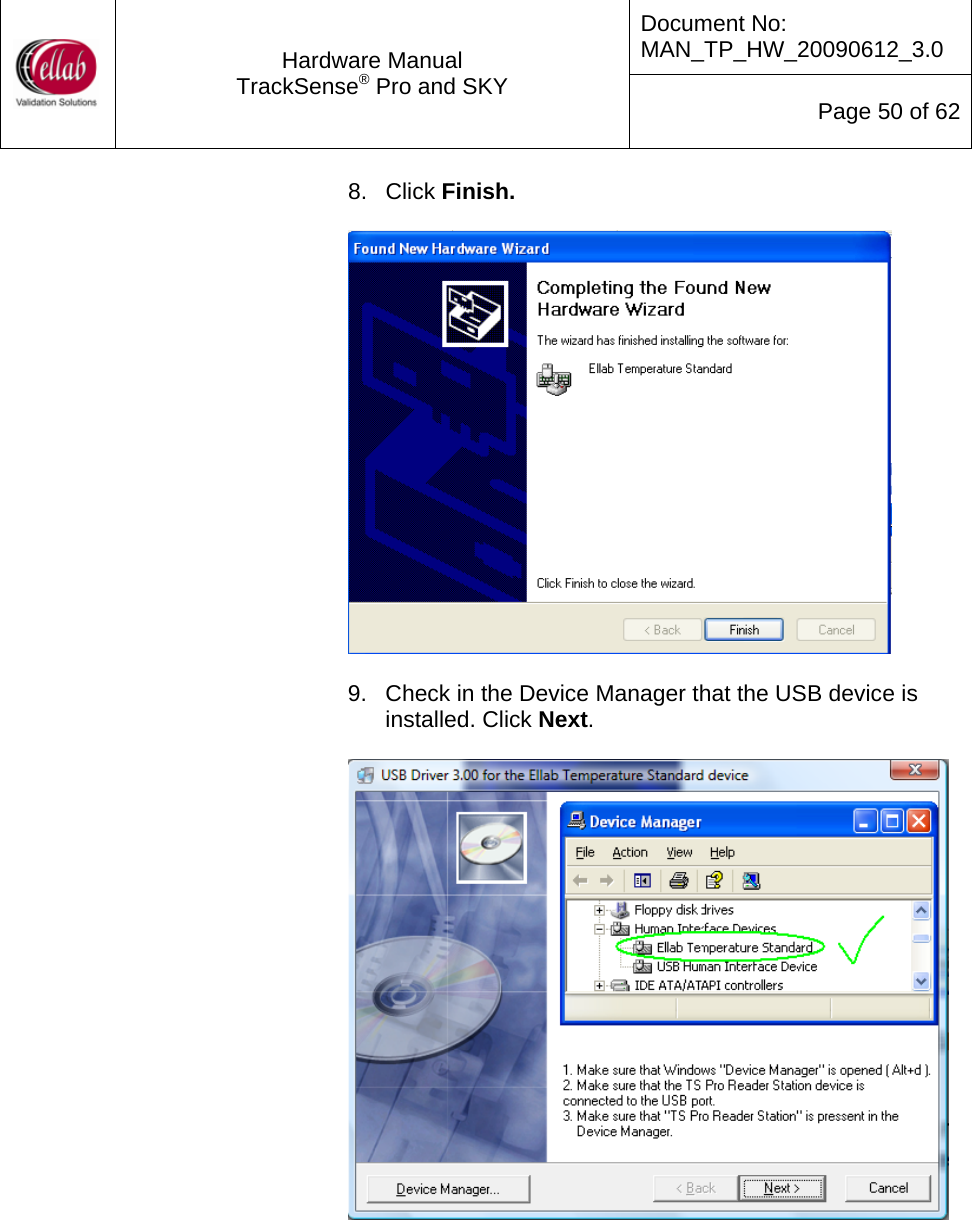
Document No: MAN_TP_HW_20090612_3.0  Hardware Manual TrackSense® Pro and SKY  Page 50 of 62 8. Click Finish.    9.  Check in the Device Manager that the USB device is installed. Click Next.
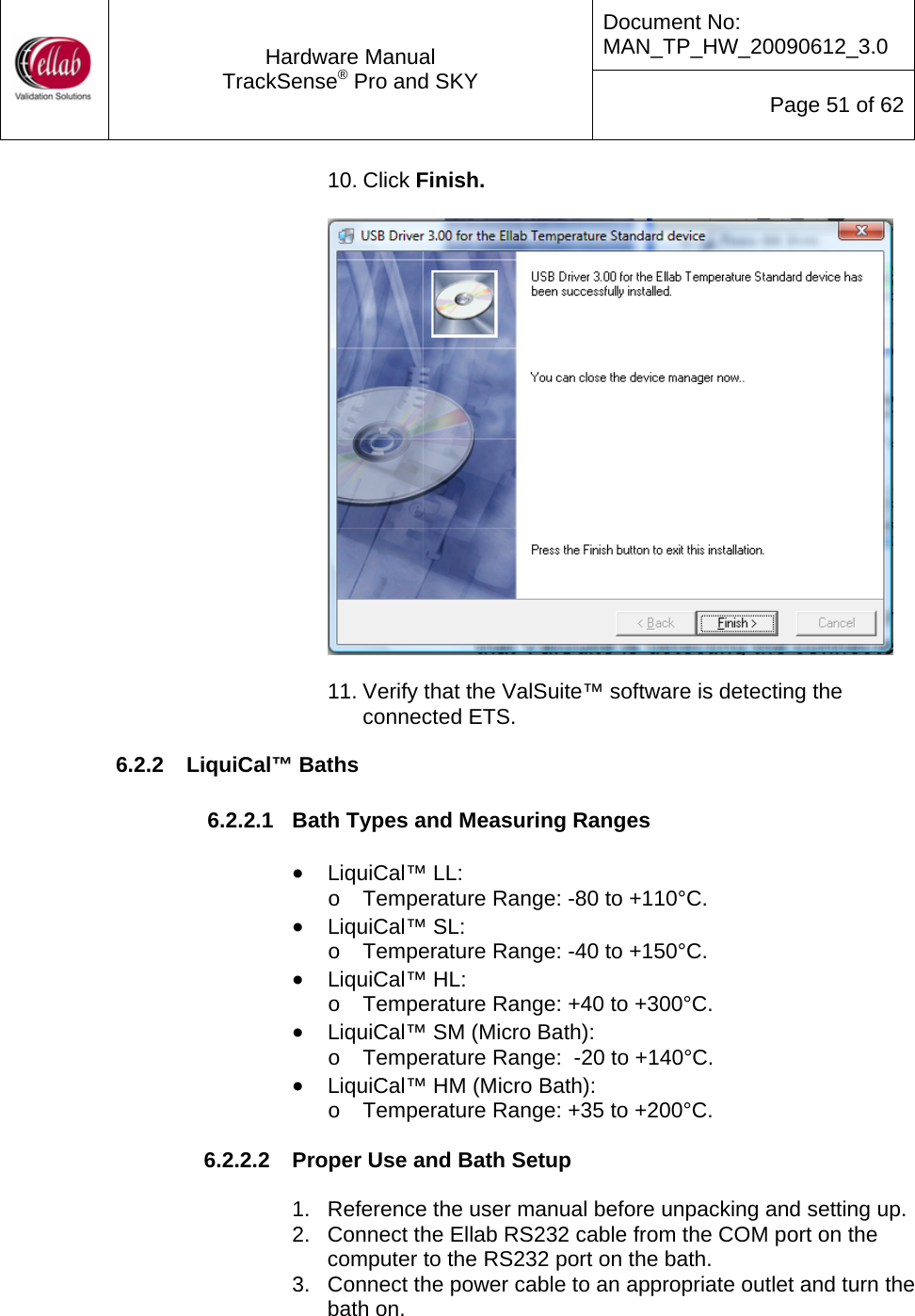
Document No: MAN_TP_HW_20090612_3.0  Hardware Manual TrackSense® Pro and SKY  Page 51 of 62 10. Click Finish.    11. Verify that the ValSuite™ software is detecting the connected ETS.   6.2.2  LiquiCal™ Baths  6.2.2.1  Bath Types and Measuring Ranges  • LiquiCal™ LL: o  Temperature Range: -80 to +110°C. • LiquiCal™ SL: o  Temperature Range: -40 to +150°C. • LiquiCal™ HL: o  Temperature Range: +40 to +300°C. • LiquiCal™ SM (Micro Bath): o  Temperature Range:  -20 to +140°C. • LiquiCal™ HM (Micro Bath): o  Temperature Range: +35 to +200°C.  6.2.2.2  Proper Use and Bath Setup  1.  Reference the user manual before unpacking and setting up. 2.  Connect the Ellab RS232 cable from the COM port on the computer to the RS232 port on the bath. 3.  Connect the power cable to an appropriate outlet and turn the bath on.
Document No: MAN_TP_HW_20090612_3.0  Hardware Manual TrackSense® Pro and SKY  Page 52 of 62 Note: Make sure power supply is grounded and connect bath to COM port of PC before connecting the power. 4.  Verify that the liquid in the bath is circulating 5.  Use Hardware Manager in ValSuite™ to select appropriate serial port. 6.2.3  Ellab Dry Block  6.2.3.1  Measuring Range  • Temperature Range: +35 to +550°C.  6.2.3.2  Proper Use and Setup  1.  Reference the Gemini user manual before unpacking and setting up. 2.  Connect the Ellab RS232 cable from the COM port on the computer to the RS232 port on the dry block. 3.  Connect the power cable to an appropriate outlet and turn the bath on. Note: Make sure power supply is grounded and connect bath to COM port of PC before connecting the power. 4.  Using the software manual, verify that ValSuite™ is detecting the dry block. 6.3 ValSuite™ Calibration Options  ValSuite™ software includes three different methods for calibrating loggers: Manual Calibration, Semi-Automatic and Full Automatic. 6.3.1  Manual Calibration  The user enters the reference temperature values, selects the time of the reference reading, and the software then calculates the offsets.  Note:  Please reference the software manual for setting up and running a manual calibration in the ValSuite™ software. 6.3.2  Semi-Automatic Calibration  The temperature standard and the sensor data are collected by the software and saved in the session file. The software will instruct the operator when to change the set point of the bath. The calibration offsets are automatically calculated.
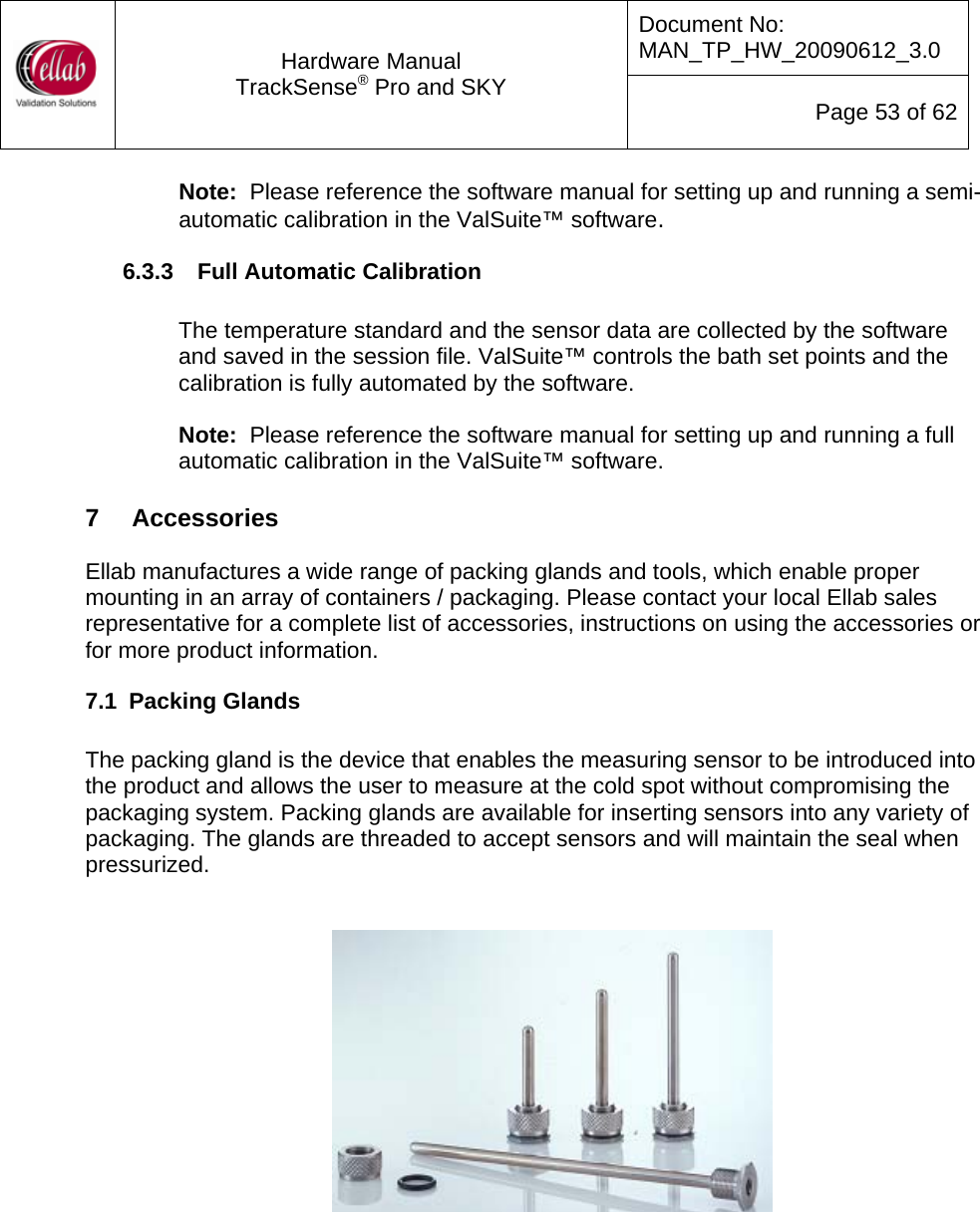
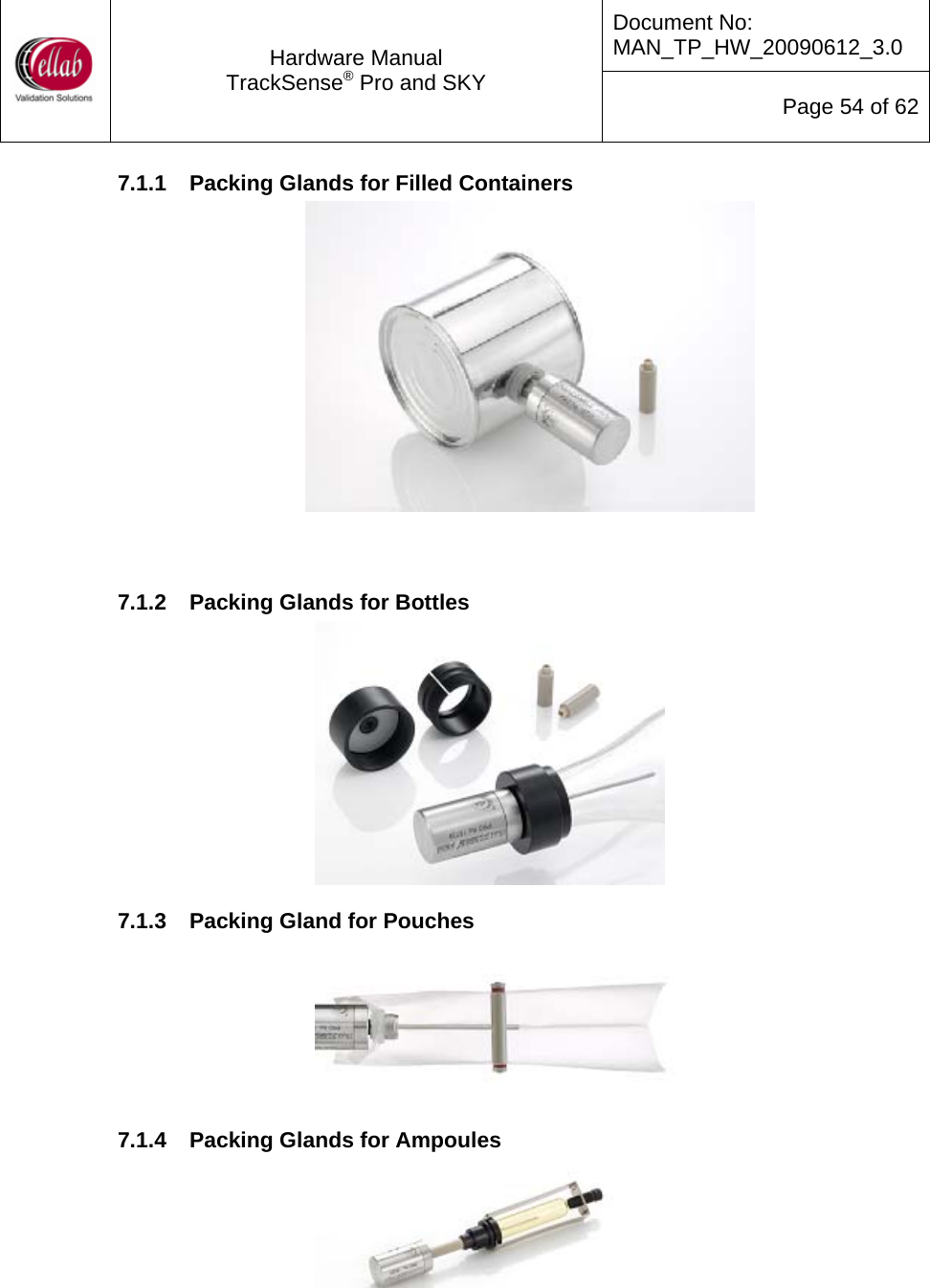
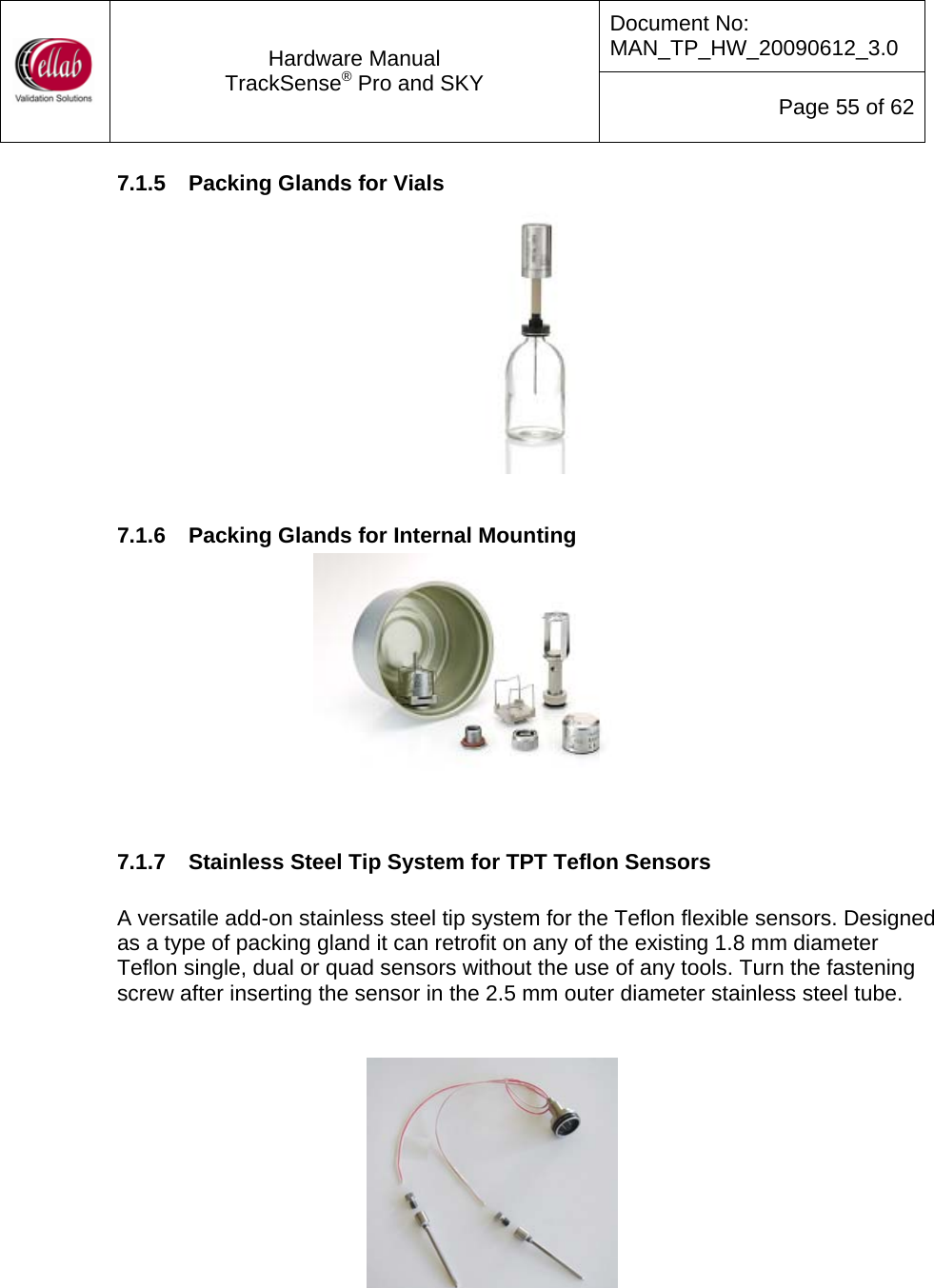
Document No: MAN_TP_HW_20090612_3.0  Hardware Manual TrackSense® Pro and SKY  Page 53 of 62 Note:  Please reference the software manual for setting up and running a semi-automatic calibration in the ValSuite™ software. 6.3.3  Full Automatic Calibration  The temperature standard and the sensor data are collected by the software and saved in the session file. ValSuite™ controls the bath set points and the calibration is fully automated by the software.  Note:  Please reference the software manual for setting up and running a full automatic calibration in the ValSuite™ software.  7   Accessories  Ellab manufactures a wide range of packing glands and tools, which enable proper mounting in an array of containers / packaging. Please contact your local Ellab sales representative for a complete list of accessories, instructions on using the accessories or for more product information. 7.1  Packing Glands  The packing gland is the device that enables the measuring sensor to be introduced into the product and allows the user to measure at the cold spot without compromising the packaging system. Packing glands are available for inserting sensors into any variety of packaging. The glands are threaded to accept sensors and will maintain the seal when pressurized.
Document No: MAN_TP_HW_20090612_3.0  Hardware Manual TrackSense® Pro and SKY  Page 54 of 62 7.1.1  Packing Glands for Filled Containers    7.1.2  Packing Glands for Bottles  7.1.3  Packing Gland for Pouches  7.1.4  Packing Glands for Ampoules
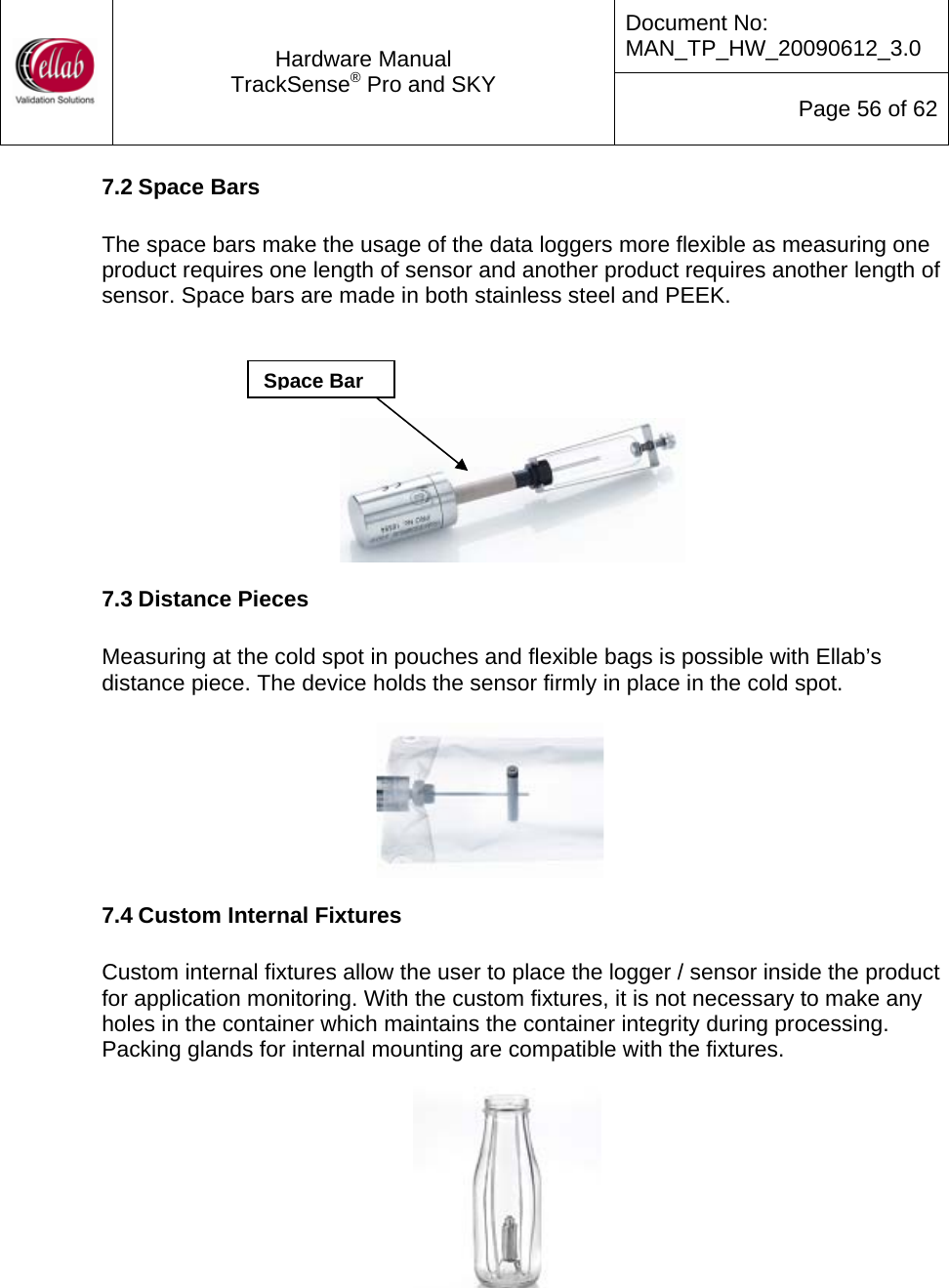
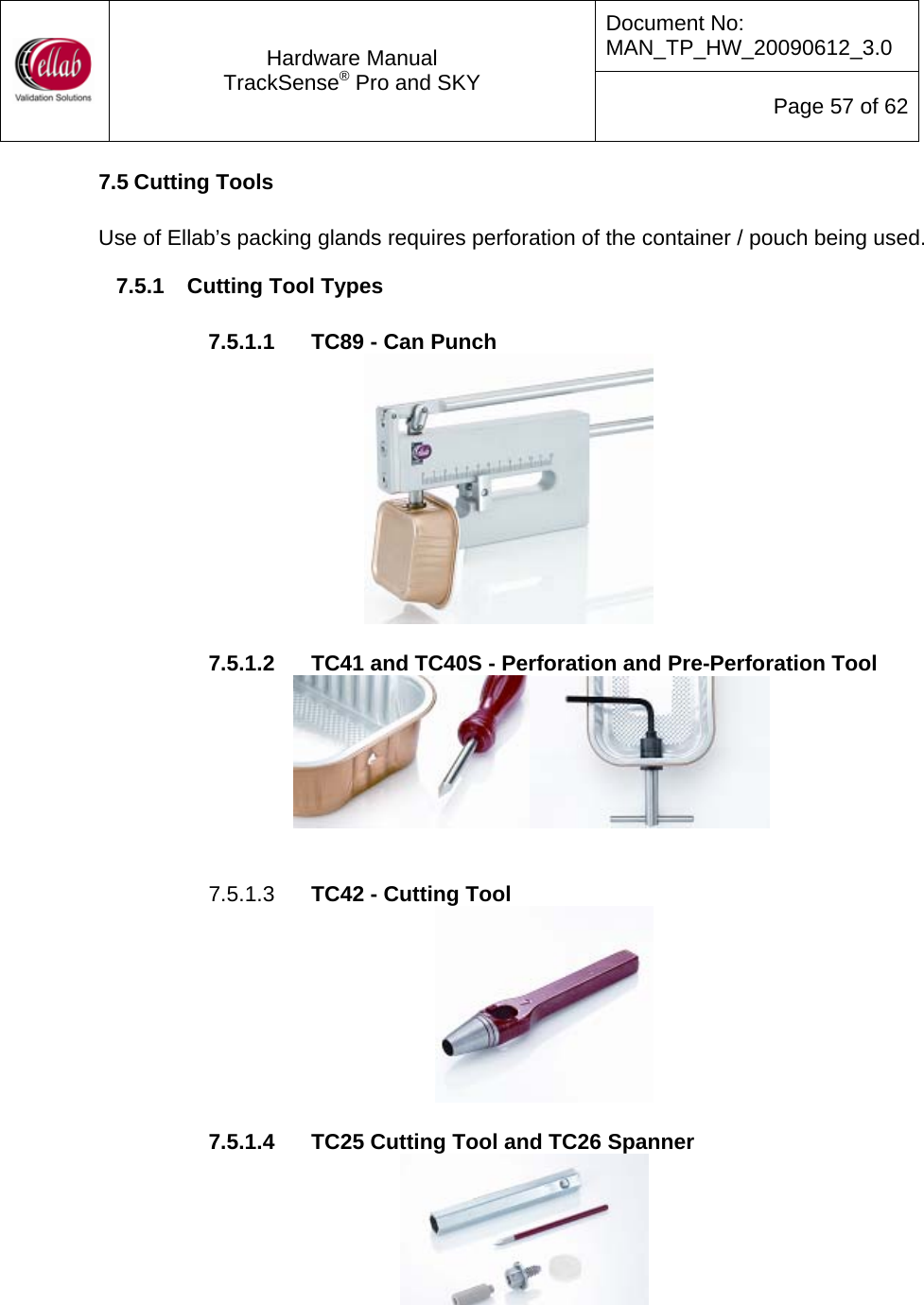
Document No: MAN_TP_HW_20090612_3.0  Hardware Manual TrackSense® Pro and SKY  Page 55 of 62 7.1.5  Packing Glands for Vials   7.1.6  Packing Glands for Internal Mounting    7.1.7  Stainless Steel Tip System for TPT Teflon Sensors  A versatile add-on stainless steel tip system for the Teflon flexible sensors. Designed as a type of packing gland it can retrofit on any of the existing 1.8 mm diameter Teflon single, dual or quad sensors without the use of any tools. Turn the fastening screw after inserting the sensor in the 2.5 mm outer diameter stainless steel tube.
Document No: MAN_TP_HW_20090612_3.0  Hardware Manual TrackSense® Pro and SKY  Page 56 of 62 7.2 Space Bars  The space bars make the usage of the data loggers more flexible as measuring one product requires one length of sensor and another product requires another length of sensor. Space bars are made in both stainless steel and PEEK.    Space Bar   7.3 Distance Pieces  Measuring at the cold spot in pouches and flexible bags is possible with Ellab’s distance piece. The device holds the sensor firmly in place in the cold spot.   7.4 Custom Internal Fixtures  Custom internal fixtures allow the user to place the logger / sensor inside the product for application monitoring. With the custom fixtures, it is not necessary to make any holes in the container which maintains the container integrity during processing. Packing glands for internal mounting are compatible with the fixtures.
Document No: MAN_TP_HW_20090612_3.0  Hardware Manual TrackSense® Pro and SKY  Page 57 of 62 7.5 Cutting Tools  Use of Ellab’s packing glands requires perforation of the container / pouch being used. 7.5.1  Cutting Tool Types   7.5.1.1  TC89 - Can Punch   7.5.1.2  TC41 and TC40S - Perforation and Pre-Perforation Tool    7.5.1.3  TC42 - Cutting Tool   7.5.1.4  TC25 Cutting Tool and TC26 Spanner
Document No: MAN_TP_HW_20090612_3.0  Hardware Manual TrackSense® Pro and SKY  Page 58 of 62 7.6 Protective Sleeves  The loggers can be protected with a rubber protective sleeve in which the loggers can be easily inserted. The rubber sleeves can also be useful for different applications where the loggers are to be hung on a string in different positions. 7.7 Contact Pucks  Contact pucks are mainly used in lyophilization applications. The combination of 1 rigid and 1 flexible sensor is appropriate for measurements in the product and on the shelf simultaneously. The contact puck allows close contact to the shelf securing accurate measurements.  8  Ellab Service Contract  Ellab offers annual service agreements. Please contact your local Ellab sales representative for pricing and details.  9  TrackSense® Pro Equipment Warranty  Ellab offers an industry leading 2-year warranty on loggers, stainless steel non-flexible sensors, SKY components and reader stations. Physical damage is not covered by the warranty. 9.1  Extended Warranty  Ellab also offers an extended warranty on all new TrackSense® Lab/Pro/Pro X/Pro Basic loggers. The extension is from 2 to 5 years. The warranty needs to be purchased together with the logger. Please contact your local Ellab sales representative for pricing.
Document No: MAN_TP_HW_20090612_3.0  Hardware Manual TrackSense® Pro and SKY  Page 59 of 62 10  FAQ  What could be the cause of a spike in a temperature channel in ValSuite™ while all other channels remain constant?  A battery failure and a disconnected sensor have similar results in ValSuite™. The temperature will spike just before the logger shuts down. One way to differentiate between the two is to check the temperature just before the spike. It is a good indication that the battery is dead, if the temperature drops just before the spike. If the temperature immediately spikes, a disconnected sensor may be the issue. This pertains to all loggers and sensors. Before sending a sensor / logger in for service, verify the results in ValSuite™ first and, if necessary, run a voltage test on the battery.    When running a SKY session, does the Access Point have to have a USB cable connected as well if using the LAN setup?  If setting up an IP address on the Access Point, both an Ethernet and USB cable need to be utilized. If the IP address has already been determined, only the Ethernet cable needs to be used.   What temperature should the loggers be at before being returned to the reader station?  If the loggers are too hot to be held by hand, they are too hot to be placed in the reader station.  Why doesn’t the reader station recognize the Mini after a battery change?  Make sure to hold battery down before replacing the cap.  When I read my logger it gave me no data. What can cause this?  Option 1: broken sensor. If the reader station slot turned green and the data appears in graph, the logger read ok. Check the data and see if there is 1 sample around 160°C. If this is the case the sensor will need to be returned to Ellab.  Option 2: dead battery. It is possible for the battery to have enough power to recognize but not enough to take and store samples. Test the battery in the activator and replace if necessary.  Option 3: logger was refreshed. If the logger was started, turned green but was refreshed while still in the station, it was actually stopped before being placed in the process. Be sure not to refresh any logger that turns green.  I replaced the battery in my Pro logger but I still get a low / critical low battery warning when I try to start it.
Document No: MAN_TP_HW_20090612_3.0  Hardware Manual TrackSense® Pro and SKY  Page 60 of 62 Error messages are collected on the loggers last read. If the battery was replaced, start the logger for a few minutes and then read it. If the error goes away the unit is ready to be used.  Can I use my computer for other jobs while running a TrackSense® session?  During data logging studies using real time data transmission (SKY) you can run multiple applications on your computer as long as you keep the software open. If SKY functionality is not required you can completely close your computer down if needed. When reopening ValSuite™, the software automatically allocates the loggers to the session they were started in.
Document No: MAN_TP_HW_20090612_3.0  Hardware Manual TrackSense® Pro and SKY  Page 61 of 62 11  Ellab Locations  Ellab A/S      Trollesmindealle 25    3400 Hilleroed, DENMARK Phone: +45 4452 0500 Fax: +45 4453 0505  Ellab Inc.      6551 South Revere Parkway Suite 145     Centennial, CO 80111, USA Phone: +1 303 425 3370 Fax: +1 303 425 3384  Ellab GmbH      An der Autobahn 5       27404 Bockel, GERMANY Phone: +49 4286 926 62-0 Fax: +49 4286 926 62-66  Ellab S.A.R.L.   ZAC de Merciéres    5 Ter, rue de Clément Ader     2e étage 60200 Compiègne, FRANCE Phone: +33 344 2302 57 Fax: +33 344 2308 94  Ellab UK Ltd.     3 Lodge Farm Barns       New Road, Bawburgh Norfolk NR9 3LZ, UNITED KINGDOM Phone: +44 1603 743 724 Fax: +44 1603 740118  Ellab Philippines Corp.       Unit 5B MB Aguirre Bldg. III     F. Reyes St.,  Balibago, Sta. Rosa, Laguna 4026, PHILIPPINES   Phone: +632 520 8529 Fax: +632 520 8529
Document No: MAN_TP_HW_20090612_3.0  Hardware Manual TrackSense® Pro and SKY  Page 62 of 62 12  Change log  Edition  Section  Change  Date:  Author 1.0 New  New  20090612 MB 2.0  12 Change log, page 62 is missing  Section 12 , page 62 Change log has been added  20091207  LT 2.0  1.4 Directives – ATEX, page 7  Revision of the sentence “The certificate will tell the ATEX….” to “As end-user you shall read the certificate including “Special Conditions for Safe Use” in accordance with “Intertek – report no: RETS(Q)3844/A/1” 20091207 LT 3.0  1.5 Important Notice regarding Ellab Sky Equipment – FCC & IC, page 7  Information about Industry Canada Compliance Information inserted.  20091216 LT

Navigation menu