EmdoorVR Technology EM-DCR1 Wireless Controller User Manual
EmdoorVR Technology Co.,Ltd Wireless Controller Users Manual
Users Manual
USER
MANUAL
WIRELESS CONTROLLER
FOR ANDROID VR
AVR1 AVR2
SETUP
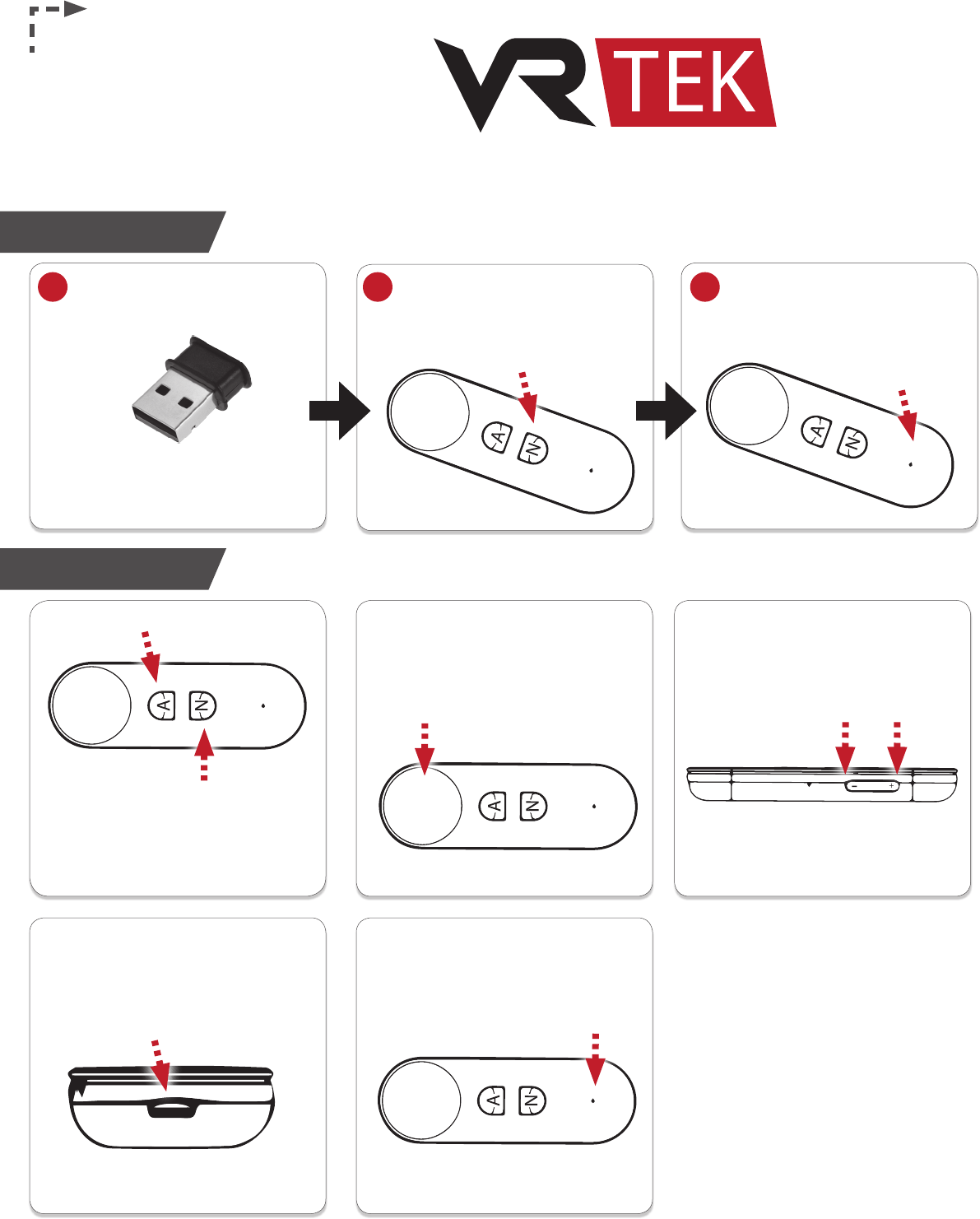
Plug the wireless receiver into
the VR headset’s USB input. Press [N icon] to power on the
controller. A ashing blue LED
signals that the controller is on
and automatically searching.
When connected,
the blue LED will stop
ashing and remain on.
12 3
FUNCTIONS
Blue LED Light:
Connection & Power Status
Indicator
Touch Panel:
Select/Conrm (Press)
Move Left/Right/Up/Down
(Touch-sensitive)
Volume +/-:
Volume Up (Press)
Volume Down (Press)
A:
Back
Micro USB Port:
Charging & Port
N:
Menu/Power On (Press)
Calibrate & Sync (Hold for 1 second)
Power O (Hold for 5 seconds)
FCCstatements:
ThedevicehasbeenevaluatedtomeetgeneralRFexposurerequirement,The
devicecanbeusedinportableexposureconditionwithoutrestriction
FederalCommunicationCommission(FCC)RadiationExposureStatement
PowerissolowthatnoRFexposurecalculationisneeded.
This device complies with part 15 of the FCC rules. Operation is subject to the
followingtwoconditions:
(1)thisdevicemaynotcauseharmfulinterference,and
(2)thisdevicemustacceptanyinterferencereceived,includinginterferencethat
maycauseundesiredoperation.
NOTE: The manufacturer is not responsible for any radio or TV interference
caused by unauthorized modifications or changes to this equipment. Such
modificationsorchangescouldvoidtheuser’sauthoritytooperate the
equipment.
NOTE:Thisequipmenthasbeentestedandfoundtocomplywiththelimitsfora
Class B digital device, pursuanttopart15oftheFCCRules.These limits are
designed to provide reasonable protection against harmful interference in a
residential installation. This equipment generates uses and can radiate radio
frequencyenergyand,ifnotinstalledandusedinaccordancewith the
instructions,maycauseharmfulinterferencetoradiocommunications.However,
thereisnoguaranteethatinterferencewillnotoccurinaparticularinstallation.
Ifthisequipmentdoescauseharmfulinterferencetoradioortelevisionreception,
which can be determined by turning the equipment off and on, the user is
encouragedtotrytocorrecttheinterferencebyoneormoreofthefollowing
measures:
‐Reorientorrelocatethereceivingantenna.
‐Increasetheseparationbetweentheequipmentandreceiver.
‐Connecttheequipmentintoanoutletonacircuitdifferentfromthattowhich
thereceiverisconnected.
‐Consultthedealeroranexperiencedradio/TVtechnicianforhelp.