Emerson 1F86 0244 Instruction Manual 1F86_0244_37 7010C_EN
2014-12-12
: Emerson Emerson-1F86-0244-Instruction-Manual-119806 emerson-1f86-0244-instruction-manual-119806 emerson pdf
Open the PDF directly: View PDF  .
.
Page Count: 16
This thermostat is intended for use with a low voltage NEC
Class II system. Do not use this thermostat with a line voltage
system. If in doubt about whether your wiring is millivolt, line,
or low voltage, have it inspected by a qualified heating and air
conditioning contractor or electrician.
Do not exceed the specification ratings.
All wiring must conform to local and national electrical codes
and ordinances.
This control is a precision instrument, and should be handled
carefully. Rough handling or distorting components could
cause the control to malfunction.
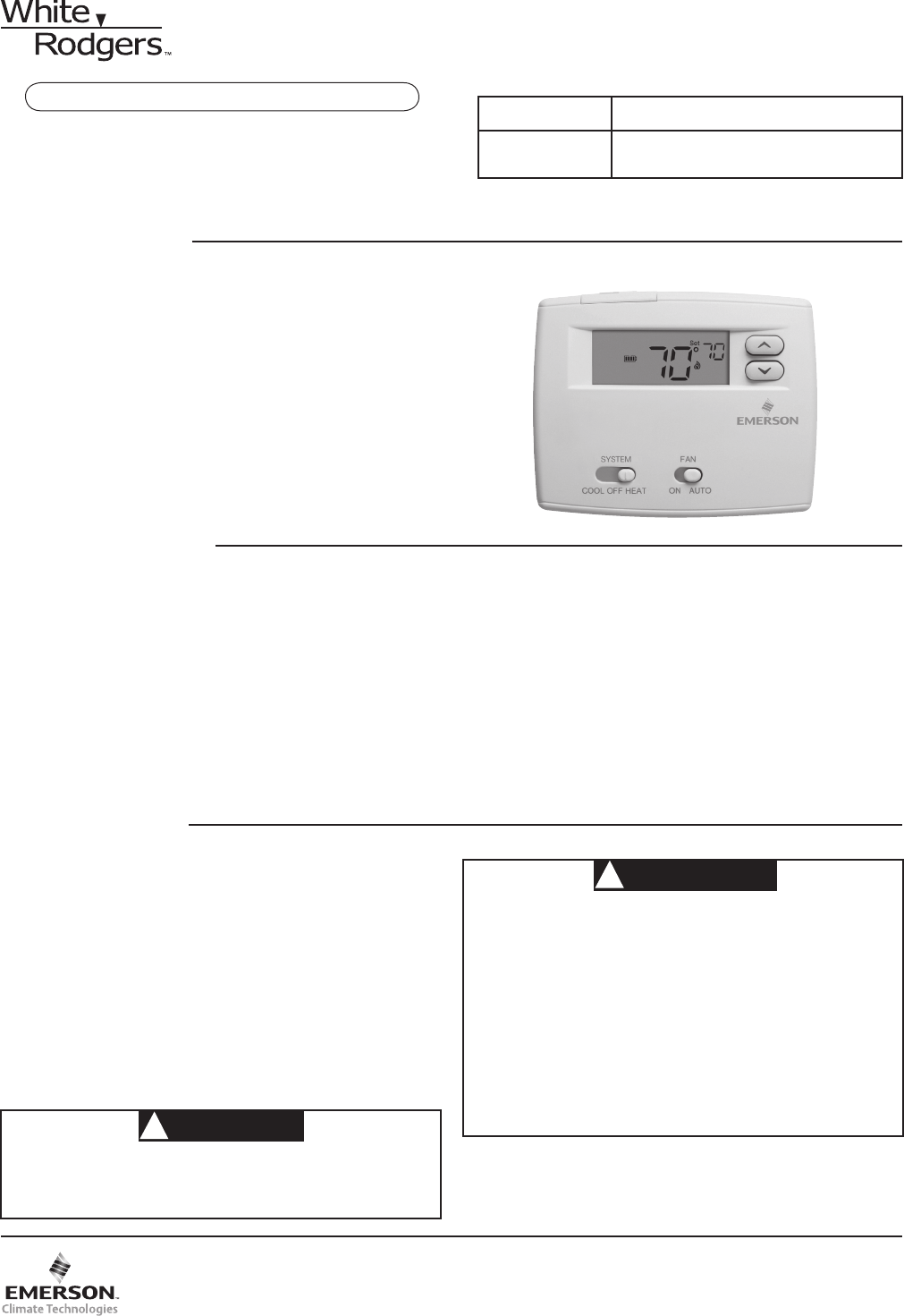
Blue 2” Single Stage Thermostat
Installation and Operating Instructions
Save these instructions for future use!
FAILURE TO READ AND FOLLOW ALL INSTRUCTIONS
CAREFULLY BEFORE INSTALLING OR OPERATING THIS
CONTROL COULD CAUSE PERSONAL INJURY AND/OR
PROPERTY DAMAGE.
APPLICATIONS
For use with the following Class II systems:
• SingleStagesystems
• Single-stageheatpumpsystemswithnoAuxheat
DO NOT USE WITH:
• Systemsexceeding30VACand1.5amps
• 3-wirezonedhydronicheatingsystems
1F86-0244 Thermostat
Model Programming Choice
1F86-0244 Non-Programmable
SPECIFICATIONS
Electrical Rating:
BatteryPower ................................................. mVto30VAC,50/60HzorDC
Input-Hardwire ................................................ 20to30VAC
Terminal Load ........................................................ 1.0Aperterminal,1.5Amaximumallterminalscombined
SetpointRange ...................................................... 45°to90°F(7°to32°C)
Differential(SingleStage) ...................................... Heat0.6°F;Cool1.2°F(adjustable)
Differential(HeatPump) ........................................ Heat1.2°F;Cool1.2°F(adjustable)
Operating Ambient ................................................. 32°to+105°F(0°to+41°C)
OperatingHumidity ................................................ 90%non-condensingmax.
ShippingTemperatureRange ................................ -40°to+150°F(-40°to+65°C)
Dimensions Thermostat ......................................... 3-3/4”Hx4-3/4”Wx1-1/2”D
PRECAUTIONS
To prevent electrical shock and/or equipment damage,
disconnect electric power to system at main fuse or
circuit breaker box until installation is complete.
CAUTION
!
Do not use on circuits exceeding specified voltage.
Higher voltage will damage control and could cause
shock or fire hazard.
Do not short out terminals on gas valve or primary
control to test. Short or incorrect wiring will damage
thermostat and could cause personal injury and/or
property damage.
Thermostat installation and all components of the
system shall conform to Class II (current limited)
circuits per the NEC code. Failure to do so could cause
a fire hazard.
WARNING
!
www.white-rodgers.com
PART NO. 37-7010C
Replaces37-7010B
1004
2
INSTALLATION
REMOVE OLD THERMOSTAT
1. Shutoffelectricityatthemainfuseboxuntilinstallationis
complete. Ensure that electrical power is disconnected.
2. Remove the front cover of the old thermostat. With wires
still attached, remove wall plate from the wall. If the
old thermostat has a wall mounting plate, remove the
thermostat and the wall mounting plate as an assembly.
3. Identify each wire attached to the old thermostat using
the labels enclosed with the new thermostat.
4. Disconnect the wires from old thermostat one at a time. DO
NOT LET WIRES FALL BACK INTO THE WALL.
5. Installnewthermostatusingthefollowingprocedures.
ATTENTION!
Thisproductdoesnotcontainmercury.However,thisproduct
may replace a unit which contains mercury.
Do not open mercury cells. If a cell becomes damaged, do
nottouchanyspilledmercury.Wearingnonabsorbentgloves,
take up the spilled mercury and place into a container which
can be sealed. If a cell becomes damaged, the unit should be
discarded.
Mercurymustnotbediscardedinhouseholdtrash.Whenthe
unit this product is replacing is to be discarded, place in a
suitablecontainer.Refertowww.white-rodgers.comforlocation
to send the product containing mercury.
ATTACH THERMOSTAT BASE TO WALL
1. Removethepackingmaterialfromthethermostat.Gently
pull the cover straight off the base. Forcing or prying on the
thermostat will cause damage to the unit.
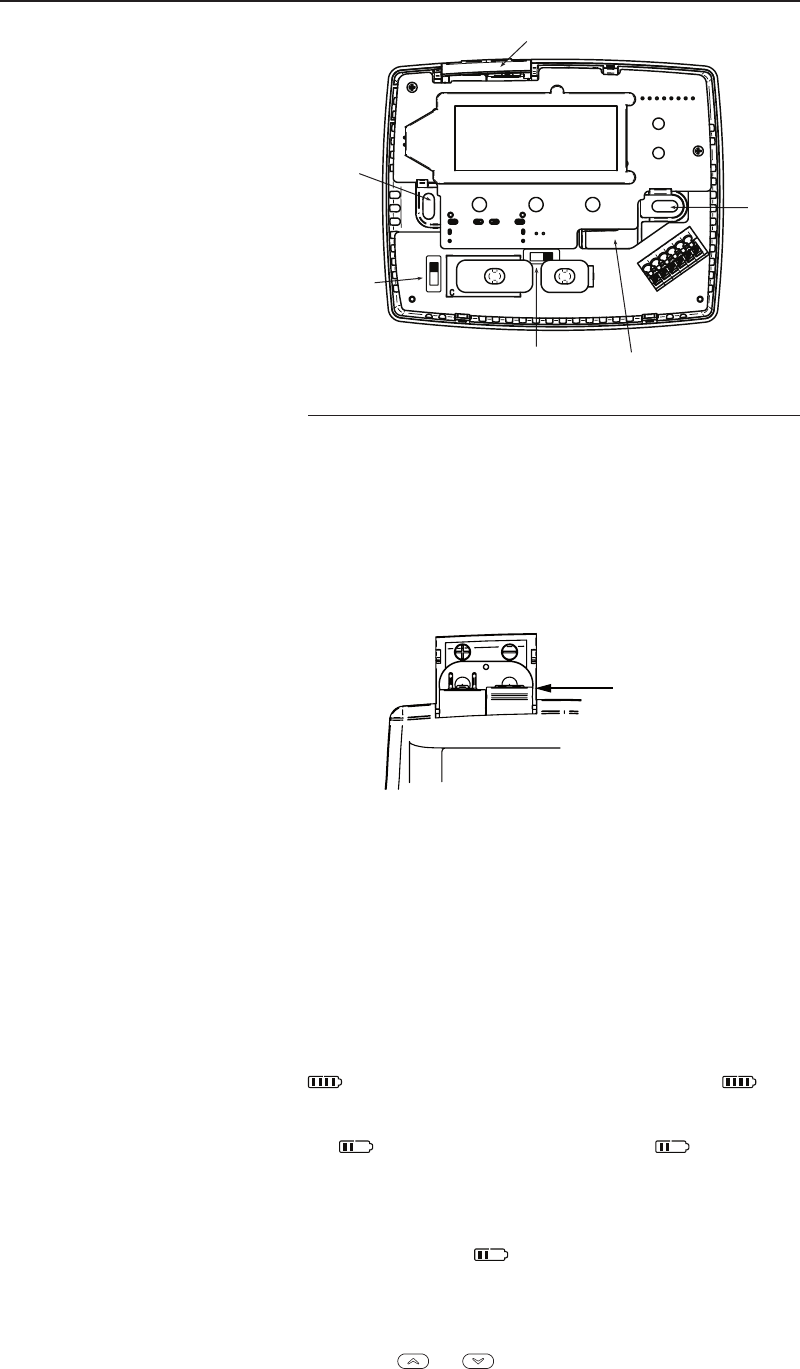
2. Place base over hole in wall and mark mounting hole
locationsonwallusingbaseasatemplate(seeFig.1).
3. Movebaseoutoftheway.Drillmountingholes.
4. Pushwiresthroughopeninginthermostatbase.
5. Fasten base loosely to wall using two mounting screws.
Place a level against bottom of base, adjust until level,
andthentightenscrews.(Levelingisforappearanceonly
andwillnotaffectthermostatoperation.)If youareusing
existing mounting holes, or if holes drilled are too large and
do not allow you to tighten base snugly, use plastic screw
anchors to secure subbase.
6. Connect wires to terminals on base using appropriate
wiringschematic(seegs.2through4).
7. Pushexcesswireintowallandplugholewithare-resistant
material (such as berglass insulation) to prevent drafts
from affecting thermostat operation.
O/B TERMINAL SWITCH SELECTION
The O/B switch on this thermostat is factory set to the “O”
position. This will accommodate the majority of heat pump
applications, which require the changeover relay to be
energizedinCOOL.Ifthethermostatyouarereplacingorthe
heatpumpbeinginstalledwiththisthermostatrequiresa“B”
terminal, toenergizethechangeoverrelayinHEAT, the O/B
switchmustbemovedtothe“B”position.
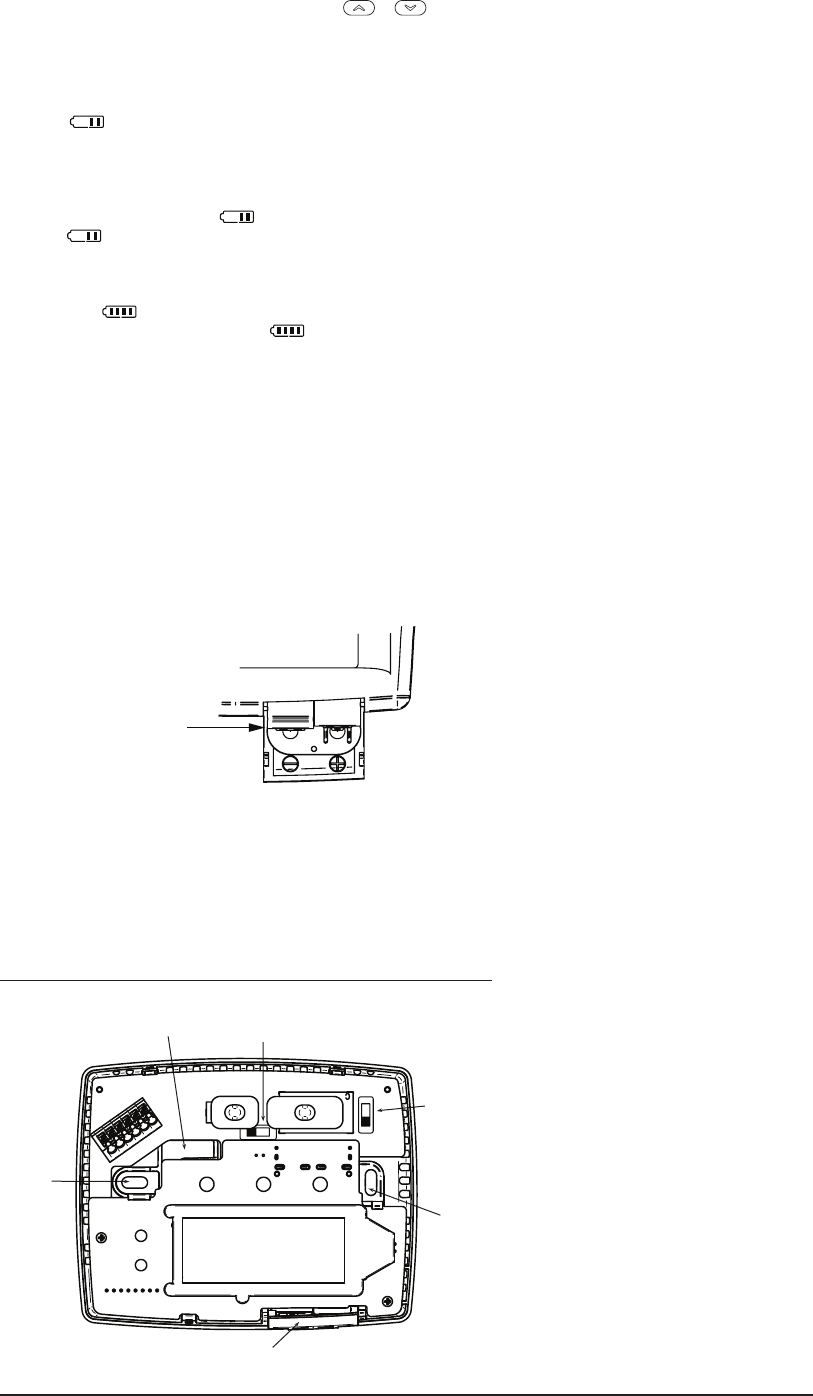
Mounting
Hole
Mounting
Hole
Opening
for wires
Gas/Elec
Switch
Battery
Door
O/B
Switch
Figure 1. Thermostat Base
GAS / ELEC SWITCH
Ifyoursystemisaheatpump,theGAS/ELECSwitchmustbe
settoELEC(seeFig.1)Ifyoursystemisasinglestage,the
switchmustbesettoGAS.Theswitchsettingmustagreewith
the system configuration selected in the configuration menu.
BATTERY LOCATION
“AA” Alkaline Batteries
Two“AA”alkalinebatteriesareinstalledinyourthermostatwith
a battery tag to prevent power drainage. Prior to use, open
the battery door and remove the battery tag. To open, pull
the battery door as shown by the arrow and lift open. The two
“AA”batterieswilloperate all functionsor maintain timeand
continuously display the temperature during a loss of AC power.
To replace batteries, pull the battery door shown by the arrow
and lift open. Using the polarity indicated inside the battery
door, insert the batteries. To close the battery door, swing the
door down while pulling in the direction of arrow. Once fully
down, snap the door back into position.
Thermostat can be powered by system AC power or Battery. If
is displayed, the thermostat is battery powered. If is not
displayed, thermostat is system powered with optional battery
back-up.Whenbatterypowerremainingisapproximatelyhalf,
the willbedisplayed.When“Change ”isdisplayed,
installfresh“AA”alkalinebatteriesimmediately.Forbestresults,
use new premium brand alkaline batteries such as Duracell® or
Energizer®.Werecommendreplacingbatteriesevery2years.
If the home is going to be unoccupied for an extended period
(over3months)and is displayed, the batteries should be
replacedbeforeleaving.Whenlessthantwomonthsofbattery
liferemain,thesetpointtemperaturewilloffsetby10degrees
(10degreescoolerinHeatmode/10degreeswarmerinCool
mode).Ifoffsetoccurs,the normalsetpointcanbemanually
reset with or . Another offset will occur within two
days if batteries are not replaced. To replace the batteries, set
system to OFF.
3
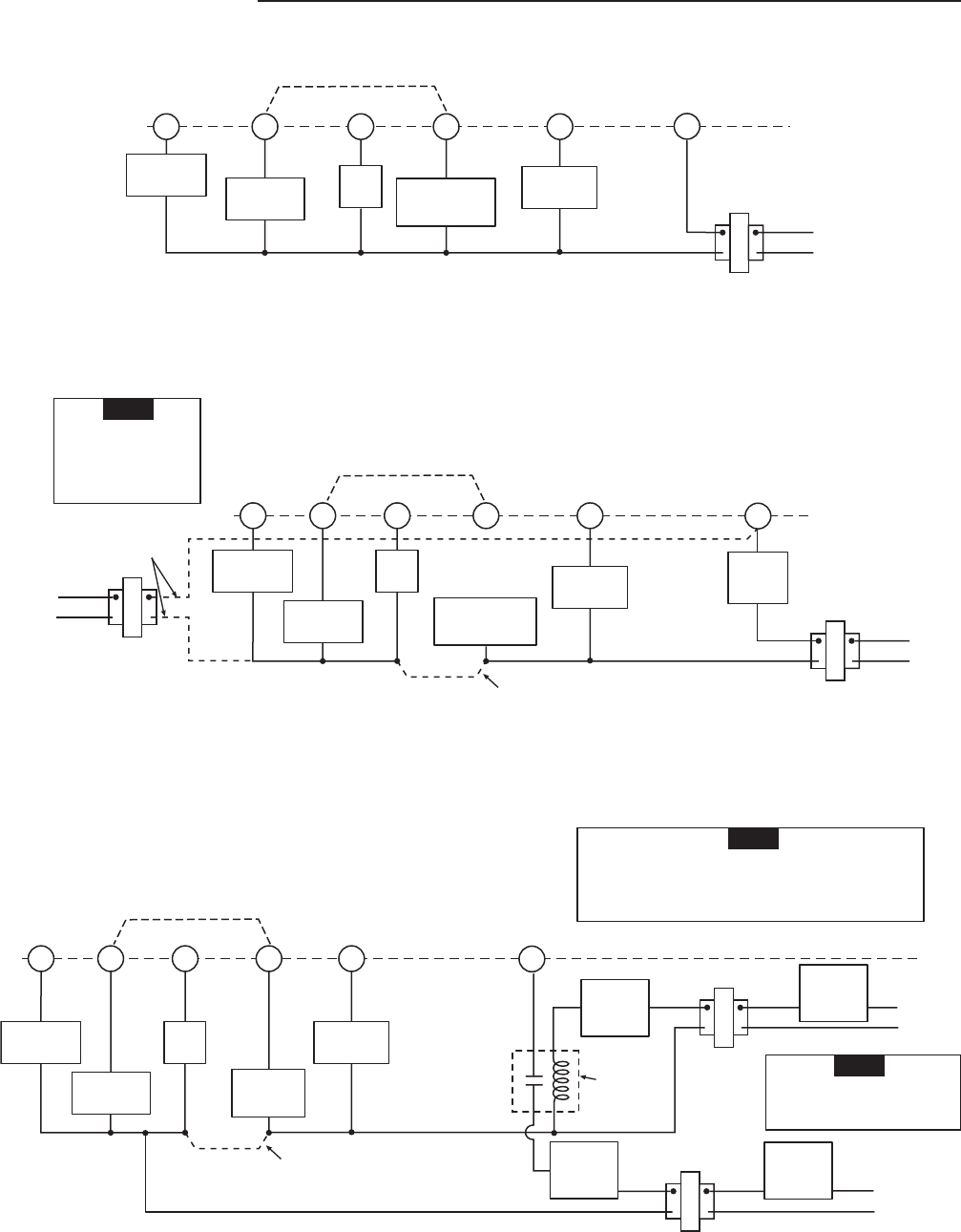
WIRING DIAGRAMS
R
C
24 VAC120 VAC
Hot
Neutral
THERMOSTAT
SYSTEM
G W
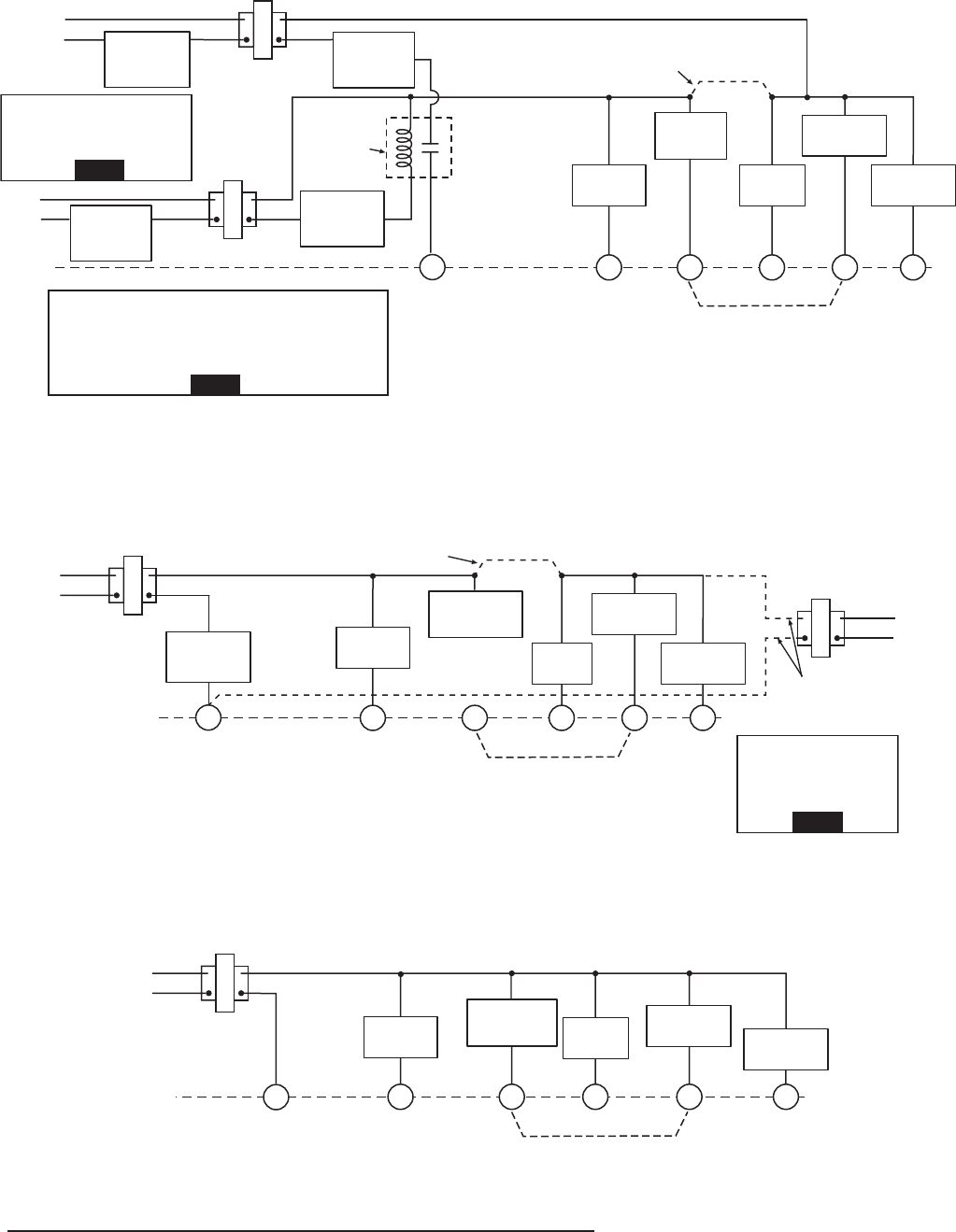
Figure 2. Typical wiring diagram for single transformer single stage systems
TRANSFORMER
(Class II Current Limited)
Changeover
Relay*
YO/B
Compressor
Contactor
* Changeover Relay is energized in COOL when O/B switch is in the “O” position
Changeover Relay is energized in HEAT when O/B switch is in the “B” position
Heat Relay
Fan
Relay Optional
Optional Jumper for
Single Stage Heat Pump
R
C
24 VAC120 VAC
Hot
Neutral
THERMOSTAT
SYSTEM
G W
Figure 3. Typical wiring diagram for two transformer single stage systems with NO safety circuits
TRANSFORMER
(Class II Current Limited)
Changeover
Relay*
YO/B
Compressor
Contactor
* Changeover Relay is energized in COOL when O/B switch is in the “O” position
Changeover Relay is energized in HEAT when O/B switch is in the “B” position
Heat Relay
Fan
Relay Optional
Limit or
Safety
Switches
TWO COMMONS MUST
BE JUMPERED TOGETHER!
HOT
NEUTRAL
120 VAC24 VAC
CUT AND
TAPE OFF!
If safety circuits are in
only one of the systems,
remove the transformer
of the system with NO
safety circuits.
NOTE
Optional Jumper for
Single Stage Heat Pump
R
CG W
Figure 4. Typical wiring diagram for two transformer single stage systems with safety circuits in BOTH systems
Changeover
Relay*
YO/B
Compressor
Contactor
* Changeover Relay is energized in COOL when O/B switch is in the “O” position
Changeover Relay is energized in HEAT when O/B switch is in the “B” position
Heat
Relay
Fan
Relay
Optional
TWO COMMONS MUST
BE JUMPERED TOGETHER!
24 VAC 120 VAC
HOT
NEUTRAL
THERMOSTAT
SYSTEM
HOT
NEUTRAL
120 VAC
Limit or
Safety
Switches
Limit or
Safety
Switches
Limit or
Safety
Switches
24 VAC
Limit or
Safety
Switches
COMMON
COMMON
Auxiliary
Heating
Transformer
(Class II
Current Limited)
Heat Pump Tr ansformer
(Class II Current Limited)
24 VAC
ACCESSORY
RELAY N.O.
CONTACT
Polarity must be observed. If the HOT side of the
second transformer is jumpered to the COMMON side
of the first transformer a short will be made. Damage
to equipment will occur when power is restored.
NOTE
The accessory relay scheme
is required when safety
circuits exist in both systems.
NOTE
Optional Jumper for
Single Stage Heat Pump
4
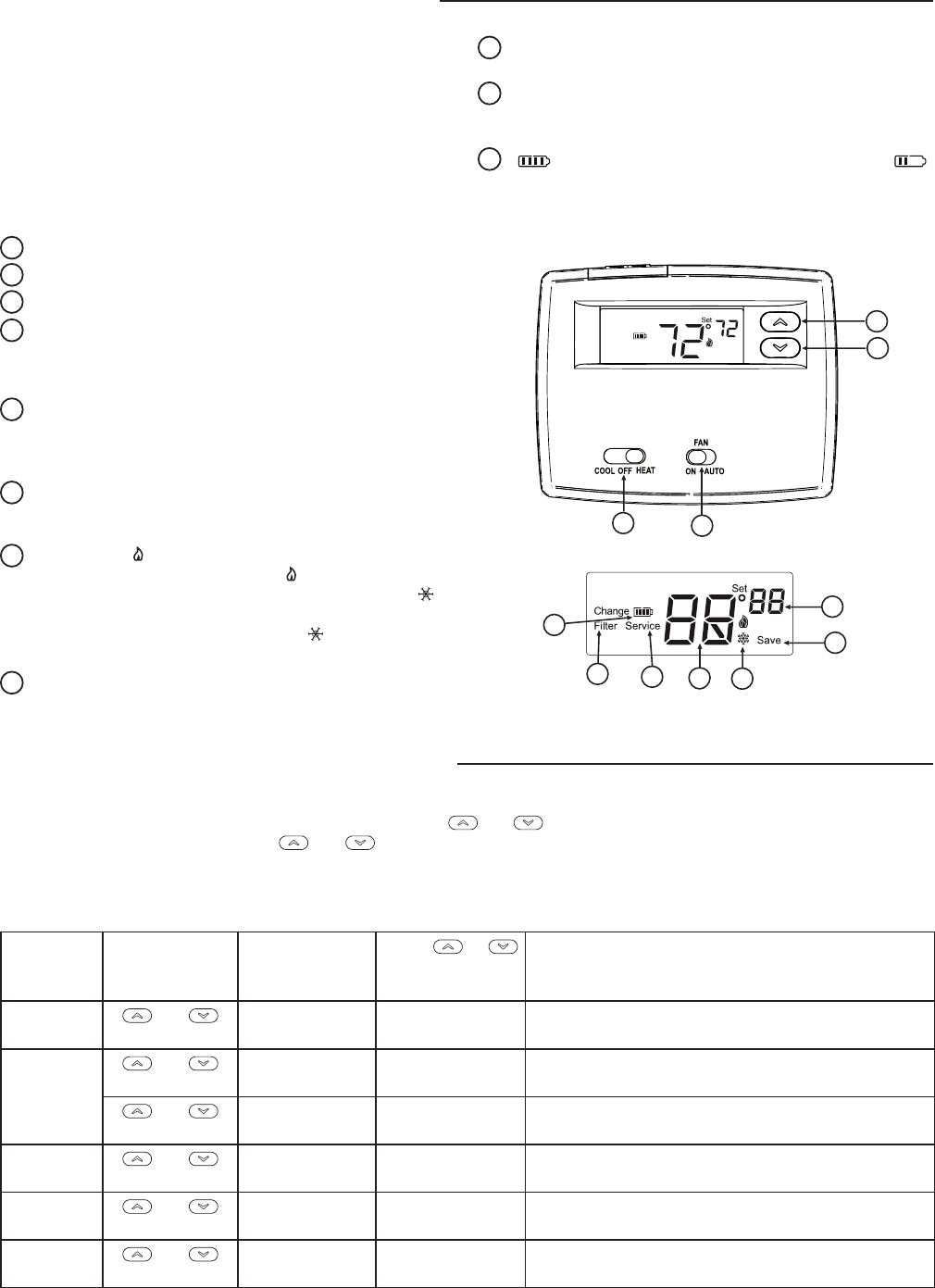
THERMOSTAT QUICK REFERENCE
Before you begin using your thermostat, you should be familiar
with its features and with the display and the location and
operationofthethermostatbuttonsandswitches(seeg.5).
Your thermostat consists of two parts: the thermostat cover
and the base. To remove the cover, pull it straight out from the
base. To replace the cover, line up the cover with the base and
press until the cover snaps onto the base.
The Thermostat Buttons and Switches
1
Raises temperature setting.
2
Lowers temperature setting.
3
SYSTEMswitch(COOL, OFF, HEAT).
4
FAN switch (ON, AUTO).
The Display
5
Indicates setpoint temperature. This is blank when system
switch is in the OFF position. Setpoint temperature is
displayed(ashing)ifthethermostatisinlockoutmodeto
prevent the compressor from cycling too quickly.
6
“Save”indicatestheCoolSavingsfeatureisenabledin
the configuration menu. “Save”(ashing)indicatesCool
Savingsfeatureisactive.
7
Flame icon( )isdisplayedwhentheSYSTEMswitchis
intheHEATposition.Flameicon( )isdisplayedashing
whenthermostatiscallingforheat.Snowakeicon( )is
displayed (non-ashing) when the SYSTEM switch is in
theCOOLposition.Snowakeicon( )andisdisplayed
(ashing)ifthethermostatiscallingforcool.
8
Displays current temperature.
Figure 5. Thermostat display, buttons, and switches
SYSTEM
2
1
34
5
6
7
8
9
11
10
9
“Service”indicatesadiagnosticfaultintheheating/cooling
system. It does not indicate a fault in the thermostat.
10
“Change Filter” is displayed when the system has run
for the programmed filter time period as a reminder to
change or clean your air filter.
11
“ ”indicatespowerlevel of batteries. “Change ”
indicates batteries should be replaced.
INSTALLER/CONFIGURATION MENU
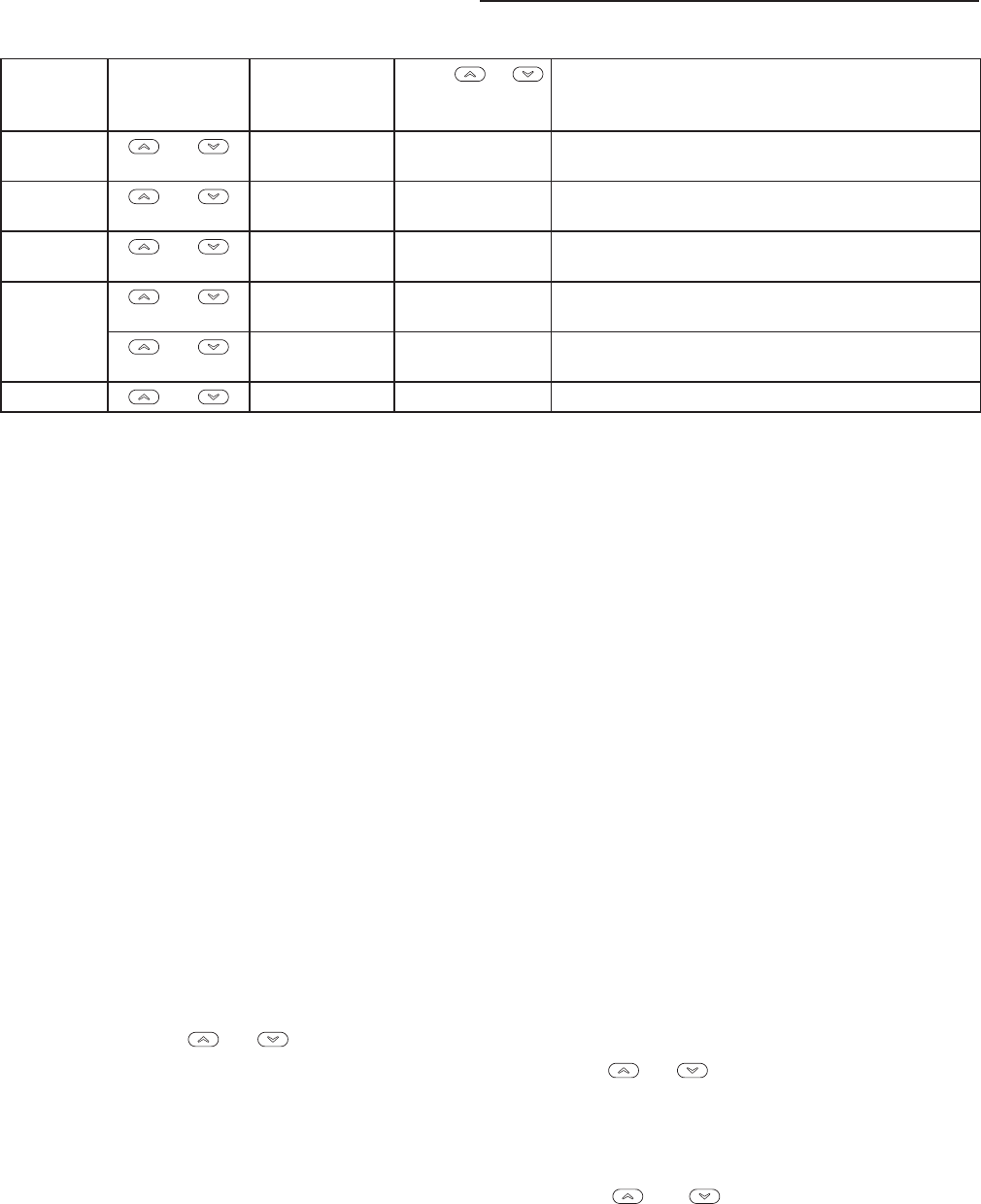
The configuration menu allows you to set certain thermostat operating characteristics to your system or personal requirements.
Toenterthemenu:SetyourthermostattoOFFandpressthe and buttons simultaneously. The display will show the first
iteminthecongurationmenu.Press and to change to the next menu item. To exit the menu, set the system switch to
CoolorHeat.Ifnokeysarepressedwithinfteenminutes,thethermostatwillreverttonormaloperation.
Configuration Menu
Menu
Reference
Number
Press
Key
Displayed
(Factory
Default)
Press or
to select from
listed options
Comments
1 and SS HP SelectSingleStage(SS)or
HeatPump(HP,1compressor)
2 and CS
(OFF)
On SelectCoolSavingsFeatureOnorOFF
and CS
(3)
1,2,3,4,5,6 IfCSselectedOn,selectsCoolSavingsvalue
3 and CRHeat
(ME)
FA,SL SelectAdjustableAnticipation,cyclerate,
HeatSingleStage
4 and CR Cool
(FA)
SL SelectAdjustableAnticipation,cyclerate,
CoolSingleStage
5 and CL
(OFF)
On SelectCompressorlockoutOFForOn
5
INSTALLER/CONFIGURATION MENU
Menu
Reference
Number
Press
Key
Displayed
(Factory
Default)
Press or
to select from
listed options
Comments
6 and L
(On)
OFF SelectDisplayLightOnorOFF
7 and Temp
(0HI)
4 LO to
4HI
Selecttemperaturedisplayadjustmenthigheror
lower
8 and oFoCSelectoF/oCDisplay(temperatureunitsinFahren-
heitorCelsius)
9 and Change Filter
(OFF)
On SelectlterreplacementindicatorOFForOn
and Change Filter
(200h)
25to1975 If Change Filter selected On, selects time interval for
ChangeFilterIndicator.(in25hourincrements)
10 and Returns to normal operation
1) System Configuration-SelectsSS(SingleStage)orHP
(HeatPump)operatingmode.DefaultcongurationisSS.
ForHeatPumpoperationchooseHP.
2) Select CS (Cool Savings™) - With Cool Savings™
enabled, the thermostat will make small adjustments to
the Setpoint temperature during periods of high demand
to reduce cooling system running time and save energy.
Whenthecoolingsystemhasbeenrunningformorethan
20minutes,humidityinthehomewillbelowerandahigher
setpointtemperaturewillfeelcomfortable.After20minutes
of run time, the thermostat will start increasing the setpoint
temperature in steps of less than one degree as the system
continuestorun.Theseadjustmentswilleventuallycause
the system to satisfy the thermostat and turn the system off
toreducetheenergyconsumption.WhentheCoolSavings
featureisactiveandmakingadjustments,thedisplaywill
show“Save”.Theamountoftheadjustmentstothesetpoint
temperatureisdependentontheCoolSavingsvaluethat
isset,1beingtheleastadjustmentand6beingthemost
adjustment.With this feature set to OFF, no change will
occur when the cooling system is continuously running
duringtheperiodsofhighdemand.Periodsofhighdemand
will normally occur during the late afternoon and early
evening on the hottest days of the summer.
3 & 4) Select Cycle Rate Selection - The factory default
settingforSingleStage Heat is Medium Cycle (ME). For
SingleStageCoolthedefaultsettingisfast(FA).Tochange
cycle rate, press the and buttons.
The cycle rate differentials for different settings are:
MODE Fast Medium Slow
(FA) (ME) (SL)
SSHeat 0.6°F 0.8°F 1.2°F
SSCool 1.2°F - 1.7°F
5) Select Compressor Lockout CL OFF or ON-Selecting
CLOnwillcausethethermostattowait5minutesbetween
cooling cycles. This is intended to help protect the
compressorfromshortcycling.Somenewercompressors
already have a time delay built in and do not require this
feature. Your compressor manufacturer can tell you if the
lockoutfeatureisalreadypresentintheirsystem.Whenthe
thermostatcompressortimedelayoccurs,itwillashthe
setpoint for up to five minutes.
6) Select Backlight Display-Thedisplaybacklightimproves
display contrast in low lighting conditions. When the “C”
terminal is connected, selecting backlight CdL On will keep
thelightoncontinuously.SelectbacklightOFFwillturnthe
lightonmomentarilywhenanykeyispressed.Whenthe
“C”terminal is not connected,regardlessofthebacklight
selection, the light will be on momentarily when any key is
pressed.
7) Select Temperature Display Adjustment 4 LO to 4 HI-
Allowsyoutoadjusttheroomtemperaturedisplayupto4°
higher or lower. Your thermostat was accurately calibrated
at the factory but you have the option to change the display
temperature to match your previous thermostat. The
currentoradjustedroomtemperaturewillbedisplayedon
the display.
8) Select F° or C° Readout-Changesthedisplayreadoutto
Celsius or Fahrenheit as required.
9)Select Filter Replacement Reminder and Set Run Time
Selectthe“Change Filter” reminder On or OFF. If selected
On, press and toselectthetimeperiodfrom25to
1975hoursin25hourincrements.Inatypicalapplication,
200hours(default)of runtime is approximately30days.
After the selected time of blower operation, the thermostat
will display “Change Filter” as a reminder to change or
clean your air lter. When “Change Filter” is displayed,
press the and button to clear the display and
restart the time to the next filter change. A selection of OFF
will cancel this feature.
6
OPERATION
CHECK THERMOSTAT OPERATION
If at any time during testing your system does not operate
properly, contact a qualified service person.
Turn on power to the system.
Fan Operation
If your system does not have a G terminal connection, skip to
Heating System.
1. MovefanswitchtoON position. The blower should begin to
operate.
2. Move fan switch to AUTO position. The blower should stop
immediately.
Heating System
1. Move SYSTEM switch to HEAT position. If the auxiliary
heating system has a standing pilot, be sure to light it.
2. Press to adjustthermostatsetting to 1°above room
temperature. The heating system should begin to operate.
3. Press to adjust temperature setting below room
temperature. The heating system should stop operating.
To prevent compressor and/or property damage, if the
outdoor temperature is below 50oF, DO NOT operate
the cooling system.
CAUTION
!
Do not allow the compressor to run unless the
compressor oil heaters have been operational for 6
hours and the system has not been operational for at
least 5 minutes.
CAUTION
!
Cooling System
1. MoveSYSTEMswitchtoCOOL position.
2. Press to adjust thermostat setting below room
temperature. The blower should come on immediately on
highspeed,followedbycoldaircirculation.However,ifthe
setpoint temperature is ashing, the compressor lockout
featureisoperating(seeCongurationmenu,item5).
3. Press to adjust temperature setting above room
temperature. The cooling system should stop operating.
7
TROUBLESHOOTING
Reset Operation
If a voltage spike or static discharge blanks out the display
or causes erratic thermostat operation, you may need to
reset the thermostat. To reset, the System Switch must be
in Cool or Heat.Simultaneouslypress and buttons
for approximately 10 seconds until thedisplaygoesblank.If
the thermostat has power, has been reset and still does not
functioncorrectlycontactyourheating/coolingserviceperson
or place of purchase.
Symptom Possible Cause Corrective Action
NoHeat/NoCool/NoFan
commonproblems)
1.Blownfuseortrippedcircuitbreaker.
2. Furnace power switch to OFF.
3.Furnaceblowercompartmentdooror
panel loose or not properly installed.
Replace fuse or reset breaker.
Turn switch to ON.
Replace door panel in proper position to engage safety
interlock or door switch.
No Heat 1.SystemSwitchnotsettoHeat.
2. Loos connection to thermostat or
system
3.HeatingSystemrequiresserviceor
thermostat requires replacement.
SetSystemSwitchtoHeatandraisesetpointaboveroom
temperature.
Verifythermostatandsystemwiresaresecurelyat-
tached.
Diagnostic:SetSystemSwitchtoHeatandraisetheset-
pointaboveroomtemperature.Withinaveminutesthe
thermostat should make a soft slick sound. This sound
usually indicates the thermostat is operating properly.
If the thermostat does not click, try the reset operation
listed above. If the thermostat does not click after being
reset contact your heating and cooling service person
or place of purchase for a replacement. If the thermostat
clicks, contact the furnace manufacturer or a service per-
son to verify the heating system is operating correctly.
No Cool 1.SystemSwitchnotsettoCool.
2. Loose connection to thermostat or
system.
3.CoolingSystemrequiresserviceor
thermostat requires replacement
SetSystemSwitchtoCoolandlowersetpointbelow
room temperature.
Verifythermostatandsystemwiresaresecurelyat-
tached.
SameproceduresasdiagnosticforNoHeatcondition
except set the thermostat to Cool and lower the setpoint
below the room temperature. There may be up to a five
minute delay before the thermostat clicks in Cooling if the
compressorlock-outoptionisselectedinthecongura-
tionmenu(Item5).
Heat, Cool or Fan Runs
Constantly
1.Possibleshortinwiring.
2.Possibleshortinthermostat.
3.PossibleshortinHeat/Cool/Fan
system.
4.FanSwitchsettoFanOn.
Check each wire connection to verify they are not shorted
or touching together. No bare wire should stick out from
under terminal screws. Try resetting the thermostat as de-
scribed below. If the condition persists, the manufacturer
of your system or service person can instruct you on how
totesttheHeat/Cool/systemforcorrectoperation.Ifthe
system operates correctly, replace the thermostat.
Furnace Cycles Too Fast
or Too Slow Cooling
Cycles Too Fast or Too
Slow (narrow or wide
temperature swing)
1.Thelocationofthethermostatand/or
thesizeoftheHeatingorCooling
Systemmaybeinuencingthecycle
rate.
Item3(CRHeat)or4(CRCool)intheConguration
Menuistheadjustmentthatcontrolsthecyclerate.Ifan
acceptablecyclerateisnotachievedusingtheFA(Fast)
orSL(Slow)adjustmentcontactalocalserviceperson
for additional suggestions.
Thermostat Setting and
Thermometer Disagree
1.Thermostatthermometersetting
requiresadjustment.
Thethermometercanbeadjusted+/-degreesaslistedin
item7oftheCongurationMenu.Nootheradjustmentis
possible.
Blank Display and/or
Keypad Not Responding
1.VoltageSpikeorStaticDischarge. If a voltage spike or static discharge occurs use the Reset
Operation listed above.

www.white-rodgers.com
White-Rodgersisadivision
of Emerson Electric Co.
The Emerson logo is a
trademark and service mark
of Emerson Electric Co.
Homeowner Help Line: 1-800-284-2925
www.white-rodgers.com
White-Rodgers es una división de
Emerson Electric Co.
El logotipo de Emerson es una
marca comercial y una marca de
servicio de Emerson Electric Co.
Línea de ayuda para el usuario: 1-800-284-2925
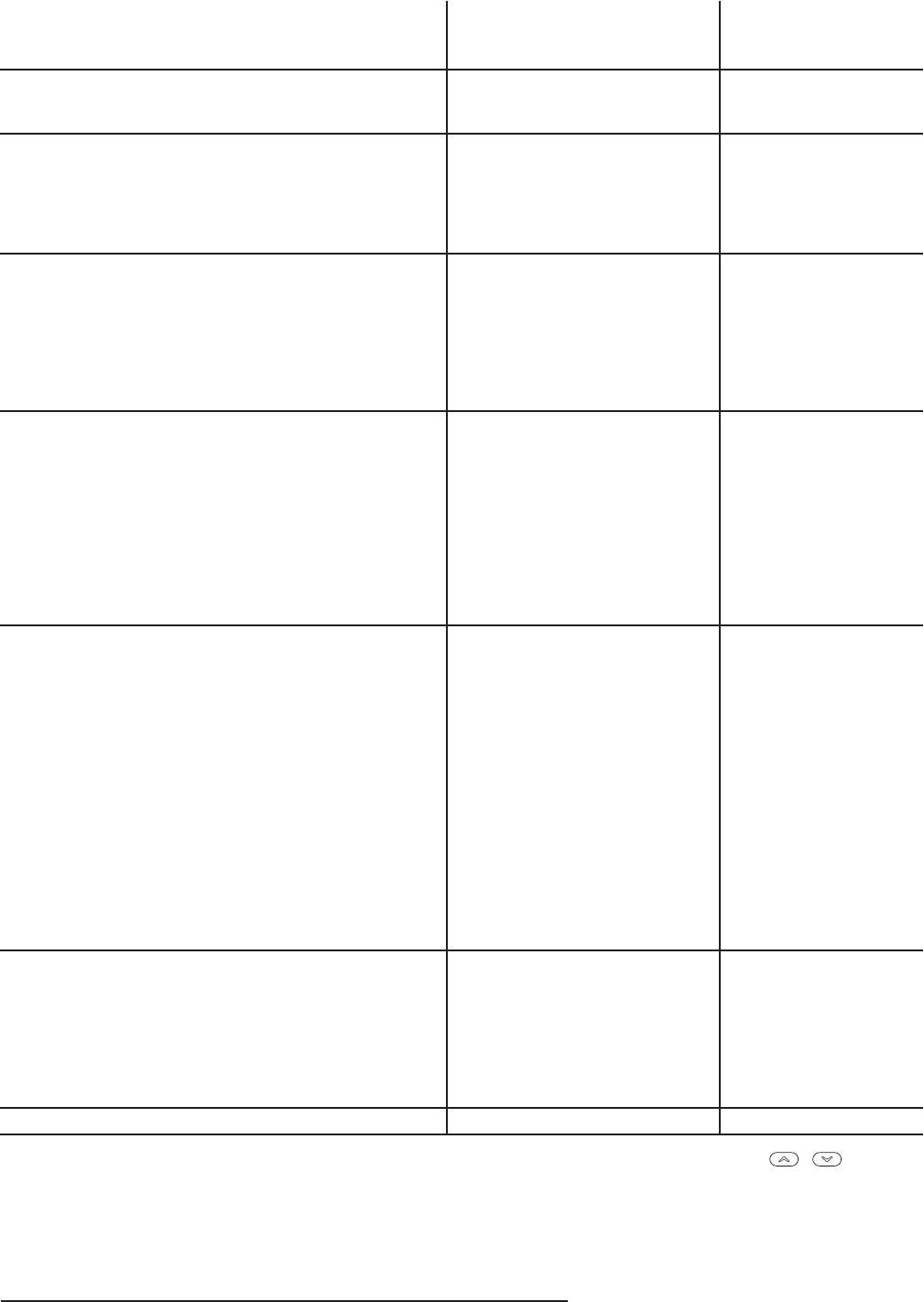
7
SOLUCIÓN DE PROBLEMAS
Operación de reajuste
Si un pico de voltaje o una descarga estática pone en blanco la
pantalla o hace que el termostato funcione de manera errática,
es posible que necesite reajustar el termostato. Para reajustar, el
interruptor del sistema tiene que estar en Cool o Heat. Presione
los botones y al mismo tiempo durante aproximadamente
10 segundos hasta que la pantalla se ponga en blanco. Si el
termostato tiene alimentación y se ha reajustado pero aún no
funciona correctamente, póngase en contacto con su servicio
técnicode calefacción/enfriamientoo conellugardonderealizó
la compra.
Síntoma Causa posible Acción correctiva
El sistema no calienta/
El sistema no enfría/
No funciona el ventilador
(problemas comunes)
1.Sequemóelfusibleosedisparó
el disyuntor.
2. El interruptor de alimentación del
calefactorestáenOFF.
3.Lapuertaoelpaneldel
compartimiento del soplador del
calefactor están sueltos o no están
debidamente instalados.
Cambie el fusible o vuelva a activar el disyuntor.
Coloque el interruptor en ON.
Vuelva a colocar el panel de la puerta en el lugar correcto
para que se enganche con el interruptor de interbloqueo de
seguridad o de la puerta.
El sistema no calienta 1.ElinterruptorSystemnoestá
ajustadoenHeat.
2. La conexión al termostato o al
sistema está suelta.
3.Elsistemadecalefacciónrequiere
servicio técnico o debe cambiarse
el termostato.
AjusteelinterruptorSystemenHeatysubalatemperaturade
referencia por encima de la temperatura ambiente.
Verifique que los cables del termostato y del sistema estén
bien conectados.
Diagnóstico:AjusteelinterruptorSystemenHeatysuba
la temperatura de referencia por encima de la temperatura
ambiente. En menos de cinco minutos, debería oírse un
chasquido suave del termostato. Por lo general, este sonido
indica que el termostato está funcionando correctamente.
Si no se oye un chasquido, intente la operación de reajuste
arriba indicada. Si el termostato no hace un chasquido
después de reajustarlo, póngase en contacto con su personal
de servicio técnico de calefacción y enfriamiento o con el
lugar de compra para obtener un reemplazo. Si el termostato
hace un chasquido, póngase en contacto con el fabricante del
calefactor o con personal técnico especializado para verificar
que la calefacción esté funcionando correctamente.
El sistema no enfría 1.ElinterruptorSystemnoestá
ajustado en Cool.
2. La conexión al termostato o al
sistema está suelta.
3.Elsistemadeenfriamiento
requiere servicio técnico o debe
cambiarse el termostato.
AjusteelinterruptorSystemenCoolybajelatemperaturade
referencia por debajo de la temperatura ambiente.
Verifique que los cables del termostato y del sistema estén
bien conectados.
Siga el mismo procedimiento de diagnóstico que cuando
el sistema no calienta pero coloque el termostato en Cool
y coloque la temperatura de referencia por debajo de la
temperatura ambiente. El termostato puede tardar hasta
cinco minutos en pasar al modo de enfriamiento si se ha
seleccionadolaopcióndebloqueodelcompresorenelmenú
deconguración(opción5).
El modo de calor, frío o
ventilador funciona de
manera constante
1.Posiblecortocircuitoenloscables.
2. Posible cortocircuito en
el termostato.
3.Posiblecortocircuitoenelsistema
decalor/frío/ventilador.
4.ElinterruptorFanestáenFanON.
Verifique todas las conexiones de los cables para asegurarse
de que no estén en cortocircuito o tocándose entre sí.
Nodebesobresalirningúncablepeladopordebajodelos
tornillos terminales. Intente reajustar el termostato. Si la
condición persiste, el fabricante de su sistema o el personal
técnicopodráindicarlecómoprobarsielsistemadecalor/
frío está funcionando correctamente. Si el sistema funciona
correctamente, cambie el termostato.
Los ciclos del calefactor/
aire acondicionado
son demasiado cortos
o demasiado largos
(oscilación reducida o
amplia de la temperatura)
1.Laubicacióndeltermostatoy/oel
tamaño del sistema de calefacción
o enfriamiento pueden influir en la
duración de los ciclos.
Laopción3(CRCalor)o4(CRFrío)delmenúde
configuración es el ajuste que controla la velocidad del ciclo.
Si no obtiene una duración de ciclo aceptable usando el ajuste
FA(Rápido)oSL(Lento),póngaseencontactoconpersonal
técnico local para que le sugieran otras soluciones.
El ajuste del termostato
no coincide con el
termómetro
1.Esnecesarioajustareltermómetro
del termostato.
Eltermómetropuedeajustarseen+/-gradossegúnseindica
enlaopción7delmenúdeconguración.Noesposible
realizarningúnotroajuste.
La pantalla está en
blanco y/o el teclado
no responde
1.Picodevoltajeodescargaestática. Si se produce un pico de voltaje o descarga estática, siga las
indicaciones de la sección Operación de reajuste anterior.
6
FUNCIONAMIENTO
VERIFIQUE EL FUNCIONAMIENTO
DEL TERMOSTATO
Si en algún momento durante la prueba su sistema no
funciona correctamente, póngase en contacto con un servicio
técnico calificado.
Encienda la alimentación del sistema.
Funcionamiento del ventilador
Si su sistema no tiene una conexión terminal G, pase directa-
mente a la sección Sistema de calefacción.
1. Mueva el interruptor FAN a la posición ON. El soplador
debería comenzar a funcionar.
2. Mueva el interruptor FAN a la posición AUTO. El soplador
debería detenerse inmediatamente.
Sistema de calefacción
1. Mueva el interruptor SYSTEM a la posición HEAT. Si el
sistemadecalefacciónauxiliartieneunpiloto,asegúresede
encenderlo.
2. Presione para ajustar la configuración del termostato
1°por encima de la temperatura ambiente. El sistema de
calefacción debería comenzar a funcionar.
3. Presione para ajustar la configuración de la temperatura
por debajo de la temperatura ambiente. El sistema de
calefacción debería dejar de funcionar.
Para evitar daños al compresor y/o daños materiales,
si la temperatura externa está por debajo de los 50°F,
NO utilice el sistema de enfriamiento.
¡PRECAUCIÓN!
No deje que el compresor funcione a menos que los
calentadores de aceite del compresor hayan estado en
funcionamiento durante 6 horas y que el sistema no haya
estado en funcionamiento durante al menos 5 minutos.
¡PRECAUCIÓN!
Sistema de enfriamiento
1. MuevaelinterruptorSYSTEMalaposiciónCOOL.
2. Presione para ajustar la configuración del termostato
por debajo de la temperatura ambiente. El soplador debería
encenderse inmediatamente a alta velocidad, seguido de
circulación de aire frío. No obstante, si la temperatura de
referencia aparece intermitente, significa que la función de
bloqueo del compresor está funcionando (vea la sección
Menúdeconguración,opción5).
3. Presione para ajustar la configuración de la temperatura
por encima de la temperatura ambiente. El sistema de
enfriamiento debería dejar de funcionar.
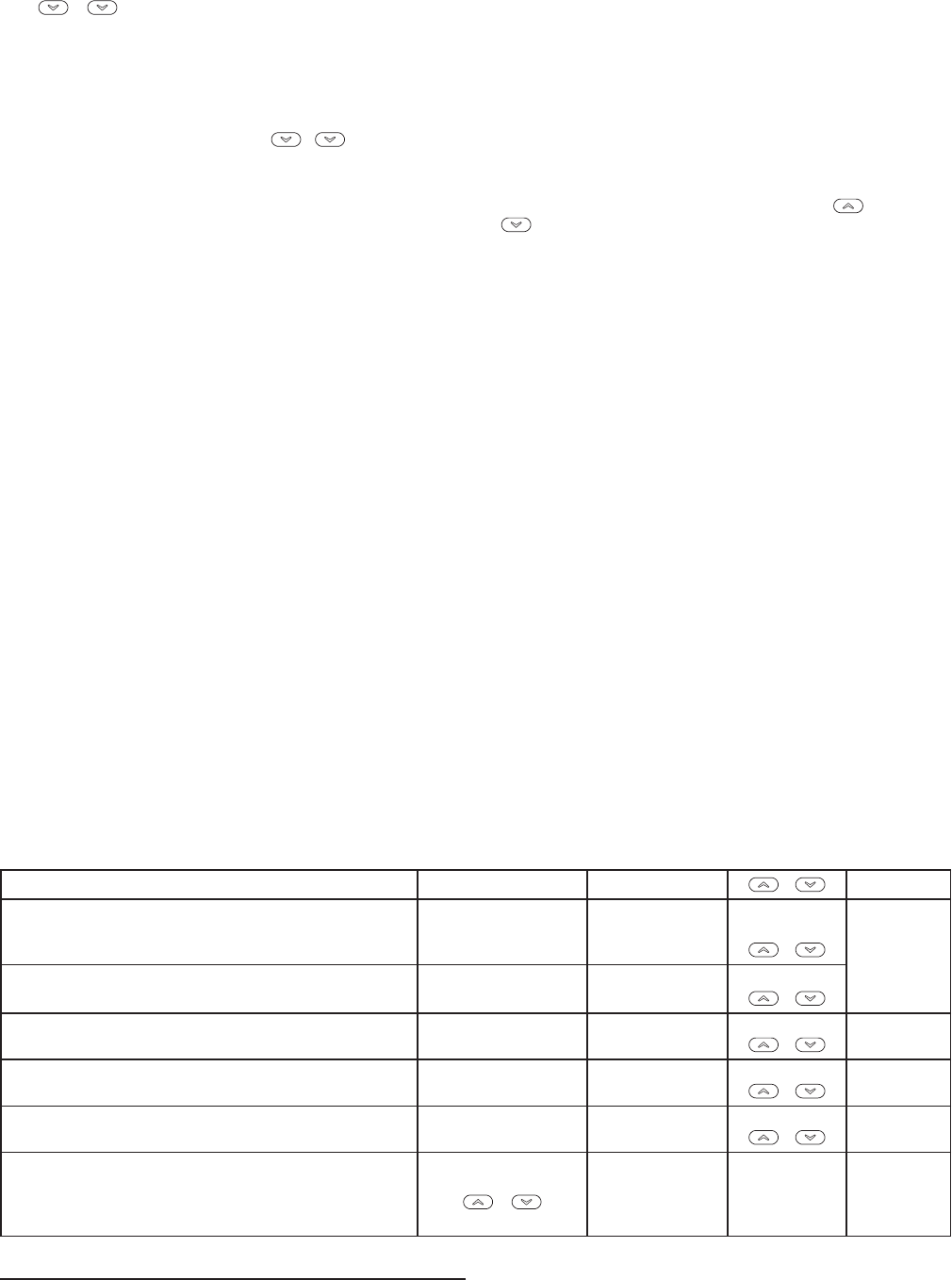
5
MENÚ INSTALADOR/DE CONFIGURACIÓN
Número de
referencia
del menú
Presione
el botón
Pantalla
(ajuste
de fábrica)
Presione
o
para seleccionar las
siguientes opciones
Observaciones
6 y L
(On)
OFF SeleccionalaluzdefondodelapantallaenOnuOFF
7 y Temp
(0HI)
4LO(4másabajo)
a4HI(4másarriba)
Selecciona el ajuste de la temperatura visualizada más
arriba o más abajo
8 y oFoCSeleccionapantallaen°F/°C(unidadesdetemperatura
FahrenheitoCelsius)
9 y ChangeFilter
(OFF)
ON Selecciona el tiempo de ejecución de reemplazo de filtro
enOFFuON
y ChangeFilter
(200h)
25a1975 SiChangeFilterestáenOn,seleccionaelintervalode
tiempodelindicadordecambiodeltro(enincrementos
de25horas)
10 y Vuelve al funcionamiento normal
1) Configuración del sistema - Selecciona el modo de
funcionamientoSS(unasolaetapa)oHP(bombadecalor).La
configuración predeterminada es SS. Para el funcionamiento
comobombadecalorseleccioneHP.
2) Seleccione CS (Cool Savings™) - Con Cool Savings™
activado, el termostato realizará pequeños ajustes a la
temperatura de referencia durante los períodos de alta
demanda para reducir el tiempo de funcionamiento del
sistema de enfriamiento y ahorrar energía. Cuando el sistema
de enfriamiento lleva funcionando más de 20 minutos, la
humedad presente en la casa es inferior y una temperatura de
referenciamásaltaseráconfortable.Despuésde20minutos
de funcionamiento, el termostato comenzará a aumentar la
temperatura de referencia en incrementos de menos de un
gradomientraselsistemacontinúafuncionando.Estosajustes
haránqueelsistema“satisfaga”nalmentealtermostatoyque
éste apague el sistema, lo cual permitirá reducir el consumo
de energía. Cuando la función Cool Savings está activada y
realizandoajustes,lapantallamostraráelmensaje“Save”.La
cantidad de ajustes en la temperatura de referencia depende
delvalordeCoolSavingsdenido:1eselajustemínimoy6
elmáximo.CuandoestafunciónestáenOFF,noserealizarán
cambios cuando el sistema está funcionando de forma
continua con el sistema de enfriamiento durante el período de
alta demanda. Normalmente, los períodos de alta demanda se
producenenlasúltimashorasdelatardeyacomienzosdela
noche en los días más calurosos de verano.
3 y 4) Selección de la velocidad del ciclo – El ajuste
predeterminado de fábrica para el modo Heat de una sola
etapa es el ciclo medio (ME). Para el modo Cool de una
sola etapa el ajuste predeterminado es el ciclo rápido (FA).
Para cambiar la velocidad del ciclo, presione el botón y
el botón .
Las velocidades de los ciclos son las indicadas a continua ción
segúnlaopciónelegida:
MODO Rápido Medio Lento
(FA) (ME) (SL)
SSHeat 0.6°F 0.8°F 1.2°F
SSCool 1.2°F - 1.7°F
5) Selección de bloqueo del compresor (CL) en OFF u ON –
Si se selecciona CL On, el termostato esperará 5 minutos
entre ciclos de enfriamiento para evitar que el compresor
realiceciclosdeencendidoyapagadocortos.Algunosdelos
compresores más nuevos ya tienen incorporada una demora
de tiempo y no requieren que esta función esté activada en el
termostato. Consulte al fabricante de su compresor para saber
si su modelo incluye la función de bloqueo. Cuando se activa
la demora de tiempo del compresor del termostato, la pantalla
mostrará la temperatura de referencia de forma intermitente
durante un máximo de cinco minutos.
6) Seleccione luz de fondo de la pantalla - La luz de fondo
mejora el contraste de la pantalla en condiciones de poca luz.
Cuandolaterminal“C”estáconectada,laseleccióndeCdL
On mantendrá la luz de fondo encendida de forma continua.
AlseleccionarOFF,laluzsemantendrámomentáneamente
encendida después de presionar cualquier botón. Cuando
la terminal “C” no está conectada, independientemente
de la selección de la luz de fondo, la luz se mantendrá
momentáneamente encendida después de presionar
cualquier botón.
7) Selección del ajuste de la pantalla de temperatura de 4 LO
(4 más abajo) a 4 HI (4 más arriba) - Le permite ajustar la
visualizacióndelatemperaturaambiente4°másarribaomás
abajo. El termostato viene calibrado con precisión de fábrica
pero usted tiene la opción de cambiar el valor de temperatura
que aparece en la pantalla para que coincida con el de su
termostato anterior. La pantalla mostrará la temperatura
ambiente actual o ajustada.
8) Seleccione F° o C° - Cambia la unidad en que aparece la
temperaturaenlapantallaagradoscentígradosoFahrenheit
segúnsupreferencia.
9) Selección de aviso de cambio de filtro y ajuste de tiempo
de funcionamiento – Seleccione el recordatorio “Change
Filter” en On (activado) u OFF (desactivado). Si selecciona
On, presione y para seleccionar la cantidad de tiempo
desde25hasta1975horasenincrementosde25horas.En
unaaplicacióntípica,200horasdetiempodefuncionamiento
(valorpredeterminado) equivalen a aproximadamente 30días.
Una vez seleccionado el tiempo de funcionamiento del
soplador, el termostato mostrará “Change Filter” como
recordatorio para cambiar o limpiar su filtro de aire. Cuando
aparezca “Change Filter”presioneelbotón y para
borrar la pantalla y reiniciar la hora para el siguiente cambio
deltro.SieligeOFF,secancelaráestafunción.
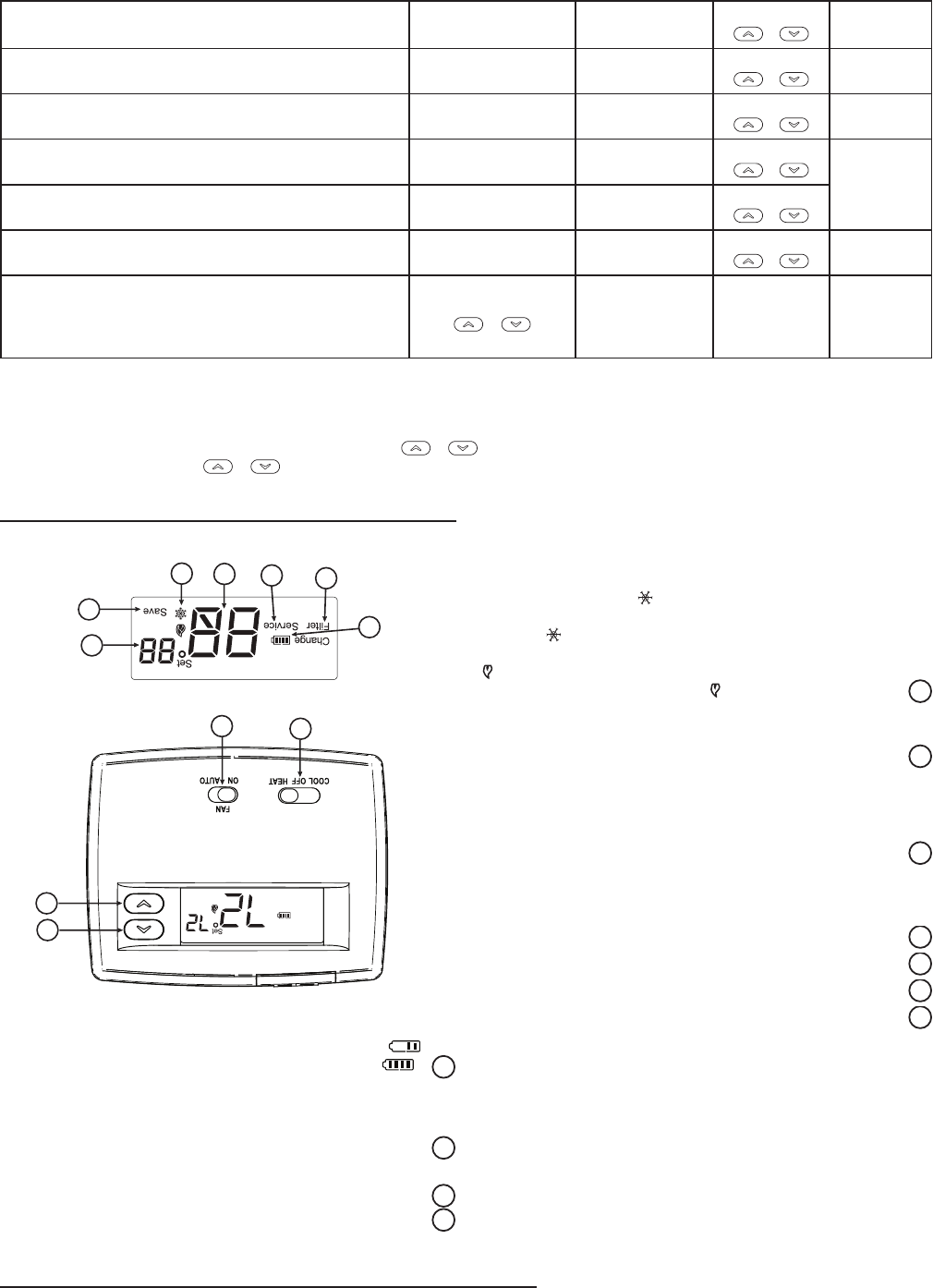
4
GUÍA DE REFERENCIA RÁPIDA
DEL TERMOSTATO
Antes de que comience a programar su termostato, debe
familiarizarse con sus funciones y con la pantalla y la ubicación
y funcionamiento de los diferentes botones interruptores (vea
gura 5). Su termostato consta de dos partes: la cubierta del
termostato y la base. Para retirar la cubierta, tire suavemente
de ella para separarla de la base. Para volver a colocarla, alinee
la cubierta con la base y presione suavemente hasta que se
enganche en la base.
Los botones e interruptores del termostato
1
Sube el ajuste de temperatura.
2
Bajaelajustedetemperatura.
3
InterruptorSYSTEM(COOL, OFF, HEAT).
4
InterruptorFAN(ventilador)(ON, AUTO).
La pantalla
5
Muestralatemperaturadereferencia.Estaapareceenblanco
cuandoelinterruptorestáenlaposiciónOFF.Latemperatura
de referencia aparece de forma intermitente si el termostato
está en el modo de bloqueo para evitar que el compresor
realice ciclos de encendido y apagado demasiado rápidos.
6
“Save” (ahorro) indica que la función Cool Savings está
activada en el menú instalador. “Save” intermitente indica
que la función Cool Savings está activa.
7
El icono de la llama( ) aparece cuando el interruptor
SYSTEMestáenlaposiciónHEAT.Eliconodelallama( )
aparece intermitente cuando el termostato realiza una
llamada de calor. El icono del copo de nieve ( ) aparece
(jo) cuando el interruptor SYSTEM está en la posición
COOL.Elcopodenieveaparece( )(intermitente)cuando
el termostato realiza una llamada de frío.
Figura 5. Pantalla, botones e interruptores del termostato
SYSTEM
2
1
34
5
6
7
8
9
11
10
8
Muestralatemperaturaactual.
9
“Service” (servicio) indica una falla en el sistema de
calefacción/enfriamiento.Noindicaunafalladeltermostato.
10
“Change Filter”(cambiar ltro) aparece cuando el sistema
se ha utilizado por la cantidad de tiempo seleccionada en el
filtro para recordarle que debe cambiar o limpiar el filtro de
aire.
11
“ ”muestraelniveldealimentacióndelaspilas.“Change
”(cambiar)indicaquelaspilasdebencambiarse.
MENÚ INSTALADOR/DE CONFIGURACIÓN
El menú de conguración le permite ajustar ciertas características operativas del termostato según el sistema o sus necesidades
particulares.Paraingresarenelmenú:ColoqueeltermostatoenOFFypresionelosbotones y al mismo tiempo. La pantalla
mostrarálaprimeraopcióndelmenúdeconguración.Presione y parapasaralasiguienteopcióndelmenú.Parasalirdel
menú,coloqueelinterruptordelsistemaenCooloHeat.Sipasanquinceminutossinpresionarningúnbotón,eltermostatovolveráal
modo de funcionamiento normal.
Menú de configuración
Número de
referencia
del menú
Presione
el botón
Pantalla
(ajuste
de fábrica)
Presione
o
para seleccionar las
siguientes opciones
Observaciones
1 y SS HP Seleccionaunasolaetapa(SS)
obombadecalor(HP,1compresor)
2 y CS
(OFF)
On SeleccionalafunciónCoolSavingsOnuOFF
y CS
(3)
1,2,3,4,5,6 Si CS está en On, selecciona el valor de Cool Savings
3 y CRHeat
(ME)
RÁPIDO, LENTO Selecciona anticipación ajustable, velocidad de ciclo,
calor de una sola etapa
4 y CR Cool
(FA)
LENTO Selecciona anticipación ajustable, velocidad de ciclo,
frío de una sola etapa
5 y CL
(OFF)
On SeleccionaelbloqueodelcompresorOFFuOn
3
CONEXIONES ELÉCTRICAS
R
C
24 VCA 120 VCA
Vivo
Neutro
SISTEMA
TERMOSTATO
G W
Figura 2. Diagrama de conexiones típico para
sistemas de una sola etapa de un solo transformador
TRANSFORMADOR
(corriente limitada Clase II)
Relé de
conmutación*
YO/B
Contactor del
compresor
* El relé de conmutación está energizado en COOL cuando el interruptor O/B está en la posición “O”
El relé de conmutación está energizado en HEAT cuando el interruptor O/B está en la posición “B”
Relé de calor
Relé del
ventilador Opcional
Puente opcional para bomba
de calor de una sola etapa
R
C
24 VCA 120 VCA
Vivo
Neutro
SISTEMA
TERMOSTATO
G W
Figura 3. Diagrama de conexiones típico para sistemas de una sola etapa
de dos transformadores SIN circuitos de seguridad
TRANSFORMADOR
(corriente limitada Clase II)
Relé de
conmutación*
YO/B
Contactor del
compresor
* El relé de conmutación está energizado en COOL cuando el interruptor O/B está en la posición “O”
El relé de conmutación está energizado en HEAT cuando el interruptor O/B está en la posición “B”
Relé de calor
Relé del
ventilador Opcional
Interruptores
limitadores o
de seguridad
¡LOS DOS NEUTROS DEBEN PUENTEARSE!
VIVO
NEUTRO
120 VCA 24 VCA
¡CORTE Y AÍSLE
CON CINTA!
Si los circuitos de seguridad
sólo se encuentran en uno
de los sistemas, retire el
transformador del sistema
SIN circuitos de seguridad.
NOTA
Puente opcional para bomba
de calor de una sola etapa
R
CG WYO/B
24 VCA 120 VCA
VIVO
NEUTRO
VIVO
NEUTRO
NEUTRO
NEUTRO
Figura 4. Diagrama de conexiones típico para sistemas de una sola etapa
de dos transformadores con circuitos de seguridad en AMBOS sistemas
Relé de
conmutación*
Contactor del
compresor
Relé
de calor
Relé del
ventilador
Opcional
¡LOS DOS NEUTROS
DEBEN PUENTEARSE!
SISTEMA
TERMOSTATO
120 VCA
24 VCA
Transformador
de calefacción
auxiliar
(corriente
limitada
Clase II)
Transformador de bomba de calor
(corriente limitada Clase II)
CONTACTO N/O
DE RELÉ
ACCESORIO
DE 24 VCA
Puente opcional para bomba
de calor de una sola etapa
* El relé de conmutación está energizado en COOL cuando el interruptor O/B está en la posición “O”
El relé de conmutación está energizado en HEAT cuando el interruptor O/B está en la posición “B”
Interruptores
limitadores o
de seguridad
Interruptores
limitadores o
de seguridad
Interruptores
limitadores o
de seguridad
Interruptores
limitadores o
de seguridad
Debe prestarse atención a la polaridad. Si el lado
VIVO del segundo transformador se une con el lado
NEUTRO del primer transformador, se producirá un
cortocircuito. Se producirán daños en el equipo
cuando se restablezca el suministro eléctrico.
NOTA
Se requiere el esquema de
relé accesorio cuando existen
circuitos de seguridad en
ambos sistemas.
NOTA
2
INSTALACIÓN
RETIRE EL TERMOSTATO VIEJO
1. Apague la electricidad en la caja de fusibles principal hasta
que haya nalizado la instalación. Asegúrese de que la
alimentación eléctrica esté desconectada.
2. Retire la cubierta delantera del termostato viejo. Con los
cables aún conectados, retire la placa de la pared. Si el
termostato viejo tiene una placa de montaje sobre pared,
retire el termostato y la placa juntos.
3. Identifique cada uno de los cables conectados al
termostato viejo usando las etiquetas incluidas con el
nuevo termostato.
4. Desconecte los cables del termostato viejo de a uno a la vez.
NO DEJE QUE LOS CABLES VUELVAN A INTRODUCIRSE
EN LA PARED.
5. Instale el termostato nuevo siguiendo el procedimiento
indicado a continuación.
¡ATENCIÓN!
Este producto no contiene mercurio. No obstante, puede
reemplazar un producto que sí contiene mercurio.
No abra las celdas de mercurio. En el caso de que una celda
se dañe, no toque el mercurio derramado. Usando un par de
guantes no absorbentes, recoja el mercurio derramado y viértalo
en un recipiente que pueda sellarse. Si se daña una celda, debe
desecharse la unidad.
El mercurio no debe desecharse con los residuos domésticos.
Para desechar la unidad que será reemplazada por este equipo,
colóquela en un recipiente adecuado. Consulte en www.white-
rodgers.com dónde enviar los productos que contienen mercurio.
FIJE LA BASE DEL TERMOSTATO A
LA PARED
1. Retireelmaterialdeembalajedeltermostato.Tiresuavemente
de la cubierta para separarla de la base. Si fuerza o hace
palanca sobre el termostato dañará la unidad.
2. Coloque la base sobre el orificio de la pared y marque las
ubicaciones de los orificios de montaje usando la base como
plantilla(veagura1).
3. Muevalabaseaunlado.Perforelosoriciosdemontaje.
4. Empuje los cables a través de la abertura en la base del
termostato.
5. Fijelabasealaparedsinajustarlademasiado,usandodos
tornillos de montaje. Coloque un nivel contra la parte inferior
de la base, ajústela hasta que quede bien nivelada y luego
aprietelostornillos.(Estoesporrazonesestéticassolamente
ynoafectaráelfuncionamientodeltermostato.)Siutilizalos
orificios de montaje existentes, o si los orificios perforados son
demasiado grandes y no le permiten ajustar bien la base, use
anclajes plásticos para fijar la subbase.
6. Conecte los cables al bloque de terminales sobre la base
consultando el esquema de conexiones correspondiente
(vealasguras2a4).
7. Empuje el cable que sobresale hacia el interior de la pared
ytapeeloricio con unmaterial ignífugo (como aislamiento
debradevidrio)paraevitarquelascorrientesdeaireafecten
el funcionamiento del termostato.
INTERRUPTOR DE SELECCIÓN DE
TERMINAL O/B
ElinterruptorO/Bdeestetermostatovieneajustadodefábricaen
laposición“O”.Estaopciónadmitelamayoríadelasaplicaciones
de bomba de calor, que requieren que el relé de conmutación esté
energizado en COOL. Si el termostato que está cambiando o la
bomba de calor que está instalando con este termostato requiere
unaterminal“B”,paraenergizarelrelédeconmutaciónenHEAT,
elinterruptorO/Bdebecolocarseenlaposición“B”.
Orificios
de montaje
Orificios
de montaje
Abertura
para cables
Interruptor
de gas/eléctrico
Puerta del
compartimiento de pilas
Interruptor
O/B
Figura 1 – Base del termostato
INTERRUPTOR GAS/ELEC
Sisusistema es una bomba de calor,elinterruptor GAS/ELEC
debe colocarse en ELEC (vea la gura 1). Si su sistema es de
unasolaetapa,el interruptordebecolocarseen GAS.El ajuste
del interruptor debe coincidir con la configuración del sistema
seleccionadaenelmenúdeconguración.
UBICACIÓN DE LAS PILAS
Pilas alcalinas “AA”
Eltermostatoincluyedospilasalcalinas“AA”instaladasconuna
bandadeuniónparaevitarquesedescarguen.Antesdeusarel
termostato, abra la puerta del compartimiento de las pilas y retire
la banda de unión. Para abrirla, tire de la puerta como muestra
laecha ylevántela. Lasdospilas“AA”permitiránactivartodas
las funciones o mantener la hora y mostrar de forma permanente
la temperatura durante una pérdida de alimentación CA. Para
cambiar las pilas, tire de la puerta del compartimiento como
muestralaechaylevántela.Coloquelaspilassegúnlapolaridad
indicada dentro de la puerta del compartimiento. Para cerrar la
puerta del compartimiento de las pilas, gírela hacia abajo mientras
tira en el sentido indicado por la flecha. Cuando esté totalmente
abajo, enganche la puerta en su lugar.
EltermostatopuedefuncionarconlaalimentaciónCAdelsistema
o con pilas. Si el símbolo aparece, significa que el termostato
está funcionando con pilas. Si el símbolo no aparece
significa que el termostato está funcionando con la alimentación
del sistema y, además, cuenta con alimentación auxiliar
opcional con pilas. Cuando la carga de las pilas se encuentra
aproximadamente en la mitad, aparecerá el símbolo . Cuando
aparezca el mensaje “Change ”(Cambiar),instaledospilas
alcalinas “AA” nuevas inmediatamente. Para obtener resultados
óptimos, use pilas alcalinas nuevas de alguna marca líder como
Duracell® o Energizer®. Recomendamos cambiar las pilas cada
2 años. Si la vivienda va a estar desocupada durante un tiempo
prolongado(másde3meses)yapareceelsímbolo , las pilas
deben cambiarse antes de partir. Cuando a las pilas les quedan
menosdedosmesesdevidaútil,latemperaturadereferenciase
compensaráen10grados(10gradosmenosenelmodoHeaty10
gradosmásenelmodoCool).Siseproduceestacompensación,
puede reajustarse la temperatura de referencia normal con los
botones o . Si no se cambian las pilas, tendrá lugar otra
compensación dentro de los dos días. Para cambiar las pilas,
coloqueelsistemaenOFF.
Este termostato está diseñado para ser utilizado con un sistema
de bajo Voltaje NEC Clase II. No utilice este termostato con
un sistema de voltaje de línea. Si tiene dudas acerca de si
su conexión eléctrica es milivoltio, de línea o de bajo voltaje,
hágala inspeccionar por un técnico especializado en equipos de
calefacción y aire acondicionado o por un electricista autorizado.
No exceda los valores nominales especificados.
Todas las conexiones eléctricas deben cumplir con los códigos y
reglamentaciones locales y nacionales.
Este control es un instrumento de precisión y debe manipularse
con cuidado. La manipulación descuidada o la distorsión de
los componentes podrían hacer que el control no funcionara
correctamente.
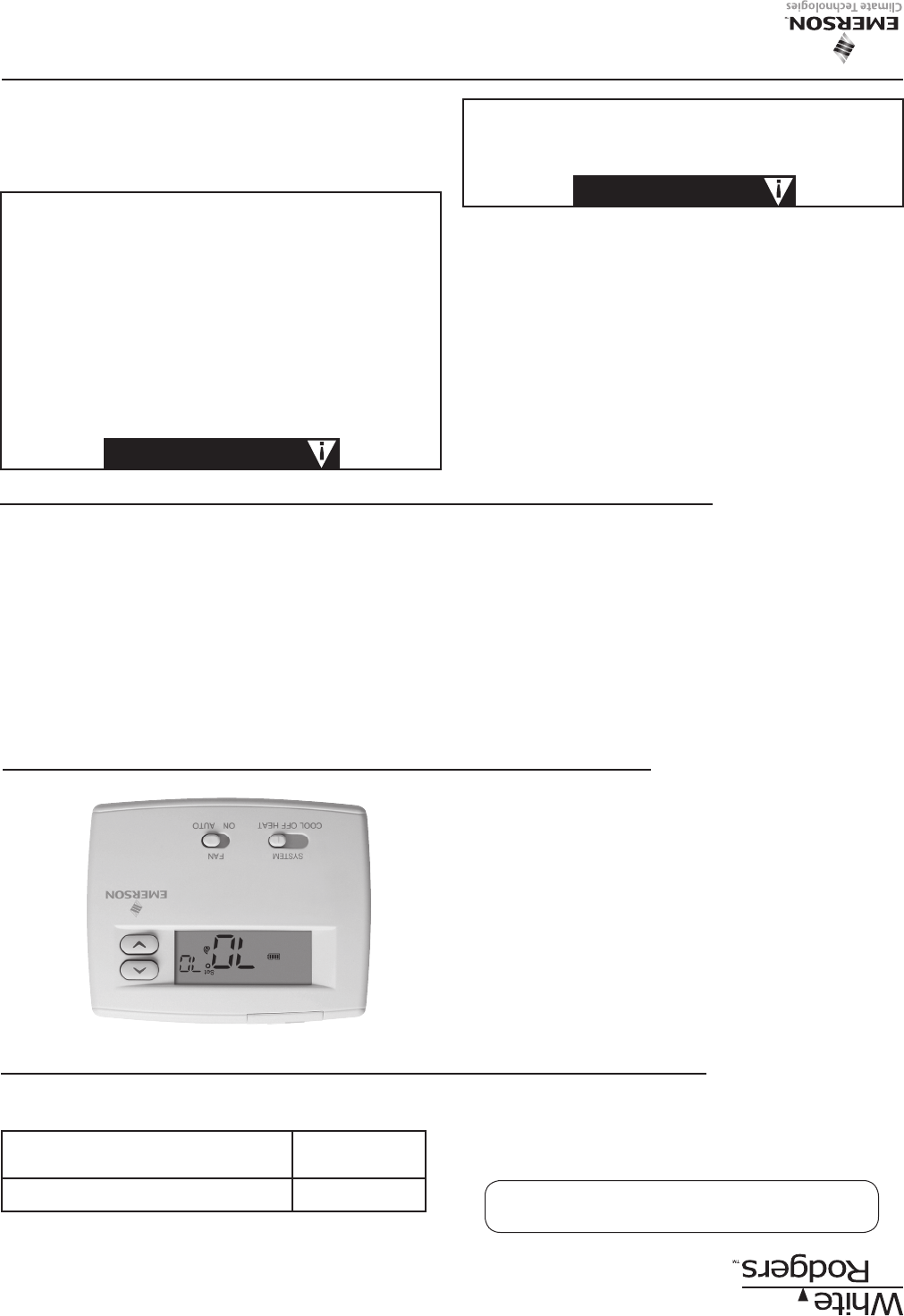
Termostato de una sola etapa Blue 2”
Instrucciones de instalación y operación
¡Conserve estas instrucciones para
consultarlas en cualquier momento!
EL NO LEER Y SEGUIR CON CUIDADO TODAS LAS
INSTRUCCIONES ANTES DE INSTALAR O UTILIZAR ESTE
CONTROL PODRÍA CAUSAR LESIONES PERSONALES Y/O
DAÑOS MATERIALES.
APLICACIONES
Para utilizar con los siguientes sistemas Clase II:
• Sistemasdeunasolaetapa
• Sistemasdebombadecalordeunasolaetapasin
calor auxiliar
NO UTILIZAR CON:
• Sistemasqueexcedenlos30VCAy1.5A
• Sistemasdecalefacciónhidrónicoszonicadosde3cables
Termostato 1F86-0244
Modelo Opcion de programación
1F86-0244 No-Programable
ESPECIFICACIONES
Características eléctricas:
Alimentaciónconpilas ....................................... mVa30VCA,50/60HzoCC
Entrada-Cableado interno .................................. 20a30VCA
Carga en terminales .................................................. 1.0Aporterminal,1.5Amáx.entodaslasterminalescombinadas
Rango de temperatura de referencia ......................... 45°a90°F(7°a32°C)
Diferencial(unasolaetapa) ....................................... Calor0.6°F;frío1.2°F(ajustable)
Diferencial(bombadecalor) ..................................... Calor1.2°F;frío1.2°F(ajustable)
Temperatura ambiente operativa ............................... 32°a+105°F(0°a+41°C)
Humedadoperativa ................................................... 90%sincondensaciónmáx.
Rango de temperatura de transporte ........................ -40°a+150°F(-40°a+65°C)
Dimensiones del termostato ...................................... 3-3/4”Alx4-3/4”Anx1-1/2”P
¡PRECAUCIÓN!
Para evitar descargas eléctricas y/o daños al equipo,
desconecte la alimentación eléctrica en la caja de
fusibles o disyuntores principal hasta que haya finalizado
la instalación del sistema.
¡PRECAUCIÓN!
No utilizar en circuitos que excedan el voltaje especificado
ya que los voltajes más altos dañarán el control y pueden
causar riesgos de electrocución o incendio.
No cortocircuite las terminales de la válvula de gas ni
del control principal para probarlos. Un cortocircuito o
una conexión incorrecta dañarán el termostato y podría
causar lesiones personales y/o daños materiales.
La instalación del termostato y de todos los componentes
del sistema de control debe ajustarse a las normas del
código NEC para los circuitos Clase II (corriente limitada).
El no hacerlo podría resultar en riesgo de incendio.
¡ADVERTENCIA!
www.white-rodgers.com
N° DE PIEZA 37-7010C
Reemplaza37-7010B
1004
