Emerson Fisher Fieldvuedvc6200 Sis Digital Valve Controller Instruction Manual D103638X012_Aug14_AQ
2015-03-30
: Emerson Emerson-Fisher-Fieldvuedvc6200-Sis-Digital-Valve-Controller-Instruction-Manual-681758 emerson-fisher-fieldvuedvc6200-sis-digital-valve-controller-instruction-manual-681758 emerson pdf
Open the PDF directly: View PDF  .
.
Page Count: 32

www.Fisher.com
HARTr Field Device Specification
Fisherr FIELDVUE™ DVC6200 SIS Digital Valve
Controller
HART Revision Device Type Device Revision Firmware Revision
HART 5 0a 1 4, 5 & 6
HART 7 130a 2
Contents
Introduction 2.................................
Product Overview 2............................
Purpose of this document 2.....................
Abbreviations and definitions 2..................
Reference Documentation 3....................
Device Identification 3..........................
Product Interfaces 4............................
Control Valve Interface 4.......................
Host interface 4...............................
Pushbutton Calibration 4.......................
Internal Jumpers And Switches 5.................
Write Protection 5.............................
Dynamic Variables 6............................
Device Variables 6..............................
Unit Codes 7...................................
Status Information 7............................
Device Status 7...............................
Universal Commands 8..........................
CommonPractice Commands 16.................
Supported Commands 16......................
Burst Mode 16................................
Catch Device Variable 16.......................
Device-Specific Commands 22....................
Performance 22................................
Annex A Compatibility Checklist 23................
Annex B DVC6200 SIS Parameters as part of a
Rosemountr 1410/1420 WirelessHARTr
Gateway 24...............................
Instruction Manual Supplement
D103638X012
DVC6200 SIS Digital Valve Controller
August 2014

Instruction Manual Supplement
D103638X012
DVC6200 SIS Digital Valve Controller
August 2014
2
Introduction
Product Overview
The FIELDVUE DVC6200 SIS digital valve controller is designed to control the pneumatic actuator of a safety valve. It
receives a current signal from a host and uses instrument air supply to create a metered pressure output signal to the
pneumatic actuator. Movement of the actuator as it positions the safety valve is measured by the DVC6200 SIS travel
sensor as its primary feedback. The name plate is located on the bottom side of the DVC6200 SIS master module
assembly and indicates the model name, individual product serial number, and any applicable third party approvals.
Purpose of this document
This specification is designed to be a technical reference for HART capable host application developers, system
integrators and knowledgeable end-users. It also provides functional specifications (e.g., commands, enumerations
and performance requirements) used during field device development, maintenance and testing. This document
assumes the reader is familiar with HART Protocol requirements and terminology. Additional product information is
available in DVC6200 SIS product literature, available from Emerson Process Management.
Abbreviations and definitions
AR Alert Record
Configuration
Variables
Variables which represent nonvolatile values of manufacturinginitialized data or
userspecified configuration information. These variables cannot be enumerated via
Command 54 and as such stand on their own with no associated units or range information.
Device Variable
Measured variables that are exposed to HART and can be enumerated using Command 54.
Generally there are variables whose ID is in the range of 0 to 13 and are associated with units
codes, status, and range values.
Enumeration A pre-defined set of values or text.
MV Measured Variable, a physical input to the instrument.
NV Named Variable – a logical point inside the device, hardmapped to a given MV as the source
of NV data.
Point A term that applies to diagnostic data packets. It is defined as a collection of periodically
sampled variables captured at a single instant in time. It does not include the “Monitor” point.
PS1 The PORT A output pressure which increases with increasing drive signal.
PS2 The PORT B output pressure which decreases with increasing drive signal.
PST Partial Stroke Test, a limited form of ramped valve diagnostic.
SIS Safety Instrumented Systems (formerly called ESD or Emergency Shutdown)
Byte An 8bit unsigned integer.
Word A 16bit unsigned integer.
Float Refers to the IEEE 754 floating point format.
Packed ASCII A special form of characters defined by HART in which 6bit ASCII characters are packed into
byte data.
Standard Span
Format
A proprietary 16bit integer format for numerical values used by some of this device’s Device
Specific commands.

Instruction Manual Supplement
D103638X012
DVC6200 SIS Digital Valve Controller
August 2014
3
Reference Documentation
HART Smart Communications Protocol Specification Revision 7.4; a group of documents specifying the HART
Communication Protocol, physical layers, and Data Link Layers as defined by the HART Communications Foundation.
Bulletin 62.1:DVC6200 SIS Fisher FIELDVUE DVC6200 SIS Digital Valve Controller (D103555X012)
Fisher FIELDVUE DVC6200 Series Digital Valve Controllers Quick Start Guide (D103556X012)
Fisher FIELDVUE DVC6200 SIS Digital Valve Controller Instruction Manual (D103557X012)
Device Identification
Manufacturer Name Fisher Controls Model Name(s) DVC6200 SIS
Manufacture ID Code 19 (13 Hex) Device Type Code 10 (0a Hex)
HART Protocol Revision 7.4 Device Revision 2
User Selectable HART Revision
between HART 5 and HART 7 Yes
Number of Device Variables 13
Physical Layers Supported FSK
Physical Device Category Valve Positioner
Instruction Manual Supplement
D103638X012
DVC6200 SIS Digital Valve Controller
August 2014
4
Product Interfaces
Control Valve Interface
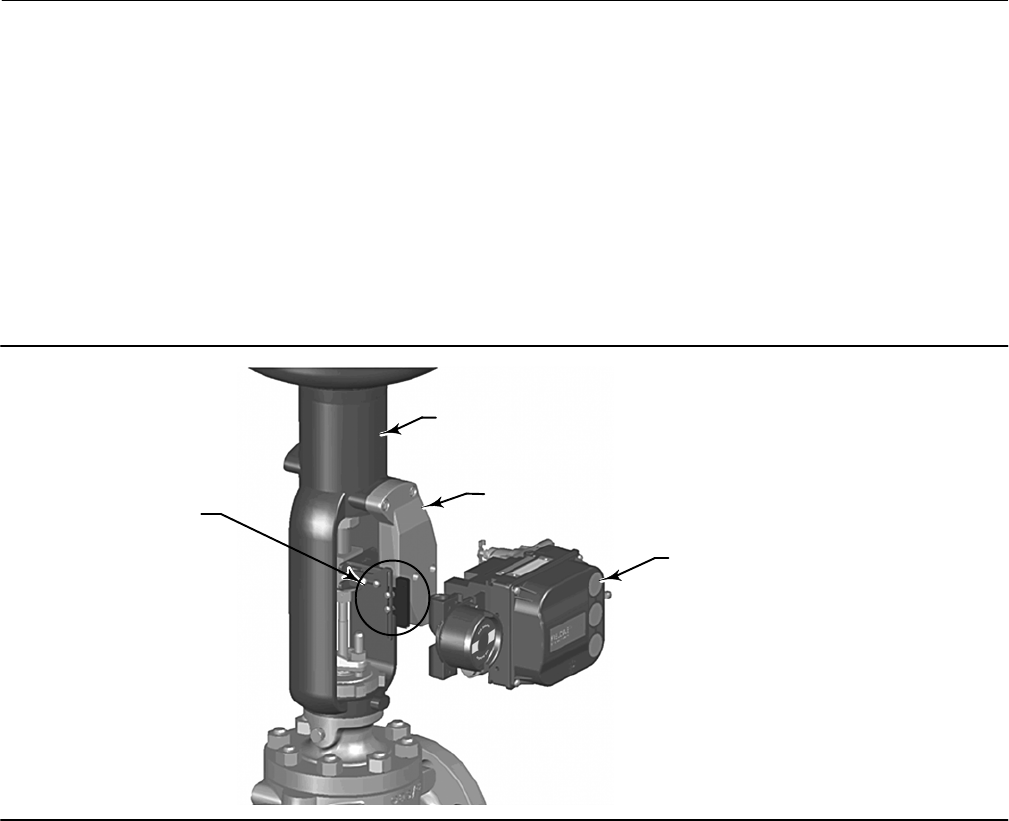
The DVC6200 SIS digital valve controller is mechanically attached to the valve’s actuator by means of a mounting
bracket. The valve's position is conveyed to the travel sensor of the DVC6200 SIS digital valve controller by means of
the feedback bracket and magnet assembly attached to the actuator’s stem.
MOUNTING
BRACKET
ACTUATOR
DVC6200 SIS
DIGITAL VALVE
CONTROLLER
FEEDBACK BRACKET
AND MAGNET ASSEMBLY
X0381-1
Pneumatic tubing connected to the DVC6200 SIS brings instrument supply air to the DVC6200 SIS and takes
controlled output air from the DVC6200 SIS to the actuator. Pressure sensors in the DVC6200 SIS measure these
pressure signals and present them as device variables
Host interface
The input to the DVC6200 SIS can either be twowire 4to20 mA current loop (in pointtopoint mode) or 24 VDC (in
multidrop mode). This input is connected in the DVC6200’s terminal box on two terminals marked “LOOP +” and
“LOOP ”. Refer to the DVC6200 Series quick start guide for connection details.
Pushbutton Calibration
A pushbutton near the wiring terminals in the terminal box provides a quick means to autocalibrate the travel of the
instrument. The button must be pressed for 3 to 10 seconds. Autocalibration will move the valve through the full
range of travel whether the Instrument Mode is In Service or Out of Service. However, if the Write Protection is
Protected, this button will not be active. To abort, press the button again for 1 second. The calibration button is
disabled by default.
Instruction Manual Supplement
D103638X012
DVC6200 SIS Digital Valve Controller
August 2014
5
Internal Jumpers And Switches
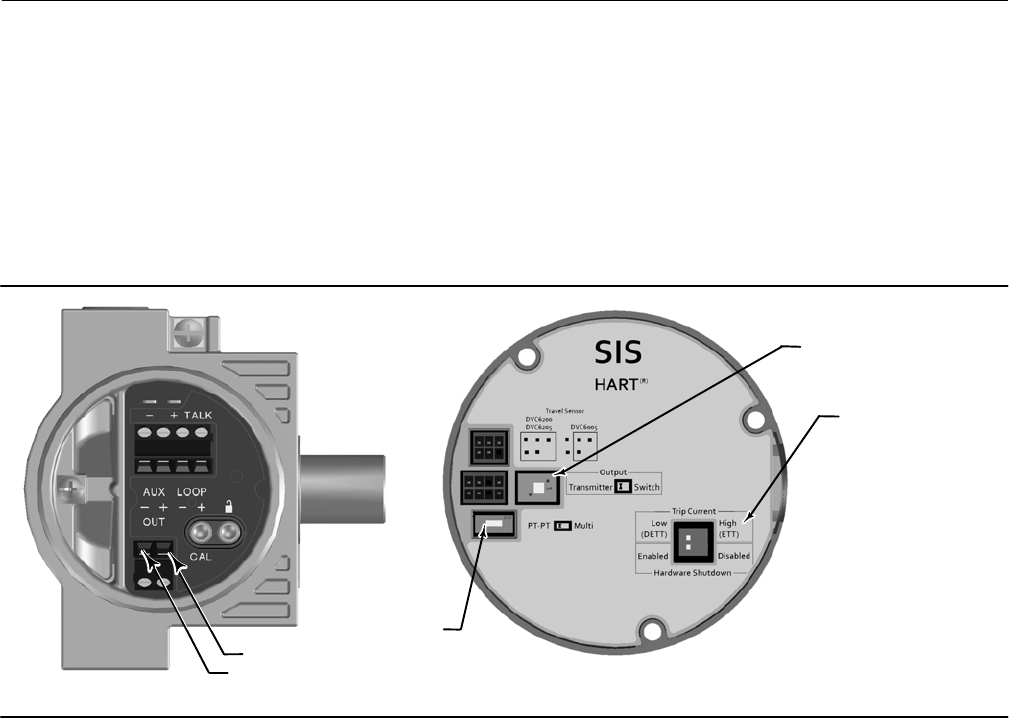
The input to the DVC6200 SIS is determined by the PtPt/MultiDrop switch on the printed wiring board.
The DVC6200 SIS also has a pair of “Output” terminals that can either function as a position transmitter or a discrete
switch. Electronic configuration of the output circuit requires the proper setting of a DIP switch on the DVC6200’s
printed wiring board. Additionally, the functional operation of the output circuit must be configured with the user
interface.
OUTPUT+
OUTPUT-
X0430
PT-PT/
MULTI-DROP
SELECTION
DE-ENERGIZE TO TRIP
ENERGIZE TO TRIP
SELECTION
X0436
DIP SWITCH FOR
TRANSMITTER/SWITCH
SELECTION
The DVC6200 SIS has an analog shutdown circuit built into the electronics construction. This circuit enables the
DVC6200 SIS to perform the safety function through electronics hardware, independent from the device firmware.
This function is controlled by two DIP switches:
One switch enables or disables the hardware shutdown feature.
The other switch to choose either to deenergizetotrip (labeled “Trip Current Low (DETT)”) or energizetotrip
(labeled “Trip Current High (ETT)”).
The cutoff point is 12 mA +/ 5% and is not configurable. DETT is the standard configuration for direct acting
applications. Energizetotrip (ETT) is the standard configuration for reverse acting applications.
Refer to the DVC6200 SIS instruction manual for additional details on the settings of the selection switches.
Write Protection
There are two Write Protection states for the DVC6200 SIS: Not Protected or Protected. Protected prevents
configuration and calibration changes to the instrument. The default setting is Not Protected. Protection is controlled
under software control. Write Protection can be enabled remotely. However, to disable Write Protection to Not
Protected, you must have physical access to the instrument. The procedure will require you to press a button inside
the terminal box when directed by the software as a security measure.
Instruction Manual Supplement
D103638X012
DVC6200 SIS Digital Valve Controller
August 2014
6
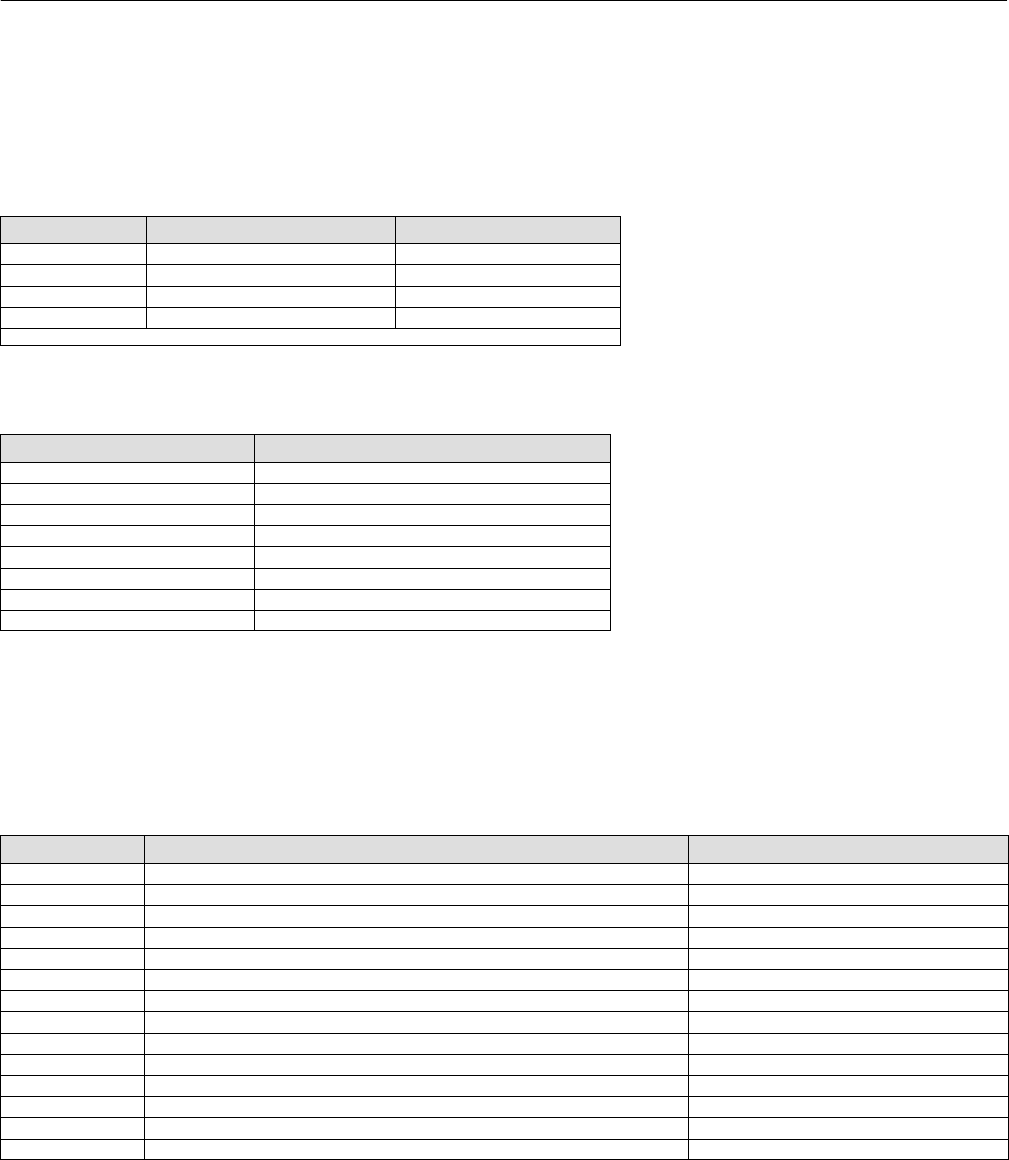
Dynamic Variables
Four Dynamic Variables are implemented.
Default Meaning Units
PV Analog Input mA, %
SV* Travel Setpoint %
TV* Pressure PSI, BAR, KPA, Kg/cm2
FV* Travel %
* User selectable
The SV, TV, and FV variables are user selectable via Command 51 to any of the following variables. Variable selections
are listed below:
Variable Units
Travel %
Travel Setpoint %
Pressure Port A PSI, BAR, KPA, Kg/cm2
Pressure Port B PSI, BAR, KPA, Kg/cm2
Pressure A – B PSI, BAR, KPA, Kg/cm2
Supply Pressure PSI, BAR, KPA, Kg/cm2
Drive Signal %
Analog Input mA, %
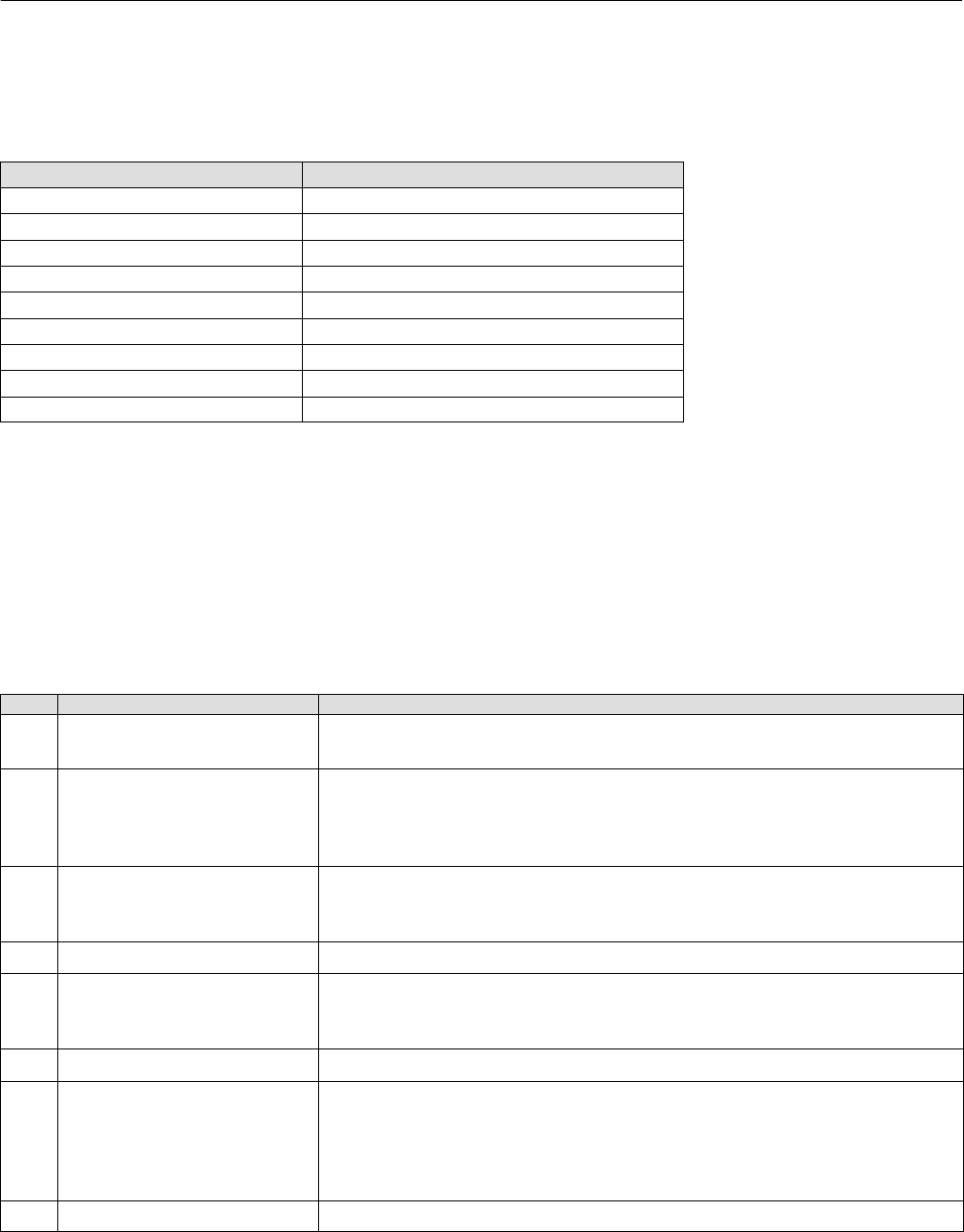
Device Variables
These variables represent measurements taken by the device, are read only values, and are all in float format. These
can be read with Commands 9, 33, and 54.
Variable ID Meaning Units
0Analog Input mA, %
1Internal Temperature _C, _F
2Pressure Port A PSI, BAR, KPA, Kg/cm2
3 Travel %
4Drive Signal %
5Pressure Port B PSI, BAR, KPA, Kg/cm2
6Travel Setpoint %
7Differential Pressure (Port A – Port B) PSI, BAR, KPA, Kg/cm2
8Supply Pressure PSI, BAR, KPA, Kg/cm2
9Implied Valve Position %
10 Primary Feedback (user selected, either Travel or Pressure) %
11 Friction As defined in ValveLink software
12 Deadband As defined in ValveLink software
13 Stroke Time seconds
Instruction Manual Supplement
D103638X012
DVC6200 SIS Digital Valve Controller
August 2014
7
Unit Codes
Variable Units Code Units
0No Units
6Pounds per square inch, psi
7 Bar
10 ($0A) Kilograms per square centimeter, kg/cm2
12 ($0C) Kilopascals, kPa
32 ($20) Celsius, _C
33 ($21) Fahrenheit, _F
39 ($27) Milliamps, mA
57 ($39) Percent, %
Status Information
Device Status
The Field Device Status Byte is the only status byte defined in the HART protocol. The order and meaning of each of the
eight bits within the byte are fixed by the protocol. This byte is one of the status bytes included with each HART
response. It is not part of the Command 48 data.
Bit Name of Status Bit Meaning
7Field Device Malfunction Set / cleared by the firmware based on self test results. This bit is set if the
pressure, position or temperature sensors provide invalid readings.
6Configuration Changed
Two such bits exist internally, one for each HART master. Both copies are set
when any variable, HART message, tag, descriptor or date are changed from
HART. Cleared by command 38, separately for each master. This bit survives
loss of power.
5Cold Start
Set by the firmware whenever a RESET sequence is executed or at initial
device power up. Cleared by the first HART command. Two such bits exist
internally, one for each HART master.
4More Status Active when any bit in command 48 is active.
3Analog Input Fixed
Active if the Instrument Mode of the DVC6200 SIS is in the “Out Of Service”
condition or if the Control Mode of the DVC6200 SIS is in one of the digital
set point modes.
2Analog Input Saturated The loop current reading is beyond sensor limits.
1Internal Sensor Out of Limits
(This bit is named “NonPrimary Variable Out Of Limits” in the HART
documentation for transmitters. It has been renamed to reflect the fact that
these variables are INTERNAL INPUTS to FIELDVUE products). The firmware
sets this bit when any sensor (pressure, position, temperature) exceeds its
operating limits.
0Variable Out of Range Set when any variable 0, 1, 2, 3, 5, 8 or 10, is saturated.

Instruction Manual Supplement
D103638X012
DVC6200 SIS Digital Valve Controller
August 2014
8
Universal Commands
The DVC6200 SIS field device implements all Universal Commands. Commands 14, 15, 17, 48 are listed below to
indicate their unique responses.
Command 0: Read Unique Identifier
Command 1: Read Primary Variable
Command 2: Read Primary Variable (current) and Percent of Range
Command 3: Read Dynamic Variables and Primary Variable (current)
Command 6: Write Polling Address
*Command 7: Read Loop Configuration
*Command 8: Read Dynamic Variable Classifications
*Command 9: Read Device Variable with Status
Command 11: Read Unique Identifier Associated with Tag
Command 12: Read Message
Command 13: Read Tag, Descriptor, Date
Command 14: Read Primary Variable Transducer Information
Command 15: Read Primary Variable Output Information
Command 16: Read Final Assembly Number
Command 17: Write Message
Command 18: Write Tag, Descriptor, Date
Command 19: Write Final Assembly Number
*Command 20: Read Long Tag
*Command 21: Read Unique Identifier Associated with Long Tag
*Command 22: Write Long Tag
Command 38: Reset Configuration Changed Flag
Command 48: Read Additional Status
*Commands 7, 8, 9, 20, 21, and 22 are HART 7 only.
Instruction Manual Supplement
D103638X012
DVC6200 SIS Digital Valve Controller
August 2014
9
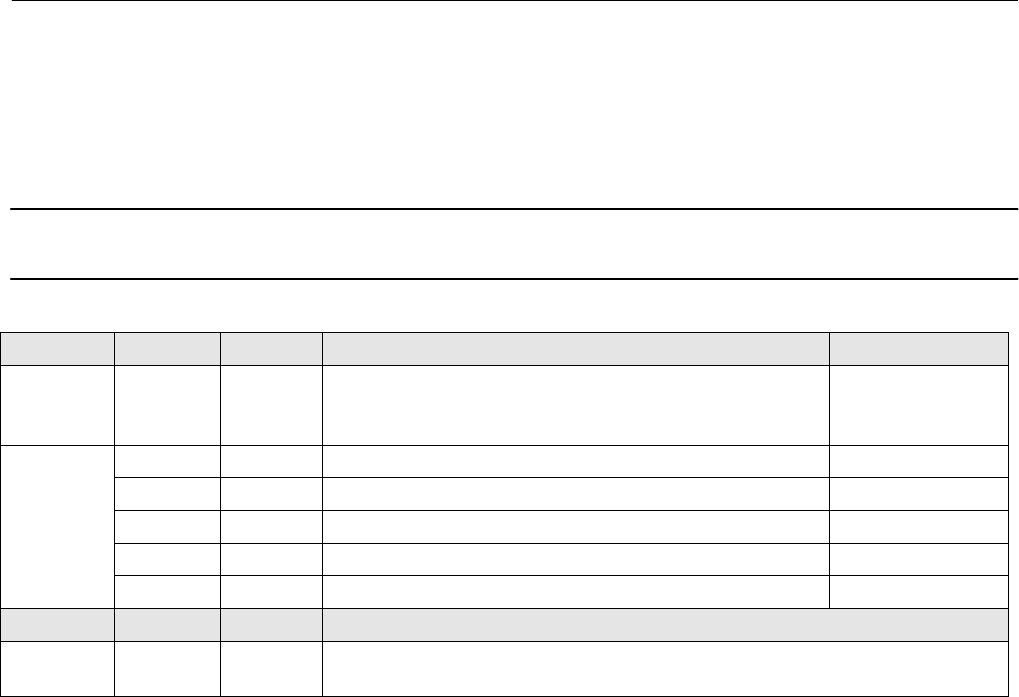
Command 14: Read Primary Variable Transducer Information
The transducer limits reported in this command are either 420 milliamps, or 0100%, and reflect the units code most
recently supplied in command 44.
Note
The Transducer Serial Number is not applicable to the DVC6200 SIS and is set to “0”.
Byte Format Description Returned Value
Request
Data
bytes
None
Response
Data
Bytes
02 UINT24 Transducer Serial Number 000000
3 Enum Transducer Limits and Minimum Span Units Code From Cmd 44
47 Float Upper Transducer Limit 20mA
811 Float Lower Transducer Limit 4.0mA
1215 Float Minimum Span 1.0mA
Code Class Description
Response
Codes None
Instruction Manual Supplement
D103638X012
DVC6200 SIS Digital Valve Controller
August 2014
10
Command 15: Read Primary Variable Output Information
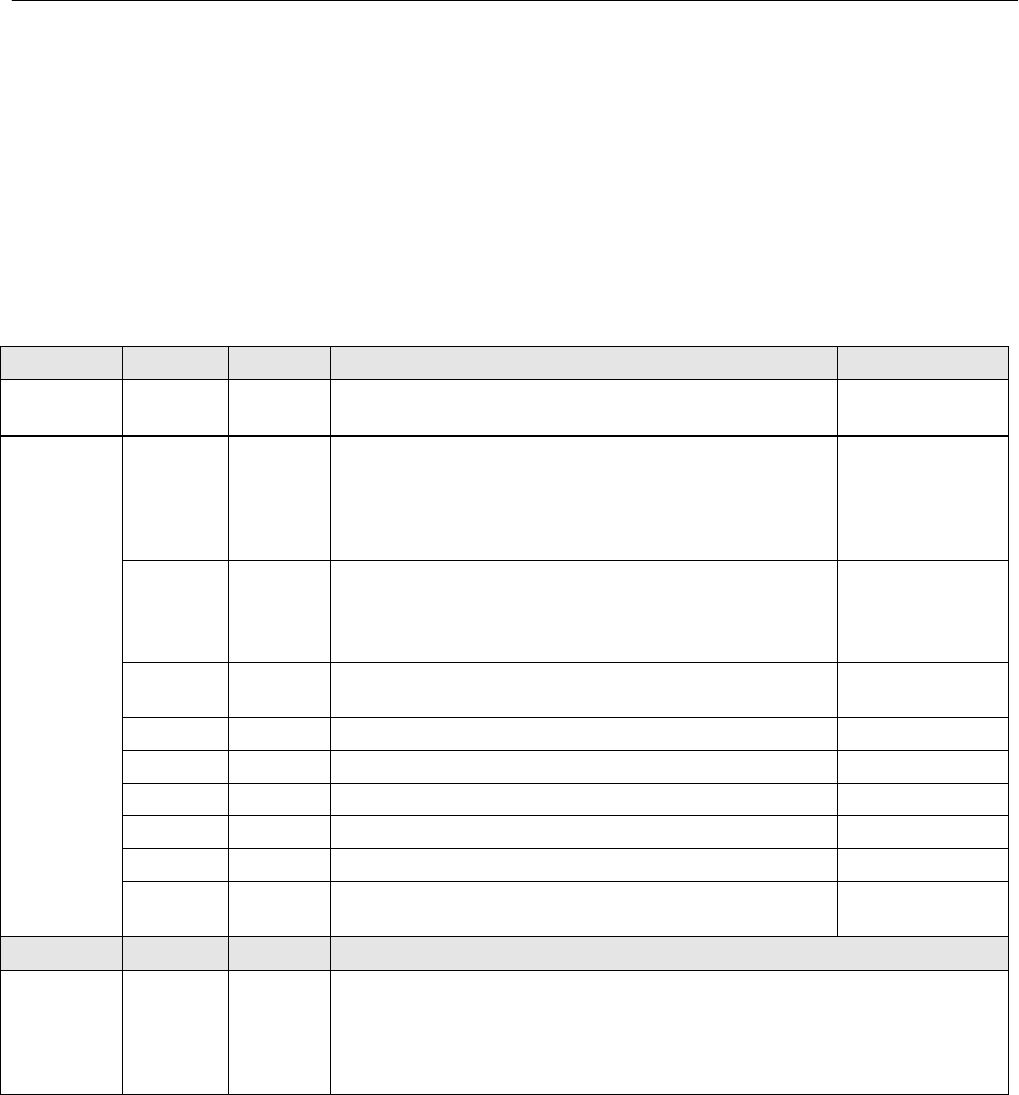
This command returns the upper/lower range values for the primary variable which is defined to be the loop current
signal. These are the loop current values for the ends of physical travel, and are used to derive set point from the loop
current. It reports the range supplied in Command 35.
For example, the lower range, for an increase to open valve, will be the current which will produce a 0% set point.
However, for an increase to close valve, the lower range will be the loop current for a 100% set point.
The range values can be changed via Command 35.
The DVC6200 SIS assumes 0% = 4mA and 100% = 20mA.
Byte Format Description Returned Value
Request
Data bytes None
Response
Data Bytes
0 Enum
PV Alarm Selection Code (see Common Table 6, Alarm
Selection Codes). The Alarm Selection Code indicates
the action taken by the device under error conditions.
For Actuators, the action taken by the positioner is
indicated.
250 (Not Used)
1 Enum
PV Transfer Function Code (see Common Table 3,
Transfer Function Codes). The Transfer Function Code
must return “0”, Linear, if transfer functions are not
supported by the device.
250 (Not Used)
2 Enum AI Upper and Lower Range Values Units Code, as
supplied in command 35. From CMD 35
36 Float AI Upper Range Value From Cmd 35
710 Float AI Lower Range Value From Cmd 35
1114 Float PV Damping Value (units of seconds) 0.0
15 Enum Write Protect Code (0=Disabled, 1=Enabled) 0 or 1
16 Enum Reserved. Must be set to “250”, Not Used. 250
17 Uint8 PV Analog Channel Flags (see Common Table 26, Analog
Channel Flags) 01
Code Class Description
Additional
Device
Related
Response
Codes
None
Instruction Manual Supplement
D103638X012
DVC6200 SIS Digital Valve Controller
August 2014
11
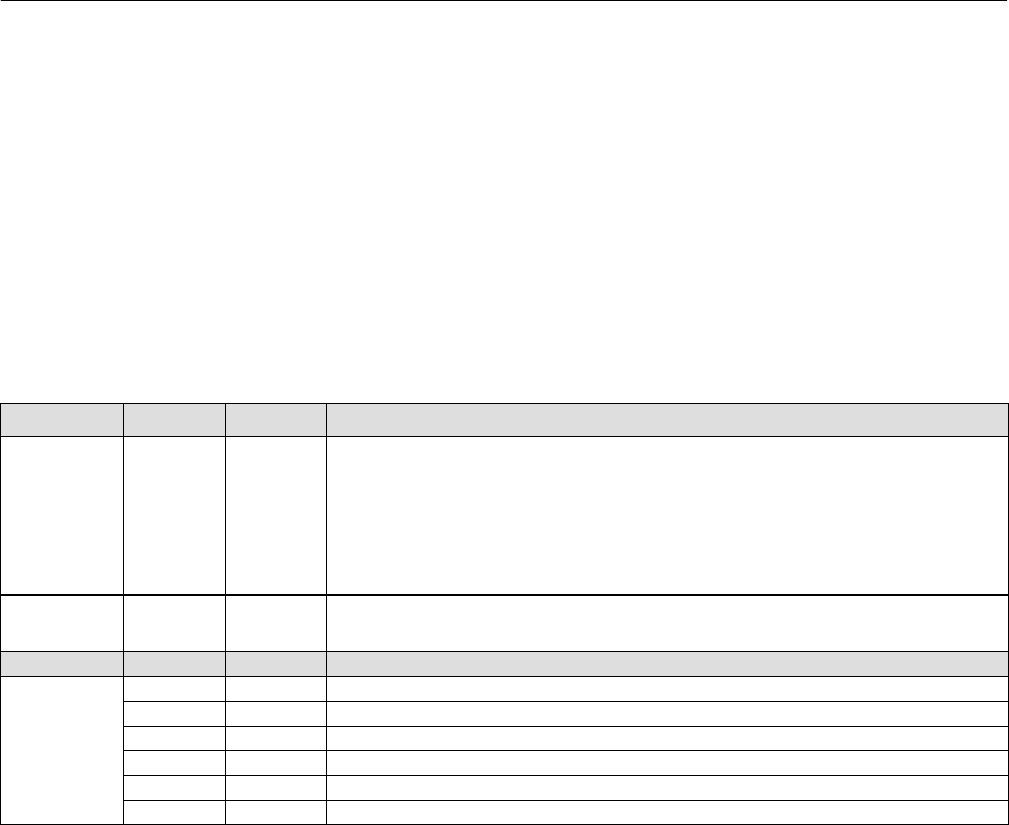
Command 17: Write Message
This command allows you to write a 24 character informational message into the device.
However, per common implementation of Emerson devices, writing a specific string to the Message field will signal
the device to transition operation from HART 5 to HART 7 mode and vice versa. The original message in the device will
not be altered if these strings are encountered.
To switch HART versions, send one of the following strings.
To switch to HART 5 mode: send “HART5”.
To switch to HART 7 mode: send “HART7”.
Byte Format Description
Request
Data bytes 023 Packed
A message string used by the master for HART Mode switching.
HART 7
20 14 94 DE 08 20 82 08 20 82 08 20 82 08 20 82 08 20 82 08 20 82 08 20
HART 5
20 14 94 D6 08 20 82 08 20 82 08 20 82 08 20 82 08 20 82 08 20 82 08 20
Response
Data Bytes 023 Packed Message String
Code Class Description
Command
Related
Response
Codes
0 Success No command specific errors
5 Error Too few data bytes
6 Error Device Specific command error
7 Error In write protect mode
16 Error Access Restricted
32 Error Busy

Instruction Manual Supplement
D103638X012
DVC6200 SIS Digital Valve Controller
August 2014
12
Command 48: Read Additional Status
This command was significantly revised in HART 7, but can operate in backward compatible mode for HART 5 masters
which do not supply data bytes in the request.
Supplying data bytes allows you to acknowledge the current status, and cause the more_status bit to be withdrawn
until some status bit changes value.
Exactly 0 or 9 data bytes must be supplied. If supplied, the data must exactly match the current command 48 response
in order for the more_status bit to be withdrawn.
Byte Format Description
Request
Data
bytes
0 or 9 None or nine bytes of status.
Response
Data
Bytes
0 Uint8 Command 48 Response Byte 0
1 Uint8 Command 48 Response Byte 1
2 Uint8 Command 48 Response Byte 2
3 Uint8 Command 48 Response Byte 3
4 Uint8 Command 48 Response Byte 4
5 Uint8 Command 48 Response Byte 5
6 Uint8 HART 7 Extended Field Device Status byte
7 Uint8 HART 7 Operating Mode byte
8 Uint8 HART 7 Standardized Status 1 byte
Code Class Description
Command
specific
Response
Codes
5Too few data
bytes 0 < x < 9, or x > 9
14 Data Mismatch Data was supplied but does not match current status

Instruction Manual Supplement
D103638X012
DVC6200 SIS Digital Valve Controller
August 2014
13
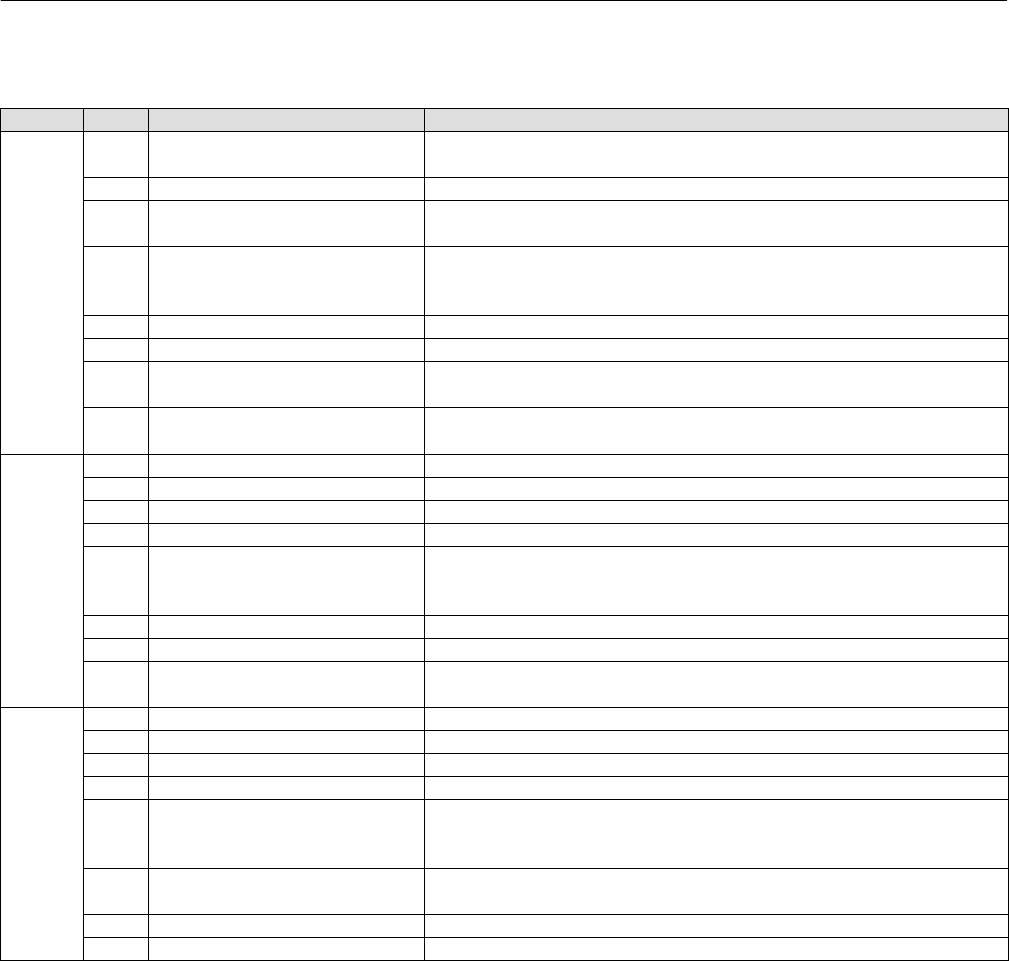
Additional Device Status
Command 48 returns 9 bytes of data, with the following status information:
Byte Bit Name of Status Bit Meaning
0
7Flash Integrity Failure Active if there is a failure associated with flash ROM (read only
memory).
6Minor Loop Sensor Alert Active if the pneumatic relay position reading is outside the valid
range.
5Reference Voltage Failure Active if there is a failure associated with the internal voltage
reference.
4Drive Current Failure Active when the drive current to the I/P converter is not flowing as
expected.
3Critical NVM Failure Active if there is a failure of nonvolatile memory used for
configuration data critical for instrument operation.
2Temperature Sensor Failure Active when the instrument temperature sensor fails or the sensor
reading is outside of the range of 60° to 100°C (76° to 212°F).
1Pressure Sensor Failure
Active if any of the 3 pressure sensor readings are outside the
range of 24.0% to 125.0% of the calibrated pressure for more than
60 seconds.
0Travel Sensor Failure Active if the sensed travel is outside the range of 25.0% to 125.0%
of calibrated travel.
1
7Alert Record Not Empty Alert Active when there are 1 or more alerts stored in the alert record.
6Tripped by the LCP
Active when the DVC6200 SIS is in the tripped position as a result
of someone pressing the Trip button on the Local Control Panel
(LCP).
5Calibration In Progress Alert Active when calibration is in progress.
4Diagnostics in Progress Alert Active when a diagnostic test is in progress.
3Pressure Fallback Active Alert Active when the instrument has detected a problem with the travel
feedback and is now controlling the output like an I/P transducer.
2SIS Program Flow Failure
SIS unit is not properly processing the expected series of
calculations or if the Instrument Mode is set to the “Out of Service”
condition.
1NVM Protective Mode Active when excessive NVM writes are detected and further writes
to NVM are rejected (to avoid NVM wearout)
0Auto Cal in Progress Alert Active when auto calibration is in progress.
2
7SIS Hardware Failure Active if a safety demand has occurred, but the electronics
hardware failed to take control of the I/P drive.
6NonCritical NVM Alert Active if there is a failure of nonvolatile memory used for data not
critical for instrument operation.
5Cycle Counter High Alert Active if the Cycle Counter exceeds the Cycle Count Alert Point.
4Travel Accumulator High
Alert
Active if the Travel Accumulator exceeds the Travel Accumulator
Alert Point.
3Instrument Time is
Approximate Alert
Active if the instrument has been powered down since the last
time the instrument clock was set.
2Alert Record Full Alert Active when the alert record contains the maximum number of 20
alerts.
1Offline / Failed Alert Active if a shutdown alert has put the DVC6200 SIS in a failed state.
0 Reserved
"Reserved" bits are always set to 0.
(continued)
Instruction Manual Supplement
D103638X012
DVC6200 SIS Digital Valve Controller
August 2014
14
Additional Device Status (continued)
Byte Bit Name of Status Bit Meaning
3
7Diagnostic Data Available
Alert
Alert is active when diagnostic data has been collected and is
being stored in the instrument.
6Valve Stuck SIS Partial Stroke diagnostic test failed
5Supply Pressure Alert Active if the supply pressure falls below the supply pressure alert
point.
4End Point Pressure Deviation
Alert
Active if the instrument is in pressure control and the pressure is
not tracking the set point within the configured deviation
allowance.
3SIS Locked in Safety Position Active when the DVC6200 SIS is in the tripped position.
2 Reserved
1Integrator Saturated High
Alert
Active if the instrument integrator is saturated at the high
extreme.
0Integrator Saturated Low
Alert Active if the instrument integrator is saturated at the low extreme.
4
7Travel Alert Lo Active when the Travel is below the Travel Alert Lo Point.
6Travel Alert Lo Lo Active when the Travel is below the Travel Alert Lo Lo Point.
5Travel Alert Hi Active when the Travel exceeds the Travel Alert Hi Point.
4Travel Alert Hi Hi Active when the Travel exceeds the Travel Alert Hi Hi Point.
3Travel Deviation Alert
Active if the difference between the Travel Target and the Travel
exceeds the Travel Deviation Alert Point for more than the Travel
Deviation Time.
2Travel Limit/Cutoff Hi Alert Active when the Travel exceeds the Hi Limit/Cutoff Point.
1Travel Limit/Cutoff Lo Alert Active when the Travel falls below the Lo Limit/Cutoff Point.
0Drive Signal Alert Active when the Drive Signal exceeds target limits (<10% or
>90%) for more than 20 seconds when not in Cutoff condition.
5
7 Reserved
6 Reserved
5 Reserved
4 Reserved
3LCP Communications Failure
Active if the AUX terminals are configured for use with the local
control panel (LCP) but communication between the DVC6200
SIS and the LCP is not occurring.
2Output Circuit
Communication Failure Active if the output circuit is not responding.
1 Reserved
0 Reserved
"Reserved" bits are always set to 0.
(continued)
Instruction Manual Supplement
D103638X012
DVC6200 SIS Digital Valve Controller
August 2014
15
Additional Device Status (continued)
Byte Bit Name of Status Bit Meaning
6
7 Reserved
Byte 6 is the Extended Field Device Status as defined by the HART
Standard.
Alerts in Byte 6 are summaries of device-specific alerts from Bytes
0 through 5. Alerts indicated with “N/A” are not available from
the DVC6200 SIS instrument.
Bit 1: One of the device variables in the list [0,1,2,3,5,8, and 10] is
out of the range of 25% to +125% of calibrated span.
6 Reserved
5 Reserved
4 Reserved
3 Reserved
2 Reserved
1Device Variable alert(1)
0Maintenance Required(2)
7
7 Reserved
Byte 7 is the Operating Mode, reserved by the HCF, and is
always 0.
6 Reserved
5 Reserved
4 Reserved
3 Reserved
2 Reserved
1 Reserved
0 Reserved
8
7 Reserved
Byte 8 is the Standardized Status 1 as defined by the HART
Standard.
Alerts in Byte 8 are summaries of device-specific alerts from Bytes
0 through 5. Alerts indicated with “N/A” are not available from
the DVC6200 SIS instrument.
6Electronic Defect(3)
5Environmental Limit(4)
4 Reserved
3 Reserved
2 Reserved
1NVM Error(5)
0 Reserved
"Reserved" bits are always set to 0.
1. Variable Limited = Variable 0 or 1 or 2 or 3 or 5 or 8 or 10 is outside the range of -25% to 125%
2. Maintenance Required = Cycle Counter Alert or Travel Accumulator Alert or Travel Deviation or Supply Pressure Alert
or PST Fail or Drive Signal Alert or Integrator Saturated High or Integrator Saturated Low
3. Electronic Defect = Program memory CRC Error or MLFB Read Back Fail or A/D Reference Error or
Drive Current Readback Error or Temperature Sensor Error or Pressure Sensor Error
or Position Sensor Error or Program Flow Error or SIS Override Fail or Option Module Error
4. Environmental Limit = Temperature outside -60 to 90 degrees C
5. NVM Error = Critical NVM Checksum Error or Non-Critical NVM Checksum Error

Instruction Manual Supplement
D103638X012
DVC6200 SIS Digital Valve Controller
August 2014
16
CommonPractice Commands
The DVC6200 SIS field device supports the following common practice commands:
Supported Commands
Command 33: Read Device Variables
Command 35: Write Primary Variable Range Values
Command 42: Perform Master Reset
Command 44: Write PV Units Code
Command 50: Read Dynamic Variable Assignments
Command 51: Write Dynamic Variable Assignments
Command 52: Set Device Variable Zero
Command 53: Set Device Variable Units
Command 54: Read Device Variable Information
Command 59: Write Number of Response Preambles
Burst Mode
This field device does not support Burst Mode when operating in HART 7 mode.
This field device supports Burst Mode and the following commands when it is operating in HART 5 mode:
Command 107: Write Burst Mode Variables
Command 108: Write Burst Mode Command Number
Command 109: Burst Mode Control
Catch Device Variable
This field device does not support Catch Device Variable.
Instruction Manual Supplement
D103638X012
DVC6200 SIS Digital Valve Controller
August 2014
17
Command 33: Read Device Variables
This command is used to read the value of up to four selected Device Variables.
The Device Variables and Variable Units Codes are listed on page 6 and 7.
Byte Format Description Allowable choices
Request
Data Bytes
0Variable ID Variable assigned to slot #0 See Device Variable on page 6
1Variable ID Variable assigned to slot #1 See Device Variable on page 6
2Variable ID Variable assigned to slot #2 See Device Variable on page 6
3Variable ID Variable assigned to slot #3 See Device Variable on page 6
Response
Data Bytes
0Variable ID Variable assigned to slot #0
1Byte, hex Slot #0 Variable units code
25 Float Slot #0 Variable value
6Variable ID Variable assigned to slot #1
7Byte, hex Slot #1 Variable units code
811 Float Slot #1 Variable value
12 Variable ID Variable assigned to slot #2
13 Byte, hex Slot #2 Variable units code
1417 Float Slot #2 Variable value
18 Variable ID Variable assigned to slot #3
19 Byte, hex Slot #3 Variable units code
2023 Float Slot #3 Variable value
Code Class Description
Command
Specific
Response
Codes
0 Success No CommandSpecific Errors
2 Error Invalid selection – Invalid Variable ID
Instruction Manual Supplement
D103638X012
DVC6200 SIS Digital Valve Controller
August 2014
18
Command 35: Write Primary Variable Range Values
In the DVC6200 SIS, the Primary Variable is defined to be the Analog Input (loop current).
This command is used to write the ranging values reported in Command 15. It controls how the DVC6200 SIS
interprets the loop current when creating the Travel Target. The upper range must be greater than the lower range.
This command does units conversion, accepting range values in milliamps or percent. If the primary variable is not
configured to use the same units as supplied in this command, the supplied ranges will be converted to PV units before
being applied. Range values are validated against those reported in Command 14 to assure that they are within the
allowable range and are separated by a minimum span.
If the range values are in percent, then they are assumed to be percent of 420 mA. For example, to range an increase
to open unit from 8 mA to 16 mA, but using percent range numbers, specify lower_range = 25% and upper_range =
75%.
This ranging is done in conjunction with the zero power condition. For an IncreasetoOpen valve, the lower range is
the 0% setpoint level (valve plug in the valve seat), while the upper range is the 100% setpoint level. An
IncreasetoClose valve is exactly opposite.
This command will be accepted when the DVC6200 SIS’s Instrument Mode is In Service but will be rejected if Write
Protection is in effect.
Byte Format Description Allowable choices
Request
Data Bytes
0 UINT8 Upper and Lower Range Values Unit Code Unit Code 39 (mA) or 57(%)
1 4 Float Primary Variable Upper Range Value
5 8 Float Primary Variable Lower Range Value
Response
Data Bytes
0 UINT8 Upper and Lower Range Values Unit Code Unit Code 39 (mA) or 57(%)
1 4 Float Primary Variable Upper Range Value
5 8 Float Primary Variable Lower Range Value
Code Class Description
Command
Specific
Response
Codes
0 Success No CommandSpecific Errors
2 Error Invalid selection Units code not 39 (mA) or 57(%)
6 Error Insufficient power
7 Error In Write Protect Mode
9 Error Lower Range too high
10 Error Lower Range too low
11 Error Upper Range too high
12 Error Upper Range too low
13 Error Both ranges are invalid
14 Error Span is too small
16 Error Access Restricted other master has access locked.
29 Error Upper range less than lower range
32 Error Busy
78 Error NVM Protection Mode
Instruction Manual Supplement
D103638X012
DVC6200 SIS Digital Valve Controller
August 2014
19
Command 42: Perform Master Reset
This reset command has two options. If no data bytes are supplied, respond immediately and then perform a “warm”
reset. This is not equivalent to power up in that restart modes and default IVP are not adopted and the realtime clock
is not reset. All other data is read from nonvolatile memory and put into effect. The second option is hard reset. This
requires two data bytes set as described below. If this form is received, the unit will save modes and counters, then
execute a hard reset by exercising the watchdog timer. The next response will have the “cold_start” bit set.
A “soft reset” command will be honored while the DVC6200 SIS Instrument Mode is in the “In Service” condition.
A “hard reset” command requires the DVC6200 SIS Instrument Mode be in the “OutofService” condition.
Byte Format Description
Request
Data
bytes
0 1 Uint16 [Optional] If hex 0x6969 is supplied as request data bytes, a hard
reset is performed. Otherwise a soft reset is performed.
Response
Data
Bytes
None
Code Class Description
Command
specific
Response
Codes
16 Error Access Restricted
Command 44: Change Primary Variable Units Code
This command is issued to change the units of the Primary Variable, which is defined in the DVC6200 SIS as the Analog
Input (loop current). The choices for units are Percent (code 57) or Milliamps (code 39). This command will cause
variable 0 (loop current), and the response to Command 14, to be reported in the new units.
In addition to changing the units code, execution of this command will also change the DVC6200 SIS’s Analog Input
Upper and Lower Range values to reflect the new units. (For example: When the DVC6200 SIS’s Analog Input is
configured as “420 mA” and Command 44 with request Data Byte 57 is executed, the DVC6200 SIS’s Analog Input
units and range values will change to “0100%”. Likewise, when the DVC6200 SIS’s Analog Input is configured as
“0100%” and Command 44 with request Data Byte 39 is executed, the DVC6200 SIS’s Analog Input units and range
values will change to “420 mA”).
This command will be accepted when the DVC6200 SIS’s Instrument Mode is In Service, but will be rejected if Write
Protection is in effect.
Byte Format Description Allowable choices
Request Data
Bytes 0 UINT8 Primary Variable Units Code Unit Code 39 (mA) or 57(%)
Response
Data Bytes 0 UINT8 Primary Variable Units Code
Code Class Description
Command
Specific
Response
Codes
0 Success No CommandSpecific Errors
2 Error Invalid selection Units code not 39 (mA) or 57(%)
6 Error Insufficient Power
7 Error In Write Protect Mode
78 Error NVM Protective Mode

Instruction Manual Supplement
D103638X012
DVC6200 SIS Digital Valve Controller
August 2014
20
Command 50: Read Dynamic Variable Assignments
This command returns a list of four device variable codes, taken from the Device Variables table on page 6, which are
returned in Command 3. These Dynamic Variables are specified via Command 51.
Byte Format Description
Request
Data Bytes None
Response
Data Bytes
0 UINT8 ID of variable returned as the first variable (PV) in Command 3
1 UINT8 ID of variable returned as the second variable (SV) in Command 3
2 UINT8 ID of variable returned as the third variable (TV) in Command 3
3 UINT8 ID of variable returned as the fourth variable (FV) in Command 3
Code Class Description
Command
Specific
Response
Codes
None
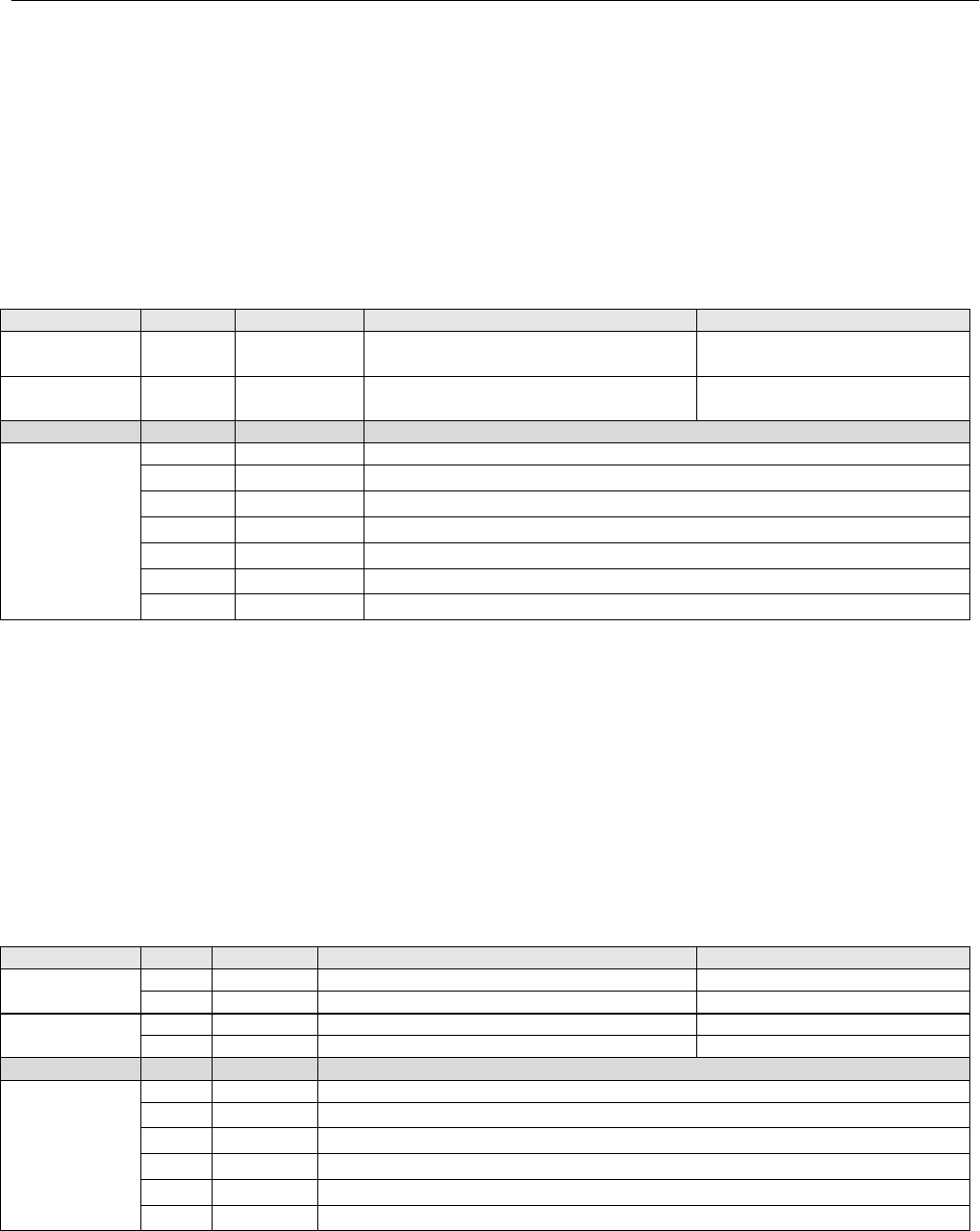
Command 51: Write Dynamic Variable Assignments
This command assigns Device Variables to the Secondary (SV), Tertiary (TV), and Quaternary (QV) Dynamic Variables
as returned in Command 3. Note that the Primary Variable (PV) is constrained to be only variable 0 (Analog Input). The
variables in SV, TV, and QV can be any Device Variable 0…10 which includes Analog Input, Temperature, all pressure
readings, Travel, or Travel Setpoint.
This command is accepted when in service, and is afforded write protection.
Byte Format Description
Request Data
Bytes
0 UINT8 Device variable ID assigned to PV (must be variable 0 only)
1 UINT8 Device variable ID assigned to SV (010 inclusive)
2 UINT8 Device variable ID assigned to TV (010 inclusive)
3 UINT8 Device variable ID assigned to QV (010 inclusive)
Response
Data Bytes
0 UINT8 Device variable ID assigned to PV
1 UINT8 Device variable ID assigned to SV
2 UINT8 Device variable ID assigned to TV
3 UINT8 Device variable ID assigned to QV
Code Class Description
Command
Specific
Response
Codes
0 Success No CommandSpecific Errors
2 Error Invalid selection (Slot #0 is not 0) or other slots not 0…10.
6 Error Insufficient Power
7 Error In Write Protect Mode
16 Error Access Restricted other master has access locked.
78 Error NVM Protective Mode
Instruction Manual Supplement
D103638X012
DVC6200 SIS Digital Valve Controller
August 2014
21
Command 52: Set Device Variable Zero
This command is used to force one of the pressure inputs to read 0. To use this for pressure, apply 0 psi to the sensor.
Then, send this command, specifying the affected pressure Device Variable. The offset will be adjusted to force the
present value to read 0. An error will be generated, and no change applied, if the new value causes a change of more
than about 3%.
Supported Variables:
2 = Port A Pressure
5 = Port B Pressure
8 = Supply Pressure
Byte Format Description Allowable choices
Request Data
Bytes 0 UINT8 Device Variable ID Variable IDs 2, 5, or 8
Response
Data Bytes 0 UINT8 Device Variable ID Variable IDs 2, 5, or 8
Code Class Description
Command
Specific
Response
Codes
0 Success No CommandSpecific Errors
2 Error Invalid selection – Unsupported variable ID
6 Error Insufficient Power
7 Error In Write Protect Mode
9 Error Present Value is too high
10 Error Present Value is too low
78 Error NVM Protective Mode
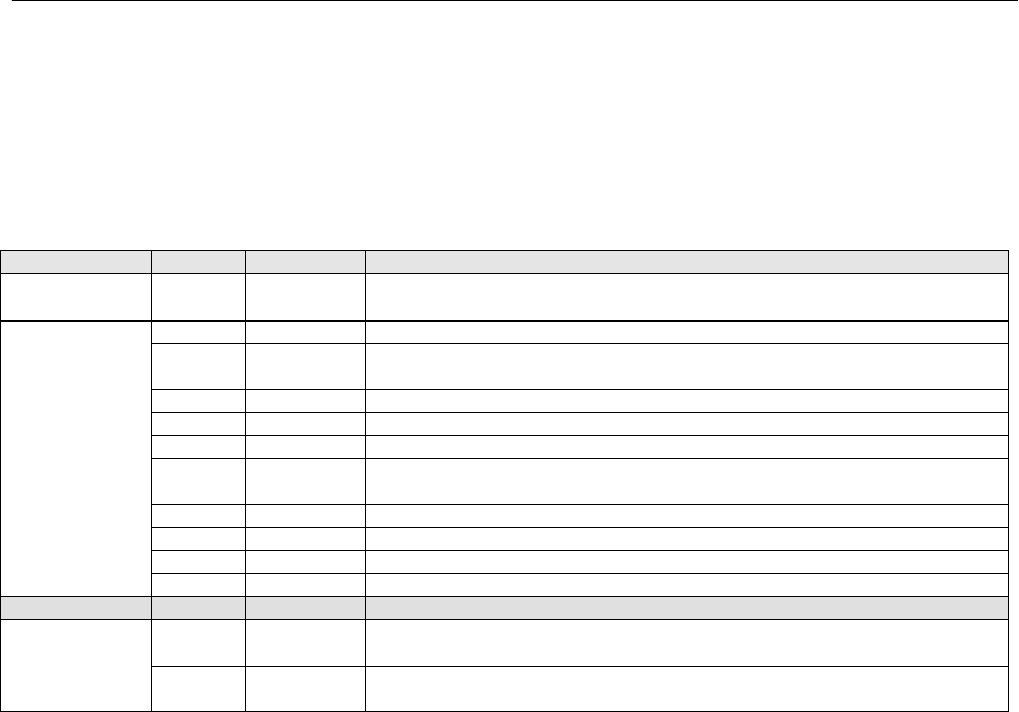
Command 53: Set Device Variable Units
This command is used to set the units for reporting of the device variables related to the DVC6200 SIS’s temperature
or pressure sensors. In addition to changing the units code, execution of this command will also change the device
variable’s Upper and Lower Range values to reflect the new units. Units Codes are listed on page 7.
To change the units of PV (Analog Input), variable 0, use Command 44.
Supported variables are:
1 = Temperature
2 = Port A Pressure
5 = Port B Pressure
7 = Differential Pressure
8 = Supply Pressure
Byte Format Description Allowable choices
Request Data
B
y
tes
0 UINT8 Device Variable ID Variable IDs 1, 2, 5, 7, or 8
1 UINT8 Pressure or Temperature Units Code
Response
Data B
y
tes
0 UINT8 Device Variable ID Variable IDs 1, 2, 5, 7, or 8
1 UINT8 Pressure or Temperature Units Code
Code Class Description
Command
Specific
Response
Codes
0 Success No CommandSpecific Errors
6 Error Insufficient Power
7 Error In Write Protect Mode
11 Error Invalid Variable ID
12 Error Invalid Units Code for the Variable ID provided
78 Error NVM Protective Mode
Instruction Manual Supplement
D103638X012
DVC6200 SIS Digital Valve Controller
August 2014
22
Command 54: Read Device Variable Information
This command is used to identify each of the Device Variables, in the range of IDs 0…10 inclusive. Responds with the
Sensor Serial Number, Sensor Range Units, Sensor Ranges, Damping Value, and Minimum Span of the selected
variable. The variable range values will be in the same units as the variable units.
Items marked by “*” are only supported in HART 7 mode.
Byte Format Description
Request Data
Bytes 0 Enum Device Variable ID, this command is applicable to variables 010. All
others will return invalid selection
Response
Data Bytes
0 UINT8 Device Variable ID
13 Device Variable Sensor Serial Number, 24bit number
(NOT USED always zero)
4 UINT8 Device variable units code
58 Float Device Variable Upper Range
912 Float Device Variable Lower Range
1316 Float Device Variable Damping Value,
(NOT USED always zero)
1720 Float Device Variable Minimum Span (NOT USED always zero)
*21 UINT8 Device Variable Classification
*22 UINT8 Family Code (NOT USED – always 250)
*2326 Time Update period in 1/23 of a millisecond
Code Class Description
Command
Specific
Response
Codes
0 Success No CommandSpecific Errors
2 Error Invalid Selection
Device-Specific Commands
The DVC6200 SIS field device supports devicespecific commands. However, these devicespecific commands require
use of the ValveLink software application or DD methods and cannot be utilized outside of those controlled
environments.
Performance
Refer to the DVC6200 SIS Digital Valve Controller Instruction Manual (D103557X012) and Product Bulletin
62.1:DVC6200 SIS (D103555X012) for details on DVC6200 SIS performance.
Instruction Manual Supplement
D103638X012
DVC6200 SIS Digital Valve Controller
August 2014
23
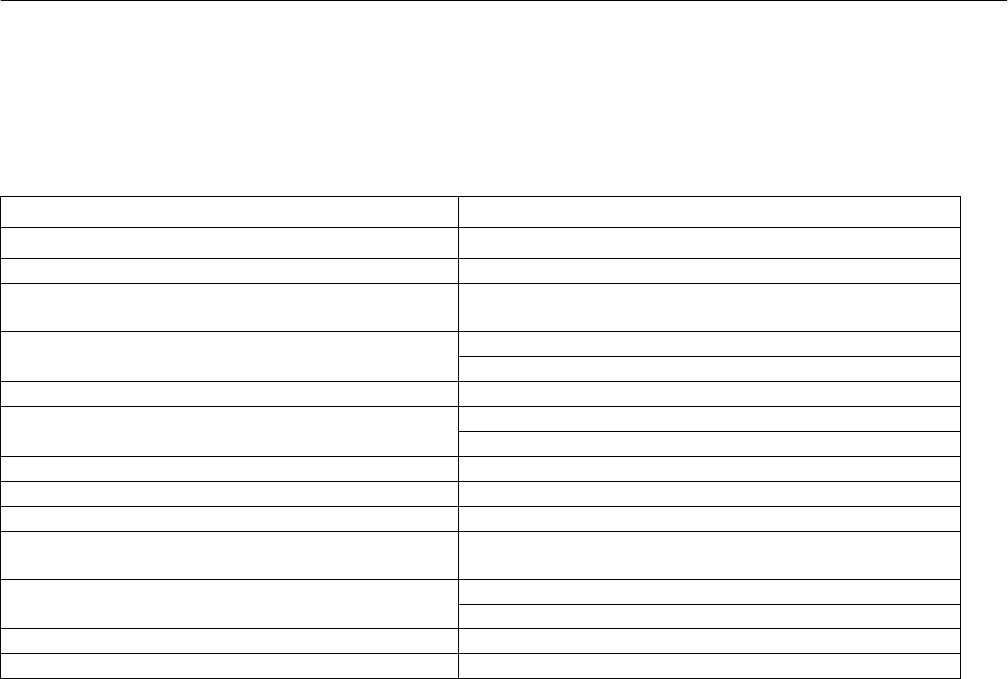
Annex A Compatibility Checklist
Manufacturer, Model, and Revision Fisher Controls DVC6200 SIS Device Revision 2
Device Type Pneumatic Control Valve Positioner
HART Protocol Revision 7.4
User switchable between HART 5 mode and
HART 7 mode?
Yes, either with configuration within DD or with a special
string in the Message field.
Device Description Available? Device Revision 1 is for HART 5 mode.
Device Revision 2 is for HART 7 mode.
Number and type of process connections None
Number of host connections Input: Control signal to Loop ± terminals
Output: Transmitter or Switch from Out ± terminals
Number of Dynamic Variables 4
Mappable Dynamic Variables? Yes. SV, TV, and FV are mappable. PV is not.
Number of Device Variables 13
Number of Supported Common Practice
Commands 10
Burst Mode? In HART 7 mode: No
In HART 5 mode: Yes
Capture Device Variables? No
Write Protection? Yes
Instruction Manual Supplement
D103638X012
DVC6200 SIS Digital Valve Controller
August 2014
24
Annex B DVC6200 SIS Parameters as part of a Rosemount 1410 /
1420 WirelessHART Gateway
A FIELDVUE DVC6200 SIS can join a wireless network through the addition of a Rosemount 775 THUM WirelessHART
adapter. The wireless adapter acts both as a HART modem for communications coming to the DVC6200 SIS from
application software and as an independent master issuing commands periodically to the wired device pertaining to
it’s status. This independently gathered status information is relayed back to the Rosemount 1410 or 1420 Wireless
Gateway and is made available to the user either through viewing the HTML interface or via mapping as “Published
Data” parameters via the Gateway’s MODBUS or OPC outputs.
For HART 5 devices the PV, SV, TV, and QV variables can be mapped.
For HART 7 devices up to 8 variables can be mapped.
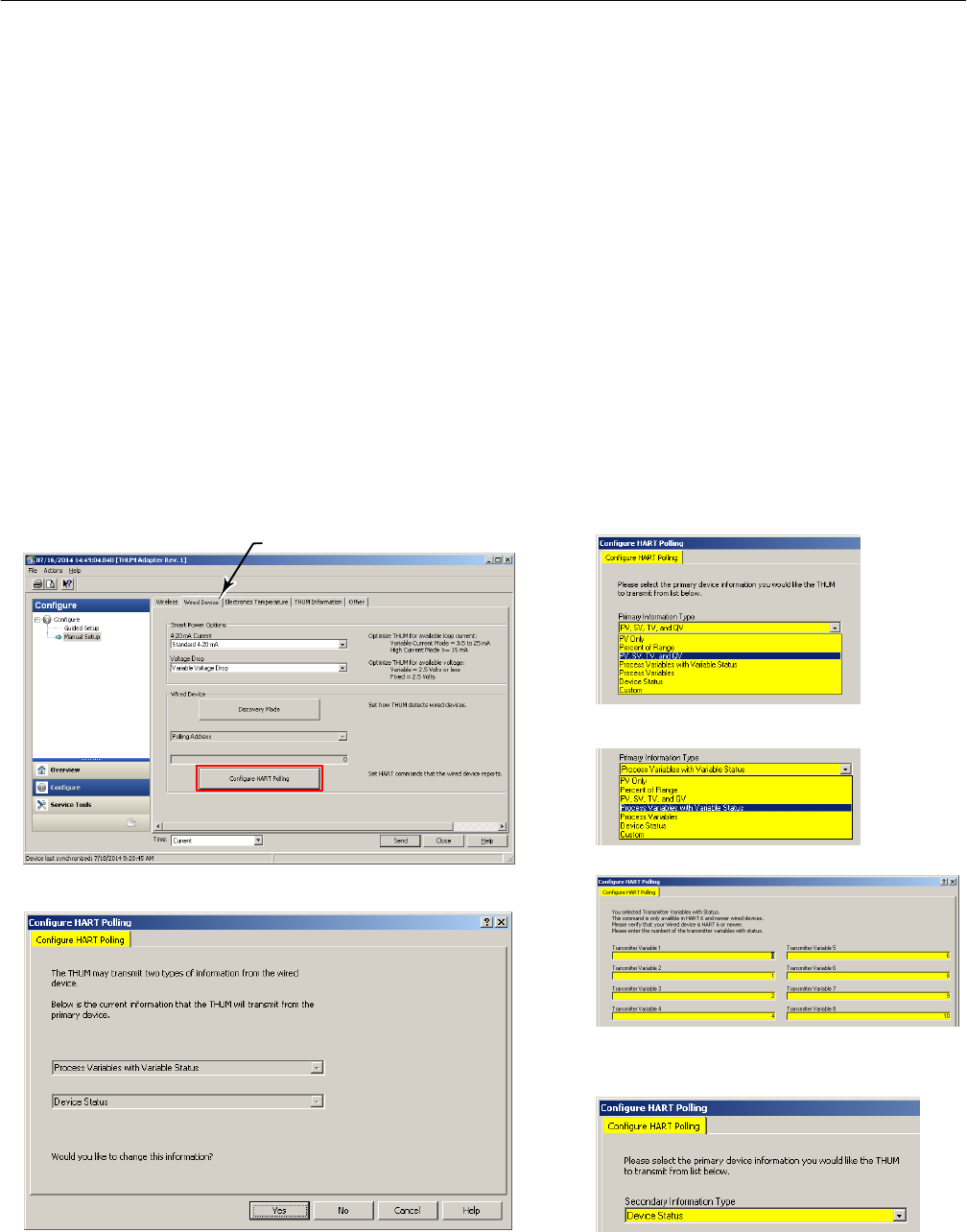
Configure the THUM as follows:
HART 5 - select PV, SV, TV, and QV
HART 7 - select Process Variables with Variable Status
Choose Variables 0, 1, 2, 4, 6, 8, 9, and 10
Select Yes if changes are required
Both HART 5 and HART 7 - select Device Status
Navigate to Configure > Manual Setup
Under the Wired Device tab select Configure HART Polling FOR PRIMARY DEVICE INFORMATION:
FOR SECONDARY DEVICE INFORMATION:
Wired Device tab
Instruction Manual Supplement
D103638X012
DVC6200 SIS Digital Valve Controller
August 2014
25
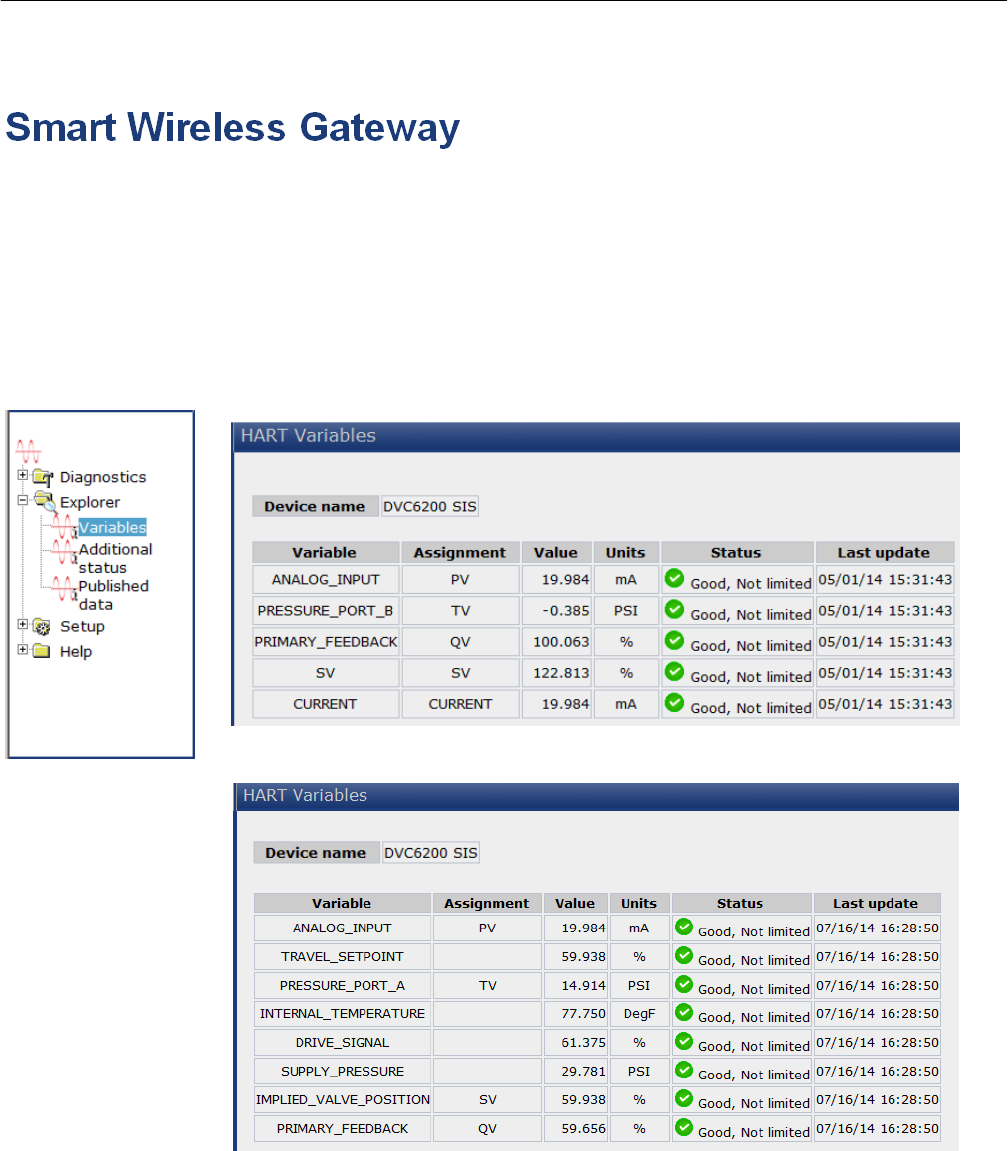
The FIELDVUE instrument is defined on the Gateway by “Tag” (read from the device’s “Message” field).
For each Tag, the Gateway provides updated values for:
D Variables
D Additional Status
D Published Data
HART 5
HART 7

Instruction Manual Supplement
D103638X012
DVC6200 SIS Digital Valve Controller
August 2014
26
Published Data, used for the Gateway’s OPC and Modbus outputs, falls into the following categories:
Field Device Identification Values:
Values that define the identity of the DVC6200 SIS. These include:
D MANUFACTURER (for “Fisher Controls” the value is “19”)
D DEVICE_TYPE
D DEVICE_REVISION
D HARDWARE_REVISION
D SOFTWARE_REVISION
D DEVICE_ID
D UNIVERSAL_REVISION (HART version)
D REQUEST_PREAMBLES
D RESPONSE_PREAMBLES
Variable information:
The Gateway receives updates concerning the DVC6200 SIS’s configured device variables. The information for any
given device variable is displayed by:
1. Dynamic Variable indicator (“PV”, “SV”, etc.)
2. The Device Variable ID number assigned to that Dynamic Variable
3. By the Device Variable Name (only if the Gateway has version 4.4 firmware or later)
Dynamic Variable Device Variable ID Device Variable Name(s)
Analog Input PV 0* ANALOG_INPUT
Internal Temperature 1 INTERNAL_TEMPERATURE
Pressure TV 2* PRESSURE_PORT_A
Travel 3 TRAVEL
Drive Signal 4 DRIVE_SIGNAL
Pressure 5 PRESSURE_PORT_B
Travel Setpoint 6 TRAVEL_SETPOINT
Pressure 7 DIFFERENTIAL_PRESSURE
Pressure 8 SUPPLY_PRESSURE
Implied Valve Position SV 9* IMPLIED_VALVE_POSITION
Travel QV 10* PRIMARY_FEEDBACK
Milliamp Current 245 CURRENT
*Default Value indicated
Instruction Manual Supplement
D103638X012
DVC6200 SIS Digital Valve Controller
August 2014
27
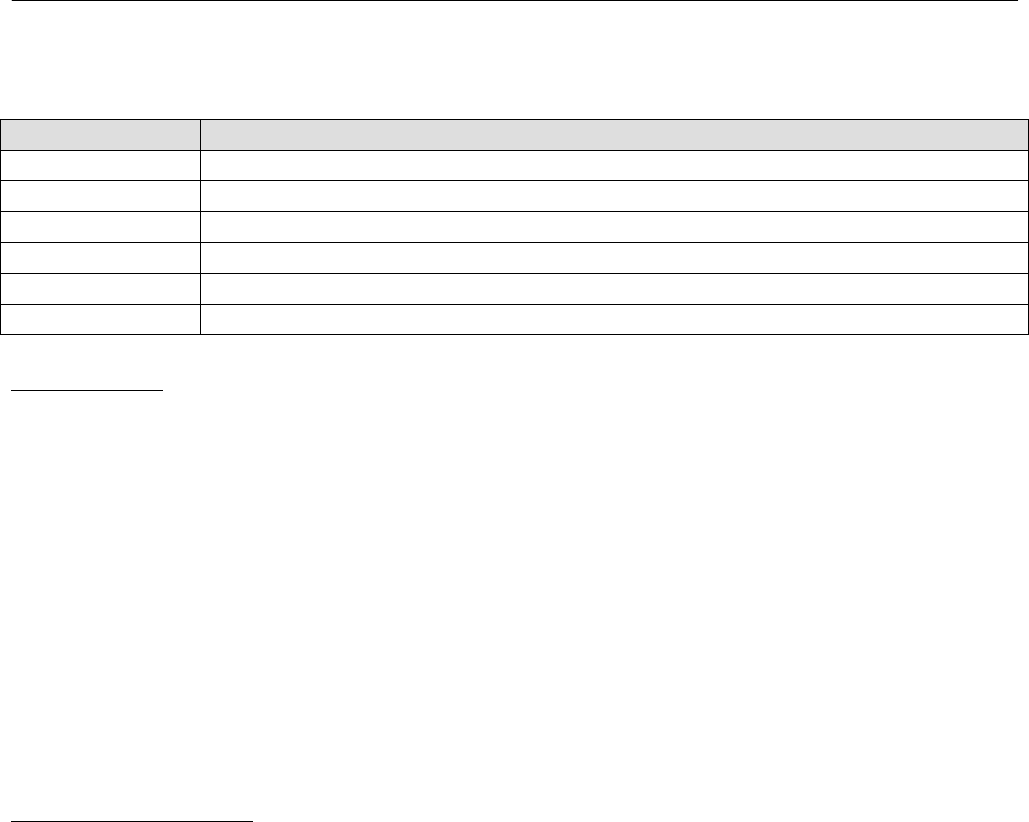
Any of these choices [Dynamic Variable, Device Variable ID, or Device Variable Name(s)] can be substituted for the “#”
sign in the Variable Identifier fields below.
Variable Identifier Comments / Explanation
#See any of the variable identifiers in the table immediately above.
#_CLASS Always “0”.
#_CODE The “Device Variable ID” number in the table immediately above.
#_HEALTHY A “true” or “false” indication of the health of the sensor providing this value.
#_STATUS
#_UNITS Decimal “Variable Units code” number from the “Units Codes” table on page 7.
Device Status:
The eight standard status conditions (present in ANY HART field device) are all represented by a Boolean “true” or
“false” state. These eight conditions, discussed on page 7, are:
D DEVICE_MALFUNCTION
D CONFIGURATION_CHANGED
D COLD_START
D MORE_STATUS_AVAILABLE
D LOOP_CURRENT_FIXED
D LOOP_CURRENT_SATURATED
D NONPRIMARY_VALUE_OUT_OF_LIMITS
D PRIMARY_VALUE_OUT_OF_LIMITS
Detailed Device Alerts:
The Alert Groupings are:
D ADDITIONAL_STATUS_0
D ADDITIONAL_STATUS_1
D ADDITIONAL_STATUS_2
D ADDITIONAL_STATUS_3
D ADDITIONAL_STATUS_4
D ADDITIONAL_STATUS_5
D ADDITIONAL_STATUS_6*
D ADDITIONAL_STATUS_7*
D ADDITIONAL_STATUS_8*

Instruction Manual Supplement
D103638X012
DVC6200 SIS Digital Valve Controller
August 2014
28
Each of these status bytes represent eight individual bits with values that range from “00” to “255”. To determine
which of the eight bits are active requires converting a decimal value to its binary equivalent value. Refer to Command
48 on page 13 for details on the individual alert bits inside of each Additional Status Byte.
Note
Gateways with firmware version 4.4 define the alerts of DVC6200 SIS. There are slight differences between the names of the alerts
as defined in the Gateway in the Command 48 tables, as detailed in the following tables.
ADDITIONAL_STATUS bytes 0 - 5 are supported by HART 5.
ADDITIONAL_STATUS bytes 0 - 8 are supported by HART 7.
ADDITIONAL_STATUS_0 According to Command 48: As defined in the Gateway:
Bit 7 Flash Integrity Failure FLASH_INTEGRITY_FAILURE
Bit 6 Minor Loop Sensor Alert MINOR_LOOP_SENSOR_ALERT
Bit 5 Reference Voltage Failure REFERENCE_VOLTAGE_FAILURE
Bit 4 Drive Current Failure DRIVE_CURRENT_FAILURE
Bit 3 Critical NVM Failure CRITICAL_NVM_ALERT
Bit 2 Temperature Sensor Failure TEMPERATURE_SENSOR_ALERT
Bit 1 Pressure Sensor Failure PRESSURE_SENSOR_ALERT
Bit 0 Travel Sensor Failure TRAVEL_SENSOR_ALERT
ADDITIONAL_STATUS_1 According to Command 48: As defined in the Gateway:
Bit 7 Alert Record Not Empty Alert ALERT_RECORD_NOT_EMPTY_ALERT
Bit 6 Tripped by the LCP TRIPPED_BY_THE_LCP
Bit 5 Calibration in Progress Alert CALIBRATION_IN_PROGRESS_ALERT
Bit 4 Diagnostics in Progress Alert DIAGNOSTICS_IN_PROGRESS_ALERT
Bit 3 Pressure Fallback Active Alert PRESSURE_FALLBACK_ACTIVE_ALERT
Bit 2 SIS Program Flow Failure SIS_PROGRAM_FLOW_FAILURE
Bit 1 NVM Protective Mode NVM_PROTECTIVE_MODE
Bit 0 Auto Cal in Progress Alert AUTO_CAL_IN_PROGRESS_ALERT
Instruction Manual Supplement
D103638X012
DVC6200 SIS Digital Valve Controller
August 2014
29
ADDITIONAL_STATUS_2 According to Command 48: As defined in the Gateway:
Bit 7 SIS Hardware Failure SIS_HARDWARE_FAILURE
Bit 6 NonCritical NVM Alert NON_CRITICAL_NVM_ALERT
Bit 5 Cycle Counter High Alert CYCLE_COUNTER_HIGH_ALERT
Bit 4 Travel Accumulator High Alert TRAVEL_ACCUMULATOR_HIGH_ALERT
Bit 3 Instrument Time is Approximate Alert INSTRUMENT_TIME_IS_APPROXIMATE_ALERT
Bit 2 Alert Record Full Alert ALERT_RECORD_FULL_ALERT
Bit 1 Offline / Failed Alert OFFLINE_FAILED_ALERT
Bit 0 Reserved
ADDITIONAL_STATUS_3 According to Command 48: As defined in the Gateway:
Bit 7 Diagnostic Data Available Alert DIAGNOSTIC_DATA_AVAILABLE_ALERT
Bit 6 Valve Stuck VALVE_STUCK
Bit 5 Supply Pressure Alert SUPPLY_PRESSURE_ALERT
Bit 4 End Point Pressure Deviation Alert END_POINT_PRESSURE_DEVIATION_ALERT
Bit 3 SIS Locked in Safety Position SIS_LOCKED_IN_SAFETY_POSITION
Bit 2 Reserved
Bit 1 Integrator Saturated High Alert INTEGRATOR_SATURATED_HIGH_ALERT
Bit 0 Integrator Saturated Low Alert INTEGRATOR_SATURATED_LOW_ALERT
ADDITIONAL_STATUS_4 According to Command 48: As defined in the Gateway:
Bit 7 Travel Alert Lo TRAVEL_ALERT_LO
Bit 6 Travel Alert Lo Lo TRAVEL_ALERT_LO_LO
Bit 5 Travel Alert Hi TRAVEL_ALERT_HI
Bit 4 Travel Alert Hi Hi TRAVEL_ALERT_HI_HI
Bit 3 Travel Deviation Alert TRAVEL_DEVIATION_ALERT
Bit 2 Travel Limit / Cutoff Hi Alert TRAVEL_LIMIT_CUTOFF_HI_ALERT
Bit 1 Travel Limit / Cutoff Lo Alert TRAVEL_LIMIT_CUTOFF_LO_ALERT
Bit 0 Drive Signal Alert DRIVE_SIGNAL_ALERT
ADDITIONAL_STATUS_5 According to Command 48: As defined in the Gateway:
Bit 7 Reserved
Bit 6 Reserved
Bit 5 Reserved
Bit 4 Reserved
Bit 3 LCP Communications Failure LCP_COMMUNICATIONS_FAILURE
Bit 2 Output Circuit Communication Failure OUTPUT_CIRCUIT_COMMUNICATION_FAILURE
Bit 1 Reserved
Bit 0 Reserved
Instruction Manual Supplement
D103638X012
DVC6200 SIS Digital Valve Controller
August 2014
30
ADDITIONAL_STATUS_6 According to Command 48: As defined in the Gateway:
Bit 7 Reserved
Bit 6 Reserved
Bit 5 Reserved FUNCTION_CHECK
Bit 4 Reserved OUT_OF_SPECIFICATION
Bit 3 Reserved FAILURE
Bit 2 Reserved CRITICAL_POWER_FAILURE
Bit 1 Device Variable Alert DEVICE_VARIABLE_ALERT
Bit 0 Maintenance Required MAINTENANCE_REQUIRED
ADDITIONAL_STATUS_7 According to Command 48: As defined in the Gateway:
Bit 7 Reserved
Bit 6 Reserved
Bit 5 Reserved
Bit 4 Reserved
Bit 3 Reserved
Bit 2 Reserved
Bit 1 Reserved
Bit 0 Reserved
ADDITIONAL_STATUS_8 According to Command 48: As defined in the Gateway:
Bit 7 Reserved DEVICE_CONFIGURATION_LOCKED
Bit 6 Electronic Defect ELECTRONIC_DEFECT
Bit 5 Environmental Limit ENVIRONMENTAL_CONDITIONS_OUT_OF_RANGE
Bit 4 Voltage Error POWER_SUPPLY_CONDITIONS_OUT_OF_RANGE
Bit 3 Reserved WATCHDOG_RESET_EXECUTED
Bit 2 Reserved VOLITILE_MEMORY_DEFECT
Bit 1 NVM Error NONVOLITILE_MEMORY_DEFECT
Bit 0 Reserved DEVICE_VARIABLE_SIMULATION_ACTIVE
*
*
*
ADDITIONAL_STATUS bytes 6 - 8 are supported by HART 7 mode only.
*
Instruction Manual Supplement
D103638X012
DVC6200 SIS Digital Valve Controller
August 2014
31

Instruction Manual Supplement
D103638X012
DVC6200 SIS Digital Valve Controller
August 2014
32
Emerson Process Management
Marshalltown, Iowa 50158 USA
Sorocaba, 18087 Brazil
Chatham, Kent ME4 4QZ UK
Dubai, United Arab Emirates
Singapore 128461 Singapore
www.Fisher.com
The contents of this publication are presented for informational purposes only, and while every effort has been made to ensure their accuracy, they are not
to be construed as warranties or guarantees, express or implied, regarding the products or services described herein or their use or applicability. All sales are
governed by our terms and conditions, which are available upon request. We reserve the right to modify or improve the designs or specifications of such
products at any time without notice.
E 2012, 2014 Fisher Controls International LLC. All rights reserved.
Fisher, FIELDVUE, and Rosemount are marks owned by one of the companies in the Emerson Process Management business unit of Emerson Electric Co.
Emerson Process Management, Emerson, and the Emerson logo are trademarks and service marks of Emerson Electric Co. HART and WirelessHART are
marks owned by the HART Communication Foundation. All other marks are the property of their respective owners.
Neither Emerson, Emerson Process Management, nor any of their affiliated entities assumes responsibility for the selection, use or maintenance
of any product. Responsibility for proper selection, use, and maintenance of any product remains solely with the purchaser and end user.
