Ensight Interfacemanual User Manual Interface
2017-12-05
User Manual: Ensight Interfacemanual InterfaceManual EnSight10_Docs www3.ensight.com 3:
Open the PDF directly: View PDF  .
.
Page Count: 504 [warning: Documents this large are best viewed by clicking the View PDF Link!]
- EnSight Interface Manual
- Detailed Table of Contents
- 0 Overview
- 1 User Defined Reader Version 1.0 API
- 1.1 Quick Index of Library Routines
- 1.2 Order Routines are Called
- 1.3 Detailed Specifications
- USERD_bkup
- USERD_get_block_coords_by_component
- USERD_get_block_iblanking
- USERD_get_block_scalar_values
- USERD_get_block_vector_values_by_component
- USERD_get_changing_geometry_status
- USERD_get_constant_value
- USERD_get_dataset_query_file_info
- USERD_get_description_lines
- USERD_get_element_connectivities_for_part
- USERD_get_element_ids_for_part
- USERD_get_element_label_status
- USERD_get_extra_gui_defaults
- USERD_get_extra_gui_numbers
- USERD_get_global_coords
- USERD_get_global_node_ids
- USERD_get_name_of_reader
- USERD_get_node_label_status
- USERD_get_num_xy_queries
- USERD_get_number_of_files_in_dataset
- USERD_get_number_of_global_nodes
- USERD_get_number_of_model_parts
- USERD_get_number_of_time_steps
- USERD_get_number_of_variables
- USERD_get_part_build_info
- USERD_get_reader_descrip
- USERD_get_reader_release
- USERD_get_scalar_values
- USERD_get_solution_times
- USERD_get_var_extract_gui_defaults
- USERD_get_var_extract_gui_numbers
- USERD_get_variable_info
- USERD_get_variable_value_at_specific
- USERD_get_vector_values
- USERD_get_xy_query_data
- USERD_get_xy_query_info
- USERD_prefer_auto_distribute
- USERD_set_extra_gui_data
- USERD_set_filename_button_labels
- USERD_set_filenames
- USERD_set_time_step
- USERD_set_var_extract_gui_data
- USERD_get_max_time_steps
- USERD_stop_part_building
- 2 User Defined Reader Version 2.0 API
- 2.1 Quick Index of 2.0 Library Routines
- 2.2 Order Routines are Called
- 2.3 Routine History
- 2.4 Detailed Specifications
- USERD_bkup
- USERD_exit_routine
- USERD_get_block_coords_by_component
- USERD_get_block_iblanking
- USERD_get_block_ghost_flags
- USERD_get_border_availability
- USERD_get_border_elements_by_type
- USERD_get_changing_geometry_status
- USERD_get_changing_geometry_status_per_part
- USERD_get_constant_val
- USERD_get_dataset_query_file_info
- USERD_get_descrip_lines
- USERD_get_element_label_status
- USERD_get_extra_gui_defaults
- USERD_get_extra_gui_numbers
- USERD_get_geom_timeset_number
- USERD_get_gold_part_build_info
- USERD_get_gold_variable_info
- USERD_get_ghosts_in_block_flag
- USERD_get_ghosts_in_model_flag
- USERD_get_matf_escalars_desc
- USERD_get_matf_set_info
- USERD_get_matf_set_type
- USERD_get_matf_var_info
- USERD_get_matsp_info
- USERD_get_max_time_steps
- USERD_get_maxsize_info
- USERD_get_model_extents
- USERD_get_name_of_reader
- USERD_get_nfaced_conn
- USERD_get_nfaced_conn_in_buffers
- USERD_get_nfaced_nodes_per_face
- USERD_get_node_label_status
- USERD_get_nsided_conn
- USERD_get_nsided_conn_in_buffers
- USERD_get_num_of_time_steps
- USERD_get_num_xy_queries
- USERD_get_number_of_files_in_dataset
- USERD_get_number_of_material_sets
- USERD_get_number_of_materials
- USERD_get_number_of_model_parts
- USERD_get_number_of_species
- USERD_get_number_of_timesets
- USERD_get_number_of_variables
- USERD_get_part_coords
- USERD_get_part_coords_in_buffers
- USERD_get_part_element_ids_by_type
- USERD_get_part_element_ids_by_type_in_buffers
- USERD_get_part_elements_by_type
- USERD_get_part_elements_by_type_in_buffers
- USERD_get_part_node_ids
- USERD_get_part_node_ids_in_buffers
- USERD_get_periodic_ghosts_num_pairs
- USERD_get_periodic_ghosts_num_symmetry_faces
- USERD_get_periodic_ghosts_pairs
- USERD_get_periodic_ghosts_structured_face_info
- USERD_get_reader_descrip
- USERD_get_reader_release
- USERD_get_reader_version
- USERD_get_sol_times
- USERD_get_structured_reader_cinching
- USERD_get_timeset_description
- USERD_get_uns_failed_params
- USERD_get_var_by_component
- USERD_get_var_by_component_in_buffers
- USERD_get_var_extract_gui_defaults
- USERD_get_var_extract_gui_numbers
- USERD_get_var_value_at_specific
- USERD_get_var_value_at_xyz_specific
- USERD_get_vglyph_counts
- USERD_get_vglyph_timeline_info
- USERD_get_vglyph_timeline_times
- USERD_get_vglyph_vector_info
- USERD_get_vglyph_vector_values
- USERD_get_vglyph_vector_xyzloc
- USERD_get_xy_query_data
- USERD_get_xy_query_info
- USERD_load_matf_data
- USERD_prefer_auto_distribute
- USERD_rigidbody_existence
- USERD_rigidbody_values
- USERD_set_block_range_and_stride
- USERD_set_extra_gui_data
- USERD_set_filename_button_labels
- USERD_set_filenames
- USERD_set_right_side
- USERD_set_server_number
- USERD_set_time_set_and_step
- USERD_set_var_extract_gui_data
- USERD_size_matf_data
- USERD_stop_part_building
- USERD_use_periodic_ghosts
- 2.5 Converting a 1.0 API Reader to a 2.0 API READER
- 3 User Defined Reader Version 3.0 API
- 3.1 Quick Index of 3.0 Library Routines
- 3.2 Order Routines are Called API 3.0
- 3.3 Overview Specifications
- 3.4 Example Headers
- 3.5 API 3.0 Headers
- User Defined test3 Reader
- Reader API 3 Routines
- USERD_reader_open
- USERD_get_name_of_reader
- USERD_get_reader_descrip
- USERD_get_reader_version
- USERD_get_reader_release
- USERD_reader_close
- USERD_exit_routine
- USERD_get_descrip_lines
- USERD_get_element_label_status
- USERD_get_node_label_status
- USERD_get_number_of_timesets
- USERD_get_timeset_description
- USERD_get_num_of_time_steps
- USERD_get_sol_times
- USERD_get_geom_timeset_number
- USERD_set_filenames
- USERD_set_time_set_and_step
- USERD_get_number_of_model_parts
- USERD_get_part_info
- USERD_get_geoms_in_part
- USERD_get_geom_info
- USERD_get_elemsets_in_geom
- USERD_get_unode_info
- USERD_get_snode_info
- USERD_get_snode_iblanking
- USERD_get_node_coords
- USERD_get_node_ids
- USERD_get_uelem_info
- USERD_get_uelem_faces_per_elem
- USERD_get_uelem_nodes_per_face
- USERD_get_uelem_conn
- USERD_get_selem_info
- USERD_get_selem_ghost_flags
- USERD_get_elem_ids
- USERD_get_number_of_vars
- USERD_get_var_info
- USERD_get_node_var_info
- USERD_get_node_var_values
- USERD_get_elem_var_info
- USERD_get_elem_var_values
- USERD_get_number_of_model_constants
- USERD_get_model_constant_info
- USERD_get_model_constant_val
- USERD_get_extra_gui_numbers
- USERD_get_extra_gui_defaults
- USERD_set_extra_gui_data
- 3.6 Converting a 2.0 API Reader to a 3.0 API READER
- 3.7 API 3.0 Call order for major routines
- 4 User Defined Writer API
- 5 User Defined Math Functions
- 6 EnSight Command Driver
- 7 EnSight Python Interpreter
- 7.1 Python EnSight module interface
- Overview
- Converting Command language to EnSight Python
- Write and import modules for EnSight Python
- General Python use in EnSight
- How not to use EnSight Python
- Python and the EnSight command line
- Limitations of the EnSight Python Interface
- 7.1 Python EnSight module interface
- 7.2 EnSight object API
- 7.3 EnSight extension mechanism
- 7.4 Helper modules
- 8 EnVe Module

Computational Engineering International, Inc.
2166 N. Salem Street, Suite 101, Apex, NC 27523
USA • 919-363-0883 • 919-363-0833 FAX
http://www.ceisoftware.com
© Copyright 1994–2016, Computational Engineering International, Inc. All rights reserved.
Printed in the United States of America.
EN-IM Revision History
This document has been reviewed and approved in accordance with Computational Engineering
International, Inc. Documentation Review and Approval Procedures.
Information in this document is subject to change without notice. This document contains
proprietary information of Computational Engineering International, Inc. The contents of this
document may not be disclosed to third parties, copied, or duplicated in any form, in whole or in
part, unless permitted by contract or by written permission of Computational Engineering
International, Inc. Computational Engineering International, Inc. does not warranty the content or
accuracy of any foreign translations of this document not made by itself. The Computational
Engineering International, Inc. Software License Agreement and Contract for Support and
Maintenance Service supersede and take precedence over any information in this document.
EnSight® is a registered trademark of Computational Engineering International, Inc. All
registered trademarks used in this document remain the property of their respective owners.
CEI’s World Wide Web addresses:
http://www.ceisoftware.com
Restricted Rights Legend
Use, duplication, or disclosure of the technical data contained in this document by the Government is
subject to restrictions as set forth in subparagraph (c)(1)(ii) of the Rights in Technical Data and Computer
Software clause at DFARS 252.227-7013. Unpublished rights reserved under the Copyright Laws of the
United States. Contractor/Manufacturer is Computational Engineering International, Inc., 2166 N. Salem
Street, Suite 101, Apex, NC 27523 USA
EN-IM:8.2-1 August 2006
EN-IM:10.0-1 January 2012
EN-IM:10.1-1 September 2013
EN-IM:10.2-0 September 2016
Table of Contents
EnSight Interface Manual 1
0 Overview
User Defined Reader APIs. . . . . . . . . . . . . . . . . . . . . . . . . . . . . . . . . . . . . . . . . . 0-1
How To Produce A User Defined Reader . . . . . . . . . . . . . . . . . . . . . . . . . . . . . . 0-3
User Defined Writers . . . . . . . . . . . . . . . . . . . . . . . . . . . . . . . . . . . . . . . . . . . . . . 0-7
User Defined Math Functions. . . . . . . . . . . . . . . . . . . . . . . . . . . . . . . . . . . . . . . . 0-7
1 User Defined Reader Version 1.0 API
1.1 Quick Index of Library Routines . . . . . . . . . . . . . . . . . . . . . . . . . . . 1-2
1.2 Order Routines are Called . . . . . . . . . . . . . . . . . . . . . . . . . . . . . . . 1-4
1.3 Detailed Specifications . . . . . . . . . . . . . . . . . . . . . . . . . . . . . . . . . . 1-6
USERD_bkup. . . . . . . . . . . . . . . . . . . . . . . . . . . . . . . . . . . . . . . . . . . . . . . . . . . . 1-7
USERD_get_block_coords_by_component. . . . . . . . . . . . . . . . . . . . . . . . . . . . . 1-9
USERD_get_block_iblanking . . . . . . . . . . . . . . . . . . . . . . . . . . . . . . . . . . . . . . . 1-10
USERD_get_block_scalar_values . . . . . . . . . . . . . . . . . . . . . . . . . . . . . . . . . . . 1-11
USERD_get_block_vector_values_by_component . . . . . . . . . . . . . . . . . . . . . . 1-12
USERD_get_changing_geometry_status . . . . . . . . . . . . . . . . . . . . . . . . . . . . . 1-14
USERD_get_constant_value . . . . . . . . . . . . . . . . . . . . . . . . . . . . . . . . . . . . . . . 1-15
USERD_get_dataset_query_file_info . . . . . . . . . . . . . . . . . . . . . . . . . . . . . . . . 1-16
USERD_get_description_lines. . . . . . . . . . . . . . . . . . . . . . . . . . . . . . . . . . . . . . 1-17
USERD_get_element_connectivities_for_part. . . . . . . . . . . . . . . . . . . . . . . . . . 1-18
USERD_get_element_ids_for_part . . . . . . . . . . . . . . . . . . . . . . . . . . . . . . . . . . 1-20
USERD_get_element_label_status . . . . . . . . . . . . . . . . . . . . . . . . . . . . . . . . . . 1-21
USERD_get_extra_gui_defaults . . . . . . . . . . . . . . . . . . . . . . . . . . . . . . . . . . . . 1-22
USERD_get_extra_gui_numbers. . . . . . . . . . . . . . . . . . . . . . . . . . . . . . . . . . . . 1-23
USERD_get_global_coords . . . . . . . . . . . . . . . . . . . . . . . . . . . . . . . . . . . . . . . . 1-25
USERD_get_global_node_ids . . . . . . . . . . . . . . . . . . . . . . . . . . . . . . . . . . . . . . 1-27
USERD_get_name_of_reader . . . . . . . . . . . . . . . . . . . . . . . . . . . . . . . . . . . . . . 1-28
USERD_get_node_label_status . . . . . . . . . . . . . . . . . . . . . . . . . . . . . . . . . . . . 1-29
USERD_get_num_xy_queries . . . . . . . . . . . . . . . . . . . . . . . . . . . . . . . . . . . . . . 1-30
Detailed Table of Contents
Table of Contents
2EnSight Interface Manual
USERD_get_number_of_files_in_dataset. . . . . . . . . . . . . . . . . . . . . . . . . . . . . .1-31
USERD_get_number_of_global_nodes . . . . . . . . . . . . . . . . . . . . . . . . . . . . . . .1-32
USERD_get_number_of_model_parts . . . . . . . . . . . . . . . . . . . . . . . . . . . . . . . .1-33
USERD_get_number_of_time_steps . . . . . . . . . . . . . . . . . . . . . . . . . . . . . . . . .1-34
USERD_get_number_of_variables . . . . . . . . . . . . . . . . . . . . . . . . . . . . . . . . . . .1-35
USERD_get_part_build_info . . . . . . . . . . . . . . . . . . . . . . . . . . . . . . . . . . . . . . . .1-36
USERD_get_reader_descrip. . . . . . . . . . . . . . . . . . . . . . . . . . . . . . . . . . . . . . . .1-39
USERD_get_reader_release. . . . . . . . . . . . . . . . . . . . . . . . . . . . . . . . . . . . . . . .1-40
USERD_get_scalar_values. . . . . . . . . . . . . . . . . . . . . . . . . . . . . . . . . . . . . . . . .1-41
USERD_get_solution_times . . . . . . . . . . . . . . . . . . . . . . . . . . . . . . . . . . . . . . . .1-43
USERD_get_var_extract_gui_defaults . . . . . . . . . . . . . . . . . . . . . . . . . . . . . . . .1-44
USERD_get_var_extract_gui_numbers . . . . . . . . . . . . . . . . . . . . . . . . . . . . . . .1-45
USERD_get_variable_info . . . . . . . . . . . . . . . . . . . . . . . . . . . . . . . . . . . . . . . . .1-47
USERD_get_variable_value_at_specific. . . . . . . . . . . . . . . . . . . . . . . . . . . . . . .1-48
USERD_get_vector_values. . . . . . . . . . . . . . . . . . . . . . . . . . . . . . . . . . . . . . . . .1-50
USERD_get_xy_query_data . . . . . . . . . . . . . . . . . . . . . . . . . . . . . . . . . . . . . . . .1-52
USERD_get_xy_query_info . . . . . . . . . . . . . . . . . . . . . . . . . . . . . . . . . . . . . . . .1-53
USERD_prefer_auto_distribute. . . . . . . . . . . . . . . . . . . . . . . . . . . . . . . . . . . . . .1-54
USERD_set_extra_gui_data . . . . . . . . . . . . . . . . . . . . . . . . . . . . . . . . . . . . . . . .1-55
USERD_set_filename_button_labels . . . . . . . . . . . . . . . . . . . . . . . . . . . . . . . . .1-56
USERD_set_filenames . . . . . . . . . . . . . . . . . . . . . . . . . . . . . . . . . . . . . . . . . . . .1-57
USERD_set_time_step . . . . . . . . . . . . . . . . . . . . . . . . . . . . . . . . . . . . . . . . . . . .1-58
USERD_set_var_extract_gui_data . . . . . . . . . . . . . . . . . . . . . . . . . . . . . . . . . . .1-59
USERD_get_max_time_steps. . . . . . . . . . . . . . . . . . . . . . . . . . . . . . . . . . . . . . .1-60
USERD_stop_part_building . . . . . . . . . . . . . . . . . . . . . . . . . . . . . . . . . . . . . . . .1-61
2 User Defined Reader Version 2.0 API
2.1 Quick Index of 2.0 Library Routines . . . . . . . . . . . . . . . . . . . . . . . . 2-2
2.2 Order Routines are Called . . . . . . . . . . . . . . . . . . . . . . . . . . . . . . . 2-5
2.3 Routine History . . . . . . . . . . . . . . . . . . . . . . . . . . . . . . . . . . . . . . . . 2-9
At Version 2.00 . . . . . . . . . . . . . . . . . . . . . . . . . . . . . . . . . . . . . . . . . . . . . . . . . .2-12
At Version 2.01 . . . . . . . . . . . . . . . . . . . . . . . . . . . . . . . . . . . . . . . . . . . . . . . . . .2-12
Table of Contents
EnSight Interface Manual 3
At Version 2.03. . . . . . . . . . . . . . . . . . . . . . . . . . . . . . . . . . . . . . . . . . . . . . . . . . 2-13
At Version 2.04. . . . . . . . . . . . . . . . . . . . . . . . . . . . . . . . . . . . . . . . . . . . . . . . . . 2-13
At Version 2.05. . . . . . . . . . . . . . . . . . . . . . . . . . . . . . . . . . . . . . . . . . . . . . . . . . 2-13
At Version 2.06. . . . . . . . . . . . . . . . . . . . . . . . . . . . . . . . . . . . . . . . . . . . . . . . . . 2-14
At Version 2.07. . . . . . . . . . . . . . . . . . . . . . . . . . . . . . . . . . . . . . . . . . . . . . . . . . 2-14
At Version 2.08. . . . . . . . . . . . . . . . . . . . . . . . . . . . . . . . . . . . . . . . . . . . . . . . . . 2-14
At Version 2.09. . . . . . . . . . . . . . . . . . . . . . . . . . . . . . . . . . . . . . . . . . . . . . . . . . 2-15
At Version 2.10. . . . . . . . . . . . . . . . . . . . . . . . . . . . . . . . . . . . . . . . . . . . . . . . . . 2-15
2.4 Detailed Specifications . . . . . . . . . . . . . . . . . . . . . . . . . . . . . . . . . 2-16
USERD_bkup. . . . . . . . . . . . . . . . . . . . . . . . . . . . . . . . . . . . . . . . . . . . . . . . . . . 2-17
USERD_exit_routine . . . . . . . . . . . . . . . . . . . . . . . . . . . . . . . . . . . . . . . . . . . . . 2-19
USERD_get_block_coords_by_component. . . . . . . . . . . . . . . . . . . . . . . . . . . . 2-20
USERD_get_block_iblanking . . . . . . . . . . . . . . . . . . . . . . . . . . . . . . . . . . . . . . . 2-21
USERD_get_block_ghost_flags. . . . . . . . . . . . . . . . . . . . . . . . . . . . . . . . . . . . . 2-22
USERD_get_border_availability. . . . . . . . . . . . . . . . . . . . . . . . . . . . . . . . . . . . . 2-23
USERD_get_border_elements_by_type . . . . . . . . . . . . . . . . . . . . . . . . . . . . . . 2-24
USERD_get_changing_geometry_status . . . . . . . . . . . . . . . . . . . . . . . . . . . . . 2-26
USERD_get_changing_geometry_status_per_part . . . . . . . . . . . . . . . . . . . . . 2-26
USERD_get_constant_val . . . . . . . . . . . . . . . . . . . . . . . . . . . . . . . . . . . . . . . . . 2-27
USERD_get_dataset_query_file_info . . . . . . . . . . . . . . . . . . . . . . . . . . . . . . . . 2-28
USERD_get_descrip_lines. . . . . . . . . . . . . . . . . . . . . . . . . . . . . . . . . . . . . . . . . 2-29
USERD_get_element_label_status . . . . . . . . . . . . . . . . . . . . . . . . . . . . . . . . . . 2-30
USERD_get_extra_gui_defaults . . . . . . . . . . . . . . . . . . . . . . . . . . . . . . . . . . . . 2-31
USERD_get_extra_gui_numbers. . . . . . . . . . . . . . . . . . . . . . . . . . . . . . . . . . . . 2-32
USERD_get_geom_timeset_number. . . . . . . . . . . . . . . . . . . . . . . . . . . . . . . . . 2-34
USERD_get_gold_part_build_info . . . . . . . . . . . . . . . . . . . . . . . . . . . . . . . . . . . 2-35
USERD_get_gold_variable_info . . . . . . . . . . . . . . . . . . . . . . . . . . . . . . . . . . . . 2-42
USERD_get_ghosts_in_block_flag . . . . . . . . . . . . . . . . . . . . . . . . . . . . . . . . . . 2-44
USERD_get_ghosts_in_model_flag . . . . . . . . . . . . . . . . . . . . . . . . . . . . . . . . . 2-45
USERD_get_matf_escalars_desc . . . . . . . . . . . . . . . . . . . . . . . . . . . . . . . . . . . 2-46
USERD_get_matf_set_info . . . . . . . . . . . . . . . . . . . . . . . . . . . . . . . . . . . . . . . . 2-47
USERD_get_matf_set_type . . . . . . . . . . . . . . . . . . . . . . . . . . . . . . . . . . . . . . . . 2-48
USERD_get_matf_var_info . . . . . . . . . . . . . . . . . . . . . . . . . . . . . . . . . . . . . . . . 2-49
Table of Contents
4EnSight Interface Manual
USERD_get_matsp_info . . . . . . . . . . . . . . . . . . . . . . . . . . . . . . . . . . . . . . . . . .2-50
USERD_get_max_time_steps. . . . . . . . . . . . . . . . . . . . . . . . . . . . . . . . . . . . . . .2-51
USERD_get_maxsize_info . . . . . . . . . . . . . . . . . . . . . . . . . . . . . . . . . . . . . . . . .2-52
USERD_get_model_extents . . . . . . . . . . . . . . . . . . . . . . . . . . . . . . . . . . . . . . . .2-54
USERD_get_name_of_reader . . . . . . . . . . . . . . . . . . . . . . . . . . . . . . . . . . . . . .2-55
USERD_get_nfaced_conn . . . . . . . . . . . . . . . . . . . . . . . . . . . . . . . . . . . . . . . . .2-56
USERD_get_nfaced_conn_in_buffers . . . . . . . . . . . . . . . . . . . . . . . . . . . . . . . .2-59
USERD_get_nfaced_nodes_per_face . . . . . . . . . . . . . . . . . . . . . . . . . . . . . . . .2-64
USERD_get_node_label_status . . . . . . . . . . . . . . . . . . . . . . . . . . . . . . . . . . . . .2-67
USERD_get_nsided_conn . . . . . . . . . . . . . . . . . . . . . . . . . . . . . . . . . . . . . . . . .2-68
USERD_get_nsided_conn_in_buffers. . . . . . . . . . . . . . . . . . . . . . . . . . . . . . . . .2-70
USERD_get_num_of_time_steps . . . . . . . . . . . . . . . . . . . . . . . . . . . . . . . . . . . .2-74
USERD_get_num_xy_queries . . . . . . . . . . . . . . . . . . . . . . . . . . . . . . . . . . . . . .2-75
USERD_get_number_of_files_in_dataset. . . . . . . . . . . . . . . . . . . . . . . . . . . . . .2-76
USERD_get_number_of_material_sets . . . . . . . . . . . . . . . . . . . . . . . . . . . . . . .2-77
USERD_get_number_of_materials . . . . . . . . . . . . . . . . . . . . . . . . . . . . . . . . . . .2-81
USERD_get_number_of_model_parts . . . . . . . . . . . . . . . . . . . . . . . . . . . . . . . .2-82
USERD_get_number_of_species . . . . . . . . . . . . . . . . . . . . . . . . . . . . . . . . . . . .2-83
USERD_get_number_of_timesets . . . . . . . . . . . . . . . . . . . . . . . . . . . . . . . . . . .2-84
USERD_get_number_of_variables . . . . . . . . . . . . . . . . . . . . . . . . . . . . . . . . . . .2-85
USERD_get_part_coords . . . . . . . . . . . . . . . . . . . . . . . . . . . . . . . . . . . . . . . . . .2-86
USERD_get_part_coords_in_buffers . . . . . . . . . . . . . . . . . . . . . . . . . . . . . . . . .2-87
USERD_get_part_element_ids_by_type. . . . . . . . . . . . . . . . . . . . . . . . . . . . . . .2-90
USERD_get_part_element_ids_by_type_in_buffers. . . . . . . . . . . . . . . . . . . . . .2-92
USERD_get_part_elements_by_type . . . . . . . . . . . . . . . . . . . . . . . . . . . . . . . . .2-96
USERD_get_part_elements_by_type_in_buffers . . . . . . . . . . . . . . . . . . . . . . . .2-98
USERD_get_part_node_ids . . . . . . . . . . . . . . . . . . . . . . . . . . . . . . . . . . . . . . .2-102
USERD_get_part_node_ids_in_buffers . . . . . . . . . . . . . . . . . . . . . . . . . . . . . .2-103
USERD_get_periodic_ghosts_num_pairs. . . . . . . . . . . . . . . . . . . . . . . . . . . . .2-106
USERD_get_periodic_ghosts_num_symmetry_faces . . . . . . . . . . . . . . . . . . .2-107
USERD_get_periodic_ghosts_pairs . . . . . . . . . . . . . . . . . . . . . . . . . . . . . . . . .2-108
USERD_get_periodic_ghosts_structured_face_info . . . . . . . . . . . . . . . . . . . . .2-110
USERD_get_reader_descrip. . . . . . . . . . . . . . . . . . . . . . . . . . . . . . . . . . . . . . .2-114
USERD_get_reader_release. . . . . . . . . . . . . . . . . . . . . . . . . . . . . . . . . . . . . . .2-115
Table of Contents
EnSight Interface Manual 5
USERD_get_reader_version . . . . . . . . . . . . . . . . . . . . . . . . . . . . . . . . . . . . . . 2-116
USERD_get_sol_times . . . . . . . . . . . . . . . . . . . . . . . . . . . . . . . . . . . . . . . . . . 2-117
USERD_get_structured_reader_cinching . . . . . . . . . . . . . . . . . . . . . . . . . . . . 2-118
USERD_get_timeset_description . . . . . . . . . . . . . . . . . . . . . . . . . . . . . . . . . . 2-119
USERD_get_uns_failed_params. . . . . . . . . . . . . . . . . . . . . . . . . . . . . . . . . . . 2-120
USERD_get_var_by_component. . . . . . . . . . . . . . . . . . . . . . . . . . . . . . . . . . . 2-122
USERD_get_var_by_component_in_buffers . . . . . . . . . . . . . . . . . . . . . . . . . . 2-125
USERD_get_var_extract_gui_defaults . . . . . . . . . . . . . . . . . . . . . . . . . . . . . . 2-131
USERD_get_var_extract_gui_numbers. . . . . . . . . . . . . . . . . . . . . . . . . . . . . . 2-132
USERD_get_var_value_at_specific . . . . . . . . . . . . . . . . . . . . . . . . . . . . . . . . 2-134
USERD_get_var_value_at_xyz_specific . . . . . . . . . . . . . . . . . . . . . . . . . . . . . 2-136
USERD_get_vglyph_counts . . . . . . . . . . . . . . . . . . . . . . . . . . . . . . . . . . . . . . 2-137
USERD_get_vglyph_timeline_info. . . . . . . . . . . . . . . . . . . . . . . . . . . . . . . . . . 2-138
USERD_get_vglyph_timeline_times . . . . . . . . . . . . . . . . . . . . . . . . . . . . . . . . 2-139
USERD_get_vglyph_vector_info . . . . . . . . . . . . . . . . . . . . . . . . . . . . . . . . . . . 2-140
USERD_get_vglyph_vector_values. . . . . . . . . . . . . . . . . . . . . . . . . . . . . . . . . 2-141
USERD_get_vglyph_vector_xyzloc . . . . . . . . . . . . . . . . . . . . . . . . . . . . . . . . . 2-142
USERD_get_xy_query_data . . . . . . . . . . . . . . . . . . . . . . . . . . . . . . . . . . . . . . 2-143
USERD_get_xy_query_info . . . . . . . . . . . . . . . . . . . . . . . . . . . . . . . . . . . . . . . 2-144
USERD_load_matf_data . . . . . . . . . . . . . . . . . . . . . . . . . . . . . . . . . . . . . . . . . 2-145
USERD_prefer_auto_distribute . . . . . . . . . . . . . . . . . . . . . . . . . . . . . . . . . . . . 2-147
USERD_rigidbody_existence. . . . . . . . . . . . . . . . . . . . . . . . . . . . . . . . . . . . . . 2-148
USERD_rigidbody_values . . . . . . . . . . . . . . . . . . . . . . . . . . . . . . . . . . . . . . . . 2-149
USERD_set_block_range_and_stride . . . . . . . . . . . . . . . . . . . . . . . . . . . . . . . 2-152
USERD_set_extra_gui_data . . . . . . . . . . . . . . . . . . . . . . . . . . . . . . . . . . . . . . 2-154
USERD_set_filename_button_labels. . . . . . . . . . . . . . . . . . . . . . . . . . . . . . . . 2-155
USERD_set_filenames . . . . . . . . . . . . . . . . . . . . . . . . . . . . . . . . . . . . . . . . . . 2-156
USERD_set_right_side . . . . . . . . . . . . . . . . . . . . . . . . . . . . . . . . . . . . . . . . . . 2-157
USERD_set_server_number . . . . . . . . . . . . . . . . . . . . . . . . . . . . . . . . . . . . . . 2-158
USERD_set_time_set_and_step . . . . . . . . . . . . . . . . . . . . . . . . . . . . . . . . . . . 2-159
USERD_set_var_extract_gui_data . . . . . . . . . . . . . . . . . . . . . . . . . . . . . . . . . 2-160
USERD_size_matf_data . . . . . . . . . . . . . . . . . . . . . . . . . . . . . . . . . . . . . . . . . 2-161
USERD_stop_part_building . . . . . . . . . . . . . . . . . . . . . . . . . . . . . . . . . . . . . . . 2-163
USERD_use_periodic_ghosts . . . . . . . . . . . . . . . . . . . . . . . . . . . . . . . . . . . . . 2-164
Table of Contents
6EnSight Interface Manual
2.5 Converting a 1.0 API Reader to a 2.0 API READER . . . . . . . . . 2-168
3 User Defined Reader Version 3.0 API
3.1 Quick Index of 3.0 Library Routines . . . . . . . . . . . . . . . . . . . . . . . . 3-2
3.2 Order Routines are Called API 3.0 . . . . . . . . . . . . . . . . . . . . . . . . . 3-7
3.3 Overview Specifications . . . . . . . . . . . . . . . . . . . . . . . . . . . . . . . . . 3-9
3.4 Example Headers . . . . . . . . . . . . . . . . . . . . . . . . . . . . . . . . . . . . . 3-10
3.5 API 3.0 Headers . . . . . . . . . . . . . . . . . . . . . . . . . . . . . . . . . . . . . . 3-11
User Defined test3 Reader . . . . . . . . . . . . . . . . . . . . . . . . . . . . . . . . . . . . . . . . .3-11
Reader API 3 Routines . . . . . . . . . . . . . . . . . . . . . . . . . . . . . . . . . . . . . . . . . . . .3-33
USERD_reader_open . . . . . . . . . . . . . . . . . . . . . . . . . . . . . . . . . . . . . . . . . . . . .3-33
USERD_get_name_of_reader . . . . . . . . . . . . . . . . . . . . . . . . . . . . . . . . . . . . . .3-35
USERD_get_reader_descrip. . . . . . . . . . . . . . . . . . . . . . . . . . . . . . . . . . . . . . . .3-36
USERD_get_reader_version. . . . . . . . . . . . . . . . . . . . . . . . . . . . . . . . . . . . . . . .3-37
USERD_get_reader_release. . . . . . . . . . . . . . . . . . . . . . . . . . . . . . . . . . . . . . . .3-38
USERD_reader_close . . . . . . . . . . . . . . . . . . . . . . . . . . . . . . . . . . . . . . . . . . . . .3-39
USERD_exit_routine . . . . . . . . . . . . . . . . . . . . . . . . . . . . . . . . . . . . . . . . . . . . . .3-40
USERD_get_descrip_lines . . . . . . . . . . . . . . . . . . . . . . . . . . . . . . . . . . . . . . . .3-41
USERD_get_element_label_status. . . . . . . . . . . . . . . . . . . . . . . . . . . . . . . . . . .3-42
USERD_get_node_label_status . . . . . . . . . . . . . . . . . . . . . . . . . . . . . . . . . . . . .3-43
USERD_get_number_of_timesets . . . . . . . . . . . . . . . . . . . . . . . . . . . . . . . . . . .3-43
USERD_get_timeset_description . . . . . . . . . . . . . . . . . . . . . . . . . . . . . . . . . . . .3-45
USERD_get_num_of_time_steps . . . . . . . . . . . . . . . . . . . . . . . . . . . . . . . . . . . .3-46
USERD_get_sol_times . . . . . . . . . . . . . . . . . . . . . . . . . . . . . . . . . . . . . . . . . . . .3-47
USERD_get_geom_timeset_number . . . . . . . . . . . . . . . . . . . . . . . . . . . . . . . . .3-48
USERD_set_filenames . . . . . . . . . . . . . . . . . . . . . . . . . . . . . . . . . . . . . . . . . . . .3-49
USERD_set_time_set_and_step . . . . . . . . . . . . . . . . . . . . . . . . . . . . . . . . . . . .3-50
USERD_get_number_of_model_parts . . . . . . . . . . . . . . . . . . . . . . . . . . . . . . . .3-51
USERD_get_part_info. . . . . . . . . . . . . . . . . . . . . . . . . . . . . . . . . . . . . . . . . . . . .3-52
USERD_get_geoms_in_part . . . . . . . . . . . . . . . . . . . . . . . . . . . . . . . . . . . . . . . .3-54
USERD_get_geom_info . . . . . . . . . . . . . . . . . . . . . . . . . . . . . . . . . . . . . . . . . . .3-54
Table of Contents
EnSight Interface Manual 7
USERD_get_elemsets_in_geom . . . . . . . . . . . . . . . . . . . . . . . . . . . . . . . . . . . . 3-56
USERD_get_unode_info . . . . . . . . . . . . . . . . . . . . . . . . . . . . . . . . . . . . . . . . . . 3-57
USERD_get_snode_info . . . . . . . . . . . . . . . . . . . . . . . . . . . . . . . . . . . . . . . . . . 3-58
USERD_get_snode_iblanking . . . . . . . . . . . . . . . . . . . . . . . . . . . . . . . . . . . . . . 3-60
USERD_get_node_coords. . . . . . . . . . . . . . . . . . . . . . . . . . . . . . . . . . . . . . . . . 3-61
USERD_get_node_ids . . . . . . . . . . . . . . . . . . . . . . . . . . . . . . . . . . . . . . . . . . . . 3-62
USERD_get_uelem_info . . . . . . . . . . . . . . . . . . . . . . . . . . . . . . . . . . . . . . . . . . 3-63
USERD_get_uelem_faces_per_elem . . . . . . . . . . . . . . . . . . . . . . . . . . . . . . . . 3-65
USERD_get_uelem_nodes_per_face . . . . . . . . . . . . . . . . . . . . . . . . . . . . . . . . 3-65
USERD_get_uelem_conn . . . . . . . . . . . . . . . . . . . . . . . . . . . . . . . . . . . . . . . . . 3-67
USERD_get_selem_info . . . . . . . . . . . . . . . . . . . . . . . . . . . . . . . . . . . . . . . . . . 3-69
USERD_get_selem_ghost_flags . . . . . . . . . . . . . . . . . . . . . . . . . . . . . . . . . . . . 3-71
USERD_get_elem_ids . . . . . . . . . . . . . . . . . . . . . . . . . . . . . . . . . . . . . . . . . . . . 3-72
USERD_get_number_of_vars . . . . . . . . . . . . . . . . . . . . . . . . . . . . . . . . . . . . . . 3-73
USERD_get_var_info. . . . . . . . . . . . . . . . . . . . . . . . . . . . . . . . . . . . . . . . . . . . . 3-74
USERD_get_node_var_info. . . . . . . . . . . . . . . . . . . . . . . . . . . . . . . . . . . . . . . . 3-76
USERD_get_node_var_values . . . . . . . . . . . . . . . . . . . . . . . . . . . . . . . . . . . . . 3-77
USERD_get_elem_var_info . . . . . . . . . . . . . . . . . . . . . . . . . . . . . . . . . . . . . . . . 3-78
USERD_get_elem_var_values . . . . . . . . . . . . . . . . . . . . . . . . . . . . . . . . . . . . . 3-79
USERD_get_number_of_model_constants . . . . . . . . . . . . . . . . . . . . . . . . . . . . 3-80
USERD_get_model_constant_info . . . . . . . . . . . . . . . . . . . . . . . . . . . . . . . . . . 3-81
USERD_get_model_constant_val . . . . . . . . . . . . . . . . . . . . . . . . . . . . . . . . . . . 3-82
USERD_get_extra_gui_numbers. . . . . . . . . . . . . . . . . . . . . . . . . . . . . . . . . . . . 3-82
USERD_get_extra_gui_defaults . . . . . . . . . . . . . . . . . . . . . . . . . . . . . . . . . . . . 3-84
USERD_set_extra_gui_data . . . . . . . . . . . . . . . . . . . . . . . . . . . . . . . . . . . . . . . 3-86
3.6 Converting a 2.0 API Reader to a 3.0 API READER . . . . . . . . . . 3-87
3.7 API 3.0 Call order for major routines . . . . . . . . . . . . . . . . . . . . . . 3-97
Part Build Info Gathering Process . . . . . . . . . . . . . . . . . . . . . . . . . . . . . . . . . . . 3-97
Part Creation Actual Data Retrieval Process: . . . . . . . . . . . . . . . . . . . . . . . . . . 3-99
Var Info Gathering Process:. . . . . . . . . . . . . . . . . . . . . . . . . . . . . . . . . . . . . . . 3-103
Var Data Retrieval Process:. . . . . . . . . . . . . . . . . . . . . . . . . . . . . . . . . . . . . . . 3-108
Table of Contents
8EnSight Interface Manual
4 User Defined Writer API
What Information Can Be Provided By The API? . . . . . . . . . . . . . . . . . . . . . . . . .4-1
Example Writers . . . . . . . . . . . . . . . . . . . . . . . . . . . . . . . . . . . . . . . . . . . . . . . . . .4-1
4.1 Directions For Writing Your Own UDW . . . . . . . . . . . . . . . . . . . . . 4-3
Topical List Of User-Defined Writer API Methods . . . . . . . . . . . . . . . . . . . . . . . . .4-4
4.2 Routine Detail Specifications . . . . . . . . . . . . . . . . . . . . . . . . . . . . . 4-7
USERD_writer_get_name . . . . . . . . . . . . . . . . . . . . . . . . . . . . . . . . . . . . . . . . . . .4-8
USERD_writer_get_writer_version . . . . . . . . . . . . . . . . . . . . . . . . . . . . . . . . . . . .4-9
USERD_writer_write_geom . . . . . . . . . . . . . . . . . . . . . . . . . . . . . . . . . . . . . . . .4-10
5 User Defined Math Functions
How the routines are invoked . . . . . . . . . . . . . . . . . . . . . . . . . . . . . . . . . . . . . . . .5-1
Current Limitation . . . . . . . . . . . . . . . . . . . . . . . . . . . . . . . . . . . . . . . . . . . . . . . . .5-1
5.1 Detailed Routine Specifications . . . . . . . . . . . . . . . . . . . . . . . . . . . 5-2
USERD_get_name_of_mf. . . . . . . . . . . . . . . . . . . . . . . . . . . . . . . . . . . . . . . . . . .5-2
USERD_get_mf_version . . . . . . . . . . . . . . . . . . . . . . . . . . . . . . . . . . . . . . . . . . . .5-3
USERD_get_nargs . . . . . . . . . . . . . . . . . . . . . . . . . . . . . . . . . . . . . . . . . . . . . . . .5-4
USERD_get_meta_data . . . . . . . . . . . . . . . . . . . . . . . . . . . . . . . . . . . . . . . . . . . .5-5
USERD_evaluate . . . . . . . . . . . . . . . . . . . . . . . . . . . . . . . . . . . . . . . . . . . . . . . . .5-6
5.2 Example . . . . . . . . . . . . . . . . . . . . . . . . . . . . . . . . . . . . . . . . . . . . . 5-7
6 EnSight Command Driver
Overview . . . . . . . . . . . . . . . . . . . . . . . . . . . . . . . . . . . . . . . . . . . . . . . . . . . . . . . .5-1
6.1 Query Capability . . . . . . . . . . . . . . . . . . . . . . . . . . . . . . . . . . . . . . . 5-4
Alphabetical List of Query Keywords: . . . . . . . . . . . . . . . . . . . . . . . . . . . . . . . . . .5-4
Query Keyword Details . . . . . . . . . . . . . . . . . . . . . . . . . . . . . . . . . . . . . . . . . . . . .5-5
6.2 Routine Descriptions. . . . . . . . . . . . . . . . . . . . . . . . . . . . . . . . . . . 5-33
enscmddriver_connect . . . . . . . . . . . . . . . . . . . . . . . . . . . . . . . . . . . . . . . . . . . .5-33
enscmddriver_sendmesg . . . . . . . . . . . . . . . . . . . . . . . . . . . . . . . . . . . . . . . . . .5-34
enscmddriver_query . . . . . . . . . . . . . . . . . . . . . . . . . . . . . . . . . . . . . . . . . . . . . .5-36
Table of Contents
EnSight Interface Manual 9
enscmddriver_disconnect . . . . . . . . . . . . . . . . . . . . . . . . . . . . . . . . . . . . . . . . . 5-37
7 EnSight Python Interpreter
7.1 Python EnSight module interface. . . . . . . . . . . . . . . . . . . . . . . . . . . . . . . . . . 6-1
Overview . . . . . . . . . . . . . . . . . . . . . . . . . . . . . . . . . . . . . . . . . . . . . . . . . . . . . . . 6-1
Converting Command language to EnSight Python. . . . . . . . . . . . . . . . . . . . . . . 6-3
Write and import modules for EnSight Python . . . . . . . . . . . . . . . . . . . . . . . . . . . 6-3
General Python use in EnSight . . . . . . . . . . . . . . . . . . . . . . . . . . . . . . . . . . . . . . 6-3
How not to use EnSight Python . . . . . . . . . . . . . . . . . . . . . . . . . . . . . . . . . . . . . . 6-4
Python and the EnSight command line . . . . . . . . . . . . . . . . . . . . . . . . . . . . . . . . 6-4
Limitations of the EnSight Python Interface . . . . . . . . . . . . . . . . . . . . . . . . . . . . . 6-4
7.1 Python EnSight module interface . . . . . . . . . . . . . . . . . . . . . . . . . . 6-6
Interpreter startup. . . . . . . . . . . . . . . . . . . . . . . . . . . . . . . . . . . . . . . . . . . . . . . . . 6-6
Ensight Module Methods . . . . . . . . . . . . . . . . . . . . . . . . . . . . . . . . . . . . . . . . . . . 6-7
The Python native command language interface. . . . . . . . . . . . . . . . . . . . . . . . 6-24
Conversion of command language scripts to the native interface . . . . . . . . . . . 6-25
Usage notes on the native Python interface . . . . . . . . . . . . . . . . . . . . . . . . . . . 6-26
EnSight Python events. . . . . . . . . . . . . . . . . . . . . . . . . . . . . . . . . . . . . . . . . . . . 6-28
EnSight Python Code Methods . . . . . . . . . . . . . . . . . . . . . . . . . . . . . . . . . . . . . 6-29
7.2 EnSight object API . . . . . . . . . . . . . . . . . . . . . . . . . . . . . . . . . . . . 6-34
7.3 EnSight extension mechanism . . . . . . . . . . . . . . . . . . . . . . . . . . . 6-35
Internationalization and EnSight Extensions . . . . . . . . . . . . . . . . . . . . . . . . . . . 6-40
7.4 Helper modules. . . . . . . . . . . . . . . . . . . . . . . . . . . . . . . . . . . . . . . 6-41
8 EnVe Module
Introduction . . . . . . . . . . . . . . . . . . . . . . . . . . . . . . . . . . . . . . . . . . . . . . . . . . . . . 6-1
8.1 EnVe Extension Module Programming. . . . . . . . . . . . . . . . . . . . . . 6-2
EnVe Python ens_utils module . . . . . . . . . . . . . . . . . . . . . . . . . . . . . . . . . . . . . . 6-2
The EnVe Movie object . . . . . . . . . . . . . . . . . . . . . . . . . . . . . . . . . . . . . . . . . . . . 6-8
The EnVe Image object . . . . . . . . . . . . . . . . . . . . . . . . . . . . . . . . . . . . . . . . . . . 6-16
Additional EnVe Modules . . . . . . . . . . . . . . . . . . . . . . . . . . . . . . . . . . . . . . . . . 6-23
Table of Contents
10 EnSight Interface Manual
. . . . . . . . . . . . . . . . . . . . . . . . . . . . . . . . . . . . . . 6-26
8.2 EnVe Application. . . . . . . . . . . . . . . . . . . . . . . . . . . . . . . . . . . . . . 6-27
Using the EnVe Application Interactively. . . . . . . . . . . . . . . . . . . . . . . . . . . . . . .6-27
EnVe Application Stereo Utilities. . . . . . . . . . . . . . . . . . . . . . . . . . . . . . . . . . . . .6-32
Using the EnVe Application in batch . . . . . . . . . . . . . . . . . . . . . . . . . . . . . . . . . .6-33
Using the enve module in EnSight in batch. . . . . . . . . . . . . . . . . . . . . . . . . . . . .6-34
8.3 Helper modules. . . . . . . . . . . . . . . . . . . . . . . . . . . . . . . . . . . . . . . 6-35

0 Overview
EnSight Interface Manual 0-1
0 Overview
EnSight has user defined capability for data readers, data writers, and math functions. This capability
allows users to read and write data in custom ways, such as the handling of in-house data formats. There
also exists limited capability to produce custom math functions for the variable calculator.
User Defined Reader APIs
The user defined reader capability included in EnSight can allow otherwise unsupported structured or
unstructured data to be read. The user defined reader capability utilizes dynamic shared libraries
containing routines defined in this document but customized by you, the user, (or some third party). This
capability is available for all our supported architectures.
Two versions of this API are available.
API 1.0 Starting with EnSight Version 6.0, the 1.0 API was made available. It was designed to
be friendly to those producing it, but requires more manipulation internally in EnSight.
It may be a little easier to produce readers using this format (especially if a global
coordinate array is a hallmark of your data format), but it requires more memory and
processing time. It also has been frozen in capability - so it does not contain many of
the newer features.
Underlying Philosophy
API 1.0 deals with:
-> global coordinate array and corresponding
-> global node id array
-> global nodal variables
-> for each part:
-> local element connectivities (grouped by type) & corresponding
-> local element ids
-> local elemental variables
The element connectivities, within parts, reference the global coordinate array. If node
ids are provided, the element connectivities have to be in terms of the node ids. If node
ids are not provided, the connectivities are in terms of the (one-based) index number of
each node in the global coordinate array. Thus, node ids are more than labels - they are
a part of the connectivity referencing scheme. Element ids are purely labels.
This API was originally setup to try to make the interface to other codes as
straightforward as possible. Efficiency was not the major consideration.
EnSight must do a fair amount of work to get data provided in the manner described
above into the form that it uses internally. There is mapping that has to be setup and
maintained between the global arrays and the local part arrays so that updating over
time can be accomplished efficiently. There is hashing that is required in order to deal
efficiently with node ids.
All of this leads to a considerable amount of temporary memory and processing, in
order to get a model read into EnSight.

0 Overview
0-2 EnSight Interface Manual
API 2.0 The current 2.0 API is considerably more efficient, and was designed more with that in
mind. It lends itself closely to the EnSight Gold format.
Underlying Philosophy
API 2.0 deals with:
-> for each part:
-> part coordinates & corresponding
-> part node ids
-> part nodal variables
-> part element connectivities (grouped by type) & corresponding
-> part element ids
-> part elemental variables
API 2.0 requires that the coordinates and corresponding nodal variables be provided
per part. This eliminates the global to local mapping with all its associated temporary
memory and processing time. The connectivity of the elements in each part reference
the node indices of its own (one-based) part coordinate array. The connectivity of the
elements do not reference the nodes according to node ids. Node ids (and element ids)
are purely labels for screen display and for query operations within EnSight. This
eliminates the need for node id hashing as a model is read.
The 2.0 API has been created for those needing more efficiency - both in terms of
memory use and speed. The increased efficiency is possible because data is requested
in a manner which more closely represents the way that EnSight stores and manipulates
information internally. The new API requests size information and allocates the actual
internal structures and arrays accordingly. Pointers to these arrays are passed directly to
you in the routines which gather data, thus eliminating a considerable amount of
temporary memory (and allocation time) that is needed in the 1.0 API. Depending on
what you must do to get your data into the form required, the memory savings and the
speed improvement when loading models can be quite significant!
Thus, some of its advantages and new features are:
* Less memory, more efficient, and faster - as indicated above.
* Model extents can be provided directly, such that EnSight need not read all the
coordinate data at load time.
* Tensor and complex variables are supported
* Exit routine provided, for cleanup operations at close of EnSight.
* Geometry and variables can be provided on different time lines (timesets).
* If your data format already provides boundary shell information, you can use it
instead of the “border” representation that EnSight would compute.
* Ghost cells (for both structured and unstructured data) are supported
* User specified node and/or element ids for structured parts are supported
* Material handling is supported
* Nsided and Nfaced elements are supported
* Structured ranges can be specified
* Failed elements is supported
* Material Species is supported
* Rigid Body values can be supplied from the reader.
* Reader can be allowed to deal with block min, max, and stride within itself - instead
of having EnSight deal with it.

0 Overview
EnSight Interface Manual 0-3
How To Produce A User Defined Reader
1. Write code for all pertinent routines in the library (Unless someone else has done this for you).
This is of course where the work is done by the user. The word “pertinent” is used because depending
on the nature of the data, some of the routines in the library may be dummy or optional routines.
The source code for a dummy_gold library and for various other working or sample libraries is
copied from the installation CD during installation. These will be located in directories under:
$CEI_HOME/ensight102/src/readers
Note: The directory following CEI_HOME in the path could vary depending on the version of
EnSight installed.
Examples:
Basic dummy_gold routines provide skeleton for a new reader
$CEI_HOME/ensight102/src/readers/dummy_gold
Sample library which reads unstructured binary EnSight Gold data (version 2.08 API)
$CEI_HOME/ensight102/src/readers/ensight_gold
Sample library which reads C binary, 3D, static Plot3D data (version 1.0 API)
$CEI_HOME/ensight102/src/readers/plot3d
You may find it useful to place the source code for the library you create in this readers area as well,
but you are not limited to this location.
The descriptions of each library routine contained in version 1.0 API , and version 2.0 API , along
with version 1.0 API , and version 2.0 API , as well other helps provided in this document, along with
the example libraries, should make it possible for you to produce code for your own data reader.
2. Produce the dynamic shared library.
This is a compiling and loading process which varies according to the type of machine you are on. In
the user-defined-reader source tree we have tried to isolate the machine dependent parts of the build
process using a set of files in the ‘config’ directory. In this directory there is a configuration file for
each platform on which EnSight is supported. Before you can compile the installed readers you
should run the script called ‘init’ in the config directory.
i.e. (for UNIX)
cd config
./init sgi_6.5_n64
cd ..
make
If you are compiling for Windows, there are two options. If you have the Cygwin GNU utilities
installed, you can use GNU make as for Unix. Otherwise, there is a script called makeall.cmd which
will build all of the readers using nmake. The Makefiles in each reader directory will work using
either make or nmake.
i.e. (WIN32 Cygwin) (using nmake)
0 Overview
0-4 EnSight Interface Manual
If you have platform-specific portions of code in your reader, the build system defines a set of flags
which can be used within #ifdef ... #endif regions in your source, as shown in the table below.
Because the readers are now dynamically opened by EnSight, you may have to include dependent
libraries on your link-line to avoid having unresolved symbols. If you are having problems with a
reader, start ensight as “ensight102 -readerdbg” and you will get feedback on any problems
encountered in loading a reader. If there are unresolved symbols, you need to find the library which
contains the missing symbols and link it into your reader by adding it to the example link commands
below.
If you choose to use a different build environment for your reader, you should take care to use
compatible compilation flags to ensure compatibility with the EnSight executables, most notably on
the SGI and HP-UX 11.0 platforms, which should use the following flags:
Once you have created your library, you should place it in a directory of your choice or in the
standard reader location:
$CEI_HOME/ensight102/machines/$CEI_ARCH/lib_readers
For example, if you created a reader for “mydata”, you should create the reader libuserd-mydata.so
and place the file in your own reader directory (see section 3 below) or in the standard location:
$CEI_HOME/ensight102/machines/$CEI_ARCH/lib_readers/libuserd-mydata.so
3. By default EnSight will load all readers found in the directory:
$CEI_HOME/ensight102/machines/$CEI_ARCH/lib_readers
Files with names “libuserd-X.so” (where X is a name unique to the reader) are assumed to be user-
defined readers.
There are two methods which can be used to supplement the default behavior.
(1) A feature which is useful for site-level or user-level configuration is the optional environment
variable $ENSIGHT10_READER. This variable directs EnSight to load all readers in the specified
reader directory (you should probably specify a full path) before loading the built-in readers. If the
same reader exists in both directories (as determined by the name returned by
USERD_get_name_of_reader(), NOT by the filename), the locally configured reader will take
precedence.
cd config
sh init win32
cd ..
make
cd config
cp win32 config
cd ..
mkdir lib
makeall.cmd
Machine
Type
OS Flag
S
hared Library
Name Produced
LD Command used in Makefile
linux -DLINUX libuserd-X.so ld -shared -o libuserd-X.so libuserd-X.o -lc
mac -DMAC libuserd-X.bundle ld -bundle -twolevel_namespace -multiply_defined -
suppress -undefined dynamic_lookup -o libuserd-X.so
libuserd-X.o
ibm -DIBM libuserd-X.so ld -G -o libuserd-X.so libuserd-X.o -bnoentry -becpall -lc
0 Overview
EnSight Interface Manual 0-5
(2) A useful feature for end-users is the use of the libuserd-devel reader. EnSight will search for a
reader named libuserd-devel.so (.sl for HP or .dll for Windows). This reader can exist anywhere in
the library path (see below) of the user. This is useful for an individual actively developing a reader
because the existence of a libuserd-devel library will take precedence over any other library which
returns the same name from USERD_get_name_of_reader().
As an example, a site may install commonly used readers in a common location, and users can set the
ENSIGHT10_READER variable to access them:
setenv ENSIGHT10_READER /usr/local/lib/ereaders
A user working on a new reader may compile the reader and place it in a directory specified by the
library path:
cp libuserd-myreader.so ~/lib/libuserd-devel.so
setenv <librarypath> ~/lib:$<librarypath>
The user is responsible for correctly configuring the library path variable in order to make use of the
libuserd-devel feature. The library environment variables used are:
As always, EnSight support is available if you need it.
4. Use the udr_checker tool for help in debugging your user-defined reader.
The udr_checker.c routine can be used to debug EnSight User-defined readers. It exists because of
the difficulty of debugging dynamic shared libraries when you don’t have the source for the calling
program (EnSight).
If udr_checker.c is compiled and linked with your reader source code (including access to any
libraries needed, and the global_extern.h file), it will exercise most options of you reader, giving
feedback as it goes. The resulting executable can be debugged using your favorite debugger. And if
you have memory/bounds checking software (such as purify), you can (and should) run it with this
executable to make sure that you are not overwriting things. Readers that bash memory will cause
problems when run with EnSight!
You will note that the Makefile provided with the readers in the EnSight distribution have a
“checker” object. If you do a “make checker” instead of just a “make”, the “checker” executable will
be produced. You may need to modify these makefiles slightly if the locations of your reader files
are different than the normal.
Once the “checker” executable exists, you can run the checker program by simply invoking it:
> checker
And you will be prompted for the type of information that you provide in the EnSight Data Reader
dialog, namely:
The path
filename_1
[filename_2] Only if your reader uses two fields
swapbytes flag
<toggle flags> Only if your reader implements extra GUI
Machine Type Environment Variable to Set
linux LD_LIBRARY_PATH
mac DYLD_LIBRARY_PATH
ibm SHLIB_PATH

0 Overview
0-6 EnSight Interface Manual
<pulldown flags> one flag value per line
<field contents> one field string per line
There are certain command line options that you can use to control some aspects of the checker
program. One of the more useful is the ability to provide the input just described in a file. This is done
in this fashion:
> checker -p <playfile>
And <playfile> would be a simple ascii file with 3 [0r 4] lines:
line 1: the path
line 2: filename_1
line 3: [filename_2] (if two_fields is TRUE)
line 3 or 4: 0 or 1, for swapbytes (0 is FALSE, 1 is TRUE)
remaining lines 0 or 1 for toggle disable enabled
one line for each toggle
0 - num_pulldown_values for pulldown choice
one line for each pulldown
strings
one line for each field
example playfile for an EnSight Gold reader casefile (entitled cube.play) could look something like
the following: (Note: two_fields is FALSE)
/usr/local/bin/data/ens
cube.case
0
And you would invoke checker as:
> checker -p cube.play
Another example playfile with swapbytes 0, two enabled toggles, three pulldowns with the value 0
chosen and a single field “sample field value” could look something like the following:
/mydirectory/subdir/
myfile
0
1
1
0
0
0
sample field value
Other command line arguments are:
-server_number For checking server number routines. If you use this option, you will be
prompted for the total number of servers and the current server number. These
will then be used in the calls to the server number routines.
-gts # For specifying the geometry timestep to test. The default is step 0.
The # is the (zero based) time step to read for geometry.
-vts # For specifying the variable timestep to test. The default is step 0.
The # is the (zero based) time step to read for variables.
0 Overview
EnSight Interface Manual 0-7
User Defined Writers
Users can write (UDW) to generate arbitrary data files for EnSight parts and variables. The EnSight server
provides a UDW API that can be used to write out the currently selected parts in the EnSight client part
list, as well as the active variables, in a user defined format. The UDW API includes methods to get, for
example, node coordinates, element connectivity, ids, variable values, and time information. A UDW can
call any of the methods as it wishes and create a data file(s) in any format desired. Additionally, the UDW
dialog in the EnSight client has a Parameter field that provides a mechanism for passing user specified
options to the UDW.
User Defined Math Functions
Users can write external variable calculator functions called (UDMF) that can be dynamically loaded by
EnSight. These functions appear in EnSight’s calculator in the general function list and can be used just as
any other calculator function to derive new variables.
EnSight Interface Manual 1-1
1 User Defined Reader Version 1.0 API
This chapter will describe the EnSight User Defined Reader Version 1.0 API. Starting with EnSight
Version 6.0, the 1.0 API has been available. It was designed to be friendly to those producing it (especially
if a global coordinate array is a hallmark of your data format).
It does, however, require more manipulation internally by EnSight, which may require more memory and
processing time. Thus, you may want to also consider the 2.0 API as described in Section 2, User Defined
Reader Version 2.0 API.
If you already have a working 1.0 API reader and are happy with it - there is probably no reason to modify
it to the 2.0 API unless you deal with large models and the memory use and load times are a problem, or
you need any of the additional capabilities that the 2.0 API provides.
If you are producing a new reader, you should consider which will work best for your needs.
Further discussion on the philosophical differences between the two API’s can be found in the Overview
chapter under section, User Defined Reader APIs.
If you wish to convert an existing 1.0 API reader to the 2.0 API, see Section 2.5, Converting a 1.0 API
Reader to a 2.0 API READER.
The process for producing the dynamic shared library is described in the Overview chapter under section,
How To Produce A User Defined Reader.

1.1 Quick Index of Library Routines
1-2 EnSight Interface Manual
1.1 Quick Index of Library Routines
Routine Name Brief Description
Generally Needed for UNSTRUCTURED Data
USERD_get_element_connectivities_for_part part’s element connectivities
USERD_get_element_ids_for_part part’s element ids
USERD_get_global_coords global node coordinates
USERD_get_global_node_ids global node ids
USERD_get_number_of_global_nodes number of global nodes
USERD_get_scalar_values global scalar variables
USERD_get_vector_values global vector variables
Generally Needed for STRUCTURED (BLOCK) Data
USERD_get_block_coords_by_component block coordinates
USERD_get_block_iblanking block iblanking values
USERD_get_block_scalar_values block scalar variables
USERD_get_block_vector_values_by_component block vector variables
Generally Needed for Either or Both Kinds of Data
USERD_bkup read/write archive routine
USERD_get_changing_geometry_status changing geometry?
USERD_get_constant_value constant variable’s value
USERD_get_dataset_query_file_info info about each model file
USERD_get_description_lines file associated descrip lines
USERD_get_element_label_status element labels?
USERD_get_name_of_reader name of reader for GUI
USERD_get_node_label_status node labels?
USERD_get_number_of_files_in_dataset number of files in model
USERD_get_number_of_model_parts number of model parts
USERD_get_number_of_time_steps number of time steps

1.1 Quick Index of Library Routines
EnSight Interface Manual 1-3
USERD_get_number_of_variables number of variables
USERD_get_part_build_info part type/descrip etc.
USERD_get_reader_descrip provide GUI more description (optional)
USERD_get_solution_times solution time values
USERD_get_variable_info variable type/descrip etc.
USERD_get_variable_value_at_specific n o d e ’s o r e l e m e n t ’s v a r i a b l e
value over time
USERD_set_filenames filenames entered in GUI
USERD_set_time_step current time step
USERD_stop_part_building cleanup routine
Optional Routines Added for Later Releases of EnSight
USERD_get_extra_gui_defaults default values for the extra GUI members
USERD_get_extra_gui_numbers number of toggles, pulldowns and fields
USERD_get_num_xy_queries number of xy queries
USERD_get_reader_release release string of reader
USERD_get_var_extract_gui_defaults default values for the var_extract members
USERD_get_var_extract_gui_numbers number of toggles, pulldowns and fields
USERD_get_xy_query_data gets xy query xy values
USERD_get_xy_query_info gets xy query names, titles, num pairs, etc.
USERD_prefer_auto_distribute tells whether reader will distribute for SOS
USERD_set_extra_gui_data returns Extra GUI answers provided by
user
USERD_set_filename_button_labels sets Get File button text
USERD_set_var_extract_gui_data returns var extract answers provided by
user
USERD_set_var_extract_gui_data returns var extract answers provided by
user
USERD_get_max_time_steps Maximum number of timesteps when
dynamically adding timesteps (e.g. if
solution is ongoing)

1.2 Order Routines are Called
1-4 EnSight Interface Manual
1.2 Order Routines are Called
The various main operations are given basically in the order they will be performed. Within each
operation, the order the routines will be called is given.
Called when library is loaded:
1. Setting name in the gui, and specifying one or two input fields - called when library is loaded.
USERD_get_name_of_reader
USERD_get_reader_descrip (optional)
USERD_prefer_auto_distribute (optional)
USERD_set_filename_button_labels (optional)
USERD_get_extra_gui_numbers (optional)
USERD_get_extra_gui_defaults (optional)
USERD_get_reader_release (optional)
Called once at initial data load when ‘OK’ pressed to load data:
2. Setting filenames and getting time info
USERD_set_extra_gui_data (optional)
USERD_set_filenames
USERD_get_number_of_time_steps
USERD_get_solution_times
USERD_set_time_step
3. Gathering info for part builder
USERD_set_time_step
USERD_get_changing_geometry_status
USERD_get_node_label_status
USERD_get_element_label_status
USERD_get_number_of_files_in_dataset
USERD_get_dataset_query_file_info
USERD_get_description_lines (for geometry)
USERD_get_number_of_model_parts
USERD_get_part_build_info
USERD_get_number_of_global_nodes
USERD_get_global_coords (for model extents)
USERD_get_block_coords_by_component (for model extents)
4. Gathering Variable info
USERD_get_number_of_variables
USERD_get_variable_info
5. Part building (per part created)
USERD_set_time_step
USERD_get_global_coords
USERD_get_global_node_ids
USERD_get_element_connectivities_for_part
USERD_get_element_ids_for_part
USERD_get_block_iblanking
USERD_get_block_coords_by_component
USERD_stop_part_building (only once when part builder dialog is closed)

1.2 Order Routines are Called
EnSight Interface Manual 1-5
6. Loading Variables
Calls for all constants at this point and not called again. (Nested loops, outer is over
all constants, inner is over all timesteps):
constants:
USERD_set_time_step
USERD_get_constant_value
Called when activated or when timestep changes:
scalars:
USERD_get_description_lines
USERD_set_time_step
USERD_get_scalar_values
USERD_get_block_scalar_values
vectors:
USERD_get_description_lines
USERD_set_time_step
USERD_get_vector_values
USERD_get_block_vector_values_by_component
Called when timestep changes:
7. Changing geometry
changing coords only:
USERD_set_time_step
USERD_get_global_coords
USERD_get_block_coords_by_component
changing connectivity:
USERD_set_time_step
USERD_get_number_of_model_parts
USERD_get_part_build_info
USERD_get_number_of_global_nodes
USERD_get_global_coords
USERD_get_global_node_ids
USERD_get_element_connectivities_for_part
USERD_get_element_ids_for_part
USERD_get_block_iblanking
USERD_get_block_coords_by_component
Called for node or element queries over time or at a specific node or element:
8. Node or Element queries over time
USERD_get_variable_value_at_specific

1.3 Detailed Specifications
1-6 EnSight Interface Manual
1.3 Detailed Specifications
Include files:
The following header file is required in any file containing these library routines.
#include “global_extern.h”
And it references:
#include “global_extern_proto.h”
Basis of arrays:
Unless explicitly stated otherwise, all arrays are zero based - in true C fashion.
Global variables:
You will generally need to have a few global variables which are shared by the various library routines.
The detailed specifications below have assumed the following are available. (Their names describe their
purpose, and they will be used in helping describe the details of the routines below).
static int Numparts_available = 0;
static int Num_unstructured_parts = 0;
static int Num_structured_blocks = 0;
/* Note: Numparts_available = Num_unstructured_parts + Num_structured_blocks */
static int Num_time_steps = 1;
static int Num_global_nodes = 0;
static int Num_variables = 0;
static int Num_dataset_files = 0;
static int Current_time_step = 0;
Dummy (or stub) Routines:
Those routines marked optional, need not be included in a reader. They are truly optional. All other
routines need to be included, but some can be dummy routines. As an example, if your data format does
not have structured data, then all the routines dealing with structured (block) parts can be dummy routines.
The specifications for each routine in the API will now be given (routines are in alphabetical order):
1.3 USERD_bkup
EnSight Interface Manual 1-7
USERD_bkup
/*--------------------------------------------------------------------
*
* Used in the archive process. Save or restore info relating to
* your user defined reader.
*
* (IN) archive_file = The archive file pointer
*
* (IN) backup_type = Z_SAVE_ARCHIVE for saving archive
* Z_REST_ARCHIVE for restoring archive
*
* returns: Z_OK if successful
* Z_ERR if not successful
*
* Notes:
* * Since EnSight’s archive file is saved in binary form, it is
* suggested that you also do any writing to it or reading from it
* in binary.
*
* * You should archive any variables, that will be needed for
* future operations, that will not be read or computed again
* before they will be needed. These are typically global
* variables.
*
* * Make sure that the number of bytes that you write on a save and
* the number of bytes that you read on a restore are identical!!
*
* * And one last reminder. If any of the variables you save are
* allocated arrays, you must do the allocations before restoring
* into them.
*
* =================================
* * SPECIAL NOTE FOR WINDOWS ONLY:
* Because our current implementation under windows needs to open and close files
* from within the reader .dll, a special structure (named USERD_globals) needs to
* be defined in the global space of your reader. This structure needs to be defined
* like: ------ -----
*
* #ifdef WIN32 (which includes 32 bit and 64 bit windows)
* W32EXPORT struct _USERD_globals {
* char arch_filename[256];
* unsigned long arch_fileptr;
* } USERD_globals;
* #endif
*
* This structure will be bound when the reader .dll is loaded and will be used to
* store the archive file name and the current offset therein.
* Again for windows only, you need to ignore the archive_file pointer in the
* argument list and instead open and close the arch_filename file as well as keep
* the arch_fileptr offset current in this routine.
*
* So first define the USERD_globals structure at the beginning of your reader.
*
* Then, when an archive is saved, the following needs to be done in this routine:
* 1. open USERD_globals.arch_filename for appending (within #ifdef WIN32)
* 2. do your writes
* 3. close the file (within #ifdef WIN32)
*
* When an archive is restored, do the following in this routine:
* 1. open USERD_globals.arch_filename for reading,
* and fseek to USERD_globals.arch_fileptr offset (within #ifdef WIN32)
1.3 USERD_bkup
1-8 EnSight Interface Manual
* 2. do your reads
* 3. save the new USERD_globals.arch_fileptr offset (using ftell),
* and close the file (within #ifdef WIN32)
*
* Here is some pseudo code to illustrate:
* ---------------------------------------
* switch(baskup_type) {
* case Z_SAVE_ARCHIVE:
*
* #ifdef WIN32
* archive_file = fopen(USERD_globals.arch_filename,”ab”);
* #endif
*
* .
* .
* .
* #ifdef WIN32
* fclose(archive_file)
* #endif
*
* break;
*
* case Z_REST_ARCHIVE:
*
* #ifdef WIN32
* archive_file = fopen(USERD_globals.arch_filename,”rb”);
* fseek(archive_file, USERD_globals.arch_fileptr, SEEK_SET);
* #endif
*
* .
* .
* .
*
* #ifdef WIN32
* USERD_globals.arch_fileptr = ftell(archive_file);
* fclose(archive_file)
* #endif
*
* break;
* }
*
* And finally be aware of a current limitation of the
* Windows implementation of this routine:
* ---------------------------------------
* Because the structure uses a long for the file offset, the archive restore
* will not work when the offset to the information written in this routine
* is greater than 2 Gb, on 32 bit windows. On 64 bit windows there is no such
* limitation because the long is 64 bits.
*--------------------------------------------------------------------*/
int
USERD_bkup(FILE *archive_file,
int backup_type)
1.3 USERD_get_block_coords_by_component
EnSight Interface Manual 1-9
USERD_get_block_coords_by_component
/*--------------------------------------------------------------------
*
* Get the coordinates of a given block, component at a time
*
* (IN) block_number = The block number
*
* (1-based index of part table, namely:
*
* 1 ... Numparts_available.
*
* It is NOT the part_id label that is
* loaded in USERD_get_part_build_info)
*
* (IN) which_component = Z_COMPX if x component wanted
* = Z_COMPY if y component wanted
* = Z_COMPZ if z component wanted
*
* (OUT) coord_array = 1D array containing x,y, or z
* coordinate component of each node
*
* (Array will have been allocated
* i*j*k for the block long)
*
* returns: Z_OK if successful
* Z_ERR if not successful
*
* Notes:
* * This will be based on Current_time_step
*
* * Not called unless Num_structured_blocks is > 0
*--------------------------------------------------------------------*/
int
USERD_get_block_coords_by_component(int block_number,
int which_component,
float *coord_array)
1.3 USERD_get_block_iblanking
1-10 EnSight Interface Manual
USERD_get_block_iblanking
/*--------------------------------------------------------------------
*
* Get the iblanking value at each node of a block - If Z_IBLANKED
*
* (IN) block_number = The block number
*
* (1-based index of part table, namely:
*
* 1 ... Numparts_available.
*
* It is NOT the part_id label that is
* loaded in USERD_get_part_build_info)
*
* (OUT) iblank_array = 1D array containing iblank value
* for each node.
*
* (Array will have been allocated
* i*j*k for the block long)
*
* possible values are: Z_EXT = exterior (outside)
* Z_INT = interior (inside)
* Z_BND = boundary
* Z_INTBND = internal boundary
* Z_SYM = symmetry plane
*
* returns: Z_OK if successful
* Z_ERR if not successful
*
* Notes:
* * This will be based on Current_time_step
*
* * Not called unless Num_structured_blocks is > 0 and you have
* some iblanked blocks
*--------------------------------------------------------------------*/
int
USERD_get_block_iblanking(int block_number,
int *iblank_array)
1.3 USERD_get_block_scalar_values
EnSight Interface Manual 1-11
USERD_get_block_scalar_values
/*--------------------------------------------------------------------
*
* if Z_PER_NODE:
* Get the values at each node of a block, for a given scalar
* variable.
*
* or if Z_PER_ELEM:
* Get the values at each element of a block, for a given scalar
* variable.
*
* (IN) block_number Since EnSight Version 7.4:
* --------------------------
* = The block number
*
* (1-based index of part table, namely:
*
* 1 ... Numparts_available.
*
* It is NOT the part_id label that is
* loaded in USERD_get_part_build_info)
*
* Prior to EnSight 7.4:
* ---------------------
* = The block id label
*
* It is the part_id label that was
* loaded in USERD_get_part_build_info
*
* It is NOT the 1-based index of the
* part table that is used in geometry routines.
*
* (IN) which_scalar = The variable “number” to get (1 ... Num_variables)
* (OUT) scalar_array = 1D array containing scalar values
* for each node or element.
*
* Array will have been allocated:
*
* if Z_PER_NODE:
* i*j*k for the block long
*
* if Z_PER_ELEM:
* (i-1)*(i-1)*(k-1) for the block long
*
* returns: Z_OK if successful
* Z_ERR if not successful
*
* Notes:
* * This will be based on Current_time_step
*
* * Not called unless Num_structured_blocks is > 0,
* Num_variables is > 0, and there are some scalar type variables
*
* * The per_node or per_elem classification must be obtainable from the
* variable number (a var_classify array needs to be retained)
*--------------------------------------------------------------------*/
int
USERD_get_block_scalar_values(int block_number,
int which_scalar,
float *scalar_array)
1.3 USERD_get_block_vector_values_by_component
1-12 EnSight Interface Manual
USERD_get_block_vector_values_by_component
/*--------------------------------------------------------------------
* if Z_PER_NODE:
* Get the values at each node of a block, for a given vector
* variable, one component at a time.
*
* or if Z_PER_ELEM:
* Get the values at each element of a block, for a given vector
* variable, one component at a time.
*
* (IN) block_number Since EnSight Version 7.4:
* --------------------------
* = The block number
*
* (1-based index of part table, namely:
*
* 1 ... Numparts_available.
*
* It is NOT the part_id label that is
* loaded in USERD_get_part_build_info)
*
* Prior to EnSight 7.4:
* ---------------------
* = The block id label
*
* It is the part_id label that was
* loaded in USERD_get_part_build_info
*
* It is NOT the 1-based index of the
* part table that is used in geometry routines.
*
* (IN) which_vector = The variable “number” to get (1 ... Num_variables)
*
* (IN) which_component = Z_COMPX if x component wanted
* = Z_COMPY if y component wanted
* = Z_COMPZ if z component wanted
*
* (OUT) vector_array = 1D array containing vector
* component value for each node or element.
*
* Array will have been allocated:
*
* if Z_PER_NODE:
* i*j*k for the block long
*
* if Z_PER_ELEM:
* (i-1)*(i-1)*(k-1) for the block long
*
* returns: Z_OK if successful
* Z_ERR if not successful
*
* Notes:
* * This will be based on Current_time_step
*
* * Not called unless Num_structured_blocks is > 0,
* Num_variables is > 0, and there are some vector type variables
*
* * The per_node or per_elem classification must be obtainable from the
* variable number (a var_classify array needs to be retained)
*
*--------------------------------------------------------------------*/
1.3 USERD_get_changing_geometry_status
1-14 EnSight Interface Manual
USERD_get_changing_geometry_status
/*--------------------------------------------------------------------
*
* Gets the changing geometry status
*
* returns: Z_STATIC if geometry does not change
* Z_CHANGE_COORDS if changing coordinates only
* Z_CHANGE_CONN if changing connectivity
*
* Notes:
* * EnSight does not support changing number of parts, nor changing
* changing number of variables. But the coords and/or the
* connectivity of the parts can change.
*--------------------------------------------------------------------*/
int
USERD_get_changing_geometry_status( void )
1.3 USERD_get_constant_value
EnSight Interface Manual 1-15
USERD_get_constant_value
/*--------------------------------------------------------------------
*
* Get the value of a constant at a time step
*
* (IN) which_var = Which variable (this is the same
* implied variable
* number used in other
* functions.)
* (1 ... Num_variables)
*
* returns: value of the requested constant variable
*
* Notes:
* * This will be based on Current_time_step
*--------------------------------------------------------------------*/
float
USERD_get_constant_value(int which_var)
1.3 USERD_get_dataset_query_file_info
1-16 EnSight Interface Manual
USERD_get_dataset_query_file_info
/*--------------------------------------------------------------------
*
* Get the information about files in the dataset. Used for the
* dataset query option.
*
* (OUT) qfiles = Structure containing information about each file
* of the dataset. The Z_QFILES structure is defined
* in the global_extern.h file
*
* (The structure will have been allocated
* Num_dataset_files long, with 10 description
* lines per file).
*
* qfiles[].name = The name of the file
* (Z_MAXFILENP is the dimensioned length
* of the name)
*
* qfiles[].sizeb = The number of bytes in the file
* (Typically obtained with a call to the
* “stat” system routine)
*
* qfiles[].timemod = The time the file was last modified
* (Z_MAXTIMLEN is the dimesioned length
* of this string)
* (Typically obtained with a call to the
* “stat” system routine)
*
* qfiles[].num_d_lines = The number of description lines you
* are providing from the file. Max = 10
*
* qfiles[].f_desc[] = The description line(s) per file,
* qfiles[].num_d_lines of them
* (Z_MAXFILENP is the allocated length of
* each line)
*
* returns: Z_OK if successful
* Z_ERR if not successful
*
* Notes:
* * If Num_dataset_files is 0, this routine will not be called.
*--------------------------------------------------------------------*/
int
USERD_get_dataset_query_file_info(Z_QFILES *qfiles)
1.3 USERD_get_description_lines
EnSight Interface Manual 1-17
USERD_get_description_lines
/*--------------------------------------------------------------------
*
* Get two description lines associated with geometry per time step,
* or one description line associated with a variable per time step.
*
* (IN) which_type = Z_GEOM for geometry
* = Z_VARI for variable
*
* (IN) which_var = If it is a variable, which one.
* (1 ... Num_variables)
* Ignored if geometry type.
*
* (OUT) line1 = The 1st geometry description line,
* or the variable description line.
*
* (OUT) line2 = The 2nd geometry description line
* Not used if variable type.
*
* returns: Z_OK if successful
* Z_ERR if not successful
*
* Notes:
* * This will be based on Current_time_step
*
* * These are the lines EnSight can echo to the screen in
* annotation mode.
*--------------------------------------------------------------------*/
int
USERD_get_description_lines(int which_type,
int which_var,
char line1[Z_BUFL],
char line2[Z_BUFL])
1.3 USERD_get_element_connectivities_for_part
1-18 EnSight Interface Manual
USERD_get_element_connectivities_for_part
/*--------------------------------------------------------------------
* Gets the connectivities for the elements of a part
*
* (IN) part_number = The part number
*
* (1-based index of part table, namely:
*
* 1 ... Numparts_available.
*
* It is NOT the part_id label that
* is loaded in USERD_get_part_build_info)
*
* (OUT) conn_array = 3D array containing connectivity
* of each element of each type.
*
* (Array will have been allocated
* Z_MAXTYPE by num_of_elements of
* each type by connectivity length
* of each type)
*
* ex) If num_of_elements[Z_TRI03] = 25
* num_of_elements[Z_QUA04] = 100
* num_of_elements[Z_HEX08] = 30
* as obtained in:
* USERD_get_part_build_info
*
* Then the allocated dimensions available
* for this routine will be:
* conn_array[Z_TRI03][25][3]
* conn_array[Z_QUA04][100][4]
* conn_array[Z_HEX08][30][8]
*
* returns: Z_OK if successful
* Z_ERR if not successful
*
* Notes:
* * This will be based on Current_time_step
*
* * Not called unless Num_unstructured_parts is > 0
*
* The coord_array loaded in USERD_get_global_coords is zero-based,
* but within EnSight it will become a one-based array.
* Thus, coord_array[0] will be accessed by node 1 from the conn_array,
* coord_array[1] will be accessed by node 2 from the conn_array, etc.
* ex) Given a model of two triangles, you should load coord_array in
* USERD_get_global_coords as follows:
*
* node coordinates
* ---- -----------
* 4 --------- 3 1 coord_array[0].xyz[0] = 0.0
* |\ | coord_array[0].xyz[1] = 0.0
* | \ T2 | coord_array[0].xyz[2] = 0.0
* | \ |
* | \ | 2 coord_array[1].xyz[0] = 1.0
* | \ | coord_array[1].xyz[1] = 0.0
* | \ | coord_array[1].xyz[2] = 0.0
* | \ |
* | T1 \ | 3 coord_array[2].xyz[0] = 1.0
* | \| coord_array[2].xyz[1] = 1.6
* 1 --------- 2 coord_array[2].xyz[2] = 0.0
1.3 USERD_get_element_connectivities_for_part
EnSight Interface Manual 1-19
*
* 4 coord_array[3].xyz[0] = 0.0
* coord_array[3].xyz[1] = 1.6
* coord_array[3].xyz[2] = 0.0
*
*
* And conn_array here as follows:
*
* Triangle Connectivity
* -------- ------------
* T1 conn_array[Z_TRI03][0][0] = 1
* conn_array[Z_TRI03][0][1] = 2
* conn_array[Z_TRI03][0][2] = 4
*
* T2 conn_array[Z_TRI03][1][0] = 2
* conn_array[Z_TRI03][1][1] = 3
* conn_array[Z_TRI03][1][2] = 4
*
*--------------------------------------------------------------------*/
int
USERD_get_element_connectivities_for_part(int part_number,
int **conn_array[Z_MAXTYPE])
1.3 USERD_get_element_ids_for_part
1-20 EnSight Interface Manual
USERD_get_element_ids_for_part
/*--------------------------------------------------------------------
*
* Gets the ids for the elements of a part
*
* (IN) part_number = The part number
*
* (1-based index of part table, namely:
*
* 1 ... Numparts_available.
*
* It is NOT the part_id label that
* is loaded in USERD_get_part_build_info)
*
* (OUT) elemid_array = 2D array containing id of each
* element of each type.
*
* (Array will have been allocated
* Z_MAXTYPE by num_of_elements of
* each type)
*
* ex) If num_of_elements[Z_TRI03] = 25
* num_of_elements[Z_QUA04] = 100
* num_of_elements[Z_HEX08] = 30
* as obtained in:
* USERD_get_part_build_info
*
* Then the allocated dimensions available
* for this routine will be:
* elemid_array[Z_TRI03][25]
* elemid_array[Z_QUA04][100]
* elemid_array[Z_HEX08][30]
*
* returns: Z_OK if successful
* Z_ERR if not successful
*
* Notes:
* * This will be based on Current_time_step
*
* * Not called unless Num_unstructured_parts is > 0 and element
* label status is TRUE
*--------------------------------------------------------------------*/
int
USERD_get_element_ids_for_part(int part_number,
int *elemid_array[Z_MAXTYPE])
1.3 USERD_get_element_label_status
EnSight Interface Manual 1-21
USERD_get_element_label_status
/*--------------------------------------------------------------------
*
* Answers the question as to whether element labels will be provided.
*
* returns: TRUE if element labels are available
* FALSE if no element labels
*
* Notes:
* * These are needed in order to do any element querying, or
* element labeling on-screen.
*
* For unstructured parts, you can read them from your file if
* available, or can assign them, etc. They need to be unique
* per part, and are often unique per model.
*
* USERD_get_element_ids_for_part is used to obtain the ids,
* on a part by part basis, if TRUE status is returned here.
*
* For structured parts, EnSight will assign ids if you return a
* status of TRUE here. You cannot assign them youself!!
*--------------------------------------------------------------------*/
int
USERD_get_element_label_status( void )
1.3 USERD_get_extra_gui_defaults
1-22 EnSight Interface Manual
USERD_get_extra_gui_defaults
/*--------------------------------------------------------------------------
* <optional>
*--------------------------------------------------------------------------
*
* This routine defines the Titles, status, List choices, strings, etc that
* are fed up to the GUI.
*
* (OUT) toggle_Title = title for each toggle
* array dimension is
* [num_toggles] by [Z_LEN_GUI_TITLE_STR] long
*
* (OUT) toggle_default_status = Setting for each toggle (TRUE or FALSE)
* array dimension is [num_toggles] long
*
* (OUT) pulldown_Title = title for each pulldown
* array dimension is
* [num_pulldowns] by [Z_LEN_GUI_TITLE_STR] long
*
* (OUT) pulldown_number_in_list = number of items in each pulldown
* array dimension is [num_pulldowns] long
*
* (OUT) pulldown_default_selection = item selection for each pulldown
* array dimension is [num_pulldowns] long
*
* (OUT) pulldown_item_strings = pulldown item strings
* array is [num_pulldowns] by
* [Z_MAX_NUM_GUI_PULL_ITEMS] by
* [Z_LEN_GUI_PULL_STR] long
*
* (OUT) field_Title = title for each field
* array dimension is
* [num_fields] by [Z_LEN_GUI_TITLE_STR] long
*
* (OUT) field_user_string = content of the field
* array dimension is
* [num_fields] by [Z_LEN_GUI_TITLE_STR] long
*
* returns: Z_OK if successful
* Z_ERR if not successful
*
* Notes:
* * The library is loaded, this routine is called,
* then the library is unloaded.
*
* * Do not define globals in this routine as when the library is unloaded,
* you’ll lose them.
* ----------------------------------------------- */
int USERD_get_extra_gui_defaults(char **toggle_Title,
int *toggle_default_status,
char **pulldown_Title,
int *pulldown_number_in_list,
int *pulldown_default_selection,
char ***pulldown_item_strings,
char **field_Title,
char **field_user_string)
1.3 USERD_get_extra_gui_numbers
EnSight Interface Manual 1-23
USERD_get_extra_gui_numbers
/*--------------------------------------------------------------------
* <optional>
* -------------------------------------------------------------------
*
* The Enhanced GUI routines are added to allow the user to customize a
* portion of the Data Reader dialog to pass in options to their user
* defined reader.
*
* This routine defines the numbers of toggles, pulldowns & fields
*
* (OUT) num_Toggles = number of toggles that will be provided
*
* (OUT) num_pulldowns = number of pulldowns that will be provided
*
* (OUT) num_fields = number of fields that will be provided
*
* Notes:
* * There are three routines that work together:
* USERD_get_extra_gui_numbers
* USERD_get_extra_gui_defaults (this one)
* USERD_set_extra_gui_data
*
* The existence of these routine indicates that
* you wish to add customize entries to the
* Data Reader dialog.
*
* If you don’t want the extra GUI features,
* simply delete these routines, or change their
* names to something such as
* USERD_DISABLED_get_extra_gui_defaults
*
* The presence of these routines
* will ensure that EnSight will call them and
* use their data to modify the Data Reader dialog
* with some or all of the following:
* toggles, pulldown menu and fields.
*
* The user can then interact with the enhanced
* GUI and then send their choices to
* USERD_set_extra_gui_data
*
* Therefore if USERD_get_extra_gui_numbers
* exists then the other two must exist.
*
* If none exist, then the GUI will be unchanged.
*
* Toggle data will return an integer
* TRUE if checked
* FALSE if unchecked
*
* Pulldown menu will return an integer representing
* the menu item selected
*
* Field will return a string Z_LEN_GUI_FIELD_STR long.
*
* If all the enhanced GUI features are enabled it
* might look something like this
*
*
*
1.3 USERD_get_extra_gui_numbers
1-24 EnSight Interface Manual
* =====================================================
*
* [ ] Title 1
* [X] Title 3
* [X] Title 2
* [X] Title 4
*
* Pulldown Menu ->
* Menu Choice 1
* Menu Choice 2
* Menu Choice 3
*
* Data Field Title 1 ____________________________
*
* Data Field Title 2 ____________________________
*
* =====================================================
*
* * The following are defined in the global_extern.h
* Z_MAX_NUM_GUI_PULL_ITEMS max num GUI pulldowns
* Z_LEN_GUI_PULL_STR max length of GUI pulldown string
* Z_LEN_GUI_FIELD_STR max length of field string
* Z_LEN_GUI_TITLE_STR max length of title string
*
* * The library is loaded, this routine is called,
* then the library is unloaded.
*
* * Do not define globals in this routine as when the library is unloaded,
* you’ll lose them.
*---------------------------------------------------------------------------*/
void USERD_get_extra_gui_numbers(int *num_Toggles,
int *num_pulldowns,
int *num_fields)
1.3 USERD_get_global_coords
EnSight Interface Manual 1-25
USERD_get_global_coords
/*--------------------------------------------------------------------
* Get the global coordinates
*
* (OUT) coord_array = 1D array of CRD structures,
* which contains x,y,z coordinates
* of each node.
*
* (Array will have been allocated
* Num_global_nodes long)
*
* For reference, this structure (which is in global_extern) is:
*
* typedef struct {
* float xyz[3];
* }CRD;
*
*
* returns: Z_OK if successful
* Z_ERR if not successful
*
* Notes:
* * This will be based on Current_time_step
*
* * Not called unless Num_unstructured_parts is > 0
*
* The coord_array is zero-based, but within EnSight it will become
* a one-based array.
* Thus, coord_array[0] will be accessed by node 1 from the conn_array,
* coord_array[1] will be accessed by node 2 from the conn_array, etc.
*
* ex) Given a model of two triangles, you should load coord_array as
* follows:
*
* node coordinates
* ---- -----------
* 4 --------- 3 1 coord_array[0].xyz[0] = 0.0
* |\ | coord_array[0].xyz[1] = 0.0
* | \ T2 | coord_array[0].xyz[2] = 0.0
* | \ |
* | \ | 2 coord_array[1].xyz[0] = 1.0
* | \ | coord_array[1].xyz[1] = 0.0
* | \ | coord_array[1].xyz[2] = 0.0
* | \ |
* | T1 \ | 3 coord_array[2].xyz[0] = 1.0
* | \| coord_array[2].xyz[1] = 1.6
* 1 --------- 2 coord_array[2].xyz[2] = 0.0
*
* 4 coord_array[3].xyz[0] = 0.0
* coord_array[3].xyz[1] = 1.6
* coord_array[3].xyz[2] = 0.0
*
*
* And conn_array in USERD_get_element_connectivities_for_part
* as follows:
*
* Triangle Connectivity
* -------- ------------
* T1 conn_array[Z_TRI03][0][0] = 1
* conn_array[Z_TRI03][0][1] = 2
* conn_array[Z_TRI03][0][2] = 4
1.3 USERD_get_global_node_ids
EnSight Interface Manual 1-27
USERD_get_global_node_ids
/*--------------------------------------------------------------------
*
* Get the global nodeids
*
* (OUT) nodeid_array = 1D array containing node ids of
* each node. The ids must be > 0
*
* (Array will have been allocated
* Num_global_nodes long)
*
* returns: Z_OK if successful
* Z_ERR if not successful
*
* Notes:
* * This will be based on Current_time_step
*
* * Not called unless Num_unstructured_parts is > 0 and
* node label status is TRUE
*--------------------------------------------------------------------*/
int
USERD_get_global_node_ids(int *nodeid_array)
1.3 USERD_get_name_of_reader
1-28 EnSight Interface Manual
USERD_get_name_of_reader
/*--------------------------------------------------------------------
*
* Gets the name of your user defined reader. The user interface will
* ask for this and include it in the available reader list.
*
* (OUT) reader_name = the name of the reader (data format)
* (max length is Z_MAX_USERD_NAME, which
* is 20)
*
* (OUT) *two_fields = FALSE if only one data field is
* required.
* TRUE if two data fields required
*
*
* returns: Z_OK if successful
* Z_ERR if not successful
*
* Notes:
* * Always called. Provide a name for your custom reader format
*
* * If you don’t want a custom reader to show up in the data dialog
* choices, return a name of “No_Custom”
*--------------------------------------------------------------------*/
int
USERD_get_name_of_reader(char reader_name[Z_MAX_USERD_NAME],
int *two_fields)
1.3 USERD_get_node_label_status
EnSight Interface Manual 1-29
USERD_get_node_label_status
/*--------------------------------------------------------------------
*
* Answers the question as to whether node labels will be provided
*
* returns: TRUE if node labels are available
* FALSE if no node labels
*
* Notes:
* * These are needed in order to do any node querying, or node
* labeling on-screen .
*
* For unstructured parts, you can read them from your file if
* available, or can assign them, etc. They need to be unique
* per part, and are often unique per model. They must also be
* positive numbers greater than zero.
*
* USERD_get_global_node_ids is used to obtain the ids, if the
* status returned here is TRUE.
*
* Also be aware that if you say node labels are available,
* the connectivity of elements must be according to these
* node ids.
*
* For structured parts, EnSight will assign ids if you return a
* status of TRUE here. You cannot assign them yourself!!
*--------------------------------------------------------------------*/
int
USERD_get_node_label_status( void )
1.3 USERD_get_num_xy_queries
1-30 EnSight Interface Manual
USERD_get_num_xy_queries
/*--------------------------------------------------------------------
* <optional>
*--------------------------------------------------------------------
*
* Get the total number of xy queries in the dataset.
*
* returns: the total number of xy queries in the dataset
*
* Notes:
* * You can be as complete as you want about this. If you don’t
* care about xy queries, return a value of 0
* If you only want certain xy queries, you can just include them. But,
* you will need to supply the info and data USERD_get_xy_query_info
* and USERD_get_xy_query_data for each xy query you include here.
*--------------------------------------------------------------------*/
int
USERD_get_num_xy_queries( void )
1.3 USERD_get_number_of_files_in_dataset
EnSight Interface Manual 1-31
USERD_get_number_of_files_in_dataset
/*--------------------------------------------------------------------
*
* Get the total number of files in the dataset. Used for the
* dataset query option.
*
* returns: the total number of files in the dataset
*
* Notes:
* * You can be as complete as you want about this. If you don’t
* care about the dataset query option, return a value of 0
* If you only want certain files, you can just include them. But,
* you will need to supply the info in USERD_get_dataset_query_file_info
* for each file you include here.
*
* * Num_dataset_files would be set here
*--------------------------------------------------------------------*/
int
USERD_get_number_of_files_in_dataset( void )
1.3 USERD_get_number_of_global_nodes
1-32 EnSight Interface Manual
USERD_get_number_of_global_nodes
/*--------------------------------------------------------------------
*
* Gets the number of global nodes, used for unstructured parts
*
* returns: number of global nodes (>=0 if okay, <0 if problems)
*
* Notes:
* * This will be based on Current_time_step
*
* * For unstructured data:
* EnSight wants 1. A global array of nodes
* 2. Element connectivities by part, which
* reference the node numbers of the global
* node array.
* IMPORTANT:
* ---------
* If you provide node ids, then element connectivities
* must be in terms of the node ids. If you do not
* provide node ids, then element connectivities must be
* in terms of the index into the node array, but shifted
* to start at 1
*
* * Not called unless Num_unstructured_parts is > 0
*
* * Num_global_nodes would be set here
*--------------------------------------------------------------------*/
int
USERD_get_number_of_global_nodes( void )
1.3 USERD_get_number_of_model_parts
EnSight Interface Manual 1-33
USERD_get_number_of_model_parts
/*-------------------------------------------------------------------
*
* Gets the total number of unstructured and structured parts
* in the model, for which you can supply information.
*
* returns: num_parts (>0 if okay, <=0 if probs)
*
* Notes:
* * If going to have to read down through the parts in order to
* know how many, you may want to build a table of pointers to
* the various parts, so can easily get to particular parts in
* later processes. If you can simply read the number of parts
* at the head of the file, then you would probably not build the
* table at this time.
*
* * This routine would set Numparts_available, which is equal to
* Num_unstructured_parts + Num_structured_blocks.
*-------------------------------------------------------------------*/
int
USERD_get_number_of_model_parts( void )
1.3 USERD_get_number_of_time_steps
1-34 EnSight Interface Manual
USERD_get_number_of_time_steps
/*--------------------------------------------------------------------
*
* Get the number of time steps of data available.
*
* returns: number of time steps (>0 if okay, <=0 if problems).
*
* Notes:
* * This should be >= 1 1 indicates a static problem
* >1 indicates a transient problem
*
* * Num_time_steps would be set here
*
* SPECIAL NOTE: Normally this routine is called just once through the normal
* pipeline.
*
* However, if 1) a USERD_get_max_time_steps routine is implemented,
* and 2) the USERD_get_max_time_steps routine returns a
* value greater than 1,
* and 3) the user hits the GUI button that calls for time to
* be reloaded.
*
* Then this routine will be called again, indicating that it
* is being called for a reload purpose. Basically a
* "co-processing" purpose. Then this routine must also do
* the following:
*
* a) Go get the new current number of time steps.
* b) Ensure that when USERD_get_sol_times is called again,
* that the new solution times are included.
*--------------------------------------------------------------------*/
int
USERD_get_number_of_time_steps( void )
1.3 USERD_get_number_of_variables
EnSight Interface Manual 1-35
USERD_get_number_of_variables
/*--------------------------------------------------------------------
*
* Get the number of variables for which you will be providing info.
*
* returns: number of variables (includes constant, scalar, vector,
* and tensor types)
* >=0 if okay
* <0 if problem
*
* Notes:
* * Variable numbers, by which references will be made, are implied
* here. If you say there are 3 variables, the variable numbers
* will be 1, 2, and 3.
*
* * Num_variables would be set here
*--------------------------------------------------------------------*/
int
USERD_get_number_of_variables( void )
1.3 USERD_get_part_build_info
1-36 EnSight Interface Manual
USERD_get_part_build_info
/*--------------------------------------------------------------------
*
* Gets the info needed for part building process
*
* (OUT) part_id = Array containing part ids for
* each of the model parts.
*
* IMPORTANT:
* Parts ids must be >= 1, because
* of the way the GUI uses them
*
* example: If Numparts_available = 3 (num_parts in the
* USERD_get_number_of_model_parts
* routine)
*
* table index part_id
* ----------- -------
* 1 13
* 2 57
* 3 125
*
* *******************************************
* Previous to version 7.4 of EnSight, there is
* an inconsistency in the way that parts are
* referenced in the arguments to various routines
* in this API. This inconsistency doesn’t matter
* whenever your parts are 1,2,3,... And thus
* most of you have never noticed the problem.
*
* The ids provided here are the numbers by
* which the parts will be referred to in the
* GUI (if possible). Starting with EnSight
* version 7.4, they are treated only as labels
* in the GUI.
*
* Starting with EnSight 7.4, all routines which have “part_number”,
* “block_number”, or “which_part” as arguments - are expecting the
* table index (1,2,3).
*
* Prior to EnSight 7.4, the arguments “part_number”, “block_number”,
* or “which_part” refer to:
* the table index (1,2,3) for the following routines:
* USERD_get_element_connectivities_for_part
* USERD_get_element_ids_for_part
* USERD_get_block_coords_by_component
* USERD_get_block_iblanking
*
* but, to the part_id labels (12,57,125) for the following routines:
* USERD_get_scalar_values
* USERD_get_vector_values
* USERD_get_block_scalar_values
* USERD_get_block_vector_values_by_component
* USERD_get_variable_value_at_specific
* ********************************************
*
* (Array will have been allocated
* Numparts_available long)
*
*
*
1.3 USERD_get_part_build_info
EnSight Interface Manual 1-37
* (OUT) part_types = Array containing one of the
* following for each model part:
*
* Z_UNSTRUCTURED or
* Z_STRUCTURED or
* Z_IBLANKED
*
* (Array will have been allocated
* Numparts_available long)
*
* (OUT) part_description = Array containing a description
* for each of the model parts
*
* (Array will have been allocated
* Numparts_available by Z_BUFL long)
*
* (OUT) number_of_elements = 2D array containing number of
* each type of element for each
* unstructured model part.
* ------------
* Possible types are:
*
* Z_POINT = point
* Z_BAR02 = 2-noded bar
* Z_BAR03 = 3-noded bar
* Z_TRI03 = 3-noded triangle
* Z_TRI06 = 6-noded triangle
* Z_QUA04 = 4-noded quadrilateral
* Z_QUA08 = 8-noded quadrilateral
* Z_TET04 = 4-noded tetrahedron
* Z_TET10 = 10-noded tetrahedron
* Z_PYR05 = 5-noded pyramid
* Z_PYR13 = 13-noded pyramid
* Z_PEN06 = 6-noded pentahedron
* Z_PEN15 = 15-noded pentahedron
* Z_HEX08 = 8-noded hexahedron
* Z_HEX20 = 20-noded hexahedron
*
* (Ignored unless Z_UNSTRUCTURED type)
*
* (Array will have been allocated
* Numparts_available by
* Z_MAXTYPE long)
*
* (OUT) ijk_dimensions = 2D array containing ijk dimensions
* for each structured model part.
* ----------
* (Ignored if Z_UNSTRUCTURED type)
*
* (Array will have been allocated
* Numparts_available by 3 long)
*
* ijk_dimensions[][0] = I dimension
* ijk_dimensions[][1] = J dimension
* ijk_dimensions[][2] = K dimension
*
* (OUT) iblanking_options = 2D array containing iblanking
* options possible for each
* structured model part.
* ----------
* (Ignored unless Z_IBLANKED type)
1.3 USERD_get_part_build_info
1-38 EnSight Interface Manual
*
* (Array will have been allocated
* Numparts_available by 6 long)
*
* iblanking_options[][Z_EXT] = TRUE if external (outside)
* [][Z_INT] = TRUE if internal (inside)
* [][Z_BND] = TRUE if boundary
* [][Z_INTBND] = TRUE if internal boundary
* [][Z_SYM] = TRUE if symmetry surface
*
*
* returns: Z_OK if successful
* Z_ERR if not successful
*
* Notes:
* * If you haven’t built a table of pointers to the different parts,
* you might want to do so here as you gather the needed info.
*
* * This will be based on Current_time_step
*--------------------------------------------------------------------*/
int
USERD_get_part_build_info(int *part_id,
int *part_types,
char *part_description[Z_BUFL],
int *number_of_elements[Z_MAXTYPE],
int *ijk_dimensions[3],
int *iblanking_options[6])
1.3 USERD_get_reader_descrip
EnSight Interface Manual 1-39
USERD_get_reader_descrip
/*--------------------------------------------------------------------
* <optional>
*
* Gets the description of the reader, so gui can give more info
*
* (OUT) reader_descrip = the description of the reader
* (max length is MAXFILENP, which
* is 255)
*
* returns: Z_OK if successful
* Z_ERR if not successful
*
* Notes:
* * OPTIONAL ROUTINE!
*--------------------------------------------------------------------*/
int
USERD_get_reader_descrip(char descrip[Z_MAXFILENP])
1.3 USERD_get_reader_release
1-40 EnSight Interface Manual
USERD_get_reader_release
/*--------------------------------------------------------------------
* <optional>
*
* Gets the release string for the reader.
*
* This release string is a free-format string which is for
* informational purposes only. It is often useful to increment
* the release number/letter to indicate a change in the reader.
* The given string will simply be output by the EnSight server
* when the reader is selected.
*
* (OUT) release_number = the release number of the reader
* (max length is Z_MAX_USERD_NAME, which
* is 20)
*
* returns: Z_OK if successful
* Z_ERR if not successful
*
* Notes:
* * Called when the reader is selected for use.
*--------------------------------------------------------------------*/
int
USERD_get_reader_release(char version_number[Z_MAX_USERD_NAME])
1.3 USERD_get_scalar_values
EnSight Interface Manual 1-41
USERD_get_scalar_values
/*--------------------------------------------------------------------
*
* if Z_PER_NODE:
* Get the values at each global node for a given scalar variable.
*
* or if Z_PER_ELEM:
* Get the values at each element of a specific part and type for a
* given scalar variable.
*
* (IN) which_scalar = The variable “number” to get
* (1 ... Num_variables)
*
* (IN) which_part
*
* if Z_PER_NODE: Not used
*
* if Z_PER_ELEM: Since EnSight Version 7.4:
* --------------------------
* = The part number
*
* (1-based index of part table, namely:
*
* 1 ... Numparts_available.
*
* It is NOT the part_id label that
* is loaded in USERD_get_part_build_info)
*
*
* Prior to EnSight Version 7.4
* ----------------------------
* = The part id This is the part_id label loaded
* in USERD_get_part_build_info. It is
* NOT the part table index.
*
* (IN) which_type
*
* if Z_PER_NODE: Not used
*
* if Z_PER_ELEM: = The element type
*
* (OUT) scalar_array
*
* if Z_PER_NODE: = 1D array containing scalar values
* for each node.
*
* (Array will have been allocated
* Num_global_nodes long)
*
* if Z_PER_ELEM: = 1d array containing scalar values for
* each element of a particular part & type.
*
* (Array will have been allocated
* number_of_elements[which_part][which_type]
* long. See USERD_get_part_build_info)
*
* returns: Z_OK if successful
* Z_ERR if not successful
*
* Notes:
* * This will be based on Current_time_step
1.3 USERD_get_scalar_values
1-42 EnSight Interface Manual
*
* * Not called unless Num_unstructured_parts is > 0,
* Num_variables is > 0, and you have some scalar type variables
*
* * The per_node or per_elem classification must be obtainable from the
* variable number (a var_classify array needs to be retained)
*
*--------------------------------------------------------------------*/
int
USERD_get_scalar_values(int which_scalar,
int which_part,
int which_type,
float *scalar_array)
1.3 USERD_get_solution_times
EnSight Interface Manual 1-43
USERD_get_solution_times
/*--------------------------------------------------------------------
*
* Get the solution times associated with each time step.
*
* (OUT) solution_times = 1D array of solution times/time step
*
* (Array will have been allocated
* Num_time_steps long)
*
* returns: Z_OK if successful
* Z_ERR if not successful
*
* Notes:
* * These must be non-negative and increasing.
*--------------------------------------------------------------------*/
int
USERD_get_solution_times(float *solution_times)
1.3 USERD_get_var_extract_gui_defaults
1-44 EnSight Interface Manual
USERD_get_var_extract_gui_defaults
/*--------------------------------------------------------------------------
* <optional>
*
* This routine defines the Titles, status, List choices, strings, etc that
* are fed up to the GUI for that after read situation. (It is very similar
* to the USERD_get_extra_gui_defaults routine, which occurs before the read)
*
* (OUT) toggle_Title = title for each toggle
* array dimension is
* [num_toggles] by [Z_LEN_GUI_TITLE_STR] long
*
* (OUT) toggle_default_status = Setting for each toggle (TRUE or FALSE)
* array dimension is [num_toggles] long
*
* (OUT) pulldown_Title = title for each pulldown
* array dimension is
* [num_pulldowns] by [Z_LEN_GUI_TITLE_STR] long
*
* (OUT) pulldown_number_in_list = number of items in each pulldown
* array dimension is [num_pulldowns] long
*
* (OUT) pulldown_default_selection = item selection for each pulldown
* array dimension is [num_pulldowns] long
*
* (OUT) pulldown_item_strings = pulldown item strings
* array is [num_pulldowns] by
* [Z_MAX_NUM_GUI_PULL_ITEMS] by
* [Z_LEN_GUI_PULL_STR] long
*
* (OUT) field_Title = title for each field
* array dimension is
* [num_fields] by [Z_LEN_GUI_TITLE_STR] long
*
* (OUT) field_user_string = content of the field
* array dimension is
* [num_fields] by [Z_LEN_GUI_TITLE_STR] long
*
* returns: Z_OK if successful
* Z_ERR if not successful
*
* Notes:
* * The library is loaded, this routine is called,
* then the library is unloaded.
*
* * Do not define globals in this routine as when the library is unloaded,
* you’ll lose them.
* ----------------------------------------------- */
int USERD_get_var_extract_gui_defaults(char **toggle_Title,
int *toggle_default_status,
char **pulldown_Title,
int *pulldown_number_in_list,
int *pulldown_default_selection,
char ***pulldown_item_strings,
char **field_Title,
char **field_user_string)
1.3 USERD_get_var_extract_gui_numbers
EnSight Interface Manual 1-45
USERD_get_var_extract_gui_numbers
/*--------------------------------------------------------------------
* <optional>
*
* The Var_Extract GUI routines are added to allow the user to customize a
* extraction parameters for variable “after” the file has been read.
* These things can be modified and the variables will be updated/refreshed
* according to the new parameters.
* (It is similar to the USERD_get_extra_gui_numbers routine)
*
* This routine defines the numbers of toggles, pulldowns & fields
*
* (OUT) num_Toggles = number of toggles that will be provided
*
* (OUT) num_pulldowns = number of pulldowns that will be provided
*
* (OUT) num_fields = number of fields that will be provided
*
* Notes:
* * There are three routines that work together:
* USERD_get_var_extract_gui_numbers
* USERD_get_var_extract_gui_defaults
* USERD_set_var_extract_gui_data
*
* The existence of these routine indicates that
* you wish to have the Var Extract capability.
*
* If you don’t want the Var Extract GUI features,
* simply delete these routines, or change their
* names to something such as
* USERD_DISABLED_get_var_extract_gui_defaults
*
* The presence of these routines
* will ensure that EnSight will call them and
* use their data to modify the extraction parameters
* with some or all of the following:
* toggles, pulldown menu and fields.
*
* The user can then interact with the var extract portion of the
* GUI and then send their choices to
* USERD_set_var_extract_gui_data
*
* Therefore if USERD_get_var_extract_gui_numbers
* exists then the other two must exist.
*
* If none exist, then the GUI will be unchanged.
*
* Toggle data will return an integer
* TRUE if checked
* FALSE if unchecked
*
* Pulldown menu will return an integer representing
* the menu item selected
*
* Field will return a string Z_LEN_GUI_FIELD_STR long.
*
* * The following are defined in the global_extern.h
* Z_MAX_NUM_GUI_PULL_ITEMS max num GUI pulldowns
* Z_LEN_GUI_PULL_STR max length of GUI pulldown string
* Z_LEN_GUI_FIELD_STR max length of field string
* Z_LEN_GUI_TITLE_STR max length of title string
1.3 USERD_get_var_extract_gui_numbers
1-46 EnSight Interface Manual
*
* * The library is loaded, this routine is called,
* then the library is unloaded.
*
* * Do not define globals in this routine as when the library is unloaded,
* you’ll lose them.
*-------------------------------------------------------------------------------*/
void USERD_get_var_extract_gui_numbers(int *num_Toggles,
int *num_pulldowns,
int *num_fields)
1.3 USERD_get_variable_info
EnSight Interface Manual 1-47
USERD_get_variable_info
/*--------------------------------------------------------------------
* Get the variable descriptions, types and filenames
*
* (OUT) var_description = Variable descriptions
*
* (Array will have been allocated
* Num_variables by Z_BUFL long)
*
* variable description restrictions:
* ----------------------------------
* 1. Only first 19 characters used in EnSight.
* 2. Leading and trailing whitespace will be removed by EnSight.
* 3. Illegal characters will be replaced by underscores.
* 4. Thay may not start with a numeric digit.
* 4. No two variables may have the same description.
*
* (OUT) var_filename = Variable filenames
*
* (Array will have been allocated
* Num_variables by Z_BUFL long)
*
* (OUT) var_type = Variable type
*
* (Array will have been allocated
* Num_variables long)
*
* types are: Z_CONSTANT
* Z_SCALAR
* Z_VECTOR
*
* (OUT) var_classify = Variable classification
*
* (Array will have been allocated
* Num_variables long)
*
* types are: Z_PER_NODE
* Z_PER_ELEM
*
* returns: Z_OK if successful
* Z_ERR if not successful
*
* Notes:
* * The implied variable numbers apply, but be aware that the
* arrays are zero based.
* So for variable 1, will need to provide var_description[0]
* var_filename[0]
* var_type[0]
* var_classify[0]
*
* for variable 2, will need to provide var_description[1]
* var_filename[1]
* var_type[1]
* var_classify[1]
* etc.
*--------------------------------------------------------------------*/
int
USERD_get_variable_info(char **var_description,
char **var_filename,
int *var_type,
int *var_classify)
1.3 USERD_get_variable_value_at_specific
1-48 EnSight Interface Manual
USERD_get_variable_value_at_specific
/*--------------------------------------------------------------------
* if Z_PER_NODE:
* Get the value of a particular variable at a particular node in a
* particular part at a particular time.
*
* or if Z_PER_ELEM:
* Get the value of a particular variable at a particular element of
* a particular type in a particular part at a particular time.
*
* (IN) which_var = Which variable (1 ... Num_variables)
*
* (IN) which_node_or_elem
*
* If Z_PER_NODE:
* = The node number. This is not the id, but is
* the index of the global node
* list (1 based), or the block’s
* node list (1 based).
*
* Thus, coord_array[1]
* coord_array[2]
* coord_array[3]
* . |
* . |which_node_or_elem index
* . ----
*
*
* If Z_PER_ELEM:
* = The element number. This is not the id, but is
* the element number index
* of the number_of_element array
* (see USERD_get_part_build_info),
* or the block’s element list
* (1 based).
*
* Thus, for which_part:
* conn_array[which_elem_type][0]
* conn_array[which_elem_type][1]
* conn_array[which_elem_type][2]
* . |
* . (which_node_or_elem - 1) index
* . ----
*
*
* (IN) which_part
*
* If Z_PER_NODE, or block part:
* = Not used
*
* If Z_PER_ELEM:
* Since EnSight Version 7.4:
* --------------------------
* = The part number
*
* (1-based index of part table, namely:
*
* 1 ... Numparts_available.
*
* It is NOT the part_id label that
* is loaded in USERD_get_part_build_info)
1.3 USERD_get_variable_value_at_specific
EnSight Interface Manual 1-49
*
*
* Prior to EnSight Version 7.4
* ----------------------------
* = The part id This is the part_id label loaded
* in USERD_get_part_build_info. It is
* NOT the part table index.
*
* (IN) which_elem_type
*
* If Z_PER_NODE, or block part:
* = Not used
*
* If Z_PER_ELEM:
* = The element type. This is the element type index
* of the number_of_element array
* (see USERD_get_part_build_info)
*
* (IN) time_step = Time step to use (0 to Num_time_steps-1)
*
* (OUT) values = scalar or vector component value(s)
* values[0] = scalar or vector[0]
* values[1] = vector[1]
* values[2] = vector[2]
*
* returns: Z_OK if successful
* Z_ERR if not successful
* Z_NOT_IMPLEMENTED if not implemented and want to use the slower,
* complete update method within EnSight.
*
* Notes:
* * This routine is used in node querys over time (or element querys over
* time for Z_PER_ELEM variables). If these operations are not critical
* to you, this can be a dummy routine.
*
* * The per_node or per_elem classification must be obtainable from the
* variable number (a var_classify array needs to be retained)
*--------------------------------------------------------------------*/
int
USERD_get_variable_value_at_specific(int which_var,
int which_node_or_elem,
int which_part,
int which_elem_type,
int time_step,
float values[3])
1.3 USERD_get_vector_values
1-50 EnSight Interface Manual
USERD_get_vector_values
/*--------------------------------------------------------------------
*
* if Z_PER_NODE:
* Get the values at each global node for a given vector variable.
*
* or if Z_PER_ELEM:
* Get the values at each element of a specific part and type for a
* given vector variable.
*
* (IN) which_vector = The variable “number” to get (1 ... Num_variables)
*
* (IN) which_part
*
* if Z_PER_NODE: Not used
*
* if Z_PER_ELEM: Since EnSight Version 7.4:
* --------------------------
* = The part number
*
* (1-based index of part table, namely:
*
* 1 ... Numparts_available.
*
* It is NOT the part_id label that
* is loaded in USERD_get_part_build_info)
*
*
* Prior to EnSight Version 7.4
* ----------------------------
* = The part id This is the part_id label loaded
* in USERD_get_part_build_info. It is
* NOT the part table index.
*
* (IN) which_type
*
* if Z_PER_NODE: Not used
*
* if Z_PER_ELEM: = The element type
*
* (OUT) vector_array
*
* if Z_PER_NODE: = 1D array containing vector values
* for each node.
*
* (Array will have been allocated
* 3 by Num_global_nodes long)
*
* Info stored in this fashion:
* vector_array[0] = xcomp of node 1
* vector_array[1] = ycomp of node 1
* vector_array[2] = zcomp of node 1
*
* vector_array[3] = xcomp of node 2
* vector_array[4] = ycomp of node 2
* vector_array[5] = zcomp of node 2
*
* vector_array[6] = xcomp of node 3
* vector_array[7] = ycomp of node 3
* vector_array[8] = zcomp of node 3
* etc.
1.3 USERD_get_vector_values
EnSight Interface Manual 1-51
*
* if Z_PER_ELEM: = 1d array containing vector values for
* each element of a particular part and type.
*
* (Array will have been allocated
* 3 by number_of_elements[which_part][which_type]
* long. See USERD_get_part_build_info)
*
* Info stored in this fashion:
* vector_array[0] = xcomp of elem 1 (of part and type)
* vector_array[1] = ycomp of elem 1 “
* vector_array[2] = zcomp of elem 1 “
*
* vector_array[3] = xcomp of elem 2 “
* vector_array[4] = ycomp of elem 2 “
* vector_array[5] = zcomp of elem 2 “
*
* vector_array[6] = xcomp of elem 3 “
* vector_array[7] = ycomp of elem 3 “
* vector_array[8] = zcomp of elem 3 “
* etc.
*
* returns: Z_OK if successful
* Z_ERR if not successful
*
* Notes:
* * This will be based on Current_time_step
*
* * Not called unless Num_unstructured_parts is > 0,
* Num_variables is > 0, and you have some vector type variables
*
* * The per_node or per_elem classification must be obtainable from the
* variable number (a var_classify array needs to be retained)
*
*--------------------------------------------------------------------*/
int
USERD_get_vector_values(int which_vector,
int which_part,
int which_type,
float *vector_array)
1.3 USERD_get_xy_query_data
1-52 EnSight Interface Manual
USERD_get_xy_query_data
/*-----------------------------------------------------------------------------
* <optional>
*
* Gets the xy values for a particular xy_query
*
* (IN) query_num = query number (zero based)
* (0 to one less than the number of querys
* returned in USERD_get_num_xy_queries)
*
* (IN) num_vals = number of xy pairs in the query
*
* (OUT) xvals = array of x values
*
* (OUT) yvals = array of y values
*
* returns: Z_OK if successful
* Z_ERR if a problem
*
* Notes:
*----------------------------------------------------------------------------*/
int USERD_get_xy_query_data(
int query_num,
int num_vals,
float *xvals,
float *yvals)
1.3 USERD_get_xy_query_info
EnSight Interface Manual 1-53
USERD_get_xy_query_info
/*----------------------------------------------------------------------------
* <optional>
*
* Gets name, axis titles, and number of xy pairs for a particular xy_query
*
* (IN) query_num = query number (zero based)
* (0 to one less than the number of querys
* returned in USERD_get_num_xy_queries)
*
* (OUT) query_name = Name for the xy query. (80 chars long)
*
* (OUT) query_xtitle = Title for x axis (80 chars long)
*
* (OUT) query_ytitle = Title for y axis (80 chars long)
*
* (OUT) query_num_pairs = number of xy pairs
*
* returns: Z_OK if successful
* Z_ERR if a problem
*
* Notes:
*---------------------------------------------------------------------------*/
int USERD_get_xy_query_info(int query_num,
char *query_name,
char *query_xtitle,
char *query_ytitle,
int *query_num_pairs )
1.3 USERD_prefer_auto_distribute
1-54 EnSight Interface Manual
USERD_prefer_auto_distribute
/*--------------------------------------------------------------------
* <optional>
*
* Returns whether the reader will do its own partitioning for SOS
*
* returns: TRUE if reader prefers to do its own partitioning for SOS
* FALSE if EnSight will be asked to do the partitioning
* if an auto-distribute is specified
*
* Notes:
*-------------------------------------------------------------------*/
int
USERD_prefer_auto_distribute(void) {
1.3 USERD_set_extra_gui_data
EnSight Interface Manual 1-55
USERD_set_extra_gui_data
/*----------------------------------------------------------------------------
* <optional>
*
* Receives the toggle, pulldown and field_text from enhanced GUI.
*
* (IN) toggle values TRUE = toggle checked
* FALSE = toggle unchecked
* Is num_Toggles long, as set in
* USERD_get_extra_gui_numbers
*
* (IN) pulldown value from 0 to number of pulldown values
* Is num_pulldowns long, as set in
* USERD_get_extra_gui_numbers
*
* (IN) field text any text
* ‘\0’ if inactivated or nothing entered
* Is num_fields by Z_LEN_GUI_FIELD_STR, as set in
* USERD_get_extra_gui_numbers
*
* Notes:
* This routine is called when the library is permanently
* loaded to the EnSight session, so define your globals
* in this and later routines.
*
* It’s up to you to change your reader behavior according to
* user entries!
* -------------------------------------------------------------- */
void
USERD_set_extra_gui_data(int *toggle,
int *pulldown,
char **field_text)
1.3 USERD_set_filename_button_labels
1-56 EnSight Interface Manual
USERD_set_filename_button_labels
/*--------------------------------------------------------------------
* <optional>
*
* Returns the labels that the EnSight GUI will place on the buttons
* in the Data Reader/Open dialog for Geometry and Results
*
* (OUT) filename_label_1 = Label for the first button
* (Z_MAX_USERD_NAME long)
* (generally the geom file)
*
* (OUT) filename_label_2 = Label for the second button
* (Z_MAX_USERD_NAME long)
* (generally the results file)
* Not needed (so can be null) if two_fields
* is FALSE in USERD_get_name_of_reader
*
* Notes:
*---------------------------------------------------------------------*/
void
USERD_set_filename_button_labels(char filename_label_1[Z_MAX_USERD_NAME],
char filename_label_2[Z_MAX_USERD_NAME])
1.3 USERD_set_filenames
EnSight Interface Manual 1-57
USERD_set_filenames
/*--------------------------------------------------------------------
*
* Receives the geometry and second text field entered in the data
* dialog. The user written code will have to store and use these
* as needed. The user written code must manage its own files!!
*
* (IN) filename_1 = the filename entered into the geometry
* field of the data dialog.
*
* (IN) filename_2 = The usage of this string depends on
* ‘two_fields’ in USERD_get_name_of_reader.
*
* If two_fields is FALSE then it’s empty.
*
* If two_fields is TRUE, this is the
* manditory results file entered
* into the result field of the data dialog.
*
* (IN) the_path = the path info from the data dialog.
* Note: filename_1 and filename_2 have already
* had the path prepended to them. This
* is provided in case it is needed for
* filenames contained in one of the files
*
* (IN) swapbytes = TRUE if should swap bytes
* = FALSE normally
*
*
* returns: Z_OK if successful
* Z_ERR if not successful
*
* Notes:
* * Since you must manage everything from the input that is entered in
* these data dialog fields, this is an important routine!
*
* * Since you manage these files, they can be whatever. Perhaps
* you will use only one, and have references to everything else
* you need within it, like EnSight6 does.
*--------------------------------------------------------------------*/
int
USERD_set_filenames(char filename_1[],
char param_2[],
char the_path[],
int swapbytes)
1.3 USERD_set_time_step
1-58 EnSight Interface Manual
USERD_set_time_step
/*--------------------------------------------------------------------
*
* Set the current time step. All functions that need time, and
* that do not explicitly pass it in, will use this time step if
* needed.
*
* (IN) time_step - The current time step (0 to Num_time_steps-1)
*
* Note:
* * Current_time_step would be set here
*
* * This routine is called from the server exit_rout with a -1
* argument. This is the chance to clean up anything that
* should be cleaned up upon exit. Like temporary files....
*--------------------------------------------------------------------*/
void
USERD_set_time_step(int time_step)
1.3 USERD_set_var_extract_gui_data
EnSight Interface Manual 1-59
USERD_set_var_extract_gui_data
/*----------------------------------------------------------------------------
* <optional>
*
* Receives the toggle, pulldown and field_text from var extract input.
*
* (IN) toggle values TRUE = toggle checked
* FALSE = toggle unchecked
* Is num_Toggles long, as set in
* USERD_get_var_extract_gui_numbers
*
* (IN) pulldown value from 0 to number of pulldown values
* Is num_pulldowns long, as set in
* USERD_get_var_extract_gui_numbers
*
* (IN) field text any text
* ‘\0’ if inactivated or nothing entered
* Is num_fields by Z_LEN_GUI_FIELD_STR, as set in
* USERD_get_var_extract_gui_numbers
*
* Notes:
* This routine is called when the library is permanently
* loaded to the EnSight session, so define your globals
* in this and later routines.
*
* It’s up to you to change your reader behavior according to
* user entries!
* -------------------------------------------------------------- */
void
USERD_set_var_extract_gui_data(int *toggle,
int *pulldown,
char **field_text)
1.3 USERD_get_max_time_steps
1-60 EnSight Interface Manual
USERD_get_max_time_steps
/*--------------------------------------------------------------------
* USERD_get_max_time_steps -
*--------------------------------------------------------------------
*
* Get the max number of time steps for a changing timestep model.
* You must use this routine if you want EnSight to consider a growing
* number of timesteps.
*
* So its presence, and a maximum greater than 1 is needed to flag EnSight
* to actuall do a rereading of the timesteps when prompted to do so.
*
* returns: max number of time steps
*--------------------------------------------------------------------*/
int
USERD_get_max_time_steps( void )
1.3 USERD_stop_part_building
EnSight Interface Manual 1-61
USERD_stop_part_building
/*--------------------------------------------------------------------
*
* This routine called when the part building dialog is closed. It is
* provided in case you desire to release memory, etc. that was only needed
* during the part building process.
*--------------------------------------------------------------------*/
void
USERD_stop_part_building( void )
EnSight Interface Manual 2-1
2 User Defined Reader Version 2.0 API
This chapter will describe the EnSight User Defined Reader Version 2.0 API. It was designed to be
considerably more efficient than the 1.0 API and has a number of new features that later versions of
EnSight can take advantage of.
If you are producing a new reader, or considering upgrading an existing version 1.0 API reader, please see
the discussion on the philosophical differences between the two API’s in the Overview chapter under
section, User Defined Reader APIs.
If you wish to convert an existing 1.0 API reader to the 2.0 API, see Section 2.5, Converting a 1.0 API
Reader to a 2.0 API READER.
The process for producing the dynamic shared library is described in the Overview chapter under section,
How To Produce A User Defined Reader.

2.1 Quick Index of 2.0 Library Routines
2-2 EnSight Interface Manual
2.1 Quick Index of 2.0 Library Routines
Routine Name Optional Routine Description
Generally Needed for UNSTRUCTURED data
USERD_get_part_coords Part’s node coordinates
USERD_get_part_coords_in_buffers X Part’s node coordinates in buffers.
(For unstructured autodistrib for SOS)
USERD_get_part_elements_by_type Part’s element connectivities
USERD_get_part_elements_by_type_in_buffers X Part’s element connectivities in buffers.
(For unstructured autodistrib for SOS)
USERD_get_periodic_ghosts_num_pairs X Return the number of pairs of nodes for each part
periodic symmetry face
USERD_get_periodic_ghosts_pairs X Return the pairs for each symmetry face
Generally Needed for BLOCK data
USERD_get_block_coords_by_component Block node coordinates
USERD_get_block_ghost_flags Block ghost cell flags
USERD_get_block_iblanking Block iblanking values
USERD_set_block_range_and_stride S e t s t h e m i n , m a x , a n d s t r i d e o f a b l o c k
(if doing structured cinching)
USERD_get_ghosts_in_block_flag Block ghost cell existence?
USERD_get_periodic_ghosts_structured_face_info X Returns face info for structured parts with periodic
symmetry
Generally needed for either or both kinds of data
USERD_bkup Archive routine
USERD_exit_routine Cleanup upon exit routine
USERD_get_border_availability Part border provided?
USERD_get_border_elements_by_type Part border conn & parent info
USERD_get_changing_geometry_status Changing geometry?
USERD_get_constant_val Constant variable’s value
USERD_get_dataset_query_file_info Info about each model file
USERD_get_descrip_lines File associated descrip lines
USERD_get_element_label_status Element labels?
USERD_get_extra_gui_defaults X Gets the default values for the extra GUI members
USERD_get_extra_gui_numbers X Gets the number of toggles, pulldowns and fields
USERD_get_geom_timeset_number Timeset # to use for geom
USERD_get_gold_part_build_info Gets the info needed for part building process
USERD_get_gold_variable_info Variable type/descrip etc
USERD_get_ghosts_in_model_flag Model contains ghost cells?
USERD_get_matf_escalars_desc X Gets material scalars description (Youngs method)

2.1 Quick Index of 2.0 Library Routines
EnSight Interface Manual 2-3
USERD_get_matf_set_info Gets the material set indices and names
USERD_get_matf_set_type X Gets the material set type
USERD_get_matf_var_info Gets the material indices and descriptions
USERD_get_matsp_info Gets material species id, descriptions, etc.
USERD_get_max_time_steps X Maximum number of timesteps when dynamically
adding timesteps (e.g. if solution is ongoing)
USERD_get_maxsize_info Part/block allocation maximums
USERD_get_model_extents Provide model bounding extents
USERD_get_name_of_reader Name of reader for GUI
USERD_get_nfaced_conn Gets the element connectivities for nfaced
elements (utilizes the number of nodes per face
obtained in USERD_get_nfaced_nodes_per_face)
USERD_get_nfaced_conn_in_buffers X Gets the element connectivities for nfaced
elements in buffers. (For unstructured autodistrib
for SOS)
USERD_get_nfaced_nodes_per_face Gets the number of nodes per face for nfaced
elements (utilizes the number of faces per element
obtained in USERD_get_part_elements_by_type)
USERD_get_node_label_status Node labels?
USERD_get_nsided_conn Gets the element connectivities for nsided
elements. (utilizes the number of nodes per
element obtained in
USERD_get_part_elements_by_type)
USERD_get_nsided_conn_in_buffers X Gets the element connectivities for nsided
elements in buffers. (For unstructured autodistrib
for SOS)
USERD_get_num_of_time_steps Number of time steps
USERD_get_num_xy_queries X Number of xy queries
USERD_get_number_of_files_in_dataset Number of files in model
USERD_get_number_of_material_sets Number of material sets
USERD_get_number_of_materials Number of materials
USERD_get_number_of_model_parts Number of model parts
USERD_get_number_of_species Number of species
USERD_get_number_of_timesets Number of timesets
USERD_get_number_of_variables Number of variables
USERD_get_part_element_ids_by_type Part’s element ids
USERD_get_part_element_ids_by_type_in_buffers X Part’s element ids in buffers (For unstructured
autodistrib for SOS)
USERD_get_part_node_ids Part’s node ids
USERD_get_part_node_ids_in_buffers X Part’s node ids in buffers (For unstructured
autodistrib for SOS)
USERD_get_periodic_ghosts_num_symmetry_fac
es
X Returns the number of symmetry faces for each
part
USERD_get_reader_descrip X Provide GUI more description
USERD_get_reader_release X Release string of reader

2.1 Quick Index of 2.0 Library Routines
2-4 EnSight Interface Manual
USERD_get_reader_version Provide reader version number
USERD_get_sol_times Solution time values
USERD_get_structured_reader_cinching Tells if the reader will do structured cinching
USERD_get_timeset_description Description of timeset
USERD_get_uns_failed_params Gets variable and thresholds/criteria for failure
USERD_get_var_by_component Part or block variable values
USERD_get_var_by_component_in_buffers X Part or block variable values in buffers (For
unstructured autodistrib for SOS)
USERD_get_var_extract_gui_defaults X Gets the default values for the var_extract
members
USERD_get_var_extract_gui_numbers X Gets the number of toggles, pulldowns and fields
USERD_get_var_value_at_specific Node’s or element’s variable value over time
USERD_get_var_value_at_xyz_specific Variable value over time at specific coordinate
USERD_get_var_value_at_xyz_specific X Gets counts for number of vector vglyphs
USERD_get_vglyph_timeline_info X Gets vector vglyph timeline metadata
USERD_get_vglyph_timeline_times X Gets vector vglyph timeline times
USERD_get_vglyph_vector_info X Gets vector vglyph metadata
USERD_get_vglyph_vector_values X Gets vector vglyph component values
USERD_get_vglyph_vector_xyzloc X Gets vector vglyph xyz locations
USERD_get_xy_query_data X Gets xy query xy values
USERD_get_xy_query_info X Gets xy query names, titles, num pairs, etc.
USERD_load_matf_data Gets the material ids list, mixed-material ids list, or
mixed-material values list
USERD_prefer_auto_distribute X Tells whether reader will distribute for SOS
USERD_rigidbody_existence Returns whether rigid body transformation data
exists for the model.
USERD_rigidbody_values Returns the euler and location values for a given
part
USERD_set_extra_gui_data X Returns the Extra GUI answers provided by the
user
USERD_set_filename_button_labels X Sets Get File button text
USERD_set_filenames Filenames entered in GUI
USERD_set_right_side X Informs the reader when the time set is for the right
side of a time span during variable interpolation
between time steps.
USERD_set_server_number Server which of how many
USERD_set_time_set_and_step Current timeset and time step
USERD_set_var_extract_gui_data X Returns the variable extract answers provided by
the user
USERD_size_matf_data Gets the length of either the material ids list,
mixed-material ids list, or mixed-material values
list
USERD_stop_part_building Cleanup after part build routine
USERD_use_periodic_ghosts X Returns whether any parts have periodic symmetry
2.2 Order Routines are Called
EnSight Interface Manual 2-5
2.2 Order Routines are Called
It is often helpful in the development of your reader to know what order the routines will be called. The
various main operations are given basically in the order they will be performed. Within each operation, the
order the routines will be called is given.
1. Setting name in the gui, and specifying one or two input fields
USERD_get_name_of_reader
USERD_get_reader_descrip (optional)
USERD_prefer_auto_distribute (optional)
USERD_set_filename_button_labels (optional)
USERD_get_extra_gui_numbers (optional)
USERD_get_extra_gui_defaults (optional)
USERD_get_reader_release (optional)
2. Getting the reader version (also distinguishes between API’s)
USERD_get_reader_version
3. Setting filenames and getting timeset and time info
USERD_set_extra_gui_data (optional if reader has USERD_get_extra_gui_defaults routine)
USERD_get_structured_reader_cinching
USERD_set_server_number
USERD_set_extra_gui_data (optional)
USERD_set_filenames
USERD_get_number_of_timesets
USERD_get_geom_timeset_number
for each timeset:
USERD_get_timeset_description
USERD_get_max_time_steps
USERD_get_num_of_time_steps
USERD_get_sol_times
USERD_set_time_set_and_step
4. Gathering info for part builder
USERD_set_time_set_and_step
USERD_get_changing_geometry_status
USERD_rigidbody_existence
USERD_get_node_label_status
USERD_get_element_label_status
USERD_get_number_of_files_in_dataset
USERD_get_dataset_query_file_info
USERD_get_descrip_lines (for geometry)
USERD_get_number_of_model_parts
USERD_get_gold_part_build_info
USERD_get_ghosts_in_model_flag
USERD_get_maxsize_info
USERD_get_ghosts_in_block_flag (if any ghost cells in model)
USERD_get_model_extents -- or -- (for model extents)
USERD_get_part_coords -- and/or --
2.2 Order Routines are Called
2-6 EnSight Interface Manual
<USERD_set_block_range_and_stride> (if doing structured reader cinching)
USERD_get_block_coords_by_component
USERD_get_uns_failed_params
5. Gathering Variable info
USERD_get_number_of_variables
USERD_get_gold_variable_info
6. Part building (per part created)
Both unstructured and structured:
USERD_set_time_set_and_step
If unstructured part:
USERD_get_part_coords -- or --
USERD_get_part_coords_in_buffers (optional)
USERD_rigidbody_values (optional)
USERD_get_part_node_ids -- or --
USERD_get_part_node_ids_in_buffers (optional)
USERD_get_part_element_ids_by_type -- or --
USERD_get_part_element_ids_by_type_in_buffers (optional)
USERD_get_part_elements_by_type -- or --
USERD_get_part_elements_by_type_in_buffers (optional)
If any nsided elements:
USERD_get_nsided_conn -- or --
USERD_get_nsided_conn_in_buffers (optional)
If any nfaced elements:
USERD_get_nfaced_nodes_per_face
USERD_get_nfaced_conn -- or --
USERD_get_nfaced_conn_in_buffers (optional)
else if structured part:
USERD_get_block_iblanking
<USERD_set_block_range_and_stride> (If doing structured reader cinching)
USERD_get_block_coords_by_component
USERD_rigidbody_values (optional)
USERD_get_block_ghost_flags (If ghost cells in part)
USERD_get_part_node_ids (If node ids given)
USERD_get_part_element_ids_by_type (If element ids given)
both again:
USERD_get_border_availability (If border representation is selected)
USERD_get_border_elements_by_type (If border representation is selected)
USERD_stop_part_building (only once when part builder dialog is closed)
7. Loading Variables
constants:
USERD_set_time_set_and_step
USERD_get_constant_val
2.2 Order Routines are Called
EnSight Interface Manual 2-7
scalars/vectors/tensors:
USERD_get_descrip_lines
USERD_set_time_set_and_step
USERD_set_right_side (optional)
<USERD_set_block_range_and_stride> (If doing structured reader cinching)
USERD_get_var_by_component -- or --
USERD_get_var_by_component_in_buffers (optional)
8. Changing geometry
changing coords only (per part):
USERD_set_time_set_and_step
USERD_get_descrip_lines
USERD_get_part_coords -- or --
USERD_get_part_coords_in_buffers (optional)
<USERD_set_block_range_and_stride> (If doing structured reader cinching)
USERD_get_block_coords_by_component
changing connectivity (per part):
Both unstructured and structured:
USERD_set_time_set_and_step
USERD_get_descrip_lines
USERD_get_number_of_model_parts
USERD_get_gold_part_build_info
USERD_get_ghosts_in_model_flag
If unstructured part:
USERD_get_model_extents -- or --
USERD_get_part_coords
USERD_get_part_coords -- or --
USERD_get_part_coords_in_buffers (optional)
USERD_rigidbody_values (optional)
USERD_get_part_node_ids -- or --
USERD_get_part_node_ids_in_buffers (optional)
USERD_get_part_element_ids_by_type -- or --
USERD_get_part_element_ids_by_type_in_buffers (optional)
USERD_get_part_elements_by_type -- or --
USERD_get_part_elements_by_type_in_buffers (optional)
If any nsided elements:
USERD_get_nsided_conn -- or --
USERD_get_nsided_conn_in_buffers (optional)
If any nfaced elements:
USERD_get_nfaced_nodes_per_face
USERD_get_nfaced_conn -- or --
USERD_get_nfaced_conn_in_buffers (optional)
else if structured part:
USERD_get_model_extents -- or --
USERD_get_part_coords
2.2 Order Routines are Called
2-8 EnSight Interface Manual
USERD_get_block_iblanking
<USERD_set_block_range_and_stride> (If doing structured reader cinching)
USERD_get_block_coords_by_component
USERD_rigidbody_values (optional)
USERD_get_block_ghost_flags (If ghost cells in part)
USERD_get_part_node_ids (If node ids given)
USERD_get_part_element_ids_by_type (If element ids given)
both again:
USERD_get_border_availability (If border representation is selected)
USERD_get_border_elements_by_type (If border representation is selected)
9. Node or Element queries over time
USERD_get_var_value_at_specific
10. To see if materials in the model
USERD_get_number_of_material_sets
USERD_get_matf_set_info
If any material sets in the model (calls these once per material set):
USERD_get_number_of_materials
USERD_get_matf_var_info
USERD_get_matf_set_type
USERD_get_matf_escalars_desc
For each element type of each part containing material ids, calls:
USERD_size_matf_data
USERD_load_matf_data
If there are any elements with mixed materials, when a domain or interface is created, calls
these again per part:
USERD_size_matf_data
USERD_load_matf_data
11. To modify the variable extraction parameters and have the variables update accordingly.
USERD_get_var_extract_gui_numbers
USERD_get_var_extract_gui_defaults
USERD_set_var_extract_gui_data
12. To get vector vglyphs.
USERD_get_var_value_at_xyz_specific
USERD_get_vglyph_timeline_info
USERD_get_vglyph_timeline_times
USERD_get_vglyph_vector_info
USERD_get_vglyph_vector_values
USERD_get_vglyph_vector_xyzloc

2.3 Routine History
EnSight Interface Manual 2-9
2.3 Routine History
The following table is an alphabetical listing of the routines in the API. It indicates at which version the
routines appeared (or were modified). Additionally it indicates which routines are optional (OPT).
Routine Name O
P
T
2
.
0
0
2
.
0
1
2
.
0
3
2
.
0
4
2
.
0
5
2
.
0
6
2
.
0
7
2
.
0
8
2
.
0
9
2
.
1
0
USERD_bkup XXXXXXXXXX
USERD_exit_routine XXXXXXXXXX
USERD_get_block_coords_by_component XXXXXXXXXX
USERD_get_block_iblanking XXXXXXXXXX
USERD_get_block_ghost_flags XXX X XX XXX
USERD_get_border_availability XXXXXXXXXX
USERD_get_border_elements_by_type XXXXXXXXXX
USERD_get_changing_geometry_status XXXXXXXXXX
USERD_get_constant_val XXXXXXXXXX
USERD_get_dataset_query_file_info XXXXXXXXXX
USERD_get_descrip_lines XXXXXXXXXX
USERD_get_element_label_status X1XX X XX XXX
USERD_get_extra_gui_defaults XXXXXXXXXXX
USERD_get_extra_gui_numbers XXXXXXXXXXX
USERD_get_geom_timeset_number XXXXXXXXXX
USERD_get_gold_part_build_info X23X X XX XXX
USERD_get_gold_variable_info XXXXXXXXXX
USERD_get_ghosts_in_block_flag XXX X XX XXX
USERD_get_ghosts_in_model_flag XXX X XX XXX
USERD_get_matf_escalars_desc XX
USERD_get_matf_set_info XX X XX XXX
USERD_get_matf_set_type XX
USERD_get_matf_var_info XX X XX XXX
USERD_get_matsp_info X XX XXX
USERD_get_maxsize_info X2XX X XX XXX
USERD_get_model_extents XXXXXXXXXX

2.3 Routine History
2-10 EnSight Interface Manual
USERD_get_name_of_reader XXXXXXXXXX
USERD_get_nfaced_conn XX X XX XXX
USERD_get_nfaced_conn_in_buffers XXXX
USERD_get_nfaced_nodes_per_face XX X XX XXX
USERD_get_node_label_status X1XX X XX XXX
USERD_get_nsided_conn XX X XX XXX
USERD_get_nsided_conn_in_buffers XXXX
USERD_get_num_of_time_steps XXXXXXXXXX
USERD_get_num_xy_queries XXXX
USERD_get_number_of_files_in_dataset XXXXXXXXXX
USERD_get_number_of_material_sets XX X XX XXX
USERD_get_number_of_materials XX X XX XXX
USERD_get_number_of_model_parts XXXXXXXXXX
USERD_get_number_of_species X XX XXX
USERD_get_number_of_timesets XXXXXXXXXX
USERD_get_number_of_variables XXXXXXXXXX
USERD_get_part_coords XXXXXXXXXX
USERD_get_part_coords_in_buffers XXXX
USERD_get_part_element_ids_by_type X12X X XX XXX
USERD_get_part_element_ids_by_type_in_buffers XXXX
USERD_get_part_elements_by_type X12X X XX XXX
USERD_get_part_elements_by_type_in_buffers XXXX
USERD_get_part_node_ids X12X X XX XXX
USERD_get_part_node_ids_in_buffers XXXX
USERD_get_reader_descrip XXXXXXXXXXX
USERD_get_reader_release XXXXXXXXXXX
USERD_get_reader_version XXXXXXXXXX
USERD_get_sol_times XXXXXXXXXX
USERD_get_structured_reader_cinching XX XXX
USERD_get_timeset_description XXXXXXXXXX
USERD_get_uns_failed_params X X XX XXX
USERD_get_var_by_component X2XX X XX XXX
USERD_get_var_by_component_in_buffers XXXX

2.3 Routine History
EnSight Interface Manual 2-11
USERD_get_var_extract_gui_defaults XX XX XXX
USERD_get_var_extract_gui_numbers XX XX XXX
USERD_get_var_value_at_specific XXXXXXXXXX
USERD_get_var_value_at_xyz_specific XXX
USERD_get_vglyph_timeline_info XXX
USERD_get_vglyph_timeline_times XXX
USERD_get_vglyph_vector_info XXX
USERD_get_vglyph_vector_values XXX
USERD_get_vglyph_vector_xyzloc XXX
USERD_get_xy_query_data XXXX
USERD_get_xy_query_info XXXX
USERD_load_matf_data XX X XX XXX
USERD_prefer_auto_distribute XX XXX
USERD_rigidbody_existence X XX XXX
USERD_rigidbody_values XXX4XX
USERD_set_block_range_and_stride XX XXX
USERD_set_extra_gui_data XXXXXXXXXXX
USERD_set_filename_button_labels XX XXX
USERD_set_filenames XXXXXXXXXX
USERD_set_right_side XX XX XXX
USERD_set_server_number XXXXXXXXXX
USERD_set_time_set_and_step XXXXXXXXXX
USERD_set_var_extract_gui_data XX XX XXX
USERD_size_matf_data XX X XX XXX
USERD_stop_part_building XXXXXXXXXX
Footnotes:
1 Modifications due to user specified ids for structured blocks
2 Additional valid ghost element types available
3 Modifications for specification of structured ranges
4 Added yaw, pitch, roll

2.3 At Version 2.00
2-12 EnSight Interface Manual
At Version 2.00
These routines existed in the original 2.00 version.
USERD_bkup
USERD_exit_routine
USERD_get_block_coords_by_component
USERD_get_block_iblanking
USERD_get_border_availability
USERD_get_border_elements_by_type
USERD_get_changing_geometry_status
USERD_get_constant_val
USERD_get_dataset_query_file_info
USERD_get_descrip_lines
USERD_get_element_label_status
USERD_get_extra_gui_defaults <optional>
USERD_get_extra_gui_numbers <optional>
USERD_get_geom_timeset_number
USERD_get_gold_part_build_info
USERD_get_gold_variable_info
USERD_get_maxsize_info
USERD_get_model_extents
USERD_get_name_of_reader
USERD_get_node_label_status
USERD_get_num_of_time_steps
USERD_get_number_of_files_in_dataset
USERD_get_number_of_model_parts
USERD_get_number_of_timesets
USERD_get_number_of_variables
USERD_get_part_coords
USERD_get_part_element_ids_by_type
USERD_get_part_elements_by_type
USERD_get_part_node_ids
USERD_get_reader_descrip <optional>
USERD_get_reader_release <optional>
USERD_get_reader_version
USERD_get_sol_times
USERD_get_timeset_description
USERD_get_var_by_component
USERD_get_var_value_at_specific
USERD_set_extra_gui_data <optional>
USERD_set_filenames
USERD_set_server_number
USERD_set_time_set_and_step
USERD_stop_part_building
At Version 2.01
ADDED for Ghost Cell support:
USERD_get_block_ghost_flags
USERD_get_ghosts_in_block_flag
USERD_get_ghosts_in_model_flag
2.3 At Version 2.03
EnSight Interface Manual 2-13
MODIFIED for user specified ids for structured blocks:
USERD_get_element_label_status
USERD_get_node_label_status
USERD_get_part_elements_by_type
USERD_get_part_node_ids
MODIFIED for Ghost Cell support:
USERD_get_gold_part_build_info
USERD_get_maxsize_info
USERD_get_part_element_ids_by_type
USERD_get_part_elements_by_type
USERD_get_var_by_component
At Version 2.03
ADDED to handle material sets:
USERD_get_matf_set_info
USERD_get_matf_var_info
USERD_get_number_of_material_sets
USERD_get_number_of_materials
USERD_load_matf_data
USERD_size_matf_data
ADDED to handle nsided and nfaced elements:
USERD_get_nfaced_conn
USERD_get_nfaced_nodes_per_face
USERD_get_nsided_conn
MODIFIED so structured ranges can be specified:
USERD_get_gold_part_build_info
At Version 2.04
ADDED to handle failed elements:
(Can implement to specify to EnSight, which variable is the failed element variable and what the
conditions of failure are)
USERD_get_uns_failed_params
At Version 2.05
ADDED to handle material species:
USERD_get_matsp_info
USERD_get_number_of_species
ADDED to handle variable extraction after a read:
(This is similar to Extra GUI options, but will modify the variable extraction options after the
initial read - and update the variables accordingly)
USERD_get_var_extract_gui_defaults <optional>
USERD_get_var_extract_gui_numbers <optional>
USERD_set_var_extract_gui_data <optional>
2.3 At Version 2.06
2-14 EnSight Interface Manual
ADDED to obtain rigid body values:
(If you can provide euler parameters for rigid body motion of parts, you should implement
these routines)
USERD_rigidbody_existence
USERD_rigidbody_values
ADDED to let reader know when on right side of a time interval for var values:
(When the current time is between 2 given time steps - requiring interpolation of variable
values - EnSight asks for the left then the right side values. For most readers, you never need
to know this. But, if you must do some efficient interpolation within the reader itself because
of differing timelines - this can be useful information)
USERD_set_right_side <optional>
At Version 2.06
ADDED to allow structured readers to deal with min, max, and stride in reader:
(To keep from having to send the entire non-strided block to EnSight - and having it then
limit the processing - you can implement this routine, and deal with the limiting and striding
within the reader itself. Allowing for lower memory requirements. If you want to use
structured auto-distribute, you must implement these routines.)
USERD_get_structured_reader_cinching
USERD_set_block_range_and_stride
At Version 2.07
ADDED to allow specification of whether the reader will auto distribute within itself for SOS:
(If your reader can (and will) partition based on which server of the total number of severs -
you will want to provide this routine)
USERD_prefer_auto_distribute <optional>
ADDED to allow readers to specify their own label for Set button in EnSight:
USERD_set_filename_button_labels <optional>
At Version 2.08
ADDED for efficient unstructured autodistribute capability:
(If you want to be able to use the unstructured autodistribute capability for SOS processing,
in EnSight 8.2 or later, you should implement these routines):
Note: These five routines are for normal elements. If any of them are implemented, they all
must be implemented.
USERD_get_part_coords_in_buffers <optional>
USERD_get_part_element_ids_by_type_in_buffers <optional>
USERD_get_part_elements_by_type_in_buffers <optional>
USERD_get_part_node_ids_in_buffers <optional>
USERD_get_var_by_component_in_buffers <optional>
This one routine for nsided elements.
USERD_get_nsided_conn_in_buffers <optional>
This one optional routine for nfaced elements
USERD_get_nfaced_conn_in_buffers <optional>
Unstructured Auto Distribute is a capability requiring Server of Servers (SOS) that will
partition an unstructured model for you automatically across a set of servers.

2.3 At Version 2.09
EnSight Interface Manual 2-15
If you do not implement the routines listed above (and described below) in your reader,
EnSight can still perform this operation but will require much more memory on each
server to read in the data (somewhat like each server having to read the whole model).
You will however, get the execution advantage of having your model partitioned across
multiple servers.
If you do implement these routines in your reader (in a proper manner), you should be
able to not only get the execution advantages, but also memory usage on each server
which is proportional to the subset that it is assigned to deal with.
Note that the optional routines are functionally quite similar to the following functions.
And thus their implementation should not be too difficult to add to any existing reader
that has already implemented these:
USERD_get_part_coords
USERD_get_part_node_ids
USERD_get_part_elements_by_type
USERD_get_part_element_ids_by_type
USERD_get_var_by_component
USERD_get_nsided_conn
USERD_get_nfaced_conn
ADDED for providing xy plot data out of a reader:
(If your data format provides plot/query xy data, you can implement these routines to have
that data be available to EnSight’s plotter)
USERD_get_num_xy_queries <optional>
USERD_get_xy_query_data <optional>
USERD_get_xy_query_info <optional>
MODIFIED for allowing yaw, pitch, roll:
(In addition to the specification of euler parameters and translations, and initial translational
offsets, this routine was modified to allow for initial yaw, pitch, roll transformations as well.)
USERD_rigidbody_values
At Version 2.09
ADDED for providing vector glyph data out of a reader:
(If your reader can (and will) provide vector glyph data (generally used for annotating force
and/or moment vectors), you will want to provide the following routines)
USERD_get_var_value_at_xyz_specific <optional>
USERD_get_vglyph_timeline_info <optional>
USERD_get_vglyph_timeline_times <optional>
USERD_get_vglyph_vector_info <optional>
USERD_get_vglyph_vector_values <optional>
USERD_get_vglyph_vector_xyzloc <optional>
At Version 2.10
ADDED for allowing materials to be specified as a scalar:
(If your reader can (and will) provide material data as per element scalars, you will want to
provide the following routines)
USERD_get_matf_set_type <optional>
USERD_get_matf_escalars_desc <optional>

2.4 Detailed Specifications
2-16 EnSight Interface Manual
2.4 Detailed Specifications
Include files:
The following header file is required in any file containing these library routines.
#include “global_extern.h”
And it references:
#include “global_extern_proto.h”
Special Note:
Make sure you use the proper define in the global_extern.h header file, namely:
#define USERD_API_208
Also, make sure the api version in the USERD_get_reader_version routine is set to the desired version.
Basis of arrays:
Unless explicitly stated otherwise, all arrays are zero based - in true C fashion.
Global variables:
You will generally need to have a few global variables which are shared by the various library routines.
The detailed specifications below have assumed the following are available. (Their names describe their
purpose, and they will be used in helping describe the details of the routines below).
static int Numparts_available = 0;
static int Num_unstructured_parts = 0;
static int Num_structured_blocks = 0;
/* Note: Numparts_available = Num_unstructured_parts + Num_structured_blocks */
static int Num_timesets = 1;
static int Current_timeset = 1;
static int Geom_timeset_number = 1;
static int Num_time_steps[Z_MAXSETS] = 1;
static int Current_time_step = 0;
static int Num_variables = 0;
static int Num_dataset_files = 0;
static int Server_Number = 1;
static int Tot_Servers = 1;
Dummy (or stub) Routines:
Those routines marked optional, need not be included in a reader. They are truly optional. All other
routines for a given version number need to be included, but can often be dummy routines - depending on
what is returned for other related routines. As an example, if you always return that borders are not
available in USERD_get_border_availability, then the USERD_get_border_elements_by_type routine can
be a dummy routine - because it will never be called.
The specifications for each routine in the API will now be given (routines are in alphabetical order):
2.4 USERD_bkup
EnSight Interface Manual 2-17
/*--------------------------------------------------------------------
USERD_bkup
* (version 2.00 and later)
*--------------------------------------------------------------------
*
* Used in the archive process. Save or restore info relating to
* your user defined reader.
*
* (IN) archive_file = The archive file pointer
*
* (IN) backup_type = Z_SAVE_ARCHIVE for saving archive
* Z_REST_ARCHIVE for restoring archive
*
* returns: Z_OK if successful
* Z_ERR if not successful
*
* Notes:
* * Since EnSight’s archive file is saved in binary form, it is
* suggested that you also do any writing to it or reading from it
* in binary.
*
* * You should archive any variables, that will be needed for
* future operations, that will not be read or computed again
* before they will be needed. These are typically global
* variables.
*
* * Make sure that the number of bytes that you write on a save and
* the number of bytes that you read on a restore are identical!!
*
* * And one last reminder. If any of the variables you save are
* allocated arrays, you must do the allocations before restoring
* into them.
*
* =================================
* * SPECIAL NOTE FOR WINDOWS ONLY:
* Because our current implementation under windows needs to open and close files
* from within the reader .dll, a special structure (named USERD_globals) needs to
* be defined in the global space of your reader. This structure needs to be defined
* like: ------ -----
*
* #ifdef WIN32 (which includes 32 bit and 64 bit windows)
* W32EXPORT struct _USERD_globals {
* char arch_filename[256];
* unsigned long arch_fileptr;
* } USERD_globals;
* #endif
*
* This structure will be bound when the reader .dll is loaded and will be used to
* store the archive file name and the current offset therein.
* Again for windows only, you need to ignore the archive_file pointer in the
* argument list and instead open and close the arch_filename file as well as keep
* the arch_fileptr offset current in this routine.
*
* So first define the USERD_globals structure at the beginning of your reader.
*
* Then, when an archive is saved, the following needs to be done in this routine:
* 1. open USERD_globals.arch_filename for appending (within #ifdef WIN32)
* 2. do your writes
* 3. close the file (within #ifdef WIN32)
*
* When an archive is restored, do the following in this routine:
2.4 USERD_bkup
2-18 EnSight Interface Manual
* 1. open USERD_globals.arch_filename for reading,
* and fseek to USERD_globals.arch_fileptr offset (within #ifdef WIN32)
* 2. do your reads
* 3. save the new USERD_globals.arch_fileptr offset (using ftell),
* and close the file (within #ifdef WIN32)
*
* Here is some pseudo code to illustrate:
* ---------------------------------------
* switch(baskup_type) {
* case Z_SAVE_ARCHIVE:
*
* #ifdef WIN32
* archive_file = fopen(USERD_globals.arch_filename,”ab”);
* #endif
*
* .
* .
* .
* #ifdef WIN32
* fclose(archive_file)
* #endif
*
* break;
*
* case Z_REST_ARCHIVE:
*
* #ifdef WIN32
* archive_file = fopen(USERD_globals.arch_filename,”rb”);
* fseek(archive_file, USERD_globals.arch_fileptr, SEEK_SET);
* #endif
*
* .
* .
* .
*
* #ifdef WIN32
* USERD_globals.arch_fileptr = ftell(archive_file);
* fclose(archive_file)
* #endif
*
* break;
* }
*
* And finally be aware of a current limitation of the
* Windows implementation of this routine:
* ---------------------------------------
* Because the structure uses a long for the file offset, the archive restore
* will not work when the offset to the information written in this routine
* is greater than 2 Gb, on 32 bit windows. On 64 bit windows there is no such
* limitation because the long is 64 bits.
*--------------------------------------------------------------------*/
int
USERD_bkup(FILE *archive_file,
int backup_type)
2.4 USERD_exit_routine
EnSight Interface Manual 2-19
/*--------------------------------------------------------------------
USERD_exit_routine
* (version 2.00 and later)
*--------------------------------------------------------------------
*
* Called when EnSight is exited for USERD, can be used to
* clean up temporary files, etc. It is often simply a dummy.
*--------------------------------------------------------------------*/
void
USERD_exit_routine( void )
2.4 USERD_get_block_coords_by_component
2-20 EnSight Interface Manual
/*--------------------------------------------------------------------
USERD_get_block_coords_by_component
* (version 2.00 and later)
*--------------------------------------------------------------------
*
* Get the coordinates of a given block, component at a time
*
* (IN) block_number = The block number
*
* (1-based index of part table, namely:
*
* 1 ... Numparts_available.
*
* It is NOT the part_id that is
* loaded in USERD_get_gold_part_build_info)
*
* (IN) which_component = Z_COMPX if x component wanted
* = Z_COMPY if y component wanted
* = Z_COMPZ if z component wanted
*
* (OUT) coord_array = 1D array containing x,y, or z
* coordinate component of each node
*
* (Array will have been allocated
* i*j*k for the block long)
*
* returns: Z_OK if successful
* Z_ERR if not successful
*
* Notes:
* * This will be based on Current_time_step
*
* * Only called for structured “block” parts
*--------------------------------------------------------------------*/
int
USERD_get_block_coords_by_component(int block_number,
int which_component,
float *coord_array)
2.4 USERD_get_block_iblanking
EnSight Interface Manual 2-21
/*--------------------------------------------------------------------
USERD_get_block_iblanking
* (version 2.00 and later)
*--------------------------------------------------------------------
*
* Get the iblanking value at each node of a block - If Z_IBLANKED
*
* (IN) block_number = The block number
*
* (1-based index of part table, namely:
*
* 1 ... Numparts_available.
*
* It is NOT the part_id that is
* loaded in USERD_get_gold_part_build_info)
*
* (OUT) iblank_array = 1D array containing iblank value
* for each node.
*
* (Array will have been allocated
* i*j*k for the block long)
*
* possible values are: Z_EXT = exterior (outside)
* Z_INT = interior (inside)
* Z_BND = boundary
* Z_INTBND = internal boundary
* Z_SYM = symmetry plane
*
* returns: Z_OK if successful
* Z_ERR if not successful
*
* Notes:
* * This will be based on Current_time_step
*
* * Not called unless Num_structured_blocks is > 0 and you have
* some iblanked blocks
*
* * Only called for structured “block” parts
*--------------------------------------------------------------------*/
int
USERD_get_block_iblanking(int block_number,
int *iblank_array)
2.4 USERD_get_block_ghost_flags
2-22 EnSight Interface Manual
/*--------------------------------------------------------------------
USERD_get_block_ghost_flags
* (version 2.01 and later)
*--------------------------------------------------------------------
*
* Get the ghost_flags value at each element of a block containg ghost cells.
*
* (IN) block_number = The block number
*
* (1-based index of part table, namely:
*
* 1 ... Numparts_available.
*
* It is NOT the part_id that is
* loaded in USERD_get_gold_part_build_info)
*
* (OUT) ghost_flags = 1D array containing ghost flag value
* for each block cell.
*
* (Array will have been allocated
* (i-1)*(j-1)*(k-1) for the block long)
*
* possible values are: 0 = non-ghost cell (normal cell)
* >0 = ghost cell
*
*
* returns: Z_OK if successful
* Z_ERR if not successful
*
* Notes:
* * This will be based on Current_time_step
*
* * Only called for structured “block” parts that have some ghost cells
* as indicated by the USERD_get_ghost_in_block_flag. The model must
* of course also have been indicated to have some ghost cells in the
* USERD_get_ghost_in_model_flag routine.
*
* * It is sufficient to set the value to be 1 to flag as a ghost cell,
* but the value can be any non-zero value, so you could use it to
* indicate which block or which server (for Server-of-server use) the
* cell is actually in.
*--------------------------------------------------------------------*/
int
USERD_get_block_ghost_flags(int block_number,
int *ghost_flags)
2.4 USERD_get_border_availability
EnSight Interface Manual 2-23
/*--------------------------------------------------------------------
USERD_get_border_availability
* (version 2.00 and later)
*--------------------------------------------------------------------
*
* Finds out if border elements are provided by the reader for the
* desired part, or will need to be computed internally by EnSight.
*
* (IN) part_number = The part number
*
* (1-based index of part table, namely:
*
* 1 ... Numparts_available.
*
* It is NOT the part_id that is
* loaded in USERD_get_gold_part_build_info)
*
* (OUT) number_of_elements = 2D array containing number of
* each type of border element in
* the part.
* ------------
* Possible types are:
*
* Z_POINT = point
* Z_BAR02 = 2-noded bar
* Z_BAR03 = 3-noded bar
* Z_TRI03 = 3-noded triangle
* Z_TRI06 = 6-noded triangle
* Z_QUA04 = 4-noded quadrilateral
* Z_QUA08 = 8-noded quadrilateral
*
* Returns:
* -------
* Z_OK if border elements will be provided by the reader.
* (number_of_elements array will be loaded and
* USERD_get_border_elements_by_type will be called)
*
* Z_ERR if border elements are not available - thus EnSight must compute.
* (USERD_get_border_elements_by_type will not be called)
*
*
* Notes:
* -----
* * Only called if border representation is used.
*
* * Will be based on Current_time_step
*
*--------------------------------------------------------------------*/
int
USERD_get_border_availability( int part_number,
int number_of_elements[Z_MAXTYPE])
2.4 USERD_get_border_elements_by_type
2-24 EnSight Interface Manual
/*--------------------------------------------------------------------
USERD_get_border_elements_by_type
* (version 2.00 and later)
*--------------------------------------------------------------------
*
* Provides border element connectivity and parent information.
*
* (IN) part_number = The part number
*
* (1-based index of part table, namely:
*
* 1 ... Numparts_available.
*
* It is NOT the part_id that is
* loaded in USERD_get_gold_part_build_info)
*
* (IN) element_type = One of the following (See global_extern.h)
* Z_POINT node point element
* Z_BAR02 2 node bar
* Z_BAR03 3 node bar
* Z_TRI03 3 node triangle
* Z_TRI06 6 node triangle
* Z_QUA04 4 node quad
* Z_QUA08 8 node quad
*
* (OUT) conn_array = 2D array containing connectivity
* of each border element of the type.
*
* (Array will have been allocated
* num_of_elements of the type by
* connectivity length of the type)
*
* ex) If number_of_elements[Z_TRI03] = 25
* number_of_elements[Z_QUA04] = 100
* number_of_elements[Z_QUA08] = 30
* as obtained in:
* USERD_get_border_availability
*
* Then the allocated dimensions available
* for this routine will be:
* conn_array[25][3] when called with Z_TRI03
*
* conn_array[100][4] when called with Z_QUA04
*
* conn_array[30][8] when called with Z_QUA08
*
* (OUT) parent_element_type = 1D array containing element type of the
* parent element (the one that the border
* element is a face/edge of).
*
* (Array will have been allocated
* num_of_elements of the type long)
*
* (OUT) parent_element_num = 1D array containing element number of the
* parent element (the one that the border
* element is a face/edge of).
*
* (Array will have been allocated
* num_of_elements of the type long)
*
*
2.4 USERD_get_border_elements_by_type
EnSight Interface Manual 2-25
* Returns:
* -------
* Z_OK if successful
* Z_ERR if not successful
*
* Notes:
* -----
* * Only called if USERD_get_border_availability returned Z_OK
*
* * Will be based on Current_time_step
*
*--------------------------------------------------------------------*/
int
USERD_get_border_elements_by_type( int part_number,
int element_type,
int **conn_array,
short *parent_element_type,
int *parent_element_num)
2.4 USERD_get_changing_geometry_status
2-26 EnSight Interface Manual
/*--------------------------------------------------------------------
USERD_get_changing_geometry_status
* (version 2.00 and later)
*--------------------------------------------------------------------
*
* Gets the changing geometry status
*
* returns: Z_STATIC if geometry does not change
* Z_CHANGE_COORDS if changing coordinates only
* Z_CHANGE_CONN if changing connectivity
* Z_GEOM_PER_PART allows the use the new changing geometry per
* part option in EnSight
*
* Notes:
* * EnSight does not support changing number of parts. But the
* coords and/or the connectivity of the parts can change. Note that
* a part is allowed to be empty (number of nodes and elements equal
* to zero).
*--------------------------------------------------------------------*/
int
USERD_get_changing_geometry_status( void )
if(Geom_status_per_part) {
return(Z_GEOM_PER_PART);
}
else {
return(Geom_status);
}
/*--------------------------------------------------------------------
USERD_get_changing_geometry_status_per_part
* returns the changing
* geometry status for part sent to it.
* This status must not change over time.
*--------------------------------------------------------------------
* (IN) part_number = The part number
*
* returns changing geometry status of the part, which must be one of:
* Z_STATIC
* Z_COORD_CHANGE
* Z_CONN_CHANGE
*
* Note: The status for a given part, is not allowed to change over time.
* Once set to be Z_COORD_CHANGE, for example, it may not become
* become Z_CONN_CHANGE or Z_STATIC at any other time.
*
* This routine will only be called if USERD_get_changing_geometry_status has
* returned a value of Z_GEOM_PER_PART. And it will be called right after the
* call to USERD_get_gold_part_build_info
*---------------------------------------------------------------------------------*/
int
USERD_get_changing_geometry_status_per_part(int part_number)
{
return(Geom_gcpp[part_number]);
}
2.4 USERD_get_constant_val
EnSight Interface Manual 2-27
/*--------------------------------------------------------------------
USERD_get_constant_val
* (version 2.00 and later)
*--------------------------------------------------------------------
*
* Get the value of a constant at a time step
*
* (IN) which_var = The variable number (1 to Num_variables)
*
* (IN) imag_data = TRUE if want imaginary data value.
* FALSE if want real data value.
*
* returns: value of the requested constant variable
*
* Notes:
* * This will be based on Current_time_step
*--------------------------------------------------------------------*/
float
USERD_get_constant_val(int which_var,
int imag_data)
2.4 USERD_get_dataset_query_file_info
2-28 EnSight Interface Manual
/*--------------------------------------------------------------------
USERD_get_dataset_query_file_info
* (version 2.00 and later)
*--------------------------------------------------------------------
*
* Get the information about files in the dataset. Used for the
* dataset query option within EnSight.
*
* (OUT) qfiles = Structure containing information about each file
* of the dataset. The Z_QFILES structure is defined
* in the global_extern.h file
*
* (The structure will have been allocated
* num_dataset_files long, with 10 description
* lines per file).
* (See USERD_get_number_of_files_in_dataset)
*
* qfiles[].name = The name of the file
* (Z_MAXFILENP is the dimensioned length
* of the name)
*
* qfiles[].sizeb = The number of bytes in the file
* (Typically obtained with a call to the
* “stat” system routine)
*
* qfiles[].timemod = The time the file was last modified
* (Z_MAXTIMLEN is the dimesioned length
* of this string)
* (Typically obtained with a call to the
* “stat” system routine)
*
* qfiles[].num_d_lines = The number of description lines you
* are providing from the file. Max = 10
*
* qfiles[].f_desc[] = The description line(s) per file,
* qfiles[].num_d_lines of them
* (Z_MAXFILENP is the allocated length of
* each line)
*
* returns: Z_OK if successful
* Z_ERR if not successful
*
* Notes:
* * If num_dataset_files is 0, this routine will not be called.
* (See USERD_get_number_of_files_in_dataset)
*--------------------------------------------------------------------*/
int
USERD_get_dataset_query_file_info(Z_QFILES *qfiles)
2.4 USERD_get_descrip_lines
EnSight Interface Manual 2-29
/*--------------------------------------------------------------------
USERD_get_descrip_lines
* (version 2.00 and later)
*--------------------------------------------------------------------
*
* Get two description lines associated with geometry per time step,
* or one description line associated with a variable per time step.
*
* (IN) which_type = Z_GEOM for geometry
* = Z_VARI for variable
*
* (IN) which_var = If it is a variable, which one. (1 to Num_variables)
* Ignored if geometry type.
*
* (IN) imag_data = TRUE if want imaginary data file.
* FALSE if want real data file.
*
* (OUT) line1 = The 1st geometry description line,
* or the variable description line.
*
* (OUT) line2 = The 2nd geometry description line
* Not used if variable type.
*
* returns: Z_OK if successful
* Z_ERR if not successful
*
* Notes:
* * This will be based on Current_time_step
*
* * These are the lines EnSight can echo to the screen in
* annotation mode.
*--------------------------------------------------------------------*/
int
USERD_get_descrip_lines(int which_type,
int which_var,
int imag_data,
char line1[Z_BUFL],
char line2[Z_BUFL])
2.4 USERD_get_element_label_status
2-30 EnSight Interface Manual
/*--------------------------------------------------------------------
USERD_get_element_label_status
* (version 2.00 and later)
* (Modified at 2.01 as indicated below)
*--------------------------------------------------------------------
*
* Answers the question as to whether element labels will be provided.
*
* returns: TRUE if element labels will be provided
* FALSE if element labels will NOT be provided
*
* Notes:
* * These are needed in order to do any element querying, or
* element labeling on-screen within EnSight.
*
* * Will call USERD_get_part_element_ids_by_type for each type of
* of each part if this routine returns TRUE.
*
* * Prior to API 2.01:
* =================
* For unstructured parts, you can read them from your file if
* available, or can assign them, etc. They need to be unique
* per part, and are often unique per model.
*
* API 1.0:
* USERD_get_element_ids_for_part is used to obtain the ids,
* on a part by part basis, if TRUE status is returned here.
*
* API 2.0:
* USERD_get_part_element_ids_by_type is used to obtain the ids,
* on an element type by part basis, if TRUE status is returned here.
*
* For structured parts, EnSight will assign ids if you return a
* status of TRUE here. You cannot assign them youself!!
*
* * Starting at API 2.01:
* ====================
* For both unstructured and structured parts, you can read them
* from your file if available, or can assign them, etc. They need
* to be unique per part, and are often unique per model (especially
* if you are dealing with a decomposed dataset).
*
* USERD_get_part_element_ids_by_type is used to obtain the ids,
* on an element type by part basis, if TRUE status is returned here.
*--------------------------------------------------------------------*/
int
USERD_get_element_label_status( void )
2.4 USERD_get_extra_gui_defaults
EnSight Interface Manual 2-31
/*--------------------------------------------------------------------------
USERD_get_extra_gui_defaults
* <optional> (version 2.00 and later)
*--------------------------------------------------------------------------
*
* This routine defines the Titles, status, List choices, strings, etc that
* are fed up to the GUI.
*
* (OUT) toggle_Title = title for each toggle
* array dimension is
* [num_toggles] by [Z_LEN_GUI_TITLE_STR] long
*
* (OUT) toggle_default_status = Setting for each toggle (TRUE or FALSE)
* array dimension is [num_toggles] long
*
* (OUT) pulldown_Title = title for each pulldown
* array dimension is
* [num_pulldowns] by [Z_LEN_GUI_TITLE_STR] long
*
* (OUT) pulldown_number_in_list = number of items in each pulldown
* array dimension is [num_pulldowns] long
*
* (OUT) pulldown_default_selection = item selection for each pulldown
* array dimension is [num_pulldowns] long
*
* (OUT) pulldown_item_strings = pulldown item strings
* array is [num_pulldowns] by
* [Z_MAX_NUM_GUI_PULL_ITEMS] by
* [Z_LEN_GUI_PULL_STR] long
*
* (OUT) field_Title = title for each field
* array dimension is
* [num_fields] by [Z_LEN_GUI_TITLE_STR] long
*
* (OUT) field_user_string = content of the field
* array dimension is
* [num_fields] by [Z_LEN_GUI_TITLE_STR] long
*
* returns: Z_OK if successful
* Z_ERR if not successful
*
* Notes:
* * The library is loaded, this routine is called,
* then the library is unloaded.
*
* * Do not define globals in this routine as when the library is unloaded,
* you’ll lose them.
* ----------------------------------------------- */
int USERD_get_extra_gui_defaults(char **toggle_Title,
int *toggle_default_status,
char **pulldown_Title,
int *pulldown_number_in_list,
int *pulldown_default_selection,
char ***pulldown_item_strings,
char **field_Title,
char **field_user_string)
2.4 USERD_get_extra_gui_numbers
2-32 EnSight Interface Manual
/*--------------------------------------------------------------------
USERD_get_extra_gui_numbers
* <optional> (version 2.00 and later)
* -------------------------------------------------------------------
*
* The Enhanced GUI routines are added to allow the user to customize a
* portion of the Data Reader dialog to pass in options to their user
* defined reader.
*
* This routine defines the numbers of toggles, pulldowns & fields
*
* (OUT) num_Toggles = number of toggles that will be provided
*
* (OUT) num_pulldowns = number of pulldowns that will be provided
*
* (OUT) num_fields = number of fields that will be provided
*
* Notes:
* * There are three routines that work together:
* USERD_get_extra_gui_numbers
* USERD_get_extra_gui_defaults (this one)
* USERD_set_extra_gui_data
*
* The existence of these routine indicates that
* you wish to add customize entries to the
* Data Reader dialog.
*
* If you don’t want the extra GUI features,
* simply delete these routines, or change their
* names to something such as
* USERD_DISABLED_get_extra_gui_defaults
*
* The presence of these routines
* will ensure that EnSight will call them and
* use their data to modify the Data Reader dialog
* with some or all of the following:
* toggles, pulldown menu and fields.
*
* The user can then interact with the enhanced
* GUI and then send their choices to
* USERD_set_extra_gui_data
*
* Therefore if USERD_get_extra_gui_numbers
* exists then the other two must exist.
*
* If none exist, then the GUI will be unchanged.
*
* Toggle data will return an integer
* TRUE if checked
* FALSE if unchecked
*
* Pulldown menu will return an integer representing
* the menu item selected
*
* Field will return a string Z_LEN_GUI_FIELD_STR long.
*
* If all the enhanced GUI features are enabled it
* might look something like this
*
*
*
2.4 USERD_get_extra_gui_numbers
EnSight Interface Manual 2-33
* =====================================================
*
* [ ] Title 1
* [X] Title 3
* [X] Title 2
* [X] Title 4
*
* Pulldown Menu ->
* Menu Choice 1
* Menu Choice 2
* Menu Choice 3
*
* Data Field Title 1 ____________________________
*
* Data Field Title 2 ____________________________
*
* =====================================================
*
* * The following are defined in the global_extern.h
* Z_MAX_NUM_GUI_PULL_ITEMS max num GUI pulldowns
* Z_LEN_GUI_PULL_STR max length of GUI pulldown string
* Z_LEN_GUI_FIELD_STR max length of field string
* Z_LEN_GUI_TITLE_STR max length of title string
*
* * The library is loaded, this routine is called,
* then the library is unloaded.
*
* * Do not define globals in this routine as when the library is unloaded,
* you’ll lose them.
*---------------------------------------------------------------------------*/
void USERD_get_extra_gui_numbers(int *num_Toggles,
int *num_pulldowns,
int *num_fields)
2.4 USERD_get_geom_timeset_number
2-34 EnSight Interface Manual
/*--------------------------------------------------------------------
USERD_get_geom_timeset_number
* (version 2.00 and later)
*--------------------------------------------------------------------
*
* Gets the timeset number to be used for geometry
*
* It must be in the valid range of timeset numbers
* For example, If USERD_get_number_of_timesets
* returns 2, the valid timeset_number’s
* would be 1 and 2.
*
* Returns:
* -------
* Geom_timeset_number = The timeset number that will be used for geometry.
* For example, if USERD_get_number_of timesets
* returns 2, the valid timeset numbers would be
* 1 or 2.
*
* Notes:
* * If your model is static, which you indicated by returning a zero
* in USERD_get_number_of_timesets, you can return a zero here as well.
*--------------------------------------------------------------------*/
int
USERD_get_geom_timeset_number( void )
2.4 USERD_get_gold_part_build_info
EnSight Interface Manual 2-35
/*--------------------------------------------------------------------
USERD_get_gold_part_build_info
* (version 2.00 and later)
* (Modified at 2.01 as indicated below)
* (Modified at 2.03 as indicated below)
*--------------------------------------------------------------------
* Gets the info needed for part building process
*
* (OUT) part_id = Array containing the external part
* ids for each of the model parts.
*
* IMPORTANT:
* External Part ids must be >= 1 because
* of the way they are used in the GUI
*
* *******************************************
* The ids provided here are the numbers by
* which the parts will be referred to in the
* GUI (if possible). They are basically
* labels as far as you are concerned.
*
* Note: The part numbers you pass to routines which receive a
* part_number or block_number or which_part as and argument
* are the 1-based table index of the parts!
*
* example: If Numparts_available = 3
*
* Table index part_id
* ----------- -------
* 1 13
* 2 57
* 3 125
*
* ^ ^
* | |
* | These are placed in:
* | part_id[0] = 13
* | part_id[1] = 57
* | part_id[2] = 125
* | for GUI labeling purposes.
* |
* These implied table indices are the part_number,
* block_number, or which_part numbers that you would
* pass to routines like:
*
* USERD_get_part_coords(int part_number,...
* USERD_get_part_node_ids(int part_number,...
* USERD_get_part_elements_by_type(int part_number,...
* USERD_get_part_element_ids_by_type(int part_number,...
* USERD_get_block_coords_by_component(int block_number,...
* USERD_get_block_iblanking(int block_number,...
* USERD_get_block_ghost_flags(int block_number,...
* USERD_get_ghosts_in_block_flag(int block_number)
* USERD_get_border_availability(int part_number,...
* USERD_get_border_elements_by_type(int part_number,...
* USERD_get_var_by_component(int which_variable,
* int which_part,...
* USERD_get_var_value_at_specific(int which_var,
* int which_node_or_elem,
* int which_part,...
* ********************************************
2.4 USERD_get_gold_part_build_info
2-36 EnSight Interface Manual
*
* (Array will have been allocated
* Numparts_available long)
*
* (OUT) part_types = Array containing one of the
* following primary types for each model part:
*
* Z_UNSTRUCTURED or
* Z_STRUCTURED or
* Z_IBLANKED
*
* (Array will have been allocated
* Numparts_available long)
* Advanced:
* In addition to the three above options, EnSight can make use of
* the following flags with the bitwise OR operator to add them
* in with the above primary types to add nuanced behavior to
* EnSight.
*
* Z_STATIC_COORDS_HINT - do not update the coords at timestep change
* Z_STATIC_CONN_HINT - do not update the connectivity at timestep change
* Z_STATIC_COORDS_HINT | Z_STATIC_CONN_HINT - Static geometry
*
* Z_UNIFORM_HINT - Structured data is uniform
* Z_RECTILINEAR_HINT - Structured data is rectilinear
*
* Why to apply these flags:
* You would use these flags to hint something to EnSight to allow
* the EnSight code to operate in a more efficient manner on this part.
* For Example:
* You might want to speed up your reader by telling the server that
* this part is an unchanging geometry amidst other parts that are
* changing connectivity to save the time of reloading the part
* every timestep change.
* Also, you might want to tell EnSight that the structured mesh of this
* part is actually uniform in some way that might facilitate efficient
* volume rendering.
*
* How to apply these flags?
* Simply use a bitwise OR function to add in the hint of interest
* Z_STRUCTURED | Z_UNIFORM_HINT - This structured part is uniform
* Z_STRUCTURED | Z_RECTILINEAR_HINT - This structured part is rectilinear
*
* Suppose that you returned Z_CHANGE_CONN in USERD_get_changing_geom_status
* Now all parts will be completely reloaded (coordinates and connectivity)
* with every timestep change. But a given part is static. Use the following:
* Z_UNSTRUCTURED | Z_STATIC_COORDS_HINT | Z_STATIC_CONN_HINT - static geom
*
* or a given part is only changing coords, then use the following:
* Z_UNSTRUCTURED | Z_STATIC_CONN_HINT
*
*
*
* (OUT) part_description = Array containing a description
* for each of the model parts
*
* (Array will have been allocated
* Numparts_available by Z_BUFL
* long)
*
* (OUT) number_of_nodes = Number of unstructured nodes in the part
2.4 USERD_get_gold_part_build_info
EnSight Interface Manual 2-37
*
* (Array will have been allocated
* Numparts_available long)
*
* (OUT) number_of_elements = 2D array containing number of
* each type of element for each
* unstructured model part.
* ------------
* Possible types are:
*
* Z_POINT = point
* Z_BAR02 = 2-noded bar
* Z_BAR03 = 3-noded bar
* Z_TRI03 = 3-noded triangle
* Z_TRI06 = 6-noded triangle
* Z_QUA04 = 4-noded quadrilateral
* Z_QUA08 = 8-noded quadrilateral
* Z_TET04 = 4-noded tetrahedron
* Z_TET10 = 10-noded tetrahedron
* Z_PYR05 = 5-noded pyramid
* Z_PYR13 = 13-noded pyramid
* Z_PEN06 = 6-noded pentahedron
* Z_PEN15 = 15-noded pentahedron
* Z_HEX08 = 8-noded hexahedron
* Z_HEX20 = 20-noded hexahedron
* Starting at API 2.03 Z_NSIDED = nsided polygon
* Starting at API 2.03 Z_NFACED = nfaced polyhedron
*
* Starting at API 2.01:
* ====================
* Z_G_POINT ghost node point element
* Z_G_BAR02 2 node ghost bar
* Z_G_BAR03 3 node ghost bar
* Z_G_TRI03 3 node ghost triangle
* Z_G_TRI06 6 node ghost triangle
* Z_G_QUA04 4 node ghost quad
* Z_G_QUA08 8 node ghost quad
* Z_G_TET04 4 node ghost tetrahedron
* Z_G_TET10 10 node ghost tetrahedron
* Z_G_PYR05 5 node ghost pyramid
* Z_G_PYR13 13 node ghost pyramid
* Z_G_PEN06 6 node ghost pentahedron
* Z_G_PEN15 15 node ghost pentahedron
* Z_G_HEX08 8 node ghost hexahedron
* Z_G_HEX20 20 node ghost hexahedron
* Starting at API 2.03 Z_G_NSIDED ghost nsided polygon
* Starting at API 2.03 Z_G_NFACED ghost nfaced polyhedron
*
* (Ignored unless Z_UNSTRUCTURED type)
*
* (Array will have been allocated
* Numparts_available by
* Z_MAXTYPE long)
*
* (OUT) ijk_dimensions = 2D array containing ijk dimension info
* for structured blocks
*
* For Z_UNSTRUCTURED - is ignored
*
* For Z_STRUCTURED or Z_IBLANKED
*
2.4 USERD_get_gold_part_build_info
2-38 EnSight Interface Manual
* Prior to version 2.03:
* ----------------------
* (Array will have been allocated
* Numparts_available by 3 long)
*
* ijk_dimensions[][0] = I dimension
* ijk_dimensions[][1] = J dimension
* ijk_dimensions[][2] = K dimension
*
*
* Starting at version 2.03:
* ------------------------
* (Array will have been allocated
* Numparts_available by 9 long)
*
* There are two ways to do this:
* ------------------------------
* 1. The simple one, without ranges.
*
* This is good for all structured models
* that will a) NOT be used in EnSight’s
* Server of Servers. or that will b) be used in
* Server of Servers with EnSight’s autodistribute
* option.
*
* Simply provide the ijk dimensions in the
* first three slots and place a -1 in
* the 4th slot. (The remaining slots will
* be ignored).
*
* Thus,
* ijk_dimensions[][0] = I dimension of block
* ijk_dimensions[][1] = J dimension of block
* ijk_dimensions[][2] = K dimension of block
* ijk_dimensions[][3] = -1
*
*
*
*
*
*
* example: (Model has one part, a simple 2D block)
*
* (J planes)
* 4 *-------*-------*
* | | | ijk_dimension[0][0] = 3
* | | | ijk_dimension[0][1] = 4
* | | | ijk_dimension[0][2] = 1
* 3 *-------*-------*
* | | | ijk_dimension[0][4] = -1
* | | |
* | | |
* 2 *-------*-------*
* | | |
* | | |
* | | |
* 1 *-------*-------*
* 1 2 3 (I planes)
*
*
*
2.4 USERD_get_gold_part_build_info
EnSight Interface Manual 2-39
* 2. Using ranges.
*
* This one can be used anytime, but MUST
* be used if EnSight’s Server of Servers
* is to be used without the autodistribute option!
*
* The first 3 slots contain the ijk dimension
* of the complete block (of which this may be
* a portion). The last 6 slots contain the
* ijk min and max ranges within the complete.
*
* Thus,
* ijk_dimensions[][0] = I dimension of complete block
* ijk_dimensions[][1] = J dimension of complete block
* ijk_dimensions[][2] = K dimension of complete block
*
* ijk_dimensions[][3] = Imin of portion (1-based)
* ijk_dimensions[][4] = Imax of portion (1-based)
* ijk_dimensions[][5] = Jmin of portion (1-based)
* ijk_dimensions[][6] = Jmax of portion (1-based)
* ijk_dimensions[][7] = Kmin of portion (1-based)
* ijk_dimensions[][8] = Kmax of portion (1-based)
*
* example1: (Model has one part, a simple 2D block,
* and want whole thing)
*
* (J planes)
* 4 *-------*-------*
* | | | ijk_dimension[0][0] = 3
* | | | ijk_dimension[0][1] = 4
* | | | ijk_dimension[0][2] = 1
* 3 *-------*-------*
* | | | ijk_dimension[0][3] = 1
* | | | ijk_dimension[0][4] = 3
* | | | ijk_dimension[0][5] = 1
* 2 *-------*-------* ijk_dimension[0][6] = 4
* | | | ijk_dimension[0][7] = 1
* | | | ijk_dimension[0][8] = 1
* | | |
* 1 *-------*-------*
* 1 2 3 (I planes)
* *
*
* example2: (Want to have the block represented
* in two portions - 2 parts)
*
* (J planes) top portion
* 4 *-------*-------*
* | | | ijk_dimension[0][0] = 3
* | | | ijk_dimension[0][1] = 4
* | | | ijk_dimension[0][2] = 1
* 3 *-------*-------*
* . . . ijk_dimension[0][3] = 1
* . . . ijk_dimension[0][4] = 3
* . . . ijk_dimension[0][5] = 3
* 2 ................. ijk_dimension[0][6] = 4
* . . . ijk_dimension[0][7] = 1
* . . . ijk_dimension[0][8] = 1
* . . .
* 1 .................
* 1 2 3 (I planes)
2.4 USERD_get_gold_part_build_info
2-40 EnSight Interface Manual
*
*
* (J planes) bottom portion
* 4 .................
* . . . ijk_dimension[1][0] = 3
* . . . ijk_dimension[2][1] = 4
* . . . ijk_dimension[3][2] = 1
* 3 *-------*-------*
* | | | ijk_dimension[1][3] = 1
* | | | ijk_dimension[1][4] = 3
* | | | ijk_dimension[1][5] = 1
* 2 *-------*-------* ijk_dimension[1][6] = 3
* | | | ijk_dimension[1][7] = 1
* | | | ijk_dimension[1][8] = 1
* | | |
* 1 *-------*-------*
* 1 2 3 (I planes)
*
*
* And note that if you were partioning this block yourself for
* EnSight’s Server of Servers, you would only have one part,
* instead of two. Each SOS server would return its appropriate
* ranges in the last 6 slots. The first 3 slots would remain constant.
*
* Just to be clear on the setting of ranges (ijk_dimension[1][3-8],
* NON-SOS cases: Ranges can be used to specify partial blocks if desired, or
* can be set to the complete block by specifying them, or
* by setting ijk_dimension[i][3] to -1
*
* SOS cases, partitioning in the reader: Ranges must be set properly in this
* routine, so that each server has its
* portion.
*
* SOS cases, EnSight’s autodistribute will be used: Ranges must be set to the
* complete block for each
* server. You can use the -1
* in the ijk_dimension[i][3]
* slot to do this if desired.
*
*
* (OUT) iblanking_options = 2D array containing iblanking
* options possible for each
* structured model part.
* ----------
* (Ignored unless Z_IBLANKED type)
*
* (Array will have been allocated
* Numparts_available by 6 long)
*
* iblanking_options[][Z_EXT] = TRUE if external (outside)
* [][Z_INT] = TRUE if internal (inside)
* [][Z_BND] = TRUE if boundary
* [][Z_INTBND] = TRUE if internal boundary
* [][Z_SYM] = TRUE if symmetry surface
*
*
* returns: Z_OK if successful
* Z_ERR if not successful
*
* Notes:
* * If you haven’t built a table of pointers to the different parts,
2.4 USERD_get_gold_part_build_info
EnSight Interface Manual 2-41
* you might want to do so here as you gather the needed info.
*
* * This will be based on Current_time_step
*--------------------------------------------------------------------*/
int
USERD_get_gold_part_build_info(int *part_id,
int *part_types,
char *part_description[Z_BUFL],
int *number_of_nodes,
int *number_of_elements[Z_MAXTYPE],
int *ijk_dimensions[9],
int *iblanking_options[6])
2.4 USERD_get_gold_variable_info
2-42 EnSight Interface Manual
/*--------------------------------------------------------------------
USERD_get_gold_variable_info
* (version 2.00 and later)
*--------------------------------------------------------------------
*
* Get the variable descriptions, types and filenames
*
* (OUT) var_description = Variable descriptions
*
* (Array will have been allocated
* Num_variables by Z_BUFL long)
*
* variable description restrictions:
* ----------------------------------
* 1. Only first 19 characters used in EnSight prior to EnSight 8.2
* Starting at EnSight 8.2, 49 characters will be used.
* 2. Leading and trailing whitespace will be removed by EnSight.
* 3. Illegal characters will be replaced by underscores.
* 4. They may not start with a numeric digit.
* 5. No two variables may have the same description.
*
* (OUT) var_filename = Variable real filenames
*
* (Array will have been allocated
* Num_variables by Z_BUFL long)
*
* (OUT) var_type = Variable type
*
* (Array will have been allocated
* Num_variables long)
*
* types are: Z_CONSTANT
* Z_SCALAR
* Z_VECTOR
* Z_TENSOR
* Z_TENSOR9
*
* (OUT) var_classify = Variable classification
*
* (Array will have been allocated
* Num_variables long)
*
* types are: Z_PER_NODE
* Z_PER_ELEM
*
* (OUT) var_complex = TRUE if complex, FALSE otherwise
*
* (Array will have been allocated
* Num_variables long)
*
* (OUT) var_ifilename = Variable imaginary filenames (if complex)
*
* (Array will have been allocated
* Num_variables by Z_BUFL long)
*
* (OUT) var_freq = complex frequency (if complex)
*
* (Array will have been allocated
* Num_variables long)
*
*
2.4 USERD_get_gold_variable_info
EnSight Interface Manual 2-43
* (OUT) var_contran = TRUE if constant changes per time step
* FALSE if constant truly same at all time steps
*
* (Array will have been allocated
* Num_variables long)
*
* (OUT) var_timeset = Timeset the variable will use (1 based).
* (For static models, set it to 1)
*
* (Array will have been allocated
* Num_variables long)
*
* For example: If USERD_get_number_of_timesets
* returns 2, the valid
* timeset_number’s would be 1 or 2.
*
* returns: Z_OK if successful
* Z_ERR if not successful
*
* Notes:
* * The implied variable numbers apply, but be aware that the
* arrays are zero based.
* So for variable 1, will need to provide var_description[0]
* var_filename[0]
* var_type[0]
* var_classify[0]
* var_complex[0]
* var_ifilename[0]
* var_freq[0]
* var_contran[0]
* var_timeset[0]
*
* for variable 2, will need to provide var_description[1]
* var_filename[1]
* var_type[1]
* var_classify[1]
* var_complex[1]
* var_ifilename[1]
* var_freq[1]
* var_contran[1]
* var_timeset[1]
* etc.
*--------------------------------------------------------------------*/
int
USERD_get_gold_variable_info(char **var_description,
char **var_filename,
int *var_type,
int *var_classify,
int *var_complex,
char **var_ifilename,
float *var_freq,
int *var_contran,
int *var_timeset)
2.4 USERD_get_ghosts_in_block_flag
2-44 EnSight Interface Manual
/*--------------------------------------------------------------------
USERD_get_ghosts_in_block_flag
* (version 2.01 and later)
*--------------------------------------------------------------------
*
* Gets whether ghost cells present in block or not
*
* (IN) block_number = The block part number
*
* (1-based index of part table, namely:
*
* 1 ... Numparts_available.
*
* It is NOT the part_id that
* is loaded in USERD_get_gold_part_build_info)
*
* returns: TRUE if any ghost cells in this structured part
* FALSE if no ghost cells in this structured part
*
* Notes:
* * This will be based on Current_time_step
*
* * Intended for structured parts only, value will be ignored for
* unstructured parts
*--------------------------------------------------------------------*/
int
USERD_get_ghosts_in_block_flag(int block_number)
2.4 USERD_get_ghosts_in_model_flag
EnSight Interface Manual 2-45
/*--------------------------------------------------------------------
USERD_get_ghosts_in_model_flag
* (version 2.01 and later)
*--------------------------------------------------------------------
*
* Answers the question as to whether any ghost cells in the model.
*
* returns: TRUE if any ghost cells in the model
* FALSE if no ghost cells in the model
*
* Notes:
*--------------------------------------------------------------------*/
int
USERD_get_ghosts_in_model_flag( void )
2.4 USERD_get_matf_escalars_desc
2-46 EnSight Interface Manual
/*--------------------------------------------------------------------
USERD_get_matf_escalars_desc
* (version 2.10 and later)
*--------------------------------------------------------------------
*
* Gets the list of descriptions of scalar per element variables to be defined
* as the specified materials. This list of element scalar descriptions must be
* given in the same order, or sequence as the listed material ids.
*
* (IN) set_index = The material set index
*
* (OUT) mesv_desc = 2D array of per element scalar descriptions
* Array will have beeen allocated by:
* [Num_materials[set_index]] by [Z_BUFL]
*
* returns: Z_OK if no problems
* Z_ERR if an error
*
*
* Notes:
* * See USERD_get_number_of_material_sets header for explanatory example
* * Will not be called unless the set_type in USERD_get_matf_set_type
* is Z_MISET_VIA_ESCAL_VARS
* * Use this in place of the sparse material list interfacing method, which uses
* USERD_size_matf_data and USERD_load_matf_data
* * This function does not work with material SPECIES, i.e. with the function
* calls USERD_get_matsp_info and USERD_get_number_of_species
* * The mesv_desc array is NOT the same as the mat_desc array given via the
* function USERD_get_matf_var_info
*--------------------------------------------------------------------*/
int
USERD_get_matf_escalars_desc(int set_index,
char **mesv_desc)
2.4 USERD_get_matf_set_info
EnSight Interface Manual 2-47
/*--------------------------------------------------------------------
USERD_get_matf_set_info
* (version 2.03 and later)
*--------------------------------------------------------------------
*
* Get the material set ids and names
*
* (OUT) mat_set_ids = 1D material set ids array. (A list of unique, non-zero,
* positive number ids to be
* associated with each material set)
*
* (Array will have been allocated
* Num_material_sets long)
*
* (OUT) mat_set_name = 2D material set name array
*
* (Array will have been allocated
* Num_material_sets by Z_BUFL long)
*
* returns: Z_OK if successful
* Z_ERR if not successful
*
* Notes:
* * Will not be called if Num_material_sets is zero
* * See USERD_get_number_of_material_sets header for explanatory example
*--------------------------------------------------------------------*/
int
USERD_get_matf_set_info(int *mat_set_ids,
char **mat_set_name)
2.4 USERD_get_matf_set_type
2-48 EnSight Interface Manual
/*--------------------------------------------------------------------
USERD_get_matf_set_type
* (version 2.10 and later)
*--------------------------------------------------------------------
* Gets the material set type
*
* (IN) set_index = The material set index
*
* returns: set_type = Z_MISET_VIA_SPARSE_MIX (default)
* Z_MISET_VIA_ESCAL_VARS
*
* Notes:
* * See USERD_get_number_of_material_sets header for explanatory example
* * Z_MISET_VIA_ESCAL_VARS does not work with the material species functions, i.e.
* USERD_get_number_of_species and USERD_get_matsp_info
* * Use Z_MISET_VIA_SPARSE_MIX to interface materials via sparse material id, mixed
* id, and mixed value lists (see USERD_size_matf_data and USRERD_load_matf_data).
* * Use Z_MISET_VIA_ESCAL_VARS to interface materials via/as scalar per element
* variables (see USERD_get_matf_escalars_desc).
*--------------------------------------------------------------------*/
int
USERD_get_matf_set_type(int set_index)
2.4 USERD_get_matf_var_info
EnSight Interface Manual 2-49
/*--------------------------------------------------------------------
USERD_get_matf_var_info
* (version 2.03 and later)
*--------------------------------------------------------------------
*
* Get the material ids and descriptions for the material set
*
* (IN) set_index = the material set index (zero based)
*
* (OUT) mat_ids[set_index] = 1D materials ids array (internal, non-zero, positive
* numeric id)
*
* (Array will have been allocated
* Num_materials long)
*
* (OUT) mat_desc[set_index] = 2D material descriptions array (description in GUI
* material list)
*
* (Array will have been allocated
* Num_materials by Z_BUFL long)
*
* returns: Z_OK if successful
* Z_ERR if not successful
*
* Notes:
* * See USERD_get_number_of_material_sets header for explanatory example
*
* * Will not be called if Num_material_sets is zero, or
* Num_materials[set_index] is zero
*--------------------------------------------------------------------*/
int
USERD_get_matf_var_info(int set_index,
int *mat_ids,
char **mat_desc)
2.4 USERD_get_matsp_info
2-50 EnSight Interface Manual
/*--------------------------------------------------------------------
USERD_get_matsp_info
* (version 2.05 and later)
*--------------------------------------------------------------------
*
* Get the material species ids, descriptions, count per material,
* and concatonated lists of species per material for the material set
*
* (IN) set_index = Material set index (zero based)
*
* (OUT) sp_ids[set_index] = 1D material species ids array (non-zero, positive
* numeric id)
*
* (Array will have been allocated
* Num_species long)
*
* (OUT) sp_desc[set_index] = 2D material species descriptions array
*
* (Array will have been allocated
* Num_species by Z_BUFL long)
*
* (OUT) sp_per_mat_cnt[set_index] = 1D species per material count array
*
* (Array will have been allocated
* Num_materials long)
*
* (OUT) sp_per_mat_lis[set_index] = 1D concatonated lists of species
* per material array
*
* (Array will have been allocated
* Num_materials*Num_species long)
*
* returns: Z_OK if successful
* Z_ERR if not successful
*
* Notes:
* * See USERD_get_number_of_material_sets header for explanatory example
*
* * Will not be called if Num_material_sets is zero, or
* Num_materials[set_index] is zero
*--------------------------------------------------------------------*/
int
USERD_get_matsp_info(int set_index,
int *sp_ids,
char **sp_desc,
int *sp_per_mat_cnt,
int *sp_per_mat_lis)
2.4 USERD_get_max_time_steps
EnSight Interface Manual 2-51
USERD_get_max_time_steps
/*--------------------------------------------------------------------
* USERD_get_max_time_steps -
*--------------------------------------------------------------------
*
* Get the max number of time steps for a changing timestep model.
* You must use this routine if you want EnSight to consider a growing
* number of timesteps, for example, when coproccessing solution data
* that is output during post processing.
*
* So its presence, and a maximum greater than 1 is needed to flag EnSight
* to actually do a rereading of the timesteps when prompted to do so.
*
* returns: max number of time steps
*
* Note that this maximum number of timesteps is used to allocate
* an upper bound on Timesets in EnSight and uses a minimal amount of
* memory. Therefore making this number conservatively large has
* little impact on the EnSight memory. Your consideration should
* primarily be your own reader memory requirements.
*
*--------------------------------------------------------------------*/
int
USERD_get_max_time_steps( void )
2.4 USERD_get_maxsize_info
2-52 EnSight Interface Manual
/*--------------------------------------------------------------------
USERD_get_maxsize_info
* (version 2.00 and later)
* (Modified at 2.01 as decribed below)
*--------------------------------------------------------------------
*
* Gets maximum part sizes for efficient memory allocation.
*
* Transient models (especially those that increase in size) can cause
* reallocations, at time step changes, to keep chewing up more and
* more memory. The way to avoid this is to know what the maximum
* size of such memory will be, and allocate for this maximum initially.
*
* Accordingly, if you choose to provide this information (it is optional),
* EnSight will take advantage of it.
*
* (OUT) max_number_of_nodes = Maximum number of unstructured nodes
* that will be in the part (over all time).
*
* (Array will have been allocated
* Numparts_available long)
*
* (OUT) max_number_of_elements = 2D array containing maximum number of
* each type of element for each
* unstructured model part (over all time).
* ------------
* Possible types are:
*
* Z_POINT = point
* Z_BAR02 = 2-noded bar
* Z_BAR03 = 3-noded bar
* Z_TRI03 = 3-noded triangle
* Z_TRI06 = 6-noded triangle
* Z_QUA04 = 4-noded quadrilateral
* Z_QUA08 = 8-noded quadrilateral
* Z_TET04 = 4-noded tetrahedron
* Z_TET10 = 10-noded tetrahedron
* Z_PYR05 = 5-noded pyramid
* Z_PYR13 = 13-noded pyramid
* Z_PEN06 = 6-noded pentahedron
* Z_PEN15 = 15-noded pentahedron
* Z_HEX08 = 8-noded hexahedron
* Z_HEX20 = 20-noded hexahedron
*
* Starting at API 2.01:
* ====================
* Z_G_POINT ghost node point element
* Z_G_BAR02 2 node ghost bar
* Z_G_BAR03 3 node ghost bar
* Z_G_TRI03 3 node ghost triangle
* Z_G_TRI06 6 node ghost triangle
* Z_G_QUA04 4 node ghost quad
* Z_G_QUA08 8 node ghost quad
* Z_G_TET04 4 node ghost tetrahedron
* Z_G_TET10 10 node ghost tetrahedron
* Z_G_PYR05 5 node ghost pyramid
* Z_G_PYR13 13 node ghost pyramid
* Z_G_PEN06 6 node ghost pentahedron
* Z_G_PEN15 15 node ghost pentahedron
* Z_G_HEX08 8 node ghost hexahedron
* Z_G_HEX20 20 node ghost hexahedron
2.4 USERD_get_maxsize_info
EnSight Interface Manual 2-53
*
* (Ignored unless Z_UNSTRUCTURED type)
*
* (Array will have been allocated
* Numparts_available by
* Z_MAXTYPE long)
*
* (OUT) max_ijk_dimensions = 2D array containing maximum ijk dimensions
* for each structured model part (over_all_time).
* ----------
* (Ignored if Z_UNSTRUCTURED type)
*
* (Array will have been allocated
* Numparts_available by 3 long)
*
* max_ijk_dimensions[][0] = maximum I dimension
* max_ijk_dimensions[][1] = maximum J dimension
* max_ijk_dimensions[][2] = maximum K dimension
*
* Originally:
* returns: Z_OK if supplying maximum data
* Z_ERR if not supplying maximum data, or some error occurred
* while trying to obtain it.
* But as of EnSight 9.0.3(d):
* returns: Z_OK if supplying maximum data (and no largest time step)
* largest_time_step + 2 if supplying maximum data and the zero-based
* time step at which it occurred.
* (The +2 is needed to be able to distinguish this
* properly from Z_OK or Z_ERR. It will be subtracted
* again in EnSight.)
* Z_ERR if not supplying maximum data, or some error occurred
* while trying to obtain it.
*
* Notes:
* * You need to have first called USERD_get_number_of_model_parts and
* USERD_get_gold_part_build_info, so Numparts_available is known and
* so EnSight will know what the type is (Z_UNSTRUCTURED, Z_STRUCTURED,
* or Z_IBLANKED) of each part.
*
* * This will NOT be based on Current_time_step - it is to be the maximum
* values over all time!!
*
* * This information is optional. If you return Z_ERR, Ensight will still
* process things fine, reallocating as needed, etc. However, for
* large transient models you will likely use considerably more memory
* and take more processing time for the memory reallocations. So, if it
* is possible to provide this information “up front”, it is recommended
* to do so.
*--------------------------------------------------------------------*/
int
USERD_get_maxsize_info(int *max_number_of_nodes,
int *max_number_of_elements[Z_MAXTYPE],
int *max_ijk_dimensions[3])
2.4 USERD_get_model_extents
2-54 EnSight Interface Manual
/*-------------------------------------------------------------------
USERD_get_model_extents
* (version 2.00 and later)
*-------------------------------------------------------------------
*
* Gets the model bounding box extents. If this routine supplys them
* EnSight will not have to spend time doing so. If this routine
* returns Z_ERR, EnSight will have to take the time to touch all the
* nodes and gather the extent info.
*
* (OUT) extents[0] = min x
* [1] = max x
* [2] = min y
* [3] = max y
* [4] = min z
* [5] = max z
*
* returns: Z_ERR if no extents given (EnSight will read all coords and
* calculate)
* Z_OK if extents given
*
* Notes:
* * This will be based on Current_time_step
*--------------------------------------------------------------------*/
int
USERD_get_model_extents( float extents[6] )
2.4 USERD_get_name_of_reader
EnSight Interface Manual 2-55
/*--------------------------------------------------------------------
USERD_get_name_of_reader
* (version 2.00 and later)
*--------------------------------------------------------------------
*
* Gets the name of your user defined reader. The user interface will
* ask for this and include it in the available reader list.
*
* (OUT) reader_name = the name of the reader (data format)
* (max length is Z_MAX_USERD_NAME, which
* is 20)
*
* (OUT) *two_fields = FALSE if only one data field is required
* in the data dialog of EnSight.
* TRUE if two data fields required
*
* -1 if one field (Geom) required
* and one field (Param) is optional
* Param field can contain any text
* for example a file name, modifiers,
* etc. that can be used to modify the
* reader’s behavior.
*
* returns: Z_OK if successful
* Z_ERR if not successful
*
* Notes:
* * Always called. Provide a name for your custom reader format
*--------------------------------------------------------------------*/
int
USERD_get_name_of_reader(char reader_name[Z_MAX_USERD_NAME],
int *two_fields)
2.4 USERD_get_nfaced_conn
2-56 EnSight Interface Manual
/*--------------------------------------------------------------------
USERD_get_nfaced_conn
* (version 2.03 and later)
*--------------------------------------------------------------------
*
* Gets the array containing the connectivity of nsided faces of
* nfaced elements
*
* (IN) part_number = The part number
*
* (1-based index of part table, namely:
*
* 1 ... Numparts_available.
*
* It is NOT the part_id that is
* loaded in USERD_get_gold_part_build_info)
*
* (OUT) nfaced_conn_array = 1D array of nsided face connectivies of
* nfaced elements
*
* (int array will have been allocated
* long enough to hold all the nsided
* face connectivities. Which is the sum of
* all the nodes per face values in
* the nfaced_npf_array of
* USERD_get_nfaced_nodes_per_face)
*
* Providing nfaced information to Ensight:
*
* 1. In USERD_get_gold_part_build_info, provide the number of nfaced
* polyhedral elements in the part.
*
* 2. In USERD_get_part_elements_by_type, provide (in the conn_array),
* the number of faces per nfaced element. (as if connectivity
* length of an nfaced element is one)
*
* 3. In this routine, provide the streamed number of nodes per face
* for each of the faces of the nfaced elements.
*
*
* Simple example: 11 10 12
* +--------+-----+
* 2 nfaced elements: /| |\ /|
* (1 7-faced / | | \ / |
* 1 5-sided) / | | +9 |
* / | | /| |
* /7 | 8 / | |
* +-----------+/ | | |
* | |5 | |4 | |6
* | +-----|--+--|--+
* | / | \ | /
* | / | \|/3
* | / | +
* | / | /
* |/1 |2 /
* +-----------+/
*
*
*
*
*
2.4 USERD_get_nfaced_conn
EnSight Interface Manual 2-57
* 1. In USERD_get_gold_part_build_info:
* number_of_elements[Z_NFACED] = 2
* .
* /|\
* |
* 2. In USERD_get_part_elements_by_type:
* length of conn_array will be: 2 x 1
* for element_type of Z_NFACED:
* conn_array[0][0] = 7 (for the 7-faced element)
* conn_array[1][0] = 5 (for the 5-faced element)
*
* ==
* Sum 12 <---------+
* |
* 3. In USERD_get_faced_nodes_per_face: |
* length of nfaced_npf_array will be: 12
*
* nfaced_npf_array[0] = 5 (5-noded top face of 7-faced element)
* nfaced_npf_array[1] = 5 (5-noded bot face of 7-faced element)
* nfaced_npf_array[2] = 4 (4-noded front face of 7-faced element)
* nfaced_npf_array[3] = 4 (4-noded left face of 7-faced element)
* nfaced_npf_array[4] = 4 (4-noded back face of 7-faced element)
* nfaced_npf_array[5] = 4 (4-noded right front face of 7-faced element)
* nfaced_npf_array[6] = 4 (4-noded right back face of 7-faced element)
*
* nfaced_npf_array[7] = 3 (3-noded top face of 5-faced element)
* nfaced_npf_array[8] = 3 (3-noded bot face of 5-faced element)
* nfaced_npf_array[9] = 4 (4-noded back face of 5-faced element)
* nfaced_npf_array[10] = 4 (4-noded right face of 5-faced element)
* nfaced_npf_array[11] = 4 (4-noded left front face of 5-faced element)
*
* ==
* Sum 48 <-----------------+
* |
* 4. In this function: |
* length of the nfaced_conn_array will be: 48
*
* nsided_conn_array[0] = 7 (conn of 5-noded top face of 7-faced elem)
* nsided_conn_array[1] = 8
* nsided_conn_array[2] = 9
* nsided_conn_array[3] = 10
* nsided_conn_array[4] = 11
*
* nsided_conn_array[5] = 1 (conn of 5-noded bot face of 7-faced elem)
* nsided_conn_array[6] = 5
* nsided_conn_array[7] = 4
* nsided_conn_array[8] = 3
* nsided_conn_array[9] = 2
*
* nsided_conn_array[10] = 1 (conn of 4-noded front face of 7-faced elem)
* nsided_conn_array[11] = 2
* nsided_conn_array[12] = 8
* nsided_conn_array[13] = 7
*
* nsided_conn_array[14] = 5 (conn of 4-noded left face of 7-faced elem)
* nsided_conn_array[15] = 1
* nsided_conn_array[16] = 7
* nsided_conn_array[17] = 11
*
* nsided_conn_array[18] = 4 (conn of 4-noded back face of 7-faced elem)
* nsided_conn_array[19] = 5
2.4 USERD_get_nfaced_conn
2-58 EnSight Interface Manual
* nsided_conn_array[20] = 11
* nsided_conn_array[21] = 10
*
* nsided_conn_array[22] = 2 (conn of 4-noded right front face of 7-faced)
* nsided_conn_array[23] = 3
* nsided_conn_array[24] = 9
* nsided_conn_array[25] = 8
*
* nsided_conn_array[26] = 3 (conn of 4-noded right back face of 7-faced)
* nsided_conn_array[27] = 4
* nsided_conn_array[28] = 10
* nsided_conn_array[29] = 9
*
* nsided_conn_array[30] = 9 (conn of 3-noded top face of 5-faced elem)
* nsided_conn_array[32] = 12
* nsided_conn_array[32] = 10
*
* nsided_conn_array[33] = 3 (conn of 3-noded bot face of 5-faced elem)
* nsided_conn_array[34] = 4
* nsided_conn_array[35] = 6
*
* nsided_conn_array[36] = 6 (conn of 4-noded back face of 5-faced elem)
* nsided_conn_array[37] = 4
* nsided_conn_array[38] = 10
* nsided_conn_array[39] = 12
*
* nsided_conn_array[40] = 3 (conn of 4-noded right face of 5-faced elem)
* nsided_conn_array[41] = 6
* nsided_conn_array[42] = 12
* nsided_conn_array[43] = 9
*
* nsided_conn_array[44] = 4 (conn of 4-noded left front face of 5-faced)
* nsided_conn_array[45] = 3
* nsided_conn_array[46] = 9
* nsided_conn_array[47] = 10
*
*
* returns: Z_OK if successful
* Z_ERR if not successful
*
* Notes:
* * Will not be called unless there are some nfaced elements in the
* the part
*--------------------------------------------------------------------*/
int
USERD_get_nfaced_conn(int part_number,
int *nfaced_conn_array)
2.4 USERD_get_nfaced_conn_in_buffers
EnSight Interface Manual 2-59
/*--------------------------------------------------------------------
USERD_get_nfaced_conn_in_buffers
* <optional> (version 2.08 and later)
*--------------------------------------------------------------------
*
* Gets three arrays containing the number of faces per element,
* number of nodes per face, and connectivity per face of nfaced
* elements in buffers
*
* This is one of several optional routines than can be added into any
* API 2.* reader to be used by the Unstructured Auto Distribute capability
* in EnSight 8.2 and later.
*
* Unstructured Auto Distribute is a capability requiring Server of Servers
* (SOS) that will partition an unstructured model for you automatically
* across a set of servers.
*
* If you do not implement this routine (and the other in_buffers routines)
* in your reader, EnSight can still perform this operation but will require
* much more memory on each server to read in the data (somewhat like each
* server having to read the whole model). You will however, get the execution
* advantage of having your model partitioned across multiple servers.
*
* If you do implement this routine (and the other in_buffers routines) in
* your reader (in a proper manner), you should be able to not only get the
* execution advantages, but also memory usage on each server which is
* proportional to the subset that it is assigned to deal with.
*
* Note that this optional routine is functionally quite similar
* to the USERD_get_nfaced_conn routine. And thus its implementation should
* not be too difficult to add to any existing reader that has already
* implemented the USERD_get_nfaced_conn routine.
*
*
* (IN) part_number = The part number
*
* (1-based index of part table, namely:
*
* 1 ... Numparts_available.
*
* It is NOT the part_id that
* is loaded in USERD_get_gold_part_build_info)
*
* (IN) first = TRUE if first invocation of a buffered set.
* Will be FALSE for all subsequent invocations
* of the set. This is so you can open files,
* get to the correct starting spot,
* initialize, etc.
*
* (IN) e_beg = Zero based, first element number
* of the buffered set
*
* (IN) e_end = Zero based, last element number
* of the buffered set
*
* Thus, for first five elements of a type:
* e_beg = 0
* e_end = 4
* total_number = (e_end - e_beg) + 1 = (4 - 0) + 1 = 5
*
*
2.4 USERD_get_nfaced_conn_in_buffers
2-60 EnSight Interface Manual
* for second five elements of a type, would be:
* e_beg = 5
* e_end = 9
* total_number = (e_end - e_beg) + 1 = (9 - 5) + 1 = 5
*
* for all elements of the type of a part, would be:
* n_beg = 0
* n_end = num_elements_of_type - 1
*
* (IN) buffer_size = The size of the num_nodes_per_elem_array buffer.
* Namely: num_nodes_per_elem_array[buffer_size]
*
* (OUT) nfaced_fpe_array = 1D buffer array of the number of faces per nfaced
* element.
*
* (int array will have been allocated
* buffer_size long)
*
* (OUT) nfaced_npf_array = 1D buffer array of the number of nodes per face
* for nfaced elements.
*
* (int array will have been allocated long
* enough to hold a buffer’s size of values)
*
* (OUT) nfaced_conn_array = 1D array of nsided face connectivies of
* nfaced elements
*
* (int array will have been allocated
* long enough to hold a buffer’s worth of values)
*
* Providing nfaced information to Ensight:
*
* NOTE: for other nfaced operations you need these first two, but we
* don’t actually use them in this routine.
*
* 1. In USERD_get_gold_part_build_info, provide the number of nfaced
* polyhedral elements in the part.
*
* 2. In USERD_get_part_elements_by_type, provide (in the conn_array),
* the number of faces per nfaced element. (as if connectivity
* length of an nfaced element is one)
*
* We do use the following:
* 3. In this routine, provide the corresponding number of faces per nfaced
* element, streamed number of nodes per face, and streamed face
* connectivities for each of the faces of the nfaced elements in the
* bufferred portion.
*
*
*
*
*
*
*
*
*
*
*
*
*
*
2.4 USERD_get_nfaced_conn_in_buffers
EnSight Interface Manual 2-61
* Simple example: 11 10 12
* +--------+-----+
* 2 nfaced elements: /| |\ /|
* (1 7-faced / | | \ / |
* 1 5-sided) / | | +9 |
* / | | /| |
* /7 | 8 / | |
* +-----------+/ | | |
* | |5 | |4 | |6
* | +-----|--+--|--+
* | / | \ | /
* | / | \|/3
* | / | +
* | / | /
* |/1 |2 /
* +-----------+/
*
* Note, don’t really use these first two here (See USERD_get_nfaced_conn)
*
* 1. In USERD_get_gold_part_build_info:
* number_of_elements[Z_NFACED] = 2
* .
* /|\
* |
* 2. In USERD_get_part_elements_by_type:
* length of conn_array will be: 2 x 1
* for element_type of Z_NFACED:
* conn_array[0][0] = 7 (for the 7-faced element)
* conn_array[1][0] = 5 (for the 5-faced element)
* ==
* Sum 12
*
*
* But for our simple example, lets assume that that our buffer is just 1
* so that we have multiple invocations. ================
* 3. In this routine:
*
* first invocation:
* first = TRUE
* e_beg = 0
* e_end = 1
* buffer_size = 1
* nfaced_fpe_array[1] load it: nfaced_fpe_array[0] = 7
*
* nfaced_npf_array[at least 7] load it: nfaced_npf_array[0] = 5
* nfaced_npf_array[1] = 5
* nfaced_npf_array[2] = 4
* nfaced_npf_array[3] = 4
* nfaced_npf_array[4] = 4
* nfaced_npf_array[5] = 4
* nfaced_npf_array[6] = 4
*
* nsided_conn_array[at least 30] load it: nsided_conn_array[0] = 7
* nsided_conn_array[1] = 8
* nsided_conn_array[2] = 9
* nsided_conn_array[3] = 10
* nsided_conn_array[4] = 11
*
* nsided_conn_array[5] = 1
* nsided_conn_array[6] = 5
* nsided_conn_array[7] = 4
2.4 USERD_get_nfaced_conn_in_buffers
2-62 EnSight Interface Manual
* nsided_conn_array[8] = 3
* nsided_conn_array[9] = 2
*
* nsided_conn_array[10] = 1
* nsided_conn_array[11] = 2
* nsided_conn_array[12] = 8
* nsided_conn_array[13] = 7
*
* nsided_conn_array[14] = 5
* nsided_conn_array[15] = 1
* nsided_conn_array[16] = 7
* nsided_conn_array[17] = 11
*
* nsided_conn_array[18] = 4
* nsided_conn_array[19] = 5
* nsided_conn_array[20] = 11
* nsided_conn_array[21] = 10
*
* nsided_conn_array[22] = 2
* nsided_conn_array[23] = 3
* nsided_conn_array[24] = 9
* nsided_conn_array[25] = 8
*
* nsided_conn_array[26] = 3
* nsided_conn_array[27] = 4
* nsided_conn_array[28] = 10
* nsided_conn_array[29] = 9
* *num_returned = 1;
* return(0)
*
* second invocation:
* first = FALSE
* e_beg = 0
* e_end = 1
* buffer_size = 1
* nfaced_fpe_array[1] load it: nfaced_fpe_array[0] = 5
*
* nfaced_npf_array[at least 7] load it: nfaced_npf_array[0] = 3
* nfaced_npf_array[1] = 3
* nfaced_npf_array[2] = 4
* nfaced_npf_array[3] = 4
* nfaced_npf_array[4] = 4
*
* nsided_conn_array[at least 18] load it: nsided_conn_array[0] = 9
* nsided_conn_array[1] = 12
* nsided_conn_array[2] = 10
*
* nsided_conn_array[3] = 3
* nsided_conn_array[4] = 4
* nsided_conn_array[5] = 6
*
* nsided_conn_array[6] = 6
* nsided_conn_array[7] = 4
* nsided_conn_array[8] = 10
* nsided_conn_array[9] = 12
*
* nsided_conn_array[10] = 3
* nsided_conn_array[11] = 6
* nsided_conn_array[12] = 12
* nsided_conn_array[13] = 9
*
2.4 USERD_get_nfaced_conn_in_buffers
EnSight Interface Manual 2-63
* nsided_conn_array[14] = 4
* nsided_conn_array[15] = 3
* nsided_conn_array[16] = 9
* nsided_conn_array[17] = 10
* *num_returned = 1;
* return(1)
*
* returns 0 if got some, more to do
* 1 if got some, done
* -1 if an error
*
* Notes:
* * This will be based on Current_time_step
*
* * Will not be called unless there are some nfaced elements in the
* the part
*
*--------------------------------------------------------------------*/
int
USERD_get_nfaced_conn_in_buffers(int part_number,
int *nfaced_fpe_array,
int *nfaced_npf_array,
int *nfaced_conn_array,
int first,
int e_beg,
int e_end,
int buffer_size,
int *num_returned)
2.4 USERD_get_nfaced_nodes_per_face
2-64 EnSight Interface Manual
/*--------------------------------------------------------------------
USERD_get_nfaced_nodes_per_face
* (version 2.03 and later)
*--------------------------------------------------------------------
*
* Gets the array containing the number of nodes per face for each face
* of the nfaced elements.
*
* (IN) part_number = The part number
*
* (1-based index of part table, namely:
*
* 1 ... Numparts_available.
*
* It is NOT the part_id that
* is loaded in USERD_get_gold_part_build_info)
*
* (OUT) nfaced_npf_array = 1D array of nodes per face for all
* faces of nfaced elements
*
* (int array will have been allocated
* long enough to hold all the nodes per
* face values. Which is the sum of
* all the number of faces per element values in
* the conn_array of
* USERD_get_part_elements_by_type)
*
* Providing nfaced information to Ensight:
*
* 1. In USERD_get_gold_part_build_info, provide the number of nfaced
* polyhedral elements in the part.
*
* 2. In USERD_get_part_elements_by_type, provide (in the conn_array),
* the number of faces per nfaced element. (as if connectivity
* length of an nfaced element is one)
*
* 3. In this routine, provide the streamed number of nodes per face
* for each of the faces of the nfaced elements.
*
*
* Simple example: 11 10 12
* +--------+-----+
* 2 nfaced elements: /| |\ /|
* (1 7-faced / | | \ / |
* 1 5-sided) / | | +9 |
* / | | /| |
* /7 | 8 / | |
* +-----------+/ | | |
* | |5 | |4 | |6
* | +-----|--+--|--+
* | / | \ | /
* | / | \|/3
* | / | +
* | / | /
* |/1 |2 /
* +-----------+/
*
*
*
*
*
2.4 USERD_get_nfaced_nodes_per_face
EnSight Interface Manual 2-65
* 1. In USERD_get_gold_part_build_info:
* number_of_elements[Z_NFACED] = 2
* .
* /|\
* |
* 2. In USERD_get_part_elements_by_type:
* length of conn_array will be: 2 x 1
* for element_type of Z_NFACED:
* conn_array[0][0] = 7 (for the 7-faced element)
* conn_array[1][0] = 5 (for the 5-faced element)
*
* ==
* Sum 12 <---------+
* |
* 3. In this routine: |
* length of nfaced_npf_array will be: 12
*
* nfaced_npf_array[0] = 5 (5-noded top face of 7-faced element)
* nfaced_npf_array[1] = 5 (5-noded bot face of 7-faced element)
* nfaced_npf_array[2] = 4 (4-noded front face of 7-faced element)
* nfaced_npf_array[3] = 4 (4-noded left face of 7-faced element)
* nfaced_npf_array[4] = 4 (4-noded back face of 7-faced element)
* nfaced_npf_array[5] = 4 (4-noded right front face of 7-faced element)
* nfaced_npf_array[6] = 4 (4-noded right back face of 7-faced element)
*
* nfaced_npf_array[7] = 3 (3-noded top face of 5-faced element)
* nfaced_npf_array[8] = 3 (3-noded bot face of 5-faced element)
* nfaced_npf_array[9] = 4 (4-noded back face of 5-faced element)
* nfaced_npf_array[10] = 4 (4-noded right face of 5-faced element)
* nfaced_npf_array[11] = 4 (4-noded left front face of 5-faced element)
*
* ==
* Sum 48 <-----------------+
* |
* 4. In USERD_get_nfaced_conn: |
* length of the nfaced_conn_array will be: 48
*
* nsided_conn_array[0] = 7 (conn of 5-noded top face of 7-faced elem)
* nsided_conn_array[1] = 8
* nsided_conn_array[2] = 9
* nsided_conn_array[3] = 10
* nsided_conn_array[4] = 11
*
* nsided_conn_array[5] = 1 (conn of 5-noded bot face of 7-faced elem)
* nsided_conn_array[6] = 5
* nsided_conn_array[7] = 4
* nsided_conn_array[8] = 3
* nsided_conn_array[9] = 2
*
* nsided_conn_array[10] = 1 (conn of 4-noded front face of 7-faced elem)
* nsided_conn_array[11] = 2
* nsided_conn_array[12] = 8
* nsided_conn_array[13] = 7
*
* nsided_conn_array[14] = 5 (conn of 4-noded left face of 7-faced elem)
* nsided_conn_array[15] = 1
* nsided_conn_array[16] = 7
* nsided_conn_array[17] = 11
*
* nsided_conn_array[18] = 4 (conn of 4-noded back face of 7-faced elem)
* nsided_conn_array[19] = 5
2.4 USERD_get_nfaced_nodes_per_face
2-66 EnSight Interface Manual
* nsided_conn_array[20] = 11
* nsided_conn_array[21] = 10
*
* nsided_conn_array[22] = 2 (conn of 4-noded right front face of 7-faced)
* nsided_conn_array[23] = 3
* nsided_conn_array[24] = 9
* nsided_conn_array[25] = 8
*
* nsided_conn_array[26] = 3 (conn of 4-noded right back face of 7-faced)
* nsided_conn_array[27] = 4
* nsided_conn_array[28] = 10
* nsided_conn_array[29] = 9
*
* nsided_conn_array[30] = 9 (conn of 3-noded top face of 5-faced elem)
* nsided_conn_array[32] = 12
* nsided_conn_array[32] = 10
*
* nsided_conn_array[33] = 3 (conn of 3-noded bot face of 5-faced elem)
* nsided_conn_array[34] = 4
* nsided_conn_array[35] = 6
*
* nsided_conn_array[36] = 6 (conn of 4-noded back face of 5-faced elem)
* nsided_conn_array[37] = 4
* nsided_conn_array[38] = 10
* nsided_conn_array[39] = 12
*
* nsided_conn_array[40] = 3 (conn of 4-noded right face of 5-faced elem)
* nsided_conn_array[41] = 6
* nsided_conn_array[42] = 12
* nsided_conn_array[43] = 9
*
* nsided_conn_array[44] = 4 (conn of 4-noded left front face of 5-faced)
* nsided_conn_array[45] = 3
* nsided_conn_array[46] = 9
* nsided_conn_array[47] = 10
*
* returns: Z_OK if successful
* Z_ERR if not successful
*
* Notes:
* * Will not be called unless there are some nfaced elements in the
* the part
*--------------------------------------------------------------------*/
int
USERD_get_nfaced_nodes_per_face(int part_number,
int *nfaced_npf_array)
2.4 USERD_get_node_label_status
EnSight Interface Manual 2-67
/*--------------------------------------------------------------------
USERD_get_node_label_status
* (version 2.00 and later)
* (Modified at 2.01 as described below)
*--------------------------------------------------------------------
*
* Answers the question as to whether node labels will be provided.
*
* returns: TRUE if node labels will be provided
* FALSE if node labels will NOT be provided
*
* Notes:
* * These are needed in order to do any node querying, or node
* labeling on-screen .
*
* * Will call USERD_get_part_node_ids for each part if this routine
* returns TRUE.
*
* * Prior to API 2.01:
* =================
* For unstructured parts, you can read them from your file if
* available, or can assign them, etc. They need to be unique
* per part, and are often unique per model. They must also be
* positive numbers greater than zero.
*
* USERD_get_part_node_ids is used to obtain the ids, if the
* status returned here is TRUE.
*
* (Unlike API 1.0, where the connectivity of elements had to be
* according to the node ids - API 2.0’s element connectivities
* are not affected either way by the status here.)
*
* For structured parts, EnSight will assign ids if you return a
* status of TRUE here. You cannot assign them yourself!!
*
* * Starting at API 2.01:
* ====================
* For both unstructured and structured parts, you can read them
* from your file if available, or can assign them, etc. They need
* to be unique per part, and are often unique per model. They must
* also be positive numbers greater than zero.
*
* USERD_get_part_node_ids is used to obtain the ids, if the
* status returned here is TRUE.
*--------------------------------------------------------------------*/
int
USERD_get_node_label_status( void )
2.4 USERD_get_nsided_conn
2-68 EnSight Interface Manual
/*--------------------------------------------------------------------
USERD_get_nsided_conn
* (version 2.03 and later)
*--------------------------------------------------------------------
*
* Gets the array containing the connectivity of nsided elements
*
* (IN) part_number = The part number
*
* (1-based index of part table, namely:
*
* 1 ... Numparts_available.
*
* It is NOT the part_id that
* is loaded in USERD_get_gold_part_build_info)
*
* (OUT) nsided_conn_array = 1D array of nsided connectivies
*
* (int array will have been allocated
* long enough to hold all the nsided
* connectivities. Which is the sum of
* all the nodes per element values in
* the conn_array of
* USERD_get_part_elements_by_type)
*
* Providing nsided information to Ensight:
*
* 1. In USERD_get_gold_part_build_info, provide the number of nsided
* elements in the part.
*
* 2. In USERD_get_part_elements_by_type, provide (in the conn_array),
* the number of nodes per nsided element. (as if connectivity
* length of an nsided element is one)
*
* 3. In this routine, provide the streamed connectivities for each of the
* nsided elements.
*
*
* Simple example: 5 6
* +--------+
* 3 nsided elements: /| \
* (1 4-sided / | \
* 1 3-sided / | \
* 1 7-sided) / | \ 7
* /3 |4 +
* +-----+ |
* | | |
* | | |8
* | | +
* | | /
* | | /
* | | /
* |1 |2 /9
* +-----+--------+
*
*
*
*
*
*
*
2.4 USERD_get_nsided_conn
EnSight Interface Manual 2-69
* 1. In USERD_get_gold_part_build_info:
* number_of_elements[Z_NSIDED] = 3
* .
* /|\
* |
* 2. In USERD_get_part_elements_by_type:
* length of conn_array will be: 3 x 1
*
* for element_type of Z_NSIDED:
* conn_array[0][0] = 4 (for the 4-sided element)
* conn_array[1][0] = 3 (for the 3-sided element)
* conn_array[2][0] = 7 (for the 7-sided element)
*
* Sum ===
* 14 <---------+
* |
* 3. In this routine: |
* length of nsided_conn_array will be: 14
*
* nsided_conn_array[0] = 1 (connectivity of 4-sided element)
* nsided_conn_array[1] = 2
* nsided_conn_array[2] = 4
* nsided_conn_array[3] = 3
*
* nsided_conn_array[4] = 3 (connectivity of 3-sided element)
* nsided_conn_array[5] = 4
* nsided_conn_array[6] = 5
*
* nsided_conn_array[7] = 2 (connectivity of 7-sided element)
* nsided_conn_array[8] = 9
* nsided_conn_array[9] = 8
* nsided_conn_array[10] = 7
* nsided_conn_array[11] = 6
* nsided_conn_array[12] = 5
* nsided_conn_array[13] = 4
*
*
* returns: Z_OK if successful
* Z_ERR if not successful
*
* Notes:
* * Will not be called unless there are some nsided elements in the
* the part
*--------------------------------------------------------------------*/
int
USERD_get_nsided_conn(int part_number,
int *nsided_conn_array)
2.4 USERD_get_nsided_conn_in_buffers
2-70 EnSight Interface Manual
/*--------------------------------------------------------------------
USERD_get_nsided_conn_in_buffers
* <optional> (version 2.08 or later)
*--------------------------------------------------------------------
* Gets the two arrays containing the connectivity information
* of nsided elements in buffers
*
* This is one of several optional routines than can be added into any
* API 2.* reader to be used by the Unstructured Auto Distribute
* capability in EnSight 8.2 and later.
*
* Unstructured Auto Distribute is a capability requiring Server of Servers
* (SOS) that will partition an unstructured model for you automatically
* across a set of servers.
*
* If you do not implement this routine (and the other in_buffers routines)
* in your reader, EnSight can still perform this operation but will require
* much more memory on each server to read in the data (somewhat like each
* server having to read the whole model). You will however, get the execution
* advantage of having your model partitioned across multiple servers.
*
* If you do implement this routine (and the other in_buffers routines) in
* your reader (in a proper manner), you should be able to not only get the
* execution advantages, but also memory usage on each server which is
* proportional to the subset that it is assigned to deal with.
*
* Note that this optional routine is functionally quite similar
* to the USERD_get_nsided_conn routine. And thus its implementation should
* not be too difficult to add to any existing reader that has already
* implemented the USERD_get_nsided_conn routine.
*
* (IN) part_number = The part number
*
* (1-based index of part table, namely:
*
* 1 ... Numparts_available.
*
* It is NOT the part_id that
* is loaded in USERD_get_gold_part_build_info)
*
* (IN) first = TRUE if first invocation of a buffered set.
* Will be FALSE for all subsequent invocations
* of the set. This is so you can open files,
* get to the correct starting spot,
* initialize, etc.
*
* (IN) e_beg = Zero based, first element number
* of the buffered set
*
* (IN) e_end = Zero based, last element number
* of the buffered set
*
* Thus, for first five elements of a type:
* e_beg = 0
* e_end = 4
* total_number = (e_end - e_beg) + 1 = (4 - 0) + 1 = 5
*
* for second five elements of a type, would be:
* e_beg = 5
* e_end = 9
* total_number = (e_end - e_beg) + 1 = (9 - 5) + 1 = 5
2.4 USERD_get_nsided_conn_in_buffers
EnSight Interface Manual 2-71
*
* for all elements of the type of a part, would be:
* n_beg = 0
* n_end = num_elements_of_type - 1
*
* (IN) buffer_size = The size of the num_nodes_per_elem_array buffer.
* Namely: num_nodes_per_elem_array[buffer_size]
*
* (OUT) num_nodes_per_elem_array = 1D buffer array of the number of nodes
* per nsided element.
*
* (OUT) nsided_conn_array = 1D buffer array of nsided connectivies
*
* (int array will have been allocated
* long enough to hold all the nsided
* connectivities in the buffered chunk)
*
* (OUT) *num_returned = The number of elements whose connectivities
* are returned in the buffer. This will
* normally be equal to buffer_size except for
* that last buffer - which could be less than
* a full buffer.
*
* Providing nsided information to Ensight:
*
* NOTE: for other nsided operations you need these first two, but we
* don’t actually use them in this routine.
*
* 1. In USERD_get_gold_part_build_info, provide the number of nsided
* elements in the part.
*
* 2. In USERD_get_part_elements_by_type, provide (in the conn_array),
* the number of nodes per nsided element. (as if connectivity
* length of an nsided element is one)
*
* We do use the following:
* 3. In this routine, provide the corresponding num_nodes_per_element and
* streamed connectivities for each of the nsided elements in this
* buffered portion.
*
*
* Simple example: 5 6
* +--------+
* 3 nsided elements: /| \
* (1 4-sided / | \
* 1 3-sided / | \
* 1 7-sided) / | \ 7
* /3 |4 +
* +-----+ |
* | | |
* | | |8
* | | +
* | | /
* | | /
* | | /
* |1 |2 /9
* +-----+--------+
*
*
*
*
2.4 USERD_get_nsided_conn_in_buffers
2-72 EnSight Interface Manual
* NOTE, don’t really use these first two here (See USERD_get_nsided_conn)
*
* 1. In USERD_get_gold_part_build_info:
* number_of_elements[Z_NSIDED] = 3
* .
* /|\
* |
* 2. In USERD_get_part_elements_by_type:
* length of conn_array will be: 3 x 1
*
* for element_type of Z_NSIDED:
* conn_array[0][0] = 4 (for the 4-sided element)
* conn_array[1][0] = 3 (for the 3-sided element)
* conn_array[2][0] = 7 (for the 7-sided element)
*
* Sum ===
* 14
*
* But for our example, lets assume that that our buffer is just 2
* ================
* 3. In this routine:
*
* first invocation:
* first = TRUE
* e_beg = 0
* e_end = 2
* buffer_size = 2
* num_nodes_per_elem_array[2] load it:
* num_nodes_per_elem_array[0] = 4
* num_nodes_per_elem_array[1] = 3
*
* nsided_conn_array[at least 7] load it: nsided_conn_array[0] = 1
* nsided_conn_array[1] = 2
* nsided_conn_array[2] = 4
* nsided_conn_array[3] = 3
*
* nsided_conn_array[4] = 3
* nsided_conn_array[5] = 4
* nsided_conn_array[6] = 5
* *num_returned = 2
* return(0) return this (indicates more to do)
*
* second invocation:
* first = FALSE
* e_beg = 0
* e_end = 2
* buffer_size = 2
* num_nodes_per_elem_array[2] load it:
* num_nodes_per_elem_array[0] = 7
*
* nsided_conn_array[at least 7] load it: nsided_conn_array[0] = 2
* nsided_conn_array[1] = 9
* nsided_conn_array[2] = 8
* nsided_conn_array[3] = 7
* nsided_conn_array[4] = 6
* nsided_conn_array[5] = 5
* nsided_conn_array[6] = 4
* *num_returned = 1
* return(1) return this (indicates no more to do)
*
*
2.4 USERD_get_nsided_conn_in_buffers
EnSight Interface Manual 2-73
* returns 0 if got some, more to do
* 1 if got some, done
* -1 if an error
*
* Notes:
* * This will be based on Current_time_step
*
* * Will not be called unless there are some nsided elements in the
* the part
*--------------------------------------------------------------------*/
int
USERD_get_nsided_conn_in_buffers(int part_number,
int *num_nodes_per_elem_array,
int *nsided_conn_array,
int first,
int e_beg,
int e_end,
int buffer_size,
int *num_returned)
2.4 USERD_get_num_of_time_steps
2-74 EnSight Interface Manual
/*--------------------------------------------------------------------
USERD_get_num_of_time_steps
* (version 2.00 and later)
*--------------------------------------------------------------------
*
* Get the number of time steps of data available for desired timeset.
*
* (IN) timeset_number = the timeset number (1 based)
*
* For example: If USERD_get_number_of_timesets
* returns 2, the valid
* timeset_number’s would be 1 and 2.
*
* returns: number of time steps (>0 if okay, <=0 if problems).
*
* Notes:
* * This should be >= 1 1 indicates a static timeset
* >1 indicates a transient problem
*
*
* SPECIAL NOTE: Normally this routine is called just once through the normal
* pipeline. The timeset_number sent to it will be a positive value.
*
* However, if 1) a USERD_get_max_time_steps routine is implemented,
* and 2) the USERD_get_max_time_steps routine returns a
* value greater than 1,
* and 3) the user hits the GUI button that calls for time to
* be reloaded.
*
* Then the timeset_number sent to this routine will be
* the negative of the actual value. Indicating that it
* is being called for a reload purpose. Basically a
* "co-processing" purpose. Then this routine must also do
* the following:
*
* a) Check for the negtive timeset_number, and reverse it.
* b) Go get the new current number of time steps.
* c) Ensure that when USERD_get_sol_times is called again,
* that the new solution times are included.
*--------------------------------------------------------------------*/
int
USERD_get_num_of_time_steps( int timeset_number )
2.4 USERD_get_num_xy_queries
EnSight Interface Manual 2-75
/*--------------------------------------------------------------------
USERD_get_num_xy_queries
* <optional> (version 2.08 and later)
*--------------------------------------------------------------------
*
* Get the total number of xy queries in the dataset.
*
* returns: the total number of xy queries in the dataset
*
* Notes:
* * You can be as complete as you want about this. If you don’t
* care about xy queries, return a value of 0
* If you only want certain xy queries, you can just include them. But,
* you will need to supply the info and data USERD_get_xy_query_info
* and USERD_get_xy_query_data for each xy query you include here.
*--------------------------------------------------------------------*/
int
USERD_get_num_xy_queries( void )
2.4 USERD_get_number_of_files_in_dataset
2-76 EnSight Interface Manual
/*--------------------------------------------------------------------
USERD_get_number_of_files_in_dataset
* (version 2.00 and later)
*--------------------------------------------------------------------
*
* Get the total number of files in the dataset. Used for the
* dataset query option.
*
* returns: the total number of files in the dataset
*
* Notes:
* * You can be as complete as you want about this. If you don’t
* care about the dataset query option, return a value of 0
* If you only want certain files, you can just include them. But,
* you will need to supply the info in USERD_get_dataset_query_file_info
* for each file you include here.
*
* * Num_dataset_files would be set here
*--------------------------------------------------------------------*/
int
USERD_get_number_of_files_in_dataset( void )
2.4 USERD_get_number_of_material_sets
EnSight Interface Manual 2-77
/*--------------------------------------------------------------------
USERD_get_number_of_material_sets
* (version 2.03 and later)
*--------------------------------------------------------------------
* Get the number of material sets in the model
*
* returns: Num_material_sets = number of material sets
* (Zero would indicate that you have no materials
* to deal with in the model)
* or
*
* -1 if an error condition
* Notes:
*
* * You may want to keep this as a global for use in other routines.
*
* ###############################################################
* NOTE: Since EnSight 7.6, only one material set is supported within EnSight
* Thus the only valid returns here are:
* 0 (no materials)
* 1 (for the one material set allowed)
* or -1 (if an error)
*
* If the casefile has more than this, this reader will read them,
* but EnSight will issue an error message and choke on them!
* ###############################################################
*
* ================================================================
* A very simple explanatory example, to use as a reference for the materials routines:
*
* Given a 2D mesh composed of 9 quad (Z_QUA04) elements, with two materials.
* Most of the model is material 1, but the top left corner is material 9 -
* basically as shown:
*
* *--------*--------*--------*
* | | / | |
* | Mat 9 / | |
* | | / | |
* | |/ | |
* | e7 / e8 | e9 |
* | /| | |
* | / | | |
* | / | | |
* *----/---*--------*--------*
* | / | | |
* | / | | |
* | / | Mat 1 |
* |/ | | |
* | e4 | e5 | e6 |
* | | | |
* | | | |
* | | | |
* *--------*--------*--------*
* | | | |
* | | | |
* | | | |
* | e1 | e2 | e3 |
* | | | |
* | | | |
* | | | |
* *--------*--------*--------*
2.4 USERD_get_number_of_material_sets
2-78 EnSight Interface Manual
*
* Thus, in this routine, set:
* Num_material_sets = 1
*
* In USERD_get_matf_set_info, set:
* mat_set_ids[0] = 1
* mat_set_name[0] = “Material Set 1” (or whatever name desired)
*
* In USERD_get_number_of_materials, input would be set_index = 0, and
* would need to set:
* Num_materials[0] = 2
*
* For simplicity, the ids and descriptions that would be returned in
* USERD_get_matf_var_info could be:
* mat_ids[0] = 1
* mat_ids[1] = 9
* mat_desc[0] = “mat 1” (or whatever desired)
* mat_desc[2] = “mat 9”
*
* Note1: In USERD_get_matf_set_type, the input would be set_index = 0, and if
* set_type = Z_MISET_VIA_SPARSE_MIX, the following 3 lists (material ids,
* mixed-material ids, and mixed-material values) would be needed and
* communicated by the following two USERD calls, i.e. USERD_size_matf_data
* and USERD_load_matf_data.
*
* The per element material ids list would need to be:
*
* material ids:
* -------------
* ids_list[0] = 1 (material id 1, for elem e1)
* ids_list[1] = 1 ( “ e2)
* ids_list[2] = 1 ( “ e3)
* ids_list[3] = -1 (neg. of index into mixed-material id list, for elem e4)
* ids_list[4] = 1 (material id 1, for elem e5)
* ids_list[5] = 1 ( “ e6)
* ids_list[6] = -5 (neg. of index into mixed-material id list, for elem e7)
* ids_list[7] = -9 ( “ e8)
* ids_list[8] = 1 (material id 1, for elem e9)
*
* Finally we need the mixed material ids list and the mixed materials
* values list, which would need to be:
*
* mixed-material ids:
* -------------------
* ==> 1 ids_list[0] = 2 (the -1 in the material variable points here,
* 2 indicates that two materials are present)
* 2 ids_list[1] = 1 (1st material is 1)
* 3 ids_list[2] = 9 (2nd material is 9)
* 4 ids_list[3] = -1 (negative of index into mixed-material val_list)
* ==> 5 ids_list[4] = 2 (the -5 in the material variable points here,
* 2 indicates that two materials are present)
* 6 ids_list[5] = 1 (1st material is 1)
* 7 ids_list[6] = 9 (2nd material is 9)
* 8 ids_list[7] = -3 (negative of index into mixed-material val_list)
* ==> 9 ids_list[8] = 2 etc.
* 10 ids_list[9] = 1
* 11 ids_list[10] = 9
* 12 ids_list[11] = -5
*
* mixed-material values:
* ----------------------
2.4 USERD_get_number_of_material_sets
EnSight Interface Manual 2-79
* ==> 1 val_list[0] = 0.875 (the -1 in the mixed-material ids_list points
* here, and this is the value for material 1)
* 2 val_list[1] = 0.125 (the value for material 9)
* ==> 3 val_list[2] = 0.125 (the -3 in the mixed-materials ids_list points
* here)
* 4 val_list[3] = 0.875
* ==> 5 val_list[4] = 0.875 (the -5 in the mixed-materials ids_list points
* here)
* 6 val_list[5] = 0.125
*
* So, USERD_size_matf_data would need to return
* matf_size = 8, when called with set_id = 1
* part_id = 1
* wtyp = Z_QUA04
* mat_type = Z_MAT_INDEX
*
* matf_size = 12, when called with set_id = 1
* part_id = 1
* mat_type = Z_MIX_INDEX
*
* = 6, when called with set_id = 1
* part_id = 1
* mat_type = Z_MIX_VALUE
*
* And, USERD_load_matf_data would need to return:
* the int array ids_list as shown above when called with:
* set_id = 1
* part_id = 1
* wtyp = Z_QUA04
* mat_type = Z_MAT_INDEX (indicating id list).
*
* the int array ids_list as shown above when called with:
* set_id = 1
* part_id = 1
* mat_type = Z_MIX_INDEX (indicating id list).
*
* the float array val_list as shown above when called with:
* set_id = 1
* part_id = 1
* mat_type = Z_MIX_VALUE (indicating val list).
*
* Note2: In USERD_get_matf_set_type, the input would be set_index = 0, and if
* set_type = Z_MISET_VIA_ESCAL_VARS, then only USERD_get_matf_escalars_desc
* would be called.
*
* In USERD_get_matf_escalars_desc, the input would be set_index = 0, and the
* descriptions of the per element scalar variables assigned as materials would
* need to be:
* mesv_desc[0] = “Escalar_1”
* mesv_desc[1] = “Escalar_9”
*
* Then corresponding per element lists would be:
* for list “Escalar_1”
* escal1_lis[0] = 1 {elem scalar value for elem 1}
* escal1_lis[1] = 1 {elem scalar value for elem 2}
* escal1_lis[2] = 1 {elem scalar value for elem 3}
* escal1_lis[3] = .875 {elem scalar value for elem 4}
* escal1_lis[4] = 1 {elem scalar value for elem 5}
* escal1_lis[5] = 1 {elem scalar value for elem 6}
* escal1_lis[6] = .125 {elem scalar value for elem 7}
* escal1_lis[7] = .875 {elem scalar value for elem 8}
2.4 USERD_get_number_of_material_sets
2-80 EnSight Interface Manual
* escal1_lis[8] = 1 {elem scalar value for elem 9}
*
* for list “Escalar_9”
* escal1_lis[0] = 0 {elem scalar value for elem 1}
* escal1_lis[1] = 0 {elem scalar value for elem 2}
* escal1_lis[2] = 0 {elem scalar value for elem 3}
* escal1_lis[3] = .125 {elem scalar value for elem 4}
* escal1_lis[4] = 0 {elem scalar value for elem 5}
* escal1_lis[5] = 0 {elem scalar value for elem 6}
* escal1_lis[6] = .875 {elem scalar value for elem 7}
* escal1_lis[7] = .125 {elem scalar value for elem 8}
* escal1_lis[8] = 0 {elem scalar value for elem 9}
*
* Note3: Only Note1 or Note2 can be used; not both simultaneously.
* Note1 should be used for readers that accommodate sparse material lists.
* Note2 should be used for readers that have the materials defined as
* per element scalar variables.
*--------------------------------------------------------------------*/
int
USERD_get_number_of_material_sets( void )
2.4 USERD_get_number_of_materials
EnSight Interface Manual 2-81
/*--------------------------------------------------------------------
USERD_get_number_of_materials
* (version 2.03 and later)
*--------------------------------------------------------------------
*
* Get the number of materials in the material set
*
* (IN) set_index = the material set index (zero based)
*
* returns: Num_materials[set_index] = number of materials in set
* (Zero would indicate that you have
* no materials to deal with in the
* material set)
* or
*
* -1 if an error condition
*
* Notes:
* * See USERD_get_number_of_material_sets header for explanatory example
* * Will not be called if Num_material_sets is zero
* * You may want to keep this as a global for use in other routines.
* * This function only works when USERD_get_matf_set_type returns
* Z_MISET_VIA_SPARSE_MIX; and thus, is NOT available if USERD_get_matf_set_type
* returns Z_MISET_VIA_ESCAL_VARS.
*--------------------------------------------------------------------*/
int
USERD_get_number_of_materials( int set_index )
2.4 USERD_get_number_of_model_parts
2-82 EnSight Interface Manual
/*-------------------------------------------------------------------
USERD_get_number_of_model_parts
* (version 2.00 and later)
*-------------------------------------------------------------------
*
* Gets the total number of unstructured and structured parts
* in the model, for which you can supply information.
*
* This value is typically called: Numparts_available
*
* returns: Numparts_available (>0 if okay, <=0 if probs)
*
* Notes:
* * IMPORTANT!! The part or block numbers that get passed to various
* routines in this API, will be the one-based table index
* of these parts.
*
* For example, if you have three parts, the part or block
* numbers of these parts will be: 1,2,3
*
* * If going to have to read down through the parts in order to
* know how many, you may want to build a table of pointers to
* the various parts, so can easily get to particular parts in
* later processes. If you can simply read the number of parts
* at the head of the file, then you would probably not build the
* table at this time.
*-------------------------------------------------------------------*/
int
USERD_get_number_of_model_parts( void )
2.4 USERD_get_number_of_species
EnSight Interface Manual 2-83
/*--------------------------------------------------------------------
USERD_get_number_of_species
* (version 2.05 and later)
*--------------------------------------------------------------------
*
* Get the number of material species in the material set
*
* (IN) set_index = the material set index (zero based)
*
* returns: Num_species[set_index] = number of material species in set
* (Zero would indicate that you have
* no materials to deal with in the
* material set)
* or
*
* -1 if an error condition
*
* Notes:
* * See USERD_get_number_of_material_sets header for explanatory example
* * Will not be called if Num_material_sets is zero
* * You may want to keep this as a global for use in other routines.
* * This function only works when USERD_get_matf_set_type returns
* Z_MISET_VIA_SPARSE_MIX; and is not available if USERD_get_matf_set_type
* returns Z_MISET_VIA_ESCAL_VARS
*--------------------------------------------------------------------*/
int
USERD_get_number_of_species( int set_index )
2.4 USERD_get_number_of_timesets
2-84 EnSight Interface Manual
/*--------------------------------------------------------------------
USERD_get_number_of_timesets
* (version 2.00 and later)
*--------------------------------------------------------------------
*
* Gets the number of timesets used in the model.
*
* returns:
* If you have a static model, both geometry and variables, you should
* return a value of zero.
*
* If you have a transient model, then you should return one or more.
*
* For example:
*
* Geometry Variables No. of timesets
* --------- ------------------------------ ---------------
* static static 0
* static transient, all using same timeset 1
*
* transient transient, all using same timeset as geom 1
*
* static transient, using 3 different timesets 3
*
* transient transient, using 3 different timesets and
* none of them the same as the
* geometry timeset 4
* etc.
*
* NOTE: ALL GEOMETRY MUST USE THE SAME TIMESET!!! You will have to provide
* the timeset number to use
* for geometry in:
* USERD_get_geom_timeset_number
*
* Variables can use the same timeset as the geometry, or can use
* other timesets. More than one variable can use the same timeset.
*
* example: changing geometry at 5 steps, 0.0, 1.0, 2.0, 3.0, 4.0
* variable 1 provided at these same five steps
* variable 2 provided at 3 steps, 0.5, 1.25, 3.33
*
* This routine should return a value of 2, because only
* two different timesets are needed. Timeset 1 would be for the
* geometry and variable 1 (they both use it). Timeset 2 would
* be for variable 2, which needs its own in this case.
*
* Notes:
*--------------------------------------------------------------------*/
int
USERD_get_number_of_timesets( void )
2.4 USERD_get_number_of_variables
EnSight Interface Manual 2-85
/*--------------------------------------------------------------------
USERD_get_number_of_variables
* (version 2.00 and later)
*--------------------------------------------------------------------
*
* Get the number of variables (includes constant, scalar,
* vector and tensor types), for which you will be providing info.
*
* returns: number of variables (includes constant, scalar, vector,
* and tensor types)
* >=0 if okay
* <0 if problem
*
* Notes:
* *****************************************************************
* * Variable numbers, by which references will be made, are implied
* here. If you say there are 3 variables, the variable numbers
* will be 1, 2, and 3.
* *****************************************************************
*
* * Num_variables would be set here
*--------------------------------------------------------------------*/
int
USERD_get_number_of_variables( void )
2.4 USERD_get_part_coords
2-86 EnSight Interface Manual
/*--------------------------------------------------------------------
USERD_get_part_coords
* (version 2.00 and later)
*--------------------------------------------------------------------
*
* Get the coordinates for an unstructured part.
*
* (IN) part_number = The part number
*
* (1-based index of part table, namely:
*
* 1 ... Numparts_available.
*
* It is NOT the part_id that is
* loaded in USERD_get_gold_part_build_info)
*
* (OUT) coord_array = 2D float array which contains
* x,y,z coordinates of each node.
*
* (IMPORTANT: the second dimension of of this array is 1-based!!!)
*
* (Array will have been allocated
* 3 by (number_of_nodes + 1) for the part
* long - see USERD_get_gold_part_build_info)
*
* ex) If number_of_nodes = 100
* as obtained in:
* USERD_get_gold_part_build_info
*
* Then the allocated dimensions of the
* pointer sent to this routine will be:
* coord_array[3][101]
*
* Ignore the coord_array[0][0]
* coord_array[1][0]
* coord_array[2][0] locations and start
* the node coordinates at:
* coord_array[0][1]
* coord_array[1][1]
* coord_array[2][1]
*
* coord_array[0][2]
* coord_array[1][2]
* coord_array[2][2]
*
* etc.
*
* returns: Z_OK if successful
* Z_ERR if not successful
*
* Notes:
* * This will be based on Current_time_step
* * Not called unless Num_unstructured_parts is > 0
* * Not called unless number_of_nodes for the part > 0
*--------------------------------------------------------------------*/
int
USERD_get_part_coords(int part_number,
float **coord_array)
2.4 USERD_get_part_coords_in_buffers
EnSight Interface Manual 2-87
/*--------------------------------------------------------------------
USERD_get_part_coords_in_buffers
* <optional> (version 2.08 and later)
*--------------------------------------------------------------------
* Get the coordinates for an unstructured part in buffers.
*
* This is one of several optional routines than can be added into any
* API 2.* reader to be used by the Unstructured Auto Distribute
* capability in EnSight 8.2 and later.
*
* Unstructured Auto Distribute is a capability requiring Server of Servers
* (SOS) that will partition an unstructured model for you automatically
* across a set of servers.
*
* If you do not implement this routine (and the other in_buffers routines)
* in your reader, EnSight can still perform this operation but will require
* much more memory on each server to read in the data (somewhat like each
* server having to read the whole model). You will however, get the execution
* advantage of having your model partitioned across multiple servers.
*
* If you do implement this routine (and the other in_buffers routines) in
* your reader (in a proper manner), you should be able to not only get the
* execution advantages, but also memory usage on each server which is
* proportional to the subset that it is assigned to deal with.
*
* Note that this optional routine is functionally quite similar
* to the USERD_get_part_coords routine. And thus its implementation should
* not be too difficult to add to any existing reader that has already
* implemented the USERD_get_part_coords routine.
*
* (IN) part_number = The part number
*
* (1-based index of part table, namely:
*
* 1 ... Numparts_available.
*
* It is NOT the part_id that is
* loaded in USERD_get_gold_part_build_info)
*
* (IN) first = TRUE if first invocation of a buffered set.
* Will be FALSE for all subsequent invocations
* of the set. This is so you can open files,
* get to the correct starting spot,
* initialize, etc.
*
* (IN) n_beg = Zero based, first node index
* of the buffered set
*
* (IN) n_end = Zero based, last node index
* of the buffered set
*
* Thus, for first five nodes:
* n_beg = 0
* n_end = 4
* total_number = (n_end - n_beg) + 1 = (4 - 0) + 1 = 5
*
* for second five nodes, would be:
* n_beg = 5
* n_end = 9
* total_number = (n_end - n_beg) + 1 = (9 - 5) + 1 = 5
*
2.4 USERD_get_part_coords_in_buffers
2-88 EnSight Interface Manual
* for all nodes of a part, would be:
* n_beg = 0
* n_end = num_nodes - 1
*
* (IN) buffer_size = The size of the buffer.
* Namely: coord_array[3][buffer_size]
*
* (OUT) coord_array = 2D float buffer array which is set up to
* hold x,y,z coordinates of nodes.
*
* (IMPORTANT: the second dimension of of this array is 0-based!!!)
*
* (IMPORTANT: in the sister routine (USERD_get_part_coords) - which
* does not use buffers. This array is 1-based.
* So pay attention.)
*
* (Array will have been allocated
* 3 by buffer_size long
*
* Example, if we had a part with 645 nodes and the buffer size was set to 200
*
* first invocation:
* first = TRUE Will be TRUE the first time!
* n_beg = 0
* n_end = 644
* buffer_size = 200
* coord_array[3][200] fill with values for nodes 1 - 200 (zero-based)
* *num_returned = 200 set this
* return(0) return this (indicates more to do)
*
* second invocation: which occurs because we returned a 0 last time
* first = FALSE will now be FALSE
* n_beg = 0
* n_end = 644
* buffer_size = 200
* coord_array[3][200] fill with values for nodes 201 - 400 (zero-based)
* *num_returned = 200 set this
* return(0) return this (indicates more to do)
*
* third invocation: which occurs because we returned a 0 last time
* first = FALSE will still be FALSE
* n_beg = 0
* n_end = 644
* buffer_size = 200
* coord_array[3][200] fill with values for nodes 401 - 600 (zero-based)
* *num_returned = 200 set this
* return(0) return this (indicates more to do)
*
* fourth invocation: which occurs because we returned a 0 last time
* first = FALSE will still be FALSE
* n_beg = 0
* n_end = 644
* buffer_size = 200
* coord_array[3][200] fill with values for nodes 601 - 645 (zero-based)
* *num_returned = 45 set this
* return(1) return this (indicates done!)
*
* (OUT) *num_returned = The number of nodes whose coordinates are returned
* in the buffer. This will normally be equal to
* buffer_size except for that last buffer -
* which could be less than a full buffer.
2.4 USERD_get_part_coords_in_buffers
EnSight Interface Manual 2-89
*
* returns 0 if got some, more to do
* 1 if got some, done
* -1 if an error
*
* Notes:
* * This will be based on Current_time_step
*
* * Not called unless number_of_nodes for the part > 0
*
* * Again, make sure each buffer is zero based. For our example above:
*
* Invocation:
* 1 2 3 4
* ------- ------- -------- -------
* coord_array[0][0] x for node 1 node 201 node 401 node 601
* coord_array[1][0] y for “ “ “ “
* coord_array[2][0] z for “ “ “ “
*
* coord_array[0][1] x for node 2 node 202 node 402 node 602
* coord_array[1][1] y for “ “ “ “
* coord_array[2][1] z for “ “ “ “
*
* ...
*
* coord_array[0][199] x for node 200 node 400 node 600 node 645
* coord_array[1][199] y for “ “ “ “
* coord_array[2][199] z for “ “ “ “
*--------------------------------------------------------------------*/
int
USERD_get_part_coords_in_buffers(int part_number,
float **coord_array,
int first,
int n_beg,
int n_end,
int buffer_size,
int *num_returned)
2.4 USERD_get_part_element_ids_by_type
2-90 EnSight Interface Manual
/*--------------------------------------------------------------------
USERD_get_part_element_ids_by_type
* (version 2.00 and later)
* (Modified at 2.01 as described below)
* (Modified at 2.03 as described below)
*--------------------------------------------------------------------
*
* Prior to API 2.01:
* ==================
* Gets the ids for the elements of a particular type for an
* unstructured part.
*
* Starting at API 2.01:
* ====================
* Gets the ids for the elements of a particular type for an
* unstructured or structured part.
*
*
* (IN) part_number = The part number
*
* (1-based index of part table, namely:
*
* 1 ... Numparts_available.
*
* It is NOT the part_id that is
* loaded in USERD_get_gold_part_build_info)
*
* (IN) element_type = One of the following (See global_extern.h)
* Z_POINT node point element
* Z_BAR02 2 node bar
* Z_BAR03 3 node bar
* Z_TRI03 3 node triangle
* Z_TRI06 6 node triangle
* Z_QUA04 4 node quad
* Z_QUA08 8 node quad
* Z_TET04 4 node tetrahedron
* Z_TET10 10 node tetrahedron
* Z_PYR05 5 node pyramid
* Z_PYR13 13 node pyramid
* Z_PEN06 6 node pentahedron
* Z_PEN15 15 node pentahedron
* Z_HEX08 8 node hexahedron
* Z_HEX20 20 node hexahedron
* Starting at API 2.03 Z_NSIDED nsided polygon
* Starting at API 2.03 Z_NFACED nfaced polyhedron
*
* Starting at API 2.01:
* ====================
* Z_G_POINT ghost node point element
* Z_G_BAR02 2 node ghost bar
* Z_G_BAR03 3 node ghost bar
* Z_G_TRI03 3 node ghost triangle
* Z_G_TRI06 6 node ghost triangle
* Z_G_QUA04 4 node ghost quad
* Z_G_QUA08 8 node ghost quad
* Z_G_TET04 4 node ghost tetrahedron
* Z_G_TET10 10 node ghost tetrahedron
* Z_G_PYR05 5 node ghost pyramid
* Z_G_PYR13 13 node ghost pyramid
* Z_G_PEN06 6 node ghost pentahedron
* Z_G_PEN15 15 node ghost pentahedron
2.4 USERD_get_part_element_ids_by_type
EnSight Interface Manual 2-91
* Z_G_HEX08 8 node ghost hexahedron
* Z_G_HEX20 20 node ghost hexahedron
* Starting at API 2.03 Z_G_NSIDED ghost nsided polygon
* Starting at API 2.03 Z_G_NFACED ghost nfaced polyhedron
*
* (OUT) elemid_array = 1D array containing id of each
* element of the type.
*
* (Array will have been allocated
* number_of_elements of type long)
*
* ex) If number_of_elements[Z_TRI03] = 25
* number_of_elements[Z_QUA04] = 100
* number_of_elements[Z_HEX08] = 30
* as obtained in:
* USERD_get_gold_part_build_info
*
* Then the allocated dimensions available
* for this routine will be:
* elemid_array[25] when called with Z_TRI03
*
* elemid_array[100] when called with Z_QUA04
*
* elemif_array[30] when called with Z_HEX08
*
* returns: Z_OK if successful
* Z_ERR if not successful
*
* Notes:
* * This will be based on Current_time_step
*
* Prior to API 2.01:
* =================
* * Not called unless Num_unstructured_parts is > 0 and element
* label status is TRUE
*
* Starting at API 2.01:
* ====================
* * Not called unless element label status is TRUE in
* USERD_get_element_label_status
*--------------------------------------------------------------------*/
int
USERD_get_part_element_ids_by_type(int part_number,
int element_type,
int *elemid_array)
2.4 USERD_get_part_element_ids_by_type_in_buffers
2-92 EnSight Interface Manual
/*--------------------------------------------------------------------
USERD_get_part_element_ids_by_type_in_buffers
* <optional> (version 2.08 and later)
*--------------------------------------------------------------------
*
* Gets the ids for the elements of a particular type
* in an unstructured part in buffers
*
* This is one of several optional routines than can be added into any
* API 2.* reader to be used by the Unstructured Auto Distribute
* capability in EnSight 8.2 and later.
*
* Unstructured Auto Distribute is a capability requiring Server of Servers
* (SOS) that will partition an unstructured model for you automatically
* across a set of servers.
*
* If you do not implement this routine (and the other in_buffers routines)
* in your reader, EnSight can still perform this operation but will
* require much more memory on each server to read in the data (somewhat
* like each server having to read the whole model). You will however, get
* the execution advantage of having your model partitioned across multiple
* servers.
*
* If you do implement this routine (and the other in_buffers routines)
* in your reader (in a proper manner), you should be able to not only get
* the execution advantages, but also memory usage on each server which is
* proportional to the subset that it is assigned to deal with.
*
* Note that this optional routine is functionally quite similar
* to the USERD_get_part_element_ids_by_type routine. And thus its
* implementation should not be too difficult to add to any existing reader
* that has already implemented the USERD_get_part_element_ids_by_type
* routine.
*
* (IN) part_number = The part number
*
* (1-based index of part table, namely:
*
* 1 ... Numparts_available.
*
* It is NOT the part_id that is
* loaded in USERD_get_gold_part_build_info)
*
* (IN) element_type = One of the following (See global_extern.h)
* Z_POINT node point element
* Z_BAR02 2 node bar
* Z_BAR03 3 node bar
* Z_TRI03 3 node triangle
* Z_TRI06 6 node triangle
* Z_QUA04 4 node quad
* Z_QUA08 8 node quad
* Z_TET04 4 node tetrahedron
* Z_TET10 10 node tetrahedron
* Z_PYR05 5 node pyramid
* Z_PYR13 13 node pyramid
* Z_PEN06 6 node pentahedron
* Z_PEN15 15 node pentahedron
* Z_HEX08 8 node hexahedron
* Z_HEX20 20 node hexahedron
*
*
2.4 USERD_get_part_element_ids_by_type_in_buffers
EnSight Interface Manual 2-93
* Starting at API 2.01:
* ====================
* Z_G_POINT ghost node point element
* Z_G_BAR02 2 node ghost bar
* Z_G_BAR03 3 node ghost bar
* Z_G_TRI03 3 node ghost triangle
* Z_G_TRI06 6 node ghost triangle
* Z_G_QUA04 4 node ghost quad
* Z_G_QUA08 8 node ghost quad
* Z_G_TET04 4 node ghost tetrahedron
* Z_G_TET10 10 node ghost tetrahedron
* Z_G_PYR05 5 node ghost pyramid
* Z_G_PYR13 13 node ghost pyramid
* Z_G_PEN06 6 node ghost pentahedron
* Z_G_PEN15 15 node ghost pentahedron
* Z_G_HEX08 8 node ghost hexahedron
* Z_G_HEX20 20 node ghost hexahedron
* Z_NSIDED n node ghost nsided polygon
* Z_NFACED n face ghost nfaced polyhedron
*
* Starting at API 2.02:
* ====================
* Z_NSIDED n node nsided polygon
* Z_NFACED n face nfaced polyhedron
* Z_G_NSIDED n node ghost nsided polygon
* Z_G_NFACED n face ghost nfaced polyhedron
*
* (IN) first = TRUE if first invocation of a buffered set.
* Will be FALSE for all subsequent invocations
* of the set. This is so you can open files,
* get to the correct starting spot,
* initialize, etc.
*
* (IN) e_beg = Zero based, first element number
* of the buffered set
*
* (IN) e_end = Zero based, last element number
* of the buffered set
*
* Thus, for first five elements of a type:
* e_beg = 0
* e_end = 4
* total_number = (e_end - e_beg) + 1 = (4 - 0) + 1 = 5
*
* for second five elements of a type, would be:
* e_beg = 5
* e_end = 9
* total_number = (e_end - e_beg) + 1 = (9 - 5) + 1 = 5
*
* for all elements of the type of a part, would be:
* n_beg = 0
* n_end = num_elements_of_type - 1
*
* (IN) buffer_size = The size of the buffer.
* Namely: elemid_array[buffer_size]
*
* (OUT) elemid_array = 1D buffer array which is set up to hold ids
* of elements of the type.
*
* (Array will have been allocated
* buffer_size long)
2.4 USERD_get_part_element_ids_by_type_in_buffers
2-94 EnSight Interface Manual
*
* * Example, (if 158 quad elements, and buffer size is 200)
*
* (get all 158 quad4 ids in one invocation)
* element_type = Z_QUA04
* first = TRUE Will be TRUE the first time!
* e_beg = 0 (zero based, first element index)
* e_end = 157 (zero based, last element index)
* buffer_size = 200
* elemeid_array[200] Use first 158 locations of the array
* *num_returned = 158 set this
* return(1) return this (indicates no more to do)
*
* * Example, (if 158 quad elements, and buffer size is 75)
*
* first invocation:
* element_type = Z_QUA04
* first = TRUE Will be TRUE the first time!
* e_beg = 0
* e_end = 157
* buffer_size = 75
* elemid_array[75] load in ids for elements 1 - 75
* *num_returned = 75 set this
* return(0) return this (indicates more to do)
*
* second invocation:
* element_type = Z_QUA04
* first = TRUE Will be TRUE the first time!
* e_beg = 0
* e_end = 157
* buffer_size = 75
* elemid_array[75] load in ids for elements 76 - 150
* *num_returned = 75 set this
* return(0) return this (indicates more to do)
*
* third invocation:
* element_type = Z_QUA04
* first = TRUE Will be TRUE the first time!
* e_beg = 0
* e_end = 157
* buffer_size = 75
* elemid_array[75] load in ids for elements 151 - 158
* *num_returned = 8 set this
* return(1) return this (indicates no more to do)
*
*
* (OUT) *num_returned = The number of elements whose ids are returned
* in the buffer. This will normally be equal
* to buffer_size except for that last buffer
* - which could be less than a full buffer.
*
* returns 0 if got some, more to do
* 1 if got some, done
* -1 if an error
*
* Notes:
* * This will be based on Current_time_step
*
* * Again, make sure each buffer is zero based.
* For our example using buffers above:
*
2.4 USERD_get_part_element_ids_by_type_in_buffers
EnSight Interface Manual 2-95
* Invocation:
* 1 2 3
* ------- ------- --------
* elemid_array[0] elem id for quad 1 quad 76 quad 151
*
* elemid_array[1] elem id for quad 2 quad 77 quad 152
*
* ...
*
* elemid_array[74] elem id for quad 75 quad 150 quad 158
*--------------------------------------------------------------------*/
int
USERD_get_part_element_ids_by_type_in_buffers(int part_number,
int element_type,
int *elemid_array,
int first,
int e_beg,
int e_end,
int buffer_size,
int *num_returned)
2.4 USERD_get_part_elements_by_type
2-96 EnSight Interface Manual
/*--------------------------------------------------------------------
USERD_get_part_elements_by_type
* (version 2.00 and later)
* (Modified at 2.01 as described below)
* (Modified at 2.03 as described below)
*--------------------------------------------------------------------
*
* Gets the connectivities for the elements of a particular type
* in an unstructured part
*
* (IN) part_number = The part number
*
* (1-based index of part table, namely:
*
* 1 ... Numparts_available.
*
* It is NOT the part_id that is
* loaded in USERD_get_gold_part_build_info)
*
* (IN) element_type = One of the following (See global_extern.h)
* Z_POINT node point element
* Z_BAR02 2 node bar
* Z_BAR03 3 node bar
* Z_TRI03 3 node triangle
* Z_TRI06 6 node triangle
* Z_QUA04 4 node quad
* Z_QUA08 8 node quad
* Z_TET04 4 node tetrahedron
* Z_TET10 10 node tetrahedron
* Z_PYR05 5 node pyramid
* Z_PYR13 13 node pyramid
* Z_PEN06 6 node pentahedron
* Z_PEN15 15 node pentahedron
* Z_HEX08 8 node hexahedron
* Z_HEX20 20 node hexahedron
* Starting at API 2.03 Z_NSIDED nsided polygon
* Starting at API 2.03 Z_NFACED nfaced polyhedron
*
* Starting at API 2.01:
* ====================
* Z_G_POINT ghost node point element
* Z_G_BAR02 2 node ghost bar
* Z_G_BAR03 3 node ghost bar
* Z_G_TRI03 3 node ghost triangle
* Z_G_TRI06 6 node ghost triangle
* Z_G_QUA04 4 node ghost quad
* Z_G_QUA08 8 node ghost quad
* Z_G_TET04 4 node ghost tetrahedron
* Z_G_TET10 10 node ghost tetrahedron
* Z_G_PYR05 5 node ghost pyramid
* Z_G_PYR13 13 node ghost pyramid
* Z_G_PEN06 6 node ghost pentahedron
* Z_G_PEN15 15 node ghost pentahedron
* Z_G_HEX08 8 node ghost hexahedron
* Z_G_HEX20 20 node ghost hexahedron
* Starting at API 2.03 Z_G_NSIDED ghost nsided polygon
* Starting at API 2.03 Z_G_NFACED ghost nfaced polyhedron
*
*
*
*
2.4 USERD_get_part_elements_by_type
EnSight Interface Manual 2-97
* (OUT) conn_array = 2D array containing connectivity
* of each element of the type.
*
* (Array will have been allocated
* number_of_elements of
* the type by connectivity length
* of the type)
*
* ex) If number_of_elements[Z_TRI03] = 25
* number_of_elements[Z_QUA04] = 100
* number_of_elements[Z_HEX08] = 30
* as obtained in:
* USERD_get_gold_part_build_info
*
* Then the allocated dimensions available
* for this routine will be:
* conn_array[25][3] when called with Z_TRI03
*
* conn_array[100][4] when called with Z_QUA04
*
* conn_array[30][8] when called with Z_HEX08
*
* returns: Z_OK if successful
* Z_ERR if not successful
*
* Notes:
* * This will be based on Current_time_step
* * Not called unless Num_unstructured_parts is > 0
*--------------------------------------------------------------------*/
int
USERD_get_part_elements_by_type(int part_number,
int element_type,
int **conn_array)
2.4 USERD_get_part_elements_by_type_in_buffers
2-98 EnSight Interface Manual
/*--------------------------------------------------------------------
USERD_get_part_elements_by_type_in_buffers
* <optional> (Version 2.08 and later)
*--------------------------------------------------------------------
*
* Gets the connectivities for the elements of a particular type
* in an unstructured part in buffers
*
* This is one of several optional routines than can be added into any
* API 2.* reader to be used by the Unstructured Auto Distribute
* capability in EnSight 8.2 and later.
*
* Unstructured Auto Distribute is a capability requiring Server of Servers
* (SOS) that will partition an unstructured model for you automatically
* across a set of servers.
*
* If you do not implement this routine (and the other in_buffers routines)
* in your reader, EnSight can still perform this operation but will require
* much more memory on each server to read in the data (somewhat like each
* server having to read the whole model). You will however, get the execution
* advantage of having your model partitioned across multiple servers.
*
* If you do implement this routine (and the other in_buffers routines) in
* your reader (in a proper manner), you should be able to not only get the
* execution advantages, but also memory usage on each server which is
* proportional to the subset that it is assigned to deal with.
*
* Note that this optional routine is functionally quite similar
* to the USERD_get_part_elements_by_type routine. And thus its
* implementation should not be too difficult to add to any existing reader
* that has already implemented the USERD_get_part_elements_by_type routine.
*
* (IN) part_number = The part number
*
* (1-based index of part table, namely:
*
* 1 ... Numparts_available.
*
* It is NOT the part_id that is
* loaded in USERD_get_gold_part_build_info)
*
* (IN) element_type = One of the following (See global_extern.h)
* Z_POINT node point element
* Z_BAR02 2 node bar
* Z_BAR03 3 node bar
* Z_TRI03 3 node triangle
* Z_TRI06 6 node triangle
* Z_QUA04 4 node quad
* Z_QUA08 8 node quad
* Z_TET04 4 node tetrahedron
* Z_TET10 10 node tetrahedron
* Z_PYR05 5 node pyramid
* Z_PYR13 13 node pyramid
* Z_PEN06 6 node pentahedron
* Z_PEN15 15 node pentahedron
* Z_HEX08 8 node hexahedron
* Z_HEX20 20 node hexahedron
*
*
*
*
2.4 USERD_get_part_elements_by_type_in_buffers
EnSight Interface Manual 2-99
* Starting at API 2.01:
* ====================
* Z_G_POINT ghost node point element
* Z_G_BAR02 2 node ghost bar
* Z_G_BAR03 3 node ghost bar
* Z_G_TRI03 3 node ghost triangle
* Z_G_TRI06 6 node ghost triangle
* Z_G_QUA04 4 node ghost quad
* Z_G_QUA08 8 node ghost quad
* Z_G_TET04 4 node ghost tetrahedron
* Z_G_TET10 10 node ghost tetrahedron
* Z_G_PYR05 5 node ghost pyramid
* Z_G_PYR13 13 node ghost pyramid
* Z_G_PEN06 6 node ghost pentahedron
* Z_G_PEN15 15 node ghost pentahedron
* Z_G_HEX08 8 node ghost hexahedron
* Z_G_HEX20 20 node ghost hexahedron
* Z_NSIDED n node ghost nsided polygon
* Z_NFACED n face ghost nfaced polyhedron
*
* Starting at API 2.02:
* ====================
* Z_NSIDED n node nsided polygon
* Z_NFACED n face nfaced polyhedron
* Z_G_NSIDED n node ghost nsided polygon
* Z_G_NFACED n face ghost nfaced polyhedron
*
* (IN) first = TRUE if first invocation of a buffered set.
* Will be FALSE for all subsequent invocations
* of the set. This is so you can open files,
* get to the correct starting spot,
* initialize, etc.
*
* (IN) e_beg = Zero based, first element number of the buffered set
*
* (IN) e_end = Zero based, last element number of the buffered set
*
* Thus, for first five elements of a type:
* e_beg = 0
* e_end = 4
* total_number = (e_end - e_beg) + 1 = (4 - 0) + 1 = 5
*
* for second five elements of a type, would be:
* e_beg = 5
* e_end = 9
* total_number = (e_end - e_beg) + 1 = (9 - 5) + 1 = 5
*
* for all elements of the type of a part, would be:
* n_beg = 0
* n_end = num_elements_of_type - 1
*
* (IN) buffer_size = The size of the buffer.
* Namely: conn_array[buffer_size][element_size]
*
* (OUT) conn_array = 2D buffer array which is set up to hold
* connectivity of elements of the type.
*
* (Array will have been allocated
* buffer_size of the type by connectivity length
* of the type)
*
2.4 USERD_get_part_elements_by_type_in_buffers
2-100 EnSight Interface Manual
* ex) The allocated dimensions available
* for this routine will be:
* conn_array[buffer_size][3] when called with Z_TRI03
*
* conn_array[buffer_size][4] when called with Z_QUA04
*
* conn_array[buffer_size][8] when called with Z_HEX08
*
* etc.
*
* * Example, (if 158 quad elements, and buffer size is 200)
*
* (get all 158 quad4s in one invocation)
* element_type = Z_QUA04
* first = TRUE Will be TRUE the first time!
* e_beg = 0 (zero based, first element index)
* e_end = 157 (zero based, last element index)
* buffer_size = 200
* conn_array[200][4] Use first 158 locations of the array
* *num_returned = 158 set this
* return(1) return this (indicates no more to do)
*
* * Example, (if 158 quad elements, and buffer size is 75)
*
* first invocation:
* element_type = Z_QUA04
* first = TRUE Will be TRUE the first time!
* e_beg = 0
* e_end = 157
* buffer_size = 75
* conn_array[75][4] load in conn for elements 1 - 75
* *num_returned = 75 set this
* return(0) return this (indicates more to do)
*
* second invocation:
* element_type = Z_QUA04
* first = TRUE Will be TRUE the first time!
* e_beg = 0
* e_end = 157
* buffer_size = 75
* conn_array[75][4] load in conn for elements 76 - 150
* *num_returned = 75 set this
* return(0) return this (indicates more to do)
*
* third invocation:
* element_type = Z_QUA04
* first = TRUE Will be TRUE the first time!
* e_beg = 0
* e_end = 157
* buffer_size = 75
* conn_array[75][4] load in conn for elements 151 - 158
* *num_returned = 8 set this
* return(1) return this (indicates no more to do)
*
*
* (OUT) *num_returned = The number of elements whose connectivities
* are returned in the buffer. This will
* normally be equal to buffer_size except for
* that last buffer - which could be less than
* a full buffer.
*
2.4 USERD_get_part_elements_by_type_in_buffers
EnSight Interface Manual 2-101
* returns 0 if got some, more to do
* 1 if got some, done
* -1 if an error
*
* Notes:
* * This will be based on Current_time_step
*
* * Again, make sure each buffer is zero based.
* For our example using buffers above:
*
* Invocation:
* 1 2 3
* ------- ------- --------
* conn_array[0][0] node 1 in conn for quad 1 quad 76 quad 151
* conn_array[0][1] node 2 in conn for quad 1 quad 76 quad 151
* conn_array[0][2] node 3 in conn for quad 1 quad 76 quad 151
* conn_array[0][3] node 4 in conn for quad 1 quad 76 quad 151
*
* conn_array[1][0] node 1 in conn for quad 2 quad 77 quad 152
* conn_array[1][1] node 2 in conn for quad 2 quad 77 quad 152
* conn_array[1][2] node 3 in conn for quad 2 quad 77 quad 152
* conn_array[1][3] node 4 in conn for quad 2 quad 77 quad 152
*
* ...
*
* conn_array[74][0] node 1 in conn for quad 75 quad 150 quad 158
* conn_array[74][1] node 2 in conn for quad 75 quad 150 quad 158
* conn_array[74][2] node 3 in conn for quad 75 quad 150 quad 158
* conn_array[74][3] node 4 in conn for quad 75 quad 150 quad 158
*--------------------------------------------------------------------*/
int
USERD_get_part_elements_by_type_in_buffers(int part_number,
int element_type,
int **conn_array,
int first,
int e_beg,
int e_end,
int buffer_size,
int *num_returned)
2.4 USERD_get_part_node_ids
2-102 EnSight Interface Manual
/*--------------------------------------------------------------------
USERD_get_part_node_ids
* (Version 2.00 and later)
* (Modified at 2.01 as described below)
*--------------------------------------------------------------------
* Prior to API 2.01:
* ==================
* Get the node ids of an unstructured part.
*
* Starting at API 2.01:
* ====================
* Get the node ids of an unstructured or structured part.
*
* (IN) part_number = The part number
*
* (1-based index of part table, namely:
*
* 1 ... Numparts_available.
*
* It is NOT the part_id that is
* loaded in USERD_get_gold_part_build_info)
*
* (OUT) nodeid_array = 1D array containing node ids of
* each node in the part.
*
* (IMPORTANT: this array is 1-based!!!)
*
* (Array will have been allocated
* (number_of_nodes + 1) for the part long
* see USERD_get_gold_part_build_info)
*
* ex) If number_of_nodes = 100
* as obtained in:
* USERD_get_gold_part_build_info
*
* Then the allocated dimensions of the
* pointer sent to this routine will be:
* nodeid_array[101]
*
* Ignore the nodeid_array[0] location and start
* the node ids at:
* nodeid_array[1]
*
* nodeid_array[2]
*
* etc.
* returns: Z_OK if successful
* Z_ERR if not successful
*
* Notes:
* * This will be based on Current_time_step
*
* * Not called unless number_of_nodes for the part is > 0 and
* node label status is TRUE, as returned from USERD_get_node_label_status
*
* * The ids are purely labels, used when displaying or querying node ids.
* However, any node id < 0 will never be displayed
*--------------------------------------------------------------------*/
int
USERD_get_part_node_ids(int part_number,
int *nodeid_array)
2.4 USERD_get_part_node_ids_in_buffers
EnSight Interface Manual 2-103
/*--------------------------------------------------------------------
USERD_get_part_node_ids_in_buffers
* <optional> (Version 2.08 an later)
*--------------------------------------------------------------------
*
* Get the node ids for an unstructured part in buffers.
*
* This is one of several optional routines than can be added into any
* API 2.* reader to be used by the Unstructured Auto Distribute
* capability in EnSight 8.2 and later.
*
* Unstructured Auto Distribute is a capability requiring Server of Servers
* (SOS) that will partition an unstructured model for you automatically
* across a set of servers.
*
* If you do not implement this routine (and the other in_buffers routines)
* in your reader, EnSight can still perform this operation but will require
* much more memory on each server to read in the data (somewhat like each
* server having to read the whole model). You will however, get the execution
* advantage of having your model partitioned across multiple servers.
*
* If you do implement this routine (and the other in_buffers routines)
* in your reader (in a proper manner), you should be able to not only get
* the execution advantages, but also memory usage on each server which is
* proportional to the subset that it is assigned to deal with.
*
* Note that this optional routine is functionally quite similar
* to the USERD_get_part_node_ids routine. And thus its implementation should
* not be too difficult to add to any existing reader that has already
* implemented the USERD_get_part_node_ids routine.
*
* (IN) part_number = The part number
*
* (1-based index of part table, namely:
*
* 1 ... Numparts_available.
*
* It is NOT the part_id that is
* loaded in USERD_get_gold_part_build_info)
*
* (IN) first = TRUE if first invocation of a buffered set.
* Will be FALSE for all subsequent invocations
* of the set. This is so you can open files, get to
* the correct starting spot, initialize, etc.
*
* (IN) n_beg = Zero based, first node index
* of the buffered set
*
* (IN) n_end = Zero based, last node index
* of the buffered set
*
* Thus, for first five nodes:
* n_beg = 0
* n_end = 4
* total_number = (n_end - n_beg) + 1 = (4 - 0) + 1 = 5
*
* for second five nodes, would be:
* n_beg = 5
* n_end = 9
* total_number = (n_end - n_beg) + 1 = (9 - 5) + 1 = 5
*
2.4 USERD_get_part_node_ids_in_buffers
2-104 EnSight Interface Manual
* for all nodes of a part, would be:
* n_beg = 0
* n_end = num_nodes - 1
*
* (IN) buffer_size = The size of the buffer.
* Namely: nodeid_array[buffer_size]
*
* (OUT) nodeid_array = 1D buffer array which is set up to hold
* node ids of nodes
*
* (IMPORTANT: this array is 0-based!!!)
*
* (IMPORTANT: in the sister routine (USERD_get_part_node_ids) - which
* does not use buffers. This array is 1-based.
* So pay attention.)
*
* (Array will have been allocated
* buffer_size long)
*
* Example, if we had a part with 645 nodes and the buffer size was set to 200
*
* first invocation:
* first = TRUE Will be TRUE the first time!
* n_beg = 0
* n_end = 644
* buffer_size = 200
* nodeid_array[200] fill with values for nodes 1 - 200 (zero-based)
* *num_returned = 200 set this
* return(0) return this (indicates more to do)
*
* second invocation: which occurs because we returned a 0 last time
* first = FALSE will now be FALSE
* n_beg = 0
* n_end = 644
* buffer_size = 200
* nodeid_array[200] fill with values for nodes 201 - 400 (zero-based)
* *num_returned = 200 set this
* return(0) return this (indicates more to do)
*
* third invocation: which occurs because we returned a 0 last time
* first = FALSE will still be FALSE
* n_beg = 0
* n_end = 644
* buffer_size = 200
* nodeid_array[200] fill with values for nodes 401 - 600 (zero-based)
* *num_returned = 200 set this
* return(0) return this (indicates more to do)
*
* fourth invocation: which occurs because we returned a 0 last time
* first = FALSE will still be FALSE
* n_beg = 0
* n_end = 644
* buffer_size = 200
* nodeid_array[200] fill with values for nodes 601 - 645 (zero-based)
* *num_returned = 45 set this
* return(1) return this (indicates done!)
*
* (OUT) *num_returned = The number of nodes whose ids are returned
* in the buffer. This will normally be equal
* to buffer_size except for that last buffer
* - which could be less than a full buffer.
2.4 USERD_get_part_node_ids_in_buffers
EnSight Interface Manual 2-105
*
* returns 0 if got some, more to do
* 1 if got some, done
* -1 if an error
*
* Notes:
* * This will be based on Current_time_step
*
* * Not called unless number_of_nodes for the part > 0
*
* * Again, make sure each buffer is zero based. For our example above:
*
* Invocation:
* 1 2 3 4
* ------- ------- -------- -------
* nodeid_array[0] id for node 1 node 201 node 401 node 601
*
* nodeid_array[1] id for node 2 node 202 node 402 node 602
*
* ...
*
* nodeid_array[199] id for node 200 node 400 node 600 node 645
*--------------------------------------------------------------------*/
int
USERD_get_part_node_ids_in_buffers(int part_number,
int *nodeid_array,
int first,
int n_beg,
int n_end,
int buffer_size,
int *num_returned)
2.4 USERD_get_periodic_ghosts_num_pairs
2-106 EnSight Interface Manual
/*--------------------------------------------------------------------
USERD_get_periodic_ghosts_num_pairs
* <optional> (Version 2.00 and later)
*--------------------------------------------------------------------
*
* (IN) part_number = The part number
*
* (1-based index of part table, namely:
*
* 1 ... Numparts_available.
*
* It is NOT the part_id that
* is loaded in USERD_get_gold_part_build_info)
*
* face = The (zero-based) symmetry face number. This routine will
* be called the number of times as the number of faces
* declared in USERD_get_periodic_ghosts_num_symmety_faces.
*
* For translation and rotation, this routine will be
* called twice - once with face = 0, and once with
* face = 1;
* For mirroring, this routine can be called once,
* twice, or three times. Thus face will be 0, 0 and 1,
* or 0,1,2.
*
* returns: the number of node pairs for the symmetry face.
*
* Notes:
* You must have first called:
* USERD_use_periodic_ghosts (only need be done once for the model)
* USERD_get_periodic_ghosts_num_symmetry_faces
*
* and will need to call:
* USERD_get_periodic_ghosts_pairs
*
* See USERD_use_periodic_ghosts routine for examples.
*--------------------------------------------------------------------*/
int
USERD_get_periodic_ghosts_num_pairs(int part_number, int face)
2.4 USERD_get_periodic_ghosts_num_symmetry_faces
EnSight Interface Manual 2-107
/*--------------------------------------------------------------------
USERD_get_periodic_ghosts_num_symmetry_faces
* <optional> (Version 2.00 and later)
*--------------------------------------------------------------------
*
* (IN) part_number = The part number
*
* (1-based index of part table, namely:
*
* 1 ... Numparts_available.
*
* It is NOT the part_id that
* is loaded in USERD_get_gold_part_build_info)
*
* returns: The number of symmetry faces in the part, and for which the
* pairs of matching nodes will be provided in:
* USERD_get_periodic_ghosts_num_pairs
* USERD_get_periodic_ghosts_pairs.
*
* or the ijk information will be provided in:
* USERD_get_periodic_ghosts_structured_face_info
*
* Zero should be returned if this part has no symmetry faces.
*
* Notes:
* You must have first called:
* USERD_use_periodic_ghosts (only need be done once for the model)
*
* and will afterwards need to call either:
* USERD_get_periodic_ghosts_num_pairs and
* USERD_get_periodic_ghosts_pairs
*
* or
* USERD_get_periodic_ghosts_structured_face_info
*
*
* See USERD_use_periodic_ghosts routine for examples.
*
* For Translation, and rotation, the number should be 2 because there
* should always be an opposite face.
*
* For mirroring, the number can be 1, 2, or 3, depending on which of
* the reflection faces are being used. Namely, for mirror symmetry
* the original instance can reflect across x, y, z, xy, yz, xz, or xyz
* filling the appropriate other 7 quadrants. And the faces needing ghosts
* depends on which are used. (x, xy, xz, xyz need x face,
* y, xy, yz, xyz need y face,
* z, xz, yz, xyz need z face)
*--------------------------------------------------------------------*/
int
USERD_get_periodic_ghosts_num_symmetry_faces(int part_number)
2.4 USERD_get_periodic_ghosts_pairs
2-108 EnSight Interface Manual
/*--------------------------------------------------------------------
USERD_get_periodic_ghosts_pairs
* <optional> (Version 2.00 and later)
*--------------------------------------------------------------------
*
* (IN) part_number = The part number
*
* (1-based index of part table, namely:
*
* 1 ... Numparts_available.
*
* It is NOT the part_id that
* is loaded in USERD_get_gold_part_build_info)
*
* face = The (zero-based) symmetry face number. This routine will
* be called the number of times as the number of faces
* declared in USERD_get_periodic_ghosts_num_symmety_faces.
*
* For translation and rotation, this routine will be
* called twice - once with face = 0, and once with
* face = 1;
* For mirroring, this routine can be called once,
* twice, or three times. Thus face will be 0, 0 and 1,
* or 0,1,2.
*
* providing_matrix = TRUE if the reader is providing the matrix. And the
* m argument must contain that matrix.
*
* FALSE if EnSight should compute it from the node pairs.
* Thus m argument is ignored.
*
* Note: EnSight should be able to produce the m matrix
* for you, except for the condition of planar 2D
* with transformations out of plane.
*
* m = 4x4 transformation matrix.
* This will be used if providing_matrix flag is TRUE
*
* Note: this matrix will be used in the following fashion:
*
* {Ax Ay Az 1}|m11 m12 m13 m14| = {Bx By Bz 1}
* . |m21 m22 m23 m24| .
* . |m31 m32 m33 m34| .
* . |m41 m42 m43 m44| .
*
* where Ax Ay Az are the coords of node1 of a pair
* Bx By Bz are the coords of node2 of a pair
*
* This matrix is generally thought of as:
*
* | | 0| r is the rotational, shearing,
* | r | 0| reflection portion
* | | 0|
* |--------------|--|
* | t | 1| t is the translational portion
*
*
* (OUT) pairs = array of part node indicies that are periodic match pairs
* for the part and symmetry face.
*
* pairs[0] = node1 of 1st pair
2.4 USERD_get_periodic_ghosts_pairs
EnSight Interface Manual 2-109
* [1] = node2 of 1st pair
* [2] = node1 of 2nd pair
* [3] = node2 of 2nd pair
* [4] = node1 of 3rd pair
* [5] = node2 of 3rd pair
* .
* .
* .
*
* it's length needs to be twice the num_pairs returned in
* USERD_get_periodic_ghosts_num_pairs.
*
* The nodes need to be the node indicies, not the ids.
*
* returns: Z_OK if all is well
* Z_ERR if an error
*
* Notes:
* You must have first called:
* USERD_use_periodic_ghosts (only need be done once for the model)
* USERD_get_periodic_ghosts_num_symmetry_faces
* USERD_get_periodic_ghosts_num_pairs
*
*
* See USERD_use_periodic_ghosts routine for examples.
*
* For translation and rotation, the pairs for face 1 will be the reverse
* of those for face 0.
* For mirroring, each pair will contain the same node index.
*--------------------------------------------------------------------*/
int
USERD_get_periodic_ghosts_pairs(int part_number,
int face,
int *providing_matrix,
double m[4][4],
int *pairs)
2.4 USERD_get_periodic_ghosts_structured_face_info
2-110 EnSight Interface Manual
/*--------------------------------------------------------------------
USERD_get_periodic_ghosts_structured_face_info
* <optional> (Version 2.00 and later)
*--------------------------------------------------------------------
*
* (IN) part_number = The part number
*
* (1-based index of part table, namely:
*
* 1 ... Numparts_available.
*
* It is NOT the part_id that
* is loaded in USERD_get_gold_part_build_info)
*
* face = The (zero-based) symmetry face number. This routine will
* be called the number of times as the number of faces
* declared in USERD_get_periodic_ghosts_num_symmetry_faces.
*
* For translation and rotation, this routine will be
* called twice - once with face = 0, and once with
* face = 1;
* For mirroring, this routine can be called once,
* twice, or three times. Thus face will be 0, 0 and 1,
* or 0,1,2.
*
* providing_matrix = TRUE if the reader is providing the matrix. And the
* m argument must contain that matrix.
*
* FALSE if EnSight should compute it from the node pairs.
* Thus m argument is ignored.
*
* Note: EnSight should be able to produce the m matrix
* for you.
* Note that there is an issue with the
* condition of planar 2D transformations out of
* plane. The transformation matrix produced may not
* be what you wanted - because there isn't enough
* information provided. However, even if the
* transformation isn't exactly correct, the ghost
* elements produced may still do their job of
* proper interpolation across the boundary (unless
* direction is critical). So for scalars you should
* be good - but for vectors you may not be.
*
*
* m = 4x4 transformation matrix.
* This will be used if providing_matrix flag is TRUE
*
* Note: this matrix will be used in the following fashion:
*
* {Ax Ay Az 1}|m11 m12 m13 m14| = {Bx By Bz 1}
* . |m21 m22 m23 m24| .
* . |m31 m32 m33 m34| .
* . |m41 m42 m43 m44| .
*
* where Ax Ay Az are the coords of node1 of a pair
* Bx By Bz are the coords of node2 of a pair
*
* This matrix is generally thought of as:
*
* | | 0| r is the rotational, shearing,
2.4 USERD_get_periodic_ghosts_structured_face_info
EnSight Interface Manual 2-111
* | r | 0| reflection portion
* | | 0|
* |--------------|--|
* | t | 1| t is the translational portion
*
*
* (OUT) which_ijk = 1 for i direction or axis
* 2 for j direction or axis
* 3 ofr k direction or axis
*
* min_or_max = 0 for min i,j, or k
* 1 for max i,j, or k
*
* returns: Z_OK if all is well
* Z_ERR if an error
*
* Notes:
* You must first call:
* USERD_use_periodic_ghosts (only need be done once for the model)
* USERD_get_periodic_ghosts_num_symmetry_faces
*
* Simple Structured Examples:
*
* periodic translation in i (min i goes to max i)
* ================================================
*
* j (in terms of original elements)
*
* *- - - - -*---------*---------*---------*- - - - -*
* . ghost | | | | ghost .
* . 8 | 6 | 7 | 8 | 6 .
* . | | | | .
* *- - - - -*---------*---------*---------*- - - - -*
* . ghost | | | | ghost .
* near. 5 | 3 | 4 | 5 | 3 . far
* . | | | | .
* *- - - - -*---------*---------*---------*- - - - -*
* . ghost | | | | ghost .
* . 2 | 0 | 1 | 2 | 0 .
* . | | | | .
* *- - - - -*---------*---------*---------*- - - - -* i
*
* <===== translation direction =====>
*
* num_symmetry_faces = 2;
* for face 0:
* which_ijk = 1
* min_or_max = 0
* for face 1:
* which_ijk = 1
* min_or_max = 1
*
*
* periodic rotation of 90 degrees about k (min j goes to max j)
* =============================================================
*
* 15 12 9
* *-----------*------------*
* | . |
* | . . | Not as easy to
* | . | show!
2.4 USERD_get_periodic_ghosts_structured_face_info
2-112 EnSight Interface Manual
* | . . |
* far | . |
* face 14 | 11. 8 . | 6
* (max j) *----*-----* *
* | . . | . |
* | . | 5 . |
* | . . * |
* | . . | | ^
* |.. | 2 | 3 |
* *----------*-------------* j
* 1,4,7,10,13
* i ->
* near face (min j)
*
* rotates in plane about k
*
* num_faces = 2
* for face 0:
* which_ijk = 2
* min_or_max = 0
* for face 1:
* which_ijk = 2
* min_or_max = 1
*
*
* mirror in i, and j (so min i reflects, ans min j reflects)
* ==========================================================
*
* ^
* | (in terms of original elements
* j
*
* *- - - - -*---------*---------*---------*
* . ghost | | | |
* . 6 | 6 | 7 | 8 |
* . | | | |
* *- - - - -*---------*---------*---------*
* . ghost | | | |
* . 3 | 3 | 4 | 5 |
* . | | | |
* *- - - - -*---------*---------*---------*
* . ghost | | | |
* . 0 | 0 | 1 | 2 |
* . | | | |
* *- - - - -*---------*---------*---------* i -->
* . ghost . ghost . ghost . ghost .
* . 0 . 0 . 1 . 2 .
* . . . . .
* *- - - - -*- - - - -*- - - - -*- - - - -*
*
* num_faces = 2
* for face 0:
* which_ijk = 1;
* min_or_max = 0;
* for face 1:
* which_ijk = 2;
* min_or_max = 0;
*--------------------------------------------------------------------*/
int
USERD_get_periodic_ghosts_structured_face_info(int part_number,
int face,
2.4 USERD_get_reader_descrip
2-114 EnSight Interface Manual
/*--------------------------------------------------------------------
USERD_get_reader_descrip
* <optional> (Version 2.00 and later)
*--------------------------------------------------------------------
*
* Gets the description of the reader, so gui can give more info
*
* (OUT) reader_descrip = the description of the reader
* (max length is MAXFILENP, which
* is 255)
*
* returns: Z_OK if successful
* Z_ERR if not successful
*
*--------------------------------------------------------------------*/
int
USERD_get_reader_descrip(char descrip[Z_MAXFILENP])
2.4 USERD_get_reader_release
EnSight Interface Manual 2-115
/*--------------------------------------------------------------------
USERD_get_reader_release
* <optional> (Version 2.00 and later)
*--------------------------------------------------------------------
*
* Gets the release string for the reader.
*
* This release string is a free-format string which is for
* informational purposes only. It is often useful to increment
* the release number/letter to indicate a change in the reader.
* The given string will simply be output by the EnSight server
* when the reader is selected.
*
* (OUT) release_number = the release number of the reader
* (max length is Z_MAX_USERD_NAME, which
* is 20)
*
* returns: Z_OK if successful
* Z_ERR if not successful
*
* Notes:
* * Called when the reader is selected for use.
*--------------------------------------------------------------------*/
int
USERD_get_reader_release(char version_number[Z_MAX_USERD_NAME])
2.4 USERD_get_reader_version
2-116 EnSight Interface Manual
/*--------------------------------------------------------------------
USERD_get_reader_version
* (Version 2.00 and later)
*--------------------------------------------------------------------
*
* Gets the API version number of the user defined reader
*
* The functions that EnSight will call depends on this API
* version. See the README files for more information.
*
* (OUT) version_number = the version number of the reader
* (max length is Z_MAX_USERD_NAME, which
* is 20)
*
* returns: Z_OK if successful
* Z_ERR if not successful
*
* Notes:
* * Always called.
*
* * This needs to be “2.000” or greater. Otherwise EnSight will assume
* this reader is API 1.0 instead of 2.0
*--------------------------------------------------------------------*/
int
USERD_get_reader_version(char version_number[Z_MAX_USERD_NAME])
2.4 USERD_get_sol_times
EnSight Interface Manual 2-117
/*--------------------------------------------------------------------
USERD_get_sol_times
* (Version 2.00 and later)
*--------------------------------------------------------------------
*
* Get the solution times associated with each time step for desired timeset.
*
* (IN) timeset_number = the timeset number (1 based)
*
* For example: If USERD_get_number_of_timesets
* returns 2, the valid
* timeset_number’s would be 1 and 2.
*
* (OUT) solution_times = 1D array of solution times per time step
*
* (Array will have been allocated
* Num_time_steps[timeset_number] long)
*
* returns: Z_OK if successful
* Z_ERR if not successful
*
* Notes:
* * These must be non-negative and increasing.
*
* SPECIAL NOTE: Normally this routine is called just once through the normal
* pipeline.
*
* However, if 1) a USERD_get_max_time_steps routine is implemented,
* and 2) the USERD_get_max_time_steps routine returns a
* value greater than 1,
* and 3) the user hits the GUI button that calls for time to
* be reloaded.
*
* Then the number of time steps may have increased. (See
* USERD_get_num_of_time_steps)
* Thus the solution times returned here must include all
* current steps.
*--------------------------------------------------------------------*/
int
USERD_get_sol_times(int timeset_number,
float *solution_times)
2.4 USERD_get_structured_reader_cinching
2-118 EnSight Interface Manual
/*--------------------------------------------------------------------
USERD_get_structured_reader_cinching
* (Version 2.06 and later)
*--------------------------------------------------------------------
*
* Gets whether this reader will do structured cinching for block data
* This means that it will handle the min, max, and step values for a
* given block and return the coordinate components or variable components
* in their “cinched” state when partial extraction or striding is used.
* This is as opposed to returning the entire component (ignoring min, max
* and stride) and letting Ensight pick out the values actually used.
*
* returns: Z_OK if the reader will handle the
* min, max, and stride and return
* the cinched values only.
*
* Z_UNDEF or Z_ERR if will return entire component
* and rely on EnSight to cinch.
*
* Notes:
* Unless you can actually pull out the desired min, max, and stride
* without using a full component of memory, don’t enable this feature.
*
* IMPORTANT!! If your reader will be used for structured auto-distribute,
* you must implement this feature, which includes this routine and
* USERD_set_block_range_and_stride
*--------------------------------------------------------------------*/
int
USERD_get_structured_reader_cinching( void )
2.4 USERD_get_timeset_description
EnSight Interface Manual 2-119
/*--------------------------------------------------------------------
USERD_get_timeset_description
* (Version 2.00 and later)
*--------------------------------------------------------------------
*
* Get the description to associate with the desired timeset.
*
* (IN) timeset_number = the timeset number
*
* For example: If USERD_get_number_of_timesets
* returns 2, the valid
* timeset_number’s would be 1 and 2.
*
* (OUT) timeset_description = timeset description string
*
*
* returns: Z_OK if successful
* Z_ERR if not successful
*
* Notes:
* * A string of NULLs is valid for timeset_description
*--------------------------------------------------------------------*/
int
USERD_get_timeset_description(int timeset_number,
char timeset_description[Z_BUFL])
2.4 USERD_get_uns_failed_params
2-120 EnSight Interface Manual
/*--------------------------------------------------------------------
USERD_get_uns_failed_params
* (Version 2.04 and later)
*--------------------------------------------------------------------
*
* Provides the failure variable and and failure criteria for failed elements
*
* (OUT) fail_var_name = Variable name to be used for failure.
* Must be a per-elem scalar!
*
* (OUT) threshold_val1 = 1st number for failure comparison
* Always used in the determination.
* If threshold_operator1 is Z_ELE_FAILED_EQUAL,
* then only this threshold value is used.
*
* (OUT) threshold_val2 = 2nd number for failure comparison
* Will be used if threshold_operator1 is not
* set to Z_ELE_FAILED_EQUAL and
* logic_criteria2 is set to
* Z_ELE_FAILED_LOGIC_AND or
* Z_ELE_FAILED_LOGIC_OR
*
* (OUT) threshold_operator1 = 1st threshold operator
* Z_ELE_FAILED_GREATER - greater than
* Z_ELE_FAILED_LESS - less than
* Z_ELE_FAILED_EQUAL - equal
* Z_ELE_FAILED_NOT_EQUAL - not equal
* Sets the logic for use of threshold_val1
*
* (OUT) threshold_operator2 = 2nd threshold operator
* Z_ELE_FAILED_GREATER - greater than
* Z_ELE_FAILED_LESS - less than
* Z_ELE_FAILED_EQUAL - equal
* Z_ELE_FAILED_NOT_EQUAL - not equal
* Used if logic_criteria2 is set to
* Z_ELE_FAILED_LOGIC_AND or
* Z_ELE_FAILED_LOGIC_OR
* Sets the loginc for use of threshold_val2
*
* (OUT) logic_criteria2 = Determines if using second criteria and if it
* is an and or or condition
* Z_ELE_FAILED_LOGIC_NONE
* Z_ELE_FAILED_LOGIC_AND
* Z_ELE_FAILED_LOGIC_OR
*
* returns: TRUE if failed elements should be used
* FALSE if not using failed elements
*
*
* Notes:
*
* Example 1:
* If variable “failure” is an element scalar that has values which
* are either 0.0 (for not-failed) or 1.0 (for failed), then:
* fail_var_name = “failure”
* threshold_val1 = 1.0
* threshold_operator1 = Z_ELE_FAILED_EQUAL
* **rest is ignored**
*
*
*
2.4 USERD_get_uns_failed_params
EnSight Interface Manual 2-121
* Example 2:
* If variable “Stress” is an element scalar, and failure occurs
* when the stress exceeds 3000.0
* fail_var_name = “Stress”
* threshold_val1 = 3000.0
* threshold_operator1 = Z_ELE_FAILED_GREATER
* logic_criteria2 = Z_ELE_FAILED_LOGIC_NONE
*
* Example 3:
* If variable “Stress” is an element scalar, and failure occurs
* when the value is less than -500, or greater than 400
* fail_var_name = “Stress”
* threshold_val1 = -500.0
* threshold_operator1 = Z_ELE_FAILED_LESS
* threshold_val2 = 400.0
* threshold_operator2 = Z_ELE_FAILED_GREATER
* logic_criteria2 = Z_ELE_FAILED_LOGIC_OR
*-------------------------------------------------------------------*/
int USERD_get_uns_failed_params(char *fail_var_name,
float *threshold_val1,
float *threshold_val2,
int *threshold_operator1,
int *threshold_operator2,
int *logic_criteria2)
2.4 USERD_get_var_by_component
2-122 EnSight Interface Manual
/*--------------------------------------------------------------------
USERD_get_var_by_component
* (Version 2.00 and later)
* (Modified at 2.01 as described below)
*--------------------------------------------------------------------
*
* Gets the values of a variable component. Both unstructured and structured
* parts use this routine.
*
* if Z_PER_NODE:
* Get the component value at each node for a given variable in the part.
*
* or if Z_PER_ELEM:
* Get the component value at each element of a specific part and type for
* a given variable.
*
* (IN) which_variable = The variable number (1 to Num_variables)
*
* (IN) which_part Since EnSight Version 7.4
* -------------------------
* = The part number
*
* (1-based index of part table, namely:
*
* 1 ... Numparts_available.
*
* It is NOT the part_id that is
* loaded in USERD_get_gold_part_build_info)
*
* Prior to EnSight Version 7.4
* ----------------------------
* = The part id This is the part_id label
* loaded in
* USERD_get_gold_part_build_info.
* It is NOT the part table index.
*
* (IN) var_type = Z_SCALAR
* Z_VECTOR
* Z_TENSOR ( symmetric tensor)
* Z_TENSOR9 (asymmetric tensor)
*
* (IN) which_type
*
* if Z_PER_NODE: Not used
*
* if Z_PER_ELEM: = The element type
* Z_POINT node point element
* Z_BAR02 2 node bar
* Z_BAR03 3 node bar
* Z_TRI03 3 node triangle
* Z_TRI06 6 node triangle
* Z_QUA04 4 node quad
* Z_QUA08 8 node quad
* Z_TET04 4 node tetrahedron
* Z_TET10 10 node tetrahedron
* Z_PYR05 5 node pyramid
* Z_PYR13 13 node pyramid
* Z_PEN06 6 node pentahedron
* Z_PEN15 15 node pentahedron
* Z_HEX08 8 node hexahedron
* Z_HEX20 20 node hexahedron
2.4 USERD_get_var_by_component
EnSight Interface Manual 2-123
*
* Starting at API 2.01:
* ====================
* Z_G_POINT ghost node point element
* Z_G_BAR02 2 node ghost bar
* Z_G_BAR03 3 node ghost bar
* Z_G_TRI03 3 node ghost triangle
* Z_G_TRI06 6 node ghost triangle
* Z_G_QUA04 4 node ghost quad
* Z_G_QUA08 8 node ghost quad
* Z_G_TET04 4 node ghost tetrahedron
* Z_G_TET10 10 node ghost tetrahedron
* Z_G_PYR05 5 node ghost pyramid
* Z_G_PYR13 13 node ghost pyramid
* Z_G_PEN06 6 node ghost pentahedron
* Z_G_PEN15 15 node ghost pentahedron
* Z_G_HEX08 8 node ghost hexahedron
* Z_G_HEX20 20 node ghost hexahedron
*
* (IN) imag_data = TRUE if imag component
* FALSE if real component
*
* (IN) component = The component: (0 if Z_SCALAR)
* (0 - 2 if Z_VECTOR)
* (0 - 5 if Z_TENSOR)
* (0 - 8 if Z_TENSOR9)
*
* * 6 Symmetric Indicies, 0:5 *
* * ---------------------------- *
* * | 11 12 13 | | 0 3 4 | *
* * | | | | *
* * T = | 22 23 | = | 1 5 | *
* * | | | | *
* * | 33 | | 2 | *
*
* * 9 General Indicies, 0:8 *
* * ---------------------------- *
* * | 11 12 13 | | 0 1 2 | *
* * | | | | *
* * T = | 21 22 23 | = | 3 4 5 | *
* * | | | | *
* * | 31 32 33 | | 6 7 8 | *
*
* (OUT) var_array
*
* -----------------------------------------------------------------------
* (IMPORTANT: this array is 1-based for both Z_PER_NODE and Z_PER_ELEM!!!
* -----------------------------------------------------------------------
*
* if Z_PER_NODE: = 1D array containing variable component value
* for each node.
*
* (Array will have been allocated
* (number_of_nodes+1) long)
*
* Info stored in this fashion:
* var_array[0] = not used
* var_array[1] = var component for node 1 of part
* var_array[2] = var component for node 2 of part
* var_array[3] = var component for node 3 of part
* etc.
2.4 USERD_get_var_by_component
2-124 EnSight Interface Manual
*
* if Z_PER_ELEM: = 1d array containing variable component value
* for each element of particular part & type.
*
* (Array will have been allocated
* (number_of_elements[which_part][which_type] + 1)
* long. See USERD_get_gold_part_build_info)
*
* Info stored in this fashion:
* var_array[1] = var component for elem 1 (of part and type)
* var_array[2] = var component for elem 2 “
* var_array[3] = var conponent for elem 3 “
* etc.
*
* returns: Z_OK if successful
* Z_ERR if not successful
*
* or: Z_UNDEF if this variable is not defined on this part. In which
* case you need not load anything into the var_array.
*
* Notes:
* * This will be based on Current_time_step
*
* * Not called unless Num_variables is > 0
*
* * The per_node or per_elem classification must be obtainable from the
* variable number (a var_classify array needs to be retained)
*
* * If the variable is not defined for this part, simply return with a
* value of Z_UNDEF. EnSight will treat the variable as undefined for
* this part.
*--------------------------------------------------------------------*/
int
USERD_get_var_by_component(int which_variable,
int which_part,
int var_type,
int which_type,
int imag_data,
int component,
float *var_array)
2.4 USERD_get_var_by_component_in_buffers
EnSight Interface Manual 2-125
/*--------------------------------------------------------------------
USERD_get_var_by_component_in_buffers
* <optional> (Version 2.08 and later)
*--------------------------------------------------------------------
*
* if Z_PER_NODE:
* Get the component value at each node for a given variable in the part
* in buffers.
*
* or if Z_PER_ELEM:
* Get the component value at each element of a specific part and type for
* a given variable in buffers.
*
* This is one of several optional routines than can be added into any
* API 2.* reader to be used by the Unstructured Auto Distribute
* capability in EnSight 8.2 and later.
*
* Unstructured Auto Distribute is a capability requiring Server of Servers
* (SOS) that will partition an unstructured model for you automatically
* across a set of servers.
*
* If you do not implement this routine (and the other in_buffers routines)
* in your reader, EnSight can still perform this operation but will require
* much more memory on each server to read in the data (somewhat like each
* server having to read the whole model). You will however, get the execution
* advantage of having your model partitioned across multiple servers.
*
* If you do implement this routine (and the other in_buffers routines) in
* your reader (in a proper manner), you should be able to not only get the
* execution advantages, but also memory usage on each server which is
* proportional to the subset that it is assigned to deal with.
*
* Note that this optional routine is functionally quite similar
* to the USERD_get_var_by_component routine. And thus its implementation
* should not be too difficult to add to any existing reader that has already
* implemented the USERD_get_var_by_component routine.
*
* (IN) which_variable = The variable number (1 to Num_variables)
*
* (IN) which_part Since EnSight Version 7.4
* -------------------------
* = The part number
*
* (1-based index of part table, namely:
*
* 1 ... Numparts_available.
*
* It is NOT the part_id that is
* loaded in USERD_get_gold_part_build_info)
*
* Prior to EnSight Version 7.4
* ----------------------------
* = The part id This is the part_id label
* loaded in
* USERD_get_gold_part_build_inf\o.
* It is NOT the part table index.
*
* (IN) var_type = Z_SCALAR
* Z_VECTOR
* Z_TENSOR ( symmetric tensor)
* Z_TENSOR9 (asymmetric tensor)
2.4 USERD_get_var_by_component_in_buffers
2-126 EnSight Interface Manual
*
* (IN) which_type
*
* if Z_PER_NODE: Not used
*
* if Z_PER_ELEM: = The element type
* Z_POINT node point element
* Z_BAR02 2 node bar
* Z_BAR03 3 node bar
* Z_TRI03 3 node triangle
* Z_TRI06 6 node triangle
* Z_QUA04 4 node quad
* Z_QUA08 8 node quad
* Z_TET04 4 node tetrahedron
* Z_TET10 10 node tetrahedron
* Z_PYR05 5 node pyramid
* Z_PYR13 13 node pyramid
* Z_PEN06 6 node pentahedron
* Z_PEN15 15 node pentahedron
* Z_HEX08 8 node hexahedron
* Z_HEX20 20 node hexahedron
*
* Z_G_POINT ghost node point element
* Z_G_BAR02 2 node ghost bar
* Z_G_BAR03 3 node ghost bar
* Z_G_TRI03 3 node ghost triangle
* Z_G_TRI06 6 node ghost triangle
* Z_G_QUA04 4 node ghost quad
* Z_G_QUA08 8 node ghost quad
* Z_G_TET04 4 node ghost tetrahedron
* Z_G_TET10 10 node ghost tetrahedron
* Z_G_PYR05 5 node ghost pyramid
* Z_G_PYR13 13 node ghost pyramid
* Z_G_PEN06 6 node ghost pentahedron
* Z_G_PEN15 15 node ghost pentahedron
* Z_G_HEX08 8 node ghost hexahedron
* Z_G_HEX20 20 node ghost hexahedron
*
* Z_NSIDED n node nsided polygon
* Z_NFACED n face nfaced polyhedron
* Z_G_NSIDED n node ghost nsided polygon
* Z_G_NFACED n face ghost nfaced polyhedron
*
*
*
* (IN) imag_data = TRUE if imag component
* FALSE if real component
*
*
* (IN) component = The component: (0 if Z_SCALAR)
* (0 - 2 if Z_VECTOR)
* (0 - 5 if Z_TENSOR)
* (0 - 8 if Z_TENSOR9)
*
*
*
* * 6 Symmetric Indicies, 0:5 *
* * ---------------------------- *
* * | 11 12 13 | | 0 3 4 | *
* * | | | | *
* * T = | 22 23 | = | 1 5 | *
2.4 USERD_get_var_by_component_in_buffers
EnSight Interface Manual 2-127
* * | | | | *
* * | 33 | | 2 | *
*
* * 9 General Indicies, 0:8 *
* * ---------------------------- *
* * | 11 12 13 | | 0 1 2 | *
* * | | | | *
* * T = | 21 22 23 | = | 3 4 5 | *
* * | | | | *
* * | 31 32 33 | | 6 7 8 | *
*
* (IN) ne_beg
* if Z_PER_NODE: = Zero based, 1st node index of the buffered set
* if Z_PER_ELEM: = Zero based, 1st element index of the buffered set
*
* (IN) ne_end
* if Z_PER_NODE: = Zero based, last node index of the buffered set
* if Z_PER_ELEM: = Zero based, last element index of the buffered set
*
* Thus, for first five elements or nodes:
* e_beg = 0
* e_end = 4
* total_number = (e_end - e_beg) + 1 = (4 - 0) + 1 = 5
*
* for second five elements or nodes, would be:
* e_beg = 5
* e_end = 9
* total_number = (e_end - e_beg) + 1 = (9 - 5) + 1 = 5
*
* for all elements or nodes of a part, would be:
* n_beg = 0
* n_end = num_elements_or_nodes - 1
*
* (IN) first = TRUE if first invocation of a buffered set.
* Will be FALSE for all subsequent invocations
* of the set. This is so you can open files,
* get to the correct starting spot,
* initialize, etc.
*
* (IN) buffer_size = The size of the buffer.
* Namely: var_array[buffer_size]
*
* (IN) leftside = TRUE if current time is at a timestep or
* when getting the left side of a time
* span that encloses the current time.
* = FALSE when getting the right side of a time
* span that encloses the current time.
*
* Timeline:
* step1 step2 step3
* |-------------|--------------|-------... requires no interpolation
* ^ get values at step2
* current time (leftside = TRUE)
*
*
*
* Timeline:
* step1 step2 step3
* |-------------|--------------|-------... requires interpolation
* ^ get values at step1 (leftside = TRUE)
* current time and get values at step2 (leftside = FALSE)
2.4 USERD_get_var_by_component_in_buffers
2-128 EnSight Interface Manual
*
*
* Note that it would generally be easier for this routine if EnSight got all
* of the left side, then all of the right side, and then did its
* interpolation. But, in the spirit of doing things in buffers (to save
* memory) it gets a left side buffer (and the corresponding right side
* buffer and interpolates these), if needed, before going to the next
* buffer of the set. Thus, you need to be able to handle that
* situation.
*
* Note also that EnSight will have called the routine to change the current
* time step between the two invocations when interpolation is required.
* And Ensight does the interpolating. This variable is provided so
* that you can deal with two different files or pointers between the
* corresponding invocations for the two times
*
* (OUT) var_array
*
* -----------------------------------------------------------------------
* (IMPORTANT: this array is 0-based for both Z_PER_NODE and Z_PER_ELEM!!!
* -----------------------------------------------------------------------
*
* if Z_PER_NODE: = 1D buffer array set up to hold a variable
* component value for nodes.
*
* if Z_PER_ELEM: = 1D buffer array set up to hold a variable
* component value for elements.
*
* (Array will have been allocated
* buffer_size long)
*
* Info stored in this fashion:
* var_array[0] = var component for node or element 1 of part
* var_array[1] = var component for node or element 2 of part
* var_array[2] = var component for node or element 3 of part
* etc.
*
*
* * Example, (if 158 quad elements with a real Z_PER_ELEM scalar,
* current time is between steps, and buffer size is 75)
*
* first invocation: (for left side of time span)
* var_type = Z_SCALAR
* which_type = Z_PER_ELEM
* imag_data = FALSE
* component = 0
* ne_beg = 0
* ne_end = 157
* first = TRUE Will be TRUE the first time!
* buffer_size = 75
* leftside = TRUE <==
* var_array[75] load in scalar value for elements 1 - 75
* *num_returned = 75 set this
* return(0) return this (indicates more to do)
*
*
* second invocation: (for right side of time span)
* var_type = Z_SCALAR
* which_type = Z_PER_ELEM
* imag_data = FALSE
* component = 0
2.4 USERD_get_var_by_component_in_buffers
EnSight Interface Manual 2-129
* ne_beg = 0
* ne_end = 157
* first = TRUE Note: Will still be TRUE (because is
* right side)
* buffer_size = 75
* leftside = FALSE <==
* var_array[75] load in scalar value for elements 1 - 75
* *num_returned = 75 set this
* return(0) return this (indicates more to do)
*
* -------------------------------
* third invocation: (for left side of time span)
* var_type = Z_SCALAR
* which_type = Z_PER_ELEM
* imag_data = FALSE
* component = 0
* ne_beg = 0
* ne_end = 157
* first = FALSE Will be FALSE now
* buffer_size = 75
* leftside = TRUE <==
* var_array[75] load in scalar value for
* elements 76 - 150
* *num_returned = 75 set this
* return(0) return this (indicates more to do)
*
* fourth invocation: (for right side of time span)
* var_type = Z_SCALAR
* which_type = Z_PER_ELEM
* imag_data = FALSE
* component = 0
* ne_beg = 0
* ne_end = 157
* first = FALSE
* buffer_size = 75
* leftside = FALSE <==
* var_array[75] load in scalar value for
* elements 76 - 150
* *num_returned = 75 set this
* return(0) return this (indicates more to do)
*
*------------------------------------
* fifth invocation: (for left side of time span)
* var_type = Z_SCALAR
* which_type = Z_PER_ELEM
* imag_data = FALSE
* component = 0
* ne_beg = 0
* ne_end = 157
* first = FALSE Will still be FALSE
* buffer_size = 75
* leftside = TRUE <==
* var_array[75] load in scalar value
* for elements 151 - 158
* *num_returned = 8 set this
* return(1) return this (indicates no more to do)
*
* sixth invocation: (for right side of time span)
* var_type = Z_SCALAR
* which_type = Z_PER_ELEM
* imag_data = FALSE
2.4 USERD_get_var_by_component_in_buffers
2-130 EnSight Interface Manual
* component = 0
* ne_beg = 0
* ne_end = 157
* first = FALSE
* buffer_size = 75
* leftside = FALSE <==
* var_array[75] load in scalar value
* for elements 151 - 158
* *num_returned = 8 set this
* return(1) return this (indicates no more to do)
*
*
* (OUT) *num_returned = The number of nodes or elements whose variable values
* are returned in the buffer. This will normally be
* equal to buffer_size except for that last buffer -
* which could be less than a full buffer
*
* returns 0 if got some, more to do
* 1 if got some, done
* -1 if an error
*
* Notes:
* * This will be based on Current_time_step
*
* * Again, make sure each buffer is zero based.
* For our example using buffers above:
*
* Invocation:
* ---------------- ------------------ -------------------
* 1 2 3 4 5 6
* ------- ------- -------- -------- --------- ---------
* var_array[0] quad 1L quad 1R quad 76L quad 76R quad 151L quad 151R
*
* var_array[1] quad 2L quad 2R quad 77L quad 77R quad 152L quad 152R
*
* ...
*
* var_array[74] quad 75L quad 75R quad 150L quad 150R quad 158L quad 158R
*
* Where: L indicates left time step
* R indicates right time step
*--------------------------------------------------------------------*/
int
USERD_get_var_by_component_in_buffers(int which_variable,
int which_part,
int var_type,
int which_type,
int imag_data,
int component,
float *var_array,
int first,
int ne_beg,
int ne_end,
int buffer_size,
int leftside,
int *num_returned)
2.4 USERD_get_var_extract_gui_defaults
EnSight Interface Manual 2-131
/*--------------------------------------------------------------------------
USERD_get_var_extract_gui_defaults
* <optional> (version 2.05 and later)
*--------------------------------------------------------------------------
*
* This routine defines the Titles, status, List choices, strings, etc that
* are fed up to the GUI for that after read situation. (It is very similar
* to the USERD_get_extra_gui_defaults routine, which occurs before the read)
*
* (OUT) toggle_Title = title for each toggle
* array dimension is
* [num_toggles] by [Z_LEN_GUI_TITLE_STR] long
*
* (OUT) toggle_default_status = Setting for each toggle (TRUE or FALSE)
* array dimension is [num_toggles] long
*
* (OUT) pulldown_Title = title for each pulldown
* array dimension is
* [num_pulldowns] by [Z_LEN_GUI_TITLE_STR] long
*
* (OUT) pulldown_number_in_list = number of items in each pulldown
* array dimension is [num_pulldowns] long
*
* (OUT) pulldown_default_selection = item selection for each pulldown
* array dimension is [num_pulldowns] long
*
* (OUT) pulldown_item_strings = pulldown item strings
* array is [num_pulldowns] by
* [Z_MAX_NUM_GUI_PULL_ITEMS] by
* [Z_LEN_GUI_PULL_STR] long
*
* (OUT) field_Title = title for each field
* array dimension is
* [num_fields] by [Z_LEN_GUI_TITLE_STR] long
*
* (OUT) field_user_string = content of the field
* array dimension is
* [num_fields] by [Z_LEN_GUI_TITLE_STR] long
*
* returns: Z_OK if successful
* Z_ERR if not successful
*
* Notes:
* * The library is loaded, this routine is called,
* then the library is unloaded.
*
* * Do not define globals in this routine as when the library is unloaded,
* you’ll lose them.
* ----------------------------------------------- */
int USERD_get_var_extract_gui_defaults(char **toggle_Title,
int *toggle_default_status,
char **pulldown_Title,
int *pulldown_number_in_list,
int *pulldown_default_selection,
char ***pulldown_item_strings,
char **field_Title,
char **field_user_string)
2.4 USERD_get_var_extract_gui_numbers
2-132 EnSight Interface Manual
/*--------------------------------------------------------------------
USERD_get_var_extract_gui_numbers
* <optional> (version 2.05 and later)
* -------------------------------------------------------------------
* The Var_Extract GUI routines are added to allow the user to customize a
* extraction parameters for variable “after” the file has been read.
* These things can be modified and the variables will be updated/refreshed
* according to the new parameters.
* (It is similar to the USERD_get_extra_gui_numbers routine)
*
* This routine defines the numbers of toggles, pulldowns & fields
*
* (OUT) num_Toggles = number of toggles that will be provided
*
* (OUT) num_pulldowns = number of pulldowns that will be provided
*
* (OUT) num_fields = number of fields that will be provided
*
* Notes:
* * There are three routines that work together:
* USERD_get_var_extract_gui_numbers
* USERD_get_var_extract_gui_defaults
* USERD_set_var_extract_gui_data
*
* The existence of these routine indicates that
* you wish to have the Var Extract capability.
*
* If you don’t want the Var Extract GUI features,
* simply delete these routines, or change their
* names to something such as
* USERD_DISABLED_get_var_extract_gui_defaults
*
* The presence of these routines
* will ensure that EnSight will call them and
* use their data to modify the extraction parameters
* with some or all of the following:
* toggles, pulldown menu and fields.
*
* The user can then interact with the var extract portion of the
* GUI and then send their choices to
* USERD_set_var_extract_gui_data
*
* Therefore if USERD_get_var_extract_gui_numbers
* exists then the other two must exist.
*
* If none exist, then the GUI will be unchanged.
*
* Toggle data will return an integer
* TRUE if checked
* FALSE if unchecked
*
* Pulldown menu will return an integer representing
* the menu item selected
*
* Field will return a string Z_LEN_GUI_FIELD_STR long.
*
* * The following are defined in the global_extern.h
* Z_MAX_NUM_GUI_PULL_ITEMS max num GUI pulldowns
* Z_LEN_GUI_PULL_STR max length of GUI pulldown string
* Z_LEN_GUI_FIELD_STR max length of field string
* Z_LEN_GUI_TITLE_STR max length of title string
2.4 USERD_get_var_extract_gui_numbers
EnSight Interface Manual 2-133
*
* * The library is loaded, this routine is called,
* then the library is unloaded.
*
* * Do not define globals in this routine as when the library is unloaded,
* you’ll lose them.
*-------------------------------------------------------------------------------*/
void USERD_get_var_extract_gui_numbers(int *num_Toggles,
int *num_pulldowns,
int *num_fields)
2.4 USERD_get_var_value_at_specific
2-134 EnSight Interface Manual
/*--------------------------------------------------------------------
USERD_get_var_value_at_specific
* (Version 2.00 and later)
*--------------------------------------------------------------------
*
* if Z_PER_NODE:
* Get the value of a particular variable at a particular node in a
* particular part at a particular time.
*
* or if Z_PER_ELEM:
* Get the value of a particular variable at a particular element of
* a particular type in a particular part at a particular time.
*
* (IN) which_var = Which variable (1 to Num_variables)
*
* (IN) which_node_or_elem
*
* If Z_PER_NODE:
* = The node number. This is not the id, but is
* the index of the node
* list (1 based), or the block’s
* node list (1 based).
*
* Thus, coord_array[1]
* coord_array[2]
* coord_array[3]
* . |
* . |which_node_or_elem index
* . ----
*
*
* If Z_PER_ELEM:
* = The element number. This is not the id, but is
* the element number index
* of the number_of_element array
* (see USERD_get_gold_part_build_info),
* or the block’s element list
* (1 based).
*
* Thus, for which_part:
* conn_array[which_elem_type][0]
* conn_array[which_elem_type][1]
* conn_array[which_elem_type][2]
* . |
* . (which_node_or_elem - 1) index
* . ----
*
*
*
* (IN) which_part Since EnSight Version 7.4
* -------------------------
* = The part number
*
* (1-based index of part table, namely:
*
* 1 ... Numparts_available.
*
* It is NOT the part_id that
* is loaded in USERD_get_gold_part_build_info)
*
*
2.4 USERD_get_var_value_at_specific
EnSight Interface Manual 2-135
* Prior to EnSight Version 7.4
* ----------------------------
* = The part id This is the part_id label
* loaded in
* USERD_get_gold_part_build_info.
* It is NOT the part table index.
*
* (IN) which_elem_type
*
* If Z_PER_NODE, or block part:
* = Not used
*
* If Z_PER_ELEM:
* = The element type. This is the element type index
* of the number_of_element array
* (see USERD_get_gold_part_build_info)
*
* (IN) time_step = Time step to use (0 to Num_time_steps[the proper var timeset])
*
* (IN) imag_data = TRUE if want imaginary data file.
* FALSE if want real data file.
*
* (OUT) values = scalar or vector component value(s)
* values[0] = scalar or vector[0]
* values[1] = vector[1]
* values[2] = vector[2]
*
* returns: Z_OK if successful
* Z_ERR if not successful
* Z_NOT_IMPLEMENTED if not implemented and want to use the slower,
* complete update method within EnSight.
*
* Notes:
* * This routine is used in node querys over time (or element querys over
* time for Z_PER_ELEM variables). If these operations are not critical
* to you, this can be a dummy routine.
*
* * The per_node or per_elem classification must be obtainable from the
* variable number (a var_classify array needs to be retained)
*
* * The time step given is for the proper variable timeset. Thus, it
* must be obtainable from the variable number also.
*--------------------------------------------------------------------*/
int
USERD_get_var_value_at_specific(int which_var,
int which_node_or_elem,
int which_part,
int which_elem_type,
int time_step,
float values[3],
int imag_data)
2.4 USERD_get_var_value_at_xyz_specific
2-136 EnSight Interface Manual
/*-----------------------------------------------------------------------------
USERD_get_var_value_at_xyz_specific
* <optional> (Version 2.09 and later)
/*--------------------------------------------------------------------
* USERD_get_var_value_at_xyz_specific -
*--------------------------------------------------------------------
*
* (IN) which_var = Which variable
*
* (IN) xyz[3] = the xyz coordinates of the desired point.
*
* (IN) which_part Since EnSight Version 7.4
* -------------------------
* = The part number
*
* (1-based index of part table, namely:
*
* 1 ... Numparts_available.
*
* It is NOT the part_id that
* is loaded in USERD_get_gold_part_build_info)
*
* Prior to EnSight Version 7.4
* ----------------------------
* = The part id This is the part_id label loaded
* in USERD_get_gold_part_build_info.
* It is NOT the part table index.
*
* (IN) time_step = Time step to use
*
* (IN) imag_data = TRUE if want imaginary data file.
* FALSE if want real data file.
*
* (OUT) values = scalar or vector component value(s)
* values[0] = scalar or vector[0]
* values[1] = vector[1]
* values[2] = vector[2]
*
* returns: Z_OK if xyz found in part provided.
* Z_UNDEF if not found in part provided
* Z_ERR if something terribly wrong
*
* Notes:
* * This routine is optional (if not provided, EnSight will do searches in
* each time step (which can be slow because it will have to update all
* results at each time step).
*
* * This routine is used in xyz querys over time.
* So if you can provide this info efficiently, please do so.
*
* * The time step given is for the proper variable timeset. Thus, it
* must be obtainable from the variable number also.
*--------------------------------------------------------------------*/
int
USERD_get_var_value_at_xyz_specific(int which_var,
float xyz[3],
int which_part,
int time_step,
float values[3],
int imag_data)
2.4 USERD_get_vglyph_counts
EnSight Interface Manual 2-137
/*-----------------------------------------------------------------------------
USERD_get_vglyph_counts
* <optional> (Version 2.09 and later)
*-----------------------------------------------------------------------------
*
* Gets the counts for the number of vector glyphs in the model
*
* (OUT) num_vglyph_vectors = The number of vector glyphs in the model.
* (Must be set to zero if none)
*
* (OUT) num_vglyph_timelines = The number of vector glyph timelines in the model.
* (can be zero if all vector glyphs are static)
*
* returns: Z_OK if no problems
* Z_ERR if an error
*
* Notes:
*--------------------------------------------------------------------*/
int
USERD_get_vglyph_counts(int *num_vglyph_vectors,
int *num_vglyph_timelines)
2.4 USERD_get_vglyph_timeline_info
2-138 EnSight Interface Manual
/*-----------------------------------------------------------------------------
USERD_get_vglyph_timeline_info
* <optional> (Version 2.09 and later)
*-----------------------------------------------------------------------------
*
* Gets the vector glyph timeline metadata.
*
* (IN) vtl = The vector glyph timeline index
* 0 ... (Num_VGLYPH_Timelines-1)
*
* (OUT) id = The vector glyph timeline id listed in the file
*
* (OUT) numtimes = The number of times in the vector glyph timeline
*
* (OUT) before = If EnSight time is before the first step in the
* vector glyph timeline, a value of
* VG_UNDEF makes the glyph undefined
* VG_NEAREST makes it act as if it is at the first step
*
* (OUT) amidst = If EnSight time is between steps in the vector glyph timeline,
* VG_INTERPOLATE interpolates values linearly between them
* VG_NEAREST snaps to the closest step for its values.
*
* (OUT) after = If EnSight time is after the last step in the
* vector glyph timeline, a value of
* VG_UNDEF makes the glyph undefined
* VG_NEAREST makes it act as if it is at the last step
*
* returns: Z_OK if no problems
* Z_ERR if an error
*
* Notes:
*--------------------------------------------------------------------*/
int
USERD_get_vglyph_timeline_info(int vtl,
int *id,
int *numtimes,
int *before,
int *amidst,
int *after)
2.4 USERD_get_vglyph_timeline_times
EnSight Interface Manual 2-139
/*-----------------------------------------------------------------------------
USERD_get_vglyph_timeline_times
* <optional> (Version 2.09 and later)
*-----------------------------------------------------------------------------
*
* Gets the vector glyph timeline times
*
* (IN) vtl = The vector glyph timeline index
* 0 ... (Num_VGLYPH_Timelines-1)
*
* (OUT) times = The array of times in the vector glyph timeline
*
* returns: Z_OK if no problems
* Z_ERR if an error
*
* Notes:
*--------------------------------------------------------------------*/
int
USERD_get_vglyph_timeline_times(int vtl,
float *times)
2.4 USERD_get_vglyph_vector_info
2-140 EnSight Interface Manual
/*-----------------------------------------------------------------------------
USERD_get_vglyph_vector_info
* <optional> (Version 2.09 and later)
*-----------------------------------------------------------------------------
*
* Gets the vector glyph metadata
*
* (IN) vg = The vector glyph index
* 0 ... (Num_VGLYPH_Vectors-1)
*
* (OUT) id = The vector glyph id number listed in the file
*
* (OUT) description = The vector glyph description.
* *** Note: This is what a user will see in
* the GUI to select the glyph
*
* (OUT) time_condition = VG_STATIC if vector glyph is always present,
* no timeline assiciated with it.
* VG_TRANSIENT if vector glyph is associated with
* a timeline
*
* (OUT) time_line = The external timeline index of the vector glyph,
* used on if time_condition is VG_TRANSIENT
*
* (OUT) part = The part that the vector glyph is associated with
*
* (OUT) nidloc = The node id number where the vector glyph is located.
* (must be -1 if not located at a node)
*
* (OUT) eidloc = The element id number where the vector glyph is located.
* (must be -1 if not located at an element)
*
*
* returns: Z_OK if no problems
* Z_ERR if an error
*
* Notes:
* For vector glyphs locates at an xyz location, make sure both nidloc and eidloc
* are both set to -1
*--------------------------------------------------------------------*/
int
USERD_get_vglyph_vector_info(int vg,
int *id,
char *description,
int *type,
int *time_condition,
int *time_line,
int *part,
int *nidloc,
int *eidloc)
2.4 USERD_get_vglyph_vector_values
EnSight Interface Manual 2-141
/*-----------------------------------------------------------------------------
USERD_get_vglyph_vector_values
* <optional> (Version 2.09 and later)
*-----------------------------------------------------------------------------
*
* Gets the vector glyph vector component values
*
* (IN) vg = The vector glyph index
* 0 ... (Num_VGLYPH_Vectors-1)
*
* (OUT) values = The vector glyph component vector values
* (2D array, with 3 values per timestep)
*
* for VG_STATIC vector glyph, would be 1 x 3 array
* [xc, yc, zc]
*
* for VG_TRANSIENT vector glyph, with a timeline
* that has 5 time steps, would be 5 x 3 array
* [xc1, yc1, zc1]
* [xc2, yc2, zc2]
* [xc3, yc3, zc3]
* [xc4, yc4, zc4]
* [xc5, yc5, zc5]
*
* returns: Z_OK if no problems
* Z_ERR if an error
*
* Notes:
*--------------------------------------------------------------------*/
int
USERD_get_vglyph_vector_values(int vg,
float **values)
2.4 USERD_get_vglyph_vector_xyzloc
2-142 EnSight Interface Manual
/*-----------------------------------------------------------------------------
USERD_get_vglyph_vector_xyzloc
* <optional> (Version 2.09 and later)
*-----------------------------------------------------------------------------
*
* Gets the vector glyph xyz locations
*
* (IN) vg = The vector glyph index
* 0 ... (Num_VGLYPH_Vectors-1)
*
* (OUT) xyzloc = The vector glyph xyz location(s)
* (2D array, with 3 values per timestep)
*
* for VG_STATIC vector glyph, would be 1 x 3 array
* [x, y, z]
*
* for VG_TRANSIENT vector glyph, with a timeline
* that has 5 time steps, would be 5 x 3 array
* [x1, y1, z1]
* [x2, y2, z2]
* [x3, y3, z3]
* [x4, y4, z4]
* [x5, y5, z5]
*
* returns: Z_OK if no problems
* Z_ERR if an error
*
* Notes:
*--------------------------------------------------------------------*/
int
USERD_get_vglyph_vector_xyzloc(int vg,
float **xyzloc)
2.4 USERD_get_xy_query_data
EnSight Interface Manual 2-143
/*-----------------------------------------------------------------------------
USERD_get_xy_query_data
* <optional> (Version 2.08 and later)
*-----------------------------------------------------------------------------
*
* Gets the xy values for a particular xy_query
*
* (IN) query_num = query number (zero based)
* (0 to one less than the number of querys
* returned in USERD_get_num_xy_queries)
*
* (IN) num_vals = number of xy pairs in the query
*
* (OUT) xvals = array of x values, dimensioned to num_vals (0 based)
*
* (OUT) yvals = array of y values, dimensioned to num_vals (0 based)
*
* returns: Z_OK if successful
* Z_ERR if a problem
*
* Notes:
*----------------------------------------------------------------------------*/
int USERD_get_xy_query_data(
int query_num,
int num_vals,
float *xvals,
float *yvals)
2.4 USERD_get_xy_query_info
2-144 EnSight Interface Manual
/*----------------------------------------------------------------------------
USERD_get_xy_query_info
* <optional> (Version 2.08 and later)
*----------------------------------------------------------------------------
*
* Gets name, axis titles, and number of xy pairs for a particular xy_query
*
* (IN) query_num = query number (zero based)
* (0 to one less than the number of querys
* returned in USERD_get_num_xy_queries)
*
* (OUT) query_name = Name for the xy query. (80 chars long)
*
* (OUT) query_xtitle = Title for x axis (80 chars long)
*
* (OUT) query_ytitle = Title for y axis (80 chars long)
*
* (OUT) query_num_pairs = number of xy pairs
*
* returns: Z_OK if successful
* Z_ERR if a problem
*
* Notes:
*---------------------------------------------------------------------------*/
int USERD_get_xy_query_info(int query_num,
char *query_name,
char *query_xtitle,
char *query_ytitle,
int *query_num_pairs )
2.4 USERD_load_matf_data
EnSight Interface Manual 2-145
/*--------------------------------------------------------------------
USERD_load_matf_data
* (Version 2.03 and later)
*--------------------------------------------------------------------
* Get the material id list, mixed-material id list, or
* mixed-material values list for the given material set and part (and
* element type if material id list)
*
* (IN) set_index = the material set index (zero based)
*
* (IN) part_id = the part number desired
*
* (IN) wtyp = the element type (used for Z_MAT_INDEX only)
*
* Z_POINT node point element
* Z_BAR02 2 node bar
* Z_BAR03 3 node bar
* Z_TRI03 3 node triangle
* Z_TRI06 6 node triangle
* Z_QUA04 4 node quad
* Z_QUA08 8 node quad
* Z_TET04 4 node tetrahedron
* Z_TET10 10 node tetrahedron
* Z_PYR05 5 node pyramid
* Z_PYR13 13 node pyramid
* Z_PEN06 6 node pentahedron
* Z_PEN15 15 node pentahedron
* Z_HEX08 8 node hexahedron
* Z_HEX20 20 node hexahedron
* Z_NSIDED nsided polygon
* Z_NFACED nfaced polyhedron
*
* Z_G_POINT ghost node point element
* Z_G_BAR02 2 node ghost bar
* Z_G_BAR03 3 node ghost bar
* Z_G_TRI03 3 node ghost triangle
* Z_G_TRI06 6 node ghost triangle
* Z_G_QUA04 4 node ghost quad
* Z_G_QUA08 8 node ghost quad
* Z_G_TET04 4 node ghost tetrahedron
* Z_G_TET10 10 node ghost tetrahedron
* Z_G_PYR05 5 node ghost pyramid
* Z_G_PYR13 13 node ghost pyramid
* Z_G_PEN06 6 node ghost pentahedron
* Z_G_PEN15 15 node ghost pentahedron
* Z_G_HEX08 8 node ghost hexahedron
* Z_G_HEX20 20 node ghost hexahedron
* Z_G_NSIDED ghost nsided polygon
* Z_G_NFACED ghost nfaced polyhedron
*
* (IN) mat_type = Z_MAT_INDEX for material ids list
* Z_MIX_INDEX for mixed-material ids list
* Z_MIX_VALUE for mixed-material values list
* Z_SPE_VALUE for material species values list
*
* (OUT) ids_list = If mat_type is Z_MAT_INDEX:
* ---------------------------
* 1D material id list
* (Int array will have been allocated
* the appropriate size, as returned in
* USERD_size_matf_data for mat_type Z_MAT_INDEX)
2.4 USERD_load_matf_data
2-146 EnSight Interface Manual
*
* If mat_type is Z_MIX_INDEX:
* ---------------------------
* 1D mixed-material id list
* (Int array will have been allocated
* the appropriate size, as returned in
* USERD_size_matf_data for mat_type Z_MIX_INDEX)
*
* (OUT) val_list = 1D mixed-materials values list
* (only used if mat_type is Z_MIX_VALUE)
*
* (Float array will have been allocated
* the appropriate size, as returned in
* USERD_size_matf_data for mat_type Z_MIX_VALUE)
*
* returns: Z_OK if successful
* Z_ERR if not successful
*
* Notes:
* * See USERD_get_number_of_material_sets header for explanatory example
* * Will not be called if Num_material_sets is zero,
* or Num_materials[set_index] is zero,
* or the appropriate size from USERD_size_matf_data is zero
* * This function is used only if USERD_get_matf_set_type returns
* Z_MISET_VIA_SPARSE_MIX.
* * This function is NOT used if USERD_get_matf_set_type returns
* Z_MISET_VIA_ESCAL_VARS (and thus is incompatible with
* USERD_get_matf_escalars_desc)
*--------------------------------------------------------------------*/
int
USERD_load_matf_data( int set_index,
int part_id,
int wtyp,
int mat_type,
int *ids_list,
float *val_list)
2.4 USERD_prefer_auto_distribute
EnSight Interface Manual 2-147
/*--------------------------------------------------------------------
USERD_prefer_auto_distribute
* <optional> (Version 2.07 and later)
*--------------------------------------------------------------------
*
* Returns whether the reader will do its own partitioning for SOS
*
* returns: TRUE if reader prefers to do its own partitioning for SOS
* FALSE if EnSight will be asked to do the partitioning
* if an auto-distribute is specified
*
* Notes:
*-------------------------------------------------------------------*/
int
USERD_prefer_auto_distribute(void)
2.4 USERD_rigidbody_existence
2-148 EnSight Interface Manual
/*--------------------------------------------------------------------
USERD_rigidbody_existence
* (Version 2.05 and later)
*--------------------------------------------------------------------
*
* Gets the existence of rigid body values or not in the model
*
* returns: Z_OK if rigid body values exist for the model
* Z_UNDEF if no rigid body values exist
* Z_ERR if an error
*
* Notes:
* * This will be based on Current_time_step
*--------------------------------------------------------------------*/
int
USERD_rigidbody_existence( void )
2.4 USERD_rigidbody_values
EnSight Interface Manual 2-149
/*--------------------------------------------------------------------
USERD_rigidbody_values
* (Version 2.05 and later)
* (Modified at 2.08 as described below)
*--------------------------------------------------------------------
*
* Gets the rigid body values for each part
*
* (IN) part_number = The part number
*
* (1-based index of part table, namely:
*
* 1 ... Numparts_available.
*
* It is NOT the part_id that is
* loaded in USERD_get_gold_part_build_info)
*
* (OUT) values values[0] = IX (x location)
* values[1] = IY (y location)
* values[2] = IZ (z location)
* values[3] = E0 (e0 euler value)
* values[4] = E1 (e1 euler value)
* values[5] = E2 (e2 euler value)
* values[6] = E3 (e3 euler value)
*
* The next 3 are for an optional cg offset. If none
* is needed or desired (namely the first 7 values
* above contain all that is needed), then these
* should be set to 0.0
*
* values[7] = xoff (initial cg x offset)
* values[8] = yoff (initial cg y offset)
* values[9] = z0ff (initial cg z offset)
*
* Stated differently,
* The translation values are tx, in values[0]
* ty, in values[1]
* tz, in values[2]
* And the euler rotational values are
* e0, in values[4]
* e1, in values[5]
* e2, in values[6]
* e3, in values[7]
*
* The order that these are applied is euler rotation first, followed by the
* translation. And the rotation will be about the global coordinate system.
*
* Whenever the part's desired center of rotation is not the global axis orig, then
* you need to do an initial translational offset using values 7-9.
* Namely, you must do a translation that will place the desired part center of
* rotation at the coordinate system origin, then do the rotation, then translate the
* part back to where it should
* be.
*
* The intitial translation can be done using values[7] through values[9], which
* get applied before those indicated above.
*
* ORDER of OPERATIONS
* First the translations of values[7] through values[9]
* Then the euler rotations of values[4] through values[7]
* Then the translations of values[0] through values[2]
2.4 USERD_rigidbody_values
2-150 EnSight Interface Manual
* So, perhaps a simple 2d example:
* ================================
* Given a square at the location shown (centered on x=2, y=1).
Y
|
| 3 4
| *------------*
| | |
| | |
| | . | Center is at (2,1)
| | |
| | |
| *------------*
| 1 2
o----------------------------- x
* We desire to have it rotate 90 degrees about the z axis, and translate to x=3,y=0
Y
|
|
|
|
|
|
|
| 4 *------------* 2
| | |
| | |
0--------------| . |--- x Center is now at (3,0)
| |
| |
3 *------------* 1
* The values needed are:
*
* values[7] = -2 These are the initial translations to get center to the
* origin
* values[8] = -1
* values[9] = 0
*
* values[3] = 0.7071 These are the euler parameters for the 90 degree rotation
* values[4] = 0.0 about the z axis. Which will now occur about the part
* center, because
* values[5] = 0.0 that center has been moved to the coordinate system origin.
* values[6] = 0.7071
*
*
* values[0] = 3 These are the final translations to get the center from
* values[1] = 0 the origin to the desired final location.
* values[2] = 0
*
*
* So you can visualize this as moving the part to the origin, doing the rotation, and
* them moving the part
* back out to where you want it to end up.
*
2.4 USERD_rigidbody_values
EnSight Interface Manual 2-151
* Starting at Version 2.08
* ========================
* The next 4 values are for and optional initial yaw,
* pitch, roll operation. This is useful to get parts
* from one standard layout to a different standard
* layout.
* (example, flex body parts computed in an axis system
* different than that of rigid body parts manipulation)
* If not needed or desired, set these to 0.0
*
* values[10] = rot_order (order the roations are applied
* 0.0 = no rotations
* 1.0 = xyz order
* 2.0 = xzy order
* 3.0 = yxz order
* 4.0 = yzx order
* 5.0 = zxy order
* 6.0 = zyx order)
* values[11] = xrot (initial x rotation - degrees)
* values[12] = yrot (initial y rotation - degrees)
* values[13] = zrot (initial z rotation - degrees)
*
* returns: Z_OK if rigid body values sent for this part
* Z_UNDEF if no rigid body values exist for this part
* Z_ERR if an error
*
*
* Notes:
* * This will be based on Current_time_step
* * It will not be called unless USERD_rigidbody_existence indicates
* that there are some values in the model by returning Z_OK.
* * Order that transformations will be applied is:
* 1. The yaw,pitch,roll rotations, if present
* (values[11] through values[13]
* in the order specified in rot_order, values[10])
* 2. The cg offsets, if present (values[7] through values[9])
* 3. The euler parameter rotations (values[3] through values[6])
* 4. The translations (values[0] through values[2])
*
*--------------------------------------------------------------------*/
int
USERD_rigidbody_values(int part_number,
float values[14]) /* Prior to Version 2.08,
float values[10] */
2.4 USERD_set_block_range_and_stride
2-152 EnSight Interface Manual
/*--------------------------------------------------------------------
USERD_set_block_range_and_stride
* (Version 2.06 and later)
*--------------------------------------------------------------------
* Sets the min, max, and step values in each of the i, j, and k, directions
* for the given part.
*
* (IN) part_number = The part number
*
* (1-based index of part table, namely:
*
* 1 ... Numparts_available.
*
* It is NOT the part_id that is
* loaded in USERD_get_gold_part_build_info)
*
* (IN) mini = min i plane desired (zero based)
* maxi = max i plane desired (zero based)
* stepi = i stride
* minj = min j plane desired (zero based)
* maxj = max j plane desired (zero based)
* stepj = j stride
* mink = min k plane desired (zero based)
* maxk = max k plane desired (zero based)
* stepk = k stride
*
*
* returns: Z_OK if no problems
* Z_ERR if an error
*
* Notes:
* * It will not be called unless USERD_get_structured_reader_cinching
* indicates that this reader does structured cinching by returning
* a Z_OK.
*
* * It will actually be called before each geom component and before
* each part variable - so if you are storing things locally, you should
* make this routine be able to quickly check whether anything needs
* updated or not.
*
* * If the stride (step) does not hit right on the max, the last element
* in each direction will be shortened appropriately.
* For example, if a block had 0 to 12 in the i direction,
* and the user specified min = 1
* max = 8
* step = 3
*
* 0 1 2 3 4 5 6 7 8 9 10 11 12
* | | | | | | | | | | | | |
*
* | | | |
*
* Namely, the coarser cell boundaries in this direction would be
* at 1, 4, 7, and 8
*
* IMPORTANT!! If your reader will be used for structured auto-distribute,
* you must implement this feature, which includes this routine and
* USERD_get_structured_reader_cinching
*--------------------------------------------------------------------*/
int
USERD_set_block_range_and_stride(int part_number,
2.4 USERD_set_extra_gui_data
2-154 EnSight Interface Manual
/*----------------------------------------------------------------------------
USERD_set_extra_gui_data
* <optional> (Version 2.00 and later)
*----------------------------------------------------------------------------
*
* Receives the toggle, pulldown and field_text from enhanced GUI.
*
* (IN) toggle values TRUE = toggle checked
* FALSE = toggle unchecked
* Is num_Toggles long, as set in
* USERD_get_extra_gui_numbers
*
* (IN) pulldown value from 0 to number of pulldown values
* Is num_pulldowns long, as set in
* USERD_get_extra_gui_numbers
*
* (IN) field text any text
* ‘\0’ if inactivated or nothing entered
* Is num_fields by Z_LEN_GUI_FIELD_STR, as set in
* USERD_get_extra_gui_numbers
*
* Notes:
* This routine is called when the library is permanently
* loaded to the EnSight session, so define your globals
* in this and later routines.
*
* It’s up to you to change your reader behavior according to
* user entries!
* -------------------------------------------------------------- */
void
USERD_set_extra_gui_data(int *toggle,
int *pulldown,
char **field_text)
2.4 USERD_set_filename_button_labels
EnSight Interface Manual 2-155
/*--------------------------------------------------------------------
USERD_set_filename_button_labels
* <optional> (Version 2.07 and later)
*--------------------------------------------------------------------
*
* Returns the labels that the EnSight GUI will place on the buttons
* in the Data Reader/Open dialog for Geometry and Results
*
* (OUT) filename_label_1 = Label for the first button
* (Z_MAX_USERD_NAME long)
* (generally the geom file)
*
* (OUT) filename_label_2 = Label for the second button
* (Z_MAX_USERD_NAME long)
* (generally the results file)
* Not needed (so can be null) if two_fields
* is FALSE in USERD_get_name_of_reader
*
* Notes:
*---------------------------------------------------------------------*/
void
USERD_set_filename_button_labels(char filename_label_1[Z_MAX_USERD_NAME],
char filename_label_2[Z_MAX_USERD_NAME])
2.4 USERD_set_filenames
2-156 EnSight Interface Manual
/*--------------------------------------------------------------------
USERD_set_filenames
* (Version 2.00 and later)
*--------------------------------------------------------------------
*
* Receives the geometry and result filenames entered in the data
* dialog. The user written code will have to store and use these
* as needed. The user written code must manage its own files!!
*
* (IN) filename_1 = the filename entered into the geometry
* field of the data dialog.
*
* (IN) filename_2 = the filename entered into the result
* field of the data dialog.
* (If the two_fields flag in USERD_get_name_of_reader
* is FALSE, this will be null string)
*
* If two_fields is TRUE, this is the
* mandatory results file entered
* into the result field of the data dialog.
*
* If two_fields is -1, then this contains
* optional text (filenames, modifiers, etc.)
* that can be parsed and used to modify
* reader
*
* (IN) the_path = the path info from the data dialog.
* Note: filename_1 and filename_2 have already
* had the path prepended to them. This
* is provided in case it is needed for
* filenames contained in one of the files
*
* (IN) swapbytes = TRUE if should swap bytes when reading data.
* = FALSE normally
*
*
* returns: Z_OK if successful
* Z_ERR if not successful
*
* Notes:
* * Since you must manage everything from the input that is entered in
* these data dialog fields, this is an important routine!
*
* * Since you manage these files, they can be whatever. Perhaps
* you will use only one, and have references to everything else
* you need within it, like EnSight’s case file does.
*--------------------------------------------------------------------*/
int
USERD_set_filenames(char filename_1[],
char filename_2[],
char the_path[],
int swapbytes)
2.4 USERD_set_right_side
EnSight Interface Manual 2-157
/*--------------------------------------------------------------------
USERD_set_right_side
* <optional> (Version 2.05 and later)
*--------------------------------------------------------------------
*
* Informs the reader that the time currently set is the right side of a time
* span used for variable interpolation between time steps
*
* Notes:
* * Applies to Current_time_step
*
* * This is called just before USERD_get_var_by_component
*
* * This information is only needed if your reader must do its own
* interpolation along a variable timeline. This can occur when rigidbody
* information has its own timeline, which is sent to EnSight as the
* controlling time line, but the variables have a different timeline
* known only to the reader.
*--------------------------------------------------------------------*/
void
USERD_set_right_side( void )
2.4 USERD_set_server_number
2-158 EnSight Interface Manual
/*--------------------------------------------------------------------
USERD_set_server_number
* (Version 2.00 and later)
*--------------------------------------------------------------------
*
* Receives the server number of how many total servers.
*
* (IN) cur_serv = the current server.
*
* (IN) tot_servs = the total number of servers.
*
* Notes:
* * Only useful if your user defined reader is being used with EnSight’s
* Server-of-Server capability. And even then, it may or may not be
* something that you can take advantage of. If your data is already
* partitioned in some manner, such that you can access the proper
* portions using this information.
*
* For all non-SOS uses, this will simply be 1 of 1
*
* * Really just a dummy for this reader - we don’t need to use it.
*--------------------------------------------------------------------*/
void
USERD_set_server_number(int cur_serv,
int tot_servs)
2.4 USERD_set_time_set_and_step
EnSight Interface Manual 2-159
/*--------------------------------------------------------------------
USERD_set_time_set_and_step
* (Version 2.00 and later)
*--------------------------------------------------------------------
*
* Set the current time step in the desired timeset. All functions that
* need time, and that do not explicitly pass it in, will use the timeset
* and step set by this routine, if needed.
*
* (IN) timeset_number = the timeset number (1 based).
*
* For example: If USERD_get_number_of_timesets
* returns 2, the valid timeset_number’s
* would be 1 and 2.
*
* (IN) time_step - The current time step (0 to Num_time_steps[timeset_number])
*
* Notes:
* * Current_time_step and Current_timeset would be set here
*--------------------------------------------------------------------*/
void
USERD_set_time_set_and_step(int timeset_number,
int time_step)
2.4 USERD_set_var_extract_gui_data
2-160 EnSight Interface Manual
/*----------------------------------------------------------------------------
USERD_set_var_extract_gui_data
* <optional> (Version 2.05 and later)
*----------------------------------------------------------------------------
*
* Receives the toggle, pulldown and field_text from var extract input.
*
* (IN) toggle values TRUE = toggle checked
* FALSE = toggle unchecked
* Is num_Toggles long, as set in
* USERD_get_var_extract_gui_numbers
*
* (IN) pulldown value from 0 to number of pulldown values
* Is num_pulldowns long, as set in
* USERD_get_var_extract_gui_numbers
*
* (IN) field text any text
* ‘\0’ if inactivated or nothing entered
* Is num_fields by Z_LEN_GUI_FIELD_STR, as set in
* USERD_get_var_extract_gui_numbers
*
* Notes:
* This routine is called when the library is permanently
* loaded to the EnSight session, so define your globals
* in this and later routines.
*
* It’s up to you to change your reader behavior according to
* user entries!
* -------------------------------------------------------------- */
void
USERD_set_var_extract_gui_data(int *toggle,
int *pulldown,
char **field_text)
2.4 USERD_size_matf_data
EnSight Interface Manual 2-161
/*--------------------------------------------------------------------
USERD_size_matf_data
* (Version 2.03 and later)
*--------------------------------------------------------------------
*
* Get the length of the material id list, mixed-material id list, or
* mixed-material values list for the given material set and part (and
* element type if material id list)
*
* (IN) set_index = the material set index (zero based)
*
* (IN) part_id = the part number desired
*
* (IN) wtyp = the element type (used for Z_MAT_INDEX only)
*
* Z_POINT node point element
* Z_BAR02 2 node bar
* Z_BAR03 3 node bar
* Z_TRI03 3 node triangle
* Z_TRI06 6 node triangle
* Z_QUA04 4 node quad
* Z_QUA08 8 node quad
* Z_TET04 4 node tetrahedron
* Z_TET10 10 node tetrahedron
* Z_PYR05 5 node pyramid
* Z_PYR13 13 node pyramid
* Z_PEN06 6 node pentahedron
* Z_PEN15 15 node pentahedron
* Z_HEX08 8 node hexahedron
* Z_HEX20 20 node hexahedron
* Z_NSIDED nsided polygon
* Z_NFACED nfaced polyhedron
*
* Z_G_POINT ghost node point element
* Z_G_BAR02 2 node ghost bar
* Z_G_BAR03 3 node ghost bar
* Z_G_TRI03 3 node ghost triangle
* Z_G_TRI06 6 node ghost triangle
* Z_G_QUA04 4 node ghost quad
* Z_G_QUA08 8 node ghost quad
* Z_G_TET04 4 node ghost tetrahedron
* Z_G_TET10 10 node ghost tetrahedron
* Z_G_PYR05 5 node ghost pyramid
* Z_G_PYR13 13 node ghost pyramid
* Z_G_PEN06 6 node ghost pentahedron
* Z_G_PEN15 15 node ghost pentahedron
* Z_G_HEX08 8 node ghost hexahedron
* Z_G_HEX20 20 node ghost hexahedron
* Z_G_NSIDED ghost nsided polygon
* Z_G_NFACED ghost nfaced polyhedron
*
* (IN) mat_type = Z_MAT_INDEX for material ids list
* Z_MIX_INDEX for mixed-material ids list
* Z_MIX_VALUE for mixed-material values list
* Z_SPE_VALUE for material species values
*
* (OUT) matf_size = the length of the material id list, or
* mixed-material id list, or
* mixed-material values list
* for the given material set and part number
* (and element type if Z_MAT_INDEX)
2.4 USERD_size_matf_data
2-162 EnSight Interface Manual
*
* returns: Z_OK if successful
* Z_ERR if not successful
*
* Notes:
* * See USERD_get_number_of_material_sets header for explanatory example
* * Will not be called if Num_material_sets is zero, or
* Num_materials[set_index] is zero
* * This function is used only if USERD_get_matf_type returns
* Z_MISET_VIA_SPARSE_MIX.
* * This function is NOT usAed if USERD_get_matf_type returns
* Z_MISET_VIA_ESCAL_VARS (and thus is incompatible with
* USERD_get_matf_escalars_desc)
*--------------------------------------------------------------------*/
int
USERD_size_matf_data( int set_index,
int part_id,
int wtyp,
int mat_type,
int *matf_size)
2.4 USERD_stop_part_building
EnSight Interface Manual 2-163
/*--------------------------------------------------------------------
USERD_stop_part_building
* (Version 2.00 and later)
*--------------------------------------------------------------------
*
* Called when part builder is closed for USERD, can be used to clean
* up memory, etc that was only needed during the part building process.
*--------------------------------------------------------------------*/
void
USERD_stop_part_building( void )
2.4 USERD_use_periodic_ghosts
2-164 EnSight Interface Manual
/*--------------------------------------------------------------------
USERD_use_periodic_ghosts
* <optional> (Version 2.00 and later)
*--------------------------------------------------------------------
*
* The existence of the this as well as the following routines, implies to
* EnSight that the reader has the capability to read periodic models, and
* a return value of TRUE from this routine tells EnSight that at least one
* part has periodic symmetry faces and the following routines should be
* called. A return value of FALSE tells EnSight that no parts have
* periodic symmetry faces and not to call the remaining routines.
*
* USERD_get_periodic_ghosts_num_symmetry_faces
*
* and for unstructured parts:
* ---------------------------
* USERD_get_periodic_ghosts_num_pairs
* USERD_get_periodic_ghosts_pairs.
*
* and for structured parts:
* -------------------------
* USERD_get_periodic_ghosts_structured_face_info
*
*
* returns: TRUE If there is at least one part that needs to
* use the node pairing information (for unstructured parts),
* or the face ijk information (for structured parts), or
* supplied transformation matrices, to augment the initial
* periodic instance with the proper ghosts across the
* symmetry face(s).
*
* FALSE if no parts have periodic faces and don't call the other
* periodic routines.
*
*
* Simple Examples:
*
* periodic translation of 3 units in x model
* ==========================================
* y
* 13 14 15 16
* *---------*---------*---------*
* | | | |
* | 6 | 7 | 8 |
* |9 |10 |11 |12
* *---------*---------*---------*
* | | | |
* face 0 | 3 | 4 | 5 | face 1
* |5 |6 |7 |8
* *---------*---------*---------*
* | | | |
* | 0 | 1 | 2 |
* |1 |2 |3 |4
* *---------*---------*---------* x
*
* <===== translation direction =====>
*
* y
* 15 13 14 15 16 14
* *- - - - -*---------*---------*---------*- - - - -*
* . ghost | | | | ghost .
2.4 USERD_use_periodic_ghosts
EnSight Interface Manual 2-165
* . 8 | 6 | 7 | 8 | 6 .
* .11 |9 |10 |11 |12 .10
* *- - - - -*---------*---------*---------*- - - - -*
* . ghost | | | | ghost .
* . 5 | 3 | 4 | 5 | 3 .
* .7 |5 |6 |7 |8 .6
* *- - - - -*---------*---------*---------*- - - - -*
* . ghost | | | | ghost .
* . 2 | 0 | 1 | 2 | 0 .
* .3 |1 |2 |3 |4 .2
* *- - - - -*---------*---------*---------*- - - - -* x
*
* num_symmetry_faces = 2;
*
* face 0
* ------
* num_pairs = 4
* pairs[0] = 1 node 1 moves to node 4 location
* pairs[1] = 4
* pairs[2] = 5 node 5 moves to node 8 location
* pairs[3] = 8
* pairs[4] = 9 node 9 moves to node 12 location
* pairs[5] = 12
* pairs[6] = 13 node 13 moves to node 16 location
* pairs[7] = 16
*
* face 1
* ------
* num_pairs = 4
* pairs[0] = 4 node 4 moves to node 1 location
* pairs[1] = 1
* pairs[2] = 8 node 8 moves to node 5 location
* pairs[3] = 5
* pairs[4] = 12 node 12 moves to node 9 location
* pairs[5] = 9
* pairs[6] = 16 node 16 moves to node 13 location
* pairs[7] = 13
*
*-------------------------------------------------------------------
* periodic rotation of 90 degrees about z axis
* ============================================
* y
* 13 14 15 16
* *---------*---------*---------*
* | | | |
* | 6 | 7 | 8 |
* |9 |10 |11 |12
* *---------*---------*---------*
* | | | |
* face 1 | 3 | 4 | 5 |
* |5 |6 |7 |8
* *---------*---------*---------*
* | | | |
* | 0 | 1 | 2 |
* |1 |2 |3 |4
* *---------*---------*---------* x
* / face 0
* /
* -- rotates in plane about node 1
*
*
2.4 USERD_use_periodic_ghosts
2-166 EnSight Interface Manual
* y
* 8 13 14 15 16
* *- - - - -*---------*---------*---------*
* . ghost | | | |
* . 2 | 6 | 7 | 8 |
* .7 |9 |10 |11 |12
* *- - - - -*---------*---------*---------*
* . ghost | | | |
* . 1 | 3 | 4 | 5 |
* .6 |5 |6 |7 |8
* *- - - - -*---------*---------*---------*
* . ghost | | | |
* . 0 | 0 | 1 | 2 |
* .5 |1 |2 |3 |4
* *- - - - -*---------*---------*---------*
* . ghost . ghost . ghost .
* . 0 . 3 . 6 .
* .2 .6 .10 .14
* *- - - - -*- - - - -*- - - - -*
*
* num_symmetry_faces = 2;
*
* face 0
* ------
* num_pairs = 4
* pairs[0] = 1 node 1 rotates to node 1 location
* pairs[1] = 1
* pairs[2] = 2 node 2 rotates to node 5 location
* pairs[3] = 5
* pairs[4] = 3 node 3 rotates to node 9 location
* pairs[5] = 9
* pairs[6] = 4 node 4 rotates to node 13 location
* pairs[7] = 13
*
* face 1
* ------
* num_pairs = 4
* pairs[0] = 1 node 1 rotates to node 1 location
* pairs[1] = 1
* pairs[2] = 5 node 5 rotates to node 2 location
* pairs[3] = 2
* pairs[4] = 9 node 9 rotates to node 3 location
* pairs[5] = 3
* pairs[6] = 13 node 13 rotates to node 4 location
* pairs[7] = 4
*
*
*--------------------------------------------------------------------------
* mirror in x
* ===========
* y
* 13 14 15 16
* *---------*---------*---------*
* | | | |
* | 6 | 7 | 8 |
* |9 |10 |11 |12
* *---------*---------*---------*
* | | | |
* face 0 | 3 | 4 | 5 |
* |5 |6 |7 |8
* *---------*---------*---------*
2.4 USERD_use_periodic_ghosts
EnSight Interface Manual 2-167
* | | | |
* | 0 | 1 | 2 |
* |1 |2 |3 |4
* *---------*---------*---------* x
* <=== mirror
*
* y
* 14 13 14 15 16
* *- - - - -*---------*---------*---------*
* . ghost | | | |
* . 6 | 6 | 7 | 8 |
* .10 |9 |10 |11 |12
* *- - - - -*---------*---------*---------*
* . ghost | | | |
* . 3 | 3 | 4 | 5 |
* .6 |5 |6 |7 |8
* *- - - - -*---------*---------*---------*
* . ghost | | | |
* . 0 | 0 | 1 | 2 |
* .2 |1 |2 |3 |4
* *- - - - -*---------*---------*---------*
*
* num_symmetry_faces = 1;
*
* face 0
* ------
* num_pairs = 4
* pairs[0] = 1 node 1 reflects about node 1
* pairs[1] = 1
* pairs[2] = 5 node 5 reflects about node 5
* pairs[3] = 5
* pairs[4] = 9 node 9 reflects about node 9
* pairs[5] = 9
* pairs[6] = 13 node 13 reflects about node 13
* pairs[7] = 13
*--------------------------------------------------------------------*/
int
USERD_use_periodic_ghosts( void )

2.5 Converting a 1.0 API Reader to a 2.0 API READER
2-168 EnSight Interface Manual
2.5 Converting a 1.0 API Reader to a 2.0 API READER
If you have an existing 1.0 API Reader and you desire to convert it to a 2.0 API reader, to take advantage of
new capabilities, or the improved efficiency, the following may be helpful.
First the Good News!
The following routines were identical in both API’s at the time that the 2.0 API was produced.
USERD_bkup
USERD_get_block_coords_by_component
USERD_get_block_iblanking
USERD_get_changing_geometry_status
USERD_get_dataset_query_file_info
USERD_get_element_label_status
USERD_get_name_of_reader
USERD_get_node_label_status
USERD_get_number_of_files_in_dataset
USERD_get_number_of_model_parts
USERD_get_number_of_variables
USERD_set_filenames
USERD_stop_part_building
Second, pretty Good News!
The following routines have minor changes, namely a slight name change and the addition of arguments
related to complex data, constant type, or self contained parts vs global coords.
(Note, the name changes are needed so both API’s can exist together)
The arguments must be added, but depending on your situation, many might simply be place holders.
A) Changes related to imaginary flag for complex data
If you don’t deal with complex variables, simply add this flag to your argument list and ignore its value.
API 1.0 API 2.0
USERD_get_constant_value
(
int which var
)
USERD_get_constant_val
(
int which_var,
int imag_data
)
USERD_get_description_lines
(
int which_type,
int which_var,
char line1[Z_BUFL],
char line2[Z_BUFL]
)
USERD_get_descrip_lines
(
int which_type,
int which_var,
int imag_data,
char line1[Z_BUFL],
char line2[Z_BUFL]
)

2.5 Converting a 1.0 API Reader to a 2.0 API READER
EnSight Interface Manual 2-169
USERD_get_variable_value_at_specific
(
int which_var,
int which_node_or_elem,
int which_part,
int which_elem_type,
int time_dtep,
float values[3]
)
USERD_get_var_value_at_specific
(
int which_var,
int which_node_or_elem,
int which_part,
int which_elem_type,
int time_dtep,
float values[3],
int imag_data
)
B) Changes related to complex data info, and constant type (and some of the multiple timeset
support).
If you don’t deal with complex variables, simply add the arguments for var_complex, var_ifilename, and
var_freq and assign var_complex to be FALSE.
The argument var_contran needs to be added, and set appropriately if you have constant variables, to indicate
if the constant variable is fixed for all time or varies over time.
The argument var_timeset needs to be added, and set appropriately.
API 1.0 API 2.0
USERD_get_variable_info
(
char **var_description,
char **var_filename,
int *var_type,
int *var_classify
)
USERD_get_gold_variable_info
(
char **var_description,
char **var_filename,
int *var_type,
int *var_classify,
int *var_complex,
char **var_ifilename,
float *var_freq,
int *var_contran,
int *var_timeset
)
C) Changes related to self contained part coordinates.
The number_of_nodes argument needs to be added and set for each part. This one is critical for you to do.
API 1.0 API 2.0
USERD_get_part_build_info
(
int *part_id,
int *part_types,
char *part_description[Z_BUFL],
int *number_of_elements[Z_MAXTYPE],
int *ijk_dimensions[3],
int *iblanking_options[6]
)
USERD_get_gold_part_build_info
(
int *part_id,
int *part_types,
char *part_description[Z_BUFL],
int *number_of_nodes,
int *number_of_elements[Z_MAXTYPE],
int *ijk_dimensions[9],
int *iblanking_options[6]
)

2.5 Converting a 1.0 API Reader to a 2.0 API READER
2-170 EnSight Interface Manual
Third, deleted and new routines. (Here is where the work lies)
Several old routines are gone. You will have to create the new routines that replace them. I think you will
find in most cases that your old routines will form the basis of the new routines, and that it isn’t too
difficult to provide the information in the new way.
See Detailed Specifications in this chapter for the needed information on these new routines.
D) Changes related to multiple timeset support.
The timeset_number argument needs to be added for the following three routines.
The multiple timeset support also includes the change in B) above for USERD_get_gold_variable_info and the
three new routines in the next section.
API 1.0 API 2.0
USERD_get_number_of_time_steps
(
void
)
USERD_get_num_of_time_steps
(
int timeset_number
)
USERD_get_solution_times
(
float *solution_times
)
USERD_get_sol_times
(
int timeset_number,
float *solution_times
)
USERD_set_time_step
(
int time_step
}
USERD_set_time_set_and_step
(
int timeset_number,
int time_step
)
API 1.0 API 2.0
These routines:
USERD_get_block_scalar_values
USERD_get_block_vector_values_by_component
USERD_get_scalar_values
USERD_get_vector_values
replaced by the single routine:
USERD_get_var_by_component
These global coordinate routines:
USERD_get_global_coords
USERD_get_global_node_ids
USERD_get_number_of_global_nodes
replaced by part coord routines:
USERD_get_part_coords
USERD_get_part_node_ids
These par connectivity routines:
USERD_get_element_connectivities_for_part
USERD_get_element_ids_for_part
replaced by part by type routines:
USERD_get_part_elements_by_type
USERD_get_part_element_ids_by_type
(Can be a dummy) ->
(Can be a dummy) ->
(Required) ->
These are new routines:
USERD_exit_routine
USERD_get_model_extents
USERD_get_reader_version

2.5 Converting a 1.0 API Reader to a 2.0 API READER
EnSight Interface Manual 2-171
(Required) ->
(Required) ->
(Required) ->
multiple timeset related:
USERD_get_number_of_timesets
USERD_get_timeset_description
USERD_get_geom_timeset_number
(Required) ->
(Can be a dummy) ->
border provided by the reader option:
USERD_get_border_availability
USERD_get_border_elements_by_type
(Can be a dummy) ->
transient model allocation efficiency:
USERD_get_maxsize_info
(Can be a dummy) ->
possible use with Server-of-Servers:
USERD_set_server_number
Required routines added after version 2.00 (Many can
be dummy routines, depending on features needed):
USERD_get_block_ghost_flags
USERD_get_ghosts_in_block_flag
USERD_get_ghosts_in_model_flag
USERD_get_matf_set_info
USERD_get_matf_var_info
USERD_get_number_of_material_sets
USERD_get_number_of_materials
USERD_load_matf_data
USERD_size_matf_data
USERD_get_nfaced_conn
USERD_get_nfaced_nodes_per_face
USERD_get_nsided_conn
USERD_get_uns_failed_params
USERD_get_matsp_info
USERD_get_number_of_species
USERD_rigidbody_existence
USERD_rigidbody_values
USERD_get_structured_reader_cinching
USERD_set_block_range_and_stride
Also note the various optional routines which can be in
the 2.0 API. See the Routine History for an easy
identification of these routines
EnSight Interface Manual 3-1
3 User Defined Reader Version 3.0 API
This chapter will describe the EnSight User Defined Reader Version 3.0 API. It was designed to
have new features that later versions of EnSight can utilize. Note: SOS Auto-distribution (e.g.
Server-decompose) for parallel computing, has not been implemented in the 3.0 API. If you need
parallel computing, then the reader needs to be written to decompose the data itself (e.g. reader
decompose).
The process for producing the dynamic shared library is described in the Overview chapter under
section, How To Produce A User Defined Reader.

3.1 Quick Index of 3.0 Library Routines
2-2 EnSight Interface Manual
3.1 Quick Index of 3.0 Library Routines
Table 1: API 3.0 Routines, Requirements and Descriptions
Routine Name Code Code Description Description
USERD_exit_routine R Required Cleanup upon exit routine
USERD_get_descrip_lines R Required File associated
description line
USERD_get_elemsets_in_geom R Required Retrieve list of elemsets
in a given geom
USERD_get_geom_info R Required Retrieve the info and
metadata for a given
geom
USERD_get_geom_timeset_number R Required Get the timeset number to
be used for geometry
USERD_get_geoms_in_part R Required Retrieve list of geoms in a
given part
USERD_get_node_coords R Required Retrieve coords for the
nodes in a given nodeset
USERD_get_number_of_model_parts R Required Get total number of
unstructured and
structured parts in the
model
USERD_get_num_of_time_steps R Required Get number of time steps
in a given timeset
USERD_get_number_of_timesets R Required Get number of timesets
used in the model
USERD_get_part_info R Required Retrieve the info and
metadata for a given part
USERD_get_sol_times R Required Get solution times for the
time steps of a given
timeset
USERD_get_timeset_description R Required Get description associated
with a given timeset
USERD_reader_close R Required Free associated memory
and the handle
USERD_reader_open R Required Creates the handle
USERD_set_filenames R Required Receive the geometry and
results filenames and set
up things for the reader

3.1 Quick Index of 3.0 Library Routines
EnSight Interface Manual 3-3
USERD_set_time_set_and_step R Required Set current time step in
desired timeset
USERD_get_var_info OBN Optional, but Needed if
USERD_get_number_of_
vars exists
Retrieves the info and
metadata for a given
variable
USERD_get_elem_ids OBN Optional, but Generally
needed
Retrieves element ids for
the elements in an elemset
USERD_get_node_ids OBN Optional, but Generally
needed
Retrieves node ids for the
nodes in a nodeset
USERD_get_node_var_info OBN Optional, but Generally
needed for vars
Retrieves the var index,
and number of values for
a nodeset var
USERD_get_node_var_values OBN Optional, but Generally
needed for vars
Retrieves the variable
values for the nodes of a
nodeset var. Return
Z_UNDEF if undefined.
USERD_get_number_of_vars OBN Optional, but Generally
needed for vars
Retrieves the number of
non-constant vars in
model
USERD_get_selem_ghost_flags OBN Needed only for
structured model
Retrieves the ghost flags
for elements in a given
structured elemset
USERD_get_selem_info OBN Needed only for
structured model
Retrieves info and
metadata for a given
structured elemset
USERD_get_snode_iblanking OBN Needed only for
structured model
Retrieves the iblanking
value for nodes in a
sructured nodeset
USERD_get_snode_info OBN Needed only for
structured model
Retrieve the info and
metadata for a given
structured nodeset
USERD_get_uelem_conn OBN Needed for unstructured
model
Retrieves the unstructured
connectivies for a given
elemset
USERD_get_uelem_faces_per_elem OBN Needed for unstructured
model
Retrieves the list of the
number of faces per
element for a given
unstructured elemset
USERD_get_uelem_info OBN Needed for unstructured
model
Retrieves info and
metadata for a given
unstructured elemset
USERD_get_uelem_nodes_per_face OBN Needed for unstructured
model
Retrieves the list of
number of nodes per face
for a given elemset
Table 1: API 3.0 Routines, Requirements and Descriptions

3.1 Quick Index of 3.0 Library Routines
2-4 EnSight Interface Manual
USERD_get_unode_info OBN Needed for unstructured
model
Retrieves the info and
metadata for a given
unstructured nodeset
USERD_get_dataset_query_file_info OB Optional, but commonly
used
Get info about files in the
dataset
USERD_get_elem_var_info OB Optional, but needed if
elem vars used
Retrieves the var_index
and number of values
from given elemset var
USERD_get_elem_var_values OB Optional, but needed if
elem vars used
Retrieves the variable
values for the elements in
a given elemset. Return
Z_UNDEF if undefined.
USERD_get_element_label_status OB Optional, but needed if
element labels used
Answers the question as
to whether element labels
will be provided.
USERD_get_node_label_status OB Optional, but commonly
used
Answers the question as
to whether node labels
will be provided.
USERD_get_number_of_files_in_dataset OB Optional, but commonly
used
Get the total number of
files in the dataset.
USERD_get_number_of_model_constants OB Optional, but needed if
model constants used
Retrieve number of model
constants in model
USERD_stop_part_building OB Optional, but commonly
used
Called when part builder
is closed
USERD_get_constant_per_part_data O Optional, unless model
constants used
Returns constant per part
variable values for desired
time step for parts that
have them
USERD_get_extra_data O Optional General routine that can
be used for custom extra
data
USERD_get_matf_escalars_desc O Optional Gets material scalars
description (Youngs
method)
USERD_get_matf_set_info O Optional Get marerial set ids and
names
USERD_get_matf_set_type O Optional Gets the materials set type
USERD_get_matf_var_info O Optional Get material set var ids
and names
USERD_get_matsp_info O Optional Gets material species id,
descripotion, etc.
Table 1: API 3.0 Routines, Requirements and Descriptions

3.1 Quick Index of 3.0 Library Routines
EnSight Interface Manual 3-5
USERD_get_max_time_steps O Optional Get max number of
timesteps for a changing
timestep model
USERD_get_maxsize_info O Optional Get maximum part sizes
for efficient memory
allocation
USERD_get_metadata O Optional General routine for
custom metadata
USERD_get_model_constant_info O Optional, Unless
USERD_get_number_of_
model_constants
Get info about a model
constant
USERD_get_model_constant_val O Optional, Unless
USERD_get_number_of_
model_constants
Get the value of a
constant at a time step
USERD_get_model_extents O Optional Get the model bounding
box extents
USERD_get_num_xy_queries O Optional Get the number of xy
queries available
USERD_get_number_of_material_sets O Optional Get the number of
material sets in the model
USERD_get_number_of_materials O Optional Get number of materials
in the material set
USERD_get_number_of_species O Optional Get number of species
USERD_get_var_by_component_given_coords O Optional Get variable component
value at a given coord
location
USERD_get_var_value_at_specific O Optional Get value of a variable at
a particular node or
element at a given time
USERD_get_var_value_at_xyz_specific O Optional Get variable value at a
particular xyz location at
a given time
USERD_get_vglyph_counts O Optional Retrieves number of
vectors and timelines for
vglyphs
USERD_get_vglyph_timeline_info O Optional Retrieves vglyph timeline
info
USERD_get_vglyph_timeline_times O Optional Retrieves vglyph timeline
times
USERD_get_vglyph_vector_info O Optional Retrieves vglyph vector
metadata
Table 1: API 3.0 Routines, Requirements and Descriptions

3.1 Quick Index of 3.0 Library Routines
2-6 EnSight Interface Manual
USERD_get_vglyph_vector_values O Optional Retrieves vglyph vector
values
USERD_get_vglyph_vector_xyzloc O Optional Retrieves vglyph vector
xyz locations
USERD_get_xy_query_data O Optional, Unless
USERD_get_num_xy_qu
eries
Retrieves xy query xy
data values
USERD_get_xy_query_info O Optional, Unless
USERD_get_num_xy_qu
eries
Retrieves xy query plot
metadata (titles, etc.)
USERD_load_matf_data O Optional Get the different material
lists for given material
set, part, and element
type.
USERD_rigidbody_existence O Optional Does rigidbody data exist
for this model
USERD_rigidbody_values O Optional, Unless
USERD_rigidbody_existe
nce
Retrieve rigidbody data
values
USERD_set_block_range_and_stride O Optional Send reader the blocks
min/max/stride
USERD_set_right_side O Optional Tell reader if at right side
of an interpolation
interval
USERD_size_matf_data O Optional Get length of the different
material lists
Table 1: API 3.0 Routines, Requirements and Descriptions
3.2 Order Routines are Called API 3.0
EnSight Interface Manual 3-7
3.2 Order Routines are Called API 3.0
It is often helpful in development of your reader to know what order the routines will be called. While not
complete, below find a few sequences that might be helpful in determining this. It is not intended to be
totally complete. And for some things (such as vglphs, or materials), you should look at the corresponding
section in the 2.0 API – because they will be similar.
Also, setting the following environment variable, will print out in the console the routine names as they are
being called in your reader. So, this can give the order for any situation.
setenv ENS_UDR_API3_VERBOSELEVEL 1 which will print out each routine name called
0 for no such output
2 for routine name and additional information
1. Initialization by EnSight calls the following in each reader to initialize the GUI
USERD_reader_open
USERD_get_name_of_reader
USERD_get_reader_descrip
USERD_get_reader_version
USERD_get_extra_gui_numbers
USERD_get_extra_gui_defaults
USERD_set_extra_gui_data
USERD_get_reader_release
USERD_reader_close
2. When user chooses a reader and chooses data file(s) and clicks OK
USERD_reader_open
USERD_set_filenames
USERD_get_number_of_timesets
USERD_get_geom_timeset_number
USERD_get_timeset_description
USERD_get_num_of_time_steps
USERD_get_sol_times
USERD_set_time_set_and_step
USERD_get_node_label_status
USERD_get_element_label_status
USERD_get_descrip_lines
USERD_get_number_of_model_parts
USERD_get_part_info
USERD_get_geoms_in_part
USERD_get_geom_info
USERD_get_elemsets_in_geom
USERD_get_uelem_info
USERD_get_unode_info
USERD_get_snode_info
USERD_get_selem_info
USERD_get_number_of_model_constants
USERD_get_number_of_vars
USERD_get_model_constant_info
USERD_get_var_info
USERD_get_model_constant_val
3. Loading unstructured parts
3.2 Order Routines are Called API 3.0
2-8 EnSight Interface Manual
USERD_set_time_set_and_step
USERD_get_part_info
USERD_get_geoms_in_part
USERD_get_geom_info
USERD_get_unode_info
USERD_get_node_coords
USERD_get_node_ids
USERD_get_elemsets_in_geom
USERD_get_uelem_info
USERD_get_elem_ids
USERD_get_uelem_faces_per_elem (if any NFACED elems)
USERD_get_uelem_nodes_per_face (if any NFACED elems)
USERD_get_uelem_conn
4. Loading structured parts
USERD_set_time_set_and_step
USERD_get_part_info
USERD_get_geoms_in_part
USERD_get_geom_info
USERD_get_snode_info
USERD_get_elemsets_in_geom
USERD_get_node_coords
USERD_get_node_ids
USERD_get_elem_ids
5. When user activates a nodal variable
USERD_get_var_info
USERD_get_descrip_lines
USERD_set_time_set_and_step
USERD_get_part_info
USERD_get_geoms_in_part
USERD_get_geom_info
USERD_get_unode_info -- or --
USERD_get_snode_info
USERD_get_node_var_info
USERD_get_node_var_values
6. When user activates an elemental variable
USERD_get_var_info
USERD_get_descrip_lines
USERD_set_time_set_and_step
USERD_get_part_info
USERD_get_geoms_in_part
USERD_get_geom_info
USERD_get_elemsets_in_geom
USERD_get_uelem_info
USERD_get_elem_var_info
USERD_get_elem_var_values
3.3 Overview Specifications
EnSight Interface Manual 3-9
3.3 Overview Specifications
Include files:
The following header file is required in any file containing these library routines.
#include “global_extern.h”
And it references:
#include “global_extern_proto.h”
Special Note:
Make sure you use the proper define in the global_extern.h header file, namely:
#define USERD_API_300
And, also make sure the API version in the USERD_get_reader_version routine is set to the
desired version.
Unless explicitly stated otherwise, all arrays are zero based - in true C fashion.
Global variables:
A big win of the new API 3.0 is that you no longer need globals. Simply populate a struct and its
pointer is passed in and out of the USERD routines as shown in USERD_reader_open, below.
3.4 Example Headers
2-10 EnSight Interface Manual
3.4 Example Headers
The specifications for each routine in the API will now be given using an example reader. First an
example global_extern.h file.
/* *************************************************************
* Copyright 2017 Computational Engineering International, Inc.
* All Rights Reserved.
*
* Restricted Rights Legend
*
* Use, duplication, or disclosure of this
* software and its documentation by the
* Government is subject to restrictions as
* set forth in subdivision [(b)(3)(ii)] of
* the Rights in Technical Data and Computer
* Software clause at 52.227-7013.
* *************************************************************
*/
#ifndef __GLOBAL_EXTERN_H__
#define __GLOBAL_EXTERN_H__
/*--------------------------------
* Set the reader version define
* (only one can be set at a time)
*--------------------------------*/
#if 0
#define USERD_API_100
#define USERD_API_200
#define USERD_API_201
#define USERD_API_202
#define USERD_API_203
#define USERD_API_204
#define USERD_API_205
#define USERD_API_206
#define USERD_API_207
#define USERD_API_208
#define USERD_API_209
#define USERD_API_210
#define USERD_API_300
#endif
#define USERD_API_300
#include "../extern/global_extern.h"
#endif
3.5 API 3.0 Headers
EnSight Interface Manual 3-11
3.5 API 3.0 Headers
Two example API 3.0 readers are found in
$CEI_HOME/ensight102/src/readers/test3
$CEI_HOME/ensight102/src/readers/test3s
directories in your EnSight install. Please look at these readers, compile them and use them as
prototypes for your new reader. The following contains the most useful headers in API 3.0, as
extracted from the test3 readers.
User Defined test3 Reader
/*----------------------------------------------------------------------------------------------
This reader does a simple (hard-coded) model:
It has both Unstructured and Structured geometry and variables.
* 300
. .
. .
. .
. 123 .
. .
100 *-------------------------* 200
* 5000 *-------------------------*
. | . | 5001 . | 6001
. | . | . |
. | . | 150 . |
. 20 | 30 . | . 175 |
. | . | . |
*------------*------------* *-------------------------*
| 4000 6000 | 3000 | 4004 | 3001
| | | |
| | | |
| | | |
| | | |
| | | |
| 10 | | 250 |
| | | |
| | | |
| | | |
| | | |
*-------------------------* *-------------------------*
1000 2000 1001 2001
Part 2 Part 3
Part 0: part_descriptions: "left" Part 1: part_description: "right"
part_index: 0 part_index: 1
part_id: 2 part_id: 3
number_of_geoms: 2 number_of_geoms: 2
geom_index[0] = 0 geom_index[0] = 1
geom_index[1] = 2 geom_index[1] = 3
-----------------------------------------------------------------------------------------*/
/*----------------------------------------------------------------------------------------
3.5 User Defined test3 Reader
2-12 EnSight Interface Manual
* 5000
. | .
. | .
. | .
. 20 | 30 .
. | .
*------------*------------*
| 4000 6000 | 3000
| |
| |
| |
| |
| |
| 10 |
| |
| |
| |
| |
*-------------------------*
1000 2000
Geom 0: geom_type = Z_UNSTRUCTURED (Composed of a set of nodes used by
nodeset_index = 0 a set of 1 quad element, and
number_of_elemsets = 2 a set of 2 triangle elements)
elemset_index[0] = 0
elemset_index[1] = 1
Nodeset 0: number_of_nodes = 6 Elemset 0: number_of_elements = 1
interleave_flag = FALSE; etype = Z_QUA04
coords_changing_flag = FALSE contents_index_mode = BY_INDEX_1
transient_var_flag = FALSE conn_changing_flag = FALSE
num_node_variables = 2 transient_var_flag = FALSE
num_elem_variables = 2
coord_array_compx[0] = 0.0;
coord_array_compx[1] = 2.0; conn_array[0] = 1;
coord_array_compx[2] = 2.0; conn_array[1] = 2;
coord_array_compx[3] = 0.0; conn_array[2] = 3;
coord_array_compx[4] = 1.0; conn_array[3] = 4;
coord_array_compx[5] = 1.0;
elem_id_array[0] = 10;
coord_array_compy[0] = 0.0;
coord_array_compy[1] = 0.0;
coord_array_compy[2] = 2.0; Elemset 1: number_of_elements = 2
coord_array_compy[3] = 2.0; etype = Z_TRI03
coord_array_compy[4] = 3.0; contents_index_mode = BY_INDEX_1
coord_array_compy[5] = 2.0; conn_changing_flag = FALSE
transient_var_flag = FALSE
coord_array_compz[0] = 0.0; num_elem_variables = 2
coord_array_compz[1] = 0.0;
coord_array_compz[2] = 0.0; conn_array[0] = 4;
coord_array_compz[3] = 0.0; conn_array[1] = 6;
coord_array_compz[4] = 0.0; conn_array[2] = 5;
coord_array_compz[5] = 0.0;
conn_array[3] = 3;
node_id_array[0] = 1000; conn_array[4] = 5;
node_id_array[1] = 2000; conn_array[5] = 6;
node_id_array[2] = 3000;
node_id_array[3] = 4000; elem_id_array[0] = 20;
node_id_array[4] = 5000; elem_id_array[1] = 30;
node_id_array[5] = 6000;
Geom 2: geom_type = Z_UNSTRUCTURED (Composed of a set of 5 bar elements
nodeset_index = 0 which use the same set of nodes as geom 0)
3.5 User Defined test3 Reader
EnSight Interface Manual 3-13
number_of_elemsets = 1
elemset_index[0] = 4
Elemset 4: number_of_elements = 5
etype = Z_BAR02
contents_index_mode = BY_INDEX_0
conn_changing_flag = FALSE
transient_var_flag = FALSE
num_elem_variables = 2
conn_array[0] = 0;
conn_array[1] = 1;
conn_array[2] = 1;
conn_array[3] = 2;
conn_array[4] = 2;
conn_array[5] = 4;
conn_array[6] = 4;
conn_array[7] = 3;
conn_array[8] = 3;
conn_array[9] = 0;
elem_id_array[0] = 10;
elem_id_array[1] = 10;
elem_id_array[2] = 30;
elem_id_array[3] = 20;
elem_id_array[4] = 10;
-------------------------------------------------------------------------------------------*/
/*-----------------------------------------------------------------------------------------
* 300
. .
. .
. .
. 123 .
. .
100 *-------------------------* 200
*-------------------------*
| 5001 . | 6001
| . |
| 150 . |
| . 175 |
| . |
*-------------------------*
| 4004 | 3001
| |
| |
| |
| |
| |
| 250 |
| |
| |
| |
| |
*-------------------------*
1001 2001
Geom 1: geom_type = Z_UNSTRUCTURED (Composed of a another set of nodes used
nodeset_index = 1 by a set of 1 quad element,
3.5 User Defined test3 Reader
2-14 EnSight Interface Manual
number_of_elemsets = 2 and a set of 2 tria3 elements)
elemset_index[0] = 2
elemset_index[1] = 3
Nodeset 1: number_of_nodes = 6 Elemset 2: number_of_elements = 1
interleave_flag = TRUE etype = Z_QUA04
coords_changing_flag = FALSE contents_index_mode = BY_ID
transient_var_flag = FALSE conn_changing_flag = FALSE
num_node_variables = 2 transient_var_flag = FALSE
num_elem_variables = 2
coord_array_compx[0] = 3.0;
coord_array_compx[1] = 0.0; conn_array[0] = 1001;
coord_array_compx[2] = 0.0; conn_array[1] = 2001;
conn_array[2] = 3001;
coord_array_compx[3] = 5.0; conn_array[3] = 4001;
coord_array_compx[4] = 0.0;
coord_array_compx[5] = 0.0 elem_id_array[0] = 250;
coord_array_compx[6] = 5.0;
coord_array_compx[7] = 2.0; Elemset 3: number_of_elements = 2
coord_array_compx[8] = 0.0; etype = Z_TRI03
contents_index_mode = BY_ID
coord_array_compx[9] = 3.0; conn_changing_flag = FALSE
coord_array_compx[10] = 2.0 transient_var_flag = FALSE
coord_array_compx[11] = 0.0; num_elem_variables = 2
coord_array_compx[12] = 3.0; conn_array[0] = 4001;
coord_array_compx[13] = 3.0; conn_array[1] = 6001;
coord_array_compx[14] = 0.0; conn_array[2] = 5001;
coord_array_compx[15] = 5.0; conn_array[3] = 3001;
coord_array_compx[16] = 3.0; conn_array[4] = 6001;
coord_array_compx[17] = 0.0; conn_array[5] = 4001;
node_id_array[0] = 1001; elem_id_array[0] = 150;
node_id_array[1] = 2001; elem_id_array[1] = 175;
node_id_array[2] = 3001;
node_id_array[3] = 4001;
node_id_array[4] = 5001;
node_id_array[5] = 6001;
Geom 3: geom_type = Z_UNSTRUCTURED (Composed of another set of nodes used by
nodeset_index = 2 a single set of 1 tri element.)
number_of_elemsets = 1
elemset_index[0] = 5
Nodeset 2: number_of_nodes = 3
interleave_flag = TRUE Elemset 5: number_of_elements = 1
coords_changing_flag = FALSE etype = Z_TRI03
transient_var_flag = FALSE contents_index_mode = BY_ID
num_node_variables = 2 conn_changing_flag = FALSE
transient_var_flag = FALSE
coord_array_compx[0] = 3.0; num_elem_variables = 2
coord_array_compx[1] = 3.25;
coord_array_compx[2] = 0.0; conn_array[0] = 100;
conn_array[1] = 200;
coord_array_compx[3] = 5.0; conn_array[2] = 300;
coord_array_compx[4] = 3.25;
coord_array_compx[5] = 0.0; elem_id_array[0] = 123;
coord_array_compx[6] = 4.0;
coord_array_compx[7] = 4.25;
coord_array_compx[8] = 0.0;
node_id_array[0] = 100;
node_id_array[1] = 200;
node_id_array[2] = 300;
3.5 User Defined test3 Reader
EnSight Interface Manual 3-15
Note that:
=> all three contents_index_modes were used above.
=> Muti-geom was used once with the same node set (pretty easy)
But, also was used once with different node sets (had to combine and modify conns)
-------------------------------------------------------------------------------------------*/
/*-----------------------------------------------------------------------------------------
Now some parts using the same "Node", so we can test the efficiency of loading vbuf only
when needed.
*------------*------------*
| | |
| | |
| TLR |
| | |
| | |
*------------*------------*
| | |
| | |
| BL | BR |
| | |
| | |
*------------*------------*
Part 2: part_descriptions: "BL" Part 3: part_description: "BR"
part_index: 2 part_index: 3
part_id: 10 part_id: 11
number_of_geoms: 1 number_of_geoms: 1
geom_index[0] = 4 geom_index[0] = 5
Part 4: part_descriptions: "TLR"
part_index: 4
part_id: 12
number_of_geoms: 2
geom_index[0] = 6
geom_index[1] = 7
Geom 4: geom_type = Z_UNSTRUCTURED
nodeset_index = 3
number_of_elemsets = 1
elemset_index[0] = 6
Geom 5: geom_type = Z_UNSTRUCTURED
nodeset_index = 3
number_of_elemsets = 1
elemset_index[0] = 7
Geom 6: geom_type = Z_UNSTRUCTURED
nodeset_index = 3
number_of_elemsets = 1
elemset_index[0] = 8
Geom 7: geom_type = Z_UNSTRUCTURED
nodeset_index = 3
number_of_elemsets = 1
elemset_index[0] = 9
Nodeset 3: number_of_nodes = 9
interleave_flag = TRUE
coords_changing_flag = FALSE
transient_var_flag = FALSE
num_node_variables = 2
coord_array_compx[0] = 0.0;
3.5 User Defined test3 Reader
2-16 EnSight Interface Manual
coord_array_compx[1] = 4.0;
coord_array_compx[2] = 0.0;
coord_array_compx[3] = 1.0;
coord_array_compx[4] = 4.0;
coord_array_compx[5] = 0.0;
coord_array_compx[6] = 2.0;
coord_array_compx[7] = 4.0;
coord_array_compx[8] = 0.0;
coord_array_compx[9] = 0.0;
coord_array_compx[10] = 5.0;
coord_array_compx[11] = 0.0;
coord_array_compx[12] = 1.0;
coord_array_compx[13] = 5.0;
coord_array_compx[14] = 0.0;
coord_array_compx[15] = 2.0;
coord_array_compx[16] = 5.0;
coord_array_compx[17] = 0.0;
coord_array_compx[18] = 0.0;
coord_array_compx[19] = 6.0;
coord_array_compx[20] = 0.0;
coord_array_compx[21] = 1.0;
coord_array_compx[22] = 6.0;
coord_array_compx[23] = 0.0;
coord_array_compx[24] = 2.0;
coord_array_compx[25] = 6.0;
coord_array_compx[26] = 0.0;
node_id_array[0] = 33;
node_id_array[1] = 34;
node_id_array[2] = 35;
node_id_array[3] = 36;
node_id_array[4] = 37;
node_id_array[5] = 38;
node_id_array[6] = 39;
node_id_array[7] = 40;
node_id_array[8] = 41;
Elemset 6: number_of_elements = 1
etype = Z_QUA04
contents_index_mode = BY_INDEX_0
conn_changing_flag = FALSE
transient_var_flag = FALSE
num_elem_variables = 2
conn_array[0] = 0;
conn_array[1] = 1;
conn_array[2] = 4;
conn_array[3] = 3;
elem_id_array[0] = 330;
Elemset 7: number_of_elements = 1
etype = Z_QUA04
contents_index_mode = BY_INDEX_0
conn_changing_flag = FALSE
transient_var_flag = FALSE
num_elem_variables = 2
3.5 User Defined test3 Reader
EnSight Interface Manual 3-17
conn_array[0] = 1;
conn_array[1] = 2;
conn_array[2] = 5;
conn_array[3] = 4;
elem_id_array[0] = 331;
Elemset 8: number_of_elements = 1
etype = Z_QUA04
contents_index_mode = BY_INDEX_0
conn_changing_flag = FALSE
transient_var_flag = FALSE
num_elem_variables = 2
conn_array[0] = 3;
conn_array[1] = 4;
conn_array[2] = 7;
conn_array[3] = 6;
elem_id_array[0] = 332;
Elemset 9: number_of_elements = 1
etype = Z_QUA04
contents_index_mode = BY_INDEX_0
conn_changing_flag = FALSE
transient_var_flag = FALSE
num_elem_variables = 2
conn_array[0] = 4;
conn_array[1] = 5;
conn_array[2] = 8;
conn_array[3] = 7;
elem_id_array[0] = 333;
----------------------------------------------------------------------------------------------*/
/*--------------------------------------------------------------------------------------------
Now a part using the same "Node" set, but with nsided and nfaced elements
* 5
. / \ nfaced is the whole "house"
. / \
10 * / \ nsided elements used are the front and bottom
/ \ / \
/ \ / \
/ \3 * 4
/ \ . |
/ \ . |
* 8 * 9 |
| | |
| front | * 2
| | .
| | . \
*-----------* - - bottom
6 7
Part 5: part_descriptions: "House"
part_index: 5
part_id: 15
number_of_geoms: 2
geom_index[0] = 8
geom_index[1] = 9
Geom 8: geom_type = Z_UNSTRUCTURED
nodeset_index = 4
number_of_elemsets = 2
elemset_index[0] = 10
3.5 User Defined test3 Reader
2-18 EnSight Interface Manual
elemset_index[1] = 11
Geom 9: geom_type = Z_UNSTRUCTURED
nodeset_index = 5
number_of_elemsets = 2
elemset_index[0] = 12
elemset_index[1] = 13
Nodeset 4: number_of_nodes = 10
interleave_flag = FALSE
coords_changing_flag = FALSE
transient_var_flag = FALSE
num_node_variables = 2
coord_array_compx[0] = 10.0;
coord_array_compx[1] = 12.0;
coord_array_compx[2] = 10.0;
coord_array_compx[3] = 12.0;
coord_array_compx[4] = 11.0;
coord_array_compx[5] = 10.0;
coord_array_compx[6] = 12.0;
coord_array_compx[7] = 10.0;
coord_array_compx[8] = 12.0;
coord_array_compx[9] = 11.0;
coord_array_compy[0] = 0.0;
coord_array_compy[1] = 0.0;
coord_array_compy[2] = 2.0;
coord_array_compy[3] = 2.0;
coord_array_compy[4] = 3.0;
coord_array_compy[5] = 0.0;
coord_array_compy[6] = 0.0;
coord_array_compy[7] = 2.0;
coord_array_compy[8] = 2.0;
coord_array_compy[9] = 3.0;
coord_array_compz[0] = 0.0;
coord_array_compz[1] = 0.0;
coord_array_compz[2] = 0.0;
coord_array_compz[3] = 0.0;
coord_array_compz[4] = 0.0;
coord_array_compz[5] = 2.0;
coord_array_compz[6] = 2.0;
coord_array_compz[7] = 2.0;
coord_array_compz[8] = 2.0;
coord_array_compz[9] = 2.0;
node_id_array[0] = 301;
node_id_array[1] = 302;
node_id_array[2] = 303;
node_id_array[3] = 304;
node_id_array[4] = 305;
node_id_array[5] = 306;
node_id_array[6] = 307;
node_id_array[7] = 308;
node_id_array[8] = 309;
node_id_array[9] = 310;
Nodeset 5: number_of_nodes = 10
interleave_flag = FALSE
coords_changing_flag = FALSE
transient_var_flag = FALSE
num_node_variables = 2
coord_array_compx[0] = 10.0;
coord_array_compx[1] = 12.0;
3.5 User Defined test3 Reader
EnSight Interface Manual 3-19
coord_array_compx[2] = 10.0;
coord_array_compx[3] = 12.0;
coord_array_compx[4] = 11.0;
coord_array_compx[5] = 10.0;
coord_array_compx[6] = 12.0;
coord_array_compx[7] = 10.0;
coord_array_compx[8] = 12.0;
coord_array_compx[9] = 11.0;
coord_array_compy[0] = 0.0;
coord_array_compy[1] = 0.0;
coord_array_compy[2] = 2.0;
coord_array_compy[3] = 2.0;
coord_array_compy[4] = 3.0;
coord_array_compy[5] = 0.0;
coord_array_compy[6] = 0.0;
coord_array_compy[7] = 2.0;
coord_array_compy[8] = 2.0;
coord_array_compy[9] = 3.0;
coord_array_compz[0] = 2.5;
coord_array_compz[1] = 2.5;
coord_array_compz[2] = 2.5;
coord_array_compz[3] = 2.5;
coord_array_compz[4] = 2.5;
coord_array_compz[5] = 4.5;
coord_array_compz[6] = 4.5;
coord_array_compz[7] = 4.5;
coord_array_compz[8] = 4.5;
coord_array_compz[9] = 4.5;
node_id_array[0] = 401;
node_id_array[1] = 402;
node_id_array[2] = 403;
node_id_array[3] = 404;
node_id_array[4] = 405;
node_id_array[5] = 406;
node_id_array[6] = 407;
node_id_array[7] = 408;
node_id_array[8] = 409;
node_id_array[9] = 410;
Elemset 10: number_of_elements = 2
etype = Z_NSIDED
contents_index_mode = BY_INDEX_0
conn_changing_flag = FALSE
transient_var_flag = FALSE
num_elem_variables = 2
fpe[0] = 1;
npf[0] = 5;
npf[1] = 4;
conn_array[0] = 5;
conn_array[1] = 6;
conn_array[2] = 8;
conn_array[3] = 9;
conn_array[4] = 7;
conn_array[5] = 0;
conn_array[6] = 1;
conn_array[7] = 6;
conn_array[8] = 5;
elem_id_array[0] = 338;
3.5 User Defined test3 Reader
2-20 EnSight Interface Manual
elem_id_array[1] = 339;
Elemset 11: number_of_elements = 1
etype = Z_NFACED
contents_index_mode = BY_INDEX_1
conn_changing_flag = FALSE
transient_var_flag = FALSE
num_elem_variables = 2
fpe[0] = 7;
npf[0] = 5;
npf[1] = 5;
npf[2] = 4;
npf[3] = 4;
npf[4] = 4;
npf[5] = 4;
npf[6] = 4;
back
conn_array[0] = 1;
conn_array[1] = 3;
conn_array[2] = 5;
conn_array[3] = 4;
conn_array[4] = 2;
front
conn_array[0] = 7;
conn_array[1] = 9;
conn_array[2] = 10;
conn_array[3] = 8;
conn_array[4] = 6;
bottom
conn_array[0] = 1;
conn_array[1] = 2;
conn_array[2] = 7;
conn_array[3] = 6;
left
conn_array[0] = 1;
conn_array[1] = 6;
conn_array[2] = 8;
conn_array[3] = 3;
right
conn_array[0] = 2;
conn_array[1] = 4;
conn_array[2] = 9;
conn_array[3] = 7;
top left
conn_array[0] = 3;
conn_array[1] = 8;
conn_array[2] = 10;
conn_array[3] = 5;
top right
conn_array[0] = 4;
conn_array[1] = 5;
conn_array[2] = 10;
conn_array[3] = 9;
elem_id_array[0] = 183;
Elemset 12: number_of_elements = 2
3.5 User Defined test3 Reader
EnSight Interface Manual 3-21
etype = Z_NSIDED
contents_index_mode = BY_INDEX_0
conn_changing_flag = FALSE
transient_var_flag = FALSE
num_elem_variables = 2
fpe[0] = 1;
npf[0] = 5;
npf[1] = 4;
conn_array[0] = 5;
conn_array[1] = 6;
conn_array[2] = 8;
conn_array[3] = 9;
conn_array[4] = 7;
conn_array[5] = 0;
conn_array[6] = 1;
conn_array[7] = 6;
conn_array[8] = 5;
elem_id_array[0] = 340;
elem_id_array[1] = 341;
Elemset 13: number_of_elements = 1
etype = Z_NFACED
contents_index_mode = BY_INDEX_1
conn_changing_flag = FALSE
transient_var_flag = FALSE
num_elem_variables = 2
fpe[0] = 7;
npf[0] = 5;
npf[1] = 5;
npf[2] = 4;
npf[3] = 4;
npf[4] = 4;
npf[5] = 4;
npf[6] = 4;
back
conn_array[0] = 1;
conn_array[1] = 3;
conn_array[2] = 5;
conn_array[3] = 4;
conn_array[4] = 2;
front
conn_array[0] = 7;
conn_array[1] = 9;
conn_array[2] = 10;
conn_array[3] = 8;
conn_array[4] = 6;
bottom
conn_array[0] = 1;
conn_array[1] = 2;
conn_array[2] = 7;
conn_array[3] = 6;
left
conn_array[0] = 1;
conn_array[1] = 6;
conn_array[2] = 8;
3.5 User Defined test3 Reader
2-22 EnSight Interface Manual
conn_array[3] = 3;
right
conn_array[0] = 2;
conn_array[1] = 4;
conn_array[2] = 9;
conn_array[3] = 7;
top left
conn_array[0] = 3;
conn_array[1] = 8;
conn_array[2] = 10;
conn_array[3] = 5;
top right
conn_array[0] = 4;
conn_array[1] = 5;
conn_array[2] = 10;
conn_array[3] = 9;
elem_id_array[0] = 184;
-------------------------------------------------------------------------------------------*/
/*-----------------------------------------------------------------------------------------
curvilinear structured block
- no iblanking
- assigning node and element ids
- no ghosts
j
|
|
*------------*------------*
/ / /|
*------------*------------* |
/ / /| |
*------------*------------* | |
/ / /| | |
*------------*------------* | | * ----- i
| | | | |/
| | | | *
| | | |/
| | | *
| | |/
*------------*------------*
/
/
k
Part 6: part_descriptions: "block 1"
part_index: 6
part_id: 7
number_of_geoms: 1
geom_index[0] = 10
Geom 14: geom_type = Z_STRUCTURED
nodeset_index = 6
number_of_elemsets = 1
elemset_index[0] = 14
Nodeset 6: ijk_dimension[0] = 3
ijk_dimension[1] = 2
ijk_dimension[2] = 4
ijk_dimension[3] = 1
ijk_dimension[4] = 3
ijk_dimension[5] = 1
3.5 User Defined test3 Reader
EnSight Interface Manual 3-23
ijk_dimension[6] = 2
ijk_dimension[7] = 1
ijk_dimension[8] = 4
stype = Z_CURVILINEAR
iblanking_options[Z_EXT] = FALSE
iblanking_options[Z_INT] = FALSE
iblanking_options[Z_BND] = FALSE
iblanking_options[Z_INTBND] = FALSE
iblanking_options[Z_SYM] = FALSE
interleave_flag = FALSE
coords_changing_flag = FALSE
transient_var_flag = FALSE
num_node_variables = 2
coord_array_compx[0] = 0.0;
coord_array_compx[1] = 1.0;
coord_array_compx[2] = 2.0;
coord_array_compx[3] = 0.0;
coord_array_compx[4] = 1.0;
coord_array_compx[5] = 2.0;
coord_array_compx[6] = 0.0;
coord_array_compx[7] = 1.0;
coord_array_compx[8] = 2.0;
coord_array_compx[9] = 0.0;
coord_array_compx[10] = 1.0;
coord_array_compx[11] = 2.0;
coord_array_compx[12] = 0.0;
coord_array_compx[13] = 1.0;
coord_array_compx[14] = 2.0;
coord_array_compx[15] = 0.0;
coord_array_compx[16] = 1.0;
coord_array_compx[17] = 2.0;
coord_array_compx[18] = 0.0;
coord_array_compx[19] = 1.0;
coord_array_compx[20] = 2.0;
coord_array_compx[21] = 0.0;
coord_array_compx[22] = 1.0;
coord_array_compx[23] = 2.0;
coord_array_compy[0] = 0.0;
coord_array_compy[1] = 0.0;
coord_array_compy[2] = 0.0;
coord_array_compy[3] = 1.0;
coord_array_compy[4] = 1.0;
coord_array_compy[5] = 1.0;
coord_array_compy[6] = 0.0;
coord_array_compy[7] = 0.0;
coord_array_compy[8] = 0.0;
coord_array_compy[9] = 1.0;
coord_array_compy[10] = 1.0;
coord_array_compy[11] = 1.0;
coord_array_compy[12] = 0.0;
coord_array_compy[13] = 0.0;
coord_array_compy[14] = 0.0;
coord_array_compy[15] = 1.0;
coord_array_compy[16] = 1.0;
coord_array_compy[17] = 1.0;
coord_array_compy[18] = 0.0;
coord_array_compy[19] = 0.0;
coord_array_compy[20] = 0.0;
coord_array_compy[21] = 1.0;
coord_array_compy[22] = 1.0;
coord_array_compy[23] = 1.0;
coord_array_compz[0] = 0.0;
3.5 User Defined test3 Reader
2-24 EnSight Interface Manual
coord_array_compz[1] = 0.0;
coord_array_compz[2] = 0.0;
coord_array_compz[3] = 0.0;
coord_array_compz[4] = 0.0;
coord_array_compz[5] = 0.0;
coord_array_compz[6] = 1.0;
coord_array_compz[7] = 1.0;
coord_array_compz[8] = 1.0;
coord_array_compz[9] = 1.0;
coord_array_compz[10] = 1.0;
coord_array_compz[11] = 1.0;
coord_array_compz[12] = 2.0;
coord_array_compz[13] = 2.0;
coord_array_compz[14] = 2.0;
coord_array_compz[15] = 2.0;
coord_array_compz[16] = 2.0;
coord_array_compz[17] = 2.0;
coord_array_compz[18] = 3.0;
coord_array_compz[19] = 3.0;
coord_array_compz[20] = 3.0;
coord_array_compz[21] = 3.0;
coord_array_compz[22] = 3.0;
coord_array_compz[23] = 3.0;
node_id_array[0] = 1;
node_id_array[1] = 2;
node_id_array[2] = 3;
node_id_array[3] = 4;
node_id_array[4] = 5;
node_id_array[5] = 6;
node_id_array[6] = 7;
node_id_array[7] = 8;
node_id_array[8] = 9;
node_id_array[9] = 10;
node_id_array[10] = 11;
node_id_array[11] = 12;
node_id_array[12] = 13;
node_id_array[13] = 14;
node_id_array[14] = 15;
node_id_array[15] = 16;
node_id_array[16] = 17;
node_id_array[17] = 18;
node_id_array[18] = 19;
node_id_array[19] = 20;
node_id_array[20] = 21;
node_id_array[21] = 22;
node_id_array[22] = 23;
node_id_array[23] = 24;
Elemset 14: ijk_dimension[0] = 3
ijk_dimension[1] = 2
ijk_dimension[2] = 4
ijk_dimension[3] = 1
ijk_dimension[4] = 3
ijk_dimension[5] = 1
ijk_dimension[6] = 2
ijk_dimension[7] = 1
ijk_dimension[8] = 4
stype = Z_CURVILINEAR
conn_changing_flag = FALSE
ghost_flag = FALSE;
transient_var_flag = FALSE
num_elem_variables = 2
elem_id_array[0] = 10;
elem_id_array[1] = 20;
3.5 User Defined test3 Reader
EnSight Interface Manual 3-25
elem_id_array[2] = 30;
elem_id_array[3] = 40;
elem_id_array[4] = 50;
elem_id_array[5] = 60;
--------------------------------------------------------------------------------
Uniform structured block part
- no iblanking
- assigning node and element ids
- has ghosts
j
|
|
*------------*------------*
/ / /|
*------------*------------* |
/ / /| |
*------------*------------* | |
/ / /| | |
*------------*------------* | | * ----- i
| | | | |/
| | | | *
| | | |/
| | | *
| ^ | ^ |/
*-----|------*-----|------*
/ | |
/ |____________|____________ 2 ghost cells
k
Part 7: part_descriptions: "block 2"
part_index: 7
part_id: 8
number_of_geoms: 1
geom_index[0] = 11
Geom 11: geom_type = Z_STRUCTURED
nodeset_index = 7
number_of_elemsets = 1
elemset_index[0] = 15
Nodeset 7: ijk_dimension[0] = 3
ijk_dimension[1] = 2
ijk_dimension[2] = 4
ijk_dimension[3] = 1
ijk_dimension[4] = 3
ijk_dimension[5] = 1
ijk_dimension[6] = 2
ijk_dimension[7] = 1
ijk_dimension[8] = 4
stype = Z_UNIFORM
iblanking_options[Z_EXT] = FALSE
iblanking_options[Z_INT] = FALSE
iblanking_options[Z_BND] = FALSE
iblanking_options[Z_INTBND] = FALSE
iblanking_options[Z_SYM] = FALSE
interleave_flag = FALSE
coords_changing_flag = FALSE
transient_var_flag = FALSE
num_node_variables = 2
3.5 User Defined test3 Reader
2-26 EnSight Interface Manual
coord_array_compx[0] = 3.0;
coord_array_compx[1] = 3.0;
coord_array_compx[2] = 3.0;
coord_array_compx[3] = 1.0;
coord_array_compx[4] = 1.0;
coord_array_compx[5] = 1.0;
node_id_array[0] = 1;
node_id_array[1] = 2;
node_id_array[2] = 3;
node_id_array[3] = 4;
node_id_array[4] = 5;
node_id_array[5] = 6;
node_id_array[6] = 7;
node_id_array[7] = 8;
node_id_array[8] = 9;
node_id_array[9] = 10;
node_id_array[10] = 11;
node_id_array[11] = 12;
node_id_array[12] = 13;
node_id_array[13] = 14;
node_id_array[14] = 15;
node_id_array[15] = 16;
node_id_array[16] = 17;
node_id_array[17] = 18;
node_id_array[18] = 19;
node_id_array[19] = 20;
node_id_array[20] = 21;
node_id_array[21] = 22;
node_id_array[22] = 23;
node_id_array[23] = 24;
Elemset 15: ijk_dimension[0] = 3
ijk_dimension[1] = 2
ijk_dimension[2] = 4
ijk_dimension[3] = 1
ijk_dimension[4] = 3
ijk_dimension[5] = 1
ijk_dimension[6] = 2
ijk_dimension[7] = 1
ijk_dimension[8] = 4
stype = Z_UNIFORM
conn_changing_flag = FALSE
ghost_flag = TRUE;
transient_var_flag = FALSE
num_elem_variables = 2
elem_id_array[0] = 10;
elem_id_array[1] = 20;
elem_id_array[2] = 30;
elem_id_array[3] = 40;
elem_id_array[4] = 50;
elem_id_array[5] = 60;
ghost_flag_array[0] = 0;
ghost_flag_array[1] = 0;
ghost_flag_array[2] = 0;
ghost_flag_array[3] = 0;
ghost_flag_array[4] = 1;
ghost_flag_array[5] = 1;
-----------------------------------------------------------------------------------
rectilinear structured block
- with iblanking all nodes on the indicated j-k planes are:
- with node and element ids
3.5 User Defined test3 Reader
EnSight Interface Manual 3-27
- no ghosts Z_INT Z_INT Z_SYM
j / / /
| / / /
|
*------------*------------*
/ / /|
*------------*------------* |
/ / /| |
*------------*------------* | |
/ / /| | |
*------------*------------* | | * ----- i
| | | | |/
| | | | *
| | | |/ <--- So this surface is
| | | * a symmetry plane
| | |/
*------------*------------*
/
/
k
Part 8: part_descriptions: "block 3"
part_index: 8
part_id: 9
number_of_geoms: 1
geom_index[0] = 12
Geom 12: geom_type = Z_IBLANKED
nodeset_index = 8
number_of_elemsets = 1
elemset_index[0] = 16
Nodeset 8: ijk_dimension[0] = 3
ijk_dimension[1] = 2
ijk_dimension[2] = 4
ijk_dimension[3] = 1
ijk_dimension[4] = 3
ijk_dimension[5] = 1
ijk_dimension[6] = 2
ijk_dimension[7] = 1
ijk_dimension[8] = 4
stype = Z_RECTILINEAR
iblanking_options[Z_EXT] = FALSE
iblanking_options[Z_INT] = TRUE
iblanking_options[Z_BND] = FALSE
iblanking_options[Z_INTBND] = FALSE
iblanking_options[Z_SYM] = TRUE
interleave_flag = FALSE
coords_changing_flag = FALSE
transient_var_flag = FALSE
num_node_variables = 2
coord_array_compx[0] = 1.5;
coord_array_compx[1] = 2.5;
coord_array_compx[2] = 3.5;
coord_array_compy[0] = -2.0;
coord_array_compy[1] = -1.0;
coord_array_compz[0] = 0.0;
coord_array_compz[1] = 1.0;
coord_array_compz[2] = 2.0;
coord_array_compz[3] = 3.0;
3.5 User Defined test3 Reader
2-28 EnSight Interface Manual
node_id_array[0] = 1;
node_id_array[1] = 2;
node_id_array[2] = 3;
node_id_array[3] = 4;
node_id_array[4] = 5;
node_id_array[5] = 6;
node_id_array[6] = 7;
node_id_array[7] = 8;
node_id_array[8] = 9;
node_id_array[9] = 10;
node_id_array[10] = 11;
node_id_array[11] = 12;
node_id_array[12] = 13;
node_id_array[13] = 14;
node_id_array[14] = 15;
node_id_array[15] = 16;
node_id_array[16] = 17;
node_id_array[17] = 18;
node_id_array[18] = 19;
node_id_array[19] = 20;
node_id_array[20] = 21;
node_id_array[21] = 22;
node_id_array[22] = 23;
node_id_array[23] = 24;
iblanking_array[0] = Z_INT
iblanking_array[1] = Z_INT
iblanking_array[2] = Z_SYM
iblanking_array[3] = Z_INT
iblanking_array[4] = Z_INT
iblanking_array[5] = Z_SYM
iblanking_array[6] = Z_INT
iblanking_array[7] = Z_INT
iblanking_array[8] = Z_SYM
iblanking_array[9] = Z_INT
iblanking_array[10] = Z_INT
iblanking_array[11] = Z_SYM
iblanking_array[12] = Z_INT
iblanking_array[13] = Z_INT
iblanking_array[14] = Z_SYM
iblanking_array[15] = Z_INT
iblanking_array[16] = Z_INT
iblanking_array[17] = Z_SYM
iblanking_array[18] = Z_INT
iblanking_array[19] = Z_INT
iblanking_array[20] = Z_SYM
iblanking_array[21] = Z_INT
iblanking_array[22] = Z_INT
iblanking_array[23] = Z_SYM
Elemset 16: ijk_dimension[0] = 3
ijk_dimension[1] = 2
ijk_dimension[2] = 4
ijk_dimension[3] = 1
ijk_dimension[4] = 3
ijk_dimension[5] = 1
ijk_dimension[6] = 2
ijk_dimension[7] = 1
ijk_dimension[8] = 4
stype = Z_RECTILINEAR
conn_changing_flag = FALSE
ghost_flag = FALSE;
transient_var_flag = FALSE
num_elem_variables = 2
elem_id_array[0] = 10;
3.5 User Defined test3 Reader
EnSight Interface Manual 3-29
elem_id_array[1] = 20;
elem_id_array[2] = 30;
elem_id_array[3] = 40;
elem_id_array[4] = 50;
elem_id_array[5] = 60;
*------------------------------------------------------------------------------------------*/
/*------------------------------------------------------------------------------------------
* ======================
* Dealing with geometry
* ======================
*
* Parts
* =====
* 1. Set number of model parts in:
* USERD_get_number_of_model_parts
*
* 2. Set the part id, part description, number of geoms for each part in:
* (as well as the flag for border geom and the border geom index - if the part has such)
* USERD_get_part_info
*
* 3. Set the list of geoms in each part in:
* USERD_get_geoms_in_part
*
* Geoms
* =====
* 1. Set the geom type, the nodeset index, and the number of elemsets for each geom in:
* USERD_get_geom_info
*
* 2. Set the list of elemsets in each geom in:
* (Structured will only have one elemset)
* USERD_get_elemsets_in_geom
*
* Nodesets
* ========
* Unstructured:
* 1. Set the number of nodes, the interleave flag, the coords changing flag, and the number
* of nodal variables for each nodeset in:
* USERD_get_unode_info
*
* Structured:
* 1. Set the structured type, the ijk dimensions, the interleave flag, the coords changing flag
* the iblanking options, the transient variable flad, and the number of nodal variables
* for each nodeset in:
* USERD_get_snode_info
*
* 2. Set the nodal iblanking values in the iblanking_array in:
* USERD_get_snode_iblanking
*
* Both Unstructured and Structured:
* 1. Set the coordinates for the nodes in the nodeset in:
* USERD_get_node_coords
*
* 2. Set the ids for the nodes in the nodeset in:
* (only called if USERD_get_node_label_status indicates that the ids will be provided)
* USERD_get_node_ids
*
* Elemsets
* ========
* Unstructured:
* 1. Set the number of elements, the element type, the contents index mode,
* the conn changing flag, and the number of elem variables for each elemset in:
* USERD_get_uelem_info
*
* 2. For element connectivities, set things in the following routines:
* USERD_get_uelem_faces_per_elem
3.5 User Defined test3 Reader
2-30 EnSight Interface Manual
* USERD_get_uelem_nodes_per_face
* USERD_get_uelem_conn
*
* according to the following table:
*
* etype USERD_get_uelem_faces_per_elem USERD_get_uelem_nodes_per_face
* ------ ------------------------------ ------------------------------
* regular Need not call. If you do, this Need not call if caller knows the conlength.
* routine should return fpe[0]=1 If you call, should return npf[0] = conlength
*
* nsided Need not call. If you do, this Need to call. This routine needs to return
* routine should return fpe[0]=1 the npf array (#nodes/elem).
* This is needed to be able to figure the
* total length of conn_array.
*
* nfaced Need to call. This routine Need to call. This routine needs to return
* should return the fpe array the npf array (#nodes/face). This is
* (#faces/elem). This is needed needed to be able to figure the total
* to be able to figure the total length of the conn_array.
* number of faces (length of the
* npf array.
*
* all Need to call the USERD_get_uelem_conn routine which will return the connectivity
* array for each element in the elemset.
*
* Structured:
* 1. Set the structured type, the ijk dimensions, the conn changing flag, the ghost flag,
* the transient variable flag, and the number of elem variables for the one elemset in:
* USERD_get_selem_info
*
* 2. Set the ghost flags for each element in the elemset in:
* USERD_get_selem_ghost_flags
*
* Both Unstructured and Structured:
* 1. Set the ids for the elements of the elemset in:
* (only called if USERD_get_element_label_status indicates that the ids will be provided)
* USERD_get_elem_ids
*------------------------------------------------------------------------------------------*/
/*------------------------------------------------------------------------------------------
* ======================
* Dealing with variables
* ======================
*
* Constants:
* ==========
* 1. Need to set the total number of constant variables in the model in:
* USERD_get_number_of_model_constants
*
* 2. Return the attributes of model constant variables in:
* USERD_get_model_constant_info
*
* 3. Return the value of model constant variables in:
* USERD_get_model_constant_val
*
*
* Non-Constants:
* =============
* 1. Need to set the total number of non-constant variables in the model in:
* USERD_get_number_of_vars
* This will be var_index = 0, 1, ... (number of non-constant vars - 1)
*
* 2. Return the attributes of a given variable in:
* USERD_get_var_info
* Reference will be the var_index.
* (One important attribute is the interleave_flag - because it will control whether values
* will be obtained by component or all at once.)
3.5 User Defined test3 Reader
EnSight Interface Manual 3-31
*
* Nodal:
* ------
* 3. Set the number of nodal variables in a given nodeset in:
*
* Unstructured:
* USERD_get_unode_info
*
* Structured:
* USERD_get_snode_info
*
* 4. Return the var_index (and the number of values) for each nodal variable in this
* nodeset_index in:
* USERD_get_node_var_info
*
* 5. Return the values for each var_index nodal variable in:
* USERD_get_node_var_values
* This will be be by component, unless it is an interleaved variable.
*
*
* Elemental:
* ----------
* 6. Set the number of elemental variables in a given elemset in:
*
* Unstructured:
* USERD_get_uelem_info
*
* Structured:
* USERD_get_selem_info
*
* 7. Return the var_index (and the number of values) for each elemental variable in this
* elemset_index in:
* USERD_get_elem_var_info
*
* 8. Return the values for each var_index elemental variable in:
* USERD_get_elem_var_values
* This will be be by component, unless it is an interleaved variable.
*-------------------------------------------------------------------------------------------*/
#include <stdio.h>
#include <stdlib.h>
#ifndef WIN32
#include <unistd.h>
#endif
#include <string.h>
#include <time.h>
#include <sys/types.h>
#include <sys/stat.h>
#include "global_extern.h" /* Any files containing these routines */
/* should include this header file */
/*==========================================================================
* Required Structure Typedef
* --------------------------
* 1. Name can be whatever, but must be returned in USERD_reader_open
* 2. The first item in the structure must be the ReaderHandle_30 structure.
* 3. You can then add whatever reader specific items you desire.
*===========================================================================*/
typedef struct {
/* Required 1st item
*------------------*/
ReaderHandle_30 server;
/* Reader specific info
3.5 User Defined test3 Reader
2-32 EnSight Interface Manual
*---------------------*/
char *filename;
char *path;
} EnSightRdrHandle;
/* Local reader specific
*----------------------*/
static int Current_time_step = 0;
static int Current_timeset = 1;
static int Num_Geoms_in_Part[13];
static int Geoms_in_Part[13][2];
3.5 Reader API 3 Routines
EnSight Interface Manual 3-33
/*======================
Reader API 3 Routines
*======================*/
/*----------------------------------------------------
USERD_reader_open
* This routine creates the handle. Call this routine first!
* ---------------------------------------------------
*
* Note that the return from this routine is USERDHandle, which is a pointer.
*
* A) You should have typedef'ed a structure, something like:
*
* typedef struct {
*
* * Required 1st item
* *------------------*
* ReaderHandle_30 server;
*
* * Reader specific info
* *---------------------*
* char *filename;
* char *path;
* } EnSightRdrHandle;
*
* Where:
* 1. Name can be whatever, but must be returned from this routine.
* 2. The first item in the structure must be the ReaderHandle_30 structure.
* 3. You can then add whatever reader specific items you desire.
*
* B) Allocate the handle, something like:
* EnSightRdrHandle *hdl = (EnSightRdrHandle *) calloc(sizeof(EnSightRdrHandle),1);
*
* C) Load the items in the ReaderHandle_30 portion of the handle.
* (You can see this structure in global_extern.h)
*
* hdl->server.APIVersion = "3.00";
* hdl->server.reader_name = "Ensight Sample 3.0";
* hdl->server.reader_description = "EnSight Gold (.case). Sample 3.0 API Reader";
* hdl->server.reader_release = "1.0 Beta";
* hdl->server.iTwoFields = 0;
* hdl->server.iUseAutoDistribute = 0;
* hdl->server.file_button_label_1 = "Set case";
* hdl->server.file_button_label_2 = "";
* etc...
*
* If you have extra gui, you will need to do some allocations and loading...
*
* The Enhanced GUI routines are added to allow
* the user to customize a portion of the Data
* Reader dialog to pass in options to their
* user defined reader. In this routine, you will define
* the toggles, pulldowns, and fields. And provide the
* defaults for them. This all goes in the handle.
*
* The User choices or entries will be avaiable in the handle
* as well. These are available by the time the USERD_set_filenames
* routine is called. So that is typically a good place to set things
* appropriately for the given responses. But, of course this can be used
* later as well.
*
* If you don't want the extra GUI features,
* simply set the numbers of each type to zero.
*
* Toggle data will return an integer
3.5 USERD_reader_open
2-34 EnSight Interface Manual
* TRUE if checked
* FALSE if unchecked
*
* Pulldown menu will return an integer representing
* the menu item selected
*
* Field will return a string Z_LEN_GUI_FIELD_STR long.
*
* In this routine define the numbers of toggles, pulldowns & fields
*
* The following are defined in the global_extern.h
* Z_MAX_NUM_GUI_PULL_ITEMS max num GUI pulldowns
* Z_LEN_GUI_PULL_STR max length of GUI pulldown string
* Z_LEN_GUI_FIELD_STR max length of field string
* Z_LEN_GUI_TITLE_STR max length of title string
*
*
* D) Load any items you desire in the reader specific portion. Now or later.
*
* E) Return the handle, casting it to USERDHandle, like:
* return ((USERDHandle)hdl);
*--------------------------------------------------------------------------------*/
3.5 USERD_get_name_of_reader
EnSight Interface Manual 3-35
/*--------------------------------------------------------------------
USERD_get_name_of_reader
* (version 2.00 and later)
*--------------------------------------------------------------------
*
* Gets the name of your user defined reader. The user interface will
* ask for this and include it in the available reader list.
*
* (OUT) reader_name = the name of the reader (data format)
* (max length is Z_MAX_USERD_NAME, which
* is 20)
*
* (OUT) *two_fields = FALSE if only one data field is required
* in the data dialog of EnSight.
* TRUE if two data fields required
*
* -1 if one field (Geom) required
* and one field (Param) is optional
* Param field can contain any text
* for example a file name, modifiers,
* etc. that can be used to modify the
* reader’s behavior.
*
* returns: Z_OK if successful
* Z_ERR if not successful
*
* Notes:
* * Always called. Provide a name for your custom reader format
*--------------------------------------------------------------------*/
int
USERD_get_name_of_reader(char reader_name[Z_MAX_USERD_NAME],
int *two_fields)
3.5 USERD_get_reader_descrip
2-36 EnSight Interface Manual
/*--------------------------------------------------------------------
USERD_get_reader_descrip
* <optional> (Version 2.00 and later)
*--------------------------------------------------------------------
*
* Gets the description of the reader, so gui can give more info
*
* (OUT) reader_descrip = the description of the reader
* (max length is MAXFILENP, which
* is 255)
*
* returns: Z_OK if successful
* Z_ERR if not successful
*
*--------------------------------------------------------------------*/
int
USERD_get_reader_descrip(char descrip[Z_MAXFILENP])
3.5 USERD_get_reader_version
EnSight Interface Manual 3-37
/*--------------------------------------------------------------------
USERD_get_reader_version
* (Version 2.00 and later)
*--------------------------------------------------------------------
*
* Gets the API version number of the user defined reader
*
* The functions that EnSight will call depends on this API
* version. See the README files for more information.
*
* (OUT) version_number = the version number of the reader
* (max length is Z_MAX_USERD_NAME, which
* is 20)
*
* returns: Z_OK if successful
* Z_ERR if not successful
*
* Notes:
* * Always called.
*
* * This needs to be “2.000” or greater. Otherwise EnSight will assume
* this reader is API 1.0 instead of 2.0
*--------------------------------------------------------------------*/
int
USERD_get_reader_version(char version_number[Z_MAX_USERD_NAME])
3.5 USERD_get_reader_release
2-38 EnSight Interface Manual
/*--------------------------------------------------------------------
USERD_get_reader_release
* <optional> (Version 2.00 and later)
*--------------------------------------------------------------------
*
* Gets the release string for the reader.
*
* This release string is a free-format string which is for
* informational purposes only. It is often useful to increment
* the release number/letter to indicate a change in the reader.
* The given string will simply be output by the EnSight server
* when the reader is selected.
*
* (OUT) release_number = the release number of the reader
* (max length is Z_MAX_USERD_NAME, which
* is 20)
*
* returns: Z_OK if successful
* Z_ERR if not successful
*
* Notes:
* * Called when the reader is selected for use.
*--------------------------------------------------------------------*/
int
USERD_get_reader_release(char version_number[Z_MAX_USERD_NAME])
3.5 USERD_reader_close
EnSight Interface Manual 3-39
/*-----------------------------------------------
USERD_reader_close
* This routine will destroy the handle
* ------------------
*
* (IN) handle = The USERDHandle pointer
* created in USERD_reader_open
*
* Free any allocated memory and the handle itself,
*------------------------------------------------*/
int
USERD_reader_close(USERDHandle handle)
{
int i, j;
EnSightRdrHandle *hdl = (EnSightRdrHandle *)handle;
/* Free the Reader Specific stuff
*-------------------------------*/
/* Free the reader handle
*-----------------------*/
if(hdl->server.iVerboseLevel == Z_FULL) {
fprintf(stderr," > Freeing reader handle\n");
}
free(hdl);
return(Z_OK);
}
3.5 USERD_exit_routine
2-40 EnSight Interface Manual
/*--------------------------------------------------------------------
USERD_exit_routine
*--------------------------------------------------------------------
*
* (IN) handle = The USERDHandle pointer
* created in USERD_reader_open
*
* Called when EnSight is exited for USERD, can be used to
* clean up temporary files, etc. It is often simply a dummy.
*--------------------------------------------------------------------*/
void
USERD_exit_routine(USERDHandle handle)
{
EnSightRdrHandle *hdl = (EnSightRdrHandle *)handle;
return;
}
3.5 USERD_get_descrip_lines
EnSight Interface Manual 3-41
/*--------------------------------------------------------------------
USERD_get_descrip_lines
*--------------------------------------------------------------------
*
* Get two description lines associated with geometry per time step,
* or one description line associated with a variable per time step.
*
* (IN) handle = The USERDHandle pointer
* created in USERD_reader_open
*
* which_type = Z_GEOM for geometry
* = Z_VARI for variable
*
* which_var = If it is a variable, which one.
* Ignored if geometry type.
*
* imag_data = TRUE if want imaginary data file.
* FALSE if want real data file.
*
* (OUT) line1 = The 1st geometry description line,
* or the variable description line.
*
* line2 = The 2nd geometry description line
* Not used if variable type.
*
* returns: Z_OK if successful
* Z_ERR if not successful
*
* Notes:
* * This will be based on Current_time_step
*
* * These are the lines EnSight can echo to the screen in
* annotation mode.
*--------------------------------------------------------------------*/
3.5 USERD_get_element_label_status
2-42 EnSight Interface Manual
/*--------------------------------------------------------------------
USERD_get_element_label_status
*--------------------------------------------------------------------
*
* Answers the question as to whether element labels will be provided.
*
* (IN) handle = The USERDHandle pointer
* created in USERD_reader_open
*
* returns: TRUE if element labels will be provided by this reader
* FALSE if element labels will NOT be provided by this reader
*
* Notes:
* * These are needed in order to do any element querying, or
* element labeling on-screen.
*--------------------------------------------------------------------*/
3.5 USERD_get_node_label_status
EnSight Interface Manual 3-43
/*--------------------------------------------------------------------
USERD_get_node_label_status
*--------------------------------------------------------------------
*
* Answers the question as to whether node labels will be provided.
*
* (IN) handle = The USERDHandle pointer
* created in USERD_reader_open
*
* returns: TRUE if node labels will be provided in this reader
* FALSE if node labels will NOT be provided in this reader
*
* Notes:
* * These are needed in order to do any node querying, or node
* labeling on-screen .
*--------------------------------------------------------------------*/
int
USERD_get_node_label_status(USERDHandle handle)
{
EnSightRdrHandle *hdl = (EnSightRdrHandle *)handle;
if(hdl->server.iVerboseLevel == Z_FULL) {
fprintf(stderr," > Node Labels will be provided\n");
}
return(TRUE);
}
/*--------------------------------------------------------------------
USERD_get_number_of_timesets
*--------------------------------------------------------------------
*
* Gets the number of timesets used in the model.
*
* (IN) handle = The USERDHandle pointer
* created in USERD_reader_open
*
* If you have a static model, both geometry and variables, you should
* return a value of zero.
*
* If you have a transient model, then you should return one or more.
*
* For example:
*
* Geometry Variables No. of timesets
* --------- ------------------------------ ---------------
* static static 0
* static transient, all using same timeset 1
*
* transient transient, all using same timeset as geom 1
*
* static transient, using 3 different timesets 3
*
* transient transient, using 3 different timesets and
* none of them the same as the
* geometry timeset 4
* etc.
*
* NOTE: ALL GEOMETRY MUST USE THE SAME TIMESET!!! You will have to provide
* the timeset number to use
* for geometry in:
* USERD_get_geom_timeset_number
*
3.5 USERD_get_number_of_timesets
2-44 EnSight Interface Manual
* Variables can use the same timeset as the geometry, or can use
* other timesets. More than one variable can use the same timeset.
*
* example: changing geometry at 5 steps, 0.0, 1.0, 2.0, 3.0, 4.0
* variable 1 provided at these same five steps
* variable 2 provided at 3 steps, 0.5, 1.25, 3.33
*
* This routine should return a value of 2, because only
* two different timesets are needed. Timeset 1 would be for the
* geometry and variable 1 (they both use it). Timeset 2 would
* be for variable 2, which needs its own in this case.
*
* Notes:
*--------------------------------------------------------------------*/
3.5 USERD_get_timeset_description
EnSight Interface Manual 3-45
/*--------------------------------------------------------------------
USERD_get_timeset_description
*--------------------------------------------------------------------
*
* Get the description to associate with the desired timeset.
*
* (IN) handle = The USERDHandle pointer
* created in USERD_reader_open
*
* timeset_number = the timeset number
*
* For example: If USERD_get_number_of_timesets
* returns 2, the valid
* timeset_number's would be 1 and 2.
*
* (OUT) timeset_description = timeset description string
*
*
* returns: Z_OK if successful
* Z_ERR if not successful
*
* Notes:
* * A string of NULLs is valid for timeset_description
*--------------------------------------------------------------------*/
int
USERD_get_timeset_description(USERDHandle handle,
int timeset_number,
char timeset_description[Z_BUFL])
{
EnSightRdrHandle *hdl = (EnSightRdrHandle *)handle;
#if 0
if(timeset_number == 1) {
strcpy(timeset_description,"Static Geometry timeset");
}
else if(timeset_number == 2) {
strcpy(timeset_description,"Transient Variable timeset");
}
#else
strcpy(timeset_description,"Static Geometry timeset");
#endif
if(hdl->server.iVerboseLevel == Z_FULL) {
fprintf(stderr," > Description for timeset %d = %s\n",timeset_number, timeset_description);
}
return(Z_OK);
}
3.5 USERD_get_num_of_time_steps
2-46 EnSight Interface Manual
/*--------------------------------------------------------------------
USERD_get_num_of_time_steps
*--------------------------------------------------------------------
*
* Get the number of time steps of data available for desired timeset.
*
* (IN) handle = The USERDHandle pointer
* created in USERD_reader_open
*
* timeset_number = the timeset number
*
* For example: If USERD_get_number_of_timesets
* returns 2, the valid
* timeset_number's would be 1 and 2.
*
* returns: number of time steps (>0 if okay, <=0 if problems).
*
* Notes:
* * This should be >= 1 1 indicates a static timeset
* >1 indicates a transient problem
*
*--------------------------------------------------------------------*/
3.5 USERD_get_sol_times
EnSight Interface Manual 3-47
/*--------------------------------------------------------------------
USERD_get_sol_times
*--------------------------------------------------------------------
*
* Get the solution times associated with each time step.
*
* (IN) handle = The USERDHandle pointer
* created in USERD_reader_open
*
* timeset_number = the timeset number
*
* For example: If USERD_get_number_of_timesets
* returns 2, the valid
* timeset_number's would be 1 and 2.
*
* (OUT) solution_times = 1D array of solution times per time step
*
* (Array will have been allocated
* Num_time_steps[timeset_number] long)
*
* returns: Z_OK if successful
* Z_ERR if not successful
*
* Notes:
* * These must be non-negative and increasing.
*--------------------------------------------------------------------*/
3.5 USERD_get_geom_timeset_number
2-48 EnSight Interface Manual
/*--------------------------------------------------------------------
USERD_get_geom_timeset_number
*--------------------------------------------------------------------
*
* Gets the timeset number to be used for geoemtry
*
* It must be in the valid range of timeset numbers
* For example, If USERD_get_number_of_timesets
* returns 2, the valid timeset_number's
* would be 1 and 2.
*
* (IN) handle = The USERDHandle pointer
* created in USERD_reader_open
*
* Notes:
* * If your model is static, which you indicated by returning a zero
* in USERD_get_number_of_timesets, you can return a zero here as well.
*--------------------------------------------------------------------*/
3.5 USERD_set_filenames
EnSight Interface Manual 3-49
/*--------------------------------------------------------------------
USERD_set_filenames
*--------------------------------------------------------------------
*
* Receives the geometry and result filenames entered in the data
* dialog. The user written code will have to store and use these
* as needed. The user written code must manage its own files!!
*
* (IN) handle = The USERDHandle pointer
* created in USERD_reader_open
*
* filename_1 = the filename entered into the geometry
* field of the data dialog.
* filename_2 = the filename entered into the result
* field of the data dialog.
* (If the two_fields flag in USERD_get_name_of_reader
* is FALSE, this will be null string)
* the_path = the path info from the data dialog.
* Note: filename_1 and filename_2 have already
* had the path prepended to them. This
* is provided in case it is needed for
* filenames contained in one of the files
* swapbytes = TRUE if should swap bytes when reading data.
* = FALSE normally
*
*
* returns: Z_OK if successful
* Z_ERR if not successful
*
* Notes:
* * Since you must manage everything from the input that is entered in
* these data dialog fields, this is an important routine!
*
* * Since you manage these files, they can be whatever. Perhaps
* you will use only one, and have references to everything else
* you need within it, like EnSight's case file does.
*
* * This is also the typical place to utilize other things in the
* handle. Such as the sever number, extra GUI user repsonses, etc.
*--------------------------------------------------------------------*/
3.5 USERD_set_time_set_and_step
2-50 EnSight Interface Manual
/*--------------------------------------------------------------------
USERD_set_time_set_and_step
*--------------------------------------------------------------------
*
* Set the current time step in the desired timeset. All functions that
* need time, and that do not explicitly pass it in, will use the timeset
* and step set by this routine, if needed.
*
* (IN) handle = The USERDHandle pointer
* created in USERD_reader_open
*
* timeset_number = the timeset number (1 based).
*
* For example: If USERD_get_number_of_timesets
* returns 2, the valid timeset_number's
* would be 1 and 2.
*
* time_step = The current time step
*
* Notes:
* * Current_time_step and Current_timeset would be set here
*--------------------------------------------------------------------*/
3.5 USERD_get_number_of_model_parts
EnSight Interface Manual 3-51
/*-------------------------------------------------------------------
USERD_get_number_of_model_parts
*-------------------------------------------------------------------
*
* Gets the total number of unstructured and structured parts
* in the model, for which you can supply information.
*
* This value is typically called: Numparts_available
*
* (IN) handle = The USERDHandle pointer
* created in USERD_reader_open
*
* returns: Numparts_available (>0 if okay, <=0 if probs)
*
* Notes:
* * IMPORTANT!! The part or block numbers that get passed to various
* routines in this API, will be the one-based table index
* of these parts.
*
* For example, if you have three parts, the part or block
* numbers of these parts will be: 1,2,3
*
* * If going to have to read down through the parts in order to
* know how many, you may want to build a table of pointers to
* the various parts, so can easily get to particular parts in
* later processes. If you can simply read the number of parts
* at the head of the file, then you would probably not build the
* table at this time.
*-------------------------------------------------------------------*/
3.5 USERD_get_part_info
2-52 EnSight Interface Manual
/*--------------------------------------------------------------------
USERD_get_part_info
*--------------------------------------------------------------------
*
* Retrieve the information and metadata for a given part
*
* (IN) handle = The USERDHandle pointer
* created in USERD_reader_open
*
* part_index = zero-based part index
*
* (OUT) part_id = the external part id for the model part.
*
* IMPORTANT:
* External Part ids must be >= 1 because
* of the way they are used in the GUI
*
* *******************************************
* The ids provided here are the numbers by
* which the parts will be referred to in the
* GUI (if possible). They are basically
* labels as far as you are concerned.
*
* Note: The part numbers you pass to routines
* which receive a part_number or block_number
* or which_part as an argument are the 1-based
* table index of the parts!
*
* example: If Numparts_available = 3
*
* Table index part_id
* ----------- -------
* 1 13
* 2 57
* 3 125
*
* ^ ^
* | |
* | These are placed in:
* | part_id[0] = 13
* | part_id[1] = 57
* | part_id[2] = 125
* | for GUI labeling purposes.
* |
* These implied table indices are the part_number,
* block_number, or which_part numbers that you would
* pass to routines like:
*
* USERD_get_part_coords(int part_number,...
* USERD_get_part_node_ids(int part_number,...
* USERD_get_part_elements_by_type(int part_number,...
* USERD_get_part_element_ids_by_type(int part_number,...
* USERD_get_block_coords_by_component(int block_number,...
* USERD_get_block_iblanking(int block_number,...
* USERD_get_block_ghost_flags(int block_number,...
* USERD_get_ghosts_in_block_flag(int block_number)
* USERD_get_border_availability( int part_number,...
* USERD_get_border_elements_by_type( int part_number,...
* USERD_get_var_by_component(int which_variable,
* int which_part,...
* USERD_get_var_value_at_specific(int which_var,
* int which_node_or_elem,
* int which_part,...
* ********************************************
*
* part_description = Array containing a description for the model part
3.5 USERD_get_part_info
EnSight Interface Manual 3-53
*
* (Array will have been allocated Z_BUFL long)
*
* number_of_geoms = number of geoms in the part
*
* has_border_geom = TRUE if a border geom will be provided for this part
* by the reader.
*
* border_geom_index = The zero-based geom index which is the border for this
* part, if provided - as indicated by previous argument.
*
* returns: Z_OK if successful
* Z_ERR if not successful
*
* Notes:
* * If you haven't built a table of pointers to the different parts,
* you might want to do so here as you gather the needed info.
*
* * This will be based on Current_time_step
*--------------------------------------------------------------------*/
int
USERD_get_part_info(USERDHandle handle,
int part_index,
int *part_id,
char part_description[Z_BUFL],
int *number_of_geoms,
int *has_border_geom,
int *border_geom_index)
3.5 USERD_get_geoms_in_part
2-54 EnSight Interface Manual
/*--------------------------------------------------------------------
USERD_get_geoms_in_part
*--------------------------------------------------------------------
*
* Retrieve the list of geoms in a given part
*
* (IN) handle = The USERDHandle pointer
* created in USERD_reader_open
*
* part_index = zero-based part index
*
* (OUT) geoms = Pointer to list of geoms in the part
* (Length is the number_of_geoms returned in
* USERD_get_part_info)
*
* returns: Z_OK if successful
* Z_ERR if not successful
*
* Notes:
*--------------------------------------------------------------------*/
int
USERD_get_geoms_in_part(USERDHandle handle,
int part_index,
int *geoms)
{
int i;
int ierr = Z_OK;
EnSightRdrHandle *hdl = (EnSightRdrHandle *)handle;
if(hdl->server.iVerboseLevel == Z_FULL) {
fprintf(stderr," > For part_index: %d\n",part_index);
}
/* For now, we simply have a single geom per part
*-----------------------------------------------*/
for(i=0; i<Num_Geoms_in_Part[part_index]; ++i) {
geoms[i] = Geoms_in_Part[part_index][i];
if(hdl->server.iVerboseLevel == Z_FULL) {
fprintf(stderr," > geoms[%d] = %d\n",i,Geoms_in_Part[part_index][i]);
}
}
return(ierr);
}
/*--------------------------------------------------------------------
USERD_get_geom_info
*--------------------------------------------------------------------
*
* Retrieve the information and metadata for a given geom
*
* (IN) handle = The USERDHandle pointer
* created in USERD_reader_open
*
* geom_index = zero-based geom index
*
* (OUT) geom_type = Z_UNSTRUCTURED,
* Z_STRUCTURED, or
* Z_IBLANKED
*
* nodeset_index = zero-based nodeset index used by the geom
*
3.5 USERD_get_geom_info
EnSight Interface Manual 3-55
* number_of_elemsets = the list of elemsets in the geom
*
* returns: Z_OK if successful
* Z_ERR if not successful
*
* Notes:
*--------------------------------------------------------------------*/
int
USERD_get_geom_info(USERDHandle handle,
int geom_index,
int *geom_type,
int *nodeset_index,
int *number_of_elemsets)
3.5 USERD_get_elemsets_in_geom
2-56 EnSight Interface Manual
/*--------------------------------------------------------------------
USERD_get_elemsets_in_geom
*--------------------------------------------------------------------
*
* Retrieve the list of elemsets in a given geom
*
* (IN) handle = The USERDHandle pointer
* created in USERD_reader_open
*
* geom_index = zero-based geom index
*
* (OUT) elemset_index_array = Pointer to the list of elemset indicies in the geom
* (Length of the array is number_of_elemsets
* returned in USERD_get_geom_info)
*
* returns: Z_OK if successful
* Z_ERR if not successful
*
* Notes:
*--------------------------------------------------------------------*/
int
USERD_get_elemsets_in_geom(USERDHandle handle,
int geom_index,
int *elemset_index_array)
3.5 USERD_get_unode_info
EnSight Interface Manual 3-57
/*--------------------------------------------------------------------
USERD_get_unode_info
*--------------------------------------------------------------------
*
* Retrieve the information and metadata for a given unstructured nodeset
*
* (IN) handle = The USERDHandle pointer
* created in USERD_reader_open
*
* nodeset_index = zero-based nodeset index
*
* (OUT) number_of_nodes = number of nodes in the nodeset
*
* interleave_flag = TRUE if nodes come xyzxyz... and will be accessed
* all at once.
* = FALSE if nodes will be accessed by component,
* thus, they are usually arranged xxxx...yyyy...zzzz
* or separately by components.
*
* coords_changing_flag = TRUE if number of nodes can vary over time,
* FALSE if number of nodes stay constant over time.
*
* num_node_variables = the number of nodal variables available per node.
*
* returns: Z_OK if successful
* Z_ERR if not successful
*
* Notes:
*--------------------------------------------------------------------*/
int
USERD_get_unode_info(USERDHandle handle,
int nodeset_index,
int *number_of_nodes,
int *interleave_flag,
int *coords_changing_flag,
int *num_node_variables)
3.5 USERD_get_snode_info
2-58 EnSight Interface Manual
/*--------------------------------------------------------------------
USERD_get_snode_info
*--------------------------------------------------------------------
*
* Retrieve the information and metadata for a given structured nodeset
*
* (IN) handle = The USERDHandle pointer
* created in USERD_reader_open
*
* nodeset_index = zero-based nodeset index
*
* (OUT) stype = Z_CURVILINEAR,
* Z_RECTILINEAR, or
* Z_UNIFORM
*
* ijk_dimensions = [0] = number of i planes
* [1] = number of j planes
* [2] = number of k planes
*
* if full range for each, then:
* [3] = -1;
*
* or if ranges to be used, then:
* [3] = 1-based imin of portion
* [4] = 1-based imax of portion
* [5] = 1-based jmin of portion
* [6] = 1-based jmax of portion
* [7] = 1-based kmin of portion
* [8] = 1-based kmax of portion
*
* example, if you wanted to specify full ranges yourself
* for a 2 x 4 x 3 block:
*
* You could specify: or just:
* ijk_dimensions[0] = 2 ijk_dimension[0] = 2
* ijk_dimensions[1] = 4 ijk_dimension[1] = 4
* ijk_dimensions[2] = 3 ijk_dimension[2] = 3
* ijk_dimensions[3] = 1 ijk_dimension[3] = -1
* ijk_dimensions[4] = 2
* ijk_dimensions[5] = 1
* ijk_dimensions[6] = 4
* ijk_dimensions[7] = 1
* ijk_dimensions[8] = 3
*
* But,if you only wanted the k=2 slice, you could specify:
* ijk_dimensions[0] = 2
* ijk_dimensions[1] = 4
* ijk_dimensions[2] = 3
* ijk_dimensions[3] = 1
* ijk_dimensions[4] = 2
* ijk_dimensions[5] = 1
* ijk_dimensions[6] = 4
* ijk_dimensions[7] = 2
* ijk_dimensions[8] = 2
*
* interleave_flag = TRUE if nodes come xyzxyz... and will be accessed
* all at once.
* = FALSE if nodes will be accessed by component,
* thus, they are usually arranged xxxx...yyyy...zzzz
* or separately by components.
*
* coords_changing_flag = TRUE if number of nodes can vary over time,
* FALSE if number of nodes stay constant over time.
*
* iblanking_options = [Z_EXT] = TRUE if some Exterior iblanked nodes
* [Z_INT] = TRUE if some Interior iblanked nodes
3.5 USERD_get_snode_info
EnSight Interface Manual 3-59
* [Z_BND] = TRUE if some Boundary iblanked nodes
* [Z_INTBND] = TRUE if some Internal Boundary/Baffle nodes
* [Z_SYM] = TRUE if some Symmetry surfaace nodes
*
* num_node_variables = the number of nodal variables available per node.
*
* returns: Z_OK if successful
* Z_ERR if not successful
*
* Notes:
*--------------------------------------------------------------------*/
int
USERD_get_snode_info(USERDHandle handle,
int nodeset_index,
int *stype,
int ijk_dimensions[9],
int *interleave_flag,
int *coords_changing_flag,
int iblanking_options[6],
int *num_node_variables)
3.5 USERD_get_snode_iblanking
2-60 EnSight Interface Manual
/*--------------------------------------------------------------------
USERD_get_snode_iblanking
*--------------------------------------------------------------------
*
* Retrieve the iblanking values for the nodes in a given structured nodeset
*
* (IN) handle = The USERDHandle pointer
* created in USERD_reader_open
*
* nodeset_index = zero-based nodeset index
*
* (OUT) iblanking_array = Pointer to array of iblanking values per node.
* Each node will have one of the following
* iblank values:
* Z_EXT exterior
* Z_INT interior
* Z_BND boundary
* Z_INTBND internal boundary/baffle
* Z_SYM symmetry surface
*
* (Length of the array is the number of nodes in the nodeset.)
*
* returns: Z_OK if successful
* Z_ERR if not successful
*
* Notes:
* * Only called if geom_type returned from USERD_get_geom_info is Z_IBLANKED
*----------------------------------------------------------------------------*/
int
USERD_get_snode_iblanking(USERDHandle handle,
int nodeset_index,
int *iblanking_array)
3.5 USERD_get_node_coords
EnSight Interface Manual 3-61
/*--------------------------------------------------------------------
USERD_get_node_coords
*--------------------------------------------------------------------
*
* Retrieve the coordinates for the nodes in a given nodeset
*
* (IN) handle = The USERDHandle pointer
* created in USERD_reader_open
*
* nodeset_index = zero-based nodeset index
*
* (OUT) coord_array_compx = Pointer to array of x components of coordinates if
* interleave_flag is FALSE in USERD_get_unode_info or
* USERD_get_snode_info
*
* Pointer to entire coordinate array if
* interleave_flag is TRUE in USERD_get_unode_info or
* USERD_get_snode_info
*
* coord_array_compy = Pointer to array of y components of coordinates if
* interleave_flag is FALSE in USERD_get_unode_info or
* USERD_get_snode_info
*
* coord_array_compz = Pointer to array of z components of coordinates
* interleave_flag is FALSE in USERD_get_unode_info or
* USERD_get_snode_info
* So, if doing interleaved:
* only pointer to coord_array_compx is used. And you should load it
* in an xyzxyzxyz... fashion. (Length of array will be 3 x number of nodes
* in the nodeset.)
*
* But, if not doing interleaved:
* all three pointers are used.
* coord_array_compx = xxxx...
* coord_array_compy = yyyy...
* coord_array_compz = zzzz...
* (Each is the number of nodes in the nodeset long.)
*
* returns: Z_OK if successful
* Z_ERR if not successful
*
* Notes:
* * Having the three pointers (and the interleave flag) is intended to
* give you flexibility in providing the data - hopefully without having
* to use any temporary arrays.
*---------------------------------------------------------------------------*/
int
USERD_get_node_coords(USERDHandle handle,
int nodeset_index,
float *coord_array_compx,
float *coord_array_compy,
float *coord_array_compz)
3.5 USERD_get_node_ids
2-62 EnSight Interface Manual
/*--------------------------------------------------------------------
USERD_get_node_ids
*--------------------------------------------------------------------
*
* Retrieve the node ids for nodes in a given nodeset
*
* (IN) handle = The USERDHandle pointer
* created in USERD_reader_open
*
* nodeset_index = zero-based nodeset index
*
* (OUT) node_id_array = Pointer to array of node ids.
* (Length will be number of nodes in the nodeset)
*
* returns: Z_OK if successful
* Z_ERR if not successful
*
* Notes:
* * Will only be called if the USERD_get_node_label_status specifies
* that node labels will be provided for the model.
*--------------------------------------------------------------------*/
int
USERD_get_node_ids(USERDHandle handle,
int nodeset_index,
int *node_id_array)
3.5 USERD_get_uelem_info
EnSight Interface Manual 3-63
/*--------------------------------------------------------------------
USERD_get_uelem_info
*--------------------------------------------------------------------
*
* Retrieve information and metadata for a given unstructured elemset
*
* (IN) handle = The USERDHandle pointer
* created in USERD_reader_open
*
* elemset_index = zero-based elemset index
*
* (OUT) number_of_elements = number of elements in the elemset
*
* etype = One of the following (See global_extern.h)
* Z_POINT node point element
* Z_G_POINT node point ghost element
* Z_BAR02 2 node bar
* Z_G_BAR02 2 node ghost bar
* Z_BAR03 3 node bar
* Z_G_BAR03 3 node ghost bar
* Z_TRI03 3 node triangle
* Z_G_TRI03 3 node ghost triangle
* Z_TRI06 6 node triangle
* Z_G_TRI06 6 node ghost triangle
* Z_QUA04 4 node quad
* Z_G_QUA04 4 node ghost quad
* Z_QUA08 8 node quad
* Z_G_QUA08 8 node ghost quad
* Z_TET04 4 node tetrahedron
* Z_G_TET04 4 node ghost tetrahedron
* Z_TET10 10 node tetrahedron
* Z_G_TET10 10 node ghost tetrahedron
* Z_PYR05 5 node pyramid
* Z_G_PYR05 5 node ghost pyramid
* Z_PYR13 13 node pyramid
* Z_G_PYR13 13 node ghost pyramid
* Z_PEN06 6 node pentahedron
* Z_G_PEN06 6 node ghost pentahedron
* Z_PEN15 15 node pentahedron
* Z_G_PEN15 15 node ghost pentahedron
* Z_HEX08 8 node hexahedron
* Z_G_HEX08 8 node ghost hexahedron
* Z_HEX20 20 node hexahedron
* Z_G_HEX20 20 node ghost hexahedron
* Z_NSIDED nsided polygon
* Z_G_NSIDED nsided ghost polygon
* Z_NFACED nfaced polyhedron
* Z_G_NFACED nfaced ghost polyhedron
*
* contents_index_mode = BY_INDEX_0 if conn_array in USERD_get_uelem_conn will
* contain zero-based node indicies.
*
* BY_INDEX_1 if conn_array in USERD_get_uelem_conn will
* contain one-based node indicies
*
* BY_ID id conn_array in USERD_get_uelem_conn will
* contain node ids.
*
* conn_changing_flag = TRUE if element connectivities can vary over time,
* FALSE if element connectivities will stay constant over time.
*
* transient_var_flag = TRUE if element variables change over time
* = FALSE if element variables are static
*
* num_elem_variables = the number of elem variables available per element.
*
3.5 USERD_get_uelem_info
2-64 EnSight Interface Manual
* returns: Z_OK if successful
* Z_ERR if not successful
*
* Notes:
*--------------------------------------------------------------------*/
int
USERD_get_uelem_info(USERDHandle handle,
int elemset_index,
int *number_of_elements,
int *etype,
int *contents_index_mode,
int *conn_changing_flag,
int *transient_var_flag,
int *num_elem_variables)
3.5 USERD_get_uelem_faces_per_elem
EnSight Interface Manual 3-65
/*--------------------------------------------------------------------
USERD_get_uelem_faces_per_elem
*--------------------------------------------------------------------
*
* Retrieve the list of the number of faces per element for a given
* unstructured elemset.
*
* (IN) handle = The USERDHandle pointer
* created in USERD_reader_open
*
* elemset_index = zero-based elemset index
*
* (OUT) fpe = Pointer to an array containing the number of faces
* per element.
* If called for:
* regular elements or
* nsided elements (which isn't needed),
* it will be of length 1, so return a fpe[0] = 1;
*
* nfaced elements (which is needed), it will be of
* length number of elems in the elemset. Return
* the number of faces per element.
*
* returns: Z_OK if successful
* Z_ERR if not successful
*
* Notes:
*--------------------------------------------------------------------*/
int
USERD_get_uelem_faces_per_elem(USERDHandle handle,
int elemset_index,
int *fpe)
/*--------------------------------------------------------------------
USERD_get_uelem_nodes_per_face
*--------------------------------------------------------------------
*
* Retrieves the list of number of nodes per face for a given elemset
*
* (IN) handle = The USERDHandle pointer
* created in USERD_reader_open
*
* elemset_index = zero-based elemset index
*
* (OUT) npf = Pointer to an array containing the number of nodes
* per face for each face of each element in the elemset.
* If called for:
* regular elements (which isn't needed), it will be of
* lenght 1, so return npf[0] = conlength.
*
* nsided elements (which is needed),
* it will be of length number of elements in elemset.
* Return with the number of nodes per each element.
*
* nfaced elements (which is needed), it will be of
* length total number of faces in the elemset. Which
* has to be summed up from the fpe array called in
* USERD_get_uelem_faces_per_elem. Return
* the number of nodes for each of these faces.
*
* returns: Z_OK if successful
* Z_ERR if not successful
*
3.5 USERD_get_uelem_conn
EnSight Interface Manual 3-67
/*--------------------------------------------------------------------
USERD_get_uelem_conn
*--------------------------------------------------------------------
*
* Retrieves the unstructured connectivites for a given elemset
*
* (IN) handle = The USERDHandle pointer
* created in USERD_reader_open
*
* elemset_index = zero-based elemset index
*
* (OUT) conn_array = Pointer to an array containing the connectivities
* of the elements in the elemset. One right after the other.
* So length will be:
* regular elements: number of elems in elemset * conlength
* nsided elements: summation of contents of npf_array
* from a call to USERD_get_uelem_nodes_per_face.
* (The npf_array will be # of elements long)
* nfaced elements: summation of contents of npf_array, from a
* call to USERD_get_uelem_nodes_per_face.
* (The npf_array will be total number of faces
* long. Which was determined by a summation
* of the fpe_array, from a call to
* USERD_get_uelem_faces_per_elem)
* Examples:
* 1. If elemset is composed of quad4's, then conn_array will be:
* conn_array[0] = q1n1 (quad 1, node 1)
* conn_array[1] = q1n2 (quad 1, node 2)
* conn_array[2] = q1n3 etc.
* conn_array[3] = q1n4
*
* conn_array[4] = q2n1 (quad 2, node 1)
* conn_array[5] = q2n2 etc.
* conn_array[6] = q2n3
* conn_array[7] = q2n4
*
* conn_array[8] = q3n1
* conn_array[9] = q3n2
* etc.
*
* 2. If elemset is composed of 3 nsided elements
* first is 5 nodes long, second is 7 nodes long, and
* third is 6 nodes long:
* conn_array[0] = ns1n1 (nsided 1, node 1)
* conn_array[1] = ns1n2 (nsided 1, node 2)
* conn_array[2] = ns1n3 etc.
* conn_array[3] = ns1n4
* conn_array[4] = ns1n5
*
* conn_array[5] = ns2n1 (nsided 2, node 1)
* conn_array[6] = ns2n2 etc.
* conn_array[7] = ns2n3
* conn_array[8] = ns2n4
* conn_array[9] = ns2n5
* conn_array[10] = ns2n6
* conn_array[11] = ns2n7
*
* conn_array[12] = ns3n1
* conn_array[13] = ns3n2
* conn_array[14] = ns3n3
* conn_array[15] = ns3n4
* conn_array[16] = ns3n5
* conn_array[17] = ns3n6
*
* 3. If elemset is composed of nfaced elements
* conn_array[0] = nf1f1n1 (nfaced 1, face 1, node 1)
3.5 USERD_get_uelem_conn
2-68 EnSight Interface Manual
* conn_array[1] = nf1f1n2 (nfaced 1, face 1, node 2)
* conn_array[2] = nf1f1n3 (nfaced 1, face 1, node 3)
* conn_array[3] = nf1f2n1 (nfaced 1, face 2, node 1)
* conn_array[4] = nf1f2n2 (nfaced 1, face 2, node 2)
* conn_array[5] = nf1f2n3 (nfaced 1, face 2, node 3)
* conn_array[6] = nf1f2n4 (nfaced 1, face 2, node 4)
* conn_array[7] = nf1f2n5 (nfaced 1, face 2, node 5)
* conn_array[8] = nf1f3n1 (nfaced 1, face 3, node 1)
* conn_array[9] = nf1f3n2 (nfaced 1, face 3, node 2)
* conn_array[10] = nf1f3n3 (nfaced 1, face 3, node 3)
* conn_array[11] = nf1f3n4 (nfaced 1, face 3, node 4)
*
* conn_array[12] = nf2f1n1 (nfaced 2, face 1, node 1)
* conn_array[13] = nf1f1n1 (nfaced 2, face 1, node 2)
* etc.
* etc.
* etc.
*
* returns: Z_OK if successful
* Z_ERR if not successful
*
* Notes:
*--------------------------------------------------------------------*/
int
USERD_get_uelem_conn(USERDHandle handle,
int elemset_index,
int *conn_array)
3.5 USERD_get_selem_info
EnSight Interface Manual 3-69
/*--------------------------------------------------------------------
USERD_get_selem_info
*--------------------------------------------------------------------
*
* Retrieves information and metadata for a given structured elemset
*
* (IN) handle = The USERDHandle pointer
* created in USERD_reader_open
*
* elemset_index = zero-based elemset index
*
* (OUT) stype = Z_CURVILINEAR,
* Z_RECTILINEAR, or
* Z_UNIFORM
*
* ijk_dimensions = [0] = number of i planes
* [1] = number of j planes
* [2] = number of k planes
*
* if full range for each, then:
* [3] = -1;
*
* or if ranges to be used, then:
* [3] = 1-based imin of portion
* [4] = 1-based imax of portion
* [5] = 1-based jmin of portion
* [6] = 1-based jmax of portion
* [7] = 1-based kmin of portion
* [8] = 1-based kmax of portion
*
* example, if you wanted to specify full ranges yourself
* for a 2 x 4 x 3 block:
*
* You could specify: or just:
* ijk_dimensions[0] = 2 ijk_dimension[0] = 2
* ijk_dimensions[1] = 4 ijk_dimension[1] = 4
* ijk_dimensions[2] = 3 ijk_dimension[2] = 3
* ijk_dimensions[3] = 1 ijk_dimension[3] = -1
* ijk_dimensions[4] = 2
* ijk_dimensions[5] = 1
* ijk_dimensions[6] = 4
* ijk_dimensions[7] = 1
* ijk_dimensions[8] = 3
*
* But,if you only wanted the k=2 slice, you could specify:
* ijk_dimensions[0] = 2
* ijk_dimensions[1] = 4
* ijk_dimensions[2] = 3
* ijk_dimensions[3] = 1
* ijk_dimensions[4] = 2
* ijk_dimensions[5] = 1
* ijk_dimensions[6] = 4
* ijk_dimensions[7] = 2
* ijk_dimensions[8] = 2
*
* conn_changing_flag = TRUE if element connectivities can vary over time,
* FALSE if element connectivities stay constant over time.
*
* ghost_flag = TRUE if ghost values are to be assigned to the elements.
* FALSE if no ghost values to be considered.
*
* transient_var_flag = TRUE if element variables will vary over time.
* = FALSE, if element variables are static
*
* num_elem_variables = the number of elem variables available per element.
*
3.5 USERD_get_selem_info
2-70 EnSight Interface Manual
*
* returns: Z_OK if successful
* Z_ERR if not successful
*
* Notes:
*--------------------------------------------------------------------*/
int
USERD_get_selem_info(USERDHandle handle,
int elemset_index,
int *stype,
int ijk_dimensions[9],
int *conn_changing_flag,
int *ghost_flag,
int *transient_var_flag,
int *num_elem_variables)
3.5 USERD_get_selem_ghost_flags
EnSight Interface Manual 3-71
/*--------------------------------------------------------------------
USERD_get_selem_ghost_flags
*--------------------------------------------------------------------
*
* Retrieves the ghost flag for the elements in a given structured elemset
*
* (IN) handle = The USERDHandle pointer
* created in USERD_reader_open
*
* elemset_index = zero-based elemset index
*
* (OUT) ghost_flag_array = Pointer to ghost flag array per element.
* 0 if not a ghost (a regular element)
* 1 if a ghost element
* (Length of array will be number of elements in elemset)
*
* returns: Z_OK if successful
* Z_ERR if not successful
*
* Notes:
* * Will not be called unless the ghost_flag is TRUE from a call to
* USERD_get_selem_info
*--------------------------------------------------------------------*/
int
USERD_get_selem_ghost_flags(USERDHandle handle,
int elemset_index,
int *ghost_flag_array)
3.5 USERD_get_elem_ids
2-72 EnSight Interface Manual
/*--------------------------------------------------------------------
USERD_get_elem_ids
*--------------------------------------------------------------------
*
* Retrieves the element ids for the elements in a given elemset
*
* (IN) handle = The USERDHandle pointer
* created in USERD_reader_open
*
* elemset_index = zero-based elemset index
*
* (OUT) elem_id_array = Pointer to an array containing the element ids.
* (Length of array will be number of elements in elemset)
*
* returns: Z_OK if successful
* Z_ERR if not successful
*
* Notes:
*--------------------------------------------------------------------*/
int
USERD_get_elem_ids(USERDHandle handle,
int elemset_index,
int *elem_id_array)
3.5 USERD_get_number_of_vars
EnSight Interface Manual 3-73
/*--------------------------------------------------------------------
USERD_get_number_of_vars
*--------------------------------------------------------------------
*
* Retrieves the number of non-constant vars in the model
*
* (IN) handle = The USERDHandle pointer
* created in USERD_reader_open
*
* returns: number of non-constant vars in the model
*
* Notes:
*--------------------------------------------------------------------*/
int
USERD_get_number_of_vars(USERDHandle handle)
{
EnSightRdrHandle *hdl = (EnSightRdrHandle *)handle;
int num_vars;
num_vars = 4;
if(hdl->server.iVerboseLevel == Z_FULL) {
fprintf(stderr," > Number of (non-constant) vars = %d\n",num_vars);
}
return(num_vars);
}
3.5 USERD_get_var_info
2-74 EnSight Interface Manual
/*--------------------------------------------------------------------
USERD_get_var_info
*--------------------------------------------------------------------
*
* Retrieves the information or metadata for a given var
*
* (IN) handle = The USERDHandle pointer
* created in USERD_reader_open
*
* var_index = The zero-based var_index
*
* (OUT) var_description = Pointer to description array
*
* (Array will have been allocated
* Num_variables by Z_BUFL long)
*
* var_type = Variable type
* types are: Z_CONSTANT
* Z_SCALAR
* Z_VECTOR
* Z_TENSOR
* Z_TENSOR9
*
* var_classify = Variable classification
* types are: Z_PER_NODE
* Z_PER_ELEM
*
* var_complex = Complex flag
* Set to TRUE if complex, FALSE otherwise
*
* var_freq = Complex frequency (if complex)
*
* var_timeset = Timeset the variable will use (1 based).
* (For static models, set it to 1)
*
* For example: If USERD_get_number_of_timesets
* returns 2, the valid
* timeset_number's would be 1 or 2.
*
* interleave_flag = TRUE if values come xyzxyz... and will be accessed
* all at once.
* = FALSE if values will be accessed by component,
* thus, they are usually arranged xxxx...yyyy...zzzz
* or separately by components.
*
* returns: Z_OK if successful
* Z_ERR if not successful
*
* Notes:
* 1. interleave_flag is currently constrained in the API to be a
* variable-wide attribute. In other words, we don't allow the same
* variable to be interleaved for some geoms,but non-interleaved for
* others. (This is mainly due to the way Ensight handles variables -
* so it could be changed if we want to. It will just make EnSight
* do more work to determine how large to make vbuf)
*
*--------------------------------------------------------------------*/
int
USERD_get_var_info(USERDHandle handle,
int var_index,
char *var_description,
int *var_type,
int *var_classify,
int *var_complex,
float *var_freq,
int *var_timeset,
3.5 USERD_get_node_var_info
2-76 EnSight Interface Manual
/*--------------------------------------------------------------------
USERD_get_node_var_info
*--------------------------------------------------------------------
*
* Retrieves the var_index associated with and the and the number of values
* from the given nodeset var
*
* (IN) handle = The USERDHandle pointer
* created in USERD_reader_open
*
* nodeset_index = zero-based nodeset index
*
* node_var_index = zero-based local var index for the nodeset
*
* (OUT) var_index = zero-based var index
*
* number_of_values = The number of nodes in the nodeset
* (This is kind of redundant with what you can
* get from the nodeset info).
*
* returns: Z_OK if successful
* Z_ERR if not successful
*
* Notes:
* 1. number_of_values is the number of nodes. It does not consider the
* number of components for the given variable type.
*
* So for a nodeset containing 100 nodes, the number_of_values is 100 no
* matter whether the variable is a nodal scalar, vector, or tensor.
*--------------------------------------------------------------------*/
int
USERD_get_node_var_info(USERDHandle handle,
int nodeset_index,
int node_var_index,
int *var_index,
int *number_of_values)
3.5 USERD_get_node_var_values
EnSight Interface Manual 3-77
/*--------------------------------------------------------------------
USERD_get_node_var_values
*--------------------------------------------------------------------
*
* Retrieves the variable values associated with a given nodeset var
*
* (IN) handle = The USERDHandle pointer
* created in USERD_reader_open
*
* nodeset_index = zero-based nodeset index
*
* node_var_index = zero-based local var index for the nodeset
*
* comp = variable component to retrieve if interleaved.
* Otherwise is ignored and all values are obtained.
*
* (OUT) values = Pointer to values array.
* Load with all values if interleaved. Load with the
* appropriate component if not interleaved.
* (Length will either be the number of nodes long if
* not interleaved, or will be the number of nodes times
* the number of components for the type long.)
*
*
* returns: Z_OK if successful
* Z_ERR if not successful
* Z_UNDEF if undefined.
*
* Notes:
* 1. comp is ignored if the var is interleaved, otherwise it is used.
*
* Thus, the calling programs should call this only once per nodeset
* for an interleaved variable, but should call it once per
* component for all other situations.
*--------------------------------------------------------------------*/
int
USERD_get_node_var_values(USERDHandle handle,
int nodeset_index,
int node_var_index,
int comp,
float *values)
3.5 USERD_get_elem_var_info
2-78 EnSight Interface Manual
/*--------------------------------------------------------------------
USERD_get_elem_var_info
*--------------------------------------------------------------------
*
* Retrieves the var_index associated with and the number of values
* from the given elemset var
*
* (IN) handle = The USERDHandle pointer
* created in USERD_reader_open
*
* elemset_index = zero-based elemset index
*
* elem_var_index = zero-based local var index for the elemset
*
* (OUT) var_index = zero-based var index
*
* number_of_values = The number of elements in the elemset
* (This is kind of redundant with what you can
* get from the elemset info).
*
* returns: Z_OK if successful
* Z_ERR if not successful
*
* Notes:
* 1. number_of_values is the number of elements that have values in the
* elemset. It does not consider the number of components for the given
* variable type.
*
* So for an elemset containing 50 triangles, the number_of_values is 50 no
* matter whether the variable is a elemental scalar, vector, or tensor.
*--------------------------------------------------------------------*/
int
USERD_get_elem_var_info(USERDHandle handle,
int elemset_index,
int elem_var_index,
int *var_index,
int *number_of_values)
3.5 USERD_get_elem_var_values
EnSight Interface Manual 3-79
/*--------------------------------------------------------------------
USERD_get_elem_var_values
*--------------------------------------------------------------------
*
* Retrieves the variable values associated with a given elemset var
*
* (IN) handle = The USERDHandle pointer
* created in USERD_reader_open
*
* elemset_index = zero-based elemset index
*
* elem_var_index = zero-based local var index for the elemset
*
* comp = variable component to retrieve if interleaved.
* Otherwise is ignored and all values are obtained.
*
* (OUT) values = Pointer to values array.
* Load with all values if interleaved. Load with the
* appropriate component if not interleaved.
* (Length will either be the number of elements long if
* not interleaved, or will be the number of elements times
* the number of components for the type long.)
*
*
* returns: Z_OK if successful
* Z_ERR if not successful
* Z_UNDEF if undefined.
*
*
* Notes:
* 1. comp is ignored if the var is interleaved, otherwise it is used.
*
* Thus, the calling programs should call this only once per set of
* elems for an interleaved variable, but should call it once per
* component for all other situations.
*--------------------------------------------------------------------*/
int
USERD_get_elem_var_values(USERDHandle handle,
int elemset_index,
int elem_var_index,
int comp,
float *values)
3.5 USERD_get_number_of_model_constants
2-80 EnSight Interface Manual
/*--------------------------------------------------------------------
USERD_get_number_of_model_constants
*--------------------------------------------------------------------
*
* Get the number of model constants for which you will be providing info.
*
* (IN) handle = The USERDHandle pointer
* created in USERD_reader_open
*
* returns: number of model constants
* >=0 if okay
* <0 if problem
*--------------------------------------------------------------------*/
int
USERD_get_number_of_model_constants(USERDHandle handle)
3.5 USERD_get_model_constant_info
EnSight Interface Manual 3-81
/*--------------------------------------------------------------------
USERD_get_model_constant_info
*--------------------------------------------------------------------
*
* Get info about model constant
*
* (IN) handle = The USERDHandle pointer
* created in USERD_reader_open
*
* (IN) which_constant = The constant number (1, 2, ... num_constants)
*
* (OUT) description = Constant description
*
* (Array will have been allocated Z_BUFL long)
*
* (OUT) complex = TRUE if complex, FALSE otherwise
*
* (OUT) freq = complex frequency (if complex)
*
* (OUT) contran = TRUE if constant changes per time step
* FALSE if constant truly same at all time steps
*
* (OUT) timeset = Timeset the constant will use (1 based).
* (For static models, set it to 1)
*
* For example: If USERD_get_number_of_timesets
* returns 2, the valid
* timeset_number's would be 1 or 2.
*
* returns: Z_OK if no problems
* Z_ERR if any errors
*
* Notes:
*--------------------------------------------------------------------*/
int
USERD_get_model_constant_info(USERDHandle handle,
int which_constant,
char *description,
int *complex,
float *freq,
int *contran,
int *timeset)
3.5 USERD_get_model_constant_val
2-82 EnSight Interface Manual
/*--------------------------------------------------------------------
USERD_get_model_constant_val
*--------------------------------------------------------------------
*
* Get the value of a constant at a time step
*
* (IN) handle = The USERDHandle pointer
* created in USERD_reader_open
*
* (IN) which_constant = The constant number (1, 2, ... num_constants)
*
* (IN) imag_data = TRUE if want imaginary data value.
* FALSE if want real data value.
*
* returns: value of the requested constant variable
*
* Notes:
* * This will be based on Current_time_step
*--------------------------------------------------------------------*/
float
USERD_get_model_constant_val(USERDHandle handle,
int which_constant,
int imag_data)
/* ------------------------------------------
USERD_get_extra_gui_numbers
*
* The Enhanced GUI routines are added to allow
* the user to customize a portion of the Data
* Reader dialog to pass in options to their
* user defined reader. There are
* three routines:
* USERD_get_extra_gui_numbers (optional)
* USERD_get_extra_gui_defaults (optional)
* USERD_set_extra_gui_data (optional)
*
* The existence of these routines indicates that
* you wish to add customize entries to the
* Data Reader dialog.
*
* If you don't want the extra GUI features,
* simply delete this routine, or change its
* name to something such as
* USERD_DISABLED_get_extra_gui_numbers
*
* The presence of USERD_get_extra_gui_numbers
* will ensure that EnSight will call it and
* use it's data to modify the Data Reader dialog
* Format Options Tab with some or all of the following:
* toggles, pulldown menu and fields.
*
* The user can then interact with the enhanced
* GUI and then send their choices to
* USERD_set_extra_gui_data
*
* Therefore if USERD_get_extra_gui_numbers
* exists then the other two routines must exist.
*
* Toggle data will return an integer
* TRUE if checked
* FALSE if unchecked
*
3.5 USERD_get_extra_gui_numbers
EnSight Interface Manual 3-83
* Pulldown menu will return an integer representing
* the menu item selected from 0 to number of
* pulldown menu items - 1.
*
* Field will return a string up to Z_LEN_GUI_FIELD_STR long.
*
* If all the enhanced GUI features are enabled it
* might look something like this
*
*=====================================================
*=====================================================
*
* X Toggle Title 1 X Toggle Title 3
* X Toggle Title 2 X Toggle Title 4
*
* Pulldown Menu ->
* Menu Choice 1
* Menu Choice 2
* Menu Choice 3
*
* Data Field Title 1 ____________________________
*
* Data Field Title 2 ____________________________
*
*=====================================================
*=====================================================
*
* This routine defines the numbers of toggles, pulldowns & fields
*
*
* The following are defined in the global_extern.h
* Z_MAX_NUM_GUI_PULL_ITEMS max num GUI pulldowns
* Z_LEN_GUI_PULL_STR max length of GUI pulldown string
* Z_LEN_GUI_FIELD_STR max length of field string
* Z_LEN_GUI_TITLE_STR max length of title string
*
* The library is loaded, this routine is
* called, then the library is unloaded.
*
* Do not define globals in this routine
* as when the library is unloaded, you'll
* lose them.
*
* ----------------------------------------- */
void USERD_get_extra_gui_numbers(
int *num_Toggles,
int *num_pulldowns,
int *num_fields)
{
if (Debug_mode) {
fprintf(stderr,"USERD_get_extra_gui_numbers\n");
}
*num_Toggles = Z_NUMGUITOGGLE;
*num_pulldowns = Z_NUMGUIPULLDOWN;
*num_fields = Z_NUMGUIFIELD;
}
3.5 USERD_get_extra_gui_defaults
2-84 EnSight Interface Manual
/* -----------------------------------------------
USERD_get_extra_gui_defaults
* This routine defines the Titles, status,
* List choices, strings, etc that are fed
* up to the GUI.
*
* The library is loaded, this routine is
* called, then the library is unloaded.
*
* Do not define globals in this routine
* that you wish to use later,
* as when the library is unloaded, you'll
* lose them.
*
*
* ----------------------------------------------- */
int USERD_get_extra_gui_defaults(
char **toggle_Title, /* [num_toggles][Z_LEN_GUI_TITLE_STR] */
int *toggle_default_status, /* [num_toggles] */
char **pulldown_Title, /* [num_pulldowns][Z_LEN_GUI_TITLE_STR] */
int *pulldown_number_in_list, /* [num_pulldowns] */
int *pulldown_default_selection, /* [num_pulldowns] */
char ***pulldown_item_strings, /*
[num_pulldowns][Z_MAX_NUM_GUI_PULL_ITEMS][Z_LEN_GUI_PULL_STR] */
char **field_Title, /* [num_fields][Z_LEN_GUI_TITLE_STR] */
char **field_user_string /* [num_fields][Z_LEN_GUI_FIELD_STR] */
)
{
/* -------------------------------
* toggles
* --------------------------------*/
strncpy(toggle_Title[0],"Load Internal Parts",Z_LEN_GUI_TITLE_STR);
strncpy(toggle_Title[1],"Use Meta Data Files",Z_LEN_GUI_TITLE_STR);
strncpy(toggle_Title[2],"Load _M1 _M2 vars",Z_LEN_GUI_TITLE_STR);
strncpy(toggle_Title[3],"Load all cell types",Z_LEN_GUI_TITLE_STR);
/* new with 6.4a 9.1.1(b) */
strncpy(toggle_Title[4],"Poly to Regular Cell",Z_LEN_GUI_TITLE_STR);
strncpy(toggle_Title[5],"Poly faced Hex to Poly",Z_LEN_GUI_TITLE_STR);
strncpy(toggle_Title[6],"Fix Hanging Nodes",Z_LEN_GUI_TITLE_STR);
strncpy(toggle_Title[7],"Read Parallel CAS Variables",Z_LEN_GUI_TITLE_STR);
strncpy(toggle_Title[8],"Read Particle Variables",Z_LEN_GUI_TITLE_STR);
strncpy(toggle_Title[9],"Use Zone IDs for Parts",Z_LEN_GUI_TITLE_STR);
strncpy(toggle_Title[10],"Read all files to create variable list",Z_LEN_GUI_TITLE_STR);
toggle_default_status[0] = FALSE; /* default is to NOT load internal parts */
toggle_default_status[1] = TRUE; /* default is to use meta data files */
toggle_default_status[2] = FALSE; /* default is to NOT load _M1 & _M2 vars */
toggle_default_status[3] = FALSE; /* default is to NOT load cell types that are not 1 */
/* new with 6.4a 9.1.1(b) */
toggle_default_status[4] = TRUE; /* default is to convert polys to regular cells where
appropriate */
toggle_default_status[5] = FALSE; /* default is to NOT convert poly faced hexes to polys */
toggle_default_status[6] = TRUE; /* default is to fix hanging nodes */
toggle_default_status[7] = FALSE; /* default is to don't read CAS parallel variables */
toggle_default_status[8] = FALSE; /* default is to don't read particle variables */
toggle_default_status[9] = FALSE; /* default is to not use Zone IDs for matching parts */
toggle_default_status[10] = FALSE; /* default is to maintain varaibles read from last CAS, DAT
file */
/* -------------------------------
* Pulldowns
* --------------------------------*/
strncpy(pulldown_Title[0],"Console Output",Z_LEN_GUI_TITLE_STR);
strncpy(pulldown_Title[1],"Time Values",Z_LEN_GUI_TITLE_STR);
3.5 USERD_get_extra_gui_defaults
EnSight Interface Manual 3-85
/* pulldown_item_strings[num_pulldown][Z_MAX_NUM_GUI_PULL_ITEMS][Z_LEN_GUI_PULL_STR] */
strncpy(pulldown_item_strings[0][0],"Normal",Z_LEN_GUI_PULL_STR);
strncpy(pulldown_item_strings[0][1],"Verbose",Z_LEN_GUI_PULL_STR);
strncpy(pulldown_item_strings[0][2],"Debug",Z_LEN_GUI_PULL_STR);
strncpy(pulldown_item_strings[0][3],"",Z_LEN_GUI_PULL_STR); /* indicates last pulldown item */
strncpy(pulldown_item_strings[1][0],"Calc Const Delta",Z_LEN_GUI_PULL_STR);
strncpy(pulldown_item_strings[1][1],"Read Time Values",Z_LEN_GUI_PULL_STR);
strncpy(pulldown_item_strings[1][2],"Use Time Steps",Z_LEN_GUI_PULL_STR);
strncpy(pulldown_item_strings[1][3],"Use Filename Numbers",Z_LEN_GUI_PULL_STR);
strcpy(pulldown_item_strings[1][4] ,""); /* indicates last pulldown item */
pulldown_default_selection[0] = 0; /* Normal output by default */
pulldown_default_selection[1] = 1; /* Read Time values by default */
/* -------------------------------
* Fields - Currently no fields
*
* strncpy(field_Title[0],"Field 1",Z_LEN_GUI_TITLE_STR);
* strncpy(field_Title[1],"Field 2",Z_LEN_GUI_TITLE_STR);
* strncpy(field_user_string[0],"Put some default text here if you want",Z_LEN_GUI_FIELD_STR);
* strncpy(field_user_string[1],"-flag1 -flag2",Z_LEN_GUI_FIELD_STR);
* --------------------------------*/
return(Z_OK);
}
3.5 USERD_set_extra_gui_data
2-86 EnSight Interface Manual
/* --------------------------------------------------------------
USERD_set_extra_gui_data
*
* toggle, pulldown and field_text from enhanced GUI.
*
* toggle values TRUE = toggle checked
* FALSE = toggle unchecked
*
* pulldown value from 0 to number of pulldown values
*
* field text any text
* '\0' if inactivated or nothing entered
*
* This routine is called when the library is permanently
* loaded to the EnSight session, so define your globals
* in this and later routines.
*
*
* It's up to you to change your reader behavior according to
* user entries!
*
* -------------------------------------------------------------- */
void USERD_set_extra_gui_data(
int *toggle, /* [num_toggle] */
int *pulldown, /* [num_pulldown] */
char **field_text /* [num_fields][Z_LEN_GUI_FIELD_STR] */
)
{
int i;
if (Debug_mode) {
fprintf(stderr,"USERD_set_extra_gui_data\n");
}
/* Assign the choices to globals */
Num_toggle = Z_NUMGUITOGGLE;
Num_pulldown = Z_NUMGUIPULLDOWN;
Num_field = Z_NUMGUIFIELD;
for(i=0; i<Z_NUMGUITOGGLE; i++) {
Toggle_user[i] = toggle[i];
}
for(i=0; i<Z_NUMGUIPULLDOWN; i++) {
Pulldown_user[i] = pulldown[i];
}
for(i=0; i<Z_NUMGUIFIELD; i++) {
strcpy(Field_user[i],field_text[i]);
}
}
/*---------------- END of FILE ---------------------*/

3.6 Converting a 2.0 API Reader to a 3.0 API READER
EnSight Interface Manual 3-87
3.6 Converting a 2.0 API Reader to a 3.0 API READER
If you have an existing 2.0 API Reader and you desire to convert it to a 3.0 API reader, to take advantage of
new capabilities, or the improved efficiency, the following may be helpful.
First the Good News!
All of your globals will now be contained in one struct, that you create that will be passed in to all of your
USERD routines via a pointer.
.
Second, pretty Good News!
The following routines have minor changes, namely a slight name change and the addition of arguments
related to complex data, constant type, or self contained parts vs global coords.
(Note, the name changes are needed so both API’s can exist together)
The arguments must be added, but depending on your situation, many might simply be place holders.
API 1.0 API 2.0 API 3.0
USERDHandle
USERD_reader_open
(void)
Creates the handle that contains
all the global stuff needed to
keep things opaque from the
application. It is the starting
routine to call. Most other calls
must include this handle.
int
USERD_verbose_level
(USERDHandle handle, int level)
Standardize debugging that can
be done from userd_read.c
int
USERD_get_last_error
(USERDHandle handle,
int *error_flag,
char errorString[Z_MAXSTR])
Last error will be contained in
the handle. So when any rou- tine
returns an error that should go
back to the user - it can be
queried by a call to this
routine.
int
USERD_bkup
(FILE *archive_file, int
backup_type)
int
USERD_bkup
(FILE *archive_file, int
backup_type)
int <optional> USERD_bkup
(USERDHandle handle,
FILE *archive_file, int
backup_type)
If not defined or
Z_NOT_IMPLEMENTED, perform a
restore by setting the filename
and timeset. Server may need to
store additional info in it’s own
backup space, such as the user-
defined GUI options.
API 1.0 API 2.0 API 3.0

3.6 Converting a 2.0 API Reader to a 3.0 API READER
2-88 EnSight Interface Manual
int
USERD_reader_close
(USERDHandle handle)
Destroy the handle
void
USERD_exit_routine
( void )
void
USERD_exit_routine
( USERDHandle handle )
Do whatever you need to when
exiting the reader.
int
USERD_get_block_coords_by_compon
ent
(int block_number,
int which_component, float
*coord_array)
int
USERD_get_block_coords_by_compon
ent
(int block_number,
int which_component, float
*coord_array)
Replaced by new routines. See
second table.
int
USERD_get_block_iblanking
(int block_number, int
*iblank_array)
int
USERD_get_block_iblanking
(int block_number, int
*iblank_array)
Replaced by new routines. See
second table.
int
USERD_get_block_ghost_flags
(int block_number, int
*ghost_flags)
Replaced by new routines. See
second table.
int
USERD_get_block_scalar_values
(int block_number, int
which_scalar, float
*scalar_array)
(See USERD_get_var_by_component) Replaced by new routines. See
second table.
int
USERD_get_block_vector_values_by
_component
(int block_number,
int which_vector,
int which_component, float
*vector_array)
(See USERD_get_var_by_component) Replaced by new routines. See
second table.
int
USERD_get_border_availability
(int part_number,
int
number_of_elements[Z_MAXTYPE])
Replaced by has_border_geom and
border_geom_index in new
routine: USERD_get_part_info.
API 1.0 API 2.0 API 3.0
int
USERD_get_border_elements_by_typ
e
(int part_number,
int element_type,
int **conn_array,
short *parent_element_type, int
*parent_element_num)
Replaced by has_border_geom and
border_geom_index in new
routine: USERD_get_part_info.
Get the element conns with
regular routines for geoms and
below.
int
USERD_get_changing_geometry_stat
us
( void )
int
USERD_get_changing_geometry_stat
us
( void )
(This is now a unode, snode,
uelem, selem attribute as far as
the readers are concerned. See
the new routines in the sec- ond
table. Applications (like
EnSight) might still choose to
make it model based - or
whatever)

3.6 Converting a 2.0 API Reader to a 3.0 API READER
EnSight Interface Manual 3-89
float
USERD_get_constant_value
(int which_var)
float
USERD_get_constant_val (int
which_var,
int imag_data)
int
USERD_get_number_of_model_consta
nts
(USERDHandle handle)
int
USERD_get_model_constant_info
(USERDHandle handle, int
which_constant, char
*description,
int *complex,
float *freq, int *contran, int
*timeset)
float
USERD_get_model_constant_val
(USERDHandle handle,
int which_constant, int
imag_data)
Might want to provide this on a
part or geom level instead?
int
USERD_get_dataset_query_file_inf
o
(Z_QFILES *qfiles)
int
USERD_get_dataset_query_file_inf
o
(Z_QFILES *qfiles)
int
USERD_get_dataset_query_file_inf
o
(USERDHandle handle, Z_QFILES
*qfiles)
API 1.0 API 2.0 API 3.0
int
USERD_get_description_lines
(int which_type,
int which_var,
char line1[Z_BUFL], char
line2[Z_BUFL])
int
USERD_get_descrip_lines (int
which_type,
int which_var,
int imag_data,
char line1[Z_BUFL], char
line2[Z_BUFL])
int
USERD_get_descrip_lines
(USERDHandle handle,
int which_type,
int which_var,
int imag_data,
char line1[Z_BUFL], char
line2[Z_BUFL])
Probably modify!
int
USERD_get_element_connectivities
_for_part
(int part_number,
int **conn_array[Z_MAXTYPE])
int
USERD_get_part_elements_by_type
(int part_number,
int element_type,
int **conn_array)
Replaced by new routines. See
second table.
int <optional>
USERD_get_part_elements_by_type_
in_buffers
(int part_number, int
element_type, int **conn_array,
int first,
int e_beg,
int e_end,
int buffer_size,
int *num_returned)
Replaced by new routines. See
second table.
int
USERD_get_element_ids_for_part
(int part_number,
int *elemid_array[Z_MAXTYPE])
int
USERD_get_part_element_ids_by_ty
pe (int part_number,
int element_type,
int *elemid_array)
Replaced by new routines. See
second table.
int <optional>
USERD_get_part_element_ids_by_ty
pe_in_buffers
(int part_number, int
element_type, int *elemid_array,
int first,
int e_beg,
int e_end,
int buffer_size,
int *num_returned)
Replaced by new routines. See
second table.
API 1.0 API 2.0 API 3.0

3.6 Converting a 2.0 API Reader to a 3.0 API READER
2-90 EnSight Interface Manual
int
USERD_get_element_label_status
( void )
int
USERD_get_element_label_status
( void )
int
USERD_get_element_label_status
(USERDHandle handle)
Or this could be discerned from
the info in the new routines. We
could check the id arrays against
NULL. Or even have a flag. Then
this routine would be
unnecessary.
int <optional>
USERD_get_extra_data
(int *target, int *nint, int
*nflt,
int *nchr, int *pint, float
*pflt, char *pchr)
int <optional>
USERD_get_extra_data
(USERDHandle handle, int
*target,
int *nint,
int *nflt,
int *nchr, int *pint, float
*pflt, char *pchr)
int <optional>
USERD_get_extra_gui_defaults
(char **toggle_Title,
int *toggle_default_status,
char **pulldown_Title,
int *pulldown_number_in_list,
int *pulldown_default_selection,
char ***pulldown_item_strings,
char **field_Title,
char **field_user_string)
int <optional>
USERD_get_extra_gui_defaults
(char **toggle_Title,
int *toggle_default_status,
char **pulldown_Title,
int *pulldown_number_in_list,
int *pulldown_default_selection,
char ***pulldown_item_strings,
char **field_Title,
char **field_user_string)
?????
void <optional>
USERD_get_extra_gui_numbers
(int *num_Toggles, int
*num_pulldowns, int *num_fields)
void <optional>
USERD_get_extra_gui_numbers
(int *num_Toggles, int
*num_pulldowns, int *num_fields)
?????
int
USERD_get_geom_timeset_number
( void )
int
USERD_get_geom_timeset_number
(USERDHandle handle)
int
USERD_get_ghosts_in_block_flag
(int block_number)
int
USERD_get_ghosts_in_block_flag
(USERDHandle handle, int
block_number)
Or this could be discerned from
the info in the new routines. We
could check the ghost flag arrays
against NULL. Or even have a
flag. Then this routine would be
unnecessary.
API 1.0 API 2.0 API 3.0
int
USERD_get_ghosts_in_model_flag
( void )
int
USERD_get_ghosts_in_model_flag
(USERDHandle handle)
Or this could be discerned from
the info in the new routines. We
could check the ghost flag arrays
against NULL. Or even have a
flag. Then this routine would be
unnecessary.
int
USERD_get_global_coords
(CRD *coord_array)
int
USERD_get_part_coords (int
part_number,
float **coord_array)
Replaced by new routines. See
second table.
int <optional>
USERD_get_part_coords_in_buffers
(int part_number, float
**coord_array, int first,
int n_beg,
int n_end,
int buffer_size,
int *num_returned)
Replaced by new routines. See
second table.

3.6 Converting a 2.0 API Reader to a 3.0 API READER
EnSight Interface Manual 3-91
int
USERD_get_global_node_ids
(int *nodeid_array)
int
USERD_get_part_node_ids (int
part_number,
int *nodeid_array)
Replaced by new routines. See
second table.
int <optional>
USERD_get_part_node_ids_in_buffe
rs
(int part_number, int
*nodeid_array, int first,
int n_beg,
int n_end,
int buffer_size,
int *num_returned)
Replaced by new routines. See
second table.
int <optional>
USERD_get_matf_escalars_desc
(int set_index,
char **mesv_desc)
int <optional>
USERD_get_matf_escalars_desc
(USERD, Handle handle,
int set_index,
char **mesv_desc)
int
USERD_get_matf_set_info
(int *mat_set_ids,
char **mat_set_name)
int
USERD_get_matf_set_info
(USERDHandle handle, int
*mat_set_ids,
char **mat_set_name)
API 1.0 API 2.0 API 3.0
int <optional>
USERD_get_matf_set_type
(int set_index)
int <optional>
USERD_get_matf_set_type
(USERDHandle handle, int
set_index)
int
USERD_get_matf_var_info
(int set_index,
int *mat_ids, char **mat_desc)
int
USERD_get_matf_var_info
(USERDHandle handle, int
set_index,
int *mat_ids, char **mat_desc)
int
USERD_get_matsp_info
(int set_index,
int *sp_ids,
char **sp_desc,
int *sp_per_mat_cnt, int
*sp_per_mat_lis)
int
USERD_get_matsp_info
(USERDHandle handleint int
*sp_ids,
char **sp_desc,
int *sp_per_mat_cnt, int
*sp_per_mat_lis)
set_index,
int
USERD_get_maxsize_info
(int *max_number_of_nodes,
int
*max_number_of_elements[Z_MAXTYP
E], int *max_ijk_dimensions[3])
int <optional>
USERD_get_maxsize_info
(USERDHandle handle,
int *max_number_of_nodes,
int
*max_number_of_elements[Z_MAXTYP
E], int *max_ijk_dimensions[3])
int
USERD_get_model_extents
( float extents[6] )
int <optional>
USERD_get_model_extents
(USERDHandle handle,
float extents[6] )
int
USERD_get_name_of_reader
(char
reader_name[Z_MAX_USERD_NAME],
int *two_fields)
int
USERD_get_name_of_reader
(char
reader_name[Z_MAX_USERD_NAME],
int *two_fields)
int
USERD_get_name_of_reader
(char
reader_name[Z_MAX_USERD_NAME],
int *two_fields)
int
USERD_get_nfaced_conn
(int part_number,
int *nfaced_conn_array)
Replaced by new routines. See
second table
API 1.0 API 2.0 API 3.0

3.6 Converting a 2.0 API Reader to a 3.0 API READER
2-92 EnSight Interface Manual
int <optional>
USERD_get_nfaced_conn_in_buffers
(int part_number,
int *nfaced_fpe_array, int
*nfaced_npf_array, int
*nfaced_conn_array, int first,
int e_beg,
int e_end,
int buffer_size,
int *num_returned)
Replaced by new routines. See
second table
int
USERD_get_nfaced_nodes_per_face
(int part_number,
int *nfaced_npf_array)
Replaced by new routines. See
second table
int
USERD_get_node_label_status
( void )
int
USERD_get_node_label_status
( void )
int
USERD_get_node_label_status
(USERDHandle handle)
Or this could be discerned from
the info in the new routines. We
could check the id arrays against
NULL. Or even have a flag. Then
this routine would be
unnecessary.
int
USERD_get_nsided_conn
(int part_number,
int *nsided_conn_array)
Replaced by new routines. See
second table
int <optional>
USERD_get_nsided_conn_in_buffers
(int part_number,
int *num_nodes_per_elem_array,
int *nsided_conn_array,
int first,
int e_beg,
int e_end,
int buffer_size,
int *num_returned)
Replaced by new routines. See
second table
int <optional>
USERD_get_num_xy_queries
( void )
int <optional>
USERD_get_num_xy_queries
( void )
int <optional>
USERD_get_num_xy_queries
(USERDHandle handle)
int
USERD_get_number_of_files_in_dat
aset
( void )
int
USERD_get_number_of_files_in_dat
aset
( void )
int
USERD_get_number_of_files_in_dat
aset
(USERDHandle handle)
int
USERD_get_number_of_global_nodes
( void )
(See
USERD_get_gold_part_build_info)
API 1.0 API 2.0 API 3.0
int
USERD_get_number_of_material_set
s
( void )
int
USERD_get_number_of_material_set
s
(USERDHandle handle)
int
USERD_get_number_of_materials
(int set_index )
int
USERD_get_number_of_materials
(USERDHandle handle, int
set_index )
int
USERD_get_number_of_model_parts
( void )
int
USERD_get_number_of_model_parts
( void )
int
USERD_get_number_of_model_parts
(USERDHandle handle)
int
USERD_get_number_of_time_steps
( void )
int
USERD_get_num_of_time_steps (int
timeset_number )
int
USERD_get_num_of_time_steps
(USERDHandle handle,
int timeset_number )

3.6 Converting a 2.0 API Reader to a 3.0 API READER
EnSight Interface Manual 3-93
int
USERD_get_number_of_species
(int set_index )
int
USERD_get_number_of_species
(USERDHandle handle, int
set_index )
int
USERD_get_number_of_timesets
( void )
int
USERD_get_number_of_timesets
(USERDHandle handle)
int
USERD_get_number_of_variables
( void )
int
USERD_get_number_of_variables
( void )
Replaced by new routines. See
second table.
Will need to accumulate
intelligently as you get Pbuild
info.
int
USERD_get_part_build_info
(int *part_id,
int *part_types,
char *part_description[Z_BUFL],
int
*number_of_elements[Z_MAXTYPE],
int *ijk_dimensions[3],
int *iblanking_options[6])
int
USERD_get_gold_part_build_info
(int *part_id,
int *part_types,
char *part_description[Z_BUFL],
int *number_of_nodes,
int
*number_of_elements[Z_MAXTYPE],
int *ijk_dimensions[9],
int *iblanking_options[6])
Replaced by new routines. See
second table.
int <optional>
USERD_get_reader_descrip
(char descrip[Z_MAXFILENP])
int <optional>
USERD_get_reader_descrip
(char descrip[Z_MAXFILENP])
int <optional>
USERD_get_reader_descrip
(char descrip[Z_MAXFILENP])
int <optional>
USERD_get_reader_release
(char
version_number[Z_MAX_USERD_NAME]
)
int <optional>
USERD_get_reader_release
(char
version_number[Z_MAX_USERD_NAME]
)
int <optional>
USERD_get_reader_release
(char
version_number[Z_MAX_USERD_NAME]
)
int
USERD_get_reader_version
(char
version_number[Z_MAX_USERD_NAME]
)
int
USERD_get_reader_version
(char
version_number[Z_MAX_USERD_NAME]
)
API 1.0 API 2.0 API 3.0
int
USERD_get_scalar_values
(int which_scalar, int
which_part,
int which_type, float
*scalar_array)
(See USERD_get_var_by_component)
int
USERD_get_solution_times
(float *solution_times)
int
USERD_get_sol_times (int
timeset_number,
float *solution_times)
int
USERD_get_sol_times (USERDHandle
handle,
int timeset_number, float
*solution_times)
int
USERD_get_structured_reader_cinc
hing
( void )
int
USERD_get_structured_reader_cinc
hing
(USERDHandle handle)
int
USERD_get_timeset_description
(int timeset_number,
char
timeset_description[Z_BUFL])
int
USERD_get_timeset_description
(USERDHandle handle,
int timeset_number,
char
timeset_description[Z_BUFL])
int
USERD_get_uns_failed_params
(char *fail_var_name, float
*threshold_val1, float
*threshold_val2,
int *threshold_operator1, int
*threshold_operator2, int
*logic_criteria2)
?????

3.6 Converting a 2.0 API Reader to a 3.0 API READER
2-94 EnSight Interface Manual
int <optional>
USERD_get_var_extract_gui_defaul
ts
(char **toggle_Title,
int *toggle_default_status,
char **pulldown_Title,
int *pulldown_number_in_list,
int *pulldown_default_selection,
char ***pulldown_item_strings,
char **field_Title,
char **field_user_string)
int <optional>
USERD_get_var_extract_gui_defaul
ts
(char **toggle_Title,
int *toggle_default_status,
char **pulldown_Title,
int *pulldown_number_in_list,
int *pulldown_default_selection,
char ***pulldown_item_strings,
char **field_Title,
char **field_user_string)
?????
void <optional>
USERD_get_var_extract_gui_number
s
(int *num_Toggles, int
*num_pulldowns, int *num_fields)
void <optional>
USERD_get_var_extract_gui_number
s
(int *num_Toggles, int
*num_pulldowns, int *num_fields)
?????
API 1.0 API 2.0 API 3.0
int
USERD_get_variable_info
(char **var_description, char
**var_filename, int *var_type,
int *var_classify)
int
USERD_get_gold_variable_info
(char **var_description,
char **var_filename, int
*var_type,
int *var_classify,
int *var_complex, char
**var_ifilename, float
*var_freq,
int *var_contran, int
*var_timeset)
Replaced by new routines. See
second table. and model
constants have their own
routines now.
(See USERD_get_scalar_values &
USERD_set_vector_values
routines)
int
USERD_get_var_by_component
(int which_variable, int
which_part,
int var_type,
int which_type,
int imag_data, int component,
float *var_array)
Replaced by new routines. See
second table.
int <optional>
USERD_get_var_by_component_in_bu
ffers
(int which_variable, int
which_part,
int var_type,
int which_type,
int imag_data, int component,
float *var_array, int first,
int ne_beg,
int ne_end,
int buffer_size,
int leftside,
int *num_returned)
Replaced by new routines. See
second table.
int
USERD_get_variable_value_at_spec
ific
(int which_var,
int which_node_or_elem, int
which_part,
int which_elem_type,
int time_step,
float values[3])
int
USERD_get_var_value_at_specific
(int which_var,
int which_node_or_elem, int
which_part,
int which_elem_type,
int time_step,
float values[3], int imag_data)
int
USERD_get_var_value_at_specific
(USERDHandle handle,
int which_var,
int which_node_or_elem, int
which_part,
int which_elem_type,
int time_step,
float values[3],
int imag_data)
API 1.0 API 2.0 API 3.0
int
USERD_get_vector_values
(int which_vector, int
which_part,
int which_type, float
*vector_array)
(See USERD_get_var_by_component)

3.6 Converting a 2.0 API Reader to a 3.0 API READER
EnSight Interface Manual 3-95
int <optional>
USERD_get_vglyph_counts
(int *num_vglyph_vectors, int
*num_vglyph_timelines)
int <optional>
USERD_get_vglyph_counts
(USERDHandle handle,
int *num_vglyph_vectors, int
*num_vglyph_timelines)
int <optional>
USERD_get_vglyph_timeline_info
(int vtl,
int *id,
int *numtimes, int *before,
int *amidst,
int *after)
int <optional>
USERD_get_vglyph_timeline_info
(USERDHandle handle, int vtl,
int *id,
int *numtimes,
int *before, int *amidst, int
*after)
int <optional>
USERD_get_vglyph_timeline_times
(int vtl,
float *times)
int <optional>
USERD_get_vglyph_timeline_times
(USERDHandle handle, int vtl,
float *times)
int <optional>
USERD_get_vglyph_vector_info
(int vg,
int *id,
char *description, int *type,
int *time_condition, int
*time_line,
int *part,
int *nidloc,
int *eidloc)
int <optional>
USERD_get_vglyph_vector_info
(USERDHandle handle, int vg,
int *id,
char *description,
int *type,
int *time_condition, int
*time_line,
int *part,
int *nidloc,
int *eidloc)
int <optional>
USERD_get_vglyph_vector_values
(int vg,
float **values)
int <optional>
USERD_get_vglyph_vector_values
(USERDHandle handle, int vg,
float **values)
API 1.0 API 2.0 API 3.0
int <optional>
USERD_get_vglyph_vector_xyzloc
(int vg,
float **xyzloc)
int <optional>
USERD_get_vglyph_vector_xyzloc
(USERDHandle handle, int vg,
float **xyzloc)
int <optional>
USERD_get_xy_query_data
(int query_num, int num_vals,
float *xvals, float *yvals)
int <optional>
USERD_get_xy_query_data
(int query_num, int num_vals,
float *xvals, float *yvals)
int <optional>
USERD_get_xy_query_data
(USERDHandle handle, int
query_num,
int num_vals,
float *xvals,
float *yvals)
int <optional>
USERD_get_xy_query_info
(int query_num,
char *query_name, char
*query_xtitle, char
*query_ytitle,
int *query_num_pairs )
int <optional>
USERD_get_xy_query_info
(int query_num,
char *query_name, char
*query_xtitle, char
*query_ytitle,
int *query_num_pairs )
int <optional>
USERD_get_xy_query_info
(USERDHandle handle, int
query_num,
char *query_name, char
*query_xtitle,
char *query_ytitle,
int *query_num_pairs )
int
USERD_load_matf_data
(int set_index, int part_id, int
wtyp,
int mat_type, int *ids_list,
float *val_list)
int
USERD_load_matf_data
(USERDHandle handle, int
set_index,
int part_id,
int wtyp,
int mat_type, int *ids_list,
float *val_list)
int <optional>
USERD_prefer_auto_distribute
(void)
int <optional>
USERD_prefer_auto_distribute
(void)
int <optional>
USERD_prefer_auto_distribute
(USERDHandle handle)
int
USERD_rigidbody_existence
( void )
int
USERD_rigidbody_existence
(USERDHandle handle)

3.6 Converting a 2.0 API Reader to a 3.0 API READER
2-96 EnSight Interface Manual
int
USERD_rigidbody_values
(int part_number,
float values[14]) /* Prior to
Version 2.08,float values[10] */
int
USERD_rigidbody_values
(USERDHandle handle, int
part_number,
float values[14])
API 1.0 API 2.0 API 3.0
int
USERD_set_block_range_and_stride
(int part_number,
int mini, int maxi, int stepi,
int minj, int maxj, int stepj,
int mink, int maxk, int stepk)
int
USERD_set_block_range_and_stride
(USERDHandle handle,
int part_number,
int mini, int maxi, int stepi,
int minj, int maxj, int stepj,
int mink, int maxk, int stepk)
void <optional>
USERD_set_extra_gui_data
(int *toggle,
int *pulldown, char
**field_text)
void <optional>
USERD_set_extra_gui_data
(int *toggle,
int *pulldown, char
**field_text)
?????
void <optional>
USERD_set_filename_button_labels
(char
filename_label_1[Z_MAX_USERD_NAM
E], char
filename_label_2[Z_MAX_USERD_NAM
E])
void <optional>
USERD_set_filename_button_labels
(char
filename_label_1[Z_MAX_USERD_NAM
E], char
filename_label_2[Z_MAX_USERD_NAM
E])
void <optional>
USERD_set_filename_button_labels
(USERDHandle handle,
char
filename_label_1[Z_MAX_USERD_NAM
E], char
filename_label_2[Z_MAX_USERD_NAM
E])
int
USERD_set_filenames
(char filename_1[], char
param_2[], char the_path[], int
swapbytes)
int
USERD_set_filenames
(char filename_1[], char
filename_2[], char the_path[],
int swapbytes)
int
USERD_set_filenames
(USERDHandle handle, char
filename_1[],
char filename_2[],
char the_path[],
int swapbytes)
void <optional>
USERD_set_right_side
( void )
void <optional>
USERD_set_right_side
(USERDHandle handle, void )
void
USERD_set_server_number
(int cur_serv, int tot_servs)
void
USERD_set_server_number
(USERDHandle handle, int
cur_serv,
int tot_servs)
void
USERD_set_time_step
(int time_step)
void
USERD_set_time_set_and_step (int
timeset_number,
int time_step)
void
USERD_set_time_set_and_step
(USERDHandle handle,
int timeset_number, int
time_step)
void <optional>
USERD_set_var_extract_gui_data
(int *toggle, int *pulldown,
char **field_text)
void <optional>
USERD_set_var_extract_gui_data
(int *toggle, int *pulldown,
char **field_text)
?????
API 1.0 API 2.0 API 3.0
int
USERD_size_matf_data
(int set_index, int part_id,
int wtyp,
int mat_type, int *matf_size)
int
USERD_size_matf_data
(USERDHandle handle, int
set_index,
int part_id,
int wtyp,
int mat_type, int *matf_size)
void
USERD_stop_part_building
( void )
void
USERD_stop_part_building
( void )
void
USERD_stop_part_building
(USERDHandle handle)

3.7 API 3.0 Call order for major routines
EnSight Interface Manual 3-97
3.7 API 3.0 Call order for major routines
As compared to past APIs (for conversion purposes)
Part Build Info Gathering Process
(does not include all routines - just the basic ones)
Old:
===
number_of_parts = USERD_get_number_of_model_parts()
(Called once for model expecting user to update)
USERD_get_gold_part_build_info(&part_id,
&part_types,
part_description,
&number_of_nodes,
number_of_elements,
ijk_dimension,
iblanking_options)
New:
====
number_of_parts = USERD_get_number_of_model_parts(handle)
Loop on Parts (part_index from 0 to number_of_parts): --------------------
USERD_get_part_info(handle,
part_index,
&part_id,
part_description,
&number_of_geoms
&has_border_geom,
&border_geom_index))
Allocate geoms array to be number_of_geoms long.
USERD_get_geoms_in_part(handle,
part_index,
geoms)
Loop on Geoms (geom_index from 0 to number_of_geoms
-----------------------
USERD_get_geom_info(handle,
geom_index,
&geom_type, Keep track of for EnSight. To set part_type
&unode_index,
&number_of_elems,
&snode_index,
&selem_index)
If geom_type is Unstructured
---------------------------------------

3.7 Part Build Info Gathering Process
2-98 EnSight Interface Manual
if number_of_elems > 0
Allocate elem_index array to be number_of_elems long.
USERD_get_uelems_in_geom(handle,
geom_index,
elem_index)
Loop on elem_indicies (elem_index from 0 to number_of_uelems)
-------------------------------
USERD_get_uelem_info(handle,
elem_index,
&number_of_elements, accumulate by type for ensight
&etype,
&contents_index_mode, note so can swizzle and/or hash
&conn_changing_flag, keep track of for ensight global
&transient_var_flag,
&num_elem_variables)
,
end elem_indicies loop
------------------------
endif number_of_elems
if node_index != NULL
USERD_get_unode_info(handle,
node_index,
&number_of_nodes, accumulate for ensight
&interleave_flag,
&coords_changing_flag,keep track of for ensight global
&transient_var_flag,
&num_node_variables)
endif node_index
endif geom_type Unstructured
else if geom_type is Structured
------------------------------------------
if node_index != NULL
USERD_get_snode_info(handle,
node_index,
&stype,
ijk_dimensions[9], accumulate for ensight
&interleave_flag,
&coords_changing_flag,keep track of for ensight global
iblanking_options[6],
&transient_var_flag,
&num_node_variables)
USERD_get_selem_info(handle,
elem_index,
&stype,
3.7 Part Creation Actual Data Retrieval Process:
EnSight Interface Manual 3-99
ijk_dimensions[9],
&conn_changing_flag,keep track of for ensight global
&transient_var_flag,
&num_elem_variables)
endif node_index
endif geom_type Structured
end geoms loop
-----------------------
end parts loop
--------------------
Part Creation Actual Data Retrieval Process:
(does not include all routines - just the basic ones)
Old:
===
Loop on Parts (part_index from 0 to number_of_parts):
--------------------
if unstructured part
USERD_get_part_coords(int part_number,
float **coord_array)
USERD_get_part_node_ids(int part_number,
int *nodeid_array)
Loop on Element Types
---------------------------------
USERD_get_part_element_ids_by_type(int part_number,
int element_type,
int *elemid_array)
USERD_get_part_elements_by_type(int part_number,
int element_type,
int **conn_array)
end element type loop
-------------------------------
else if structured part
USERD_get_block_iblanking(int block_number,
int *iblank_array)
USERD_get_block_coords_by_component(int block_number,
int which_component,
float *coord_array)
3.7 Part Creation Actual Data Retrieval Process:
2-100 EnSight Interface Manual
USERD_get_block_ghost_flags(int block_number,
int *ghost_flags)
USERD_get_part_element_ids_by_type(int part_number,
int element_type,
int *elemid_array)
USERD_get_part_elements_by_type(int part_number,
int element_type,
int **conn_array)
endif
end part loop
------------------
New:
====
Loop on Parts (part_index from 0 to number_of_parts):
--------------------
USERD_get_part_info(handle,
part_index,
&part_id,
part_description,
&number_of_geoms,
&has_border_geom,
&border_geom_index)
Allocate geoms array to be number_of_geoms long.
USERD_get_geoms_in_part(handle,
part_index,
geoms)
Loop on Geoms (geom_index from 0 to number_of_geoms -----------------------
USERD_get_geom_info(handle,
geom_index,
&geom_type, Keep track of for EnSight. To set part_type
&unode_index,
&number_of_elems,
&snode_index,
&selem_index)
If geom_type is Unstructured
---------------------------------------
if number_of_elems > 0
Allocate elem_index array to be number_of_elems long.
USERD_get_uelems_in_geom(handle,
geom_index,
elem_index)
Loop on elem_indices (elem_index from 0 to number_of_uelems)
3.7 Part Creation Actual Data Retrieval Process:
EnSight Interface Manual 3-101
-------------------------------
USERD_get_uelem_info(handle,
elem_index,
&number_of_elements, accumulate by type for ensight
&etype,
&contents_index,_mode,note so can swizzle and/or hash
&conn_changing_flag,keep track of for ensight global
&transient_var_flag,
&num_elem_variables)
if etype is a regular elem
Allocate int conn_array (number_of_elements x known conlength)
USERD_get_uelem_conn(handle,
elem_index,
conn_array)
else if etype is nsided
Allocate int npf array (number_of_elements long)
USERD_get_uelem_nodes_per_face(handle,
elem_index,
npf)
Accumulate total length of conn_array loop thru npf array.
Allocate int conn_array (as long as this accumulated length)
USERD_get_uelem_conn(handle,
elem_index,
conn_array)
else if etype is nfaced
Allocate int fpe array (number_of_elements long)
USERD_get_uelem_faces_per_elem(handle,
elem_index,
fpe)
Accumulate total length of nfp array by running through fpe array.
Allocate int npf array (as long as this accumulated length)
USERD_get_uelem_nodes_per_face(handle,
elem_index,
npf)
Accumulate total length of conn_array by loop thru npf array.
Allocate int conn_array (as long as this accumulated length)
USERD_get_uelem_conn(handle,
elem_index,
conn_array)
endif etype
Allocate int elem_id_array (number_of_elements long)
USERD_get_elem_ids(handle,
elem_index,
elem_id_array)
end elems loop
------------------------
3.7 Part Creation Actual Data Retrieval Process:
2-102 EnSight Interface Manual
endif number_of_elements
if node_index != NULL
USERD_get_unode_info(handle,
node_index,
&number_of_nodes, accumulate for ensight
&interleave_flag,
&coords_changing_flag,keep track of for ensight global
&transient_var_flag,
&num_node_variables)
Allocate the float coord_array (3 x (number_of_nodes+1))
USERD_get_node_coords(handle,
node_index,
&coord_array[0][1],
&coord_array[1][1],
&coord_array[2][1])
Allocate the int node_id_array (number_of_nodes+1)
USERD_get_node_ids(handle,
node_index,
node_id_array)
endif node_index
else if geom_type is Structured
------------------------------------------
if node_index != NULL
USERD_get_snode_info(handle,
node_index,
&stype,
ijk_dimensions[9], accumulate for ensight
&interleave_flag,
&coords_changing_flag,keep track of for ensight global
iblanking_options[6],
&transient_var_flag,
&num_node_variables)
Allocate the float coord_array (3 x (i*j*k+1))
USERD_get_node_coords(handle,
node_index,
&coord_array[0][1],
&coord_array[1][1],
&coord_array[2][1])
Allocate for node_id_array (i*j*k + 1)
USERD_get_node_ids(handle,
node_index,
3.7 Var Info Gathering Process:
EnSight Interface Manual 3-103
node_id_array)
if iblanking
Allocate for iblanking_array (i*j*k + 1)
USERD_get_snode_iblanking(USERDHandle handle,
int snode_index,
int *iblanking_array)
endif
USERD_get_selem_info(handle,
elem_index,
&stype,
ijk_dimensions[9],
&conn_changing_flag,keep track of for ensight global
&transient_var_flag,
&num_elem_variables)
Allocate for elem_id_array ((i-1)*(j-1)*(k-1) long)
USERD_get_elem_ids(handle,
elem_index,
elem_id_array)
Allocate for ghost_flag_array ((i-1)*(j-1)*(k-1) long)
USERD_get_selem_ghost_flags(handle,
elem_index,
ghost_flag_array)
endif
endif
end geoms loop
-----------------------
end parts loop
--------------------
Var Info Gathering Process:
(does not include all routines - just the basic ones)
Old:
===
number_of_vars = USERD_get_number_of_variables( void )
(Called once for model)
USERD_get_gold_variable_info(char **var_description,
char **var_filename,
int *var_type,
int *var_classify,
int *var_complex,
3.7 Var Info Gathering Process:
2-104 EnSight Interface Manual
char **var_ifilename,
float *var_freq,
int *var_contran,
int *var_timeset)
New:
====
Constants
--------------
number_of_model_constants =
USERD_get_number_of_model_constants(handle)
Loop on model constants (which_constant from 0 to number_of_model_constants)
----------------------------------
USERD_get_model_constant_info(handle,
which_constant,
description,
&complex,
&freq, if complex
&contran, strict constant or single value that changes with time.
×et) if transient constant
end model constant loop
----------------------------------
Non-Constants
---------------------
number_of_parts = USERD_get_number_of_model_parts(handle)
Loop on Parts (part_index from 0 to number_of_parts):
--------------------
USERD_get_part_info(handle,
part_index,
&part_id,
part_description,
&number_of_geoms,
&has_border_geom,
&border_geom_index)
Allocate geoms array to be number_of_geoms long.
USERD_get_geoms_in_part(handle,
part_index,
3.7 Var Info Gathering Process:
EnSight Interface Manual 3-105
geoms)
Loop on Geoms (geom_index from 0 to number_of_geoms
-----------------------
USERD_get_geom_info(handle,
geom_index,
&geom_type, Keep track of for EnSight. To set part_type
&unode_index,
&number_of_elems,
&snode_index,
&selem_index)
If geom_type is Unstructured
---------------------------------------
if number_of_elems > 0
Allocate elem_index array to be number_of_elems long.
USERD_get_uelems_in_geom(handle,
geom_index,
elem_index)
Loop on elem_indices (elem_index from 0 to number_of_uelems)
-------------------------------
USERD_get_uelem_info(handle,
elem_index,
&number_of_elements, accumulate by type for ensight
&etype,
&contents_index_mode, note so can swizzle and/or hash
&conn_changing_flag, keep track of for ensight global
&transient_var_flag,
&num_elem_variables)
Loop on num_elem_variables vars
------------------------------------------------
USERD_get_var_info(handle,
var_index,
var_description,
var_filename,
&var_type,
&var_classify,
&var_complex,
var_ifilename,
&var_freq,
&var_timeset,
&num_entities,
&interleave_flag)
If new var, increment number_of_variables, and log its type etc.
end num_elem_variables loop
end elem_indicies loop
3.7 Var Info Gathering Process:
2-106 EnSight Interface Manual
------------------------
end if number_of_elems
if node_index != NULL
USERD_get_unode_info(handle,
node_index,
&number_of_nodes, accumulate for ensight
&interleave_flag,
&coords_changing_flag,keep track of for ensight global
&transient_var_flag,
&num_node_variables)
Loop on num_node_variables vars
------------------------------------------------
USERD_get_var_info(handle,
var_index,
var_description,
var_filename,
&var_type,
&var_classify,
&var_complex,
var_ifilename,
&var_freq,
&var_timeset,
&num_entities,
&interleave_flag)
If the variable is new, increment number_of_variables, and log its type.
end node_variables loop
endif node_index
else if Structured
if node_index != NULL
USERD_get_snode_info(handle,
node_index,
&stype,
ijk_dimensions[9], accumulate for ensight
&interleave_flag,
&coords_changing_flag,keep track of for ensight global
iblanking_options[6],
&transient_var_flag,
&num_node_variables)
Loop on num_node_variables vars
------------------------------------------------
USERD_get_var_info(handle,
var_index,
var_description,
var_filename,
3.7 Var Info Gathering Process:
EnSight Interface Manual 3-107
&var_type,
&var_classify,
&var_complex,
var_ifilename,
&var_freq,
&var_timeset,
&num_entities,
&interleave_flag)
If the new var, increment number_of_variables, and log its type etc.
end node_variables loop
USERD_get_selem_info(handle,
elem_index,
&stype,
ijk_dimensions[9],
&conn_changing_flag, keep track of for ensight global
&transient_var_flag,
&num_elem_variables)
Loop on num_elem_variables vars
------------------------------------------------
USERD_get_var_info(handle,
var_index,
var_description,
var_filename,
&var_type,
&var_classify,
&var_complex,
var_ifilename,
&var_freq,
&var_timeset,
&num_entities,
&interleave_flag)
If the new var, increment number_of_variables, and log its type etc.
end elem_variables loop
endif node_index
endif Structured
end Geoms loop
-----------------------
end Parts loop
--------------------
3.7 Var Data Retrieval Process:
2-108 EnSight Interface Manual
Var Data Retrieval Process:
(does not include all routines - just the basic ones)
Old:
===
Loop on Variables (which variable from 1 to number_of_vars)
-------------------------
USERD_get_var_by_component(int which_variable,
int which_part,
int var_type,
int which_type,
int imag_data,
int component,
float *var_array)
end loop on variables
------------------------------
New:
====
Constants
--------------
number_of_model_constants =
USERD_get_number_of_model_constants(handle)
Loop on model constants (which_constant from 0 to number_of_model_constants)
----------------------------------
USERD_get_model_constant_info(handle,
which_constant,
description,
&complex,
&freq,
&contran,
×et)
if real
real_constant_val = USERD_get_model_constant_val(handle,
which_constant,
imag_data) set to FALSE
else if complex
imag_constant_val = USERD_get_model_constant_val(handle,
which_constant,
imag_data)set to TRUE
endif
end model constant loop
3.7 Var Data Retrieval Process:
EnSight Interface Manual 3-109
----------------------------------
Non-Constants
---------------------
Loop on Parts (part_index from 0 to number_of_parts):
--------------------
USERD_get_part_info(handle,
part_index,
&part_id, part_description,
&number_of_geoms
&has_border_geom,
&border_geom_index)
Allocate geoms array to be number_of_geoms long.
USERD_get_geoms_in_part(handle,
part_index,
geoms)
Loop on Geoms (geom_index from 0 to number_of_geoms
-----------------------
USERD_get_geom_info(handle,
geom_index,
&geom_type, Keep track of for EnSight. To set part_type
&unode_index,
&number_of_elems,
&snode_index,
&selem_index)
If geom_type is Unstructured
---------------------------------------
if number_of_elems > 0
Allocate elem_index array to be number_of_elems long.
USERD_get_uelems_in_geom(handle,
geom_index,
elem_index)
Loop on elem_indices (elem_index from 0 to number_of_uelems)
-------------------------------
USERD_get_uelem_info(handle,
elem_index,
&number_of_elements, accumulate by type for ensight
&etype,
&contents_index_mode, note so can swizzle and/or hash
&conn_changing_flag, keep track of for ensight global
&transient_var_flag
&num_elem_variables)
3.7 Var Data Retrieval Process:
2-110 EnSight Interface Manual
Loop on num_elem_variables vars
------------------------------------------------
USERD_get_var_info(handle,
var_index,
var_description,
var_filename,
&var_type,
&var_classify,
&var_complex,
var_ifilename,
&var_freq,
&var_timeset,
&num_entities,
&interleave_flag)
Allocate var_array according to var_type, and var_classify.
USERD_get_var_array(handle,
var_index,
var_array)
end num_elem_variables loop
end elem_indicies loop
------------------------
endif number_of_elements
if node_index != NULL
USERD_get_unode_info(handle,
node_index,
&number_of_nodes, accumulate for ensight
&interleave_flag,
&coords_changing_flag,keep track of for ensight global
&transient_var_flag,
&num_node_variables)
Loop on num_node_variables vars
------------------------------------------------
USERD_get_var_info(handle,
var_index,
var_description,
var_filename,
&var_type,
&var_classify,
&var_complex,
var_ifilename,
&var_freq,
&var_timeset,
&num_entities,
&interleave_flag)
3.7 Var Data Retrieval Process:
EnSight Interface Manual 3-111
Allocate var_array according to var_type, and var_classify.
USERD_get_var_array(handle,
var_index,
var_array)
end num_node_variables loop
endif node_index
else if geom_type is Structured
------------------------------------------
if node_index != NULL
USERD_get_snode_info(handle,
node_index,
&stype,
ijk_dimensions[9], accumulate for ensight
&interleave_flag,
&coords_changing_flag,keep track of for ensight global
iblanking_options[6],
&transient_var_flag,
&num_node_variables)
Loop on num_node_variables vars
------------------------------------------------
USERD_get_var_info(handle,
var_index,
var_description,
var_filename,
&var_type,
&var_classify,
&var_complex,
var_ifilename,
&var_freq,
&var_timeset,
&num_entities,
&interleave_flag)
Allocate var_array according to var_type, and var_classify.
USERD_get_var_array(handle,
var_index,
var_array)
end node_variables loop
USERD_get_selem_info(handle,
elem_index,
&stype,

What Information Can Be Provided By The API?
EnSight Interface Manual 3-1
4 User Defined Writer API
Users can write User-Defined Writers (UDW) to generate arbitrary data files for EnSight parts and
variables. The EnSight server provides a UDW API that can be used to query the currently selected
parts in the EnSight client part list. The UDW API includes methods to get, for example, node
coordinates, element connectivity, ids, variable values, and time information. A UDW can call any of
the methods as it wishes and create a data file(s) in any format desired. Additionally, the UDW dialog in
the EnSight client has a Parameter field that provides a mechanism for passing user specified options to
the UDW.
What Information Can Be Provided By The API?
Example Writers
Several example User-Defined Writers (including source code, Makefile, and shared library) are
included to demonstrate this capability. The easiest way to get started is to copy the whole directory of a
simple writer, such as the Flatfile writer, then change it’s name, modify the Makefile, set the
environment variable ENSIGHT10_UDW, and make it. Once you have it made, start EnSight with the
following option:
ensight102 -writerdbg
to verify that your writer is loading properly. Once loading properly, use print statements to aid in
debugging. Alternatively, attach a debugger to the ensight102.server at run time and set breakpoints
within the methods of the UDW.
The Flatfile UDW is designed to demonstrate the output of selected part nodal data (coordinates & IDs)
as well as active variable values (scalar and/or vector only) in a comma delimited format easily
imported into other applications. If any of the keywords ‘ANSYS’ or ‘force’ or ‘body’ is entered into
the Parameter field of the EnSight client UDW dialog, then the Flatfile UDW will output an ANSYS
body force file. If keywords ‘SSCALE #’, ‘VSCALE #’ and/or ‘GSCALE #’ are entered then the
scalars, vectors, and/or geometry are each scaled by the number following the keyword when written
out to the file.
The HDF 5.0 UDW is designed to write out selected parts and their corresponding active variables
using the HDF 5.0 API which is compatible with the EnSight HDF User-Defined Reader. The HDF
writer ignores the Parameter field. The HDF 5.0 writer illustrates most of the routines available to
retrieve data from EnSight.
The Case (Gold) Lite UDW is provided to demonstrate how to exercise most of the API and output a
subset of the Case (Gold) format. Complex numbers and the custom Gold format are not supported in
this writer. The Case (Gold) writer ignores the Parameter field. While the writer is not provided as a
Which parts are available to the UDW? All parts currently selected in the Main Parts List (except those
indicated below)
Where are the available parts located? On the EnSight server
Which parts are unavailable to the UDW? Any client-based parts:
contours
vector arrows
particle traces
profiles
Example Writers
3-2 EnSight Interface Manual
prebuilt library, the source code and Makefile are provided.
The STL UDW is provided to write out the border geometry in the form of triangular 2D elements for
the selected part(s) at the beginning timestep. The end time and the step time are ignored. The STL
format does not support multiple parts in a single binary file, but does support multiple parts in a single
ASCII file. Therefore, if multiple parts are selected and ascii is checked, the STL writer outputs an ascii
file with the border of each of the parts. If multiple parts are selected and binary is checked, the STL
writer outputs a binary file containing a single border of the multiple parts. The STL writer ignores the
Parameter field.
4.1 Directions For Writing Your Own UDW
EnSight Interface Manual 3-3
4.1 Directions For Writing Your Own UDW
1. Create a directory where your writer will be located, for example
$CEI_HOME/ensight102/src/writers/mywriter/
2. Several example writers are provided which have source code and a Makefile.
For example, look at the flatfile format, an ASCII comma delimited writer.
cd $CEI_HOME/ensight102/src/writers/flatfile
Notice that there are several files in this directory.
a. libuserd_write.c - The writer code
b. Makefile - makefile
c. README - specific directions for using this writer
3. Copy these files into your directory:
$CEI_HOME/ensight102/src/writers/mywriter/
a. The Makefile should be used to compile and link a shared library.
Edit the Makefile so that it names the shared library properly.
b. Edit the C file.
i. - give the writer a name. Ignore the other returned variable.
ii. - give the writer a version so you can use version control in the future revisions
iii. - The UDW routine called by EnSight. What you do in here is up to you; but basically you can
open a file for writing, call a bunch of methods (listed below) to get the data of interest, write
data into a file, and return an error status code to EnSight.
This method has the following arguments:
c. Edit the README file
Since each writer can operate however it wishes, document any constraints, expectations,
limitations, user specified parameters, etc. here. Given this is likely the only documentation
available for the writer, give enough details about it for both end-users and future maintainers.
d. Set the UDW environment variable:
a. char full_fname[Z_MAXFILENP] - (IN) file name requested by the user from the GUI
b. int lis_parts[Z_MAXPART] - (IN) list of parts selected by the user in EnSight
c. int num_parts - (IN) number of selected parts
d. int do_binary - (IN) TRUE if writing binary file
FALSE if writing ascii file
e. float max_fsize_mb - (IN) maximum file size value for this machine
f. int combined - (IN) TRUE if user requests single file output
FALSE if user allows multiple file output
g. float *timestep_vals - (IN) array of time step values
h. int ntime_steps - (IN) number of time steps
i. char text_input[ UDW_STRSIZE] - (IN) string entered from GUI by user can be used to
input commands to modify writer behavior
j. int *error_flag - (OUT) Return from writer
Z_ERR if a problem
Z_EN_ERR_NONE if no problem
4.1 Topical List Of User-Defined Writer API Methods
3-4 EnSight Interface Manual
setenv ENSIGHT10_UDW $CEI_HOME/ensight102/src/writers/mywriter/
EnSight will first look in $ENSIGHT10_UDW and load the writer library. Next, EnSight will then
look in $CEI_HOME/ensight102/machines/$CEI_ARCH/lib_writers/. If duplicate writers are
found, they will only be loaded once.
e. Make your library and fix all compile errors.
f. Run the EnSight using a manual connection and specify the command line option -writerdbg to the
server to verify that it is loading the UDW correctly at runtime:
ensight102.server -writerdbg (or for Windows ensight102_server -writerdbg)
g. Compile in UDW debug output to track the progress of runtime loading of the writer and proper
operation.
Topical List Of User-Defined Writer API Methods
The following is a topical list of the User-defined Writer API methods along with a brief description of
each. These methods should be called from within the UDW’s () method to retrieve data from EnSight.
GENERAL INFO
USERD_writer_part_verify a. Good part if at least one part > 0
b. Is at least one part created geometry?
(Not discrete and not model part)
c. Do I need to write model geometry?
(not discrete particle type)
d. Do I need to write measured geometry?
(discrete particle type)
USERD_get_undef_ptr Checks each element type for any undefined
variable values
USERD_get_num_time_steps Return the time-set num steps index based on
var_index and meas_data
USERD_writer_get_variable_transient Returns variable static (0) or transient (1)
USERD_writer_get_var_type TRUE if model vars = static && measured vars =
constant
VARIABLE INFO
USERD_writer_get_undef_val Echoes the EnSight undefined value
USERD_writer_get_exist_active Does var exist and is it active?
USERD_writer_get_variable_info Gets variable descriptors source, complex, type,
descrip, vref, freq, parent
USERD_writer_get_per_elem_node Gets per element or per node flags, any undefined
flag
USERD_writer_get_number_of_variables Returns number of variables
USERD_writer_get_measured_vector_var_val Returns vector of measured variable values
USERD_writer_get_part_variable_status T or F, does part have variable(s)?
USERD_writer_get_static_const_value A variable’s current constant value
USERD_writer_get_component_vector_var_val Returns vector of variable value
PART INFO

4.1 Topical List Of User-Defined Writer API Methods
EnSight Interface Manual 3-5
USERD_writer_get_part_info Gets part_type, num elems, descrip, struct_flag
USERD_writer_get_part_struct_unstruct Returns either structured or unstructured
USERD_writer_get_changing_measured_geometry_flag Measured geom change status
USERD_writer_get_changing_model_geometry_flag Coord, connect change status
USERD_writer_get_structured_data Gets values assoc w/ struct data part_ijk_num,
iblank nf, ghost flag, cell type
USERD_writer_get_structured_data_ijk Gets values assoc w/ struct data part_ijk_num,
iblank nf, ghost flag, cell type
USERD_writer_get_structured_cell_type Gets only the cell type for structured data
NODAL INFO
USERD_writer_get_node_label_status Does MODEL have node labels?
USERD_writer_get_part_node_label_status Does PART have node labels? (T or F)
USERD_writer_get_part_coords Gets part x, y, & z coordinates in 2d format
USERD_writer_get_part_coords_vector Gets part x, y, & z coordinates in vector format
USERD_writer_get_part_node_id Gets part node ids
ELEMENT INFO
USERD_writer_get_element_label_status Does MODEL have element labels?
USERD_writer_get_part_element_label_status Does PART have element labels? (T or F)
USERD_writer_get_part_elem_id Returns array of element id’s
USERD_writer_get_part_elem_id_per_type Returns array of element id’s per elem type
USERD_writer_get_eletype_string Get the string describing that element type
USERD_writer_get_element_connectivities_for_part Elem connectivity vector
USERD_writer_get_element_connectivities_for_part_simple Elem connectivity by elem type
USERD_get_Nfaced_size Total vector length, index of first connectivity
val, max conn size, total # faces
USERD_get_Nfaced_vector Gets vector of connectivity data
TIME
USERD_writer_validate_time_step Validates the current Ensight time step for
multiple scales
USERD_writer_get_original_time Gets client time which is the original time.
USERD_writer_set_current_time Sets the time
OTHER
USERD_get_titles Gets the two model title description lines
USERD_writer_get_ensight_release Get Ensight release letter as string
USERD_writer_get_ensight_version Get Ensight version number as string
USERD_writer_whatis_machine_byte_order Current machine is big- or little-endian

4.1 Topical List Of User-Defined Writer API Methods
3-6 EnSight Interface Manual
SIZING
USERD_writer_get_var_max_sect_vals Loop thru parts & find max # variables of node or
elem type
USERD_get_modl_geo_max_node_size Loop thru parts & find max # of nodes
USERD_get_modl_geo_max_conn_size Loop thru parts and find max connectivity size
USERD_get_current_model_extents Either assign or compute model ranges
SPECIALIZED
USERD_writer_get_part_coords_per_elem Gets part coordinates fro TRI & QUA elems
USERD_writer_get_part_coords_per_elem_border Gets part border coords for TRI & QUA
USERD_run_border Calls create_border and finds boundary of part

4.2 Routine Detail Specifications
EnSight Interface Manual 3-7
4.2 Routine Detail Specifications
Include files:
The following header file is required in any file containing these library routines.
#include “../extern/global_extern_w.h”
And for windows, the following is referenced from within:
#include “global_extern_w_dispatch.h”
Global Define:
The following should be defined in your writer code.
#define USERD_WRITER_GLOBALS
4.2 USERD_writer_get_name
3-8 EnSight Interface Manual
/*--------------------------------------------------------------------*/
USERD_writer_get_name
/*--------------------------------------------------------------------*/
/* */
/* Gets the name of the writer, so gui can list as a writer */
/* */
/* (OUT) writer_name = the name of the writer (data format) */
/* (max length is Z_MAX_USERD_NAME, which */
/* is 20) */
/* */
/* (OUT) *two_fields = FALSE if only one data field is */
/* required. */
/* TRUE if two data fields required */
/* */
/* returns: Z_OK if successful */
/* Z_ERR if not successful */
/* */
/* Notes: */
/* * Always called. Provide a name for your custom writer format */
/* */
/* * If you don’t want a custom writer to show up in the data dialog */
/* choices, return a name of “No Custom” */
/*--------------------------------------------------------------------*/
int
USERD_writer_get_name(char writer_name[Z_MAX_USERD_NAME],
int *two_fields)
4.2 USERD_writer_get_writer_version
EnSight Interface Manual 3-9
/*--------------------------------------------------------------------
USERD_writer_get_writer_version
*--------------------------------------------------------------------
*
* Gets the release string for the writer.
*
* This release string is a free-format string.
* It is used for version control and backwards compatibility.
* It is useful to increment
* the release number/letter to indicate a change in the writer.
* The given string will simply be output by the EnSight server
* when the writer is selected.
*
* (OUT) release_number = the release number of the writer
* (max length is Z_MAX_USERD_NAME, which
* is 20)
*
* returns: Z_OK if successful
* Z_ERR if not successful
*
* Notes:
* Called when the writer is selected for use.
* called by USERD_writer routines
*--------------------------------------------------------------------*/
int
USERD_writer_get_writer_version(char version_number[Z_MAX_USERD_NAME])
4.2 USERD_writer_write_geom
3-10 EnSight Interface Manual
/*-----------------------------------------------------------------------
USERD_writer_write_geom
*-----------------------------------------------------------------------
*
* Write user specified data for selected parts and active variables.
*
* (IN) char full_fname[Z_MAXFILENP] = file name requested by the user from the GUI
* (IN) int lis_parts[Z_MAXPART] = list of parts selected by the user in EnSight
* (IN) int num_parts = number of selected parts
* (IN) int do_binary = TRUE if writing binary file
* FALSE if writing ascii file
* (IN) float max_fsize_mb = maximum file size value for this machine
* (IN) int combined = TRUE if user requests single file output
* FALSE if user allows multiple file output
* (IN) float *timestep_vals = array of time step values
* (IN) int ntime_steps = number of time steps
* (IN) char text_input[UDW_STRSIZE] = string entered from GUI by user can be used to
* input commands to modify writer behavior
* (OUT) int *error_flag = Return from writer
* Z_ERR if a problem
* Z_EN_ERR_NONE if no problem
*-----------------------------------------------------------------------*/
void
USERD_writer_write_geom(char full_fname[Z_MAXFILENP],
int lis_parts[Z_MAXPART],
int num_parts,
int do_binary,
float max_fsize_mb,
int combined,
float *timestep_vals,
int ntime_steps,/
char text_input[ UDW_STRSIZE],
int *error_flag)
How the routines are invoked
EnSight Interface Manual 4-1
5 User Defined Math Functions
Users can write external variable calculator functions called User Defined Math Functions (UDMF) that
can be dynamically loaded by EnSight. These functions appear in EnSight’s calculator in the general
function list and can be used just as any other calculator function to derive new variables.
Several examples of UDMFs can be found in the directory
$CEI_HOME/ensight102/src/math_functions/
.
Please see these examples if you wish to create your own UDMFs.
When the EnSight server starts it will look in the following subdirectories for UDMF dynamic shared
libraries:
./libudmf-devel.so (.sl) (.dll)
$ENSIGHT10_UDMF/libudmf-*.so (.sl) (.dll)
$CEI_HOME/ensight102/machines/$ENSIGHT10_ARCH/lib_udmf/libudmf-*.so (.sl) (.dll)
Depending on the server platform, the dynamic shared library must have the correct suffix for that platform
(e.g. .so, .sl, .dl
l
).
How the routines are invoked
Currently, when a UDMF is used in the EnSight calculator, it is invoked for each node in the specified
part(s) if all the variables operated on for the specified part(s) are node centered. If all of the variables are
element centered, then the UDMF is invoked for each element in the part(s). If the variables are a mix of
node and element centered values, then the node centered values are automatically converted to element
centered values and then the UDMF is invoked for each element using element centered variables.
Arguments and the return type for the UDMF can be either scalar or vector EnSight variables or constants.
Current Limitation
At this time, only variable quantities and constants can be passed into UDMFs. There is no mechanism for
passing in either part geometry, neighboring variables, or other information.

5.1 Detailed Routine Specifications
4-2 EnSight Interface Manual
5.1 Detailed Routine Specifications
Include files:
The following header file is required in any file containing these library routines.
#include “/udmf_extern.h”
/*--------------------------------------------------------------------
USERD_get_name_of_mf
*--------------------------------------------------------------------
*
* Gets the name of the math function, so gui can list as a calculator
* function.
*
* (OUT) mf_name = the name of the math function
* (max length is UDMFSNAME, which is 64)
*
* returns: Z_OK if successful
* Z_ERR if not successful
*
*--------------------------------------------------------------------*/
int
USERD_get_name_of_mf(char mf_name[UDMFSNAME])
5.1 USERD_get_mf_version
EnSight Interface Manual 4-3
/*--------------------------------------------------------------------
USERD_get_mf_version
*--------------------------------------------------------------------
*
* Gets the version number of the user defined math function supported API
*
* (OUT) version_number = the version number of the math function
* (max length is UDMFSNAME, which is 64)
*
* returns: Z_OK if successful
* Z_ERR if not successful
*
* Notes:
* * version needs to be “1.000”.
*--------------------------------------------------------------------*/
int
USERD_get_mf_version(char version_number[UDMFSNAME]) {
strcpy(version_number, “1.000”);
return(Z_OK);
}
5.1 USERD_get_nargs
4-4 EnSight Interface Manual
/*--------------------------------------------------------------------
USERD_get_nargs
*--------------------------------------------------------------------
*
* Gets the number of arguments needed by the function.
*
* (OUT) nArgs = the number of arguments
*
* returns: Z_OK if successful
* Z_ERR if not successful
*
*--------------------------------------------------------------------*/
int
USERD_get_nargs(int *nArgs) {
*nArgs = 2;
return(Z_OK);
}
5.1 USERD_get_meta_data
EnSight Interface Manual 4-5
/*--------------------------------------------------------------------
USERD_get_meta_data
*--------------------------------------------------------------------
*
* Get the function descriptions, argument types, and return type.
*
* (OUT) listDescription = description shown in general function column
* (OUT) funcDescription = description shown in feedback window
* (OUT) argTypes = data types of arguments passed into USERD_evaluate
* (OUT) returnType = data type returned by function USERD_evaluate
*
* returns: Z_OK if successful
* Z_ERR if not successful
*
*--------------------------------------------------------------------*/
int
USERD_get_meta_data(char listDescription[UDMFLNAME],
char funcDescription[UDMFLNAME],
int *argTypes, int *returnType) {
strcpy(listDescription, “add2(part, scalar, scalar)”);
strcpy(funcDescription, “add2(any part(s), scalar, scalar)”);
argTypes[0] = UDMFSCL;
argTypes[1] = UDMFSCL;
*returnType = UDMFSCL;
return(Z_OK);
}
5.1 USERD_evaluate
4-6 EnSight Interface Manual
/*--------------------------------------------------------------------
USERD_evaluate
*--------------------------------------------------------------------
* Note: see math_functions/example1/libudmf-ex1.c
* Evaluate the function.
*
* (OUT) args = pointers to arguments
* args[0] = pointer to the first variable needed by the function
* args[1] = pointer to the second variable needed by the function
* ...
* args[n] = pointer to the last variable needed by the function
* EnSight 10.1 adds args[n+1] and args[n+2] as follows
* args[n+1] is a float that is the number of nodes
* when computing a constant then num_nodes = 0.
* when computing a per-node variable num_nodes = 1
* when computing a per-element variable num_nodes
* is the number of nodes is the element being processed.
* args[n+2] is the coordinates, x1,y1,z1,x2,y2,z2,...
* if xyz = args[3] then,
* xyz[0] = x coordinate of the first node
* xyz[1] = y coordinate of the first node
* xyz[2] = z coordinate of the first node
* xyz[3] = x coordinate of the second node
* xyz[4] = y coordinate of the second node
*
* (OUT) undefined = boolean; true if return value is undefined.
* (OUT) value = returned value
*
* returns: Z_OK if successful
* Z_ERR if not successful
*--------------------------------------------------------------------*/
int
USERD_evaluate(void *args[], void *value, int *undefined) {
int i, j, num_nodes;
float *result;
float *arg1, *arg2;
float *num_nodes_float;
float *xyz;
result = value;
arg1 = args[0];
arg2 = args[1];
num_nodes_float = args[2];
xyz = args[3];
num_nodes = *num_nodes_float;
if(*num_nodes_float - num_nodes > .5) {
++num_nodes;
}
fprintf(stderr,"number of nodes from udmf = %d\n",num_nodes);
for(i=0; i<num_nodes; ++i) {
fprintf(stderr,"x/y/z coords = %f %f %f\n",xyz[i*3],xyz[i*3+1],xyz[i*3+2]);
}
*result = *arg1 + *arg2;
*undefined = 0;
return(Z_OK);
}
5.2 Example
EnSight Interface Manual 4-7
5.2 Example
The following example simply adds two scalars. Other examples can be found in subdirectories of
$CEI_HOME/ensight102/src/math_functions/
#include <stdio.h>
#include <stdlib.h>
#include <string.h>
#ifndef WIN32
#include <unistd.h>
#endif
#include “../extern/udmf_extern.h”
/*--------------------------------------------------------------------
* USERD_get_name_of_mf
*--------------------------------------------------------------------
*
* Gets the name of the math function, so gui can list as a calculator
* function.
*
* (OUT) mf_name = the name of the math function
* (max length is UDMFSNAME, which is 64)
*
* returns: Z_OK if successful
* Z_ERR if not successful
*
*--------------------------------------------------------------------*/
int
USERD_get_name_of_mf(char mf_name[UDMFSNAME]) {
memset(mf_name,’\0’,UDMFSNAME);
strcpy(mf_name, “addTwoScalars”);
return(Z_OK);
}
/*--------------------------------------------------------------------
* USERD_get_mf_version
*--------------------------------------------------------------------
*
* Gets the version number of the user defined math function supported API
*
* (OUT) version_number = the version number of the math function
* (max length is UDMFSNAME, which is 64)
*
* returns: Z_OK if successful
* Z_ERR if not successful
*
* Notes:
* * version needs to be “1.000”.
*--------------------------------------------------------------------*/
int
USERD_get_mf_version(char version_number[UDMFSNAME]) {
strcpy(version_number, “1.000”);
return(Z_OK);
}
/*--------------------------------------------------------------------
5.2 Example
4-8 EnSight Interface Manual
* USERD_get_nargs
*--------------------------------------------------------------------
*
* Gets the number of arguments needed by the function.
*
* (OUT) nArgs = the number of arguments
*
* returns: Z_OK if successful
* Z_ERR if not successful
*
*--------------------------------------------------------------------*/
int
USERD_get_nargs(int *nArgs) {
*nArgs = 2;
return(Z_OK);
}
/*--------------------------------------------------------------------
* USERD_get_meta_data
*--------------------------------------------------------------------
*
* Get the function descriptions, argument types, and return type.
*
* (OUT) listDescription = description shown in general function column
* (OUT) funcDescription = description shown in feedback window
* (OUT) argTypes = data types of arguments passed into USERD_evaluate
* (OUT) returnType = data type returned by function USERD_evaluate
*
* returns: Z_OK if successful
* Z_ERR if not successful
*
*--------------------------------------------------------------------*/
int
USERD_get_meta_data(char listDescription[UDMFLNAME],
char funcDescription[UDMFLNAME],
int *argTypes, int *returnType) {
strcpy(listDescription, “add2(part, scalar, scalar)”);
strcpy(funcDescription, “add2(any part(s), scalar, scalar)”);
argTypes[0] = UDMFSCL;
argTypes[1] = UDMFSCL;
*returnType = UDMFSCL;
return(Z_OK);
}
/*--------------------------------------------------------------------
* USERD_evaluate
*--------------------------------------------------------------------
*
* Evaluate the function.
*
* (OUT) args = pointers to arguments
* (OUT) undefined = boolean; true if return value is undefined.
* (OUT) value = returned value
*
* returns: Z_OK if successful
5.2 Example
EnSight Interface Manual 4-9
* Z_ERR if not successful
*
*--------------------------------------------------------------------*/
int
USERD_evaluate(void *args[], void *value, int *undefined) {
float *result;
float *arg1, *arg2;
result = value;
arg1 = args[0];
arg2 = args[1];
*result = *arg1 + *arg2;
*undefined = 0;
return(Z_OK);
}

Overview
EnSight Interface Manual 5-1
6 EnSight Command Driver
Overview
This document provides information about a communication mechanism which can be used to drive
EnSight from an external program using EnSight’s command language. The logical steps involved in this
process are:
1. Compile your external program with the enscmddriver_comm library.
2. Start EnSight and have it listen for the connection from the external program.
3. Start the external program and issue the connect command within that program.
4. Send commands to EnSight using the enscmddriver_sendmesg routine.
5. Shutdown Ensight.
More detail will now be provided for each of these steps.
Step 1:
Compile your external program with the enscmddriver.a library. This library is provided in the
EnSight distribution, under the src/cmddriver directory. Directions for compiling are contained in the
README file contained in that directory. Also provided therein is a sample external program (entitled
enscmddriver.c) which is used to show how to compile, as well as for examples of how to utilize the
following routines within your external driver:
Step 2:
Start EnSight and have it listen for the connection from the external program. Normally this will be
done from your external program and will thus use batch mode to start EnSight.
In batch mode:
ensight102 -X -batch -externalcmds
While not the norm, it is possible to have EnSight start listening for the connection from an interactive
session.
Interactively (from the command dialog in EnSight):
test: acceptcmddriver
Ensight will listen on Port 1104 for the connection from the external program. If a different port is desired,
you can use the command line option “-externalcmdport #” when starting EnSight. Replace the # with
a legitimate (>1024) port number. Then be sure to use the specified socket in the enscmddriver_connect
call within your external program.
To establish the connection with EnSight
To send command language to EnSight
To query information from EnSight (limited)
To disconnect and leave EnSight running (not commonly used)
Overview
5-2 EnSight Interface Manual
Step 3:
Once EnSight is listening, start the external program and issue the connect command within that program.
For the provided enscmddriver sample, this is done as follows:
enscmddriver HOSTNAME
Where, HOSTNAME is the name of the machine running EnSight. Note, the sample enscmddriver program calls
the enscmddriver_connect routine to establish the connection.
Step 4:
Send commands to EnSight using the enscmddriver_sendmesg routine. The commands that you send to
EnSight using this routine are the same commands that EnSight produces when users are manipulating a model
with the EnSight Graphical User Interface. All of these commands are described in the Command Reference
Manual within EnSight.
Note that the enscmddriver_sendmesg routine returns an ok or ERROR indicating its success or not.
It is possible to play entire command files that are accessible from the machine where the EnSight client is
running. You can send a “play:” command to specify the name of the command file to use. Commands that are
played using a file (play:) will execute faster than sending individual commands. The following is a command
file (amiread.enc) that reads and colors the ami data set that is shipped with EnSight.
VERSION 7.52
data: binary_files_are big_endian
data: format case
data: path /usr/local/CEI/ensight102/data/ami
data: geometry ami.case
data: read
data_partbuild: begin
part: select_default
part: modify_begin
part: elt_representation not_loaded
part: modify_end
data_partbuild: data_type unstructured
data_partbuild: select_begin
1
data_partbuild: select_end
data_partbuild: description
data_partbuild: create
part: select_default
part: modify_begin
part: elt_representation 3D_border_2D_full
part: modify_end
data_partbuild: data_type unstructured
data_partbuild: select_begin
2
data_partbuild: select_end
data_partbuild: description
data_partbuild: create
data_partbuild: end
variables: activate pressure
part: select_all
part: modify_begin
part: colorby_palette pressure
part: modify_end
Your external program could send the command “play: amiread.enc” to Ensight using the
enscmddriver_sendmesg routine. Ensight would play the command file, which would read in the model and
color it by pressure, etc. It would then return and allow the external program to continue to issue other
commands, such as would create images, produce VRML, create flipbook or keyframe animation sequences,
etc.
There are also some commands that can be sent raw by the enscmddriver_sendmesg routine to bring up
portions of EnSight’s current GUI, so that user’s can perform various actions. These “raw” commands are listed
Overview
EnSight Interface Manual 5-3
in with the description of the enscmddriver_sendmesg rotuine. See .
Additionally, the enscmddriver_query routine can be used to obtain some limited information back from
EnSight. The current possibilities for this option will be described in the query section below.
Step 5:
Shutdown Ensight. If you did the normal, and started ensight in batch mode - you close the
communication and get Ensight to stop by sending an exit command with the enscmddriver_sendmesg
routine.
If you happen to be running EnSight interactively, rather than the normal batch mode, and you desire to
close the connection, but leave EnSight running - you can use the enscmddriver_disconnect routine.
Example
Assuming that you were able to successfully compile our sample external program, enscmddriver, and
that your machine name was “speedy”, you could do the following:
Start Ensight in batch mode (on your machine named “speedy”):
> ensight102 -X -batch -externalcmds &
Start the enscmddriver sample routine:
> enscmddriver speedy
Issue the following commands as prompted by the enscmddriver program:
What would you like to do?
play: amiread.enc
What would you like to do?
view: hidden_surface ON
What would you like to do?
savegeom: format vrml
What would you like to do?
savegeom: binary OFF
What would you like to do?
savegeom: save_geometric_entities /tmp/ami
What would you like to do?
exit
Which would read in the ami model using the amiread.enc command file, then turn shading on, then save a
vrml file in /tmp. It would then close the communication and cause EnSight to exit.
You will of course be using your own external program, so the actual use of the enscmddriver_connect,
and enscmddriver_sendmesg routines will be of interest to you. You can see them being used in the
enscmddriver.c file. The routine arguments are described in detail in the Routine Descriptions section
below.

6.1 Query Capability
5-4 EnSight Interface Manual
6.1 Query Capability
The Ensight external command driver as first implemented with EnSight version 6.2.4, was purely a one-way
interface. Namely, the external program could send command language to EnSight, but could not receive any
type of information back (except for the error flag concerning success or failure of the command). Starting with
EnSight 7.6, the capability to query EnSight for certain data has been added. While initially the scope of
implemented queries is small, the implementation is general enough that future desirable queries should be
easily added. Currently you can query for various transformation and viewport information.
The enscmddriver_query routine is driven by keywords. According to the keyword, the needed input
parameters are defined, as well as the returned results.
Note: In the descriptions of the transformation matrices below, the components of a 4 x 4 matrix are:
| a11 a12 a13 a14 |
| a21 a22 a23 a24 |
| a31 a32 a33 a34 |
| a41 a42 a43 a44 |
Alphabetical List of Query Keywords:

6.1 Query Keyword Details
EnSight Interface Manual 5-5
Query Keyword Details
Count of 3D arrow annotations
Keyword:
ARROW_COUNT
example command> query ARROW_COUNT
Input:
Return Values:
On Success -> (1)
ret_int_cnt = 1
ret_int_array[0] = number of 3D arrow annotations
On Failure -> (-1)
ret_error_buf contains the error message string
3D arrow annotation display attributes
Keyword:
ARROW_DISPLAY_ATTRIBUTES
example command> query ARROW_DISPLAY_ATTRIBUTES 1
Input:
param_cnt = 1
param_array[0] = 3d arrow’s id
Return Values:
On Success -> (1)
ret_str_cnt = total number of attributes
ret_str_array = 1D array of command strings, each NULL terminated
command1 NULL command2 NULL ... lastcommand NULL
On Failure -> (-1)
ret_error_buf contains the error message string
3D arrow label text
Keyword:
ARROW_LABEL_TEXT
example command> query
Input:
param_cnt = 1
param_array[0] = 3d arrow’s id
Return Values:
On Success -> (1)
ret_str_cnt = 1
ret_str_array = 1D array containing the arrow label text
On Failure -> (-1)
ret_error_buf contains the error message string

6.1 Query Keyword Details
5-6 EnSight Interface Manual
Selected 3D arrows
Keyword:
ARROW_SELECTED_OBJECTS
example command> query ARROW_SELECTED_OBJECTS
Input:
Return Values:
On Success -> (1)
ret_int_cnt = total selected 3D arrows
ret_int_array = 1D array of selected 3d arrow ids
On Failure -> (-1)
ret_error_buf contains the error message string
Count of dial annotations
Keyword:
DIAL_COUNT
example command> query DIAL_COUNT
Input:
Return Values:
On Success -> (1)
ret_int_cnt = 1
ret_int_array[0] = number of dial annotations
On Failure -> (-1)
ret_error_buf contains the error message string
Dial annotation display attributes
Keyword:
DIAL_DISPLAY_ATTRIBUTES
example command> query DIAL_DISPLAY_ATTRIBUTES 1
Input:
param_cnt = 1
param_array[0] = dial's id
Return Values:
On Success -> (1)
ret_str_cnt = total number of attributes
ret_str_array = 1D array of command strings, each NULL terminated
command1 NULL command2 NULL ... lastcommand NULL
On Failure -> (-1)
ret_error_buf contains the error message string

6.1 Query Keyword Details
EnSight Interface Manual 5-7
Selected dials
Keyword:
DIAL_SELECTED_OBJECTS
example command> query DIAL_SELECTED_OBJECTS
Input:
Return Values:
On Success -> (1)
ret_int_cnt = total selected dials
ret_int_array = array of selected dial ids
On Failure -> (-1)
ret_error_buf contains the error message string
Flipbook creation attributes
Keyword:
FLIPBOOK_INFORMATION
example command> query FLIPBOOK_INFORMATION
Input:
Return Values:
On Success -> (1)
ret_str_cnt = total number of attributes
ret_str_array = 1D array of command strings, each NULL terminated
command1 NULL command2 NULL ... lastcommand NULL
On Failure -> (-1)
ret_error_buf contains the error message string
Flipbook loaded or not?
Keyword:
FLIPBOOK_LOADED
example command> query FLIPBOOK_LOADED
Input:
Return Values:
On Success -> (1)
ret_int_cnt = 1
ret_int_array[0] = 1(Yes), 0(No)
On Failure -> (-1)
ret_error_buf contains the error message string

6.1 Query Keyword Details
5-8 EnSight Interface Manual
Flipbook running or not?
Keyword:
FLIPBOOK_RUNNING
example command> query FLIPBOOK_RUNNING
Input:
Return Values:
On Success -> (1)
ret_int_cnt = 1
ret_int_array[0] = 1(Yes), 0(No)
On Failure -> (-1)
ret_error_buf contains the error message string
Number of Frames
Keyword:
FRAME_COUNT
example command> query FRAME_COUNT
Input:
param_cnt = 0
Return Values:
On Success -> (1)
ret_int_cnt = 1
ret_int_array[0] = number of frames
On Failure -> (-1)
ret_error_buf contains the error message string
Frame Location
Keyword:
FRAME_LOCATION
example command> query FRAME_LOCATION 1
Input:
param_cnt = 1
param_array[0] = frame’s id
Return Values:
On Success -> (1)
ret_float_cnt = 12
ret_float_array[0] = x origin
ret_float_array[1] = y origin
ret_float_array[2] = z origin
ret_float_array[3] = x vector u
ret_float_array[4] = x vector v
ret_float_array[5] = x vector w
ret_float_array[6] = y vector u
ret_float_array[7] = y vector v
ret_float_array[8] = y vector w
ret_float_array[9] = z vector u
ret_float_array[10] = z vector v
ret_float_array[11] = z vector w
On Failure -> (-1)
ret_error_buf contains the error message string

6.1 Query Keyword Details
EnSight Interface Manual 5-9
Count of gauge annotations
Keyword:
GAUGE_COUNT
example command> query GAUGE_COUNT
Input:
Return Values:
On Success -> (1)
ret_int_cnt = 1
ret_int_array[0] = number of gauge annotations
On Failure -> (-1)
ret_error_buf contains the error message string
Gauge annotation display attributes
Keyword:
GAUGE_DISPLAY_ATTRIBUTES
example command> query GAUGE_DISPLAY_ATTRIBUTES 1
Input:
param_cnt = 1
param_array[0] = gauge's id
Return Values:
On Success -> (1)
ret_str_cnt = total number of attributes
ret_str_array = 1D array of command strings, each NULL terminated
command1 NULL command2 NULL ... lastcommand NULL
On Failure -> (-1)
ret_error_buf contains the error message string
Selected gauges
Keyword:
GAUGE_SELECTED_OBJECTS
example command> query GAUGE_SELECTED_OBJECTS
Input:
Return Values:
On Success -> (1)
ret_int_cnt = total selected gauges
ret_int_array = array of selected gauge ids
On Failure -> (-1)
ret_error_buf contains the error message string

6.1 Query Keyword Details
5-10 EnSight Interface Manual
Number of legend annotations
Keyword:
LEGEND_COUNT
example command> query LEGEND_COUNT
Input:
param_cnt = 0
Return Values:
On Success -> (1)
ret_int_cnt = 1
ret_int_array[0] = number of legend annotations
On Failure -> (-1)
ret_error_buf contains the error message string
Legend’s display attributes
Keyword:
LEGEND_DISPLAY_ATTRIBUTES
example command> query LEGEND_DISPLAY_ATTRIBUTES 1
Input:
param_cnt = 1
param_array[0] = legend’s id (0-based)
Return Values:
On Success -> (1)
ret_char_cnt = number of attributes + 2
ret_char_array[0] = legend description, format, and attribute commands with values
desc NULL format NULL command1 NULL command2 NULL ...
lastcommand NULL
On Failure -> (-1)
ret_error_buf contains the error message string
Selected legends
Keyword:
LEGEND_SELECTED_OBJECTS
example command> query LEGEND_SELECTED_OBJECTS
Input:
Return Values:
On Success -> (1)
ret_int_cnt = total selected legends
ret_int_array = array of selected legend ids
On Failure -> (-1)
ret_error_buf contains the error message string

6.1 Query Keyword Details
EnSight Interface Manual 5-11
Number of line annotations
Keyword:
LINE_COUNT
example command> query LINE_COUNT
Input:
param_cnt = 0
Return Values:
On Success -> (1)
ret_int_cnt = 1
ret_int_array[0] = number of line annotations
On Failure -> (-1)
ret_error_buf contains the error message string
Lines’s display attributes
Keyword:
LINE_DISPLAY_ATTRIBUTES
example command> query LINE_DISPLAY_ATTRIBUTES 1
Input:
param_cnt = 1
param_array[0] = line’s id (0-based)
Return Values:
On Success -> (1)
ret_char_cnt = number of attributes
ret_char_array[0] = attribute commands with values
command1 NULL command2 NULL ... lastcommand NULL
On Failure -> (-1)
ret_error_buf contains the error message string
Selected lines
Keyword:
LINE_SELECTED_OBJECTS
example command> query LINE_SELECED_OBJECTS
Input:
Return Values:
On Success -> (1)
ret_int_cnt = total selected lines
ret_int_array = array of selected line ids
On Failure -> (-1)
ret_error_buf contains the error message string

6.1 Query Keyword Details
5-12 EnSight Interface Manual
Number of logo annotations
Keyword:
LOGO_COUNT
example command> query LOGO_COUNT
Input:
param_cnt = 0
Return Values:
On Success -> (1)
ret_int_cnt = 1
ret_int_array[0] = number of logo annotations
On Failure -> (-1)
ret_error_buf contains the error message string
Logo’s display attributes
Keyword:
LOGO_DISPLAY_ATTRIBUTES
example command> query LOGO_DISPLAY_ATTRIBUTES 1
Input:
param_cnt = 1
param_array[0] = logo’s id (0-based)
Return Values:
On Success -> (1)
ret_char_cnt = number of attributes
ret_char_array[0] = attribute commands with values
command1 NULL command2 NULL ... lastcommand NULL
On Failure -> (-1)
ret_error_buf contains the error message string
Selected logos
Keyword:
LOGO_SELECTED_OBJECTS
example command> query LOGO_SELECTED_OBJECTS
Input:
Return Values:
On Success -> (1)
ret_int_cnt = total selected logos
ret_int_array = array of selected logo ids
On Failure -> (-1)
et_error_buf contains the error message string

6.1 Query Keyword Details
EnSight Interface Manual 5-13
Message Window contents
Keyword:
MESSAGES
example command> query MESSAGES
Input:
param_cnt = 0
Return Values:
On Success -> (1)
ret_char_cnt = 1
ret_char_array[0] = message window contents
On Failure -> (-1)
ret_error_buf contains the error message string
Part’s display attributes
Keyword:
PART_DISPLAY_ATTRIBUTES
example command> query PART_DISPLAY_ATTRIBUTES 1
Input:
param_cnt = 1
param_array[0] = part’s id as returned from “query PART_OBJECTS”
Return Values:
On Success -> (1)
ret_char_cnt = number of attributes
ret_char_array[n] = attribute commands with values
command1 NULL command2 NULL ... lastcommand NULL
On Failure -> (-1)
ret_error_buf contains the error message string
Element’s id and X,Y,Z model location of pick point on the element
Keyword:
PART_ELEMENT_PICKEDBYWINXY
example command> query PART_ELEMENT_PICKEDBYWINXY x y
Input:
param_cnt = 2
mouse pointer location(X Y) as returned by WINDOW_MOUSELASTPRESS_INFO, so:
param_array[0] = x location
param_array[1] = y location
Return Values:
On Success -> (1)
ret_int_cnt = 1
ret_int_array[0] = element id
ret_float_cnt = 3
ret_float_array[0] = X model location
ret_float_array[1] = Y model location
ret_float_array[2] = Z model location
On Failure -> (-1)
ret_error_buf contains the error message string

6.1 Query Keyword Details
5-14 EnSight Interface Manual
Element's id at model coordinate(X,Y,Z)
Keyword:
PART_ELEMENT_PICKEDBYWORLDXYZ
example command> query PART_ELEMENT_PICKEDBYWORLDXYZ x y z
Input:
param_cnt = 3
model location(X Y Z), so:
param_array[0] = x location
param_array[1] = y location
param_array[2] = z location
Return Values:
On Success -> (1)
ret_int_cnt = 1
ret_int_array[0] = element id
On Failure -> (-1)
ret_error_buf contains the error message string
Node's id and X,Y,Z model location of pick point on the node
Keyword:
PART_NODE_PICKEDBYWINXY
example command> query PART_NODE_PICKEDBYWINXY x y
Input:
param_cnt = 2
mouse pointer location(X Y) as returned by WINDOW_MOUSELASTPRESS_INFO, so:
param_array[0] = x location
param_array[1] = y location
Return Values:
On Success -> (1)
ret_int_cnt = 1
ret_int_array[0] = node id
ret_float_cnt = 3
ret_float_array[0] = X model location
ret_float_array[1] = Y model location
ret_float_array[2] = Z model location
On Failure -> (-1)
ret_error_buf contains the error message string

6.1 Query Keyword Details
EnSight Interface Manual 5-15
Node's id at model coordinate(X,Y,Z)
Keyword:
PART_NODE_PICKEDBYWORLDXYZ
example command> query PART_NODE_PICKEDBYWORLDXYZ x y z
Input:
param_cnt = 3
model location(X Y Z), so:
param_array[0] = x location
param_array[1] = y location
param_array[2] = z location
Return Values:
On Success -> (1)
ret_int_cnt = 1
ret_int_array[0] = node id
On Failure -> (-1)
ret_error_buf contains the error message string
Part general existence information
Keyword:
PART_OBJECTS
example command> query PART_OBJECTS
Input:
param_array_cnt = 0
Return Values:
On Success -> (1)
ret_int_cnt = number of parts + 1
ret_int_array[0] = number of parts
ret_int_array[1] = ID for part 1
ret_int_array[2] = ID for part 2
ret_int_array[3] = ID for part 3 .
.
.
.
ret_int_array[number of parts] = ID for last part
ret_charstr_cnt = number of parts
ret_char_str = name_of_part1 NULL name_of_part2 NULL ... name_of_lastpart NULL
On Failure -> (-1)
ret_error_buf contains the error message string

6.1 Query Keyword Details
5-16 EnSight Interface Manual
Part's id and X,Y,Z model location of pick point on the part
Keyword:
PART_PICKED
example command> query PART_PICKED x y
Input:
param_cnt = 2
mouse pointer location(X Y) as returned by WINDOW_MOUSELASTPRESS_INFO, so:
param_array[0] = x location
param_array[1] = y location
Return Values:
On Success -> (1)
ret_int_cnt = 1
ret_int_array[0] = part id
ret_float_cnt = 3
ret_float_array[0] = X model location
ret_float_array[1] = Y model location
ret_float_array[2] = Z model location
On Failure -> (-1)
ret_error_buf contains the error message string
Part selection information
Keyword:
PART_SELECTED_OBJECTS
example command> query PART_SELECTED_OBJECTS
Input:
param_array_cnt = 0
Return Values:
On Success -> (1)
ret_int_cnt = number of selected parts + 1
ret_int_array[0] = number of selected parts
ret_int_array[1] = ID for part 1
ret_int_array[2] = ID for part 2
ret_int_array[3] = ID for part 3 .
.
.
ret_int_array[number of parts] = ID for last selected part
ret_charstr_cnt = number of selected parts
ret_char_str = name_of_part1 NULL name_of_part2 NULL ... name_of_lastpart NULL
On Failure -> (-1)
ret_error_buf contains the error message string

6.1 Query Keyword Details
EnSight Interface Manual 5-17
Number of plotters
Keyword:
PLOT_COUNT
example command> query PLOT_COUNT
Input:
param_cnt = 0
Return Values:
On Success -> (1)
ret_int_cnt = 1
ret_int_array[0] = number of plotters
On Failure -> (-1)
ret_error_buf contains the error message string
Plotter’s display attributes
Keyword:
PLOT_DISPLAY_ATTRIBUTES
example command> query PLOT_DISPLAY_ATTRIBUTES 1
Input:
param_cnt = 1
param_array[0] = plotter’s id (0-based)
Return Values:
On Success -> (1)
ret_char_cnt = number of attributes + 6
ret_char_array[0] = plotter description NULL plotter title NULL
x axis title NULL y axis title NULL
x axis format string NULL y axis format string NULL
attribute commands with values separated by NULLs
On Failure -> (-1)
ret_error_buf contains the error message string
Plotter's id
Keyword:
PLOT_PICKED
example command> query PLOT_PICKED x y
Input:
param_cnt = 2
mouse pointer location(X Y) as returned by WINDOW_MOUSELASTPRESS_INFO, so:
param_array[0] = x location
param_array[1] = y location
Return Values:
On Success -> (1)
ret_int_cnt = 1
ret_int_array[0] = plotter id
On Failure -> (-1)
ret_error_buf contains the error message string

6.1 Query Keyword Details
5-18 EnSight Interface Manual
Number of queries
Keyword:
QUERY_COUNT
example command> query QUERY_COUNT
Input:
param_cnt = 0
Return Values:
On Success -> (1)
ret_int_cnt = 1
ret_int_array[0] = number of queries
On Failure -> (-1)
ret_error_buf contains the error message string
Query’s display attributes
Keyword:
QUERY_DISPLAY_ATTRIBUTES
example command> query QUERY_DISPLAY_ATTRIBUTES 1
Input:
param_cnt = 1
param_array[0] = query’s id (0-based)
Return Values:
On Success -> (1)
ret_char_cnt = number of attributes + 1
ret_char_array[0] = query description NULL attribute commands
with values separated by NULLs
On Failure -> (-1)
ret_error_buf contains the error message string
Query item's id and value pair at pick point on curve
Keyword:
QUERY_PICKED
example command> query QUERY_PICKED x y
Input:
param_cnt = 2
mouse pointer location(X Y) as returned by WINDOW_MOUSELASTPRESS_INFO, so:
param_array[0] = x location
param_array[1] = y location
Return Values:
On Success -> (1)
ret_int_cnt = 1
ret_int_array[0] = query item id
ret_float_cnt = 2
ret_float_array[0] = X value
ret_float_array[1] = Y value
On Failure -> (-1)
ret_error_buf contains the error message string

6.1 Query Keyword Details
EnSight Interface Manual 5-19
Query Probe’s display attributes
Keyword:
QUERY_PROBE_ATTRIBUTES
example command> query QUERY_PROBE_ATTRIBUTES
Input:
Return Values:
On Success -> (1)
ret_str_cnt = total number of attributes
ret_str_array = 1D array of command strings, each NULL terminated
command1 NULL command2 NULL ... lastcommand NULL
On Failure -> (-1)
ret_error_buf contains the error message string
Count of probe queries
Keyword:
QUERY_PROBE_COUNT
example command> query QUERY_PROBE_COUNT
Input:
Return Values:
On Success -> (1)
ret_int_cnt = 1
ret_int_array[0] = number of probe queries
On Failure -> (-1)
ret_error_buf contains the error message string
Query Probe’s output
Keyword:
QUERY_PROBE_OUTPUT
example command> query QUERY_PROBE_OUTPUT
Input:
param_cnt = 2
Return Values:
On Success -> (1)
ret_char_cnt = 1
ret_char_array[0] = query probe output
ret_char_cnt = 0
ret_char_array = <No output>
On Failure -> (-1)
ret_error_buf contains the error message string

6.1 Query Keyword Details
5-20 EnSight Interface Manual
Count of shape annotations
Keyword:
SHAPE_COUNT
example command> query SHAPE_COUNT
Input:
Return Values:
On Success -> (1)
ret_int_cnt = 1
ret_int_array[0] = number of shape annotations
On Failure -> (-1)
ret_error_buf contains the error message string
Shape annotation display attributes
Keyword:
SHAPE_DISPLAY_ATTRIBUTES
example command> query SHAPE_DISPLAY_ATTRIBUTES 1
Input:
param_cnt = 1
param_array[0] = shape's id
Return Values:
On Success -> (1)
ret_str_cnt = total number of attributes
ret_str_array = 1D array of command strings, each NULL terminated
command1 NULL command2 NULL ... lastcommand NULL
On Failure -> (-1)
ret_error_buf contains the error message string
Selected shapes
Keyword:
SHAPE_SELECTED_OBJECTS
example command> query SHAPE_SELECTED_OBJECTS
Input:
Return Values:
On Success -> (1)
ret_int_cnt = total selected shapes
ret_int_array = array of selected shape ids
On Failure -> (-1)
ret_error_buf contains the error message string

6.1 Query Keyword Details
EnSight Interface Manual 5-21
Number of text annotations
Keyword:
TEXT_COUNT
example command> query TEXT_COUNT
Input:
param_cnt = 0
Return Values:
On Success -> (1)
ret_int_cnt = 1
ret_int_array[0] = number of text annotations
On Failure -> (-1)
ret_error_buf contains the error message string
Text’s display attributes
Keyword:
TEXT_DISPLAY_ATTRIBUTES
example command> query TEXT_DISPLAY_ATTRIBUTES 1
Input:
param_cnt = 1
param_array[0] = text’s id (0-based)
Return Values:
On Success -> (1)
ret_char_cnt = number of attributes
ret_char_array[0] = attribute commands with values
command1 NULL command2 NULL ... lastcommand NULL
On Failure -> (-1)
ret_error_buf contains the error message string
Text’s display text
Keyword:
TEXT_DISPLAY_TEXT
example command> query TEXT_DISPLAY_TEXT 1
Input:
param_cnt = 1
param_array[0] = text’s id (0-based)
Return Values:
On Success -> (1)
ret_char_cnt = 1
ret_char_array[0] = text annotation’s text
On Failure -> (-1)
ret_error_buf contains the error message string

6.1 Query Keyword Details
5-22 EnSight Interface Manual
Selected text strings
Keyword:
TEXT_SELECTED_OBJECTS
example command> query TEXT_SELECTED_OBJECTS
Input:
Return Values:
On Success -> (1)
ret_int_cnt = total selected text strings
ret_int_array = array of selected text string ids
On Failure -> (-1)
ret_error_buf contains the error message string
The Center of Transformation
Keyword:
TRANSFORMATION_CENTER_OF
example command> query TRANSFORMATION_CENTER_OF 1
Input:
param_array_cnt = 1
param_array[0] = Viewport number for the desired viewport (zero based)
Return Values:
On Success -> (1)
ret_float_cnt = 3
ret_float_array[0] = x coordinate of center of transformation
ret_float_array[1] = y coordinate of center of transformation
ret_float_array[2] = z coordinate of center of transformation
On Failure -> (-1)
ret_error_buf contains the error message string
The Composite Transformation matrix - A combination of the look_at/look_from transform and the
global transformation matrix.
Keyword:
TRANSFORMATION_COMPOSITE_MATRIX
example command> query TRANSFORMATION_COMPOSITE_MATRIX 1
Input:
param_array_cnt = 1
param_array[0] = Viewport number for the desired viewport (zero based)
Return Values:
On Success -> (1)
ret_float_cnt = 16 (4 x 4 matrix)
ret_float_array[0] = a11 ret_float_array[8] = a31
ret_float_array[1] = a12 ret_float_array[9] = a32
ret_float_array[2] = a12 ret_float_array[10] = a32
ret_float_array[3] = a14 ret_float_array[11] = a34
ret_float_array[4] = a21 ret_float_array[12] = a41
ret_float_array[5] = a22 ret_float_array[13] = a42
ret_float_array[6] = a22 ret_float_array[14] = a42
ret_float_array[7] = a24 ret_float_array[15] = a44
On Failure -> (-1)
ret_error_buf contains the error message string

6.1 Query Keyword Details
EnSight Interface Manual 5-23
The Lookat Position
Keyword:
TRANSFORMATION_LOOKAT_POSITION
example command> query TRANSFORMATION_LOOKAT_POSITION 1
Input:
param_array_cnt = 1
param_array[0] = Viewport number for the desired viewport (zero based)
Return Values:
On Success -> (1)
ret_float_cnt = 3
ret_float_array[0] = x coordinate of lookat point
ret_float_array[1] = y coordinate of lookat point
ret_float_array[2] = z coordinate of lookat point
On Failure -> (-1)
ret_error_buf contains the error message string
The Lookfrom Position
Keyword:
TRANSFORMATION_LOOKFROM_POSITION
example command> query TRANSFORMATION_LOOKFROM_POSITION 1
Input:
param_array_cnt = 1
param_array[0] = Viewport number for the desired viewport (zero based)
Return Values:
On Success -> (1)
ret_float_cnt = 3
ret_float_array[0] = x coordinate of lookfrom point
ret_float_array[1] = y coordinate of lookfrom point
ret_float_array[2] = z coordinate of lookfrom point
On Failure -> (-1)
ret_error_buf contains the error message string
Perspective angle
Keyword:
TRANSFORMATION_PERANG
example command> query TRANSFORMATION_PERANG 0
Input:
param_cnt = 1
param_array[0] = viewport number
Return Values:
On Success -> (1)
ret_float_cnt = 1
ret_float_array[0] = perang
On Failure -> (-1)
ret_error_buf contains the error message string

6.1 Query Keyword Details
5-24 EnSight Interface Manual
Projection matrix
Keyword:
TRANSFORMATION_PROJ_MATRIX
example command> query TRANSFORMATION_PROJ_MATRIX 0
Input:
param_cnt = 1
param_array[0] = viewport number
Return Values:
On Success -> (1)
ret_float_cnt = 16 (4 x 4 matrix)
ret_float_array[0] = a11
ret_float_array[1] = a12
ret_float_array[2] = a13
ret_float_array[3] = a14
ret_float_array[4] = a21
ret_float_array[5] = a22
ret_float_array[6] = a23
ret_float_array[7] = a24
ret_float_array[8] = a31
ret_float_array[9] = a32
ret_float_array[10] = a33
ret_float_array[11] = a34
ret_float_array[12] = a41
ret_float_array[13] = a42
ret_float_array[14] = a43
ret_float_array[15] = a44
On Failure -> (-1)
ret_error_buf contains the error message string
where the matrix components are | a11 a12 a13 a14 |
| a21 a22 a23 a24 |
| a31 a32 a33 a34 |
| a41 a42 a43 a44 |

6.1 Query Keyword Details
EnSight Interface Manual 5-25
The Rotate Transformation matrix
Keyword:
TRANSFORMATION_ROTATE_MATRIX
example command> query TRANSFORMATION_ROTATE_MATRIX 1
Input:
param_array_cnt = 1
param_array[0] = Viewport number for the desired viewport (zero based)
Return Values:
On Success -> (1)
ret_float_cnt = 16 (4 x 4 matrix)
ret_float_array[0] = a11 ret_float_array[8] = a31
ret_float_array[1] = a12 ret_float_array[9] = a32
ret_float_array[2] = a12 ret_float_array[10] = a32
ret_float_array[3] = a14 ret_float_array[11] = a34
ret_float_array[4] = a21 ret_float_array[12] = a41
ret_float_array[5] = a22 ret_float_array[13] = a42
ret_float_array[6] = a22 ret_float_array[14] = a42
ret_float_array[7] = a24 ret_float_array[15] = a44
On Failure -> (-1)
ret_error_buf contains the error message string
The Scale Transformation matrix
Keyword:
TRANSFORMATION_SCALE_MATRIX
example command> query TRANSFORMATION_SCALE_MATRIX 1
Input:
param_array_cnt = 1
param_array[0] = Viewport number for the desired viewport (zero based)
Return Values:
On Success -> (1)
ret_float_cnt = 16 (4 x 4 matrix)
ret_float_array[0] = a11 ret_float_array[8] = a31
ret_float_array[1] = a12 ret_float_array[9] = a32
ret_float_array[2] = a12 ret_float_array[10] = a32
ret_float_array[3] = a14 ret_float_array[11] = a34
ret_float_array[4] = a21 ret_float_array[12] = a41
ret_float_array[5] = a22 ret_float_array[13] = a42
ret_float_array[6] = a22 ret_float_array[14] = a42
ret_float_array[7] = a24 ret_float_array[15] = a44
On Failure -> (-1)
ret_error_buf contains the error message string

6.1 Query Keyword Details
5-26 EnSight Interface Manual
The Translate Transformation matrix
Keyword:
TRANSFORMATION_TRANSLATE_MATRIX
example command> query TRANSFORMATION_TRANSLATE_MATRIX 1
Input:
param_array_cnt = 1
param_array[0] = Viewport number for the desired viewport (zero based)
Return Values:
On Success -> (1)
ret_float_cnt = 16 (4 x 4 matrix)
ret_float_array[0] = a11 ret_float_array[8] = a31
ret_float_array[1] = a12 ret_float_array[9] = a32
ret_float_array[2] = a12 ret_float_array[10] = a32
ret_float_array[3] = a14 ret_float_array[11] = a34
ret_float_array[4] = a21 ret_float_array[12] = a41
ret_float_array[5] = a22 ret_float_array[13] = a42
ret_float_array[6] = a22 ret_float_array[14] = a42
ret_float_array[7] = a24 ret_float_array[15] = a44
On Failure -> (-1)
ret_error_buf contains the error message string
Zclip locations
Keyword:
TRANSFORMATION_ZCLIP_LOCATIONS
example command> query TRANSFORMATION_ZCLIP_LOCATIONS
Input:
param_array_cnt = 1
param_array[0] = Viewport number (zero based)
Return Values:
On Success -> (1)
ret_float_cnt = 2
ret_float_array[0] = near zplane z location
ret_float_array[1] = far zplane z location
On Failure -> (-1)
ret_error_buf contains the error message string

6.1 Query Keyword Details
EnSight Interface Manual 5-27
Variable information - such as the active/inactive flag, current min and max values,
expression for computed vars, etc.
Keyword:
VARIABLE_INFORMATION
example command> query VARIABLE_INFORMATION 1
Input:
ret_param_cnt = 1
ret_params[0] = variable number starting with 0 as returned
from “query VARIABLE_OBJECTS”.
Return Values:
On Success -> (1)
ret_int_cnt = 1
ret_int_array[0] = active flag (0 if inactive, 1 if active)
If Computed
ret_int_count = 2 + number of parts used to compute it.
ret_int_array[0] = active flag (0 if inactive, 1 if active)
ret_int_array[1] = count of parts used to compute it
ret_int_array[2] = 1st part used to compute it.
ret_int_array[3] = 2nd part used to compute it.
. . .
ret_int_array[2+n] = nth part used to compute it.
If Scalar:
ret_float_cnt = 2
ret_float_array[0] = min value
ret_float_array[1] = max value
If Vector:
ret_float_cnt = 8
ret_float_array[0] = x comp min value
ret_float_array[1] = x comp max value
ret_float_array[2] = y comp min value
ret_float_array[3] = y comp max value
ret_float_array[4] = z comp min value
ret_float_array[5] = z compmax value
ret_float_array[6] = magnitude min value
ret_float_array[7] = magnitude max value
If Computed:
ret_charstr_cnt = 1
ret_char_str[0] = command for calculator expression
On Failure -> (-1)
ret_error_buf contains the error message string

6.1 Query Keyword Details
5-28 EnSight Interface Manual
Variable general existence information
Keyword:
VARIABLE_OBJECTS
example command> query VARIABLE_OBJECTS
Input:
param_array_cnt = 0
Return Values:
On Success -> (1)
ret_int_cnt = number of vars + 1
ret_int_array[1] = type for variable 1
ret_int_array[2] = type for variable 2
ret_int_array[3] = type for variable 3 .
.
.
ret_int_array[number of vars] = type for last variable
ret_int_array[1 + number of vars] = order for variable 1
ret_int_array[2 + number of vars] = order for variable 2
ret_int_array[3 + number of vars] = order for variable 3 .
.
.
ret_int_array[2 * number of vars] = order for last variable
ret_charstr_cnt = number of variables
ret_char_str = name_of_var1 NULL name_of_var2 NULL ... name_of_lastvar NULL
On Failure -> (-1)
ret_error_buf contains the error message string
Map of variable types:
0 = Scalar
1 = Vector
2 = Tensor
3 = Scalar Complex
4 = Vector Complex
Map of variable orders:
0 = Per Case (constant)
1 = Per Elem
2 = Per Node
Current view mode - Helps in determining which menu to bring up. For
example a menu with part or plotter actions.
Keyword:
VIEW_MODE
example command> query VIEW_MODE
Input:
Return Values:
On Success -> (1)
ret_char_cnt = 1
ret_char_array = a string value which is one of:
Part,Frame,Annot,Plot,VPort
On Failure -> (-1)
ret_error_buf contains the error message string

6.1 Query Keyword Details
EnSight Interface Manual 5-29
Number of viewports
Keyword:
VIEWPORT_COUNT
example command> query VIEWPORT_COUNT
Input:
param_cnt = 0
Return Values:
On Success -> (1)
ret_int_cnt = 1
ret_int_array[0] = number of viewports
On Failure -> (-1)
ret_error_buf contains the error message string
Viewport’s display attributes
Keyword:
VIEWPORT_DISPLAY_ATTRIBUTES
example command> query VIEWPORT_DISPLAY_ATTRIBUTES 1
Input:
param_cnt = 1
param_array[0] = viewport’s id (0-based)
Return Values:
On Success -> (1)
ret_char_cnt = number of attributes
ret_char_array[0] = attribute commands with values
command1 NULL command2 NULL ... lastcommand NULL
On Failure -> (-1)
ret_error_buf contains the error message string
The Location of bottom left of Viewport - returned both as screen and as normalized coords
Keyword:
VIEWPORT_LOCATION
example command> query VIEWPORT_LOCATION 1
Input:
param_array_cnt = 1
param_array[0] = Viewport number for the desired viewport (zero based)
Return Values:
On Success -> (1)
ret_float_cnt = 2
ret_float_array[0] = normalized window x coordinate of bottom left of viewport (0. to 1.)
ret_float_array[1] = normalized window y coordinate of bottom left of viewport (0. to 1.)
ret_int_cnt = 3
ret_int_array[0] = screen x coordinate of bottom left of viewport
ret_int_array[1] = screen y coordinate of bottom left of viewport
On Failure -> (-1)
ret_error_buf contains the error message string

6.1 Query Keyword Details
5-30 EnSight Interface Manual
Viewport's id
Keyword:
VIEWPORT_PICKED
example command> query VIEWPORT_PICKED x y
Input:
param_cnt = 2
mouse pointer location(X Y) as returned by WINDOW_MOUSELASTPRESS_INFO, so:
param_array[0] = x location
param_array[1] = y location
Return Values:
On Success -> (1)
ret_int_cnt = 1
ret_int_array[0] = viewport id
On Failure -> (-1)
ret_error_buf contains the error message string
The Size of the Viewport, width and height - returned both as screen and as normalized values
Keyword:
VIEWPORT_SIZE
example command> query VIEWPORT_SIZE 1
Input:
param_array_cnt = 1
param_array[0] = Viewport number for the desired viewport (zero based)
Return Values:
On Success -> (1)
ret_float_cnt = 2
ret_float_array[0] = normalized window x size of viewport (0. to 1.)
ret_float_array[1] = normalized window y size of viewport (0. to 1.)
ret_int_cnt = 3
ret_int_array[0] = screen x size of viewport
ret_int_array[1] = screen y size of viewport
On Failure -> (-1)
ret_error_buf contains the error message string
Window depth values
Keyword:
WINDOW_DEPTH_VALUES
example command> query WINDOW_DEPTH_VALUES
Input:
param_cnt = 0
Return Values:
On Success -> (1)
ret_float_cnt = xSize * ySize
ret_float_array[n] = depth pixel interlaced values
if stereo, then the array is xSize * ySize * 2 and the
two stereo pairs are back to back
On Failure -> (-1)
ret_error_buf contains the error message string

6.1 Query Keyword Details
EnSight Interface Manual 5-31
Mouse current location and button information
Keyword:
WINDOW_MOUSECURRENT_INFO
example command> query WINDOW_MOUSECURRENT_INFO
Input:
Return Values:
On Success -> (1)
ret_int_cnt = 7
query_int_array[0] = x
query_int_array[1] = y
query_int_array[2] = left mouse button state
query_int_array[3] = middle mouse button state
query_int_array[4] = right mouse button state
query_int_array[5] = Control key down(1=True,0=False)
query_int_array[6] = window
On Failure -> (-1)
ret_error_buf contains the error message string
Mouse location and button information at last mouse button press
Keyword:
WINDOW_MOUSELASTPRESS_INFO
example command> query WINDOW_MOUSELASTPRESS_INFO
Input:
Return Values:
On Success -> (1)
ret_int_cnt = 7
query_int_array[0] = x
query_int_array[1] = y
query_int_array[2] = double click(1=True,0=False)
query_int_array[3] = left mouse button state
query_int_array[4] = middle mouse button state
query_int_array[5] = right mouse button state
query_int_array[6] = Control key down(1=True,0=False)
On Failure -> (-1)
ret_error_buf contains the error message string
Window RGBA values
Keyword:
WINDOW_RGBA_VALUES
example command> query WINDOW_RGBA_VALUES
Input:
param_cnt = 0
Return Values:
On Success -> (1)
ret_char_cnt = xSize * ySize * 4
ret_char_array[n] = rgba pixel interlaced values
if stereo, then the array is xSize * ySize * 4 * 2 and the
two stereo pairs are back to back
On Failure -> (-1)
ret_error_buf contains the error message string

6.1 Query Keyword Details
5-32 EnSight Interface Manual
The supplied sample external routine (enscmddriver.c) contains an example of the use of this routine.
Please see the Routine Description section for an explanation of the other arguments to the routine.
Window size
Keyword:
WINDOW_SIZE
example command> query WINDOW_SIZE
Input:
param_cnt = 0
Return Values:
On Success -> (1)
ret_int_cnt = 3
ret_int_array[0] = x size (pixels)
ret_int_array[1] = y size (pixels)
ret_int_array[2] = isStereo (boolean)
On Failure -> (-1)
ret_error_buf contains the error message string
6.2 Routine Descriptions
EnSight Interface Manual 5-33
6.2 Routine Descriptions
enscmddriver_connect
/*******************************************************************************
* Starts up connection to the EnSight client to drive it via commands.
* Parameters:
* host_toconnectto - Character buffer containing hostname
* where EnSight is running.
* sockport - Port number to use for socket( > 1024).
* print_error - if (1) will print errors to stderr when
* they occur.
* Return Values:
* On Success - Socket file descriptor to communicate with
* EnSight, if success.
* On Failure
* ENS_SOCKRANGE - Port number out of range. Must be > 1024.
* ENS_CONNECT - Connection to EnSight failed. EnSight must
* be ready for the external command connection.
* ENS_HANDSHAKE - The call to receive the handshake string
* from the EnSight client failed.
* ENS_HOSTTOOLONG - The hostname specified is too large.
******************************************************************************/
int
enscmddriver_connect(char *host_toconnectto,
int sockport,
int print_error)
6.2 enscmddriver_sendmesg
5-34 EnSight Interface Manual
enscmddriver_sendmesg
/*******************************************************************************
* This routine sends the EnSight client a command and waits for an ok (or ERROR).
* Parameters:
* comm_socket - Socket to communicate on.
* cmd - command string being sent
* print_error - if (1) will print errors to stderr when
* they occur.
* Return Values:
* 1 - upon success
* -1 - upon failure
******************************************************************************/
int
enscmddriver_sendmesg(int comm_socket,
char *cmd,
int print_error)
Note:
The “cmd” argument can be basically any of the commands in the EnSight Command language. There are
also some commands that can be sent raw by this routine to bring up portions of EnSight’s current GUI, so
that user’s can perform various actions within those dialogs These current “raw” commands are listed
below with the following form:
command_category: command <options delimited by “/”>
Example: To open the quick interaction area for isosurfaces, you would send the following string to the
enscmddriver_sendmesg routine:
isos: open_userinterface quick_interaction
The current possible commands are:
anim_flipbook: open_userinterface <quick_interaction>
anim_flipbook: close_userinterface <quick_interaction>
anim_keyframe: open_userinterface <quick_interaction>
anim_keyframe: close_userinterface <quick_interaction>
boundarylayer: open_userinterface <quick_interaction>
boundarylayer: close_userinterface <quick_interaction>
clip: open_userinterface <quick_interaction / detail_editor>
clip: close_userinterface <quick_interaction / detail_editor>
collab: open_userinterface <part / annotation / view / plot / viewport / frame /query_dataset / main_message>
collab: close_userinterface <part / annotation / view / plot / viewport / frame / query_dataset /main_message>
command: open_userinterface <string value>
command: close_userinterface <string value>
contour: open_userinterface <quick_interaction / detail_editor>
contour: close_userinterface <quick_interaction / detail_editor>
devsrf: open_userinterface <quick_interaction / detail_editor>
devsrf: close_userinterface <quick_interaction / detail_editor>
elevsurf: open_userinterface <quick_interaction / detail_editor>
elevsurf: close_userinterface <quick_interaction / detail_editor>
extrude: open_userinterface <quick_interaction / detail_editor>
extrude: close_userinterface <quick_interaction / detail_editor>
function: open_userinterface <detail_editor>
6.2 enscmddriver_sendmesg
EnSight Interface Manual 5-35
function: close_userinterface <detail_editor>
isos: open_userinterface <quick_interaction / detail_editor>
isos: close_userinterface <quick_interaction / detail_editor>
material: open_userinterface <quick_interaction / detail_editor>
material : close_userinterface <quick_interaction / detail_editor>
message_window: save <string value>
message_window: clear
message_window: open_userinterface
message_window: close_userinterface
message_window: display_information <string value>
message_window: display_warning <string value>
message_window: display_error <string value>
message_window: display_errorpopup <string value>
model: open_userinterface <quick_interaction / detail_editor>
model: close_userinterface <quick_interaction / detail_editor>
part: open_userinterface <quick_interaction_color / quick_interaction_displace / part_viewer>
part: close_userinterface <quick_interaction_color / quick_interaction_displace / part_viewer>
pointpart: open_userinterface <quick_interaction / detail_editor>
pointpart: close_userinterface <quick_interaction / detail_editor>
profile: open_userinterface <quick_interaction / detail_editor>
profile: close_userinterface <quick_interaction / detail_editor>
ptrace: open_userinterface <quick_interaction / detail_editor>
ptrace: close_userinterface <quick_interaction / detail_editor>
query_ent_var: open_userinterface <quick_interaction / quick_interaction_query / quick_interaction_plot>
query_ent_var: close_userinterface <quick_interaction / quick_interaction_query /quick_interaction_plot>
query_interact: open_userinterface <quick_interaction>
query_interact: close_userinterface <quick_interaction>
sepattach: open_userinterface <quick_interaction / detail_editor>
sepattach: close_userinterface <quick_interaction / detail_editor>
shock: open_userinterface <quick_interaction / detail_editor>
shock: close_userinterface <quick_interaction / detail_editor>
solution_time: open_userinterface <quick_interaction>
solution_time: close_userinterface <quick_interaction>
subset: open_userinterface <quick_interaction / detail_editor>
subset: close_userinterface <quick_interaction / detail_editor>
tensor: open_userinterface <quick_interaction / detail_editor>
tensor: close_userinterface <quick_interaction / detail_editor>
variables: open_userinterface <quick_interaction / detail_editor>
variables: close_userinterface <quick_interaction / detail_editor>
vctarrow: open_userinterface <quick_interaction / detail_editor>
vctarrow: close_userinterface <quick_interaction / detail_editor>
vortexcore: open_userinterface <quick_interaction / detail_editor>
vortexcore: close_userinterface <quick_interaction / detail_editor>
6.2 enscmddriver_query
5-36 EnSight Interface Manual
enscmddriver_query
/*******************************************************************************
* This routine sends the EnSight client a query command and waits for the results.
* Parameters:
* comm_socket - Socket to communicate on.
* query_keyword - Query keyword
* param_array_cnt - Count of parameters in array below.
* param_array - Floating point array containing any parameters
* for the query operation. The count above helps
* to clarify any changes that might be made to
* a particular query in the future. This will
* help to allow forward/backward compatibility
* and prevent users from always having to use
* the latest library.
*
* ***NOTE: the next 6 need to be passed in by address(ex. &ret_int_cnt)
* because return values will be placed in the ...cnt variables
* and space will be allocated for the others and return
* information will be placed in this space.
* ret_charstr_cnt - Count of strings concatenated into string return
* ret_char_str - String(s) returned from query and separated
* by NULLs. When the user finishes with the
* information they must use free() to deallocate.
* ret_int_cnt - Count of integers in return int array.
* ret_int_array - Array of integer return values. When the user
* finishes with the information they must use
* free() to deallocate.
* ret_float_cnt - Count of floats in return float array.
* ret_float_array - Array of float return values. When the user
* finishes with the information they must use
* free() to deallocate.
*
* ret_error_buf - Buffer for error return string. This buffer
* should be preallocated to 500 characters by
* the caller. It will contain a NULL terminated
* error string when the return value is -1.
*
* Return Values:
* On Success - (1)
* On Failure - (-1) (See error_buffer above)
*
******************************************************************************/
int
enscmddriver_query(int comm_socket,
char *query_keyword,
int param_array_cnt,
float *param_array,
int *ret_charstr_cnt,
char **ret_char_str,
int *ret_int_cnt,
int **ret_int_array,
int *ret_float_cnt,
float **ret_float_array,
char ret_error_buf[500])
6.2 enscmddriver_disconnect
EnSight Interface Manual 5-37
enscmddriver_disconnect
/*******************************************************************************
* This routine cleans up the connection to EnSight. This must
* be done before you exit, especially if your application is dieing
* because it received a signal. If the socket is not closed properly
* your port may become hung and you won’t be able to use it until
* it is cleared out by a reboot of your system or some other event.
*
* Parameters:
* comm_socket - Socket to communicate on.
*
* Return Values:
* None
******************************************************************************/
void
enscmddriver_disconnect(int comm_socket)
7.1 Python EnSight module interface
EnSight Interface Manual 6-1
7 EnSight Python Interpreter
7.1 Python EnSight module interface
7.2 EnSight object API
7.3 EnSight extension mechanism
7.4 Helper modules
Overview
EnSight includes a built-in interpreter for the Python programming language (www.python.org). The
system allows Python code to be executed within the EnSight program, not unlike the command language
allows. Python is a more fully featured programming language with formal flow control, classes and
complex variable types. It is also intrinsically extensible. EnVe is an example of a Python extension. The
popularity of the Python language means that there are a large number of available extensions (e.g. xml,
SQL, COM, etc). The Python built into EnSight includes the core classes and libraries as well as the
EnSight, EnVe, numpy and PyQt (Python interface to the Qt GUI library) modules. The PyQt module
allows Python code running inside of EnSight to create cross-platform custom GUIs that can interact with
EnSight. The EnSight core itself implements extensions (command language, right mouse button menus,
user-defined tools and user-defined GUIs) in Python.
EnSight uses Python, Qt and PyQt. The Python interpreter uses version 2.7.1 and generally includes the
modules built from the standard Python source code distribution. Qt is version 4 with corresponding
updates to QScintilla and PyQt. See the Qt and PyQt websites for more details on this change.
The core interface to the Python interpreter is accessed via the "Python" tab in the command dialog GUI
Overview
6-2 EnSight Interface Manual
The 'Cmd:' edit field allows the user to interactively type in Python commands. The output of those commands is
captured in the pane above the prompt. Normal output from Python is in black text, while error output is
displayed as red text. Simple, one-line commands can be entered and executed when the user presses 'enter'. The
command prompt allows for command recall as well. The up and down arrow keys walk though the most
recently entered commands, facilitating rapid editing and re-issuing of commands. A button is provided to clear
the current log text at any time. The ‘Log font...’ button allows the user to change the font used in the dialog as
well as the Python source code editor.
EnSight provides a built-in editor for Python code that includes Python aware syntax highlighting. Buttons are
provided to create a new Python script file or edit an existing one. The editor window looks like this:
The line numbers are down the left side and a column is provided to allow the user to hide/show blocks of text.
This also makes it easier to see how the block indented structure of Python denotes scope. The menu options
allow for many options. In addition to basic file I/O and cut/copy/paste editing, there is a find/replace dialog set
and options to indent/unindent and block comment. A menu allows the user to adjust the font used for display.
This selection is stored in the user’s preferences.
The editor provides a simple auto-completion mechanism that can be enabled from the ‘Edit’ menu or by typing
the ‘ctrl-tab’ key. When enabled, if the ‘.’ character is typed, the text to the left of the ‘.’ is scanned for a Python
Converting Command language to EnSight Python
EnSight Interface Manual 6-3
module name match and items in that module are displayed for easy selection. For example, entering
‘ensight.’ brings up a list of objects in the Python ensight module. The can be very helpful in getting the
proper syntax, especially of seldom used commands. Note that the system will work for the EnSight core
Python modules as well as any module that has been imported into the global Python interpreter
namespace.
Converting Command language to EnSight Python
There is a built-in mechanism to convert code in command language into Python. To do this, you first paste
the command langauge into the Python editor (lines of command language can be selected and copied
using the right mouse button menu in the “Execution” tab). Next, select the text in the editor and used the
Edit menu options for “Convert selection to sendmesg()” or “Convert selection to native Python”. In
general, the ‘native Python’ conversion results in much more readable Python code that is far easier to edit
than the sendmesg() option. The native option should be used for all but legacy development.
The file menu provides two items to execute the current file text in the EnSight Python interpreter. The
“Run script” item causes the file contents to be executed in the global namespace (e.g. like the execfile()
function). The “Import script as module” item first saves the current file to disk and then executes a Python
‘import’ operation on the file, which executes in a private namespace. Both will check the syntax of the
current file and allow for rapid prototyping.
Write and import modules for EnSight Python
If you wish to write and import your own python modules and import them into EnSight, then set the
environmental variable CEI_PYTHONPATH to point to the location of your module. After you put your
new module in place, you may need to start up ensight once with the -no_prefs option to force a reload of
all the modules, then quit and restart ensight normally to get all your preferences for your session.
ensight102 -no_prefs
For an example module that you can import and use in your scripts, as well as use as a template for your
module, see $CEI_HOME/ensight102/site_preferences/extensions/ens_utils.py. Try the following in your
python scripts or in the command window.
import ens_utils as eu
dir(eu)
Then pick a module that you are interested in and do a help, for example:
help(eu.get_const_var_names)
help(eu.get_const_val)
General Python use in EnSight
EnSight will accept Python scripts in most situations where it is expecting a command script. For example,
in the 'Load:' prompt in the command dialog, as the name of a keyboard or HUM macro and on the
command line (-p), the user may specify the name of a Python script to be executed. This would allow
things like GUIs to be popped up when keys are pressed, etc. The command language 'play: filename'
command will accept a Python filename, allowing the execution of Python code from any command file.
EnSight differentiates between command language files and Python files based on filename suffix. Python
files are assumed to end in '.py' or '.pyc'. All other files are assumed to contain EnSight command language
instructions. Unlike the command language, EnSight Python code is not journaled during execution by
default, thus Python commands will not show up in any saved EnSight command stream unless special
flags are set.
Simple Python commands can also be embedded directly in EnSight command language. If a line of
How not to use EnSight Python
6-4 EnSight Interface Manual
command language begins with ‘ensight.’, it is assumed to be Python code and is passed directly to the Python
interpreter. This means that the “native” API, discussed later in this section, can be used directly in .enc files.
Also, the command language command: “ext: python” has been added to command language. This command
passes the remainer of the command line to the Python interpreter. Thus in EnSight the following is a legal .enc
file:
VERSION 10.2
ensight.view_transf.rotate(0.0,0.0,0.1)
ext: python print "Hello from Python!"
Note that the printed string will appear in the Python tab in the command dialog.
How not to use EnSight Python
When you want to do something in EnSight, try thinking within the EnSight functionality and only use EnSight
Python to control EnSight, or to make it easier using a new custom GUI, or to make it work repetitively.
Do not use Python as a substitute for the EnSight calculator. Python is an interpreted language. Python is serial
within EnSight for many operations. For example, EnSight Python query of elements requires a sequential round
trip for every element in a serial fashion.
For example, if I wish to count the number of cells in a part inside a box tool, it would be a very, very bad idea to
get the box tool attributes in python and then cycle through a EnSight Python query of each of the elements in all
the parts to see which ones fell inside the box tool limits. Instead, I would use the EnSight calculator, which has
a server with a calculator written in optimized, compiled, threaded code as follows. I could use a inner clip of the
box tool and find only those cells with a value inside. I would assign a value of 1.0 to each element using
MakeScalElem and a value of 1.0, and then sum up the values all in the EnSight calculator using StatMoment
with the sum option. Note that by using EnSight, I would have even more flexibility: I could even filter by the
element type using the EleMetric and the Filter function to filter out the unwanted element types.
Python and the EnSight command line
There are a number of situations where it would be helpful for the Python interpreter in EnSight to have access
to the EnSight command line. This is done through the ‘sys.argv’ interface in Python. The EnSight client
application supports the command line options ‘-pyargv’ and ‘-endpyargv’. These options serve to mark a
section of the command line used to launch EnSight to be passed to the EnSight Python interpreter. For example:
ensight102_client -c -pyargv example -another_example -endpyargv -X
Will cause EnSight to be launched with the ‘-c’ and ‘-X’ options and the value of sys.argv to be set to
[“ensight”,”example”,”-another_example”] in Python. The use of -endpyargv is optional and if missing, will
cause all the arguments followin ‘-pyargv’ to be passed to sys.argv. Note: EnSight will prepend the string
“ensight” to the start of sys.argv. If the raw command line is desired, it is available as the ‘ensight.argv’ list. In
the above example, the output would be something like: ['C:\\Program
Files\\CEI\\ensight102\\machines\\win64\\ens102cl.exe', '-hide_console', '-c', ‘-pyargv’, ’example’, ’-
another_example’, ’-endpyargv’, ‘-X’, '-iwd', '-homecwd']
Limitations of the EnSight Python Interface
Python is a complex and broad-ranging programming language. There are a few features of the language that
can cause problems if called from within EnSight. The features should not be used by Python code running
inside of EnSight.
Re-entrant interfaces to the command language are not allowed. For example, a Python script may use
Limitations of the EnSight Python Interface
EnSight Interface Manual 6-5
ensight.sendmesg() to 'play:' a command language file. If that file in turn tries to execute a Python script,
EnSight will fail. The reverse is also true. If a command language script calls a Python script which then
calls a command language script, EnSight will fail. In general, avoid nesting 'play:' commands that change
interpreters.
Python supports threads and you can use these, except there are two problems. Python threads require the
interpreter be running at all times to execute. In EnSight, the interpreter is dormant unless Python code is
being executed, so the threads may not always be executed. Second, threads that explicitly or implicitly
modify GUI elements can cause issues. In EnSight, it is critical that only the main thread of execution
make GUI changes. Note that even simple things like 'print' in EnSight Python cause GUI elements to
change (the output is logged to a Qt widget). The best advice is not to use Python threads in EnSight.
The PyQt module provides a socket interface. This interface is based on asynchronous socket calls. While
the interface is quite nice, it has the side effect of making all the other socket calls in EnSight under
Windows asynchronous. This will cause EnSight's socket communication library to fail. If you need a
socket connection in Python, use the provided Python module instead of the PyQt module.
EnSight balances the X11 Motif widgets with those provided by PyQt, allowing both to exist and co-
operate. One exception to this rule is the issue of modal widgets. The current event handling system cannot
properly handle the case of both widget systems having a modal widget. Thus, this case must be avoided.
The most common situation occurs when a modal PyQt widget is active and a callback function on that
widget uses ensight.sendmesg() and the resulting command causes EnSight to pop up a modal X11 dialog.
This will cause EnSight to hang. The work-around is to avoid calling sendmesg() when there is a modal
PyQt widget (note that Qt popup menus are modal widgets). Always allow the modal operation to
complete before making the sendmesg() calls.
In order to provide a more seamless integration between the EnSight core windows and those generated via
the Python API, special consideration must be given to the parents of top-level widgets. Two methods,
ensight.qtparent() and ensight.reparent(), provide this functionality. Proper use of these methods is to
provide ensight.qtparent() as the parent of any top-level Qt widget and to call ensight.reparent() in the
widget __init__() method. An Example would be:
class example(QWidget):
def __init__(self, parent=None, flags=Qt.WType_TopLevel):
QWidget.__init__(self, parent, flags)
ensight.reparent(self)
...
temp = example(ensight.qtparent())
temp.show()
The resulting top-level widget will interact properly with the EnSight GUI windows.
7.1 Python EnSight module interface
6-6 EnSight Interface Manual
7.1 Python EnSight module interface
Key to interacting with EnSight from within Python is the 'ensight' module. This module is pre-loaded into the
environment and provides a number of methods that can be used to communicate directly with EnSight. There
are a large number of examples that use this interface included in the user-defined EnSight extensions. These
can be found in the $CEI_HOME/ensight102/site_preferences/extensions/user_defined directory tree.
Interpreter startup
When the EnSight Python interpreter is initialized it performs the following operations:
1. Set up PYTHON_HOME/PATH.
2. Create the ‘ensight’ module.
3. Create the cmdlanguage methods in the ‘ensight’ module for the native API.
4. Import the sys, sip and imp modules.
5. Import the PyQt4.Gui module.
6. Add $CEI_HOME/ensight102/site_preferences/extensions to sys.path.
7. If it exists, add the EnSight Defaults Directory path plus the extensions subdirectory to sys.path. The
EnSight Defaults Directory path is %HOMEDRIVE%%HOMEPATH%\(username)\.ensight102 commonly
C:\Users\username\.ensight102 on Vista and Win7, C:\Documents and Settings\yourusername\.ensight102 on
older Windows, and ~/.ensight102 on Linux, and ~/Library/Application Support/ensight102 on the Mac.
8. Import the ensight.core module. This has the side effect of adding the names specified by the
CEI_PYTHONPATH environmental variable (“:” separated under Unix and “;” separated under Windows) to
sys.path.
9. Execute ensight.core.load_extensions(). This walks the extension tree, loads any user defined extensions
and reads in any Qt4 language files (*.qm) it finds.

7.1 Ensight Module Methods
EnSight Interface Manual 6-7
Ensight Module Methods
ensight.sendmesg(cmd|(cmdlist)[,record=r] [,display=d] [,exception=e] [,version=v]
[,noexec=n])
This method executes one or more command language commands. The function can be passed
a single string or a tuple of strings. In the latter case, all the strings in the tuple will be executed.
For example:
ensight.sendmesg((“shell: echo A”, “shell: echo B”))
executes two command language commands.
The sendmesg() function provides mechanisms to control the display and recording of the
individual command language commands it executes. The 'record=' and 'display=' keyword
arguments control this. By default, commands are not recorded in the session command log. If
the record keyword is set to '1', the commands will be recorded in the session log. For example:
ensight.sendmesg(“shell: echo hello”,record=1)
will execute the command and cause it to be recorded. If the display keyword is set to '1', the
commands will be echoed as text as they are executed to the Python text log in the command
dialog Python tab. Similarly, the 'noexec=' keyword controls if the command being issued
should actually be executed. Setting noexec to 1 supresses actual execution of the command,
but still allows for the command to be displayed or recorded as selected by other keywords.
This method returns a 0 if no error and a -1 if error. For example we can purposely enter in the
correct rotate command and an incorrect rotate command and show the return values:
a = ensight.sendmesg("view_transf: rotate -1 1 0")
print a
0
a = ensight.sendmesg("view_transf: rotERRORate -1 1 0")
print a
-1
If the exception keyword is set to ‘1’, and the command language string resulted in an error,
Python will raise a Python exception instead of returning -1, which can be trapped by normal
Python exception handling mechanisms.
If the version keyword is set, the version of the command language will be set to that version
for the duration of this single command. The default is to use the version set by
sendmesgoptions(). If the keyword is set to 0, the current version of EnSight is used.
Explicitly setting any keywords will override the defaults set by the ensight.sendmesgoptions()
method.
Note, you can send the commands that open a part of the current EnSight GUI with this
method. See GUI raw commands

7.1 Ensight Module Methods
6-8 EnSight Interface Manual
ensight.sendmesgoptions([record=r] [,display=d] [,exception=e] [,version=v]
[,noexec=n])
This method allows the caller to set the default values for the ‘exception’, 'record', 'display',
‘version’ and ‘noexec’ keywords in the ensight.sendmesg() method. By default, the keywords
except ‘version’ are set to 0. If they are set to 1 by this method, subsequent sendmesg() calls
without the keywords specified will use the values set by this method. For example:
ensight.sendmesgoptions(record=1,display=1)
ensight.sendmesg("shell: echo A")
will result in the shell: command being both logged and printed. The commands:
ensight.sendmesgoptions(record=1,display=1)
ensight.sendmesg("shell: echo A",record=0)
would result in the shell: command being printed, but not recorded. The noexec keyword can be
set to 1 to allow the record and display operations to run as selected, but actual execution of the
line of command language is supressed.
By default, ‘version’ is set to the current EnSight command language version number. The
keyword can be set to any valid floating point version number. If it is set to 0, the version will
be reset to the version of EnSight running (its initial state).
(value,type,scope) = ensight.ensvariable(varname)
This method will query EnSight command language variable values and returns a tuple
containing the value, its type and the scope it was found in (similar to the commnad language
‘$’ functionality, allowing access to variables defined directly in command language or
computed constants). The function returns None if the variable cannot be found.
The TYPE of the variable will be 0 if the value is an integer, 1 if the value is a float and 2 if
the value is a string.
The SCOPE is an integer that specifies where the variable was found.
-2: the variable is in the enscl namespace (e.g. ensight.ensvariable('enscl.FOO')).
-1: the varaible is an EnSight constant variable (file, case or computed variable).
0: the variable is global in the command language interpreter (e.g. $globalint BAR) or is a
special command language variable like: APPTOTALTIMESTEPS.
+1: the variable is local in the command language interpreter and the number is the depth
in the interpreter stack where the value is defined.
See the Command Language Manual, under “Scripting Constructs” for details.
ensight.play(filename)
This method causes the command language file (.enc) specified by FILENAME to be executed
(similar to the ‘play: filename’ command). If the name of a Python (.py) file is specified, the
file will be read into memory and executed with the Python ‘exec()’ command.
ensight.reparent(QWidget_object)
This method is useful on X11 platforms and harmless under Windows. It causes any PyQt
widgets one might create in the EnSight Python interpreter to properly layer with the EnSight
windows (keeping them above the main EnSight window). Note, calling this function with the
wrong argument type can cause EnSight to crash.


7.1 Ensight Module Methods
6-10 EnSight Interface Manual
This method allows the caller to query various attributes in EnSight. The returned value is
always a list that starts with an error code. The list will include one or more returned values
(specific to the param). See ?$paratext>? on page 4.
Valid "param" values include the following. Note that an "*" means the "which" argument is
required:
ensight. FRAME_COUNT
ensight. FRAME_LOCATION*
ensight. LEGEND_COUNT
ensight. LEGEND_DISPLAY_ATTRIBUTES *
ensight. LEGEND_SELECTED_OBJECTS
ensight. LINE_COUNT
ensight. LINE_DISPLAY_ATTRIBUTES *
ensight. LINE_SELECTED_OBJECTS
ensight. LOGO_COUNT
ensight. LOGO_DISPLAY_ATTRIBUTES *
ensight. LOGO_SELECTED_OBJECTS
ensight. DIAL_COUNT
ensight. DIAL_DISPLAY_ATTRIBUTES *
ensight. DIAL_SELECTED_OBJECTS
ensight. FLIPBOOK_INFORMATION
ensight. FLIPBOOK_LOADED
ensight. FLIPBOOK_RUNNING
ensight. GAUGE_COUNT
ensight. GAUGE_DISPLAY_ATTRIBUTES *
ensight. GAUGE_SELECTED_OBJECTS
ensight. SHAPE_COUNT
ensight. SHAPE_DISPLAY_ATTRIBUTES *
ensight. SHAPE_SELECTED_OBJECTS
ensight. ARROW_COUNT
ensight. ARROW_DISPLAY_ATTRIBUTES *
ensight. ARROW_SELECTED_OBJECTS
ensight. ARROW_LABEL_TEXT
ensight. MESSAGES
ensight. PART_DISPLAY_ATTRIBUTES *
ensight. PART_ELEMENT_PICKEDBYWINXY * *
ensight. PART_ELEMENT_PICKEDBYWORLDXYZ * * * *
ensight. PART_NODE_PICKEDBYWINXY * *
ensight. PART_NODE_PICKEDBYWORLDXYZ * * * *
ensight. PART_OBJECTS
ensight. PART_PICKED * *
ensight. PART_SELECTED_OBJECTS
ensight. PLOT_COUNT
ensight. PART_DISPLAY_ATTRIBUTES *
ensight. PLOT_PICKED * *
ensight. QUERY_COUNT
ensight. QUERY_DISPLAY_ATTRIBUTES
ensight. QUERY_PICKED * *
ensight.QUERY_PROBE_DATA
ensight. QUERY_PROBE_OUTPUT *
ensight. QUERY_PROBE_ATTRIBUTES
ensight. TEXT_COUNT
ensight. TEXT_DISPLAY_TEXT *
ensight. TEXT_DISPLAY_ATTRIBUTES *
ensight. TEXT_SELECTED_OBJECTS
7.1 Ensight Module Methods
EnSight Interface Manual 6-11
ensight. TRANSFORMATION_PERANG *
ensight. TRANSFORMATION_PROJ_MATRIX *
ensight. TRANSFORMATION_CENTER_OF *
ensight. TRANSFORMATION_COMPOSITE_MATRIX *
ensight. TRANSFORMATION_LOOKAT_POSITION *
ensight. TRANSFORMATION_LOOKFROM_POSITION *
ensight. TRANSFORMATION_ROTATE_MATRIX *
ensight. TRANSFORMATION_SCALE_MATRIX *
ensight. TRANSFORMATION_TRANSLATE_MATRIX *
ensight. TRANSFORMATION_ZCLIP_LOCATIONS *
ensight. VARIABLE_OBJECTS
ensight. VARIABLE_INFORMATION *
ensight. VIEWPORT_COUNT
ensight. VIEWPORT_DISPLAY_ATTRIBUTES *
ensight. VIEWPORT_LOCATION *
ensight. VIEWPORT_SIZE *
ensight. WINDOW_SIZE
ensight. WINDOW_DEPTH_VALUES
ensight. WINDOW_RGBA_VALUES †
† The ensight.WINDOW_RGBA_VALUES is a special case. The second argument value picks the
format of the returned data. A 0 returns the image as a list of integers, 1 returns the image as an
ASCII string (which happens to be a valid PPM file) and 2 returns the image as an enve image
object
The following query param() options are specific to the Python interface and are not supported by the
command driver interface:
ensight.TEXTURE_COUNT
Returns the number of textures EnSight supports.
ensight.TEXTURE_IMAGE *
Returns the texture selected by param1 as an EnVe image object (see the EnVe module
description of the image object)
ensight.TEXTURE_BORDER_COLOR *
Returns the texture border color [R,G,B,A] selected by param1.
ensight.VARIABLE_PALETTE * [*]
Returns the current palette for the variable index (see ensight.VARIABLE_OBJECTS)
selected by param1. If the variable is a vector, param2 selects the palette for the
magnitude (0), x (1), y (2) or z (3) components (it defaults to 0). Each palette entry is
four values in the floating point array. The first is the value and the next three are the
R, G, B color for that value.
ensight.CMDLANG_VERSION

7.1 Ensight Module Methods
6-12 EnSight Interface Manual
Returns the current EnSight command language version number being used. The
values is returned as a string.
ensight.VARIABLE_HISTOGRAM *
Returns the min, max and current histogram for the variable index (see
ensight.VARIABLE_OBJECTS) selected by param1. For a scalar variable, 102
floating point values are returned. The first two are the variable min and max
respectively. The subsequent 100 values are the counts for 100 bins between the min
and max values. For vector variables, four times the number of values are returned.
Values for the magnitude and x, y, and z components are included.
ensight.QUERY_DATA *
For the query selected by param1 (see ensight.QUERY_COUNT), this values returns the
actual point data for that query. The routine returns integer, string and float values. The
integers start with the number of columns. These will be 2 or 5 depending on the type
of query (e.g. over time or over distance). The remaining integers define the number of
point that go into each segment. The (2 or 5) strings are the labels for the columns. The
floating point values will be either 2 or 5 per point and there will be as many points as
the sum of the integers following the number of columns.
Example:
num_queries = ensight.query(ensight.QUERY_COUNT)
print "The number of queries is" , num_queries[1]
for query_num in range(num_queries[1][0]):
query_vals = ensight.query(ensight.QUERY_DATA,query_num)
print "query vals, query num", query_num,"=", query_vals
ensight.QUERY_PROBE_DATA
Returns the current interactive probe query values. The output is a list, one item per
query value. Each item is a list of the form:
[[variables], [xyz], [ijk], ID, type]
The first item in the output list contains text headers for all the columns. The
‘variables’ list contains one item for each selected variable. The ‘xyz’ list contains a
list of three floats, the coordinates of the query. The ‘ijk’ list (which can be null)
contains a list of three ints, the ijk values of the query (if any). If the query has an ID
value, it will be returned ad ‘ID’ (or the value will be null). The ‘type’ of the query is
an ascii string of the source of the query. Note: ‘Undefined’ values will be returned as
Python None objects.
Example for a simple query with two probes and two variables:
print ensight.query(ensight.QUERY_PROBE_DATA)
[
[[‘temperature’, ‘velocity’], [‘X’,’Y’,’Z’], [‘I’,’J’,’K’], ‘ID’,
‘Type’],
[[0.9, 0.9], [1.5, -2.0, 0.9], [None, None, None], None, ‘Surface
Pick’],
[[0.9, 0.9], [-0.8, -2.0, 0.9], [None, None, None], None, ‘Surface
Pick’]
]

7.1 Ensight Module Methods
EnSight Interface Manual 6-13
ensight.DATASET
Returns information about the current dataset. The output may be “None” if the
current case is not loaded of a list of the form:
[[filedata],coord_sys,coord_type,full_flag,[[minx,miny,minz],[maxx,max
y,maxz]], total_nodes, total_elements, [elementlist]]
The FILEDATA list describes the various files opened (as specified by the actual
reader). The information includes the filename, it’s size, it’s date and any number of
description strings. The list has the form:
[[filename,file_size,file_date,[“desc1”,”desc2”,...]]
COORD_SYS specifies the file’s coordinate system and can be: “Cylindrical”,
“Rectangular”, “Spherical” or “Unknown”. COORD_TYPE specifies the file’s
temporal scheme and can be: “Static”, “Changing Connectivity” or “Changing
Coordinate”.
The FULL_FLAG is 1 if the min/max arrays are for the entire dataset. Otherwise the
numbers are just for the loaded parts. The subsequent arrays specify the coordinate
min/max values for x, y and z.
TOTAL_NODES and TOTAL_ELEMENTS specify the total number of nodes and
elements in the dataset respectively. The ELEMENTLIST list describes the number of
elements in the dataset of each element type. The list has the form:
[[“type1”,num_elements1],[“type2”,num_elements2],...]
ensight.TIMEVALS
This query returns a dictionary of the current EnSight timeline. The dictionary keys
include:
timecurrent - the current time value
stepcurrent - the current timestep (note: this is a float as it could be interpolated)
timelimits - list of the minimum and maximum time values
steplimits - list of the minimum and maximum time steps (integers)
timevalues - list of [timestep, timevalues] lists for every simulation time
ensight.FULLSCREEN
This query returns zero if EnSight is not in fullscreen mode or non-zero if it is in
fullscreen mode.
ensight.PREFERENCESPATH
This query returns a string that is the directory name where EnSight is reading and
writing preference data to.
ensight.SENDMESG_RECORD,SENDMESG_RAISE,SENDMESG_NOEXEC,SENDMESG_DISPLAY

7.1 Ensight Module Methods
6-14 EnSight Interface Manual
These four queries return the current value of the ‘record’, ‘exception’, ‘noexec’ or
‘display’ named agruments respectively to the ensight.sendmesgoptions() method.
ensight.GLCONFIG
This query returns a dictionary of OpenGL related information. The dictionary keys
include (on most platforms):
vendor - the OpenGL vendor string
renderer - the OpenGL renderer string
version - the OpenGL version string
stencilbuffer - a non-zero integer if a stencil buffer is being used
doublebuffer - a non-zero integer if depth buffering is being used
occlusiontest - True if the OpenGL occlusion test is being used
wirefamemode - True if wireframe mode is done with lines (instead of polygons)
displaylist - True if OpenGL display lists are being used
normpervertex - True if EnSight is generating a normal per vertex
vertexcount - the number of vertices in a geometry block
palettemode - “Textures” or “RGB”
extensions - the OpenGL extension string
freevideoram - Amount of available GPU memory, in MB (If 0, then graphics card or
software driver does not allow a query of memory).
ensight.SYSINFO
This query returns a dictionary of system resource related information. The dictionary
keys include (on most platforms):
numprocs - number of processor (cores) in the system
totalmem - amount of physical RAM in the system (in kilobytes)
freemem - amount of free RAM in the system (in kilobytes)
memuse - the amount of RAM being used by the EnSight process (in kilobytes)
pointersize - the size of a pointer in bits on the platform (32 or 64)
ensight.DR_INFO
This query returns a dictionary of system resource related information. The dictionary
keys include (on most platforms):
parallelrendering - a non-zero integer if the system is using parallel rendering
masterclient - True if the current node is the DR master client
compositing - True if image-based parallel compositing is being used
detached - True if DR detached displays are being used
rank - the rank of the current EnSight client node in DR
ranksize - the number of clients nodes being used in this DR session.
ensight.UNIQUE_ID
This query returns a unique integer number every time it is called. This can be useful
with things like obtaining a unique, private ‘filter’ flag for the
ENS_EVENT_PYTHON event interface.

7.1 Ensight Module Methods
EnSight Interface Manual 6-15
ensight.SPLINE_COUNT
This query returns the number of splines currently defined. The value is returned as
with the command driver queries: [errorcode, [number_of_splines]].
ensight.SPLINE_DATA
This query returns the acutal raw splince coordinates for a given spline number. For
example:
a = ensight.query(ensight.SPLINE_DATA, 1)
returns the control points for spline number 1. The spline data itself has the following
form:
[errorcode,[num_points],[x0,y0,z0,x1,y1,z1...],[‘spline name’]]
ensight.TOOL_PARAMS *
Allows the user to query the current setting for the various EnSight data tools.
The param1 value should be one of the following:
ensight.TOOL_CURSOR Value is three floats: [x,y,z] the point
ensight.TOOL_LINE Value is six floats: [x0,y0,z0,x1,y1,z1] two points
ensight.TOOL_PLANE Value is twelve floats:
[x0,y0,z0,x1,y1,z1,x2,y2,z2,x3,y3,z3] four points
(must be rectangular and co-planar)
ensight.TOOL_BOX Value is fifteen floats:
[ox,oy,oz,xx,xy,xz,yx,yy,yz,zx,zy,zz,sx,sy,sz] an
origin point, three normal vectors (must be
orthogonal) for the axis and three length values
ensight.TOOL_CYLINDER Value is seven floats: [x0,y0,z0,x1,y1,z1,rad] two
points at the ends of the cylinder and the radius
ensight.TOOL_SPHERE Value is six floats: [x0,y0,z0,x1,y1,z1] two points that
define the diameter (and major axis) of the sphere.
ensight.TOOL_CONE Value is seven floats:
[x0,y0,z0,x1,y1,z1,cone_ang] two points at the ends
of the cone and the angle at the apex.
ensight.TOOL_REVOLUTION Value is six + 2*N floats:
[x0,y0,z0,x1.y1.z1,d0,r0,d1,r1,...] two point, one at
the end and the other that defines the axis followed by
a variable number of distance, radius pairs that define
the profile
7.1 Ensight Module Methods
6-16 EnSight Interface Manual
err = ensight.modify(param,(value))
This method is used to set various EnSight global parameters.
The valid values for "param" are:
ensight.TEXTURE_IMAGE
In this case, value should be a tuple of the form (texure_index, image). Texture_index
is an integer from 0 to 7 and image is an EnVe module image object.
ensight.TEXTURE_BORDER_COLOR
In this case, value should be a tuple of the form (texure_index, (r,g,b,a)).
Texture_index is an integer from 0 to 7, while (r,g,b,a) is a four valued float tuple that
specifies a color+alpha value (all values are in the range [0,1]).
ensight.TOOL_PARAMS
In this case, value should be a tuple of the form (tool_name, (tool_setting)).
Tool_name is one of the options documented for TOOL_PARAMS for ensight.query()
above (e.g. ensight.TOOL_CURSOR). Tool_setting is the value to change to change
the tool location/settings to (see the TOOL_PARAMS section in the ensight.query()
documentation for details on the individual tool formats.
ensight.refresh()
This method queues up an EnSight redraw for the next idle redraw of its graphics displays. Use
the following to force the redraw immediately: ensight.refresh(force=1).
image = ensight.render([x=dx] [,y=dy] [,dpi=dpi] [,stereo=s] [,plots_only=po]
[,invert_background=ib][,num_samples=ns])

7.1 Ensight Module Methods
EnSight Interface Manual 6-17
This method causes EnSight to render the current image to one or more EnVe image objects.
The return value is either a single EnVe image object by default. If the stereo keyword is set to
1, the return value will be a list of two image objects. The first is the left eye view and the
second the right eye view. By default, the output image(s) will be the size of the current
EnSight rendering window. The ‘x’ and ‘y’ keywords can be set to any desired output image
size. The dpi keyword selects the dots per inch resolution of the output. In the current release,
this keyword is ignored. When set to 1, the ‘plots_only’ keyword will cause only the EnSight
plots to be drawn instead of both the plots and the geometry. When set to 1, the
‘invert_background’ keyword will cause the current background to toggle between black and
white. This can be useful if the ultimate target of the image is a printer or perhaps an embedded
document. The ‘num_samples’ keyword sets the number of passes of full scene anti-aliasing
that should be used to render the output image. The default number of samples is 1 and the
maximum number is 16.
value = ensight.query_points(pointlist [,parts=partlist] [,variables=varlist]
[,time=t])
This function is a basic variable and mesh query mechanism. It takes a list of points as input.
The list is a Python list of 3 value python lists. An example would be: [ [1,2,0], [2,4,2] ] for two
points. The function will perform a query at each point in the list.
The “parts” keyword variable is optional. If not present, the currently selected parts will be
used. The “parts” keyword can be set to the string “all” (e.g. parts=”all”) to select all parts in
the current case, otherwise, “partlist” should be a Python list variable may include any mixture
of string names, part numbers or part objects for all the parts that should be included in the
query. For example: parts=[“mesh”,”field”,8] will include the parts named “mesh”, “field”,
and part number 8 in the query.
The “variables” keyword variable is optional. If present, “varlist” should be a Python list
variable that may include any mixture of string names, variable numbers or variable objects for
all the variables that should be included in the query. For example:
variables=[“velocity”,”pressure”,2] will include output for the variables named “velocity”,
“pressure” and variable number 2 in the query.
The “time” keyword variable is optional. If not present, the query will be for the current time
value in EnSight. The caller can also specify a specific time value using this keyword.
The return value is a list of output lists. One list for each input point. If no variables are
specified, the query will be about the mesh structure and the list for each point will appear as:
[part_number, structuredpart_flag, closest_node, element_id]
The values are the part number the point was found in, a flag that is non-zero if the part is
structured, the node id of the node closest to the point and the element id of the element that
contains the point.
If a list of variables is specified, the returned value will be a list of lists, one for each variable.
If the input variables were “pressure” and “velocity” (a scalar and a vector), the output (per
point) would be:
[ [pressure_value], [velocity_x, velocity_y, velocity_z] ]
value = ensight.query_nodes(nodelist [,parts=partlist][,variables=varlist][,time=t])

7.1 Ensight Module Methods
6-18 EnSight Interface Manual
This function is a basic variable and mesh query mechanism. It takes a list of node ids as input.
An example would be: [500, 323] for two nodes. The function will perform a query at each
node in the list. WARNING: Each of these nodal queries makes a round trip from the client to
the server, one at a time. This is not intended to be used to query large numbers of nodes and
will be extremely slow for large numbers of nodes. Use EnSight python for controlling EnSight,
not for replacing the EnSight server.
The “parts” keyword variable is optional. If not present, the currently selected parts will be
used. The “parts” keyword can be set to the string “all” (e.g. parts=”all”) to select all parts in
the current case, otherwise, “partlist” should be a Python list variable may include any mixture
of string names, part numbers or part objects for all the parts that should be included in the
query. For example: parts=[“mesh”,”field”,8] will include the parts named “mesh”, “field”,
and part number 8 in the query.
The “variables” keyword variable is optional. If present, “varlist” should be a Python list
variable that may include any mixture of string names, variable numbers or variable objects for
all the variables that should be included in the query. For example:
variables=[“velocity”,”pressure”,2] will include output for the variables named “velocity”,
“pressure” and variable number 2 in the query.
The “time” keyword variable is optional. If not present, the query will be for the current time
value in EnSight. The caller can also specify a specific time value using this keyword.
The return value is a list of output lists. One list for each input node. If no variables are
specified, the query will be about the mesh structure and the list for each node will appear as:
[part_number, structuredpart_flag, [node_x, node_y, node_z], [element_list]
The values are the part number the node was found in, a flag that is non-zero if the part is
structured, the coordinates of the node and a list of elements that reference that node.
If a list of variables is specified, the returned value will be a list of lists, one for each variable.
If the input variables were “pressure” and “velocity” (a scalar and a vector), the output (per
node) would be:
[ [pressure_value], [velocity_x, velocity_y, velocity_z] ]
value = ensight.query_elems(elemlist [,parts=partlist][,variables=varlist][,time=t])
This function is a basic variable and mesh query mechanism. It takes a list of element ids as
input. An example would be: [232, 4733] for two elements. The function will perform a query
at each element in the list.
The “parts” keyword variable is optional. If not present, the currently selected parts will be
used. The “parts” keyword can be set to the string “all” (e.g. parts=”all”) to select all parts in
the current case, otherwise, “partlist” should be a Python list variable may include any mixture
of string names, part numbers or part objects for all the parts that should be included in the
query. For example: parts=[“mesh”,”field”,8] will include the parts named “mesh”, “field”,
and part number 8 in the query.
The “variables” keyword variable is optional. If present, “varlist” should be a Python list
variable that may include any mixture of string names, variable numbers or variable objects for
all the variables that should be included in the query. For example:
variables=[“velocity”,”pressure”,2] will include output for the variables named “velocity”,
“pressure” and variable number 2 in the query.

7.1 Ensight Module Methods
EnSight Interface Manual 6-19
The “time” keyword variable is optional. If not present, the query will be for the current time
value in EnSight. The caller can also specify a specific time value using this keyword.
The return value is a list of output lists. One list for each input element. If no variables are
specified, the query will be about the mesh structure and the list for each element will appear
as:
[part_number, structuredpart_flag, element_type, failed_flag, [element_ijk_list], [node_list],
[neighbor_element_list]]
The values are the part number the element was found in, a flag that is non-zero if the part is
structured, the type of the element, a flag that is non-zero if the element is currently “failed”, a
list of ijk bounds for the element (if the part is structured), a list of the nodes this element
references and a list of the elements that neighbor this element.
If a list of variables is specified, the returned value will be a list of lists, one for each variable.
If the input variables were “pressure” and “velocity” (a scalar and a vector), the output (per
element) would be:
[ [pressure_value], [velocity_x, velocity_y, velocity_z] ]
value = ensight.query_trace_paths([parts=partlist][,variables=varlist])
This function allows the user to directly query the points that make up particle traces. The
output is similar to the output generated by the “test: trace_dump” command, except that it is
returned as a Python variable insted of a text file on disk. The function takes a list of particle
trace objects as input, along with an optional list of variable names.
The “parts” keyword variable is optional. If not present, the currently selected parts will be
used. The “parts” keyword can be set to the string “all” (e.g. parts=”all”) to select all parts in
the current case, otherwise, “partlist” should be a Python list variable may include any mixture
of string names, part numbers or part objects for all the parts that should be included in the
query. For example: parts=[“mesh”,”field”,8] will include the parts named “mesh”, “field”,
and part number 8 in the query.
The “variables” keyword variable is optional. If present, “varlist” should be a Python list
variable that may include any mixture of string names, variable numbers or variable objects for
all the variables that should be included in the query. For example: variables=[“velocity”,
”pressure”, 2] will include output for the variables named “velocity”, “pressure” and variable
number 2 in the query. Note: in order to get a valid return for a given variable, it must be
active, and have been activated prior to the creation of the trace.
The return value is a list of output lists. One list for each input part. The list for each part will
contain one list for every trace in the part. If no variables are specified, the list for each trace
will contain information about the temporal and spatial location of each point on the trace in the
form:
[x,y,z,t]
The time value t is the resident time for the trace.
If a list of variables is specified, the returned value will be a list per part of of lists per trace of
lists, one for each variable. If the input variables were “pressure” and “velocity” (a scalar and a
vector), the output (per point on a trace) would be:
[ [pressure_value], [velocity_x, velocity_y, velocity_z] ]

7.1 Ensight Module Methods
6-20 EnSight Interface Manual
For example, in the case of two parts, each with 3 traces of 4 points each and the the varible
keyword specifiying a vector and a scalar variable, the full output would look like:
[
#part 1
[
#trace 1
[[[vx,vy,vz],[s]],[[vx,vy,vz],[s]],[[vx,vy,vz],[s]],[[vx,vy,vz],[s]]],
#trace 2
[[[vx,vy,vz],[s]],[[vx,vy,vz],[s]],[[vx,vy,vz],[s]],[[vx,vy,vz],[s]]],
#trace 3
[[[vx,vy,vz],[s]],[[vx,vy,vz],[s]],[[vx,vy,vz],[s]],[[vx,vy,vz],[s]]]
],
#part 2
[...]
]
ensight.query_parts([parts=partlist][,client=client][,variables=varlist])
This method returns basic information about parts as a Python list. The “parts” keyword
variable is optional. If not present, the currently selected parts will be used. The “parts”
keyword can be set to the string “all” (e.g. parts=”all”) to select all parts in the current case,
otherwise, “partlist” should be a Python list variable may include any mixture of string names,
part numbers or part objects for all the parts that should be included in the query. For example:
parts=[“mesh”,”field”,8] will include the parts named “mesh”, “field”, and part number 8 in the
query.
The “variables” keyword variable is optional. If present, “varlist” should be a Python list
variable that may include any mixture of string names, variable numbers or variable objects for
all the variables that should be included in the query. For example: variables=[“velocity”,
”pressure”, 2] will include output for the variables named “velocity”, “pressure” and variable
number 2 in the query.
The return value is a list of output lists, one list for each selected part. The list for each part can
have one of three structures, depending on the setting of the ‘client’ keyword and the presence
of the variables keyword. If the variables keyword is present, the return value is a list of lists,
one per parts. Each list has the following structure:
[partID, [vlist]]
The vlist list has one value for each variable being queried. The value is 1 if the variable exists,
is active and has some defined values for the given part. The value is -1 if the variable not
active or not defined for the given part. -2 is returned if the part does not contain the variable or
the variable is not defined. Other values are returned for invalid input parameters.

7.1 Ensight Module Methods
EnSight Interface Manual 6-21
By default, the client keyword is 0 and results in a server query, much like the Query->Show
Information->Part menu selection.Client side parts (e.g. groups, pathlines, vector arrows) will
not be included in this output.If the client keyword is set to the value ‘1’, the query will be
performed on the client. This is a much faster query and it includes all parts, but it returns less
detailed information than the server query.
In the server query case (client=0), the list for each part has the following structure:
[partID, part_type, [x0,y0,z0], [x1,y1,z1], num_nodes,
elemlist, is_selected, “partname”, is_structured, ijkbounds,
casenum, parentpartlist]
In the client query case (client=1), the list for each part has the following structure:
[partID, part_type, is_selected, “partname”, is_structured,
casenum, parentpartlist]
In both cases, the named fields are defined as:
partID = the part ID
part_type = the EnSight part type (e.g. model, clip, etc) (int)
part_type will be one of the following values:
ensight.PART_MODEL, ensight.PART_CLIP_PLANE, ensight.PART_CONTOUR,
ensight.PART_DISCRETE_PARTICLE, ensight.PART_FRAME,
ensight.PART_ISO_SURFACE, ensight.PART_PARTICLE_TRACE,
ensight.PART_PROFILE, ensight.PART_VECTOR_ARROW,
ensight.PART_ELEVATED_SURFACE, ensight.PART_DEVELOPED_SURFACE,
ensight.PART_MODEL_EXTRACT, ensight.PART_MODEL_CUT,
ensight.PART_MODEL_BOUNDARY, ensight.PART_ISO_VOLUME,
ensight.PART_BUILT_UP, ensight.PART_TENSOR_GLYPH,
ensight.PART_FX_VORTEX_CORE, ensight.PART_FX_SHOCK,
ensight.PART_FX_SEP_ATT, ensight.PART_MATERIAL_INTERFACE,
ensight.PART_POINT, ensight.PART_AXI_SYMMETRIC, ensight.PART_MODEL_MERGE,
ensight.PART_MULT
x0,y0,z0 = the part minimum x,y,z coords
x1,y1,z1 = the part maximum x,y,z coords
num_nodes = the number of nodes in the part
elemlist = a list of element types and the number of elements each type. For each element
type in the part, there is a two element list in elemlist of the form: ['elemtype', num], that
defines the number of elements of the specified type. elemtypes ar text strings like 'Tria3' or
'Hexa8'.
is_selected = an integer that is non-zero if the part is currently selected
partname = the name of the part as a string
is_structured= an integer that is non-zero if the part is structured. If non-zero, the ijkbounds list
will be present.
ijkbounds = this list is only present if the part is structured. It consists of three, three element
lists and has the form: [ [i_min, i_max, i_step, i_limit], [j_min, j_max, j_step, j_limit], [k_min,
k_max, k_step, k_limit] ]. These are the current min, max and step size along the i, j and k axis
for the structured part as well as the maximum (limit) of the individual axis bounds.
casenum = the case number to which this part belongs
parentpartlist= a list of part numbers that are the parents to this part. This list may be empty. It
will be non-empty for derived parts (e.g. clips, contours, etc).

7.1 Ensight Module Methods
6-22 EnSight Interface Manual
ensight.query_cases()
This method returns basic information about the current EnSight cases as a Python list. The
returned list has the following format:
[current_case_number,[case1_num,”case1_name”],[case2_num,”case2_name”]...]
The first item is the current case number (zero based). There will be one subsequent item for
each current case. Each of those items is a list containing the number for that case and its name.
err=ensight.query_xy_create(title,xtitle,ytitle,data[,segments=seg])
This function creates a new xy query in EnSight. It is similar to reading a query from an
external file, except the data is passed from Python. "title", "xtitle" and "ytitle" are strings that
specify the textual labels for the curve, x and y axis. "data" is a list of lists that takes the form:
[[x0,y0],[x1,y1],[x2,y2],...]
That is a list of two element lists which contain two float values each that are interpreted as an
X,Y point in space. By default, the data is plotted as a connected line. The optional
"segments=seg" keyword allows the caller to specify a "seg" variable which is a list of integers.
Each integer is the length of a connected line of points. For example: [10,24,8] specifies that
the first 10 points should be connected as a polyline, the next 24 as separate polyline and the
remaining 8 as a separate polyline. The sum of the "seg" list integers must be the same as the
number of points in the "data" list. A return value of 0 means the creation was successful, -1
means there were issues in the format of the input arguments, -2 suggests an out of memory
condition and -3 means that the query was created, but that some values in the "data" list were
missing (and set to 0.0).
ensight.qtparent()
This method returns 'None' on X11 platform and a QWidget object under Windows. It is used
in conjunction with ensight.reparent() to ensure that Python Qt windows can interact properly
with the existing EnSight windows.
ensight.version()
This method returns a list of the form:
['vers', 'mode', 'arch', 'cei_home', 'server_vers', 'sos_vers', licenseinfo]
vers = the version of EnSight currently running
mode = 'gold' or 'standard' or 'lite' or 'demo'
arch = the system architecture (output of cei_arch)
server_ver = the version of the currently connected server (if any)
sos_ver = the version of the currently connected sos (if any)
licenseinfo = a dictionary of the current ensight license information
ensight.checkabort([throw_exception])
7.1 Ensight Module Methods
EnSight Interface Manual 6-23
In the EnSight Python editor, there is an option to set an “abort” flag. When this method is
called, two things happen. First, all the pending GUI events are processed. Second, if the user
has selected the abort menu option, this method resets the abort state and returns a non-zero
integer. If the abort menu has not been selected, this method returns the value 0. If throw
exception is passed as an argument and is non-zero, if the function would return a non-zero
value, it will instaed throw a Python exception.
ensight.batch()
This method returns a non-zero integer if the EnSight client is running in batch mode.
ensight.exit()
This method causes EnSight to shut down the current EnSight session.
7.1 The Python native command language interface
6-24 EnSight Interface Manual
The Python native command language interface
As described in the previous section, the ensight.sendmesg() function can be used to execute command
language from Python. The command language takes the form of a Python string or list of strings. There
exists a collection of modules that implement a more natural Python (“native”) interface to the command
language. These modules follow the form of the EnSight command language syntax. All command
language commands have the fundamental form:
category: command <args>
For example:
view_transf: rotate 9.657229e+000 2.282249e+001 0.000000e+000
has a category of ‘view_transf’, a command of ‘rotate’ and arguments of ‘9.657229e+000 2.282249e+001
0.000000e+000’. The native command language interface maps the category and command names to
modules under the ‘ensight’ module. For example, the above command is equivalent to the following line
of Python code:
ensight.view_transf.rotate(‘9.657229e+000 2.282249e+001 0.000000e+000’)
Additionally, the native interface will try to map data types to <args> strings. So the following lines of
Python code are all equivalent:
ensight.view_transf.rotate(9.657229e+000,2.282249e+001,0.000000e+000)
ensight.view_transf.rotate([9.657229,2.282249e+01,0])
a=[9.657229,2.282249e+01,0]
ensight.view_transf.rotate(a)
The use of Python native variables makes this interface much more flexible for complex scripting.
The native interface handles the “select_begin”/”select_end” commands very differently. The command
language includes structures like:
part: select_begin
1 2 3 4 5 6 7 8
part: select_end
part: select_byname_begin
"(CASE:Case 1)Block ID 7 - HEX" "(CASE:Case 1)Block ID 8 - HEX"
"(CASE:Case 1)Block ID 9 - HEX" "(CASE:Case 1)Block ID 10 - HEX"
"(CASE:Case 1)Block ID 11 - HEX" "(CASE:Case 1)Block ID 1 - HEX"
part: select_byname_end
The native Python interface is aware of the list nature of the “select_begin”/”select_end” commands and
maps them to a single command (the “select_begin”). The above lines translate to two lines of Python:
ensight.part.select_begin(1,2,3,4,5,6,7,8)
ensight.part.select_byname_begin("(CASE:Case 1)Block ID 7 -
HEX","(CASE:Case 1)Block ID 8 - HEX","(CASE:Case 1)Block ID 9 -
HEX","(CASE:Case 1)Block ID 10 - HEX","(CASE:Case 1)Block ID 11 -
HEX","(CASE:Case 1)Block ID 1 - HEX")
The “*_end” functions are not necessary. Additionally, a list-based syntax is also supportted, so the
following three lines are also equivalent:
7.1 Conversion of command language scripts to the native interface
EnSight Interface Manual 6-25
ensight.part.select_begin([1,2,3,4,5,6,7,8])
list = ["(CASE:Case 1)Block ID 7 - HEX",
"(CASE:Case 1)Block ID 8 - HEX",
"(CASE:Case 1)Block ID 9 - HEX",
"(CASE:Case 1)Block ID 10 - HEX",
"(CASE:Case 1)Block ID 11 - HEX",
"(CASE:Case 1)Block ID 1 - HEX"]
ensight.part.select_byname_begin(list)
In all cases where the command language uses a “*_begin”/”*_end” syntax with a collection of items
(numerical or strings), a Python command strucure similar to the above may be used.
Conversion of command language scripts to the native interface
In previous versions of EnSight, functions were provided to convert selections of command language to
ensight.sendmesg() format. With the native interface, these have been replaced with two menu options in
the EnSight Python script editor. Under the ‘Edit’ menu, there is an option ‘Convert selection to
sendmesg()’ which converts the currently selected text in the editor into the ‘ensight.sendmesg()’ form.
More importantly, there is a ‘Convert selection to native Python’ option. This function will convert
command language to the native interface described here. One can convert a .enc file by loading it into the
script editor window, selecting all of the text and converting it to native Python. The result can be saved as
a ‘.py’ file. An example of the conversion results would be:
VERSION 8.26
part: select_default
part: modify_begin
part: elt_representation 3D_feature_2D_full
part: modify_end
data: binary_files_are big_endian
data: format case
data: shift_time 1.000000 0.000000 0.000000
data: replace c:/Program Files/CEI/ensight102/data/cube/cube.case
view_transf: rotate -6.277198e+001 6.945956e-001 0.000000e+000
part: select_all
clip: begin
clip: value MID-RANGE
clip: domain intersect
clip: tool xyz
clip: end
clip: create
part: select_begin
2
part: select_end
view_transf: rotate 1.904619e+001 3.095920e+001 0.000000e+000
part: modify_begin
clip: value -0.425000
clip: tool xyz
part: modify_end
view: hidden_surface ON
variables: activate temperature
part: select_all
part: modify_begin
part: colorby_palette temperature
part: modify_end
Translates into the following native Python code:
7.1 Usage notes on the native Python interface
6-26 EnSight Interface Manual
ensight.sendmesgoptions(version=8.26)
ensight.part.select_default()
ensight.part.modify_begin()
ensight.part.elt_representation("3D_feature_2D_full")
ensight.part.modify_end()
ensight.data.binary_files_are("big_endian")
ensight.data.format("case")
ensight.data.shift_time(1.000000,0.000000,0.000000)
ensight.data.replace("c:/Program Files/CEI/ensight102/data/cube/cube.case")
ensight.view_transf.rotate(-6.277198e+001,6.945956e-001,0.000000e+000)
ensight.part.select_all()
ensight.clip.begin()
ensight.clip.value("MID-RANGE")
ensight.clip.domain("intersect")
ensight.clip.tool("xyz")
ensight.clip.end()
ensight.clip.create()
ensight.part.select_begin(2)
ensight.view_transf.rotate(1.904619e+001,3.095920e+001,0.000000e+000)
ensight.part.modify_begin()
ensight.clip.value(-0.425000)
ensight.clip.tool("xyz")
ensight.part.modify_end()
ensight.view.hidden_surface("ON")
ensight.variables.activate("temperature")
ensight.part.select_all()
ensight.part.modify_begin()
ensight.part.colorby_palette("temperature")
ensight.part.modify_end()
ensight.sendmesgoptions(version=0)
This language conversion is actually performed by the class ‘Cmd2Py’ in the Python module: cei.cmd2py.
A quick study of the cmd2py.py file will give an overview of the conversion process and what is and what
is not handled by the conversion. Some command language cannot be converted automatically. Files that
include things like command language loops cannot be converted automatically and the conversion system
will insert comments detailing the failures. Examples that use other command language features that
cannot be directly translated (e.g. ‘$’ variables) will be converted to ensight.sendmesg() formatted lines as
a fallback. In most cases, users are better off converting such sections of code into native Python in any
case. A command line program: ‘cmd2py’ is also provided to aid in the conversion of files outside of
EnSight.
Usage notes on the native Python interface
The native interface has the same limitations listed in the “Limitations of the EnSight Python Interface”. In
general, all of the command language is supported with a few exceptions.
One exception is the ‘test:’ commands. These commands are not supportted by the native interface (i.e.
there is no ‘ensight.test’ module). They can of course be issued using the ensight.sendmesg(“test:...”)
interface.
There are a number of commands in the EnSight command language that are not valid Python names. A
few examples include:
function: #_of_levels 5
annotation: 3d_label_size 10.0
command: print “hello”
viewport: raise
7.1 Usage notes on the native Python interface
EnSight Interface Manual 6-27
The reasons a name might be invalid include:
1) name includes an invalid character (e.g. “#”)
2) name begins with a digit (e.g. “1”)
3) name is a Python reserved word (e.g. “raise”)
These are transformed using the following rules:
1) “#” characters are replaced with the text “number”
2) names that start with a digit are prefixed with an “_”
3) names that are the same as a Python reserved word are prefixed with an “_”
The previous examples become:
ensight.function.number_of_levels(5)
ensight.annotation._3d_label_size(10.0)
ensight.command.print(“hello”)
ensight.viewport._raise()
There are a few obsolete EnSight command language functions that are not supportted. One example
would be:
part: symmetry_1_1_-1
Such functions can still be executed using ensight.sendmesg().
The native interface methods do not include the ‘exception’, ‘record’, ‘display’ or ‘version’ keywords like
ensight.sendmesg(). However, they do honor the values set by ensight.sendmesgoptions(). That function
can be used to cause the code that uses the native interface do be executed under the particular rules of a
specific command language version or to throw exceptions on errors for instance.
7.1 EnSight Python events
6-28 EnSight Interface Manual
EnSight Python events
EnSight has a mechanism to execute Python code when various events occur in the main program. The
module provides methods to add a callback and remove one. Each callback consists of a Python object, the
name of a method on the object and a reason to be called back. An example Python class that registers
itself for one rendering callback and then removes itself would be:
class cb_class:
def register(self):
self.ID = ensight.addcallback(self,"callback",ensight.ENS_EVENT_PRERENDER)
def callback(self,value):
print "Called back from EnSight", value
ensight.removecallback(self.ID)
example = cb_class()
example.register()
Note that "callback" in the addcallback() method specifies the name of the function in the object to call.
The value in the callback "value" argument vary depending on the specific event it is tied to, but it will
always be a tuple that starts with the original event name passed in addcallback(). Another example, using
the ENS_EVENT_PYTHON interface might be:
class py_cb_class:
def __init__(self):
self.filter = ensight.query(ensight.UNIQUE_ID)
self.ID1 = ensight.addcallback(self,"fil_cb",ensight.ENS_EVENT_PYTHON,self.filter)
self.ID2 = ensight.addcallback(self,"def_cb",ensight.ENS_EVENT_PYTHON)
def fil_cb(self,value):
print "Filtered callback ", self.filter, value
return 0
def def_cb(self,value):
print "Default callback ", value
return 0
def test(self):
print “immediate,filtered:”, ensight.sendevent([“hello”],filter=self.filter)
print “deferred:”, ensight.sendevent([“goodbye”],deferred=1)
example = py_cb_class()
example.test()
In this example, take careful note of the position and order of the generated output to see the effects of
deferred callbacks.


7.1 EnSight Python Code Methods
6-30 EnSight Interface Manual
This method registers the specified method name will be called on the passed object when the
specified event_type occurs in EnSight. The function returns an ID number that can be passed
to removecallback() to unregister the callback.
Currently defined values for event_type:
ensight.ENS_EVENT_ALL The method will be called for all EnSight events. The
callback function value will reflect the actual event
type for which the callback was invoked.
ensight.ENS_EVENT_QUIT EnSight is about to exit.
ensight.ENS_EVENT_SOLUTION_TIME The current solution time has changed. The new time
is passed as the value.
ensight.ENS_EVENT_NEW_TIME The number of time steps has changed. The new time
is passed as the value. This event is triggered due to
simulation monitoring updates. This is an topic
discussed in the How to Load Transient data
Advanced.
ensight.ENS_EVENT_POSTRENDER EnSight has just redrawn its current displays.
ensight.ENS_EVENT_PRECOMMAND EnSight is about to execute the command language
string passed as the value.
ensight.ENS_EVENT_POSTCOMMAND EnSight has just executed the command language
string passed as the value.
ensight.ENS_EVENT_TIMEOUT A periodic time has occurred (see below).
ensight.ENS_EVENT_PARTSELECT The current part selection has changed to the tuple of
part numbers passed as value.
ensight.ENS_EVENT_PART A part has either been created or destroyed. A value
of 0 is passed on construction and 1 is passed on
destruction. A value of 3 is passed when a part is
renamed.
ensight.ENS_EVENT_CASE A case has either been created, renamed, made current
or destroyed. A value of 0 is passed on construction, 1
is passed on destruction, 2 is passed if the current case
is made current and 3 is passed if a case is renamed.
ensight.ENS_EVENT_QUERY A query in ensight has been created, destroyed or
updated. Two values are passed. The first selects the
type of the query. If the first value is:
ensight.ENS_EVENT_QUERY_PROBE, the second
value will be 0 and the current probe information has
been updated. If the first value is:
ensight.ENS_EVENT_QUERY_DATA the value can
be 0 if a query has been created or 1 if it has been
destroyed.
ensight.ENS_EVENT_VARIABLE A variable has either been created/activated or
destroyed/deactivated. A value of 0 is passed on
construction and 1 is passed on destruction.

7.1 EnSight Python Code Methods
EnSight Interface Manual 6-31
Special event Types:
These events come from different sources and the callback functions may have slightly
different behavior from the basic event types.
Python events:
ensight.ENS_EVENT_PYTHON This event allows multiple Python objects running
inside of the EnSight Python interpreter to pass
information to each other. A callback function that is
associated with this event type will be passed a
Python list as its value (see: the method
ensight.sendevent()). The return value of this callback
function is important. If it has the integer value 1, no
additional ENS_EVENT_PYTHON callbacks will be
called with the value. If the callback returns the value
0, any remaining ENS_EVENT_PYTHON callbacks will
also be called with the same value. When this event is
specified, the optional ‘filter’ parameter to the
ensight.addcallback() is used. The parameter registers
a “tag” with the callback that specifies that only the
callbacks generated by a sendevent() call with that
same tag be called. By default, the filter values are set
to zero in both functions which results in a broadcast
of the python list to all callbacks. The application can
specify a unique ‘tag’ number to send private
messages. See ensight.sendevent() for more details.
Low Level CVF (device) events:
EnSight’s rendering windows are based on a framework called CVF. This framework provides
an abstraction for all user input events. These event types give a Python callback the
opportunity to see these low-level device events. It also gives the callback the opportunity to
suppress the handling of these events by the normal EnSight handlers. This can be useful for
applications that decide they want specify control over user input in the graphics windows or
want to override the default EnSight behavior for types of interaction. If the callback for one of
these events returns the integer value 1, the event will not be passed on to EnSight. A return
value of 0 will allow normal EnSight event processing to occur.
ensight.ENS_EVENT_MOUSE_BUTTON_DOWN
The passed value will be the list: [ENS_EVENT_MOUSE_BUTTON_DOWN, button, buttonstate,
modifiers, x, y]
ensight.ENS_EVENT_MOUSE_BUTTON_UP
The passed value will be the list: [ENS_EVENT_MOUSE_BUTTON_UP, button, buttonstate, modifiers,
x, y]
ensight.ENS_EVENT_MOUSE_DOUBLE_CLICK
The passed value will be the list: [ENS_EVENT_MOUSE_DOUBLE_CLICK, button, buttonstate,
modifiers, x, y]
ensight.ENS_EVENT_MOUSE_MOTION
The passed value will be the list: [ENS_EVENT_MOUSE_MOTION, buttonstate, modifiers, x, y]
ensight.ENS_EVENT_WHEEL_MOTION
The passed value will be the list: [ENS_EVENT_WHEEL_MOTION, val, dir, modifiers, x, y]

7.1 EnSight Python Code Methods
6-32 EnSight Interface Manual
ensight.ENS_EVENT_6D_BUTTON_DOWN
The passed value will be the list: [ENS_EVENT_6D_BUTTON_DOWN, tracker]
ensight.ENS_EVENT_6D_BUTTON_UP
The passed value will be the list: [ENS_EVENT_6D_BUTTON_UP, tracker]
ensight.ENS_EVENT_6D_VALUATOR
The passed value will be the list: [ENS_EVENT_6D_VALUATOR, valuator, value]
ensight.ENS_EVENT_DRAWABLE_RESIZE
The passed value will be the list: [ENS_EVENT_DRAWABLE_RESIZE]
ensight.ENS_EVENT_DRAWABLE_EXPOSE
The passed value will be the list: [ENS_EVENT_DRAWABLE_EXPOSE
ensight.ENS_EVENT_DRAWABLE_SHOW
The passed value will be the list: [ENS_EVENT_DRAWABLE_SHOW]
ensight.ENS_EVENT_DRAWABLE_HIDE
The passed value will be the list: [ENS_EVENT_DRAWABLE_HIDE]
ensight.ENS_EVENT_DRAWABLE_FOCUSIN
The passed value will be the list: [ENS_EVENT_DRAWABLE_FOCUSIN]
ensight.ENS_EVENT_DRAWABLE_FOCUSOUT
The passed value will be the list: [ENS_EVENT_DRAWABLE_FOCUSOUT]
ensight.ENS_EVENT_DRAWABLE_ENTER
The passed value will be the list: [ENS_EVENT_DRAWABLE_ENTER]
ensight.ENS_EVENT_DRAWABLE_LEAVE
The passed value will be the list: [ENS_EVENT_DRAWABLE_LEAVE]
ensight.ENS_EVENT_DRAWABLE_SAVE
The passed value will be the list: [ENS_EVENT_DRAWABLE_SAVE]
ensight.ENS_EVENT_DRAWABLE_RESTORE
The passed value will be the list: [ENS_EVENT_DRAWABLE_RESTORE]
The x and y values are the location of the cursor at the time of the event. Generally, the button
value will be one of (ensight.ENS_BUTTON_LEFT, ensight.ENS_BUTTON_RIGHT,
ensight.ENS_BUTTON_MIDDLE, ensight.ENS_BUTTON_WHEEL), while buttonstate is the
arithmetic or of these values together for the current state of all the buttons. The modifiers
values will be the arithmetic or of none or some of the following values:
ensight.MODIFIER_CTRL, ensight.MODIFIER_SHIFT, ensight.MODIFIER_ALT.
Timer events
ensight.ENS_EVENT_TIMEOUT
This is a special case in that it requires an extra "timeout" argument to addcallback().
Registering for this event type schedules a periodic callback to the Python code from EnSight
every "timeout" seconds (timeout is a float). ENS_EVENT_ALL callbacks are not called for
ENS_EVENT_TIMEOUT events.
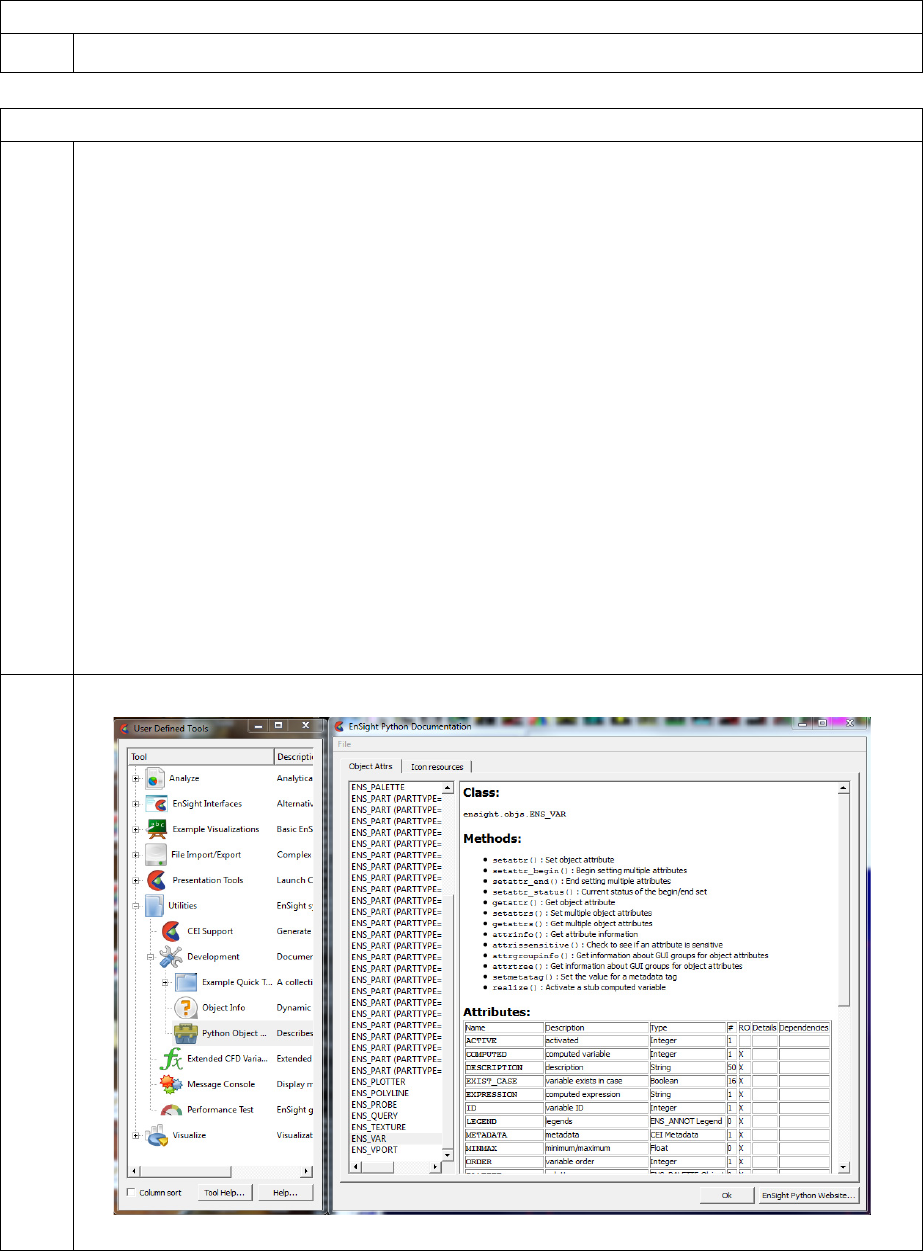
7.1 EnSight Python Code Methods
EnSight Interface Manual 6-33
err = ensight.removecallback(ID)
This method removes the previously registered callback function.
suppressed = ensight.sendevent( python_list [,filter=f][,deferred=d] )
This method works in conjunction with ensight.ENS_EVENT_PYTHON. When this function
is called from the EnSight Python interpreter, all of the callback functions that were associated
with ENS_EVENT_PYTHON are called with the Python list object passed to this function as a
parameter. If a callback returns the value of 1, then the list is not passed to any additional
callback functions of this type and sendevent() returns 1. This mechanism is used to allow
multiple objects running within the EnSight Python interpreter to communicate with each other
and pass data, messages, etc back and forth within EnSight. By default, this is a synchronous
call, so callback functions that themselves call sendevent() must take care to ensure that their
callback function is reentrant. The user may also specify the ‘deferred=’ keyword to make the
callback asynchronous. If “deferred” is set to 1, this function will return immediately, but will
queue up the callback for later execution. A the next point where EnSight becomes “idle” the
callbacks will be executed. This can be very useful in breaking circular callback loops. By
default, the python list object is sent to all methods registered for the ENS_EVENT_PYTHON
callback. The ‘filter=’ keyword can be used to select a sepecific subset of registered methods
be called instead of all of them. The filter keyword works in conjunction with the filter
parmeter to ensight.addcallback() to create private communications channels. The
ensight.query(ensight.UNIQUE_ID) call can be used to generate guaranteed unique numbers
that can be used for filter values at runtime to avoid colliding with other applets which may also
use this mechanism.
7.2 EnSight object API
6-34 EnSight Interface Manual
7.2 EnSight object API
Starting in EnSight 9.0, CEI has been developing a new Python API based on the intrinsic objects inside of
the EnSight core. This API tragets applications developers that wish to build more complex applications
on top of the EnSight Qt and Python interfaces. This API is utilized by EnSight itself internally. The API is
much larger than the previous API and the documentation would not fit easily into these documents.
Furthermore, the API is not yet complete and CEI reserves the right to change anything in the API without
warning at this point in time. Many folks have asked for access to this API, even though it is not yet
complete. CEI does not offer formal support for any of the Object API interfaces at this point in time. We
will take bug reports, but due to the nature of the API, we are not providing normal support services.
CEI provides two locations for information on the API. First, in the user-defined tools, there is a tool
located under Utilities/Development named “Python Object API”. This tool allows the user to browse the
various classes available and their attributes/methods. The tool is “self-documenting” in that all the
information it displays is generated from the core objects at runtime. There is also a website: https://
sites.google.com/a/ensight.com/ensight-python-api/ that contains additional information about the various
APIs. The website is dynamically updated and interested parties can subscribe to changes via RSS feeds.
7.3 EnSight extension mechanism
EnSight Interface Manual 6-35
7.3 EnSight extension mechanism
A number of features of EnSight are written as extensions in Python or command language. In EnSight,
this system has been written to more fully integrate GUI objects and command language extensions into
EnSight. The extension framework itself is written in Python and resides in $CEI_HOME/ensight102/
site_preferences/extensions. This directory contains two directories: core and user_defined. The ‘core’
directory contains the Python implmentation of all of the base classes described here. The ‘user_defined’
directory contains the various EnSight extensions that are loaded on startup. At least two replacement GUI
extensions, ten Tools and a large number of Menus are included by CEI in the distribution. The source
code to these are an extremely valuable reference to the extension developer.
Startup process
At startup, EnSight builds a default sys.path which includes ‘$CEI_HOME/ensight102/site_preferences/
extensions’ as well as EnSightDefaultDirectory/extensions (if it exists). EnSightDefaultsDirectory is
%HOMEDRIVE%%HOMEPATH%\(username)\.ensight102 commonly located at
C:\Users\username\.ensight102 on Vista and Win7, C:\Documents and Settings\yourusername\.ensight102
on older Windows, and ~/.ensight102 on Linux, and ~/Library/Application Support/ensight102 on the
Mac. It will also add any directories specified by the CEI_PYTHONPATH environmental variable. This
variable may contain multiple directory names, separated by a ‘:’ under unix operating systems and a ‘;’
under Windows.
EnSight scans in sys.path, looking for entries that end in the name ‘extension’. If any subdirectory of an
extension directory contains an __init__.py file, the subdir is ‘import’ed into the module ensight.ext (note:
ensight.ext.__path__ is modified to include the ‘extensions’ dirnames). If a user has common Python
utilities or a startup script, it can be added as a module to the internal Python interpreter via this
mechanism.
Formal EnSight extensions
EnSight supports the concept of a formal extension. An extension to EnSight is a subclass of one of the
base-classes of the extension framework. Common extensions are for user-defined menus or “tools” and to
replace the EnSight GUI itself. All extensions include a mechanism to extend EnSight command language
to include custom batch scripting and action logging. EnSight looks for extensions by scanning all of the
.define, .py and .enc files located in subdirectories rooted by a subdirectory of a sys.path ‘extension’
directory (as described above) named ‘user_defined’ for specially formatted comment blocks. There are
two comment block forms for “Legacy” and “Direct load” extensions.
Legacy extensions
Legacy extensions can include operatons written in command language or Python. The comment block in
each of these extensions has the general form:
#ENSIGHT_USER_DEFINED_BEGIN
#TEXT=name used for GUIs
#TOOLTIP=text displayed in tooltips
#ICON=name_of_an_iconfile.png
#NAME=simplename
#DESC=text description of the item
#TYPE=TOOL,MENU,TOOLDIR,MENUDIR
#MODE=’All’,’Part’,’Annot’,’Plot’,’VPort’,’Frame’
#PTYPE=’All’,’None’,’Mixed’,’Model’,’ClipPlane’,’Contour’,’DiscretePar
ticle’,’Frame’,’IsoSurface’,’ParticleTrace’,’Profile’,’VectorArrow’,’E
7.3 EnSight extension mechanism
6-36 EnSight Interface Manual
levatedSurface’,’DevelopedSurface’,’ModelExtract’,’ModelCut’,’ModelBou
ndary’,’IsoVolume’,’BuiltUp’,’TensorGlyph’,’FxVortexCore’,’FxShock’,’F
xSepAtt’,’MaterialInterface’,’Point’,’AxiSymmetric’,’ModelMerge’,’Mult
’
#ENSIGHT_USER_DEFINED_END
Most of these fields are optional. If they are included in a .py or .enc file, they inform EnSight that these
are TOOL or MENU extensions (depending on the TYPE= value). EnSight will build an extension object
(a subclass of the tool_extension or menu_extension classes) for the file and if the extension is executed,
the contents of the file will be executed. When it is run, the directory containing the file will be added to
sys.path temporarily.
MODE= and PTYPE= fields are used for filtering the display of the item depending on the current state of
EnSight (what mode and what type of parts are selected).
A file named ‘menu.define’ or ‘tool.define’ can contain just this comment block, but uses the type
‘TOOLDIR’ or ‘MENUDIR’. If this file exists, the other commented files are included as GUI children of
that object. The loader will instantiate a class of the proper type: ‘menu_extension’ or ‘tool_extension’ and
registers it with EnSight. The registration operation has two parts. First, the class is stored under the proper
key in the dictionary ‘ensight.core.extensions’ so that object can query and use the various extensions.
Second, the register method is called on the base class (’core_extension’). This methods registers a method
on the object as a the command language extension. Thus, an object with the name ‘foo’ that is a child of
an object with the name ‘bar’ will be able to generate command language of the form “ext: bar.foo string”.
It is also able to handle the playback of such strings by overriding the base class.
Direct loaded (Python) extensions
Direct load extensions can only be written in Python and have a number of advantages over Legacy
extiensions, including private namespaces in both Python and command language. Developers are
encouraged to use this form of extension whenever possible as it avoid potential namespace collisions both
in Python and EnSight. To use this mechanism, the developer writes their own subclass(es) of the
appropriate extension base class(es). They then add a comment block to the top of the Python source code
file that looks like this:
#ENSIGHT_USER_DEFINED_BEGIN
#FACTORY=function_name
#ENSIGHT_USER_DEFINED_END
In this case, the file will be imported and the function ‘function_name()’ will be invoked with a single
‘parent’ parameter. The function should create all of the instances of the extension class objects needed and
return them as a Python list. Note that function_name() should also do any parent adding for the objects it
wants before returning them. The calling system will register the objects in the returned list and insert them
into the ensight.core.extension dictionary. When this file is imported, the directory it is in will have been
added to the sys.path variable.
Extension base classes
The extension mechanism is based on Python subclasses. All extensions subclass from a code base class.
This class provides two important features. First, each extension is in a private namespace in Python,
allowing each one to have its own “global” variables. Second, each extension is given part of the
command language namespace complete with methods to generate custom command language and replay
it. The simplest extension just extends command language with a new command (note: in command
language, all extensions appear as: ‘ext: namespace string’). The base classes are “core’, “guibase”, “gui”,
“tool” and “menu”.
7.3 EnSight extension mechanism
EnSight Interface Manual 6-37
core_extension class
Basic extension of the command language (type = “core”). Override the cmdExec() and cmdRecord()
methods to generate your own command language extensions.
Data members:
_version : version number
_path : path to the file defining this extension
_name : “name” for purposes of Python/cmdlang namespaces (no spaces, odd chars, etc)
_text : Display name of the extension (spaces allowed)
_desc : ASCII description of the exension (spaces allowed)
_namespace : actual cmdlang namespace (e.g. ext: namespace foo)
_children : list of children of this extension
Member functions:
addChild(child) : add a child
setDesc(text)
setSort(text) : set the menu sorting value for this extension
cmdExec(string) : called back when cmdlang sees “ext: namespace foo” String will be “foo”
cmdRecord(string) : call to record command language “ext: _namespace string”
guibase_extension class (subclass of core_extension)
This class adds common GUI elements such as itcons and tooltips (type = “guibase”). In general, user
defined extensions should not subclass this class directly.
Member functions:
setInMenus(v) : Set the state of dynamic menu visiblity
getInMenus() : True if this extension should show up in any dynamic menus
setTooltip(text) : the text for the tooltip
setIcon(”pathname”) : filename for the icon, can be a resource reference (e.g. “:/ensight/...”)
getWidget(w,parent) : return the widget representation of the object. This method is overrid-
den by subclasses
setWaitCursor(onoff) : display/clear the hourglass cursor for this extension
gui_extension class (subclass of guibase_extension)
A full user-defined GUI (type = “gui”). Subclass this class to completely replace the EnSight GUI with
your own gui. Note: the cmdExec method has been overridden to include “activate_gui”
Member functions:
setSplash(pathname) : pathname to an SVG file to use as the splash screen
doActivate(onoff) : called to enable/disable this GUI must be overridden, returns False on
failure.
doErrorMessage(message,style) : called when EnSight throws an error or needs a Yes/No
question, must be overridden.
doGuiEvent(message,targetlist) : called when there is a GUI event, must be overridden.
Useful module functions:
These functions can be used directly by applications that want to interact with the core GUI and its events.
7.3 EnSight extension mechanism
6-38 EnSight Interface Manual
ensight.core.gui_extension.gui_activate(name)
gui=ensight.core.gui_extension.current_active_gui()
ensight.core.gui_extension.error_message(msg,what)
ensight.core.gui_extension.gui_event(msg,targets)
tool_extension class (subclass of guibase_extension)
Baseclass for an EnSight user-defined tool (type = “tool”). All tool extensions must subclass from this
class.
Member functions:
run() : This function is called when the tool is invoked. The function must be overridden.
menu_extension class (subclass of guibase_extension)
Baseclass for an EnSight popup menu (type = “menu”). All menu extensions must subclass from this
class.
Data members:
_info : the dictionary of values resulting from the mousedown that triggered this menu
Member functions:
setSeparator(boolean) : set to true if this menu is a separator
setMode(mode) : a string containing the mode names for this menu to be displayed in. Concat-
enated from: ‘Part’,’Annot’,’Plot’,’VPort’,’Frame’,’All’
setPartType(type) : a string containing the part types for which this menu is to be displayed.
Concatenated from:
‘All’,’Model’,’ClipPlane’,’Contour’,’DiscreteParticle’,’Frame’,’IsoSurface’,’ParticleTrace’,’
Profile’,’VectorArrow’,’ElevatedSurface’,’DevelopedSurface’,’ModelExtract’,’ModelCut’,’
ModelBoundary’,’IsoVolume’,’BuiltUp’,’TensorGlyph’,’FxVortexCore’,’FxShock’,’FxSepA
tt’,’MaterialInterface’,’Point’,’AxiSymmetric’,’ ModelMerge’,’Mult’
validFilter(self,emode,ptype) : return 1 if this menu should be shown. By default, it filters
using the mode and parttype values as noted above, however for general filtering, one ma
override this method.
run() : override this method do what this menu should do when selected.
the _info attribute is set to the “context” of the operation that started the menu operation. It is a dictionary.
Some fields are pre-defined, depending on the EnSight RMB context.
The pre-defined _info fields are:
Common to all modes
‘pick’: the click target
‘pos’: the (x,y,z) tuple of the click in data space
‘target’: list of ensight object references that are the action target (list can be empty)
‘mousepos’: (x,y) position tuple in the graphics window of the mouse down (normalized coords). -1,-1 if
there is no position or one is not in the window.
pick: CVF_CURSOR_TOOL
7.3 EnSight extension mechanism
EnSight Interface Manual 6-39
pick: CVF_LINE_TOOL
‘item’: The part of the line clicked: CVF_EVENT_LOCAT_MID, CVF_EVENT_LOCAT_END2,
CVF_EVENT_LOCAT_END1, CVF_EVENT_LOCAT_XAXIS, CVF_EVENT_LOCAT_YAXIS,
CVF_EVENT_LOCAT_ZAXIS
pick: CVF_PLANE_TOOL
‘item’: The part of the line clicked: CVF_EVENT_LOCAT_MID,
CVF_EVENT_LOCAT_UPPER_RIGHT, CVF_EVENT_LOCAT_LOWER_LEFT,
CVF_EVENT_LOCAT_LOWER_RIGHT, CVF_EVENT_LOCAT_UPPER_LEFT,
CVF_EVENT_LOCAT_XAXIS, CVF_EVENT_LOCAT_YAXIS, CVF_EVENT_LOCAT_ZAXIS
pick: CVF_CYLINDER_TOOL
‘item’: The part of the line clicked: CVF_EVENT_LOCAT_MID, CVF_EVENT_LOCAT_END2,
CVF_EVENT_LOCAT_END1, CVF_EVENT_LOCAT_XAXIS, CVF_EVENT_LOCAT_YAXIS,
CVF_EVENT_LOCAT_ZAXIS, CVF_EVENT_LOCAT_RADIUS
pick: CVF_CONE_TOOL
‘item’: The part of the line clicked: CVF_EVENT_LOCAT_MID, CVF_EVENT_LOCAT_END2,
CVF_EVENT_LOCAT_END1, CVF_EVENT_LOCAT_XAXIS, CVF_EVENT_LOCAT_YAXIS,
CVF_EVENT_LOCAT_ZAXIS, CVF_EVENT_LOCAT_RADIUS
pick: CVF_SPHERE_TOOL
‘item’: The part of the line clicked: CVF_EVENT_LOCAT_MID, CVF_EVENT_LOCAT_END2,
CVF_EVENT_LOCAT_END1, CVF_EVENT_LOCAT_XAXIS, CVF_EVENT_LOCAT_YAXIS,
CVF_EVENT_LOCAT_ZAXIS
pick: CVF_REVO_TOOL
‘item’: The part of the line clicked: CVF_EVENT_LOCAT_MID, CVF_EVENT_LOCAT_END2,
CVF_EVENT_LOCAT_END1, CVF_EVENT_LOCAT_XAXIS, CVF_EVENT_LOCAT_YAXIS,
CVF_EVENT_LOCAT_ZAXIS
pick: CVF_POLYLINE
‘item’: The spline number clicked on
‘point’: The index into the spline knot points
pick: CVF_LEGEND
‘item’: The palette id
‘component’: The palette id component (for vectors)
pick: CVF_ANNOT
‘item’: The annotation id (the target object has the type implicitly)
pick: CVF_PART
‘item’: The part id
pick: CVF_VIEWPORT
‘item’: The viewport id
pick: CVF_PLOTTER
‘curve’: The curve number clicked on
7.3 Internationalization and EnSight Extensions
6-40 EnSight Interface Manual
‘value’: The (f,x) value at the clicked point
‘_prepick_’: This key is optional. If set to the name of a user-defined menu, the doPopup() function will
not display any menus. Instead, it will call the ‘run()’ method on the first menu with that name. This
mechanism makes it easy to execute a menu in a given spatial context.
Useful module functions:
core.userdefinedmenus.doPopup(infodict) : popup the current RMB menu at the mouse. You
must pass a proper info dictionary (see: _info above)
With this function, the caller needs to create the _info dictionary. One special key has been defined:
‘mode’. If this key is present, it will override the current EnSight mode value for validFilter() filtering. An
example using this function would be:
dict = {'pick': ensight.CVF_PART, 'item': partid, 'target': partobj,
'pos': (0,0,0), 'mousepos': (-1,-1) }
ensight.core.userdefinedmenus.doPopup(dict)
Internationalization and EnSight Extensions
The EnSight core includes an instance of the CEItranslate object. It can be accessed as: ensight.core.tr.
When the ensight.core module loads and scans the directories for extensions, it also scans for any *.qm
files and automatically registers them with ensight.core.tr. Thus, if you have internationalized an extension
GUI (or any other Qt/PyQt gui), simply place the translation files in the extensions directory and they will
be loaded. When the QApplication instance is created, ensight.core.tr.changelang() is called. If the user has
set CEI_LANG (or the host system has a language set), the translation files for that langauge are
automatically loaded. CEI_LANG should be set to the two character ISO 639 code for the target language.
In Python code, you can trap and handle dynamic language changes by including the following method to
your top level widget:
# i18n bits: handle dynamic language changes
def changeEvent(self, event):
if (event.type() == QtCore.QEvent.LanguageChange):
self.retranslateUi(self)
QtGui.QMainWindow.changeEvent(self, event)
Note that you may need to change ‘QMainWindow’ to the appropriate classname. The
‘self.retranslateUi()’ call should be replaced with whatever function regenerates the GUI text contents on
your system (it may be more than one call to autogenerated retranslateUi() methods.
7.4 Helper modules
EnSight Interface Manual 6-41
7.4 Helper modules
CEI has included a number of helper modules that wrapper common functions. These are included in a
couple of different modules. Python developers are encouraged to familiarize themselves with these
modules and their functions as they can save a great deal of development time and provide a more
consistent user experience.
‘ensight.core’ module
This module include a number of image saving and printing functions that implement standard GUI
menus.
CeiEnSightPrintWindow() class for rasterizing and printing (in qtimageutils.py)
CeiEnSightCopyWindow() copy to clipboard (in qtimageutils.py)
CeiEnSightSaveImage() save image to disk (in qtimageutils.py)
CeiEnSightImportImageAnnot() import image file/movie as an annotation (in qtimageutils.py)
In the core, there are some useful items (created by __init__.py). ensight.core.ENS_stdout_instance/
ENS_stderr_instance are the wrappers for the Python interpreter output. EnSight has ‘resume()’ and
‘suspend()’ methods which allows output to be redirected to the console instead of the command dialog
Python tab. There is also a dictionary ‘ensight.core.extensions’. The keys of the dict include ‘menu’, ‘tool’,
‘core’, ‘gui’ and each points to a list of instances of object of the class ‘xxxx_extension’s that were created
on startup.
‘cei’ module
This module includes a number of common functions that are not generally EnSight specific. They are
used in tools like EnVe, but can be used by any EnSight Python application.
CeiPrintDlg() class for PyQt based rendering and printing of the main window (in printdlg.py)
CeiQtImageFormatOptions() class for prompting the user for UDIL selection/options (in qtimgformats.py)
CeiQtSaveImage() class to prompt the user for a complete set of image size/saving options, including the
render and save) (in qtimgformats.py)
CeiPlot() classes to wrapper matplotlib. Create a graph and save it to disk (in plots.py)
CeiQtPlotWindow() class providing a dockable Qt4 widget that contains a CeiPlot object, including copy
and print operations (in qtplots.py)
CEItranslate() class that acts as a repository for .qm translation files and allows for dynamic changing of
the language for all objects as well as a method to get a language menu (in qtlanguage.py)
ceisplash() class to manage a splash screen from a .svg file (in ceisplash.py)
CeiLogging() and logging shortcuts (in ceilogging.py)
CeiQtGenericDialog() class that generates dynamic dialogs from simple lists and prompts the user for
values. It can handle things like text, checkboxes, ints, floats, variables, parts, option menus, strings,
filenames, etc (in qtgenericdlg.py)
Introduction
EnSight Interface Manual 7-1
8 EnVe Module
Introduction
EnVe refers to two entities. First EnVe refers to the enve extension module within EnSight which includes
programming routines for manipulating images and movies. Second EnVe refers to an interactive
application with a GUI that is built upon the image and movie manipulation extension module. The enve
extension module will be discussed first, followed by the EnVe application.
The EnVe extension module can be imported into an EnSight python routine to make use of two main
Python objects: the image and the movie objects to access low-level manipulation methods. These methods
are discussed in detail in then next section. If you wish to use the low-level image and movie methods, the
enve module can be imported into your EnSight python code with the following statement at the top:
import enve
Higher level manipulation routines that both provide high-level movie and image functionality as well as
serve as enve tutorial routines, have been included with your EnSight install as an ens_utils module.
Note: you cannot use the ens_utils module outside of EnSight. To use these routines, simply import the
ens_utils module as follows:
import ens_utils as eu
These routines translate movies and images to another format, they concatenate movies or images into
another movie of a chosen format, they difference images or movies and return the statistics on the
differences and/or write out the difference as an image or movie, respectively. Example usage of these
routines will be discussed in a bit more detail in the next section. The ens_utils module is located as
follows:
$CEI_HOME/ensight102/site_preferences/extensions/ens_utils.py
The second major entity is the EnVe interactive application. It is built on the PyQt (Python interface to the
Qt GUI library) module and the enve module. This application allows interactive loading and modification
of images and movies and can be accessed by typing in the following at the command line:
enve41
Alternatively, double clicking on the EnVe4.1 icon on your desktop will start up the application. Studying
and using the enve modules as well as their usage in the ens_utils module will help you to understand the
EnVe application’s options and using the EnVe application will help you understand the enve modules.
8.1 EnVe Extension Module Programming
EnVe Python ens_utils module
The EnVe Movie object
The EnVe Image object
8.2 EnVe Application
8.3 Helper modules
Warning: the current codec for writing mp4 files does not properly read them. Therefore you can write
mpeg4 files, including those using the H264 standard, but will often fail at reading them into EnVe and also
into the enve module.
8.1 EnVe Extension Module Programming
7-2 EnSight Interface Manual
8.1 EnVe Extension Module Programming
EnVe Python ens_utils module
The ens_utils module is a collection of high-level EnSight and EnVe routines available to speed up your
programming workflow. These modules fit between the EnVe application and the enve module: they do some of
the high-level manipulations of the EnVe application while they are still useable in your EnSight Python code.
The code in the ens_utils.py module also serves to illustrate the usage of the low-level movie and image
functions. These routines can enhance your post-post processing productivity. For example, you might want to
convert a number of files into a movie. You would simply import the ens_utils module and find your module
from the description below and use it. Or, look it up in the python source to see how it works if you want to
understand the enve module in detail in action.
The ens_utils module is included in the following directory.
$CEI_HOME/site_preferences/extensions/ens_utils.py
and is easily imported as follows:
import ens_utils as eu
Edit the ens_utils.py and find the enve routines and take a look at them as they are discussed below. The
detailed, low-level enve functions that are used will be discussed in the movie and image sections below.
A dictionary of the codecs: eu.codec_dictionary()
The enve module has a number of codecs designed to read and write movies and images. All of the packages
installed with EnSight (EnVe, EnVideo and EnSight) use these codecs, so that you are guaranteed to be able to
read and write your movies and images on all platforms that we support. So the first thing you might need to do
is to get a listing of the supported codecs and the extensions. The second thing you might want to do is to get a
listing of what options are available for controlling the output of each of these formats. To use it in your python,
do the following:
import ens_utils as eu
#
# Get a dictionary of all codecs
#
cdict = eu.codec_dictionary()
cdict[‘name’] will have a list of all of the codec names:
['AVI', 'BMP', 'EVO', 'FLV', 'GIF', 'JPG', 'MPEG', 'MPEG4', 'PNG', ...]
cdict[‘ext’] will provide a list of all the appropriate extensions for each of these names (note that some codec
names have multiple extensions):
[['.avi'], ['.bmp'], ['.evo'], ['.flv'], ['.gif'], ['.jpg', '.jpeg'], ['.mpg', '.mpeg',
'.mp4'], ['.mp4'], ['.png'],...]
cdict["name"][0] is the codec name with the extensions in cdict["ext"][0]: ‘AVI’ corresponds to the
‘.avi’ extension
Take a look at the comments in the ens_utils.py file for the codec_dictionary() function as follows:
###################################################################
#
# returns an enve codec dictionary
# IN
# If both inputs are empty (default) then you get a list of ALL
# enve codecs
# If name OR ext are defined then you get a list of codecs that
8.1 EnVe Python ens_utils module
EnSight Interface Manual 7-3
# match either.
# name = codec name, e.g. 'MPEG4', 'PNG'. Note since codec names are
# all CAPITAL letters the name is converted to all upper
# prior to comparison, so it is case insensitive
# ext = codec suffix e.g. '.mpg', '.png'. Note since all codec
# suffixes start with a '.', a missing '.' is added prior to
# comparison and all ext are converted to lower so it is
# case insensitive.
# the_type = 'movie' - returns only movie formats that can store
# multiple frames in one file
# 'image' - returns only image formats that can store
# one frame per file
# 'all' - returns both movie and image formats
#
# OUTPUT
# A Dictionary with the following KEYS:
#
# 'name' - a list of all the codec names available
# 'ext' - a list of lists of recognized extensions
# corresponding to the name list above
# 'desc' - a list of detailed descriptions of the
# codecs corresponding to the name list abvoe
# 'stereo' - a list of True or False whether the codec
# supports stereo
# 'single file' - a list of True or False whether the
# True means all frames in one file
# False means one frame per file
# 'options' - a list of lists corresponding to the codec
# name list as follows:
# [[name,'type',[choices], default, detailed descrip],
# [name2, 'type',[choices], default, detailed descrip],... ]
# name is the option name
# 'type' is 'BOOL', 'INT', 'FLOAT', 'CHOICE'
# [choices] is
# [0,1] for BOOL
# [min,max] for INT or FLOAT (a range of choices)
# ['choice1', 'choice2',...'choiceN'] a list of text choices for CHOICE
# default is the default choice for this option
# detailed description is the complete option description
#
def codec_dictionary(name="", ext="", the_type='all'):
Mapping name to file extension: get_codec_extension and get_codec_name
Sometimes it is useful to parse a filename extension and then ask enve if it has a codec for that extension.
Or, if you are going to save an image, the enve image save decides on what codec to use based on the
filename extension, so you want to be able to name the file appropriately prior to saving it.
import ens_utils as eu
print "\n\nName to Extension"
for cdt in cdict['name']:
print cdt, eu.get_codec_extension(cdt)
print
print "\n\nExtension to Name"
for ext in cdict['ext']:
for ee in ext:
8.1 EnVe Python ens_utils module
7-4 EnSight Interface Manual
print ee, eu.get_codec_name(ee)
print
Has the following output
Name to Extension
AVI ['.avi']
BMP ['.bmp']
EVO ['.evo']
FLV ['.flv']
GIF ['.gif']
JPG ['.jpg', '.jpeg']
MPEG ['.mpg', '.mpeg', '.mp4']
MPEG4 ['.mp4']
PNG ['.png']
PPM ['.ppm', '.pgm', '.pbm', '.pnm']
MOV ['.mov']
SGI ['.rgb', '.bw', '.sgi']
SM ['.sm']
SWF ['.swf']
TIFF ['.tif', '.tiff']
XPM ['.xpm']
Extension to Name
.avi AVI
.bmp BMP
.evo EVO
.flv FLV
.gif GIF
.jpg JPG
.jpeg JPG
.mpg MPEG
.mpeg MPEG
.mp4 MPEG
.mp4 MPEG
.png PNG
.ppm PPM
.pgm PPM
.pbm PPM
.pnm PPM
.mov MOV
.rgb SGI
.bw SGI
.sgi SGI
.sm SM
.swf SWF
.tif TIFF
.tiff TIFF
.xpm XPM
8.1 EnVe Python ens_utils module
EnSight Interface Manual 7-5
Print out movie codecs and image codecs: eu.codec_dictionary()
import ens_utils as eu
print "\n\nImage formats:"
print eu.codec_dictionary("","","image")
print "\n\nMovie formats:"
print eu.codec_dictionary("","","movie")Convert a movie from one format to another
eu.convert_movie
import ens_utils as eu
# and convert the original evo file to all other movie types:
# out_mov.evo, out_mov.avi, out_mov.mpg, etc.
in_mov = "/path/file.mp4" # full filename with extension
out_pref = "/path/new_file" # file prefix
out_form="AVI" # one of the allowable formats
ret_val = eu.convert_movie(in_mov, out_pref, out_form)
Code comment details:
#
# This will convert a movie
# opts is a text string: "optname optchoice optname2 optchoice2"
# example for AVI: 'Compression MPEG4V2 BitRate 20000 '
#
def convert_movie(infile, outfile_prefix, out_format='EVO', opts=""):
Get movie info metadata: eu.get_movie_info
import ens_utils as eu
in_mov = "C:/Users/ensight/Documents/test.evo"
in_mov_info = eu.get_movie_info(in_mov)
for ky in in_mov_info.keys():
print "# "+ky,eu.get_movie_info(in_mov)[ky]
prints out the following:
# nframes 21
# stereo 0
# repeat [0, 0]
# format EVO
# flip 0
# anaglyph 0
# filename C:/Users/ensight/Documents/test.evo
# realframes 21
# dims [737, 768]
# intensity [1.0, 1.0]
# framerange [0, 20]
# fps 30.0
# tiling [1, 1]
# options
8.1 EnVe Python ens_utils module
7-6 EnSight Interface Manual
Extract out a movie frame: eu.extract_frame()
# Extract second to last frame
# of a movie and write out as PNG
import ens_utils as eu
in_mov = "C:/Users/ensight/Documents/test.evo"
out_prefix = "C:/Users/ensight/Documents/test2"
mi = eu.get_movie_info(in_mov)
fn = mi['nframes'] - 1 # second to the last frame
eu.extract_frame(in_mov, out_prefix ,fn, "PNG")
Make a list of images into a movie: eu.images_to_mov()
# read in a bunch of tif images
# and write them into each and every one of the
# supported movie formats
#
# get info on all movie codecs
import ens_utils as eu
mdict = eu.codec_dictionary("","",'movie')
# This searches out_dir for all the tif files
file_list = eu.search_tree(out_dir,".tif",1)
print file_list
mv = "EVO"
eu.images_to_mov(file_list, out_dir+"mov_tiff", mv)
Concatenate list of movies & convert them to a new format: eu.concatenate_movies()
import ens_utils as eu
infile_list = ["/path/mov.avi","/path/mov.mp4",...]
out_file_prefix = "/newpath/new_prefix"
eu.concatenate_movies(infile_list, outfile_prefix, out_format="EVO")
Do a diff of two movies frame by frame and write out a new movie: eu.movie_compare()
import ens_utils as eu
mov1 = "/path/mov.avi"
mov2 = "/path/mov.mp4"
out_diff_prefix = "/path/mov_diff"
eu.movie_compare(mov1,mov2,out_diff_prefix,"EVO")
Convert an image to a different format: eu.convert_image()
import ens_utils as eu
img = "/path/img.png"
out_diff_prefix = "/path/new_image"
new_format = "JPG"
eu.convert_image(img,out_diff_prefix,new_format)
Get an image from EnSight graphics window & return enve image: eu.get_ens_image()
import ens_utils as eu
img = eu.get_ens_image()
8.1 EnVe Python ens_utils module
EnSight Interface Manual 7-7
Get a dictionary of info about an enve image: eu.get_image_info()
import ens_utils as eu
idict = eu.get_image_info(img)
print idict[‘dims’]
Compare two images by doing a diff on the pixel by pixel diff: eu.image_compare()
import ens_utils as eu
img = "/path/img.png"
img2 = "/path/img2.png"
outfile = "/path/out_diff.png"
stat_dict = eu.image_compare(img1,img2,outfile)
print stat_dict
Save an image with a transparent background: eu.get_ens_image_trans()
import ens_utils as eu
outfile = "/path/out_trans_bck.png"
env_img = eu.get_ens_image_trans(outfile,annots=’dark’)
Tiling two movies or images: eu.movies_tile_mtm()
This will write out an .mtm file that can be read into EnVideo to show two movies
adjacent to each other. The default is to write an mtm file with movies side by side.
The movies must have the same number of frames. Mismatch
import ens_utils as eu
infile_list = ["/path/file1.evo","/path/file2.evo"]
out_file_prefix = "/path/file_mtm"
err = eu.movies_tile_mtm(infile_list,out_file_prefix)
8.1 The EnVe Movie object
7-8 EnSight Interface Manual
The EnVe Movie object
This section will discuss the portion of the enve module that handles movies. The movie object is created in
READ or WRITE mode. In normal operation, the various movie attributes are set after creation and then the
object is 'open()'ed to begin the I/O process. Once the file is open, some attribute values will change to match the
actual values in the files and some attributes will become read only until the file is closed. Movie objects are
associated with a filename. They contain a number of images that can be read as well as attributes like
dimensions, frames per second and stereo.
The movie object is used to open and read from or write to animation files. A simple function for reading a
movie in one format and writing it to another format is shown below. Note it allows changing the options.
import enve
#
# This will convert a movie
# opts is a text string: "optname optchoice optname2 optchoice2"
# example for AVI: 'Compression MPEG4V2 BitRate 20000 '
def convert_movie(infile, outfile_prefix, out_format, opts=""):
in_mov = enve.movie(enve.MOVIE_READ)
out_mov = enve.movie(enve.MOVIE_WRITE)
in_mov.filename = infile
out_mov.filename = outfile_prefix
in_ret = in_mov.open()
if in_ret != 0:
print "Failure to open input movie"
print "'" +infile+"'"
return in_ret
else:
out_mov.format = out_format
if len(opts) > 0:
out_mov.options = opts
out_mov.addcount(in_mov)
out_mov.open()
out_mov.append(in_mov)
out_mov.close()
in_mov.close()
#
filename1 = r"C:\Users\ensight\Documents\test.evo"
filename2 = r"C:\Users\ensight\Documents\test_out"
# example options for AVI
options = 'Compression MJPEG BitRate 30000 '
convert_movie(filename1,filename2+"AVI_demo","AVI",options)
# this will step through all the available formats and convert the
# test.evo file to test_out.suffix where suffix is the format suffix
# Note if the output format is an image format then only a single image of the
# last timestep will be saved.
#
clist = enve.codecs()
for cc in clist:
convert_movie(filename1,filename2,cc[0])
8.1 The EnVe Movie object
EnSight Interface Manual 7-9
Here is an example of loading a series of .png images and writing them out as an evo movie.
import enve
#
# Sequentially numbered images can be read directly as
# a movie using '#' characters as the numerical field
# and an '@' character where the 'l','r' characters go.
#
# Convert images named: sample00.png, sample01.png, ...
#
mov = enve.movie(enve.MOVIE_READ)
mov.filename = r"d:\Users\rjfrank\Desktop\stereo\sample##.png"
err = mov.open()
if (err == 0):
evo = enve.movie(enve.MOVIE_WRITE)
evo.filename = r"d:\Users\rjfrank\Desktop\stereo\sample_output"
evo.format = "EVO"
evo.stereo = mov.stereo
evo.addcount(mov)
err = evo.open()
if (err == 0):
evo.append(mov)
else:
print "Error:",evo.errstr()
evo.close()
mov.close()
else:
print "Error:",mov.errstr()
#
# A stereo example: files00l.png, files00r.png, files01l.png,
# files01r.png, ...
#
mov = enve.movie(enve.MOVIE_READ)
mov.filename = r"d:\Users\rjfrank\Desktop\stereo\files##@.png"
# once you open the move below, you write the header
err = mov.open()
if (err == 0):
evo = enve.movie(enve.MOVIE_WRITE)
evo.filename = r"d:\Users\rjfrank\Desktop\stereo\sample_output_stereo"
evo.format = "EVO"
evo.stereo = mov.stereo
evo.addcount(mov)
err = evo.open()
if (err == 0):
evo.append(mov)
else:
print "Error:",evo.errstr()
evo.close()
mov.close()
else:
print "Error:",mov.errstr()
8.1 The EnVe Movie object
7-10 EnSight Interface Manual
Here is an another example that creates a movie.
import enve
#
# Generic examples using naturally ordered images.
# Note: this approach handles the case where the sizes
# of the images might differ as it is not legal to have
# frames of different sizes in a movie. movie.append(image)
# will rescale each image to match the dimensions of the
# output movie.
#
import glob
# Get a list of filenames and sort them alphabetically
wildcard = r"d:\Users\rjfrank\Desktop\stereo\sample*.png"
filenames = glob.glob(wildcard)
filenames.sort()
# start the output movie
evo = enve.movie(enve.MOVIE_WRITE)
evo.filename = r"d:\Users\rjfrank\Desktop\stereo\sample_natural"
evo.format = "EVO"
# set the size of the frames using the first image
# the other images will be scaled to the size of this image
img = enve.image()
err = img.load(filenames[0])
if (err != 0):
print "Unable to set output movie size"
evo.dims = tuple(img.dims)
# set the number of frames
evo.addcount(len(filenames))
# process all images
err = evo.open()
if (err == 0):
for file in filenames:
err = img.load(file)
if (err != 0):
print "Error reading:",file
err = evo.append(img)
evo.close()
else:
print "Error:",evo.errstr()
8.1 The EnVe Movie object
EnSight Interface Manual 7-11
Here is an example that creates a stereo movie.
import enve
#
# Example of image processing on a movie to create
# another. In this example, if the source movie is
# in stereo, it will swap the right and left images.
#
mov = enve.movie(enve.MOVIE_READ)
mov.filename = r"d:\Users\rjfrank\Desktop\stereo\stereo_example.evo"
mov.open()
evo = enve.movie(enve.MOVIE_WRITE)
# Note: the extension is added automatically.
evo.filename = r"d:\Users\rjfrank\Desktop\stereo\stereo_example_rev"
evo.format = "EVO"
evo.options = "Compression RLE"
evo.stereo = mov.stereo
# addcount() sets the number of output frames as well
# as the frame size
err = evo.addcount(mov)
if (err < 0):
print "Count error:",evo.errstr()
err = evo.open()
if (err < 0):
print "Open error:",evo.errstr()
for i in range(mov.nframes):
print "Working on frame:",i
# if this is a stereo movie, getframe() will return
# a list of enve.image() objects in [right,left] order.
pair = mov.getframe(i)
# swap the images
pair.reverse()
# add them to the other movie (make sure to use a tuple)
err = evo.append(tuple(pair))
if (err < 0):
print "Save error:",evo.errstr()
evo.close()
mov.close()
Now, let’s look at each of the enve movie methods and attributes used to create, load, modify and save
enve movies. The following methods and attributes can be listed in EnSight Python as follows:
import enve
dir(enve.movie)

8.1 The EnVe Movie object
7-12 EnSight Interface Manual
EnVe Module Code Methods
x = enve.movie(enve.MOVIE_READ|enve.MOVIE_WRITE)
Creates an empty movie object in read or write mode. No actual I/O operations will be started
until the “open()” method is called. The proper usage is to create the movie object, set attributes
on it (e.g. filename, image size, number of frame in the case of writing) and then open() the file.
At that point, the append() and getframe() methods will work. When done accessing image
frames, the file should be close()ed and the object can be destroyed.
err = x.addcount(N|image|movie)
Write movies must know in advance how many frames will be added before the file is open()ed.
This function is used to add frame counts to the movie. The input parameter can be an integer
(number of frames) an image object (adds one frame) or another movie (open() and in READ
mode, which adds the number of frames in the movie). In the latter two cases, the target movie
may change its dimensions or frame rate to match the added objects. This will happen if the
current dimensions or fps are <= 0. The return value is the number of frames, or -1 on error.
x.nframes is updated to reflect this as well. If addcount() is only called with an integer number
of frames, the caller must also set the ‘dims’ attribute to set the size of the output movie in
pixels.
err = x.append(image|image_tuple|movie[,object=obj][,method=meth][,smooth=sm])
If a WRITE movie is open(), this method is used to physically add an image, image tuple of two
images for stereo, or the frames in a movie to the current movie. The input frames will be scaled
to match the dimensions of the target. Returns 0 if successful. If the caller specifies the
OBJECT and METHOD keywords to an object reference and the name of a method, this
function will periodically call 'object.method(n)' where n is the number of the frame currently
being worked on. This method should return 1 if the operation is to be aborted or 0 if processing
should continue. By default, this method uses nearest neighbor sampling to scale images. If a
higher quality scaling is desired, set the SMOOTH keyword to the value
enve.CVF_SCALE_SMOOTH to select box filtered scaling.
err = x.close()
This method completes all I/O operations with a given movie. The physical file on disk will be
valid after this method is called.
str = x.errstr()
If any of the methods return an error (-1), a string describing the error will be stored in the
movie object. These error strings can be accessed via this method.
8.1 The EnVe Movie object
EnSight Interface Manual 7-13
image = x.getframe(framenum)
This method extracts a frame from a movie and returns a list of image objects. There may be
one or two images returned (two in the case of a hardware stereo source). If two images are
returned, the first is the left eye image and the second is the right eye image. The framenum is
[0,x.nframes-1]. The returned frame is intensity and repeat adjusted as specified by those
attributes. This method can only be used on a READ movie.
The return is either a list (success) or an int (fail).
On error, this returns the integer -1 so, do the following:
image = x.getframe(framenum)
if type(image) == int:
print “Error”
return image
err = x.open()
This method opens the physical movie file. In the case of a WRITE file, it will begin the
encoding process.
err = x.resetcount()
This function resets the current nframes count on a WRITE movie to 0. This can be called if the
movie is not currently open.
print x
Prints basic information about the movie x.

8.1 The EnVe Movie object
7-14 EnSight Interface Manual
These get and set any of the various movie object attributes.
Movie attributes:
__members__ Returns a list of the attributes this object supports.
Readonly list.
__methods__ Returns a list of the methods this object supports.
Readonly list.
filename The filename to use. Read/write string.
stereo This attribute is non-zero if the movie supports HW
stereo (on read) or if the movie has been set to output
HW or anaglyph stereo (on write). Read/write int. If
stereo is set to non-zero for a WRITE movie then the
append function should include tuples of images
representing the left and right images.
fps The framerate for movie playback in frames per second.
Read/write float.
dims The dimensions of the movie frames in pixels. Read/
write tuple of two ints: (dx, dy)
tiling If the output movie should be written as an MTM file
(see 9.21 Multi-Tiled Movie (MTM) File Format ) this
attribute specifies the number of tiles in the X and Y axis.
Read/write tuple of two ints: (dx, dy)
format This attribute specifies the format for the movie. See:
enve.codecs() for a list of formats. Read/write string.
framerange For a read movie, this attribute allows one to select a
subset of the input frames to read. For example, (10,20)
will cause the movie to only output frames 10 through 20
inclusive (11 frames). Note that framerange numbers
start at 0 and run through x.realframes-1. Read/write
tuple of two ints: (start, end)
nframes For a read movie, this is the effective number of frames
in the file (int), useable by x.get_frame(framenum)
realframes The number of actual physical images in the file (the
repeated frames are not in the total number of frames).
It is the valid range for getframe(X)). It is equal to:
frameend-framestart+repeatstart+repeatend. Readonly
int.
options Format specific options in the form: "op1 value op2
value ...". See enve.codecs() for a list of format options
and the example script for how to create them. Read/
write string.
intensity Frames may have their intensity scaled linearly from the
first to the last frame. This attribute allows this scaling to
be set. The default is (1.0,1.0) or no intensity changes.
Read/write tuple of two floats: (start, end)

8.1 The EnVe Movie object
EnSight Interface Manual 7-15
repeat When reading from a file, the first and last frames may
be repeated a number of times. This attribute allows the
number of additional times those frames appear. For
example, (5,3) will cause the first frame to be repeated 5
additional times (6 total) and the last frame 3 times (4
total). As a result, nframes will report 8 more frames in
the movie. Note that the intensity interpolation includes
these repeated frames. Read/write tuple of two ints:
(start, end)
anaglyph If an output movie has stereo set, this attribute allows
that stereo to be in anaglyph form. Valid values include:
enve.MOVIE_ANAGLYPH_NONE - use HW stereo
(shutter glasses)
enve.MOVIE_ANAGLYPH_REDBLUE
enve.MOVIE_ANAGLYPH_BLUERED
enve.MOVIE_ANAGLYPH_REDCYAN
enve.MOVIE_ANAGLYPH_CYANRED
Read/write int.
flip When reading from a file, flip the frames about the X or
Y axis in memory (the original file is unchanged). If your
object in your movie moves left to right, and flip about
the Y axis then it will move right to left. Note that
pixelated text will be flipped as well. Valid values are
formed by ‘OR’ing: enve.CVF_FLIP_XAXIS and/or
enve.CVF_FLIP_YAXIS
Read/write int.
8.1 The EnVe Image object
7-16 EnSight Interface Manual
The EnVe Image object
The image object is a simple 2D array of pixels. The pixels in an imge can be in one of the
followingformats:
enve.CVF_IMG_FMT_A - alpha only image
enve.CVF_IMG_FMT_L - luminance only image (grayscale)
enve.CVF_IMG_FMT_LA - luminance+alpha image
enve.CVF_IMG_FMT_RGB - red,green,blue three channel image
enve.CVF_IMG_FMT_RGBA - red,green,blue,alpha four channel image
EnVe image object processing operations
x = enve.image()
Create a new image object. The default image is 100 by 100 in size and a format of
enve.CVF_IMG_FMT_RGB.
print x
Prints basic information about the image x.
x == y
The object supports the comparison of two images for pixel by pixel equality
The attributes and methods can be listed separately as follows:
x._methods__
x.__members__
Note that the following members are not used:.
frame, origin, and framenumber.
And, there is no method for closing the file.
x.close()
Both the methods and the attributes are listed together below in alphabetical order.
dir(enve.image())

8.1 The EnVe Image object
EnSight Interface Manual 7-17
x.bitblt(src,spos,ssize,pos,size,mode,backpixel)
This method copies a rectangle of pixels from one image to the target. The two images must
have the same pixel format. The rectangles may lie outside of the source or destination images.
For source pixels that lie outside of the source image, the backpixel value is used. The source
pixels will be scaled as needed (nearest neighbor sampling) to fill the destination rectangle. The
following are variable descriptions: src is an enve.image() object to use as the pixel source,
spos is the origin of the pixels in the source image (a tuple of two ints), ssize is the rectangle
(dx,dy) of the pixels in the source image (a tuple of two ints), pos is the origin location of the
pixels in the destination image (a tuple of two ints), size is the rectangle (dx,dy) of the pixels to
paint in the destination (a tuple of two ints), mode - The operation mode can be a simple copy
(enve.CVF_BITBLT_COPY), where source pixels replace destination pixels or it can be a masked
copy (enve.CVF_BITBLT_ALPHAMASK) where source pixels only replace destination pixels if they
have a non-zero alpha channel, and backpixel is a tuple of 4 integers (Red,Green,Blue,Alpha).
x.blend(src,srcCM,srcAM,dstCM,dstAM,fixedcolor,fixedalpha)
This method blends the pixels of two images together according to four blending mode
functions (a color and alpha for each of the source and destination images). Blending is
performed by weighting each component of the source and destination by a particular function
and then summing the results. The results are then clamped to the range [0,255] and stored in the
destination image. In addition to the images, a fixed color and alpha value are supplied. These
are used by some of the various expression combinations. fixedcolor is a tuple of four integers
(enve.CVF_IMG_FMT_RGBA) and fixedalpha is a single integer.
The formula take the following form:
dst'(RGB)=(dst(RGB)*dstCModeWeight)/255+(src(RGB)*srcCModeWeight)/255
dst'(A) =(dst(A) *dstAModeWeight)/255+(src(A) *srcAModeWeight)/255
srcCM selects the function for determining srcCModeWeight
srcAM selects the function for determining srcAModeWeight
dstCM selects the function for determining dstCModeWeight
dstAM selects the function for determining dstAModeWeight
The available weight functions include:
enve.CVF_BLEND_ZERO The value 0
enve.CVF_BLEND_ONE The value 255
enve.CVF_BLEND_SCOLOR The value of the source color
enve.CVF_BLEND_SALPHA The value of the source alpha
enve.CVF_BLEND_DCOLOR The value of the destination color
enve.CVF_BLEND_DALPHA The value of the destination alpha
enve.CVF_BLEND_CCOLOR The value of the "fixed" color
enve.CVF_BLEND_CALPHA The value of the "fixed" alpha
enve.CVF_BLEND_MSCOLOR 255 - CVF_BLEND_SCOLOR
enve.CVF_BLEND_MSALPHA 255 - CVF_BLEND_SALPHA
enve.CVF_BLEND_MDCOLOR 255 - CVF_BLEND_DCOLOR
enve.CVF_BLEND_MDALPHA 255 - CVF_BLEND_DALPHA
enve.CVF_BLEND_MCCOLOR 255 - CVF_BLEND_CCOLOR
enve.CVF_BLEND_MCALPHA 255 - CVF_BLEND_CALPHA

8.1 The EnVe Image object
7-18 EnSight Interface Manual
.
x.chromakey(incolor,tolerance,alpha)
This method scans the input image and compares the color of each pixel to the input pixel color
(incolor). If every channel is within 'tolerance' of the target pixel, the alpha channel for that
pixel is replaced by the input alpha value. incolor is a tuple of 3 integers (R,G,B) range [0,255]
each. The tolerance is a tuple of 3 integers that are the tolerance in R,G,B range [0,255] each.
x.colormath(rw,gw,bw,aw)
This method performs simple linear algebra on an image. The math is performed at floating
point resolution and the results clamped to the range [0,255] before being output. rw,gw,bw and
aw are each tuples of 5 floats and each represent the coefficients of the linear transform for a
given output component.
The math implemented is as follows:
R' = R*rw[0]+G*rw[1]+B*rw[2]+A*rw[3]+rw[4]
G' = R*gw[0]+G*gw[1]+B*gw[2]+A*gw[3]+gw[4]
B' = R*bw[0]+G*bw[1]+B*bw[2]+A*bw[3]+bw[4]
A' = R*aw[0]+G*aw[1]+B*aw[2]+A*aw[3]+aw[4]
image = x.diff(input [,absolute=1])
This method computes a new image that is the pixel by pixel (component by component)
difference between image ‘x’ and image ‘input’. By default, the subtraction is performed as a
signed operation which is clamped to [0,255] on output. If the ‘absolute’ keyword is set, the
output is the absolute value of the difference clamped to the range [0,255].
x.dims = tuple(int x,int y)
This attribute is used to get and set the image dimensions. Returns the size of the image in the x
and y dimensions. If set, it will resize the image to the new x and y values using nearest
neighbor sampling. Read/write tuple of ints (dx,dy).
str = x.errstr()
If any of the methods return an error (-1), a string describing the error will be stored in the image
object. These error strings can be accessed via this method.
x.flip(int)
This method will flip an image in memory (original file is unchanged) about one or more axis. If
the image is facing left and you flip it about the Y axis then the image will be facing right. This
corresponds to the Horizontal flip toggle in the application. The int parameter formed by
‘OR’ing together the following: enve.CVF_FLIP_XAXIS and enve.CVF_FLIP_YAXIS, selects
the operation.
8.1 The EnVe Image object
EnSight Interface Manual 7-19
x.format = enve.CVF_IMG_FMT_RGB
This attribute is not the format of the image in terms of the codec (‘AVI’, ‘TIFF’, ‘PNG’, etc.).
That format is set using the suffix of the filename when saving the file. The mapping of the
suffices to the format is found in enve.codecs().
This format refers to the information in each pixel. If this is set to a different value, then it will
change the image format to the new value (interpreting all pixel values).
Valid values:
enve.CVF_IMG_FMT_A - alpha only
enve.CVF_IMG_FMT_L - luminance (grayscale) only
enve.CVF_IMG_FMT_LA - luminance and alpha
enve.CVF_IMG_FMT_RGB - red, green, blue, three channel image
enve.CVF_IMG_FMT_RGBA - red, green, blue, alpha, four channel image
Read/write int.
x.fromstring(s, dx, dy, format)
This method is the inverse of tostring(). It constructs the contents of the image x from the pixel
data in the raw binary string s. It is assumed that the string source was something like that output
by the enve.image.tostring() method. The dx, dy and format arguments specify the size and
pixel format the image x should take. This method can be used with packages such as matplotlib
or numpy which provide mechanisms for generating such raw strings.
pv = x.getpixel(xo,yo)
This method will returns as a list, the current color at pixel xo,yo in the image. See setpixel() for
a description of the pv.
np_ndarray = x.getpixels()
This method returns an numpy ndarray with dimensions of (xdim * ydim * depth) and depth is
3 for rgb, 4 for RGBA. So np_ndarray[0,0] might be [0,0,0] for RGB, and each entry is of
type numpy.uint8. You can put this numpy array back into setpixels to create a new image.
err = x.load(filename)
This method reads an image file and sets the current image object to its contents. If the input file
is an animation, the first frame is returned. The method returns 0 on success or a negative
integer on error. See enve.codecs() for supported file formats.
x.macclip()
This is a legacy method for the Apple Mac that is no longer used.
x.ppm()

8.1 The EnVe Image object
7-20 EnSight Interface Manual
This method returns a string that is the representation of the image as an ASCII PPM file. This
can be useful in interfacing to systems like Qt
err = x.resize(xsize,ysize[,smooth=sm])
This method resizes the current image to the size specified by xsize, ysize. This is essentially the
same as changing the ‘dim’ attribute on the image object. By default, this operation is performed
using nearest neighbor sampling. The caller may select higher quality box filtered sampling by
setting the SMOOTH keyword equal to the value enve.CVF_SCALE_SMOOTH.
err = x.save(filename[,options=options_string])
This method saves the current image to disk in the specified filename. The filename must have
an extension, because the format is selected by the filename extension. It is an error to give this
a filename without an extension (in contrast to the movie which uses a prefix without an
extension). The target file is overwritten without warning. The options keyword allows the user
to set specific format options (e.g. compression) like the enve.movie options attribute. The
method returns 0 on success, or a negative integer on error. See enve.codecs() for supported
filename extensions and option strings.
x.setpixel(xo,yo,pixelvalue)
This method will set the color of the pixel at position xo,yo in the image to be the color specified
by the list pixelvalue. Pixelvalue is a list of integer values between 0 and 255 (inclusive). There
should be at least as many elements in the list as there are image components. For example, if
x.format = enve.CVF_IMG_FMT_RGB then there should be three components in pixelvalue (e.g.
[255, 135, 135]) representing the red, green and blue values of the pixel.
x.setpixels(np_ndarray)
This method takes as input a numpy ndarray and it creates and enve image, x. The np_ndarray
is of dimensions of (xdim * ydim * depth) and depth is 3 for rgb, 4 for RGBA. So
np_ndarray[0,0] might be [0,0,0] for RGB, and each entry is of type numpy.uint8. You
must define x as an enve image and define the dimensions of x prior to inputting the numpy
array into it as follows:
# suppose you have an nd_ndarray of dimensions 736x769, with [R,G,B] values
x = enve.image()
x.dims = (736,769)
x.setpixels(np_ndarray)
dict = x.stats()

8.1 The EnVe Image object
EnSight Interface Manual 7-21
This method computes basic statistics on the image object. It computes for all pixels and for all
channels (a 10x10 enve.CVF_IMG_FMT_RGB image is considered to have 300 pixels). It returns a
dictionary with the keys:
‘count’ - the number of pixels in the image
‘mean’ - the mean pixel value
‘sum’ - the sum of all the pixel values
‘sumofsquares’ - the sum of the squares of all of the pixels
‘variance’ - the variance of the pixels
‘minimum’- the minimum pixel value
‘maximum’ - the maximum pixel value
image = x.subrect((int originx, int originy),(int dx,int dy))
image = x.subrect()
This method extracts a rectangle of pixels from the image and returns a new image. The first
tuple is the offset into the image and the last specifies the dx,dy in pixels. In the second form, the
method simply clones the source image.
x.swizzle(swiz,mask)
This method allows the value of any channel of the image to come from any other channel of the
image. The array swiz selects the input channel for each output channel. For example, a swiz of
(0,1,2,3) will result in no image change. A swiz of (2,1,0,0) will swap the red and blue channels
and place the input red channel in the output alpha channel as well. The mask array allows
individual output channels to be enabled or disabled for writing. The value in the mask array
must be non-zero for the output channel to be writable. swiz and mask are both tuples of four
integers. With some formats, not all values are used.
s = x.tostring()
This method will return the pixel data in the image as a raw binary Python string. There is one
character in the string for each component of each pixel. For example, if the image were
100x100 and in enve.CVF_IMG_FMT_RGB format, the resulting string would be 30000 bytes in
length. Note the the image dimensions and pixel format are not encoded in the string and that
the string is actually raw binary data. This method can be used with packages such as matplotlib
or numpy which provide mechanisms for interpreting such raw strings.

8.1 The EnVe Image object
7-22 EnSight Interface Manual
These get and set object attributes are currently unused.
framenumber Returns an index number that can be used to store a
sequence number for this frame. Presently, this is
unused. Read/write int.
frame Returns the size of the image frame for which this image
might be a subrect of. Presently, this is unused. Read/
write tuple of ints (dx,dy).
origin Returns the position (relative to the upper left corner) of the
current image in the full image frame specified by the frame
attribute. Presently, this is unused. Read/write tuple of
ints (dx,dy).

8.1 Additional EnVe Modules
EnSight Interface Manual 7-23
Additional EnVe Modules
dir(enve)shows the following modules
The first two are the main objects.
image, and movie, and these have been discussed in their own sections. In addition the
following minor objects will be discussed below.
arch, extend, home, indexof, istemplate, uuid, version and codecs. These will be
discussed directly below.
test=enve.arch()
This function returns the architecture on which enve is running. For example, enve.arch()
returns win64, apple_10.5, or linux_2.6_64.
test=enve.extend(string name,int timestep,int imin,int imax)
This function resets the imin and imax of a named movie??
test=enve.home()
This function returns the $CEI_HOME location of the EnSight install.
test=enve.indexof(string file,string name,int start,int end)
This function scans from start to end and gets the index of the file when file==name.
test=enve.istemplate(string file)
This function uses the file string to set a template?
test=enve.uuid(1)
This function generates a universal, unique identifier based on the platform, timestamp and a
random number. An example might be as follows: ff20e203-dc86-11e4-9d54-6be85efe571e.
enve.UUID_MAKE_MC - ?
enve.UUID_MAKE_V1 - ?
enve.UUID_MAKE_V3 - ?
enve.UUID_MAKE_V4 - ?
enve.UUID_MAKE_V5 - ?
test=enve.version()
This function generates a list that includes the name and copyright, three digit and then two digit
version of EnVe. For example: ['EnVe Movie Editor, Copyright 2012 Computational
Engineering International, Inc', '4.1.0', 4.1].

8.1 Additional EnVe Modules
7-24 EnSight Interface Manual
list=enve.codecs()
EnSight and EnVe use a consistent set of internal codecs for import and export to ensure
compatibility across all platforms. This may mean that EnVe is unable to import a movie or
image created in a third-party application. This function queries the installed UDILs and returns
a list of supported file formats and associated options. It returns a list structure in the following
form:
[
["name","desc",[".ext",...],stereo, multi,
[["optname",opttype,<optvalue>,<optdefault>"optdesc"],...]],
...
]
"name" is the name of the UDIL, this is used as the movie.format attribute.
"desc" is an ASCII description of the UDIL in more detail.
".ext" is a list of the filename extensions used by this format.
stereo is an integer that is non-zero if the file supports HW stereo movies.
multi is an integer that is non-zero if the format is an animation file that places all frames in
a single file.
The final list is a list of custom options that can be set for the format.
"optname" is the name of an option.
"opttype" is the type of choice: a boolean, integer, float, or choice from a list.
The types can be as follows:
enve.CVF_UDIL_BOOLEAN
enve.CVF_UDIL_INT
enve.CVF_UDIL_FLOAT
enve.CVF_UDIL_CHOICE.
"optvalue" are different for each type:
"optdefault" are different for each type:
Type Value Default
enve.CVF_UDIL_BOOLEAN "0|1" int
enve.CVF_UDIL_INT [int_min,int_max] int
enve.CVF_UDIL_FLOAT [flt_min,flt_max] float
enve.CVF_UDIL_CHOICE ["opt0","opt1",...] int (index into list)
"optdesc" is a full text description of this option.
To list all the codecs see the following:
for f in enve.codecs():
print "%s (%s)" % (f[1],f[0])
For an example,
print enve.codecs()[8]
['PNG', 'PNG Image', ['.png'], 0, 0, [['Compression', 4, ['None', 'Fast',
'Best', 'Default'], 3, 'Compression method']]]

8.1 Additional EnVe Modules
EnSight Interface Manual 7-25
Example EnSight Python to print out of all of the codecs.
import enve
clist = enve.codecs()
for cc in clist:
print cc
print
print "name", cc[0]
print "desc", cc[1]
print ".ext", cc[2]
if cc[3] > 0:
print "supports stereo"
if cc[4] > 0:
print "all frames in single file"
else:
print "frames in separate files"
print "Codec options:"
opts = ""
for copt in cc[5]:
print "optname ", copt[0]
opts += copt[0] + " "
print " detailed description", copt[4]
if copt[1] == enve.CVF_UDIL_BOOLEAN:
print " Boolean choice"
opts += str(copt[3]) + " "
elif copt[1] == enve.CVF_UDIL_INT:
print " Integer choice"
opts += str(copt[3]) + " "
elif copt[1] == enve.CVF_UDIL_FLOAT:
print " Float choice"
opts += str(copt[3]) + " "
elif copt[1] == enve.CVF_UDIL_CHOICE:
print " General choice"
opts += copt[2][copt[3]] + " "
else:
print " unknown choice", copt[1]
print " list of choices", copt[2]
print " default choice", copt[3]
if len(opts) > 0:
print "example mov.options = '"+opts+"'"
else:
print "no mov.options available for this format "
print "\n\n"
8.1
7-26 EnSight Interface Manual
Example Output from the above EnSight Python Code
['AVI', 'Microsoft AVI Movie', ['.avi'], 0, 1, [['Compression', 4, ['MJPEG',
'RAW', 'MPEG4V2'], 2, 'Compression method'], ['BitRate', 1, [0, 40000], 20000,
'Stream bitrate (kbits/sec)']]]
name AVI
desc Microsoft AVI Movie
.ext ['.avi']
all frames in single file
Codec options:
optname Compression
detailed description Compression method
General choice
list of choices ['MJPEG', 'RAW', 'MPEG4V2']
default choice 2
optname BitRate
detailed description Stream bitrate (kbits/sec)
Integer choice
list of choices [0, 40000]
default choice 20000
example mov.options = 'Compression MPEG4V2 BitRate 20000 '
[“copyright”, "ver",ver] = enve.version()
This function returns a copyright notice and the version of the enve API as a text string and a
floating point number.
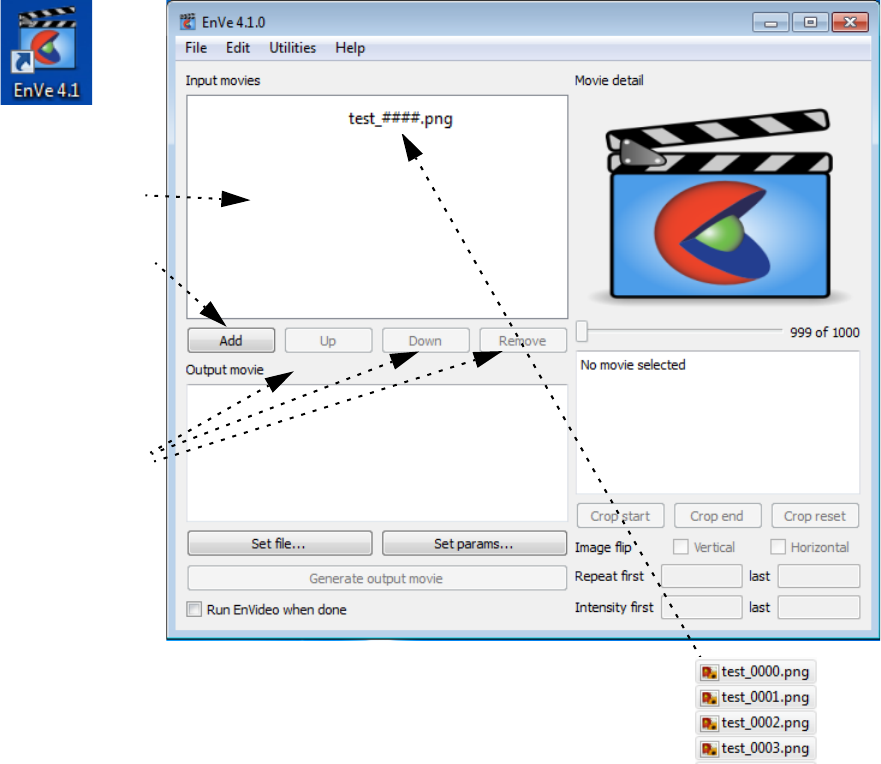
8.2 EnVe Application
EnSight Interface Manual 7-27
8.2 EnVe Application
The EnVe video editor is a useful, interactive movie editing application built using the Python Qt GUI to
demonstrate a subset of the EnVe Module Interface. It is appropriately called EnVe (EnSight Video editor).
Note you can modify and convert images with this application, but it is designed for movies. This can be
started by opening a cmd window and typing enve41 or by double clicking on the EnVe 4.1 icon.
Simply read in movies that you would like to sequence, convert format, change resolution, or apply fade in
/ fade out effects. EnVe can read in formats supported by the current UDIL libraries in the EnSight install.
Also, we only guarantee that to read in data formats that were written by CEI tools. For example, we can
read an AVI file we wrote, but not necessarily an AVI file that came from the web. This is true of a lot of
the multi-codec formats. See the previous examples of listing the codecs.
Using the EnVe Application Interactively
EnVe Application Startup and Input
1. Drag and Drop
movies or
image files here
OR
Click Add to add
movies or images
OR
File>Add movie
or add movies or
images
2. Order the movies
or images by
moving them up
or down or
remove them
Note: choose File>Import image sequence as a movie....
and choose the first file in the sequence to add them all
OR
simply select all the files and drag them onto the Input movies field
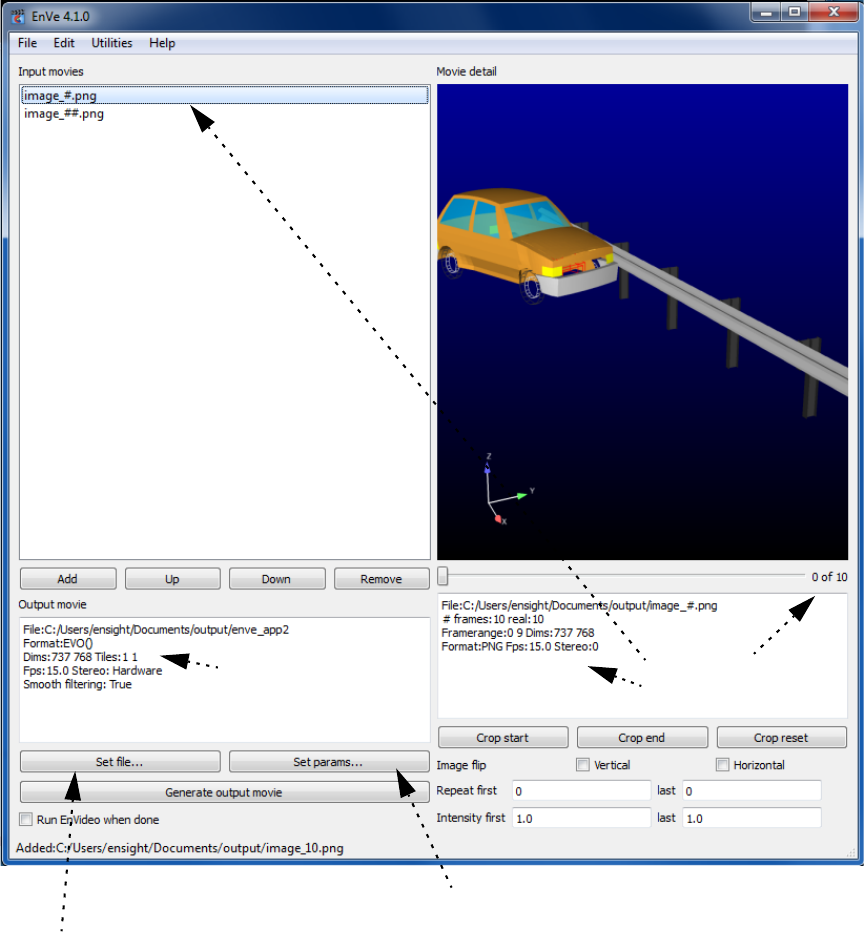
8.2 Using the EnVe Application Interactively
7-28 EnSight Interface Manual
Choose the output file
prefix. Note if you add an
extension (e.g. .mp4), it
will be removed.
Choose the output format, format
options, stereo option, frames
per second, smoothing option,
output dimensions, and/or tiling.
EnVe adds the extension based
on the output format.
This is your
sequential list of
input movies.
Note: if the
filenames contain L
and R then stereo is
assumed:
file001l.png,
file001r.png,
...
This area has
info on the
output movie.
Info for
selected input
movie.
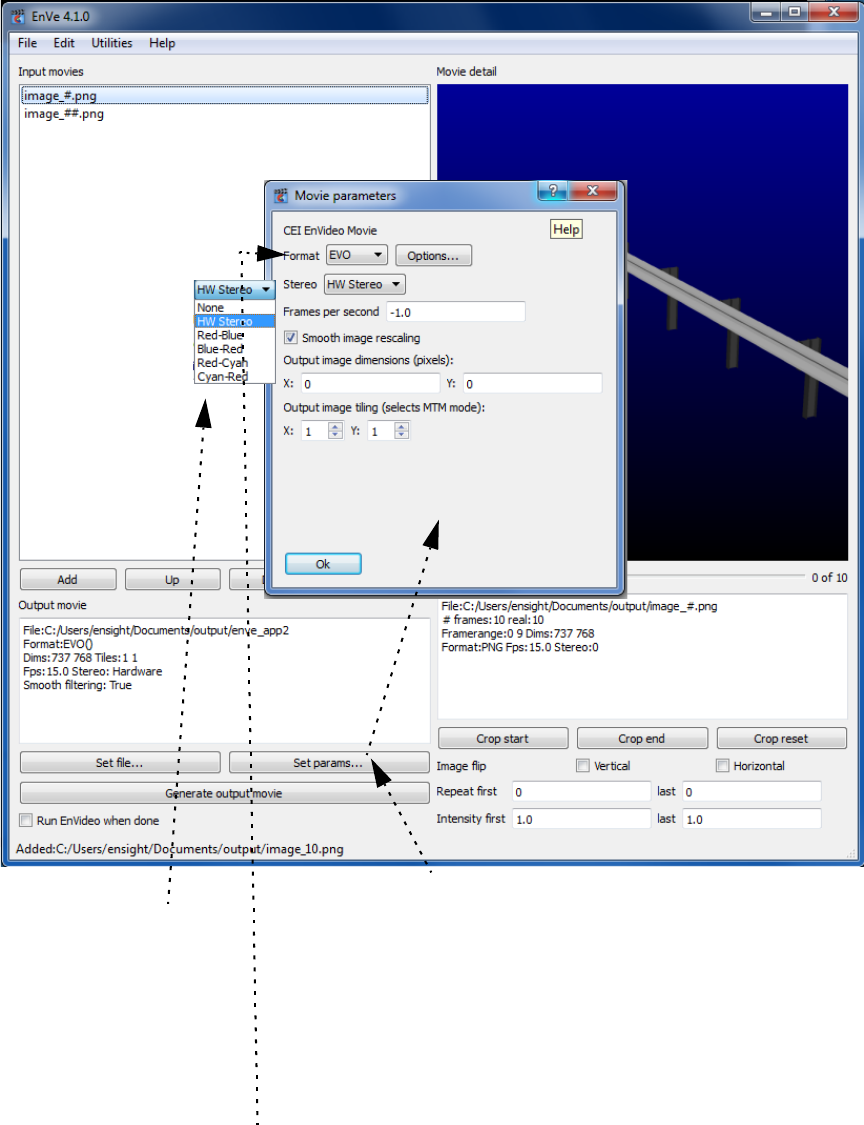
8.2 Using the EnVe Application Interactively
EnSight Interface Manual 7-29
HW stereo same
as EnSight
interleaved
stereo: two
images each
frame.
Other options are
anaglyph stereo
using colors.
Params include format, format options, stereo
type, frames per sec (-1 is format default),
smoothing toggle, dimensions (0 is use input
movie dimensions) and MTM is multi-tile (movie
is divided into nxm tiles and a .mtm master text
file is written (see the User Manual 9.21 Multi-
Tiled Movie (MTM) File Format).
Click on format to see all the codecs available.
EnVe codecs are guaranteed to be compatible with
all EnSight/EnVideo output on any platform, but
may not be able to import all images and movies
generated outside the EnSight ecosystem.
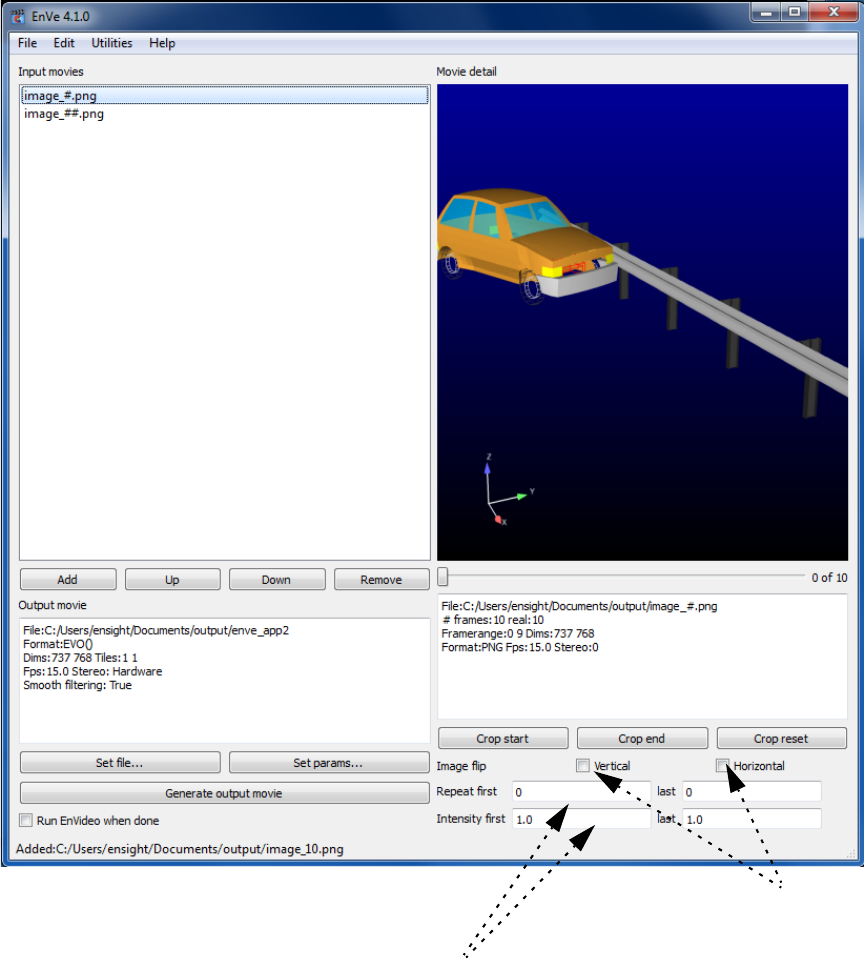
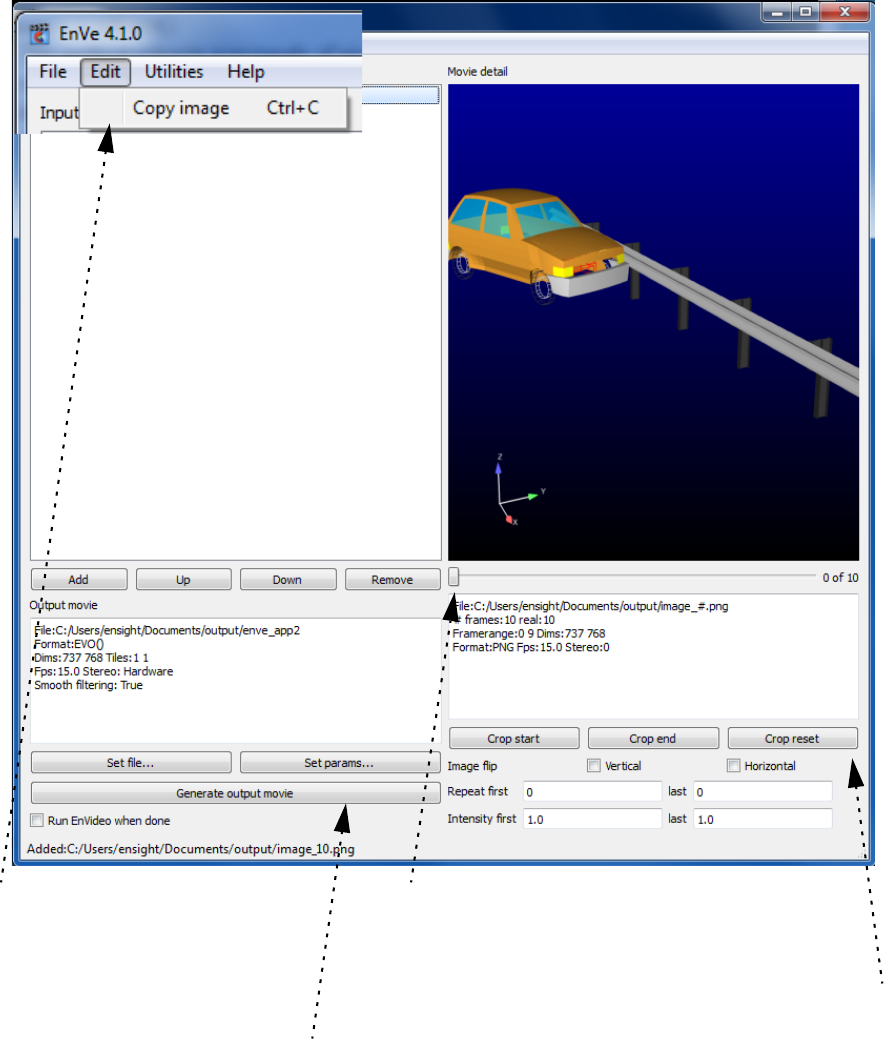
8.2 Using the EnVe Application Interactively
EnSight Interface Manual 7-31
Click to generate output
movie with extension
appropriate for format.
Use slider to look at your movie frame by
frame, or to choose a frame for cropping.
Crop start to make the current frame as
the first in your output movie. Move the
slider again to the right. Crop end to
make that frame the final frame in your
output movie.
Crop reset to use the whole movie.
Copy the visible frame to
the clipboard for use
elsewhere.
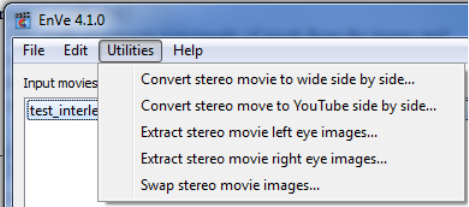
8.2 EnVe Application Stereo Utilities
7-32 EnSight Interface Manual
EnVe Application Stereo Utilities
EnVe has five other useful stereo utilities completely unrelated to the
input movie that you have chosen, or the output movie or parameters
that you have chosen.
Pick one of these options and you will be prompted for an input stereo
movie and and output prefix (these utilities will ignore the extension
even if you add it onto the prefix). EnVe will write out an EVO movie
using the option you have chosen with an .evo extension.
8.2 Using the EnVe Application in batch
EnSight Interface Manual 7-33
Using the EnVe Application in batch
EnVe can be run with no gui using a python file. Python modules can only be loaded from the sys.path
location. EnVe does not include all of the directories in the sys.path that are available in EnSight. EnVe
does load the enve module implicitly and can load other python modules only from $CEI_HOME/enve41.
As such the ens_utils.py high-level utilities are available to be run only with EnSight, and running enve in
batch requires the use of lower-level enve routines, thus requires a bit of programming. To run enve
without a gui using a python file, type in the following from the command line:
%enve41 -nogui filename.py
Shown below is an example python that can be run in batch to convert all of the EnVideo format (.evo)
files to .avi format. Simply copy/paste this into a file named enve_convert.py and run it as shown below.
Note that the enve module is implicitly imported into EnVe.
#
# convert evo format movies found in the
# current working directory to avi using EnVe
#
# batch execute like this:
# %enve41 -nogui enve_convert.py
#
#
import os;
import glob;
# The input movies are expected to be *.evo
files = glob.glob('*.evo')
# Common target format options: AVI, MPEG, MOV, GIF, EVO
# Set this variable to your format choice from the above list
targetFormat = "AVI";
for m in files:
if not os.path.exists(m):
print "++ Attention, this file doesn't exist:", m;
continue;
m1 = enve.movie(enve.MOVIE_READ);
m1.filename = m;
m1.open();
convertedFile = m[:-4];
m2 = enve.movie(enve.MOVIE_WRITE);
m2.filename = convertedFile;
m2.format = targetFormat;
m2.addcount(m1);
print "++ converting", m1.filename, "to", m2.filename+"."+targetFormat;
m2.open();
m2.append(m1);
m2.close();
m1.close();
print "\n++ enveConvert is done"
8.2 Using the enve module in EnSight in batch
7-34 EnSight Interface Manual
Using the enve module in EnSight in batch
Alternatively you can do the same thing using EnSight in batch using the ens_utils.py routines to make
much simpler code.
%ensight102 -batch -p movie_convert.py
Shown below is the simpler code
#
# Run as ensight102 -batch -p movie_convert.py
# to convert every evo movie in the current directory
# to avi format
#
import ens_utils as eu
file_list = eu.get_file_list('./*.evo')
for fil in file_list:
fdict = eu.split_filename(fil)
print "++ converting ",fil, "to ", fdict['file prefix']+'.avi'
eu.convert_movie(fil,fdict['file prefix']+'.avi')
print "\n++ movieConvert is done"
8.3 Helper modules
EnSight Interface Manual 7-35
8.3 Helper modules
‘cei’ module
This module includes a number of common functions that are not generally EnSight specific. They are
used in tools like EnVe, but can be used by any EnSight Python application.
CeiPrintDlg() class for PyQt based rendering and printing of the main window (in printdlg.py)
CeiQtImageFormatOptions() class for prompting the user for UDIL selection/options (in qtimgformats.py)
CeiQtSaveImage() class to prompt the user for a complete set of image size/saving options, including the
render and save) (in qtimgformats.py)
CeiPlot() classes to wrapper matplotlib. Create a graph and save it to disk (in plots.py)
CeiQtPlotWindow() class providing a dockable Qt4 widget that contains a CeiPlot object, including copy
and print operations (in qtplots.py)
CEItranslate() class that acts as a repository for .qm translation files and allows for dynamic changing of
the language for all objects as well as a method to get a language menu (in qtlanguage.py)
ceisplash() class to manage a splash screen from a .svg file (in ceisplash.py)
CeiLogging() and logging shortcuts (in ceilogging.py)
CeiQtGenericDialog() class that generates dynamic dialogs from simple lists and prompts the user for
values. It can handle things like text, checkboxes, ints, floats, variables, parts, option menus, strings,
filenames, etc (in qtgenericdlg.py)
