Epson Product Support Bulletin If Not Then Pl83nlps
Epson-Powerlite-8300Nl-Multimedia-Projector-Product-Support-Bulletin-667663 epson-powerlite-8300nl-multimedia-projector-product-support-bulletin-667663
User Manual: Epson If not then Manual: ://files.supporton.com/pdf/pl83nl/pl83nlps
Open the PDF directly: View PDF  .
.
Page Count: 42
- PSB.2009.06.002-Release of EMP NS Connection for Windows & Mac Upgrade from v2.50 to v2.51
- PSB.2009.06.001-Release of EMP Monitor for Windows version 4.30
- PSB.2009.01.006-Release of Check Tool for Network Projectors V1.00 (for Windows)
- PSB.2009.01.003-EMP SlideMaker2 updated Version 1.30 – provides scenario support for WXGA (1280 x 800) resolution
- PSB.2007.11.005A-EMP Monitor Version 4.21 Release
- PSB.2005.06.001-Filter-Cleaning Procedures
- PSB.2005.05.005-1400 x 1050 DVI Compatibility Support
- PSB.2005.05.003-1400 x 1050 Compatibility Support
- PSB.2004.04.005-EMP NS Connection failures caused by Remote Control applications
- PSB.2004.02.009-EMP Monitor version 3.03 Update
- PSB.2003.11.001-Supported Wired and Wireless LAN cards
EPSON PRODUCT SUPPORT BULLETIN
Date: 06/10/2009 Originator: DS
TIB #: PSB.2009.06.002 Authorization:
Reference: TI 09-08j Rev. A Total Pages: 8
Product(s): PowerLite 735c / 737c / 745c /755c/ 765c / 835p /1705/1715/1815/1825/7850p
/ 8300 with EasyMP.net option, Pro G5150/G5350 / 1725 / 1735W / 85 / 825 /
826W
Subject: Release of EMP NS Connection for Windows & Mac Upgrade from v2.50 to
v2.51
This bulletin was created to inform you of the release of the new version 2.51 of the
EMP NS Connection software.
Description of Change:
Improvements have been made to the EMP NS Connection utility.
Reason:
The improvements to NS Connection V2.51 are as follows
Improvements(V2.50 ( V2.51
Improvements Addition of 10 new languages: Arabic, Ukrainian, Romanian,
Indonesian, Croat, Slovak, Bulgarian, Malay, Vietnamese and Hebrew.
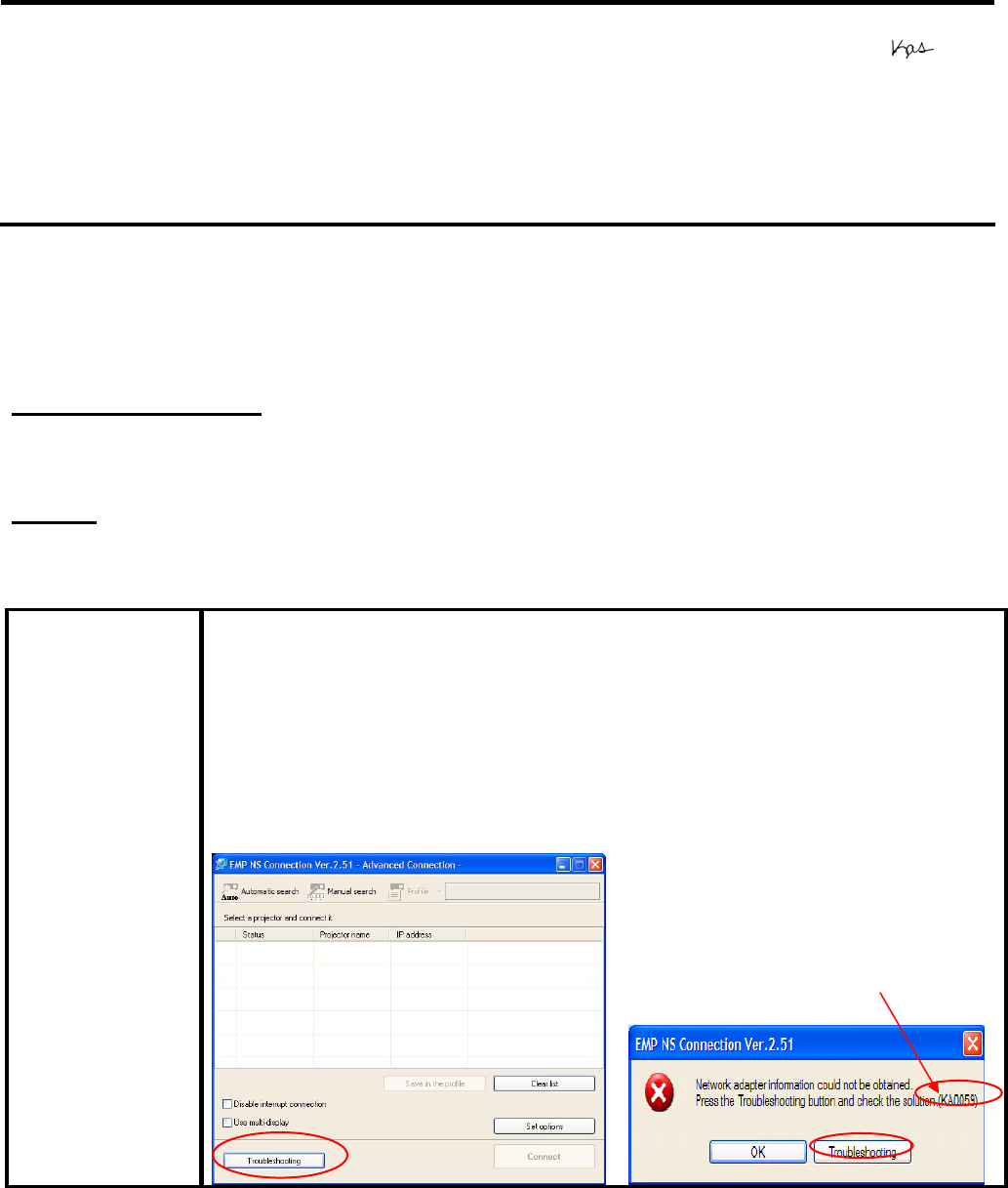
Addition of troubleshooting function (Windows Only)
When pressing the troubleshooting button, the
corresponding troubleshooting and error number is displayed
in the error message window.
• When experiencing problems with NS Connect, please report to
Epson the error number along with the failure information.
Error number
Page 1 of 8
PSB.2009.06.002
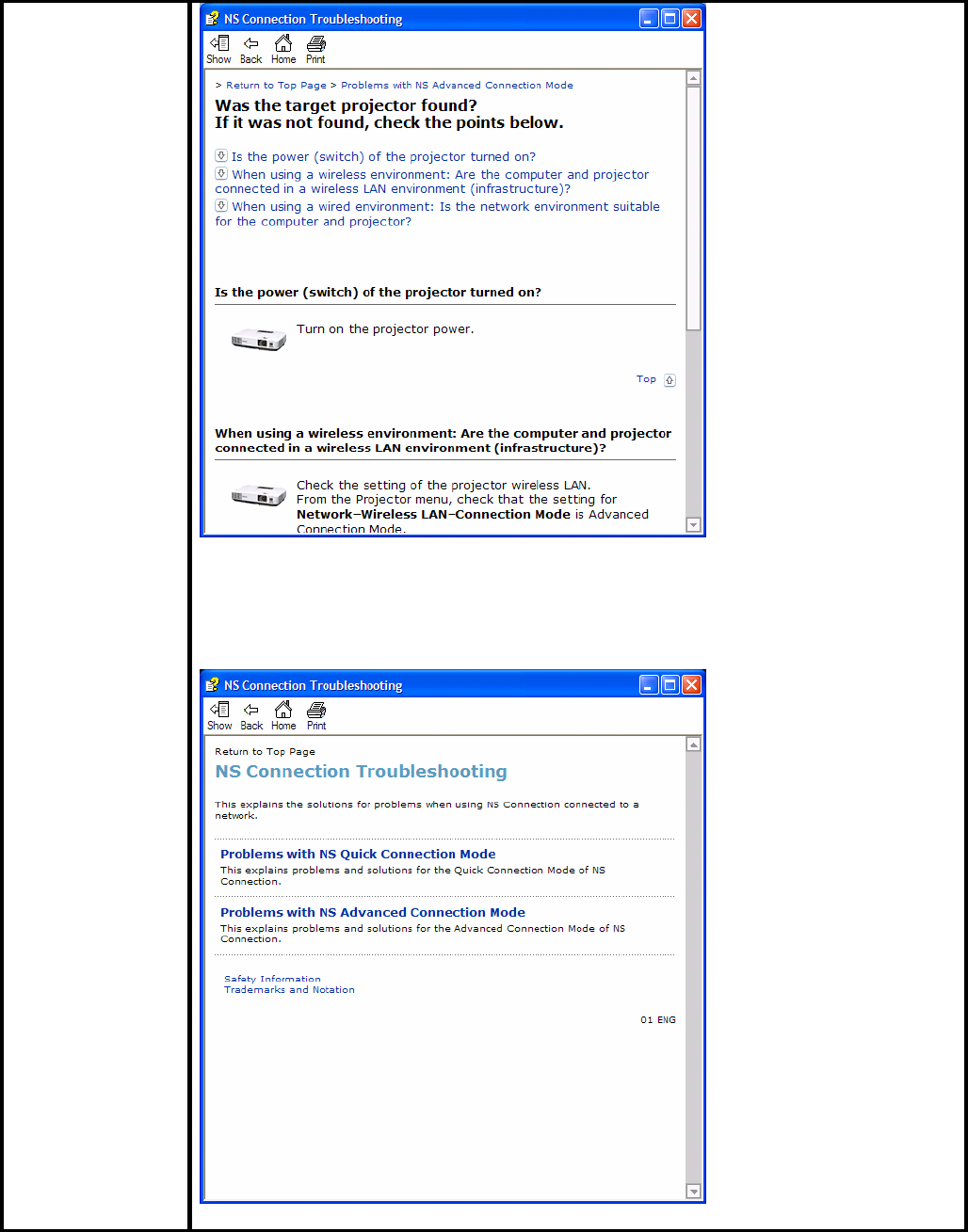
Also you can access troubleshooting by clicking Start Æ All programs Æ
EPSON ProjectorÆEMP NS ConnectionÆEMP NS Connection V2.51
Troubleshooting.
Page 2 of 8
PSB.2009.06.002

Fixed error message displayed by the NVIDIA utility
Failure Symptom
When starting Quick Wireless/USB Display/NS Connection on a PC with
the built-in NVIDIA graphics chip (ex.ThinkPadT61 NVIDIA Quadro NVS
140M/NVIDIA Quadro FX 570M Display Driver), the NVIDIA utility
displays consecutive error messages. As a result, some PCs will
experience a lock-up.
Countermeasure
Hardware acceleration level is set to 3 when Quick Wireless/USB
Display/NS Connection are being used.
Limitation
By setting hardware acceleration level to “3”, the mouse cursor flickers
more visibly than the setting of “None”. This symptom can be avoided by
unchecking the box for Transfer Layered Window on the Adjustment
performance tab in the Set Options window of NS Connection.
Note: When NS connection is being used, and the hardware acceleration
setting is changed manually, at next startup, NS connection starts with
the same setting level of hardware acceleration.
Page 3 of 8
PSB.2009.06.002

Page 4 of 8
PSB.2009.06.002
Limitation All Operating Systems
• When using EAP type of security that consumes a lot of CPU resources,
projectors may disconnect from NS connection. The solution is to click
Set Options of NS Connection and set Adjust Performance to Fast.
• It takes more time for the PowerLite 1725 / 1735W / 1825 / Pro G5150 /
Pro G5350 projectors to disconnect from NS connection as compared to
the PowerLite 1705 / 1715 / 1815 projectors, due to the limitation of the
new OS (WindowsCE) on IM-X4 projectors.
• To avoid conflicts between the Quick Wireless and other makers’
utilities, when the Quick Wireless starts, this version stops services of
the other utilities listed in the attached file (Exhibit 1). When quitting
Quick Wireless, the other utilities resume their services.
• In the network environment using IEEE 802.11 b/g standards, the
wireless connection may drop under the following conditions. Due to
specification of wireless controllers, some wireless controllers don’t send
their beacon periodically. Even if a projector is connected to a PC via
wireless, if the projector doesn’t detect the beacon for 11b signal for a
certain period (30 – 60 seconds) from the PC , the projector judges that
there isn’t any PC using the11b signal in the network and switches to
communication with11g (default) signal. On the other hand the PC still
tries to communicate with 11b. As a result, the wireless connection
between the projector and the PC drops.
Solutions to this problem:
a. Establish a wireless communication between the PC and
projector via 802.11a signal.
Windows OS
• Due to a limitation of the module VLC for the Movie Sending mode
of the IM-X4 version projectors, when IM-X4 projectors display
MPEG2 and WMV images in Movie Sending mode via NSC V2.40,
fast-forward and rewind functions cannot be used. When IM-X3
projectors display MPEG2 via NSC V2.40, fast-forward and rewind
functions can be used.
Windows Vista OS
• Multi screen display function cannot be used
• Virtual display driver cannot be installed in PC.
• When UAC (User Account Controls) screen is being displayed, the
projected image pauses.
• The Motion picture of Windows photo gallery cannot be projected in full-
screen mode.
• Still images and motion pictures from Windows Media Center cannot be
projected in full-screen mode.
• Since NS Connection can capture Layered windows, the tool bar of NS
Connection is projected.
•
•
• When projecting images via NS Connection, mouse cursor might blink
depending on PC specification.

Macintosh OS
In case of uninstalling NSC V2.20 or later version, it is
possible to uninstall by following 2 methods.
- Delete by installer exclusively for NSC version which you
want to uninstall.
For example, when you want to uninstall NSC V2.40, you need
to use installer for NSC
V2.40. NSC V2.20 and later version can not be uninstalled
automatically by different
version installer.
- Delete manually.
System Requirements:
Windows 2000 SP4/ XP Home Edition/ XP Professional(32bit)
/Vista SP1 Home Basic / Home / Premium / Ultimate / Business
/ Enterprise(32bit) Mac OS X 10.3 minimum, OS
10.3.9/10.4.5/10.5.1 recommended
OS
Windows: Mobile Pentium III 1.2GHz at least (Pentium
M1.6GHz at least recommended)
Mac: Power PC G3 900MHz at least recommended
CPU
Memory At least 256MB (At least 512MB recommended)
Available hard disk
space At least 20MB
Display Minimum- VGA(640×480), Maximum- UXGA (1600 x 1200)
16-bit color or more
Obtaining the Update:
Download epson13123.exe from www.epson.com to the version 2.50 update for NS
Connection.
The files are extracted and copied to C:\EPSON\epson13123_EMP_NS_Connection_251.
The user should be directed to this folder to find the bulletin. The program will automatically
install after the download file is extracted.
Note: on the Mac, the extraction process copies the epson13124_EMP_NS_Connection_251
folder to the desktop. The program and bulletin are inside this folder. The user will double-click
on NSCv2.51_Installer to start the installation process.
Software Upgrade History:
Version Release date Remarks
1.00 December 25,
2002 New release
1.10 January 1, 2003 Release for PowerLite 7850p
1.20 September 10, Improved the transfer rate specification for PowerPoint
Page 5 of 8
PSB.2009.06.002

2003 images
1.30 May 31, 2004 Support added for WPA and LEAP
1.31 June 18, 2004 Improved screen problem issue
1.32 January 18, 2004 Improved the internal function of connecting to the projector
1.40 April 1, 2005 • Addition of Presentation Mode and Interruption
Prevention function
• Able to present with video set for 32 bit color
• Function improvement with Excel and PowerPoint
• Improved ESSID search lockup prevention when
certain LAN adapters and drivers are used
2.00 2006/06/20 • Addition of multi screen display function
• Addition of movie sending mode
• - Improvement of connection and usability
2.10
2006/12/08 • Improvement in the ability to search projectors by
Automatic Search. (For Windows)
• Improvement in the operability of choosing projector.
• Improvement in operability and visibility of “Connect”
button.
• Preventing Virtual Display from being used as primary
display.
• Improvement in the ability of image processing speed.
(For Mac)
• - Change the packet size for a connection request
command used by Quick connection.
2.20 2006/05/29 EMP NS Connection V2.20 supports Windows Vista (Home
Basic
/Home Premium/Ultimate/Business/Enterprise).
2.30 Nov. 27, 2007 • Supported picture transfer for EMP-1825
• Improved wireless search and connection abilities.
• - Added video format supporting movie sending mode
2.40 Mar. 24, 2008 • EMP NS Connection V2.40 supports Windows Vista
Service Pack 1
• - Supports 24 languages
2.50 Jun.2,2008 Supported image transfer and virtual display of 1280 x 768
• Changed the operation method to prevent NS
connection from being blocked by Windows Firewall
Added another wireless LAN utility that NS connection
supports
2.51 Feb.9,2009 - Addition of supported models (PowerLite-85/825/826W)
- Addition of supported languages
- Addition of troubleshooting function (Only for Windows)
[Exhibit 1] Wireless LAN client list that NSC V2.30 and V2.40 stops their service
process
Page 6 of 8
PSB.2009.06.002

Manufacturer
Name Adapter Name Wireless LAN Utility
Name
D-Link Air Plus XTREMEG DWL-G650 D-Link AirPlus
XtremeG Utility (CD)
NETGEAR WN511T Smart Wireless Utility
Ver.1.1.5.9(CD)
BUFFALO Buffalo all products Client Manager 3
Ver.1.2.10(Web)
IBM ThinkPad products Access
Connection(Web) *1
Ver.4 or later
IBM ThinkPad products Access
Connection(Web) *1
Ver.3.71
Logitec Logitec LAN-WAG/U2 Wireless
LAN Adapter Logitec Wireless LAN
Client Utility
Linksys Wireless-G Notebook Adapter
v.5.0 WPC54G-JP setting
utility
NETGEAR WG511AJP NETGEAR WG511A
Smart Wizard
Ver3.2.3.306
NETGEAR WGM511 NETGEAR SMART
WIZARD -Wireless
Assistant WGM511 Ver
1.0.0.7
NETGEAR WPNT511 NETGEAR WPNT511
SMART WIZARD
Ver1.1.3.0
Linksys WPC300N Wireless-N Notebook
Adapter Wireless
Network Monitor v1.05
Linksys WPC54G Wireless-G Notebook
Adapter Wireless
Network Monitor Ver
3.1
Linksys WPC54GX4 Wireless-G Notebook
Adapter with SRX400
Setup Wizard V1.1
Linksys WUSB54GP Wireless-G Portable
USB Adapter WLAN
Monitor v1.05
Linksys WUSBF54G Wireless-G USB
Adapter with Wi-Fi
Finder
Supported by V2.30
NETGEAR WG511 v2
Page 7 of 8
PSB.2009.06.002

Linksys WPC54GX Wireless-G Notebook
Adapter With SRX
Wireless Network
Monitor v. 1.2
Supported by V2.40 Linksys WUSB54GSC Compact Wireless-G
USB Adapter Wireless
Network Monitor v1.05
Supported by Quick
Wireless
Connection V.1.00 /
NSC V2.50
Atheros Atheros Client Utility
Supported by Quick
Wireless Connection
v1.02 / NSCv2.51
Broadcom BCM4311 / BCM2050 Broadcom Wireless
Utility
NETGEAR WN511B NETGEAR WN511B
Smart Wizard Utility
NETGEAR WG111v3 NETGEAR WG111v3
Smart Wizard Utility
NETGEAR wn111 NETGEAR WN111
Smart Wizard Utility
NETGEAR WUSB600N Linksys Wireless
Network Monitor
PLANEX GW-US300MiniW PCI GW-US300MiniW
Utility
*1: Because Access Connection service stops, power display of Power Manager becomes
invalid.
Page 8 of 8
PSB.2009.06.002
EPSON PRODUCT SUPPORT BULLETIN
Date: 04/20/2009 Originator: JAM
PSB #: PSB.2009.06.001 Authorization:
Reference: TI 09-05e Rev. A/B Total Pages: 5
Product(s): PowerLite 735c / Cinema 500 / 737c / 745c / 755c / 765c / 830p / 835p /
1705c / 1715c / 6100i / 6110i / 7800p / 7850p / 7900NL / 8300i / 8300i with
EasyMP.net module / 9300NL / 1815p / 1825 / 822p / 83c / 822+ / 83+ /
G5000 / Pro G5150 / Pro G5350 / Pro G5200W / 1725 / 1735W / 400W /
410W / 84 / 85 / 825 / 826W
PowerLite 61p / 81p / 82c / 821p / 1810 / 260d (Latin America) / 280d (Latin
America) with TCP/IP to Serial converter
Subject: Release of EMP Monitor for Windows version 4.30
This bulletin was created to inform you of the release of the new version 4.30 of the Epson
EMP Monitor software utility.
Description of Change:
Improvements have been made to the EMP Monitor software utility.
Note: For the PowerLite 61p / 81p / 82c / 821p / 1810 / 260d (Latin America) / 280d (Latin
America) models, a serial to TCP/IP conversion adapter is necessary. The function of Auto
Update does not work for these models. You need to manually click on refresh to get an
updated status of projectors.
Reason:
The improved points of version 4.30 are as follows:
Application EMP Monitor
Version
upgraded Version 4.22 Æ Version 4.30
Improved
points (1) Addition of 7 new languages
- Indonesian, Croat, Slovak, Bulgarian, Malay, Vietnamese, and
Hebrew
Existing 27 languages
- Chinese (Traditional), Netherlands, Danish, Polish, Hungarian,
Czech, Romanian, Slovene, Norwegian, Swedish, Finnish, Russian,
Ukrainian, Greek, Turkish, Arabic (Windows NT4 does not support),
English, Japanese, French, German, Italy, Spanish, Portuguese,
Chinese (Simplified), Korean, Catalan, Thai
Page 1 of 4
PSB.2009.06.001
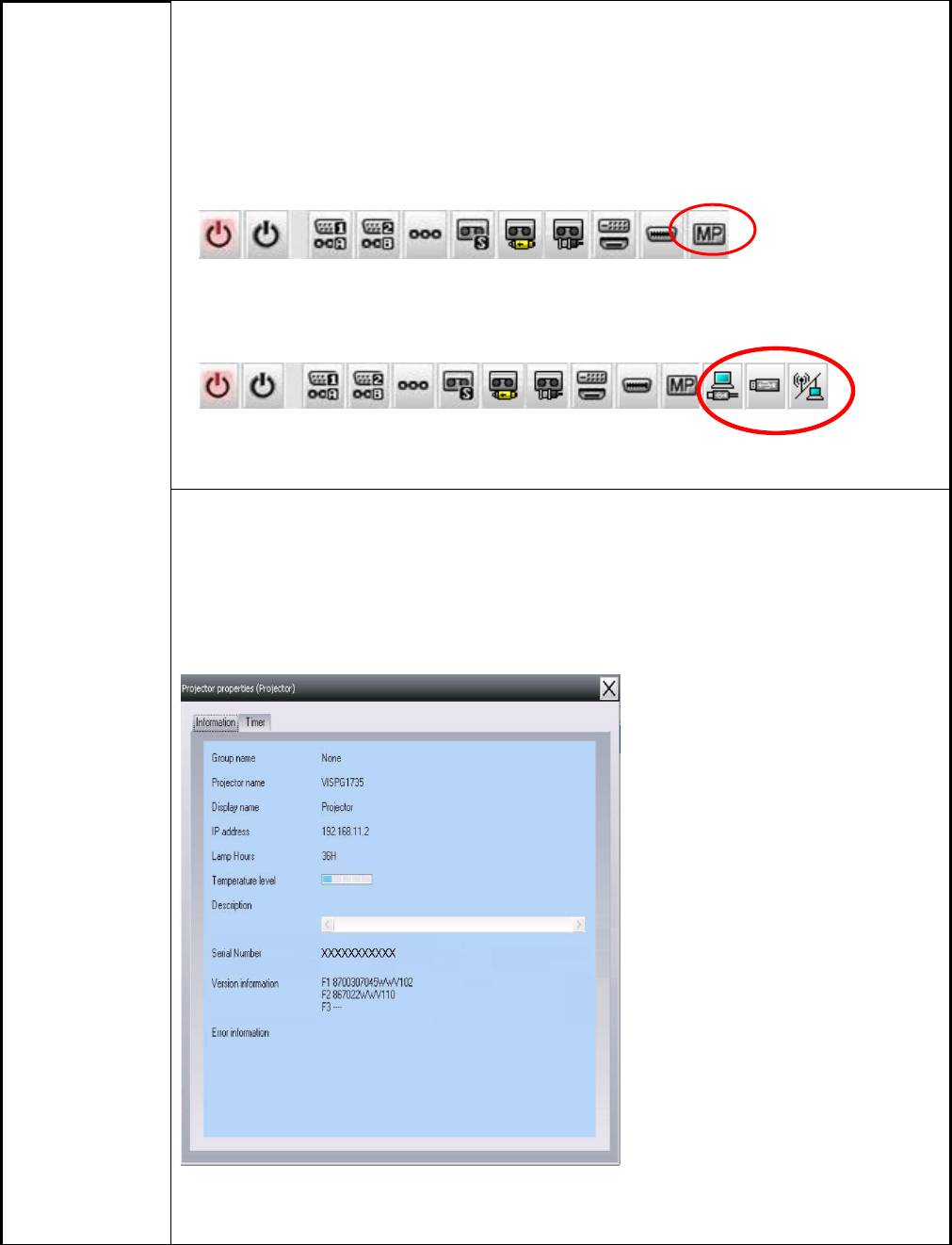
(2) Addition of Input Source (Only PowerLite 84 / 85 / 825 / 826W)
Previous version of EMP Monitor included USB Display, USB and LAN as
one source: EasyMP.
The input source buttons for USB display, USB, and LAN are available as
separate input sources as shown below:
- Old version - EMP Monitor V4.22
EMP Monitor V4.22
- New version - EMP Monitor V4.30
EMP Monitor V4.30
.
(3) New feature for the PowerLite 84 / 85 / 825 / 826W.
Displays projector’s serial number in the Menu settings
- The projector’s serial number is now displayed in the projector’s
menu under “info”,
- EMP Monitor can also display the projector’s serial number as
shown below:
Page 2 of 4
PSB.2009.06.001

Limitations When the PowerLite1725 / 1735W exhibit a Lamp Cover Open error state,
EMP Monitor cannot detect the error. The reason is that when the lamp
cover is opened, the primary power source that reports the error state to
EMP Monitor is turned off immediately. This is different from other models
which make the secondary power source turn off under the same condition.
Note: EMP Monitor Ver. 4.xx is not compatible with EMP Monitor Ver. 3.05 and earlier
versions. EMP Monitor Ver. 4.xx cannot read the setting files of EMP Monitor Ver. 3.05
and earlier versions.
System Requirements:
OS • Windows 98 SE / Me / NT 4.0 (SP6) *Except Arabic and
Hebrew / Windows 2000 Pro / XP Home Edition / XP
Professional (32 bit) / Vista Home Basic / Home Premium /
Ultimate / Business / Enterprise (32 bit) *Except Ukrainian /
Vista SP1 Home Basic / Home Premium / Ultimate /
Business / Enterprise (32 bit)
• Internet Explorer Ver. 5.0 or later must be installed
CPU Minimum: Pentium MMX 166 MHz (Recommended: Pentium II
233 MHz or higher)
Memory At least 64 MB (Recommended: 128 MB or above)
Available hard disk
space At least 50 MB
Display SVGA (800×600) or higher resolution, 32 bit or higher display
color
Obtaining the Update:
Download epson13055.exe from www.epson.com to get the version 4.30 update for EMP
Monitor. The files are extracted and copied to C:\EPSON\epson13055_emp_monitor_430.
This file is a self-extracting archive and will start the installation utility for EMP Monitor. Follow
the on-screen instructions during the installation process.
Page 3 of 4
PSB.2009.06.001

Software Upgrade History:
Version Release date Remarks
3.00 December
25,2002 Supported PowerLite 735c
3.01 February
26,2003 Supported PowerLite 7800p / 8300i
3.02 April
18,2003 Supported PowerLite 7850p / 8300i with EasyMP.net option
module
3.03 November
21,2003 Supported PowerLite Cinema 500
3.04 April
1, 2004 Supported Serial -TCP/IP conversion adapter for PowerLite
61p / 81p
4.01 October
18, 2004 Supported projectors that are configured on a large-scale
network.
4.02 August
29, 2005 Addition of timer function and auto search function by
specifying IP addresses.
Improvement of communication logs size.
4.10 May
8, 2006 Addition of new functions, Improvement of usability, and
Corresponding to PowerLite 6100i.
4.20 May
15, 2007 EMP NS Connection V2.20 supports Windows Vista (Home
Basic / Home Premium / Ultimate / Business / Enterprise).
4.21 September
26, 2007 Supported 25 languages
4.22 March 31, 2008 Supported 27 languages
Addition of new Error Information
Supported Video (BNC)
4.30 April 3, 2009 Supported 34 languages
Additional Input Sources
Displays projector’s serial number in Menu settings
Page 4 of 4
PSB.2009.06.001

EPSON PRODUCT SUPPORT BULLETIN
Date: 12/18/2008 Originator: DS
PSB #: PSB.2009.01.006 Authorization:
Reference: TI 08-22e Rev. A/B Total Pages: 7
Product(s): PowerLite 735c / 737c / 745c / 755c / 765c / 835p
1705c / 1715c / 1815p / 1825p / 7850p / 8300i with EasyMP.net option
Pro G5150 / Pro G5350 / 1725 / 1735W
Subject: Release of Check Tool for Network Projectors V1.00 (for Windows)
This bulletin was created to inform you about the release of Epson Check Tool software
for Network Projectors version 1.00.
Description of Change:
First release of the Check Tool for Network Projectors for Windows
Reason:
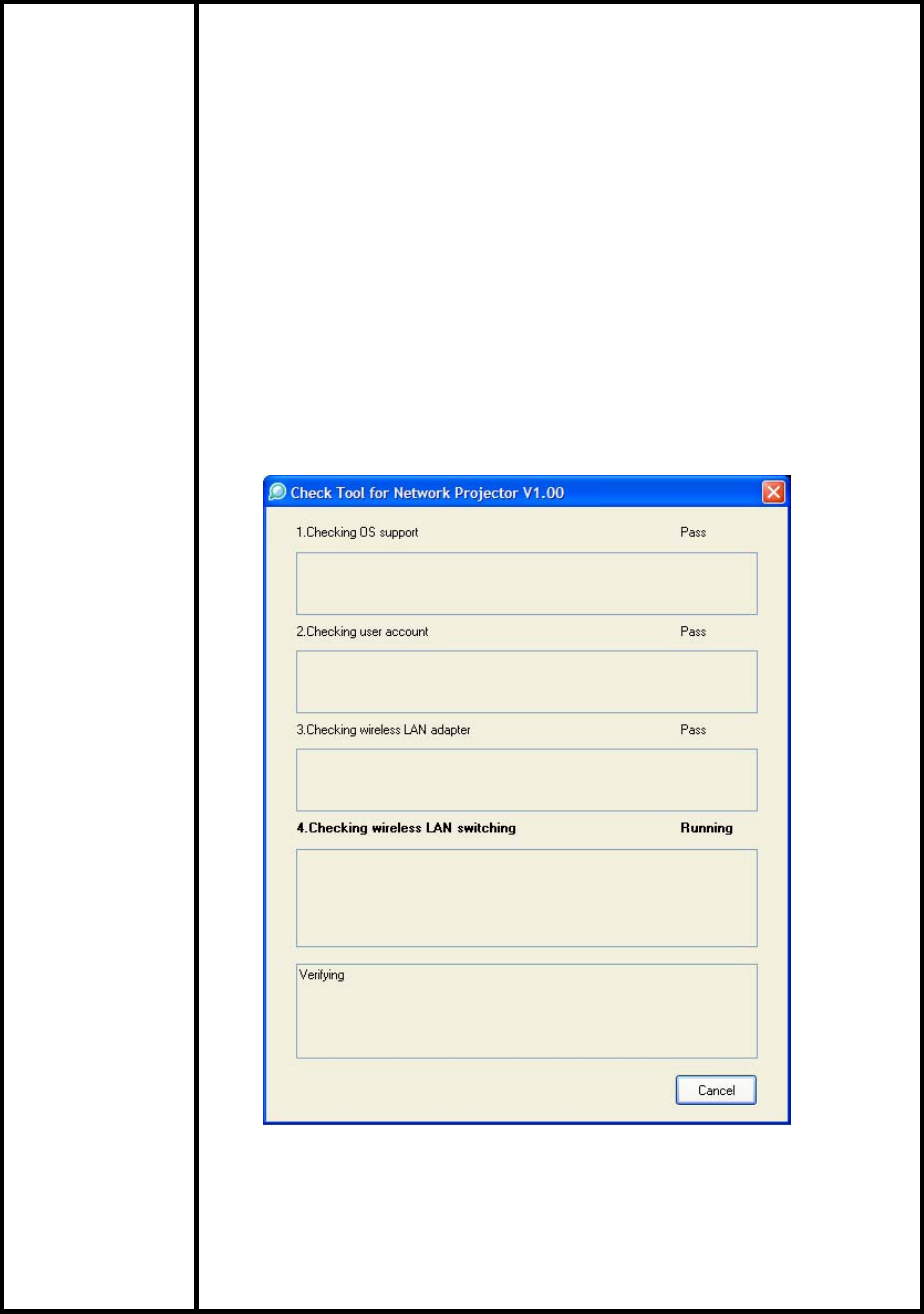
The Check Tool for Network Projectors makes it possible to easily check whether
EPSON Quick Wireless Connection and EMP NS Connection’s Quick Connection mode
can operate on the users’ Windows PC properly. The Check Tool for Network Projector
can also be used as a reference check before the purchase of the projector or as a
troubleshooting Tool.
1) Function of the Application
Application
name Check Tool for Network Projector V1.00
Notes
The Check Tool checks automatically whether EMP Quick
Wireless Connection and EMP NS Connection’s Quick
Connection mode can operate properly on the user’s Windows PC
in terms of the following four points:
1. Checks OS support.
• Checks whether the OS is supported by EMP Quick
Wireless Connection / EMP NS Connection.
2. Checks user account
• Checks user’s account for administrator privileges to
install EMP Quick Wireless Connection / EMP NS
Connection.
3. Checks the wireless LAN adapter
• Checks whether the wireless LAN adapter and
driver are installed on the PC.
• Checks whether the wireless LAN is active.
Page 1 of 7
PSB.2009.01.006
Notes
4. Checks wireless LAN switching
• Checks whether wireless LAN adapter is turned ON.
• Checks whether EMP Quick Wireless Connection
and EMP NS Connection’s Quick Connection mode
can set the SSID on the user’s PC when trying to
connect to a projector using EMP Quick Wireless
Connection and EMP NS Connection’s Quick
Connection Mode.
The Check Tool checks for communication conflict and whether it
can actually stop the utilities when both utilities--EMP Quick
Wireless Connection V1.00 and EMP NS Connection-- are both
installed on the users PC.
Page 2 of 7
PSB.2009.01.006

Notes
Output of the log file:
• The Check Tool records the result in a text file (log file).
Usually, the log file is saved under the name of
CheckInfoDATE.log in the directory where “EB_CHT.exe”
is stored
Limitations • When the Check Tool is checking the user’s PC, the user’s
PC drops off network.
• The Check Tool does not check whether the firewall of
manufacturers of security software other than Windows
may be blocking EPSON Quick Wireless Connection/EMP
NS Connection.
2) Operating Environment
Check Tool for Network Projector V1.00
OS Windows 2000 SP4 Rollup1
/ XP Home Edition/ XP Professional(32bit) non-SP,SP1,SP2,SP3
/Vista SP1 Home Basic/Home
Premium/Ultimate/Business/Enterprise(32bit)
non-SP,SP1
CPU Windows: Mobile Pentium III 1.2GHz at least (Pentium M1.6GHz
at least recommended)
Memory 256MB at least (Recommendation: 512MB at least)
Disk space 20MB at least
Display Resolution: At least VGA(640 x 480) but no more than UXGA
(1600 x 1200)
At least 16 bit color
Page 3 of 7
PSB.2009.01.006
3) Location of download file: Check Tool for Network Projector V1.00
Download epson12794.exe from the Epson website (www.epson.com).
This is a self-extracting file; please follow the screen prompts to install the
Check Tool software.
4) Double-click the [EB_CHT.exe] icon
5) Read the contents of the [SOFTWARE LICENSE AGREEMENT], and click the
[Agree] button.
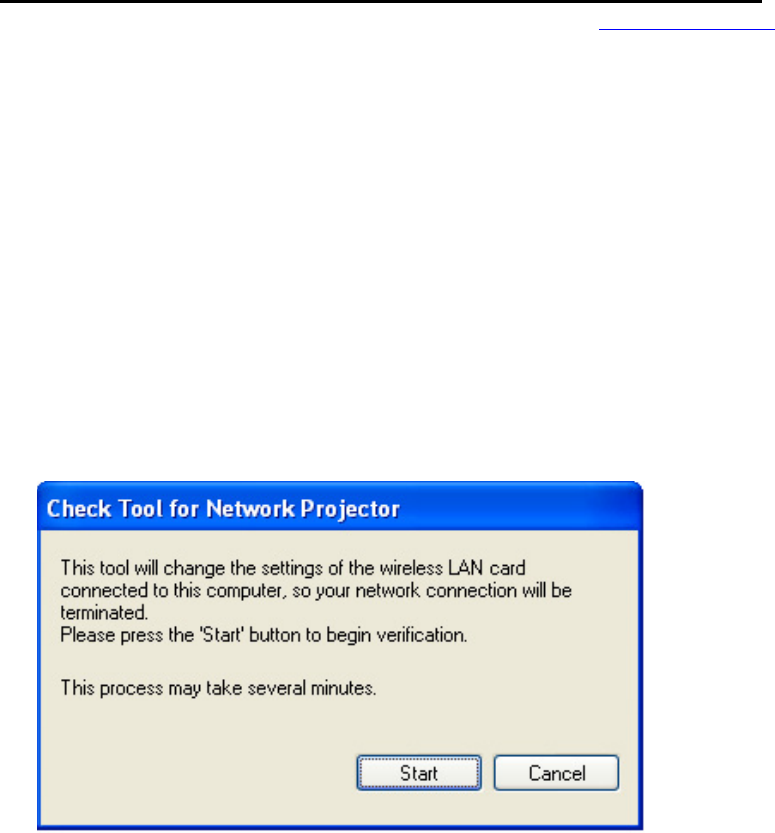
6) A dialog indicating the program is starting opens with the following message:
This tool cuts off the network connection temporarily.
Click the [Start] button to begin verification.
Page 4 of 7
PSB.2009.01.006
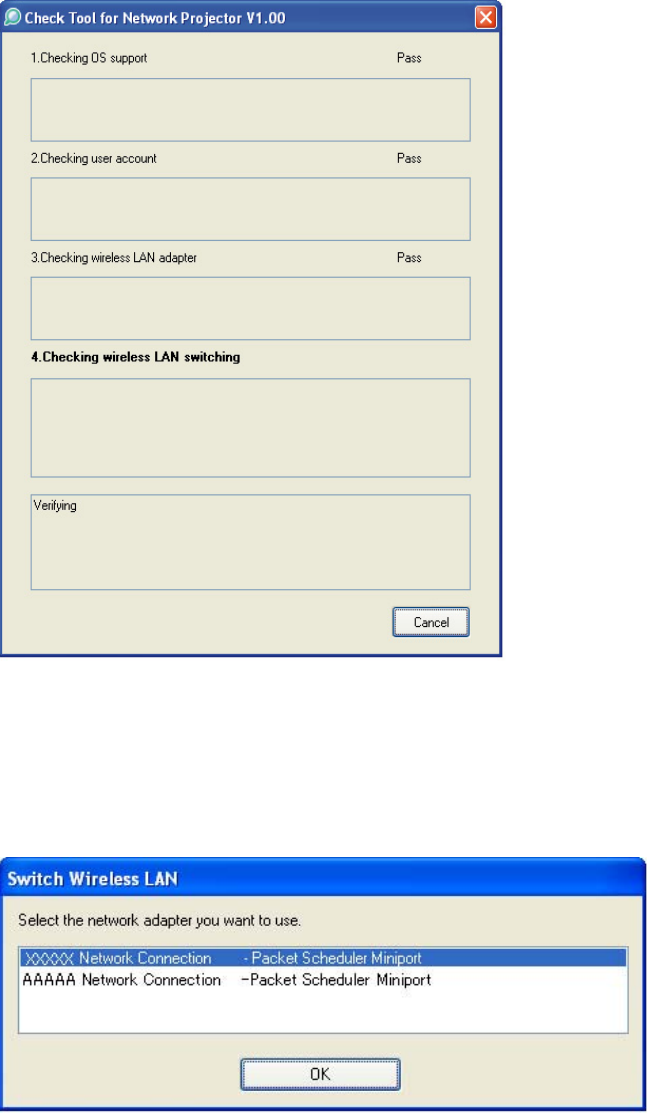
7) The Check tool dialog is displayed. It takes a few minutes for the results
of the verification are displayed
8) When two or more wireless LAN adapters are available on your computer, the
adapter selection dialog opens.
Select the wireless LAN adapter and press the OK button to continue.
Page 5 of 7
PSB.2009.01.006

9) When the verification is complete, the result is displayed on the bottom of the
dialog.
The result is stored in the same folder as the check tool.
File Name: CheckInfo<****>.log
**** indicates the created date and time.
[Exhibit 1]
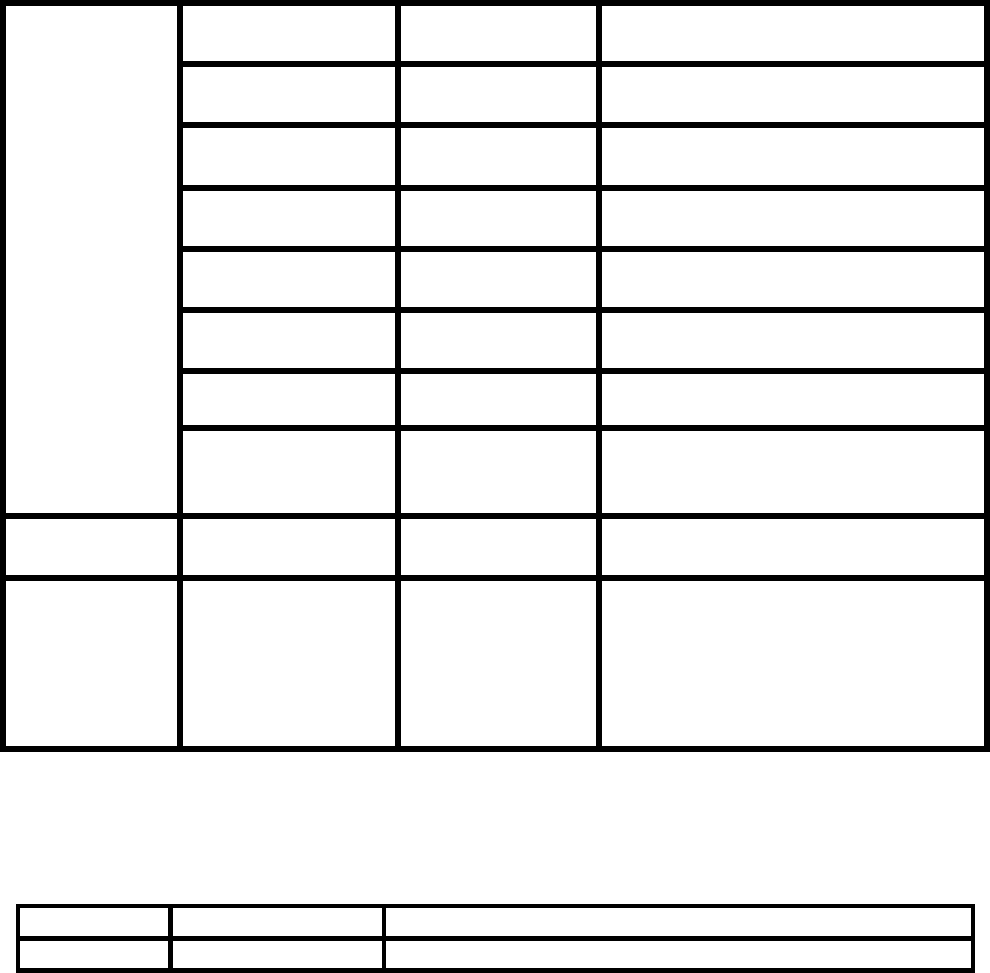
Wireless LAN client list that NSC and Quick Wireless Connection stop their
service process
Manufacturer
Name Adapter Name Wireless LAN Utility Name
D-Link Air Plus
XTREMEG
DWL-G650
D-Link AirPlus XtremeG Utility
(CD)
NETGEAR WN511T Smart Wireless Utility
Ver.1.1.5.9(CD)
BUFFALO Buffalo all
products Client Manager 3
Ver.1.2.10(Web)
IBM ThinkPad
products Access Connection(Web) *1
Ver.4 or later
IBM ThinkPad
products Access Connection(Web) *1
Ver.3.71
Logitec Logitec LAN-
WAG/U2
Wireless LAN
Adapter
Logitec Wireless LAN Client Utility
Linksys Wireless-G
Notebook
Adapter v.5.0
WPC54G-JP setting utility
NETGEAR WG511AJP NETGEAR WG511A Smart
Wizard Ver3.2.3.306
NETGEAR WGM511 NETGEAR SMART WIZARD -
Wireless Assistant WGM511 Ver
1.0.0.7
Supported by
NSC V2.30
NETGEAR WPNT511 NETGEAR WPNT511 SMART
WIZARD Ver1.1.3.0
Page 6 of 7
PSB.2009.01.006
Linksys WPC300N Wireless-N Notebook Adapter
Wireless Network Monitor v1.05
Linksys WPC54G Wireless-G Notebook Adapter
Wireless Network Monitor Ver 3.1
Manufacturer
Name Adapter Name Wireless LAN Utility Name
Linksys WPC54GX4 Wireless-G Notebook Adapter with
SRX400 Setup Wizard V1.1
Linksys WUSB54GP Wireless-G Portable USB Adapter
WLAN Monitor v1.05
Linksys WUSBF54G Wireless-G USB Adapter with Wi-
Fi Finder
NETGEAR WG511 v2
Linksys WPC54GX Wireless-G Notebook Adapter
With SRX Wireless Network
Monitor v. 1.2
Supported by
NSC V2.40 Linksys WUSB54GSC Compact Wireless-G USB Adapter
Wireless Network Monitor v1.05
Supported by
NSC V2.50 &
Quick
Wireless
Connection
V1.00
Atheros Atheros Client Utility
*1: Because Access Connection service stops, power display of Power Manager becomes
invalid.
Software Upgrade History Quick Wireless
Version Release date Remark
V1.00 August. 12, 2008 V1.00 release
Page 7 of 7
PSB.2009.01.006

EPSON PRODUCT SUPPORT BULLETIN
Date: 09/17/2008 Originator: VS
PSB #: PSB.2009.01.003 Authorization:
Reference: TI 08-29e Rev. A Total Pages: 8
Product(s): PowerLite 1735W, 735c, 737c, 745c, 755c, 765c, 835p, 1705c, 1715c, 1725,
1815c, 1825, 7850p, 7950p, 8300i with EasyMP.Net optional module,
Pro G5150 and Pro G5350 projectors
Subject: EMP SlideMaker2 updated Version 1.30 – provides scenario support for
WXGA
(1280 x 800) resolution
This bulletin was created to inform users about a software update for the EMP SlideMaker2 to
Version 1.30.
Description of Change:
Updated software release for creating scenarios in WXGA (16:10) format.
Reason:
• The updated version of EMP SlideMaker2 provides support for creating scenarios in
XGA (1024 x 768) resolution and WXGA (1280 x 800) resolution.
• It also provides the ability to select scenarios in XGA (4:3) or WXGA (16:10) format,
depending on the projector model used for the presentation.
Limitations:
• When creating a 16:10 scenario, the JPEG image must be in a 16:10 format.
• A 16:10 converted scenario can only be displayed with a WXGA (1280 x 800) projector.
• A 4:3 converted scenario can be displayed with a XGA or WXGA supported projector.
• When adding a PowerPoint slide from a thumbnail window to EMP SlideMaker2 with
Microsoft Office 2007, the scenario image file may deteriorate due to an issue with
Microsoft Office 2007 SP1.
1 of 8
PSB.2009.01.003
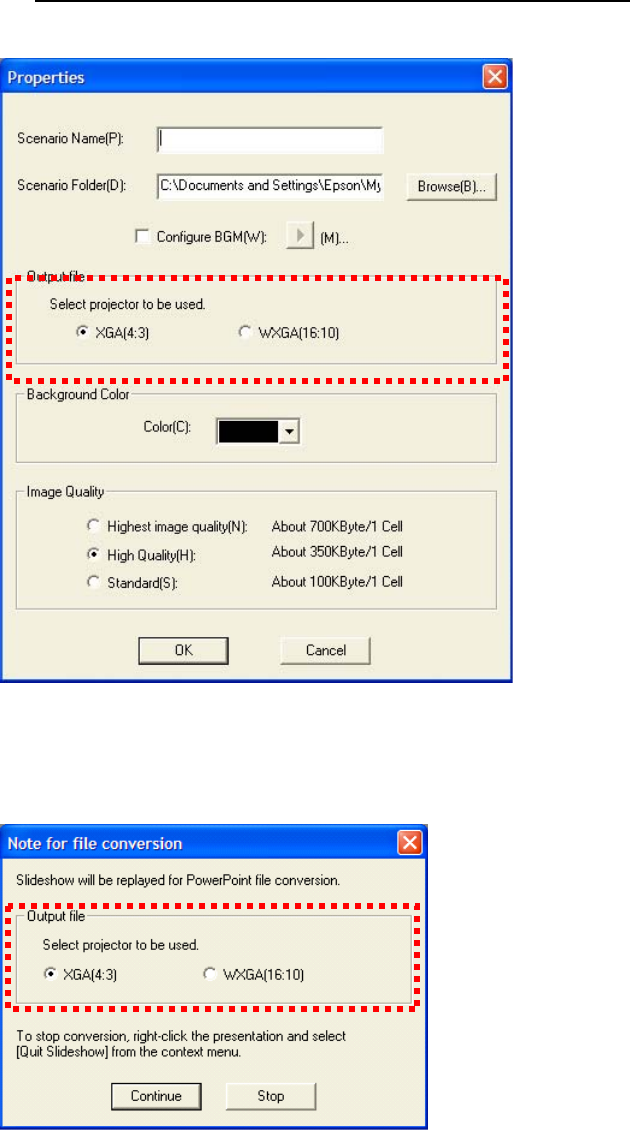
1) Selecting Aspect Ratio for the Projector being used:
a) Properties Window
b) Drag and Drop Window
2 of 8
PSB.2009.01.003
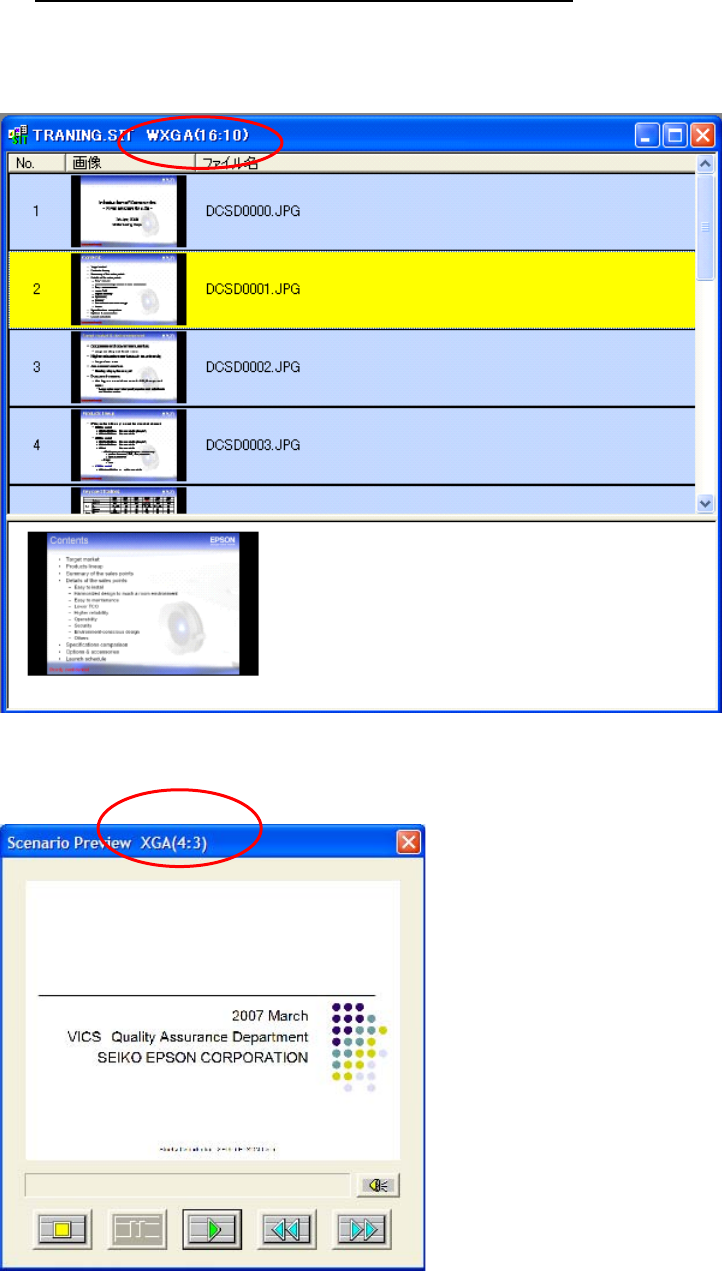
2) How to Verify the Aspect Ratio of the Scenario:
The resolution of the scenario is displayed in the window title of the Scenario Window and
Scenario Preview as shown below:
a) Scenario Window
b) Scenario Preview
3 of 8
PSB.2009.01.003
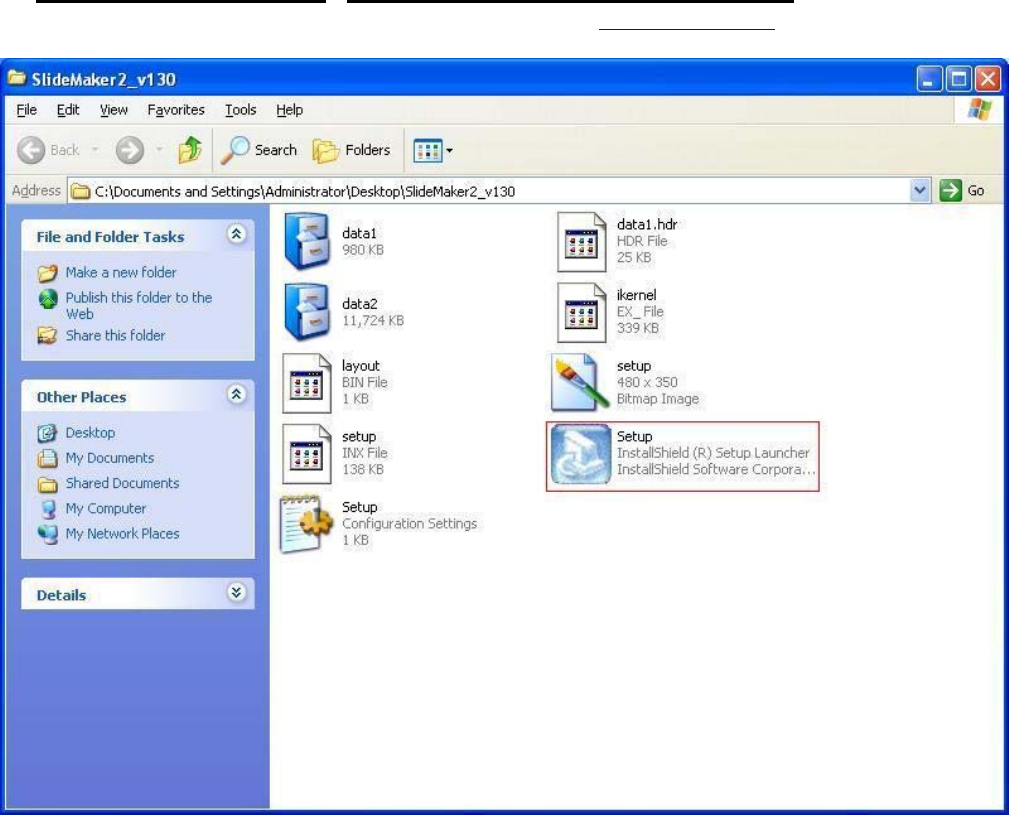
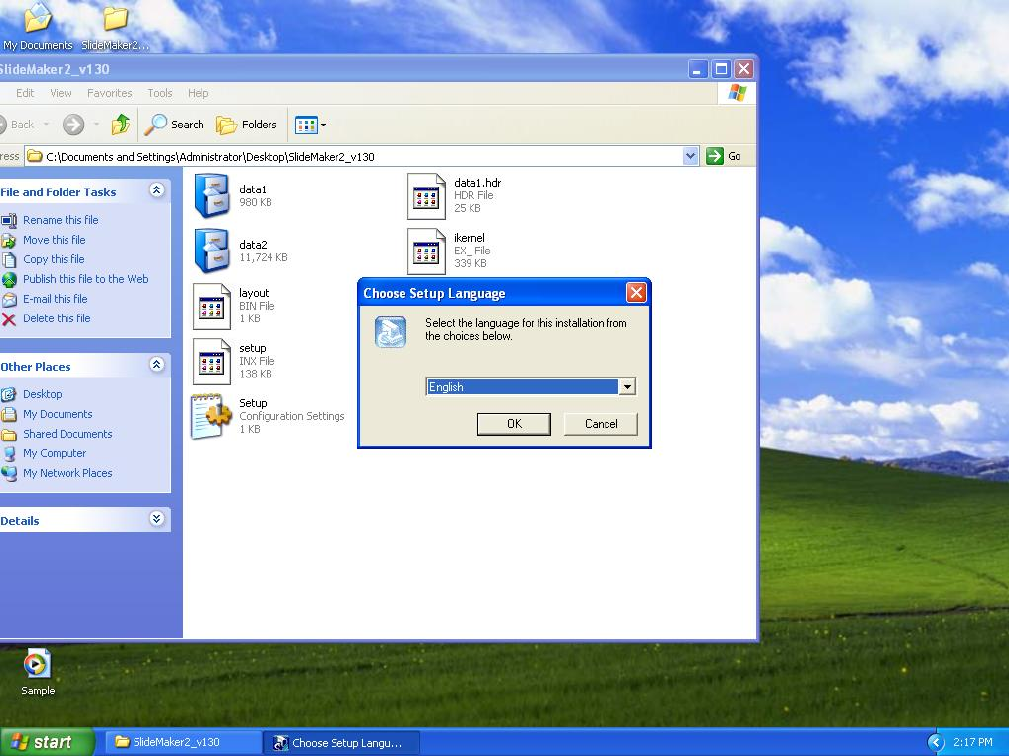
Select you language.
5 of 8
PSB.2009.01.003
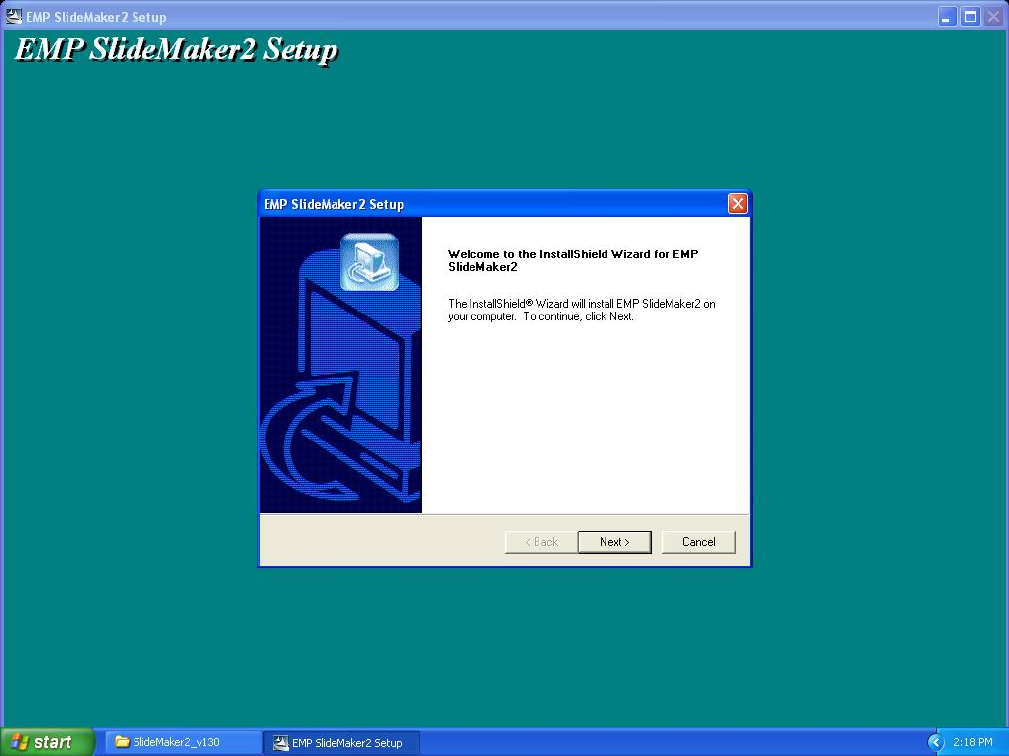
Click “Next” at this screen.
6 of 8
PSB.2009.01.003
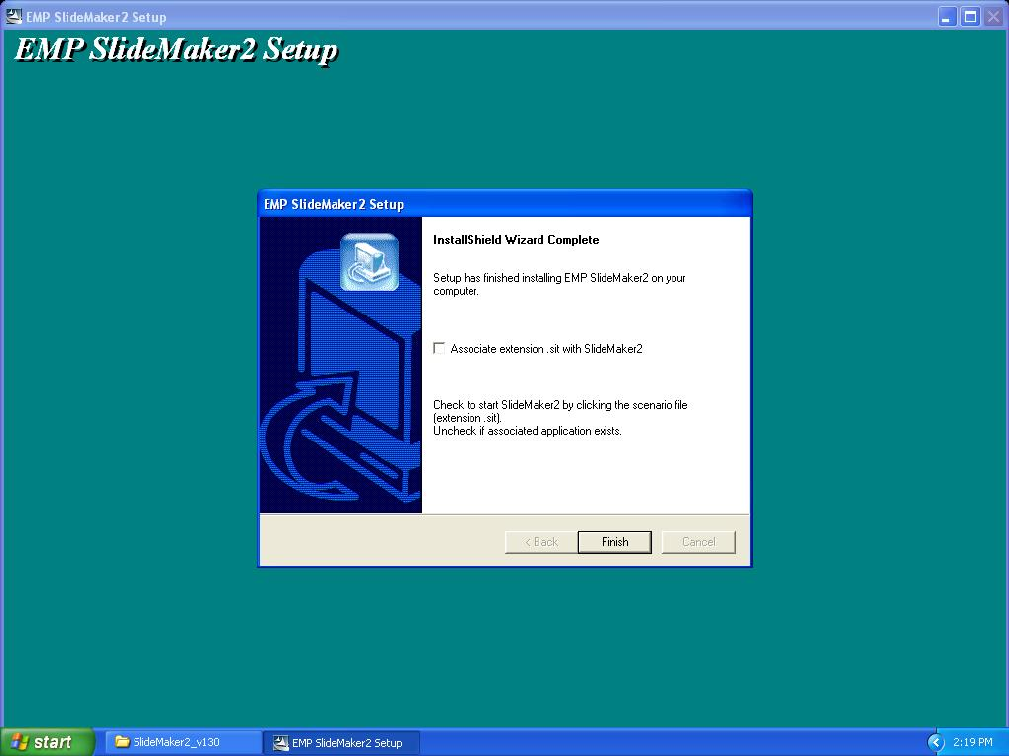
Click “Finish” to complete the installation.
7 of 8
PSB.2009.01.003

4) How to User the software: Please refer to the original documentation that came with your
Projector.
5) Operating Environment:
OS Windows 98/98SE/Me/ 2000 Professional/XP Home Edition SP4
/ XP SP1,SP2,SP3 Professional(32bit)
/ Vista non-SP,SP1 Home Basic/Home Premium/Ultimate
/Business/Enterprise(32bit)
Office Office2000、OfficeXP、Office2003、Office2007
CPU At least Celeron 300MHz (Recommended: Celeron 400MHz or
above)
Memory At least 64MB(Recommended: 128MB or above)
Disk space At least 50MB
Display At least SVGA(800×600) (Recommended: XGA(1024x768))
8 of 8
PSB.2009.01.003
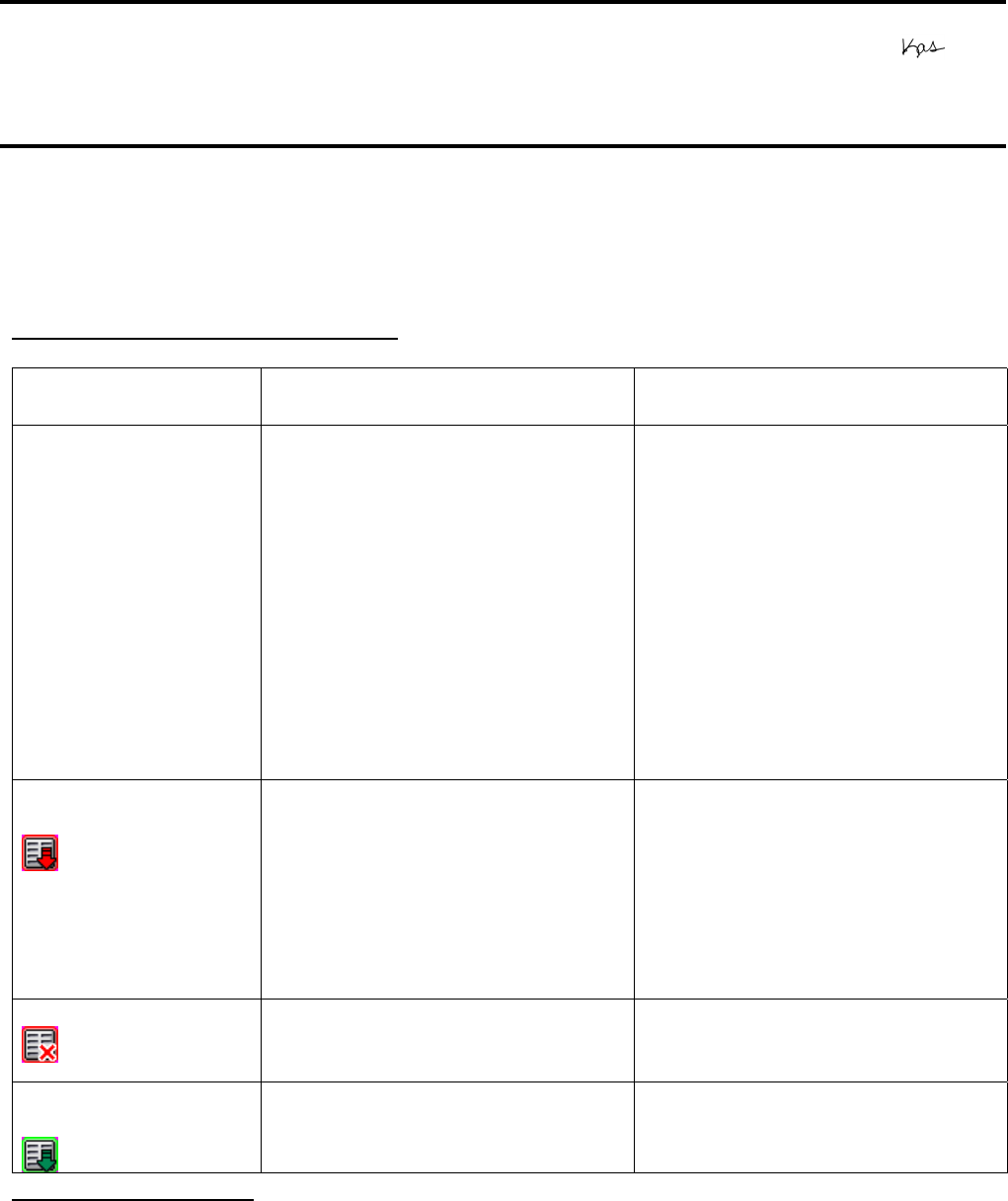
Page 1 of 3
PSB.2007.11.005A
EPSON PRODUCT SUPPORT BULLETIN
Date: 11/13/2007 Originator: AP
PSB #: PSB.2007.11.005A Authorization:
Reference: TI 07-63e, Rev. A Total Pages: 3
Product(s): Epson EMP Monitor
Subject: EMP Monitor Version 4.21 Release
This bulletin was created to inform you of the release of Epson EMP Monitor version 4.21
utility.
New Functions and Improvements:
New Functions,
Improvements
Supported Models Function / Improvement
Description
Support for 25
languages
All projectors (see Supported
Projectors table)
Language support extended to
include Chinese (traditional),
Dutch, Danish, Polish,
Hungarian, Czech, Romanian,
Slovene, Norwegian, Swedish,
Finnish, Russian, Ukrainian,
Greek, Turkish, Arabic.
Languages supported in prior
version of EMP Monitor: English,
Japanese, French, German,
Italian, Spanish, Portuguese,
Chinese (simplified), Korean
Abnormally low air
flow notification
PowerLite 6100i / 6110i Indicates an abnormal decrease
in the force of air flow through
the air filter. User should check
for air filter obstructions, clean
and replace air filter as
necessary.
This feature is available only for
the indicated models.
Air flow sensor error PowerLite 6100i (with firmware
version 1.10 or later) / 6110i
Indicates air flow sensor error.
This feature is available only for
the indicated models
Clean air filter
notification
PowerLite 6110i User notification to clean air filter.
This feature is available only for
the indicated model.
Supported Projectors:
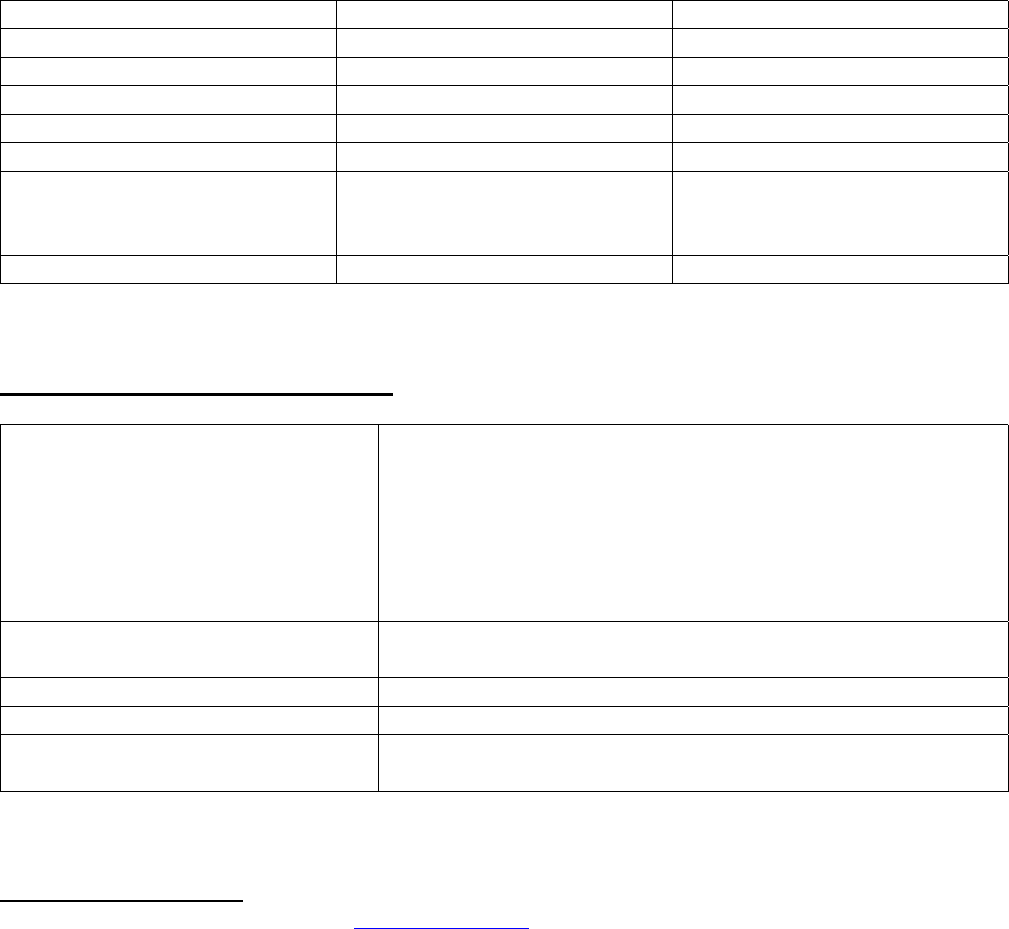
This application supports the following Epson projectors:
Page 2 of 3
PSB.2007.11.005A
PowerLite 735c PowerLite 1715c PowerLite 1815p
PowerLite 737c PowerLite 6100i PowerLite 822p
PowerLite 745c PowerLite 7800p PowerLite 6110i
PowerLite 755c PowerLite 7850p PowerLite Cinema 500
PowerLite 765c PowerLite 7900NL PowerLite 61p
PowerLite 830p PowerLite 8300i / 8300NL PowerLite 81p
PowerLite 835p PowerLite 8300i with the
EasyMP.net Option Module
installed
PowerLite 82c
PowerLite 1705c PowerLite 9300NL PowerLite 821p
Supported Operating Environment:
Operating System requirement • Windows 98SE / Me / NT 4.0 SP6 (except
Ukrainian) / 2000 Professional / XP Home Edition
/ XP Professional (32 bit) / Vista Home Basic /
Vista Home Premium / Vista Ultimate (32 bit) /
Vista Business (32 bit) / Vista Enterprise (32 bit)
(except Arabic)
• Internet Explorer 5.0 or later
Minimum CPU requirement Pentium MMX 166 MHz (Recommended: Pentium II 233
MHz or faster)
Minimum RAM requirement At least 64 MB (Recommended: 128 MB or more)
Drive space requirement At least 50 MB free
Display requirements SVGA (800 x 600) or higher resolution, 32 bit color
display or higher
Obtaining the Update:
Download epson12456.exe from www.epson.com to get the version 4.21 update for EMP
Monitor. This file is a self-extracting archive and will start the installation utility for EMP
Monitor.

Page 3 of 3
PSB.2007.11.005A
Software History:
Version Release Date Notes
3.00 December 25, 2002 Added support for the PowerLite 735c
3.01 February 26, 2003 Added support for the PowerLite 7800p / 8300i
3.02 April 18, 2003 Added support for the PowerLite 7850p / PowerLite 8300i
with the EasyMP.net option module installed
3.03 November 21, 2003 Added support for the PowerLite Cinema 500
3.04 April 1, 2004 Added support for the Serial ↔ TCP/IP conversion
adapter for the PowerLite 61p / 81p
4.01 October 18, 2004 Added support for projectors installed on large scale
networks
4.02 August 29, 2005 Addition of timer function, auto search by specifying IP
address.
Improvement of communication logs sizes
4.10 May 8, 2006 Addition of support for PowerLite 6100i with support for
additional monitoring features unique to the PowerLite
6100i
4.20 May 29, 2007 Added support for Windows Vista (32 bit)
4.21 September 26, 2007 Increased language support to 25 languages
Page 1 of 3
PSB.2005.06.001
EPSON PRODUCT SUPPORT BULLETIN
Date: 06/06/2005 Originator: JD
PSB #: PSB.2005.06.001 Authorization:
Reference: N/A Total Pages: 3
Product(s): Powerlite 8300/8300 with EasyMP.net/9300 series Projectors
Subject: Filter-Cleaning Procedures
This bulletin was created to inform users about the filter-cleaning procedures necessary for
maintaining proper airflow and reducing the potential for overheating.
Reason:
The PowerLite 8300 and 9300 series projectors have five (5) filters that must be cleaned on a regular
basis. Cleaning the filters is critical to maintaining proper airflow inside the projector and reducing
possible overheating issues. Incomplete or infrequent filter-cleaning maintenance can cause one or
more filters to accumulate excessive dust over time. This can inhibit proper airflow so that the
projector begins to overheat during operation and eventually shut down. The next section provides
information on the location of the filters on the projector, cleaning instructions and recommended
maintenance schedules.
Action:
The following filters should be cleaned after every 100 hours of use. For dusty environments, filter
cleaning should be performed more frequently.
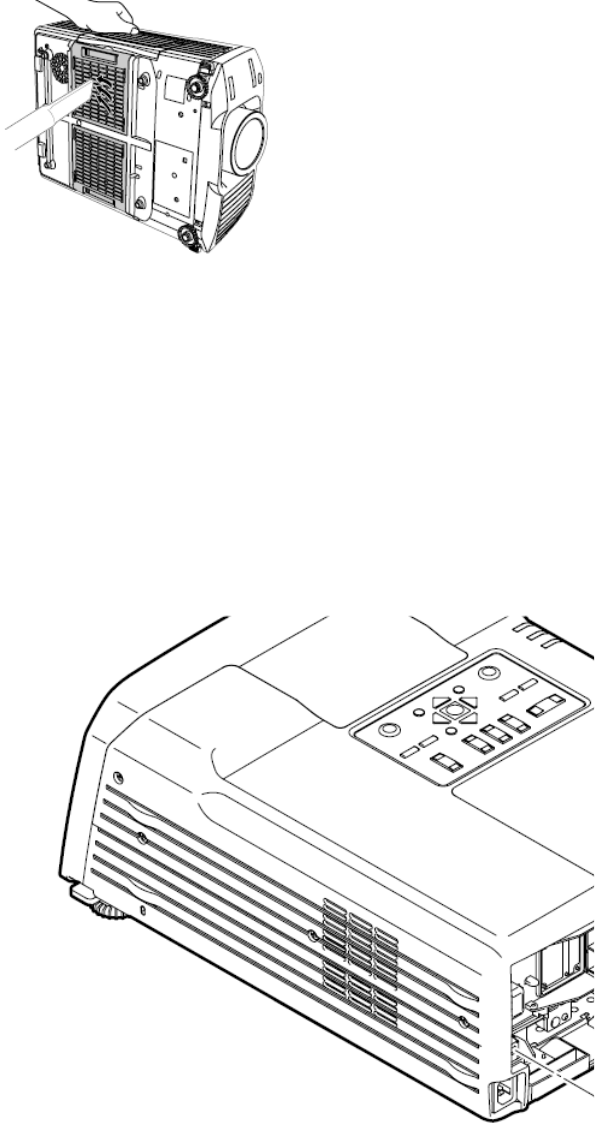
1) Wire mesh filter (inside lamp housing shutter):
Hold shutter open and use a computer vacuum to remove dust.
Page 2 of 3
PSB.2005.06.001
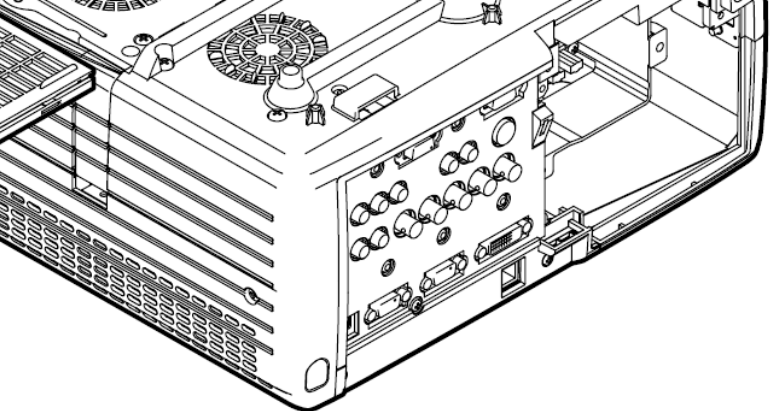
2) Air intake filters (2)--located at bottom of projector:
Use a computer vacuum to clean both filters. If you don’t have one, then use a soft brush and gently
clean the filters. If the dirt is difficult to remove or either filter is damaged or broken, replace the
filter(s).
Note: Both filters should be replaced when the lamp is replaced.
3) Power supply intake filter (located on side of projector—opposite handle side)
Use a computer vacuum to clean dust from the filter and vents.
Page 3 of 3
PSB.2005.06.001
4) Lamp intake filter (circular filter located at bottom of projector)
Use a computer vacuum to clean dust from the filter and vents.

Page 1 of 2
PSB.2005.05.005
EPSON PRODUCT SUPPORT BULLETIN
Date: 05/11/2005 Originator: JAM
PSB #: PSB.2005.05.005 Authorization:
Reference: N/A Total Pages: 2
Product(s): PowerLite 8300i
Subject: 1400 x 1050 DVI Compatibility Support
Reason:
This bulletin is to inform you of the testing results for 1400 x 1050 DVI full-screen resolution
with the Epson PowerLite 8300i Projector.
Question:
1. Has the Epson PowerLite 8300 projector been tested for 1400 x 1050 DVI
full-screen display compatibility?
2. What type of DVI port is on the PowerLite 8300 and PowerLite 9300 Projectors?
Answer:
1. The Projector has native resolution of 1280 x 1024. Its maximum “DVI” resolution is 1280 x
1024. This Projector can only support 1400 x 1050 DVI full-screen display using a DVI-D
to VGA 15HD cable. Detailed information listed below.
2. The port on the rear A/V module is DVI-D (DVI Digital) dual link. It is not an analog port
and does not have the 4 extra analog pins for DVI-I (DVI Digital and Analog). A DVI-I cable
cannot physically attach to the port since it can cause damage to the cable.
Operating Systems tested:
System Version(s): Mac OS X 10.2.8
Hardware tested:
Computer(s): Apple PowerMac G5
Video Chip Set: NVidia, GeForce FX 5200
Video Test Generators tested:
Make: Extron
Model #: VTG 400

Page 2 of 2
PSB.2005.05.005
Projector Resolution “About” information:
Source: DVI
Input Signal: Digital-RGB
Resolution 1280 x 1024
Refresh Rate: 60 Hz
Input Device: PowerMac G5
Source: Computer 1
Input Signal: Analog-RGB
Resolution 1400 x 1050
Refresh Rate: 60 Hz
Input Device: Extron VTG 400
Tested by:
J.A.Madrigal
Epson America Inc.,
Advanced Product Support
Long Beach, CA

Page 1 of 2
PSB.2005.05.003
EPSON PRODUCT SUPPORT BULLETIN
Date: 05/11/2005 Originator: JAM
PSB #: PSB.2005.05.003 Authorization:
Reference: N/A Total Pages: 2
Product(s): PowerLite 8300i and PowerLite 9300i
Subject: 1400 x 1050 Compatibility Support
Reason:
This bulletin is to inform you of the testing results for 1400 x 1050 full-screen resolution with
the Epson PowerLite 8300i and PowerLite 9300i video projectors.
Question:
1. Have the Epson PowerLite 8300 and PowerLite 9300 Projectors been tested for
1400 x 1050 full-screen display compatibility?
2. Why do some laptops undersize the screen and perform in a pan-and-scan function on
projectors with 1400 x 1050 native resolutions?
Answer:
1. Yes, the Projectors have been confirmed functional with various video sources and
software operating systems for full-screen display performance. Detailed information
listed below.
2. Various laptop manufacturers use ATI RagePro or ATI Radeon chipsets for the built-in
LCD screen. The “Advanced Settings” of the video driver function in pan-and-scan
mode when re-directing video to the external video port. The true output at the VGA
15-HD port is only 1280 x 1024 as verified using by a VGA monitor that can sense and
display the video settings from the monitor’s menu options.
Operating Systems tested:
System Version(s): Windows 98SE and Windows XP Service Pack 2
Mac OS X 10.2.8
Hardware tested:
Mother Board(s): ASUS P4BGL-VM ATX Motherboard
Video Chip Set: Intel 8284G/GL Graphics Controller
Computer(s): Apple PowerMac G5
Video Chip Set: NVidia, GeForce FX 5200

Page 2 of 2
PSB.2005.05.003
Video Test Generators tested:
Make: Extron
Model #: VTG 400
Projector Resolution “About” information:
Source: DVI
Input Signal: Digital-RGB
Resolution 1400 x 1050
Refresh Rate: 60 Hz
Input Device: PowerMac G5
Source: Computer 1
Input Signal: Analog-RGB
Resolution 1400 x 1050
Refresh Rate: 60 Hz
Input Device: Extron VTG 400
Tested by:
J.A.Madrigal
Epson America Inc.,
Advanced Product Support
Long Beach, CA

Page 1 of 1
PSB.2004.04.005
EPSON PRODUCT SUPPORT BULLETIN
Date: 04/19/2004 Originator: TC
PSB #: PSB.2004.04.005 Authorization:
Reference: N/A Total Pages: 1
Product(s): PowerLite 735c/7850p & 8300i (with EasyMP.net module.)
Subject: EMP NS Connection failures caused by Remote Control applications
This bulletin was created to inform you of an issue that can occur when using the PowerLite
735c/7850p, 8300i (with EasyMP.net module) and remote control software.
Description of Issue:
The user attempts to run EMP NS Connection on Windows 98SE/Me/2000/XP with the PowerLite
735c/7850p/ 8300i (with EasyMP.net module). When the EMP NS Connection application is
launched, it immediately gives an error message stating that EMP NS Connection "FAILED TO
INITIALIZE."
Reason:
Epson has found that remote control software, like PCAnywhere and RealVNC, causes a conflict
with the EMP NS Connection application. These remote control applications use a "Video Hook
Driver" that conflicts with the Epson GDI Monitor driver that is installed and used by EMP NS
Connection. Most remote control programs load a small client application at Windows startup and
leave an icon in the system tray (located at the bottom right on the desktop) to indicate they have
been loaded. In most cases, the remote control software can be turned off by right-clicking on the
icon in the system tray and disabling or exiting the program. Remote control applications do not
have to be removed from the system in order for EMP NS Connection to run properly; they just
need to be turned off. Consult the documentation that came with the remote control software for
information on how to disable the software from automatically launching every time the computer is
started.
Once the remote control software has been turned off, EMP NS Connection should run without
returning an error. If you continue to have issues connecting to the projector, consult the EMP NS
Connection Help file or User's Guide for troubleshooting assistance.
Notes:
VNC stands for Virtual Network Computing. It is a remote console utility which allows a user at his
computer to assume control of another computer across a network, as if they were sitting in front of
that computer.
Remote Control Applications known to conflict with Epson EMP NS Connection
• PCAnywhere - versions 32, 9.0, 9.2, 10.0, 10.5 and 11.0 by Symantec
• Real VNC - versions 3.3.7 and 4.0 beta by RealVNC with the GNU Library General Public
License
• TightVNC - version 1.3dev3 based on VNC with the GNU Library General Public License
• NetworkStreaming – v. 7.1 (formerly ExpertVNC)
Any other VNC remote control software based on RealVNC under the GNU Library General Public
License or remote control programs that load a "Video Hook Driver" (listed in Windows Device
Manager under "Display Adapters), can cause similar conflicts.

Page 1 of 1
PSB.2004.02.009
EPSON PRODUCT SUPPORT BULLETIN
Date: 02/26/2004 Originator: AP
PSB #: PSB.2004.02.009 Authorization:
Reference: TI03-57e Rev. A Total Pages: 1
Product(s): PowerLite 735c / 7800p / 7850p / 8300i / Cinema 500
Subject: EMP Monitor version 3.03 Update
This bulletin was created to inform you of the availability of EMP Monitor version 3.03. This
version of the EMP Monitor software has added support for the PowerLite Cinema 500
projector. All other support for previously supported projectors remains the same.
This software update can be downloaded from the Epson website. Locate and download
epson11017.exe. This file is a self extracting archive that will automatically start the program
installer once the file is extracted to your computer hard drive.
Refer to the documentation provided with your projector for further information about the
operation of the EMP Monitor software.
Page 1 of 3
PSB.2003.11.001
EPSON PRODUCT SUPPORT BULLETIN
Date: October 17, 2003 Originator: VS
PSB #: PSB.2003.11.001 Authorization:
Reference: TI 03-42e Rev. A Total Pages: 3
Product(s): PowerLite 735c / 7850p / 8300i with EasyMP.net option installed
Subject: Supported Wired and Wireless LAN cards
Reason:
This bulletin is to inform you of the testing results for wired and wireless LAN cards used with
the PowerLite 735c / 7850p / 8300i with EasyMP.net option installed.
Models and firmware versions used in the evaluation:
Model PW firmware version IM-X•IM-XP firmware version
PowerLite 735c 1.00 1.01 (IM-X)
PowerLite 7850p 2.00 1.00 (IM-X)
PowerLite 8300i with
EasyMP.net option
installed
1.20 1.01 (IM-XP)
Wireless LAN cards configuration:
1. The tested Wireless LAN cards are inserted into the PC and a wireless LAN connection
(Ad hoc mode) is made to the projector.
2. The tested Wireless LAN cards are inserted into the PC and a wireless LAN connection is
made to the projector using an access point (Infrastructure mode).
Items evaluated:
The following items were tested and confirmed to work in both Ad hoc and infrastructure
modes. (WEP is only supported in the infrastructure mode.)
1. All functions of EMP Monitor.
2. DHCP, ESSID and WEP can be setup by a browser and function properly.
3. EMP NS Connection functions properly with the freeze, mute, zoom, and video input
change features.
4. Power Point slide show works.
Operating systems used for testing:
Windows 98 and Windows XP
Page 2 of 3
PSB.2003.11.001
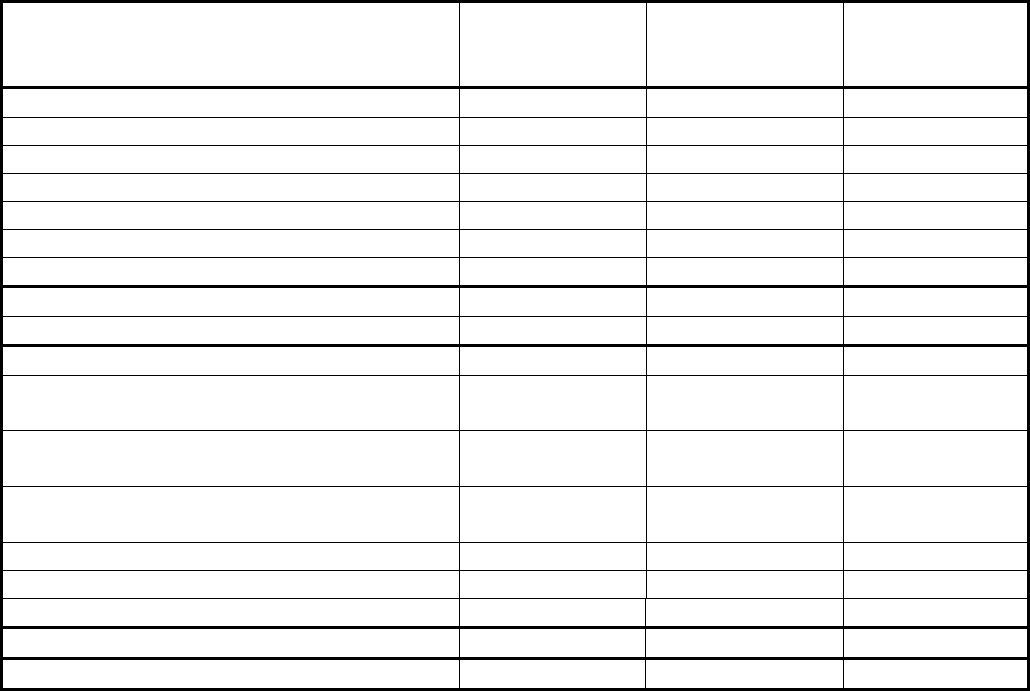
Evaluation results for the Wireless LAN cards:
Wireless LAN card PowerLite 735c PowerLite
7850p PowerLite
8300i with
EasyMP.net
3Com,3crshpw 196, office connect pass pass pass
Cisco Aironet350 AIR-PCM341(2.4GHz) pass pass pass
FMV Notebook (Broadcom BCM4306) pass pass pass
FMV Notebook (Intersil Prism2.5) pass pass pass
Fujitsu FMV-JW181(Agere) pass pass pass
Fujitsu FMV-JW183(Agere HermesII) pass pass pass
Fujitsu FMV-W182(Intersil Prism2.5) pass pass pass
Fujitsu FMV-JW182(Intersil Prism2.5) - pass pass
FMV-STYLISTICTB93(Intersil Prism2.5) - pass pass
D-Link Airplus XtremeG DWL-G650 pass - -
Intel,CR Pro Wireless 2011B, LAN PC
Card pass - -
Linksys WPC11 Wireless Network PC
Card pass - -
NetGear 54Mbps wireless PC Card
WG511 pass - -
SMC 2435W, EZ Connect Turbo, pass - -
US Robotic Ref. 9514115MBP pass - -
BUFFALO WLI-CB-G54 pass - -
ADTEK ADLINK2422C pass Didn’t pass Didn’t pass
FMV Notebook (Intel Calexico) Didn’t pass Didn’t pass Didn’t pass
Wired LAN cards configuration:
Insert the wired LAN card to be tested into the projector and make a network connection to the
PC.
Items evaluated:
The following items were tested and confirmed to work.
1. All functions of EMP Monitor.
2. DHCP can be setup using a browser and functions properly.
3. EMP NS Connection functions properly with the freeze, mute, zoom, and video input
change features.
4. Power Point slide show works.
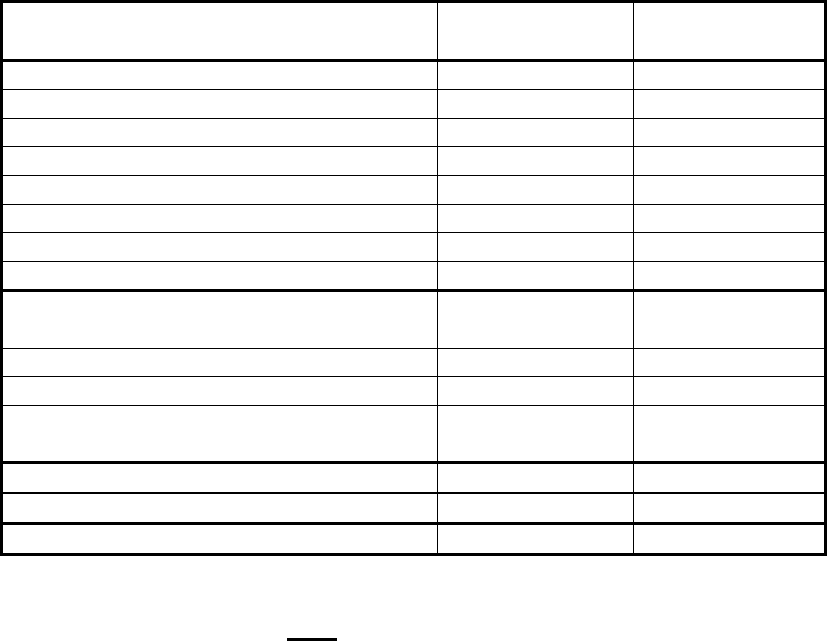
Evaluation results for the Wired LAN cards:
Page 3 of 3
PSB.2003.11.001
Wired Card name PowerLite 735c PowerLite
7850p
3Com 3C589C-TP pass pass
3Com 3CXE589ET-JP pass pass
D-Link DFE670TXD pass pass
Fujitsu FMV-J182 pass pass
Hawking PN652TX pass pass
Linksys PCM100 ver2 pass pass
Netgear FA411 pass pass
SMC SMC8041TX pass pass
3Com 10/100 LAN PC Card
3CCFE574BT pass -
PCET100-CL pass -
Linksys 10/100 PC Card pass -
SMC 8041TX V.2, EZ PC Card
10/100, SMC pass -
I-O Data PCLA/TE Didn’t pass pass
PCC-TXD Didn’t pass Didn’t pass
Kingston EtheRx PC Card KNE-PC2T Didn’t pass
The following cards are NOT compatible:
1. 3Com 3CCFE575BT-JP
2. 3Com 3CXFE575CT-JP
3. 3Com 3CXFEM656C
4. Megahertz 10/100 LAN CardBus PC Card (3Com)
5. Come once (Taiwan card)
6. DFE-690TXD- Cardbus 32 bits
7. Fujitsu FMV-J184
8. Fujitsu FMV-J185
9. LPC3-CLTL
10. NetGear CardBus Notebook Adapter FA511
11. SMC 8036TX, EZ PC Card 10/100, SMC
12. TDK LAK-CB100X
13. Toshiba LANCB100A
14. Xircom CE3B-100BTX
15. Xircom CreditCard Ethernet CE3-10/10
NOTE:
No EMI (electro magnetic interference) was done, only a functionality evaluation.
