FarmTek MI046 Wireless Photo-Receiver User Manual Allegro Manual
FarmTek Inc Wireless Photo-Receiver Allegro Manual
FarmTek >
Revised Users Manual
Sport Timing Specialists
Allegro
Electronic Timer
Operating
Instructions
FarmTek, Inc.
1000-D Hwy 78 North (972) 429-0947
Wylie, TX 75098 (800) 755-6529
Farm
T
ek

© 2005
(CTO6GM+PE
(800) 755-6529
FCC and Industry Canada Information
This equipment has been tested and found to comply
with the limits for a Class B digital device, pursuant
to Part 15 of the FCC Rules. These limits are de-
signed to provide reasonable protection against
harmful interference when the equipment is operated
in a non-residential installation.
This equipment generates, uses, and can radiate ra-
dio frequency energy and, if not installed and used
in accordance with the instruction manual, may
cause harmful interference to radio communications.
However, there is no guarantee that interference will
not occur in a particular installation.
If this equipment does cause harmful interference to
radio or television reception, the user is encouraged
to try to correct the interference by one or more of
the following measures:
(1) Reorient or relocate the receiving antenna.
(2) Increase the separation between the equip-
ment and the receiver.
(3) Consult the dealer or radio/TV technician
for help.
CAUTION: Changes made or modifications not
expressly approved by the party responsible for FCC
compliance of this equipment could void the user’s
authority to operate the equipment.
This device complies with part 15 of the FCC Rules.
Operation is subject to the following two conditions:
(1) This device may not cause harmful interfer-
ence, and
(2) This device must accept any interference re-
ceived, including interference that ma cause
undesired operation.
© 2005
(CTO6GM+PE
(800) 755-6529
ALLEGRO TIMER CONSOLE
Timer Console Power
Batteries
The 2005 Allegro timer is powered by four AA al-
kaline batteries instead of an AC adapter as in the
past. The timer runs 50 to 60 hours on a new set of
batteries. Always turn the timer off before changing
the batteries and always replace all four batteries at
the same time – do not mix old and new batteries.
To check the battery level, press the right arrow
button on the timer console. The percent of battery
remaining (“br”) is displayed. For example, if 45%
of the battery life is remaining, the display shows:
br 45
The normal time display is automatically restored in
about eight seconds, or when the timer starts/stops,
or when the left arrow key is pressed.
Keep in mind that when the console is first turned
on after being off for a while (e.g., overnight), the
reported battery level is artificially high for the first
half-hour or so of use.
Low Battery Warning
When about 2 to 4 hours of console battery life are
remaining, the decimal point is flashed to alert the
timekeeper of the low battery. Note that the decimal
is also flashed when an electric eye in the arena has
a low battery. Check the console’s battery level as
described previously to see if it is the reason the low
battery warning is flashing.
Power On/Off
Turn the Polaris timer on and off using the slide
switch located at the upper right corner of the timer
console.
Timer Connections
Connections on the rear of the timer console have
changed with the introduction of the 2005 Allegro
timer. The
Power
jack is gone and in its position is
the
Input
jack. The
Input
jack is for connection of
optional input devices such as a bar code reader and
numeric keypad to be offered in the future. Do not
plug an AC adapter from an older FarmTek
timer into the
Input
jack on the new Allegro. It
can cause serious damage!
The
Display
jack is for connection of an optional
arena display (scoreboard). Additional information
is provided with the scoreboard.
The
Printer
jack allows connection of the optional
printer or computer interface cable. Additional in-
formation is provided with the printer and computer
interface cable.
© 2005
(CTO6GM+PE
(800) 755-6529
WIRELESS ELECTRIC EYES
Operation
Batteries
The electric eyes operate over 70 hours from a 9
volt alkaline battery (use only alkaline batteries).
The
Power
lamp on the unit glows steadily while
the battery is good and flashes when the battery is
low.
To help detect an eye with a low battery, the Al-
legro timer in the announcer’s booth flashes the
decimal point on the time display when any electric
eye in use has a low battery.
The electric eyes operate at least two hours after the
first indication of low battery. NOTE: The two hour
period is from the first time the low battery light
begins flashing. If a unit with a low battery is turned
off and then later turned back on, the lamp may
glow steadily for some time before it starts flashing
again. This does not mean there are two more hours
of operation remaining at this point.
Once the
Power
lamp begins flashing, it is simplest
to just replace the battery during the next break in
your event – don’t worry about trying to use the last
few hours of the battery.
When storing the electric eyes for an extended pe-
riod of time, always remove the batteries.
Helpful Hints
Even though the antennas
can be unscrewed, doing so
can cause problems: Do Not Remove the Antennas!
Placement of the electric eyes and the timer console
in the arena and the announcer’s stand can affect
performance of the radio link. Note these guide-
lines:
1) Ensure an unobstructed line-of-sight between
the antenna on the electric eye and the antenna
on the timer console in the announcer’s booth.
Verify clear line-of-sight from down at the an-
tenna’s level – not from your standing eye level.
2) Position the timer console at least 2-3 feet from
major electronic equipment such as computers,
monitors, and the PA system.
Optical Interference from the Sun
When the electric eyes are setup with more than 100
feet between them, a late afternoon sun shining di-
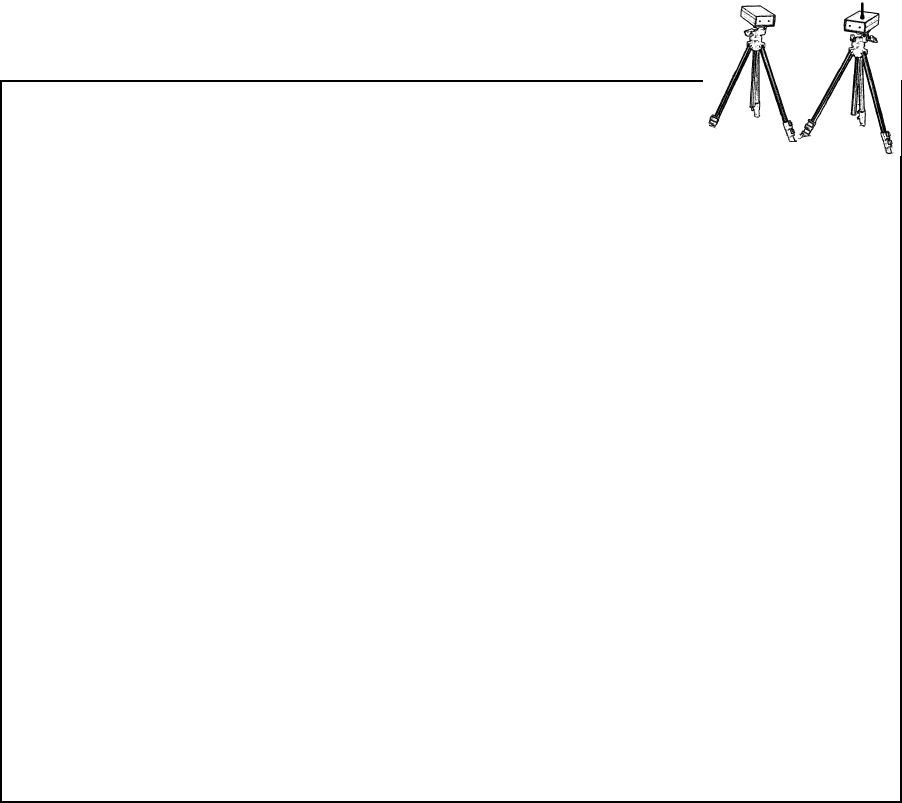
rectly into the Photo-Receiver (the electric eye with
the antenna) can reduce the working range between
the eyes. A simple remedy is to swap the electric
eyes with each other so that the sun shines into the
face of the Photo-Transmitter instead (the electric
eye without the antenna). Or, you can construct a
shade for the Photo-Receiver – see a sample sun-
shield to print and cut out on the web at:
http://farmtek.net/sunshield.htm.

© 2005
(CTO6GM+PE
(800) 755-6529
WIRELESS ELECTRIC EYES (Cont’d)
Two Timers At Once
Two complete timers can be used at the same time
to provide back-up for each other. However, when
two Photo-Transmitters (the infrared light source)
are on at the same time, they interfere with each
other at the Photo-Receiver. To prevent problems,
set up both complete timers, stacking the electric
eyes on top of each other. However, only turn on
one of the Photo-Transmitters. Both Photo-
Receivers will “see” the beam, but since the beam is
coming from just one Photo-Transmitter, there is no
interference.
Note: Older wired electric eyes may not “recognize”
the wireless Photo-Transmitter. In this situation,
make sure the one Photo-Transmitter that you turn
on is the older, wired Photo-Transmitter – both the
wired and wireless Photo-Receivers will recognize
the older, wired Photo-Transmitter.
Two Wireless Timers at Once
If the two timers in use are both wireless timers,
then in addition to the requirements already men-
tioned, make sure the two Photo-Receivers (the
electric eye with the antenna) operate on different
channels. The channel number used by the Photo-
Receiver is stamped inside the battery compartment.
Electronic ID Code
Each wireless electric eye produced by FarmTek is
permanently programmed with an electronic identi-
fication code. No two units have the same ID code.
The ID code is transmitted along with other infor-
mation whenever the electric eye beam is broken or
restored. For a set of wireless electric eyes to work
with a particular timer console, the timer console
must know the ID code of the electric eye being
used.
If you use a different set of electric eyes or a differ-
ent timer console than usual, you must have the
timer console “learn” the ID code of the electric
eyes being used. You may also want to perform this
procedure if your timer console and electric eyes no
longer seem to work together.
Follow these steps to force the timer console to learn
the ID code of the electric eyes being used.
1) Set up the electric eyes and the timer console for
normal operation as per the Barrel Racing in-
structions. (Note: The
Check Eyes
alignment
indicator on the timer console will not update un-
til after the ID code has been set.)
2) On the timer console, press the
Eyes On
button
and hold the button down until a series of dashes
( “-----”) is shown on the display (this will take
several seconds).
3) Walk through the electric eye beam. When the
beam breaks, the electric eye sends a message to
the timer console. The timer console displays a
four digit ID code for a few seconds, then the
normal display is restored. That’s it! The timer is
now ready for operation.
Note: If the dashes remain on the display, the timer
console did not receive a transmission from the
electric eye. Make sure the eyes are on and visu-
ally aligned, then walk through the beam again.
If the timer still fails to receive an ID code, move
the eyes closer to each other and closer to the
timer console (try less than 100 feet).
© 2005
(CTO6GM+PE
(800) 755-6529
Preparation For Use
BARREL RACING (1)
1) Attach each electric eye to a tripod. Place the eyes
on opposite sides of the arena to form a start/stop
line between them. Extend tripod legs fully to en-
sure the electric eyes are high enough to be bro-
ken by the horse's body (not its legs).
2) Turn the electric eyes ON. The power indicator
lamp on each unit should glow steadily. If the in-
dicator is blinking, the battery is low and should
be replaced as soon as possible.
3) Align the electric eyes. The electric eye on the
opposite side of the arena should be directly in-
line when sighting down either line on top of the
electric eye (left to right alignment), and when
sighting down the crack on the side of the electric
eye (up and down alignment).
4) Turn on the timer console using the slide switch
located at the upper right corner of the timer.
5) When the timer is first turned on, the entire dis-
play is lit for about one second, then a time of
"0.000" is displayed. If the timer fails to come on,
turn the power switch off and verify the batteries
are installed correctly.
6) Walk through the electric eye beam at least once
to force the eyes to send a message to the timer
console. This makes the
Allegro
console update
its electric eye alignment indicator (see below).
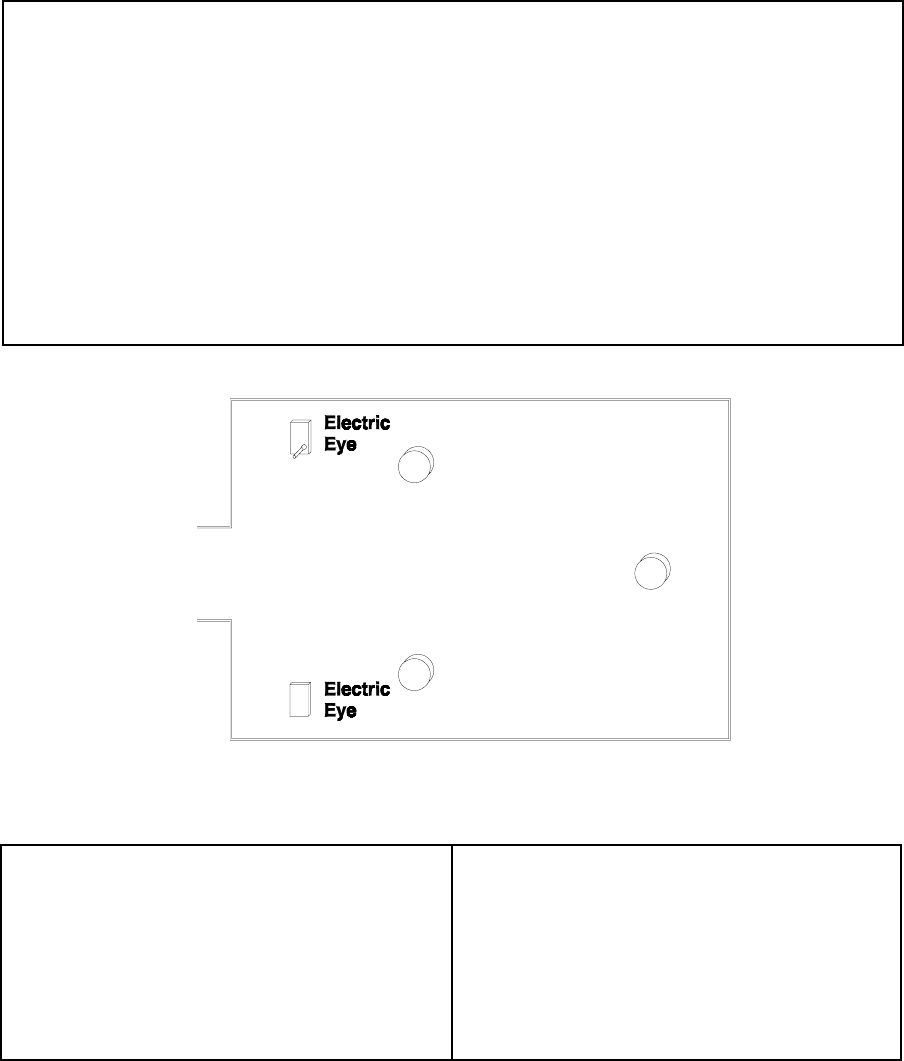
Typical Barrel Racing Layout
Checking Eye Alignment
The
Check Eyes
indicator is shown on the time dis-
play when the electric eyes are not aligned or anytime
the beam is broken.
Important! When setting up the electric eyes, always
take the time to align the eyes as outlined in Step 3
above– even if the timer indicates the eyes are
aligned. This ensures a strong alignment instead of a
possibly marginal alignment.
Timer Operation
1) As the rider enters the arena and breaks the beam,
the timer automatically begins timing from zero.
2) When the rider finishes the run and again breaks
the beam, the timer stops and shows the rider's
time. The timer is now ready for the next rider!
Note: After the beam is broken, it is ignored for
about 2 seconds to allow dust to settle.

© 2005
(CTO6GM+PE
(800) 755-6529
Useful Features
BARREL RACING (2)
Manual Start/Stop
The
Start/Stop
button starts and stops the timer just
as if the electric eye beam had been broken.
Accidental Beam Break
If the timer accidentally stops during the middle of a
run, the rider can still be accurately timed. Pressing
the
Restart
button resumes timing as if the timer
had never been stopped. As long as the
Restart
but-
ton is pressed before the ride is completed, the time
is not lost. To alert you, the timer console beeps
whenever the beam is broken.
Locking Out The Electric Eyes
Some events require the rider to pass through the
beam several times during a run. For these events,
the eyes can be disabled during the run, then re-
enabled before the rider finishes. To disable the
electric eyes, press the
Eyes Off
button. While the
eyes are disabled, the
Eyes Off
indicator is shown
on the display. Press the
Eyes On
button to re-
enable the electric eyes and remove the
Eyes Off
indicator.
Viewing Previous Times
The
Allegro
saves times and penalties for the most
recent 100 riders. Press the left arrow button to
scroll backwards through times and the right arrow
to move forward. Previous times are identified on
the display by the presence of the
Prev Time
indica-
tor.
When viewing a previous time, its position relative
to the current time is displayed as long as the arrow
button is held down. For example, “1” is shown
while the left arrow is pressed for the most recent
previous time. “2” is shown while the left arrow is
pressed for the second previous time, etc. Previous
times are displayed for 8 seconds or until the timer
starts, stops, or another button is pressed. After 8
seconds, the original display is restored.
Skipping a Rider / No Time
Pressing the NO TIME button enters “no run” in the
timer’s memory and prints “-- No Time --” on the
optional printer. This ensures an entry is present in
timer memory and on the printer for each contestant
registered to ride.
Penalties
Entering Penalties
Penalties can be entered while the rider is on course
or after a run is completed. Each press of the
Penalty
button adds 1 penalty to the current run. The
Penal-
ties
indicator displays the total number of penalties
recorded. Up to five penalties can be added to a run.
While time is running, the time shown does not in-
clude the penalties. When time is stopped, the time
value of the penalties is added into the time shown.
Time Value For Each Penalty Point
The preset time value for each penalty is 5 seconds.
To change the time value for a penalty, press and
hold down the
Penalty
button until the timer beeps
and the current penalty value is displayed. Press the
left arrow to lower the penalty value and the right
arrow to increase the penalty value. When the desired
penalty value is reached, press the
Penalty
button
again. The new penalty time value is permanently
saved until changed again in this same manner.
Trouble Shooting Suggestions
• Verify both electric eyes are on and aligned. If the
power light is flashing, replace the battery.
• Check the battery level (see page 1).
• Move the timer console and the electric eye with
the antenna away from large metallic objects or po-
tential sources of radio interference.
• Ensure a clean “line of sight” between the timer
console and the electric eye with the antenna.
• Reset the electric eye ID Code in the timer console
(see the Wireless Electric Eyes page).
• Turn the timer off, then back on.

FarmTek, Inc.
1000-D Hwy 78 North
Wylie, TX 75098
(800) 755-6529
(972) 429-0947
(972) 429-1379 (fax)
On the web at http://farmtek.net
E-Mail: info@farmtek.net
© 2005 FarmTek, Inc.