Fieldserver Fs 8704 09 Snmp Users Manual 09_SNMP
FS-8704-09 SNMP to the manual 7c389f7f-b13c-4d8d-95f8-99f6e68f81b1
2015-02-09
: Fieldserver Fieldserver-Fs-8704-09-Snmp-Users-Manual-551129 fieldserver-fs-8704-09-snmp-users-manual-551129 fieldserver pdf
Open the PDF directly: View PDF  .
.
Page Count: 39

-
A Sierra Monitor Company
APPLICABILITY & EFFECTIVITY
Effective for all systems manufactured after September 2008
Driver Manual
(Supplement to the FieldServer Instruction Manual)
FS-8704-09 SNMP Version 1
Driver Version:
1.03
Document Revision:
8

FS-8704-09 SNMP Driver Manual Table of Contents
FieldServer Technologies 1991 Tarob Court Milpitas, California 95035 USA Web: www.fieldserver.com
Tel: (408) 262 2299 Fax: (408) 262 9042 Toll Free: (888) 509 1970 email: support@fieldserver.com
TABLE OF CONTENTS
1.
SNMP DESCRIPTION ...................................................................................................................... 3
2.
DRIVER SCOPE OF SUPPLY.......................................................................................................... 4
2.1.
Supplied by FieldServer Technologies for this driver ................................................................. 4
2.1.1.
Required 3
rd
Party Hardware................................................................................................... 4
3.
HARDWARE CONNECTIONS ......................................................................................................... 5
3.1.
Hardware Connection Tips / Hints .............................................................................................. 5
4.
CONFIGURING THE FIELDSERVER AS A SNMP CLIENT ...........................................................6
4.1.
Data Arrays/Descriptors .............................................................................................................. 6
4.2.
Client Side Connection Descriptors ............................................................................................ 7
4.3.
Client Side Node Descriptors...................................................................................................... 8
4.4.
Client Side Map Descriptors ....................................................................................................... 9
4.4.1.
FieldServer Related Map Descriptor Parameters ................................................................... 9
4.4.2.
Driver Related Map Descriptor Parameters ............................................................................ 9
4.4.3.
Timing Parameters .................................................................................................................. 9
4.4.4.
Map Descriptor Example ....................................................................................................... 10
5.
CONFIGURING THE FIELDSERVER AS A SNMP SERVER/AGENT ......................................... 11
5.1.
Server Side Data Arrays ........................................................................................................... 11
5.2.
Server Side Connection Descriptors......................................................................................... 12
5.3.
Server Side Node Descriptors .................................................................................................. 12
5.4.
Server Side Map Descriptors .................................................................................................... 12
APPENDIX A.
ADVANCED TOPICS....................................................................................................13
Appendix A.1.
Receiving SNMP TRAPS ........................................................................................... 13
Appendix A.1.1.
Trap Source IP Address ...................................................................................... 13
Appendix A.1.2.
Receiving SNMP TRAPs using the SNMP Client ............................................... 14
Appendix A.1.3.
Receiving SNMP Traps – Storing using a Lookup Table....................................15
Appendix A.2.
Sending SNMP TRAPS using the SNMP Server/Agent ............................................18
Appendix A.2.1.
COV Map Descriptor Example ............................................................................ 19
Appendix A.2.2.
Polling for Integer bound Data............................................................................. 20
Appendix A.3.
MIB File Generation for the SNMP Server/Agent ...................................................... 22
Appendix A.3.1.
Customizing the MIB File Header: ...................................................................... 23
Appendix A.4.
Controlling how a MIB file reports traps ..................................................................... 24
Appendix A.4.1.
Mib_Style_for_Traps' = 'Style2' – Trap Descriptions........................................... 32
APPENDIX B.
TROUBLESHOOTING TIPS......................................................................................... 33
Appendix B.1.
HP Openview: ............................................................................................................33
APPENDIX C.
DRIVER ERROR MESSAGES ..................................................................................... 34
Appendix C.1.
Exposing Driver Statistics ..........................................................................................39
FS-8704-09 SNMP Driver Manual Page 3 of 39
FieldServer Technologies 1991 Tarob Court Milpitas, California 95035 USA Web: www.fieldserver.com
Tel: (408) 262 2299 Fax: (408) 262 9042 Toll Free: (888) 509 1970 email: support@fieldserver.com
1. SNMP Description
The SNMP driver allows the FieldServer to transfer data to and from devices over Ethernet using the
SNMP version 1 protocol. The FieldServer can emulate either a Server (SNMP Agent) or Client.
Max Nodes Supported:
FieldServer Mode Nodes Comments
Client 25 Each Node is specified by a unique IP address
Server 1 As a Server the SNMP driver can act as a single Node only
The Client can be configured to read values specified by their SNMP Object Identifiers (OID’s), which are
defined in the MIB file (Management Information Base) of the target device. When acting as an SNMP
Agent (Server), the driver makes the contents of specified integer data arrays available to any SNMP
Client. The FieldServer MIB file sets out the OIDs to use.
The current version of the driver can send and receive SNMP traps. The following SNMP data types are
supported:
• INTEGER
• OCTET_STREAM
• TIMER_TICKS
• STRING
The maximum number of traps currently supported is 255.
The FieldServer Enterprise ID is 6347. MIB files are generated automatically from the FieldServer
configuration files. A selection of standard MIB-2 OIDs are supported to allow interaction with popular
Network Management packages.
FS-8704-09 SNMP Driver Manual Page 4 of 39
FieldServer Technologies 1991 Tarob Court Milpitas, California 95035 USA Web: www.fieldserver.com
Tel: (408) 262 2299 Fax: (408) 262 9042 Toll Free: (888) 509 1970 email: support@fieldserver.com
2. Driver Scope of Supply
2.1. Supplied by FieldServer Technologies for this driver
FieldServer Technologies PART # Description
FS-8915-10 Ethernet cable, 7 foot, RJ45
FS-8704-09 Driver Manual.
FS-8704-09 mb8sim.exe. SNMP utility for generating MIB files
2.1.1. Required 3
rd
Party Hardware
Part # Description
Ethernet 10/100 BaseT hub
1
1
Not all FieldServer models support 100BaseT. Consult the appropriate instruction manual for details of
the Ethernet speed supported by specific hardware.
FS-8704-09 SNMP Driver Manual Page 5 of 39
FieldServer Technologies 1991 Tarob Court Milpitas, California 95035 USA Web: www.fieldserver.com
Tel: (408) 262 2299 Fax: (408) 262 9042 Toll Free: (888) 509 1970 email: support@fieldserver.com
3. Hardware Connections
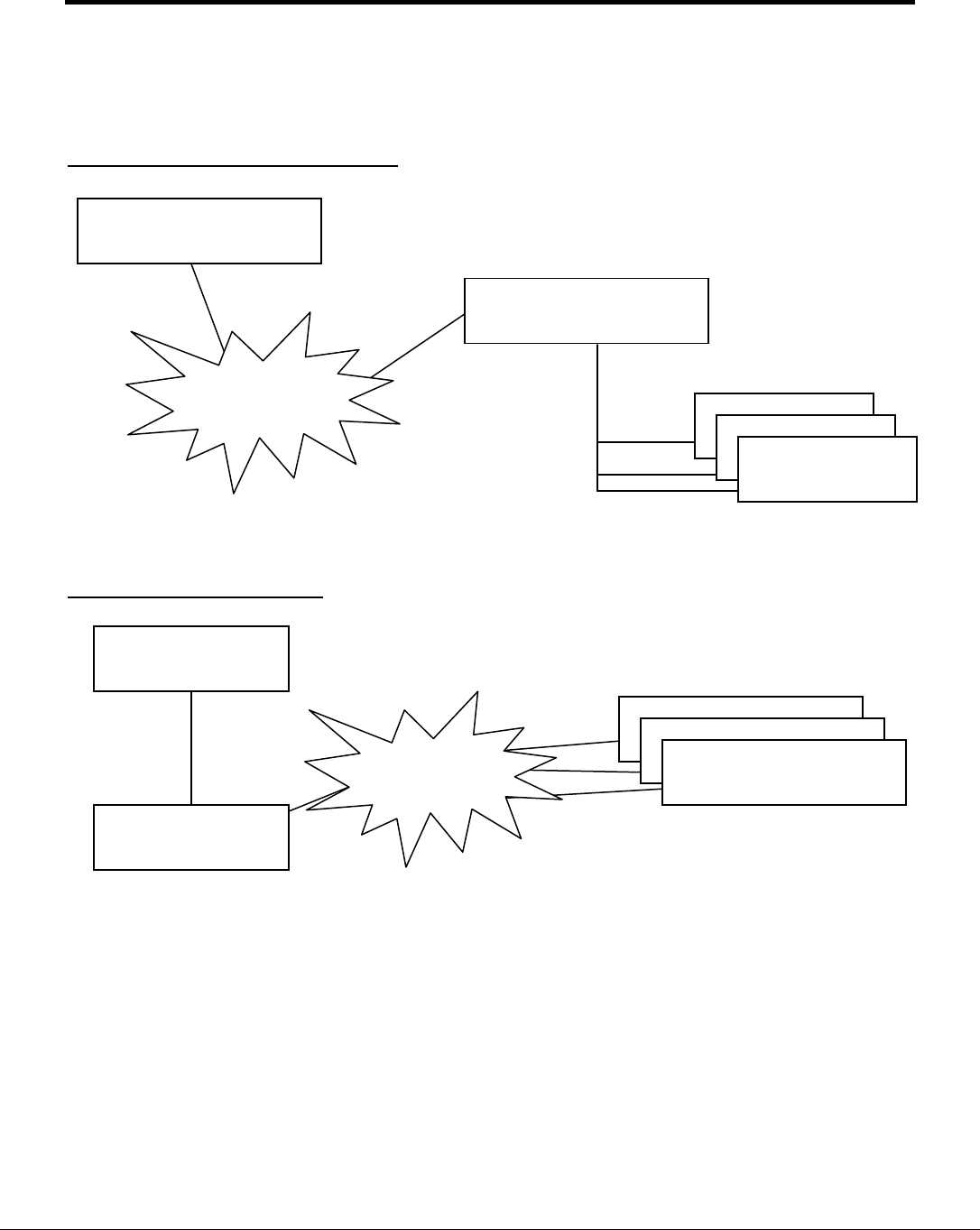
The FieldServer is connected to the Ethernet using the UTP cable supplied. Two typical hardware
configurations are shown below:
1. FieldServer as SNMP Agent (Server)
2. FieldServer as SNMP Client
3.1. Hardware Connection Tips / Hints
The FieldServer utility program Ruinet will connect to the FieldServer even if the Netmask setting on
the PC differs from the setting on the FieldServer. SNMP will only work between Nodes for which
these settings correspond, however, thus all Nodes required to communicate using SNMP must have
the same Netmask setting.
Network
Management
Station
FieldServer SNMP
Agent/Server
TCP/IP Cloud
3
rd
Party
Nodes
(non-SNMP)
FieldServer
(SNMP Client)
TCP/IP Cloud
Managed Nodes
(SNMP Agents)
SCADA
(3
rd
Party Client)

FS-8704-09 SNMP Driver Manual Page 6 of 39
FieldServer Technologies 1991 Tarob Court Milpitas, California 95035 USA Web: www.fieldserver.com
Tel: (408) 262 2299 Fax: (408) 262 9042 Toll Free: (888) 509 1970 email: support@fieldserver.com
4. Configuring the FieldServer as a SNMP Client
For a detailed discussion on FieldServer configuration, please refer to the FieldServer Configuration
manual. The information that follows describes how to expand upon the factory defaults provided in the
configuration files included with the FieldServer (See “.csv” sample files provided with the FieldServer).
This section documents and describes the parameters necessary for configuring the FieldServer to
communicate with a SNMP Agent/Server. Please refer to Appendix A: for a discussion of how to receive
SNMP TRAPS.
4.1. Data Arrays/Descriptors
The configuration file tells the FieldServer about its interfaces, and the routing of data required. In
order to enable the FieldServer for SNMP communications, the driver independent FieldServer
buffers need to be declared in the “Data Arrays” section, the destination device addresses need to be
declared in the “Client Side Nodes” section, and the data required from the servers needs to be
mapped in the “Client Side Map Descriptors” section. Details on how to do this can be found below.
Note that in the tables, * indicates an optional parameter, with the bold legal value being the default.
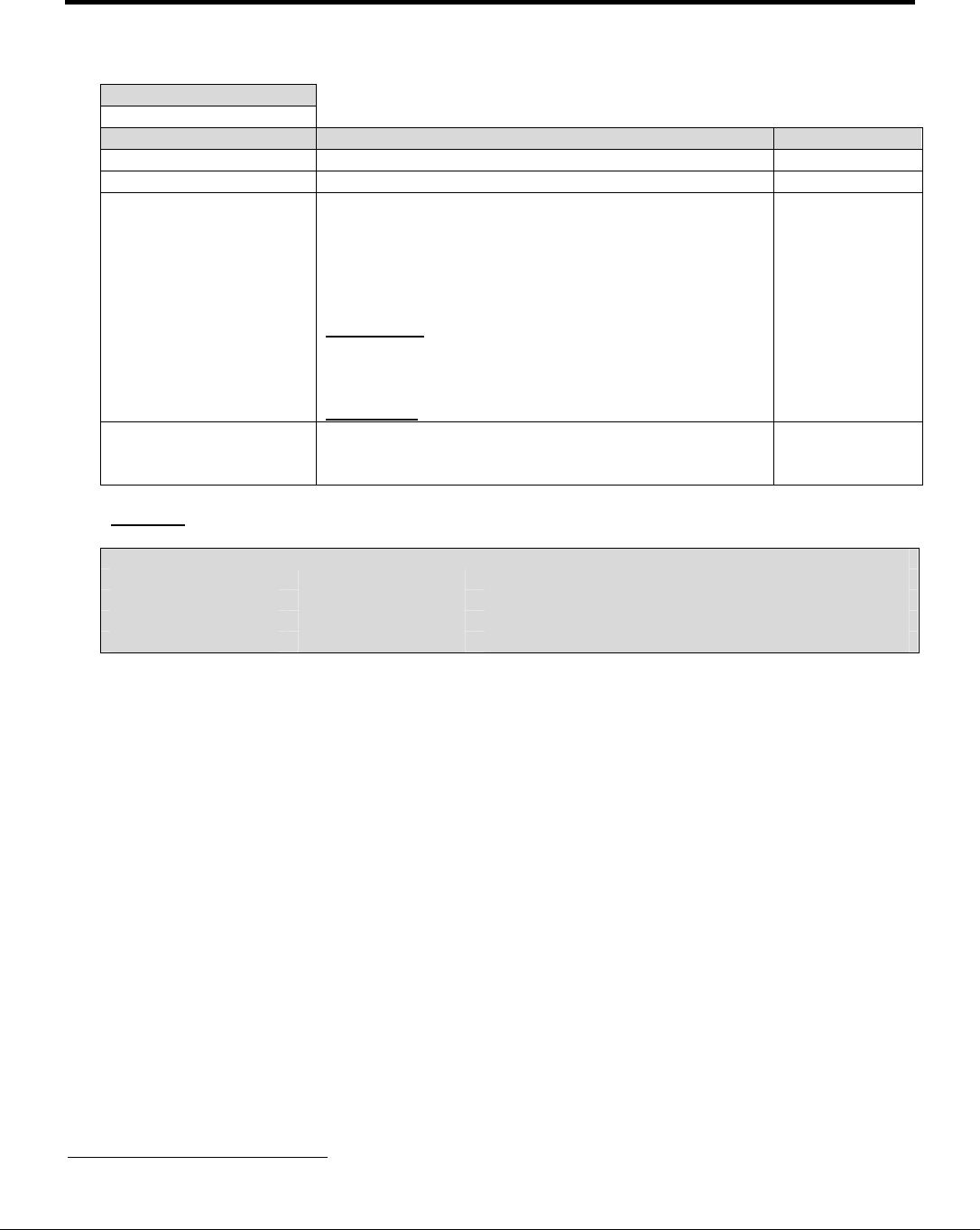
Section Title
Data_Arrays
Column Title Function Legal Values
Data_Array_Name Provide name for Data Array Up to 15 alphanumeric
characters
Data_Array_Format Provide data format. Each Data Array
can only take on one format.
Float, Bit, UInt16, SInt16,
Packed_Bit, Byte,
Packed_Byte,
Swapped_Byte
Data_Array_Length
Number of Data Objects. Must be
larger than the data storage area
required by the map descriptors for the
data being placed in this array.
1-10,000
Example
// Data Arrays
Data_Arrays
Data_Array_Name, Data_Format, Data_Array_Length
DA_AI_01, UInt16, 200
DA_AO_01, UInt16, 200
DA_DI_01, Bit, 200
DA_DO_01, Bit, 200
FS-8704-09 SNMP Driver Manual Page 7 of 39
FieldServer Technologies 1991 Tarob Court Milpitas, California 95035 USA Web: www.fieldserver.com
Tel: (408) 262 2299 Fax: (408) 262 9042 Toll Free: (888) 509 1970 email: support@fieldserver.com
4.2. Client Side Connection Descriptors
Section Title
Adapter
Column Title Function Legal Values
Adapter Adapter Name N1, N2
2
Protocol Specify protocol used SNMP
Length_Encode_Method
If this parameter is omitted or set to 0 the short form of
encoding length will be used. If the parameter is set to
1 (and the Length is ≤ 127) the long form of encoding
length will be used. For Length >127 short form will
be used regardless of the setting.
Long form: an extra byte will be inserted to indicate
the number of following bytes which indicates the
length of the following section in message.
Short form: only length value will be inserted.
0 (default),
1
SNMP_Community*
This parameter can be configured if it is required that
“Community” be a different name in order to receive
traps.
Any string up to
255 characters,
Public
Example
// Client Side Connections
Adapters
Adapter, Protocol, Length_Encode_Method
N1, SNMP, 1
2
Not all ports shown are necessarily supported by the hardware. Consult the appropriate Instruction
manual for details of the ports available on specific hardware.
FS-8704-09 SNMP Driver Manual Page 8 of 39
FieldServer Technologies 1991 Tarob Court Milpitas, California 95035 USA Web: www.fieldserver.com
Tel: (408) 262 2299 Fax: (408) 262 9042 Toll Free: (888) 509 1970 email: support@fieldserver.com
4.3. Client Side Node Descriptors
Section Title
Nodes
Column Title Function Legal Values
Node_Name Provide name for Node
Up to 32
alphanumeric
characters
Node_ID* Identifies Node; needed only if Node Online/Offline
monitoring is used. 1-255
Protocol Specify protocol used SNMP
Adapter Specify network adapter N1, N2
2
IP_Address IP Address of remote Agent. Refer to Appendix A.1
for more information.
Legal 4 byte IP
address on the
same subnet.
MIB_Style Controls how MIB file is formatted. Refer to
Appendix A.3 for more info.
‘Standard’;
‘Custom’;
‘NuDesign’
MIB_Style_for_Traps Controls how traps are reported in MIB file. Refer to
Appendix A.3 for more info.
Style1; Style2;
Style3
Do_not_MIB_this_Node
Controls whether a Node’s traps contribute to the
MIB file. Where duplicate traps are sent to more
than one Node, second and subsequent Nodes will
not contribute to the MIB file. Review the example
MIB files and configuration file in Appendix A.3.
0 – Node’s traps contribute to MIB File.
1 – Node’s traps do not contribute to MIB file.
0; 1
SNMP_Read_Method*
If this parameter is set it is possible for the
FieldServer to sequentially read (walk) the SNMP
Server in the same way as the snmpwalk parameter
works on SNMP.
Walk, -
Example
// Client Side Nodes
Nodes
Node_Name, Node_ID, Protocol, Adapter, IP_Address, SNMP_Read_Method
Agent 1, 1, SNMP, N1, 192.168.1.174, Walk
FS-8704-09 SNMP Driver Manual Page 9 of 39
FieldServer Technologies 1991 Tarob Court Milpitas, California 95035 USA Web: www.fieldserver.com
Tel: (408) 262 2299 Fax: (408) 262 9042 Toll Free: (888) 509 1970 email: support@fieldserver.com
4.4. Client Side Map Descriptors
4.4.1. FieldServer Related Map Descriptor Parameters
Section Title
Map Descriptors
Column Title Function Legal Values
Map_Descriptor_Name
Name of this Map Descriptor Up to 32 alphanumeric characters
Data_Array_Name Name of Data Array where data is
to be stored in the FieldServer
One of the Data Array names from
“Data Array” section above
Data_Array_Offset Starting location in Data Array 0 to maximum specified in “Data
Array” section above
Function Function of Client Map Descriptor RDBC, WRBC, WRBX
4.4.2. Driver Related Map Descriptor Parameters
Section Title
Map Descriptors
Column Title Function Legal Values
Node_Name Name of Node to fetch data from
One of the Node names
specified in “Client Node
Descriptor” above
Length Length of Map Descriptor 1
SNMP_OID Specify the Object ID to be read/written Refer to the MIB file of the
particular SNMP Agent
SNMP_Write_as_Trap
Used to send non COV (Change of
Value) Traps Yes, No
Data_Type
Used to send non COV Traps. Tells
the Driver to send a trap containing
numeric or Ascii data.
Ascii, numeric
4.4.3. Timing Parameters
Section Title
Map Descriptors
Column Title Function Legal Values
Scan_Interval Rate at which data is polled ≥0.001s
FS-8704-09 SNMP Driver Manual Page 10 of 39
FieldServer Technologies 1991 Tarob Court Milpitas, California 95035 USA Web: www.fieldserver.com
Tel: (408) 262 2299 Fax: (408) 262 9042 Toll Free: (888) 509 1970 email: support@fieldserver.com
4.4.4. Map Descriptor Example
// Client Side Map Descriptors
Map Descriptors
Map_Descriptor_Name,
Data_Array_Name,
Data_Array_Offset, Function,
Node_Name,
SNMP_OID, Length,
Scan_Interval
A1, DA_AI3, 0, RDBC, Agent 1, 1.3.6.1.4.1.6347.1.1.0,
1, 5
A2, DA_AI3, 1, WRBX, Agent 1, 1.3.6.1.4.1.6347.1.1.0,
1, -
The Data Array to
which the Read Data
will be stored, or from
which Write Data will
be fetched, at the
location specified by
Data_Array_Offset
Read functions are
implemented as
SNMP Get Requests.
Write functions are
implemented as
SNMP Set Requests.
The OID is
derived from the
MIB file of the
Node you are
talking to. It is
easiest to load
the MIB file in a
MIB browser
(e.g. MG-Soft)
which converts
the text name to
the OID format
Specifies how
often to perform
this transaction,
in seconds.

FS-8704-09 SNMP Driver Manual Page 11 of 39
FieldServer Technologies 1991 Tarob Court Milpitas, California 95035 USA Web: www.fieldserver.com
Tel: (408) 262 2299 Fax: (408) 262 9042 Toll Free: (888) 509 1970 email: support@fieldserver.com
5. Configuring the FieldServer as a SNMP Server/Agent
For a detailed discussion on FieldServer configuration, please refer to the FieldServer Configuration
Manual. The information that follows describes how to expand upon the factory defaults provided in the
configuration files included with the FieldServer. (See “.csv” sample files provided with the FieldServer).
This section documents and describes the parameters necessary for configuring the FieldServer to
communicate with a SNMP Client such as a Network Management application. Please refer to Appendix
A: for a discussion of how to configure SNMP TRAPS.
The configuration file tells the FieldServer about its interfaces, and the routing of data required. In order to
enable the FieldServer for SNMP communications, the driver independent FieldServer buffers need to be
declared in the “Data Arrays” section, the FieldServer virtual Node(s) needs to be declared in the “Server
Side Nodes” section, and the data to be provided to the clients needs to be mapped in the “Server Side
Map Descriptors” section. Details on how to do this can be found below.
Note that in the tables, * indicates an optional parameter, with the bold legal value being the default.
5.1. Server Side Data Arrays
A special Data Array naming convention is used to map FieldServer Data Arrays into the SNMP OID
addressing scheme. Any data arrays that are to be visible via SNMP have to be named in the
following way:
Data_Arrays
Data_Array_Name, Data_Format, Data_Array_Length
SNMP_DA_1, Int, 20
SNMP_DA_2, Float, 20
The Data_Format and Data_Array_Length may be freely chosen, but the name has to be in the
format SNMP_DA_x, where x is sequential from one Data Array to the next. The corresponding
entries in the automatically generated MIB file would appear as shown below.
SNMP_DA_1 appears in the MIB thus:
dataArray1 OBJECT IDENTIFIER ::= { snmp_server_v1_00a 1 }
The first data value in SNMP_DA_1 appears in the MIB thus (note Integer Data Type):
dataValue1_0 OBJECT-TYPE
SYNTAX INTEGER
MAX-ACCESS read-write
STATUS current
DESCRIPTION
"Data value."
::= { dataArray1 0 }
The resulting OID for this data value is 1.3.6.1.4.1.6347.1.1.0.
FS-8704-09 SNMP Driver Manual Page 12 of 39
FieldServer Technologies 1991 Tarob Court Milpitas, California 95035 USA Web: www.fieldserver.com
Tel: (408) 262 2299 Fax: (408) 262 9042 Toll Free: (888) 509 1970 email: support@fieldserver.com
5.2. Server Side Connection Descriptors
Section Title
Adapter
Column Title Function Legal Values
Adapter Adapter Name N1, N2
3
Protocol Specify protocol used SNMP
SNMP_Community*
This parameter can be
configured if it is required that
“Community” be a different name
in order to receive traps.
Any string up to 255 characters,
Public
Example
// Server Side Connections
Adapters
Adapter, Protocol
N1, SNMP
5.3. Server Side Node Descriptors
Section Title
Nodes
Column Title Function Legal Values
Node_Name Provide name for Node Up to 32 alphanumeric
characters
Protocol Specify protocol used SNMP
Example
// Server Side Nodes
Nodes
Node_Name, Protocol
Agent 1, SNMP
5.4. Server Side Map Descriptors
No Server Side Map Descriptors are required by SNMP for Get or Set requests, since the mapping of
FieldServer Data Arrays into the SNMP OID addressing scheme follows the method outlined in
Section 5.1 above. Server Side Map Descriptors are required to configure SNMP TRAPS as outlined
in Appendix A.
Scaling on Client side is per normal model but on Server side, normal model only applies if a Map
Descriptor is used.
3
Not all ports shown are necessarily supported by the hardware. Consult the appropriate Instruction
manual for details of the ports available on specific hardware.

FS-8704-09 SNMP Driver Manual Page 13 of 39
FieldServer Technologies 1991 Tarob Court Milpitas, California 95035 USA Web: www.fieldserver.com
Tel: (408) 262 2299 Fax: (408) 262 9042 Toll Free: (888) 509 1970 email: support@fieldserver.com
Appendix A. Advanced Topics
Appendix A.1. Receiving SNMP TRAPS
A trap can reveal the causal event in two ways:
• The cause can be indicated by the OID number inside the trap with the event state reported by
the associated data value.
• The cause can be indicated by the value of one OID field and the event state by the value of
another OID field.
Appendix A.1.1. Trap Source IP Address
When a trap is received it contains its source IP address information within the UDP packet
header. It is possible for a trap to reveal its source IP address by coding an IP_ADDRESS field
inside the trap.
To catch a trap it is necessary to define Map Descriptors containing the OID’s of the trap. Map
Descriptors are associated with a Node. A Node is defined by its IP address amongst other
parameters. When a trap is received the source of the IP address must match the IP address of
the Node associated with the Map Descriptor.
A trap may originate from one IP address, and contain an alternative source IP Address within the
message. In this case, the FieldServer will use the IP_Address contained within the message as
the source rather than the IP address of the sending device. When this situation occurs the driver
prints a message to the error log so that you know why, perhaps, the trap was ignored/processed
differently from your expectations."
FS-8704-09 SNMP Driver Manual Page 14 of 39
FieldServer Technologies 1991 Tarob Court Milpitas, California 95035 USA Web: www.fieldserver.com
Tel: (408) 262 2299 Fax: (408) 262 9042 Toll Free: (888) 509 1970 email: support@fieldserver.com
Appendix A.1.2. Receiving SNMP TRAPs using the SNMP Client
In order to receive Traps, the SNMP Client requires a Map Descriptor to be configured for each OID that is to be updated via a Trap. Note
that a single Trap message may contain multiple OID’s, depending on the Agent originating the Trap. Each OID of interest requires its
own Map Descriptor. The Map Descriptor Function must be set to Passive_Client.
Example:
// Server Side Map Descriptors
Map Descriptors
Map_Descriptor_Name, Data_Array_Name, Data_Array_Offset, Function, Node_Name, SNMP_OID
A1, DA_AI3, 0, Passive_Client, Agent 1, 1.3.6.1.4.1.6347.1.1.0,
A2, DA_AI3, 1, Passive_Client, Agent 1, 1.3.6.1.4.1.6347.1.1.1,
The OID specifies the value that will be stored by this Map
Descriptor following a TRAP update.
Traps can only be received by Map Descriptors with
the Function set to Passive_Client.

FS-8704-09 SNMP Driver Manual Page 15 of 39
FieldServer Technologies 1991 Tarob Court Milpitas, California 95035 USA Web: www.fieldserver.com
Tel: (408) 262 2299 Fax: (408) 262 9042 Toll Free: (888) 509 1970 email: support@fieldserver.com
Appendix A.1.3. Receiving SNMP Traps – Storing using a Lookup Table
Some devices send trap messages with the same OID’s irrespective of the causal events. The OID contents provide event specific
information such as event origin and state. Consider a trap containing 3 OID’s. One has an integer value (event state) and the other two
have strings reporting the event source. The SNMP driver is capable of using the two string OID’s to form a search string to search a
lookup table. The driver uses the index value associated with a matching entry to determine a Data Array location to store the event state.
Thus a single trap message can be used to populate a Data Array in such a way that the location in the DA indicates the event source and
the value found at that location indicates the event state.
Example:
In the trap below ;
• 1.3.6.1.4.1.290.1.0 contains the event state
• 1.3.6.1.4.1.290.2.0 contains the 1
st
part of identifier of the event source
• 1.3.6.1.4.1.290.3.0 contains the 2
nd
part of identifier of the event source
When configured correctly the driver will concatenate the values of the two source OID’s to form a search string for a lookup table. An
offset value extracted from a matching entry is used to determine the location to store the event state value.
The example below illustrates how to configure the FieldServer to achieve this:
Simple Network Management Protocol
Version: 1 (0)
Community: public
PDU type: TRAP-V1 (4)
Enterprise: 1.3.6.1.4.1.290 (SNMPv2-SMI::enterprises.290)
Agent address: 10.32.6.3 (10.32.6.3)
Trap type: ENTERPRISE SPECIFIC (6)
Specific trap type: 70000000
Timestamp: 0
Object identifier 1: 1.3.6.1.4.1.290.1.0 (SNMPv2-SMI::enterprises.290.1.0)
Value: INTEGER: 4
Object identifier 2: 1.3.6.1.4.1.290.2.0 (SNMPv2-SMI::enterprises.290.2.0)
Value: STRING: "CROSSTWN_KDA"
Object identifier 3: 1.3.6.1.4.1.290.3.0 (SNMPv2-SMI::enterprises.290.3.0)
Value: STRING: "EMS_84_900MHZ_RADIO_B"
Object identifier 4: 1.3.6.1.4.1.290.4.0 (SNMPv2-SMI::enterprises.290.4.0)
Value: STRING: "EMS 84 900MHZ RADIO B"
Object identifier 5: 1.3.6.1.4.1.290.5.0 (SNMPv2-SMI::enterprises.290.5.0)
Value: INTEGER: 0
FS-8704-09 SNMP Driver Manual Page 16 of 39
FieldServer Technologies 1991 Tarob Court Milpitas, California 95035 USA Web: www.fieldserver.com
Tel: (408) 262 2299 Fax: (408) 262 9042 Toll Free: (888) 509 1970 email: support@fieldserver.com
Step 1: Define the Lookup Table
The driver loads the table into memory and uses it when a new trap is received. If the search string is formed by concatenating two OID
Sting fields then the driver places a colon, thus a colon should be placed between the two substrings. If the search string formed from the
trap contents does not match an entry in the table the driver prints a message in the error log at an offset of zero. For this reason you
cannot use a value of zero for the parameter called ‘SNMP_Lookup_Table_Offset’.
In the configuration file create a Driver Table section.
Driver_Table
SNMP_Lookup_Table_Offset, SNMP_Lookup_Table_String, Protocol
1, Sandhill_KDA:24V_CHARGER, SNMP
2, BIG_BEND_DVA_02_102:AC_POWER_FAILURE, SNMP
3, CROSSTWN_KDA:EMS_84_900MHZ_RADIO_B, SNMP
There are some limitations to the table:
• it can hold a maximum of 200 entries.
• Each string entry can be a maximum of 59 characters.
• When the driver searches the table looking for a match it ignores the case of the entries.
Storage Offset:
If the lookup string matches a row in the table then the value of
the parameter called ‘SNMP_Lookup_Table_Offset’ is used as
an offset into the Data Array
Do not use values of zero. Take care to ensure that the offset
will not result in an offset that is beyond the end of the Data
Array.
Lookup String:
The String contents of up to two OID’s are
concatenated to form a search string. Place a colon
‘:’ between each part of the search string if two OID’s
are used to form the string.
Searches are case insensitive

FS-8704-09 SNMP Driver Manual Page 17 of 39
FieldServer Technologies 1991 Tarob Court Milpitas, California 95035 USA Web: www.fieldserver.com
Tel: (408) 262 2299 Fax: (408) 262 9042 Toll Free: (888) 509 1970 email: support@fieldserver.com
Step 2 : Create a Map Descriptor (MD) to catch the Trap
Pay special consideration to the following parameters;
• SNMP_OID: Specify the OID of the event state. The field must contain an integer value which is the value that will be stored. When
the trap is received the driver extracts the contents and takes the 1
st
OID in the message and looks for a MD whose ‘SNMP_OID’
matches. If it doesn’t find one then the trap is discarded.
• SNMP_Trap_Store_Method: Set the value of this parameter to ‘Lookup’. This tells the driver to use the lookup table and also to use
the following two parameters;
o SNMP_OID_Index1: Specify the OID of the field that contains the 1
st
part of the search/lookup string. Once the driver sees
that a ‘Lookup’ store is to be done it extracts the string contents of this OID to form the 1
st
part of the search string.
o SNMP_OID_Index2: Specify the OID of the field that contains the 2nd part of the search/lookup string. Once the driver sees
that a ‘Lookup’ store is to be done it extracts the string contents of this OID to form the search string by adding a colon to the
1
st
part and then appending the string found in this OID.
Map_Descriptor_Name, Data_Array_Name, Data_Array_Offset, Function, Node_Name, SNMP_OID, SNMP_Trap_Store_Method, SNMP_OID_Index1, SNMP_OID_Index2
MD1, DA_TRAPS, 0, Passive_Client, Agent 1, 1.3.6.1.4.1.290.1.0, Lookup, 1.3.6.1.4.1.290.2, 1.3.6.1.4.1.290.3
The following notes refer to the decoded SNMP trap message shown above in this section.
• Driver receives trap and starts extracting data from the message
• Driver finds OID= 1.3.6.1.4.1.290.1, extracts the Integer value=4 and searches for an MD with SNMP_OID= 1.3.6.1.4.1.290.1
• The MD specifying Storage Method=Lookup and Data Array Name = DA_TRAPS is found. (If not found, the message is discarded.)
• Driver finds IOD = 1.3.6.1.4.1.290.2 and extracts a string = CROSSTWN_KDA
• Driver compares the extracted OID to the OID specified by ‘SNMP_OID_Index1’. If it matches then it forms the 1st fragment of the
search string, otherwise the driver continues extracting OID’s from the trap.
• Driver finds IOD = 1.3.6.1.4.1.290.3 and extracts a string = EMS_84_900MHZ_RADIO_B
• Driver compares the extracted OID to the OID specified by ‘SNMP_OID_Index2’. If it matches then it forms the 2nd fragment of the
search string, otherwise the driver continues extracting OID’s from the trap.
• Once a complete search string is formed, the driver starts searching the lookup table defined in step1. The search is case insensitive.
A match is made with offset 3 and the driver stores the value 4 at offset 3 in DA_TRAPS. (If the search fails – there is no matching
entry then the driver uses offset zero). The offsets are relative to the offset specified by ‘Data_Array_Offset’.
FS-8704-09 SNMP Driver Manual Page 18 of 39
FieldServer Technologies 1991 Tarob Court Milpitas, California 95035 USA Web: www.fieldserver.com
Tel: (408) 262 2299 Fax: (408) 262 9042 Toll Free: (888) 509 1970 email: support@fieldserver.com
Appendix A.2. Sending SNMP TRAPS using the SNMP Server/Agent
There are two ways to send traps using the driver
• A rule based appoach – COV (Change of Value): Driver watches a data point. If the data changes and meets the condition of some rule then
the trap is generated.
• Non-rule – Driver sends the trap uncondionally based on a time interval or whenever the source data point is udpated (even if there is no
change.)
Change of Value (COV) Traps
Rules determine when to send an SNMP Trap. These rules are configured in Server Side Map Descriptors, and are applied to the data whenever
it changes. Traps are sent on a Change of State (COS) of the relevant Data Array value, as determined by the following configurable criteria:
COS_Hi_Alm High Alarm threshold, applies to numerical values
COS_Hi_Warning
High Warning threshold, applies to numerical values
COS_Lo_Warning
Low Warning threshold, applies to numerical values
COS_Lo_Alm Low Alarm threshold, applies to numerical values
COS_Deadband Deadband value which must be crossed for Alarm or Warning states to toggle (prevents chatter)
COS_Normal Normal value for a digital point (1 or 0) – when the value changes to or from Normal, a Trap is sent. For an analog point set
the 'COS_Normal' parameter = 'COS_Server_Event' and then specify the dead band. Each time the the analog value
changes by at the deadband or more (absolute change) then a trap will be sent
Each Trap Map Descriptor must specify the destination of the Trap by configuring a Remote_Client_Node_Descriptor, as shown in the example
below. The OID to which the data value is to be bound in the Trap message is specified in the Map Descriptor.
First, the Trap destination Node is set up as follows:
Remote_Client_Node_Descriptors
Node_Name,
Node_ID,
Protocol, Adapter,
IP_Address
NM_1, 1, SNMP, N1, 192.168.1.174
The Trap Map Descriptors are then configured as below, using the desired COS rule parameters:
// Server Side Map Descriptors
Map_Descriptors
Map_Descriptor_Name, Data_Array_Name, Data_Array_Offset, Function, Node_Name, SNMP_OID, COS_Hi_Alm, COS_Lo_Alm, COS_Deadband
PSU_Voltage_Alarm, DA_AI3, 0, SNMP_TRAP, NM_1, 1.3.6.1.4.1.6347.1.1.0.0, 10.5, 7.3, 0.2

FS-8704-09 SNMP Driver Manual Page 19 of 39
FieldServer Technologies 1991 Tarob Court Milpitas, California 95035 USA Web: www.fieldserver.com
Tel: (408) 262 2299 Fax: (408) 262 9042 Toll Free: (888) 509 1970 email: support@fieldserver.com
Appendix A.2.1. COV Map Descriptor Example
In this example each time the value found in Data Array 'DA_AI3' at offset 0 changes by at least 0.2 (COS_Deadband) then a trap will be sent.
// Server Side Map Descriptors
Map_Descriptors
Map_Descriptor_Name, Data_Array_Name, Data_Array_Offset, Function, Node_Name, SNMP_OID, COS_Normal, COS_Deadband
PSU_Voltage_Alarm, DA_AI3, 0, SNMP_TRAP, NM_1, 1.3.6.1.4.1.6347.1.1.0.0, COS_Server_Event, 0.2
Content of Trap Messages:
Each trap has 3 OID's. THE OID of the trap itself and OID of the two bound variables (the payload). Systems that use traps are typically set up to
watch for OID's in the payloads and the Trap’s OID is therefore not relevant. The driver allocates trap OID's as follows:
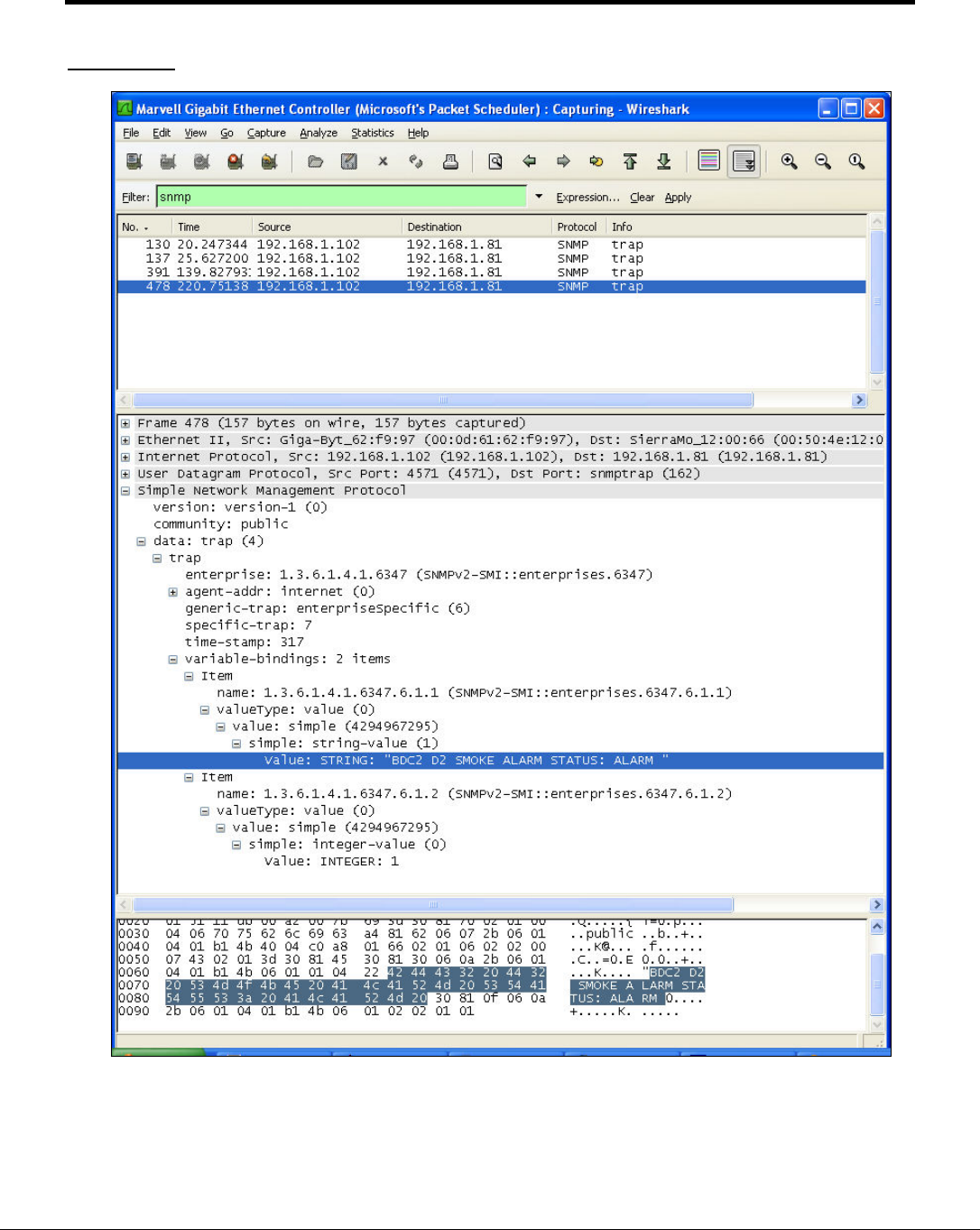
The 1st trap found in the configuration file is allocated OID=1.3.6.1.4.1.6347.6.6. Subsequent traps are allocated ...6347.6.7 ...6347.6.8 etc.
Each COS trap contains two bound variables. The first bound variable has its OID equal to the OID specified in the configuration file. It contains
an Integer reporting the value of the variable at the time the trap is generated. The second bound variable's OID is determined by adding '.0' to
the OID specified in the configuration file. It contains a string reporting the Map Descriptor name (Thus use the variable/tag name to name the
Map Descriptor) and a short report on the event type.
The following are possible descriptions;
Status: HI ALARM
Status: HI WARNING
Status: LO ALARM
Status: LO WARNING
Status: ALARM
Status: DELTA EVENT
Status: NORMAL
The actual states that can be reported depend on the COS states defined in the MD's
e.g. Where a Map Descriptor has COS_Normal defined then possible states are
STATUS: NORMAL
STATUS: ALARM
e.g. Where a Map Descriptor has COS_Hi_Alm, COS_Lo_Alm defined then possible states are
STATUS: NORMAL
STATUS: LO ALARM
STATUS: HI ALARM

FS-8704-09 SNMP Driver Manual Page 20 of 39
FieldServer Technologies 1991 Tarob Court Milpitas, California 95035 USA Web: www.fieldserver.com
Tel: (408) 262 2299 Fax: (408) 262 9042 Toll Free: (888) 509 1970 email: support@fieldserver.com
Example of a Trap Sent:
In this example the trap was the 1st trap defined in the configuration. That is why the Trap OID = 6. The MD name was 'ambTemp'. Its name
begins with a lower case character to meet validation requirements. The configuration file definition for the trap had the OID set to
1.3.6.1.4.1.6347.1.1.1.0. When the trap was produced the value was 120 and the trap was produced because the value was above the Hi Alarm
threshold specified by the COS_HI_Alarm parameter in the configuration file.
TrapOID: 1.3.6.1.4.1.6347.6.6 (Generic Trap 6 (enterprise), specific trap 6) So most likely from the MIB it would compile as
1.3.6.1.4.1.6347.0.6
Varbinds:
OID Format
Contents
1.3.6.1.4.1.6347.1.1.1.0.0
String ambTemp Status: HI ALARM
1.3.6.1.4.1.6347.1.1.1.0 Integer 120
Trap OID's
Appendix A.2.2. Polling for Integer bound Data
It is possible for the remote SNMP Client to poll for the data as well as listen for the traps. This is achieved by setting the OID to a value that
corresponds to a pollable point in a 'SNMP_DA_xx' Data Array.
In the example below, the Data Array name is SNMP_DA_02. This means that its points can be polled by polling for 1.3.6.1.4.1.6347.1.2.x.0
where x is the offset in the Data Array. When a trap is generated because of the COS event, the integer bound variable gets its OID from the
configuration and thus is equal to 1.3.6.1.4.1.6347.1.2.1.0 . This corresponds to the OID for SNMP_DA_2:0 (DA:Offset). Thus if the remote client
wanted to poll for the data as well as listen for the traps it could poll 1.3.6.1.4.1.6347.1.2.1.0 and it would be served the same data as contained in
the integer bound variable.
Example:
Map_Descriptors
Map_Descriptor_Name,
Data_Array_Name,
Data_Array_Offset, Function, Node_Name,
SNMP_OID, COS_Normal
WaterHA, SNMP_DA_2, 01, SNMP_TRAP,
Trap_1, 1.3.6.1.4.1.6347.1.2.1.0,
0
FS-8704-09 SNMP Driver Manual Page 21 of 39
FieldServer Technologies 1991 Tarob Court Milpitas, California 95035 USA Web: www.fieldserver.com
Tel: (408) 262 2299 Fax: (408) 262 9042 Toll Free: (888) 509 1970 email: support@fieldserver.com
Non-COV Traps
The FieldServer can be configured to send a trap periodically or when a data is updated. A data update occurs when one protocol reads data
from a remote device and the data is stored in a Data Array regardless of whether the data has changed or not. Each Trap Map Descriptor must
specify the destination of the Trap by configuring a Remote_Client_Node_Descriptor, as shown in the example below. The OID to which the data
value is to be bound in the Trap message is specified in the Map Descriptor.
First, the Trap destination Node is set up as follows:
Remote_Client_Node_Descriptors
Node_Name, Node_ID, Protocol,
Adapter, IP_Address
NM_1, 1, SNMP, N1, 192.168.1.174
The Trap Map Descriptors are then configured as below:
Map_Descriptors
Map_Descriptor_Name, Data_Array_Name, Data_Array_Offset, Function, Node_Name, SNMP_OID, SNMP_Write_as_Trap, Data_Type, Length
PSU_Voltage_Alarm, DA_AI3, 0, Wrbx, NM_1, 1.3.6.1.4.1.6347.1.1.0.0, Yes, Integer, 1
Wrbx to write on
update.
Use Wrbc and add a
Scan_Interval to
have the trap send
periodically.
This is what tells the
driver that this is not
a normal write and
that the message
should be sent as a
trap.
Integer value or ASCII strings may be sent. If sending
an ASCII string keep the length as one but note that
the driver starts at the specified location and proceeds
element by element of the Data Array building the
string until it finds a zero which it regards as the marker
for the end of string. If using Wrbx as the function the
message is only sent when the 1
st
element is updated.
FS-8704-09 SNMP Driver Manual Page 22 of 39
FieldServer Technologies 1991 Tarob Court Milpitas, California 95035 USA Web: www.fieldserver.com
Tel: (408) 262 2299 Fax: (408) 262 9042 Toll Free: (888) 509 1970 email: support@fieldserver.com
Appendix A.3. MIB File Generation for the SNMP Server/Agent
It is necessary to create an updated MIB file corresponding to the available Data Arrays and Traps
configured in the Server configuration (*.csv) file. To create this MIB file, run the mb8sim.exe utility
supplied with the FieldServer in a DOS command window as follows:
• mb8sim –cmy_config.csv
where my_config.csv is the newly created configuration file.
• hit ‘Q’ to quit. The program will have created a file called FServer.MIB, which may be compiled
into the SNMP Management application of choice.
When the MIB File is created the driver prints a message to the Error log.
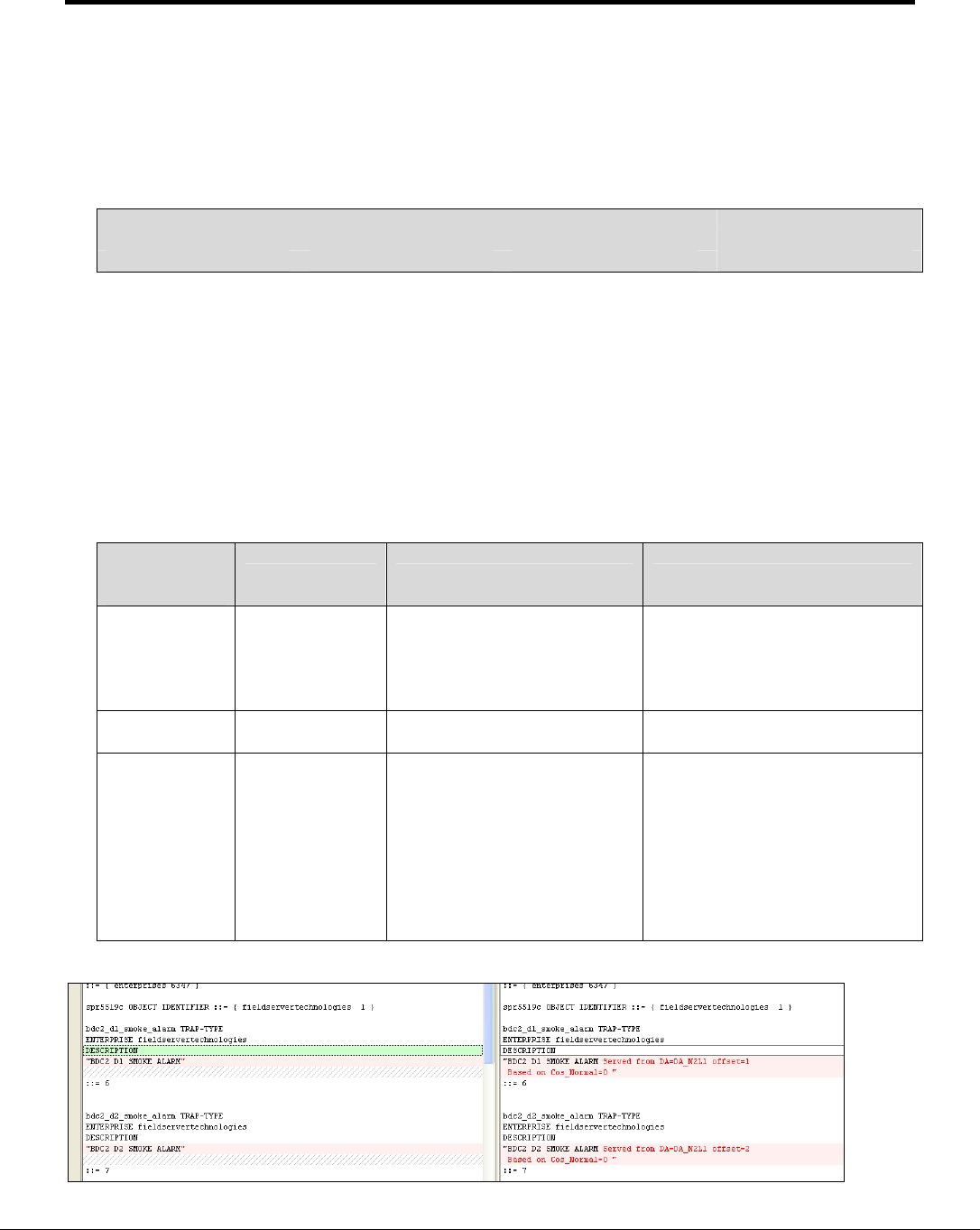
The “MIB_Style” parameter specified in Section 4.3 provides three options for creating the MIB file.
• Standard - this is the same as omitting the parameter
• NuDesign the MIB file produced is suitable for compilation by the NuDesign Browser.
• Custom - the file MIBhead.ini is used in preparing the MIB file.
Adapters
Adapter, Protocol, MIB_Style
N1, SNMP, Standard
NuDesign
Custom

FS-8704-09 SNMP Driver Manual Page 23 of 39
FieldServer Technologies 1991 Tarob Court Milpitas, California 95035 USA Web: www.fieldserver.com
Tel: (408) 262 2299 Fax: (408) 262 9042 Toll Free: (888) 509 1970 email: support@fieldserver.com
Appendix A.3.1. Customizing the MIB File Header:
Use the ‘Custom’ MIB_Style.
The MB8Sim.exe application looks for a file called ‘MIBhead.ini”. If the file is absent or cannot be
opened then a standard MIB file is produced. If the file can be opened then the application
inserts the contents of the file into the header. In the example below the section in blue italics
would be replaced with the contents of the MIBhead.ini file.
FIELDSERVER-MIB DEFINITIONS ::= BEGIN
IMPORTS
enterprises, OBJECT-TYPE, MODULE-IDENTITY
FROM SNMPv2-SMI
TRAP-TYPE
FROM RFC-1215;
fieldserver_technologies MODULE-IDENTITY
LAST-UPDATED "200308121338Z"
ORGANIZATION
"FieldServer Technologies"
CONTACT-INFO
"info@fieldserver.com"
DESCRIPTION
"FieldServer Technologies"
::= { enterprises 6347 }
snmp_server_v1_00a OBJECT IDENTIFIER ::= { fieldserver_technologies 1 }
dataArray1 OBJECT IDENTIFIER ::= { snmp_server_v1_00a 1 }
dataValue1_0 OBJECT-TYPE
SYNTAX INTEGER
MAX-ACCESS read-write
STATUS current
DESCRIPTION
"Data value."
::= { dataArray1 0 }
…………………………………… remainder of file omitted from this example …
FS-8704-09 SNMP Driver Manual Page 24 of 39
FieldServer Technologies 1991 Tarob Court Milpitas, California 95035 USA Web: www.fieldserver.com
Tel: (408) 262 2299 Fax: (408) 262 9042 Toll Free: (888) 509 1970 email: support@fieldserver.com
Appendix A.4. Controlling how a MIB file reports traps
The connection parameter ‘Do_not_MIB_this_Node’ controls whether a Node’s traps contribute to the
MIB file. This parameter is useful where duplicate traps are being sent to more than one destination.
Some aspects of how traps are reported in the MIB file may be controlled with a Node parameter
called ‘MIB_Style_for_Traps’
Adapters
Adapter, Protocol, Poll_Delay, MIB_Style_for_Traps
N1, SNMP, 0.1s, Style1
Permitted Values for the parameter are:
Style1 (Default)
Style2
Style3
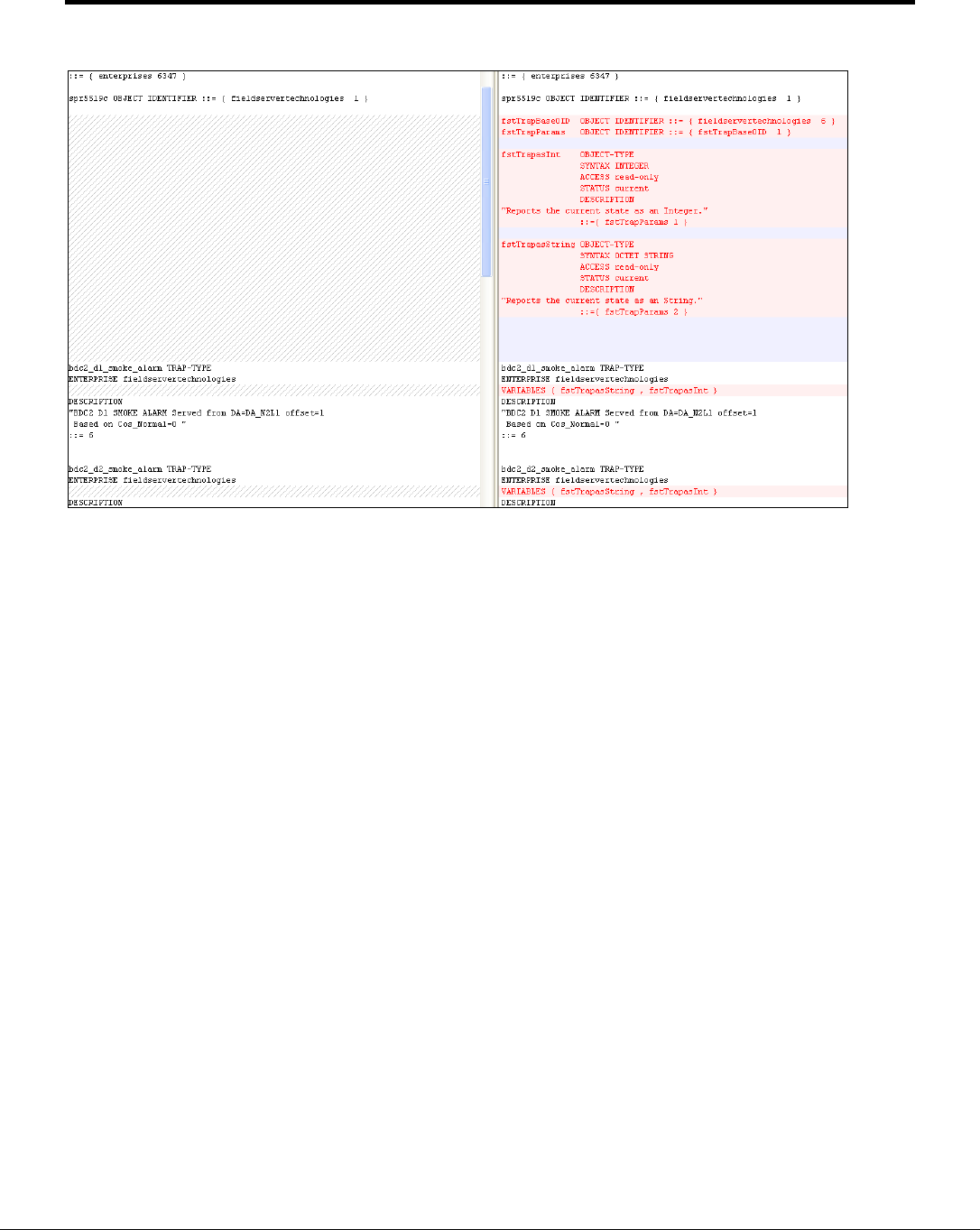
Style2 and 3 add information to the trap description on the trap origin.
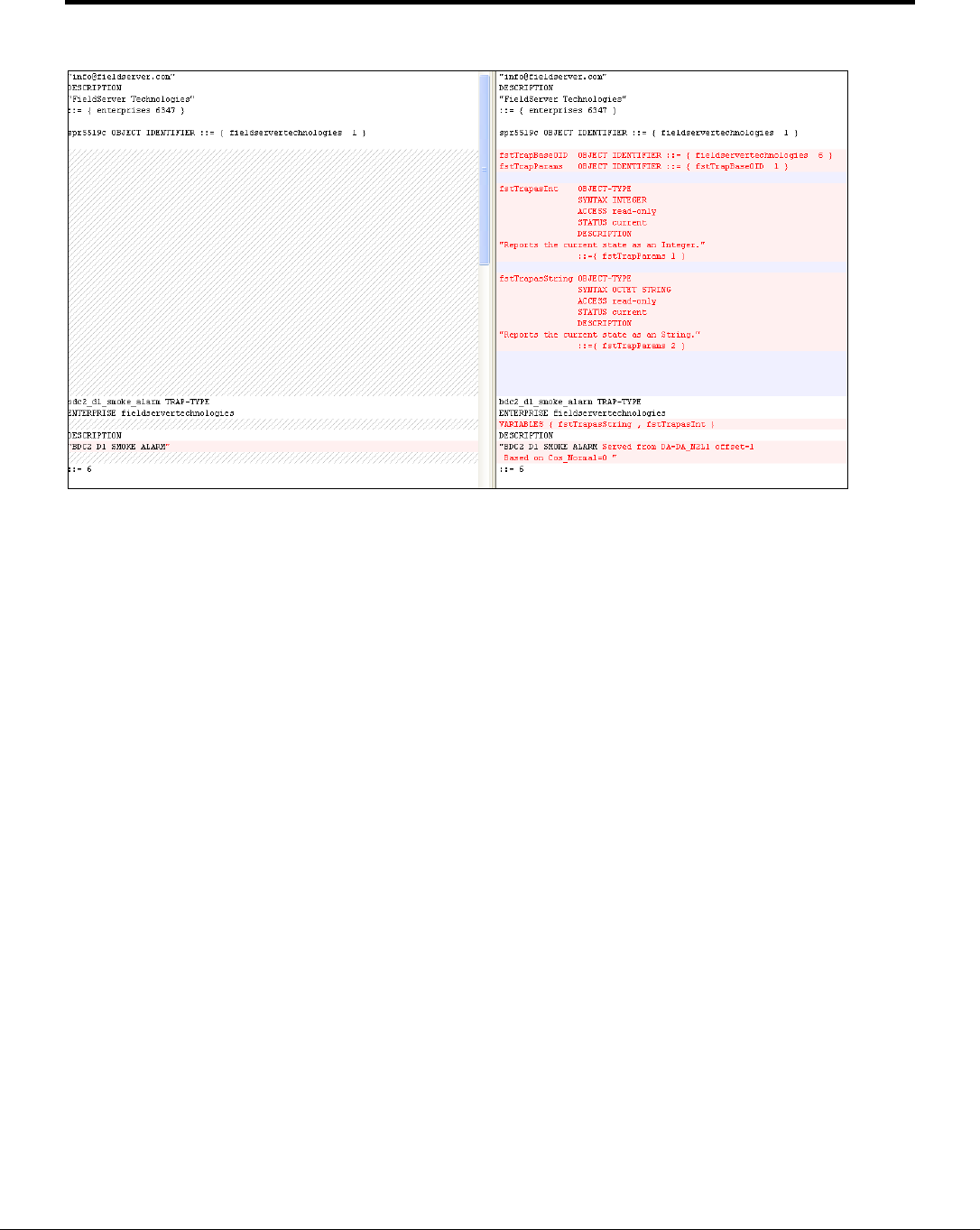
Style3 defines the parameters contained in each trap and assigns these parameters hard coded
OID’s which are fixed for all traps. In Style 1 and 2, the parameters are not reported in the MIB file
and the parameter OID’s are based on the trap OID. Thus style 3 changes the structure and data of
the MIB from Style1&2.
Trap
reporting
Style
Style 1 Style 2 Style 3
Trap
Descriptions.
Description is
the Map
Descriptor
Name
Description is the Map
Descriptor Name and also
contains information on the
data source and the
originating event.
Same as Style 2
Trap
Parameters
Not defined in
MIB File Same as Style 1 Trap Parameters defined in MIB
File.
Trap
Parameters
OID’s
Based on trap
OID
Two parameters
per trap.
BaseOID.
Same as Style 1
Fixed hard coded trap
parameters.
1.2.6.1.4.1.6347.1.1 (Parameter
contains a string that describes
event)
1.2.6.1.4.1.6347.1.21
(Parameter contains a numeric
that contains data point value).
Comparison of Style1 to Style2
FS-8704-09 SNMP Driver Manual Page 25 of 39
FieldServer Technologies 1991 Tarob Court Milpitas, California 95035 USA Web: www.fieldserver.com
Tel: (408) 262 2299 Fax: (408) 262 9042 Toll Free: (888) 509 1970 email: support@fieldserver.com
Comparison of Style2 to Style3
FS-8704-09 SNMP Driver Manual Page 26 of 39
FieldServer Technologies 1991 Tarob Court Milpitas, California 95035 USA Web: www.fieldserver.com
Tel: (408) 262 2299 Fax: (408) 262 9042 Toll Free: (888) 509 1970 email: support@fieldserver.com
Comparison of Style1 to Style3
FS-8704-09 SNMP Driver Manual Page 27 of 39
FieldServer Technologies 1991 Tarob Court Milpitas, California 95035 USA Web: www.fieldserver.com
Tel: (408) 262 2299 Fax: (408) 262 9042 Toll Free: (888) 509 1970 email: support@fieldserver.com
Sample Configuration File
// Data Arrays
//
Data_Arrays
Data_Array_Name, Data_Format, Data_Array_Length
DA_N2L1, Float, 3500
DA_N3L1, Float, 3500
DA_N4L1, Float, 3500
DA_N5L1, Float, 3500
DA_SYS_N2, UINT16, 1000
DA_SYS_N3, UINT16, 1000
DA_SYS_N4, UINT16, 1000
DA_SYS_N5, UINT16, 1000
// Active Server - Connection
//
Adapters
Adapter, Protocol, Poll_Delay, MIB_Style_for_Traps
N1, SNMP, 0.1s, Style3
// Active Server - Remote Destination Node for Traps
//
Remote_Client_Node_Descriptors,
Node_Name , Node_ID, Protocol, Adapter,
IP_Address,
Max_Trap_Count,
Do_not_MIB_this_Node
SNMP1, 11, SNMP,
N1, 192.168.1.81,
Extended, 0(Ok to MIB)
// Active Server - Map Descriptors
//
Map_Descriptors
Map_Descriptor_Name,
Data_Array_Name,
Data_Array_Offset,
Function, Node_Name, Length, COS_Deadband, Cos_Hi_Warn, COS_Hi_Alm, COS_Normal, SNMP_OID
BDC2 D1 SMOKE ALARM, DA_N2L1, 1 SNMP_TRAP, SNMP1, 1 - , - , - , 0, 1.3.6.1.4.1.6347.6
BDC2 D2 SMOKE ALARM, DA_N2L1, 2 SNMP_TRAP, SNMP1, 1 -, - , - , 0, 1.3.6.1.4.1.6347.7
BDC2 D3 SMOKE ALARM, DA_N2L1, 3 SNMP_TRAP, SNMP1, 1 -, - , - , 0, 1.3.6.1.4.1.6347.8
BDC2 D4 SMOKE ALARM, DA_N2L1, 4 SNMP_TRAP, SNMP1, 1 -, - , - , 0, 1.3.6.1.4.1.6347.9
BDC2 D5 SMOKE ALARM, DA_N2L1, 5 SNMP_TRAP, SNMP1, 1 -, - , - , 0, 1.3.6.1.4.1.6347.10
BDC2 D6 SMOKE ALARM, DA_N2L1, 6 SNMP_TRAP, SNMP1, 1 -, - , - , 0, 1.3.6.1.4.1.6347.11
BDC2 D7 SMOKE ALARM, DA_N2L1, 7 SNMP_TRAP, SNMP1, 1 -, - , - , 0, 1.3.6.1.4.1.6347.12
BDC2 D8 SMOKE ALARM, DA_N2L1, 8 SNMP_TRAP, SNMP1, 1 -, - , - , 0, 1.3.6.1.4.1.6347.13
BDC2 D9 SMOKE ALARM, DA_N2L1, 9 SNMP_TRAP, SNMP1, 1 -, - , - , 0, 1.3.6.1.4.1.6347.14
BDC2 D1 SMOKE ALARM, DA_N2L1, 1 SNMP_TRAP, SNMP2, 1 -, - , - , 0, 1.3.6.1.4.1.6347.6
BDC2 D2 SMOKE ALARM, DA_N2L1, 2 SNMP_TRAP, SNMP2, 1 -, - , - , 0, 1.3.6.1.4.1.6347.7
BDC2 D3 SMOKE ALARM, DA_N2L1, 3 SNMP_TRAP, SNMP2, 1 -, - , - , 0, 1.3.6.1.4.1.6347.8
BDC2 D4 SMOKE ALARM, DA_N2L1, 4 SNMP_TRAP, SNMP2, 1 -, - , - , 0, 1.3.6.1.4.1.6347.9
BDC2 D5 SMOKE ALARM, DA_N2L1, 5 SNMP_TRAP, SNMP2, 1 -, - , - , 0, 1.3.6.1.4.1.6347.10
BDC2 D6 SMOKE ALARM, DA_N2L1, 6 SNMP_TRAP, SNMP2, 1 -, - , - , 0, 1.3.6.1.4.1.6347.11
BDC2 D7 SMOKE ALARM, DA_N2L1, 7 SNMP_TRAP, SNMP2, 1 -, - , - , 0, 1.3.6.1.4.1.6347.12
BDC2 D8 SMOKE ALARM, DA_N2L1, 8 SNMP_TRAP, SNMP2, 1 -, - , - , 0, 1.3.6.1.4.1.6347.13
BDC2 D9 SMOKE ALARM, DA_N2L1, 9 SNMP_TRAP, SNMP2, 1 -, - , - , 0, 1.3.6.1.4.1.6347.14

FS-8704-09 SNMP Driver Manual Page 28 of 39
FieldServer Technologies 1991 Tarob Court Milpitas, California 95035 USA Web: www.fieldserver.com
Tel: (408) 262 2299 Fax: (408) 262 9042 Toll Free: (888) 509 1970 email: support@fieldserver.com
Style1 MIB File based on above configuration
FIELDSERVER-MIB DEFINITIONS ::= BEGIN
IMPORTS
enterprises, OBJECT-TYPE, MODULE-IDENTITY
FROM SNMPv2-SMI
TRAP-TYPE
FROM RFC-1215;
fieldservertechnologies MODULE-IDENTITY
LAST-UPDATED "200308121338Z"
ORGANIZATION
"FieldServer Technologies"
CONTACT-INFO
"info@fieldserver.com"
DESCRIPTION
"FieldServer Technologies"
::= { enterprises 6347 }
spr5519c OBJECT IDENTIFIER ::= { fieldservertechnologies 1 }
bdc2_d1_smoke_alarm TRAP-TYPE
ENTERPRISE fieldservertechnologies
DESCRIPTION
"BDC2 D1 SMOKE ALARM"
::= 6
bdc2_d2_smoke_alarm TRAP-TYPE
ENTERPRISE fieldservertechnologies
DESCRIPTION
"BDC2 D2 SMOKE ALARM"
::= 7
bdc2_d3_smoke_alarm TRAP-TYPE
ENTERPRISE fieldservertechnologies
DESCRIPTION
"BDC2 D3 SMOKE ALARM"
::= 8
bdc2_d4_smoke_alarm TRAP-TYPE
ENTERPRISE fieldservertechnologies
DESCRIPTION
"BDC2 D4 SMOKE ALARM"
::= 9
bdc2_d5_smoke_alarm TRAP-TYPE
ENTERPRISE fieldservertechnologies
DESCRIPTION
"BDC2 D5 SMOKE ALARM"
::= 10
bdc2_d6_smoke_alarm TRAP-TYPE
ENTERPRISE fieldservertechnologies
DESCRIPTION
"BDC2 D6 SMOKE ALARM"
::= 11
bdc2_d7_smoke_alarm TRAP-TYPE
ENTERPRISE fieldservertechnologies
DESCRIPTION
"BDC2 D7 SMOKE ALARM"
::= 12
bdc2_d8_smoke_alarm TRAP-TYPE
ENTERPRISE fieldservertechnologies
DESCRIPTION
"BDC2 D8 SMOKE ALARM"
::= 13
bdc2_d9_smoke_alarm TRAP-TYPE
ENTERPRISE fieldservertechnologies
DESCRIPTION
"BDC2 D9 SMOKE ALARM"
::= 14
END

FS-8704-09 SNMP Driver Manual Page 29 of 39
FieldServer Technologies 1991 Tarob Court Milpitas, California 95035 USA Web: www.fieldserver.com
Tel: (408) 262 2299 Fax: (408) 262 9042 Toll Free: (888) 509 1970 email: support@fieldserver.com
Style2 MIB File based on above configuration
FIELDSERVER-MIB DEFINITIONS ::= BEGIN
IMPORTS
enterprises, OBJECT-TYPE, MODULE-IDENTITY
FROM SNMPv2-SMI
TRAP-TYPE
FROM RFC-1215;
fieldservertechnologies MODULE-IDENTITY
LAST-UPDATED "200308121338Z"
ORGANIZATION
"FieldServer Technologies"
CONTACT-INFO
"info@fieldserver.com"
DESCRIPTION
"FieldServer Technologies"
::= { enterprises 6347 }
spr5519c OBJECT IDENTIFIER ::= { fieldservertechnologies 1 }
bdc2_d1_smoke_alarm TRAP-TYPE
ENTERPRISE fieldservertechnologies
DESCRIPTION
"BDC2 D1 SMOKE ALARM Served from DA=DA_N2L1 offset=1
Based on Cos_Normal=0 "
::= 6
bdc2_d2_smoke_alarm TRAP-TYPE
ENTERPRISE fieldservertechnologies
DESCRIPTION
"BDC2 D2 SMOKE ALARM Served from DA=DA_N2L1 offset=2
Based on Cos_Normal=0 "
::= 7
bdc2_d3_smoke_alarm TRAP-TYPE
ENTERPRISE fieldservertechnologies
DESCRIPTION
"BDC2 D3 SMOKE ALARM Served from DA=DA_N2L1 offset=3
Based on Cos_Normal=0 "
::= 8
bdc2_d4_smoke_alarm TRAP-TYPE
ENTERPRISE fieldservertechnologies
DESCRIPTION
"BDC2 D4 SMOKE ALARM Served from DA=DA_N2L1 offset=4
Based on Cos_Normal=0 "
::= 9
bdc2_d5_smoke_alarm TRAP-TYPE
ENTERPRISE fieldservertechnologies
DESCRIPTION
"BDC2 D5 SMOKE ALARM Served from DA=DA_N2L1 offset=5
Based on Cos_Normal=0 "
::= 10
bdc2_d6_smoke_alarm TRAP-TYPE
ENTERPRISE fieldservertechnologies
DESCRIPTION
"BDC2 D6 SMOKE ALARM Served from DA=DA_N2L1 offset=6
Based on Cos_Normal=0 "
::= 11
bdc2_d7_smoke_alarm TRAP-TYPE
ENTERPRISE fieldservertechnologies
DESCRIPTION
"BDC2 D7 SMOKE ALARM Served from DA=DA_N2L1 offset=7
Based on Cos_Normal=0 "
::= 12
bdc2_d8_smoke_alarm TRAP-TYPE
ENTERPRISE fieldservertechnologies
DESCRIPTION
"BDC2 D8 SMOKE ALARM Served from DA=DA_N2L1 offset=8
Based on Cos_Normal=0 "
::= 13
bdc2_d9_smoke_alarm TRAP-TYPE
ENTERPRISE fieldservertechnologies
DESCRIPTION
"BDC2 D9 SMOKE ALARM Served from DA=DA_N2L1 offset=9
Based on Cos_Normal=0 "
::= 14
END

FS-8704-09 SNMP Driver Manual Page 30 of 39
FieldServer Technologies 1991 Tarob Court Milpitas, California 95035 USA Web: www.fieldserver.com
Tel: (408) 262 2299 Fax: (408) 262 9042 Toll Free: (888) 509 1970 email: support@fieldserver.com
Style3 MIB File based on above configuration
FIELDSERVER-MIB DEFINITIONS ::= BEGIN
IMPORTS
enterprises, OBJECT-TYPE, MODULE-IDENTITY
FROM SNMPv2-SMI
TRAP-TYPE
FROM RFC-1215;
fieldservertechnologies MODULE-IDENTITY
LAST-UPDATED "200308121338Z"
ORGANIZATION
"FieldServer Technologies"
CONTACT-INFO
"info@fieldserver.com"
DESCRIPTION
"FieldServer Technologies"
::= { enterprises 6347 }
spr5519c OBJECT IDENTIFIER ::= { fieldservertechnologies 1 }
fstTrapBaseOID OBJECT IDENTIFIER ::= { fieldservertechnologies 6 }
fstTrapParameters OBJECT IDENTIFIER ::= { fstTrapBaseOID 1 }
fstTrapasInt OBJECT-TYPE
SYNTAX INTEGER
ACCESS read-only
STATUS current
DESCRIPTION
"Reports the current state as an Integer."
::={ fstTrapParameters 1 }
fstTrapasString OBJECT-TYPE
SYNTAX OCTET STRING
ACCESS read-only
STATUS current
DESCRIPTION
"Reports the current state as an String."
::={ fstTrapParameters 2 }
bdc2_d1_smoke_alarm TRAP-TYPE
ENTERPRISE fieldservertechnologies
VARIABLES { fstTrapasString , fstTrapasInt }
DESCRIPTION
"BDC2 D1 SMOKE ALARM Served from DA=DA_N2L1 offset=1
Based on Cos_Normal=0 "
::= 6
bdc2_d2_smoke_alarm TRAP-TYPE
ENTERPRISE fieldservertechnologies
VARIABLES { fstTrapasString , fstTrapasInt }
DESCRIPTION
"BDC2 D2 SMOKE ALARM Served from DA=DA_N2L1 offset=2
Based on Cos_Normal=0 "
::= 7
bdc2_d3_smoke_alarm TRAP-TYPE
ENTERPRISE fieldservertechnologies
VARIABLES { fstTrapasString , fstTrapasInt }
DESCRIPTION
"BDC2 D3 SMOKE ALARM Served from DA=DA_N2L1 offset=3
Based on Cos_Normal=0 "
::= 8
bdc2_d4_smoke_alarm TRAP-TYPE
ENTERPRISE fieldservertechnologies
VARIABLES { fstTrapasString , fstTrapasInt }
DESCRIPTION
"BDC2 D4 SMOKE ALARM Served from DA=DA_N2L1 offset=4
Based on Cos_Normal=0 "
::= 9
bdc2_d5_smoke_alarm TRAP-TYPE
ENTERPRISE fieldservertechnologies
VARIABLES { fstTrapasString , fstTrapasInt }
DESCRIPTION
"BDC2 D5 SMOKE ALARM Served from DA=DA_N2L1 offset=5
Based on Cos_Normal=0 "
::= 10
bdc2_d6_smoke_alarm TRAP-TYPE
ENTERPRISE fieldservertechnologies
VARIABLES { fstTrapasString , fstTrapasInt }
DESCRIPTION
"BDC2 D6 SMOKE ALARM Served from DA=DA_N2L1 offset=6
Based on Cos_Normal=0 "
::= 11
FS-8704-09 SNMP Driver Manual Page 31 of 39
FieldServer Technologies 1991 Tarob Court Milpitas, California 95035 USA Web: www.fieldserver.com
Tel: (408) 262 2299 Fax: (408) 262 9042 Toll Free: (888) 509 1970 email: support@fieldserver.com
Style3 Traps

FS-8704-09 SNMP Driver Manual Page 32 of 39
FieldServer Technologies 1991 Tarob Court Milpitas, California 95035 USA Web: www.fieldserver.com
Tel: (408) 262 2299 Fax: (408) 262 9042 Toll Free: (888) 509 1970 email: support@fieldserver.com
Appendix A.4.1. Mib_Style_for_Traps' = 'Style2' – Trap Descriptions
Where the Node parameter 'Mib_Style_for_Traps' = 'Style2' then the driver will produce trap
descriptions which indicate what will cause the trap to be generated. The examples below
illustrate the kind of information provided in the trap description.
delta1 TRAP-TYPE
ENTERPRISE fieldserver_technologies
DESCRIPTION
"delta1 Served from DA=SNMP_DA_1 offset=0
Based on COS_Normal='COS_Server_Event' with COS_Deadband=1.000000"
::= 6
temp_out_of_range TRAP-TYPE
ENTERPRISE fieldserver_technologies
DESCRIPTION
"temp out of range Served from DA=SNMP_DA_1 offset=1
Based on COS_HI_Alarm=4.0000 COS_Deadband=0.0000
Based on Cos_Hi_Warn=3.0000 COS_Deadband=0.0000"
::= 7

FS-8704-09 SNMP Driver Manual Page 33 of 39
FieldServer Technologies 1991 Tarob Court Milpitas, California 95035 USA Web: www.fieldserver.com
Tel: (408) 262 2299 Fax: (408) 262 9042 Toll Free: (888) 509 1970 email: support@fieldserver.com
Appendix B. Troubleshooting Tips
Appendix B.1. HP Openview:
If the FieldServer is running and is not visible in the network topology, try restarting the network
discovery as described in the HP Openview Network Node Manager User Manual.

FS-8704-09 SNMP Driver Manual Page 34 of 39
FieldServer Technologies 1991 Tarob Court Milpitas, California 95035 USA Web: www.fieldserver.com
Tel: (408) 262 2299 Fax: (408) 262 9042 Toll Free: (888) 509 1970 email: support@fieldserver.com
Appendix C. Driver Error Messages
Message Description/Action
SNMP:#01 Err. Response report
err=%d
A response from the remote device reports an error. The message
is good but inside the message there is a field reporting an error.
Consult the vendor for the meaning of the printed SNMP error
number.
SNMP:#02a/b Err. Could not
read SNMP response version
The driver found an error in the message structure preventing it from
extracting the SNMP version number. See msg #05 for follow up
actions.
SNMP:#03a/b Err. Version.
Expected=1 Rcvd=%d
This driver only supports SNMP version #1. See msg #05 for follow
up actions
SNMP:#04a Err. Extract Int
Failed. Index=%d
SNMP:#04b Err. Expected INT.
Found NULL. Index=%d
The driver is extracting an integer value from the SNMP message
but the field was incorrectly formatted. Formatting can be checked
using Ethreal
4
SNMP:#05 Err. Parse Failed.
MD=%s Msg Buffer
The driver is attempting to process a SNMP message that is not
correctly formatted; contains an error or contains unsupported
SNMP elements. Immediately after the message has been printed
the driver does a hexadecimal dump of the message.
If you see this message rarely and data is being transferred correctly
then ignore it. If it is repeated or affects data transfer then take a log
and call tech Support. This message is usually preceded by a
message which provides a more specific clue as to why the parse
failed.
4
SNMP:#10 FYI. NuDesign MIB
File=%s created. (Tier=%d)
SNMP:#10 FYI. Custom MIB
File=%s created. (Tier=%d)
SNMP:#10 FYI. MIB File=%s
created. (Tier=%d)
These messages do not require any corrective action provided that
they report what you expected. They are printed for confirmation
only.
SNMP:#11 Err. Can’t open
MIBHead.ini. Producing std MIB
file
The configuration has told the driver to build a customized MIB file.
This requires that a file called MIBHead.ini is present on the
FieldServer. Refer to the configuration manual and Appendix A.3 for
more information.
SNMP:#12 Err. Bad MD length -
defaulting to 1
A MD was found where the length was not specified or specified as
zero. Specify the length setting it to one.
5
SNMP:#13 Err. Max=255
number of TRAP map
descriptors exceeded
The default maximum number of trap Map Descriptors is 255.
SNMP:#14 Err. SNMP_TRAP
map descriptor must have OID
specified
SNMP:#15 Err. Passive_Client
map descriptor must have OID
specified
You must specify the ‘SNMP_OID” parameter on a Map Descriptor
used for a trap. Read Appendix A for more information on Traps
5
SNMP:#16 unknown
SNMP_Read_Method value: %s
The only permitted value for the SNMP_Read_Method is
‘walk’Error! Bookmark not defined.
SNMP:#17 Err. Diagnostic 1 The driver has executed an internal diagnostic. If this message is
printed please call Tech Support.
4
Refer to Enote 63 on the Website for more information.
5
Edit the configuration file, downloaded the modified file to the FieldServer and restart the FieldServer for
the changes to take effect.

FS-8704-09 SNMP Driver Manual Page 35 of 39
FieldServer Technologies 1991 Tarob Court Milpitas, California 95035 USA Web: www.fieldserver.com
Tel: (408) 262 2299 Fax: (408) 262 9042 Toll Free: (888) 509 1970 email: support@fieldserver.com
Message Description/Action
SNMP:#18 Err. Bad Send IP=%s The IP address for a remote SNMP server (agent) has probably
been incorrectly specified. Check the configuration file.
5
SNMP:#19 Err. Can’t send to
Agent/Trap Dest. %s at %s
The FieldServer cannot reach the specified remote Node. The
message prints the Node name and the IP address. This message is
most commonly printed when:
• The wrong IP address has been specified.
• The remote Node is off or in an error state
6
SNMP:#20 Err. Received
set/get/getnext request
The Client side of the driver has received a request. It should only
receive responses.
6
SNMP:#21 Err. Bad community
string
The SNMP message contains a badly formatted community string or
the community string is absent. Read notes for msg#23
SNMP:#22 Err: Cant parse msg:
found %#x at %d
A response to a poll from the FieldServer contains a bound variable
that is not supported or expected. For example an IP_ADDRESS
and OPAQUE variable or a TRAP. Immediately after this message
the driver prints a hex dump of the offending message. Ensure that
the remote SNMP server is correctly configured. Review the Driver
fact Sheet for supported features. If you are confident that the FS
should process the message correctly then capture a log and call
tech Support.
5
SNMP:#23 Err. Invalid Msg
The Server side of the driver has received a message from a SNMP
client which is not correctly formatted or which contains bound
variables/features not supported by the driver. This particular error
message is printed when the SNMP message does not begin with
0x30.
5
SNMP:#24 Err. Message length
error
The SNMP message indicates that a message length is different to
the number of bytes received.
5
SNMP:#25 Err. Could not get
Request ID The SNMP message number is badly formatted or absent.
5
SNMP:#26 Could not get Error
Status The SNMP error status field is badly formatted or absent.
5
SNMP:#27 Could not get Error
Index The SNMP error id field is badly formatted or absent
5
SNMP:#28 Expected
SNMP_TYPE_SEQ
The message header is correctly formatted but as the driver
continues parsing the message it can’t find the bound variables.
6
SNMP:#29 ERR. Couldn’t
respond to Get Request for OID
Immediately after this message the driver prints the value of the
offending OID. The driver can only serve data for configured OID
points.
The OID must correspond to a FST system OID. 1.3.6.1.4.1.6347
and there must be a data array to serve the point (read Appendix A
for more information). To resolve this problem you will have to
reconfigure the remote client or the FS.
5
SNMP:#30 FYI Int
IP=%d.%d.%d.%d.%d Ext=%s
The Server side of the FieldServer can discover the IP address of
the source Node from the IP packet header. The source Node IP
address can also be reported inside the SNMP portion of the
Ethernet message. This message is pronted if the tow IP addresses
are different and is for information only. The driver uses the IP
address contained in the SNMP portion of the message to locate a
matching Node in the configuration. You may need to edit the
configuration and change the IP address of the Node which sends
6
Edit the configuration file, downloaded the modified file to the FieldServer and restart the FieldServer for
the changes to take effect.

FS-8704-09 SNMP Driver Manual Page 36 of 39
FieldServer Technologies 1991 Tarob Court Milpitas, California 95035 USA Web: www.fieldserver.com
Tel: (408) 262 2299 Fax: (408) 262 9042 Toll Free: (888) 509 1970 email: support@fieldserver.com
Message Description/Action
the traps for the FS to catch the traps. The driver only catches traps
for configured Nodes.
5
SNMP:#31 Err Couldnt parse
msg: found %#x at %d
The server side of the driver could not complete parsing a message.
Immediately after this message the driver prints a hex dump of the
offending message. The driver prints this error when the SNMP
message contains a field that is not supported by the driver.
7
SNMP:#33 Err. Too many DA's
to validate for SNMP. Max=%d
If the driver is configured as a Server agent then a remote Client
may try and walk the FieldServer. To do this the driver requires one
or more specially named Data Arrays.
DA_SNMP_n where n=1,2,3,4 etc
• DA_SNMP_1 corresponds to 1.3.6.1.4.1.6347.1
• 1.3.6.1.4.1.6347.1.0 corresponds to the 1
st
element of
DA_SNMP_1; 1.3.6.1.4.1.6347.1.1 corresponds to the 2nd
element of DA_SNMP_1, etc.
• DA_SNMP_2 corresponds to 1.3.6.1.4.1.6347.2
• The length of the DA determines how many OID’s correspond to
each DA.
To allow a walk the FS must, have at least DA_SNMP_1. There is a
maximum limit of 1000 on the number of these DA’s. The DA’s must
be numbered sequentially.Error! Bookmark not defined.
SNMP:#34 FYI. No DA's for walk
by remote browser
If the FieldServer is configured as a SNMP Client you may ignore
this message, If you have configured the FieldServer is configured
as a Server then any attempt by a remote client to ‘walk’ the
FieldServer will fail because there are none of the specially named
Data Array’s required to respond to the walk. Read the notes for
Msg #33.
SNMP:#35 FYI. DA
'SNMP_DA_1' is missing. Walk
will fail
SNMP:#36 FYI. 'SNMP_DA_%d'
is missing. Walk will fail
SNMP:#37 FYI. No SNMP DA's
for walk by remote browser.
Read the notes for Msg #33. There are no DA’s suitable for a walk
by a remote client.
SNMP:#38 FYI. DA names
suitable for walk by remote
browser
If the FieldServer is configured as a SNMP client, ignore the
message. If the driver is configured as a Server then read MSg #33.
SNMP:#39 FYI. Use an array
called <%s> to expose
diagnostic info
Read 0
SNMP:#40 Err. Bad Node_ID -
forcing to 11
If you allocate a Node_ID to the SNMP Node it must be a number in
the range 1-255 inclusive. The driver has changed the Node_ID to
11. Node_ID’s are used when Node_Status bits are prepared.
Refer to Enote43 on the FST Web Site.
SNMP:#41 Err Undefined
SNMP_OID_Index1
The driver has rejected a Map Descriptor because the parameter
called ‘SNMP_Trap_Store_Method’ has been set to indexed/lookup
and the driver requires that the parameter ‘SNMP_OID_Index1’ is
defined. Refer to Appendix A.2
8
SNMP:#42 Err Undefined
SNMP_OID_Index2
The driver has rejected a Map Descriptor because the parameter
called ‘SNMP_Trap_Store_Method’ has been set to indexed/lookup
7
Refer to Enote 63 on the Website for more information
8
Edit the configuration file, download the modified file to the FieldServer and restart the FieldServer for
the changes to take effect

FS-8704-09 SNMP Driver Manual Page 37 of 39
FieldServer Technologies 1991 Tarob Court Milpitas, California 95035 USA Web: www.fieldserver.com
Tel: (408) 262 2299 Fax: (408) 262 9042 Toll Free: (888) 509 1970 email: support@fieldserver.com
Message Description/Action
and the driver requires that the parameter ‘SNMP_OID_Index2’ is
defined. Refer to Appendix A.2
SNMP:#43 Err Undefined
SNMP_Trap_Store_Method
The driver found a Map Descriptor parameter heading
‘SNMP_Trap_Store_Method’ but could not find a value for it.. Refer
to Appendix A.2
8
SNMP:#44 Err Undefined
SNMP_Write_as_Trap
The driver found a MD parameter heading ‘SNMP_Write_as_Trap’
but could not find a value for it. Refer to Appendix A.2Refer to
Appendix A.2
8
SNMP:#45 Err. Undefined
SNMP_Read_Method
The driver found a MD parameter heading ‘SNMP_Read_Method’
but could not find a value for it. Refer to Appendix A.2
8
SNMP:#46 FYI. Duplicate
state=<%s>
Refer to Appendix A.2. When adding entries to the driver lookup
table a duplicate lookup string was found. You probably did not
intend this.
8
SNMP:#47 Err. No space. Driver
rejects value state=<%s>
value=%d
Refer to Appendix. You are adding entries to the driver lookup table
and the driver has run out of space. If you need more entries
contact the FST sales group.
SNMP:#48 FYI. Added
state=<%s> value=%d
This message is for information only. The driver prints it each time a
new entry is added to the lookup table. Refer to Appendix A.2
SNMP:#49 Err. Cant find lookup
table entry below
Refer to Appendix A.2. The driver has been told to store data from a
trap using the lookup method. The search string was extracted from
the trap but a matching entry could not be found in the table. If the
data is required, a new entry for the table will need to be created.
8
SNMP:#50 Err. Found non-string
data while extracting string
Refer to Appendix A.2. The driver is building the search string by
extracting data from the trap. The search string is built by extracting
data from two OID fields which should be formatted as strings. A
non-string has been found. To resolve this issue you will need to
reconfigure the agent that produced the trap.
SNMP:#51 Err Indexed Store.
Offset too big to store
DAOffset=%d IndexOffset=%d
Off=%d DA=%s Len=%d
Refer to Appendix A.2. The driver is storing data using the lookup
method. The offset into the data Array that corresponds to the
search string points beyond the end of the Data Array. You may
need to increase the length of the Data Array or change the offset
value associated with the search string.
8
SNMP:#52 FYI. Lookup=%s:%s
Value=%d DA:Off=%s:%d
This message is for information only. Each time the driver stores
data using the lookup method this message is printed so that you
can see the effect of the trap.
SNMP:#53 FYI Cant send trap
with null string. DA=%s Off=%d
You are trying to send a trap with Ascii string data but the when the
Data Array was inspected for data to form the string it found a zero
in the 1
st
location and hence it thinks the string is empty. Make sure
the data array has some data to form the string.
SNMP:#54 Err. Diagnostic
DIAG_USER_1 - Bad TRAP
Length
An internal diagnostic has been generated. Take a log and call Tech
Support.
9
SNMP:#55 Err. Multiple Objects
Rquested.
The server can respond to polls for multiple objects in one SNMP
message. Re-configure your SNMP client.
SNMP:#56 Err. Needs Data
Array with name=%s
The server has received a poll for data. The polled OID corresponds
to the named Data Array. The driver can’t find the Data Array. Either
reconfigure the remote client to poll for an appropriate point. Read
Appendix A or correct the configuration adding the new Data Array.
9
Refer to Enote 63 on the Website for more information

FS-8704-09 SNMP Driver Manual Page 38 of 39
FieldServer Technologies 1991 Tarob Court Milpitas, California 95035 USA Web: www.fieldserver.com
Tel: (408) 262 2299 Fax: (408) 262 9042 Toll Free: (888) 509 1970 email: support@fieldserver.com
Message Description/Action
SNMP:#57 Err. Data
offline/expired. DA=%s Off=%d
A remote client has polled for data. The data at the location
specified it ‘too old’ to serve. This usually means that the Client
Node is offline and hence the FieldServer cannot update the data. A
parameter called ‘Cache_Age_Timeout’ controls how old the data
can be before the FieldServer refuses to serve it. Check the
connection used to obtain the original data.
SNMP:#58 Err. Needs Data
Array with name %
The server side of the driver has received a message which requires
data to be stored in the named Data Array but the Data Array cannot
be found. Check the configuration of the FieldServer vs. the
configuration of the remote client.
SNMP:#59 Err. Store index %d
exceeds Data Array %s length
The server side of the driver has received a message which requires
data to be stored in the named Data Array at the specified offset.
The Data Array is too short. Check the configuration of the
FieldServer vs. the configuration of the remote client.
SNMP:#60 Err. Index Storage
can only store Integer Values
Refer to Appendix A.2. The driver is storing data using the lookup
method. The data that is stored is the data associated with the
‘SNMP_OID” parameter in the configuration file. This OID must be
bound to integer data. Check and correct the configuration of the
FieldServer or the remote agent that produces the trap.
SNMP:#61 FYI Store Int.
DA=%s:%d value=%d gen=%d
SNMP:#61 FYI Store ! String
DA=%s:%d value=%d
The driver is storing data. This message is for information only. The
message tells you where the data was stored. It is intended as a
debugging tool.
SNMP:#62 Err. Unsupported
data_type: 0x%x
The driver is storing data but the data type is not supported. Check
the Driver fact sheet to see what data types are supported and then
correct the configuration of the remote client/agent that produced the
trap.
SNMP:#63a Err. Cant open %s
SNMP:#63b FYI. Response was
sent from %s (Hex file)
SNMP:#63b FYI. Response was
sent from %s (Hex file)
SNMP:#63c FYI. Looking for
file=<%s> for response.
These messages should only be printed during the execution of QA
script. If you see this message call tech Support.
SNMP:#64 Err. Could not free
socket handle %x
Take a log including an ethereal log. Then restart the
FieldServer with the log running. If the error is repeated then stop
the log. If the error doesn't repeat let the log run for 5 minutes and
then stop. Now call Tech support.
SNMP:#65a/b Err. Diagnostic 5 -
Response suppressed.
If this message is printed, please take a log and contact tech
support. The driver has executed a diagnostic that should only occur
during factory testing. The a/b in the message indicate the reason
the response was suppressed
SNMP:#66 FYI. Writing traps to
Mib file using 'style2'
This message is for your information only. If it confirms your
expectation then ignore this message. The message is printed each
time a MIB file is produced and 'style2' is used to document the trap
section of the Mib File. Refer to Appendix A.4 for more information.

FS-8704-09 SNMP Driver Manual Page 39 of 39
FieldServer Technologies 1991 Tarob Court Milpitas, California 95035 USA Web: www.fieldserver.com
Tel: (408) 262 2299 Fax: (408) 262 9042 Toll Free: (888) 509 1970 email: support@fieldserver.com
Appendix C.1. Exposing Driver Statistics
In addition to the standard FieldServer operating statistics the driver exposes certain key statistics in
a Data Array if required. A Server device can then monitor these stats.
Add the following to your configuration file to activate these statistics if the driver is configured as a
Client.
// Expose Driver Operating Stats.
Data_Arrays
Data_Array_Name, Data_Format, Data_Array_Length
snmp-stats, UINT32, 200
The following statistics are exposed. The table below provides the offset into the Data Array where
you will find the statistic.
Offset
Stat
1 There are Server Data Arrays suitable for a walk. The driver sets this offset non-zero if this
is true. Read Error message #33 in Appendix C
2 Increments each time a lookup store tries to store at an index > DA length
3 Counts the number of bytes sent by FS in the form of non-COV traps
4 Counts the number of messages sent by FS in the form of non-COV traps
5 Counts the number of bytes sent by FS in the form of COV traps
6 Counts the number of messages sent by FS in the form of COV traps
7 Counts the number of bytes sent by FS in the form of polls
8 Counts the number of messages sent by FS in the form of reads
9 Counts the number of messages sent by FS in the form of writes
10 Counts the number of bytes received by the server. (Excludes Traps)
11 Counts the number of messages received by the server. (Excludes Traps)
12 Counts the number of tap message bytes received by the server.
13 Counts the number of trap messages received by the server.
14 Counts the number of server messages that were received and parsed without error
15 Counts the number of server messages that were received and parsed with error (excludes
multiples object requests)
16 Counts the number of server messages that were received and parsed and rejected
because they requested multiple objects
17 Counts the number of client side responses that were parsed without error
