First Alert A-575 INDOOR/OUTDOOR WIRELESS CAMERA SYSTEM User Manual
First Alert INDOOR/OUTDOOR WIRELESS CAMERA SYSTEM
Users Manual

User Manual
Model: A-575
1
Table of Contents
IMPORTANT SAFETY PRECAUTIONS .................................................... 2
Overview......................................................................................................... 3
Technical Specifications ............................................................................... 4
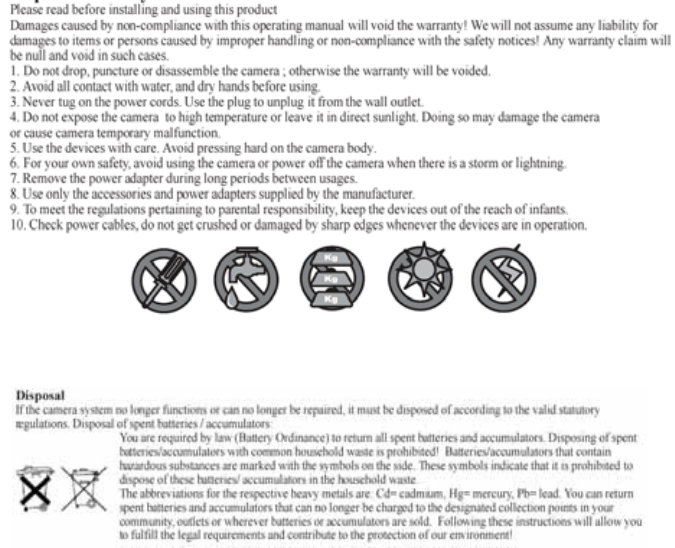
2
IMPORTANT SAFETY PRECAUTIONS
3
Overview
Congratulations on your purchase of the wireless DVR! This single
channel video recorder is a terrific value for money security solution,
as well as being easy to install, use and transport from location to
location. Practically fitting into the palm of your hand is a neat feature
as well!
Before we get into the nitty-gritty of learning how to install, configure
and use the wireless DVR, let’s just take a moment to discuss its
features, strengths and limitations, so you can get the most out of your
Wireless DVR.
1) How it Works
The wireless DVR will record video or still images directly to an SD
card, and it can be configured to do this whenever it detects motion in
the view of its camera.
It is an ideal monitoring solution for guarding specific security
vulnerabilities around the home or small office. Some suggested
applications include monitoring the front or back door, a main hallway,
or a courtyard or balcony. If there is a single, specific location that you
wish to safeguard, the wireless DVR is the perfect solution.
By correctly configuring the motion detection settings, and using a
large SD card you can get the wireless DVR to function autonomously
for up to months at a time!
2) A few key points to remember:
→The wireless DVR requires high-quality, high-speed SD cards to
function correctly. Cheaper SD cards have slower write speeds, and
can’t keep up with the wireless DVR. Digital video requires a massive
amount of data -so make sure you use the highest quality, highest
speed cards available. The Wireless DVR is compatible with the SD
and SDHC standards.
4
Technical Specifications
1) Wireless DVR
Video
Video Format NTSC or PAL
Video Input 1 Composite Input
Video Output 1 Composite Output
Display Resolution NTSC: 720 x 480,
PAL: 720 x 576
Display Frame Rate NTSC: Up to 30fps*
PAL: Up to 25fps*
Audio
Audio Input 1
Audio Output 1
Recording
Compression Format Video: MJPEG (Motion JPEG)
Photo: JPEG
Recording Resolution Video: NTSC D1(720 x 480) CIF(360 x 240)
PAL: D1(720 x 576) CIF(360 x 288)
Recording Frame Rate NTSC: Up to 30fps*
PAL: Up to 25fps*
*Note: While monitoring two cameras (PIP
MODE) the monitoring and recording frame
rates are reduced.
Recording Modes Manual / Motion / Continuous
Multiplex Operation Simplex
HDD Interface/Memory SD Card
Hard Drive Support SD / SDHC Cards
5
General
Operating Power DC 9V
Dimensions 5.25” x 3.33” x 0.75”
133mm x 85mm x 20mm
Weight 5.25oz / 148g
Backup Method SD Card
FCC NOTE : THE MANUFACTURER IS NOT RESPONSIBLE FOR ANY
RADIO OR TV INTERFERENCE CAUSED BY UNAUTHORIZED
MODIFICATIONS TO THIS EQUIPMENT. SUCH MODIFICATIONS
COULD VOID THE USER’S AUTHORITY TO OPERATE THE
EQUIPMENT.
This equipment has been tested and found to comply with the limits for a
Class B digital device, pursuant to part 15 of the FCC Rules. These limits are
designed to provide reasonable protection against harmful interference in a
residential installation. This equipment generates uses and can radiate radio
frequency energy and, if not installed and used in accordance with the
instructions, may cause harmful interference to radio communications.
However, there is no guarantee that interference will not occur in a particular
installation. If this equipment does cause harmful interference to radio or
television reception, which can be determined by turning the equipment off
and on, the user is encouraged to try to correct the interference by one or
more of the following measures:
—Reorient or relocate the receiving antenna.
—Increase the separation between the equipment and receiver.
—Connect the equipment into an outlet on a circuit different from that to
which the receiver is connected.
—Consult the dealer or an experienced radio/TV technician for help.