Fitcare Electronics HRM826 Heart Rate Monitor User Manual HRM826 F45 20190220

Shenzhen Fitcare Electronics Co., Ltd Heart Rate Monitor HRM826 F45 20190220

User Manual

This product is for sport purposes only and is not meant to detect, diagnose or treat any disease or condition or replace any medical device.This manual contains important safety and care information as well as step-by-step instructions on using the product. Read it thoroughly and keep the manual in a safe place in case you need to refer to it later.IMPORTANT
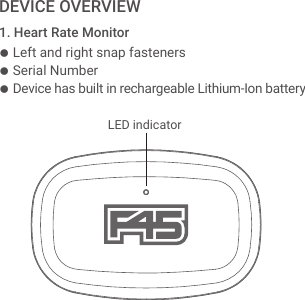
● Left and right snap fasteners● Serial Number● Device has built in rechargeable Lithium-Ion battery1. Heart Rate MonitorDEVICE OVERVIEW    LED indicator
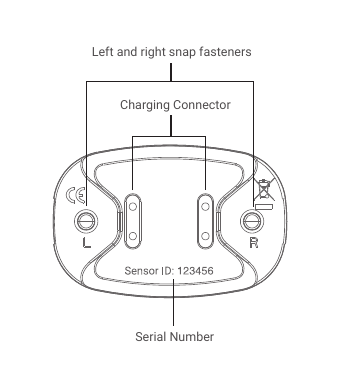
Left and right snap fastenersCharging Connector      Serial Number
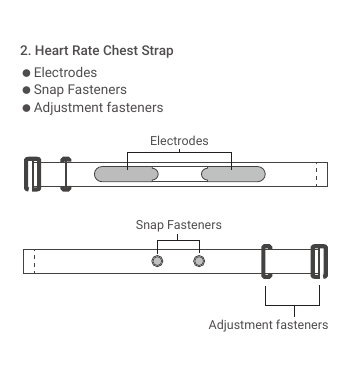
● Electrodes● Snap Fasteners● Adjustment fasteners2. Heart Rate Chest StrapElectrodesSnap FastenersAdjustment fasteners
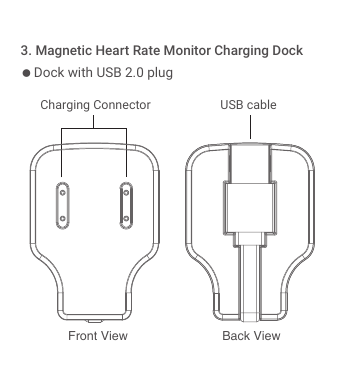
● Dock with USB 2.0 plug3. Magnetic Heart Rate Monitor Charging DockCharging Connector USB cableBack ViewFront View
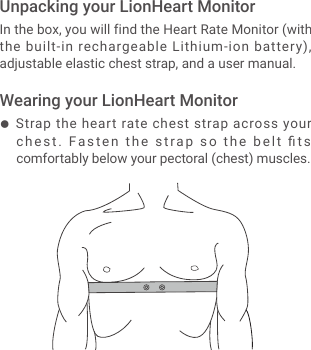
● Strap the heart rate chest strap across your chest.  Fasten the strap so the belt fits comfortably below your pectoral (chest) muscles.In the box, you will find the Heart Rate Monitor (with the built-in rechargeable Lithium-ion battery), adjustable elastic chest strap, and a user manual.Unpacking your LionHeart MonitorWearing your LionHeart Monitor
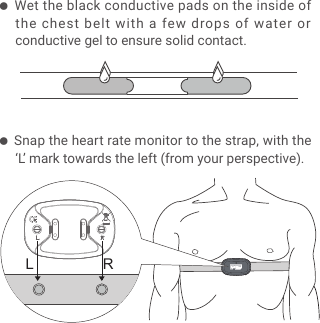
LR● Wet the black conductive pads on the inside of the chest belt with a few drops of water or conductive gel to ensure solid contact.● Snap the heart rate monitor to the strap, with the ‘L’ mark towards the left (from your perspective).
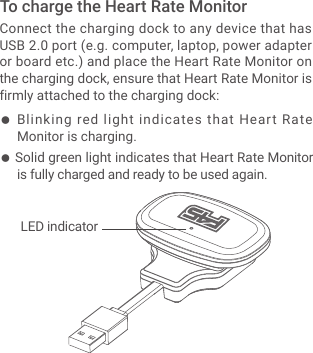
● Blinking red light indicates that Heart Rate Monitor is charging.● Solid green light indicates that Heart Rate Monitor is fully charged and ready to be used again.Connect the charging dock to any device that has USB 2.0 port (e.g. computer, laptop, power adapter or board etc.) and place the Heart Rate Monitor on the charging dock, ensure that Heart Rate Monitor is firmly attached to the charging dock:To charge the Heart Rate Monitor    LED indicator
Visit f45lionheart.com and click “ACTIVATE MY BAND NOW”. Select your studio and enter in the serial number on the back on your HR Monitor.Walk into your F45 Studio and start receiving real-time HR information while you train! At the end of your session, a report will be sent to your email address.Activate you LionHeart MonitorStart Training!
● Ensure the device is unclipped from the strap after use, this will prolong the battery life of the monitor.● Cleaning your strap must be by HAND WASH ONLY - Before washing the chest strap, detach the heart rate monitor. This part is not washable. Make sure the water temperature is no higher than 30°C.● Inaccurate heart rate data will be detected if the device is worn incorrectly.● Ironing, bleaching or heating is prohibited.● Cleaning of monitor and chest strap in a washing machine or dryer will cause damage to internal components of the device.DEVICE CARE & MAINTENANCEWARNING
● The batteries supplied must not be dismantled, put into fire, or short-circuited.The Heart Rate Monitor uses a rechargeable Lithium-Ion battery. Fully charged battery typically last 2-3 months on a single charge.BATTERYTHERE IS A RISK OF EXPLOSION IF BATTERY IS REPLACED WITH AN INCORRECT BATTERY TYPE. DISPOSE OF THE USED BATTERIES WITH CARE.CAUTIONIMPORTANT
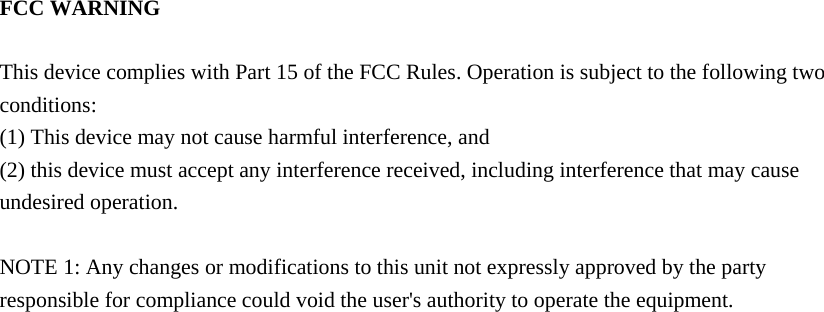
  FCC WARNING  This device complies with Part 15 of the FCC Rules. Operation is subject to the following two conditions: (1) This device may not cause harmful interference, and (2) this device must accept any interference received, including interference that may cause undesired operation.  NOTE 1: Any changes or modifications to this unit not expressly approved by the party responsible for compliance could void the user's authority to operate the equipment.

Navigation menu