Fitcare Electronics RC900 Sports Data Wireless Hub User Manual 15 RC900 UserMan

Shenzhen Fitcare Electronics Co., Ltd Sports Data Wireless Hub 15 RC900 UserMan

15_RC900 UserMan

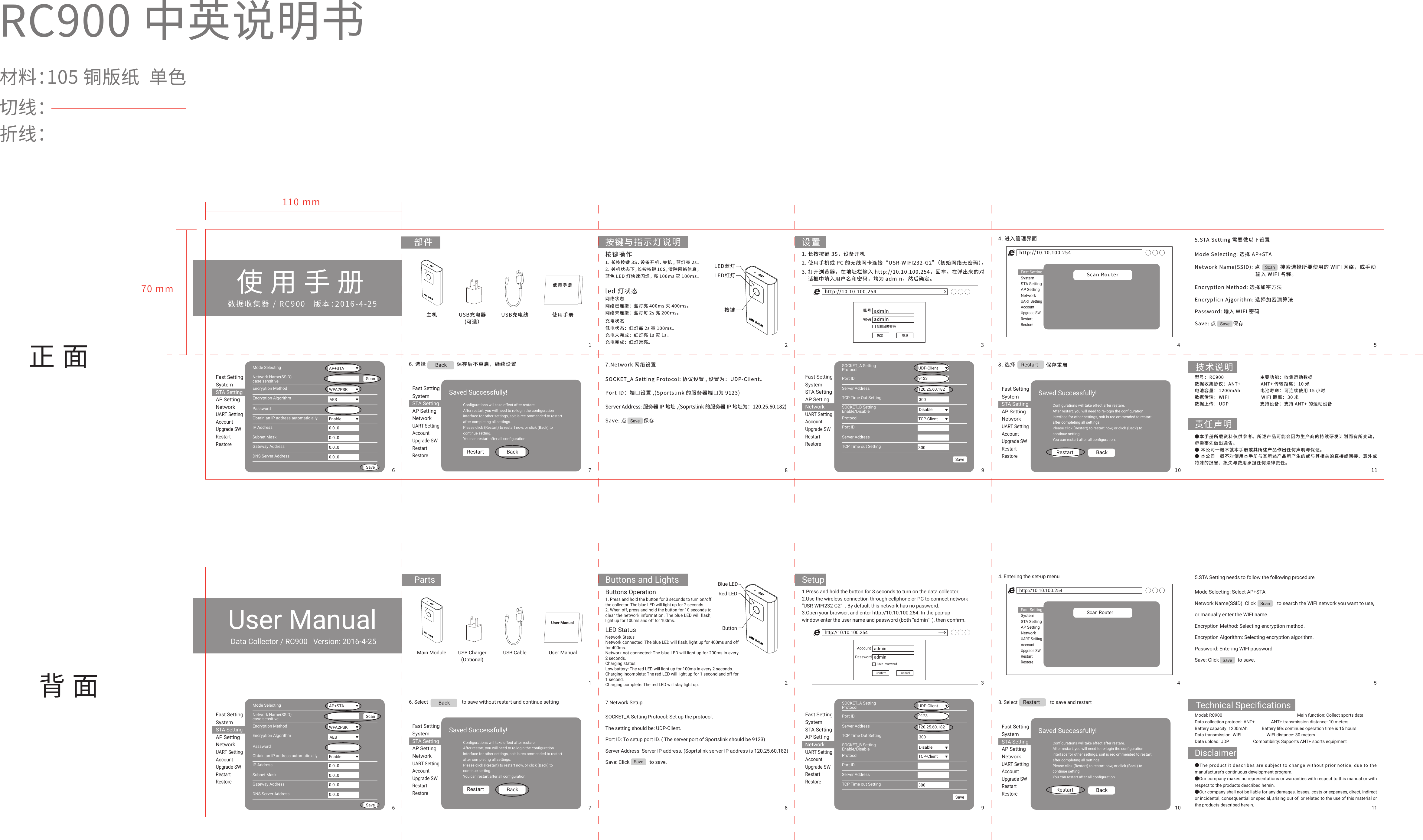
数据收集器 / RC900   版本:2016-4-25RC900 中英说明书材料:105 铜版纸  单色切线:折线:使用手册正面背面部件 按键与指示灯说明 设置主机 USB充电器(可选)USB充电线 使用手册110 mm70 mm技术说明责任声明使用手册按键LED蓝灯LED红灯按键操作1. 长按按键 3S,设备开机、关机 , 蓝灯亮 2s。2. 关机状态下,长按按键 10S,清除网络信息,蓝色 LED 灯快速闪烁,亮 100ms 灭 100ms。led 灯状态网络状态网络已连接:蓝灯亮 400ms 灭 400ms。网络未连接:蓝灯每 2s 亮 200ms。充电状态低电状态:红灯每 2s 亮 100ms。充电未完成:红灯亮 1s 灭 1s。充电完成:红灯常亮。1. 长按按键 3S,设备开机4. 进入管理界面 5.STA Setting 需要做以下设置6. 选择                    保存后不重启,继续设置   7.Network 网络设置2. 使用手机或 PC 的无线网卡连接“USR-WIFI232-G2”(初始网络无密码)。3. 打开浏览器,在地址栏输入 http://10.10.100.254,回车。在弹出来的对    话框中填入用户名和密码,均为 admin,然后确定。http://10.10.100.254adminadmin记住我的密码确定 取消密码账号http://10.10.100.254Scan RouterFast SettingSystemSTA SettingAP SettingNetworkUART SettingAccountUpgrade SWRestartRestoreFast SettingSystemSTA SettingAP SettingNetworkUART SettingAccountUpgrade SWRestartRestoreScanSaveMode SelectingNetwork Name(SSID)case sensitiveEncryption MethodEncryption AlgorithmPasswordObtain an IP address automatic allyIP AddressSubnet MaskGateway AddressDNS Server AddressAP+STAWPA2PSKScanSaveAESEnable0.0..00.0..00.0..00.0..0Fast SettingSystemSTA SettingAP SettingNetworkUART SettingAccountUpgrade SWRestartRestoreSOCKET_A SettingProtocolPort IDServer AddressTCP Time Out SettingSOCKET_B SettingEnable/DisableProtocolPort IDServer AddressTCP Time out SettingUDP-Client120.25.60.1829123Save300DisableTCP-Client300Fast SettingSystemSTA SettingAP SettingNetworkUART SettingAccountUpgrade SWRestartRestoreMode Selecting: 选择 AP+STAEncryption Method: 选择加密方法Encryplicn Ajgorithm: 选择加密演算法Password: 输入 WIFI 密码SOCKET_A Setting Protocol: 协议设置 , 设置为:UDP-Client。Port ID:端口设置 ,(Sportslink 的服务器端口为 9123)Server Address: 服务器 IP 地址 ,(Soprtslink 的服务器 IP 地址为:120.25.60.182)Save: 点           保存Save: 点           保存Network Name(SSID): 点             搜索选择所要使用的 WIFI 网络,或手动                                        输入 WIFI 名称。Saved Successfully!Configurations will take effect after restare.After restart, you will need to re-login the configurationinterface for other settings, soit is rec ommended to restartafter completing all settings.Please click (Restart) to restart now, or click (Back) tocontinue setting.You can restart after all configuration.Restart BackFast SettingSystemSTA SettingAP SettingNetworkUART SettingAccountUpgrade SWRestartRestoreSaved Successfully!Configurations will take effect after restare.After restart, you will need to re-login the configurationinterface for other settings, soit is rec ommended to restartafter completing all settings.Please click (Restart) to restart now, or click (Back) tocontinue setting.You can restart after all configuration.Restart BackBackSave8. 选择 Restart型号: RC900                           主要功能: 收集运动数据数据收集协议: ANT+               ANT+ 传输距离: 10 米电池容量: 1200mAh               电池寿命: 可连续使用 15 小时数据传输: WIFI                        WIFI 距离: 30 米数据上传: UDP                       支持设备: 支持 ANT+ 的运动设备●本手册所载资料仅供参考。所述产品可能会因为生产商的持续研发计划而有所变动,毋需事先做出通告。● 本公司一概不就本手册或其所述产品作出任何声明与保证。● 本公司一概不对使用本手册与其所述产品所产生的或与其相关的直接或间接、意外或特殊的损害、损失与费用承担任何法律责任。保存重启1 2 3 4 56 7 8 9 10 11Data Collector / RC900   Version: 2016-4-25User ManualParts Buttons and Lights SetupMain Module USB Charger(Optional)USB Cable User ManualTechnical SpecificationsDisclaimerUser ManualButtonBlue LEDRed LEDButtons Operation1. Press and hold the button for 3 seconds to turn on/off the collector. The blue LED will light up for 2 seconds.2. When off, press and hold the button for 10 seconds to clear the network information. The blue LED will flash, light up for 100ms and off for 100ms.LED Status Network StatusNetwork connected: The blue LED will flash, light up for 400ms and off for 400ms.Network not connected: The blue LED will light up for 200ms in every 2 seconds.Charging status:Low battery: The red LED will light up for 100ms in every 2 seconds.Charging incomplete: The red LED will light up for 1 second and off for 1 second.Charging complete: The red LED will stay light up.1.Press and hold the button for 3 seconds to turn on the data collector.2.Use the wireless connection through cellphone or PC to connect network “USR-WIFI232-G2” . By default this network has no password.3.Open your browser, and enter http://10.10.100.254. In the pop-up window enter the user name and password (both “admin” ), then confirm.4. Entering the set-up menu 5.STA Setting needs to follow the following procedure6. Select                           to save without restart and continue setting 7.Network Setuphttp://10.10.100.254adminadminSave PasswordConfirm CancelPasswordAccounthttp://10.10.100.254Scan RouterFast SettingSystemSTA SettingAP SettingNetworkUART SettingAccountUpgrade SWRestartRestoreFast SettingSystemSTA SettingAP SettingNetworkUART SettingAccountUpgrade SWRestartRestoreScanSaveMode SelectingNetwork Name(SSID)case sensitiveEncryption MethodEncryption AlgorithmPasswordObtain an IP address automatic allyIP AddressSubnet MaskGateway AddressDNS Server AddressAP+STAWPA2PSKScanSaveAESEnable0.0..00.0..00.0..00.0..0Fast SettingSystemSTA SettingAP SettingNetworkUART SettingAccountUpgrade SWRestartRestoreSOCKET_A SettingProtocolPort IDServer AddressTCP Time Out SettingSOCKET_B SettingEnable/DisableProtocolPort IDServer AddressTCP Time out SettingUDP-Client120.25.60.1829123Save300DisableTCP-Client300Fast SettingSystemSTA SettingAP SettingNetworkUART SettingAccountUpgrade SWRestartRestoreMode Selecting: Select AP+STANetwork Name(SSID): Click                 to search the WIFI network you want to use, or manually enter the WIFI name.Encryption Method: Selecting encryption method.Encryption Algorithm: Selecting encryption algorithm.Password: Entering WIFI passwordSave: Click               to save.SOCKET_A Setting Protocol: Set up the protocol. The setting should be: UDP-Client.Port ID: To setup port ID. ( The server port of Sportslink should be 9123)Server Address: Server IP address. (Soprtslink server IP address is 120.25.60.182)Save: Click                to save.Saved Successfully!Configurations will take effect after restare.After restart, you will need to re-login the configurationinterface for other settings, soit is rec ommended to restartafter completing all settings.Please click (Restart) to restart now, or click (Back) tocontinue setting.You can restart after all configuration.Restart BackFast SettingSystemSTA SettingAP SettingNetworkUART SettingAccountUpgrade SWRestartRestoreSaved Successfully!Configurations will take effect after restare.After restart, you will need to re-login the configurationinterface for other settings, soit is rec ommended to restartafter completing all settings.Please click (Restart) to restart now, or click (Back) tocontinue setting.You can restart after all configuration.Restart BackBackSave8. Select                          to save and restartRestartModel: RC900    Main function: Collect sports dataData collection protocol: ANT+               ANT+ transmission distance: 10 metersBattery capacity: 1200mAh             Battery life: continues operation time is 15 hoursData transmission: WIFI                       WIFI distance: 30 metersData upload: UDP                      Compatibility: Supports ANT+ sports equipment●The product it describes are subject to change without prior notice, due to the manufacturer's continuous development program.●Our company makes no representations or warranties with respect to this manual or with respect to the products described herein.●Our company shall not be liable for any damages, losses, costs or expenses, direct, indirect or incidental, consequential or special, arising out of, or related to the use of this material or the products described herein.1 2 3 4 56 7 8 9 10 11
FCC RF Exposure Information and Statement  The SAR limit of USA (FCC) is 1.6 W/kg averaged over one gram of tissue. Device types Sports Data Wireless Hub / (FCC ID: 2ACN7-RC900) has also been tested against this SAR limit. SAR information on this and other pad can be viewed on‐line at http://www.fcc.gov/oet/ea/fccid/. Please use the device FCC ID number for search. This device was tested for typical body-worn operations kept 10mm from the body. To maintain compliance with FCC RF exposure requirements, use accessories that maintain a 10mm separation distance between the user's body and the device. The use of belt clips, holsters and similar accessories should not contain metallic components in its assembly. The use of accessories that do not satisfy these requirements may not comply with FCC RF exposure requirements, and should be avoided.  FCC Warning  This device complies with Part 15 of the FCC Rules. Operation is subject to the following two conditions: (1) This device may not cause harmful interference, and (2) this device must accept any interference received, including interference that may cause undesired operation.  NOTE: Any changes or modifications to this unit not expressly approved by the party responsible for compliance could void the user's authority to operate the equipment.

Navigation menu