Fitcare Electronics SR428 Bluetooth Jump Rope User Manual

Shenzhen Fitcare Electronics Co., Ltd Bluetooth Jump Rope

User Manual

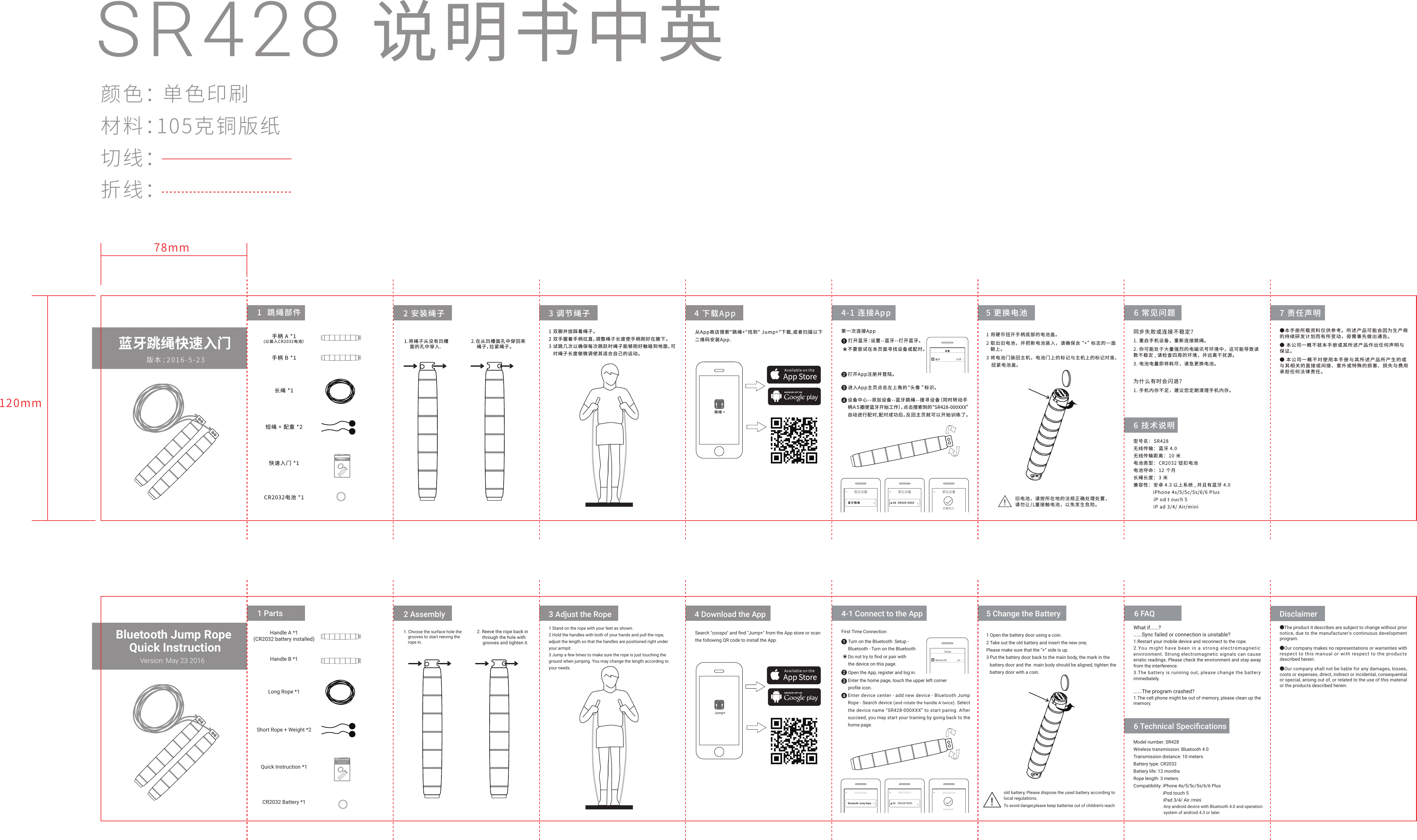
SR428 说明书中英颜色: 单色印刷材料:105克铜版纸切线:折线: 手柄 A *1(以装入CR2032电池)手柄 B *1长绳 *1短绳 + 配重 *2快速入门 *1CR2032电池 *1同步失败或连接不稳定?1. 重启手机设备,重新连接跳绳。2. 你可能处于大量强烈的电磁讯号环境中,这可能导致读数不稳定 , 请检查四周的环境,并远离干扰源。3. 电池电量即将耗尽,请急更换电池。为什么有时会闪退?1. 手机内存不足,建议您定期清理手机内存。6 技术说明7 责任声明●本手册所载资料仅供参考。所述产品可能会因为生产商的持续研发计划而有所变动,毋需事先做出通告。● 本公司一概不就本手册或其所述产品作出任何声明与保证。● 本公司一概不对使用本手册与其所述产品所产生的或与其相关的直接或间接、意外或特殊的损害、损失与费用承担任何法律责任。蓝牙跳绳快速入门版本:2016-5-23蓝牙跳绳快速入门版本:2016-5-231  跳绳部件 2 安装绳子1.将绳子从没有凹槽    面的孔中穿入.2.在从凹槽面孔中穿回来    绳子,拉紧绳子。3 调节绳子 4 下载App1 双脚并拢踩着绳子。2 双手握着手柄拉直,调整绳子长度使手柄刚好在腋下。3 试跳几次以确保每次跳跃时绳子能够刚好触碰到地面,可   对绳子长度做微调使其适合自己的运动。从App商店搜索"跳绳+"找到" Jump+"下载,或者扫描以下二维码安装App.跳绳 +4-1 连接App 5 更换电池打开蓝牙:设置--蓝牙--打开蓝牙。打开App注册并登陆。进入App主页点击左上角的“头像 ”标识。    设备中心--添加设备--蓝牙跳绳--搜寻设备(同时转动手柄A5圈使蓝牙开始工作),点击搜索到的“SR428-000XXX”自动进行配对,配对成功后,反回主页就可以开始训练了。蓝牙跳绳第一次连接App不要尝试在本页面寻找设备或配对。1243SR428-0000-886 常见问题型号名: SR428无线传输: 蓝牙 4.0无线传输距离: 10 米电池类型: CR2032 钮扣电池电池夺命: 12 个月长绳长度: 3 米兼容性:安卓 4.3 以上系统 , 并且有蓝牙 4.0              iPhone 4s/5/5c/5s/6/6 Plus              iP od t ouch 5              iP ad 3/4/ Air/mini1 用硬币扭开手柄底部的电池盖。2 取出旧电池,并把新电池装入,请确保含“+”标志的一面   朝上。3 将电池门装回主机,电池门上的标记与主机上的标记对准,   扭紧电池盖。!旧电池,请按所在地的法规正确处理处置,请勿让儿童接触电池,以免发生危险。78mm120mmSetupBluetooth onHandle A *1(CR2032 battery installed)Handle B *1Long Rope *1Short Rope + Weight *2Quick Instruction *1CR2032 Battery *16 Technical SpecificationsDisclaimerBluetooth Jump Rope Quick InstructionVersion: May 23 2016Bluetooth Jump Rope Quick InstructionVersion: May 23 20161 Parts 2 Assembly1. Choose the surface hole the    grooves to start reeving the    rope in.  2. Reeve the rope back in       through the hole with       grooves and tighten it.3 Adjust the Rope 4 Download the AppSearch "coospo" and find "Jump+" from the App store or scanthe following QR code to install the App.Jump+4-1 Connect to the App 5 Change the BatteryTurn on the Bluetooth: Setup - Bluetooth - Turn on the BluetoothOpen the App, register and log in.Enter the home page, touch the upper left corner profile icon. Bluetooth Jump RopeFirst Time Connection1243SR428-0000-886 FAQModel number: SR428Wireless transmission: Bluetooth 4.0Transmission distance: 10 metersBattery type: CR2032Battery life: 12 monthsRope length: 3 metersCompatibility: iPhone 4s/5/5c/5s/6/6 Plus                                           iPod touch 5                          iPad 3/4/ Air /mini1 Open the battery door using a coin.2 Take out the old battery and insert the new one; Please make sure that the “+” side is up.3 Put the battery door back to the main body, the mark in the    battery door and the  main body should be aligned, tighten the   battery door with a coin.1 Stand on the rope with your feet as shown.2 Hold the handles with both of your hands and pull the rope, adjust the length so that the handles are positioned right under your armpit.3 Jump a few times to make sure the rope is just touching the ground when jumping. You may change the length according to your needs.Do not try to find or pair with the device on this page.Enter device center - add new device - Bluetooth Jump Rope - Search device (and rotate the handle A twice). Select the device name “SR428-000XXX” to start paring. After succeed, you may start your training by going back to the home page.    What if......?......Sync failed or connection is unstable?1.Restart your mobile device and reconnect to the rope.2.You might  have been in a strong  electromagnetic  environment. Strong electromagnetic signals can cause erratic readings. Please check the environment and stay away from the interference.3.The battery is running out, please change the battery immediately.......The program crashed?1.The cell phone might be out of memory, please clean up the memory.●The product it describes are subject to change without prior notice, due to the manufacturer's continuous development program.●Our company makes no representations or warranties with respect to this manual or with respect to the products described herein.●Our company shall not be liable for any damages, losses, costs or expenses, direct, indirect or incidental, consequential or special, arising out of, or related to the use of this material or the products described herein.Add Device Add Device Add DeviceSucceed!To avoid danger,please keep batterise out of children's reachold battery, Please dispose the used battery according tolocal regulations.Any android device with Bluetooth 4.0 and operationsystem of android 4.3 or later.
  FCC Warning  This device complies with Part 15 of the FCC Rules. Operation is subject to the following two conditions: (1) This device may not cause harmful interference, and (2) this device must accept any interference received, including interference that may cause undesired operation.  NOTE: Any changes or modifications to this unit not expressly approved by the party responsible for compliance could void the user's authority to operate the equipment.

Navigation menu