Flaircomm Technologies BTHF341 Bluetooth Handsfree Speaker User Manual TQ6BTHF341

Flaircomm Technologies Inc. Bluetooth Handsfree Speaker TQ6BTHF341

user manual

                                                                                               BTHF341 User Manual   .       1         Bluetooth Handsfree User Manual     Model: BTHF341
                                                                                               BTHF341 User Manual   .       2     Thank you for choosing our Bluetooth handsfree products. Please read this BTHF341 User Manual before you use this handsfree speaker. Flaircomm Technologies Inc. (hereinafter referred to as “The company”) reserves its rights to make any changes and improvements to the product described in this document without prior notice.  Declaration: Without written permission from original manufacturer, reproduction, transfer, distribution or storage of part or all of the contents in this document in any form is prohibited.  Notice : Please make sure your mobile phone supports Bluetooth profiles and network operator supports the functions described in this manual, otherwise the relative functions cannot be realized on this handsfree device.  Safety:   Use the charger and accessories that come with package. The company is not responsible for any losses caused by using other chargers or accessories.     Caution: risk of explosion if battery is replaced by an incorrect type.   Check the laws and regulations on the use of mobile phones and handsfree equipment in the areas where you drive. Always give full attention to driving and pull off the road and park before making or answering a call if driving conditions require.   Do not allow children to play with your Bluetooth handsfree speaker since it contains small parts that could become detached and create a choking hazard.   This device contains a Li-polymer battery. Please keep it away from fire anytime (including discarding the device) or the battery may explode.   The handsfree Speaker, especially the embedded battery must be properly disposed or recycled. Contact your local recycling centers for disposal methods.
                                                                                               BTHF341 User Manual   .       3    Certification and Safety Approvals This product has been tested and found to comply with Bluetooth BQB requirements, part 15 of FCC rules, R&TTE Directive(99/5/EC) of CE marked requirements, and approval on Bluetooth models of China Wireless Communications Committee.  Warning: Users should not make changes on or modify the device in any way. Changes or modifications without being expressly approved by the party responsible for compliance could void the user’s authority to operate the device. This device complies with part 15 of the FCC Rules. Operation is subject to the following two conditions: (1) This device may not cause harmful interference, and (2) this device must accept any interference received, including interference that may cause undesired operation. FEDERAL COMMUNICATIONS COMMISSION INTERFERENCE STATEMENT This equipment has been tested and found to comply with the limits for a Class B digital device, pursuant to part 15 of the FCC Rules. These limits are designed to provide reasonable protection against harmful interference in a residential installation. This equipment generates, uses and can radiate radio frequency energy and, if not installed and used in accordance with the instructions, may cause harmful interference to radio communications. However, there is no guarantee that interference will not occur in a particular installation. If this equipment does cause harmful interference to radio or television reception, which can be determined by turning the equipment off and on, the user is encouraged to try to correct the interference by one or more of the following measures: -Reorient or relocate the receiving antenna;  -Increase the separation between the equipment and receiver; -Connect the equipment into an outlet on a circuit different from that to which the receiver is connected; -Consult the dealer or an experienced radio/ TV technician for help. CAUTION: Any changes or modifications not expressly approved by the grantee of this device could void the user's authority to operate the equipment. RF exposure warning: This equipment must be installed and operated in accordance with provided instructions and the antenna(s) used for this transmitter must be installed to provide a separation distance of at least 20 cm from all persons and must not be co-located or operating in conjunction with any other antenna or transmitter. End-users and installers must be provided with antenna installation instructions and transmitter operating conditions for satisfying RF exposure compliance.  CE command: ETSI EN 301 489-1 V1.6.1(2005-09); ETSI EN 301 489-17 V1.2.1(2002-08);
                                                                                               BTHF341 User Manual   .       4    ETSI EN 300 328 V1.7.1(2006-10); IEC 60950-1:2001,EN 60950-1:2001+A11:2004
                                                                                               BTHF341 User Manual   .       5    Contents: 1. INTRODUCTION...............................................................................................................................65 1.1 BLUETOOTH TECHNOLOGY ................................................................................................................65 1.2 BLUETOOTH HANDSFREE SPEAKER....................................................................................................65 1.3 PRODUCT FEATURES ..........................................................................................................................65 1.4 PACKAGE CONTENTS..........................................................................................................................76 1.5 OVERVIEW .........................................................................................................................................76 2. USING YOUR HANDSFREE............................................................................................................87 2.1 BATTERY CHARGING AND USAGE ......................................................................................................87 2.1.1 Battery Charging .......................................................................................................................87 2.1.2 Battery Information ...................................................................................................................88 2.2 MOUNTING YOUR HANDSFREE ...........................................................................................................98 2.3 TURN ON/OFF HANDSFREE ................................................................................................................98 2.4 PAIRING/CONNECTING YOUR HANDSFREE WITH BLUETOOTH EQUIPMENT ........................................99 2.4.1 Pairing your Handsfree with Bluetooth Handset .......................................................................99 2.4.2 Disconnecting your Handsfree with Bluetooth Equipment .....................................................109 2.4.3 Connecting your Handsfree with Bluetooth Equipment..........................................................109 2.4.4 Delete Paired Records ...........................................................................................................1010 2.5 CALL FUNCTIONS ...........................................................................................................................1110 2.5.1 Basic Call Operations............................................................................................................1110 2.5.2 Transferring Calls to/from your Handset...............................................................................1110 2.5.3 Advanced Call Functions.......................................................................................................1110 3. QUICK USER GUIDE....................................................................................................................1312 3.1 LED INDICATOR PATTERNS ...........................................................................................................1312 3.2 QUICK USER GUIDE........................................................................................................................1312 4. MAINTENANCE ............................................................................................................................1615 5. IMPORTANT MESSAGES AND FREQUENTLY ASKED QUESTIONS...............................1716
                                                                                               BTHF341 User Manual   .       6    1. Introduction 1.1 Bluetooth Technology Bluetooth is an internationally standardized technology supporting short distance wireless communications. Any two Bluetooth-compatible equipments, such as mobile phone, PDA、PC, headset, mouse, keyboard, printer, etc. can wirelessly communicate with each other via Bluetooth connection.  Though line-of-sight is not required, Bluetooth connections could be subject to interferences from obstructions such as walls, human bodies, and other electronic devices. In addition, due to variations on product implementation, it is likely that Bluetooth equipments from different manufactures have interoperability issues. In that case, you may consult with manufactures to check product compatibility. Note that, there could be some restrictions imposing on using Bluetooth devices in some countries. Please check with your local authorities. 1.2  Bluetooth Handsfree Speaker This Bluetooth handsfree speaker is a specially designed product bringing not only convenience but also safety by allowing car drivers to make and receive calls without holding a mobile phone. It provides a clean wireless audio connection with your Bluetooth mobile phone and PDA. Mobile phones that are not Bluetooth-enable also support this handsfree set through AV adaptors.  In addition to vehicle environment applications, this portable equipment, supported by an internal rechargeable Li-ion battery, can also be used in office environment as normal handsfree equipment to make/receive/conference phone calls.  1.3 Product Features  Bluetooth v 2.1+EDR compliant, and data rate up to 2Mbps   Class II, operating range up to 10 meters (33 feet)  Compatible with most Bluetooth-enabled devices such as cellular phones, PDAs, and computers for voice communication  Support up to 8 handset pairing info simultaneously  Best-in-class voice quality ensured by cutting-edge noise suppression and echo cancellation techniques   Loud audio output and supreme audio effect, allowing crystal-clear conversations within a noisy car environment  Ultra-low cost with two omni-directional microphone solution  Cutting-edge DSP solution for superior AEC and full-duplex performance  Voice dialing and user friendly operation keys ideal for car drivers to make/receive calls   Support Call Waiting and Conference functions  Better portability with internal rechargeable Li-Polymer battery  Low power consumption, up to 6 hours talk time and 600 hours standby time with the internal battery
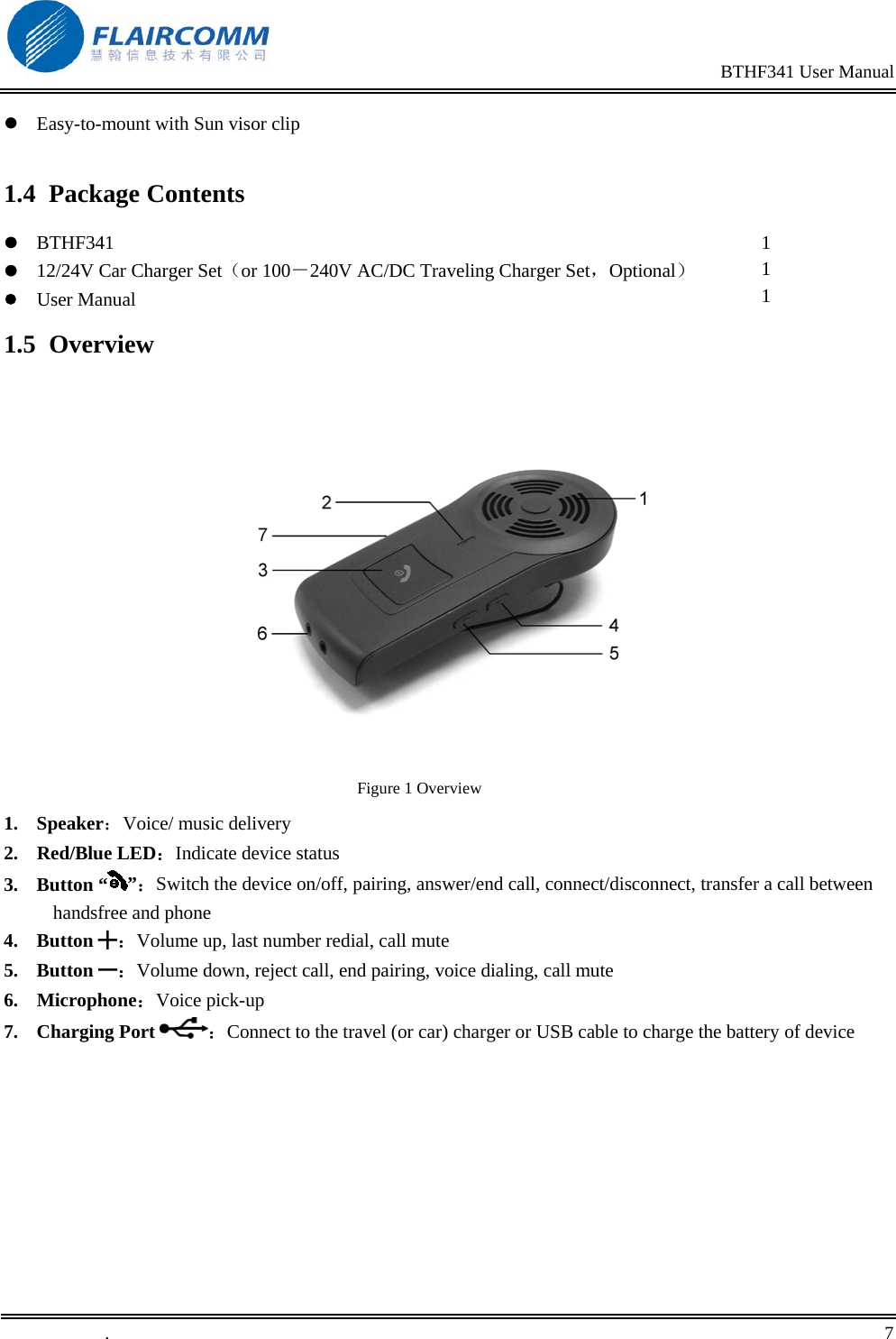
                                                                                               BTHF341 User Manual   .       7     Easy-to-mount with Sun visor clip  1.4 Package Contents  BTHF341  12/24V Car Charger Set(or 100-240V AC/DC Traveling Charger Set,Optional)  User Manual  1 1 1 1.5 Overview     Figure 1 Overview 1. Speaker:Voice/ music delivery 2. Red/Blue LED:Indicate device status 3. Button “ ”:Switch the device on/off, pairing, answer/end call, connect/disconnect, transfer a call between handsfree and phone 4. Button ╋:Volume up, last number redial, call mute 5. Button ━:Volume down, reject call, end pairing, voice dialing, call mute 6. Microphone:Voice pick-up 7. Charging Port  :Connect to the travel (or car) charger or USB cable to charge the battery of device
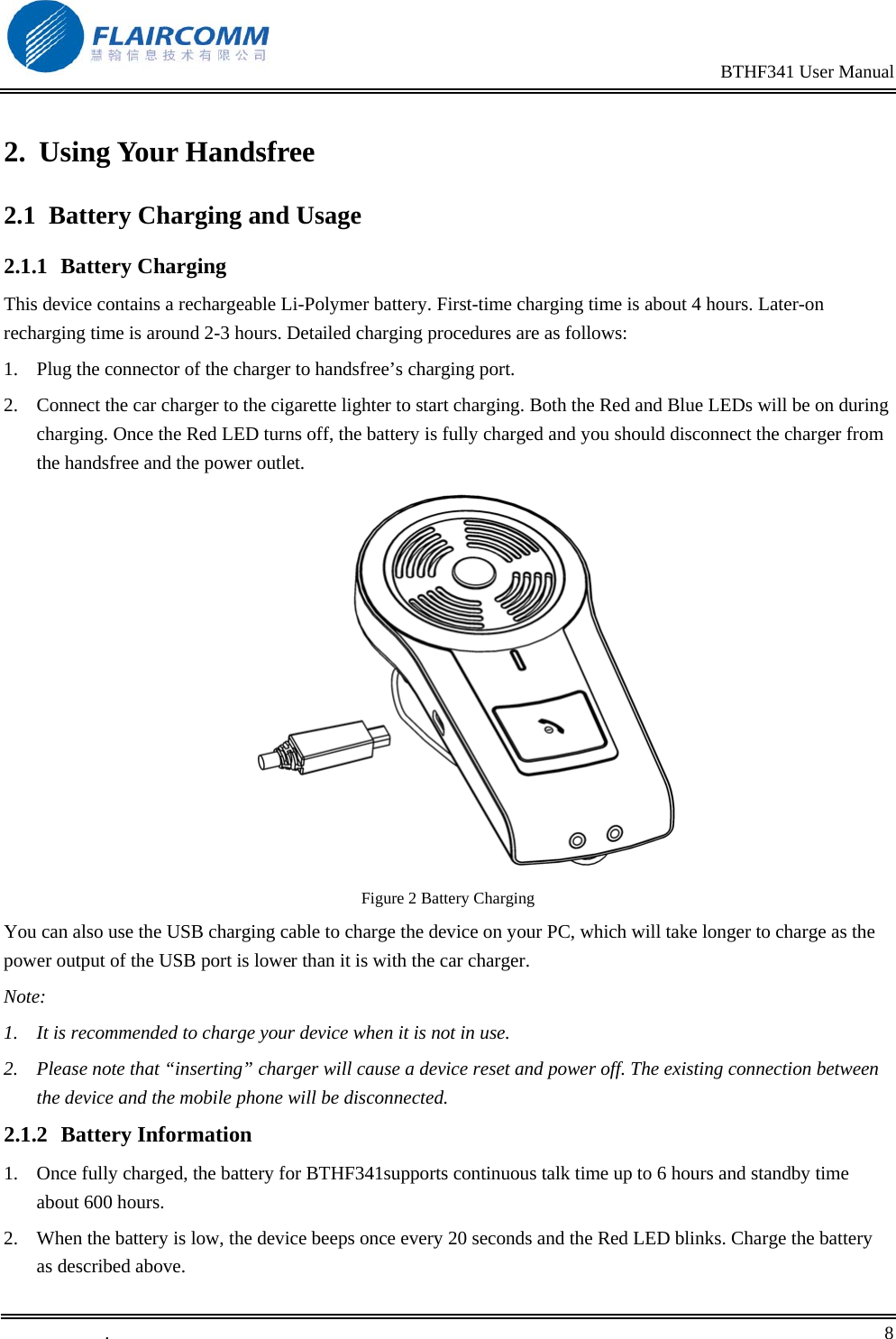
                                                                                               BTHF341 User Manual   .       8    2. Using Your Handsfree 2.1  Battery Charging and Usage 2.1.1 Battery Charging This device contains a rechargeable Li-Polymer battery. First-time charging time is about 4 hours. Later-on recharging time is around 2-3 hours. Detailed charging procedures are as follows:  1.  Plug the connector of the charger to handsfree’s charging port. 2.  Connect the car charger to the cigarette lighter to start charging. Both the Red and Blue LEDs will be on during charging. Once the Red LED turns off, the battery is fully charged and you should disconnect the charger from the handsfree and the power outlet.   Figure 2 Battery Charging You can also use the USB charging cable to charge the device on your PC, which will take longer to charge as the power output of the USB port is lower than it is with the car charger. Note: 1.  It is recommended to charge your device when it is not in use.  2.  Please note that “inserting” charger will cause a device reset and power off. The existing connection between the device and the mobile phone will be disconnected.  2.1.2 Battery Information 1.  Once fully charged, the battery for BTHF341supports continuous talk time up to 6 hours and standby time about 600 hours. 2.  When the battery is low, the device beeps once every 20 seconds and the Red LED blinks. Charge the battery as described above.
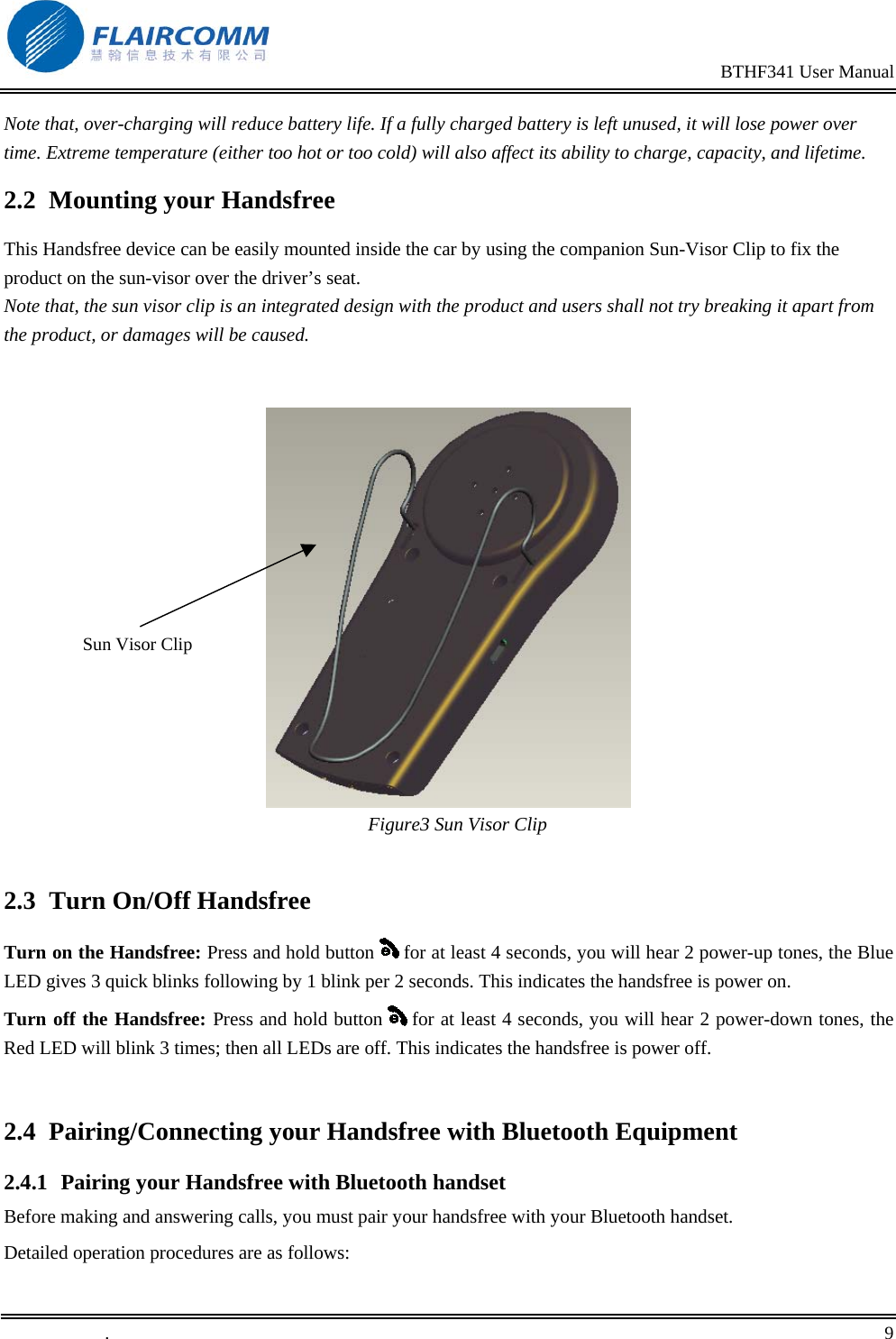
                                                                                               BTHF341 User Manual   .       9    Note that, over-charging will reduce battery life. If a fully charged battery is left unused, it will lose power over time. Extreme temperature (either too hot or too cold) will also affect its ability to charge, capacity, and lifetime. 2.2  Mounting your Handsfree This Handsfree device can be easily mounted inside the car by using the companion Sun-Visor Clip to fix the product on the sun-visor over the driver’s seat. Note that, the sun visor clip is an integrated design with the product and users shall not try breaking it apart from the product, or damages will be caused.       Figure3 Sun Visor Clip  2.3  Turn On/Off Handsfree Turn on the Handsfree: Press and hold button   for at least 4 seconds, you will hear 2 power-up tones, the Blue LED gives 3 quick blinks following by 1 blink per 2 seconds. This indicates the handsfree is power on. Turn off the Handsfree: Press and hold button   for at least 4 seconds, you will hear 2 power-down tones, the Red LED will blink 3 times; then all LEDs are off. This indicates the handsfree is power off.  2.4  Pairing/Connecting your Handsfree with Bluetooth Equipment  2.4.1  Pairing your Handsfree with Bluetooth handset  Before making and answering calls, you must pair your handsfree with your Bluetooth handset. Detailed operation procedures are as follows: Sun Visor Clip
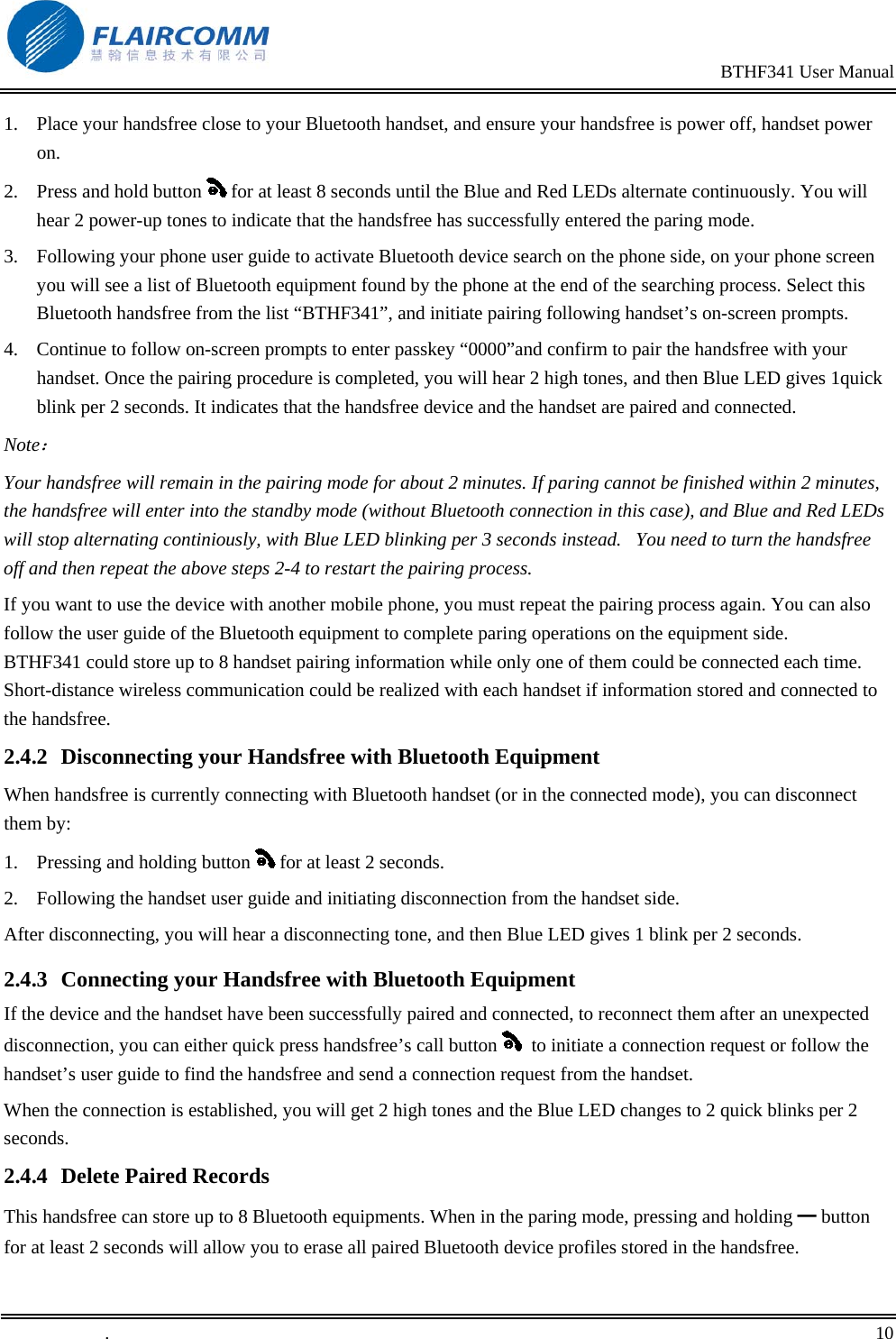
                                                                                               BTHF341 User Manual   .       10    1.  Place your handsfree close to your Bluetooth handset, and ensure your handsfree is power off, handset power on.  2.  Press and hold button   for at least 8 seconds until the Blue and Red LEDs alternate continuously. You will hear 2 power-up tones to indicate that the handsfree has successfully entered the paring mode.    3.  Following your phone user guide to activate Bluetooth device search on the phone side, on your phone screen you will see a list of Bluetooth equipment found by the phone at the end of the searching process. Select this Bluetooth handsfree from the list “BTHF341”, and initiate pairing following handset’s on-screen prompts.  4.  Continue to follow on-screen prompts to enter passkey “0000”and confirm to pair the handsfree with your handset. Once the pairing procedure is completed, you will hear 2 high tones, and then Blue LED gives 1quick blink per 2 seconds. It indicates that the handsfree device and the handset are paired and connected. Note: Your handsfree will remain in the pairing mode for about 2 minutes. If paring cannot be finished within 2 minutes, the handsfree will enter into the standby mode (without Bluetooth connection in this case), and Blue and Red LEDs will stop alternating continiously, with Blue LED blinking per 3 seconds instead.   You need to turn the handsfree off and then repeat the above steps 2-4 to restart the pairing process. If you want to use the device with another mobile phone, you must repeat the pairing process again. You can also follow the user guide of the Bluetooth equipment to complete paring operations on the equipment side. BTHF341 could store up to 8 handset pairing information while only one of them could be connected each time. Short-distance wireless communication could be realized with each handset if information stored and connected to the handsfree.  2.4.2  Disconnecting your Handsfree with Bluetooth Equipment When handsfree is currently connecting with Bluetooth handset (or in the connected mode), you can disconnect them by: 1.  Pressing and holding button   for at least 2 seconds. 2.  Following the handset user guide and initiating disconnection from the handset side. After disconnecting, you will hear a disconnecting tone, and then Blue LED gives 1 blink per 2 seconds. 2.4.3  Connecting your Handsfree with Bluetooth Equipment If the device and the handset have been successfully paired and connected, to reconnect them after an unexpected disconnection, you can either quick press handsfree’s call button    to initiate a connection request or follow the handset’s user guide to find the handsfree and send a connection request from the handset.  When the connection is established, you will get 2 high tones and the Blue LED changes to 2 quick blinks per 2 seconds. 2.4.4  Delete Paired Records This handsfree can store up to 8 Bluetooth equipments. When in the paring mode, pressing and holding ━ button for at least 2 seconds will allow you to erase all paired Bluetooth device profiles stored in the handsfree.
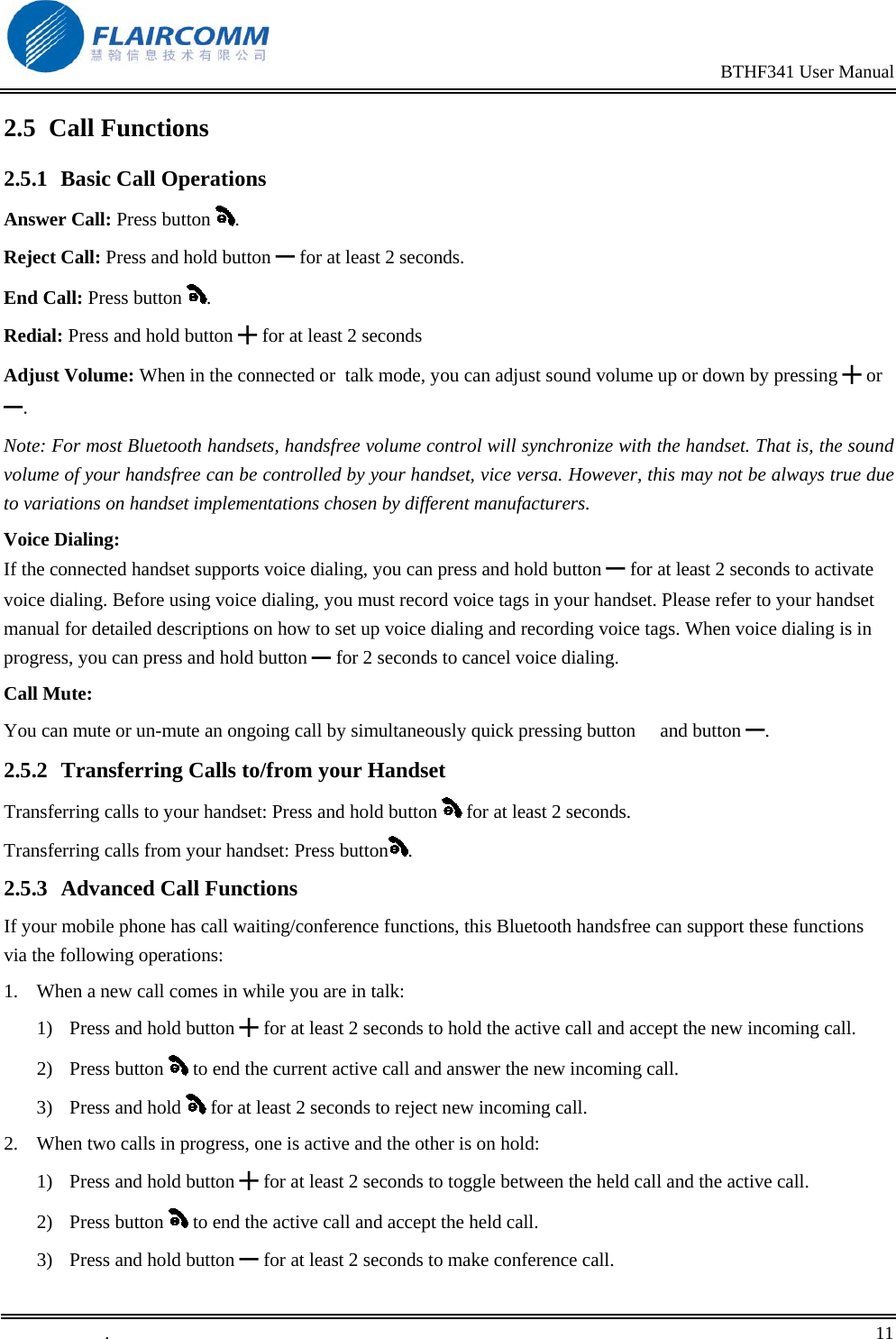
                                                                                               BTHF341 User Manual   .       11    2.5 Call Functions 2.5.1 Basic Call Operations Answer Call: Press button  . Reject Call: Press and hold button ━ for at least 2 seconds. End Call: Press button  . Redial: Press and hold button ╋ for at least 2 seconds Adjust Volume: When in the connected or  talk mode, you can adjust sound volume up or down by pressing ╋ or ━. Note: For most Bluetooth handsets, handsfree volume control will synchronize with the handset. That is, the sound volume of your handsfree can be controlled by your handset, vice versa. However, this may not be always true due to variations on handset implementations chosen by different manufacturers. Voice Dialing: If the connected handset supports voice dialing, you can press and hold button ━ for at least 2 seconds to activate voice dialing. Before using voice dialing, you must record voice tags in your handset. Please refer to your handset manual for detailed descriptions on how to set up voice dialing and recording voice tags. When voice dialing is in progress, you can press and hold button   for ━2 seconds to cancel voice dialing. Call Mute: You can mute or un-mute an ongoing call by simultaneously quick pressing button  and button ━.  2.5.2  Transferring Calls to/from your Handset Transferring calls to your handset: Press and hold button   for at least 2 seconds. Transferring calls from your handset: Press button . 2.5.3 Advanced Call Functions If your mobile phone has call waiting/conference functions, this Bluetooth handsfree can support these functions via the following operations: 1.  When a new call comes in while you are in talk: 1)  Press and hold button ╋ for at least 2 seconds to hold the active call and accept the new incoming call.  2) Press button   to end the current active call and answer the new incoming call. 3) Press and hold   for at least 2 seconds to reject new incoming call. 2.  When two calls in progress, one is active and the other is on hold: 1)  Press and hold button ╋ for at least 2 seconds to toggle between the held call and the active call. 2) Press button   to end the active call and accept the held call. 3)  Press and hold button ━ for at least 2 seconds to make conference call.
                                                                                               BTHF341 User Manual   .       12    4) Press and hold  for at least2 seconds to end held call.
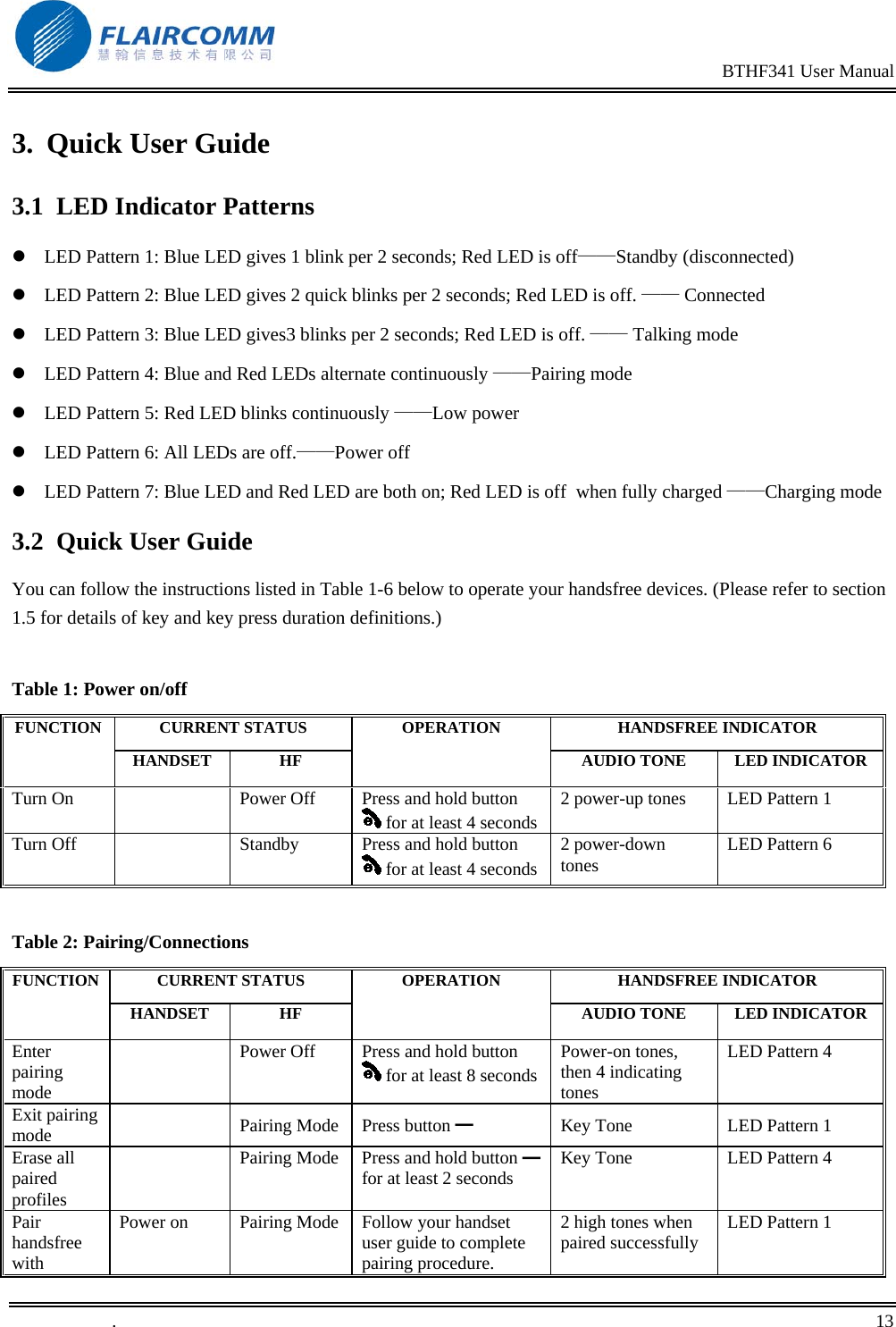
                                                                                               BTHF341 User Manual   .       13    3. Quick User Guide 3.1  LED Indicator Patterns  LED Pattern 1: Blue LED gives 1 blink per 2 seconds; Red LED is off——Standby (disconnected)  LED Pattern 2: Blue LED gives 2 quick blinks per 2 seconds; Red LED is off. —— Connected  LED Pattern 3: Blue LED gives3 blinks per 2 seconds; Red LED is off. —— Talking mode   LED Pattern 4: Blue and Red LEDs alternate continuously ——Pairing mode  LED Pattern 5: Red LED blinks continuously ——Low power  LED Pattern 6: All LEDs are off.——Power off  LED Pattern 7: Blue LED and Red LED are both on; Red LED is off  when fully charged ——Charging mode 3.2 Quick User Guide You can follow the instructions listed in Table 1-6 below to operate your handsfree devices. (Please refer to section 1.5 for details of key and key press duration definitions.)  Table 1: Power on/off CURRENT STATUS  HANDSFREE INDICATOR FUNCTION HANDSET HF OPERATION AUDIO TONE  LED INDICATORTurn On    Power Off  Press and hold button  for at least 4 seconds2 power-up tones  LED Pattern 1 Turn Off    Standby  Press and hold button  for at least 4 seconds2 power-down tones  LED Pattern 6  Table 2: Pairing/Connections CURRENT STATUS  HANDSFREE INDICATOR FUNCTION HANDSET HF OPERATION AUDIO TONE  LED INDICATOREnter pairing mode   Power Off  Press and hold button  for at least 8 secondsPower-on tones, then 4 indicating tones  LED Pattern 4 Exit pairing mode   Pairing Mode Press button ━ Key Tone  LED Pattern 1 Erase all paired profiles   Pairing Mode  Press and hold button   ━for at least 2 seconds  Key Tone  LED Pattern 4 Pair handsfree with Power on  Pairing Mode  Follow your handset user guide to complete pairing procedure. 2 high tones when paired successfully  LED Pattern 1
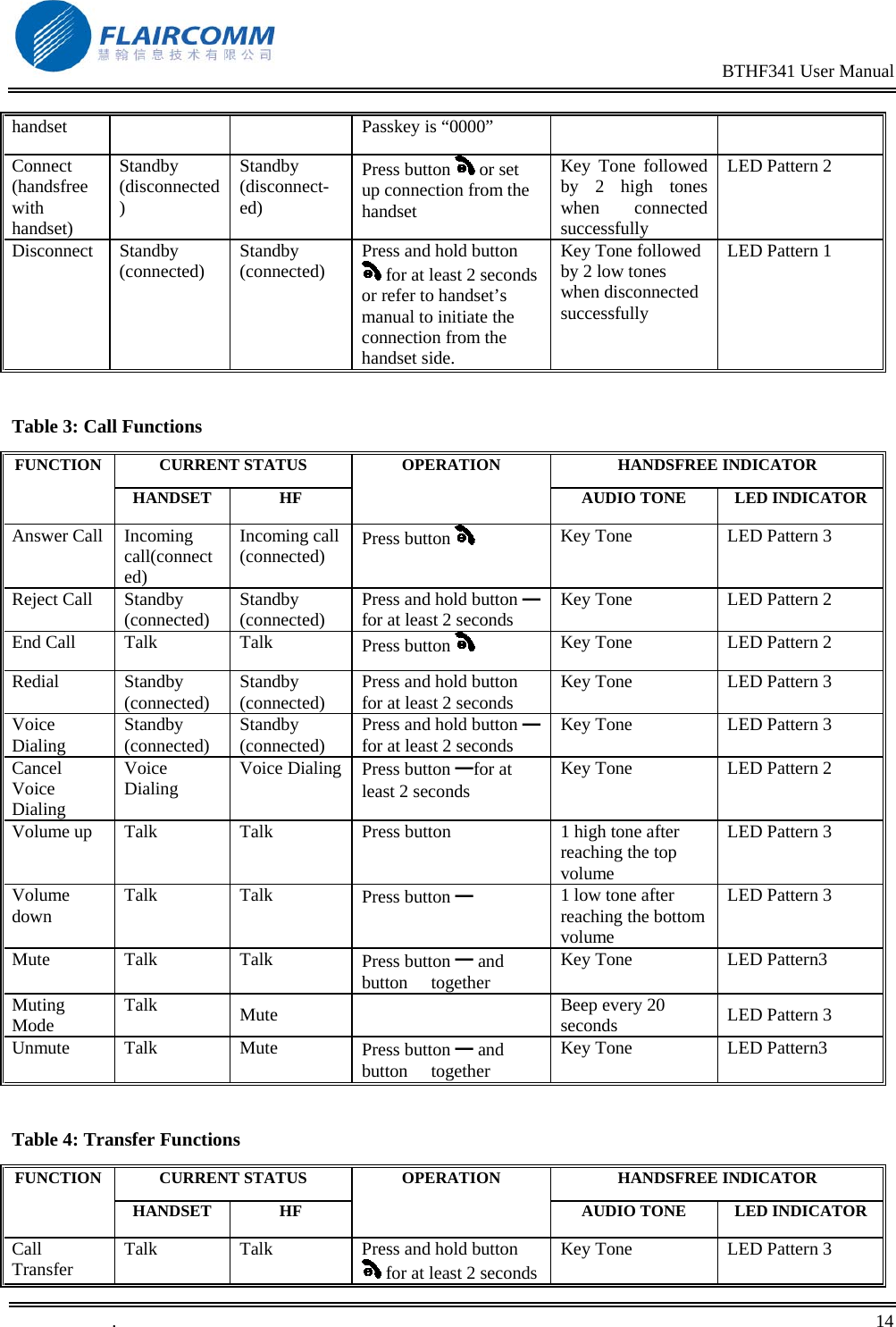
                                                                                               BTHF341 User Manual   .       14    handset  Passkey is “0000” Connect (handsfree with handset) Standby (disconnected) Standby (disconnect-ed) Press button   or set up connection from the handset Key Tone followed by 2 high tones when connected successfully LED Pattern 2 Disconnect Standby (connected)  Standby (connected)  Press and hold button  for at least 2 seconds or refer to handset’s manual to initiate the connection from the handset side. Key Tone followed by 2 low tones when disconnected successfully LED Pattern 1  Table 3: Call Functions CURRENT STATUS  HANDSFREE INDICATOR FUNCTION HANDSET HF OPERATION AUDIO TONE  LED INDICATORAnswer Call  Incoming call(connected) Incoming call (connected)  Press button     Key Tone  LED Pattern 3 Reject Call  Standby (connected)  Standby (connected)  Press and hold button   ━for at least 2 seconds  Key Tone  LED Pattern 2 End Call  Talk  Talk  Press button   Key Tone  LED Pattern 2 Redial Standby (connected)  Standby (connected)  Press and hold button  for at least 2 seconds  Key Tone  LED Pattern 3 Voice Dialing  Standby (connected)  Standby (connected)  Press and hold button   ━for at least 2 seconds  Key Tone  LED Pattern 3 Cancel Voice Dialing  Voice Dialing   Voice Dialing   Press button ━for at least 2 seconds  Key Tone   LED Pattern 2 Volume up  Talk  Talk  Press button   1 high tone after reaching the top volume LED Pattern 3 Volume down  Talk Talk  Press button ━ 1 low tone after reaching the bottom volume LED Pattern 3 Mute Talk  Talk  Press button ━ and button  together Key Tone  LED Pattern3 Muting Mode  Talk  Mute   Beep every 20 seconds  LED Pattern 3 Unmute Talk  Mute  Press button ━ and button  together Key Tone  LED Pattern3  Table 4: Transfer Functions CURRENT STATUS  HANDSFREE INDICATOR FUNCTION HANDSET HF OPERATION AUDIO TONE  LED INDICATORCall Transfer  Talk  Talk  Press and hold button  for at least 2 secondsKey Tone  LED Pattern 3
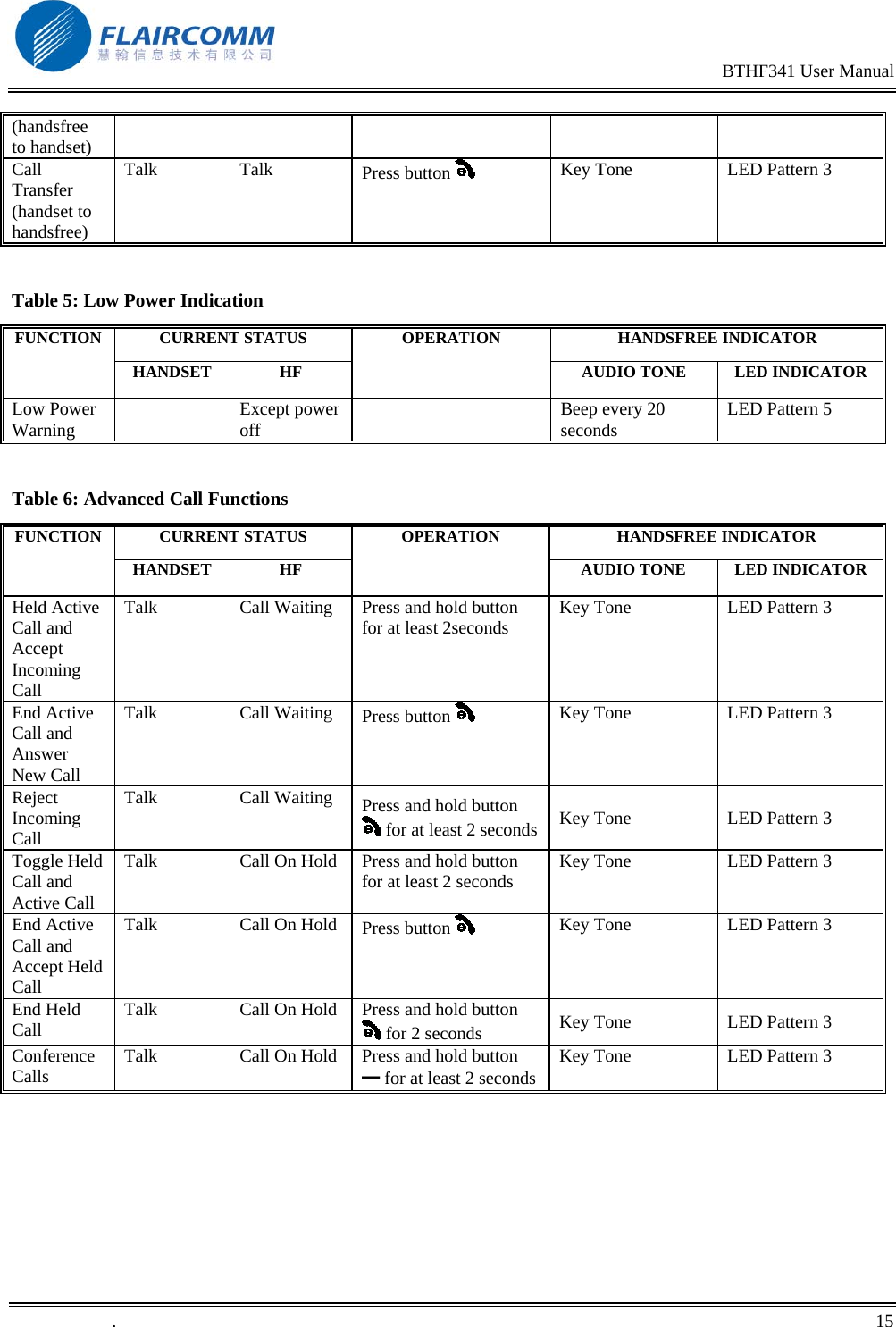
                                                                                               BTHF341 User Manual   .       15    (handsfree to handset) Call Transfer (handset to handsfree) Talk Talk  Press button   Key Tone  LED Pattern 3  Table 5: Low Power Indication CURRENT STATUS  HANDSFREE INDICATOR FUNCTION HANDSET HF OPERATION AUDIO TONE  LED INDICATORLow Power Warning   Except power off    Beep every 20 seconds  LED Pattern 5  Table 6: Advanced Call Functions CURRENT STATUS  HANDSFREE INDICATOR FUNCTION HANDSET HF OPERATION AUDIO TONE  LED INDICATORHeld Active Call and Accept Incoming Call Talk  Call Waiting  Press and hold button  for at least 2seconds  Key Tone  LED Pattern 3 End Active Call and Answer New Call Talk Call Waiting Press button   Key Tone  LED Pattern 3 Reject Incoming Call Talk Call Waiting Press and hold button  for at least 2 seconds Key Tone  LED Pattern 3 Toggle Held Call and Active Call Talk  Call On Hold  Press and hold button  for at least 2 seconds  Key Tone  LED Pattern 3 End Active Call and Accept Held Call Talk  Call On Hold  Press button   Key Tone  LED Pattern 3 End Held Call  Talk  Call On Hold  Press and hold button  for 2 seconds  Key Tone  LED Pattern 3  Conference Calls  Talk  Call On Hold  Press and hold button ━ for at least 2 secondsKey Tone  LED Pattern 3
                                                                                               BTHF341 User Manual   .       16    4. Maintenance BTHF341 is a well-designed communications device; careful maintenance and proper use will extend the product life and keep its elite performance in delivering voice and music. Following maintenance procedures may be helpful to you:  Always turn off power and keep your device in a safe place when it is not in use.  Keep the device dry, away from water, precipitation, humidity, moisture, and various liquids that may corrode electronic circuits. If your device gets wet, turn it off immediately and wait until the device gets dry completely before using it.  Keep the device away from dusty and dirty places. Otherwise, the mechanic and electronic parts could be damaged.  Do not store the device in high temperatures or in direct sunlight. Extreme high temperature could degrade performance, reduce battery lifetime, and wrap or melt certain plastics.   Do not store the device in too cold place. Moisture could form inside the device when you take it to a warm place. This could damage the internal electronic circuits.  Avoid dropping, knocking, and shaking the device. The mechanical parts and the internal electronic circuits could be broken.   Avoid using hash chemicals, cleaning solvents, and any other strong detergent to clean the device. You may use a clean and slightly damp cloth to clean the device.  Always take the device to the nearest authorized service facility for repairing if it is malfunctioning. Disassembling, modifying, and replacing components yourself could degrade product performance, cause damages, and terminate warranty.
                                                                                               BTHF341 User Manual   .       17    5.  Important Messages and Frequently Asked Questions Q1. Red LED blinking:                                                                    Low battery indicator; please recharge your battery as soon as possible. Q2. Can't power up the device after charging more than 20 minutes: For first time use, the device should be charged at least 40 minute in advance. It is recommended that the battery should be fully charged before using the device. Q3. Without charging indicator:                                                      When the battery runs off or the handsfree has not been used for a while, the Red LED may take a while to light up after the charger gets connected. Q4. Can't hear anything on handsfree-you should check the followings:  Handsfree is power on  Handsfree has paired with a handset  Handsfree has connected with a handset (except the handset only supports Headset Profile)  Handsfree and handset are within 10m  Handsfree and handset have good signal strength Q5.  Can the handsfree get connected to different phones simultaneously? No. The handsree can only get connected to one handset each time, though it could store pairing information of up to 8 Bluetooth enabled devices.  Q6. Does the paired handsfree or the paired handset need to be repaired after power off: No. Please note that for the handset supporting handsfree profile, the handsfree and the handset must be connected first before making/receiving. Refer section 2.4.3 for details. Q7. Voice dialing does not work: First check whether or not the handset supports voice dialing function. Then make sure your handset has recorded the voice tag. If already recorded, try recording again with your handsfree. Please note that noisy environment may affect voice dialing.

Navigation menu