Flaircomm Technologies BTM403 Bluetooth Module User Manual FLC BTM401 DS

Flaircomm Technologies Inc. Bluetooth Module FLC BTM401 DS

User Manual

                                                             FLC-BTM403 Series User Manual  Flaircomm Technologies Confidential     -1-   FLC-BTM403 Series User Manual            Document Type:    Bluetooth Module User Manual Document Number:  FLC-BTM403-DS Document Version:  V1.0 Release Date:    April 13, 2011   Copyright 2010 ~ 2011 by Flaircomm Technologies Inc., All Right Reserved Without written permission from Flaircomm Technologies Inc., reproduction, transfer, distribution or storage of part or all of the contents in this document in any form is prohibited
                                                             FLC-BTM403 Series User Manual  Flaircomm Technologies Confidential     -2- FCC Regulations:  zThis device complies with part 15 of the FCC Rules. Operation is subject to the following two conditions: (1) This device may not cause harmful interference, and (2) this device must accept any interference received, including interference that may cause undesired operation.  zThis device has been tested and found to comply with the limits for a Class B digital device, pursuant to Part 15 of the FCC Rules. These limits are designed to provide reasonable protection against harmful interference in a residential installation. This equipment generates, uses and can radiated radio frequency energy and, if not installed and used in accordance with the instructions, may cause harmful interference to radio communications. However, there is no guarantee that interference will not occur in a particular installation If this equipment does cause harmful interference to radio or television reception, which can be determined by turning the equipment off and on, the user is encouraged to try to correct the interference by one or more of the following measures:  -Reorient or relocate the receiving antenna. -Increase the separation between the equipment and receiver. -Connect the equipment into an outlet on a circuit different from that to which the receiver is connected. -Consult the dealer or an experienced radio/TV technician for help.  Changes or modifications not expressly approved by the party responsible for compliance could void the user‘s authority to operate the equipment.  4RF Exposure Information  This Modular Approval is limited to OEM installation for mobile and fixed applications only.  The antenna installation and operating configurations of this transmitter, including any applicable source-based time-averaging duty factor, antenna gain and cable loss must satisfy MPE categorical Exclusion Requirements of §2.1091.   The end user has no manual instructions to remove or install the device and a separate approval is required for all other operating configurations, including portable configurations with respect to 2.1093 and different antenna configurations.  Maximum antenna gain allowed for use with this device is 0.5 dBi. When the module is installed in the host device, the FCC ID label must be visible through a window on the final device or it must be visible when an access panel, door or cover is easily re-moved. If not, a second label must be placed on the outside of the final device that contains the following text: “Contains FCC ID: TQ6BTM403”.
                                                             FLC-BTM403 Series User Manual  Flaircomm Technologies Confidential     -3-CONTENT 1. INTRODUCTION.................................................................................................................................5 1.1 NAMING DECLARATION .......................................................................................................................5 1.2 FEATURES ............................................................................................................................................5 1.3 APPLICATIONS .....................................................................................................................................6 2. GENERAL SPECIFICATION ............................................................................................................7 3. PIN DEFINITION.................................................................................................................................8 3.1 PIN CONFIGURATION............................................................................................................................ 8 3.2 PIN DEFINITION....................................................................................................................................8 4. PHYSICAL INTERFACES ...............................................................................................................10 4.1 POWER SUPPLY ..................................................................................................................................10 4.2 RESET ................................................................................................................................................10 4.3 DIGITAL AUDIO INTERFACES .............................................................................................................11 4.3.1 PCM Interface Master/Slave .....................................................................................................11 4.3.2 Long Frame Sync ......................................................................................................................12 4.3.3 Short Frame Sync ......................................................................................................................13 4.3.4 Multi-slot Operation..................................................................................................................13 4.3.5 GCI Interface.............................................................................................................................14 4.3.6 Slots and Sample Formats ......................................................................................................... 14 4.3.7 Additional Features ...................................................................................................................15 4.3.8 PCM Timing Information.......................................................................................................... 15 4.4 RF INTERFACE ...................................................................................................................................19 4.5 GENERAL PURPOSE ANALOGUE IO ....................................................................................................19 4.6 GENERAL PURPOSE DIGITAL IO.........................................................................................................19 4.7 SERIAL INTERFACES........................................................................................................................... 19 4.7.1 UART........................................................................................................................................ 19 4.7.2 USB...........................................................................................................................................20 4.7.3 I2C.............................................................................................................................................22 4.7.4 SPI.............................................................................................................................................22 5. ELECTRICAL CHARACTERISTIC...............................................................................................24 5.1 ABSOLUTE MAXIMUM RATING ..........................................................................................................24 5.2 RECOMMEND OPERATION CONDITIONS ..............................................................................................24 5.3 POWER CONSUMPTIONS......................................................................................................................24 5.4 INPUT/OUTPUT TERMINAL CHARACTERISTICS ...................................................................................24 5.4.1 Digital Terminals.......................................................................................................................24 5.4.2 USB...........................................................................................................................................25 6. REFERENCE DESIGN......................................................................................................................26 7. MECHANICAL CHARACTERISTIC .............................................................................................27 8. RECOMMENDED PCB LAYOUT AND MOUNTING PATTERN..............................................28 9. RECOMMENDED REFLOW PROFILE ........................................................................................29 10. ORDERING INFORMATION ......................................................................................................30 10.1 PRODUCT PACKAGING INFORMATION ................................................................................................ 30 10.2 ORDERING INFORMATION................................................................................................................... 31 10.2.1 Product Revision .......................................................................................................................31 10.2.2 Shipping Package ......................................................................................................................31 10.2.3 Product Package ........................................................................................................................ 31 10.2.4 Product Grade............................................................................................................................31
                                                             FLC-BTM403 Series User Manual  Flaircomm Technologies Confidential     -4-TABLE AND FIGURE  Table 1: Naming Declaration ..........................................................................................................................5 Table 2: General Specification........................................................................................................................7 Table 3: Pin Definition....................................................................................................................................9 Table 4: Pin Status on Reset.......................................................................................................................... 11 Table 5: PCM Master Timing ....................................................................................................................... 16 Table 6: PCM Slave Timing..........................................................................................................................18 Table 7: Possible UART Settings.................................................................................................................. 20 Table 8: USB Interface Component Values .................................................................................................. 21 Table 9: Absolute Maximum Rating Recommended Operating Conditions ................................................. 24 Table 10: Recommended Operating Conditions ........................................................................................... 24 Table 11: Power consumptions ..................................................................................................................... 24 Table 12: Digital Terminal............................................................................................................................25 Table 13: USB Terminal ...............................................................................................................................25 Table 14: Product Revision...........................................................................................................................31 Table 15: Shipping Package..........................................................................................................................31 Table 16: Product Package............................................................................................................................31 Table 17: Product Grade ...............................................................................................................................32  Figure 1: Pin Configuration.............................................................................................................................8 Figure 2: Configured PCM as a Master.........................................................................................................12 Figure 3: Configured PCM as a Slave........................................................................................................... 12 Figure 4: Long Frame Sync (Shown with 8-bit Companded Sample) .......................................................... 13 Figure 5: Short Frame Sync (Shown with 16-bit Sample) ............................................................................13 Figure 6: Multi-Slot Operation with Two Slots and 8-bit Companded Samples........................................... 14 Figure 7: GCI Interface ................................................................................................................................. 14 Figure 8: 16-Bit Slot Length and Sample Formats........................................................................................15 Figure 9: PCM Master Timing Long Frame Sync......................................................................................... 17 Figure 10: PCM Master Timing Short Frame Sync ......................................................................................17 Figure 11: PCM Slave Timing Long Frame Sync.........................................................................................18 Figure 12: PCM Master Timing Short Frame Sync ......................................................................................19 Figure 13: USB Connections for Self-Powered Mode ..................................................................................21 Figure 14: USB Connections for Bus-Powered Mode ..................................................................................22 Figure 15: Example EEPROM Connection with I2C Interface .....................................................................22 Figure 16: Design SPI for In-System Programming and Debug ................................................................... 23 Figure 17: Reference Design......................................................................................................................... 26 Figure 18: Mechanical Characteristic............................................................................................................27 Figure 19: Leave 20mm Clearance Space from the Module chip Antenna................................................... 28 Figure 20: Recommended Reflow Profile..................................................................................................... 29 Figure 21: Product Packaging Information ...................................................................................................31 Figure 22: Ordering Information...................................................................................................................31
                                                             FLC-BTM403 Series User Manual  Flaircomm Technologies Confidential     -5-1. Introduction  FLC-BTM403/FLC-BTMDC748 is a small form factor and highly economic Bluetooth radio module(class 1 or class 2) that allows OEM to add wireless capability to their products. The module supports multiple interfaces that make it simple to design into fully certified embedded Bluetooth solutions.  With FLC’s AT#™ programming interfaces, designers can easily customize their applications to support different Bluetooth profiles, such as SPP, DUN, HDP, and etc. class1 module supports Bluetooth® Enhanced Data Rate (EDR) and delivers up to 3 Mbps data rate for distances up to 300 meters with its integrated chip antenna, class 2 module supports 3Mbps data rate Transmission for distances up to 10 meters with its integrated chip antenna. The module is an appropriate product for designers who want to add wireless capability to their products. Note: According to the software divided into class1 and class2 1.1 Naming Declaration  New Naming  Old Naming FLC-BTM403A FLC-BTMDC748A(class1) FLC-BTM403B FLC-BTMDC748B(class1) FLC-BTM403C FLC-BTMDC748C(class2) Table 1: Naming Declaration  1.2 Features  z Bluetooth v2.1+EDR z UART and USB programming and data interfaces z PCM  digital audio interfaces z 8MB on board flash z Small form factor z SMT pads for easy and reliable PCB mounting z BQB/FCC/CE Certified z RoHS compliant
                                                             FLC-BTM403 Series User Manual  Flaircomm Technologies Confidential     -6-1.3 Applications  z Cable replacement z Bar code and RFID scanners z Measurement and monitoring systems z Industrial sensors and controls z Medical devices z Industrial PCs and laptops
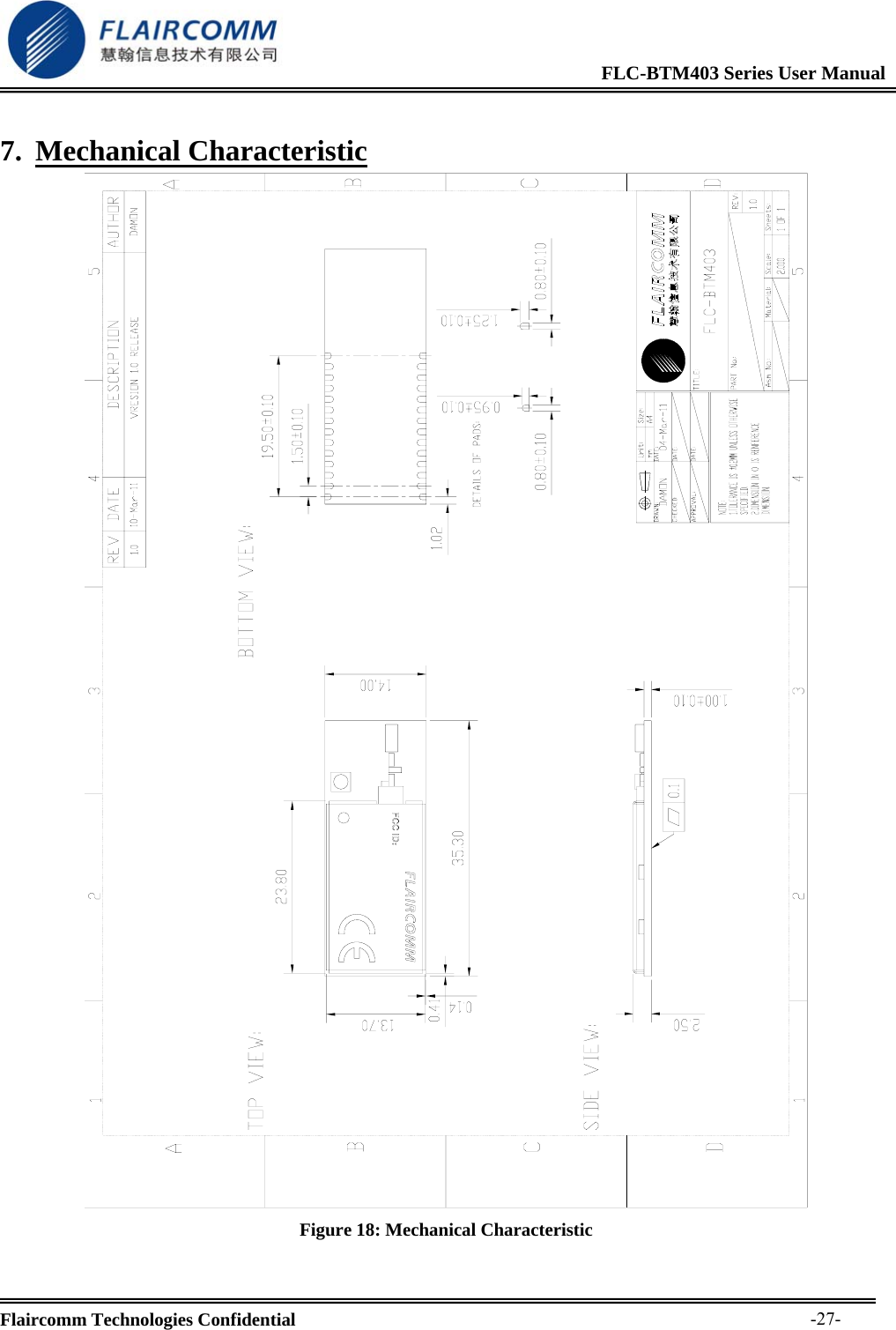
                                                             FLC-BTM403 Series User Manual  Flaircomm Technologies Confidential     -7-2. General Specification  Bluetooth Specification Standard Bluetooth2.1+EDR Profiles  SPP, DUN, HDP, detailed profiles depends on the firmware Frequency Band  2.402G ~ 2.480G Maximum Data Rate  3Mbps  Antenna  Multilayer Ceramic Antenna or UFL port RF Input Impedance  50 ohms Baseband Crystal OSC  16MHz Interface   UART, PIO, AIO, USB, SPI, PCM Sensitivity  -84dBm@0.1%BERRF TX Power  +13dBm(class1)  +4dbm(class2) Power Supply Voltage  3 ~ 3.6V DC Working Current  Depends on profiles, 22mA typical  Standby Current(Connected)  <2mA Operating Environment Temperature  -20ºC to +55ºC Humidity 10%~90% Non-Condensing Certifications  BQB/FCC/CE Environmental  RoHS Compliant Dimension and Weight Dimension 35.30mm×14.00mm×2.50mm Weight 2.00g  Table 2: General Specification
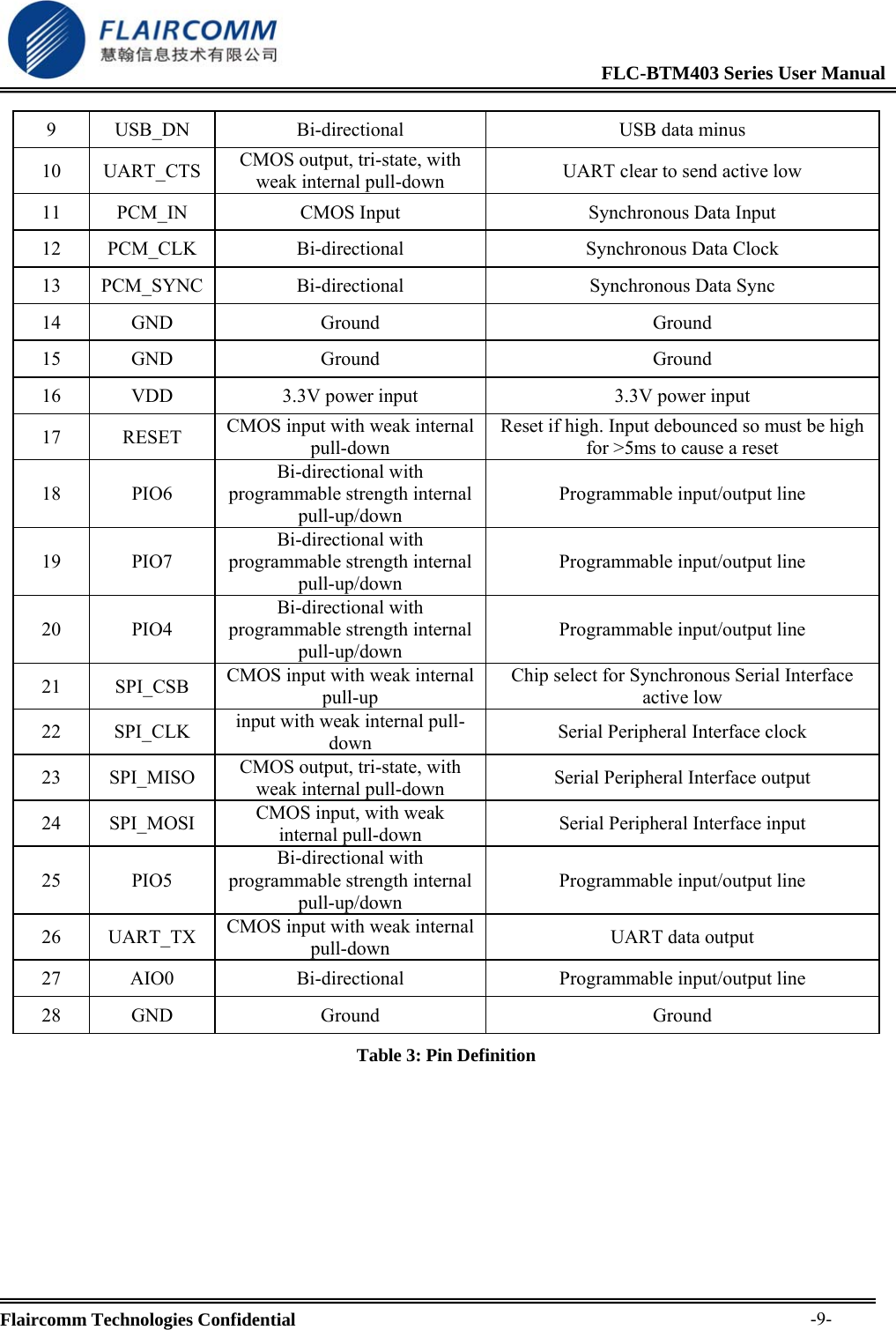
                                                             FLC-BTM403 Series User Manual  Flaircomm Technologies Confidential     -8-3. Pin Definition 3.1 Pin Configuration    Figure 1: Pin Configuration 3.2 Pin Definition  Pin  Symbol  I/O Type  Description 1 GND  Ground  Ground 2  VDD  3V3 power input  3V3 power input 3 PIO2 Bi-directional with programmable strength internal pull-up/down Programmable input/output line 4 PIO3 Bi-directional with programmable strength internal pull-up/down Programmable input/output line 5 UART_RTS CMOS output, tri-state, with weak internal pull-up  UART request to send active low 6 UART_RX CMOS input with weak internal pull-down  UART data input 7 PCM_OUT  Bi-directional  Synchronous Data Output 8 USB_DP  Bi-directional  USB data plus with selectable internal 1.5Kohm pull-up resistor
                                                             FLC-BTM403 Series User Manual  Flaircomm Technologies Confidential     -9-9  USB_DN  Bi-directional  USB data minus 10 UART_CTS CMOS output, tri-state, with weak internal pull-down  UART clear to send active low 11  PCM_IN  CMOS Input  Synchronous Data Input 12 PCM_CLK  Bi-directional  Synchronous Data Clock 13 PCM_SYNC  Bi-directional  Synchronous Data Sync 14 GND  Ground  Ground 15 GND  Ground  Ground 16  VDD  3.3V power input  3.3V power input 17 RESET CMOS input with weak internal pull-down Reset if high. Input debounced so must be high for >5ms to cause a reset 18 PIO6 Bi-directional with programmable strength internal pull-up/down Programmable input/output line 19 PIO7 Bi-directional with programmable strength internal pull-up/down Programmable input/output line 20 PIO4 Bi-directional with programmable strength internal pull-up/down Programmable input/output line 21 SPI_CSB CMOS input with weak internal pull-up Chip select for Synchronous Serial Interface active low 22 SPI_CLK input with weak internal pull-down  Serial Peripheral Interface clock 23 SPI_MISO CMOS output, tri-state, with weak internal pull-down  Serial Peripheral Interface output 24 SPI_MOSI  CMOS input, with weak internal pull-down  Serial Peripheral Interface input 25 PIO5 Bi-directional with programmable strength internal pull-up/down Programmable input/output line 26 UART_TX CMOS input with weak internal pull-down  UART data output 27 AIO0  Bi-directional  Programmable input/output line 28 GND  Ground  Ground Table 3: Pin Definition
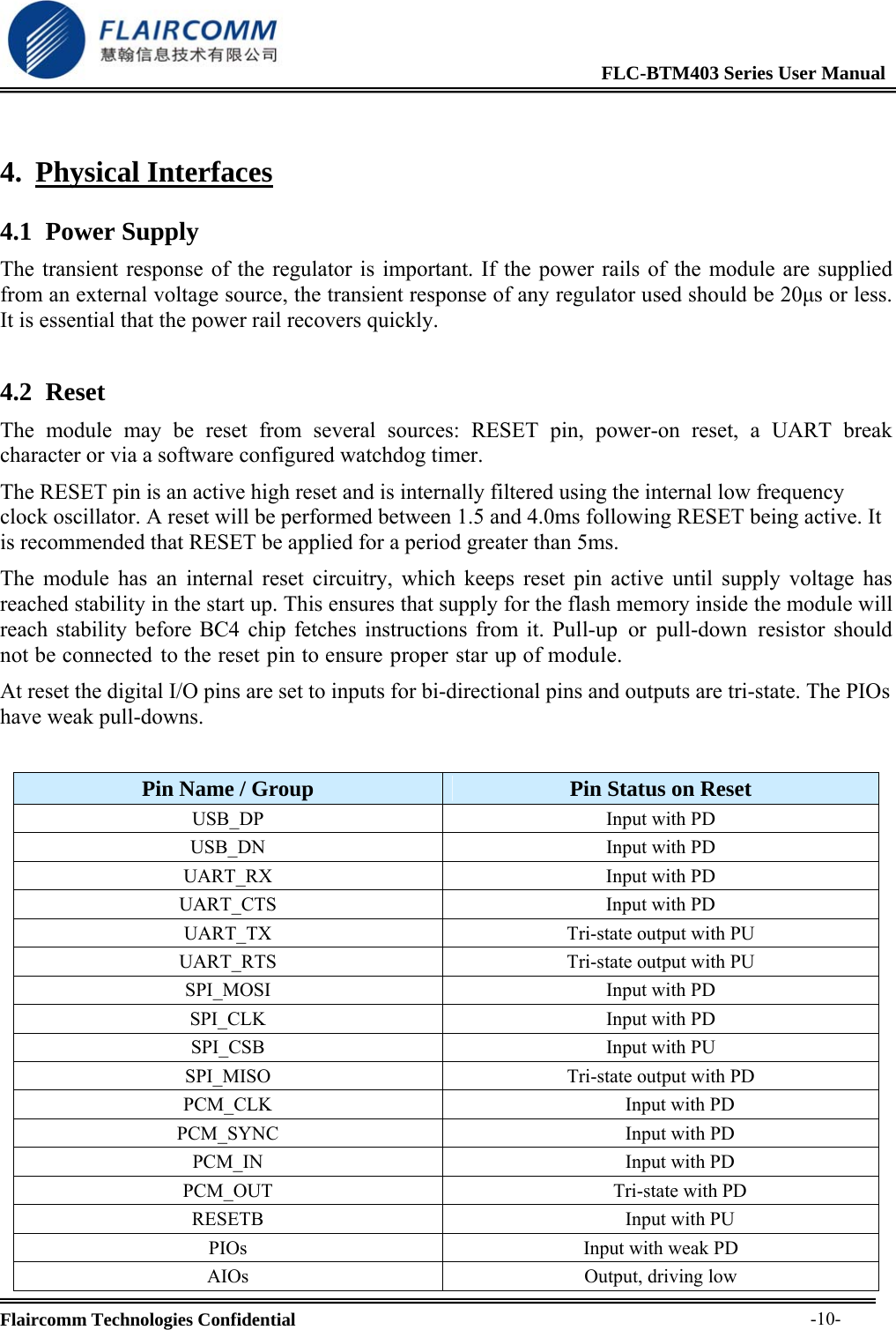
                                                             FLC-BTM403 Series User Manual  Flaircomm Technologies Confidential     -10-4. Physical Interfaces 4.1 Power Supply The transient response of the regulator is important. If the power rails of the module are supplied from an external voltage source, the transient response of any regulator used should be 20μs or less. It is essential that the power rail recovers quickly. 4.2 Reset The module may be reset from several sources: RESET pin, power-on reset, a UART break character or via a software configured watchdog timer. The RESET pin is an active high reset and is internally filtered using the internal low frequency clock oscillator. A reset will be performed between 1.5 and 4.0ms following RESET being active. It is recommended that RESET be applied for a period greater than 5ms. The module has an internal reset circuitry, which keeps reset pin active until supply voltage has reached stability in the start up. This ensures that supply for the flash memory inside the module will reach stability before BC4 chip fetches instructions from it. Pull-up or pull-down resistor should not be connected to the reset pin to ensure proper star up of module. At reset the digital I/O pins are set to inputs for bi-directional pins and outputs are tri-state. The PIOs have weak pull-downs.  Pin Name / Group  Pin Status on Reset USB_DP  Input with PD USB_DN  Input with PD UART_RX  Input with PD UART_CTS  Input with PD UART_TX  Tri-state output with PU UART_RTS  Tri-state output with PU SPI_MOSI  Input with PD SPI_CLK  Input with PD SPI_CSB  Input with PU SPI_MISO  Tri-state output with PD PCM_CLK  Input with PD PCM_SYNC  Input with PD PCM_IN  Input with PD PCM_OUT Tri-state with PD RESETB  Input with PU PIOs  Input with weak PD AIOs Output, driving low
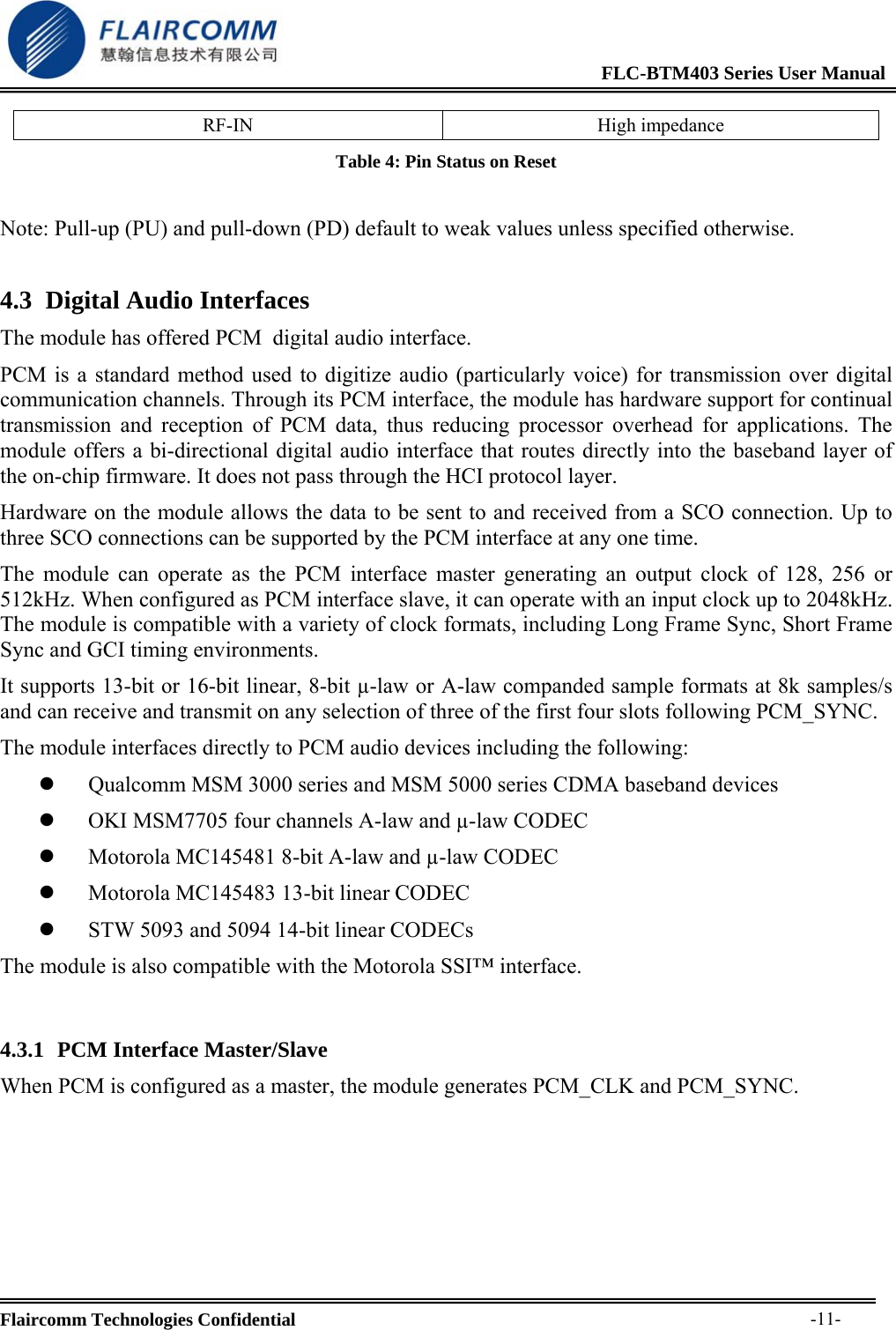
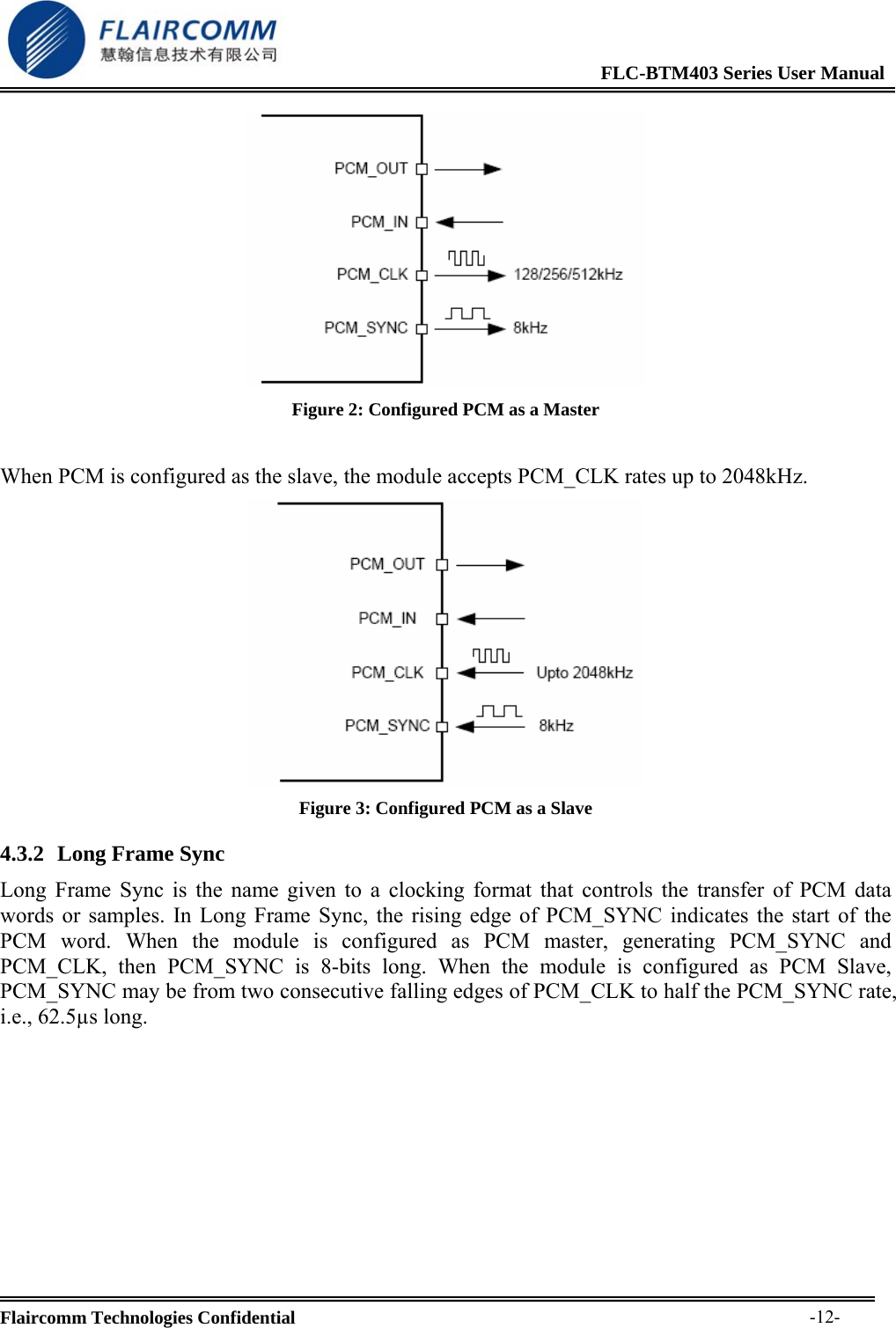
                                                             FLC-BTM403 Series User Manual  Flaircomm Technologies Confidential     -11-RF-IN High impedance Table 4: Pin Status on Reset  Note: Pull-up (PU) and pull-down (PD) default to weak values unless specified otherwise. 4.3 Digital Audio Interfaces The module has offered PCM  digital audio interface. PCM is a standard method used to digitize audio (particularly voice) for transmission over digital communication channels. Through its PCM interface, the module has hardware support for continual transmission and reception of PCM data, thus reducing processor overhead for applications. The module offers a bi-directional digital audio interface that routes directly into the baseband layer of the on-chip firmware. It does not pass through the HCI protocol layer. Hardware on the module allows the data to be sent to and received from a SCO connection. Up to three SCO connections can be supported by the PCM interface at any one time. The module can operate as the PCM interface master generating an output clock of 128, 256 or 512kHz. When configured as PCM interface slave, it can operate with an input clock up to 2048kHz. The module is compatible with a variety of clock formats, including Long Frame Sync, Short Frame Sync and GCI timing environments. It supports 13-bit or 16-bit linear, 8-bit µ-law or A-law companded sample formats at 8k samples/s and can receive and transmit on any selection of three of the first four slots following PCM_SYNC.  The module interfaces directly to PCM audio devices including the following: z  Qualcomm MSM 3000 series and MSM 5000 series CDMA baseband devices z OKI MSM7705 four  channels A-law and µ-law CODEC z Motorola MC145481 8 -bit A-law and µ-law CODEC z Motorola MC145483 13 -bit linear CODEC z STW 5093 and 5094 14 -bit linear CODECs The module is also compatible with the Motorola SSI™ interface.  4.3.1 PCM Interface Master/Slave When PCM is configured as a master, the module generates PCM_CLK and PCM_SYNC.
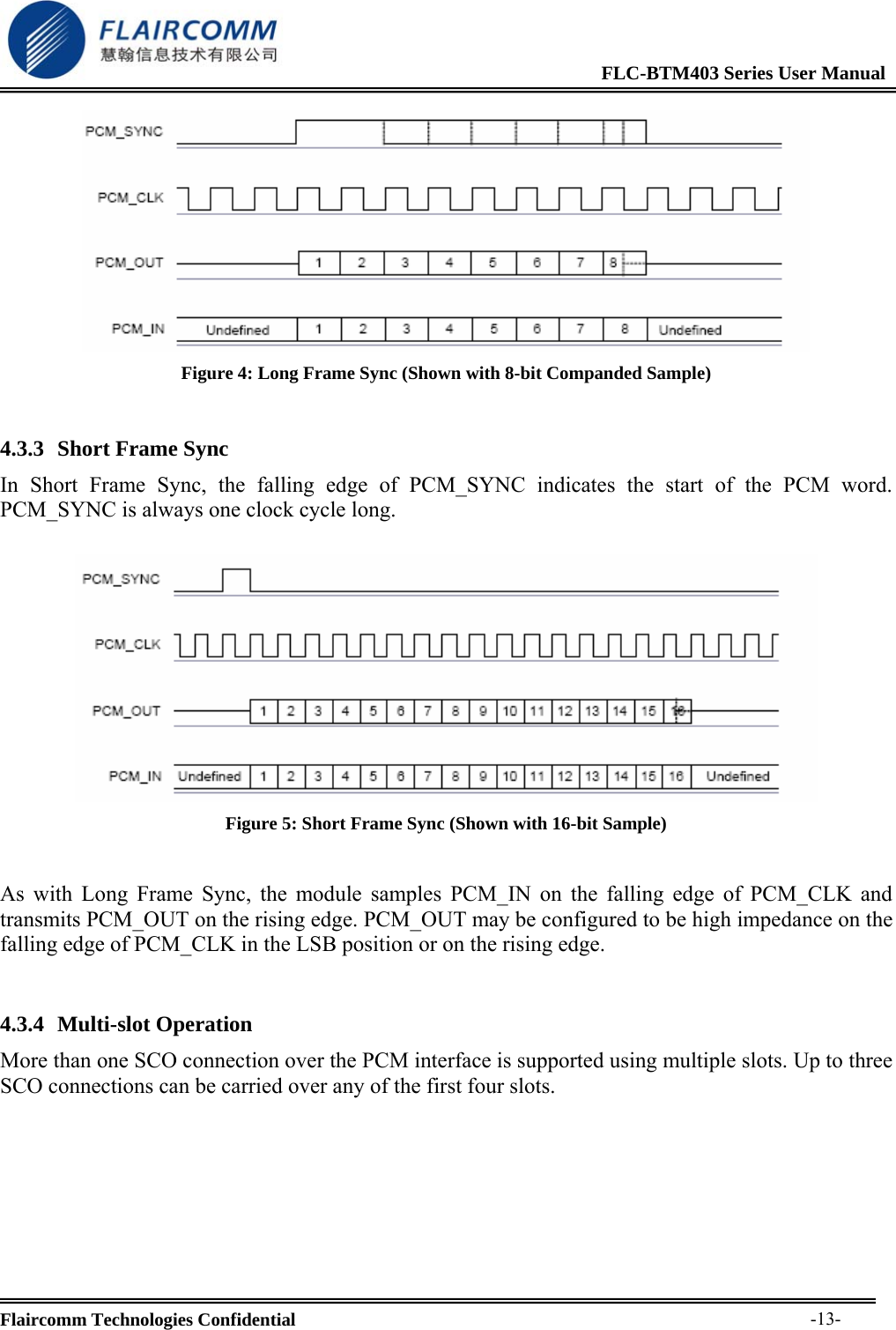
                                                             FLC-BTM403 Series User Manual  Flaircomm Technologies Confidential     -12- Figure 2: Configured PCM as a Master  When PCM is configured as the slave, the module accepts PCM_CLK rates up to 2048kHz.  Figure 3: Configured PCM as a Slave 4.3.2 Long Frame Sync Long Frame Sync is the name given to a clocking format that controls the transfer of PCM data words or samples. In Long Frame Sync, the rising edge of PCM_SYNC indicates the start of the PCM word. When the module is configured as PCM master, generating PCM_SYNC and PCM_CLK, then PCM_SYNC is 8-bits long. When the module is configured as PCM Slave, PCM_SYNC may be from two consecutive falling edges of PCM_CLK to half the PCM_SYNC rate, i.e., 62.5µs long.
                                                             FLC-BTM403 Series User Manual  Flaircomm Technologies Confidential     -13- Figure 4: Long Frame Sync (Shown with 8-bit Companded Sample)  4.3.3 Short Frame Sync In Short Frame Sync, the falling edge of PCM_SYNC indicates the start of the PCM word. PCM_SYNC is always one clock cycle long.   Figure 5: Short Frame Sync (Shown with 16-bit Sample)  As with Long Frame Sync, the module samples PCM_IN on the falling edge of PCM_CLK and transmits PCM_OUT on the rising edge. PCM_OUT may be configured to be high impedance on the falling edge of PCM_CLK in the LSB position or on the rising edge.  4.3.4 Multi-slot Operation More than one SCO connection over the PCM interface is supported using multiple slots. Up to three SCO connections can be carried over any of the first four slots.
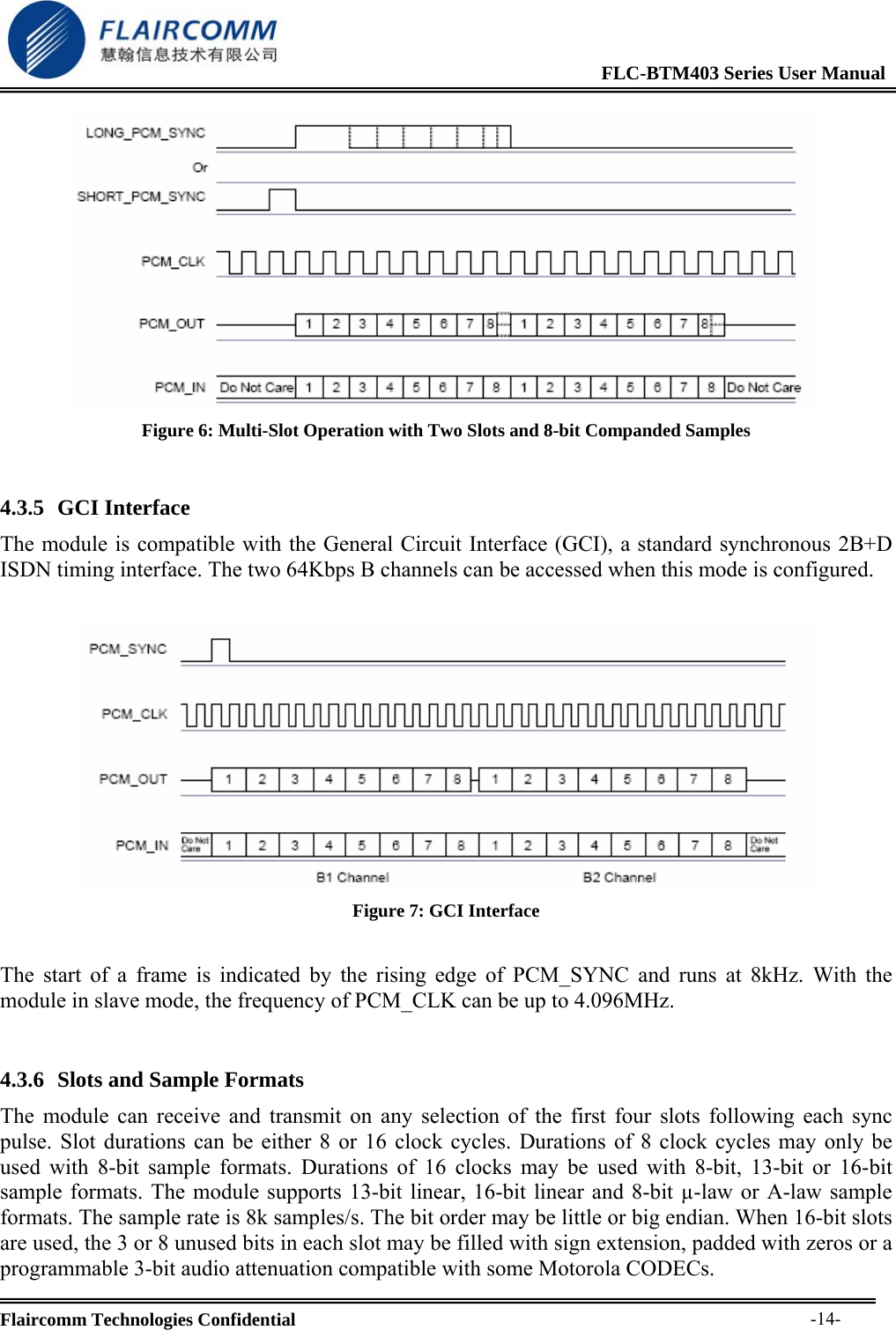
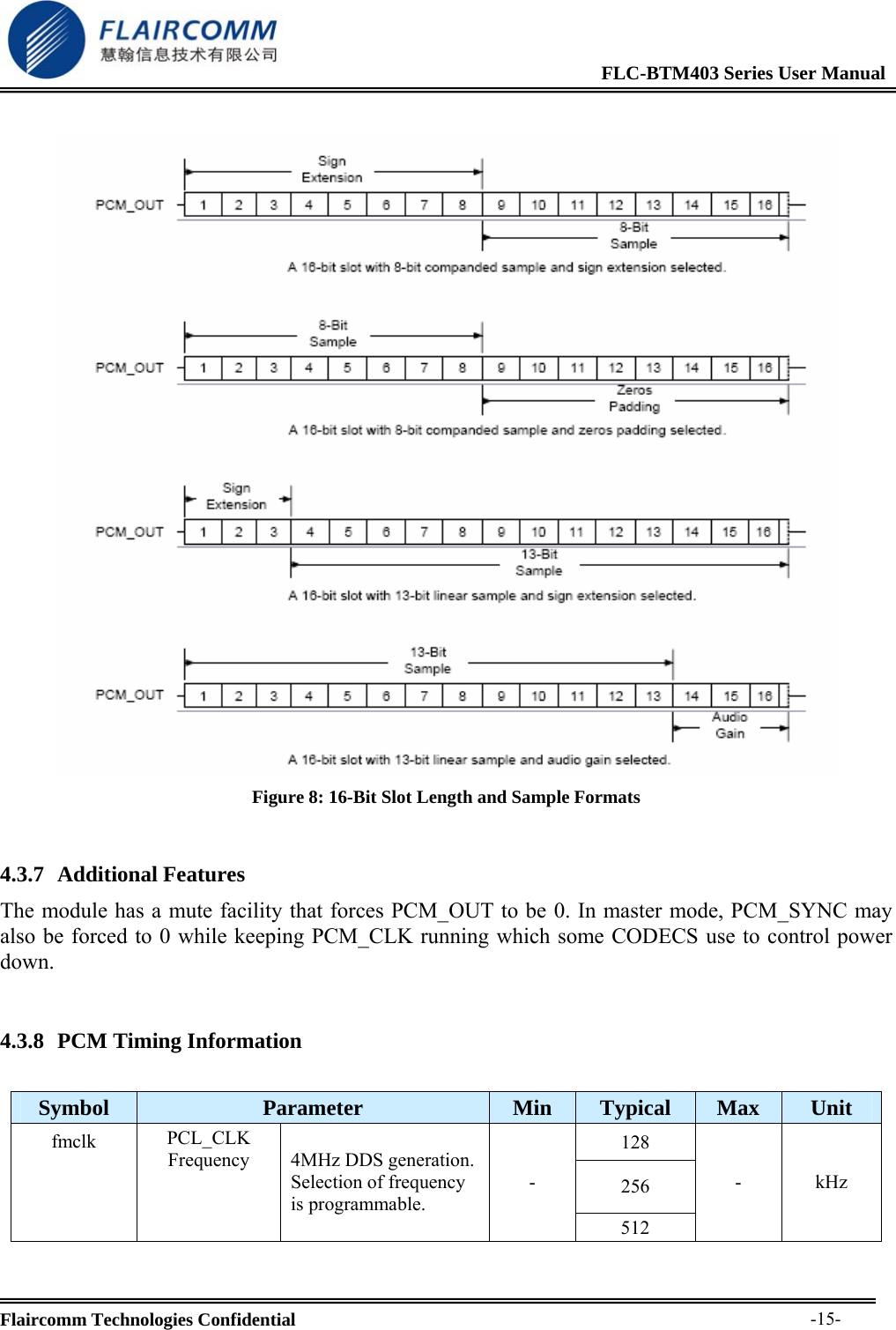
                                                             FLC-BTM403 Series User Manual  Flaircomm Technologies Confidential     -14- Figure 6: Multi-Slot Operation with Two Slots and 8-bit Companded Samples  4.3.5 GCI Interface The module is compatible with the General Circuit Interface (GCI), a standard synchronous 2B+D ISDN timing interface. The two 64Kbps B channels can be accessed when this mode is configured.   Figure 7: GCI Interface  The start of a frame is indicated by the rising edge of PCM_SYNC and runs at 8kHz. With the module in slave mode, the frequency of PCM_CLK can be up to 4.096MHz.  4.3.6 Slots and Sample Formats The module can receive and transmit on any selection of the first four slots following each sync pulse. Slot durations can be either 8 or 16 clock cycles. Durations of 8 clock cycles may only be used with 8-bit sample formats. Durations of 16 clocks may be used with 8-bit, 13-bit or 16-bit sample formats. The module supports 13-bit linear, 16-bit linear and 8-bit µ-law or A-law sample formats. The sample rate is 8k samples/s. The bit order may be little or big endian. When 16-bit slots are used, the 3 or 8 unused bits in each slot may be filled with sign extension, padded with zeros or a programmable 3-bit audio attenuation compatible with some Motorola CODECs.
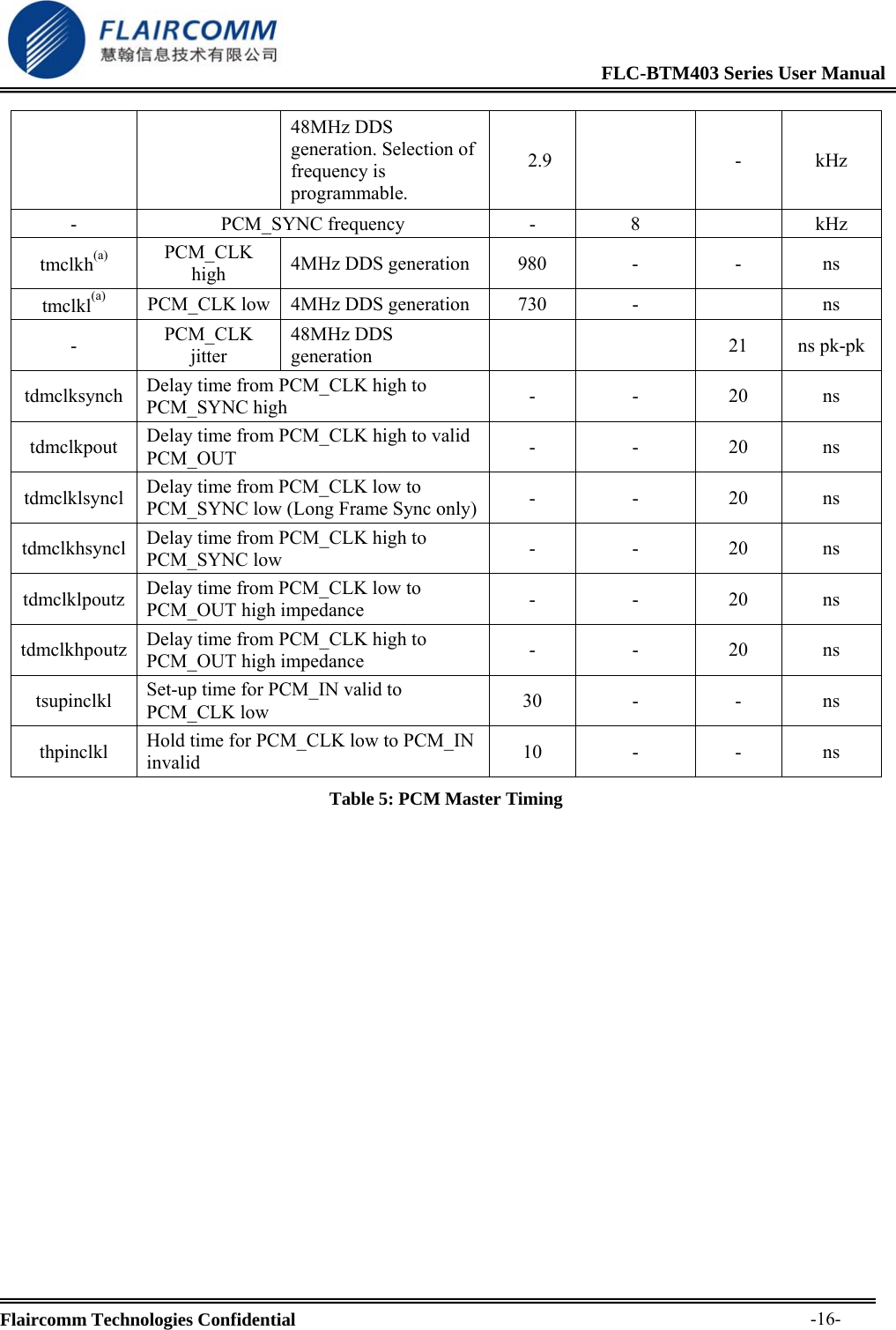
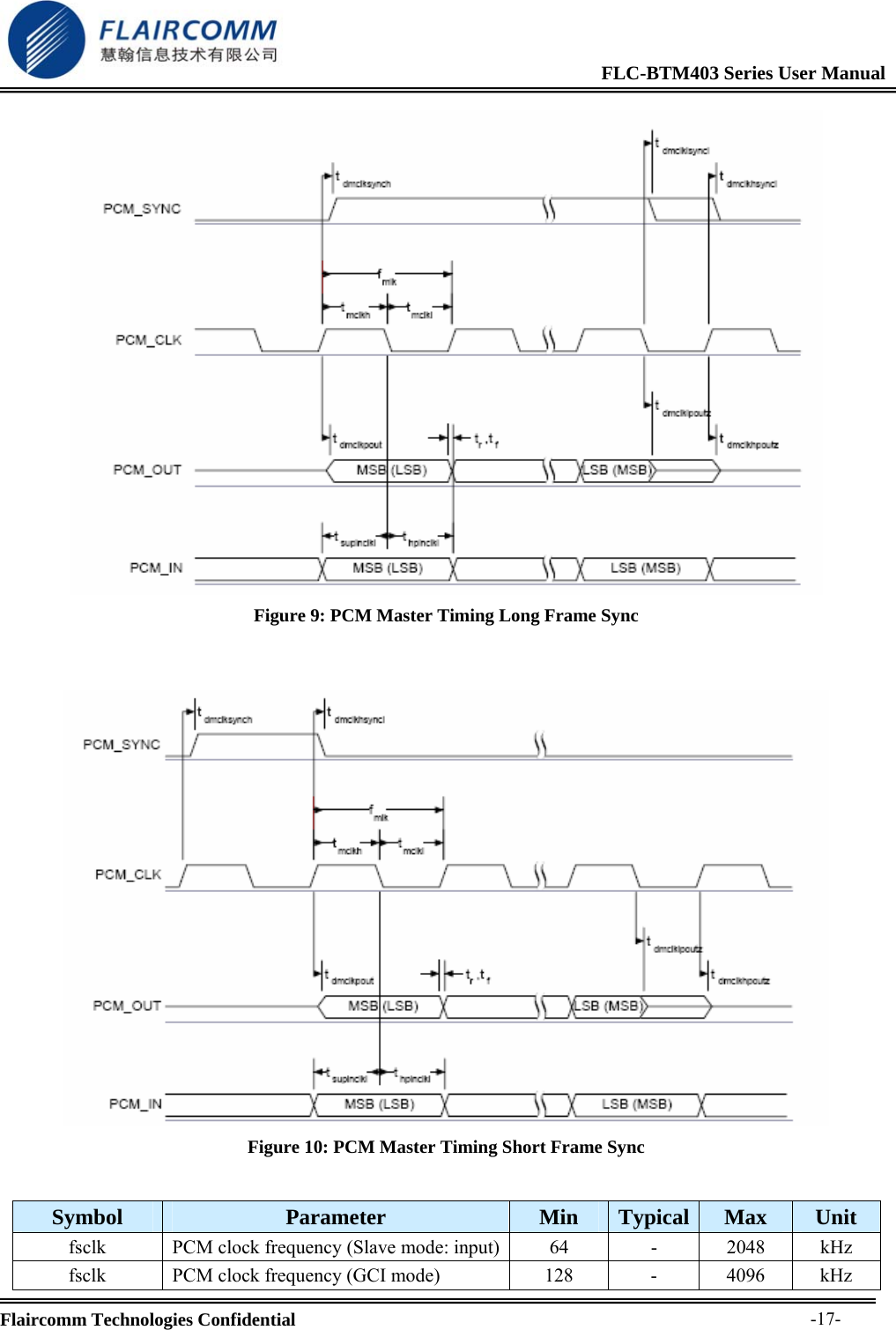
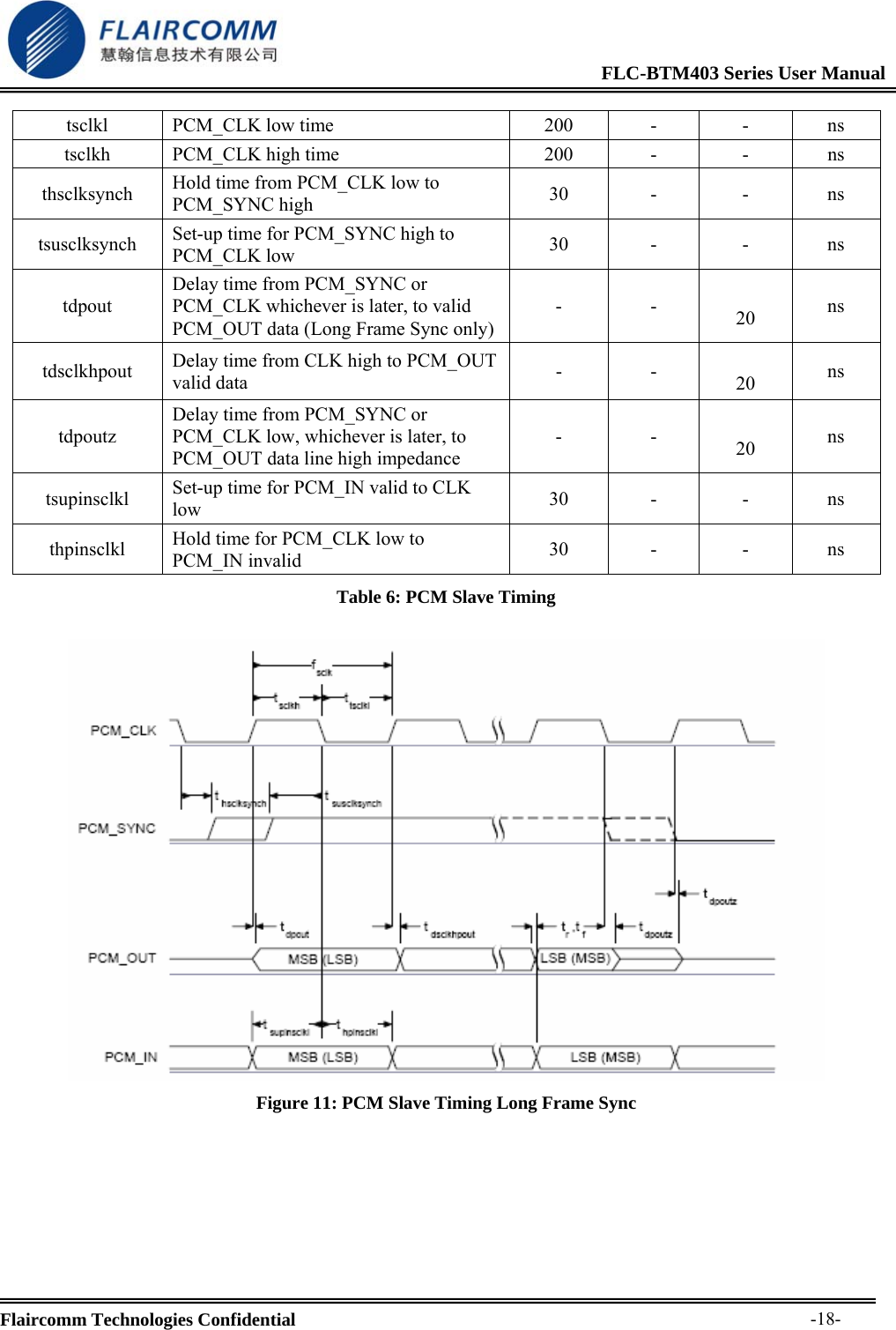
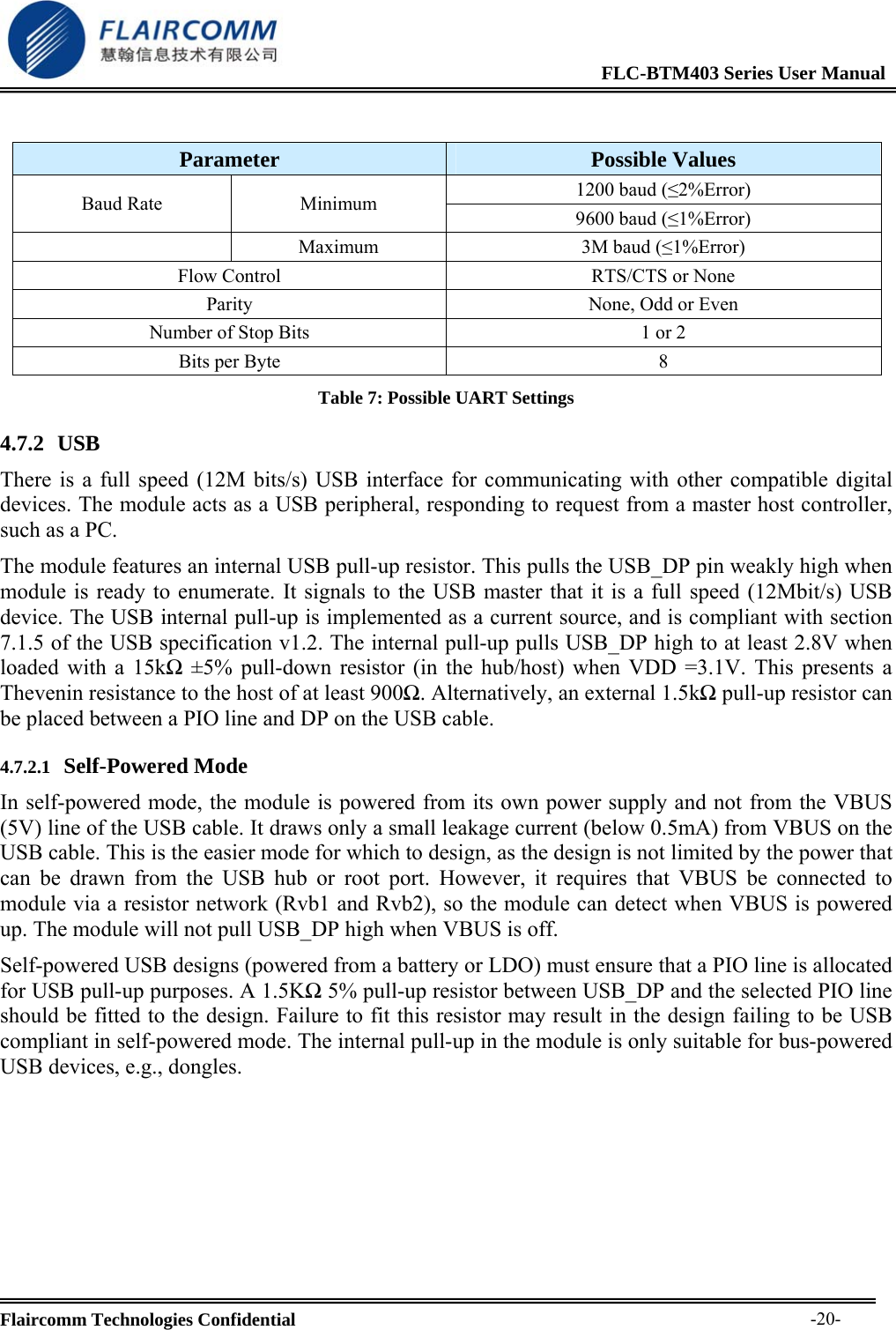
                                                             FLC-BTM403 Series User Manual  Flaircomm Technologies Confidential     -15-  Figure 8: 16-Bit Slot Length and Sample Formats  4.3.7 Additional Features The module has a mute facility that forces PCM_OUT to be 0. In master mode, PCM_SYNC may also be forced to 0 while keeping PCM_CLK running which some CODECS use to control power down.  4.3.8 PCM Timing Information  Symbol  Parameter  Min  Typical  Max  Unit 128 256 fmclk  PCL_CLK Frequency  4MHz DDS generation. Selection of frequency is programmable. - 512 - kHz
                                                             FLC-BTM403 Series User Manual  Flaircomm Technologies Confidential     -16-48MHz DDS generation. Selection of frequency is programmable. 2.9   - kHz - PCM_SYNC frequency - 8  kHz tmclkh(a) PCM_CLK high  4MHz DDS generation  980  -  -  ns tmclkl(a) PCM_CLK low  4MHz DDS generation  730  -    ns -  PCM_CLK jitter 48MHz DDS generation    21 ns pk-pktdmclksynch  Delay time from PCM_CLK high to PCM_SYNC high  - - 20 ns tdmclkpout  Delay time from PCM_CLK high to valid PCM_OUT  - - 20 ns tdmclklsyncl  Delay time from PCM_CLK low to PCM_SYNC low (Long Frame Sync only) - - 20 ns tdmclkhsyncl  Delay time from PCM_CLK high to PCM_SYNC low  - - 20 ns tdmclklpoutz  Delay time from PCM_CLK low to PCM_OUT high impedance  - - 20 ns tdmclkhpoutz  Delay time from PCM_CLK high to PCM_OUT high impedance  - - 20 ns tsupinclkl  Set-up time for PCM_IN valid to PCM_CLK low  30 -  - ns thpinclkl  Hold time for PCM_CLK low to PCM_IN invalid  10 -  - ns Table 5: PCM Master Timing
                                                             FLC-BTM403 Series User Manual  Flaircomm Technologies Confidential     -17- Figure 9: PCM Master Timing Long Frame Sync    Figure 10: PCM Master Timing Short Frame Sync  Symbol  Parameter  Min  Typical  Max  Unit fsclk  PCM clock frequency (Slave mode: input) 64  -  2048  kHz fsclk  PCM clock frequency (GCI mode)  128  -  4096  kHz
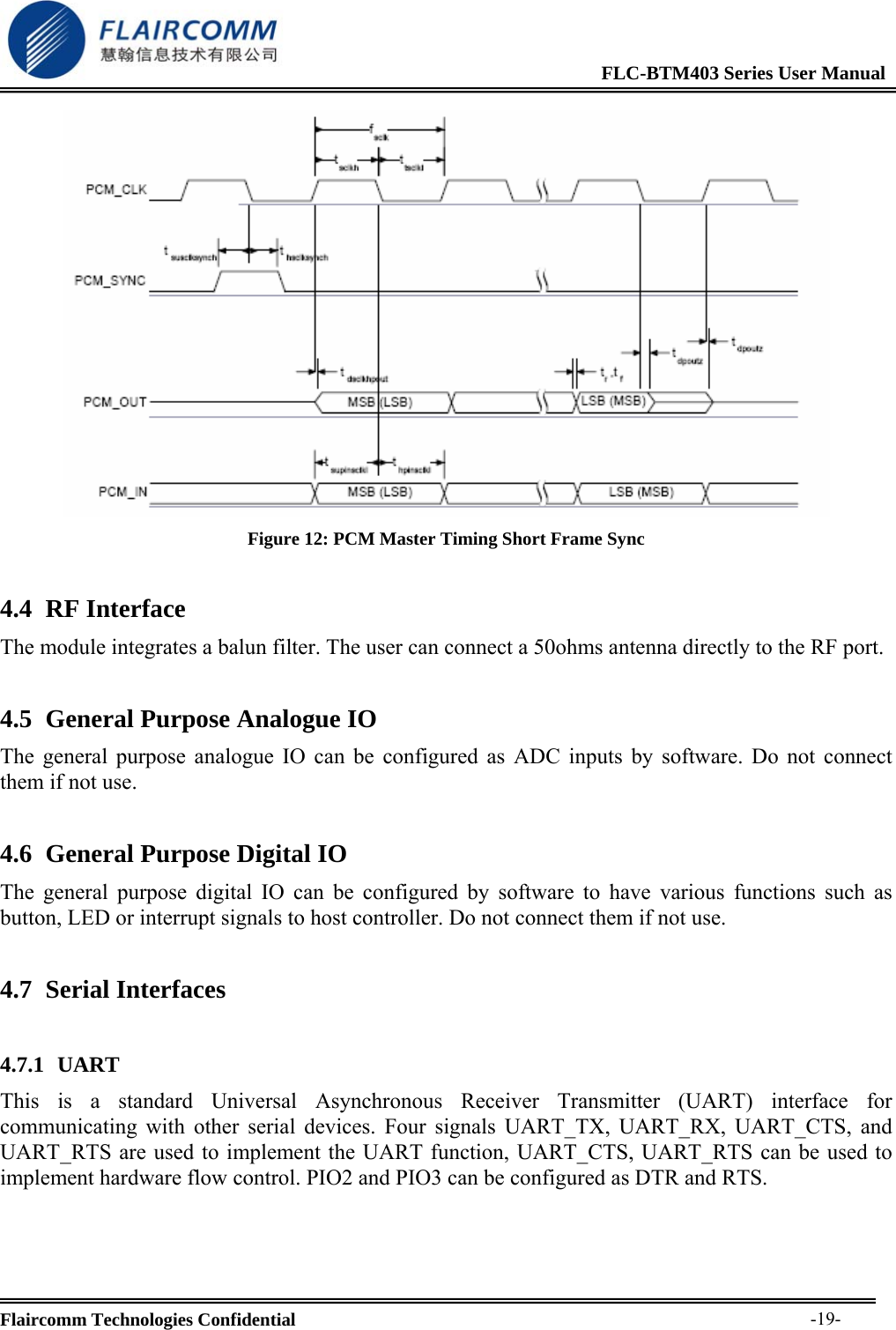
                                                             FLC-BTM403 Series User Manual  Flaircomm Technologies Confidential     -18-tsclkl PCM_CLK low time  200  -  -  ns tsclkh  PCM_CLK high time  200  -  -  ns thsclksynch  Hold time from PCM_CLK low to PCM_SYNC high  30 -  - ns tsusclksynch  Set-up time for PCM_SYNC high to PCM_CLK low  30 -  - ns tdpout Delay time from PCM_SYNC or PCM_CLK whichever is later, to valid PCM_OUT data (Long Frame Sync only)- -  20  ns tdsclkhpout  Delay time from CLK high to PCM_OUT valid data  - -  20  ns tdpoutz Delay time from PCM_SYNC or PCM_CLK low, whichever is later, to PCM_OUT data line high impedance - -  20  ns tsupinsclkl  Set-up time for PCM_IN valid to CLK low  30 -  - ns thpinsclkl  Hold time for PCM_CLK low to PCM_IN invalid  30 -  - ns Table 6: PCM Slave Timing   Figure 11: PCM Slave Timing Long Frame Sync
                                                             FLC-BTM403 Series User Manual  Flaircomm Technologies Confidential     -19- Figure 12: PCM Master Timing Short Frame Sync 4.4 RF Interface The module integrates a balun filter. The user can connect a 50ohms antenna directly to the RF port. 4.5 General Purpose Analogue IO The general purpose analogue IO can be configured as ADC inputs by software. Do not connect them if not use. 4.6 General Purpose Digital IO The general purpose digital IO can be configured by software to have various functions such as button, LED or interrupt signals to host controller. Do not connect them if not use. 4.7 Serial Interfaces  4.7.1 UART This is a standard Universal Asynchronous Receiver Transmitter (UART) interface for communicating with other serial devices. Four signals UART_TX, UART_RX, UART_CTS, and UART_RTS are used to implement the UART function, UART_CTS, UART_RTS can be used to implement hardware flow control. PIO2 and PIO3 can be configured as DTR and RTS.
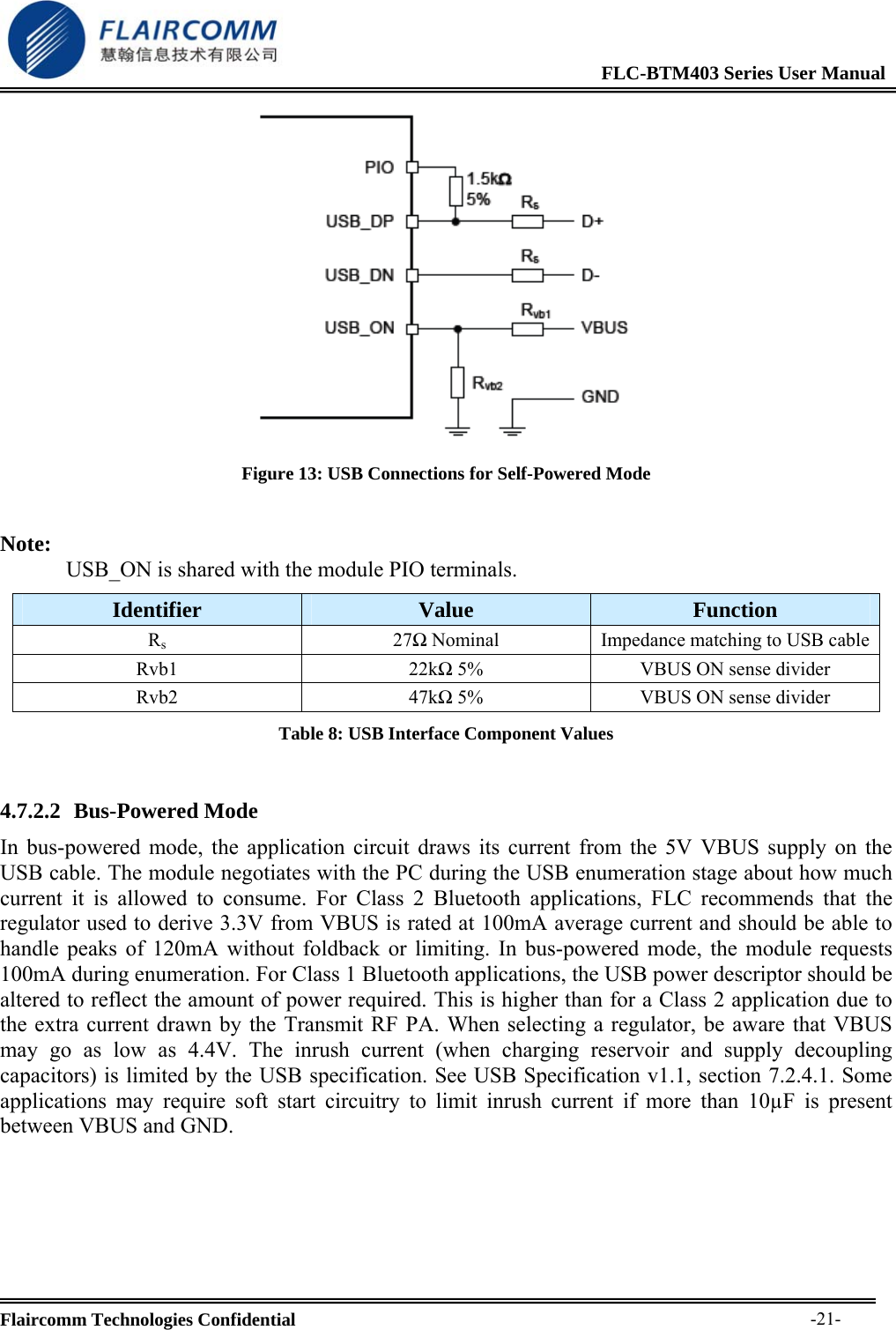
                                                             FLC-BTM403 Series User Manual  Flaircomm Technologies Confidential     -20- Parameter  Possible Values 1200 baud (≤2%Error) Baud Rate  Minimum  9600 baud (≤1%Error)  Maximum  3M baud (≤1%Error) Flow Control  RTS/CTS or None Parity  None, Odd or Even Number of Stop Bits  1 or 2 Bits per Byte  8 Table 7: Possible UART Settings 4.7.2 USB  There is a full speed (12M bits/s) USB interface for communicating with other compatible digital devices. The module acts as a USB peripheral, responding to request from a master host controller, such as a PC. The module features an internal USB pull-up resistor. This pulls the USB_DP pin weakly high when module is ready to enumerate. It signals to the USB master that it is a full speed (12Mbit/s) USB device. The USB internal pull-up is implemented as a current source, and is compliant with section 7.1.5 of the USB specification v1.2. The internal pull-up pulls USB_DP high to at least 2.8V when loaded with a 15kΩ ±5% pull-down resistor (in the hub/host) when VDD =3.1V. This presents a Thevenin resistance to the host of at least 900Ω. Alternatively, an external 1.5kΩ pull-up resistor can be placed between a PIO line and DP on the USB cable.  4.7.2.1 Self-Powered Mode In self-powered mode, the module is powered from its own power supply and not from the VBUS (5V) line of the USB cable. It draws only a small leakage current (below 0.5mA) from VBUS on the USB cable. This is the easier mode for which to design, as the design is not limited by the power that can be drawn from the USB hub or root port. However, it requires that VBUS be connected to module via a resistor network (Rvb1 and Rvb2), so the module can detect when VBUS is powered up. The module will not pull USB_DP high when VBUS is off. Self-powered USB designs (powered from a battery or LDO) must ensure that a PIO line is allocated for USB pull-up purposes. A 1.5KΩ 5% pull-up resistor between USB_DP and the selected PIO line should be fitted to the design. Failure to fit this resistor may result in the design failing to be USB compliant in self-powered mode. The internal pull-up in the module is only suitable for bus-powered USB devices, e.g., dongles.
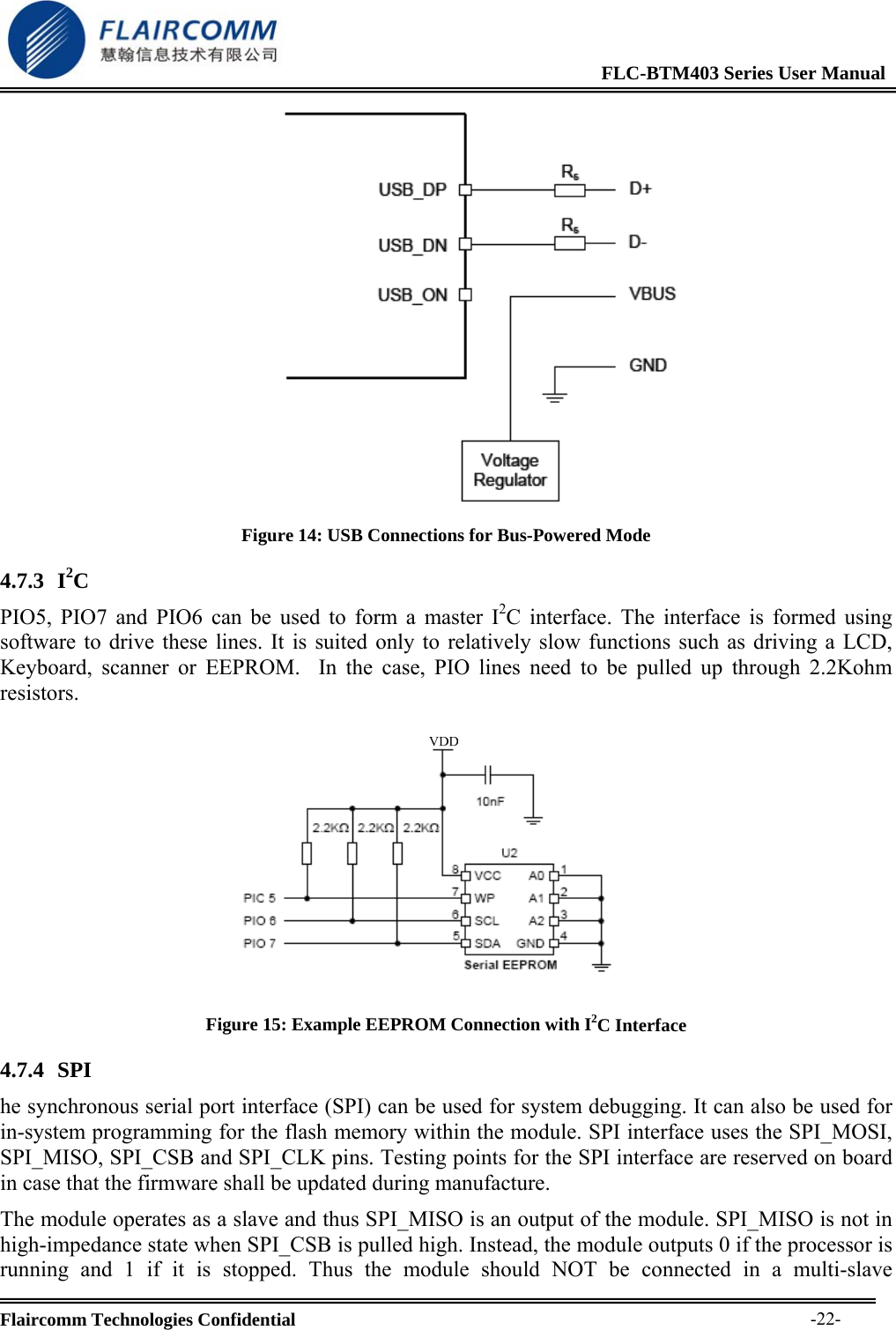
                                                             FLC-BTM403 Series User Manual  Flaircomm Technologies Confidential     -21- Figure 13: USB Connections for Self-Powered Mode  Note: USB_ON is shared with the module PIO terminals. Identifier  Value  Function Rs27Ω Nominal  Impedance matching to USB cableRvb1 22kΩ 5%  VBUS ON sense divider Rvb2 47kΩ 5%  VBUS ON sense divider Table 8: USB Interface Component Values  4.7.2.2 Bus-Powered Mode In bus-powered mode, the application circuit draws its current from the 5V VBUS supply on the USB cable. The module negotiates with the PC during the USB enumeration stage about how much current it is allowed to consume. For Class 2 Bluetooth applications, FLC recommends that the regulator used to derive 3.3V from VBUS is rated at 100mA average current and should be able to handle peaks of 120mA without foldback or limiting. In bus-powered mode, the module requests 100mA during enumeration. For Class 1 Bluetooth applications, the USB power descriptor should be altered to reflect the amount of power required. This is higher than for a Class 2 application due to the extra current drawn by the Transmit RF PA. When selecting a regulator, be aware that VBUS may go as low as 4.4V. The inrush current (when charging reservoir and supply decoupling capacitors) is limited by the USB specification. See USB Specification v1.1, section 7.2.4.1. Some applications may require soft start circuitry to limit inrush current if more than 10µF is present between VBUS and GND.
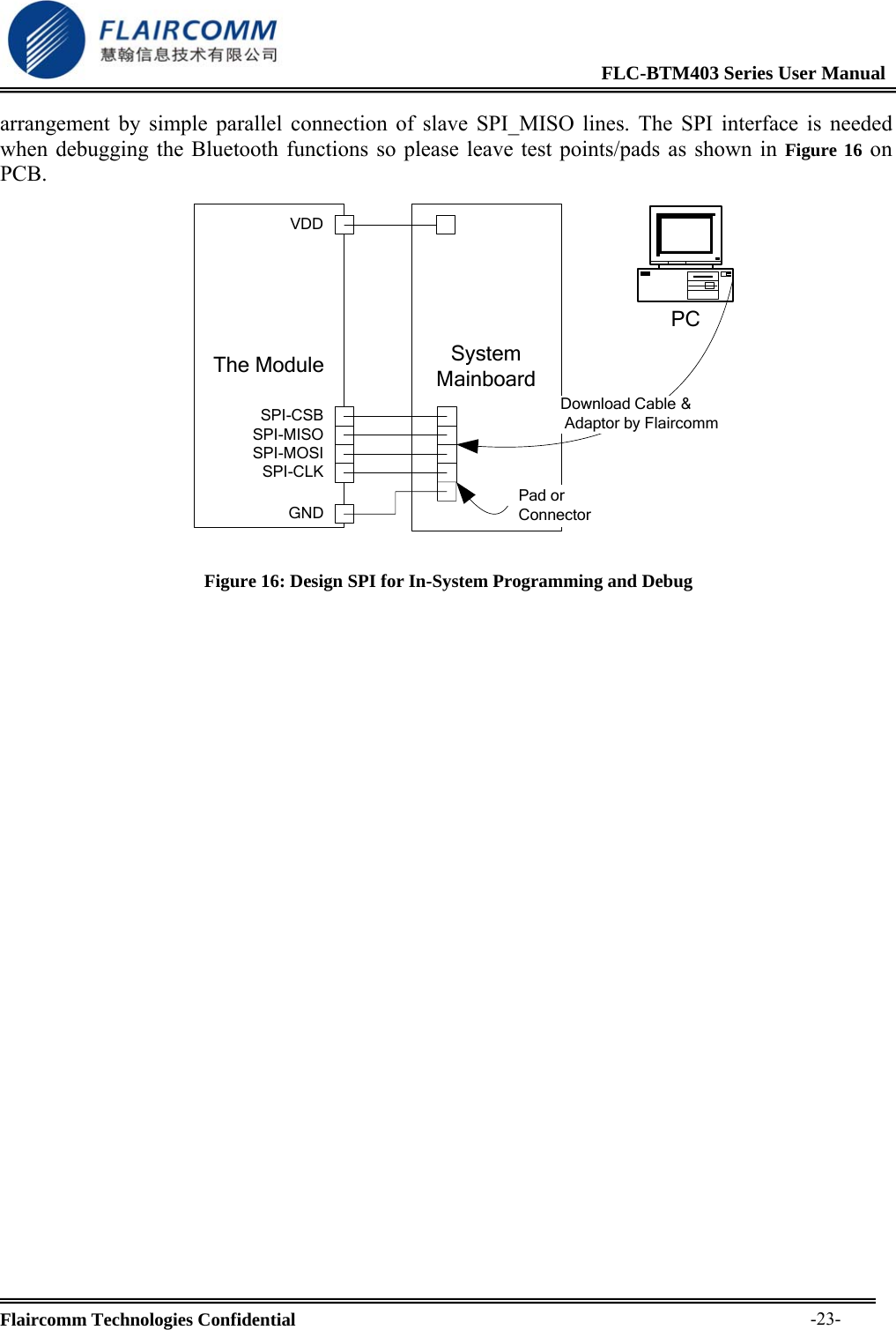
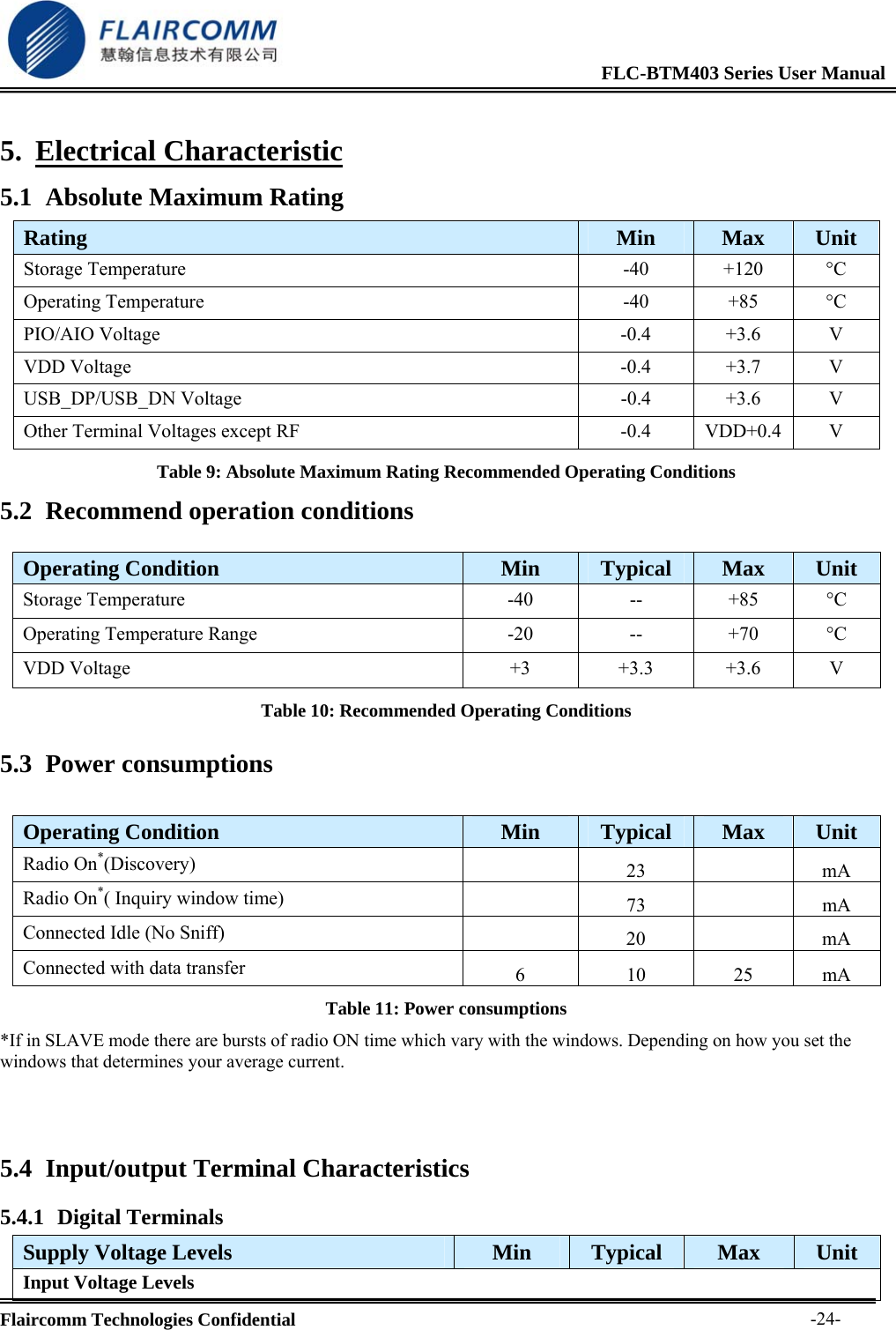
                                                             FLC-BTM403 Series User Manual  Flaircomm Technologies Confidential     -22- Figure 14: USB Connections for Bus-Powered Mode 4.7.3 I2C PIO5, PIO7 and PIO6 can be used to form a master I2C interface. The interface is formed using software to drive these lines. It is suited only to relatively slow functions such as driving a LCD, Keyboard, scanner or EEPROM.  In the case, PIO lines need to be pulled up through 2.2Kohm resistors.   Figure 15: Example EEPROM Connection with I2C Interface 4.7.4 SPI  he synchronous serial port interface (SPI) can be used for system debugging. It can also be used for in-system programming for the flash memory within the module. SPI interface uses the SPI_MOSI, SPI_MISO, SPI_CSB and SPI_CLK pins. Testing points for the SPI interface are reserved on board in case that the firmware shall be updated during manufacture. The module operates as a slave and thus SPI_MISO is an output of the module. SPI_MISO is not in high-impedance state when SPI_CSB is pulled high. Instead, the module outputs 0 if the processor is running and 1 if it is stopped. Thus the module should NOT be connected in a multi-slave
                                                             FLC-BTM403 Series User Manual  Flaircomm Technologies Confidential     -23-arrangement by simple parallel connection of slave SPI_MISO lines. The SPI interface is needed when debugging the Bluetooth functions so please leave test points/pads as shown in Figure 16 on PCB.                                         System MainboardThe ModuleSPI-CSBSPI-MISOSPI-MOSISPI-CLKGNDPad or ConnectorVDDPCDownload Cable & Adaptor by Flaircomm    Figure 16: Design SPI for In-System Programming and Debug
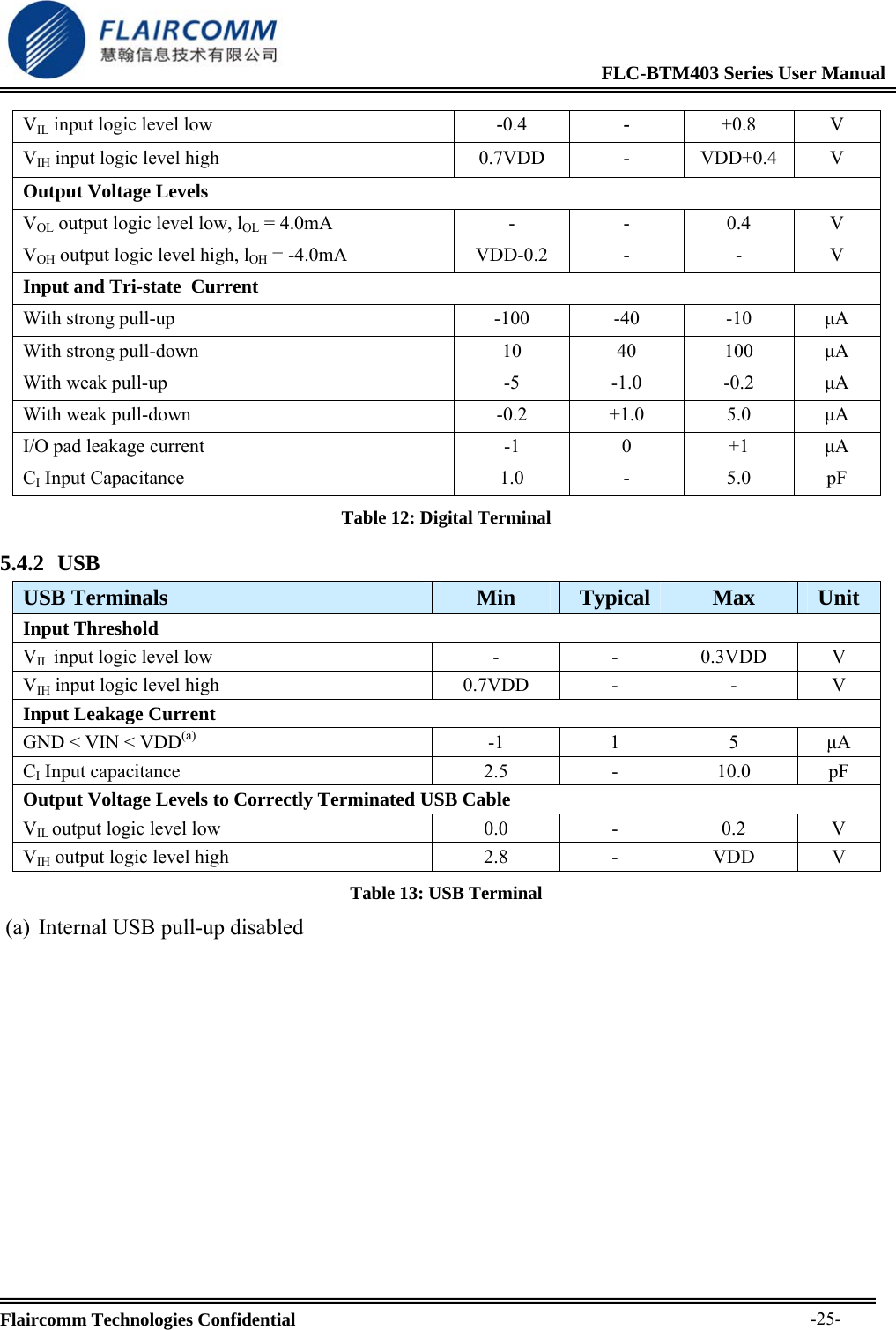
                                                             FLC-BTM403 Series User Manual  Flaircomm Technologies Confidential     -24-5. Electrical Characteristic 5.1 Absolute Maximum Rating Table 9: Absolute Maximum Rating Recommended Operating Conditions 5.2 Recommend operation conditions  Operating Condition  Min  Typical  Max  Unit Storage Temperature  -40  --  +85  °C Operating Temperature Range  -20  --  +70  °C VDD Voltage  +3  +3.3  +3.6  V Table 10: Recommended Operating Conditions 5.3 Power consumptions  Operating Condition  Min  Typical  Max  Unit Radio On*(Discovery)    23    mA Radio On*( Inquiry window time)   73  mA Connected Idle (No Sniff)    20    mA Connected with data transfer  6 10 25 mA Table 11: Power consumptions *If in SLAVE mode there are bursts of radio ON time which vary with the windows. Depending on how you set the windows that determines your average current.   5.4 Input/output Terminal Characteristics 5.4.1 Digital Terminals Supply Voltage Levels  Min  Typical  Max  Unit Input Voltage Levels Rating  Min  Max  Unit Storage Temperature  -40  +120  °C Operating Temperature  -40  +85  °C PIO/AIO Voltage  -0.4  +3.6  V VDD Voltage  -0.4  +3.7  V USB_DP/USB_DN Voltage  -0.4  +3.6  V Other Terminal Voltages except RF  -0.4  VDD+0.4  V
                                                             FLC-BTM403 Series User Manual  Flaircomm Technologies Confidential     -25-VIL input logic level low  -0.4  -  +0.8 V VIH input logic level high  0.7VDD  -  VDD+0.4  V Output Voltage Levels VOL output logic level low, lOL = 4.0mA  -  -  0.4  V VOH output logic level high, lOH = -4.0mA  VDD-0.2  -  -  V Input and Tri-state  Current With strong pull-up  -100  -40  -10  μA With strong pull-down  10  40  100  μA With weak pull-up  -5  -1.0  -0.2  μA With weak pull-down  -0.2  +1.0  5.0  μA I/O pad leakage current  -1  0  +1  μA CI Input Capacitance  1.0  -  5.0  pF Table 12: Digital Terminal 5.4.2 USB USB Terminals  Min  Typical  Max  Unit Input Threshold VIL input logic level low  -  -  0.3VDD  V VIH input logic level high  0.7VDD  -  -  V Input Leakage Current GND < VIN < VDD(a) -1 1  5 μA CI Input capacitance  2.5  -  10.0  pF Output Voltage Levels to Correctly Terminated USB Cable VIL output logic level low  0.0  -  0.2  V VIH output logic level high  2.8  -  VDD  V Table 13: USB Terminal (a) Internal USB pull-up disabled
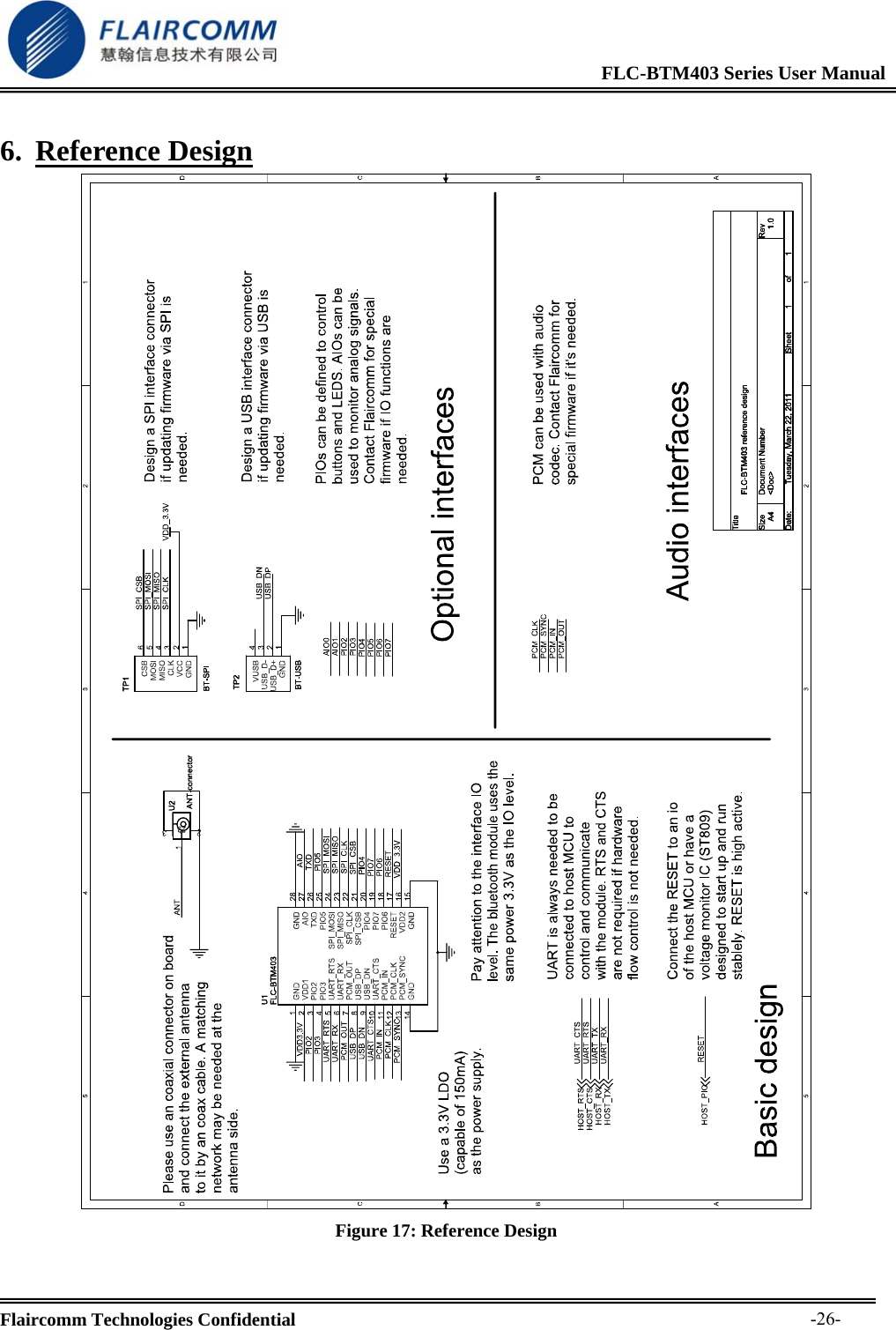
                                                             FLC-BTM403 Series User Manual  Flaircomm Technologies Confidential     -26-6. Reference Design  Figure 17: Reference Design
                                                             FLC-BTM403 Series User Manual  Flaircomm Technologies Confidential     -27-7. Mechanical Characteristic  Figure 18: Mechanical Characteristic
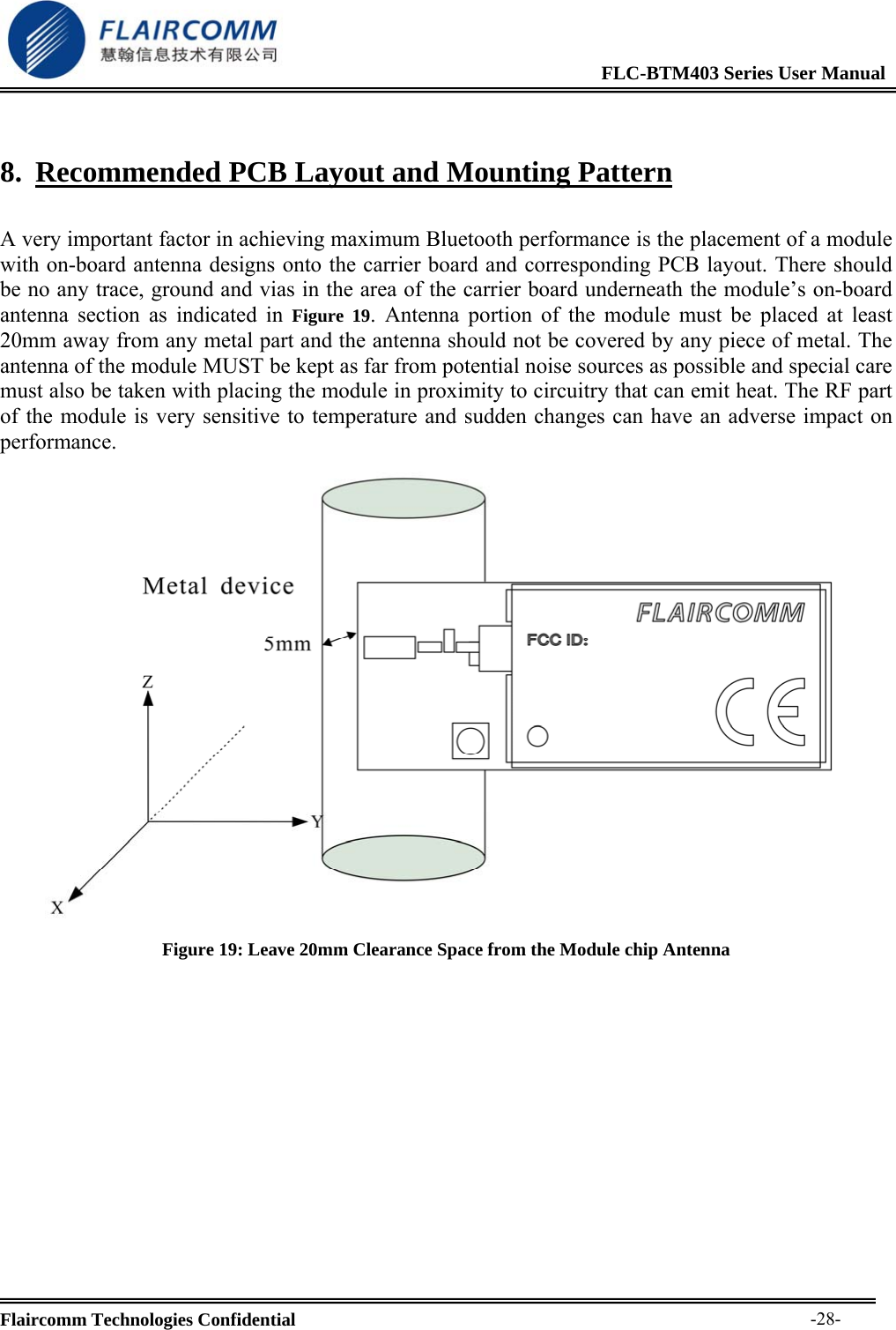
                                                             FLC-BTM403 Series User Manual  Flaircomm Technologies Confidential     -28-8. Recommended PCB Layout and Mounting Pattern  A very important factor in achieving maximum Bluetooth performance is the placement of a module with on-board antenna designs onto the carrier board and corresponding PCB layout. There should be no any trace, ground and vias in the area of the carrier board underneath the module’s on-board antenna section as indicated in Figure 19. Antenna portion of the module must be placed at least 20mm away from any metal part and the antenna should not be covered by any piece of metal. The antenna of the module MUST be kept as far from potential noise sources as possible and special care must also be taken with placing the module in proximity to circuitry that can emit heat. The RF part of the module is very sensitive to temperature and sudden changes can have an adverse impact on performance.  Figure 19: Leave 20mm Clearance Space from the Module chip Antenna
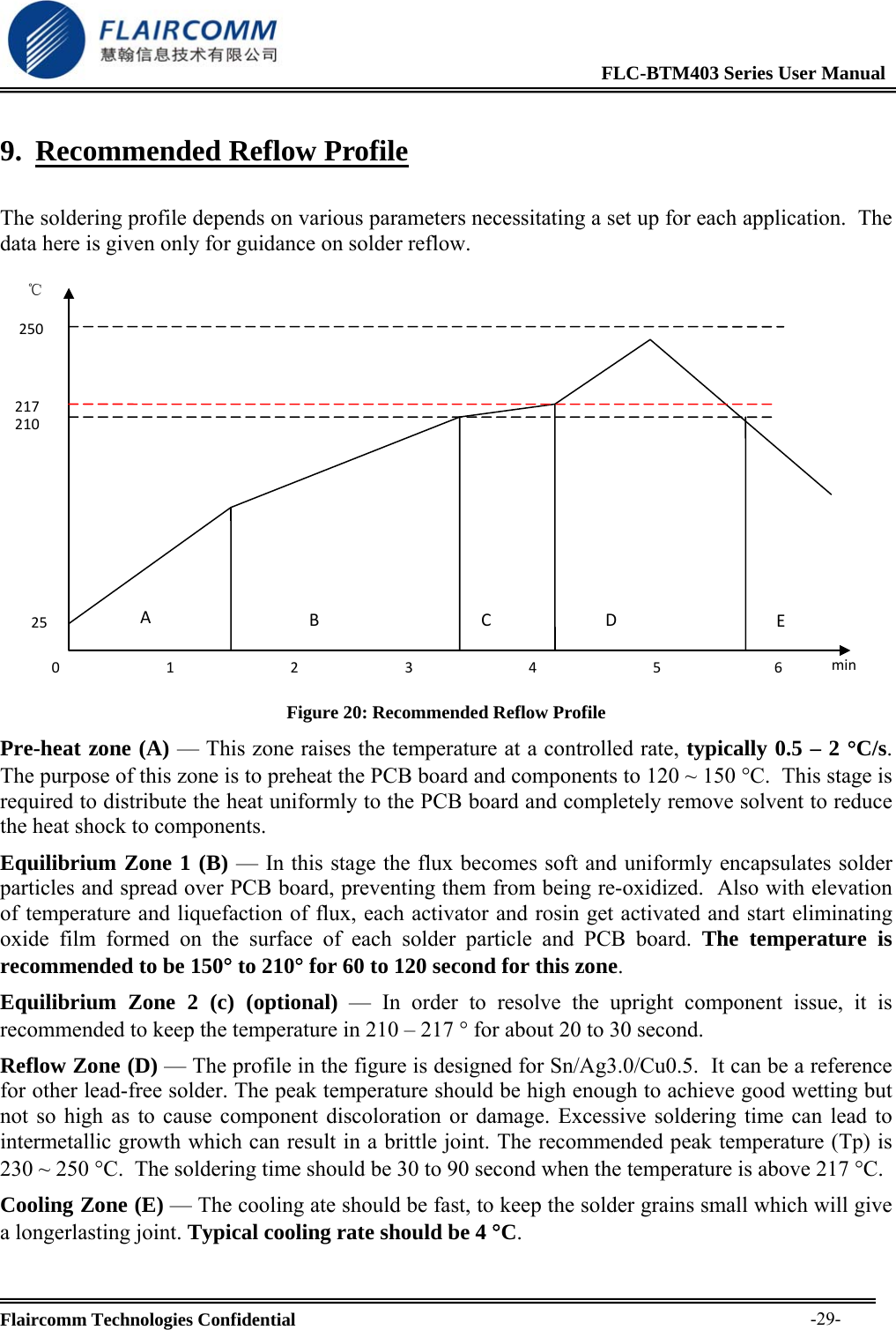
                                                             FLC-BTM403 Series User Manual  Flaircomm Technologies Confidential     -29-9. Recommended Reflow Profile  The soldering profile depends on various parameters necessitating a set up for each application.  The data here is given only for guidance on solder reflow. 210217℃250ABCD120253456minE Figure 20: Recommended Reflow Profile Pre-heat zone (A) — This zone raises the temperature at a controlled rate, typically 0.5 – 2 °C/s.  The purpose of this zone is to preheat the PCB board and components to 120 ~ 150 °C.  This stage is required to distribute the heat uniformly to the PCB board and completely remove solvent to reduce the heat shock to components.  Equilibrium Zone 1 (B) — In this stage the flux becomes soft and uniformly encapsulates solder particles and spread over PCB board, preventing them from being re-oxidized.  Also with elevation of temperature and liquefaction of flux, each activator and rosin get activated and start eliminating oxide film formed on the surface of each solder particle and PCB board. The temperature is recommended to be 150° to 210° for 60 to 120 second for this zone. Equilibrium Zone 2 (c) (optional) — In order to resolve the upright component issue, it is recommended to keep the temperature in 210 – 217 ° for about 20 to 30 second.  Reflow Zone (D) — The profile in the figure is designed for Sn/Ag3.0/Cu0.5.  It can be a reference for other lead-free solder. The peak temperature should be high enough to achieve good wetting but not so high as to cause component discoloration or damage. Excessive soldering time can lead to intermetallic growth which can result in a brittle joint. The recommended peak temperature (Tp) is 230 ~ 250 °C.  The soldering time should be 30 to 90 second when the temperature is above 217 °C. Cooling Zone (E) — The cooling ate should be fast, to keep the solder grains small which will give a longerlasting joint. Typical cooling rate should be 4 °C.
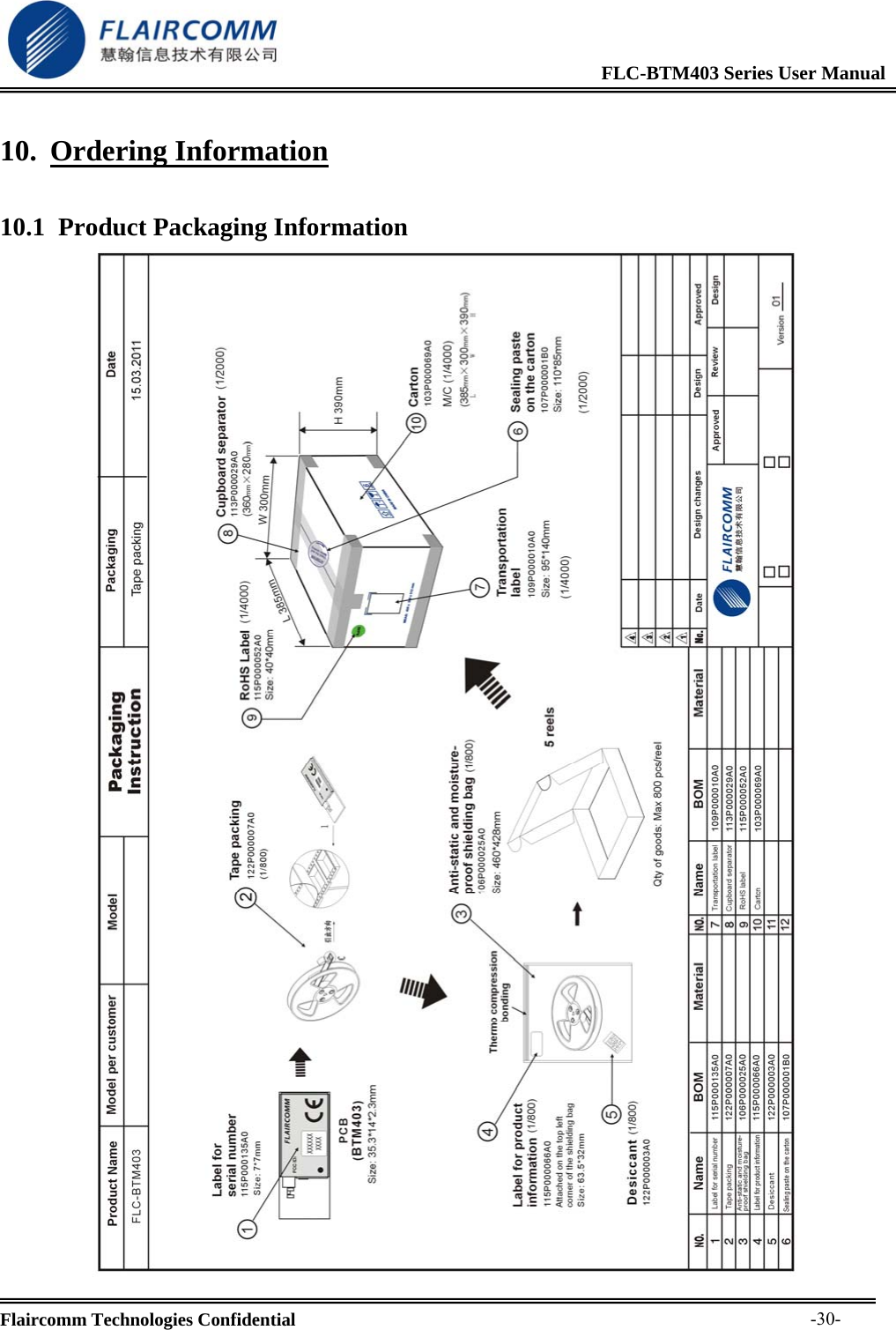
                                                             FLC-BTM403 Series User Manual  Flaircomm Technologies Confidential     -30-10. Ordering Information 10.1 Product Packaging Information
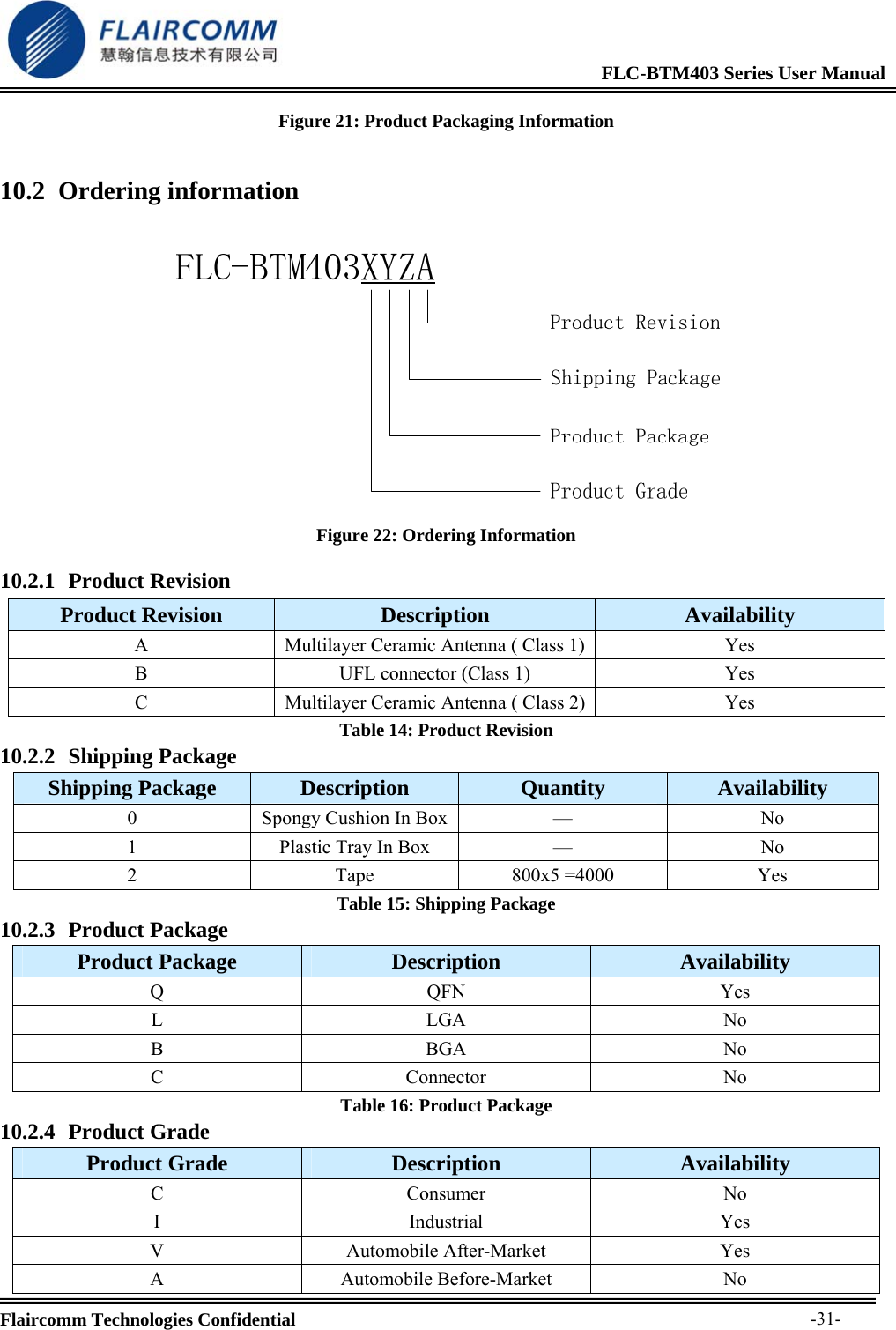
                                                             FLC-BTM403 Series User Manual  Flaircomm Technologies Confidential     -31-Figure 21: Product Packaging Information 10.2 Ordering information   Figure 22: Ordering Information 10.2.1 Product Revision Product Revision  Description  Availability A  Multilayer Ceramic Antenna ( Class 1) Yes B  UFL connector (Class 1)  Yes C  Multilayer Ceramic Antenna ( Class 2) Yes Table 14: Product Revision 10.2.2 Shipping Package Shipping Package  Description  Quantity  Availability 0  Spongy Cushion In Box —  No 1  Plastic Tray In Box   —  No 2 Tape 800x5 =4000 Yes Table 15: Shipping Package 10.2.3 Product Package Product Package  Description  Availability Q QFN Yes L LGA No B BGA No C Connector No Table 16: Product Package 10.2.4 Product Grade Product Grade  Description  Availability C Consumer No I Industrial Yes V Automobile After-Market Yes A Automobile Before-Market No
                                                             FLC-BTM403 Series User Manual  Flaircomm Technologies Confidential     -32-Table 17: Product Grade

Navigation menu