Flextronics Canada Design Services 10E Wireless Access Point User Manual Enterasys Wireless Access Point Intallation Guide

Flextronics Canada Design Services Inc. Wireless Access Point Enterasys Wireless Access Point Intallation Guide

Users Manual Revised
P/N 9034671Enterasys® WirelessAccess PointsInstallation GuideWS-AP3710iWS-AP3710e
iNoticeEnterasys Networks reserves the right to make changes in specifications and other information contained in this document and its web site without prior notice. The reader should in all cases consult Enterasys Networks to determine whether any such changes have been made.The hardware, firmware, or software described in this document is subject to change without notice.IN NO EVENT SHALL ENTERASYS NETWORKS BE LIABLE FOR ANY INCIDENTAL, INDIRECT, SPECIAL, OR CONSEQUENTIAL DAMAGES WHATSOEVER (INCLUDING BUT NOT LIMITED TO LOST PROFITS) ARISING OUT OF OR RELATED TO THIS DOCUMENT, WEB SITE, OR THE INFORMATION CONTAINED IN THEM, EVEN IF ENTERASYS NETWORKS HAS BEEN ADVISED OF, KNEW OF, OR SHOULD HAVE KNOWN OF, THE POSSIBILITY OF SUCH DAMAGES.Enterasys Networks, Inc.9 Northeastern BoulevardSalem, NH 03079 2013 Enterasys Networks, Inc. All rights reserved.Part Number: 9034671 March 2013ENTERASYS, ENTERASYS NETWORKS, ENTERASYS SECURE NETWORKS, NETSIGHT, ENTERASYS NETSIGHT, and any logos associated therewith, are trademarks or registered trademarks of Enterasys Networks, Inc., in the United States and/or other countries. For a complete list of Enterasys trademarks, see http://www.enterasys.com/company/trademarks.aspx.All other product names mentioned in this manual may be trademarks or registered trademarks of their respective companies.Documentation URL: https://extranet.enterasys.com/downloads/Electrical Hazard: Only qualified personnel should perform installation procedures.Riesgo Electrico: Solamente personal calificado debe realizar procedimientos de instalacion.Elektrischer Gefahrenhinweis: Installationen sollten nur durch ausgebildetes und qualifiziertes Personal vorgenommen werden.
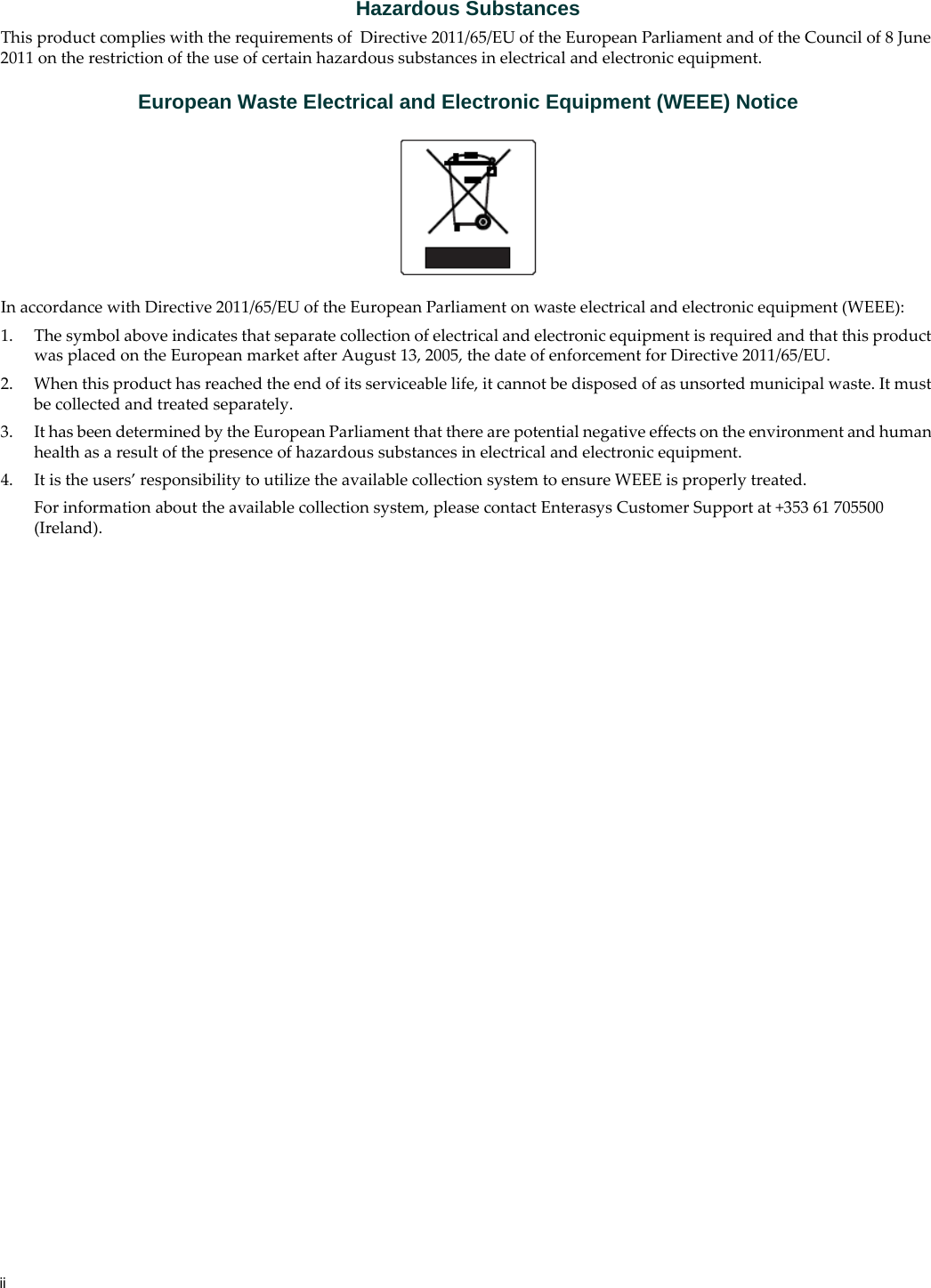
iiHazardous SubstancesThis product complies with the requirements of  Directive 2011/65/EU of the European Parliament and of the Council of 8 June 2011 on the restriction of the use of certain hazardous substances in electrical and electronic equipment.European Waste Electrical and Electronic Equipment (WEEE) NoticeIn accordance with Directive 2011/65/EU of the European Parliament on waste electrical and electronic equipment (WEEE):1. The symbol above indicates that separate collection of electrical and electronic equipment is required and that this product was placed on the European market after August 13, 2005, the date of enforcement for Directive 2011/65/EU.2. When this product has reached the end of its serviceable life, it cannot be disposed of as unsorted municipal waste. It must be collected and treated separately.3. It has been determined by the European Parliament that there are potential negative effects on the environment and human health as a result of the presence of hazardous substances in electrical and electronic equipment.4. It is the users’ responsibility to utilize the available collection system to ensure WEEE is properly treated.For information about the available collection system, please contact Enterasys Customer Support at +353 61 705500 (Ireland).
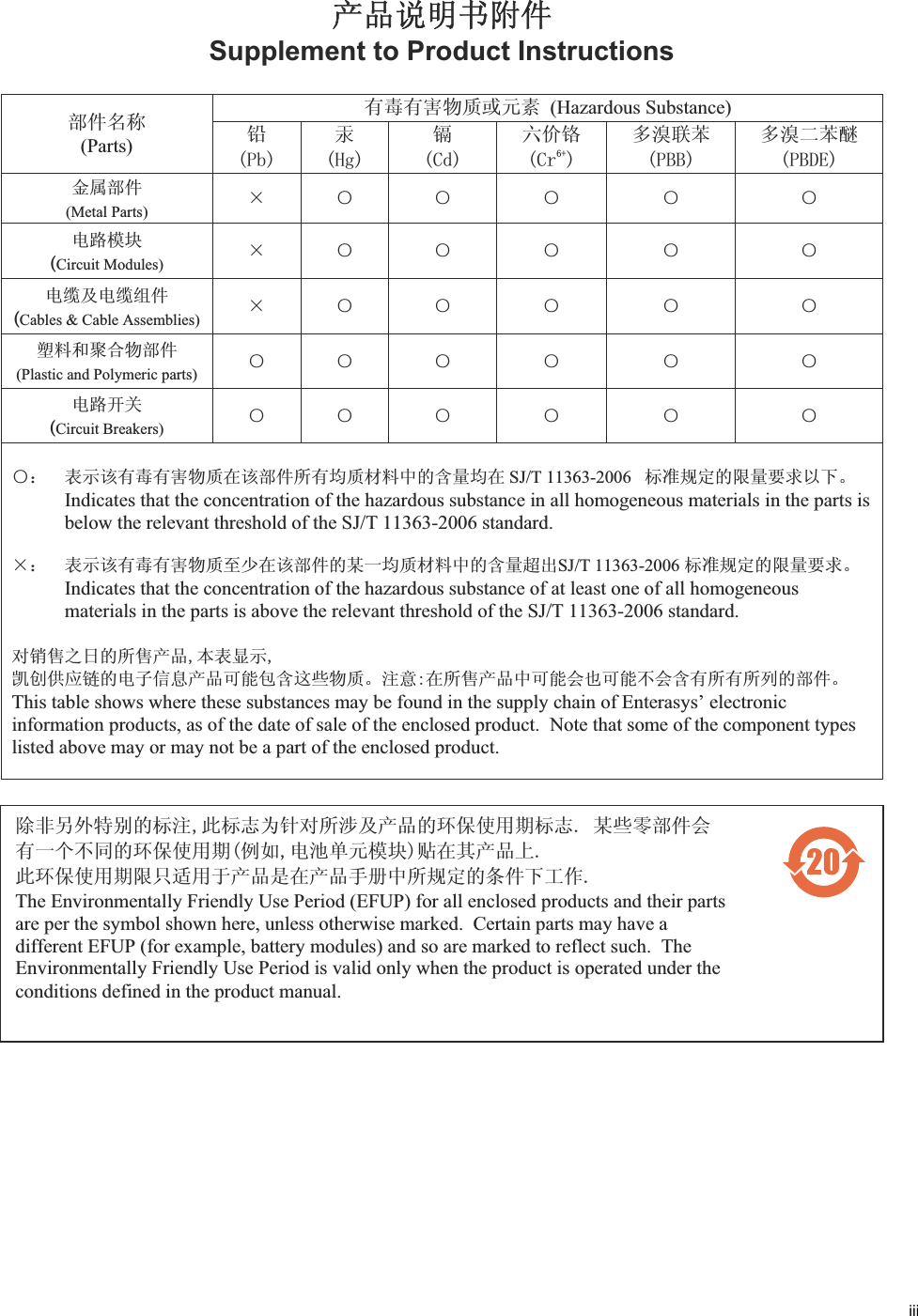
iiiѻѻક䇈ᯢк䰘ӊSupplement to Product Instructions ᳝↦᳝ᆇ⠽䋼៪ܗ㋴(Hazardous Substance) 䚼ӊৡ⿄(Parts)  䪙3E∲+J䬝&G݁Ӌ䫀&U໮⒈㘨㣃3%%໮⒈Ѡ㣃䝮3%'(䞥ሲ䚼ӊ(Metal Parts)hƻ ƻ ƻ ƻ ƻ⬉䏃῵ഫ(Circuit Modules)hƻ ƻ ƻ ƻ ƻ⬉㓚ঞ⬉㓚㒘ӊ(Cables & Cable Assemblies)hƻ ƻ ƻ ƻ ƻล᭭੠㘮ড়⠽䚼ӊ(Plastic and Polymeric parts) ƻƻ ƻ ƻ ƻ ƻ⬉䏃ᓔ݇(Circuit Breakers)ƻƻ ƻ ƻ ƻ ƻƻ˖ 㸼⼎䆹᳝↦᳝ᆇ⠽䋼೼䆹䚼ӊ᠔᳝ഛ䋼ᴤ᭭Ёⱘ৿䞣ഛ೼ SJ/T 11363-2006   ᷛޚ㾘ᅮⱘ䰤䞣㽕∖ҹϟDŽIndicates that the concentration of the hazardous substance in all homogeneous materials in the parts is below the relevant threshold of the SJ/T 11363-2006 standard. h˖ 㸼⼎䆹᳝↦᳝ᆇ⠽䋼㟇ᇥ೼䆹䚼ӊⱘᶤϔഛ䋼ᴤ᭭Ёⱘ৿䞣䍙ߎSJ/T 11363-2006 ᷛޚ㾘ᅮⱘ䰤䞣㽕∖DŽIndicates that the concentration of the hazardous substance of at least one of all homogeneous materials in the parts is above the relevant threshold of the SJ/T 11363-2006 standard. ᇍ䫔ଂП᮹ⱘ᠔ଂѻકᴀ㸼ᰒ⼎߃߯կᑨ䫒ⱘ⬉ᄤֵᙃѻકৃ㛑ࣙ৿䖭ѯ⠽䋼DŽ⊼ᛣ೼᠔ଂѻકЁৃ㛑Ӯгৃ㛑ϡӮ৿᳝᠔᳝᠔߫ⱘ䚼ӊDŽThis table shows where these substances may be found in the supply chain of Enterasys electronic information products, as of the date of sale of the enclosed product.  Note that some of the component types listed above may or may not be a part of the enclosed product. 䰸䴲঺໪⡍߿ⱘᷛ⊼ℸᷛᖫЎ䩜ᇍ᠔⍝ঞѻકⱘ⦃ֱՓ⫼ᳳᷛᖫᶤѯ䳊䚼ӊӮ᳝ϔϾϡৠⱘ⦃ֱՓ⫼ᳳ՟བ⬉∴ऩܗ῵ഫ䌈೼݊ѻકϞℸ⦃ֱՓ⫼ᳳ䰤া䗖⫼Ѣѻકᰃ೼ѻક᠟ݠЁ᠔㾘ᅮⱘᴵӊϟᎹ԰The Environmentally Friendly Use Period (EFUP) for all enclosed products and their parts are per the symbol shown here, unless otherwise marked.  Certain parts may have a different EFUP (for example, battery modules) and so are marked to reflect such.  The Environmentally Friendly Use Period is valid only when the product is operated under the conditions defined in the product manual.
ivEnterasys Networks, Inc. Firmware License AgreementBEFORE OPENING OR UTILIZING THE ENCLOSED PRODUCT,CAREFULLY READ THIS LICENSE AGREEMENT.This document is an agreement (“Agreement”) between the end user (“You”) and Enterasys Networks, Inc., on behalf of itself and its Affiliates (as hereinafter defined) (“Enterasys”) that sets forth Your rights and obligations with respect to the Enterasys software program/firmware (including any accompanying documentation, hardware or media) (“Program”) in the package and prevails over any additional, conflicting or inconsistent terms and conditions appearing on any purchase order or other document submitted by You. “Affiliate” means any person, partnership, corporation, limited liability company, other form of enterprise that directly or indirectly through one or more intermediaries, controls, or is controlled by, or is under common control with the party specified. This Agreement constitutes the entire understanding between the parties, with respect to the subject matter of this Agreement. The Program may be contained in firmware, chips or other media.BY INSTALLING OR OTHERWISE USING THE PROGRAM, YOU REPRESENT THAT YOU ARE AUTHORIZED TO ACCEPT THESE TERMS ON BEHALF OF THE END USER (IF THE END USER IS AN ENTITY ON WHOSE BEHALF YOU ARE AUTHORIZED TO ACT, “YOU” AND “YOUR” SHALL BE DEEMED TO REFER TO SUCH ENTITY) AND THAT YOU AGREE THAT YOU ARE BOUND BY THE TERMS OF THIS AGREEMENT, WHICH INCLUDES, AMONG OTHER PROVISIONS, THE LICENSE, THE DISCLAIMER OF WARRANTY AND THE LIMITATION OF LIABILITY. IF YOU DO NOT AGREE TO THE TERMS OF THIS AGREEMENT OR ARE NOT AUTHORIZED TO ENTER INTO THIS AGREEMENT, ENTERASYS IS UNWILLING TO LICENSE THE PROGRAM TO YOU AND YOU AGREE TO RETURN THE UNOPENED PRODUCT TO ENTERASYS OR YOUR DEALER, IF ANY, WITHIN TEN (10) DAYS FOLLOWING THE DATE OF RECEIPT FOR A FULL REFUND.IF YOU HAVE ANY QUESTIONS ABOUT THIS AGREEMENT, CONTACT ENTERASYS NETWORKS, LEGAL DEPARTMENT AT (603) 952-5000.You and Enterasys agree as follows:1. LICENSE. You have the non-exclusive and non-transferable right to use only the one (1) copy of the Program provided in this package subject to the terms and conditions of this Agreement.2. RESTRICTIONS. Except as otherwise authorized in writing by Enterasys, You may not, nor may You permit any third party to:(a) Reverse engineer, decompile, disassemble or modify the Program, in whole or in part, including for reasons of error correction or interoperability, except to the extent expressly permitted by applicable law and to the extent the parties shall not be permitted by that applicable law, such rights are expressly excluded. Information necessary to achieve interoperability or correct errors is available from Enterasys upon request and upon payment of Enterasys’ applicable fee.(b) Incorporate the Program in whole or in part, in any other product or create derivative works based on the Program, in whole or in part.(c) Publish, disclose, copy reproduce or transmit the Program, in whole or in part.(d) Assign, sell, license, sublicense, rent, lease, encumber by way of security interest, pledge or otherwise transfer the Program, in whole or in part.(e) Remove any copyright, trademark, proprietary rights, disclaimer or warning notice included on or embedded in any part of the Program.3. APPLICABLE LAW. This Agreement shall be interpreted and governed under the laws and in the state and federal courts of the State of New Hampshire without regard to its conflicts of laws provisions. You accept the personal jurisdiction and venue of the State of New Hampshire courts. None of the 1980 United Nations Convention on the Limitation Period in the International Sale of Goods, and the Uniform Computer Information Transactions Act shall apply to this Agreement.4. EXPORT RESTRICTIONS. You understand that Enterasys and its Affiliates are subject to regulation by agencies of the U.S. Government, including the U.S. Department of Commerce, which prohibit export or diversion of certain technical products to certain countries, unless a license to export the product is obtained from the U.S. Government or an exception from obtaining such license may be relied upon by the exporting party.If the Program is exported from the United States pursuant to the License Exception CIV under the U.S. Export Administration Regulations, You agree that You are a civil end user of the Program and agree that You will use the Program for civil end uses only and not for military purposes.If the Program is exported from the United States pursuant to the License Exception TSR under the U.S. Export Administration Regulations, in addition to the restriction on transfer set forth in Section 1 or 2 of this Agreement, You agree not to (i) reexport or release the Program, the source code for the Program or technology to a national of a country in Country Groups D:1 or E:2 (Albania, Armenia, Azerbaijan, Belarus, Cambodia, Cuba, Georgia, Iraq, Kazakhstan, Laos, Libya, Macau,
vMoldova, Mongolia, North Korea, the People’s Republic of China, Russia, Tajikistan, Turkmenistan, Ukraine, Uzbekistan, Vietnam, or such other countries as may be designated by the United States Government), (ii) export to Country Groups D:1 or E:2 (as defined herein) the direct product of the Program or the technology, if such foreign produced direct product is subject to national security controls as identified on the U.S. Commerce Control List, or (iii) if the direct product of the technology is a complete plant or any major component of a plant, export to Country Groups D:1 or E:2 the direct product of the plant or a major component thereof, if such foreign produced direct product is subject to national security controls as identified on the U.S. Commerce Control List or is subject to State Department controls under the U.S. Munitions List.5. UNITED STATES GOVERNMENT RESTRICTED RIGHTS. The enclosed Program (i) was developed solely at private expense; (ii) contains “restricted computer software” submitted with restricted rights in accordance with section 52.227-19 (a) through (d) of the Commercial Computer Software-Restricted Rights Clause and its successors, and (iii) in all respects is proprietary data belonging to Enterasys and/or its suppliers. For Department of Defense units, the Program is considered commercial computer software in accordance with DFARS section 227.7202-3 and its successors, and use, duplication, or disclosure by the U.S. Government is subject to restrictions set forth herein.6. DISCLAIMER OF WARRANTY. EXCEPT FOR THOSE WARRANTIES EXPRESSLY PROVIDED TO YOU IN WRITING BY ENTERASYS, ENTERASYS DISCLAIMS ALL WARRANTIES, EITHER EXPRESS OR IMPLIED, INCLUDING BUT NOT LIMITED TO IMPLIED WARRANTIES OF MERCHANTABILITY, SATISFACTORY QUALITY, FITNESS FOR A PARTICULAR PURPOSE, TITLE AND NON-INFRINGEMENT WITH RESPECT TO THE PROGRAM. IF IMPLIED WARRANTIES MAY NOT BE DISCLAIMED BY APPLICABLE LAW, THEN ANY IMPLIED WARRANTIES ARE LIMITED IN DURATION TO THIRTY (30) DAYS AFTER DELIVERY OF THE PROGRAM TO YOU.7. LIMITATION OF LIABILITY. IN NO EVENT SHALL ENTERASYS OR ITS SUPPLIERS BE LIABLE FOR ANY DAMAGES WHATSOEVER (INCLUDING, WITHOUT LIMITATION, DAMAGES FOR LOSS OF BUSINESS, PROFITS, BUSINESS INTERRUPTION, LOSS OF BUSINESS INFORMATION, SPECIAL, INCIDENTAL, CONSEQUENTIAL, OR RELIANCE DAMAGES, OR OTHER LOSS) ARISING OUT OF THE USE OR INABILITY TO USE THE PROGRAM, EVEN IF ENTERASYS HAS BEEN ADVISED OF THE POSSIBILITY OF SUCH DAMAGES. THIS FOREGOING LIMITATION SHALL APPLY REGARDLESS OF THE CAUSE OF ACTION UNDER WHICH DAMAGES ARE SOUGHT.THE CUMULATIVE LIABILITY OF ENTERASYS TO YOU FOR ALL CLAIMS RELATING TO THE PROGRAM, IN CONTRACT, TORT OR OTHERWISE, SHALL NOT EXCEED THE TOTAL AMOUNT OF FEES PAID TO ENTERASYS BY YOU FOR THE RIGHTS GRANTED HEREIN.8. AUDIT RIGHTS. You hereby acknowledge that the intellectual property rights associated with the Program are of critical value to Enterasys, and, accordingly, You hereby agree to maintain complete books, records and accounts showing (i) license fees due and paid, and (ii) the use, copying and deployment of the Program. You also grant to Enterasys and its authorized representatives, upon reasonable notice, the right to audit and examine during Your normal business hours, Your books, records, accounts and hardware devices upon which the Program may be deployed to verify compliance with this Agreement, including the verification of the license fees due and paid Enterasys and the use, copying and deployment of the Program. Enterasys’ right of examination shall be exercised reasonably, in good faith and in a manner calculated to not unreasonably interfere with Your business. In the event such audit discovers non-compliance with this Agreement, including copies of the Program made, used or deployed in breach of this Agreement, You shall promptly pay to Enterasys the appropriate license fees. Enterasys reserves the right, to be exercised in its sole discretion and without prior notice, to terminate this license, effective immediately, for failure to comply with this Agreement. Upon any such termination, You shall immediately cease all use of the Program and shall return to Enterasys the Program and all copies of the Program.9. OWNERSHIP. This is a license agreement and not an agreement for sale. You acknowledge and agree that the Program constitutes trade secrets and/or copyrighted material of Enterasys and/or its suppliers. You agree to implement reasonable security measures to protect such trade secrets and copyrighted material. All right, title and interest in and to the Program shall remain with Enterasys and/or its suppliers. All rights not specifically granted to You shall be reserved to Enterasys.10. ENFORCEMENT. You acknowledge and agree that any breach of Sections 2, 4, or 9 of this Agreement by You may cause Enterasys irreparable damage for which recovery of money damages would be inadequate, and that Enterasys may be entitled to seek timely injunctive relief to protect Enterasys’ rights under this Agreement in addition to any and all remedies available at law.11. ASSIGNMENT. You may not assign, transfer or sublicense this Agreement or any of Your rights or obligations under this Agreement, except that You may assign this Agreement to any person or entity which acquires substantially all of Your stock assets. Enterasys may assign this Agreement in its sole discretion. This Agreement shall be binding upon and inure to the benefit of the parties, their legal representatives, permitted transferees, successors and assigns as permitted by this Agreement. Any attempted assignment, transfer or sublicense in violation of the terms of this Agreement shall be void and a breach of this Agreement.
vi12. WAIVER. A waiver by Enterasys of a breach of any of the terms and conditions of this Agreement must be in writing and will not be construed as a waiver of any subsequent breach of such term or condition. Enterasys’ failure to enforce a term upon Your breach of such term shall not be construed as a waiver of Your breach or prevent enforcement on any other occasion.13. SEVERABILITY. In the event any provision of this Agreement is found to be invalid, illegal or unenforceable, the validity, legality and enforceability of any of the remaining provisions shall not in any way be affected or impaired thereby, and that provision shall be reformed, construed and enforced to the maximum extent permissible. Any such invalidity, illegality, or unenforceability in any jurisdiction shall not invalidate or render illegal or unenforceable such provision in any other jurisdiction.14. TERMINATION. Enterasys may terminate this Agreement immediately upon Your breach of any of the terms and conditions of this Agreement. Upon any such termination, You shall immediately cease all use of the Program and shall return to Enterasys the Program and all copies of the Program.
viiContentsAbout This GuideWho Should Use This Guide  .............................................................................................................................ixHow to Use This Guide ......................................................................................................................................ixRelated Documents  ............................................................................................................................................xTypographical Conventions  ................................................................................................................................xGetting Help .......................................................................................................................................................xiChapter 1: IntroductionAbout the WS-AP3710  ................................................................................................................................... 1-1WS-AP3710 Overview .................................................................................................................................... 1-2WS-AP3710 LED Indicators ..................................................................................................................... 1-5Common Architectural Features ..................................................................................................................... 1-5Console Port  ............................................................................................................................................ 1-5LAN Port ................................................................................................................................................... 1-6Reset Switch  ............................................................................................................................................ 1-6Kensington Lock Slot  ............................................................................................................................... 1-6Chapter 2: InstallationUnpacking the WS-AP3710  ........................................................................................................................... 2-1Accessories .................................................................................................................................................... 2-1Access Point Installation Procedures  ............................................................................................................. 2-2Mounting the AP3710 to a Drop Ceiling ................................................................................................... 2-2Mounting the AP3710 to a Wall ................................................................................................................ 2-4Mounting on a Junction Box, or in Place of an Older AP  .........................................................................2-5LAN/Console Connections  ....................................................................................................................... 2-6Power Connections .................................................................................................................................. 2-6Appendix A: SpecificationsExternal Antennas  ..........................................................................................................................................A-1FCC/IC Power Setting Tables ..................................................................................................................A-2Appendix B: Regulatory InformationEnterasys Wireless WS-AP3710  ....................................................................................................................B-1United States ............................................................................................................................................B-1FCC Declaration of Conformity Statement ........................................................................................ B-1USA Conformance Standards ........................................................................................................... B-2Professional Installation Notice: ........................................................................................................ B-2FCC RF Radiation Exposure Statement............................................................................................ B-3Canada .....................................................................................................................................................B-3Industry Canada Compliance Statement........................................................................................... B-3Canada Conformance Standards ...................................................................................................... B-4European Community  ..............................................................................................................................B-5Declaration of Conformity in Languages of the European Community.............................................. B-5European Conformance Standards ................................................................................................... B-6Conditions of use in the European Community ................................................................................. B-7European Spectrum Usage Rules ..................................................................................................... B-7Certifications of Other Countries ..............................................................................................................B-9
viii  Figures1-1 Enterasys Wireless AP3710i Front View ............................................................................................ 1-21-2 Enterasys Wireless AP3710e Front View........................................................................................... 1-31-3 WS-AP3710 e Back View ................................................................................................................... 1-41-4 WS-AP3710 LEDs (Front, lower right)................................................................................................ 1-52-1 Mounting Bracket and T-bar Rail Clamp ............................................................................................ 2-22-2 Attaching the AP to the Ceiling Mount Assembly ...............................................................................2-32-3 Wall Mounting Bracket........................................................................................................................ 2-42-4 Mounting the AP on the Mounting Bracket ......................................................................................... 2-5Tables1-1 WS-AP3710 LED Indications.............................................................................................................. 1-52-1 AP3710 Package Contents ................................................................................................................ 2-1A-1 Specifications for the WS-AP3710 .....................................................................................................A-1A-2 Certified External Antennas for WS-AP3710e....................................................................................A-1A-3 FCC/IC Antenna Channel Power Settings, Modes B, G, GN-HT20, GN-HT40..................................A-2A-4 FCC/IC Antenna Channel Power Settings, Modes A, AN-HT20, AN-HT40 .......................................A-3B-1 European Spectrum Usage Rules ......................................................................................................B-8
Enterasys Wireless AP3710/AP3725e Installation Guide ixAbout This GuideThe guide describes how to mount and connect cables to the Enterasys Wireless AP3710 access points (WS-AP3710i and WS-AP3710e). In addition, this guide provides information on the product certifications and national approvals for the AP3710 access points.Who Should Use This GuideThis product should be installed and serviced by a qualified licensed technician, electrician, or electrical maintenance person familiar with its operation and the hazards involved. Proper installation, which includes wiring, mounting, fusing or other over current protection and grounding, can reduce the chance of electric shocks, fires, or explosion in this product or products used within this product.How to Use This GuideRead through this guide completely to familiarize yourself with its contents and to gain an understanding of the features and capabilities of the AP3710 access points. A general working knowledge of data communications networks is helpful when setting up this product.This preface provides an overview of this guide, defines the conventions used in this document, and instructs how to obtain technical support from Enterasys Networks. To locate information about various subjects in this guide, refer to the following table.Note: This guide does not provide information on configuration of the access points. For information on how to configure the access points, see the Enterasys Wireless Convergence Software User Guide.Electrical Hazard: Only qualified personnel should install or service this unit.Riesgo Electrico: Nada mas personal capacitado debe de instalar o darle servicio a esta unida.Elektrischer Gefahrenhinweis: Installationen oder Servicearbeiten sollten nur durch ausgebildetes und qualifiziertes Personal vorgenommen werden.For...  Refer to...An overview of the AP3710 features. Chapter 1, IntroductionInstructions to mount the AP3710, connect cables, and connect power. Instructions are also included to mount and connect the optional Power Supply.Chapter 2, InstallationSpecifications, environmental requirements, and physical properties of the AP3710.Appendix A, SpecificationsRegulatory certifications and national approvals. Appendix B, Regulatory Information
xRelated DocumentsThe following document can be obtained from the World Wide Web in Adobe Acrobat Portable Document Format (PDF) at the following location:https://extranet.enterasys.com/downloads/• Enterasys Wireless Convergence Software User GuideTypographical ConventionsThe following typographical conventions and icons are used in this document.blue type Indicates a hypertext link. When reading this document online, click the text in blue to go to the referenced figure, table, or section.Lowercase x Indicates the general use of an alphanumeric character (for example, AP37xx, the x’s indicate a combination of numbers or letters).Note: Calls the reader’s attention to any item of information that may be of special importance.Caution: Contains information essential to avoid damage to the equipment.Precaución: Contiene información esencial para prevenir dañar el equipo.Achtung: Verweißt auf wichtige Informationen zum Schutz gegen Beschädigungen.Warning: Warns against an action that could result in personal injury or death.Advertencia: Advierte contra una acción que pudiera resultar en lesión corporal o la muerte.Warnhinweis: Warnung vor Handlungen, die zu Verletzung von Personen oder gar Todesfällen führen können!Electrical Hazard: Warns against an action that could result in personal injury or death.Riesgo Electrico: Advierte contra una acción que pudiera resultar en lesión corporal o la muerte debido a un riesgo eléctrico.Elektrischer Gefahrenhinweis: Warnung vor sämtlichen Handlungen, die zu Verletzung von Personen oder Todesfällen – hervorgerufen durch elektrische Spannung – führen können!
Enterasys Wireless AP3710/AP3725e Installation Guide xiGetting HelpFor additional support related to the AP3710 or this document, contact Enterasys Networks using one of the following methods:Before contacting Enterasys Networks for technical support, have the following data ready:• Your Enterasys Networks service contract number• A description of the failure• A description of any action(s) already taken to resolve the problem (for example, changing mode switches or rebooting the unit)• The serial and revision numbers of all involved Enterasys Networks products in the network• A description of your network environment (such as layout, cable type, other relevant environmental information)• Network load and frame size at the time of trouble (if known)• The device history (for example, if you have returned the device before, or if this is a recurring problem)• Any previous Return Material Authorization (RMA) numbersWorld Wide Web www.enterasys.com/support/ Phone 1-800-872-8440 (toll-free in U.S. and Canada) or 1-603-952-5000For the Enterasys Networks Support toll-free number in your country:www.enterasys.com/support/Internet mail support@enterasys.comTo expedite your message, please type [Wireless] in the subject line.
xii
Enterasys Wireless AP3710 Installation Guide 1-11IntroductionThis installation guide provides an overview and installation instructions for the Enterasys Wireless Access Points WS-AP3710 i and WS-AP3710 e.About the WS-AP3710The WS-AP3710 access points are a cost-effective solution for extending your wireless LAN around indoor locations. They interoperate fully with the Enterasys wireless LAN, including support for Enterasys wireless VoWLAN, branch office mode, availability and mobility features.The WS-AP3710 i and WS-AP3710 e have the following features:• Both operate in 802.11n mode, and also support 802.11a/802.11g and 802.11b standard legacy devices. • Both support two MIMO 3x3 (up to three 802.11n spatial streams). • They provide two single band radios for dual-band, concurrent operation, optimized for indoor antenna coverage:– 5GHz  (Radio 1) in any of the following modes: IEEE802.11 a/b/g and/or n – 2.4GHz  (Radio 2) in any of the following modes: IEEE802.11 a/b/g and/or n • They are enclosed in a rectangular, compact case.• Both models include a mounting bracket for mounting them to walls and drop ceilings. (For mounting on drop ceilings, an optional T-bar rail clamp accessory is needed.) • They provide 40MHz Bandwidth at 2.4/5GHz operation (Channel Bonding).• They must be powered directly through the LAN using Power over Ethernet (PoE).For information about... Refer to page...About the WS-AP3710 1-1WS-AP3710 Overview 1-2Common Architectural Features 1-5Note: The WS-AP3710 comes in two models: the WS-AP3710i has 6 internal single-band antennas while the WS-AP3710e has 6 external RSMA connectors for connecting external antennas. Within this document, any reference to WS-AP3710 applies to both models.
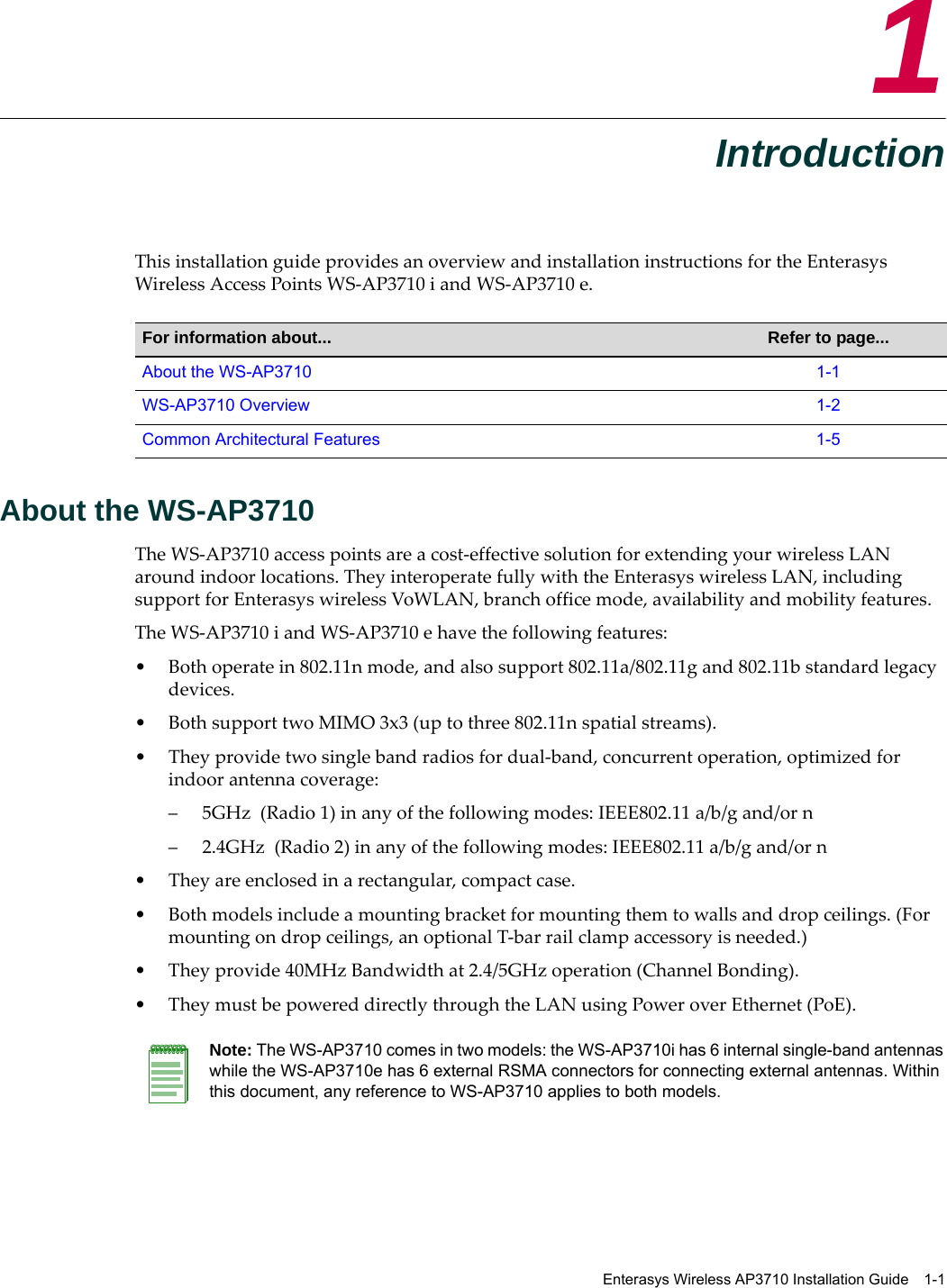
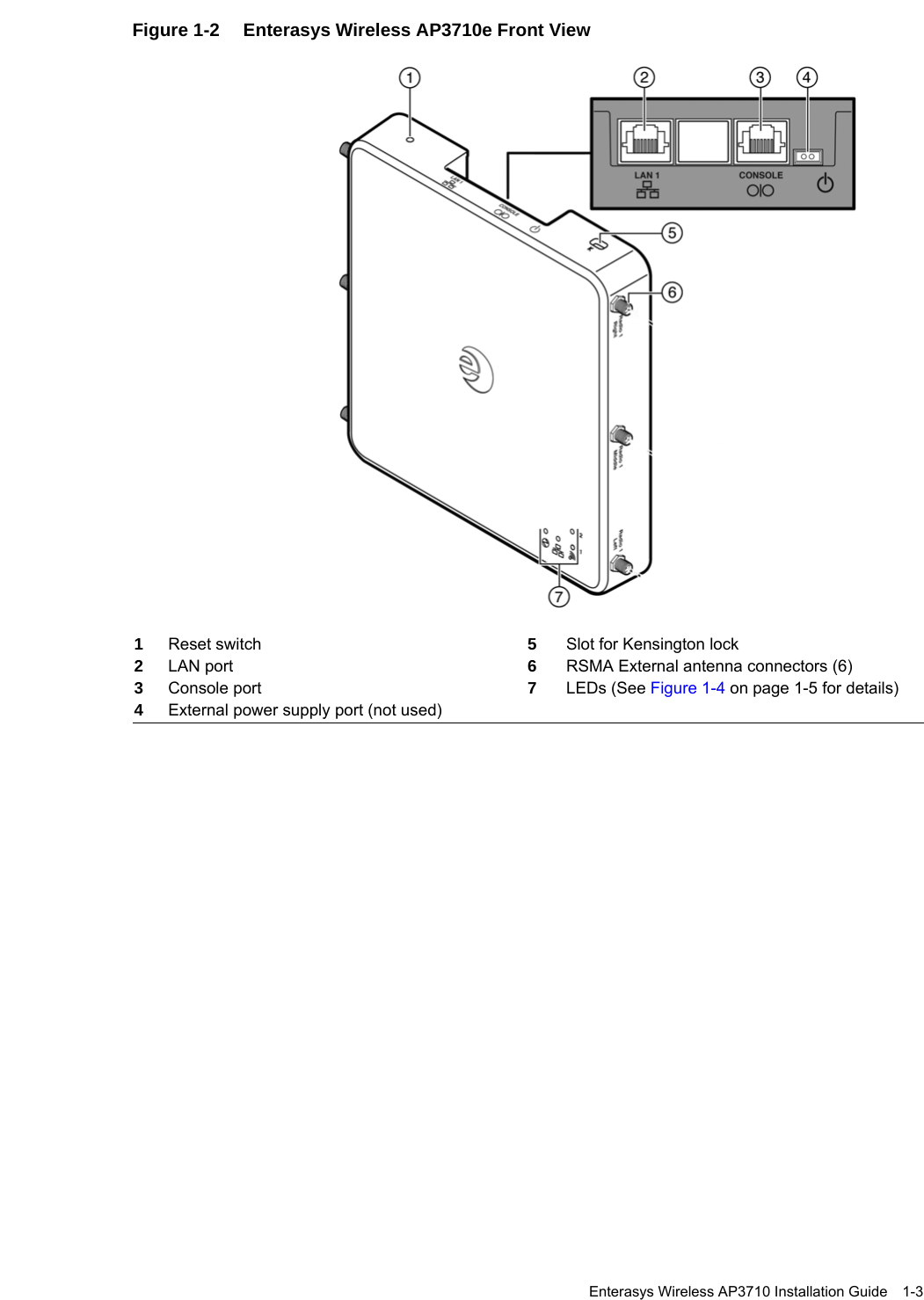
1-2 WS-AP3710 OverviewWS-AP3710 OverviewFigure 1-1 on page 1-2 shows the front view of the WS-AP3710 i and Figure 1-2 on page 1-3 shows the front view of the WS-AP3710 e. Both figures also show the location of the LAN port and console port.Figure 1-3 on page 1-4 shows the back view of the WS-AP3710 i. Although the figure shows the WS-AP3710 e model, the back panel is the same for both models.Figure 1-4 on page 1-5 illustrates the WS-AP3710 i LEDs.Figure 1-1  Enterasys Wireless AP3710i Front View1Reset switch 4External power supply port (not used)2LAN port 5Slot for Kensington lock3Console port 6LEDs (See Figure 1-4 on page 1-5 for details)
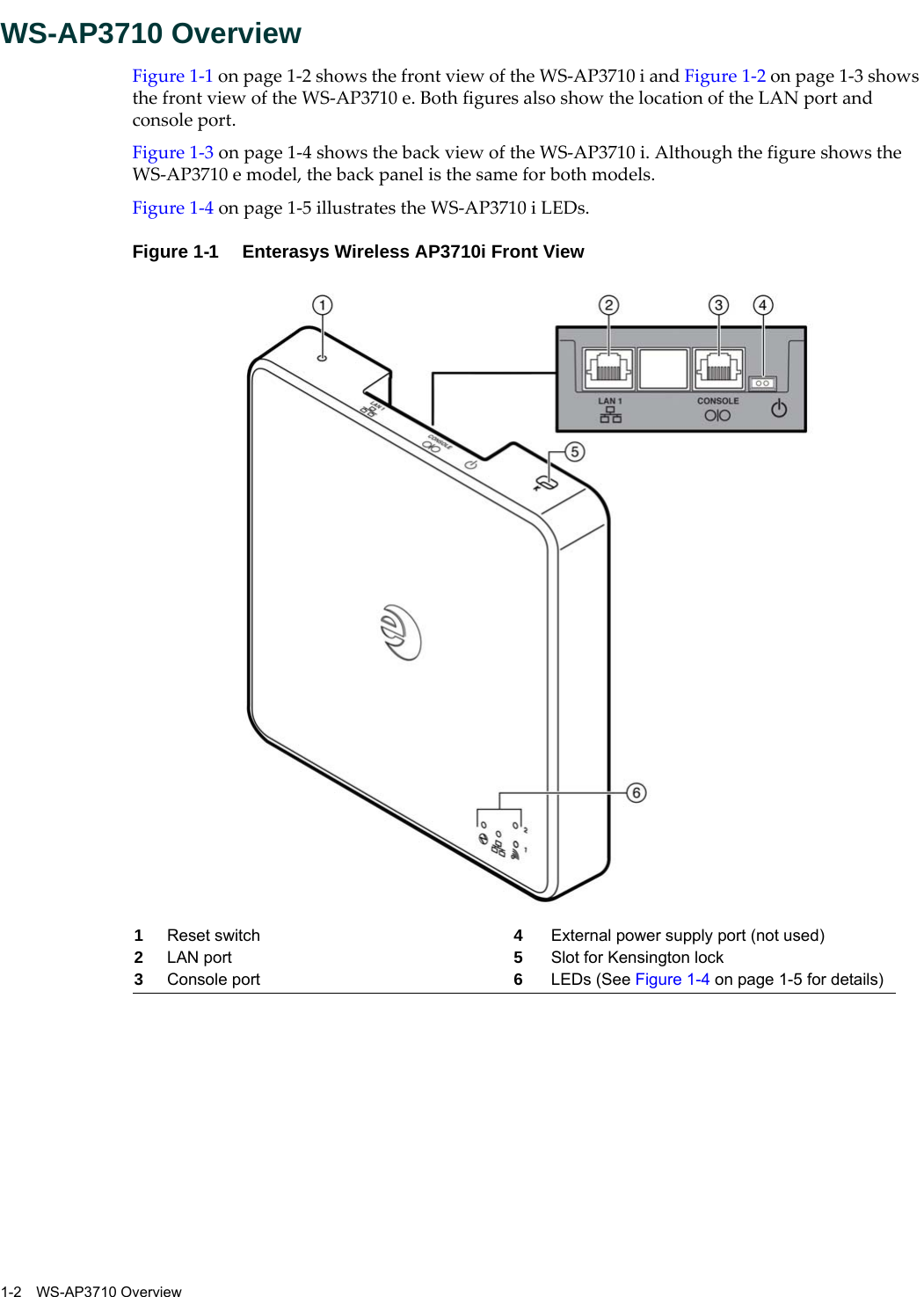
Enterasys Wireless AP3710 Installation Guide 1-3Figure 1-2  Enterasys Wireless AP3710e Front View1Reset switch 5Slot for Kensington lock2LAN port 6RSMA External antenna connectors (6)3Console port 7LEDs (See Figure 1-4 on page 1-5 for details)4External power supply port (not used)
1-4 WS-AP3710 OverviewFigure 1-3  WS-AP3710 e Back View1RSMA antenna connectors 4Product Label2Back Plate Screws 5Tamper Evident Label3Mount Bracket 6Regulatory Label
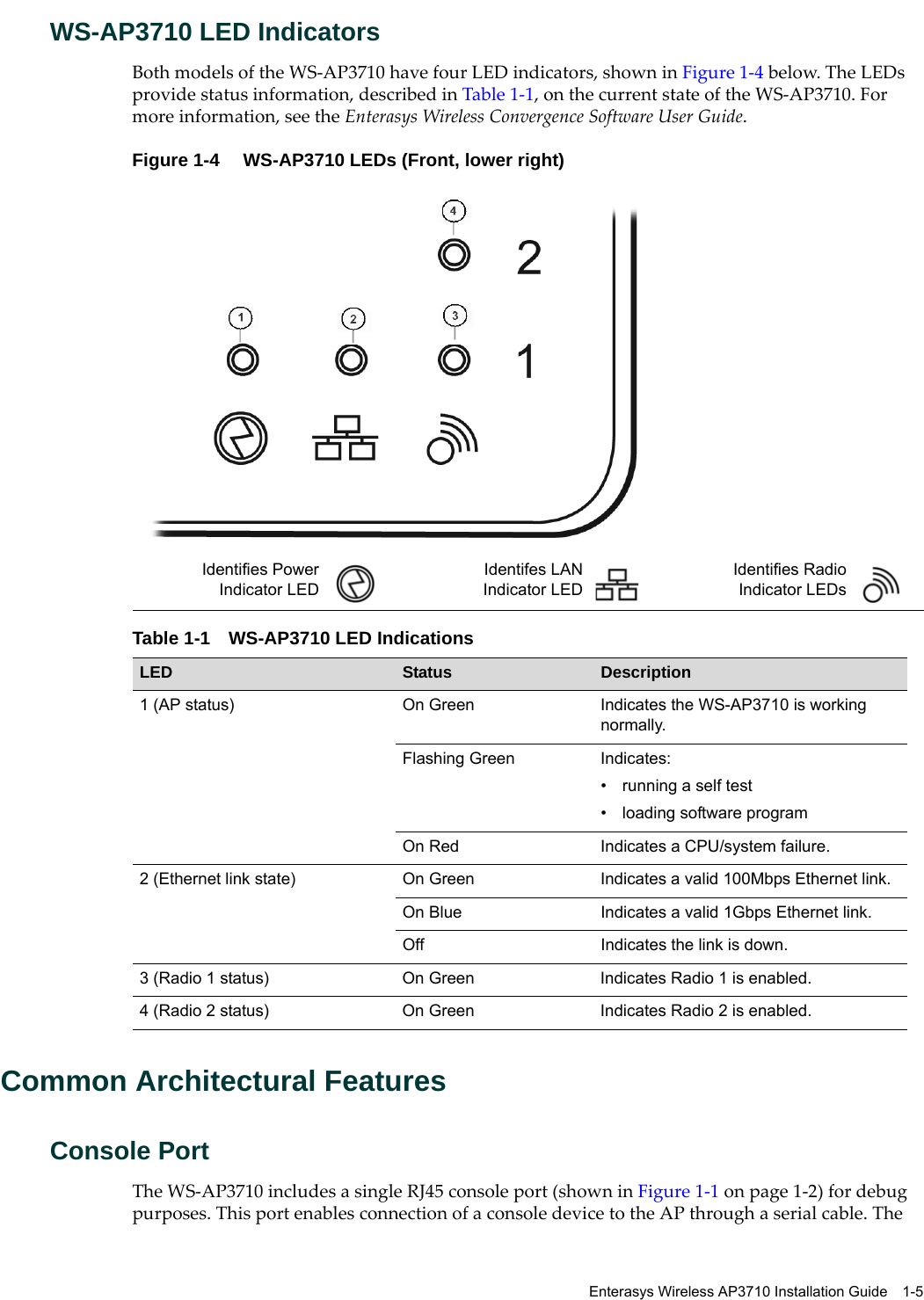
Enterasys Wireless AP3710 Installation Guide 1-5WS-AP3710 LED IndicatorsBoth models of the WS-AP3710 have four LED indicators, shown in Figure 1-4 below. The LEDs provide status information, described in Table 1-1, on the current state of the WS-AP3710. For more information, see the Enterasys Wireless Convergence Software User Guide.Figure 1-4  WS-AP3710 LEDs (Front, lower right)Common Architectural FeaturesConsole PortThe WS-AP3710 includes a single RJ45 console port (shown in Figure 1-1 on page 1-2) for debug purposes. This port enables connection of a console device to the AP through a serial cable. The Identifies PowerIndicator LEDIdentifes LANIndicator LEDIdentifies RadioIndicator LEDsTable 1-1 WS-AP3710 LED IndicationsLED Status Description1 (AP status) On Green Indicates the WS-AP3710 is working normally.Flashing Green Indicates:• running a self test• loading software programOn Red Indicates a CPU/system failure.2 (Ethernet link state) On Green Indicates a valid 100Mbps Ethernet link.On Blue Indicates a valid 1Gbps Ethernet link.Off Indicates the link is down.3 (Radio 1 status) On Green Indicates Radio 1 is enabled.4 (Radio 2 status) On Green Indicates Radio 2 is enabled.
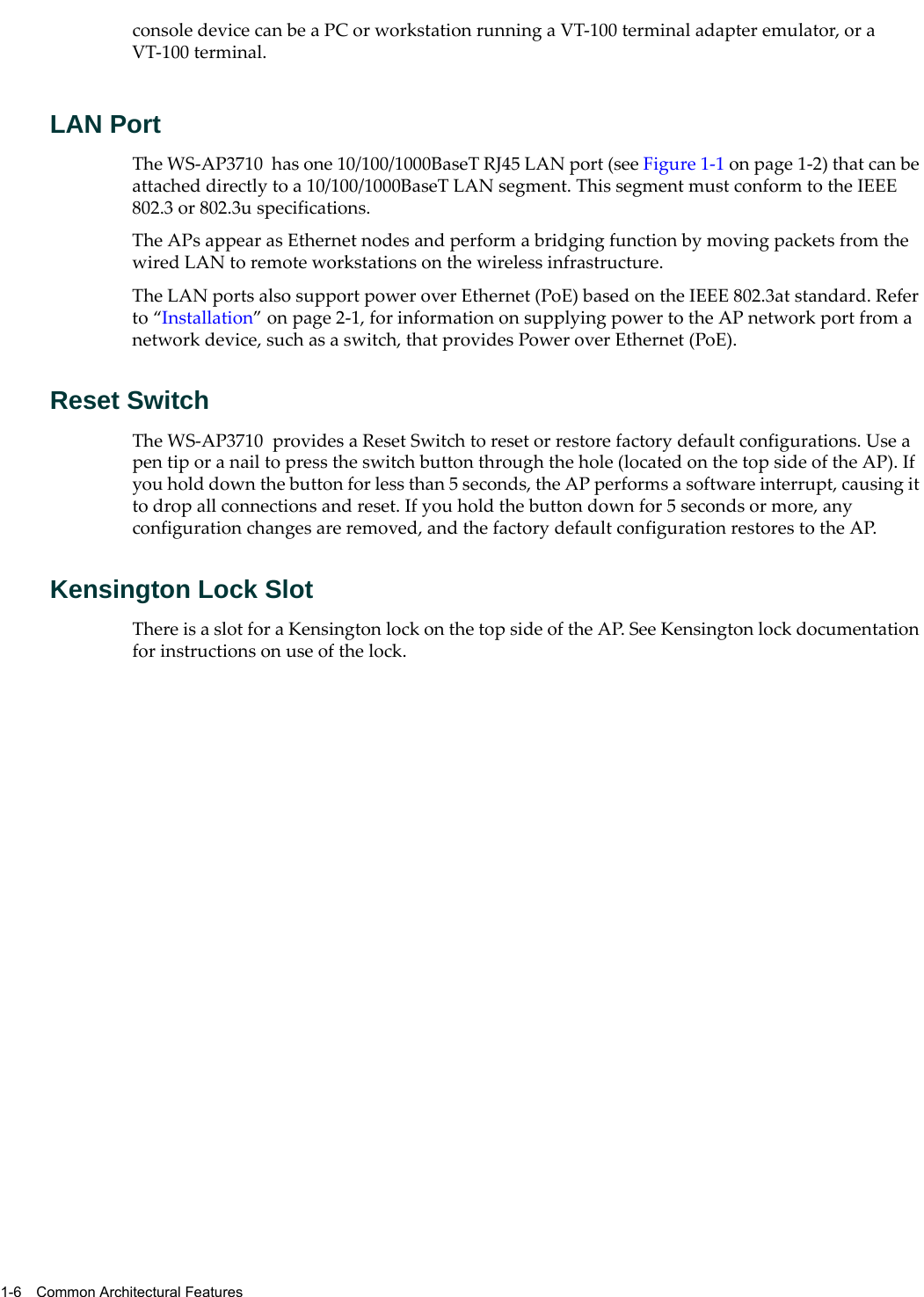
1-6 Common Architectural Featuresconsole device can be a PC or workstation running a VT-100 terminal adapter emulator, or a VT-100 terminal.LAN PortThe WS-AP3710  has one 10/100/1000BaseT RJ45 LAN port (see Figure 1-1 on page 1-2) that can be attached directly to a 10/100/1000BaseT LAN segment. This segment must conform to the IEEE 802.3 or 802.3u specifications. The APs appear as Ethernet nodes and perform a bridging function by moving packets from the wired LAN to remote workstations on the wireless infrastructure.The LAN ports also support power over Ethernet (PoE) based on the IEEE 802.3at standard. Refer to “Installation” on page 2-1, for information on supplying power to the AP network port from a network device, such as a switch, that provides Power over Ethernet (PoE).Reset SwitchThe WS-AP3710  provides a Reset Switch to reset or restore factory default configurations. Use a pen tip or a nail to press the switch button through the hole (located on the top side of the AP). If you hold down the button for less than 5 seconds, the AP performs a software interrupt, causing it to drop all connections and reset. If you hold the button down for 5 seconds or more, any configuration changes are removed, and the factory default configuration restores to the AP.Kensington Lock SlotThere is a slot for a Kensington lock on the top side of the AP. See Kensington lock documentation for instructions on use of the lock.
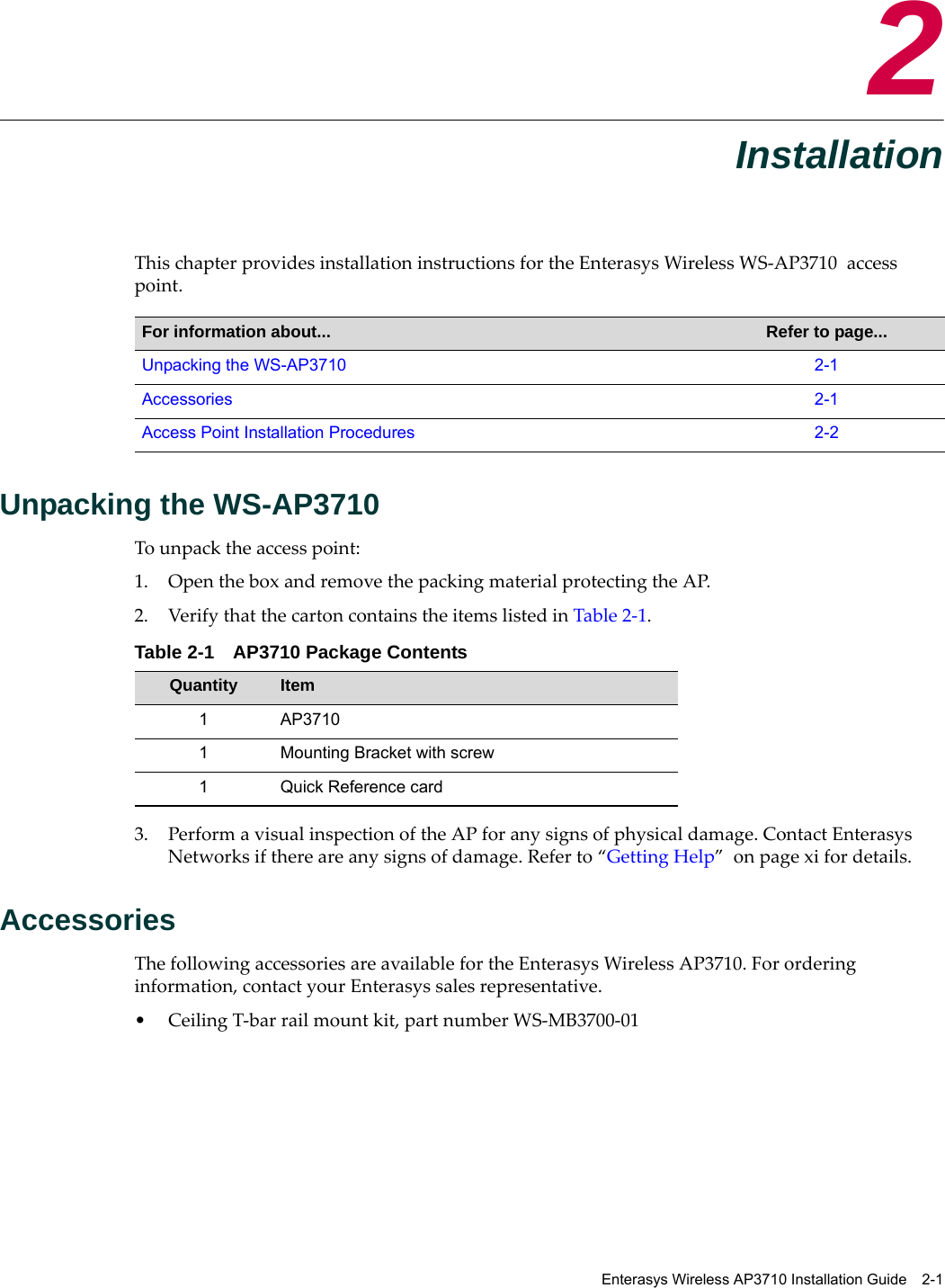
Enterasys Wireless AP3710 Installation Guide 2-12InstallationThis chapter provides installation instructions for the Enterasys Wireless WS-AP3710  access point. Unpacking the WS-AP3710 To unpack the access point:1. Open the box and remove the packing material protecting the AP.2. Verify that the carton contains the items listed in Table 2-1. 3. Perform a visual inspection of the AP for any signs of physical damage. Contact Enterasys Networks if there are any signs of damage. Refer to “Getting Help”  on page xi for details.AccessoriesThe following accessories are available for the Enterasys Wireless AP3710. For ordering information, contact your Enterasys sales representative.• Ceiling T-bar rail mount kit, part number WS-MB3700-01For information about... Refer to page...Unpacking the WS-AP3710 2-1Accessories 2-1Access Point Installation Procedures 2-2Table 2-1 AP3710 Package ContentsQuantity Item1 AP37101 Mounting Bracket with screw1 Quick Reference card
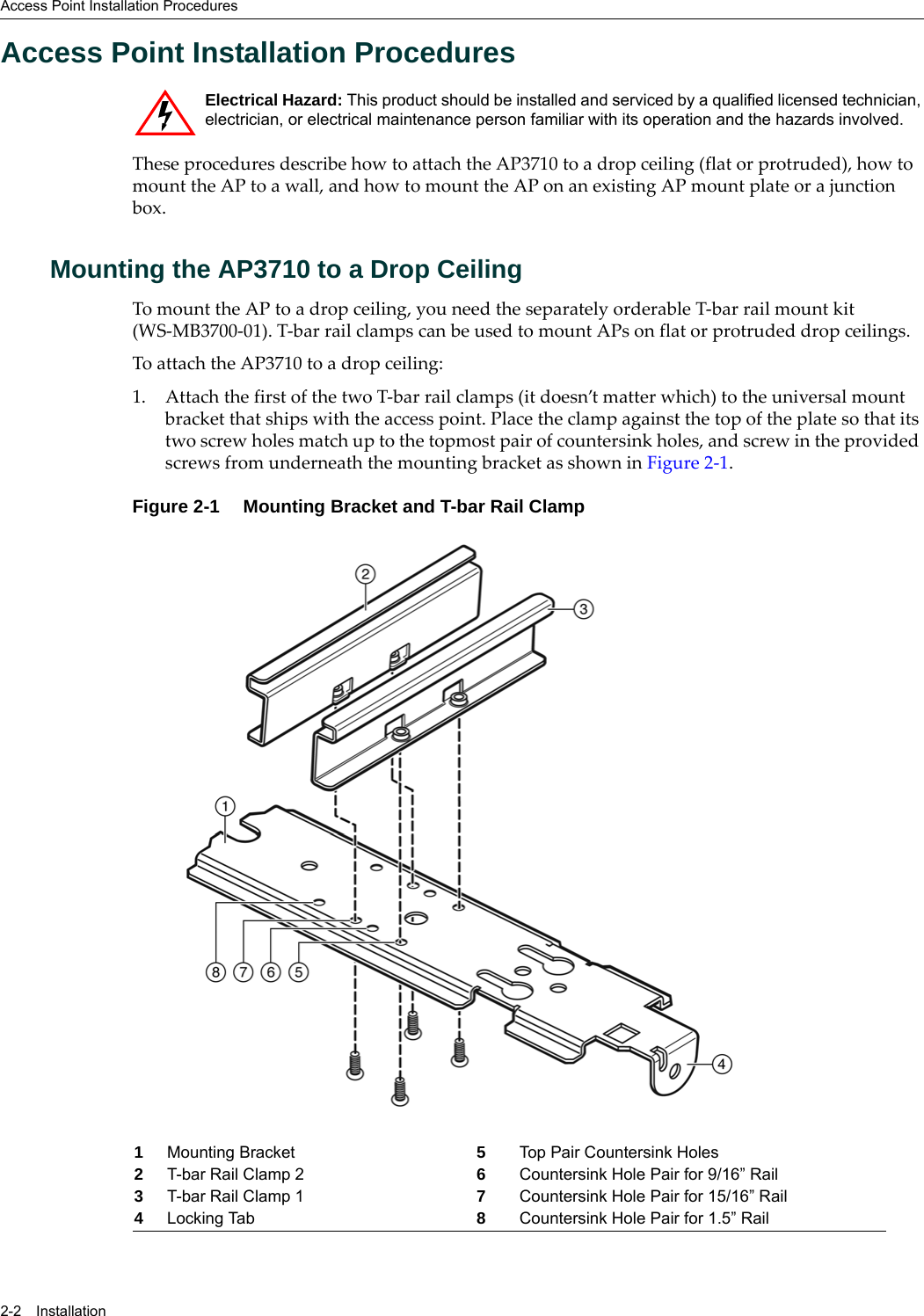
Access Point Installation Procedures2-2 InstallationAccess Point Installation ProceduresThese procedures describe how to attach the AP3710 to a drop ceiling (flat or protruded), how to mount the AP to a wall, and how to mount the AP on an existing AP mount plate or a junction box.Mounting the AP3710 to a Drop CeilingTo mount the AP to a drop ceiling, you need the separately orderable T-bar rail mount kit (WS-MB3700-01). T-bar rail clamps can be used to mount APs on flat or protruded drop ceilings.To attach the AP3710 to a drop ceiling:1. Attach the first of the two T-bar rail clamps (it doesn’t matter which) to the universal mount bracket that ships with the access point. Place the clamp against the top of the plate so that its two screw holes match up to the topmost pair of countersink holes, and screw in the provided screws from underneath the mounting bracket as shown in Figure 2-1.Figure 2-1  Mounting Bracket and T-bar Rail ClampElectrical Hazard: This product should be installed and serviced by a qualified licensed technician, electrician, or electrical maintenance person familiar with its operation and the hazards involved. 1Mounting Bracket 5Top Pair Countersink Holes2T-bar Rail Clamp 2 6Countersink Hole Pair for 9/16” Rail3T-bar Rail Clamp 1 7Countersink Hole Pair for 15/16” Rail4Locking Tab 8Countersink Hole Pair for 1.5” Rail
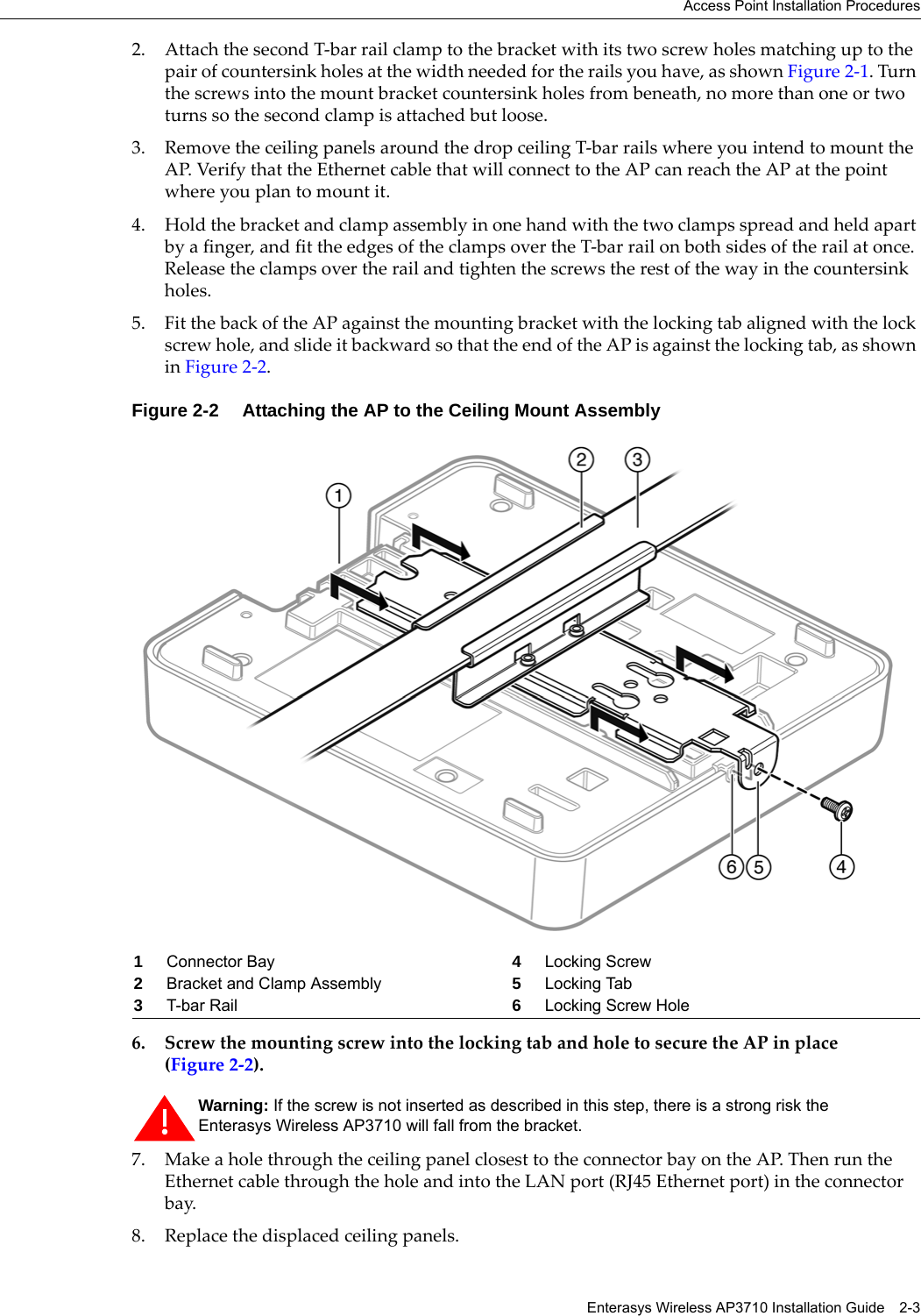
Access Point Installation ProceduresEnterasys Wireless AP3710 Installation Guide 2-32. Attach the second T-bar rail clamp to the bracket with its two screw holes matching up to the pair of countersink holes at the width needed for the rails you have, as shown Figure 2-1. Turn the screws into the mount bracket countersink holes from beneath, no more than one or two turns so the second clamp is attached but loose.3. Remove the ceiling panels around the drop ceiling T-bar rails where you intend to mount the AP. Verify that the Ethernet cable that will connect to the AP can reach the AP at the point where you plan to mount it.4. Hold the bracket and clamp assembly in one hand with the two clamps spread and held apart by a finger, and fit the edges of the clamps over the T-bar rail on both sides of the rail at once. Release the clamps over the rail and tighten the screws the rest of the way in the countersink holes. 5. Fit the back of the AP against the mounting bracket with the locking tab aligned with the lock screw hole, and slide it backward so that the end of the AP is against the locking tab, as shown in Figure 2-2.Figure 2-2  Attaching the AP to the Ceiling Mount Assembly6. Screw the mounting screw into the locking tab and hole to secure the AP in place (Figure 2-2).7. Make a hole through the ceiling panel closest to the connector bay on the AP. Then run the Ethernet cable through the hole and into the LAN port (RJ45 Ethernet port) in the connector bay.8. Replace the displaced ceiling panels.1Connector Bay 4Locking Screw 2Bracket and Clamp Assembly 5Locking Tab3T-bar Rail 6Locking Screw HoleWarning: If the screw is not inserted as described in this step, there is a strong risk the Enterasys Wireless AP3710 will fall from the bracket.
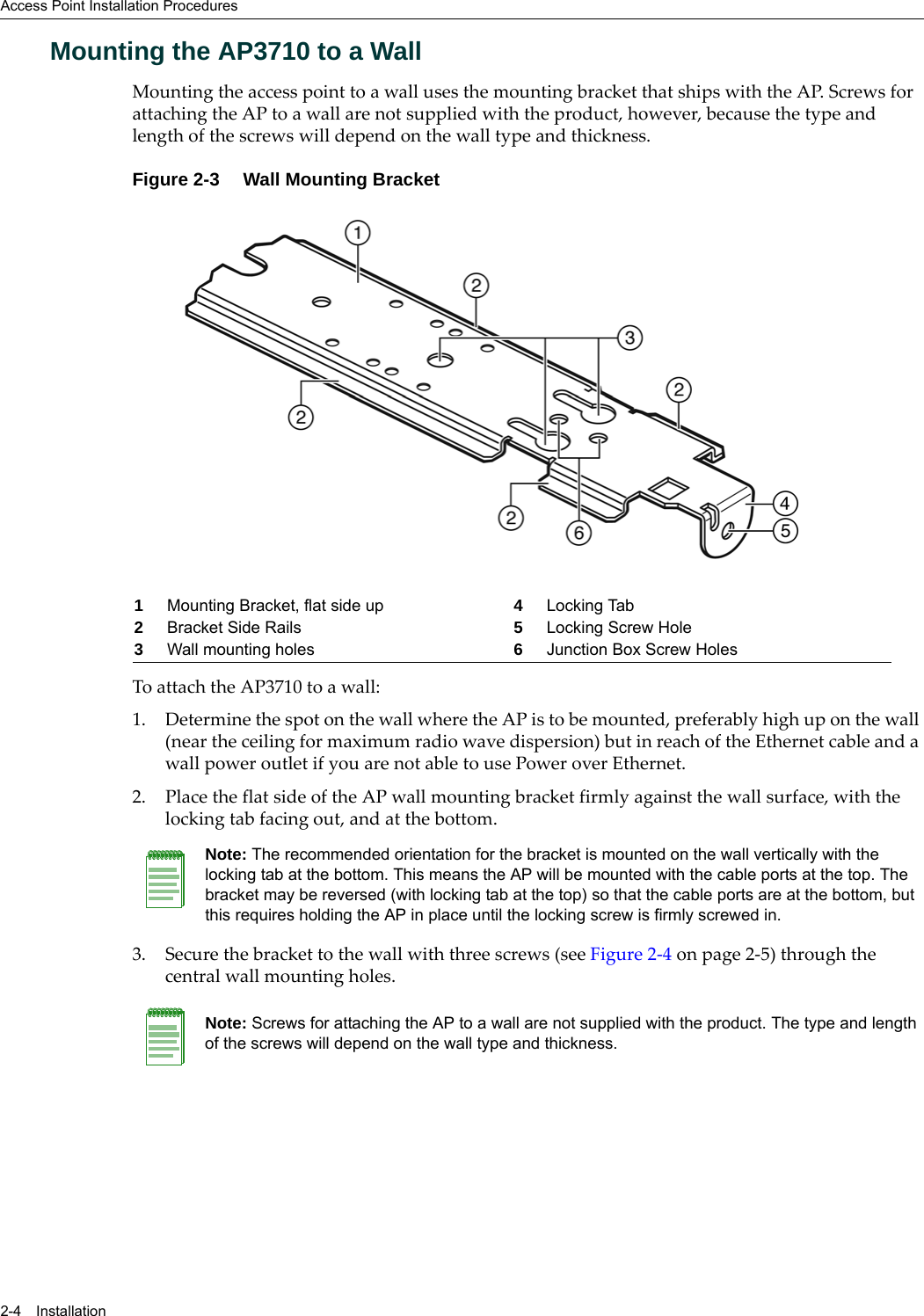
Access Point Installation Procedures2-4 InstallationMounting the AP3710 to a WallMounting the access point to a wall uses the mounting bracket that ships with the AP. Screws for attaching the AP to a wall are not supplied with the product, however, because the type and length of the screws will depend on the wall type and thickness.Figure 2-3  Wall Mounting Bracket To attach the AP3710 to a wall:1. Determine the spot on the wall where the AP is to be mounted, preferably high up on the wall (near the ceiling for maximum radio wave dispersion) but in reach of the Ethernet cable and a wall power outlet if you are not able to use Power over Ethernet.2. Place the flat side of the AP wall mounting bracket firmly against the wall surface, with the locking tab facing out, and at the bottom.3. Secure the bracket to the wall with three screws (see Figure 2-4 on page 2-5) through the central wall mounting holes.1Mounting Bracket, flat side up 4Locking Tab2Bracket Side Rails 5Locking Screw Hole3Wall mounting holes 6Junction Box Screw HolesNote: The recommended orientation for the bracket is mounted on the wall vertically with the locking tab at the bottom. This means the AP will be mounted with the cable ports at the top. The bracket may be reversed (with locking tab at the top) so that the cable ports are at the bottom, but this requires holding the AP in place until the locking screw is firmly screwed in.Note: Screws for attaching the AP to a wall are not supplied with the product. The type and length of the screws will depend on the wall type and thickness.
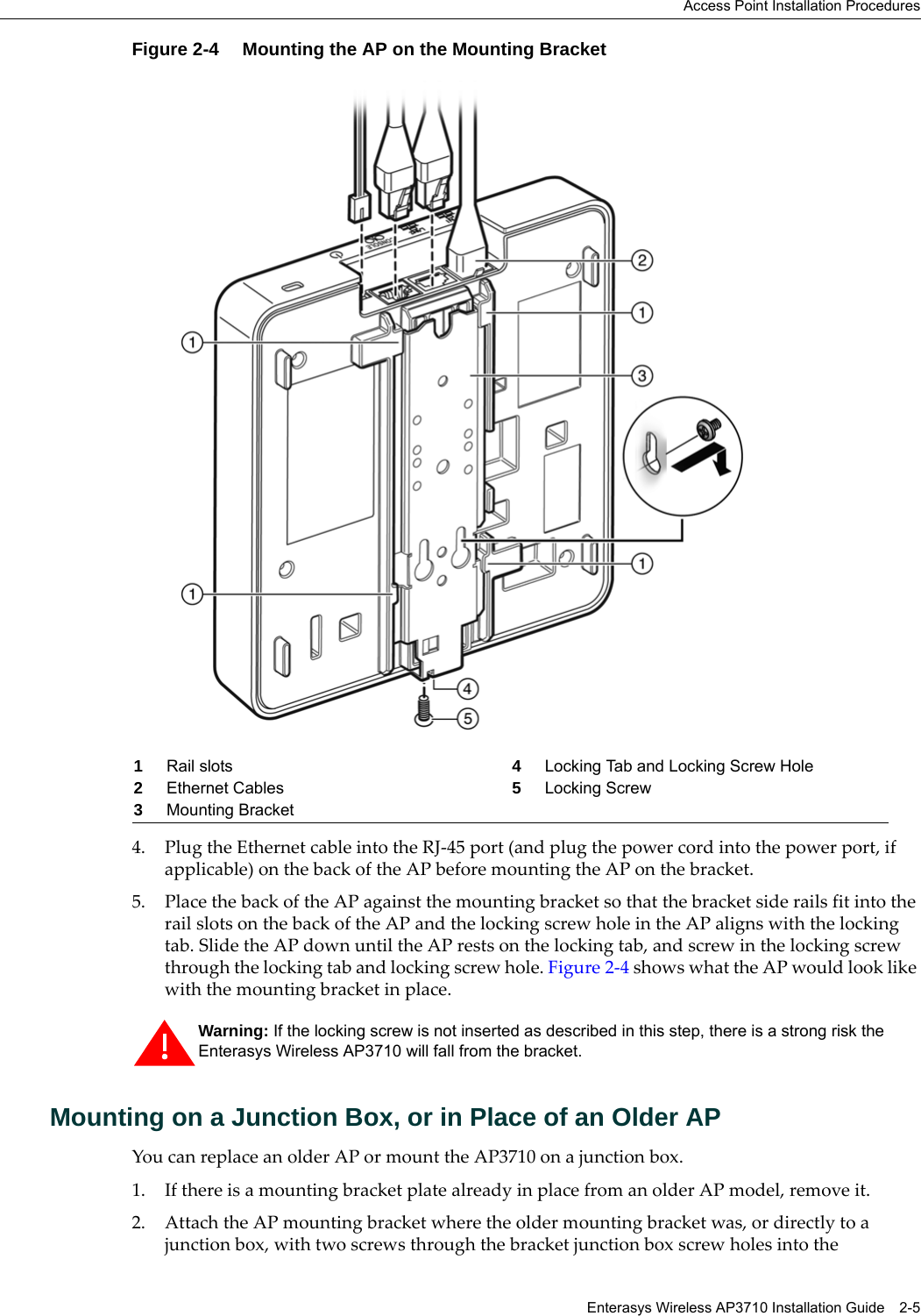
Access Point Installation ProceduresEnterasys Wireless AP3710 Installation Guide 2-5Figure 2-4  Mounting the AP on the Mounting Bracket4. Plug the Ethernet cable into the RJ-45 port (and plug the power cord into the power port, if applicable) on the back of the AP before mounting the AP on the bracket.5. Place the back of the AP against the mounting bracket so that the bracket side rails fit into the rail slots on the back of the AP and the locking screw hole in the AP aligns with the locking tab. Slide the AP down until the AP rests on the locking tab, and screw in the locking screw through the locking tab and locking screw hole. Figure 2-4 shows what the AP would look like with the mounting bracket in place.Mounting on a Junction Box, or in Place of an Older APYou can replace an older AP or mount the AP3710 on a junction box.1. If there is a mounting bracket plate already in place from an older AP model, remove it.2. Attach the AP mounting bracket where the older mounting bracket was, or directly to a junction box, with two screws through the bracket junction box screw holes into the 1Rail slots 4Locking Tab and Locking Screw Hole2Ethernet Cables 5Locking Screw3Mounting BracketWarning: If the locking screw is not inserted as described in this step, there is a strong risk the Enterasys Wireless AP3710 will fall from the bracket.
Access Point Installation Procedures2-6 Installationcorresponding holes on the junction box (see Figure 2-3 for location of junction box screw holes).3. Plug the Ethernet cable into the RJ-45 port (and plug the power cord into the power port, if applicable) on the back of the AP before mounting the AP on the bracket.4. Place the back of the AP against the mounting bracket so that the bracket side rails fit into the rail slots on the back of the AP and the locking screw hole in the AP aligns with the locking tab. Slide the AP down until the AP rests on the locking tab, and screw in the locking screw through the locking tab and locking screw hole. Figure 2-4 on page 2-5 shows what the AP would look like with the mounting bracket in place.LAN/Console ConnectionsThe WS-AP3710 has both a LAN and a Console port. Refer to Figure 1-1 on page 1-2 for the location of these ports. During administration and maintenance through the LAN or Console, the AP must have a power connection through either an Ethernet PoE cable or a DC power supply.Power ConnectionsThe AP can be powered only by Power over Ethernet (PoE), which is power provided through the RJ45 Ethernet port (LAN port) on the top of the AP. This is the preferred method of powering the AP on ceiling and high wall installations.Warning: If the screw is not inserted as described in this step, there is a strong risk the Enterasys Wireless AP3710 will fall from the bracket.
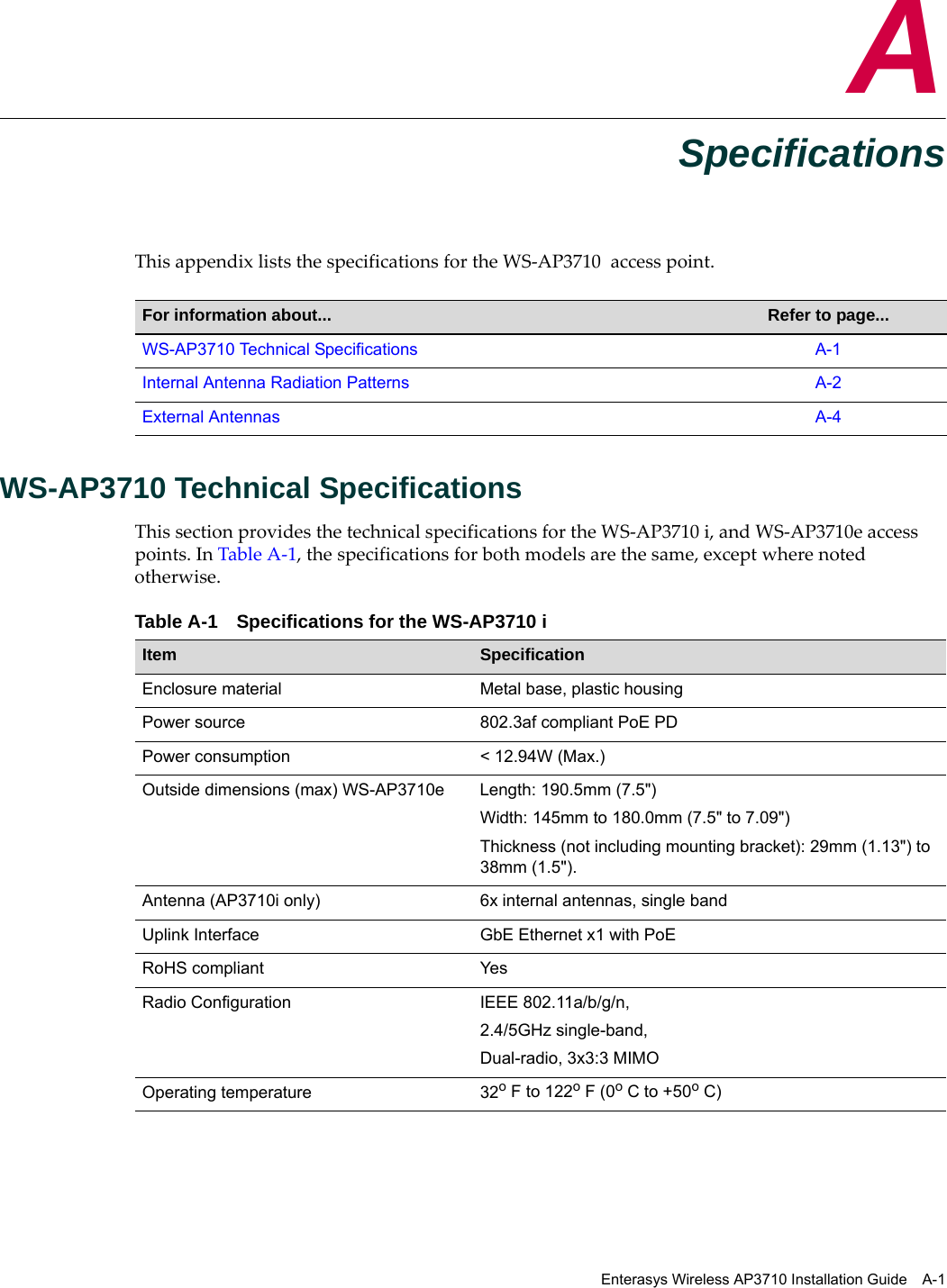
Enterasys Wireless AP3710 Installation Guide A-1ASpecificationsThis appendix lists the specifications for the WS-AP3710  access point.WS-AP3710 Technical SpecificationsThis section provides the technical specifications for the WS-AP3710 i, and WS-AP3710e access points. In Table A-1, the specifications for both models are the same, except where noted otherwise.For information about... Refer to page...WS-AP3710 Technical Specifications A-1Internal Antenna Radiation Patterns A-2External Antennas A-4Table A-1 Specifications for the WS-AP3710 i Item SpecificationEnclosure material Metal base, plastic housingPower source 802.3af compliant PoE PDPower consumption < 12.94W (Max.)Outside dimensions (max) WS-AP3710e Length: 190.5mm (7.5") Width: 145mm to 180.0mm (7.5" to 7.09") Thickness (not including mounting bracket): 29mm (1.13") to 38mm (1.5").Antenna (AP3710i only) 6x internal antennas, single bandUplink Interface GbE Ethernet x1 with PoERoHS compliant YesRadio Configuration IEEE 802.11a/b/g/n, 2.4/5GHz single-band, Dual-radio, 3x3:3 MIMOOperating temperature 32o F to 122o F (0o C to +50o C)
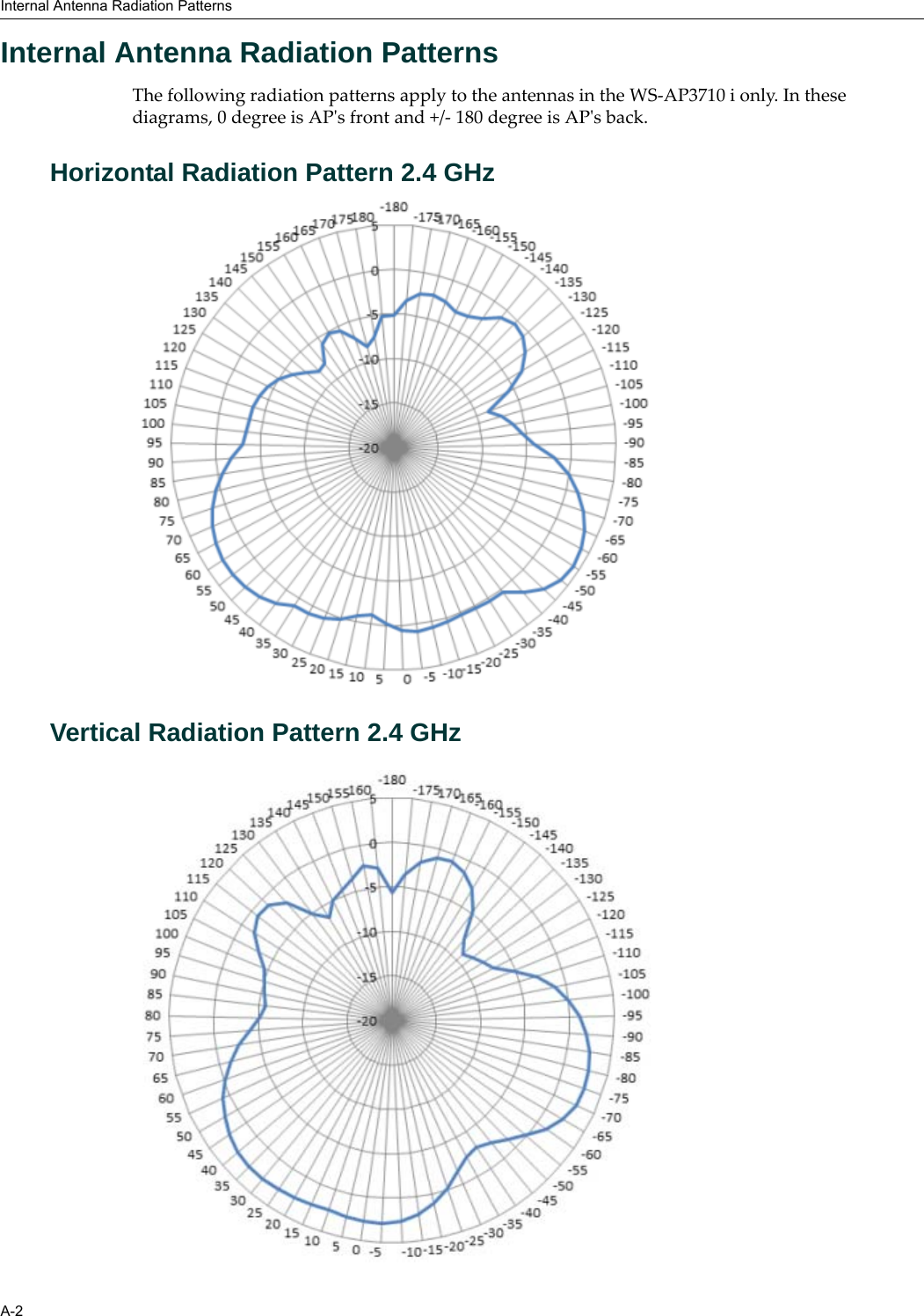
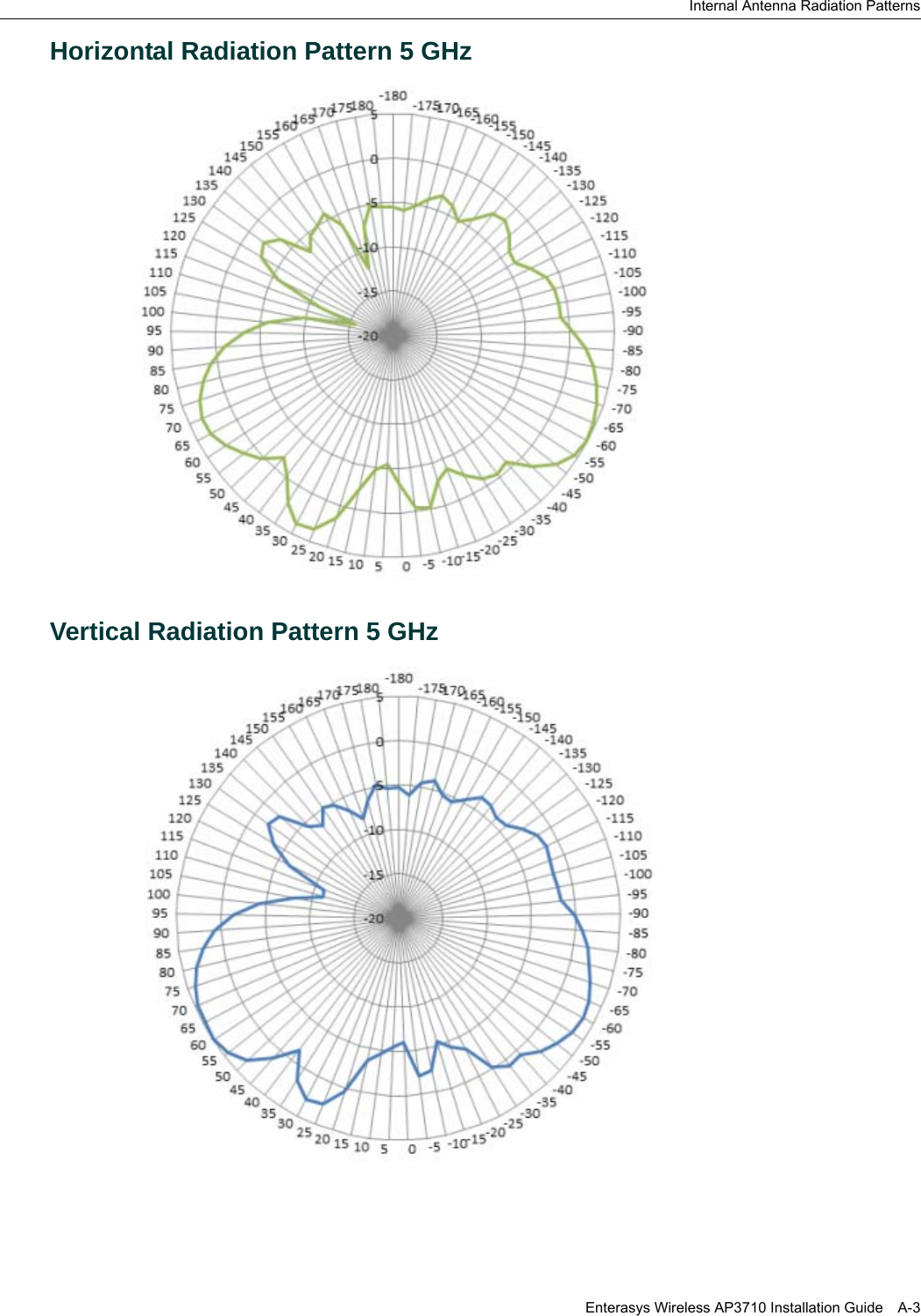
Internal Antenna Radiation PatternsA-2Internal Antenna Radiation PatternsThe following radiation patterns apply to the antennas in the WS-AP3710 i only. In these diagrams, 0 degree is AP's front and +/- 180 degree is AP's back.Horizontal Radiation Pattern 2.4 GHzVertical Radiation Pattern 2.4 GHz
Internal Antenna Radiation PatternsEnterasys Wireless AP3710 Installation Guide A-3Horizontal Radiation Pattern 5 GHzVertical Radiation Pattern 5 GHz
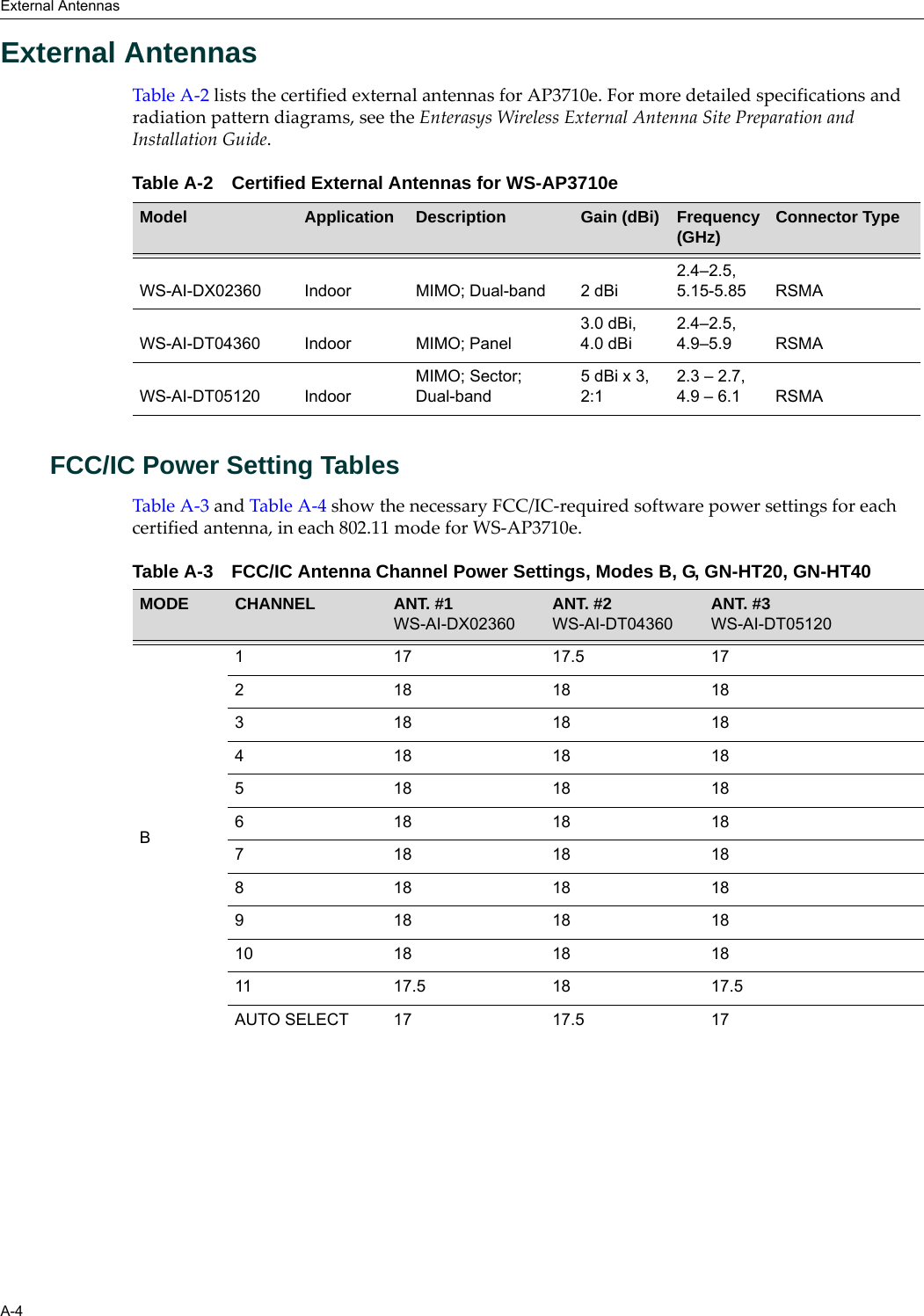
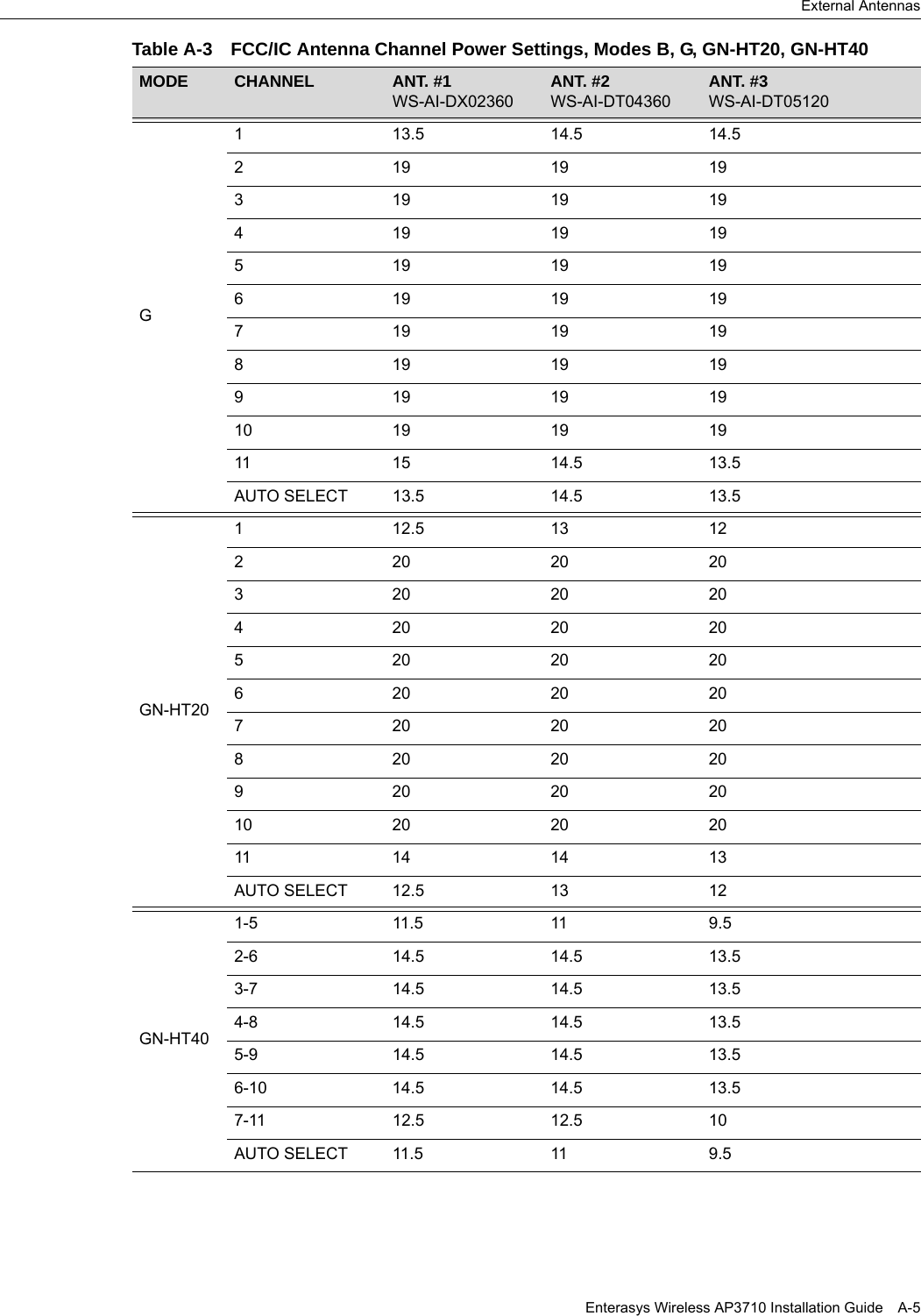
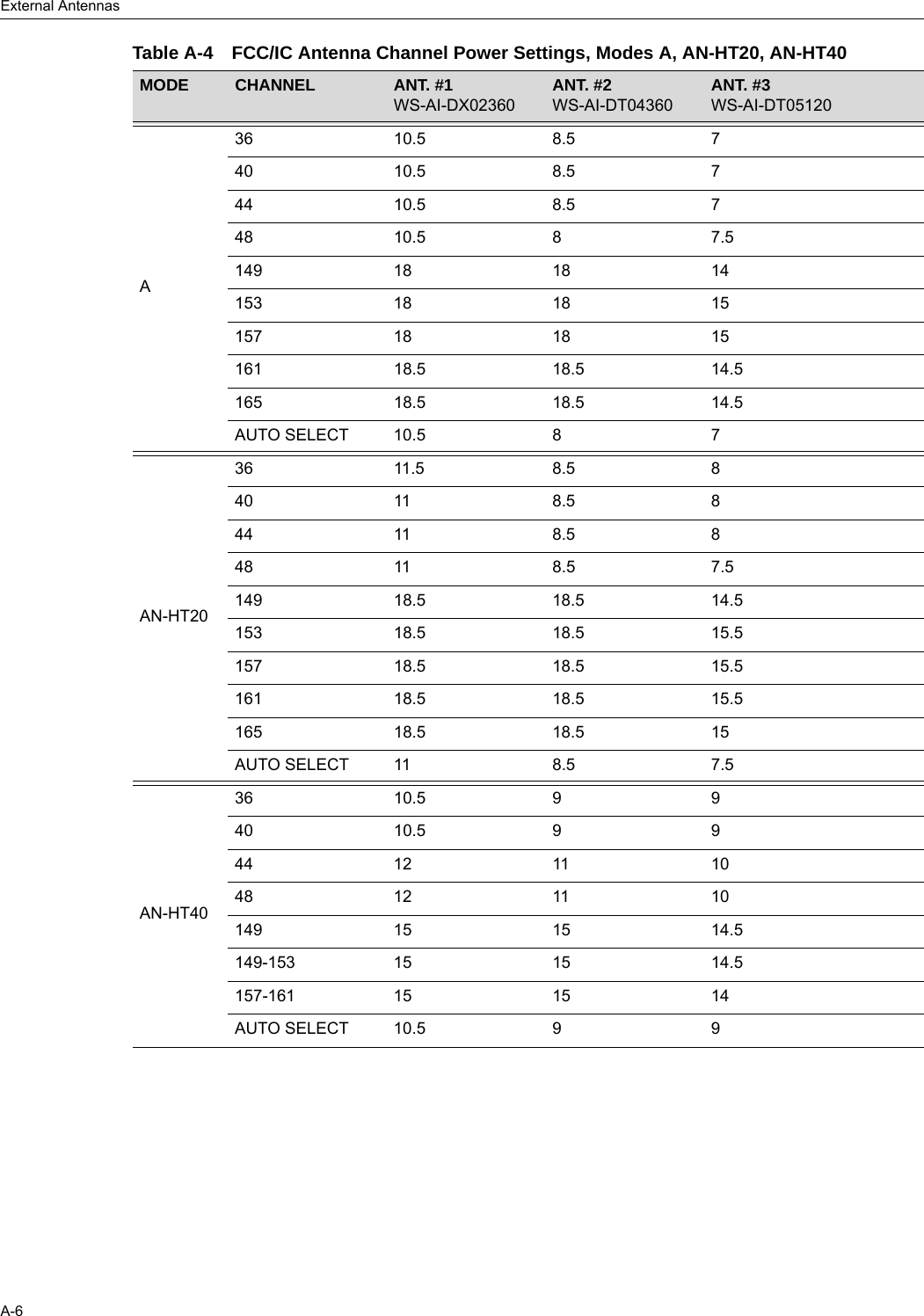
External AntennasA-4External AntennasTable A-2 lists the certified external antennas for AP3710e. For more detailed specifications and radiation pattern diagrams, see the Enterasys Wireless External Antenna Site Preparation and Installation Guide.FCC/IC Power Setting TablesTable A-3 and Table A-4 show the necessary FCC/IC-required software power settings for each certified antenna, in each 802.11 mode for WS-AP3710e.Table A-2 Certified External Antennas for WS-AP3710eModel Application Description Gain (dBi) Frequency (GHz) Connector TypeWS-AI-DX02360 Indoor MIMO; Dual-band 2 dBi2.4–2.5, 5.15-5.85 RSMAWS-AI-DT04360 Indoor MIMO; Panel3.0 dBi,4.0 dBi2.4–2.5, 4.9–5.9 RSMAWS-AI-DT05120 IndoorMIMO; Sector; Dual-band5 dBi x 3,2:12.3 – 2.7,4.9 – 6.1 RSMATable A-3 FCC/IC Antenna Channel Power Settings, Modes B, G, GN-HT20, GN-HT40MODE CHANNEL ANT. #1WS-AI-DX02360ANT. #2WS-AI-DT04360ANT. #3WS-AI-DT05120B1 17 17.5 172 1818183 1818184 1818185 1818186 1818187 1818188 1818189 18181810 18 18 1811 17.5 18 17.5AUTO SELECT 17 17.5 17
External AntennasEnterasys Wireless AP3710 Installation Guide A-5G1 13.5 14.5 14.52 1919193 1919194 1919195 1919196 1919197 1919198 1919199 19191910 19 19 1911 15 14.5 13.5AUTO SELECT 13.5 14.5 13.5GN-HT20112.513122 2020203 2020204 2020205 2020206 2020207 2020208 2020209 20202010 20 20 2011 14 14 13AUTO SELECT 12.5 13 12GN-HT401-5 11.5 11 9.52-6 14.5 14.5 13.53-7 14.5 14.5 13.54-8 14.5 14.5 13.55-9 14.5 14.5 13.56-10 14.5 14.5 13.57-11 12.5 12.5 10AUTO SELECT 11.5 11 9.5Table A-3 FCC/IC Antenna Channel Power Settings, Modes B, G, GN-HT20, GN-HT40 MODE CHANNEL ANT. #1WS-AI-DX02360ANT. #2WS-AI-DT04360ANT. #3WS-AI-DT05120
External AntennasA-6Table A-4 FCC/IC Antenna Channel Power Settings, Modes A, AN-HT20, AN-HT40MODE CHANNEL ANT. #1WS-AI-DX02360ANT. #2WS-AI-DT04360ANT. #3WS-AI-DT05120A36 10.5 8.5 740 10.5 8.5 744 10.5 8.5 748 10.5 8 7.5149181814153181815157181815161 18.5 18.5 14.5165 18.5 18.5 14.5AUTO SELECT 10.5 8 7AN-HT2036 11.5 8.5 840 11 8.5 844 11 8.5 848 11 8.5 7.5149 18.5 18.5 14.5153 18.5 18.5 15.5157 18.5 18.5 15.5161 18.5 18.5 15.5165 18.5 18.5 15AUTO SELECT 11 8.5 7.5AN-HT4036 10.5 9 940 10.5 9 944 12 11 1048 12 11 10149151514.5149-153 15 15 14.5157-161 15 15 14AUTO SELECT 10.5 9 9
Enterasys Wireless AP3710 Installation Guide B-1BRegulatory InformationThis appendix provides regulatory information for the Enterasys Wireless  WS-AP3710 access point.Enterasys Wireless WS-AP3710The following regulatory information applies to the Enterasys Wireless  access point WS-AP3710.United StatesFCC Declaration of Conformity StatementThis device complies with Part 15 of the FCC Rules. Operation is subject to the following two conditions:• This device may not cause harmful interference.• This device must accept any interference received, including interference that may cause undesired operation.This equipment has been tested and found to comply with the limits for a Class B digital device, pursuant to Part 15 of the FCC Rules. These limits are designed to provide reasonable protection against harmful interference when the equipment is operated in a residential and business environment. This equipment generates, uses, and radiates radio frequency energy, and if not installed and used in accordance with instructions, may cause harmful interference. However, there is no guarantee that interference will not occur. If this equipment does cause harmful interference, which can be determined by turning the equipment off and on, the user is encouraged to try to correct the interference by one or more of the following measures:Warning: Warnings identify essential information. Ignoring a warning can lead to problems with the application.Note: Throughout this appendix, the term ‘Enterasys Wireless AP3710’ refers to the AP models WS-AP3710i and WS-AP3710e. Specific AP models are only identified in this appendix where it is necessary to do so. Warning: Changes or modifications made to the Enterasys Wireless AP3710 which are not expressly approved by Enterasys could void the user's authority to operate the equipment.Only authorized Enterasys service personnel are permitted to service the system. Procedures that should be performed only by Enterasys personnel are clearly identified in this guide.Note: The Enterasys Wireless AP3710 is in compliance with the European Directive 2002/95/EC on the restriction of the use of certain hazardous substances (RoHS) in electrical and electronic equipment.
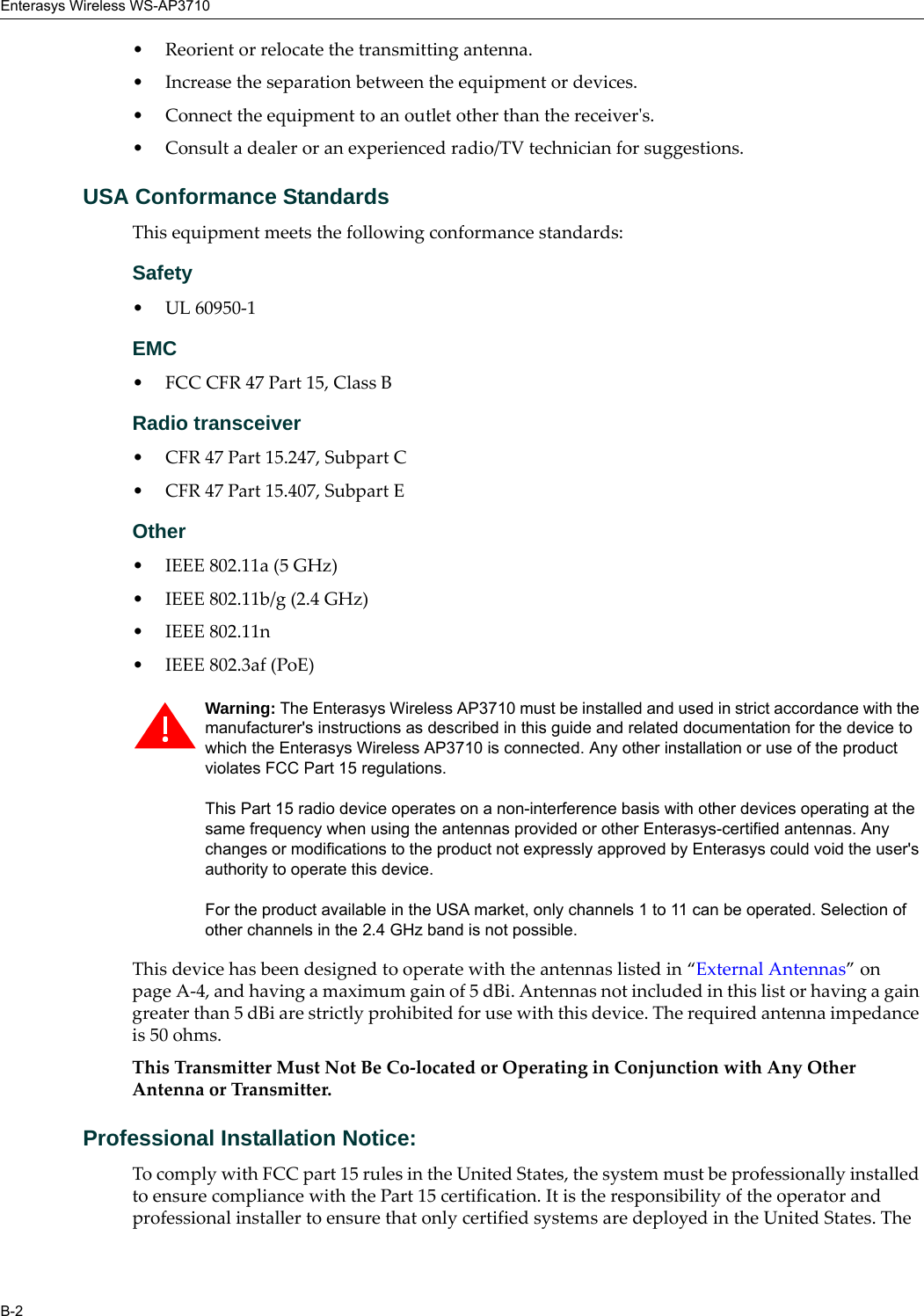
Enterasys Wireless WS-AP3710B-2• Reorient or relocate the transmitting antenna.• Increase the separation between the equipment or devices.• Connect the equipment to an outlet other than the receiver's.• Consult a dealer or an experienced radio/TV technician for suggestions.USA Conformance StandardsThis equipment meets the following conformance standards:Safety • UL 60950-1EMC • FCC CFR 47 Part 15, Class BRadio transceiver • CFR 47 Part 15.247, Subpart C • CFR 47 Part 15.407, Subpart E Other• IEEE 802.11a (5 GHz)• IEEE 802.11b/g (2.4 GHz)• IEEE 802.11n • IEEE 802.3af (PoE)This device has been designed to operate with the antennas listed in “External Antennas” on page A-4, and having a maximum gain of 5 dBi. Antennas not included in this list or having a gain greater than 5 dBi are strictly prohibited for use with this device. The required antenna impedance is 50 ohms.This Transmitter Must Not Be Co-located or Operating in Conjunction with Any Other Antenna or Transmitter.Professional Installation Notice: To comply with FCC part 15 rules in the United States, the system must be professionally installed to ensure compliance with the Part 15 certification. It is the responsibility of the operator and professional installer to ensure that only certified systems are deployed in the United States. The Warning: The Enterasys Wireless AP3710 must be installed and used in strict accordance with the manufacturer's instructions as described in this guide and related documentation for the device to which the Enterasys Wireless AP3710 is connected. Any other installation or use of the product violates FCC Part 15 regulations.This Part 15 radio device operates on a non-interference basis with other devices operating at the same frequency when using the antennas provided or other Enterasys-certified antennas. Any changes or modifications to the product not expressly approved by Enterasys could void the user's authority to operate this device.For the product available in the USA market, only channels 1 to 11 can be operated. Selection of other channels in the 2.4 GHz band is not possible.
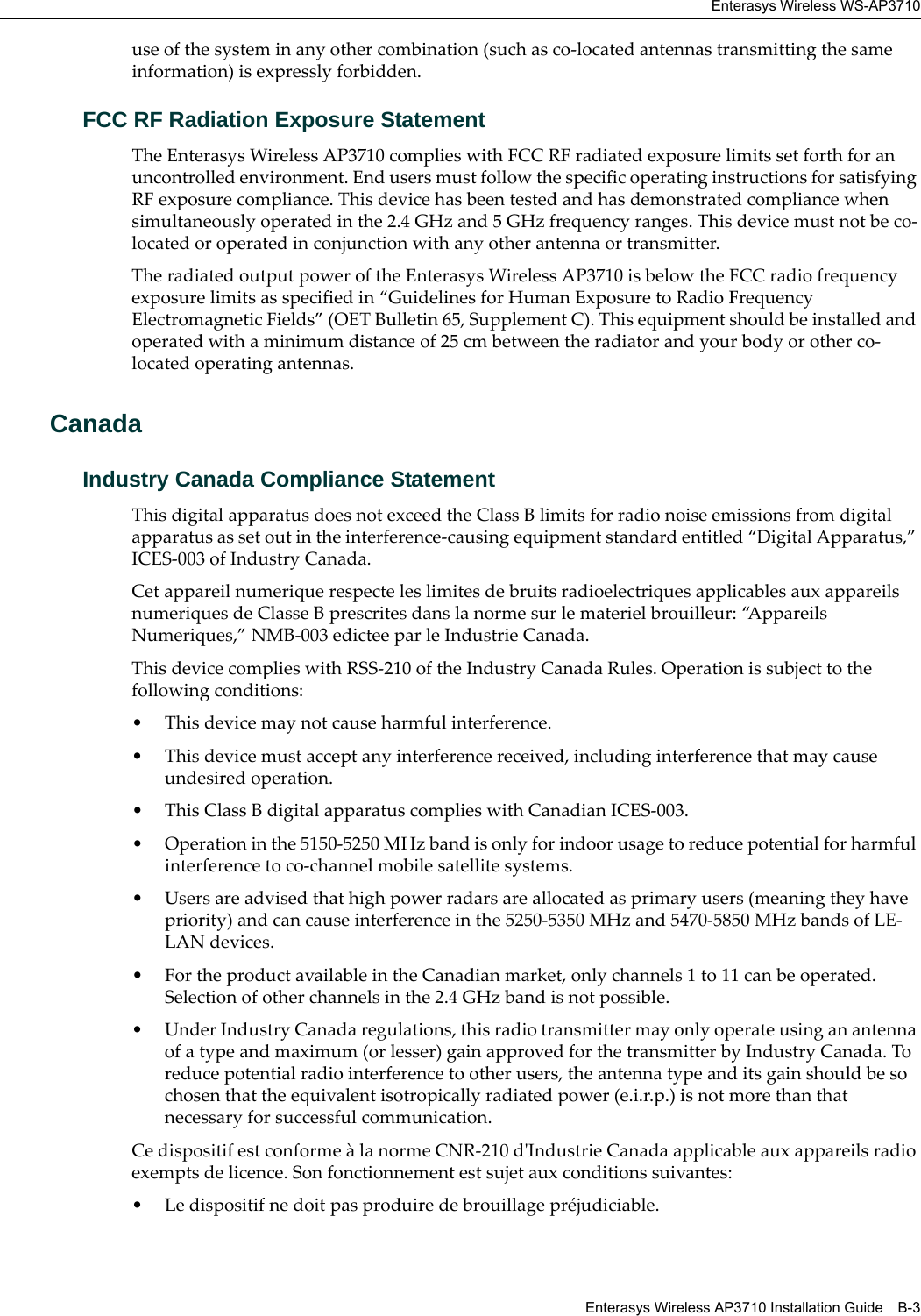
Enterasys Wireless WS-AP3710Enterasys Wireless AP3710 Installation Guide B-3use of the system in any other combination (such as co-located antennas transmitting the same information) is expressly forbidden.FCC RF Radiation Exposure StatementThe Enterasys Wireless AP3710 complies with FCC RF radiated exposure limits set forth for an uncontrolled environment. End users must follow the specific operating instructions for satisfying RF exposure compliance. This device has been tested and has demonstrated compliance when simultaneously operated in the 2.4 GHz and 5 GHz frequency ranges. This device must not be co-located or operated in conjunction with any other antenna or transmitter.The radiated output power of the Enterasys Wireless AP3710 is below the FCC radio frequency exposure limits as specified in “Guidelines for Human Exposure to Radio Frequency Electromagnetic Fields” (OET Bulletin 65, Supplement C). This equipment should be installed and operated with a minimum distance of 25 cm between the radiator and your body or other co-located operating antennas.CanadaIndustry Canada Compliance StatementThis digital apparatus does not exceed the Class B limits for radio noise emissions from digital apparatus as set out in the interference-causing equipment standard entitled “Digital Apparatus,” ICES-003 of Industry Canada.Cet appareil numerique respecte les limites de bruits radioelectriques applicables aux appareils numeriques de Classe B prescrites dans la norme sur le materiel brouilleur: “Appareils Numeriques,” NMB-003 edictee par le Industrie Canada.This device complies with RSS-210 of the Industry Canada Rules. Operation is subject to the following conditions: • This device may not cause harmful interference.• This device must accept any interference received, including interference that may cause undesired operation. • This Class B digital apparatus complies with Canadian ICES-003.• Operation in the 5150-5250 MHz band is only for indoor usage to reduce potential for harmful interference to co-channel mobile satellite systems.• Users are advised that high power radars are allocated as primary users (meaning they have priority) and can cause interference in the 5250-5350 MHz and 5470-5850 MHz bands of LE-LAN devices.• For the product available in the Canadian market, only channels 1 to 11 can be operated. Selection of other channels in the 2.4 GHz band is not possible.• Under Industry Canada regulations, this radio transmitter may only operate using an antenna of a type and maximum (or lesser) gain approved for the transmitter by Industry Canada. To reduce potential radio interference to other users, the antenna type and its gain should be so chosen that the equivalent isotropically radiated power (e.i.r.p.) is not more than that necessary for successful communication.Ce dispositif est conforme à la norme CNR-210 d'Industrie Canada applicable aux appareils radio exempts de licence. Son fonctionnement est sujet aux conditions suivantes:• Le dispositif ne doit pas produire de brouillage préjudiciable.
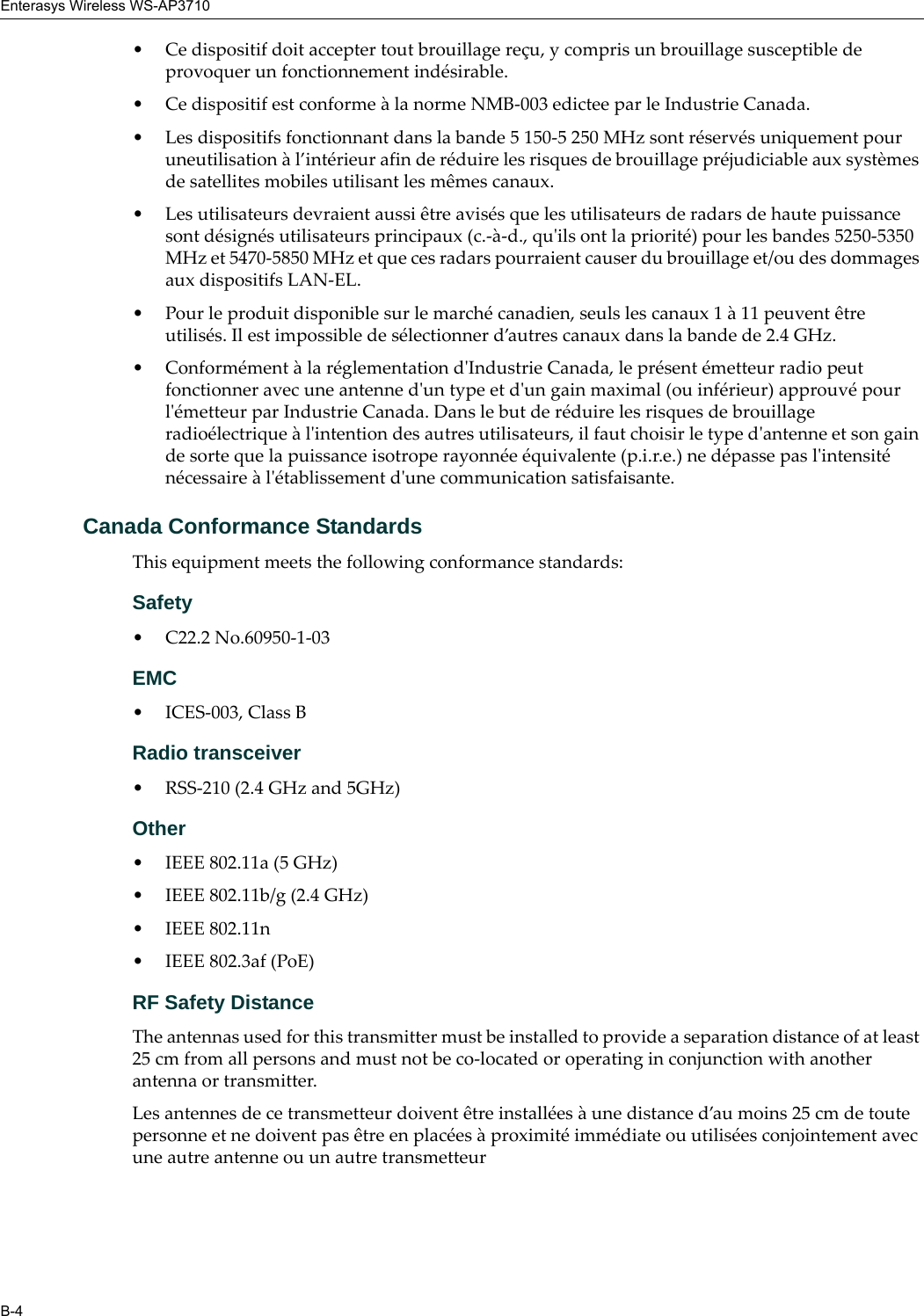
Enterasys Wireless WS-AP3710B-4• Ce dispositif doit accepter tout brouillage reçu, y compris un brouillage susceptible de provoquer un fonctionnement indésirable. • Ce dispositif est conforme à la norme NMB-003 edictee par le Industrie Canada.• Les dispositifs fonctionnant dans la bande 5 150-5 250 MHz sont réservés uniquement pour uneutilisation à l’intérieur afin de réduire les risques de brouillage préjudiciable aux systèmes de satellites mobiles utilisant les mêmes canaux.• Les utilisateurs devraient aussi être avisés que les utilisateurs de radars de haute puissance sont désignés utilisateurs principaux (c.-à-d., qu'ils ont la priorité) pour les bandes 5250-5350 MHz et 5470-5850 MHz et que ces radars pourraient causer du brouillage et/ou des dommages aux dispositifs LAN-EL.• Pour le produit disponible sur le marché canadien, seuls les canaux 1 à 11 peuvent être utilisés. Il est impossible de sélectionner d’autres canaux dans la bande de 2.4 GHz.• Conformément à la réglementation d'Industrie Canada, le présent émetteur radio peut fonctionner avec une antenne d'un type et d'un gain maximal (ou inférieur) approuvé pour l'émetteur par Industrie Canada. Dans le but de réduire les risques de brouillage radioélectrique à l'intention des autres utilisateurs, il faut choisir le type d'antenne et son gain de sorte que la puissance isotrope rayonnée équivalente (p.i.r.e.) ne dépasse pas l'intensité nécessaire à l'établissement d'une communication satisfaisante.Canada Conformance StandardsThis equipment meets the following conformance standards:Safety • C22.2 No.60950-1-03EMC • ICES-003, Class BRadio transceiver• RSS-210 (2.4 GHz and 5GHz)Other• IEEE 802.11a (5 GHz)• IEEE 802.11b/g (2.4 GHz)• IEEE 802.11n • IEEE 802.3af (PoE)RF Safety DistanceThe antennas used for this transmitter must be installed to provide a separation distance of at least 25 cm from all persons and must not be co-located or operating in conjunction with another antenna or transmitter.Les antennes de ce transmetteur doivent être installées à une distance d’au moins 25 cm de toute personne et ne doivent pas être en placées à proximité immédiate ou utilisées conjointement avec une autre antenne ou un autre transmetteur
Enterasys Wireless WS-AP3710Enterasys Wireless AP3710 Installation Guide B-5European CommunityThe Enterasys Wireless AP3710 is designed for use in the European Union and other countries with similar regulatory restrictions where the end user or installer is allowed to configure the Enterasys Wireless AP3710 for operation by entry of a country code relative to a specific country. After the country code is selected, the Enterasys Wireless AP3710 uses the proper frequencies and power outputs for that country code.The Enterasys Wireless AP3710 is intended for indoor use and must be installed in a proper indoor location. Contact local Authority for procedure to follow and regulatory information. For more details on legal combinations of frequencies, power levels and antennas, contact Enterasys.Declaration of Conformity with R&TTE Directive of the European Union 1999/5/ECThe following symbol indicates compliance with the Essential Requirements of the R&TTE Directive of the European Union (1999/5/EC). Declaration of Conformity in Languages of the European CommunityEnglish Hereby, Enterasys, declares that this Radio LAN device is in compliance with the essential requirements and other relevant provisions of Directive 1999/5/EC.Finnish Valmistaja Enterasys vakuuttaa täten että Radio LAN device tyyppinen laite on direktiivin 1999/5/EY oleellisten vaatimusten ja sitä koskevien direktiivin muiden ehtojen mukainen.Dutch Hierbij verklaart Enterasys dat het toestel Radio LAN device in overeenstemming is met de essentiële eisen en de andere relevante bepalingen van richtlijn 1999/5/EG. Bij deze verklaart Enterasys dat deze Radio LAN device voldoet aan de essentiële eisen en aan de overige relevante bepalingen van Richtlijn 1999/5/EC.French Par la présente Enterasys déclare que l'appareil Radio LAN device est conforme aux exigences essentielles et aux autres dispositions pertinentes de la directive 1999/5/CE. Par la présente, Enterasys déclare que ce Radio LAN device est conforme aux exigences essentielles et aux autres dispositions de la directive 1999/5/CE qui lui sont applicables.Swedish Härmed intygar Enterasys att denna Radio LAN device står I överensstämmelse med de väsentliga egenskapskrav och övriga relevanta bestämmelser som framgår av direktiv 1999/5/EG. Danish Undertegnede Enterasys erklærer herved, at følgende udstyr Radio LAN device overholder de væsentlige krav og øvrige relevante krav i direktiv 1999/5/EF.German Hiermit erklärt Enterasys die Übereinstimmung des "WLAN Wireless Controller bzw. Access Points" mit den grundlegenden Anforderungen und den anderen relevanten Festlegungen der Richtlinie 1999/5/EG.Greek ΜΕ ΤΗΝ ΠΑΡΟΥΣΑ Enterasys ∆ΗΛΩΝΕΙ ΟΤΙ Radio LAN device ΣΥΜΜΟΡΦΩΝΕΤΑΙ ΠΡΟΣ ΤΙΣ ΟΥΣΙΩ∆ΕΙΣ ΑΠΑΙΤΗΣΕΙΣ ΚΑΙ ΤΙΣ ΛΟΙΠΕΣ ΣΧΕΤΙΚΕΣ ∆ΙΑΤΑΞΕΙΣ ΤΗΣ Ο∆ΗΓΙΑΣ 1999/5/ΕΚ.Icelandic Enterasys lysir her med yfir að thessi bunadur, Radio LAN device, uppfyllir allar grunnkrofur, sem gerdar eru i R&TTE tilskipun ESB nr 1999/5/EC.Italian Con la presente Enterasys dichiara che questo Radio LAN device è conforme ai requisiti essenziali ed alle altre disposizioni pertinenti stabilite dalla direttiva 1999/5/CE.Spanish Por medio de la presente Enterasys declara que el Radio LAN device cumple con los requisitos esenciales y cualesquiera otras disposiciones aplicables o exigibles de la Directiva 1999/5/CE.
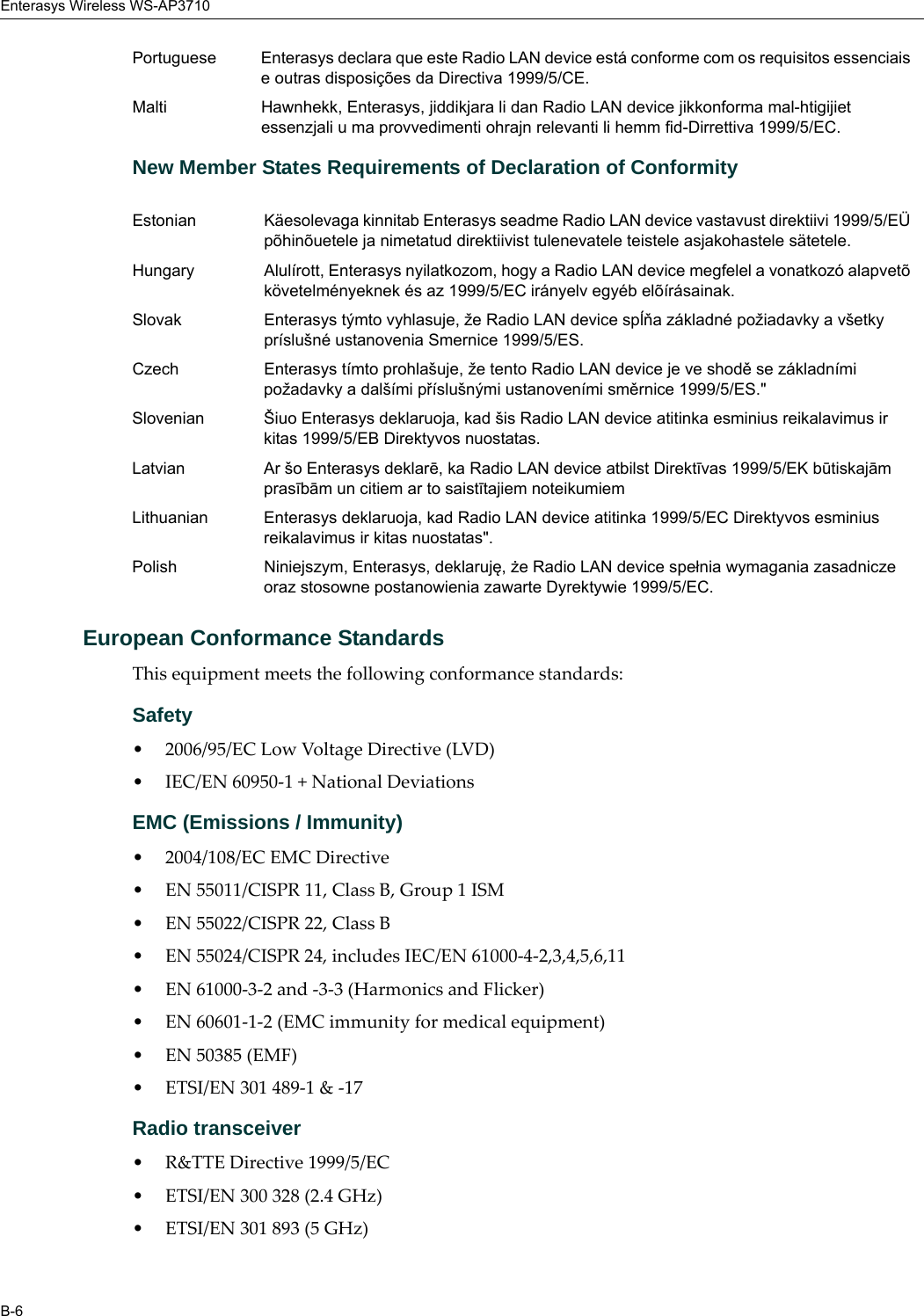
Enterasys Wireless WS-AP3710B-6New Member States Requirements of Declaration of ConformityEuropean Conformance StandardsThis equipment meets the following conformance standards:Safety • 2006/95/EC Low Voltage Directive (LVD)• IEC/EN 60950-1 + National DeviationsEMC (Emissions / Immunity)• 2004/108/EC EMC Directive• EN 55011/CISPR 11, Class B, Group 1 ISM• EN 55022/CISPR 22, Class B• EN 55024/CISPR 24, includes IEC/EN 61000-4-2,3,4,5,6,11• EN 61000-3-2 and -3-3 (Harmonics and Flicker)• EN 60601-1-2 (EMC immunity for medical equipment)• EN 50385 (EMF)• ETSI/EN 301 489-1 & -17 Radio transceiver • R&TTE Directive 1999/5/EC• ETSI/EN 300 328 (2.4 GHz)• ETSI/EN 301 893 (5 GHz)Portuguese Enterasys declara que este Radio LAN device está conforme com os requisitos essenciais e outras disposições da Directiva 1999/5/CE. Malti Hawnhekk, Enterasys, jiddikjara li dan Radio LAN device jikkonforma mal-htigijiet essenzjali u ma provvedimenti ohrajn relevanti li hemm fid-Dirrettiva 1999/5/EC.Estonian Käesolevaga kinnitab Enterasys seadme Radio LAN device vastavust direktiivi 1999/5/EÜ põhinõuetele ja nimetatud direktiivist tulenevatele teistele asjakohastele sätetele.Hungary Alulírott, Enterasys nyilatkozom, hogy a Radio LAN device megfelel a vonatkozó alapvetõ követelményeknek és az 1999/5/EC irányelv egyéb elõírásainak.Slovak Enterasys týmto vyhlasuje, že Radio LAN device spĺňa základné požiadavky a všetky príslušné ustanovenia Smernice 1999/5/ES.Czech Enterasys tímto prohlašuje, že tento Radio LAN device je ve shodě se základními požadavky a dalšími příslušnými ustanoveními směrnice 1999/5/ES."Slovenian Šiuo Enterasys deklaruoja, kad šis Radio LAN device atitinka esminius reikalavimus ir kitas 1999/5/EB Direktyvos nuostatas.Latvian Ar šo Enterasys deklarē, ka Radio LAN device atbilst Direktīvas 1999/5/EK būtiskajām prasībām un citiem ar to saistītajiem noteikumiemLithuanian Enterasys deklaruoja, kad Radio LAN device atitinka 1999/5/EC Direktyvos esminius reikalavimus ir kitas nuostatas".Polish Niniejszym, Enterasys, deklaruję, że Radio LAN device spełnia wymagania zasadnicze oraz stosowne postanowienia zawarte Dyrektywie 1999/5/EC.
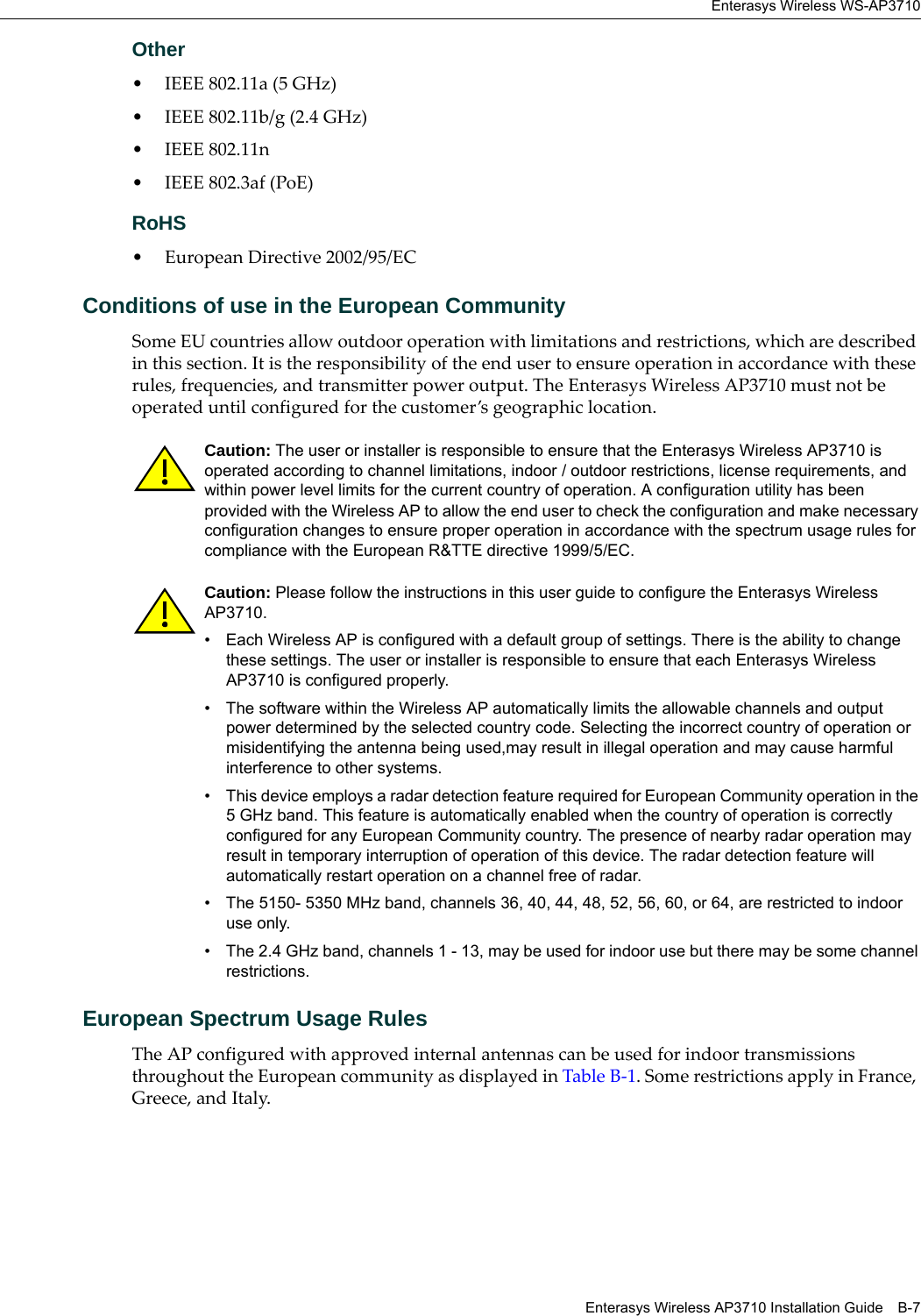
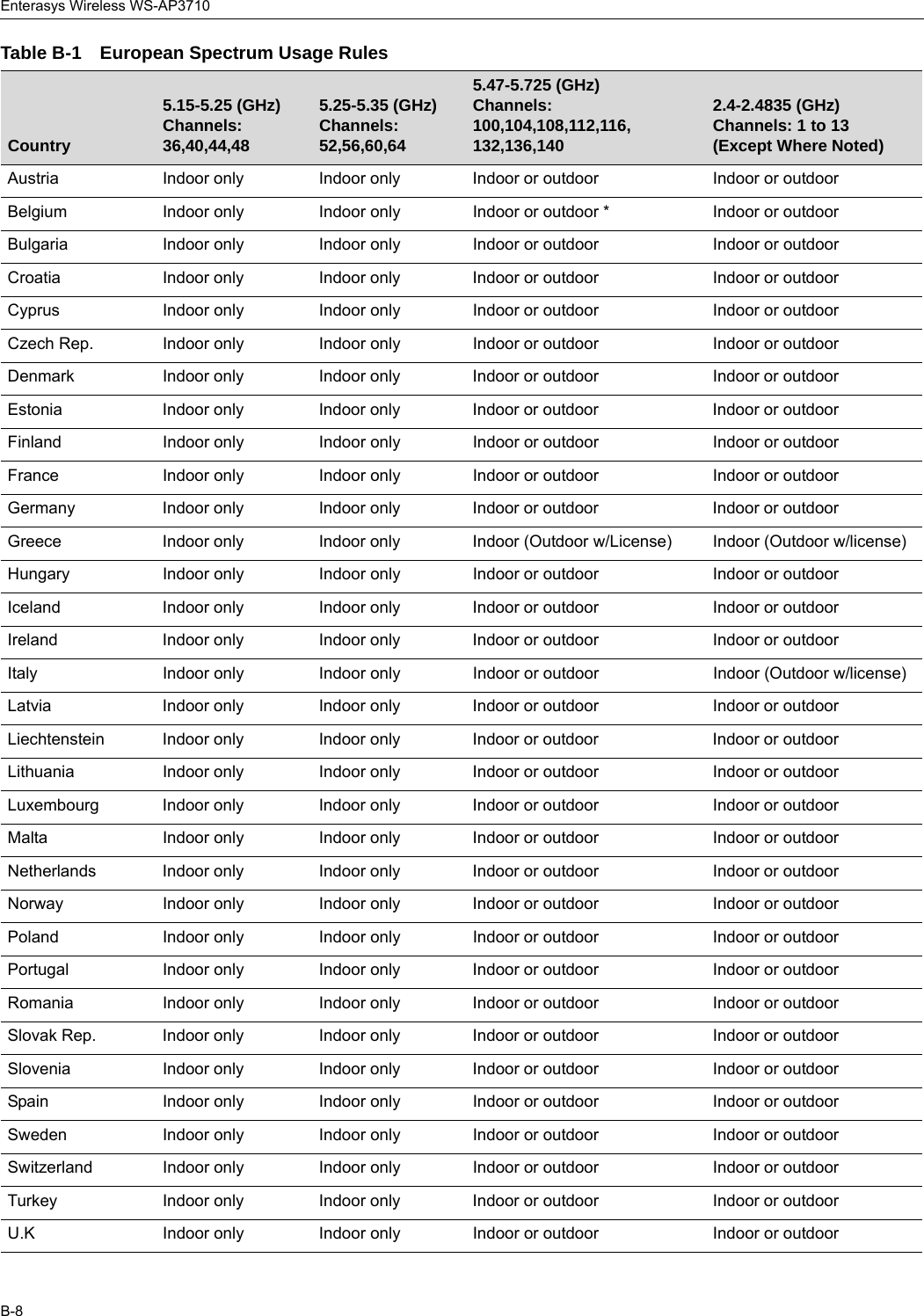
Enterasys Wireless WS-AP3710Enterasys Wireless AP3710 Installation Guide B-7Other• IEEE 802.11a (5 GHz)• IEEE 802.11b/g (2.4 GHz)• IEEE 802.11n • IEEE 802.3af (PoE)RoHS• European Directive 2002/95/ECConditions of use in the European CommunitySome EU countries allow outdoor operation with limitations and restrictions, which are described in this section. It is the responsibility of the end user to ensure operation in accordance with these rules, frequencies, and transmitter power output. The Enterasys Wireless AP3710 must not be operated until configured for the customer’s geographic location.European Spectrum Usage RulesThe AP configured with approved internal antennas can be used for indoor transmissions throughout the European community as displayed in Table B-1. Some restrictions apply in France, Greece, and Italy.Caution: The user or installer is responsible to ensure that the Enterasys Wireless AP3710 is operated according to channel limitations, indoor / outdoor restrictions, license requirements, and within power level limits for the current country of operation. A configuration utility has been provided with the Wireless AP to allow the end user to check the configuration and make necessary configuration changes to ensure proper operation in accordance with the spectrum usage rules for compliance with the European R&TTE directive 1999/5/EC.Caution: Please follow the instructions in this user guide to configure the Enterasys Wireless AP3710.• Each Wireless AP is configured with a default group of settings. There is the ability to change these settings. The user or installer is responsible to ensure that each Enterasys Wireless AP3710 is configured properly. • The software within the Wireless AP automatically limits the allowable channels and output power determined by the selected country code. Selecting the incorrect country of operation or misidentifying the antenna being used,may result in illegal operation and may cause harmful interference to other systems.• This device employs a radar detection feature required for European Community operation in the 5 GHz band. This feature is automatically enabled when the country of operation is correctly configured for any European Community country. The presence of nearby radar operation may result in temporary interruption of operation of this device. The radar detection feature will automatically restart operation on a channel free of radar.• The 5150- 5350 MHz band, channels 36, 40, 44, 48, 52, 56, 60, or 64, are restricted to indoor use only.• The 2.4 GHz band, channels 1 - 13, may be used for indoor use but there may be some channel restrictions.
Enterasys Wireless WS-AP3710B-8Table B-1 European Spectrum Usage RulesCountry5.15-5.25 (GHz) Channels: 36,40,44,485.25-5.35 (GHz)Channels: 52,56,60,645.47-5.725 (GHz)Channels: 100,104,108,112,116,132,136,1402.4-2.4835 (GHz)Channels: 1 to 13(Except Where Noted)Austria Indoor only Indoor only Indoor or outdoor Indoor or outdoorBelgium Indoor only Indoor only Indoor or outdoor * Indoor or outdoorBulgaria Indoor only Indoor only Indoor or outdoor Indoor or outdoorCroatia Indoor only Indoor only Indoor or outdoor Indoor or outdoorCyprus Indoor only Indoor only Indoor or outdoor Indoor or outdoorCzech Rep. Indoor only Indoor only Indoor or outdoor Indoor or outdoorDenmark Indoor only Indoor only Indoor or outdoor Indoor or outdoorEstonia Indoor only Indoor only Indoor or outdoor Indoor or outdoorFinland Indoor only Indoor only Indoor or outdoor Indoor or outdoorFrance Indoor only Indoor only Indoor or outdoor Indoor or outdoorGermany Indoor only Indoor only Indoor or outdoor Indoor or outdoorGreece Indoor only Indoor only Indoor (Outdoor w/License) Indoor (Outdoor w/license)Hungary Indoor only Indoor only Indoor or outdoor Indoor or outdoorIceland Indoor only Indoor only Indoor or outdoor Indoor or outdoorIreland Indoor only Indoor only Indoor or outdoor Indoor or outdoorItaly Indoor only Indoor only Indoor or outdoor Indoor (Outdoor w/license)Latvia Indoor only Indoor only Indoor or outdoor Indoor or outdoorLiechtenstein Indoor only Indoor only Indoor or outdoor Indoor or outdoorLithuania Indoor only Indoor only Indoor or outdoor Indoor or outdoorLuxembourg Indoor only Indoor only Indoor or outdoor Indoor or outdoorMalta Indoor only Indoor only Indoor or outdoor Indoor or outdoorNetherlands Indoor only Indoor only Indoor or outdoor Indoor or outdoorNorway Indoor only Indoor only Indoor or outdoor Indoor or outdoorPoland Indoor only Indoor only Indoor or outdoor Indoor or outdoorPortugal Indoor only Indoor only Indoor or outdoor Indoor or outdoorRomania Indoor only Indoor only Indoor or outdoor Indoor or outdoorSlovak Rep. Indoor only Indoor only Indoor or outdoor Indoor or outdoorSlovenia Indoor only Indoor only Indoor or outdoor Indoor or outdoorSpain Indoor only Indoor only Indoor or outdoor Indoor or outdoorSweden Indoor only Indoor only Indoor or outdoor Indoor or outdoorSwitzerland Indoor only Indoor only Indoor or outdoor Indoor or outdoorTurkey Indoor only Indoor only Indoor or outdoor Indoor or outdoorU.K Indoor only Indoor only Indoor or outdoor Indoor or outdoor
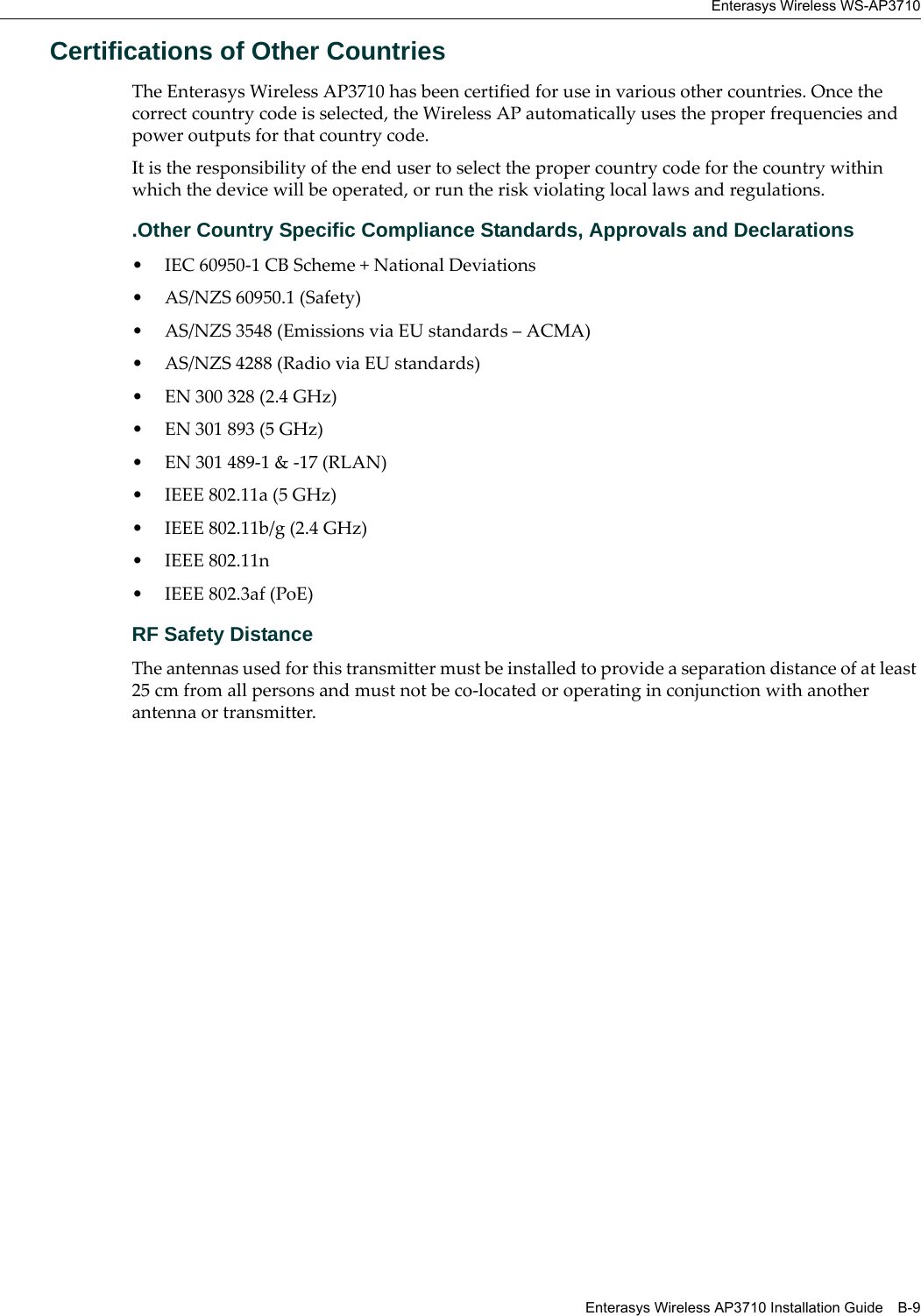
Enterasys Wireless WS-AP3710Enterasys Wireless AP3710 Installation Guide B-9Certifications of Other Countries The Enterasys Wireless AP3710 has been certified for use in various other countries. Once the correct country code is selected, the Wireless AP automatically uses the proper frequencies and power outputs for that country code.It is the responsibility of the end user to select the proper country code for the country within which the device will be operated, or run the risk violating local laws and regulations..Other Country Specific Compliance Standards, Approvals and Declarations• IEC 60950-1 CB Scheme + National Deviations• AS/NZS 60950.1 (Safety)• AS/NZS 3548 (Emissions via EU standards – ACMA)• AS/NZS 4288 (Radio via EU standards)• EN 300 328 (2.4 GHz)• EN 301 893 (5 GHz)• EN 301 489-1 & -17 (RLAN)• IEEE 802.11a (5 GHz)• IEEE 802.11b/g (2.4 GHz)• IEEE 802.11n• IEEE 802.3af (PoE)RF Safety DistanceThe antennas used for this transmitter must be installed to provide a separation distance of at least 25 cm from all persons and must not be co-located or operating in conjunction with another antenna or transmitter.
Enterasys Wireless WS-AP3710B-10

Navigation menu