Flying Dragon Development LT-033 USB Rechargeable speaker lantern User Manual ML 903 lantern manual v2

Flying Dragon Development Ltd. USB Rechargeable speaker lantern ML 903 lantern manual v2

User Manual

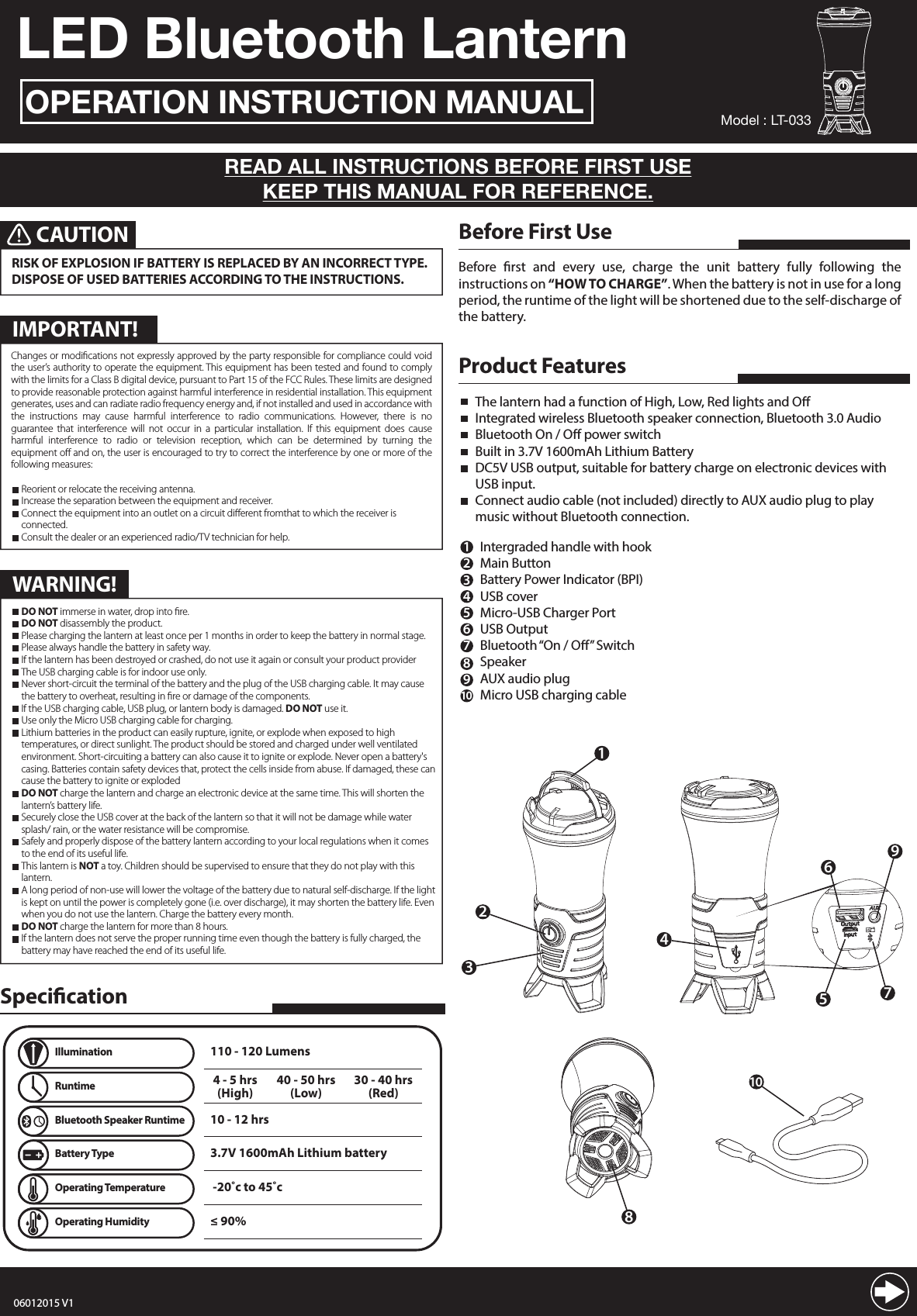
LED Bluetooth LanternOPERATION INSTRUCTION MANUALREAD ALL INSTRUCTIONS BEFORE FIRST USEKEEP THIS MANUAL FOR REFERENCE.Before rst and every use, charge the unit battery fully following the instructions on “HOW TO CHARGE”. When the battery is not in use for a long period, the runtime of the light will be shortened due to the self-discharge of the battery.Before First UseChanges or modications not expressly approved by the party responsible for compliance could void the user’s authority to operate the equipment. This equipment has been tested and found to comply with the limits for a Class B digital device, pursuant to Part 15 of the FCC Rules. These limits are designed to provide reasonable protection against harmful interference in residential installation. This equipment generates, uses and can radiate radio frequency energy and, if not installed and used in accordance with the instructions may cause harmful interference to radio communications. However, there is no guarantee that interference will not occur in a particular installation. If this equipment does cause harmful interference to radio or television reception, which can be determined by turning the equipment o and on, the user is encouraged to try to correct the interference by one or more of the following measures:  Reorient or relocate the receiving antenna.  Increase the separation between the equipment and    receiver.  Connect the equipment into an outlet on a circuit      dierent from that to which the receiver is connected.  Consult the dealer or an experienced radio/TV technician    for help.123Product FeaturesThe lantern had a function of High, Low, Red lights and OIntegrated wireless Bluetooth speaker connection, Bluetooth 3.0 AudioBluetooth On / O power switchBuilt in 3.7V 1600mAh Lithium BatteryDC5V USB output, suitable for battery charge on electronic devices with USB input.Connect audio cable (not included) directly to AUX audio plug to play music without Bluetooth connection.Intergraded handle with hookMain Button Battery Power Indicator (BPI)USB coverMicro-USB Charger PortUSB OutputBluetooth “On / O” SwitchSpeakerAUX audio plugMicro USB charging cable123456789108CAUTIONRISK OF EXPLOSION IF BATTERY IS REPLACED BY AN INCORRECT TYPE. DISPOSE OF USED BATTERIES ACCORDING TO THE INSTRUCTIONS. Model : LT-0335679410SpecicationIllumination4 - 5 hrs(High)10 - 12 hrs110 - 120 Lumens40 - 50 hrs(Low)30 - 40 hrs(Red)Runtime3.7V 1600mAh Lithium batteryBattery Type -20˚c to 45˚cOperating Temperature≤ 90% Operating HumidityBluetooth Speaker RuntimeChanges or modifications not expressly approved by the party responsible for compliance could void the user’s authority to operate the equipment. This equipment has been tested and found to comply with the limits for a Class B digital device, pursuant to Part 15 of the FCC Rules. These limits are designed to provide reasonable protection against harmful interference in residential installation. This equipment generates, uses and can radiate radio frequency energy and, if not installed and used in accordance with the instructions may cause harmful interference to radio communications. However, there is no guarantee that interference will not occur in a particular installation. If this equipment does cause harmful interference to radio or television reception, which can be determined by turning the equipment off and on, the user is encouraged to try to correct the interference by one or more of the following measures:  Reorient or relocate the receiving antenna.  Increase the separation between the equipment and receiver.  Connect the equipment into an outlet on a circuit different fromthat to which the receiver is     connected.  Consult the dealer or an experienced radio/TV technician for help.IMPORTANT!WARNING! DO NOT immerse in water, drop into fire. DO NOT disassembly the product. Please charging the lantern at least once per 1 months in order to keep the battery in normal stage. Please always handle the battery in safety way. If the lantern has been destroyed or crashed, do not use it again or consult your product provider The USB charging cable is for indoor use only. Never short-circuit the terminal of the battery and the plug of the USB charging cable. It may cause    the battery to overheat, resulting in fire or damage of the components. If the USB charging cable, USB plug, or lantern body is damaged. DO NOT use it. Use only the Micro USB charging cable for charging. Lithium batteries in the product can easily rupture, ignite, or explode when exposed to high      temperatures, or direct sunlight. The product should be stored and charged under well ventilated      environment. Short-circuiting a battery can also cause it to ignite or explode. Never open a battery's    casing. Batteries contain safety devices that, protect the cells inside from abuse. If damaged, these can    cause the battery to ignite or exploded DO NOT charge the lantern and charge an electronic device at the same time. This will shorten the    lantern’s battery life. Securely close the USB cover at the back of the lantern so that it will not be damage while water      splash/ rain, or the water resistance will be compromise. Safely and properly dispose of the battery lantern according to your local regulations when it comes    to the end of its useful life. This lantern is NOT a toy. Children should be supervised to ensure that they do not play with this     lantern. A long period of non-use will lower the voltage of the battery due to natural self-discharge. If the light    is kept on until the power is completely gone (i.e. over discharge), it may shorten the battery life. Even    when you do not use the lantern. Charge the battery every month. DO NOT charge the lantern for more than 8 hours. If the lantern does not serve the proper running time even though the battery is fully charged, the     battery may have reached the end of its useful life.06012015 V1
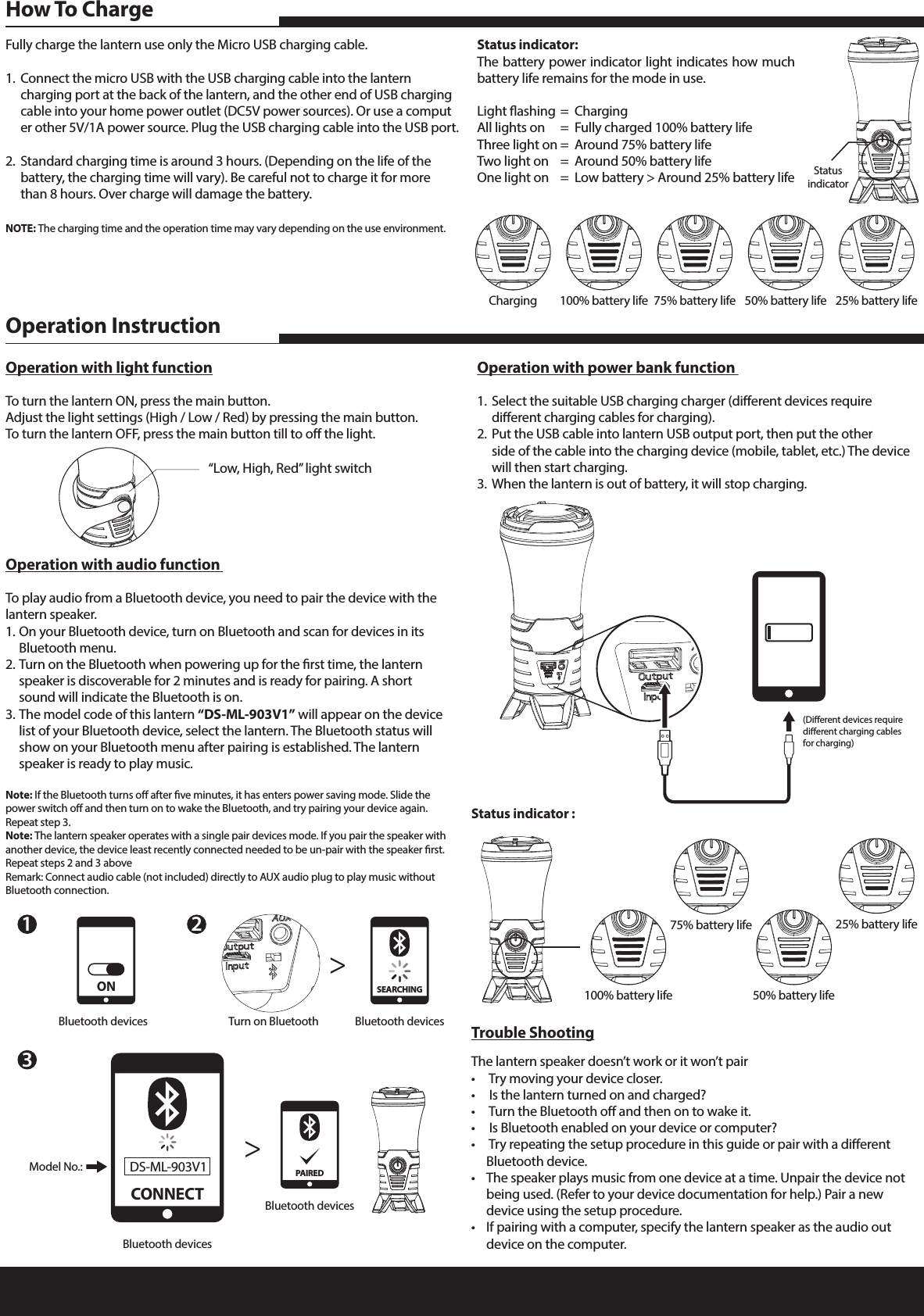
Fully charge the lantern use only the Micro USB charging cable.1.  Connect the micro USB with the USB charging cable into the lantern      charging port at the back of the lantern, and the other end of USB charging    cable into your home power outlet (DC5V power sources). Or use a comput   er other 5V/1A power source. Plug the USB charging cable into the USB port.2.  Standard charging time is around 3 hours. (Depending on the life of the      battery, the charging time will vary). Be careful not to charge it for more      than 8 hours. Over charge will damage the battery. NOTE: The charging time and the operation time may vary depending on the use environment.Status indicator:The battery power indicator light indicates how much battery life remains for the mode in use.Light ashing  =  ChargingAll lights on  =  Fully charged 100% battery lifeThree light on  =  Around 75% battery life Two light on  =  Around 50% battery lifeOne light on  =  Low battery > Around 25% battery lifeHow To ChargeTrouble ShootingThe lantern speaker doesn’t work or it won’t pair•   Try moving your device closer.•   Is the lantern turned on and charged?•   Turn the Bluetooth o and then on to wake it.•   Is Bluetooth enabled on your device or computer?•   Try repeating the setup procedure in this guide or pair with a dierent      Bluetooth device.•  The speaker plays music from one device at a time. Unpair the device not     being used. (Refer to your device documentation for help.) Pair a new      device using the setup procedure.•  If pairing with a computer, specify the lantern speaker as the audio out      device on the computer.  Operation with audio function To play audio from a Bluetooth device, you need to pair the device with the lantern speaker.1. On your Bluetooth device, turn on Bluetooth and scan for devices in its      Bluetooth menu.2. Turn on the Bluetooth when powering up for the rst time, the lantern      speaker is discoverable for 2 minutes and is ready for pairing. A short      sound will indicate the Bluetooth is on.3. The model code of this lantern “DS-ML-903V1” will appear on the device    list of your Bluetooth device, select the lantern. The Bluetooth status will      show on your Bluetooth menu after pairing is established. The lantern      speaker is ready to play music.Note: If the Bluetooth turns o after ve minutes, it has enters power saving mode. Slide the power switch o and then turn on to wake the Bluetooth, and try pairing your device again. Repeat step 3.Note: The lantern speaker operates with a single pair devices mode. If you pair the speaker with another device, the device least recently connected needed to be un-pair with the speaker rst. Repeat steps 2 and 3 aboveRemark: Connect audio cable (not included) directly to AUX audio plug to play music without Bluetooth connection.Operation with power bank function 1.  Select the suitable USB charging charger (dierent devices require      dierent charging cables for charging).2.  Put the USB cable into lantern USB output port, then put the other      side of the cable into the charging device (mobile, tablet, etc.) The device     will then start charging.3.  When the lantern is out of battery, it will stop charging.Operation with light functionTo turn the lantern ON, press the main button.Adjust the light settings (High / Low / Red) by pressing the main button.To turn the lantern OFF, press the main button till to o the light. Operation InstructionStatus indicator :23Turn on Bluetooth>>Bluetooth devicesSEARCHING(Dierent devices require dierent charging cables for charging)Charging 100% battery life 75% battery life 50% battery life 25% battery life100% battery life75% battery life50% battery life25% battery lifeStatusindicator“Low, High, Red” light switch1Bluetooth devicesONBluetooth devicesModel No.:CONNECTDS-ML-903V1Bluetooth devicesPAIRED

Navigation menu