Focus Electronic Co RM868 WIRELESS REMOTE User Manual RM 868 Manual ai

Focus Electronic Co Ltd WIRELESS REMOTE RM 868 Manual ai

Users Manual

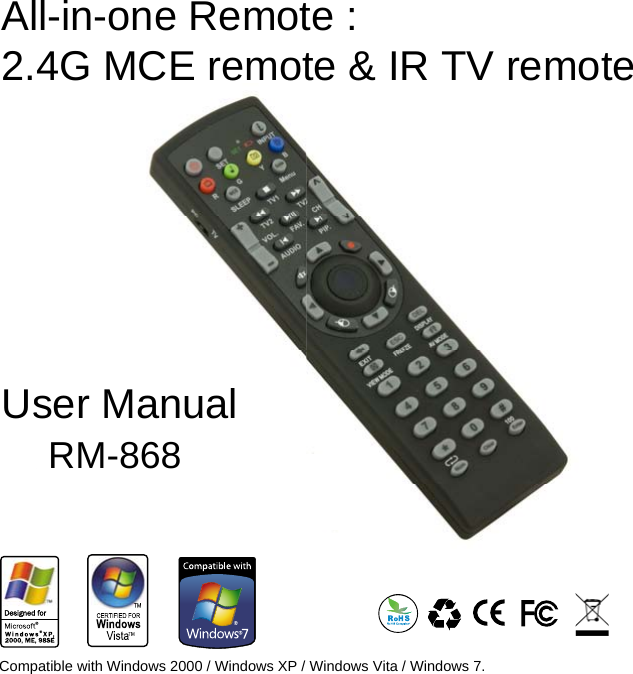
User Manual    RM-868All-in-one Remote : 2.4G MCE remote & IR TV remoteser Manual RM-868Compatible with Windows 2000 / Windows XP / Windows Vita / Windows 7.
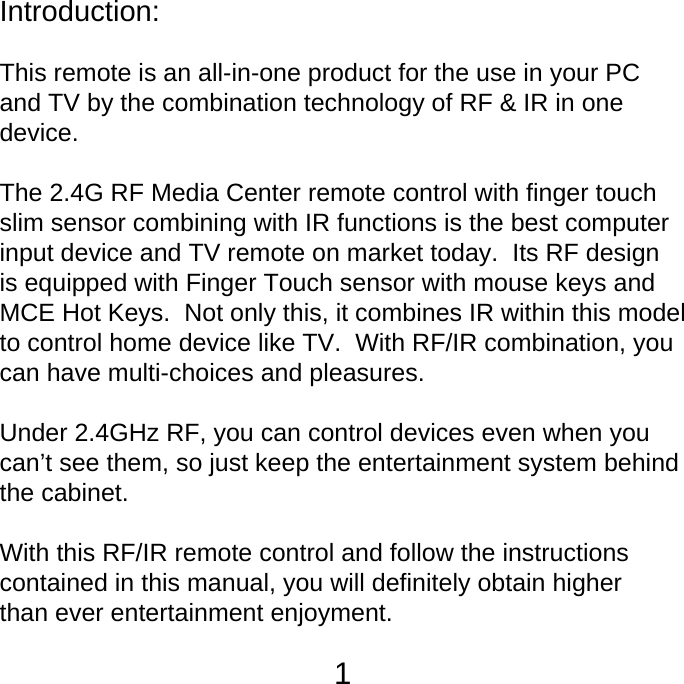
Introduction: This remote is an all-in-one product for the use in your PC and TV by the combination technology of RF & IR in one device.The 2.4G RF Media Center remote control with finger touch slim sensor combining with IR functions is the best computerinput device and TV remote on market today.  Its RF design is equipped with Finger Touch sensor with mouse keys and MCE Hot Keys.  Not only this, it combines IR within this model to control home device like TV.  With RF/IR combination, you can have multi-choices and pleasures.  Under 2.4GHz RF, you can control devices even when you can’t see them, so just keep the entertainment system behind the cabinet.  With this RF/IR remote control and follow the instructions contained in this manual, you will definitely obtain higher than ever entertainment enjoyment. 1
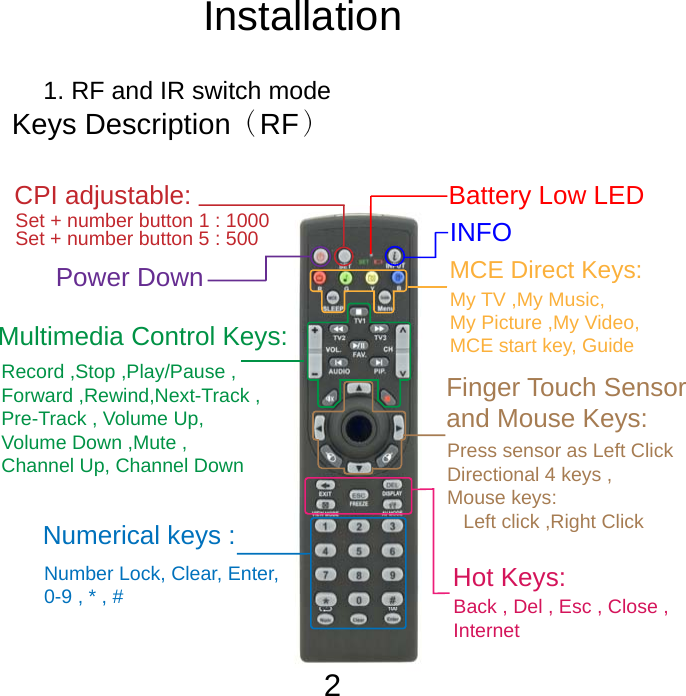
RF mode for PC :  1. RF and IR switch mode Keys Description(RF)Switchto PC modeTVPCBattery Low LEDNumber Lock, Clear, Enter, 0-9 , * , # Hot Keys:MCE Direct Keys:Multimedia Control Keys:My TV ,My Music, My Picture ,My Video,MCE start key, GuideRecord ,Stop ,Play/Pause ,Forward ,Rewind,Next-Track ,Pre-Track , Volume Up,Volume Down ,Mute ,Channel Up, Channel DownFinger Touch Sensor and Mouse Keys:Back , Del , Esc , Close , InternetNumerical keys :INFOPower Down Press sensor as Left ClickDirectional 4 keys ,Mouse keys:    Left click ,Right ClickCPI adjustable: Set + number button 1 : 1000 Set + number button 5 : 500Installation2
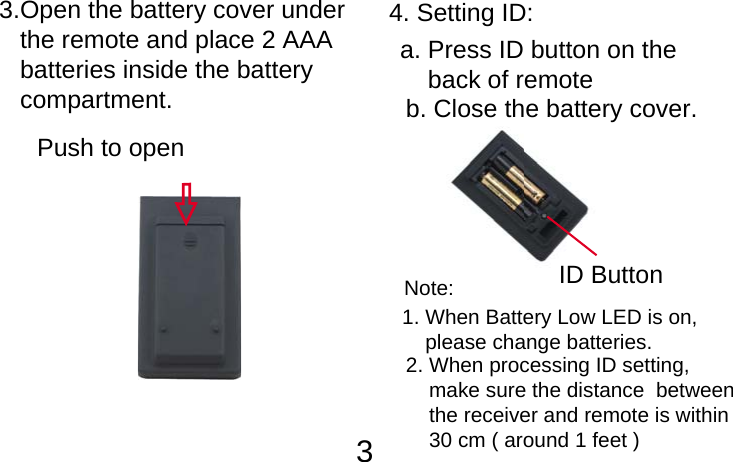
         33.Open the battery cover under    the remote and place 2 AAA    batteries inside the battery    compartment.Push to openID Button4. Setting ID:a. Press ID button on the     back of remote b. Close the battery cover.2. When processing ID setting,     make sure the distance  between     the receiver and remote is within     30 cm ( around 1 feet )1. When Battery Low LED is on,     please change batteries.Note:
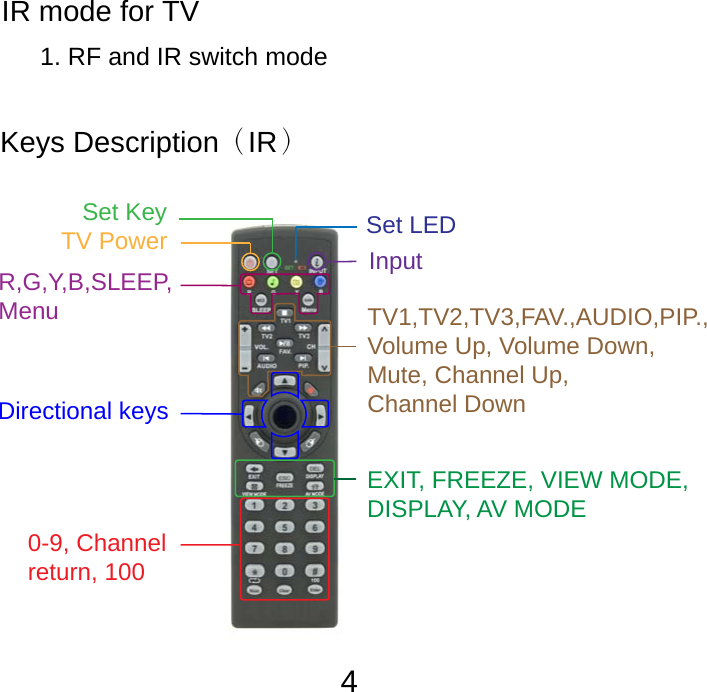
FCC Information: The  Federal  Communication  Commission  Radio  Frequency  Interference Statement includes the following paragraph:The equipment has been tested and found to comply with the limits for a Class B  Digital  Device,  pursuant  to  part  15  of  the  FCC  Rules.  These  limits  are designed  to  provide  reasonable  protection  against  harmful  interference  in  a residential installation. This equipment generates, uses and can radiate radio frequency  energy  and,  if  not  installed  and  used  in  accordance  with  the instruction, may cause harmful interference to radio communication. However, there is no grantee that interference will not occur in a particular installation. If this equipment dose cause harmful interference to radio or television reception, which  can  be  determined  by  turning  the  equipment  off  and  on,  the  user  is encouraged to try to correct the interference by one or more of the following measures:- Reorient or relocate the receiving antenna.- Increase the separation between the equipment and receiver.- Connect the equipment into an outlet on a circuit different from that to whichthe receiver is connected.- Consult the dealer or an experienced radio/TV technician for help. IR mode for TV 1. RF and IR switch modeKeys Description(IR)EXIT, FREEZE, VIEW MODE,DISPLAY, AV MODE Set LED Set KeyTV Power  InputR,G,Y,B,SLEEP,Menu TV1,TV2,TV3,FAV.,AUDIO,PIP.,Volume Up, Volume Down,Mute, Channel Up, Channel DownDirectional keys 0-9, Channel return, 1004
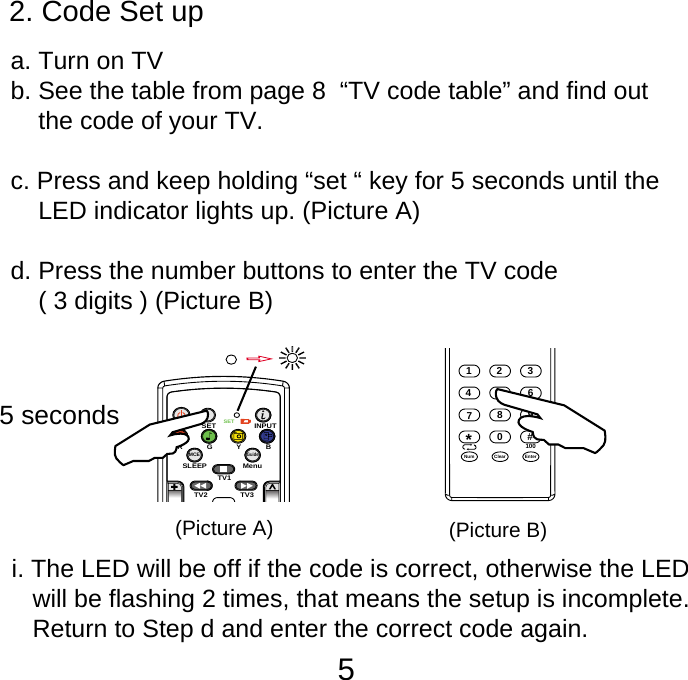
52. Code Set up       a. Turn on TV    b. See the table from page 8  “TV code table” and find out         the code of your TV.    c. Press and keep holding “set “ key for 5 seconds until the         LED indicator lights up. (Picture A)    d. Press the number buttons to enter the TV code         ( 3 digits ) (Picture B)SETSETINPUTSLEEP MenuTV1TV3TV2MCEGuideRGYB5 seconds123876450Num9#EnterClear*100(Picture A) (Picture B)i. The LED will be off if the code is correct, otherwise the LED    will be flashing 2 times, that means the setup is incomplete.     Return to Step d and enter the correct code again.
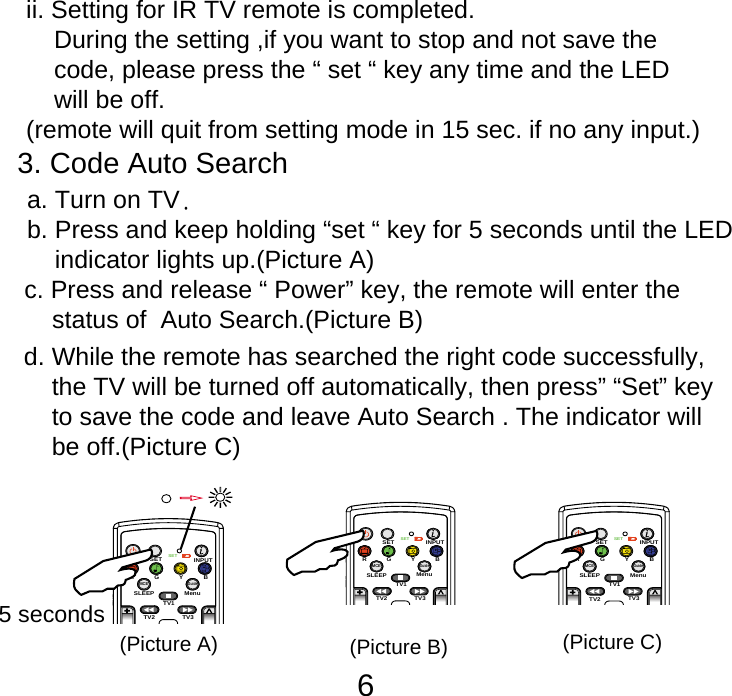
63. Code Auto Search       c. Press and release “ Power” key, the remote will enter the     status of  Auto Search.(Picture B) d. While the remote has searched the right code successfully,     the TV will be turned off automatically, then press” “Set” key     to save the code and leave Auto Search . The indicator will     be off.(Picture C)ii. Setting for IR TV remote is completed.     During the setting ,if you want to stop and not save the     code, please press the “ set “ key any time and the LED     will be off.(remote will quit from setting mode in 15 sec. if no any input.)   b. Press and keep holding “set “ key for 5 seconds until the LED       indicator lights up.(Picture A) a. Turn on TV.SETSETINPUTSLEEP MenuTV1TV3TV2MCEGuideRGYB5 seconds(Picture A)SETSETINPUTSLEEP MenuTV1TV3TV2MCEGuideRGYB(Picture B)SETSETINPUTSLEEP MenuTV1TV3TV2MCEGuideRGYB(Picture C)
7Information to the users  The herein code is applicable for most popular TV on market,   later version of TV which is not included in the list may result   in improper function for some keys on the remote.e. Checking the setting :   Turn on the TV and check functions of other keys to see if     they are working correctly, such as [CH+/-] & [ 0- 9 ]. If not,     return to step b to enter the status of Auto Search again.   *  The default value of first setting is for TV1 and please press    TV 2 before pressing “ set “ key for the setting of the second    TV.This remote is available for up to 3 sets of TV setting at    one timeWarning  Changes or modifications not expressly approved by the   manufacturer could void the user’s authority to operate the  equipment.
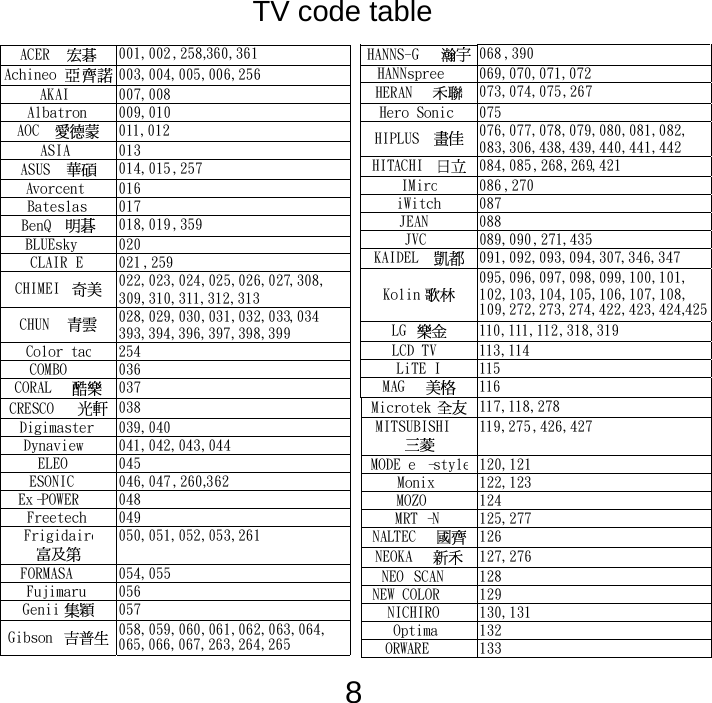
8   ACER  001,002,258,360,361Achineo 003,004,005,006,256AKAI 007,008Albatron 009,010AOC  011,012ASIA 013ASUS 014,015,257Avorcent 016Bateslas 017BenQ  018,019 ,359BLUEsky 020CLAIR E 021 ,259CHIMEI  022,023,024,025,026,027,308,309,310,311,312,313 CHUN  028,029,030,031,032,033,034393,394,396,397,398,399 Color tac254COMBO 036CORAL  037CRESCO 038Digimaster 039,040Dynaview 041,042,043,044ELEO 045ESONIC 046,047 ,260,362Ex-POWER 048Freetech 049Frigidaire 050,051,052,053,261FORMASA 054,055Fujimaru 056Genii  057Gibson 058,059,060,061,062,063,064,065,066,067,263,264,265 HANNS-G 068 ,390HANNspree 069,070,071,072HERAN  073,074,075,267Hero Sonic 075HIPLUS  076,077,078,079,080,081,082,083,306,438,439,440,441,442 HITACHI 084,085 ,268,269,421IMiro086 ,270iWitch 087JEAN 088JVC 089,090 ,271,435KAIDEL 091,092,093,094,307,346,347Kolin  095,096,097,098,099,100,101,102,103,104,105,106,107,108,109,272,273,274,422,423,424, LG  110,111,112,318,319LCD TV 113,114LiTE I 115MAG   116 Microtek 117,118,278MITSUBISHI 119,275 ,426,427MODE e-style120,121Monix 122,123MOZO 124MRT-N 125,277NALTEC 126NEOKA  127,276NEO SCAN 128NEW COLOR 129NICHIRO 130,131Optima 132ORWARE 133425TV code table
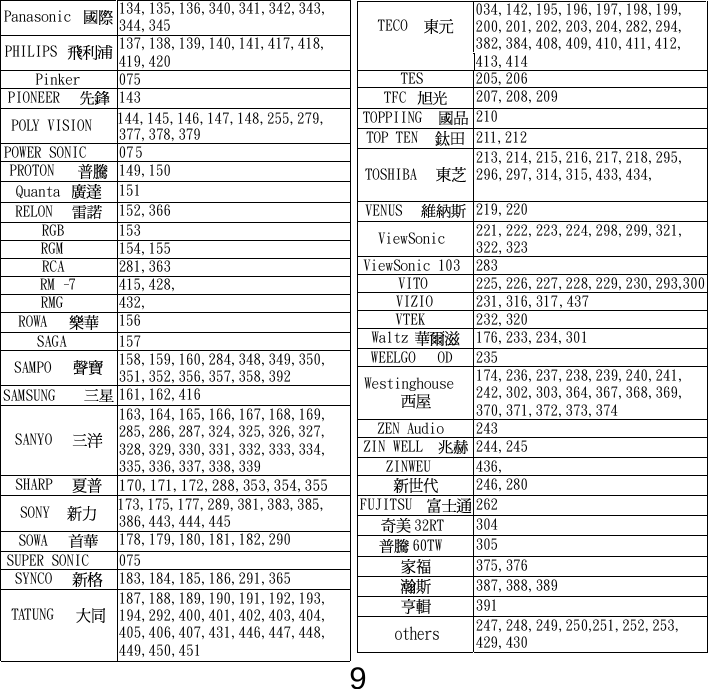
9Panasonic 134,135,136,340,341,342,343,344,345 PHILIPS 137,138,139,140,141,417,418,419,420 Pinker 075PIONEER 143POLY VISION 144,145,146,147,148,255,279,377,378,379 POWER SONIC 075PROTON 149,150Quanta  151RELON  152,366RGB 153RGM 154,155RCA 281,363RM-7 415,428,RMG 432,ROWA  156SAGA 157SAMPO  158,159,160,284,348,349,350,351,352,356,357,358,392 SAMSUNG 161,162,416SANYO  163,164,165,166,167,168,169,285,286,287,324,325,326,327,328,329,330,331,332,333,334,335,336,337,338,339 SHARP  170,171,172,288,353,354,355SONY  173,175,177,289,381,383,385,386,443,444,445 SOWA  178,179,180,181,182,290SUPER SONIC 075SYNCO  183,184,185,186,291,365TATUNG187,188,189,190,191,192,193,194,292,400,401,402,403,404,405,406,407,431,446,447,448,449,450,451TECO  034,142,195,196,197,198,199,200,201,202,203,204,282,294,382,384,408,409,410,411,412,413,414 TES 205,206TFC  207,208,209TOPPIING 210TOP TEN 211,212TOSHIBA213,214,215,216,217,218,295,296,297,314,315,433,434,  VENUS 219,220ViewSonic  221,222,223,224,298,299,321,322,323 ViewSonic 103 283VITO 225,226,227,228,229,230,293,VIZIO 231,316,317,437VTEK 232,320Waltz  176,233,234,301WEELGO OD 235Westinghouse 174,236,237,238,239,240,241,242,302,303,364,367,368,369,370,371,372,373,374 ZEN Audio 243ZIN WELL 244,245ZINWEU 436, 246,280FUJITSU 26232RT  30460TW  305 375,376 387,388,389 391247,248,249,250,251,252,253,429,430  300others
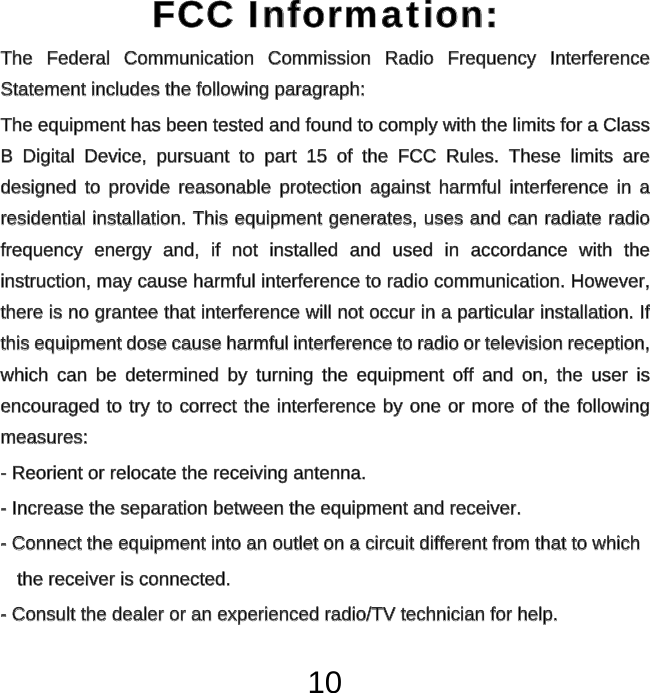
10FCC Information: FCC Information: The Federal Communication Commission Radio Frequency Interference The  Federal  Communication  Commission  Radio  Frequency  Interference Statement includes the following paragraph:Statement includes the following paragraph:The equipment has been tested and found to comply with the limits for a Class The equipment has been tested and found to comply with the limits for a Class B Digital Device, pursuant to part 15 of the FCC Rules. These limits are B  Digital  Device,  pursuant  to  part  15  of  the  FCC  Rules.  These  limits  are designed to provide reasonable protection against harmful interference in a designed  to  provide  reasonable  protection  against  harmful interference in a residential installation. This equipment generates, uses and can radiate radio residential installation. This equipment generates, uses and can radiate radio frequency energy and, if not installed and used in accordance with the frequency  energy  and,  if  not  installed  and  used  in  accordance  with  the instruction, may cause harmful interference to radio communication. However, instruction, may cause harmful interference to radio communication. However, there is no grantee that interference will not occur in a particular installation. If there is no grantee that interference will not occur in a particular installation. If this equipment dose cause harmful interference to radio or television reception, this equipment dose cause harmful interference to radio or television reception, which can be determined by turning the equipment off and on, the user is which  can  be  determined  by  turning  the  equipment  off  and  on,  the  user  is encouraged to try to correct the interference by one or more of the following encouraged to try to correct the interference by one or more of the following measures:measures:- Reorient or relocate the receiving antenna.- Reorient or relocate the receiving antenna.- Increase the separation between the equipment and receiver.- Increase the separation between the equipment and receiver.- Connect the equipment into an outlet on a circuit different from that to which- Connect the equipment into an outlet on a circuit different from that to whichthe receiver is connected.the receiver is connected.- Consult the dealer or an experienced radio/TV technician for help.- Consult the dealer or an experienced radio/TV technician for help.
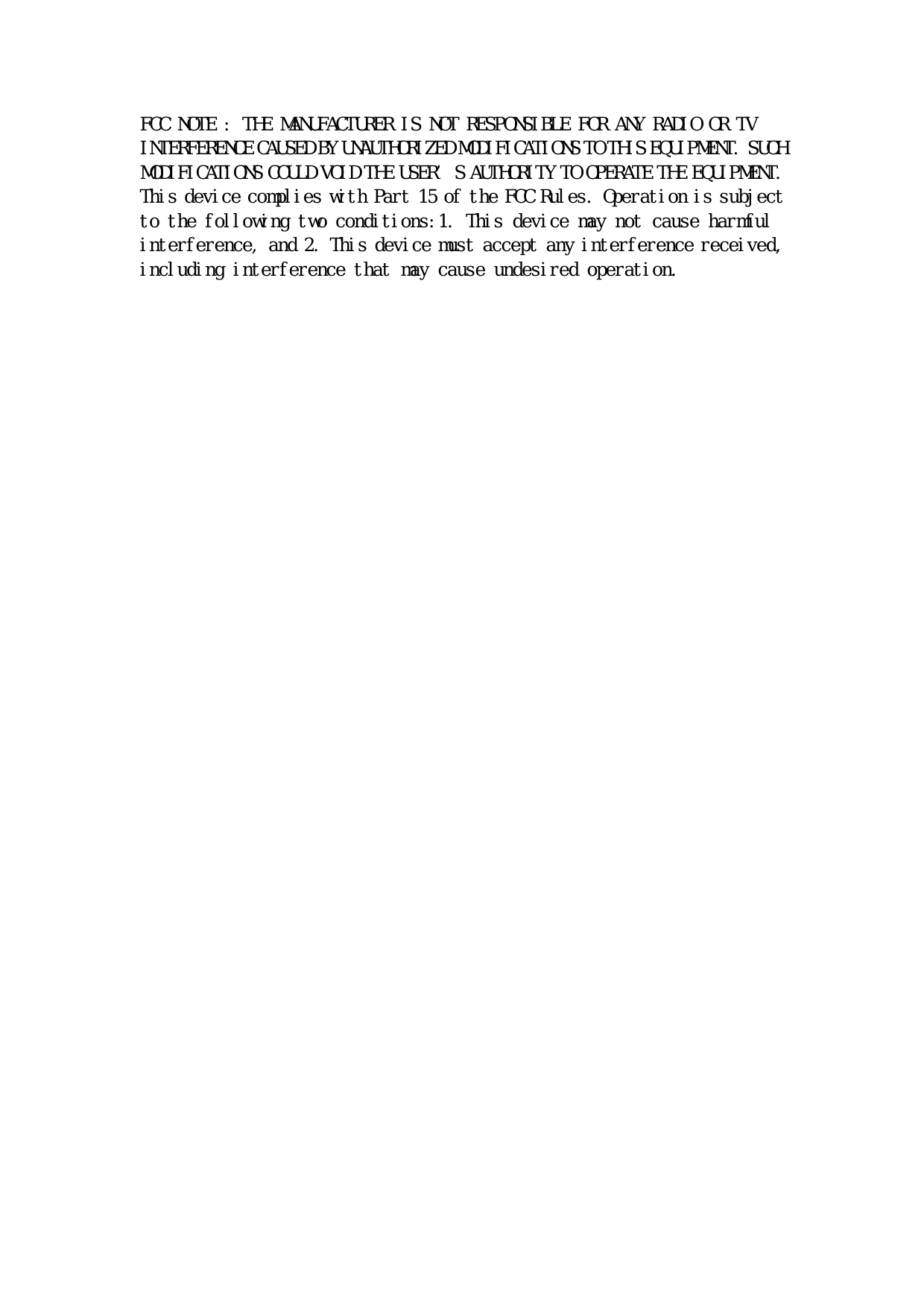
FCC NOTE : THE MANUFACTURER IS NOT RESPONSIBLE FOR ANY RADIO OR TV INTERFERENCE CAUSED BY UNAUTHORIZED MODIFICATIONS TO THIS EQUIPMENT. SUCH MODIFICATIONS COULD VOID THE USER’S AUTHORITY TO OPERATE THE EQUIPMENT. This device complies with Part 15 of the FCC Rules. Operation is subject to the following two conditions:1. This device may not cause harmful interference, and 2. This device must accept any interference received, including interference that may cause undesired operation.

Navigation menu