Formosa Teletek BT118FTT02 Bluetooth Carkit User Manual
Formosa Teletek Corporation Bluetooth Carkit
User Manual

Bluetooh Handsfree Carkit
Bluetooth your safety
Introduction
The Bluetooth Handsfree Carkit is base on Bluetooth wireless technology. You
can easily convert your mobile phone communication into this in-car solution,
talking through its build-in high quality speaker and high sensitivity
microphone. The complete set includes cigarette lighter adapter for your
quick installation.
The Bluetooth wireless technology makes this product connecting with any
Bluetooth mobile phone without using cable. You need to have a mobile
phone with Bluetooth capability and handsfree profile. The connection
between this product and bluetooth mobile is based on an audio link that
provides fast and reliable transmission of voice.
Note: This bluetooth carkit just supports “call receiving” function, if
bluetooth phone only has headset profile, without handsfree
profile.
It doesn’t support a bluetooth phone without headset and
handsfree profile.
The following page of this user manual focus on how to use this product
Getting started
Assembly
Before you use the this carkit, you must first:
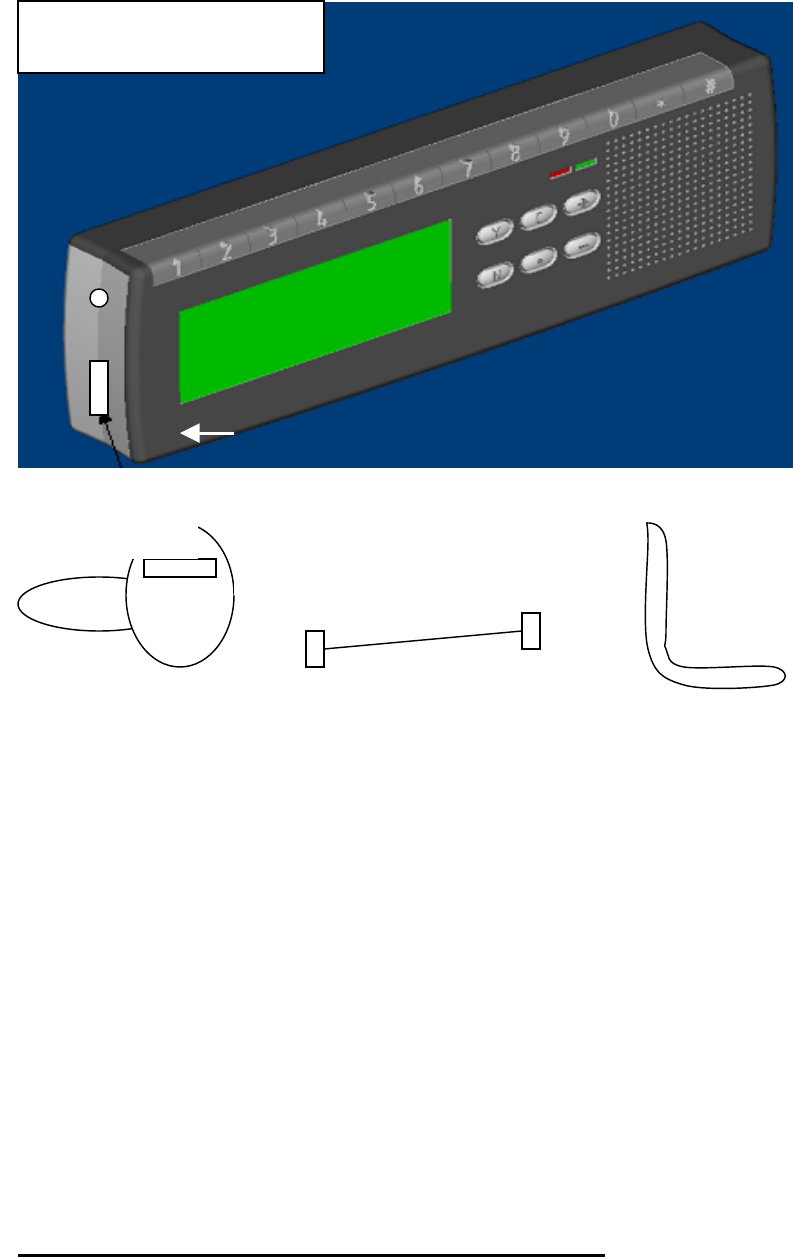
1. Install the stand into the stand socket on the back of this product
2. Connect the USB cable to the USB power jack on the carkit
3. Connect the other end of the USB cable to the USB power jack on the
Cigarette lighter adapter.
4. Make sure the power switch on the Cigarette lighter adapter is off. Plug
the cigarette lighter adapter into the cigarette lighter power supply in
your car. Turn on the power switch. The LED power indicator on the
carkit shows a steady red light, the display shows “Welcome !!!”.
5. Stick the stand on a suitable position on your dashboard.
Pair the bluetooth carkit with your mobile phone
You pair the carkit with the phone by adding it to the pairing list in the phone.
The two devices then recognize each other when they connect.
Build-in Microphone
Cigarette liger adapter
USB jack
Power switch
USB cable Stand
Overview

1. Prepare your phone for turning on the bluetooth function.
2. Key-in a number,(1~4 digits), to be your password, then long press the
“Y” button until the Green LED starts flashing four times per second. The
LCD shows “Paring”.
3. On you phone, start searching new device, according to the user’s guide.
Make sure the carkit is within 5m of the phone.
4. “Auto Blue” appears in the pairing list on your phone. Selects it and
key-in the password as you just key-in in the carkit.
5. Press “ “ button on the carkit, the display show “Connecting …”. If the
connection successes, the display shows “ Connected” for 3 seconds,
then shows “Bluetooth carkit”. The LED signal indicator shows a steady
Green light.
6. If the connection fails, the display shows “Connect failed !”, the LED
signal is off. Please try it again.
Note: You only pair the carkit with your mobile phone at the first
time. You don’t have to redo the pairing process until you want
to use it with another mobile phone.
Connect/Disconnect
1. Automatically connect: The carkit will connect to the paired phone
automatically when the power is on.
2. Lost connection: Anytime the carkit lost connection with the paired
phone, either 1) the mobile phone is power off, 2) two devices is out of
range, 3) press the key. The LCD display shows “Disconnected !”, and
the LED signal indicator is off.
3. Reconnect the paired device: Press “ “ button to reconnect the
paired phone. The display shows “Connecting …”, and “Connected” for
3 seconds, and “Bluetooth carkit”. The LED signal indicator flashes 4
times per second during connecting period, and shows steady Green light
when it connects.
If the connection fails, the display shows “Connect failed”, the LED
signal is off.
4. Disconnect: press “ “ button to disconnect the link between mobile
phone and car kit during talk mode. The LED signal indicator is off, and
display shows “Disconnected !”

Standby mode
• The LCD display shows “Bluetooth carkit” during standby mode,
• Press “N” button to return to the standby mode in any situation.
Calls
Your mobile phone must turn on and be within range of a network.
The display shows “Call active” in the talking mode.
Receiving a call
When you receive a call, carkit rings, and the display shows “Answer?” or
caller ID. The LED signal indicator flashes Green light 8 times per second
To answer a call
Press the “Y” button to answer the call.
To reject a call
Press the “N ” button to reject the call.
To terminate a call
Press the “N” button during the talking mode to terminate the call. The
display shows “Call terminated”.
Making a call
1. Enter the phone number, the number shows on the display.
2. Press the “c” button to clear the last dialing digit, or press “N” button
to clear all digits for going back to the standby mode.
3. Press the “Y” button to make the call.
To Redial
1. Press “Y” button, the display shows the last dialing number.
2. Press the “Y” button again to redial.
To make a call using voice dialing
If your phone supports voice dialing, and it is activated, you can use this
feature with this carkit.
1. Refer to the phone’s user guide to enable the voice commands on your
phone;
2. Press and hold the “c” button. Wait for the “beep”, and say the name

as you recorded on your phone.
3. If it successes, the carkit will repeat and dial out. The display shows
“Voice Dialing”, and then shows the number. If LCD shows
“Bluetooth carkit” again, it means NO MATCH.
To make a call using speed dialing
If your phone supports speed dialing, and it is activated, you can use this
feature with this carkit
1. Refer to the phone’s user guide to enable the speed dialing function on
your phone.
2. From the standby, press and hold the position number from 1-9 as you
saved on your phone. The display shows “Memory dialing” for 1
second, then show the number.
Note: If you place a call on the phone, the carkit won’t show the
number on the display until the call is active.
To make an international call
1. Press and hold “*” button until a + sign appears in the display.
2. Enter the country code, area code, and phone number.
3. Press “Y” button to make a call.
To turn off the microphone during the call:
• Press “c” button to mute the microphone, the display shows “Mute”.
• Press “c” button again to enable the microphone.
To transfer the audio between the phone and the carkit
1. Transfer the audio to the mobile phone: In the talking mode, you can
press the “ “ button to transfer the audio to your mobile for your
privacy. Other functions in this carkit remain the same. The LCD
display still shows “Call active”.
2. Transfer the audio back to carkit: Press the “ “ button again to
transfer the audio back to car kit.
Adjusting the Volume
• You can adjust the speaker and microphone volume during a call. The
LCD display will indicate the volume level.

To adjust the volume
2. To increase the volume, press the button ”+”
3. To decrease the volume, press the button “-”.
Phone Status
Out of GSM signal coverage: the speaker produces 5 short beeps,
when your mobile phone is out of GSM network coverage. The LCD
shows “No Network” for 1 seconds, and then shows ”Bluetooth carkit”.
The Green LED is off.
GSM signal recover: the speaker produces 3 short beeps, when your
mobile phone receives the GSM signal again. The LCD shows
“Network OK” for 1 seconds, and then shows ”Bluetooth carkit”. The
Green LED steady on.
FCC Statement
The changes or modifications not expressly approved by the party responsible for compliance
could void the user’s
authority to operate the equipment.
User Information
This device complies with part 15 of FCC Rules. Operation is subject to the
following two conditions:
(1)This device may not cause harmful interference, and
(2)This device must accept any interference received, including interference that
may cause undesired operation.
To comply with FCC RF exposure requirement, this device
and its antenna must be co-located or operating in the
conjunction with any other antenna or transmitter.