Fortuneship Technology SP5026I Smart Phone User Manual
Shenzhen Fortuneship Technology Co., LTD Smart Phone
Users Manual
User Manual

Statement
Your phone is in the best use of state, please read this manual carefully.
For the sake of accurate, this manual has been validated and reviewed. The guidance
and descriptions contained in this manual is accurate at time of publication. But the
phone and the manual may change without notice. The Company reserves the rights
of this manual!
Note: Caution and Warning
Note: “Note” means important information that helps you better use this mobile
phone.
“Caution” means the failure to follow the instructions might cause
hardware damage or data loss.
“Warning” means the failure to follow the instructions might cause
property loss, personal injury or even death.
SafetyPrecautions
Please read the following brief rules. Failure to obey those rules may
cause danger or violation of any law. This User Manual provides more details
on safety precautions.
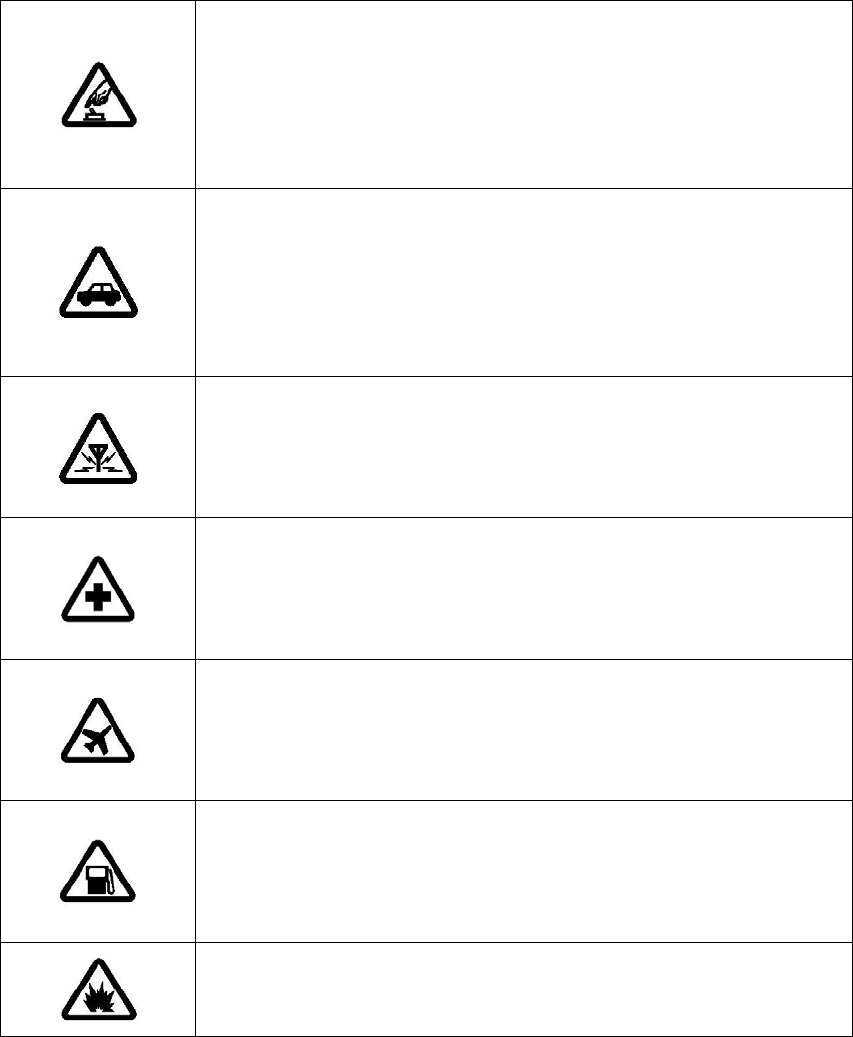
Safe switch-on
Do not switch on your mobile phone where the use of
mobile phone is forbidden or may cause interference or
danger.
Traffic safety is top priority
Please respect all local applicable laws and regulations.
Try best to drive with both hands. Traffic safety always
comes first in driving.
Interference
All mobile phones are subject to interference, which
adversely affects communication performance.
Switch off in hospital
Please follow any relevant restrictions. Switch off your
mobile phone in medical service.
Switch off on aircraft
Please respect any relevant restrictions. The use of
mobile phone interferes with aircraft operation.
Switch off at gas station
Do not use mobile phone in gas station. Switch it off near
fuel or chemical product.
Switch off near blasting site
Please obey any relevant restrictions. Do not use your
mobile phone where blasting operation occurs.
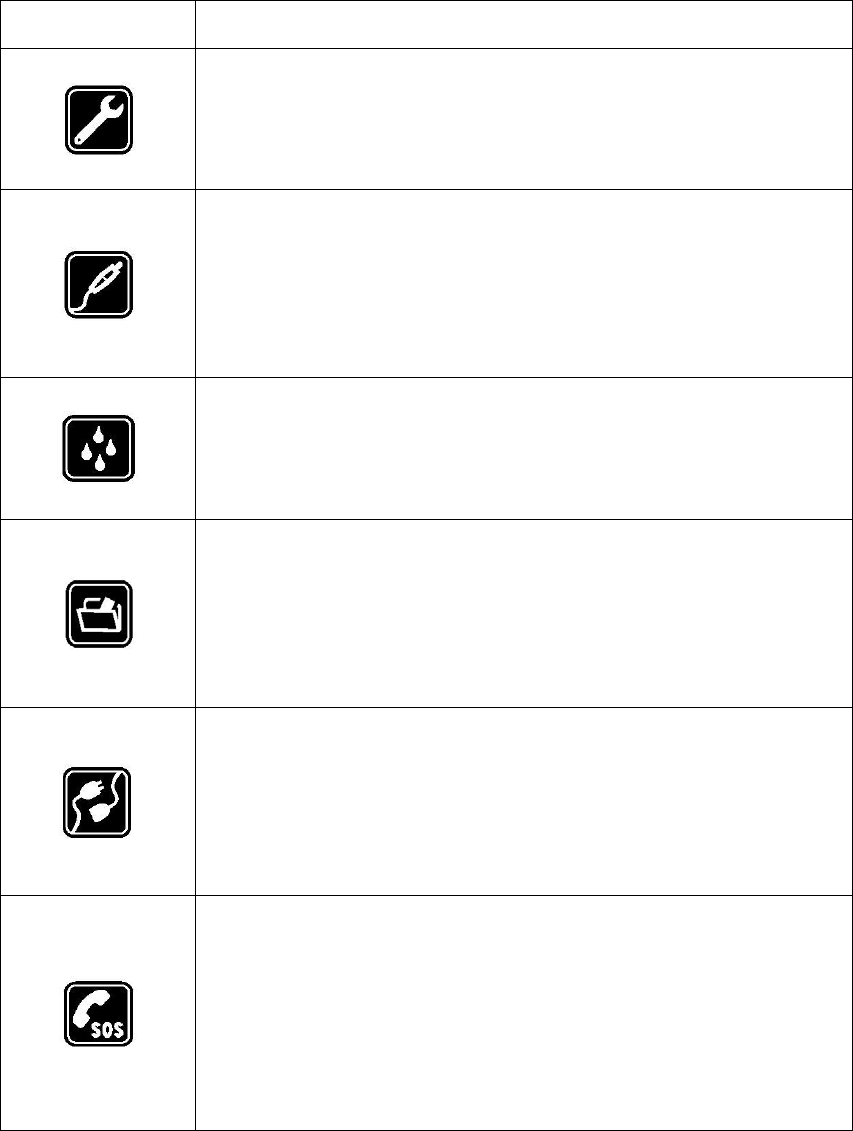
Use qualified repair service
Your mobile phone may be installed or repaired by
qualified maintenance personnel only.
Accessories and batteries
Only authorized accessories and batteries can be used.
Do not connect your mobile phone to any incompatible
product.
Waterproofness
Your mobile phone is not waterproof, so please keep it
dry.
Data backup
Do remember to make a backup of all important
information stored in your mobile phone or keep a written
record.
Connect to other mobile phones
Before connecting to another mobile phone, read the
phone’s user manual to get detailed safety instructions. Do
not connect your mobile phone to any incompatible product.
Emergency call
Make sure your phone is within network service and its
call function is already activated. Dial the required
emergency call number and press the Send key. Offer the
information of your location.

Charging the battery
Note: Ambient temperature for battery charging is 0°C~ 55°C.
Before using your phone for the first time, fully charge the battery.
a. Insert the provided USB cable into USB port of your mobile phone
b. Insert USB charger into the mains socket until the battery is fully charged.
Note: The battery can be charged via computer.
Switching your mobile phone ON
Note: Ambient temperature for use of mobile phone is -10°C ~55°C.
1. Hold down the Power key to switch on the mobile phone and activate the
operating system.
2. If the screen is automatically locked, please touch the Unlock key to unlock
the screen.
Note: If you lock SIM card using your PIN code, key in your PIN code by
touching the corresponding numeric keys on the keypad. Touch the “Sure” key
to confirm the input.
3. When the main screen appears, you can start to use your mobile phone.

Switching your mobile phone OFF
1. Hold down the Power key for 2 seconds and then touch the “OFF” option on
the screen.
2. Hold down the Power key until the mobile phone is powered off.
Note: 1. Hold down the Power key for 1 second to lock the screen.
2. Hold down the Power key for 2 seconds and the following
options pop out: Mute, Airplane, and OFF.
Closing the screen
If the mobile phone and its screen are both on, press the Power key briefly to
open the screen.
Note: If the mobile phone is on but its screen is off, press the Power key
briefly to open the screen (hold down the Power key for 1 second).
Charging the battery
Only authorized chargers and accessories fit for your mobile phone may
be used.
The use of other types of charger and accessories may violate the
authorization or warranty clause of mobile phone and cause danger.
To switch off any accessory, you should grasp it and remove the plug
instead of yanking the power cord.
If battery power is exhausted, it might be 30 minutes before the charging
reminder appears on the main screen.

Original accessories
With regard to the supply of original accessories, please consult you local
distributor. The following are precautions on use of accessories:
1. Please keep all accessories out of children’s reach.
2. To disconnect any accessory, unplug it by grasping the plug instead of
yanking the power cord.
3. Conduct periodical inspection to check if all mobile phones in car are
properly installed and operate smoothly.
Only battery, charger and accessories authorized by the manufacturer are
used. The use of battery, charger and accessories of any other type may
violate authorization or warranty clause and cause danger.
Why original accessories should be used?
As key components of this mobile phone, battery and charger plays a vital
role in guaranteeing the workings of this mobile phone and your safety. Our
long-term customer survey and after-sales service practice show that the
failure of mobile phone is generally attributable to the use of unqualified
accessories, especially battery and charger.
Hazards of unqualified battery and charger include:
1. Shortened service life. The number of charging and discharging cycles
of unqualified battery is considerably lower than that of original
battery.
2. Greatly reduced useful life of your mobile phone. Unstable voltage will
seriously affect the normal operation of the circuit of mobile phone
and result in permanent damage.
3. Impaired performance and reliability of your mobile phone.
Warning: Unauthorized accessories may cause combustion or explosion,
which will harm your personal safety.
Battery information
Charging and discharging
This mobile phone is powered by storage battery. Its battery can be
charged and discharged several hundred times, but will fail in the end. Please
come to a certified mobile phone service provider for replacement. Only
authorized batteries can be used, and only an authorized charger fit for this
model of mobile phone may be used for charging your mobile phone.
When the battery is fully recharged, please disconnect the charger from
your mobile phone and unplug it from power socket.
If battery power is exhausted, it will be some 30 minutes before the screen
displays the charging prompt. No damaged charger may be used.
Care and maintenance
Your device is a product of superior design and craftsmanship and should
be treated with care. The following suggestions will help you protect you
r
warranty coverage.
1. Keep the device dry. Precipitation, humidity, and all types of liquids o
r
moisture can contain minerals that will corrode electronic circuits.
2. Do not use or store the device in dusty, dirty areas. Its moving parts and
electronic components can be damaged.
3. Do not store the device in hot areas.
4. Do not store the device in cold areas. When the device return to its normal
temperature, moisture can form inside the device and damage electronic
circuit board.
5. Do not attempt to open the device other than as instructed in this manual.
6. Do not drop, knock, or shake the device. Rough handling can break internal
circuit boards and fine mechanics.
7. Do not use harsh chemicals, cleaning solvents, or strong detergents to clean
the device.
8. Do not paint the device. Paint can clog the moving parts and prevent prope
r
operation.
9. Use a soft, clean, dry cloth to clean any lenses, such as camera lenses, light
sensor lenses.
10. Use charger indoors.
These suggestions apply equally to your device, charger or any enhancement. If
any device is not working properly, take it to the nearest authorized service
facility for service.
FCC Warning:
Any Changes or modifications not expressly approved by the party responsible for compliance could
void the user's authority to operate the equipment.
This device complies with part 15 of the FCC Rules. Operation is subject to the following two conditions:
(1) This device may not cause harmful interference, and (2) this device must accept any interference
Important Safety Information
Medical devices
Operation of any radio transmitting equipment, including wireless phones, may
interfere with the functionality of inadequately protected medical devices. Consult
a physician or the manufacturer of the medical device to determine if they are
adequately shielded from external RF energy or if you have any questions.
Switch off your device when any regulations posted in these areas instruct you to
do so.
Vehicle
Only qualified personnel should service the device or install the device in a
vehicle. Faulty installation or service may be dangerous and may invalidate any
warranty that may apply to the device. Check regularly that all wireless device
equipment in your vehicle is mounted and operating properly. Do not store o
r
carry flammable liquids, gases, or explosive materials in the same compartment
as the device, its parts, or enhancements. For vehicles equipped with an air bag
remember that air bags inflate with great force. Do not place objects, including
installed or portable wireless equipment in the area over the air bag or in the ai
r
bag deployment area. If in-vehicle wireless equipment is improperly installed
and the air bag inflates, serious injury could result.
Aircraft
Using your device is prohibited while flying in aircraft. Switch off your device
before boarding an aircraft. The use of this device in an aircraft may be
dangerous to the operation of the aircraft, disrupt the wireless telephone network,
and may be illegal.
Potentially explosive environments
Switch off your device when in any area with a potentially explosive atmosphere
and obey all signs and instructions.
received, including interference that may cause undesired operation.
Note: This equipment has been tested and found to comply with the limits for a Class B digital device,
pursuant to part 15 of the FCC Rules. These limits are designed to provide reasonable protection against
harmful interference in a residential installation. This equipment generates, uses and can radiate radio
frequency energy and, if not installed and used in accordance with the instructions, may cause harmful
interference to radio communications. However, there is no guarantee that interference will not occur in a
particular installation. If this equipment does cause harmful interference to radio or television reception,
which can be determined by turning the equipment off and on, the user is encouraged to try to correct the
interference by one or more of the following measures:
—Reorient or relocate the receiving antenna.
—Increase the separation between the equipment and receiver.
—Connect the equipment into an outlet on a circuit different from that to which the receiver is connected.
—Consult the dealer or an experienced radio/TV technician for help.
Specific Absorption Rate (SAR) information
SAR tests are conducted using standard operating positions accepted by the FCC with the phone
transmitting at its highest certified power level in all tested frequency bands. Before a new model
phone is a available for sale to the public, it must be tested and certified to the FCC that it does not
exceed the exposure limit established by the FCC. Tests for each phone are performed in positions and
locations (e.g. at the ear and worn on the body)as required by the FCC. For body worn operation, this
model phone has been tested and meets the FCC RF exposure guidelines when used with an
accessory designated for this product or when used with an accessory that contains no metal and that
positions the handset a minimum of 1.0 cm from the body. Non-compliance with the above restrictions
may result in violation of RF exposure guidelines.