Fortyfour group KRONIES Kronies Ture wirless earbuds User Manual
Fortyfour group LLC Kronies Ture wirless earbuds
User Manual
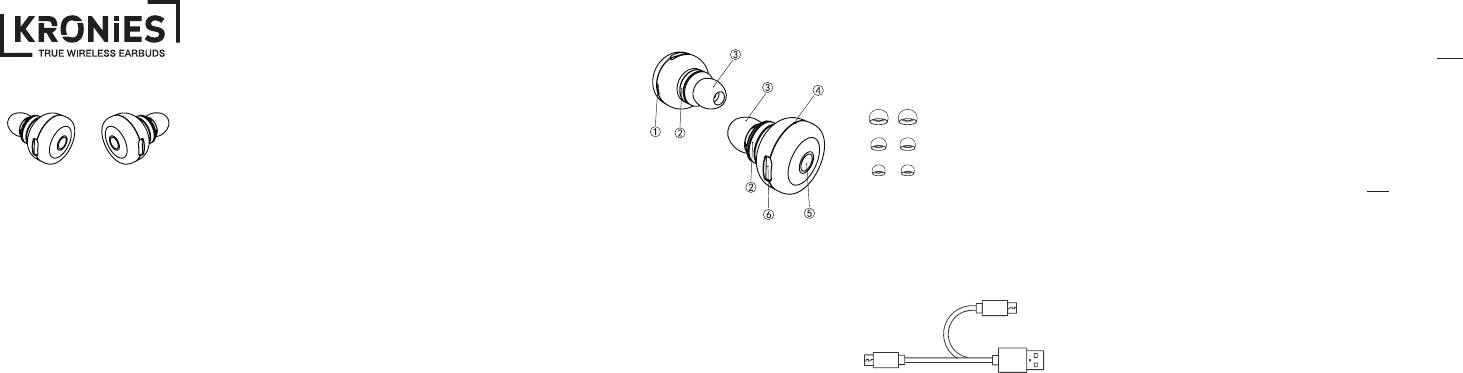
ACCESSORIES
EAR TIPS: To make sure you
get the best sound possible,
try out each sized ear tip to
nd which one ts best.
CHARGING CABLE: This
item includes a dual micro
USB cable for easy and
simultaneous charging of
your Kronies.
GETTING STARTED
We recommend fully charging
your earbuds before using
them for the rst time. Using
the included charging cable,
plug your earbuds into any
USB port with a 5V/1A output.
LED INDICATOR LIGHT
Solid RED: Charging
Solid BLUE: Fully charged
Flashing BLUE: Unit is actively
playing
Flashing RED: Low battery
Flashing RED/BLUE: Powered
on, ready for pairing
POWER ON/OFF
Power On: Press and hold the
multifunction button on both
Kronies for roughly 4 seconds
until the indicator light ashes
blue and you hear a tone.
Power Off: Press and hold
the multifunction button for 4
seconds on one earbud until
the LED ashes red. The other
earbud will automatically turn
off with it (like magic).
This USER MANUAL is
designed to help you get
familiar with your new
Origaudio true wireless
earbuds, Kronies—
the best buds
you’ll ever need!
SAFETY POINTERS:
• Although we’re known
for breaking the rules,
we recommend that you
follow the ones outlined
in this manual. We care
about your safety and
experience, so read on
before using your new
earbuds!
• Be aware of any
sharp edges, uneven
surfaces, or metal parts/
accessories included in
the packaging—we want
to prevent any possible
injuries.
• Don’t try to modify,
repair or dismantle your
earbuds! Doing so may
PARTS AND STUFFcause undesired effects
such as electric shocks,
product breakdown, and
even re hazards. All of
which are not covered
under the warranty.
• Do not use any diluents/
solvents to clean your
Kronies True Wireless
Earbuds.
• Be practical when using
your earbuds—don’t
wear them in situations
that require the full
attention of your hearing
like driving, herding cats,
and certainly never ever
during boring company
meetings (wink).
1. Indicator Light
2. Rubber Ring
3. Ear Tips
4. Microphone
5. Multifunction Key
6. USB Input
large
medium
small

WIRELESS PAIRING
1. Turn on BOTH earbuds by
pressing and holding the
multifunction buttons for
about 4 seconds until the
indicator starts ashing.
2. Keep buds within 6
inches of each other to
allow them to pair to
one another. (They have
abandonment issues).
Once the buds are paired,
one bud will ash a blue
LED slowly, while the
other will ash blue and
red quickly. This one is
the “master” bud. (They
also have a complicated
relationship.)
3. Keep your Kronies and
all accessories out of the
reach of children and
pets, as small parts can
t in the mouth and cause
potential choking and/or a
bad time in general.
4. Keep your Kronies out
of the water! They’re
earbuds—not goldsh!
3. Once on and paired with
one another, proceed
to pair your Kronies to
your device by selecting
“Kronies” on the
device list. If you’re not
connected right away,
simply click “Connect”
and if prompted to enter
a passkey, enter “0000.”
NOTE: Seriously though,
don’t try pairing your
buds to your wireless
device until they have
been turned on and
paired with one another
rst. It won’t work.
4. Y
ou will know that
your buds are paired
successfully with your
device when they are
both ashing a slow blue
indicator light.
CALLING
Only the “master” bud may
be used to receive and listen
to calls.
Answer/End a call: Press the
multifunction button once.
Reject a call: Press and hold
down the multifunction button.
Redial a number: Quickly
press the multifunction button
twice.
PRODUCT SPECIFICATIONS
Play time: Up to 4 hours
Wireless Range: Up to 33ft.
Working Voltage: 3.2V - 4.2V
Wireless Frequency Band:
2.4 - 2.48Ghz
Driver: 10mm copper ring
loudspeaker
Impedance: 16 Ω
Microphone Sensitivity:
-40dB ± 2dB
Charging: Dual Micro USB
Size: 0.87 in x 1.10in
ORIGAUDIO.COM
PLAYING MUSIC
To pause your music: Press
the multifunction button once
while music is playing.
To play your music: Press the
multifunction button once to
resume your music.
ADDITIONAL NOTES
• If your Kronies cannot
nd any pairing device
for 5 minutes, they will
power off automatically.
• You must charge your
wireless earbuds if they
have not been used for
more than 3 months.
• What’s the point of buds
if you can’t share with a
friend? You can jam out
with your human bud, but
make sure you stay within
20 feet of one another.
WARNINGS
1. Do not keep or store your
Kronies in an area too
hot or too cold for a long
period of time, as it may
cause deformation, reduce
battery capacity, and even
shorten your Kronies’
lifetime. Room temp is
recommended.
2. Do not attempt to
disassemble your wireless
earbuds for any reason,
as it can create a safety
hazard.
FCC Caution:
This device complies with part 15 of the FCC Rules. Operation is subject to the
following two conditions: (1) This device may not cause harmful interference, and (2)
this device must accept any interference received, including interference that may
cause undesired operation.
Any Changes or modifications not expressly approved by the party responsible for
compliance could void the user's authority to operate the equipment.
Note: This equipment has been tested and found to comply with the limits for a Class
B digital device, pursuant to part 15 of the FCC Rules. These limits are designed to
provide reasonable protection against harmful interference in a residential installation.
This equipment generates uses and can radiate radio frequency energy and, if not
installed and used in accordance with the instructions, may cause harmful interference
to radio communications. However, there is no guarantee that interference will not
occur in a particular installation. If this equipment does cause harmful interference to
radio or television reception, which can be determined by turning the equipment off
and on, the user is encouraged to try to correct the interference by one or more of the
following measures:
-Reorient or relocate the receiving antenna.
-Increase the separation between the equipment and receiver.
-Connect the equipment into an outlet on a circuit different from that to which the
receiver is connected.
-Consult the dealer or an experienced radio/TV technician for help.