FreeTek 12011 Bluetooth Headphone User Manual 12011 01 ORG1 160825

FreeTek International Co.,Ltd. Bluetooth Headphone 12011 01 ORG1 160825

user manual

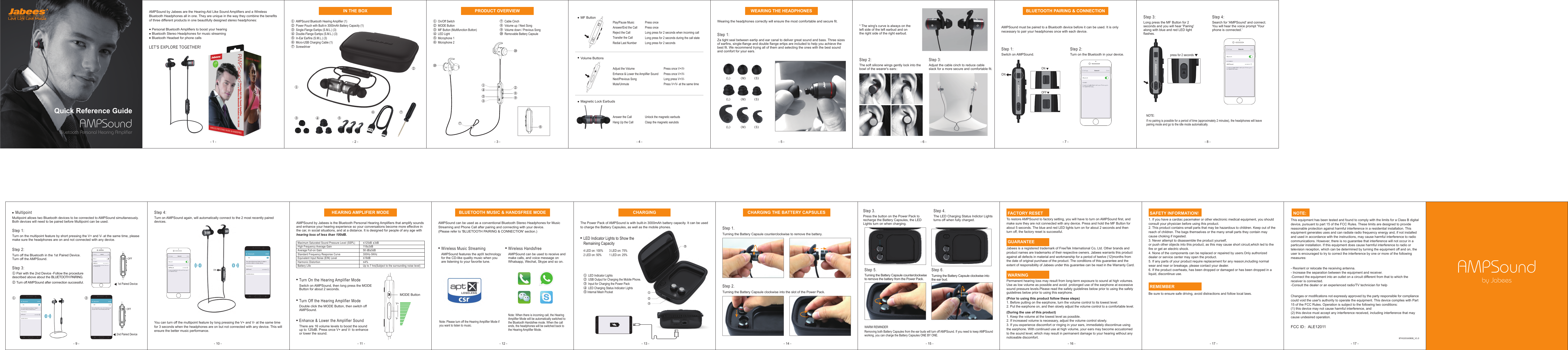
ONONOFF② ①③ ⑤ ④ AMPSoundBluetooth Personal Hearing AmplifierQuick Reference GuideAMPSound by Jabees are the Hearing-Aid Like Sound Amplifiers and a Wireless Bluetooth Headphones all in one. They are unique in the way they combine the benefits of three different products in one beautifully designed stereo headphones:    Personal Bluetooth Amplifiers to boost your hearing   Bluetooth Stereo Headphones for music streaming   Bluetooth Headset for phone callsLET'S EXPLORE TOGETHER!①  AMPSound Bluetooth Hearing Amplifier (1)②  Power Pouch with Built-in 3000mAh Battery Capacity (1)③  Single-Flange Eartips (S.M.L.) (3)④  Double-Flange Eartips (S.M.L.) (3)⑤  In-Ear Earfins (S.M.L.) (3)⑥  Micro-USB Charging Cable (1)⑦  ScrewdriverPlay/Pause MusicAnswer/End the CallReject the Call Transfer the Call Redial Last NumberPress oncePress onceLong press for 2 seconds when incoming callLong press for 2 seconds during the call stateLong press for 2 secondsAdjust the VolumeEnhance & Lower the Amplifier Sound Next/Previous SongMute/UnmutePress once V+/V-Press once V+/V-Long press V+/V-Press V+/V- at the same timeUnlock the magnetic earbudsClasp the magnetic earubdsAnswer the CallHang Up the CallWearing the headphones correctly will ensure the most comfortable and secure fit.Step 1: Za tight seal between eartip and ear canal to deliver great sound and bass. Three sizes of earfins, single-flange and double flange ertips are included to help you achieve the best fit. We recommend trying all of them and selecting the ones with the best sound and comfort for your ears.Step 2: The soft silicone wings gently lock into the bowl of the wearer's ears:* The wing's curve is always on the left side of the left earbud and on the right side of the right earbud.Step 3: Adjust the cable cinch to reduce cable slack for a more secure and comfortable fit.AMPSound must be paired to a Bluetooth device before it can be used. It is only necessary to pair your headphones once with each device.Step 1: Switch on AMPSound. Step 2: Turn on the Bluetooth in your device. Step 3: Long press the MF Button for 2 seconds and you will hear 'Pairing' along with blue and red LED light flashes.NOTE:If no pairing is possible for a period of time (approximately 2 minutes), the headphones will leave pairing mode and go to the idle mode automatically. Step 4: Search for 'AMPSound' and connect.You will hear the voice prompt 'Your phone is connected.' FACTORY RESETTo restore AMPSound to factory setting, you will have to turn on AMPSound first, and make sure they are not connected with any device. Press and hold the MF Button for about 5 seconds. The blue and red LED lights turn on for about 2 seconds and then turn off, the factory reset is successful. GUARANTEEJabees is a registered trademark of FreeTek International Co, Ltd. Other brands and product names are trademarks of their respective owners. Jabees warrants this product against all defects in material and workmanship for a period of twelve (12)months from the date of original purchase of the product. The conditions of this guarantee and the extent of responsibility of Jabees under this guarantee can be read in the Warranty Card. WARNINGPermanent hearing loss may result from long-term exposure to sound at high volumes. Use as low volume as possible and avoid  prolonged use of the earphone at excessive sound pressure levels.Please read the safety guidelines below prior to using the safety guidelines below prior to using this earphone.(Prior to using this product follow these steps)1. Before putting on the earphone, turn the volume control to its lowest level.2. Put the earphone on, and then slowly adjust the volume control to a comfortable level.(During the use of this product) 1. Keep the volume at the lowest level as possible.2. If increased volume is necessary, adjust the volume control slowly.3. If you experience discomfort or ringing in your ears, immediately discontinue using the earphone. With continued use at high volume, your ears may become accustomed to the sound level, which may result in permanent damage to your hearing without any noticeable discomfort.Step 2. Turning the Battery Capsule clockwise into the slot of the Power Pack. Step 1. Turning the Battery Capsule counterclockwise to remove the battery.Step 5. Turning the Battery Capsule counterclockwise to remove the battery from the Power Pack. Step 6. Turning the Battery Capsule clockwise into the ear bud.Step 3. Press the button on the Power Pack to recharge the Battery Capsules, the LED Lights turn on when charging. Step 4. The LED Charging Status Indictor Lights turns off when fully charged. WARM REMINDERRemoving both Battery Capsules from the ear buds will turn off AMPSound. If you need to keep AMPSound working, you can charge the Battery Capsules ONE BY ONE. SAFETY INFORMATION!1. If you have a cardiac pacemaker or other electronic medical equipment, you should consult your physician before using this product. 2. This product contains small parts that may be hazardous to children. Keep out of the reach of children. The bags themselves or the many small parts they contain may cause choking if ingested.3. Never attempt to disassemble the product yourself, or push other objects into this product, as this may cause short circuit,which led to the fire or get an electric shock.4. None of the components can be replaced or repaired by users.Only authorized dealer or service center may open the product.5. If any parts of your product require replacement for any reason,including normal wear and rear or breakage, please contact your dealer.6. If the product overheats, has been dropped or damaged or has been dropped in a liquid, discontinue use. REMEMBERBe sure to ensure safe driving, avoid distractions and follow local laws.     NOTE: This equipment has been tested and found to comply with the limits for a Class B digital device, pursuant to part 15 of the FCC Rules. These limits are designed to provide reasonable protection against harmful interference in a residential installation. This equipment generates uses and can radiate radio frequency energy and, if not installed and used in accordance with the instructions, may cause harmful interference to radio communications. However, there is no guarantee that interference will not occur in a particular installation. If this equipment does cause harmful interference to radio or television reception, which can be determined by turning the equipment off and on, the user is encouraged to try to correct the interference by one or more of the following measures:- Reorient or relocate the receiving antenna.- Increase the separation between the equipment and receiver.-Connect the equipment into an outlet on a circuit different from that to which the receiver is connected.-Consult the dealer or an experienced radio/TV technician for helpChanges or modifications not expressly approved by the party responsible for compliancecould void the user's authority to operate the equipment. This device complies with Part15 of the FCC Rules. Operation is subject to the following two conditions:(1) this device may not cause harmful interference, and(2) this device must accept any interference received, including interference that maycause undesired operation.The Power Pack of AMPSound is with built-in 3000mAh battery capacity. It can be used to charge the Battery Capsules, as well as the mobile phones.①  LED Indicator Lights②  USB Output for Charging the Mobile Phone.③  Input for Charging the Power Pack④  LED Charging Status Indicator Lights⑤ Internal Mesh PocketWireless Music StreamingAMPSound features the aptX technology for the CD-like quality music when you are listening to your favorite tune. Note: Please turn off the Hearing Amplifier Mode if you want to listen to music.Note: When there is incoming call, the Hearing Amplifier Mode will be automatically switched to the Bluetooth Handsfree mode. When the call ends, the headphones will be switched back to the Hearing Amplifier Mode. AMPSound can be used as a conventional Bluetooth Stereo Headphones for Music Streaming and Phone Call after pairing and connecting with your device.(Please refer to 'BLUETOOTH PAIRING & CONNECTION' section.)Wireless HandsfreeAMPSound can be used to receive and make calls, and voice message on Whatsapp, Wechat, Skype and so on. Turn On the Hearing Amplifier ModeSwitch on AMPSound, then long press the MODE Button for about 2 seconds.Turn Off the Hearing Amplifier ModeDouble click the MODE Button, then switch off AMPSound.Enhance & Lower the Amplifier SoundThere are 16 volume levels to boost the sound up to 125dB. Press once V+ and V- to enhance or lower the sound. AMPSound by Jabees is the Bluetooth Personal Hearing Amplifiers that amplify sounds and enhance your hearing experience so your conversations become more effective in the car, in social situations, and at a distance. It is designed for people of any age with hearing loss of less than 100dB. Step 2: Turn off the Bluetooth in the 1st Paired Device. Turn off the AMPSound.Step 1: Turn on the multipoint feature by short pressing the V+ and V- at the same time, please make sure the headphones are on and not connected with any device.Step 3: ① Pair with the 2nd Device -Follow the procedure described above about the BLUETOOTH PAIRING.② Turn off AMPSound after connection successful. Multipoint allows two Bluetooth devices to be connected to AMPSound simultaneously. Both devices will need to be paired before Multipoint can be used. MultipointMF ButtonVolume ButtonsMagnetic Lock Earbuds (L) (M) (S)(L) (M) (S)(L) (M) (S)BLUETOOTH PAIRING & CONNECTIONpress for 2 secondsStep 4: Turn on AMPSound again, will automatically connect to the 2 most recently paired devices.You can turn off the multipoint feature by long pressing the V+ and V- at the same time for 3 seconds when the headphones are on but not connected with any device. This will ensure the better music performance.1st Paired DeviceOFF① 2nd Paired DeviceOFF②ONMaximum Saturated Sound Pressure Level (SSPL)High Frequency Average GainAverage Full-on GainStandard Frequency Response CurveEquivalent Input Noise (EIN) LevelHarmonic DistortionBattery Life≤125dB ±3dB118±3dB58 dB±5dB300Hz-5KHz≤18dB≤4%Up to 7 hrs(Subject to the surrounding noise level)BLUETOOTH MUSIC & HANDSFREE MODEHEARING AMPLIFIER MODEV+V-MODE ButtonCHARGINGLED Indicator Lights to Show the Remaining Capacity4 LED on: 100%        3 LED on: 75%2 LED on: 50%          1 LED on: 25%CHARGING THE BATTERY CAPSULESAMPSoundby JabeesBTHS20160808_V1.0IN THE BOXWEARING THE HEADPHONES①  On/Off Switch ②  MODE Button ③  MF Button (Multifunction Button) ④  LED Light⑤  Microphone 1 ⑥  Microphone 2 ⑦  Cable Cinch ⑧  Volume up / Next Song ⑨  Volume down / Previous Song⑩  Removable Battery CapsulePRODUCT OVERVIEWFCC ID:ALE12011Bluetooth STOPYour device(Samsung Galaxy S7 edge) iscurrently visible to nearby devices. OnPaired devicesAMPSoundAvailable devicesM+STOPBluetooth STOPYour device(Samsung Galaxy S7 edge) iscurrently visible to nearby devices. OnPaired devicesAMPSoundAvailable devicesBluetooth SCANTurn on Bluetooth to see a list of devices you can pair with or have already paired with.OffM+① ③ ④ ⑤ ⑧ ⑨ ⑩ ⑩ ② ⑥ ⑦ ② ① ③ ④ ⑤⑥ ⑦- 4 - - 5 - - 6 - - 7 - - 8 -- 13 - - 14 - - 15 - - 16 - - 17 -- 12 -- 11 -- 10 -- 9 - - 17 -- 1 - - 2 - - 3 -

Navigation menu