Freestyle Navigator 2 0 Users Manual FS1067_Navigator2.0_Multi_IM
Navigator 2.0 to the manual 069f93b1-c1db-4738-873c-50be15eb6ac0
2015-02-02
: Freestyle Freestyle-Navigator-2-0-Users-Manual-402066 freestyle-navigator-2-0-users-manual-402066 freestyle pdf
Open the PDF directly: View PDF  .
.
Page Count: 2
ENGLISH
NAVIGATOR 2.0
S1
S2
S4
S3
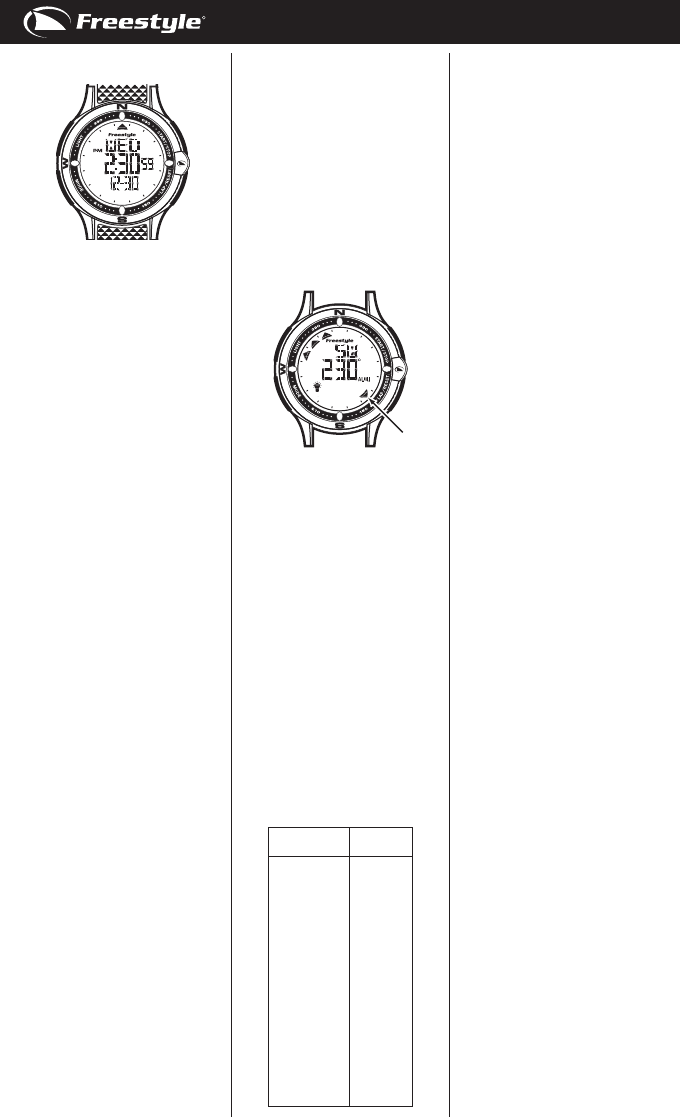
CONTROL BUTTONS
S1.Start/stopbutton
S2.Lap/resetbutton
S3.Modebutton
S4.Lightbutton
DISPLAY MODES:
Thewatchhassixdisplaymodes:
HOMETIME/FOREIGNTIME(TM2),
COMPASS(COMP),CHRONOGRAPH
(CHR),RECALL(RCL),TIMER(TMR)
andALARM(ALM).
Tochangefromonedisplaymodeto
another,pressS3buttononce.The
modedescriptionwillappearfor
around2secondsbeforetheselected
modeisactivated.
NOTE:Inanysettingmode,ifthereis
nokeymanipulationforaround1-2
minutes,thewatchwillautomatically
savetheentereddataandexitthe
settingmode.
HOME AND FOREIGN TIME DISPLAY:
TodisplayFOREIGNTIMEmode,press
S1buttonwhenHOMETIMEmodeis
displayed.Themodedescription(TM2)
willbedisplayed.Tochangebackto
HOMETIMEmode,pressS1button
again.
TO SET THE TIME AND CALENDAR:
1. PressS3buttontoselectHOME
TIME/FOREIGNTIMEmode.
2. PressandholdS2buttonfor
around2seconds.Thesecond
digitswillblink.
3. PressS1buttontoresetthesecond
digitstozero.
4. PressS3button,theminutedigits
willblink.
5. PressS1buttontosettheminute
digits.Holdingdownthebuttonwill
speeduptheprocess.
6. PressS3button,thehourdigitswill
blink.
7. PressS1buttontosetthehour
digits.Holdingdownthebuttonwill
speeduptheprocess.
8. Followthesamepatterntosetthe
hourformat,date,month,year,
hourlychimeoptionandbutton
beepoption.
9. Tosetthehourformat,pressS1
buttontotogglebetween12-hour
and24-hourformat.TheP.M.indi-
catormaybedisplayedtoindicate
thetimeperiod12:00A.M.–11:59
P.M.in12-hourformat.
10.Tosetthehourlychimeoption,
pressS1buttontoturnitONor
OFF.
11.Tosetthebuttonbeepoption,press
S1buttontoturninONorOFF.
12.Afternishedmakingalltheset-
tings,pressS2buttontoconrm.
NOTE:Theday(oftheweek)is
automaticallysetinaccordancewith
thedate.Thedatecanbesetwithin
therangeof1January2008to31
December2099.
NOTE:InFOREIGNTIMEsettings,only
thehourdigitsandminutedigitsare
opentosetting.Allothersettingsare
synchronizedbetweenHOMETIMEand
FOREIGNTIMEmode.
TO USE THE COMPASS:
PressS3buttontoselectCOMPASS
mode.Thecurrenttimewillbe
displayedforaround0.5second,then
therelativecompasspointandangular
bearingwillbedisplayed.
NOTE:Thismovingpointerrepresents
thedirectionofNorth(N).
NOTE:Ifthereisnokeymanipulation
for20seconds,thecompasssensor
willbedeactivatedforpowersaving
andthewatchwilldisplayonlythe
currentHOMETIMEorFOREIGNTIME
(dependsonyourselectionintime
mode).PressS1buttontore-activate
thecompasssensor.
NOTE:Ifthecompassdoesnotseem
toworkwell,forexample:whenit
displaysthewrongcompassdirection
oritdisplays“DIST”(distort)onthe
screen,thenyouhavetocalibratethe
compass.Youshouldalsocalibrate
itafterreplacingthebattery.Ifyour
watchhasbeenexposedtostrong
electromagneticelds,suchaselectric
lines,magnetsorloudspeakers,then
youhavetocalibrateitagain.Please
alsocalibratethecompassbefore
usingitforthersttimeandbeforea
longtrip.
NOTE:Becauseofthedifferencebe-
tweentrueNorthandmagneticNorth,
youhavetocompensateitbyadjusting
thecompassdeclination.Thedeclina-
tionangleforyourlocalareamaybe
foundbelow:
City Declination
Angle
Anchorage 22E
Atlanta 4W
Bombay 1W
Boston 16W
Calgary 18E
Chicago 3W
Denver 10E
Jerusalem 3E
London 4W
LittleRock 3E
Livingston,MT 14E
Munich 1E
NewYorkCity 14W
Orlando 5W
Oslo 2W
Paris 2W
RioDeJaneiro 21W
SanFrancisco 15E
Seattle 19E
Shanghai 5W
Toronto 11W
Vancouver 20E
WashingtonDC 10W
Waterbury,CT 14W
TO SET THE DECLINATION ANGLE:
InCOMPASSmode,
1. PressandholdS2buttonfor
around 2seconds
toenterintoCALmode.
2. PressS3button,thedeclination
anglewillblink.
3. PressS1orS3buttontosetthe
declinationangle.Holdingdownthe
buttonwillspeeduptheprocess.
4. Afternishedmakingallsettings,
pressS2buttontoreturntoCOM-
PASSmode.
TO CALIBRATE THE COMPASS:
InCOMPASSmode,
1. PressandholdS2buttonfor
around 2seconds
toenterintoCAL(cali-
bration)mode.
2. PressS1button,thepointerswill
begintorotateclockwise.
3. Rotatethewatchhorizontallyin
clockwisedirectionslowlyforat
least2rotations,takingatleast15
secondsperrotation.
4. PressS1buttonorleavethewatch
idlefor60secondstoconrmthe
calibrationprocess,orpressS2
buttonorS3buttontoabortthe
calibrationprocess.
TO USE THE CHRONOGRAPH:
1. PressS3buttontoselectCHRONO
GRAPHmode.
2. Thechronographwillthenbe
displayedinitscurrentstatus–
reset,runningorstopped.
3. Toresumeacounting,pressS1
buttontoresumefromwhereitleft
off.
4. Tostartanewcounting,resetthe
chronographtozerorst.PressS1
buttontostopcounting,then
pressandholdS2buttonforaround
2secondstoreset.
Forthemeasurementofelapsedtime,
InCHRONOGPRAHmode,
1. PressS1buttontostartcounting.
2. Tostopcounting,pressS1button.
PressS1buttontoresumefrom
whereitleftoff.
3. Toresettozero,pressS1buttonto
stopcountingandthenpressand
holdS2button.
Forthemeasurementofsplittime,
InCHRONOGRAPHmode,
1. PressS1buttontostartcounting.
2. Whilethechronographisrunning,
pressS2buttononcetoregistera
lap.Thelapnumberandlaptime
oftheregisteredlapwillbe
displayed.Thechronographisstill
runninginthebackground.
Afteraround10seconds,thelap
numberandsplittimeofthecur
rentlapwillbedisplayed.
3. Repeatthelaststepuntilallthe
lapshavebeenregistered.
4. Tostopcounting,pressS1button.
PressS1buttontoresumefrom
whereitleftoff.
5. Toresettozero,pressS1buttonto
stopcounting,thenpressandhold
S2buttonforaround2seconds.
NOTE:Thewatchcanregisterand
recorduptoamaximumof30laps.
NOTE:Thechronographcancountup
toamaximumof99hours,59minutes
and59.99seconds.
NOTE:Youcanleavethechronograph
runningwhileswitchingovertoother
operatingmodes.
Toreducecarbonfootprint,these
Freestyleinstructionsareprintedwith
soyinksonrecycledpaper.
ENGLISH
TO USE THE RECALL FUNCTION:
1. PressS3buttontoselectRECALL
mode.
2. PressS1buttontoscrollthrough
therecordedindividuallaptimeand
totalelapsedtime.
NOTE:Therecallfunctionisavailable
onlywhenthereislaprecord.The
message“NOLAPS”willbedisplayed
ifthereisnolaprecord.
NOTE:Thelaprecordwillbecleared
whenthechronographisreset.
TO SET THE TIMER:
1. PressS3buttontoselectTIMER
mode.
2. PressandholdS2buttonfor
around2seconds,thetimerselec
tionwillblink.
3. PressS1buttontotogglebetween
timerinterval1andtimerinterval2
toset.
4. PressS3button,theseconddigits
willblink.
5. PressS1buttontosetthesecond
digits.Holdingdownthebuttonwill
speeduptheprocess.
6. PressS3button,theminutedigits
willblink.
7. PressS1buttontosettheminute
digits.Holdingdownthebuttonwill
speeduptheprocess.
8. PressS3button,thehourdigitswill
blink.
9. PressS1buttontosetthehour
digits.Holdingdownthebuttonwill
speeduptheprocess.
10.PressS3button,theaction-at-end
selectionwillblink.
11.PressS1buttontoselectamongCS
(CountStop),CR(CountRepeat)
andCCU(CountUp).
12.Afternishedmakingalltheset-
tings,pressS2buttontoconrm.
NOTE:Illustrationoftheaction-at-end
selections:
a) CS(CountStop)–thetimerwill
stopwhenthecountdownteaches
zero.
b) CR(CountRepeat)–thetimer
willrepeatthecountdownwhenthe
countdownreacheszero.
c) CCU(CountUp)–thetimercount
uptoamaximumof23hours59
minutesand59secondswhenthe
countdownreacheszero.
NOTE:Thetimercannotbeactivated
ifthevalueoftimerinterval1isset
as0:0’00”.
TO USE THE TIMER:
1. PressS3buttontoselectTIMER
mode.
2. Thetimerwillbedisplayedinits
currentstate–reset,running,or
stopped.
3. Toresumeacounting,pressS1
buttontoresumefromwhereitleft
off.
4. Tostartanewcounting,reloadthe
timerrst.
PressS1buttontostopcounting
andthenpressS2button.
5. Afterreachingzeroinacountdown,
atunewillbeemitted.Tostopthe
tune,pressanybutton.
NOTE:Youcanleavethetimerrunning
whileswitchingovertootheroperating
modes.
TO SET THE ALARM:
1. PressS3buttontoselectALARM
mode.
2. PressS2buttontoselectamong
alarmentries1,2and3toset.
3. PressandholdS2buttonforaround
2seconds.Theminutedigitswill
blink.
4. PressS1buttontosettheminute
digits.Holdingdownthebuttonwill
speeduptheprocess.
5. PressS3button,thehourdigitswill
blink.
6. PressS1buttontosetthehour
digits.Holdingdownthebuttonwill
speeduptheprocess.
7. PressS3buttonthealarmfre
quencywillblink.
8. PressS1buttontoselectamong
daily(DLY)andindividualday(of
theweek)only–Sunday(SUN),
Monday(MON,Tuesday(TUE),
Wednesday(WED),Thursday(THU),
Friday(FRI)andSaturday(SAT).
9. Afternishedthesettings,pressS2
buttontoconrm.
NOTE:Thealarmwillautomaticallybe
activatedafterbeingset.
NOTE:Thealarmwillworkaccording
toHOMETIMEorFOREIGNTIME(de-
pendsonyourselectionintimemode).
TO USE THE ALARM:
InALARMmode,
1. PressS2buttontoselectamong
alarmentries1,2and3toset.
2. PressS1buttontoactivatethe
alarm.Thealarmindicator will
bedisplayed.
3. PressS1buttonagaintodeactivate
thealarm.Themessage“OFF”will
bedisplayed.
WHEN AN ALARM GOES OFF:
A20-secondalarmtunewillbeemitted
atthedesignatedtimewhenthealarm
isactivated.Tostopthetune,press
anybutton.
TO USE THE BACKLIGHT:
PressS4buttontoturnontheback-
lightforaround3seconds.
BEZEL-ACTIVATED BACKLIGHT
FUNCTION:
1. PressandholdS4buttonforaround
3secondsactivatedordeactivate
thebezel-activatedbacklightfunc-
tion.
2. Whenthefunctionisactivated,the
lightbulbicon willbedisplayed.
Youcanthenturnonthebacklight
foraround3secondsbytouching
thebezelofthewatch.
NOTE:Tousethebezel-activated
backlightfunction,thecasebackofthe
watchmustbeindirectcontactwith
yourskinduringwear.
LOW BATTERY DETECTION:
Whenthebatteryofthewatchisclose
todepletion,thebatterylowindicator
willbedisplayed.
FS8127-NAVIGATOR2.0-1067-MR01
