Fujikon BT-310 Bluetooth Headset User Manual BT 400 Instructions guide
Fujikon Industrial Co., Ltd. Bluetooth Headset BT 400 Instructions guide
Fujikon >
BT-310 instruction manual
BT-310 Instructions guide
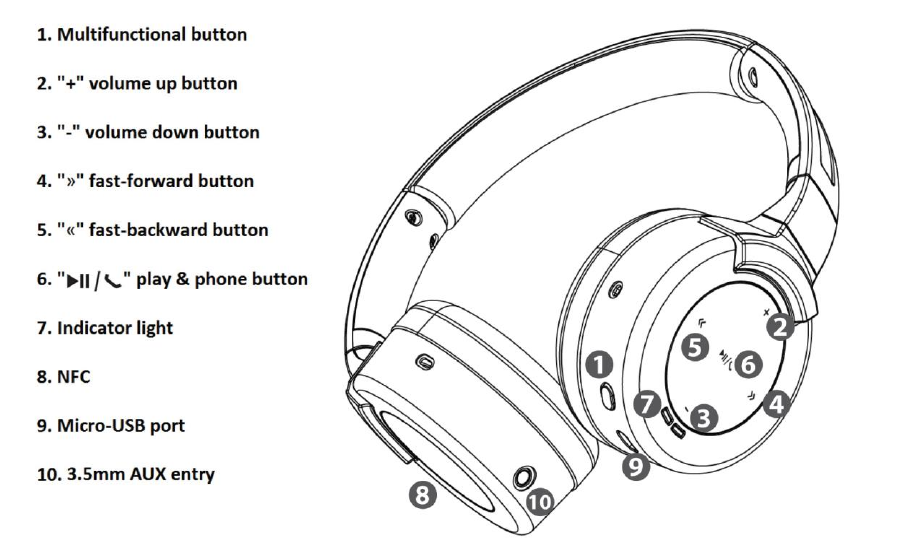
Keys and parts
The headset contains several technological features to improve the experience of the user.
The following section is an overview of the parts:
Before using the headset, you must fully charge the battery and connect the headset to your
respective Bluetooth device.
Charge of battery
The headset contains a battery capable of up to 14 hours of usage. To charge the battery, the
headset has to be connected with the included USB cable. The cable has two different sized
ends.
First, take the Micro-USB end and plug into the USB entry port in the right side of the headset.
The other end of the cable is fitted with a standard USB end which needs to be compatible
with the respective unit. Plug the end in the USB port of the computer, wall charger, or other
compatible devices with an USB port.
The indicating light will be on the right side of the headset. When the battery is charging, a
constant green light will be on. Once the battery is fully charged, the green indicating light will
be turned off.
Turn on headset
When you want to turn on the headset, locate the multifunctional button on the right side of
the headset. The button is located next to the Micro-USB port on the headset. To turn on the
headset, press the button and hold for 3 seconds and the indicating light will show a blue flash
followed by two red flashes. The headset is now turned on (not yet paired).
Pairing of wireless devices
To pair the headset with your music player, ensure that the respective device is turned on and
the Bluetooth function is active.
When setting the headset for pairing mode, make sure the headset is off, and then press the
multifunctional button and hold for 5 seconds. The indicating light will show the below
process.
1. First the light will show a blue flash once.
2. Then for a few seconds it will flash red.
3. After red it will blink blue flashes and the headset is now in pairing mode.
On your respective device you should search for the signal and use the device's functions to
connect. On the list of found devices you select "BT-310" to establish the connection.
Some devices require a passcode to connect with a newly established Bluetooth apparatus.
Enter passcode: 0000 if necessary.
When the connection is established, the headset's light indicator will flash a blue light two
times every 5 second to verify the connection.
Pairing with NFC Bluetooth
The headset has the NFC (Near Field Communication) Bluetooth technology incorporated and
can be used if your respective music device is compatible. To pair with NFC, please follow the
steps:
1. Enable the NFC function on your music device.
2. Gently let the headset and your music device meet, by holding them close together. The
NFC is located on the center of the left earcup.
3. Your music device should now recognize the signal from the headset.
a. If the music device and the headset are pairing for the first time, you will need to
accept the pairing on the music device
4. When the signal has been accepted on your music device, the headset will be paired
and ready for use.
Listening to music - volume control
Your connection should now be established and the headset can be used to listen to music,
accept phone calls and much more.
To adjust the volume of the headset use the volume button located on the right earcup. The
button has a plus “+” and minus “-” symbol. The “+” volume button is related to the plus
symbol and will turn up the volume if pressed. The “-” volume button is related to the minus
symbol and will turn down the volume of the headset.
Listening to music - use of AUX cable
The headset has an AUX entry build-in on the left side of the headset. The AUX can be used to
listen to music, movies, news etc. on any device with a 3.5 mm AUX entry, which is the
standard AUX size.
The headset does not need to be turned on for the AUX technology to function. Simply plug
the cable in the point of entry on the headset and your respective device.
Note: When the AUX cable is inserted, the Bluetooth function and the build-in microphone will
be disabled.
Play and pause music
When the headset is connected to your music player, you can easily and quickly start listening
to music by pushing the “ ” play & phone button one time, located on the right earcup.
When you want to resume the paused song, you push the “ ” play & phone button once
again and the song will begin.
Next and previous track
The “»” and “«” key that is also located on the right earcup can also easily be used to navigate
between the various songs on your music player.
If you wish to skip to the next track, push the “»” key once.
If you wish to go back to the previous song, push the “«” key two times, press the “«”
key once to go back to the beginning of the current song.
Receive calls
If the headset is connected to your mobile phone you can use it to answer phone calls. You
can use the “ ” key to navigate your incoming calls.
Making a call - in order to make a call when your headset is connected to your mobile
phone, you will have to dial your mobile phone in the normal way or by using voice
dialing (if enabled by your respective phone).
Answering a call - to answer an incoming call press the “ ” key one time.
To end a call - when finishing the call press the “ ” key once more.
Rejecting a call - if you wish to reject an incoming call you have to press the “ ”
key and hold for 2 seconds.
Disconnect the headset
If you wish to disconnect the established connection between the headset and your respective
device, simply enter the Bluetooth function on your music player and shut down the
connection or switch off the headset.
Switch off headset
If you wish to turn off the headset, you should initially locate the multifunctional button on
the right side of the headset. Press the button and hold for 3 seconds until the indicator will
show a constant red light. Let go of the button and the device is now turned off.
Clear Settings or Reset the headset
To clear the pairing settings from the headset, you should firstly turn off the headset. Then
press and hold the multifunctional button simultaneously with the “-” volume button. The
two buttons has to be pressed and hold for 8 seconds. The indicating light will switch between
a red and blue flash 3 times and the headset has now been clear the pairing settings.
To hardware reset the headset, plug and unplug the 3.5 mm AUX cable.
The following section contains information regarding safety warnings, requirements and
statements. Please read and understand thoroughly before using the headset.
Safety requirements
Heed all warnings
Keep and follow all instructions.
The operating temperature range in user manual: from 0 degree Celsius to 45 degree Celsius.
DO NOT use this apparatus near water
Clean only with dry cloth
DO NOT disassemble or replace the battery. If you suspect there is something wrong with the battery, please carry the unit to the
service center for help.
CAUTION: RISK OF EXPLOSION IF BATTRY IS REPLACED BY AN UNCORRECT TYPE. DISPOSE OF USED BATTERIES ACCORDING TO
THE INSTRUCTIONS
The battery should not be disposed together with other waste. The battery has to be disposed at an authorized place for recycling of
electrical and electronic appliances. By collecting and recycling waste, you help save natural resources, and make sure the product is
disposed in an environmental friendly and healthy way.
Unplug this apparatus during lightning storms or when unused for long periods of time
DO NOT install near any heat sources such as radiators, heat registers, stoves, or other apparatus (including amplifiers) that produce
heat
Only use accessories specified by the manufacturer
Refer all servicing to qualified service personnel. Servicing is required when the apparatus has been damaged in any way, such as
liquid has been spilled or objects have fallen into the apparatus, the apparatus has been exposed to rain or moisture, does not operate
normally, or has been dropped.
If at any time in the future you should need to dispose of this product please note that: Waste electrical products should not be
disposed of with household waste. Please recycle where facilities exist. Check with your Local Authority or retailer for recycling advice.
(Waste Electrical and Electronic Equipment Directive)
EMC/RF requirements
Europe—EU Declaration of Conformity:
The equipment complies according to the Radio Equipment and Telecommunications Terminal Equipment Directive 1999/5/EC. This equipment
meets the following conformance standards:
Safety : EN 60065:2002/A12:2011
Health: EN 62479: 2010
EMC : EN 301 489-1 V1.9.2
EN 301 489-17 V2.2.1
EN 55013: 2013
EN 55020:2007/A11:2011
Radio: EN 300 328 V1.8.1
FCC requirements
This equipment has been tested and found to comply with the limits for a Class B digital device, pursuant to part 15 of the FCC Rules. These
limits are designed to provide reasonable protection against harmful interference in a residential installation. This equipment generates,
uses and can radiate radio frequency energy and, if not installed and used in accordance with the instructions, may cause harmful
interference to radio communications. However, there is no guarantee that interference will not occur in a particular installation. If this

equipment does cause harmful interference to radio or television reception, which can be determined by turning the equipment off and on,
the user is encouraged to try to correct the interference by one or more of the following measures:
Reorient or relocate the receiving antenna.
Increase the separation between the equipment and receiver.
Connect the equipment into an outlet on a circuit different from that to which the receiver is connected.
Consult the dealer or an experienced radio/TV technician for help.
CAUTION: To comply with the limits of the Class B digital device, pursuant to Part 15 of the FCC Rules, this device is comply with Class B
limits. All peripherals must be shielded and grounded. Operation with non-certified peripherals or non-shielded cables may results in
interference to radio or reception.
MODIFICATION: Any changes or modifications not expressly approved by the grantee of this device could void the user’s authority to operate
the device.
This device complies with part 15 of the FCC Rules. Operation is subject to the following two conditions:
(1) This device may not cause harmful interference, and
(2) This device must accept any interference received, including interference that may cause undesired operation.
Manufacturer's name and address
Fujikon Industrial Co. Ltd.
16/F, Tower 1, Grand Central Plaza, 138 Shatin Rural Committee Road, Shatin, N.T., Hong Kong