Fujitsu ROR V3.3 Functional Overview Server View Resource Orchestrator Ps V33 En
User Manual: Fujitsu ServerView Resource Orchestrator V3.3 Functional Overview ation - Fujitsu United States
Open the PDF directly: View PDF  .
.
Page Count: 49
- FUJITSU Software ServerView Resource Orchestrator Functional Overview
- Contents
- Benefit of private cloud
- Features for Private Cloud
- Platform provision as a service
- Technical terms : Management and roles
- Technical Terms : Logical-Server / Logical-Platform
- Manage resources in a multi-tenant environment
- Advanced Cloud Access Portal
- Platform lending process flow
- L-Platform deployment
- Template creation and publish
- L-Platform subscription
- Subscription process
- Using of cloud services (1)
- Using of cloud services (2)
- Resource pool management
- Network configuration automation (1)
- Network configuration automation (2)
- Resource status monitoring
- Monitoring of resource usage (1)
- Monitoring of resource usage (2)
- Improved Network security
- Billing function
- Disaster recovery
- Hybrid cloud support (migration between private and public)
- Apply for VDI (Virtual Desktop Infrastructure)
- Automatically Quarantine
- Dynamic resource management function list
- Features for Resource management
- BladeViewer
- Network Viewer (1)
- Network Viewer (2)
- VM home position
- Unified system image management
- Auto recovery (PC Server)
- Auto recovery (UNIX Server)
- Auto migration from pre-failure error
- OS hang-up monitor
- Physical Server Auto deployment (Cloning)
- Visualize power consumption
- Server management function list
- スライド番号 43
- Products
- Functional Differences Between Virtual Edition & Cloud Edition
- Support environment (1)
- Support environment (2)
- Support environment (3)
- スライド番号 49

Fujitsu Limited
FUJITSU Software
ServerView
Resource Orchestrator
Functional Overview
Benefit of private cloud
Functional Overview
Features for Private Cloud
Features for Resource management
System configuration & supported environment
Copyright 2017 FUJITSU LIMITED
Contents
2
Copyright 2017 FUJITSU LIMITED
Benefit of private cloud
Speed up system setup time and reduce operational complexity and
management
1. Service Portal
2. Auto deployment
3. Resource Pool
Integrate resources into
a resource pool
Automated L-Platform setup
User interface for system
operation and management
Use resources more effectively by
optimizing multiple systems’ resources
Dramatically reduce setup time by
batch setup of a multi-tier system
with a standardized template
Provide a unified interface for a
multi-Platform environment and reduce
the operational costs
3
Copyright 2017 FUJITSU LIMITED
Features for Private Cloud
4
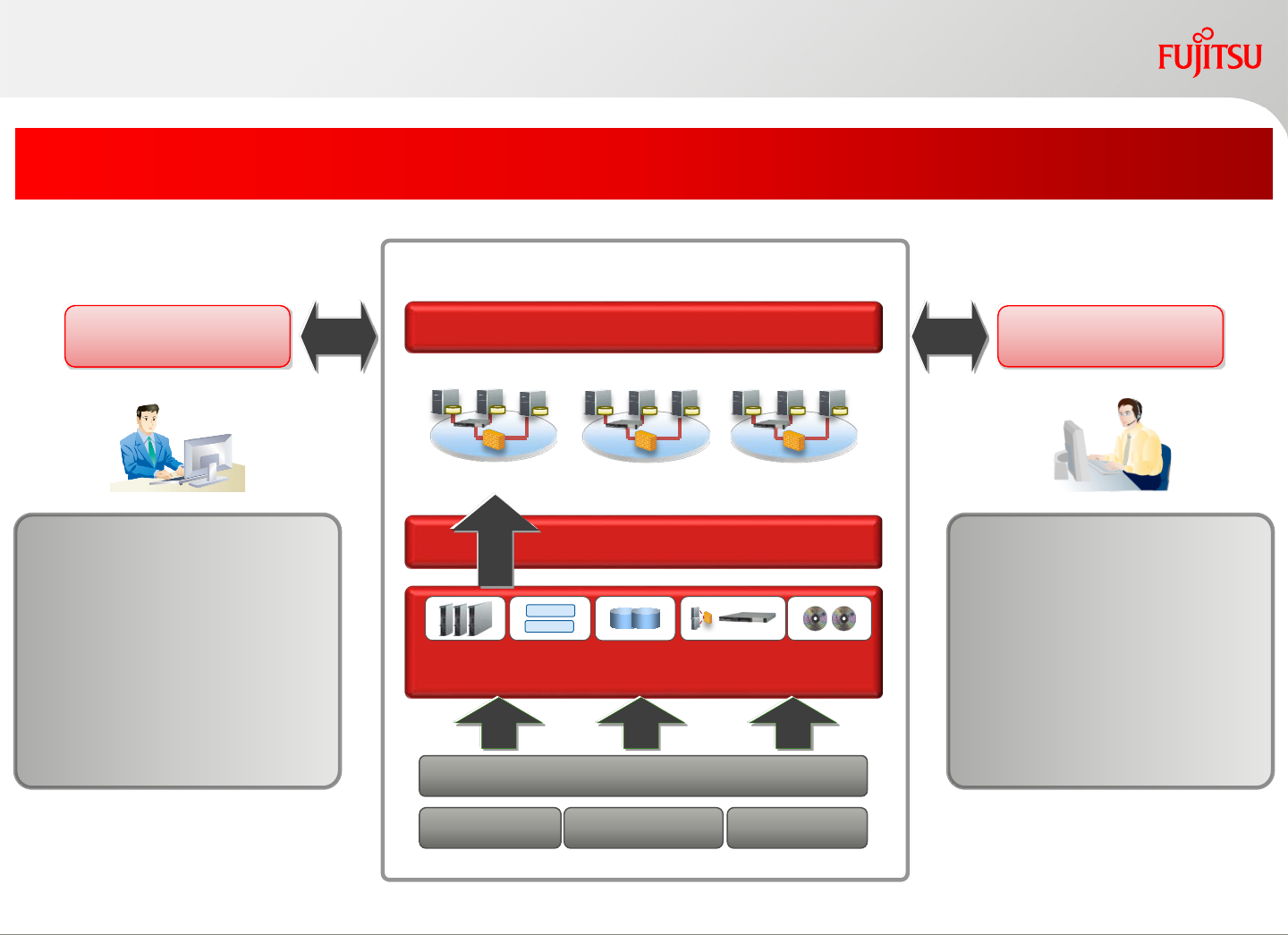
Automatically provide a ready-to-use platform
Virtualization
Use the service Provide a service
Resource Pool
Server StorageNetwork
•Subscribe a L-Platform
•Start/stop servers
•Status monitor, etc.
VM
VM
Service Portal
Auto deployment
Logical Platform*1
*1 A production system mixed with a combination of physical and virtual resources.
•Create, publish
service template
•Manage resources
•Monitor capacity, etc.
Operation Management
Platform provision as a service
Copyright 2017 FUJITSU LIMITED5
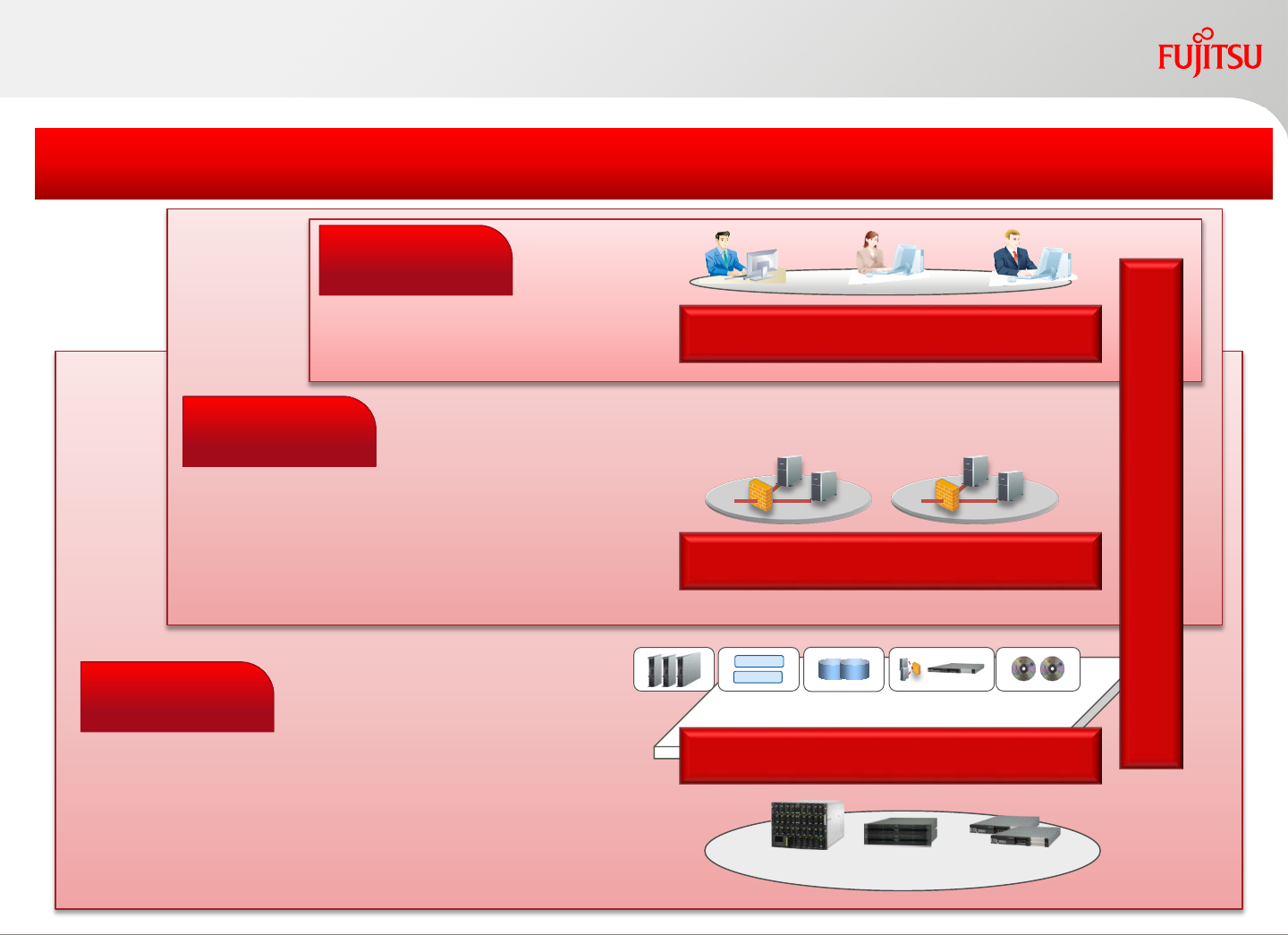
Technical terms : Management and roles
Copyright 2017 FUJITSU LIMITED
•Register resources, manage hardware
•Manage public pools
•Create and publish the basic templates
•Review and approve L-Platform subscriptions
•Manage tenant private pools
•Manage tenant specific templates
•Manage tenant user accounts
•Approve L-Platform subscriptions
•L-Platform subscription
•Resource status monitor
Server/Storage/Network/image
L-Platform
Visualize the operation status
Service Portal
Deployment
Server Storage Network
VM
VM
Resource Pools
Administrative operations are limited by the user roles
Tenant User
Tenant Admin
Infra Admin
6
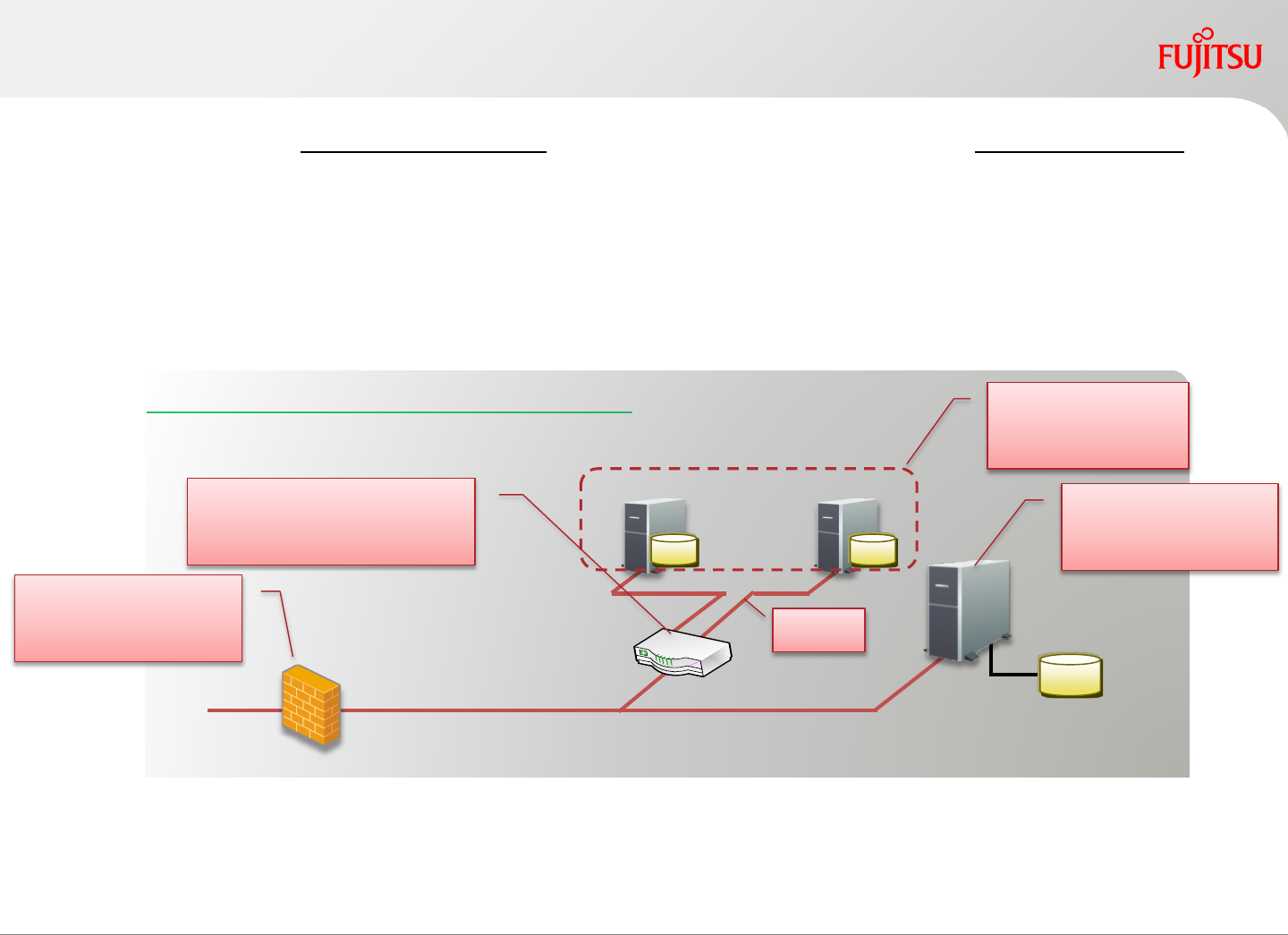
L-Server can be a physical L-Server (native OS and hypervisors) or a virtual L-Server (VM
Guest) which is: [Defined by FUJITSU Software ServerView Resource Orchestrator using
resources in the resource pools]
L-Platform is an infrastructure logical platform that may include one or more L-Servers,
storages, networks and system images; up to a maximum of 30 components including firewall
and server load balancer.
Copyright 2017 FUJITSU LIMITED
Technical Terms : Logical-Server / Logical-Platform
Note 1: L-Server defines the logical specification for virtual server/physical server and storage/
network connected to them (number of CPU, memory size, number of NIC, disk etc).
Note 2: L-Platform is by FUJITSU Software ServerView Resource Orchestrator unit of subscription by users
Sample of a multi-tier L-Platform system
(FC-SAN)
disk disk
disk
Web-AP Server
(virtual L-Server)
DB Server
(physical L-Server)
VLAN
Firewall
(Network device)
Server Load balancer
(Network device)
7
Copyright 2017 FUJITSU LIMITED
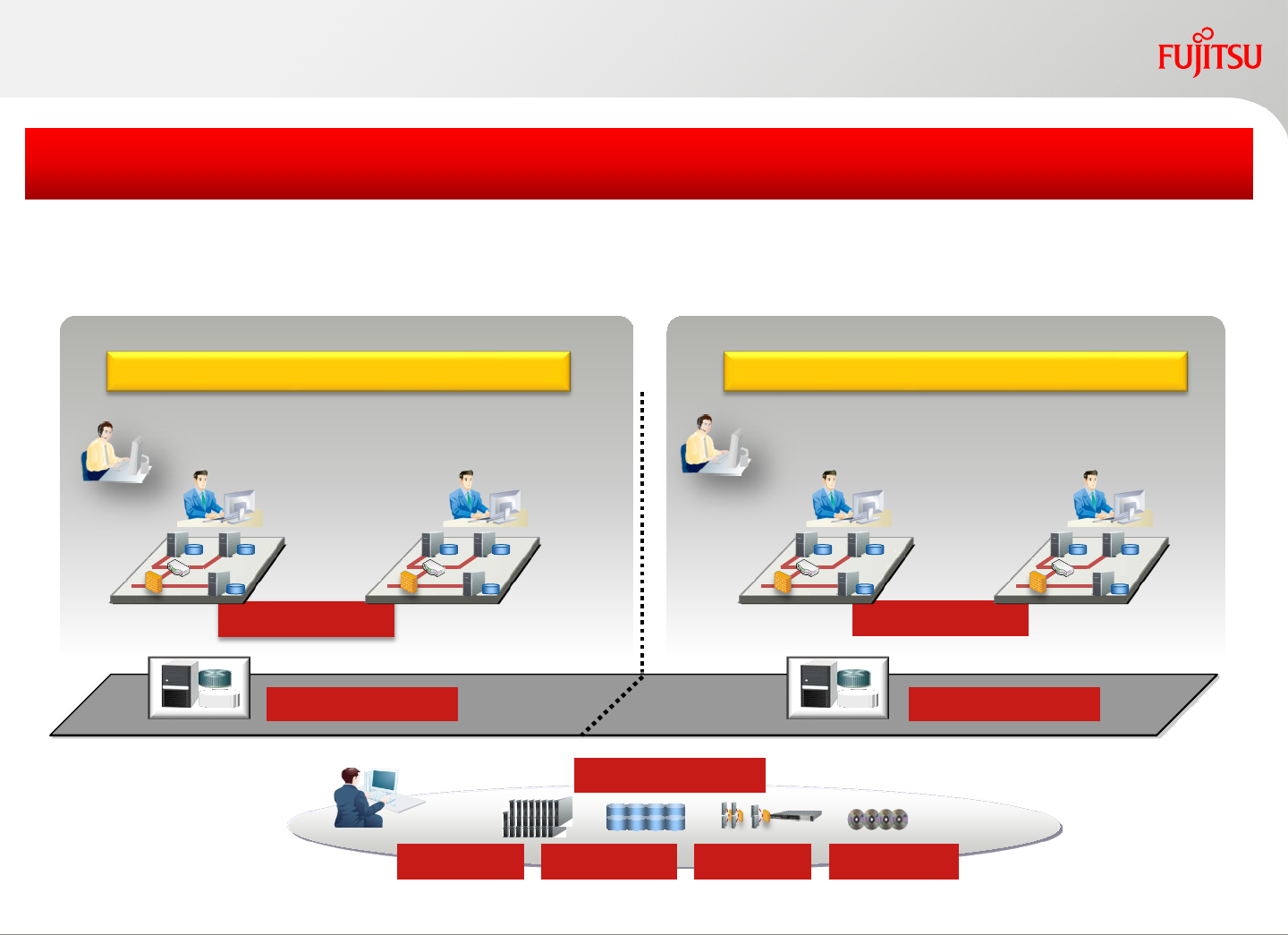
Manage resources in a multi-tenant environment
Tenant User
Tenant A Tenant B
Storage
Server Network Image
Tenant private pool Tenant private pool
Tenant Admin
Infra Admin Public pool
L-Platform L-Platform
Each tenant uses resources exclusively from the private resource pools
L-Platform template creation and publication is tenant-specific as well
Share public infrastructure resources across multiple separated tenants
Tenant User
Tenant Admin
8
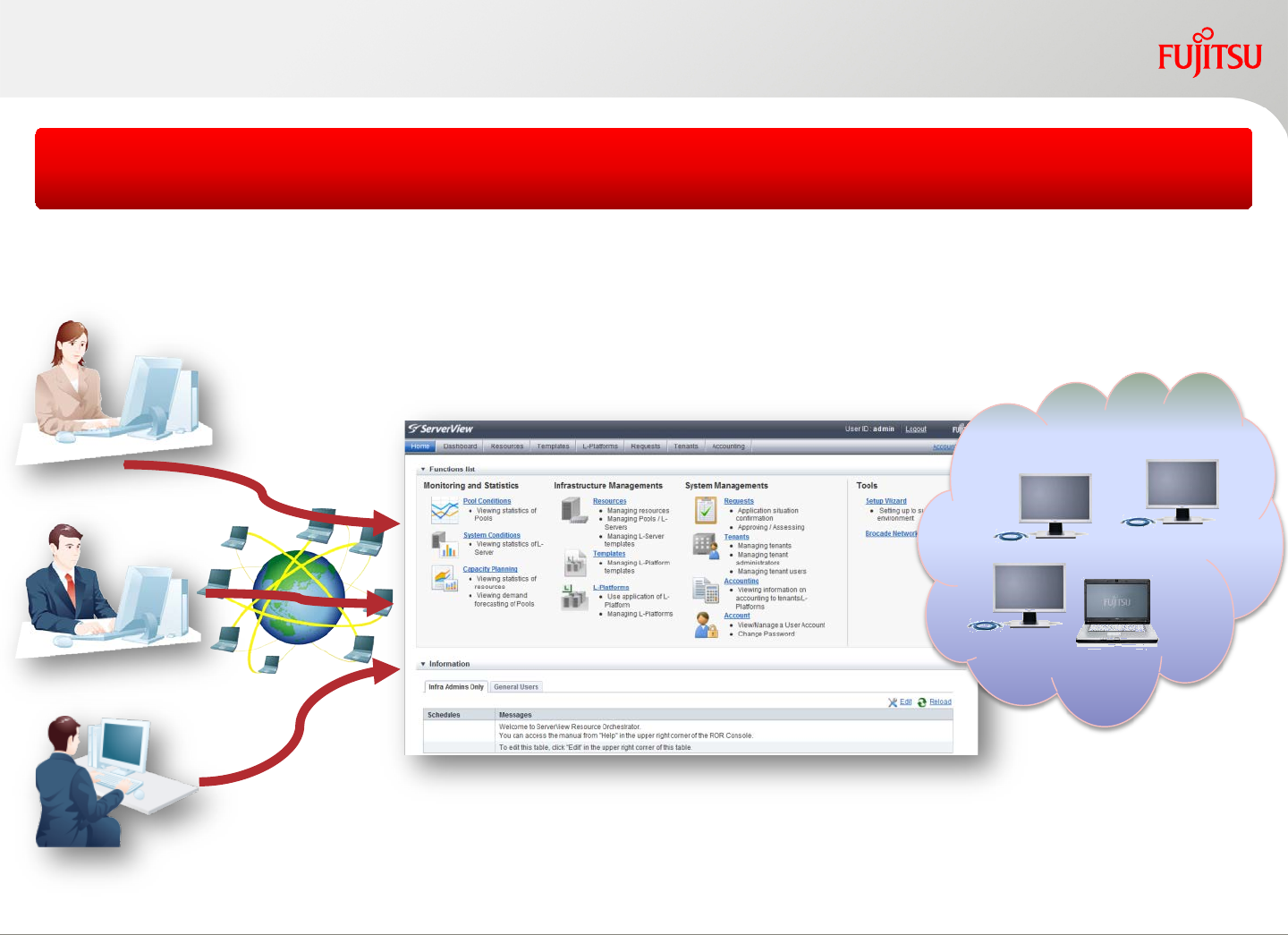
Users access cloud resources via the advanced self-service portal
Copyright 2017 FUJITSU LIMITED
Advanced Cloud Access Portal
Tenant Users Self Service Portal Cloud resources
9
Copyright 2017 FUJITSU LIMITED
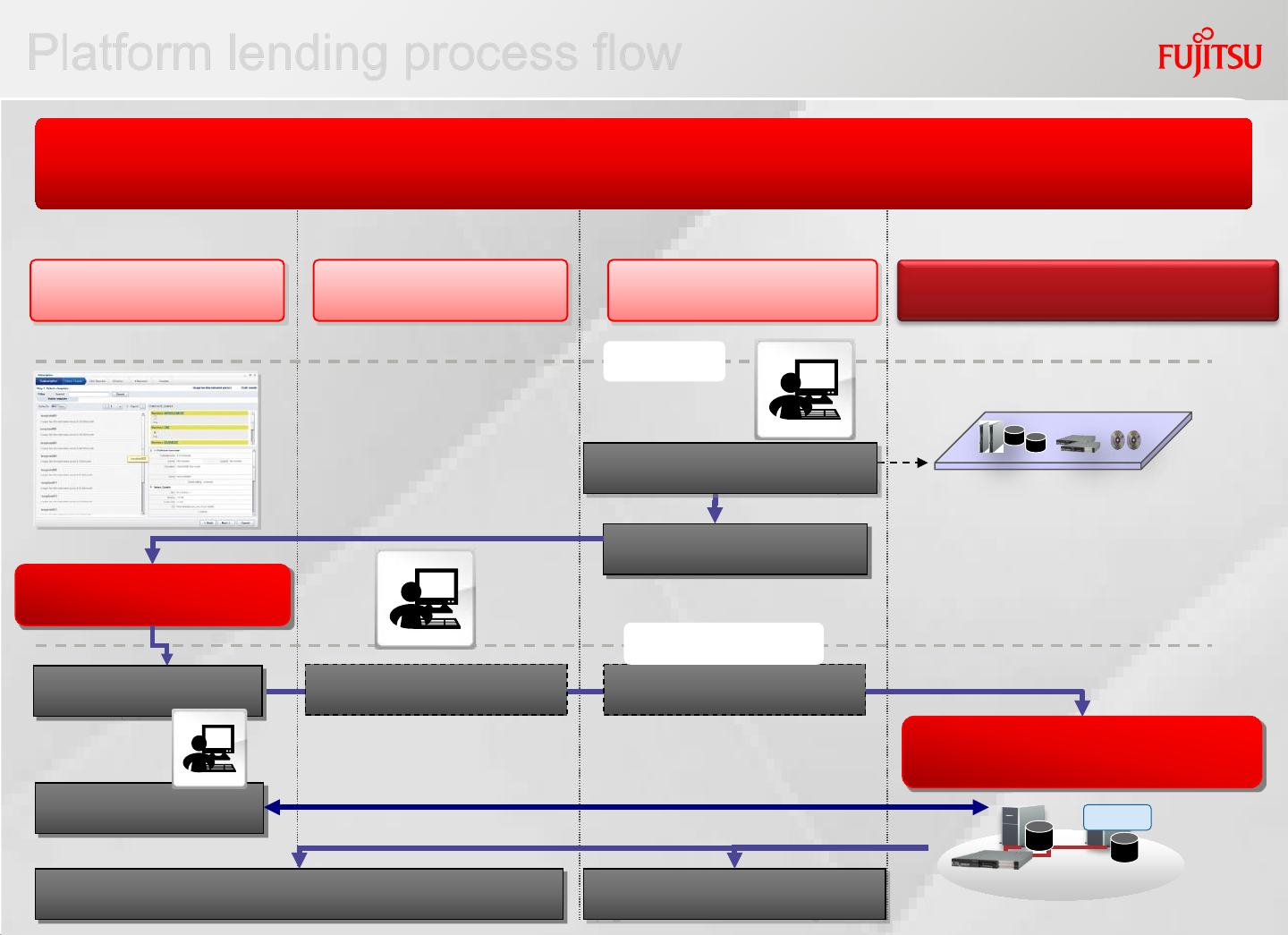
Platform lending process flow
Tenant User FUJITSU Software ServerView
Resource Orchestrator
Provisioning management
(Building of L-Platform)
Use service
Select L-Platform
and apply for service
Automatic building of the infrastructure layer which can also be used for
visualization of ICT resource usage
Define L-Platform specification.
Release the service
on Self-service portal
Approval of L-Platform
Preparing
Apply for service
Displays status of utilization Pool management of ICT resources.
(Figure out allocation remaining of Pools)
ICT resource pools
Tenant admin Infrastructure
administrator
Pool Management of ICT resources.
(consolidate resources and create pools)
Approval of L-Platform
VM
10
Copyright 2017 FUJITSU LIMITED
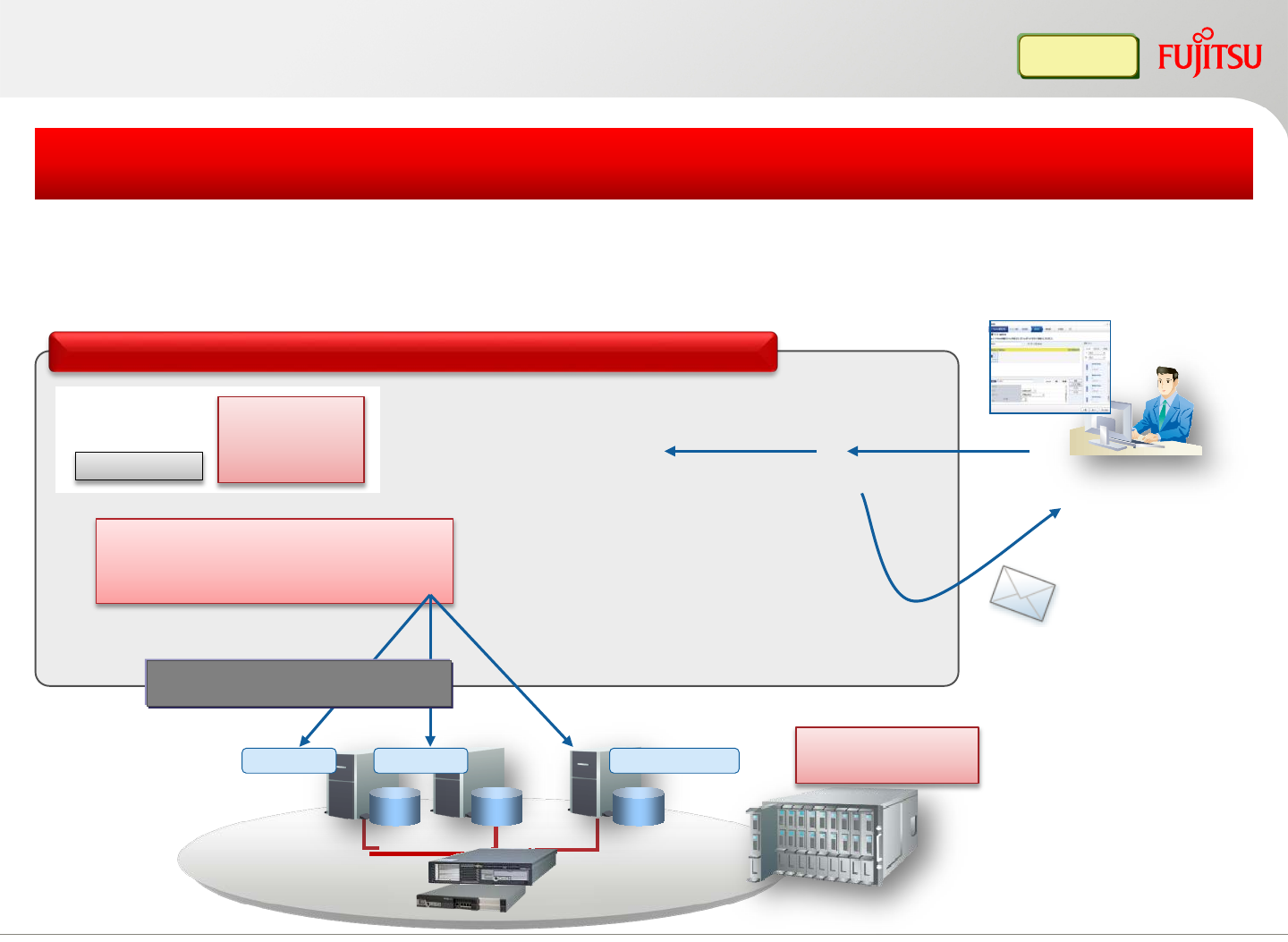
L-Platform deployment
Subscribe
2. Get information from
L-Platform template
L-Platform
template
VM Server
3. Deployment
•Setup server, storage, network
•Deploy and configure OS
L-Platform
VM software
VM Server Physical Server VM management
software
1. Accept subscription
Image file
Windows
Automatic
Based on the user specified template, L-Platform is automatically deployed and
configured. Physical/VM mixed L-Platforms are also supported
Quickly provide logical platforms to tenant user
Network device
(firewall, server load balancer)
Approval
notification email
FUJITSU Software ServerView Resource Orchestrator
11
Template creation and publish
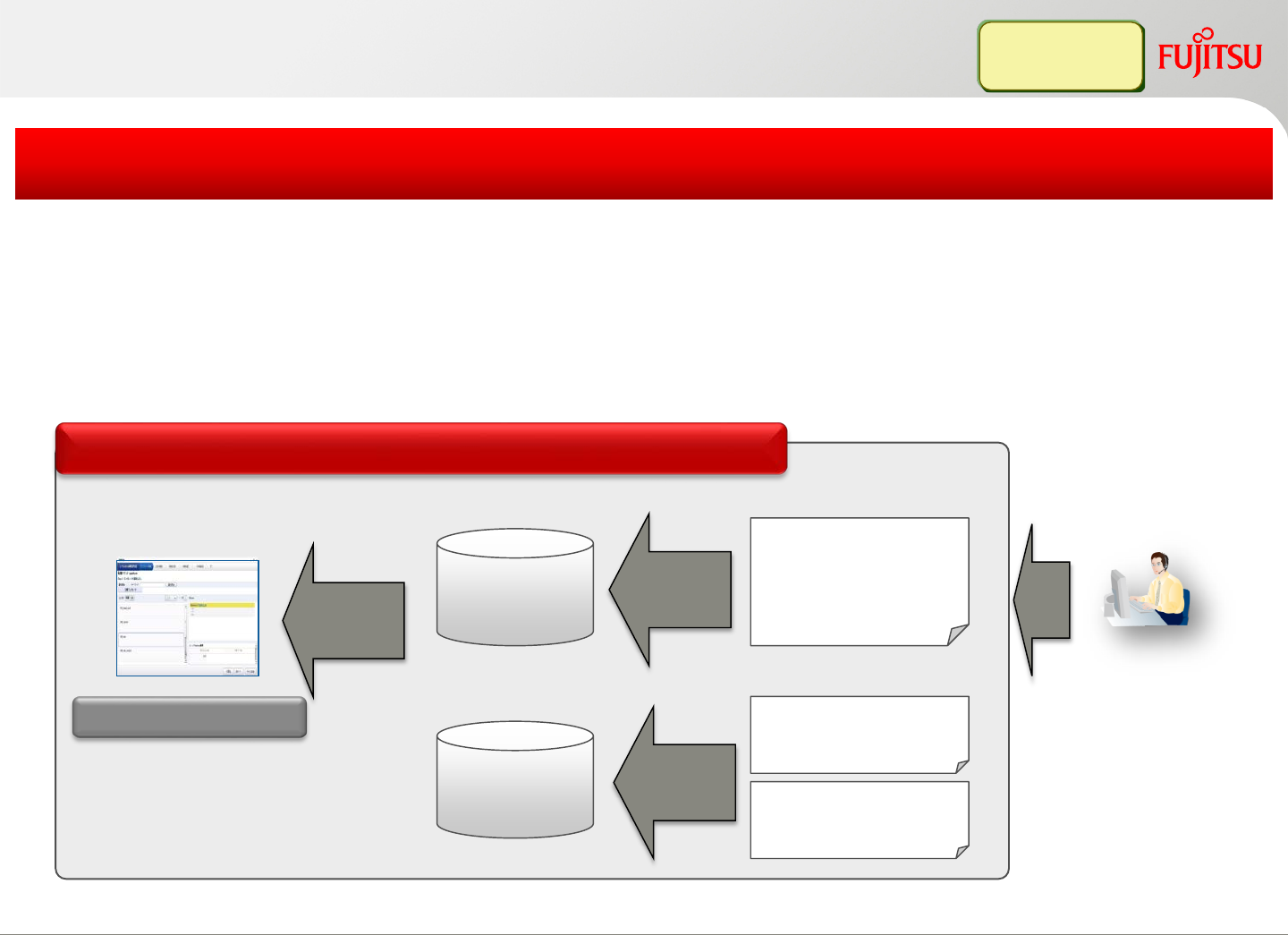
1.Register
Template
info
Create a
template
L-Platform spec:
Name
Purpose
etc.
Template
Define firewall
ruleset
Define Server load
balancer rules
Service portal
Setup
script
GUI operation to create, register and publish a template
Server and allocated resources can be defined for each template
Template can be shared by multiple tenants or used by one tenant
Provide different configuration patterns to group companies or for internal use
FUJITSU Software ServerView Resource Orchestrator
Infra Admin
Tenant Admin
2.Register
3.Publish
Copyright 2017 FUJITSU LIMITED12
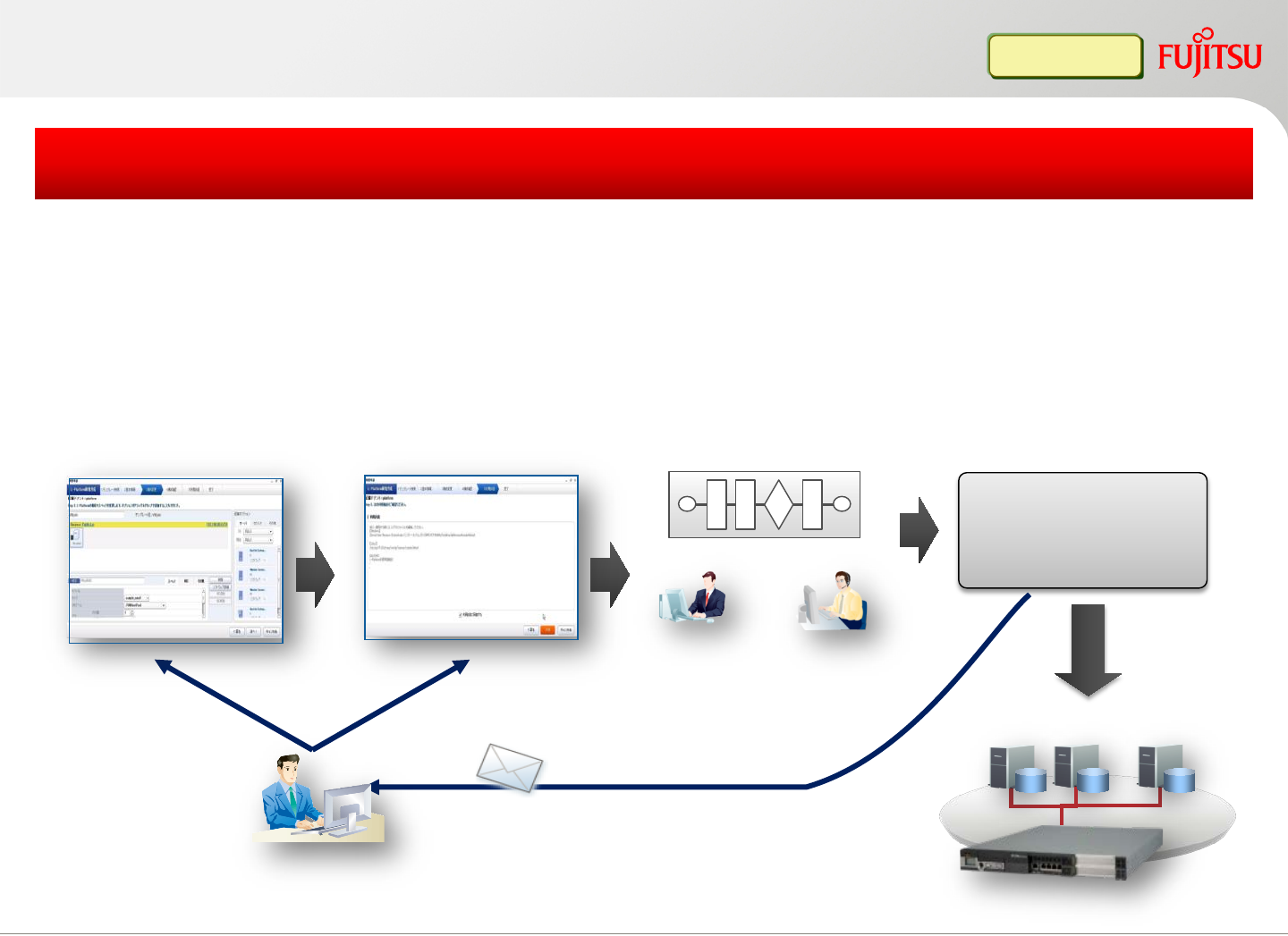
5. Notification email when finished
(user ID, password, etc.)
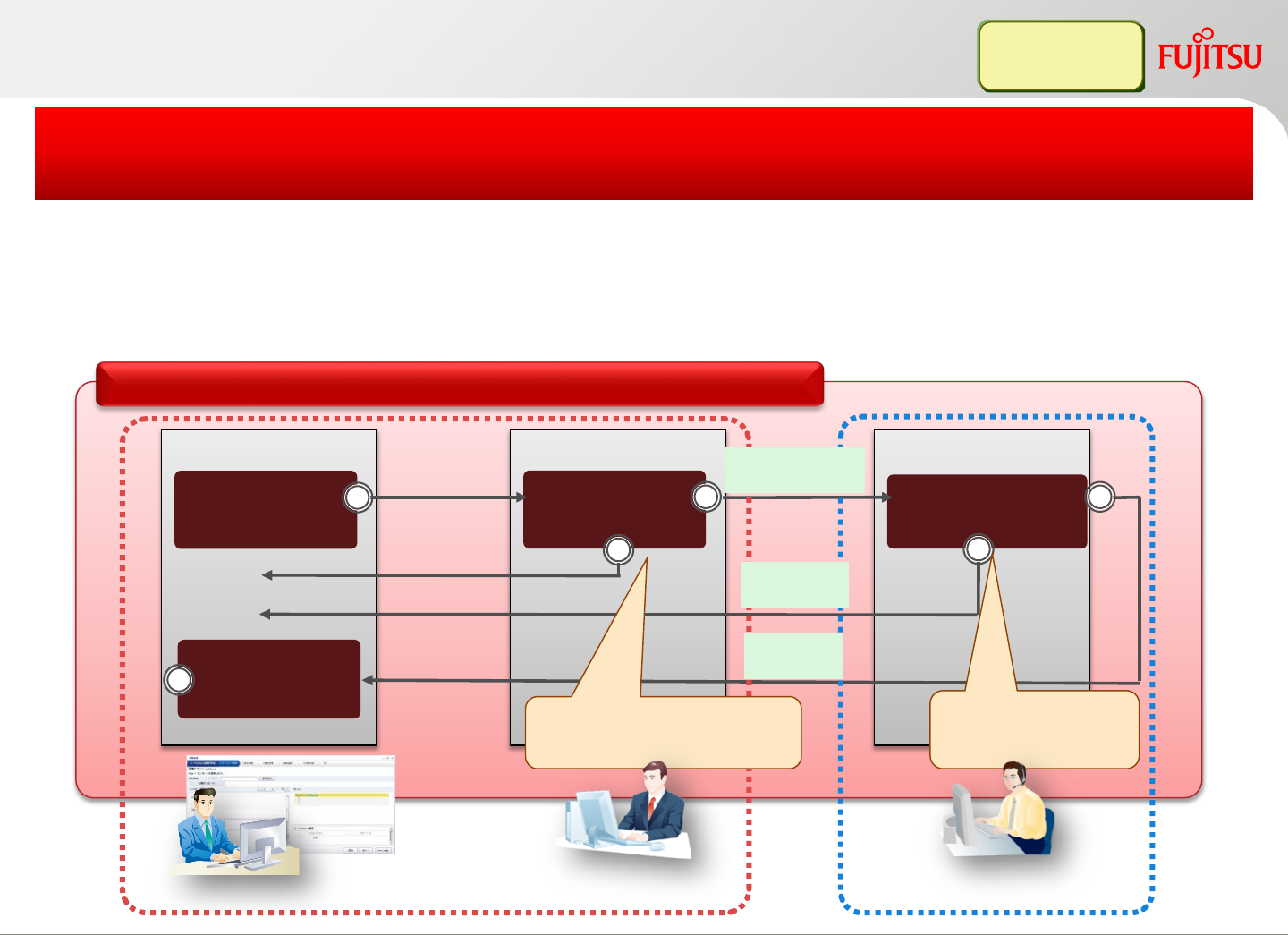
Subscription process Auto deploy a
virtual L-Platform
Get a virtual L-Platform
1. Select a template
2. Customize 3. L-Platform subscription
Tenant Admin
(Approval)
4. Approval process
InfraAdmin
(Review)
Tenant User
Firewall/Server Load balancer
Service-enabled L-Platform creation with full automation process
A multi-tier system, including firewall and server load balancer, can be
deployed automatically by simply selecting a template
CPU and Memory spec can be changed after L-Platform creation
L-Platform
Copyright 2017 FUJITSU LIMITED
L-Platform subscription
1313
Copyright 2017 FUJITSU LIMITED
Subscription process
Subscribe Approve
Reject
Confirm
status
Review
Tenant User Infra Admin
Confirm if this
request is validate
Approval
Admit
Reject
Responsible person’s
approval is required
Tenant Admin
Ensure the subscription of a tenant user is valid or not
before the actual deployment
Two stages (review and approval) to check the tenant user’s subscription
Reject or approve the subscription is judged by the responsible person
Infra Admin
Tenant Admin
Apply
FUJITSU Software ServerView Resource Orchestrator
14
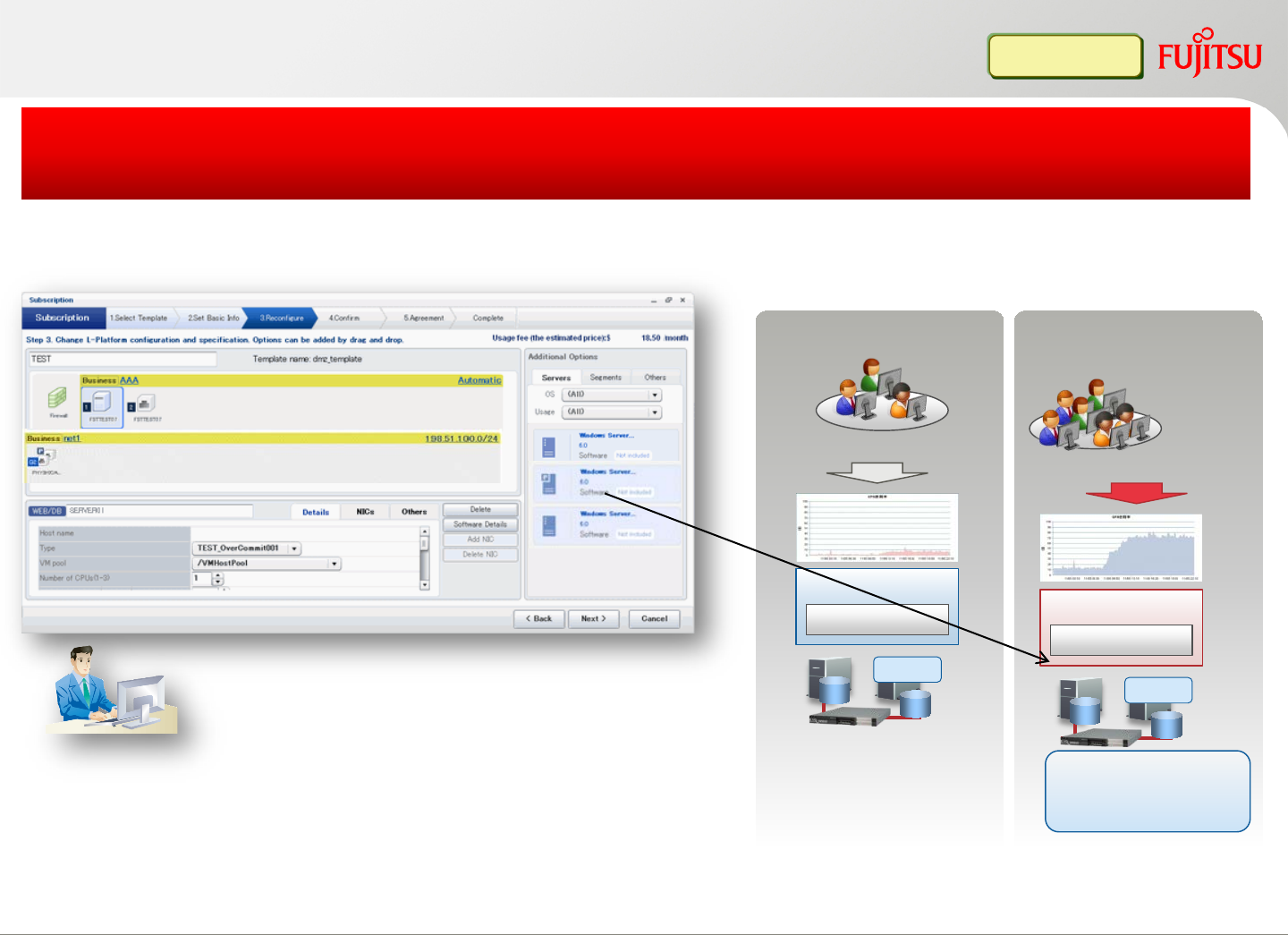
Using of cloud services (1)
Tenant User
End user number is
increasing
Customer division A
Customer division B
L-Platform A
Task A L-Platform B
Task B
Heavy load
VM VM
Add more resources
To avoid the
performance neck
System configuration, spec and L-Server number can be changed
After L-Platform deployment, L-Platform spec and configuration can be
changed by tenant user (subscription is required)
Tenant user can change the following parameters
without stopping L-Platform
•CPU number, performance
•Memory size
•Disk number
•Server Number
Tenant User
Copyright 2017 FUJITSU LIMITED1515
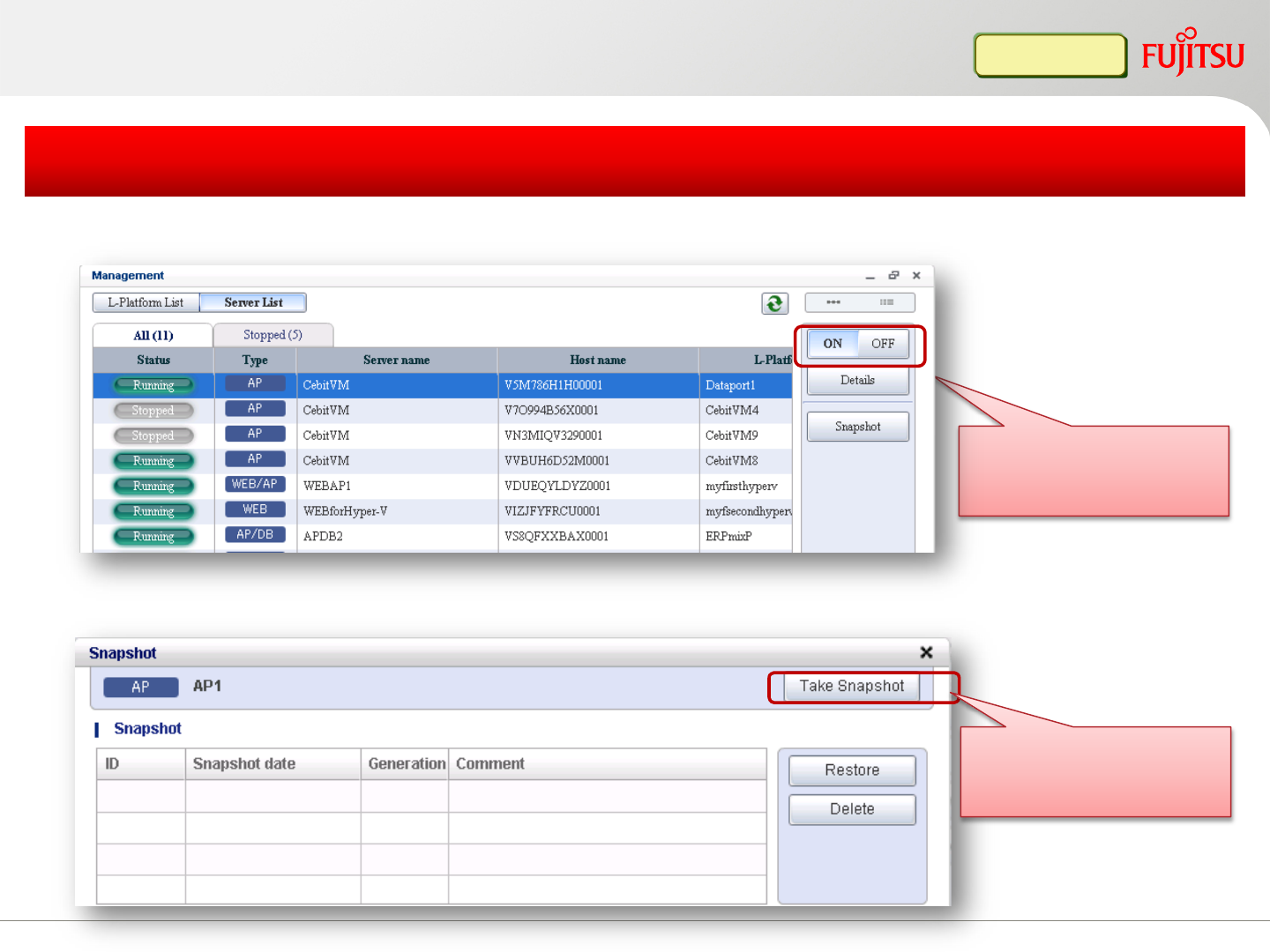
Power on/off L-Platform, including all L-Servers through one operation
Easy operation and easy maintenance
Support 3 generations snapshot image management, and be able to restore to any specified
generation
Power control
button
Snapshot collect
Tenant User
Using of cloud services (2)
Copyright 2017 FUJITSU LIMITED1616
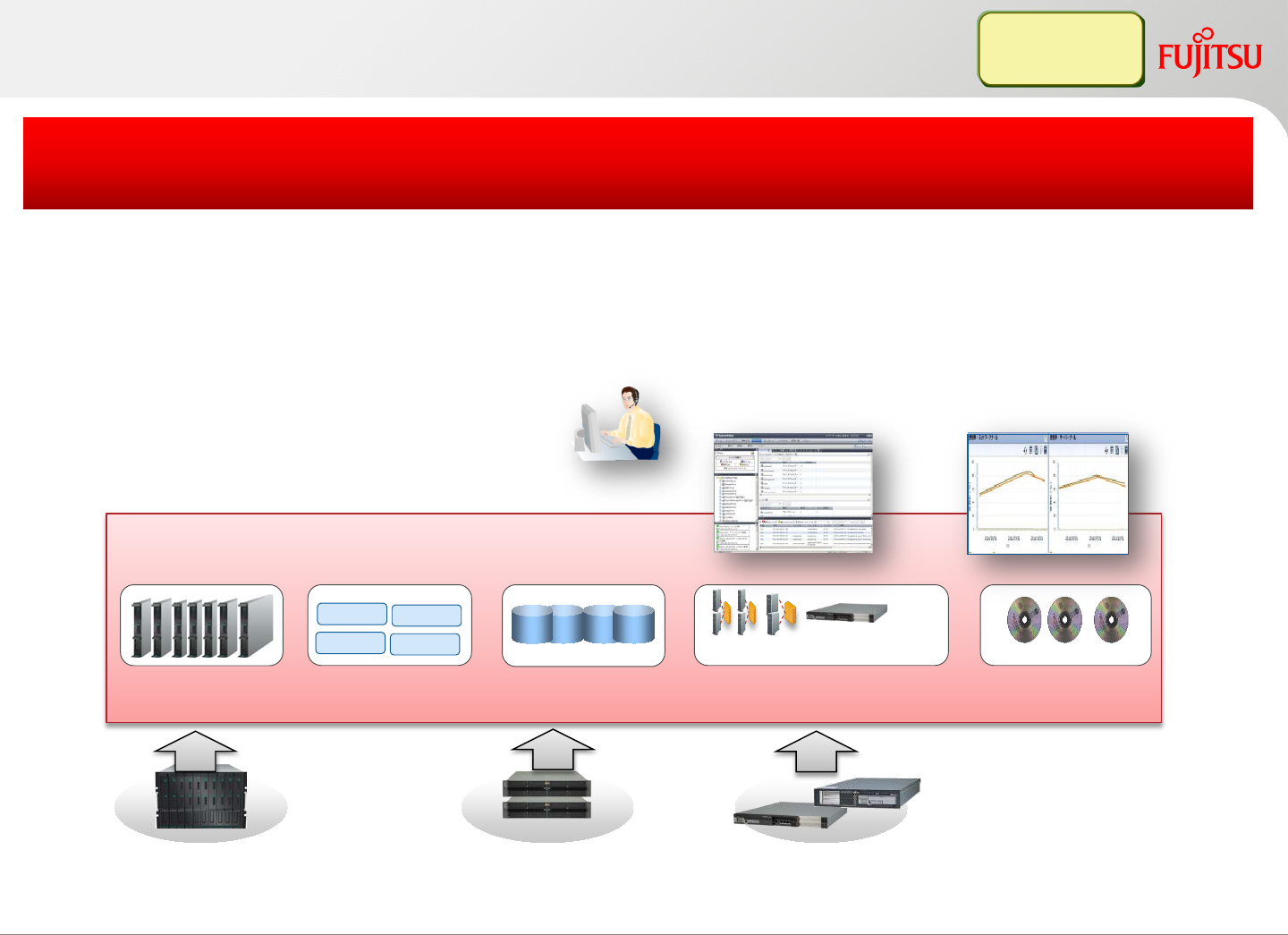
Resource Pools
*: Pools to manage the network configuration info (IP, VLAN-ID, physical connection) and network devices (Firewall/Server load balancer)
Integrate the scattered resources into resource pools
Firewall
IP VLAN Load Balancer
Network pool*
VM VM
VM pool
VM VM
Cloning image
Image pool
Server pool Storage pool
Resource capacity planning
Infra Admin
Tenant Admin
Integrate resources into resource pools for central management
Easy to know the current resource usage and plan for future
Improve the hardware utilization ratio by allocating/releasing
resources on demand
Manage resource pool
Monitor, operate
resource pools
Copyright 2017 FUJITSU LIMITED
Resource pool management
17
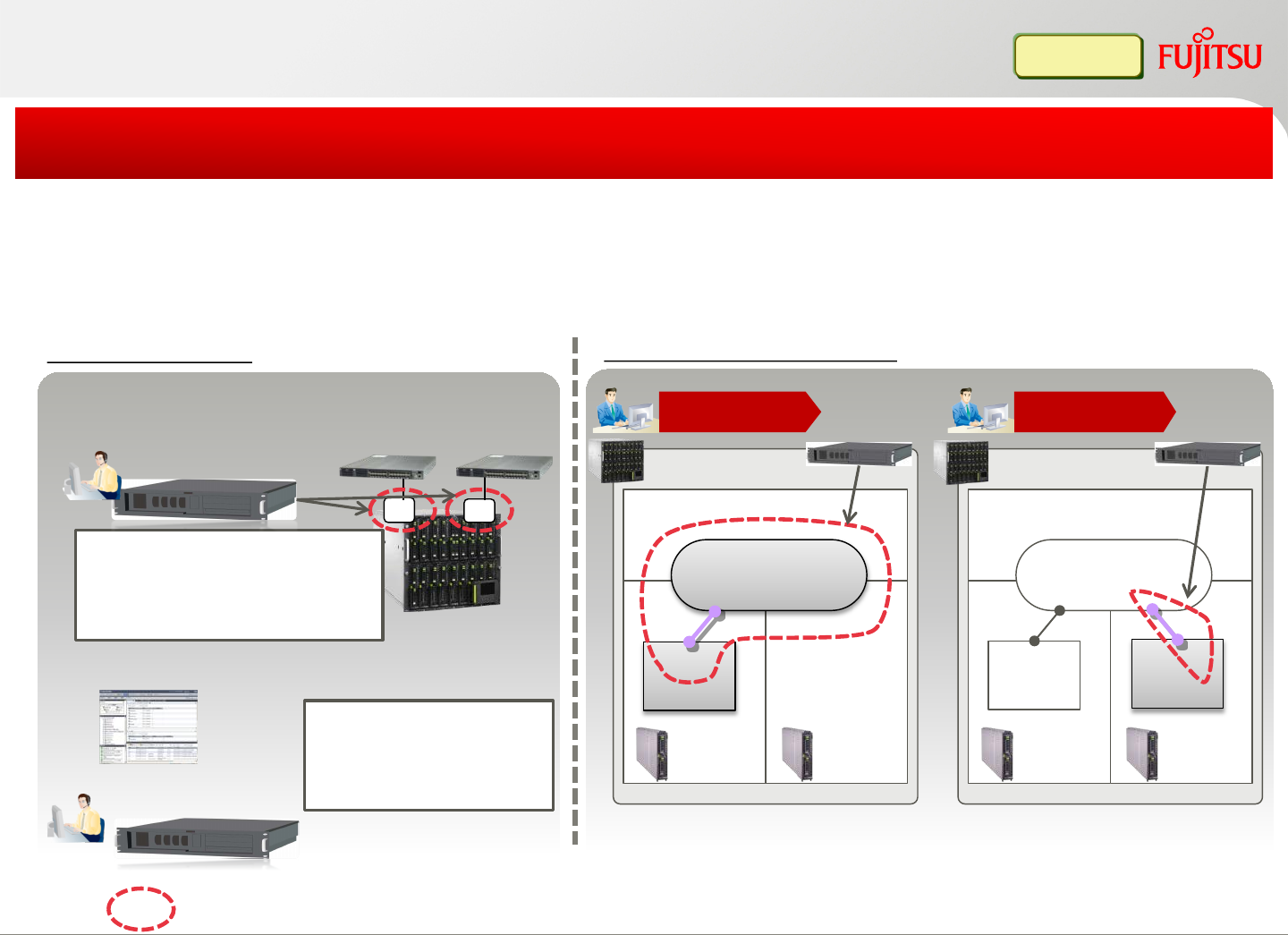
Blade ChassisBlade Chassis
Automatically create VLAN and virtual networks on the VM host.
Automatically connect newly created virtual servers into the virtual network
Reduce operation costs by automating and simplifying VLAN networks
1st time
Site Preparation
STEP2:Create network resource
STEP1:Cabling and decide VLAN ID
ab
VLAN101
Configure uplink port VLAN
ID (via by FUJITSU Software
ServerView Resource
Orchestrator GUI)
2nd time
LAN switch blade
Server
Blade
Server
Blade
VLAN101
network
LAN switch blade
Server
Blade
Server
Blade
VLAN101
network
* Sample of VMware ESX/ESXi(vNetwork), Hyper-V on blade server. Automation
scope differs from OS/hardware environment
•Use VLAN ID=101
•Uplink port info a,b
•Subnet address
•Available IP address
Virtual
Server Virtual
Server
Virtual
Server
L-Platform subscription
Manager Manager
Network configuration automation (1) Automatic
:Automated area
ServerView Resource
Orchestrator Manager
ServerView Resource
Orchestrator Manager
Copyright 2017 FUJITSU LIMITED1818
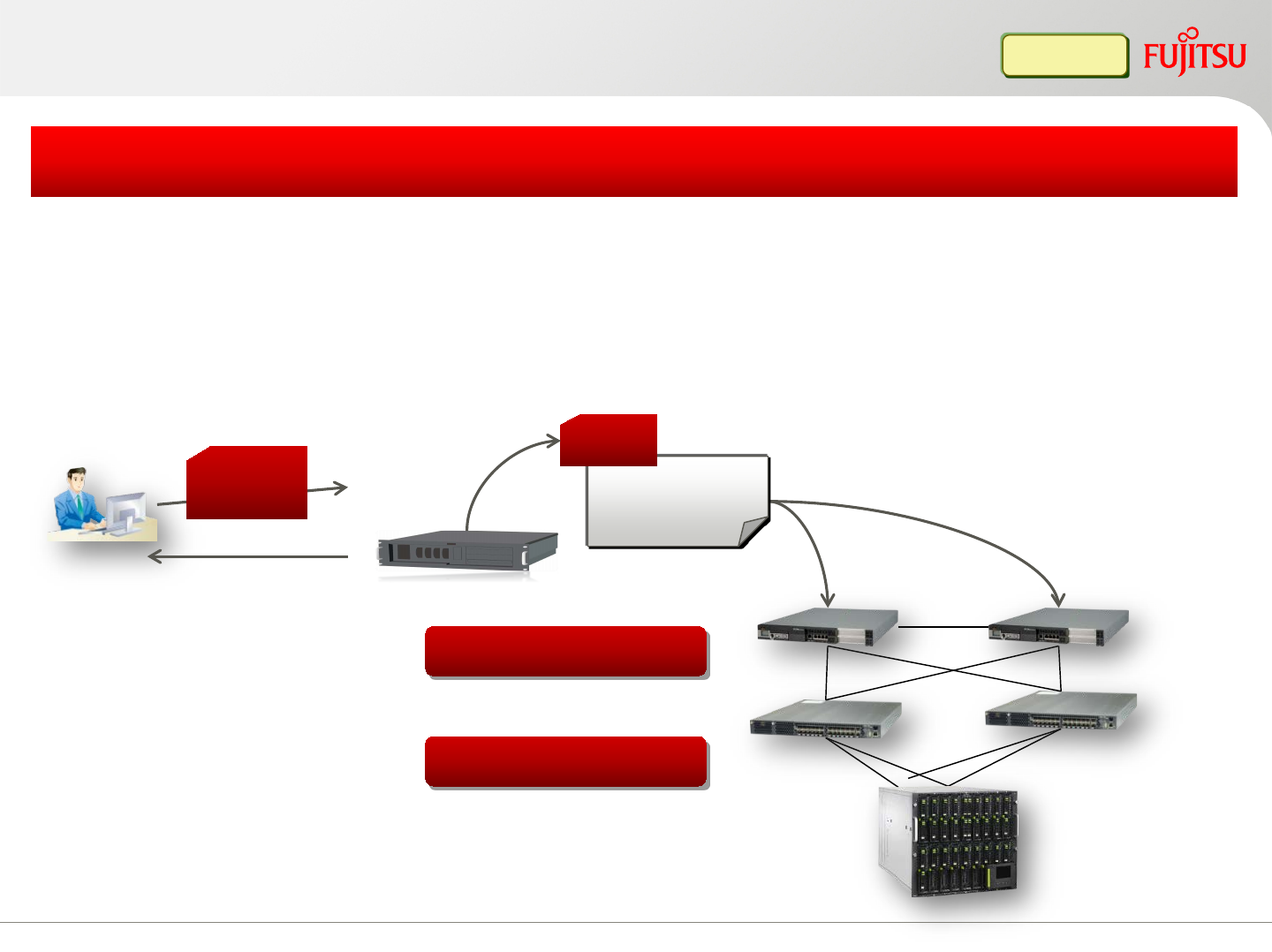
L-Platform subscription
Simplify firewall and server load balancer configuration
ServerView
Resource
Orchestrator
Manager
Network device
script*1
Firewall rule set
Load balancing rule
Automatically configure firewall and load balancer when
creating/modifying/changing the L-Platform
Prepare recovery scripts in advance, if the script execution fails, it is skipped and
the unfinished configuration is removed automatically
*1 The infrastructure administrator should prepare the setting script for each
piece of equipment. Tenant user can specify arrangements of that scripts from
setup screen.
Config
value
param
Result information Setup network device
Network configuration automation (2) Automatic
Tenant
administrator
Copyright 2017 FUJITSU LIMITED19
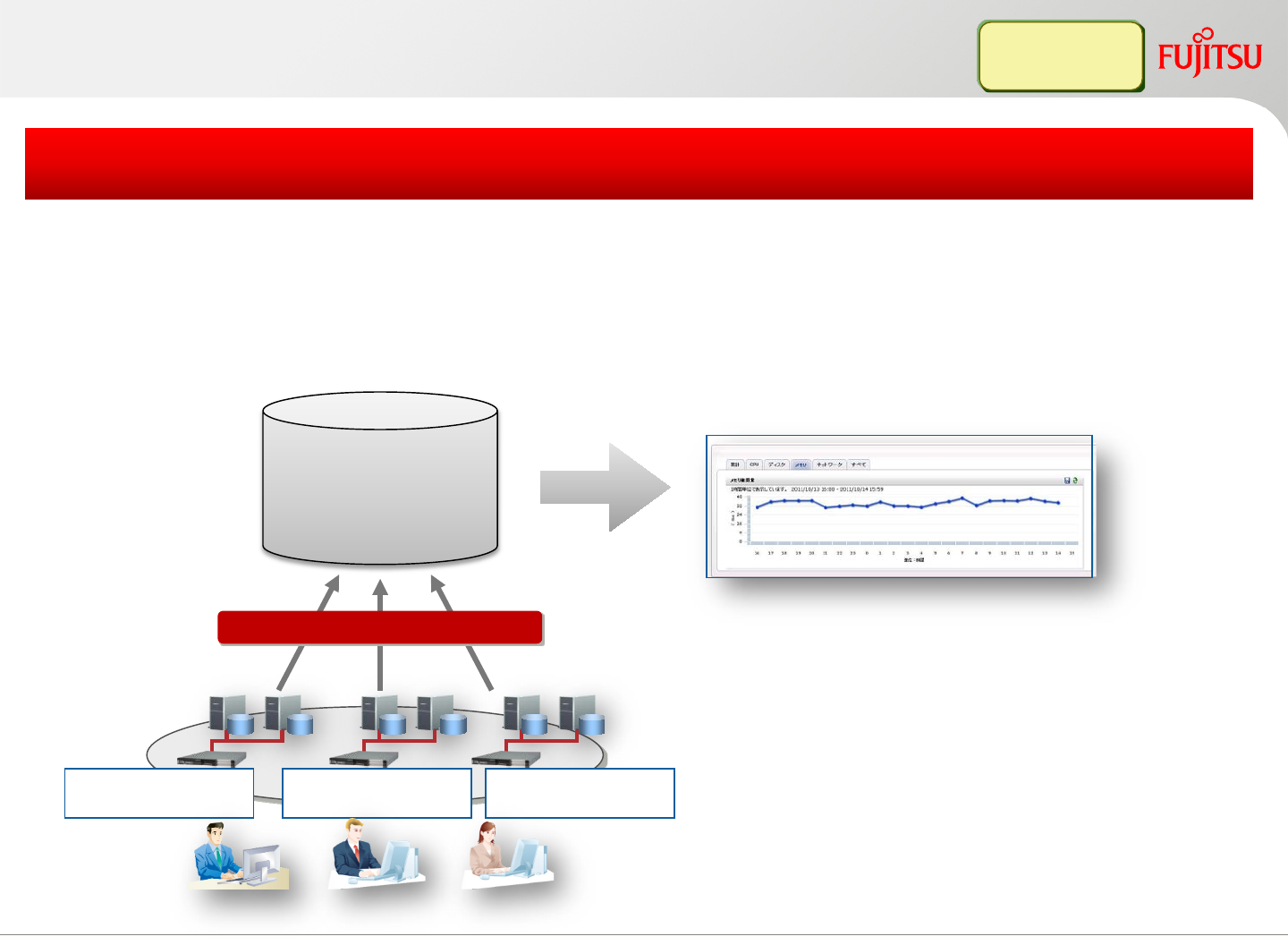
Resource status monitoring
•CPU usage rate(%)
•Memory amount (MB)
•Disk read/write amount (MB/S)
•Disk read/write number (IOPS)
•Network throughput (Mbps)
Resource
usage
info
L-Platform A L-Platform B L-Platform C
Collect and store usage data
Display resource usage in graph
Centralized view to show all the L-Platform resources usage
Reference range can be restricted in accordance with the tenant user and tenant
admin’s role authority
Easy to check the server resource usage and conditions
Infra Admin
Tenant Admin
Copyright 2017 FUJITSU LIMITED20
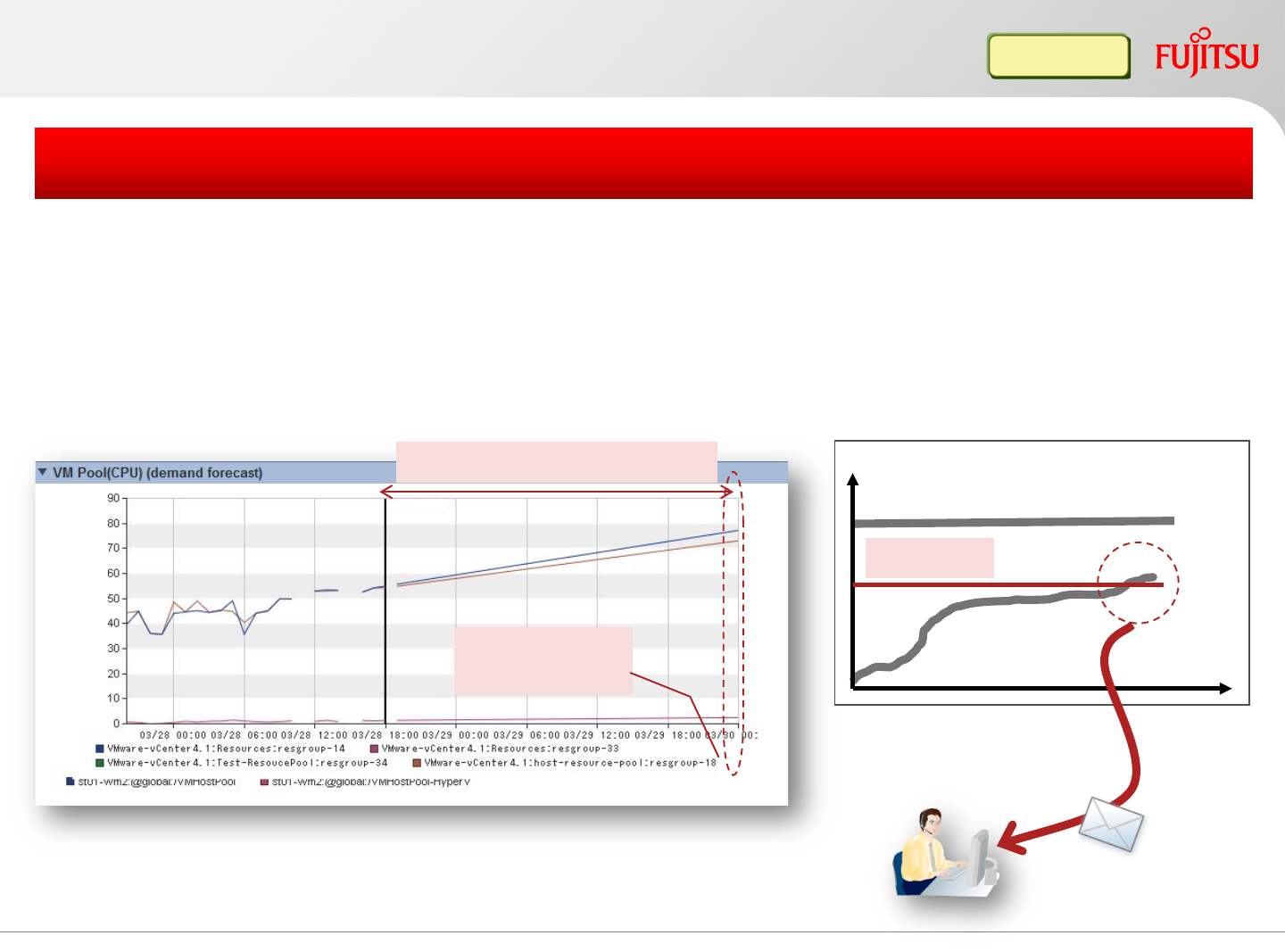
Monitoring of resource usage (1)
Predict the future usage based on existing actual data
Early detection of insufficient resources through threshold monitoring
Real time analysis for the best performance
Regression analysis the usage of the resource pool
threshold
Total
Usage graph
Threshold monitoring and email notification
When threshold is exceed
Predict when
the depletion
Notification
email
Infra Admin
Period until depletion point
Copyright 2017 FUJITSU LIMITED21
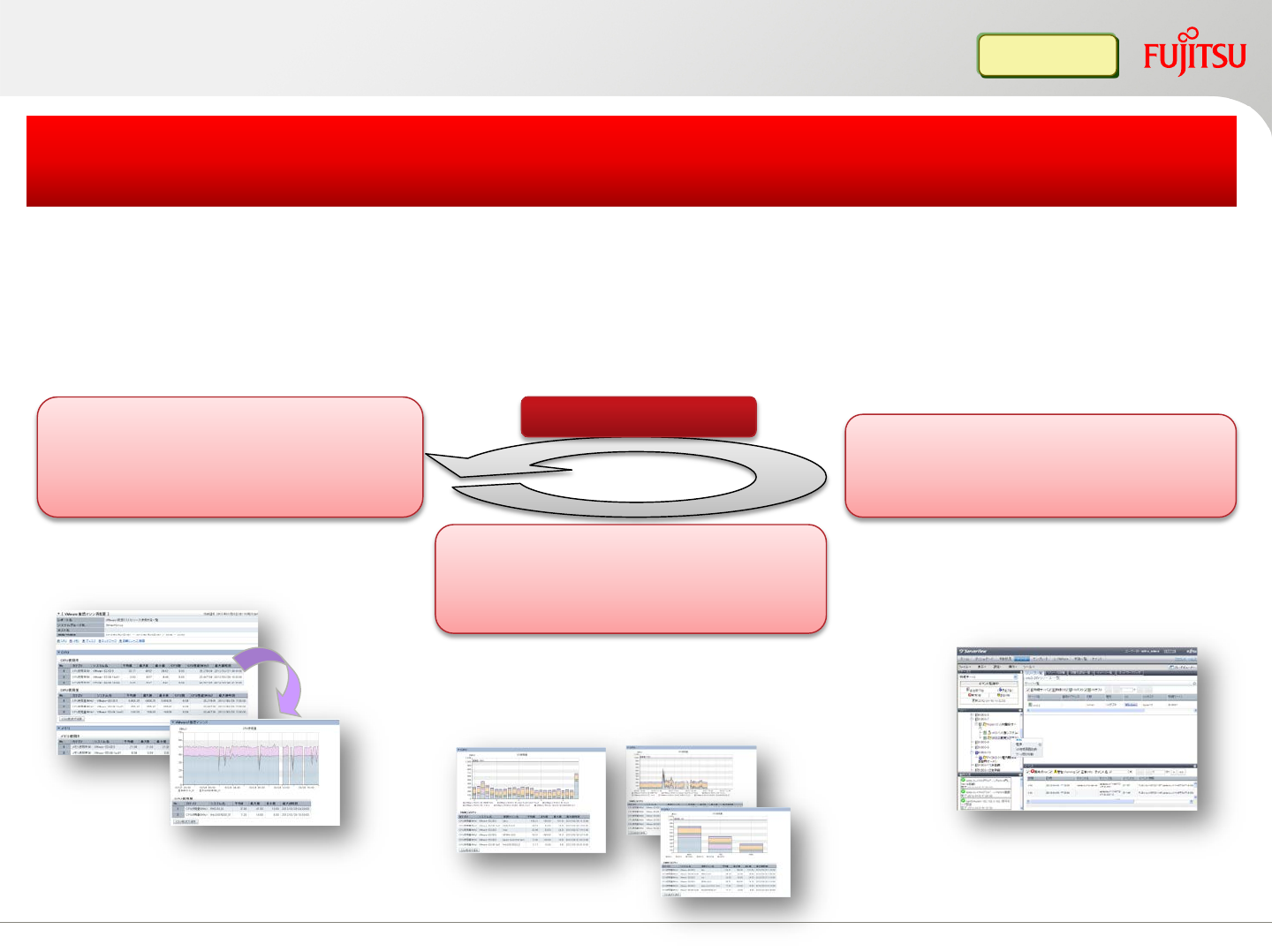
Resource load is displayed in graph per host, which can be used to check whether
the host is over-loaded or under-loaded
Simulate the VM guest reallocation, to find the best solution and avoid peak time
heavy load in advance
Resolve the VM host insufficient resource problem
by optimizing the VM guest relocation
Monitor over-load VM host
based on the physical resource
amount and usage
Pre-validate the resource usage
by simulating the status after
guest OS reallocation
Based on the result of simulation
reallocate the guest OS
to avoid the over-load
Keep running
1. Check usage per host
Display temporal sequence
2. Check usage per guest Display by weekday
Display by time slot
3. Decide the reallocate guest OS
and its destination
4. Refer to the simulation result
and migrate the target guest OS
5. Avoid system over load
Infra Admin
Monitoring of resource usage (2)
Copyright 2017 FUJITSU LIMITED22
Copyright 2017 FUJITSU LIMITED
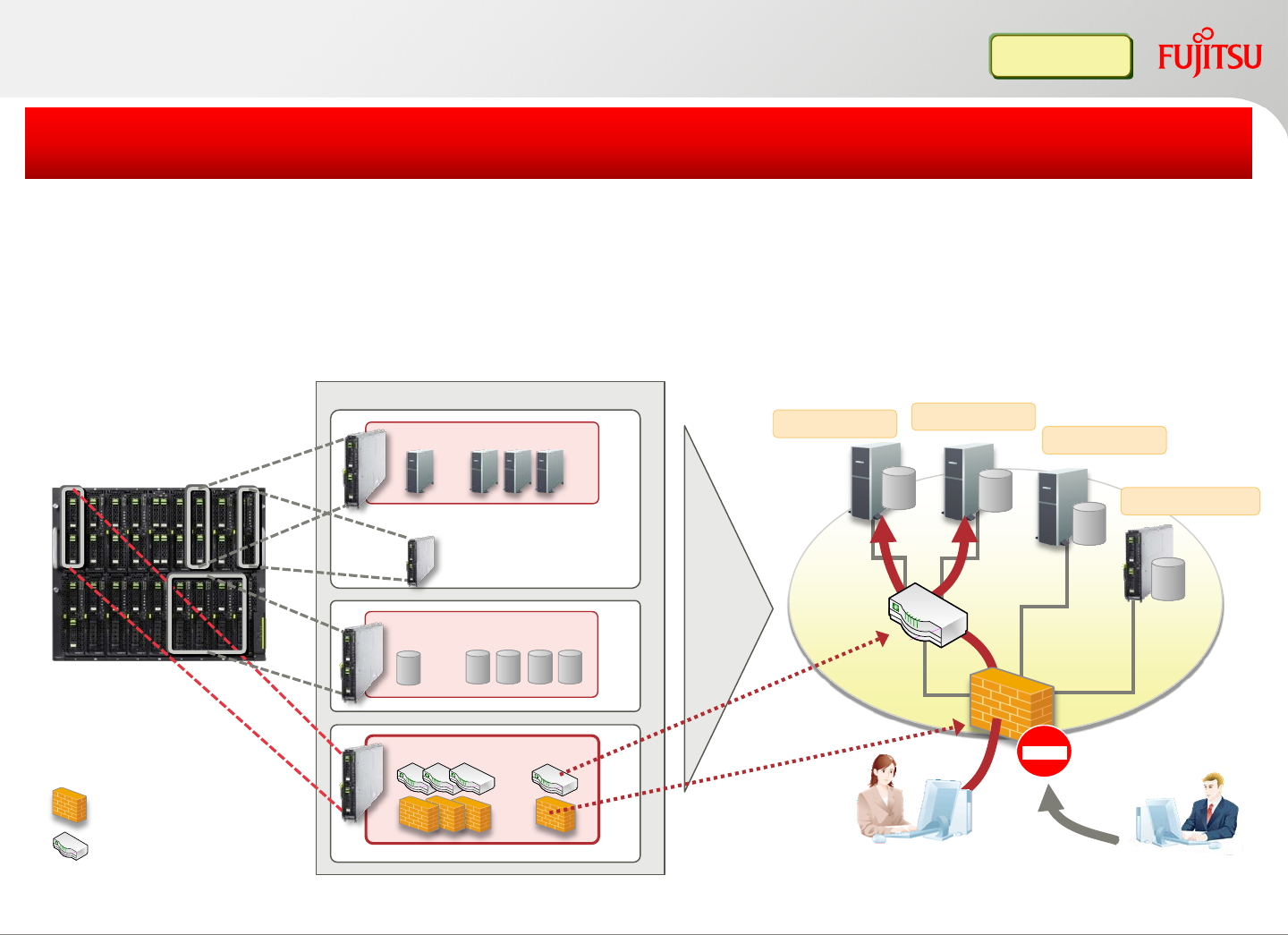
Improved Network security
The Access Control Feature controls the access between tenants and platforms
Address Translation Function can hide secure server information
The Anomaly IPS feature protects each platform from flooding-attacks
Improved network security for customers, projects & divisions
Infra Admin
PRIMERGY BX900
Physical server
Virtual server
・・・
・・・
・・・
Resource pool
: Server load balancer
: Firewall
Virtual storage
・・・
deploy
Network
storages
servers
Virtual server
Logical Platform
Virtual server
Physical server
Virtual server
user Non-user
23
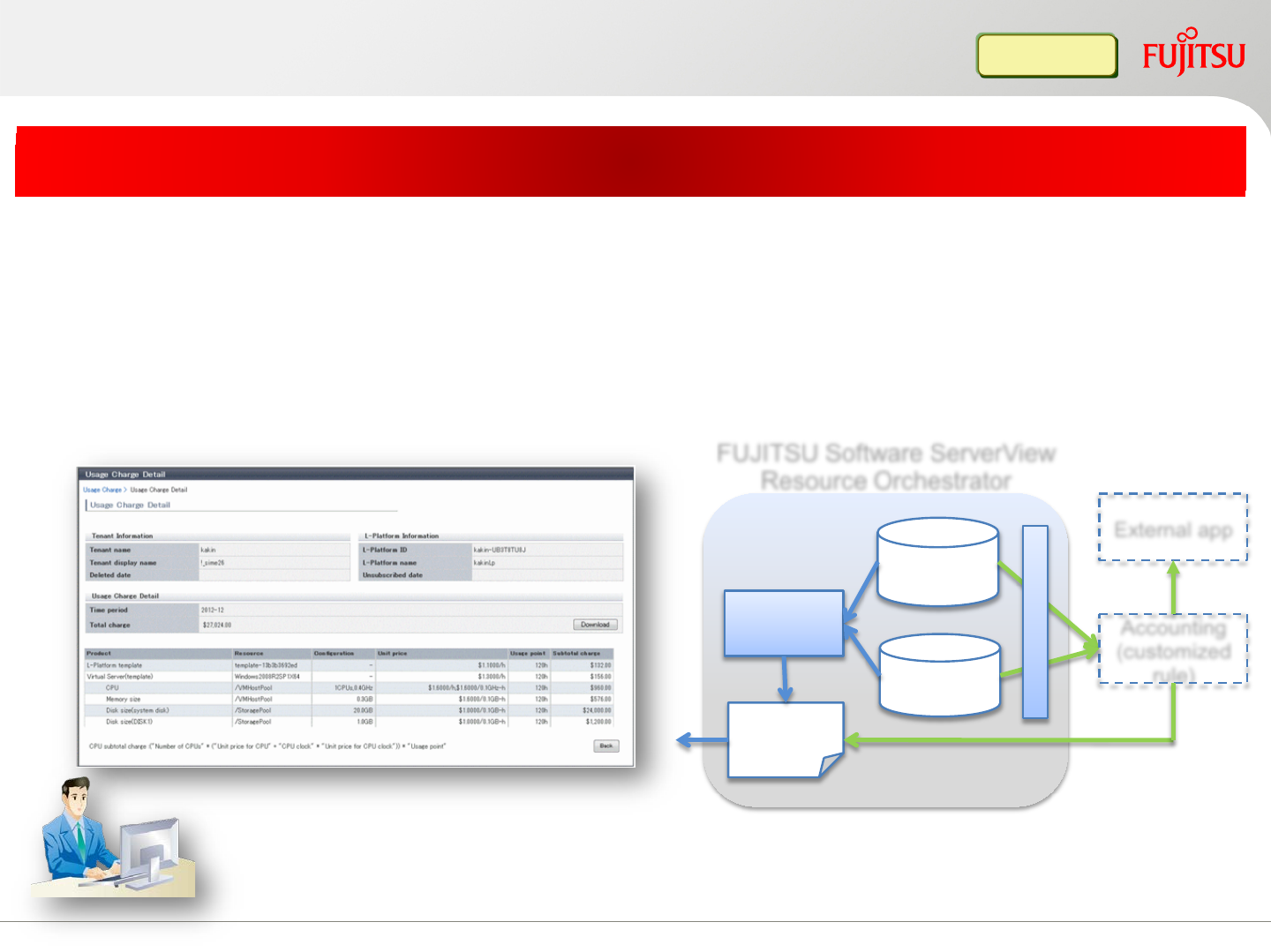
Billing function
Flexible billing function based on the customer requirements
Easy to use monthly billing based on the unit price of L-Platform
Unit price (master DB) and usage (metering log) can be collected from
FUJITSU Software ServerView Resource Orchestrator API, to customize
the billing rule
Monthly billing info
Metering
log
Master
DB
Calculate
result
Accounting Accounting
(customized
rule)
External app
A
P
I
FUJITSU Software ServerView
Resource Orchestrator
Infra Admin
Copyright 2017 FUJITSU LIMITED24
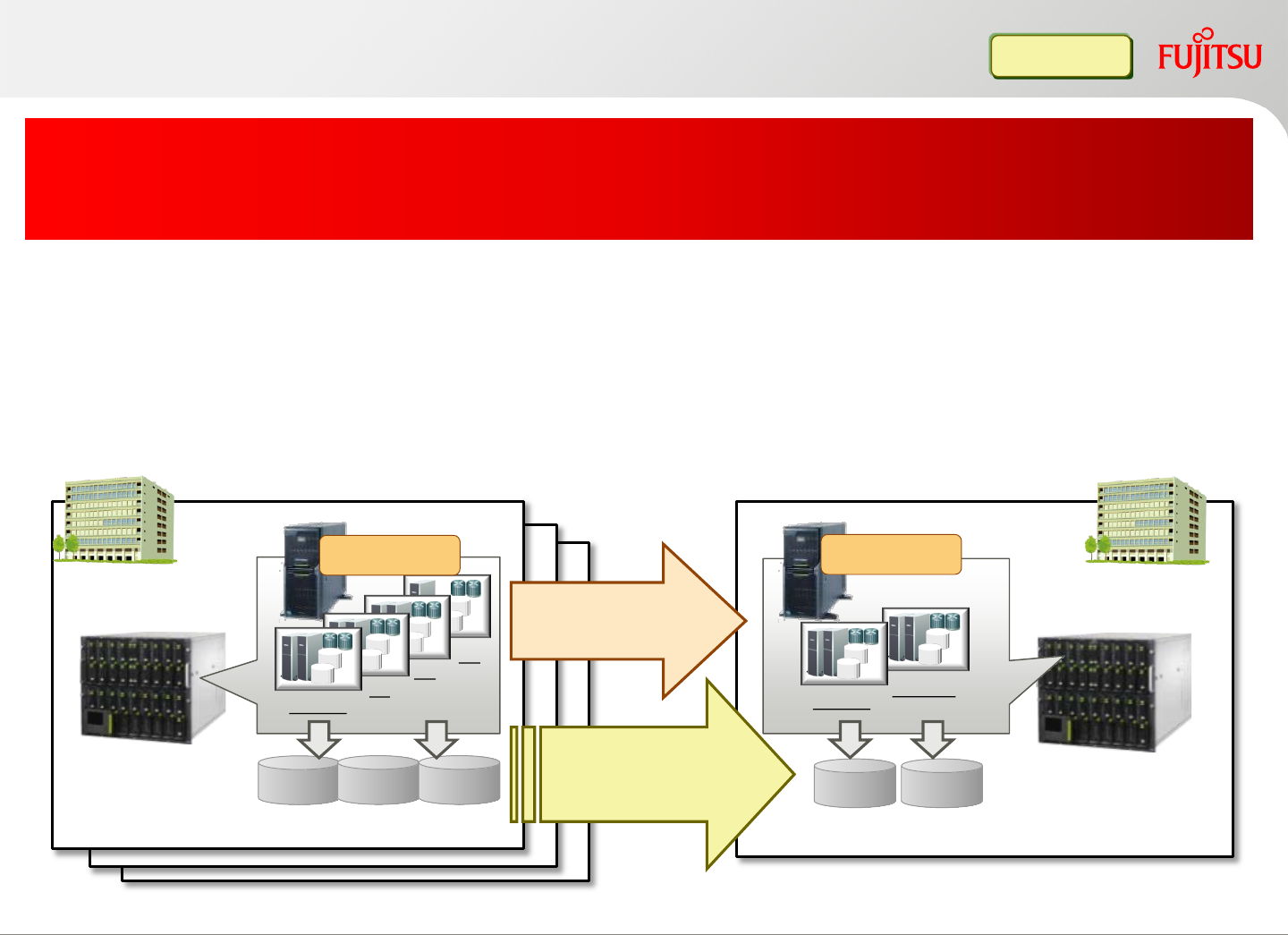
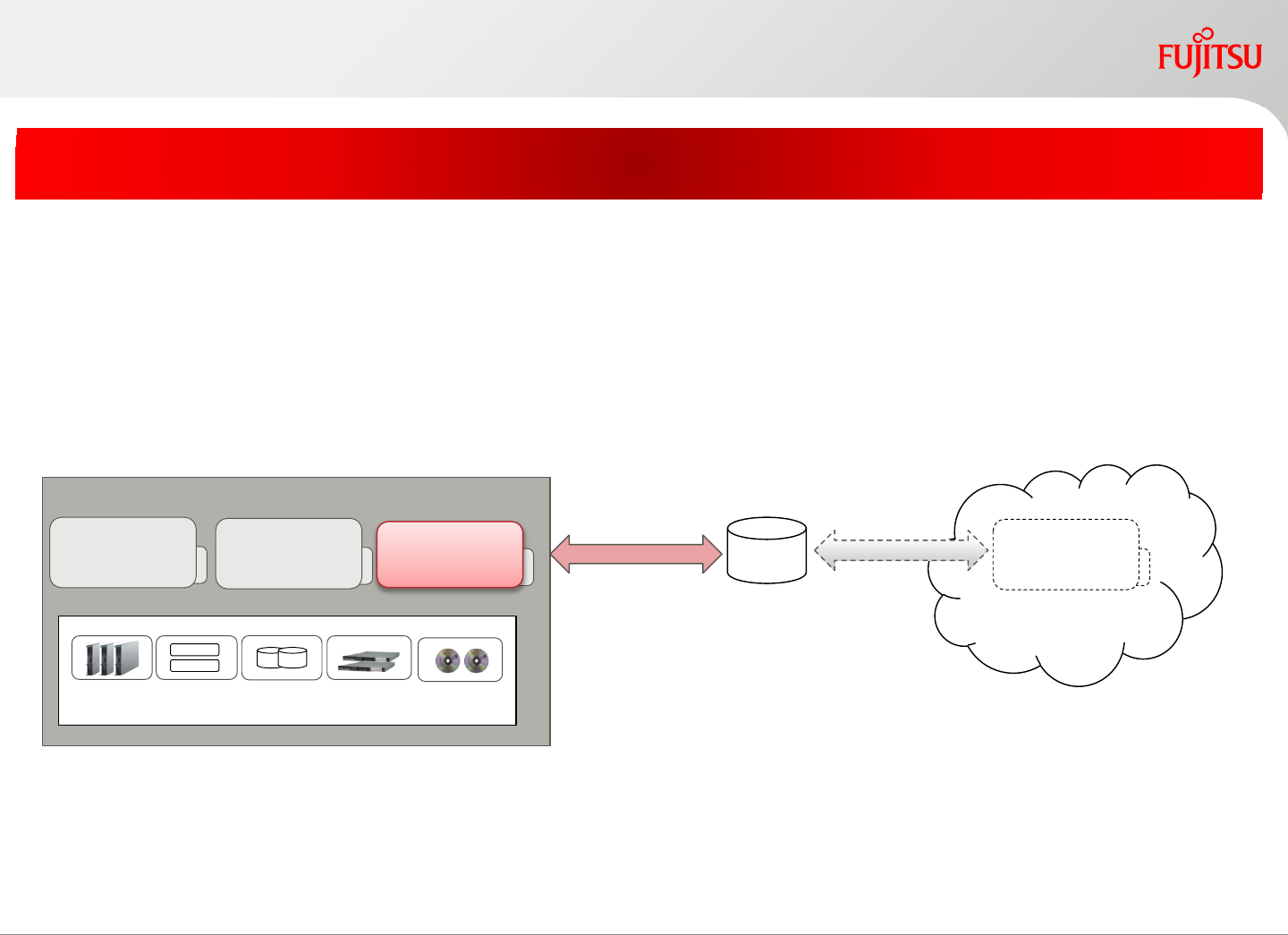
Disaster recovery
Both of primary site and backup site can be used as active state (backup
site can be used for another purpose)
In case of disaster, the whole primary site or a part of resources
(L-Platform, tenant, etc.) can be recovered. More than one primary sites
can share one backup site to reduce spare resources
Quickly recover the private cloud infrastructure on the backup site
by replicating the disk contents and
FUJITSU Software ServerView Resource Orchestrator configurations
Infra Admin
Copyright 2017 FUJITSU LIMITED
運用サイト
運用サイト
App AB
disk disk disk
Server
storage (SAN/NAS/iSCSI)
App A
Replication for
system disk and
data disk
server
Admin server
Storage (SAN/NAS/iSCSI)
CD
App B
Duplicate the
configuration info
(Operating in usual) (operating in disaster)
Primary site
disk disk
Admin server Backup site
* This function is activated by “ServerView Resource Orchestrator DR Option”.
25
Copyright 2017 FUJITSU LIMITED
Hybrid cloud support (migration between private and public)
Realize a flexible migration of virtual server to the public cloud
*1: Please contact the engineer about the destination cloud.
ServerView Resource Orchestrator
Image format for virtual server
(OVF file: Open Virtualization
Format )
export
import
Import
export
Source: private cloud
VM
VM
Resource pool
Destination: public cloud*1
Virtual
server Virtual
server Virtual
server Virtual
server
Export/Import the virtual server image format (OVF file) on the private
cloud with a definition information.
26

Copyright 2017 FUJITSU LIMITED
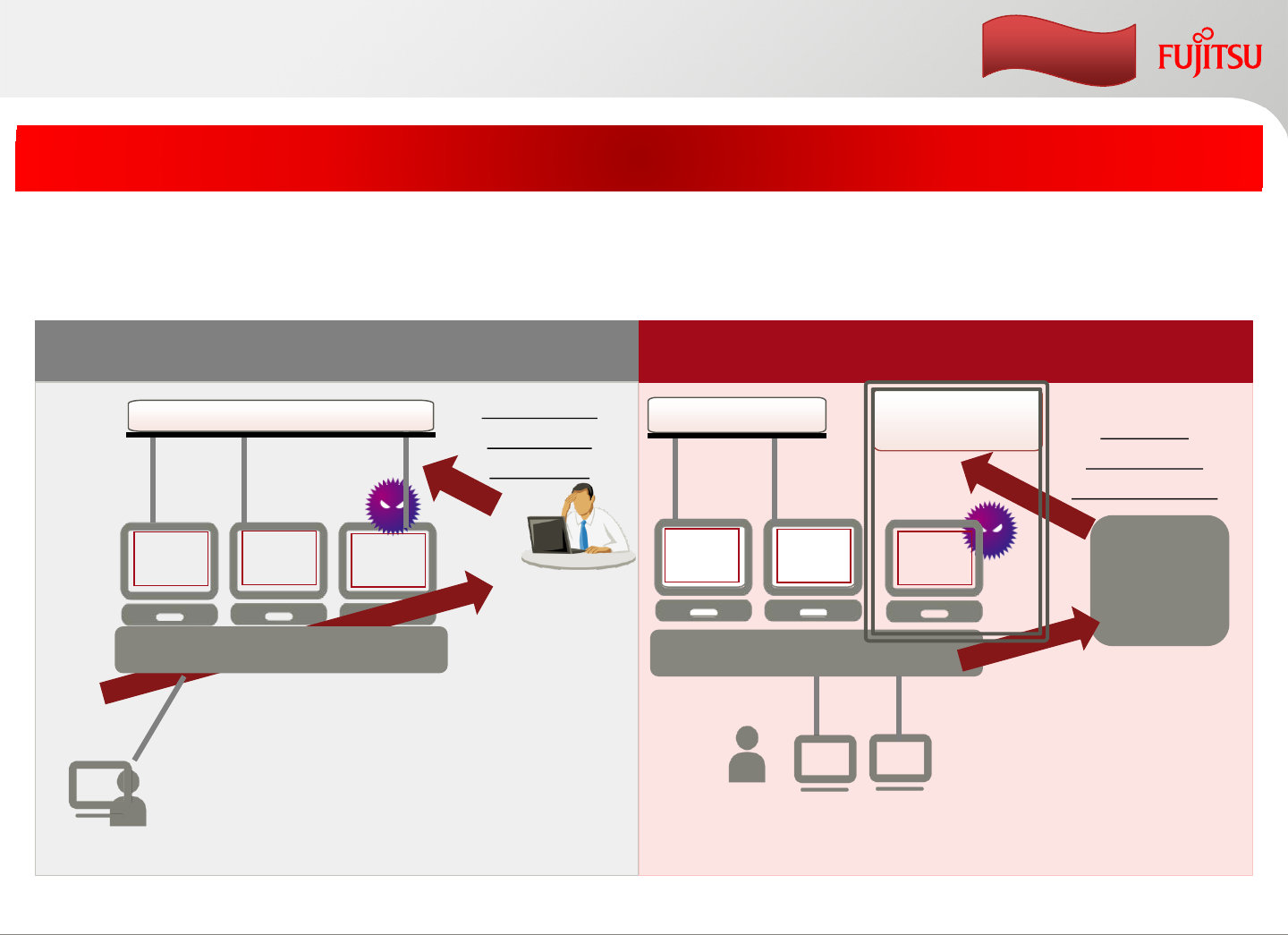
Apply for VDI (Virtual Desktop Infrastructure)
Decrease the operation costs of the VDI environment
In VDI, timely providing of virtual PC to the user is important like Private Cloud
operation. This product can efficiently operate the life cycle of the virtual PC by
automatic deployment and visualization of the operation status.
*1: an actual sample of a customer
creation
release
using
Easy backup
(snapshot)
centralized virtual
PC management
Virtual PC
request to
create the
virtual PC
request to
release the
virtual PC
ServerView
Resource
Orchestrator
manager
•Shortening at VDI environment creation
period (1.5 month*1) by automatic
deployment of virtual PC (including register
ActiveDirectory and VDI software).
• The user operation status can be monitored
via viewer function.
• Take a snapshot before OS patch is applied.
• Reuse the released resources from user.
[point 1]timely providing of a lot of virtual
PCs
[point 2]easy management of virtual PCs
27
Copyright 2017 FUJITSU LIMITED
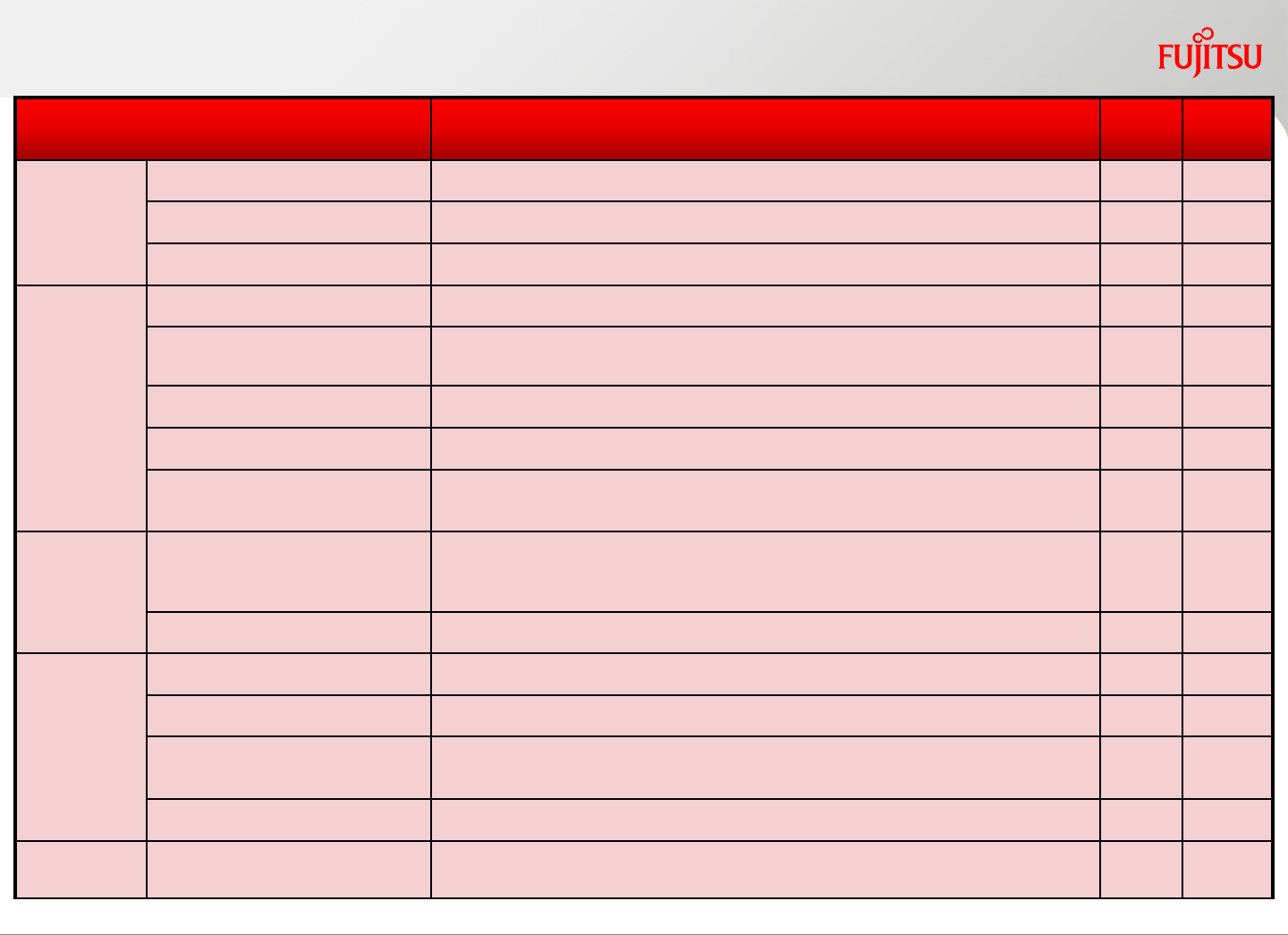
Automatically Quarantine
Automatically switch infected computer to the quarantine network
The infected computer is automatically switched to the quarantine network by
ServerView Resource Orchestrator, and vice versa.
Without ServerView Resource Orchestrator With ServerView Resource Orchestrator
Administrator
notification
Isolate the
computer
manually
Virus
Scanner
Quarantine
network
Service LAN
Computer
Users
notification
XenApp/XenDesktop
ServerView
Resource
Orchestrator
Computer
User
XenApp/XenDesktop
Service LAN
Above process causes delay in response
which can lead to the spreading of the virus.
Quarantine
infected
computers
automatically
enhancement
In thin-client environment,
both users and administrators'
manual processes can be done automatically.
Virus
Scanner Virus
Scanner
Virus
Scanner
Virus
Scanner Virus
Scanner
28
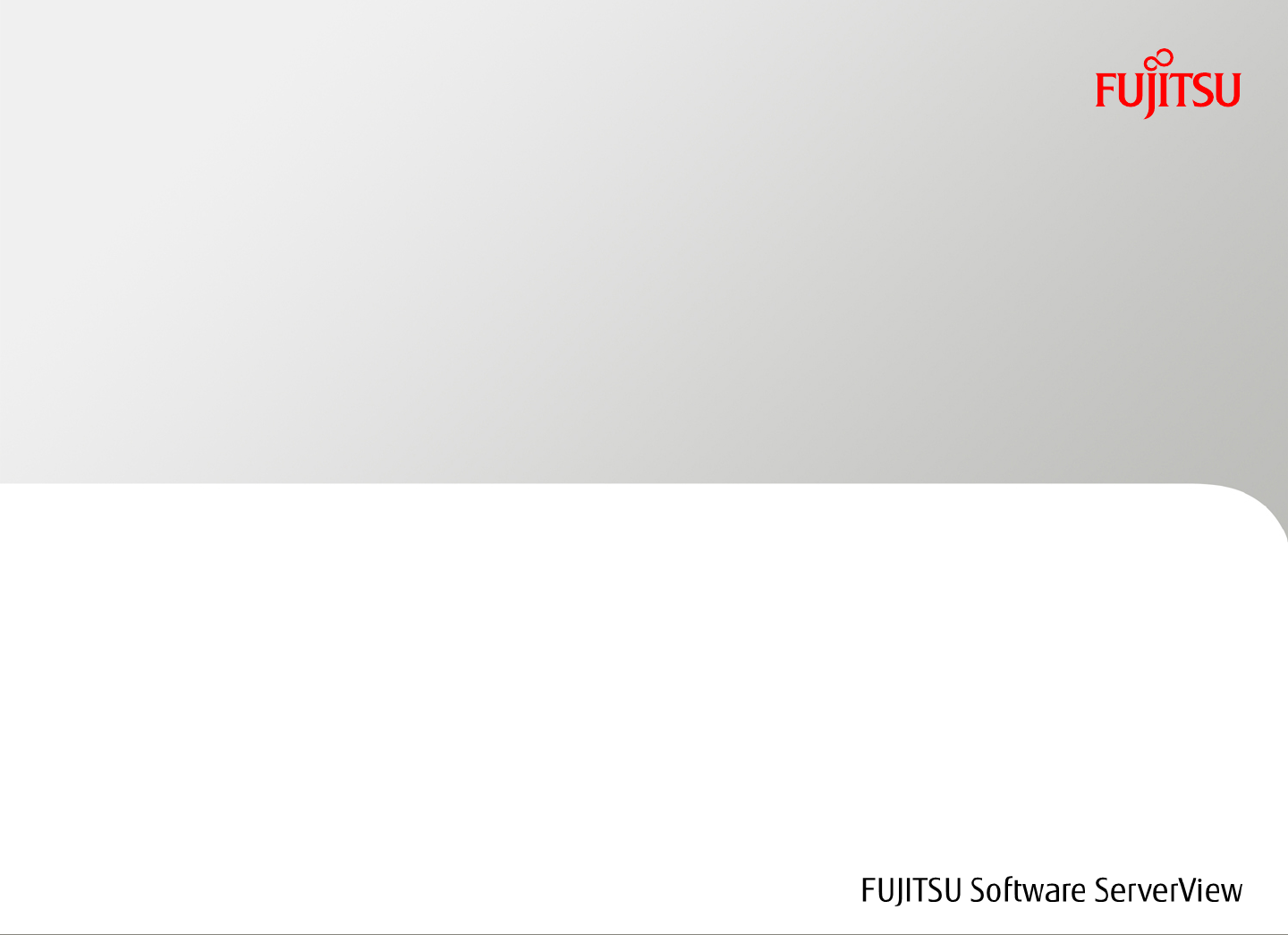
Function Summary Virtual
Edition Cloud
Edition
Security
Account management Register/delete users for each tenant
Access management Limit operational resource scope based on the user’s role
Automatically Quarantine Automatically Quarantine virus-infected computers
Service
Portal
Resource subscription Apply for a logical platform (L-Platform)
Configuration change Delete/modify the L-Platform configurations after it is created. Define
firewall and server load balancer’s setting
Power control Power on/off L-Platform and L-Servers
Snapshot Collect and restore virtual server’s snapshot as backup
Display resource usage Display CPU/memory usage, power status, Network status, etc. of each
L-Platform.
Auto deploy Service template Define/modify/customize/publish a service template. Cloning master can
be change/delete as well. Define the scripts for the external network
device
Subscription workflow Manage L-Platform application, approval operation and history
Resource
pool
Resource pool Create/change/move/delete resource and resource pool
Provisioning Automate server provisioning within the accessible resources
Monitor resource
usage Monitor resource pool’s usage and forecast. Display and simulate virtual
server, virtual host resource usage.
Disaster-recovery Move the customer production from primary site to remote backup site
Billing Billing and accounting Collect and output the resource usage data which relates with billing
(XML/CSV). Calculate and display the billing report on GUI
Copyright 2017 FUJITSU LIMITED
Dynamic resource management function list
*1 FUJITSU Software ServerView Resource Orchestrator DR option license is required
*1
29
Features for Resource management
Copyright 2017 FUJITSU LIMITED30
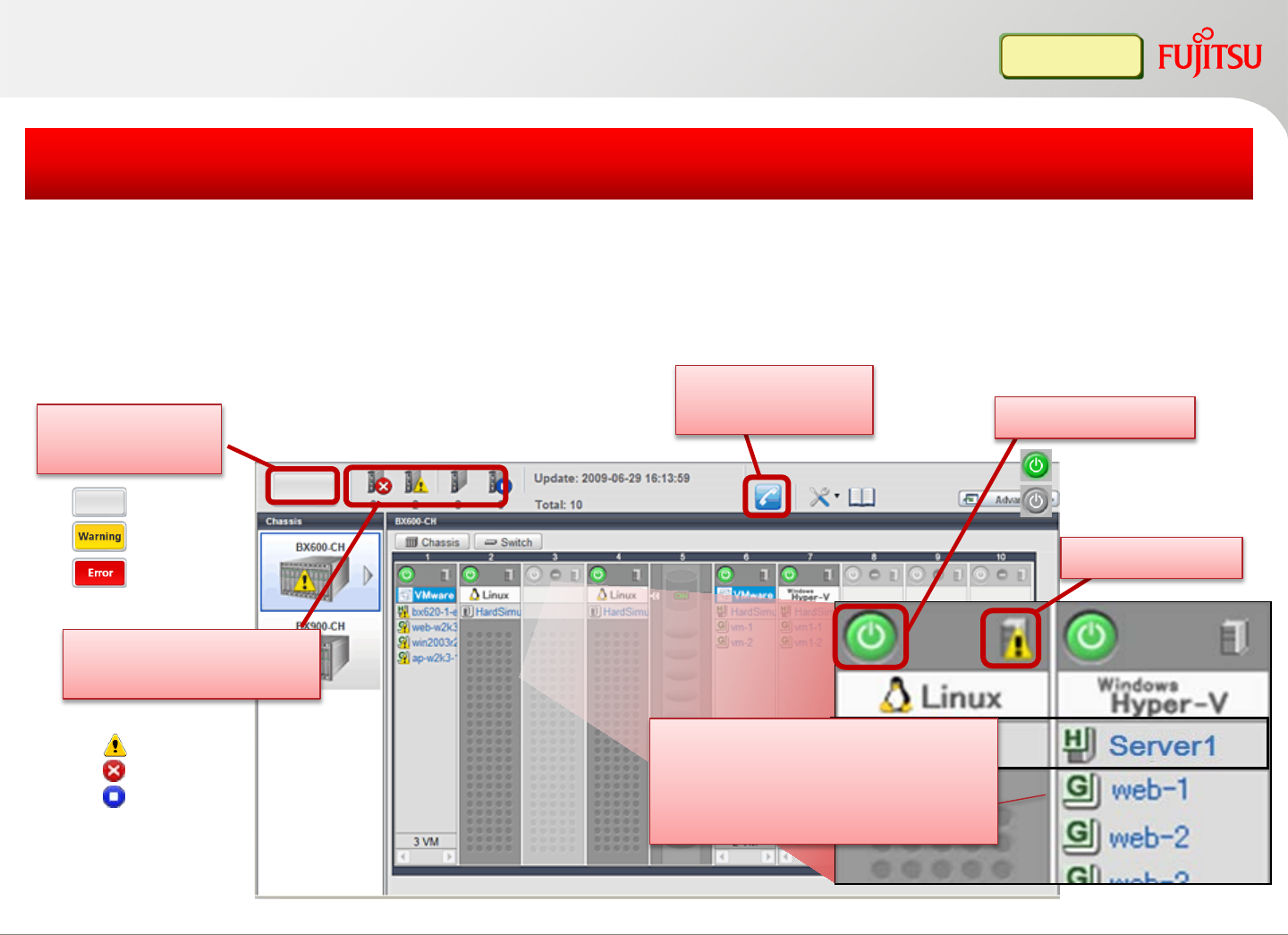
Status view
(server status and #)
BladeViewer
Green: power on
Gray: power off
Contact person
address
Status view
(warning light)
normal
warning
error
Normal
Warning
Error
Stop
None OS and label is displayed
(when the guest OS is
migrated to another host, the
name is moved as well)
Server Status
Power control
Infra Admin
Display blade chassis, server blades, virtual/physical servers, OS names
Easy to confirm status of all servers (powered on/off, error)
Simplify blade server management
Copyright 2017 FUJITSU LIMITED31
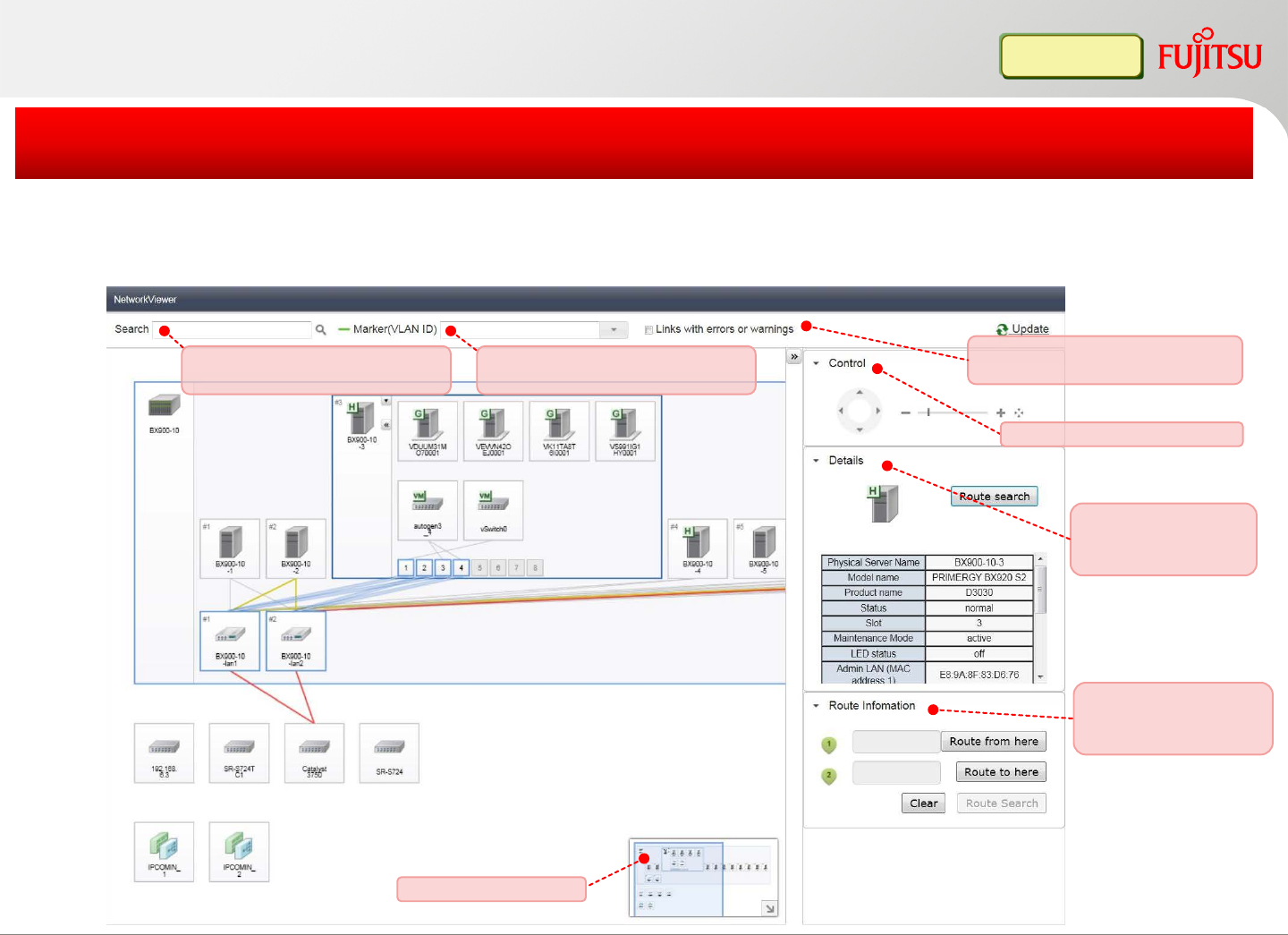
Network Viewer (1)
Display the connection between physical/virtual servers, physical/virtual switches
Display connections (VLAN/VM, redundant network) and switch port status
Easy to identify the network error location and impacted servers
Infra Admin
Copyright 2017 FUJITSU LIMITED
Detailed information
for selected resource
is displayed.
Map navigation area
Moving, Scaling, Initializing
Resources can be searched
and Autocomplete is available. Network connections related to
selected VLAN ID is highlighted.
Network connections with error
and warning are only displayed.
Network route can be
searched specifying
start and end.
32
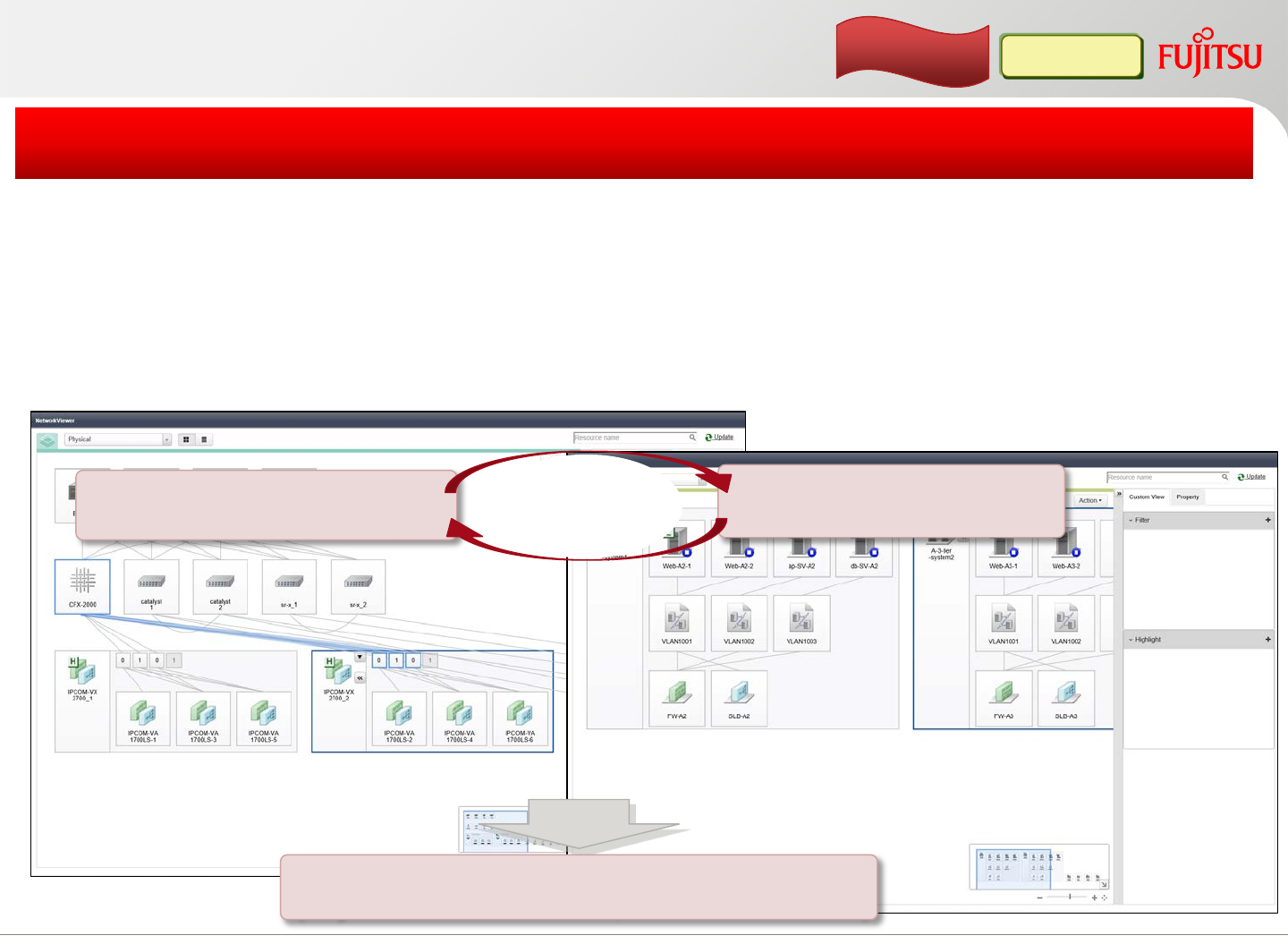
Network Viewer (2)
Strongly support operations management of cloud management
Infra Admin
Copyright 2017 FUJITSU LIMITED
enhancement
[Function]
[Benefit]
Display physical/virtual network and corresponding production
network (logical platform configuration)
Display/output lists of resources and contacts of tenants
Enable administrators to monitor network status from service
perspective
Production network
(Logical platform)
Display list / CSV output
(Physical/virtual resources, Contacts of tenants)
Switch
screen
Physical/virtual network
(VM guests, virtual switches, etc.)
33
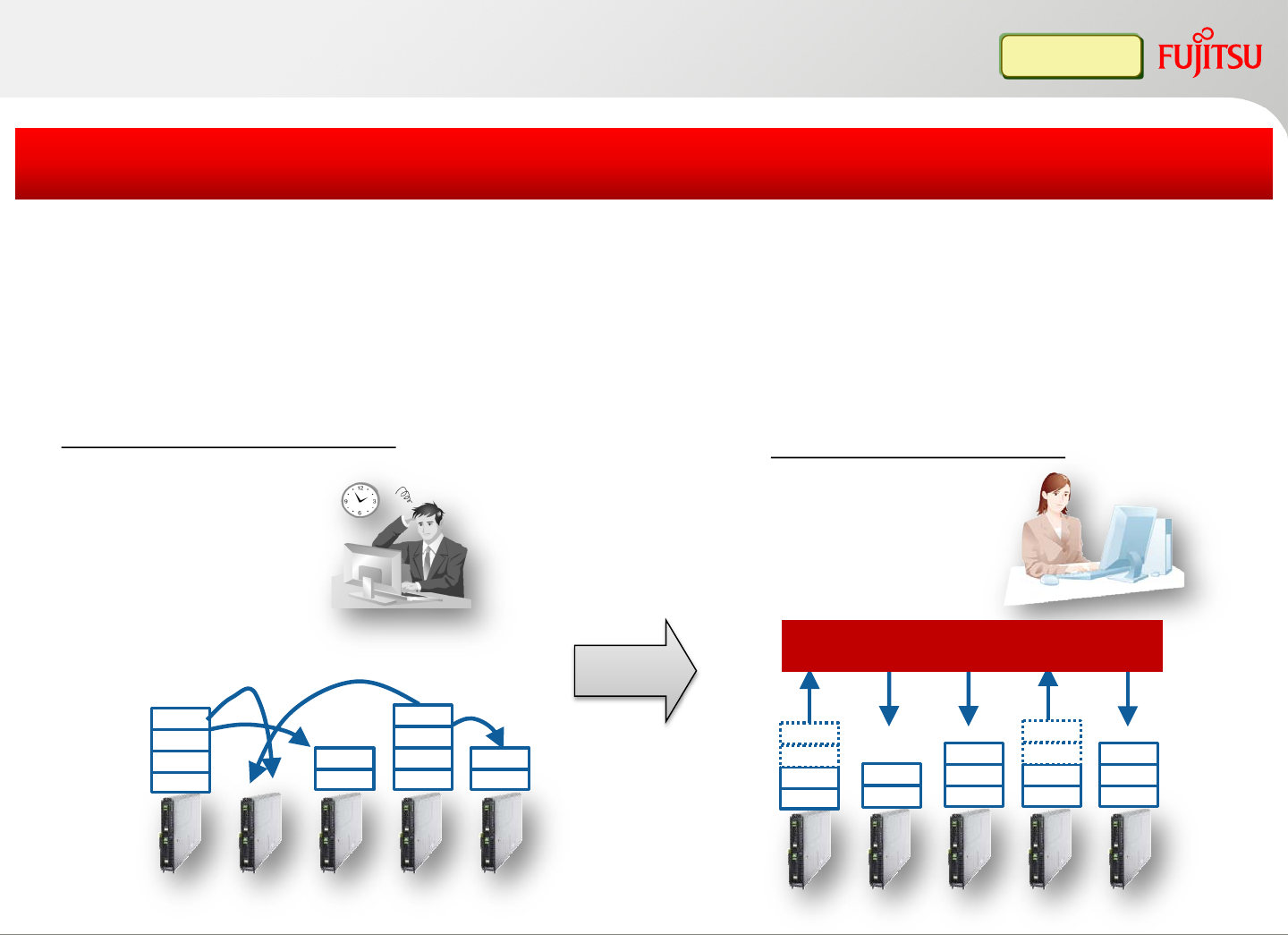
VM home position
VMGuest
VMGuest
VMGuest
VMGuest
VMGuest
VMGuest
VMGuest
VMGuest
VMGuest
VMGuest
VMGuest
VMGuest
Without VM home position
VMGuest
VMGuest VMGuest
VMGuest
VMGuest
VMGuest
VMGuest
VMGuest
VMGuest
VMGuestVMGuest
VMGuest
One click will move all
the guest OSs to the
original designated
position
FUJITSU Software
ServerView Resource Orchestrator
VMGuest
VMGuest
VMGuest
VMGuest
Register the belonging VM host (home position), and move all the guest OSs back
to original location automatically
Home position registration and home position operation can be done for a single
physical server or the whole system
One click to migrate all guest OSs to the original location
Infra Admin
Sometimes the administrator
needs to migrate the guest
OSs to other hosts
temporarily (during
maintenance, etc.). But after
that, it takes time to migrate
those guest OSs back to the
original designated position
With VM home position
Copyright 2017 FUJITSU LIMITED34
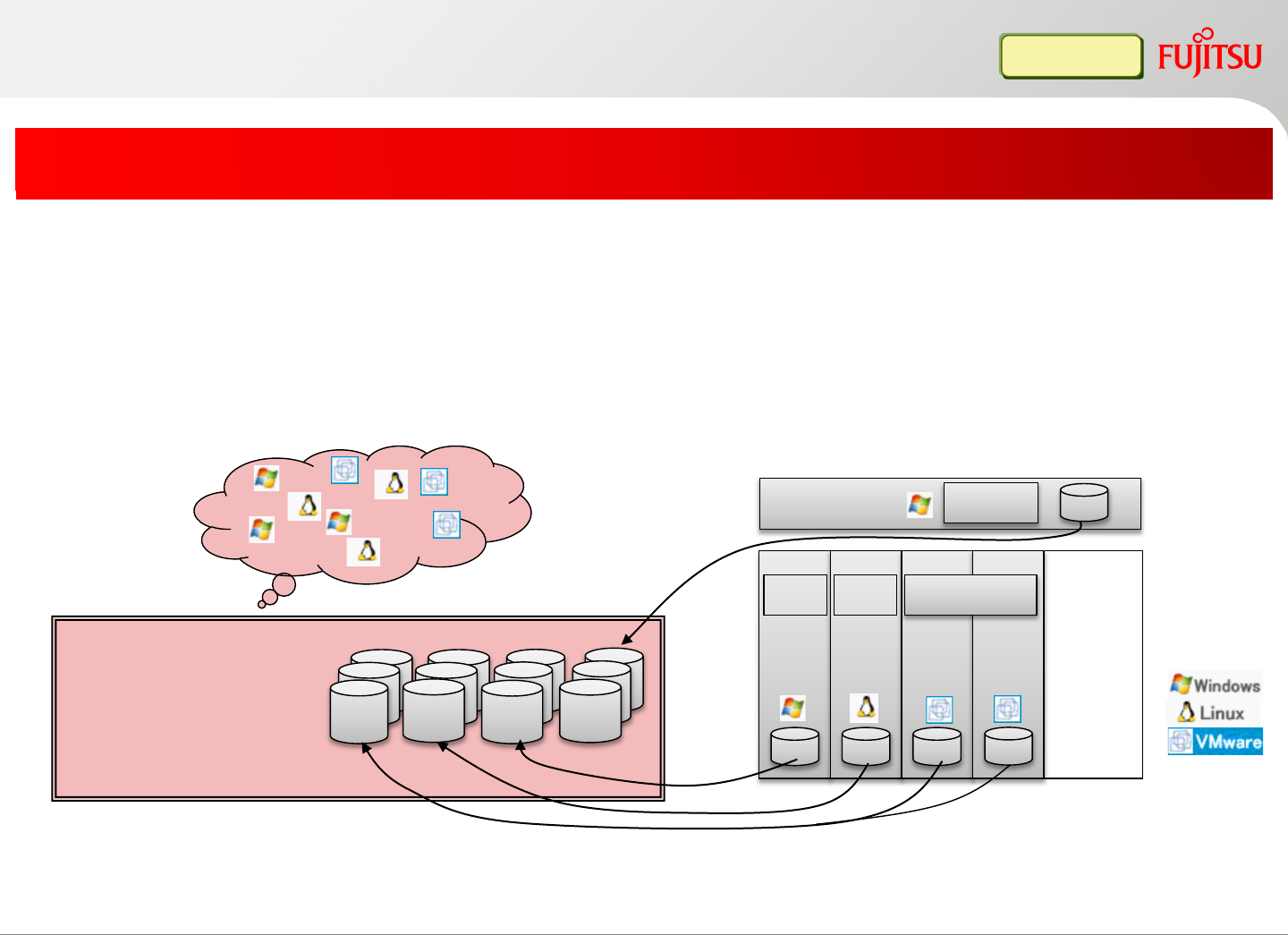
This function supports iSCSI boot and EFI environment as well (in addition to SAN
boot and local boot).
Backup/restore can be performed for each physical server or VM host.
Note that VMware vSphere 4/5 host backup/restore is not supported.
Rack server
Blade
#1 Blade
#2 Blade
#3 Blade
#4
Admin Server
Image management
AppC AppA AppB
AppA AppB AppC
Managed Server
Without this function, image management is difficult
AppD
AppD
FUJITSU Software
ServerView Resource
Orchestrator
Backup system images, and centrally manage images in FUJITSU Software
ServerView Resource Orchestrator manager (keep multiple generations)
Simple operation from GUI to backup system image. CLI is also provided for
automation
Simplify system image management
Infra Admin
Unified system image management
Copyright 2017 FUJITSU LIMITED35
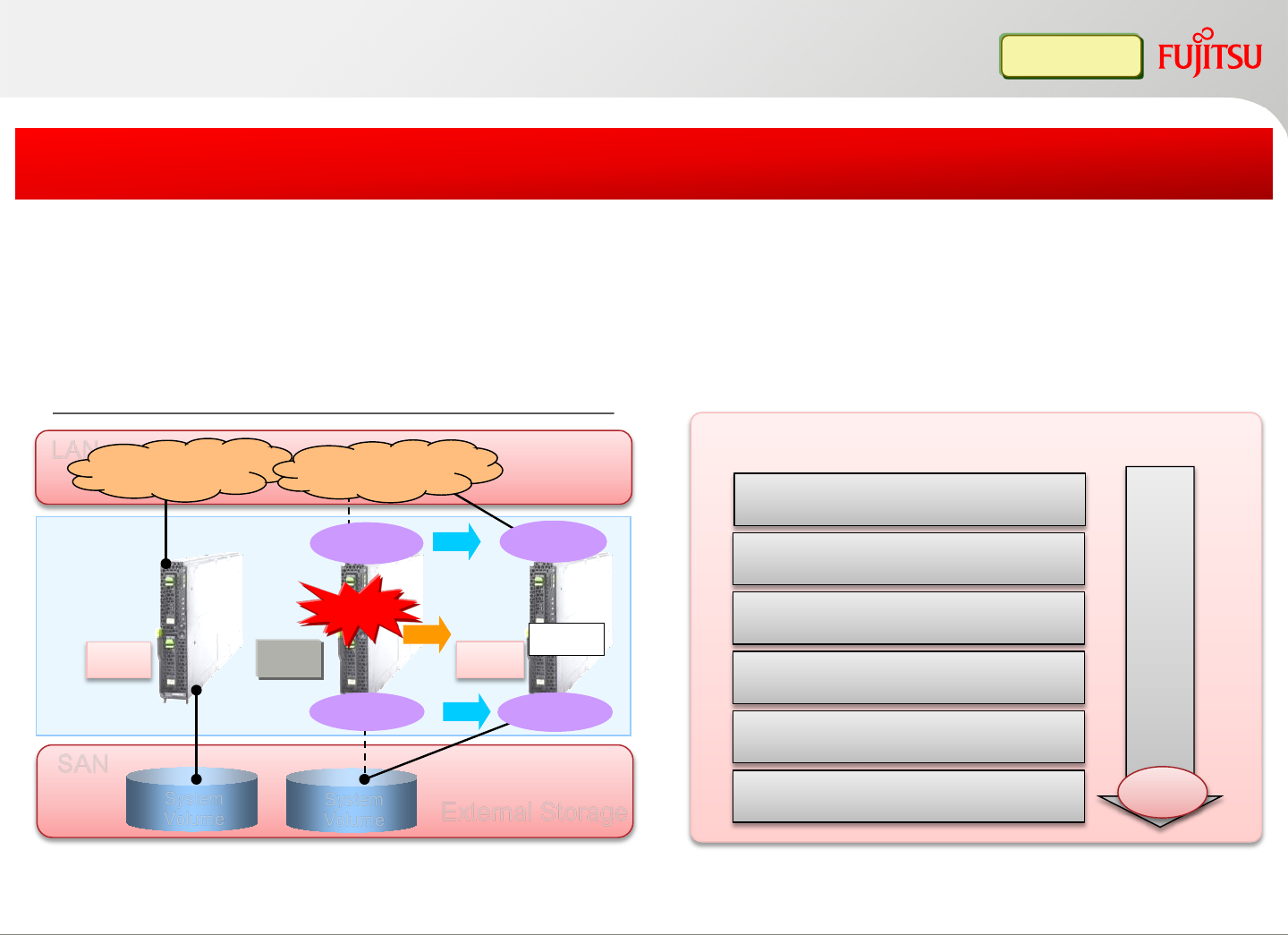
Auto recovery (PC Server)
External Storage
System
Volume System
Volume
SAN
App#1 App#2
Server Failover
OS Start
OS OS
Failure
App#2
OS Spare
Virtual WWN Virtual WWN
Ex: FUJITSU Serer PRIMERGY BX900+SAN Boot
LAN Public LAN Public LAN
VLAN
*: Windows server can not share the same spare server with VMware vSphere 4/5 ESX/ESXi servers.
VLAN
Share one spare server across multiple production servers (N+1 cold-standby)
Auto recovery of failed server on spare server to keep server functional
N+1 “cold-standby” enables high availability and cost reduction
Infra Admin
Automation
1. Detect a hardware failure
2. Power off the failed server
6. Boot from the spare server
4. Remap the virtual addresses
(when using I/O virtualization method)
3. Configure the network
5. Restore with the server image
(when using backup/restore method)
Copyright 2017 FUJITSU LIMITED36
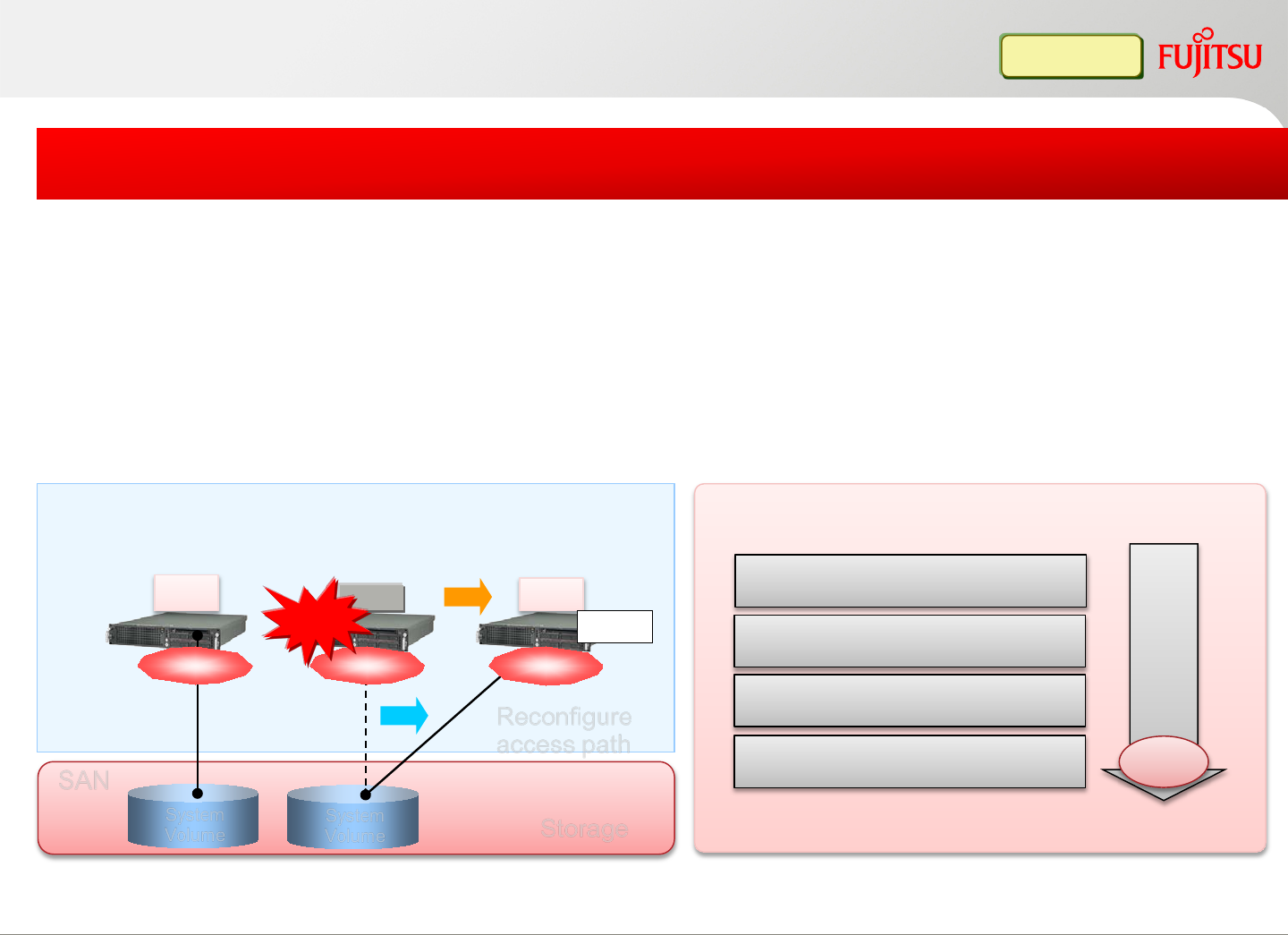
*1. ETERNUS SF Storage Cruiser is required for this function
Storage
SAN
Server Failover
OS OS OS
WWN2 WWN3
WWN1
Reconfigure
access path
Auto recovery FUJITSU SPARC Servers from a hardware failure
Integrate with FUJITSU Software ETERNUS SF Storage Cruiser(*1), FC switch
zoning and host affinity settings of SAN storage settings can be automatically
switched
N+1 cold-standby solution on SPARC Servers
Infra Admin
1. Detect a hardware failure
2. Power off the failed server
3. Reconfigure the access path
4. Boot from the spare server
Spare
Failure
App#1 App#2 App#2
System
Volume System
Volume
Auto recovery (UNIX Server)
Copyright 2017 FUJITSU LIMITED
Automation
OS Start
37
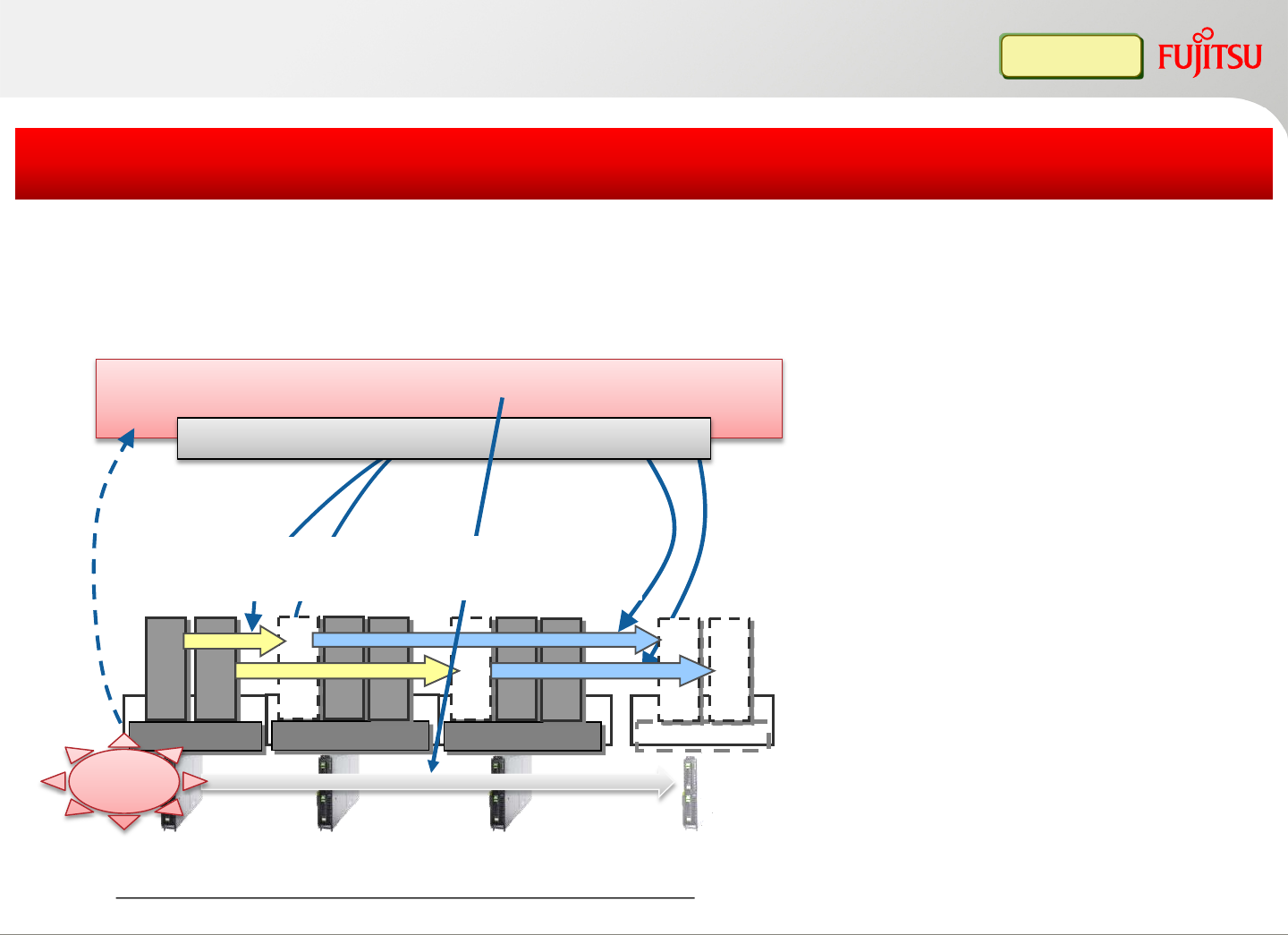
Auto migration from pre-failure error
Process of prefailure detection until system recovery
*1. All supported VM software (except for VMware vSphere
4.1 ESXi) which provides migration function can be supported.
*2. This function requires external script (will be published on web
site)
FUJITSU Software ServerView Resource Orchestrator
2. Migrate to other
healthy server
1. Detect a prefailure
4. Move back to the
original position
(home-position)
Guest A
Guest B
VM Host#1
Guest B
Guest E
VM Host#3
Guest F
Guest A
Guest C
VM Host#2
Guest D
VM Host
Guest A
Guest B
SpareServer A Server B Server C
Pre-failure
VM Management Software
3. Recover VM host
(host failover)
Pre-failure detection, migration, failover, and move back to the original host (home
position), the whole process is automated
Reduce the risk of server stoppages due to physical server failure
Infra Admin
Copyright 2017 FUJITSU LIMITED38
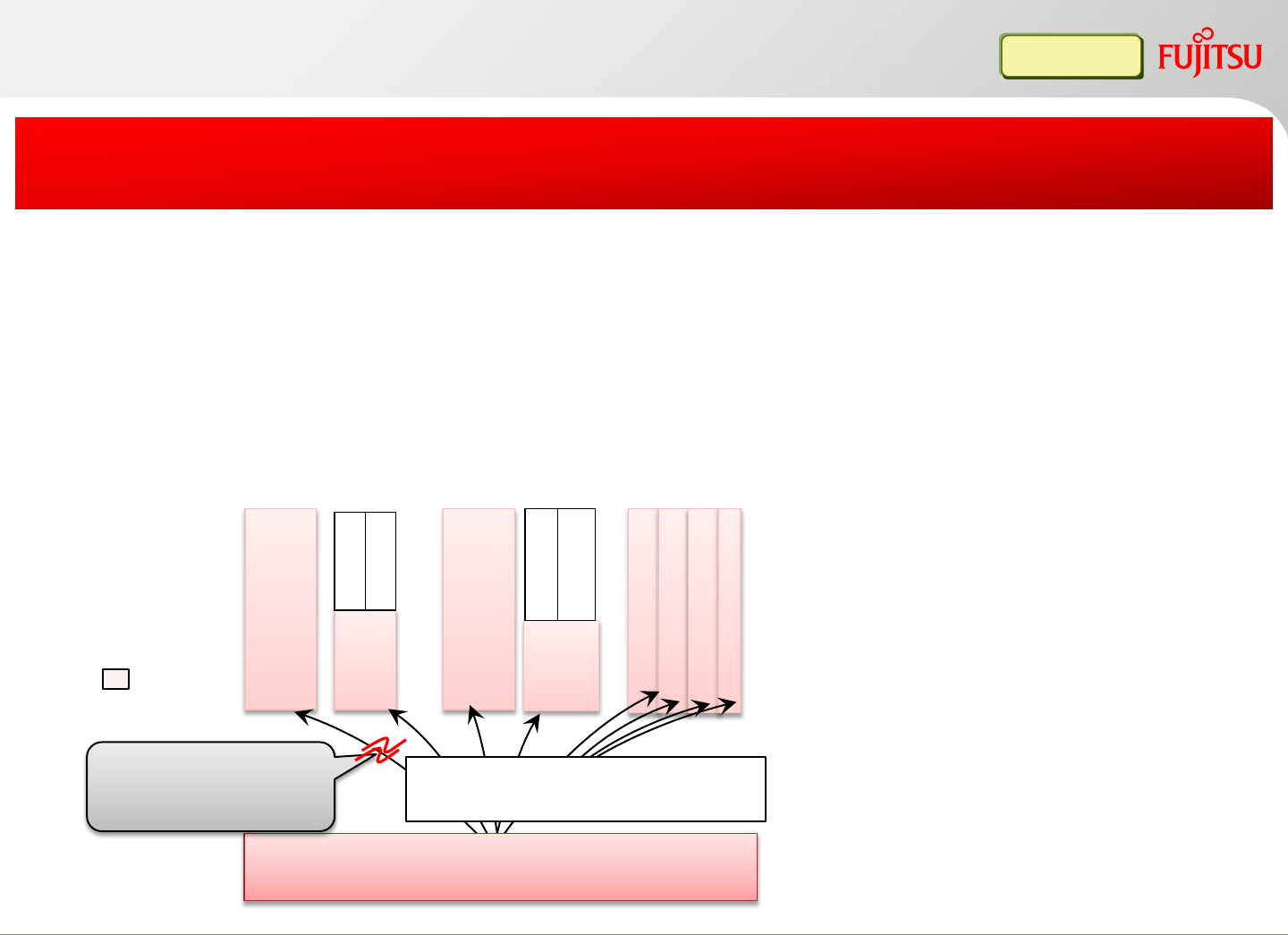
OS hang-up monitor
*1. FUJITSU Software ServerView Resource
Orchestrator uses admin LAN to monitor the
managed server. When this “OS hang-up monitor”
option is enabled, the server may be forcibly
rebooted when running. Admin LAN redundant
setting is recommended.
*2. VMware ESXi is not supported
*3. For servers which doesn’t support server failover
(FUJITSU Server PRIMEQUEST 2000/1000 Series),
the action will be OS restart only
Physical Server
Solaris10
VM host
VM guest
Ping monitor
supported servers
UNIX Server Mission Critical
IA Server
Partition #1
Partition #2
Partition #3
Solaris10
GlobalZone
Non-GlobalZone
Non-GlobalZone
Partition #4
FUJITSU Software
ServerView Resource Orchestrator
FUJITSU Software ServerView
Resource Orchestrator monitors
servers via ping command (admin LAN)
When ping command is
timed out, server restart
or/and recovery is performed
IA server
VM guest
FUJITSU Software ServerView Resource Orchestrator monitors the managed
servers by ping command(*1). When the server has no response, FUJITSU
Software ServerView Resource Orchestrator automatically re-starts the server(*2)
When the server has no response after restart, FUJITSU Software ServerView
Resource Orchestrator automatically failovers the server to spare server(*3)
Besides server hardware error/pre-failure, OS hang-up is also
monitored and can also be auto-recovered
Infra Admin
Copyright 2017 FUJITSU LIMITED39
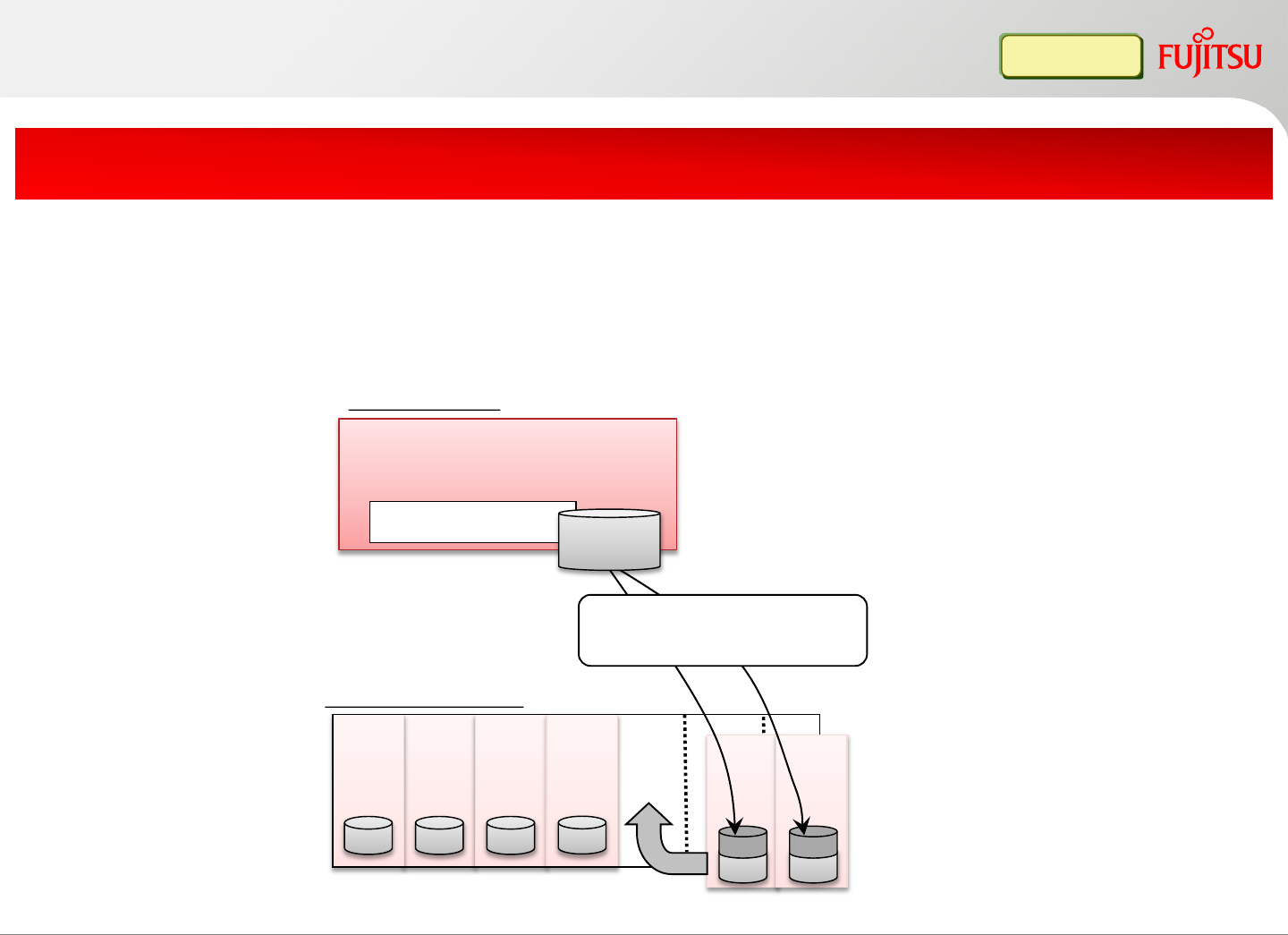
Server
#2 Server
#3 Server
#4
Server
#1
Production Servers
Server
#5 Server
#6
Prepared image
(image collection)
FUJITSU Software
ServerView Resource
Orchestrator
Deploy the system image
and preset the IP/host name
System
image
Using image deployment to setup a new server quickly
After image deployment, management LAN information is automatically configured
Quick server addition using cloning image deployment
Infra Admin
Physical Server Auto deployment (Cloning)
Admin Servers
Copyright 2017 FUJITSU LIMITED
Additional server
40
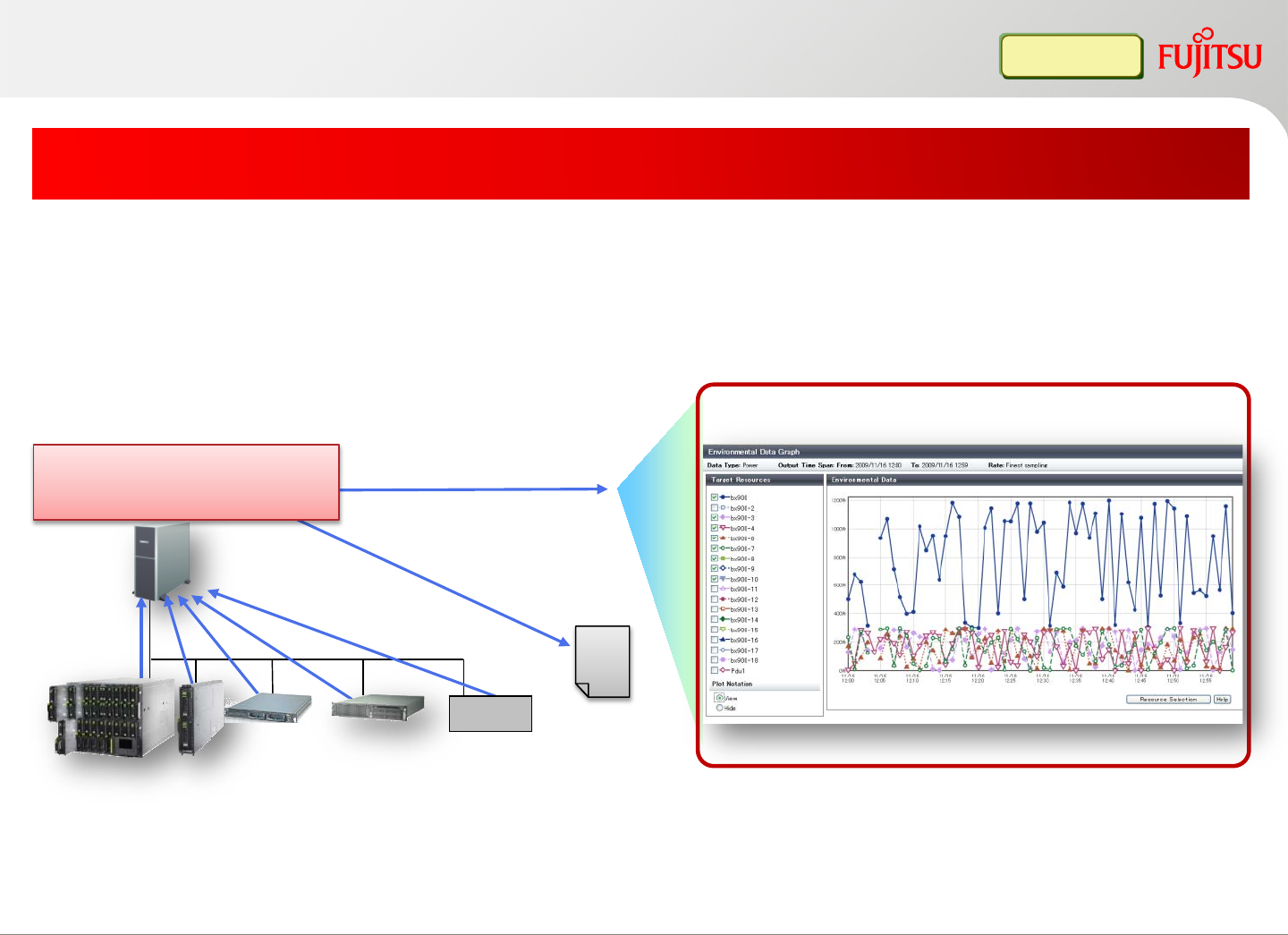
FUJITSU Server
PRIMERGY BX900
Visualize power consumption
Admin Server
CSV
file
Output to file
Show graph
Power consumption graph
FUJITSU Software
ServerView
Resource Orchestrator
FUJITSU
Server
PRIMERGY
RX
FUJITSU
Server
SPARC
Enterprise
M3000
UPS
Collect server power consumption data
Monitor each IT resources (chassis, server, UPS) power consumption
status in real time
Visualize power consumption and support green IT
Infra Admin
Copyright 2017 FUJITSU LIMITED41
Copyright 2017 FUJITSU LIMITED
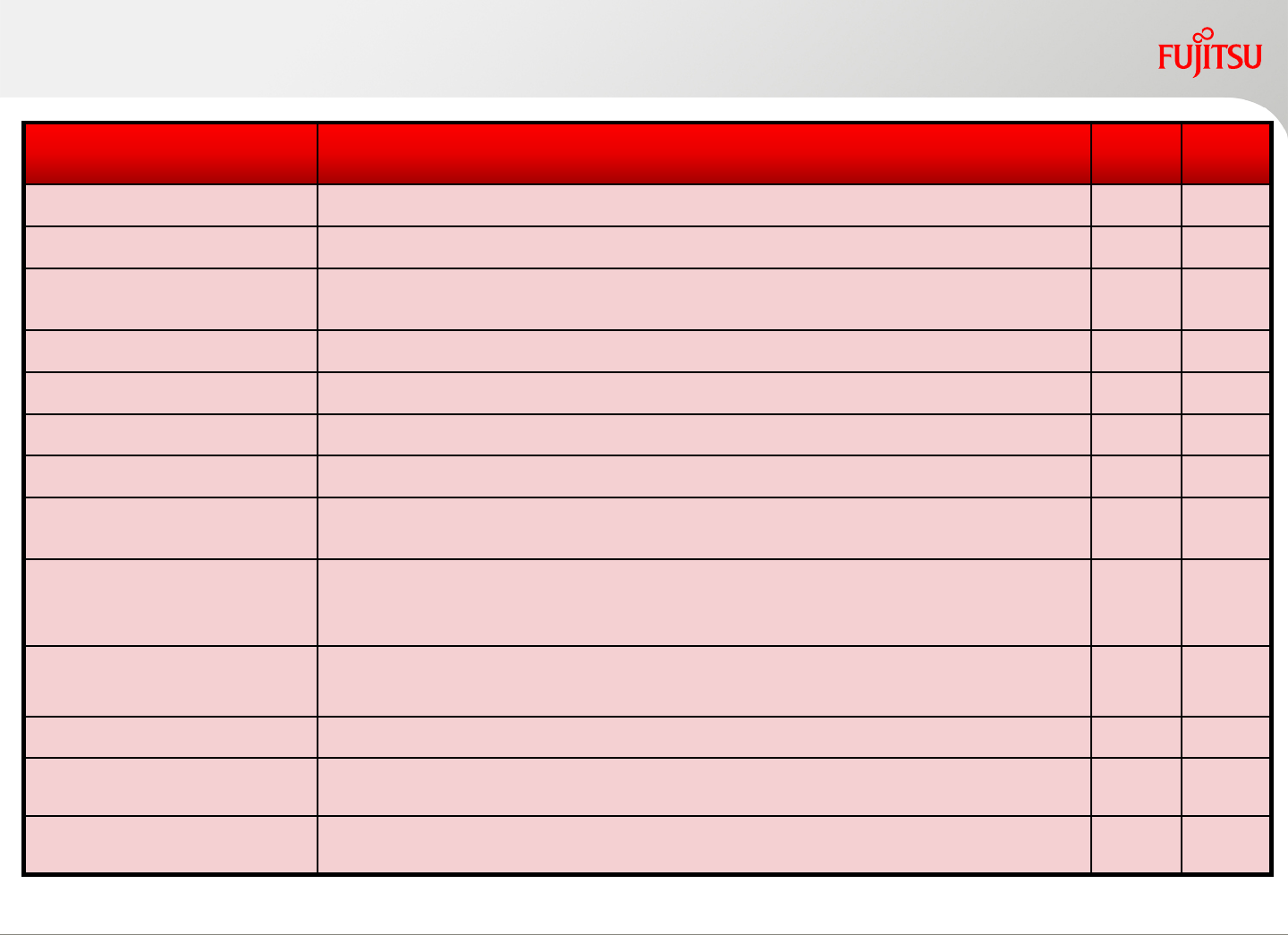
Server management function list
Function Summary Virtual
Edition Cloud
Edition
Configuration display Display physical/virtual server list, and the relationship of VM host and guest
Server monitor Monitor physical/virtual server status (normal/stop/warning/error)
Failure monitor *1 Monitor server hardware failure, hardware prefailure and vCenter alert. Invoke server
failover, force reboot or other external customer scripts
Power control Physical/virtual server power control ON/OFF (provides GUI/CLI)
Power consumption display *1 Graphically display power consumption amount of server, blade chassis, UPS
Server cloning *1 Quickly deploy native OS to physical server for quick setup (Windows/Linux)
Disk backup *1 Backup/restore system disk of physical server (Windows/Linux)
VM server migration*1,*2 Migrate VM guest to other VM host. One-click to re-migrate back all VM guests to the
original VM host position
PRIMERGY blade server
management
Monitor blade server in intuitive GUI which shows similar picture as a real blade
chassis. Simplify LAN switch blade VLAN setting and display the topology including
virtual network and physical LAN switch blade VLAN setting
PQ partition management Display server partition information (SB,IOB,GSPB). Display virtual network and
server NIC vlan setting
Server I/O virtualization *1 Replace physical server without re-configure SAN storage
VM server HA *1,*2 Automatic migrate guest OS to other server when hardware prefailure happens on
hypervisor
Physical Server HA *1 Switchover and reboot the spare server, when the server OS is hung-up or hardware
failure occurs
*1 Function differs from different server type and OS *2 VM management software (VMware vCenter, Microsoft SCVMM) is required
42
Product information
Copyright 2017 FUJITSU LIMITED43
FUJITSU Software ServerView Resource Orchestrator Virtual Edition
Simplify server management lifecycle by automating server installation, visualizing multi
platform systems, and server failover
FUJITSU Software ServerView Resource Orchestrator Cloud Edition
Manage resource pools and quickly automate the L-Platform deployment based on the
users request to improve the system operation efficiency.
<optional products>
FUJITSU Software ServerView Resource Orchestrator
I/O virtualization option (FJ-WWN16)
•for FUJITSU Software ServerView Resource Orchestrator Virtual Edition / Cloud Edition
Required for server I/O virtualization function. Provides globally unique virtual WWN
number for 16 managed servers.
FUJITSU Software ServerView Resource Orchestrator
I/O virtualization (FJ-MAC16)
•for FUJITSU Software ServerView Resource Orchestrator Virtual Edition / Cloud Edition
Required for server I/O virtualization function. Provides globally unique virtual MAC number
for 16 managed servers.
FUJITSU Software ServerView Virtual-IO Manager
Simplified Operation and management of the LAN-SAN environment of a server blade. And
link virtual network to physical
Copyright 2017 FUJITSU LIMITED
Products
44
Copyright 2017 FUJITSU LIMITED
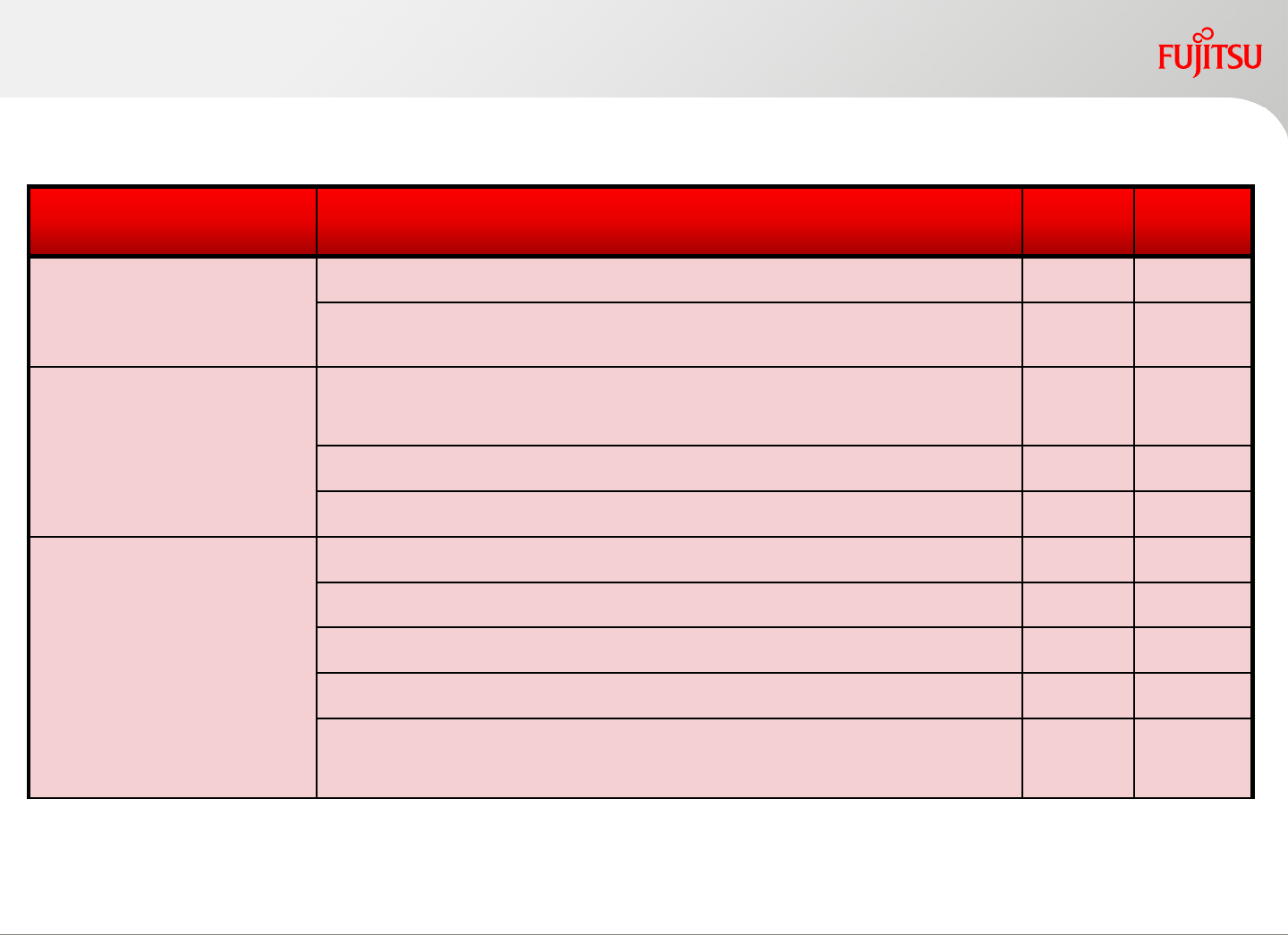
Functional Differences
Between Virtual Edition & Cloud Edition
Requirement Functionality Virtual
Edition Cloud
Edition
Centralized
virtual/physical server
management
Visualize and monitor virtual and physical servers x x
Consistent interface of server management x x
Improve server
availability
I/O virtualization for flexible connectivity between
server/storage x x
Auto recovery from server hardware failure x x
Detect hardware prefailure to avoid virtual server stop x x
Provide platform
service
Visualization of resource and resource pool usage - x
Auto deploy L-Platform with template - x
Manage L-Platform with service portal - x
Visualize resource capacity and billing - x
Disaster recovery for L-Platform
(ServerView Resource Orchestrator DR option is required) - x
x: Supported, -: Not supported
45
Copyright 2017 FUJITSU LIMITED
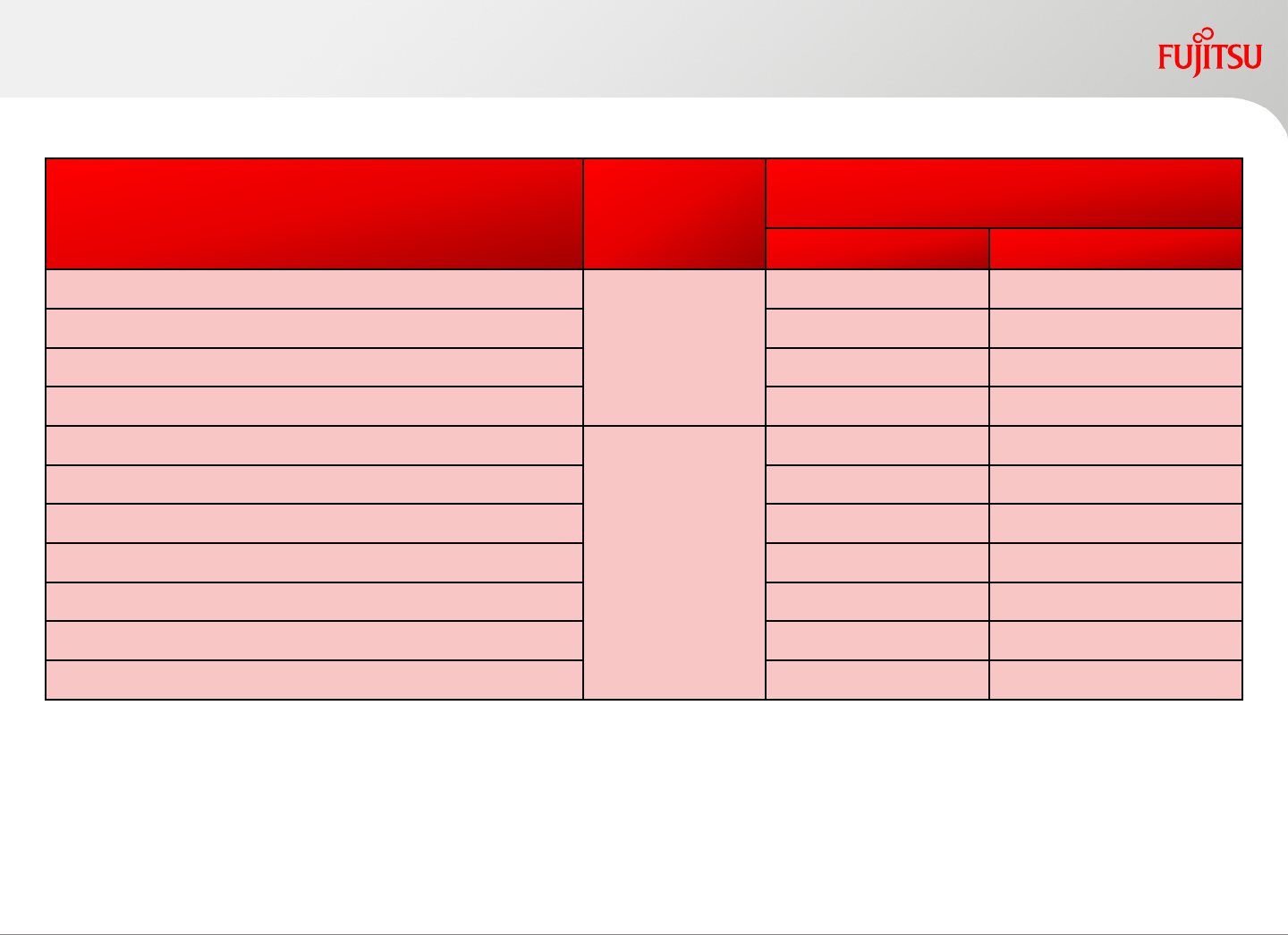
Support environment (1)
OS Function
FUJITSU Software
ServerView Resource Orchestrator
Virtual Edition Cloud Edition
Windows Server 2016
Admin server
(Manager)
X X
Windows Server 2012,2012R2 X X
Windows Server 2008,2008 R2 X X
Red Hat Enterprise Linux 6 X X
Windows Server 2016
Managed
Server
(Agent)
X X
Windows Server 2012,2012R2 X X
Windows Server 2008,2008 R2 X X
Red Hat Enterprise Linux 7 X X
Red Hat Enterprise Linux 6 X X
Oracle Solaris 11 X X
Oracle Solaris 10 X X
Microsoft Internet Explorer 8/9/10/11(Desktop) and FireFox ESR24/ESR31/ESR38/ESR45 is supported
Browser (web client)
Windows /Linux / Solaris x: Supported, -: Not supported
46
Server Function
FUJITSU Software ServerView
Resource Orchestrator
Virtual Edition Cloud Edition
FUJITSU Server PRIMERGY BX/RX/TX Manager x x
FUJITSU Server PRIMEQUEST 2000/1000 series x x
FUJITSU Server PRIMERGY BX/RX/TX/CX
Agent
X x
FUJITSU Server PRIMEQUEST 2000/1000 series X x
FUJITSU SPARC Servers X x
IPMI 2.0 compatible 3rd party vendor Server*1 X x
Server
Support environment (2)
Virtual management software
Software Function
FUJITSU Software ServerView
Resource Orchestrator
Virtual Edition Cloud Edition
VMware vSphere
Agent
x x
Microsoft Hyper-V x x
Linux Kernel-based Virtual Machine (KVM) x x
Solaris Zone*2, Oracle VM Server for SPARC x x
Copyright 2017 FUJITSU LIMITED
x: Supported, -: Not supported
x: Supported, -: Not supported
*1: Please contact Fujitsu for details about the supported server vendor/models
*2: Solaris Kernel Zone is not supported.
47
Network devices
*1: The following series are supported: 2950, 2960, 3560, 3750
*2: The following series are supported: 2900, 2918, 2928, 2940, 2950, 2955, 2960, 2970, 2975, 3500, 3550, 3560, 3750
*3: ASA 5505 is not supported
*4: The following series are supported: 2000, 5000
*5: The following series are supported: 6710, 6720, 6730, 6740, 6740T
*6: Support for network device monitor function. For network device auto configuration, the sample script is not provided
Copyright 2017 FUJITSU LIMITED
Support environment (3)
Network device Function
FUJITSU Software
ServerView Resource Orchestrator
Virtual Edition Cloud Edition
FUJITSU Network System SR-X300
Agent
- X
FUJITSU Network System SR-X500 - X
Cisco Catalyst X*1 X*2
FUJITSU Network System
IPCOM EX IN series - X
FUJITSU Network System
IPCOM EX SC series - X
Cisco ASA 5500 - X*3
Cisco Nexus 5000 - X*4 *6
Brocade VDX - X*5 *6
F5 Networks BIG-IP - X
x: Supported, -: Not supported
48

Copyright 2012FUJITSU LIMITED
