Furuno Weather Fax 410 Users Manual
Furuno-Fax410-Ac-Operators-Manual-801365 furuno-fax410-ac-operators-manual-801365
FAX-410 to the manual 71d422a1-b7fe-4b3a-8625-b91e1db3d7b0
2015-02-02
: Furuno Furuno-Weather-Fax-Fax-410-Users-Manual-428702 furuno-weather-fax-fax-410-users-manual-428702 furuno pdf
Open the PDF directly: View PDF  .
.
Page Count: 40
FACSIMILE RECEIVER
FAX-410

IMPORTANT NOTICE
• This manual is intended for use by native speakers of English.
• No part of this manual may be copied or reproduced without written permission.
• If this manual is lost or worn, contact your dealer about replacement.
• The contents of this manual and equipment specifications are subject to change without
notice.
• The example screens (or illustrations) shown in this manual may not match the screens
you see on your display. The screen you see depends on your system configuration and
equipment settings.
• FURUNO will assume no responsibility for the damage caused by improper use or
modification of the equipment or claims of loss of profit by a third party.
• Store this manual in a convenient place for future reference.
SAFETY INSTRUCTIONS
WARNING
Do not open the equipment except to
replace paper.
Only qualified personnel should work
inside the equipment.
Immediately turn off the power at the
switchboard if water leaks into the
equipment or something is dropped
into the equipment.
Continued use of the equipment can cause
fire or electrical shock. Contact a FURUNO
agent for service.
Do not disassemble or modify the
equipment.
Fire, electrical shock or serious injury can
result.
Do not place liquid-filled containers on
the top of the equipment.
Fire or electrical shock can result if a liquid
spills into the equipment.
Immediately turn off the power at the
switchboard if the equipment is emitting
smoke or fire.
Continued use of the equipment can cause
fire or electrical shock. Contact a FURUNO
agent for service.
Make sure no rain or water splash leaks
into the equipment.
Fire or electrical shock can result if water
leaks in the equipment.
Safety Instructions for the Operator
CAUTION
Do not use commercial cleaners to
clean the main unit.
Commercial cleaners may remove paint
and markings. Remove dust from the main
unit with a soft cloth. For stubborn dirt, use
water-diluted mild detergent and a soft
cloth.
Be careful not to catch fingers between
upper lid and chassis when changing
recording paper.
Injury may result.
WARNING
Use the proper fuse.
Use of a wrong fuse can result in damage
to the equipment or cause fire.
Handle the LCD with great care. Strong
shock may break it.
If the LCD breaks, LCD liquid may leak out.
Do not swallow or touch the liquid - it is
toxic if swallowed. If it is swallowed or
contacts eyes, rinse the contacted area
thoroughly with water and contact a
physician immediately.
Dispose of the main unit according to
appropriate regulations.
The main unit contains a battery. It should
also be disposed of according to
appropriate regulations.
The power supply shall conform to
the recommended rating.
Fire or electrical shock may result if an
improper power supply is used.
Safety Instructions for the Operator (con't)
WARNING
To avoid electrical shock, do not
remove cover. No user-serviceable
parts inside.
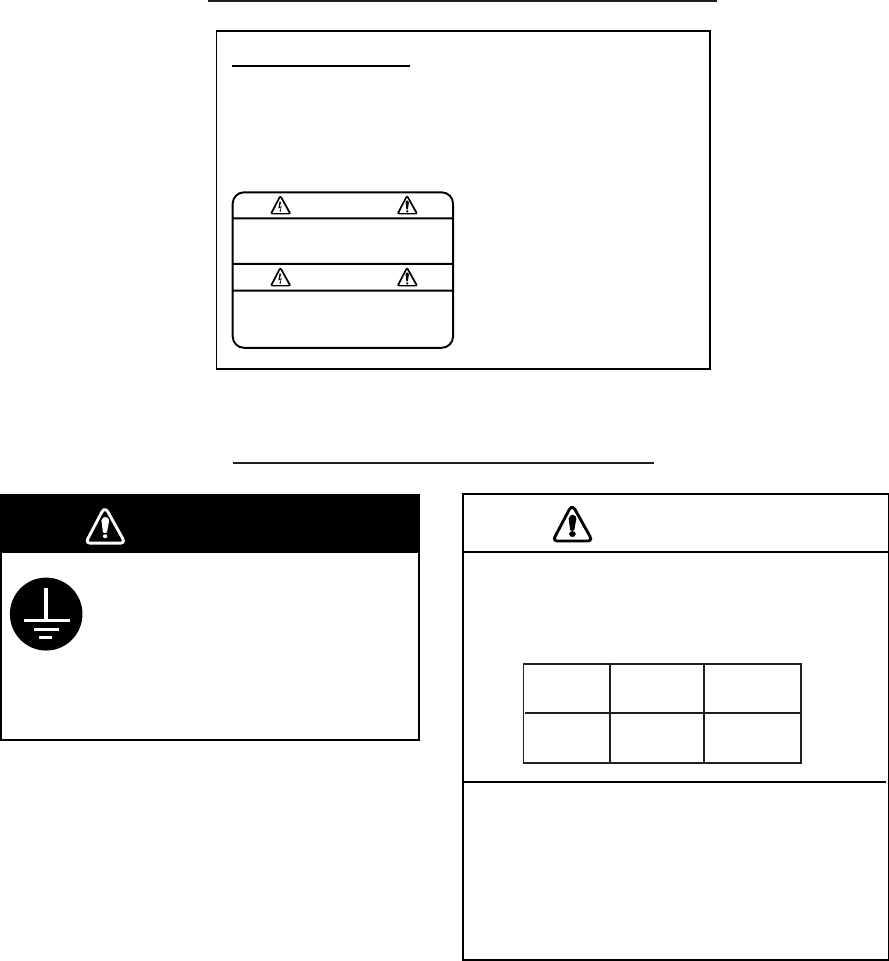
WARNING LABEL
A warning label is attached to the main unit.
Do not remove the label. If the label is missing or
damaged, contact a FURUNO agent or dealer
about replacement.
Name: Warning Label 1
Type: 86-003-1011-1
Code No.: 100-236-231
Safety Instructions for the Installer
CAUTION
Observe the following compass safe
distances to prevent interference to a
compass:
Do not install the main unit in direct
sunlight or where it may be subjected
to vibration or shock.
Inappropriate mounting location may affect
performance or damage the unit.
Magnetic Steering
compass compass
1.0 m 0.7 m
Main unit
Securely attach protective
earth to the ship's body.
The protective earth is required
to the power supply to prevent
electrical shock.
WARNING
i
Page
1. OUTLINE ・・・・・ ・・・・・・・・・・・・・・・・・・・・・・・・・・・・・・・・ 1
1.1 Characteristics ・・・・・・・・・・・・・・・・・・・・・・・・・・・・・ 1
1.2 List of Standard Components ・・・・・・・・・・・・・・・・・・・・・ 2
1.3 System Components ・・・・・・・・・・・・・・・・・・・・・・・・・・・・ 3
2. OPERATION
2.1 Description of key ・・・・・・・・・・・・・・・・・・・・・・・・・・・ 4
2.2 Contrast and brightness ・・・・・・・・・・・・・・・・・・・・・・・・ 7
2.3 Basic operation ・・・・・・・・・・・・・・・・・・・・・・・・・・・・ 7
2.3.1 Channel setting ・・・・・・・・・・・・・・・・・・・・・・・・・・・ 7
2.3.2 Fine-adjustment of frequency,
and selection of a desired frequency ・・・・・・・・・・・・・・ 7
2.3.3 Start and stop of recording ・・・・・・・・・・・・・・・・・・・ 8
2.3.4 Manual phasing ・・・・・・・・・・・・・・・・・・・・・・・・・・・ 8
2.3.5 Synchronization ・・・・・・・・・・・・・・・・・・・・・・・・・・・ 8
2.3.6 Selection of reception mode ・・・・・・・・・・・・・・・・・・・・ 9
2.3.7 Timer release and release of key lock in the timer mode ・・ 9
2.4 Description of setting mode ・・・・・・・・・・・・・・・・・・・・・ 10
2.4.1 Switching of receiver (audio) ・・・・・・・・・・・・・・・・・・ 10
2.4.2 Setting of timer reception ・・・・・・・・・・・・・・・・・・・・・ 11
2.4.3 Sleep timer setting ・・・・・・・・・・・・・・・・・・・・・・・・・ 12
2.4.4 Registration of new frequency ・・・・・・・・・・・・・・・・・・・ 13
2.4.5 Time setting ・・・・・・・・・・・・・・・・・・・・・・・・・・・・・ 14
2.4.6 Setting of ISB frequency ・・・・・・・・・・・・・・・・・・・・・・ 15
2.4.7 Adjustment of contrast ・・・・・・・・・・・・・・・・・・・・・・・ 15
2.4.8 RAM clearance function ・・・・・・・・・・・・・・・・・・・・・・・ 16
2.4.9 Attention at the time of operation ・・・・・・・・・・・・・・・・ 16
2.5 Operation with external receiver ・・・・・・・・・・・・・・・・・・ 17
3. MAINTENANCE
3.1 Back-up battery ・・・・・・・・・・・・・・・・・・・・・・・・・・・・ 18
3.2 Lubrication and Cleaning
・・・・・・・・・・・・・・・・・・・・・・・ 18
4. INSTALLATION
4.1 Main unit ・・・・・・・・・・・・・・・・・・・・・・・・・・・・・・・・・ 19
4.2 Wiring ・・・・・・・・・・・・・・・・ ・・・・・・・・・・・・・・・・・・・ 20
4.2.1 DC power supply built-in type ・・・・・・・・・・・・・・・ 20
4.2.2 AC power supply built-in type ・・・・・・・・・・・・・・・ 20
4.3 Terminal board ・・・・・・・・・・・・・・・・・・・・・・・・・・・・・ 21
4.3.1 Connection of BK ・・・・・・・・・・・・・・・・・・・・・・・・ 21
4.3.2 Connection with external receiver ・・・・・・・・・・・・・ 21
4.4 Grounding ・・・・・・・・・・・・・・・・・・・・・・・・・・・・・・・・ 22
4.5 Receiving antenna ・・・・・・・・・・・・・・・・・・・・・・・・・・・ 22
CONTENTS
ii
4.6 Exchange of a recording paper ・・・・・・・・・・・・・・・・・・・ 23
5. SPECIFICATIONS ・・・・・・・・・・・・・・・・・・・・・・・・・・・・・・・・ SP-1
5.1 Receiver ・・・・・・・・・・・・・・・・・・・・・・・・・・・・・・・・・・ SP-1
5.2 Recorder ・・・・・・・・・・・・・・・・・・・・・・・・・・・・・・・・・ SP-1
5.3 Automatic Control ・・・・・・・・・・・・・・・・・・・・・・・・・・・・ SP-1
5.4 Power, Dimension & Weight ・・・・・・・・・・・・・・・・・・・・・・ SP-1
APPENDIX
TABLE OF FACSIMILLE STATION
Area map of existing stations ・・・・・・・・・・・・・・・・・・・・・・ SP-2
Facsimile station table
・・・・・・・・・・・・・・・・・・・・・・・・・・ SP-3
PACKING LIST ・・・・・・・・・・・・・・・・・・・・・・・・・・・・・・・・・ A-1~2
Outside view ・・・・・・・・・・・・・・・・・・・・・・・・・・・・・・・・・・・D-1
Layout diagram ・・・・・・・・・・・・・・・・・・・・・・・・・・・・・・・・・ D-2
1
1.OUT LINE
FAX-410 is the high sensitive weather facsimile receiver using electronic scanning
thermal head recording system.
1.1 Characteristics
(1) Electronic scanning with thermal head recording system provides clear image, quiet
operation.
(2) Pre-programmed all existing weather facsimile stations in the world. Vacant
channels for new station are provided, and rewriting of the memory data is possible
for changing frequency of existing station.
(3) 9-tones gradation recording function provides clear and detailed weather photo from
satellite.
(4) Timer programming function up to 16 programs in a week provides operation free
for reception of each program.
(5) ISB shift function is equipped for corresponding to simultaneous broadcasting of
fax/teletype by a multiple method of SSB by the station of the U.S. Marines
management to which the frequency irregularly changes by 1-2kHz.
(6) Possible to record the data receiving signal from external receiver.
(7) Automatic start/stop circuit is equipped in accordance with WMO standard.
(8) Easy operation by automatic selection of phase matching and recording speed.
2
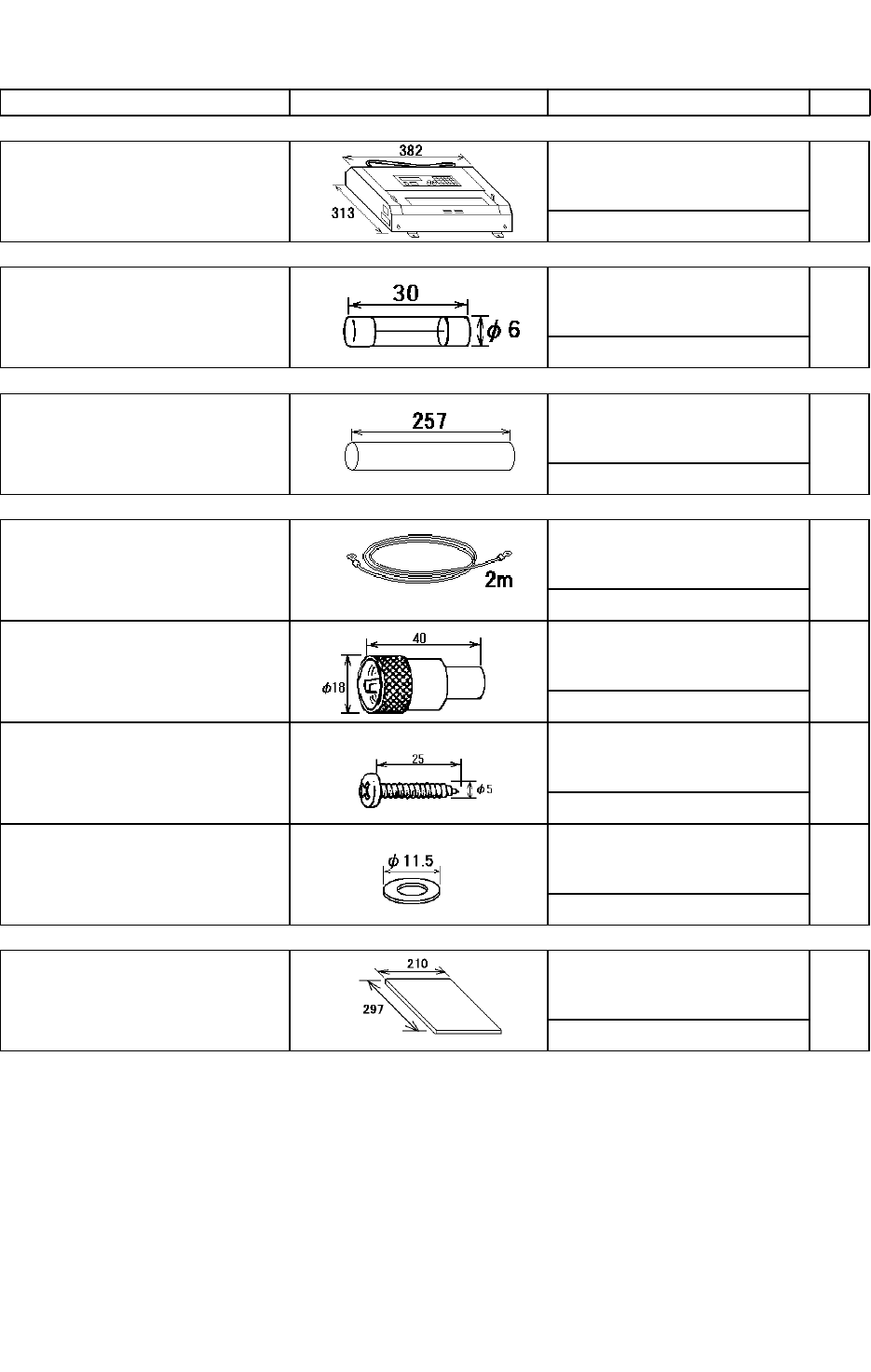
1.2 List of Standard Components
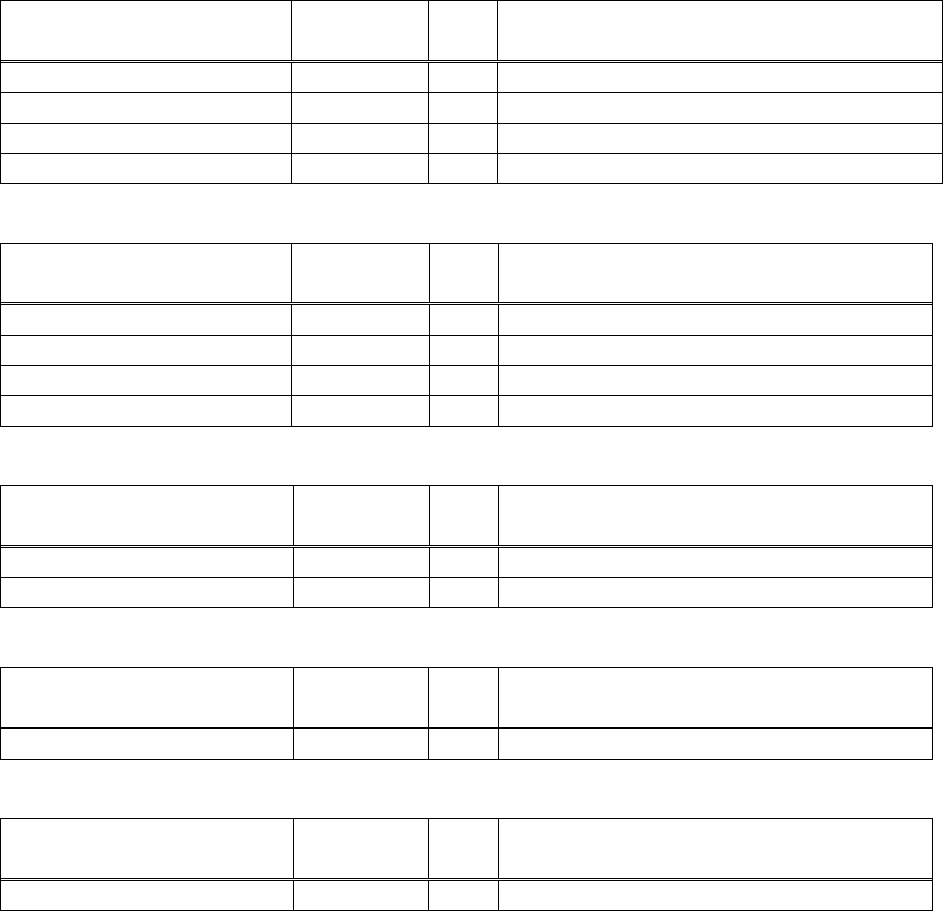
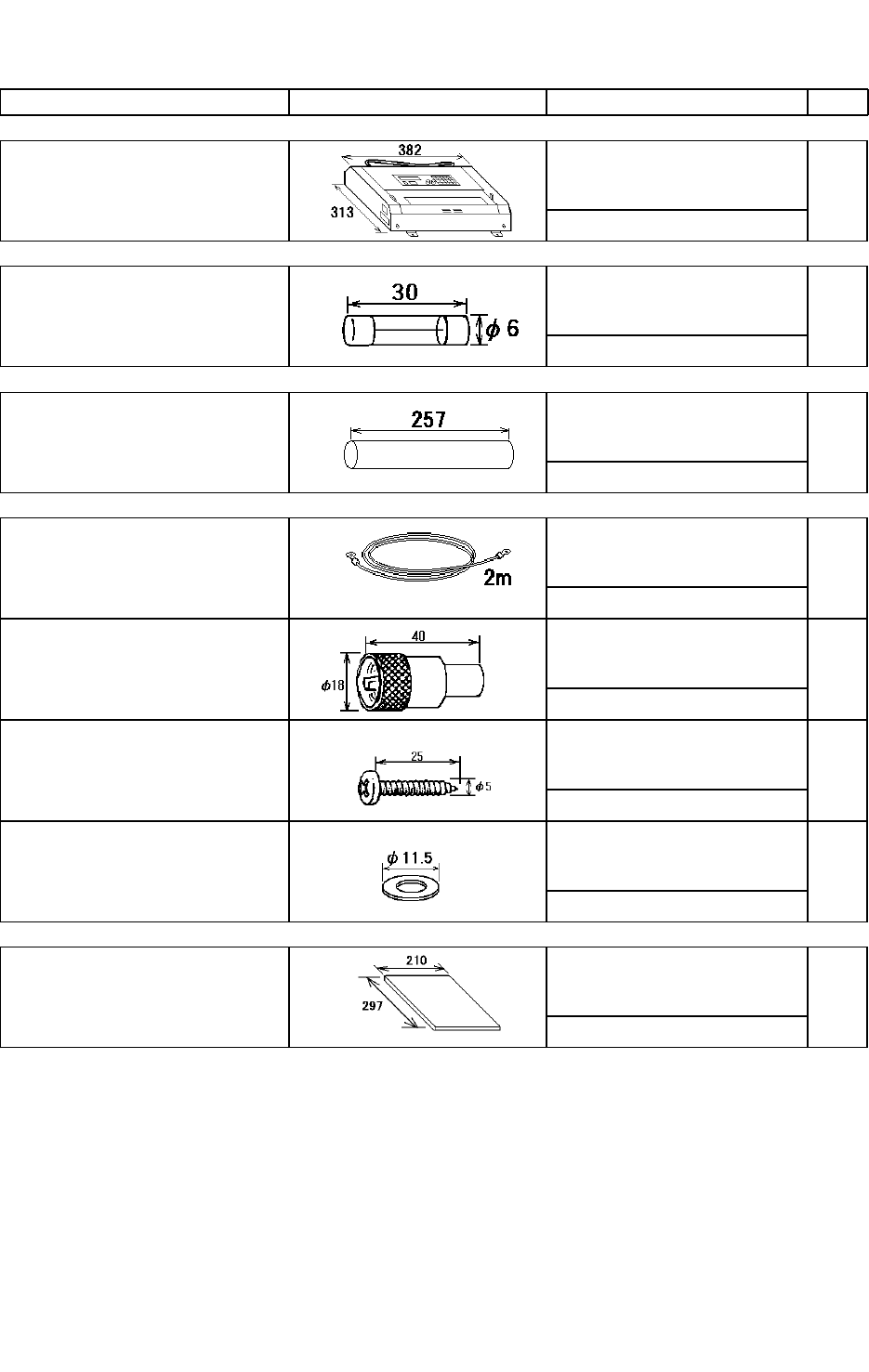
Facsimile receiver. List of Standard Components
Standard Components
Name Model nam
e/Code No.
Q’ty Remarks
Main unit FAX-410 1 set AC Power supply or DC Power supply
Installation materials 1
Accessories 1 set
Spare parts
1 set
Installation materials
Name Model nam
e/Code No.
Q’ty Remarks
Grounding wire 343200G01 2m With terminal
Coaxial connector M207-P 2 For Antenna cable
Self-tapping screw M5×25
4 Clamp for Main unit
Flat washer M6 5 Adjust to Clamp for Main unit
Accessories
Name Model nam
e/Code No.
Q’ty Remarks
Recording paper F220VP 1 257mm×30m
Operator’s Manual 1
Spare parts(AC Power supply)
Name Model nam
e/Code No.
Q’ty Remarks
Fuse ST4-2AN1
4 250VAC2A
Spare parts(DC Power supply)
Name Model nam
e/Code No.
Q’ty Remarks
Fuse ST6-7A
4 125VAC7A
3
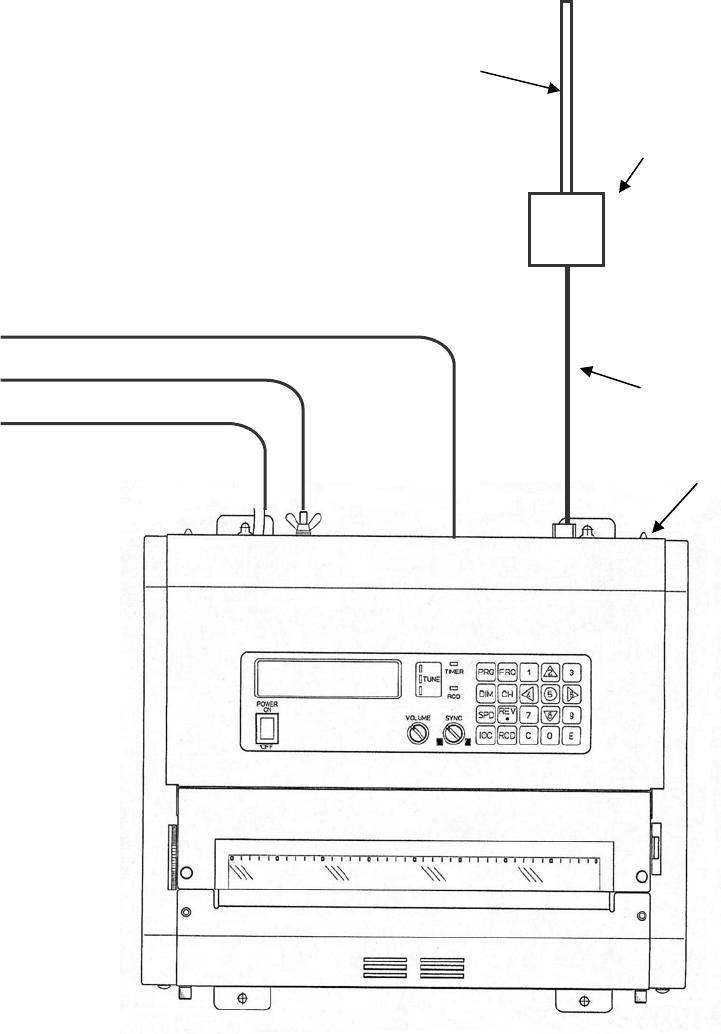
1.3 System Components
2.6m Whip antenna
Main unit
A
ntenna
coupler,fax-5
To BK line
To Grounding wire
To Power supply Coaxial cable
- 4 -
2.OPERATION
The unit, with antenna(s) and power supply, receives and records signal automatically
by the control of APSS when desired channels have been set.
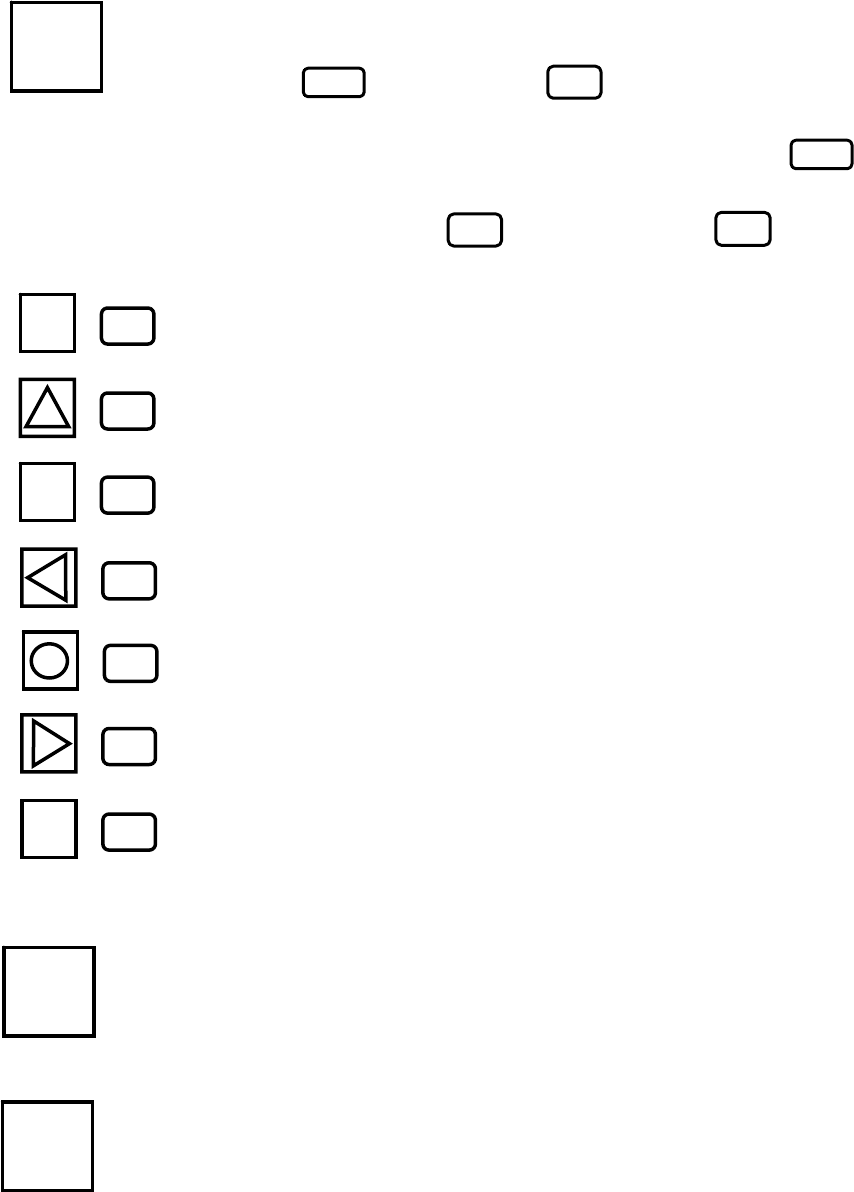
2.1 Description of key
Program key : For preparation to mode setting.
One of following modes can be selected by pressing
key and next, a key.
Be sure to follow instruction of the indicator in
selecting a mode. To cancel a setting, press the
key to reset to the initial display of selection mode.
Then, press a key to reset or the key
to set the standard operation mode.
Dimmer key : For adjusting a backlight brightness of the LCD
indicator, 4 levels selectable.
Speed key : For selection of SPD (speed).
PRG
PRG
C
N
0~9
N
0~9
1 1 key
2 2 key
3 key
3
4 4 key
5 5 key
6 6 key
9 key
9
PRG
SPD
: Switch the receiver, internal or external
: Set timer reception
: Set sleep timer
: Set a new frequency or change stored frequency
: Set clock time
: Set ISB
: Clear RAM
DIM
- 5 -
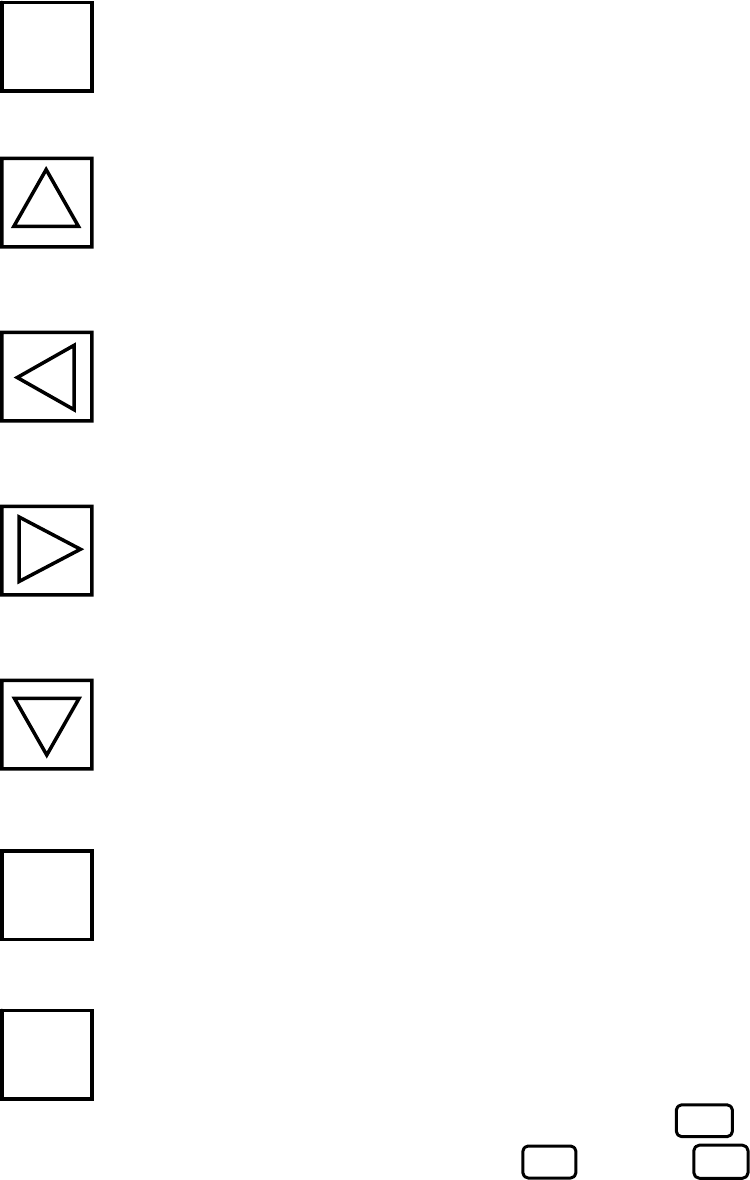
IOC key : For selection of IOC.
Up key : Channel up in the channel mode or frequency up in
the frequency mode.
Left key : For manual phasing in recording (towards left).
A press of the key shifts 2.5% of the paper width.
Right key : For manual phasing in recording (towards right).
A press of the key shifts 2.5% of the paper width.
Down key : Channel down in the channel mode or frequency
down in the frequency mode.
Reverse key : (REV) For reversal of black-white of the recording.
or dot key (.) Decimal point in setting time or frequency.
A press of the key alternates the (REV)/(.).
Frequency key : For selection of frequency mode from channel mode
and for shift to frequency setting in the frequency
mode. For frequency setting, press key and
enter frequency with keys and key.
(unit: 0.1kHz, Available frequency for setting are
within 80-159.9kHz or 2-24.9999MHz.)
2
4
6
8
FRQ
N
0~9REV
・
REV
・
IOC
FRQ
- 6 -
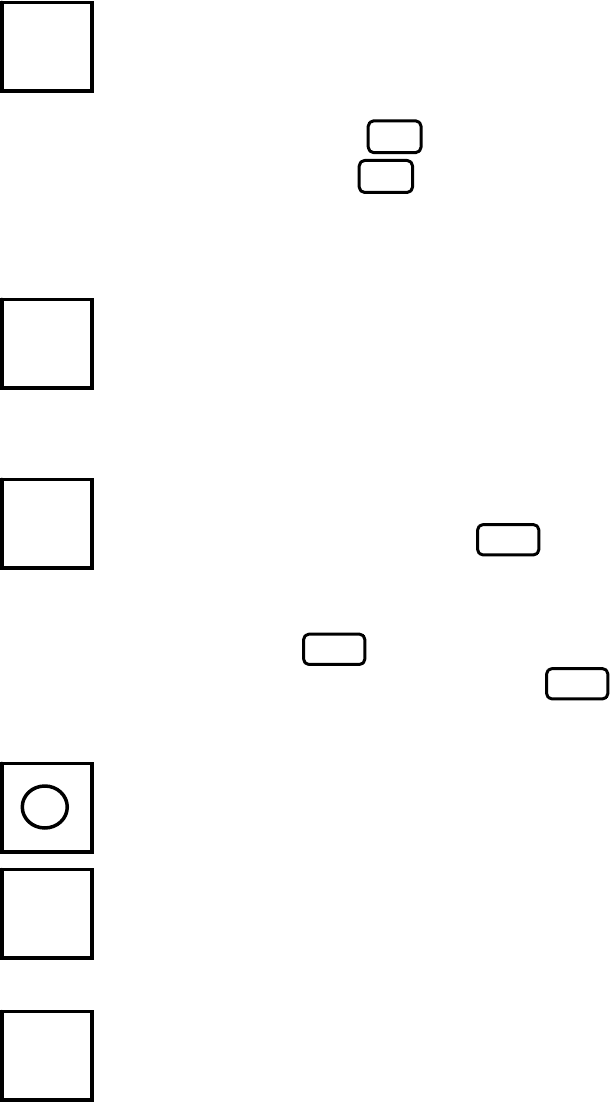
Channel key : For selection of channel mode from frequency
mode, and for shift to the channel setting in the
channel mode. For setting a channel,
press key and enter channel number with
three keys.
The channel covers 000~406 (existent frequency)
and 410~733 (new frequency).
Clear key : For deletion of memorized value in a set mode and
for return to the standard operation mode from a
set mode.
Record key : To start and stop recording. In the non-recording
mode, a press of key sets automatic phasing
mode and recording starts when phasing is
completed. In the automatic phasing, a press of
key stops the automatic phasing and starts
recording. A press of key while recording
stops recording.
○ key : Time display (clock function)
Number key : To enter number or mode.
Entry key : To acknowledge setting.
E
RCD
CH
C
RCD
5
N
0~9
CH
N
0~9
RCD
RCD
- 7 -
2.2 Contrast and brightness
Contrast of LCD display depends on the visual angle and the temperature and hence,
be sure to adjust it with the contrast knob (see Fig. 1) for optimum result at the time
of installation. The backlight brightness of the LDC can be adjusted in five stages by
pressing the key.
2.3 Basic operation
Power switch is on the left of the front panel. When the power is turned on, the
channel at the last power off is displayed.
These two display modes are selected alternatively by pressing key or
key.
Channel number is displayed with 3 figures. Upper 2 figures are assigned for a
station and last figure represents its own frequency code.
2.3.1 Channel setting
A press of key in the channel display mode scrolls channel number.
Selection of a channel is possible by pressing key first and next,
three keys.When a station is chosen with two keys and the key
is pressed, asterisk mark (*) appears in the 3rd figure and the most sensitive
frequency of that station is selected automatically.
2.3.2 Fine-adjustment of frequency, and selection of a desired frequency
In the frequency display mode, fine-adjustment of the frequency with a step of
0.1kHz is possible by pressing key. Best tuning is indicated when
the green LED is lit on the TUNE display.
It is also possible to select a desired frequency by pressing key first and
next, four~six keys with key (available frequency for setting are
T
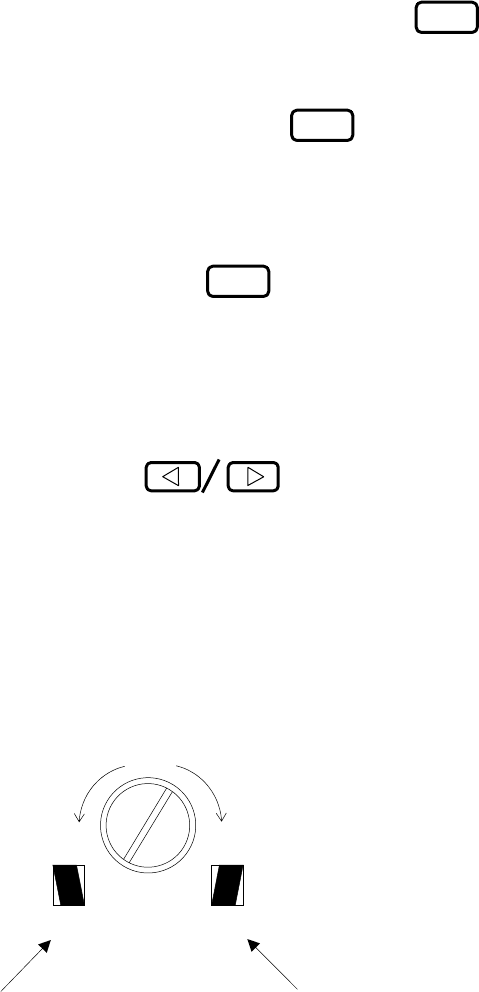
he channel [000] is displayed as an example.
C
on the left to
p
shows channel dis
p
la
y
mode.
DIM
C000 JMH 3622.5
S120 I576
000 JMH F 3622.5
S120 I576
F
before frequency shows frequency display mode.
N
0~9
N
0~9
N
0~9
△▽
△ ▽
FRQ
CH
REV
・
CH
REV
・
FRQ
- 8 -
within 2000.0~24999.9kHz).
2.3.3 Start and stop of recording
(1) Start
Recording starts automatically (Start/Stop, Phase, Speed, IOC) by receiving the
APSS signal. To start halfway of the received picture, press key once
and automatic speed setting and auto-phasing mode are set. Then, recording
starts upon phasing is completed. When the phase signal for automatic start is
not received, recording does not start. Then, press key again for manual
recording.
(2) Stop
Recording stops automatically when auto stop signal is received. In the absence
of auto stop signal or to stop halfway, press key.
2.3.4 Manual phasing
In manual recording mode or when the phasing is not completed in the proper
position by auto phasing,
be sure to adjust the phase using the key.
The phase signal shifts by 2.5% of the paper width or about 6.4mm per keying.
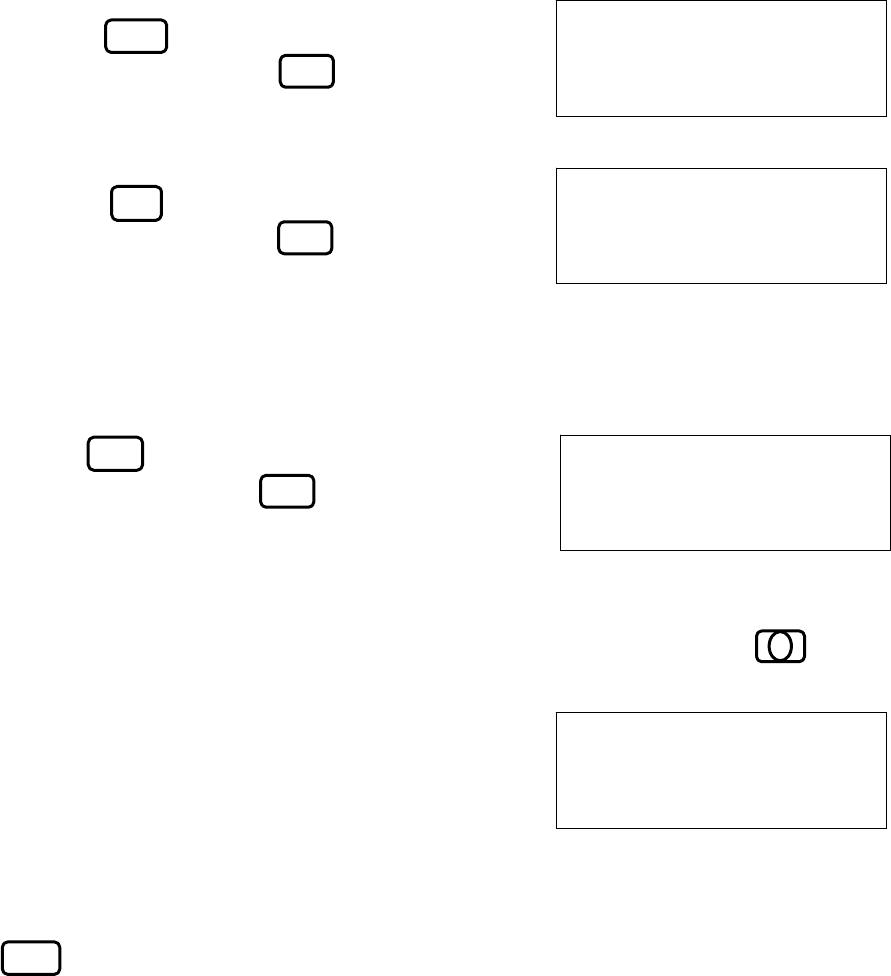
2.3.5 Synchronization
When a recorded picture (phase signal, etc.) drifts to left or right, be sure to adjust
the synchronization with SYNC knob to stop drift.
When the picture is such as shown in the left illustration (①), turn the knob
counter-clockwise. In case of the right illustration (②), turn the knob clockwise.
SYNC
Turn
clockwise
Turn counter-
clockwise
① ②
RCD
RCD
RCD
- 9 -
2.3.6 Selection of reception mode
The reception mode refers IOC, speed, and normal/reverse printing and modes.
The former two (IOC and speed) are automatically selected by receiving the APSS
signal and phase signal. For the latter two modes, desired ones should be selected
manually.
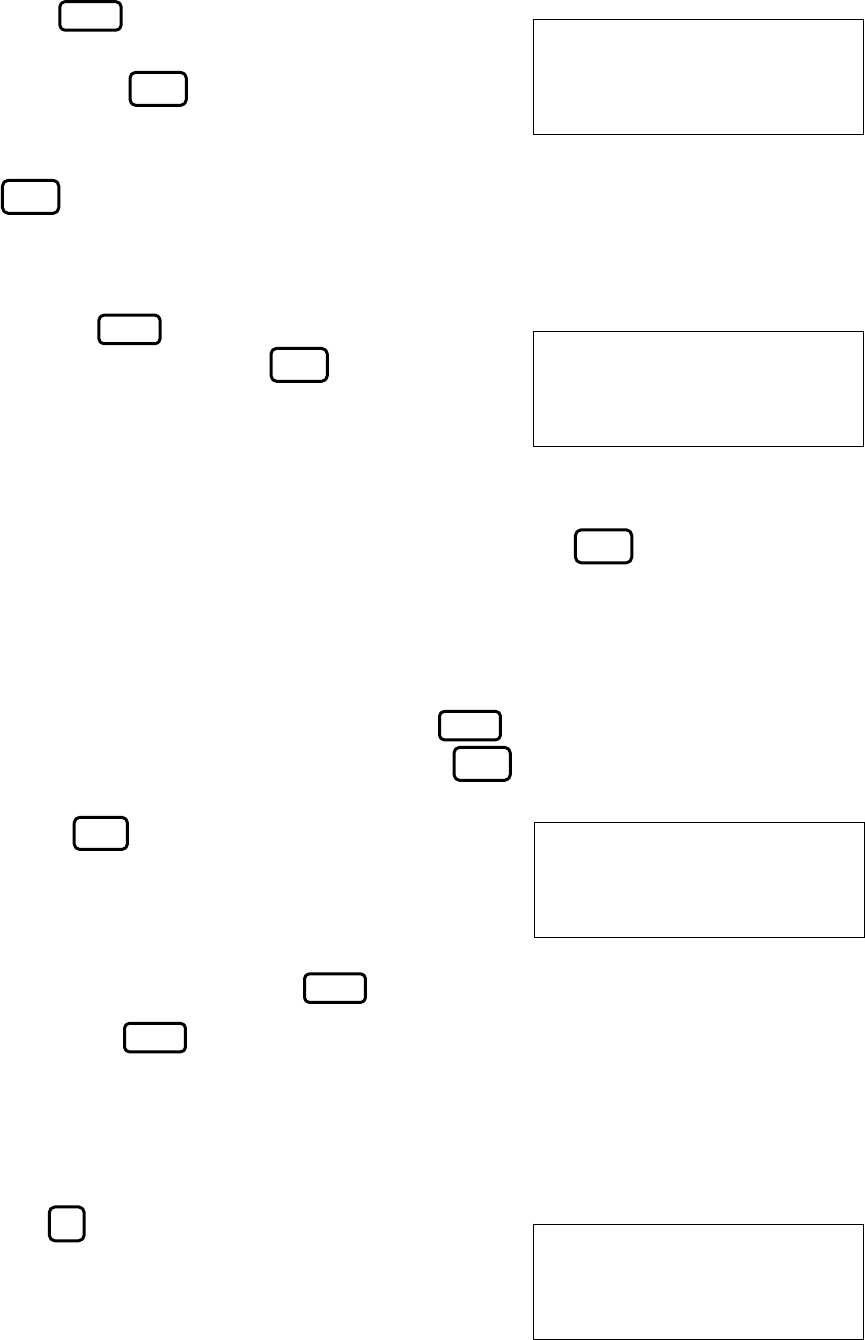
(1) Speed and IOC
When incorrect speed or IOC is selected in
manual recording or when auto-recording
has started at improper position, its setting
can be changed with following procedure.
a) Change of speed
Press key, then the display on the
right appears. Press key to select
correct speed.
b) Change of IOC
Press key, then the display on the
right appears. Press key to select
correct IOC.
(2) Reverse mode
When recorded picture is reversed (white/black), follow the procedure below.
Press key, then the display on the
right appears. Press key to select
mode.
(3) Time display
A built-in clock is provided. The present time is displayed by pressing key
in the standard operation mode.
When the displayed time is not correct, be sure to
reset the time by following the instructions in 1.4.5.
Right display indicates April 10, Tuesday, 12:00.
2.3.7 Timer release and release of keylock in the timer mode
When the timer is in operation (except sleep timer), function of each key (except
key) is locked to keep set values and hence, ordinary keying is inhibited.
SPEED:120
1-120 2-90 3-60
IOC:576
1-576 2-288
N
0~9
SPD
IOC
N
0~9
N
0~9
REVERSE: OFF
1-OFF 2-ON
C000 JMH 3622.5
APR 10 MON 12:00
REV
・
DIM
5
- 10 -
To release this timer or keylock in the timer mode, follow the procedure below.
(1) In the timer standby mode (time for the next recording is displayed):
Press key then the message on the
right is displayed. Then,
a press of key releases the timer
operation and shifts the mode to the
standard operation mode. By pressing
key before fix the timer release, the
timer standby mode is maintained.
(2) In the timer operation mode (standard operation being displayed):
Press the key and the message on theright
appears. Fixing with the key releases the
keylock (even though in the timer operation mode,
each key function is revised and all operations
are possible).
To release the timer mode in such a case, refer to 1.4.2. When the keylock off is
displayed, it is possible to clear the keylock off with the key.
2.4 Description of setting mode
Shift to a set mode is made by pressing the key. When the mode is set, the
message on the right is shown. Pressing the key in this mode, the standard
operation mode is reset.
When a key is pressed, it is possible to
set one of the following modes as explained in
1.4.1~1.4.6.
To cancel a setting after shifting to the setting
mode and before fix it, press the key.
Pressing the key resets to the initial
setting mode (as displayed above).
2.4.1 Switching of receiver (audio)
Switching of the internal or external receiver is set by the following procedure.
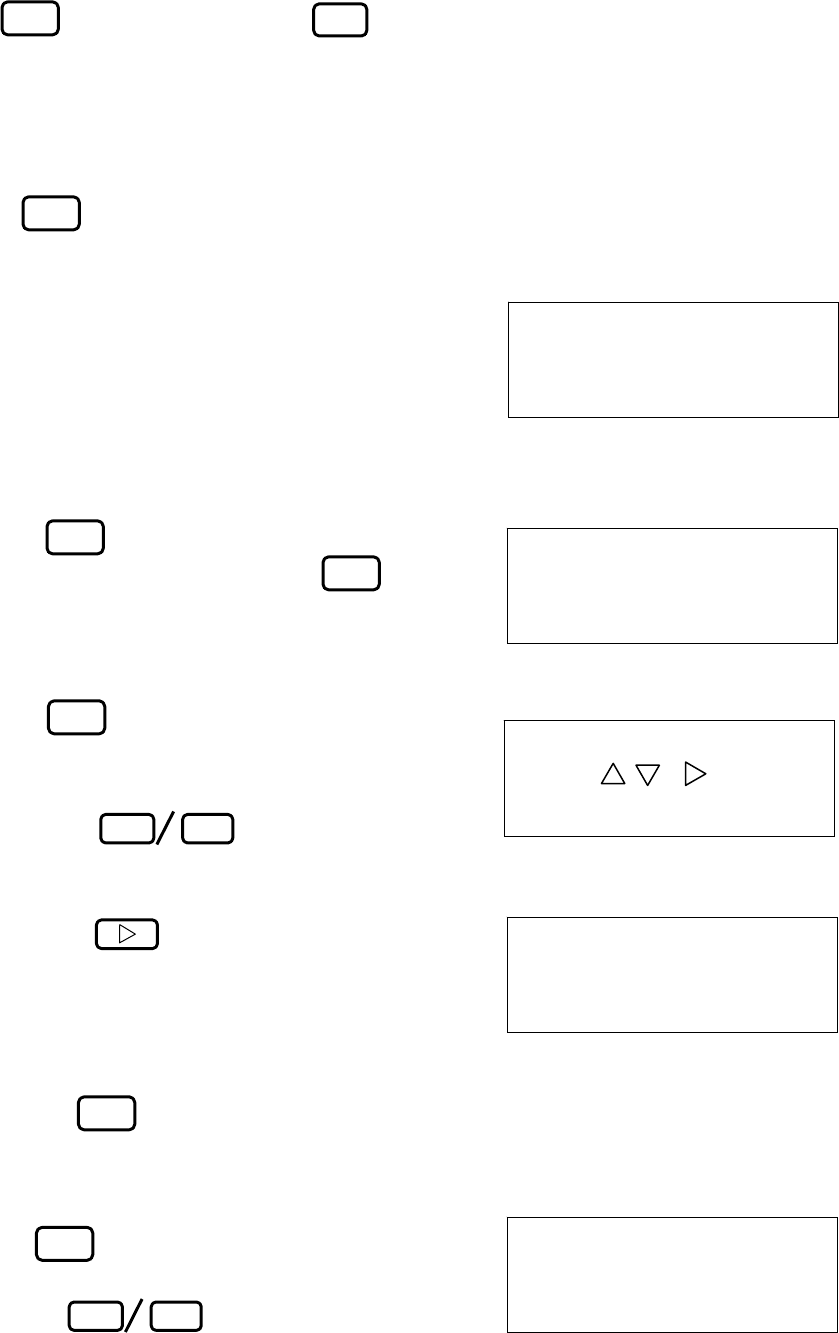
Press key. Then the receiver switching
mode is set and message on the right appears.
The displayed number 1 is for internal
PRG
PRG
TIMER RCV : OFF ?
PUSH E KEY
KEY LOCK : OFF ?
PUSH E KEY
SET PRG. NO. 1-9
ESC PUSH C KEY
PRG
N
0~9
PRG
PRG
AF IN : INT
1-INT 2-EXT
E
C
E
C
C
1
- 11 -
receiver, 2 is for external receiver. Pressing
the key after setting a key,
completes the setting.
2.4.2 Setting of timer reception
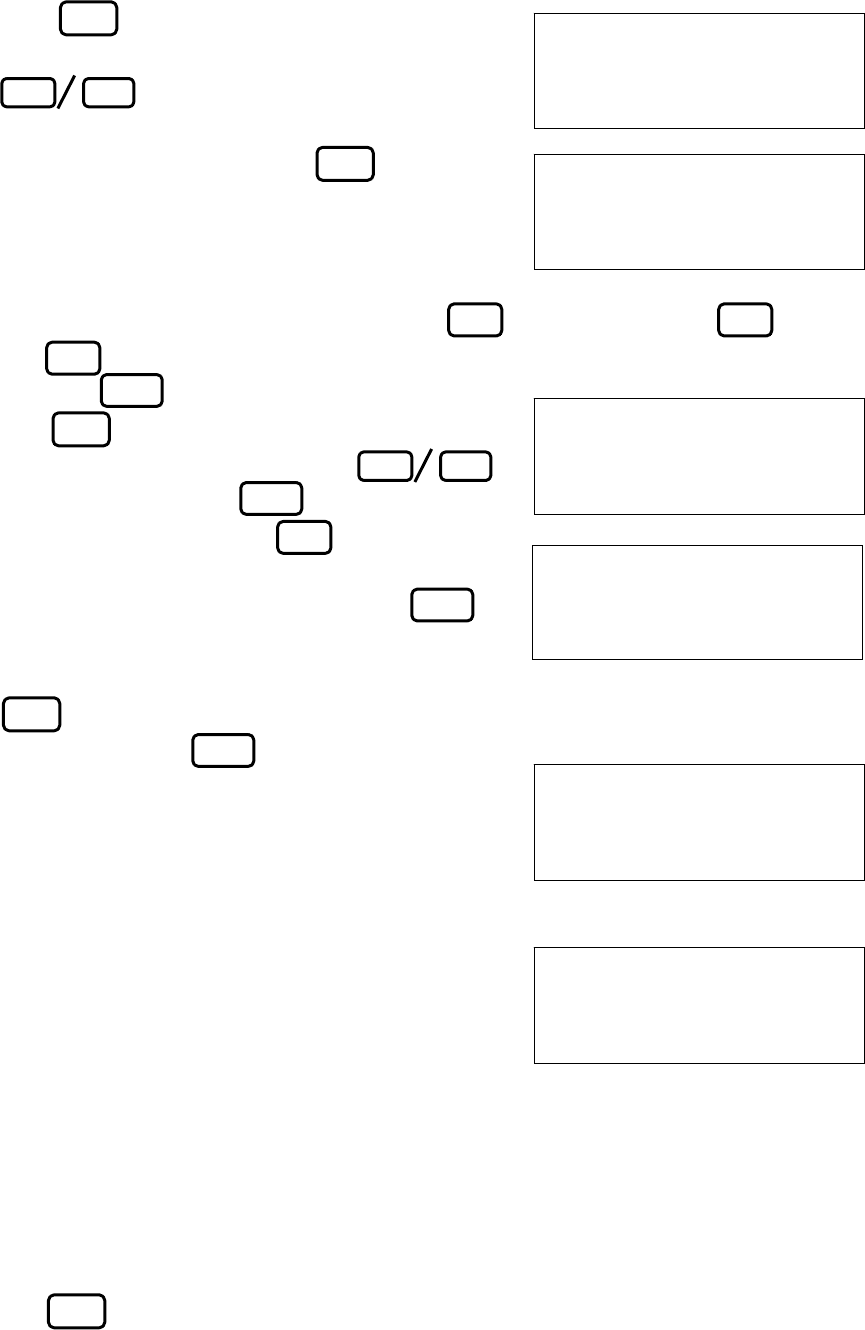
This unit has 16 booking functions and each timer is set as follows.
Press key. Then the timer reception setting mode is set and the message is
shown on the right.The displayed number correspond to the following entries
respectively.
1 : Release
2 : Setting
3 : Re-calling (readout of the booking data)
4 : Entry booking
(1) Release
Press key. Then the message is
shown on the right. Pressing the key
releases the timer mode
(2) Setting
Press key. Then the message is
shown on the right.
Select booking number(s), 0~F,
by pressing key.
The display shown on the right is an example
when selecting booking number “0”.
Then, press key to fix the selection
Plural selection of the booking numbers are
acceptable. The display shown on the right
is an example when select and fix the
booking number “0”, “1”, “2” and “3”.
Press the key to complete the setting.
(3) Re-calling (readout of the booking data)
Press key.
Select a booking number to be confirmed by
pressing key. Then, contents
of the booking data is displayed.
N
0~9
TIMER RCV : 1-OFF
2-ON 3-RCL 4-STR
TIMER RCV : OFF?
PUSH E KEY
SET REG No. 0-F
PUSH / & &E KEY
TIMER RCV NO.: 4
0123
△ ▽
△ ▽
RECALL TIMER REG
SET REG NO. 0-F
E
2
1
E
2
E
3
- 12 -
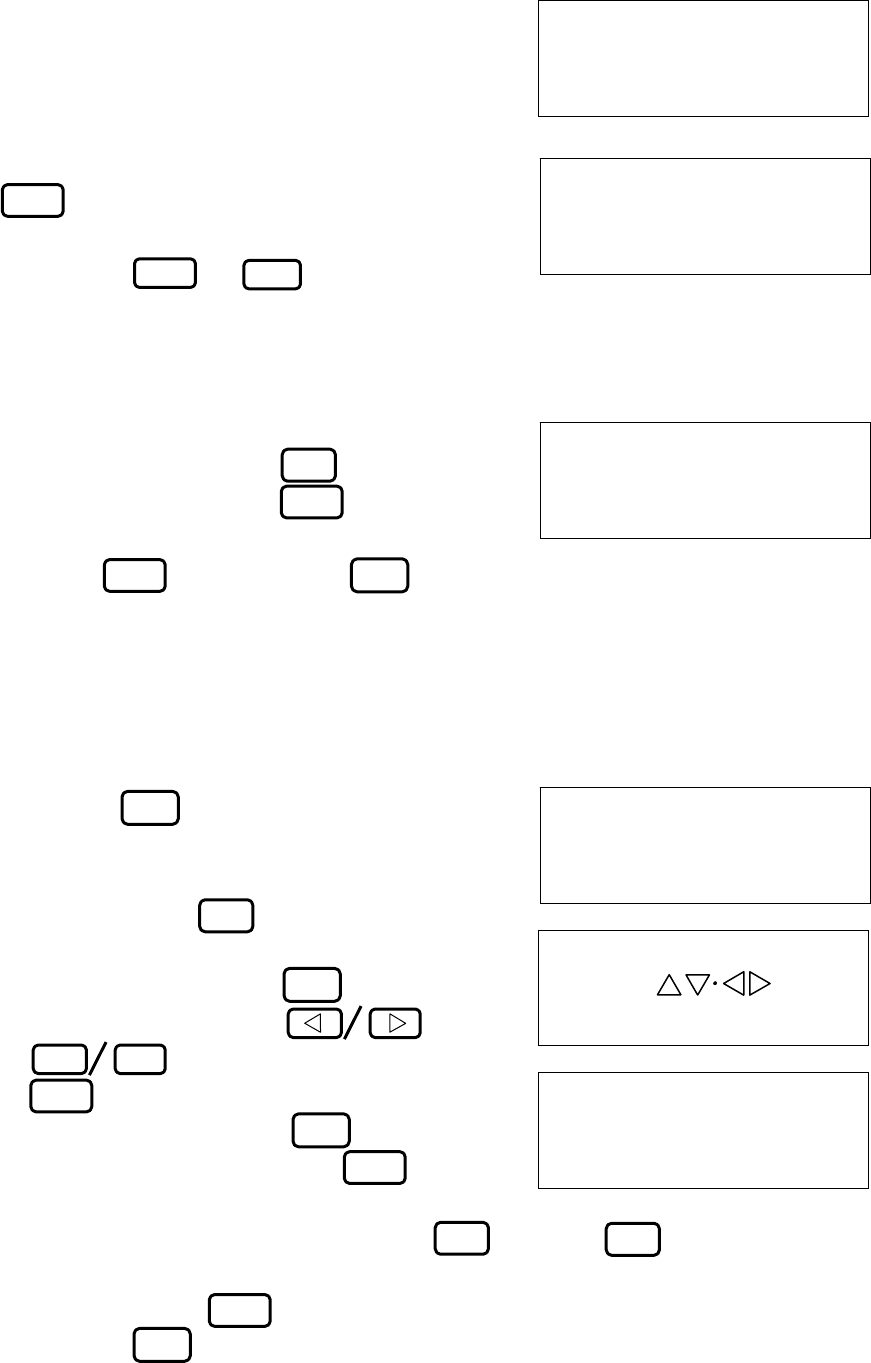
(4) Entry booking
Press key.
Select a timer number for booking by pressing
key. Then, the unit will ask
whether the number is correct or not. Fix
the number by pressing the key or
enter a new number if the number is not
correct. The display on the right shows
when the number 1 is set.
Then, enter a channel number with three keys (or press two keys
and key for automatic setting of the maximum sensitive frequency) and fix
with the key or reset a channel with
the key.
Further, set a day of the week with
key and fix it with the key. Then, set
start and end time with keys from
00:00 to 23:59.
After setting is competed, fix it with the
key. To change the time while setting,
press the
key to reset the time.
After fix with the key, the setting is
displayed as shown on the right.
The message on the right is for setting:
Channel No.000 at JMH 3MHz, booking
No.1, starting Monday 08:00 and ending
09:00.
Be sure to give one minute or longer for time
interval between start times of booking.
For example, 12:00~12:30 for No.1 and
12:31~13:00 for No.2.
2.4.3 Sleep timer setting
The sleep timer indicates the sleep mode after a specified time for reception has
passed and its setting is made as following.
Press key. Then the message is shown
on the right. The displayed numbers refer to
STORE TIMER REG
SET REG NO. 0-F
R1 SET CHANNEL
NO. in 3 FIGURES
△ ▽
N
0~9
REV
・
E
R1 C000 SET DAY
of THE WEEK by△▽
R1 C000 MON
SET START/STOP
08:00 - 09:00?
PUSH E KEY
000 JMH 3622.5
1MON 08:00-09:00
△▽
4
E
N
0~9
C
E
N
0~9
E
C
E
3
- 13 -
the following operations.
1 : Release
2 : Setting
(1) Release
Select “1” in the above message, and fix with
key. (display on the right)
Note: When the system is in the sleep mode,
press & keys to shift
the mode to the standard operation
mode.
(2) Setting
Select “2” in the above message, and enter
desired time to sleep by key (max.
23:59), and fix it with key. To
correct or change the entered time before
pressing key, press the key
for resetting.
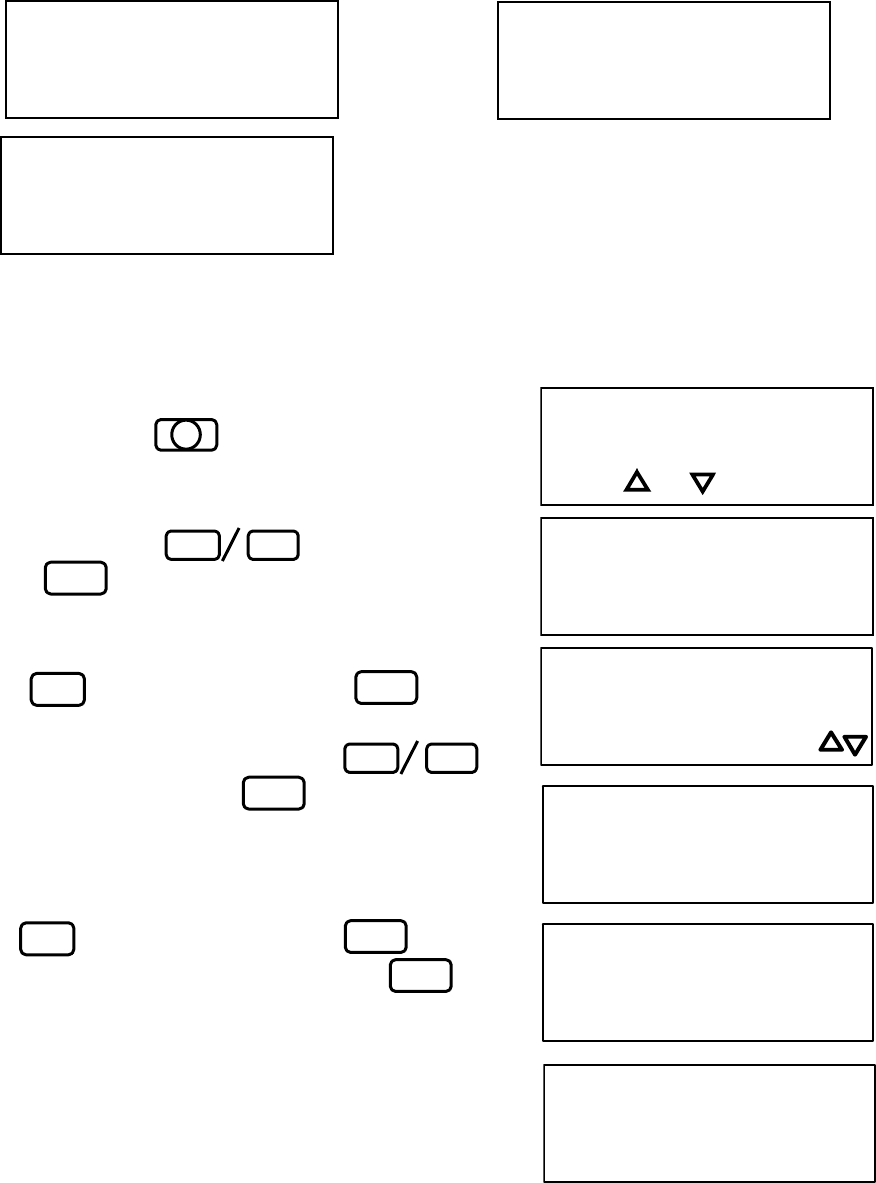
2.4.4 Registration of new frequency
Registration of a new frequency (450~724) or re-writing of an existent frequency
(CH000~443) can be made in the following procedure.
Press the key, and the frequency
registration mode is set. Then, message
shown on the right appears. Enter a channel
number with three keys.
Right example is for channel 000. To change
the entered number, use the key. Then,
enter a call sign with the &
the key, and fix it with
the key.
To correct call sign, press key and
re-enter a call sign before pressing key.
The message on the right shows when AAA (3 figures) is entered.
Then, enter a frequency (3~6 figures) with keys and key with a unit
of 0.1kHz Available frequency for setting are within 80.0~159.9kHz or 2000.0~
24999.9kHz. Press key to fix the registration. To correct the entry
halfway, use key for resetting. Further, the speed, IOC, reverse and
decoder can besetin sequence.
N
0~9
SLEEP MODE : OFF
1-OFF 2-ON
SLEEP MODE : OFF ?
PUSH E KEY
SLEEP TIME :
SET SLEEP TIME
CHANNEL PROGRAM
SET CH in 3 FIGS
N
0~9
△ ▽
C000 SET CALL S-
IGN by KEY
E
C000 AAA 0.0
SET FREQUENCY
N
0~9REV
・
E
E
E
C
5
C
C
C
E
E
PRG E
- 14 -
SET REVERSE
SET IOC 576/288
SET SPEED 120-60
APR 10 MON ‘05
12:00
SET TIME in 4FIG
APR 10 MON ’
SET YEAR in 2FIG
APR 10 SET DAY
Of THE WEEK by
A
PR
SET DATE in 2FIG
SET MONTH
by / KEY
1-120 2-90 3-60 1-0FF 2-ON
1-576 2-288
2.4.5 Time setting
Clock time can be set by the following procedure.
Pressing the key sets the time
setting mode and message shown on the
right appears.
Set month with key, and fix it
with key.
The message on the right shows entering
April. Next, enter date with 2 figures by
the key, and fix it with the key.
(e.g. April 10th)
Then, enter day of the week with
key, and fix it with the key. Message
shown on the right indicates Monday.
Finally, enter year (last two figures) and time
(hour: 2 figures, minute: 2 figures) each with
the key, and fix with the key.
To correct the setting halfway, press the
key for resetting.
5
△ ▽
△▽
N
0~9
N
0~9
E
E
E
C
E
- 15 -
ISB +0.0KHz:OFF
1-OFF 2-ON 3-QTY
ISB +1.9kHz:ON
PUSH ENT KEY
SET ISB in 2FIGS
+/- by ・ KEY
2.4.6 Setting of ISB frequency
Signals from multiplex-communication station are easily received by setting an
ISB (Independent side band) width as shown in the following.
Pressing key sets the ISB setting mode
and the message on the right is shown.
The displayed numbers correspond to the
following.
1 : Release
2 : Setting
3 : Shift quantity entry
(1) Release
Press key, and fix with the key orelease the mode.
(2) Setting
Press key, and fix with the key,
then a displayed amount of frequency is
shifted.
Be careful as a frequency shift is set in all
channels. When the power is turned on, the
shift frequency for all channels is indicated
when ISB has been set.
(3) Shift quantity entry
Press key.
Then use the key to decide
plus (+) or minus (-), and enter a shift width
by key (2 figures).
Press the key to fix it. To correct the
entry halfway, use the key for re-entry.
2.4.7 Adjustment of contrast
N
0~9
SET CONTRAST
by △/▽ KEY
CONTRAST : 9
By △/▽ KEY
Press key, then the contrast adjustment
display appears (upper left).
Press key to select contrast level
for 0 ~ 9. Larger value leads higher contrast.
Press key to set and memorize the
contrast level.
△▽
EC
6
1
2
E
E
E
3
C
7
- 16 -
RAM CLEAR!!
PUSH ENT KEY
2.4.8 RAM clearance function
The unit has RAM to memorize the frequency data of the FAX transmitting
stations in the world and to retrieve such data. Therefore, when a part or all of
RAM data is deleted in error so that the initial data in ROM (data at the time of
delivery) has to be retrieved, the following procedure is needed to clear the RAM
data. Be careful since all the data in the RAM will be initialized, deleting the
data of registered frequencies, etc. when this procedure is performed.
Pressing key sets the RAM clear mode
and pressing key clears the RAM data.
To stop this procedure, press the key
or the key.
2.4.9 Attention at the time of operation
Be careful of the following thing when operation.
[CAUTION]
If operations other than normal operation are repeated, the keyboard may lock.
In such a case, turn the power switch OFF, and turn it ON again.
9
E
C
PRG
- 17 -
2.5 Operation with external receiver
(1) External receiver
When an external receiver is used, it should have a local oscillator with very good
frequency stability. The A1 detected beat, a low-frequency output, can be
monitored with the unit when the signal is supplied through receiver jack of the
external receiver. If the signal is supplied from the speaker terminal, it is
suggested to use a dummy resistor and supply signal from both ends of the dummy
resistor. The signal enters the input terminal (EXT-IN) on the back of the unit
and should be 50mV or larger at the input terminal. When an external receiver is
of ordinary type, there will be no problem of excessive input since there is a
protection circuit inside the unit. However, if direct current is superposed, be
sure to input it through a non-polarized capacitor of about 1μF.
(2) Operation
a) Beat adjustment
When using an external receiver whose beat frequency is adjustable within a
range of ±2kHz or more by means of the beat knob, set the frequency dial so as
to maximize the deflection of the receiver’s “S” meter, and adjust the beat knob
so that the center LED of the tuning indicator of the unit is lit. When a signal
from station with ISB communication from a U.S. Navy station, e.g., Guam,
Pearl Harbor or San Francisco, is received, sometimes an adjustment of the
frequency is necessary with a variable condenser or spread variable condenser,
because the frequency may shift within a range of ±2kHz from the specified
frequency of the station.
b) Band width
When noise is low, a wide bandwidth is advantageous to have good picture
quality. However, a narrow bandwidth down to 1kHz is preferable in a noisy
condition.
c) Selection of external receiver
Refer to 1.4.1 to use an external receiver and also to return to the internal
receiver.
d) Recording
Refer to 1.3.3 for recording operations and for reverse reception. In reverse
reception, set the external receiver to the FBO, LSB or USB mode similarly.
NOTE
BFO : Beat frequency oscillator LSB : Lower side band
USB : Upper side band ISB : Independent side band
- 18 -
3. Maintenance
3.1 Back-up battery
This device uses a manganese lithium battery as a back-up battery.
Please exchange to new one after using for 5 years.
Ask to a service shop for replacing the back-up battery.
3.2 Lubrication and Cleaning
(1) Lubrication
Lubricate a paper sending gear with 1-2 drops of lubricating oil at every 2-3
months.
(2) Cleaning
Clean the thermal head with attached cotton cleaner at every month.
When garbage has adhered to the thermal head, soak a little ethyl alcohol on
cloth and wipe it off. Don't use other than ethyl alcohol.
- 19 -
4.INSTALLATION
4.1Main unit
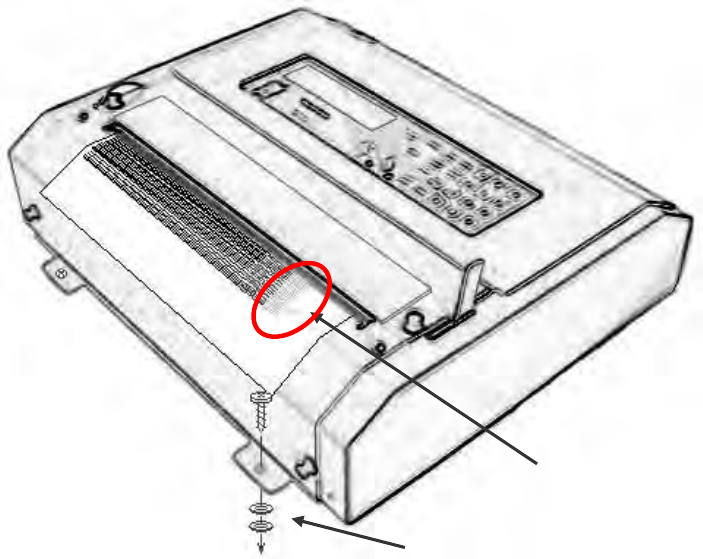
Install the TF-711 main unit on a plane desk or a solid and plane wall with 4 pcs. of
screws and washers.
Caution: A print may become blurred if the installation place is uneven. In that
case, put some washers or suitable attachment to adjust the flatness as
following figure.
Blurred part
Washer
- 20 -
4.2 Wiring
4.2.1 DC power supply built-in type
Connect black wire to “-“ (negative), and red wire to “+” (positive).
4.2.2 AC power supply built-in type
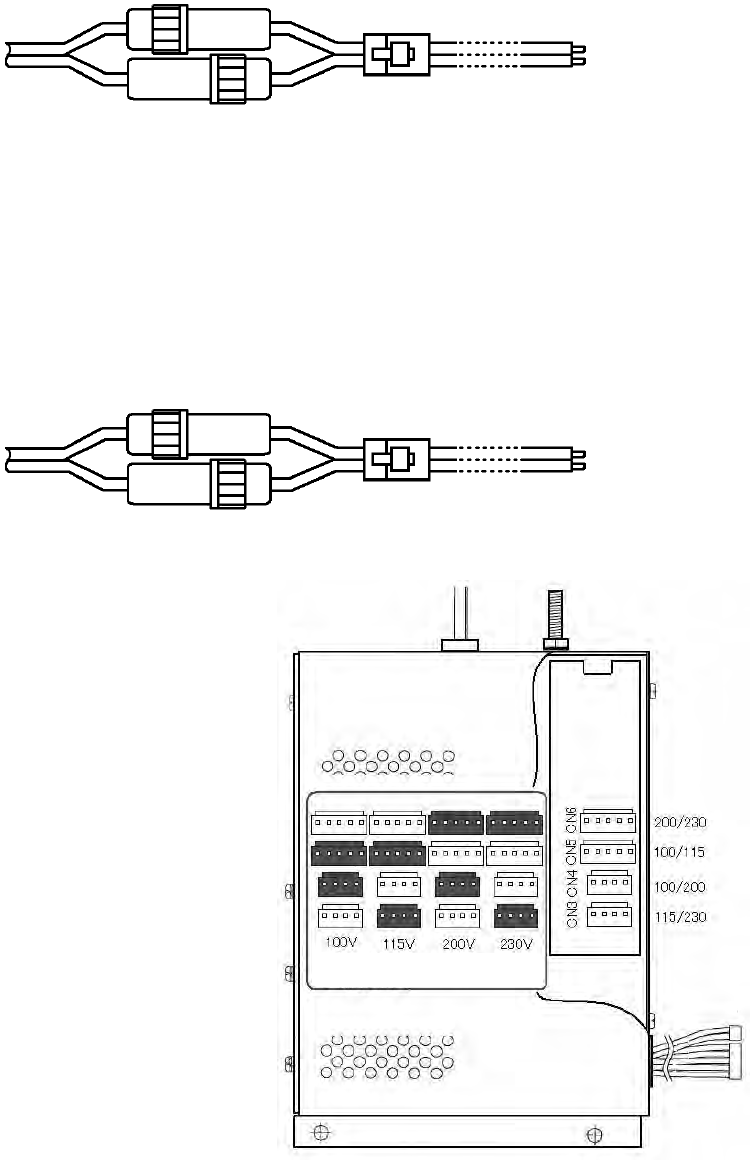
Operation voltage (100/115/200/230 VAC) is pre-set at factory in accordance with
customer’s request.
In case of changing operation voltage, re-adjust the voltage changer inside the AC
power supply unit as follows.
Voltage setting:
Referring to drawing in the right, change
the short harness (ribbon wire) in
accordance with required voltage.
For example, connect the short
Harness Between CN4 and CN5 in case
of 100 VAC.
7A fuse + : Red
- : Black
Fig. 4.2.1 DC power cable
2A fuse HOT : Gray
COLD : Gray
Fig. 4.2.2 AC power cable
Fig. 4.2.3 AC power supply unit
- 21 -
4.3 Terminal board
Use terminal board on the rear panel of
the main unit for the connection between
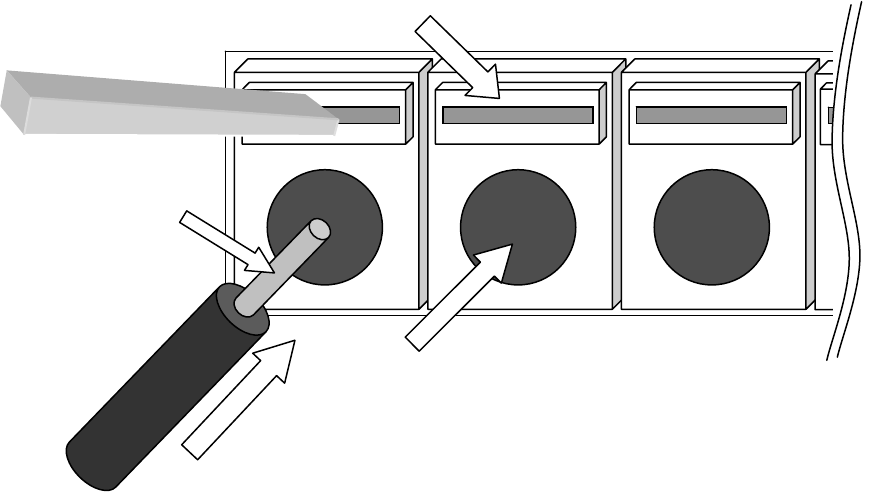
BK, external receiver or decoder. Insert a
connection wire in a terminal in the following ways.
Note: Use connection wire with single core 0.4~1.0mmØ or standard twist
core 0.3mm2~0.7mm2.
4.3.1 Connection of BK
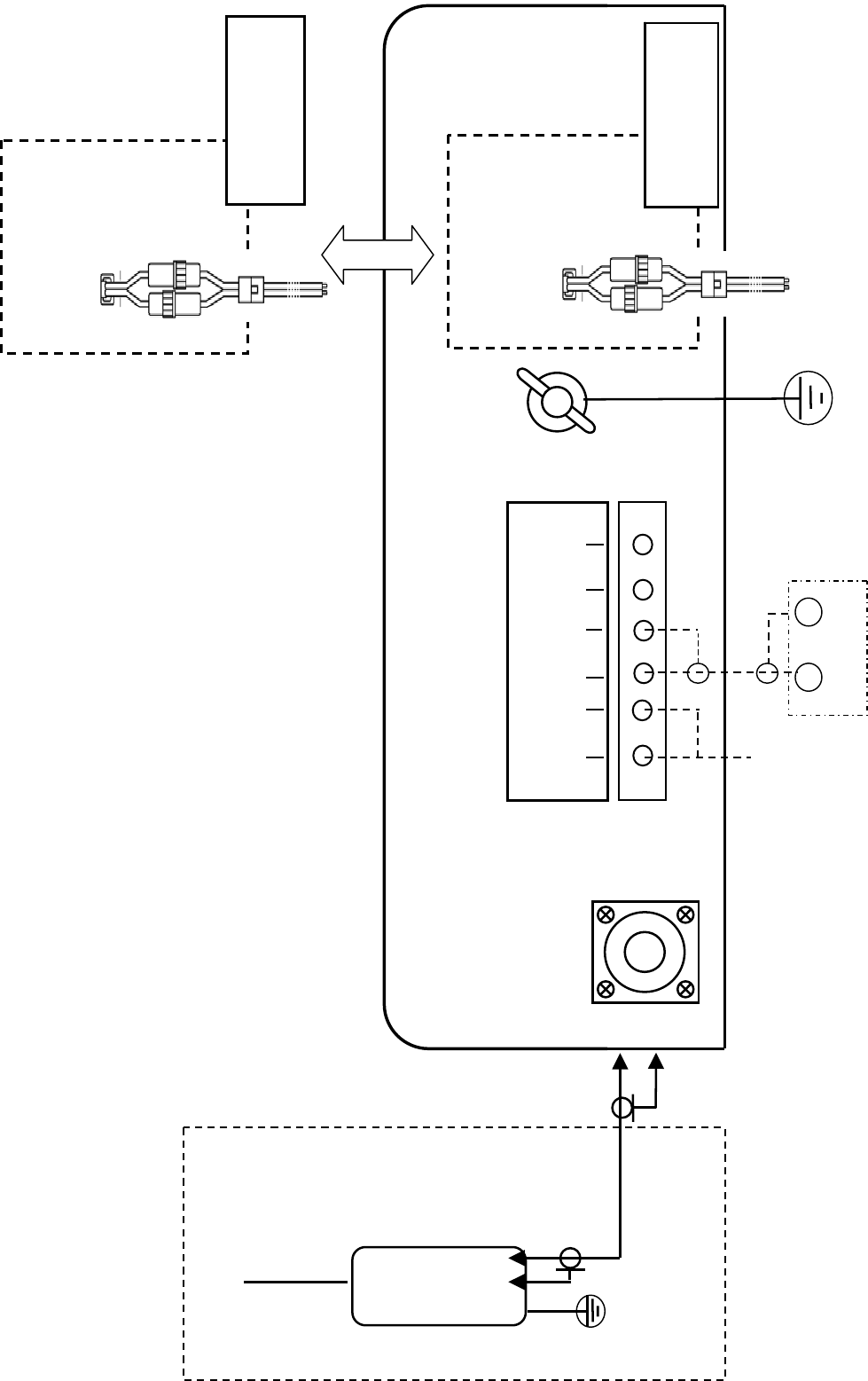
Connect BK referring to attached “Layout diagram” in the APPENDIX.
BK voltage is 12 ~ 24 VDC, no polarity.
BK cable is not included in the standard supply scope.
4.3.2 Connection with external receiver
Connect with external receiver referring to article 2.5 “Operation with external
receiver” (page 17).
Insert a connection wire to a hole
while pressing the push knob
Push knob
Wire hole
Connection
wire
Press a push knob by
a screwdriver
Terminal board
Peel off vinyl sheath
of the wire about 10mm
- 22 -
4.4 Grounding
A GND terminal is on the rear panel of the main unit.
Be sure to ground the main unit using attached earth wire (3m KIV wire 50/0.45 with
copper tube terminal).
4.5 Receiving antenna
Following antennas are suitable to use as the receiving antenna for the FAX-410.
A) Antenna coupler FAX-5 + 2.6 m whip antenna (supplied by us as option)
B) Whip antenna (6 m ~ 8 m)
C) Wire antenna (Reverse-L or T type)
Note: Generally, whip antenna is suitable for reception over 6 MHz, and wire antenna is
suitable for reception under 6 MHz.
Receiving sensitivity would become worse when using one antenna for other receivers
and/or transmitters through multi-coupler. In that case, please use other antenna or
install exclusive antenna.
Be sure to connect BK especially for following case in order to avoid from burning trouble
of antenna coil/receiver circuit.
A) In case of using same antenna which is used for a transmitter
B) When a transmitting antenna is located near to receiving antenna of FAX-410
Use high frequency coaxial cable as an antenna cable.
When using optional antenna coupler FAX-5, turn ON the switch S1 on BK board inside
the main unit.
- 23 -
4.6 Exchange of a recording paper
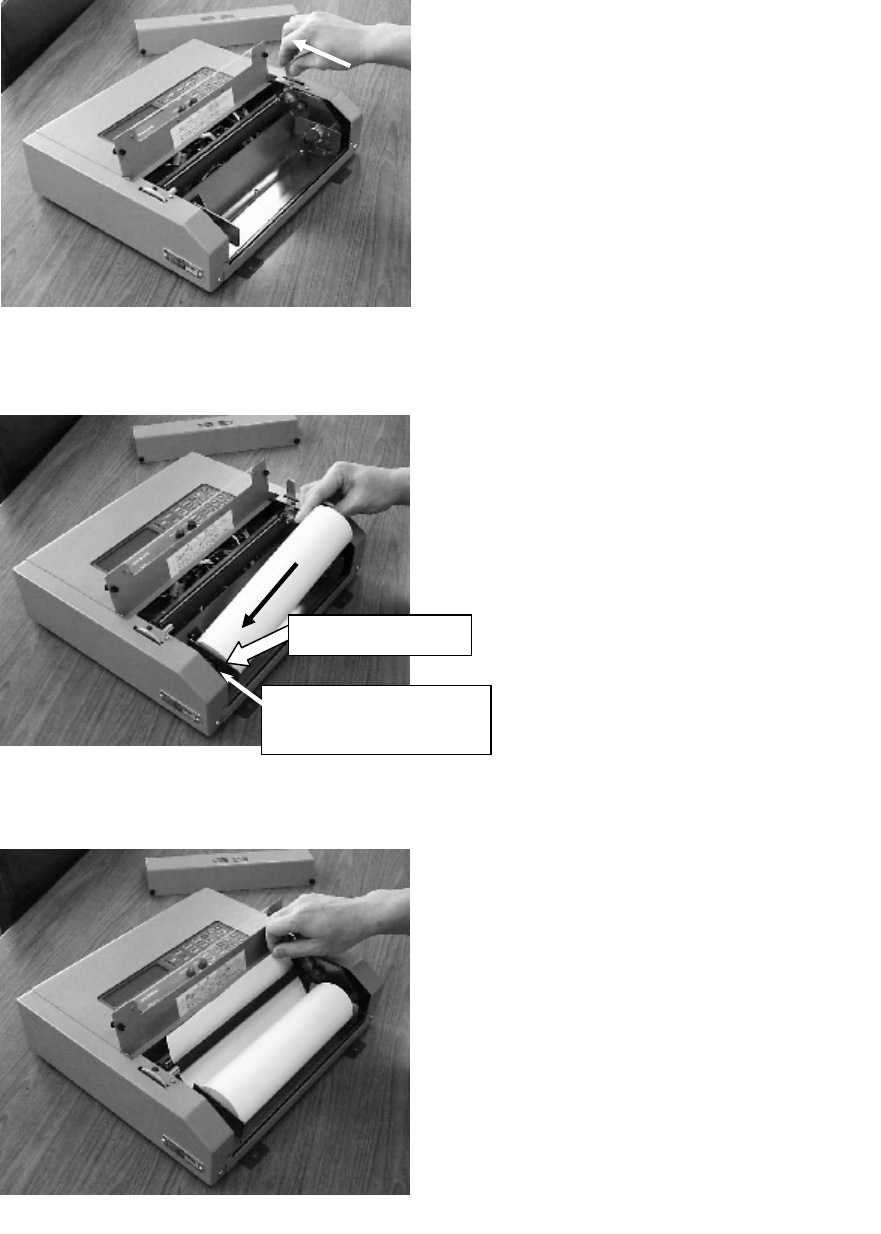
(1) Remove the front cover, up the paper
cutting plate, slide the paper feed
lever in the direction of rear.
(Ref. Fig.1)
(2) Set the roll paper to the holder by
pressing a paper guide ② to left side.
(Ref. Fig.2)
Note: The paper guide ② can be moved
about 3cm to left, and can be locked
by rotating clockwise (about 90
degree).
The lock can be released by rotating
the paper guide anti-clockwise
(about 90 degree).
(3) Pull out the end of paper upwards
from under the rubber roller.
(Ref. Fig.3)
Fig.1
Fig.2
Fig.3
①
Press
Paper guide ②
Spring (between paper
guide and chassis)
- 24 -
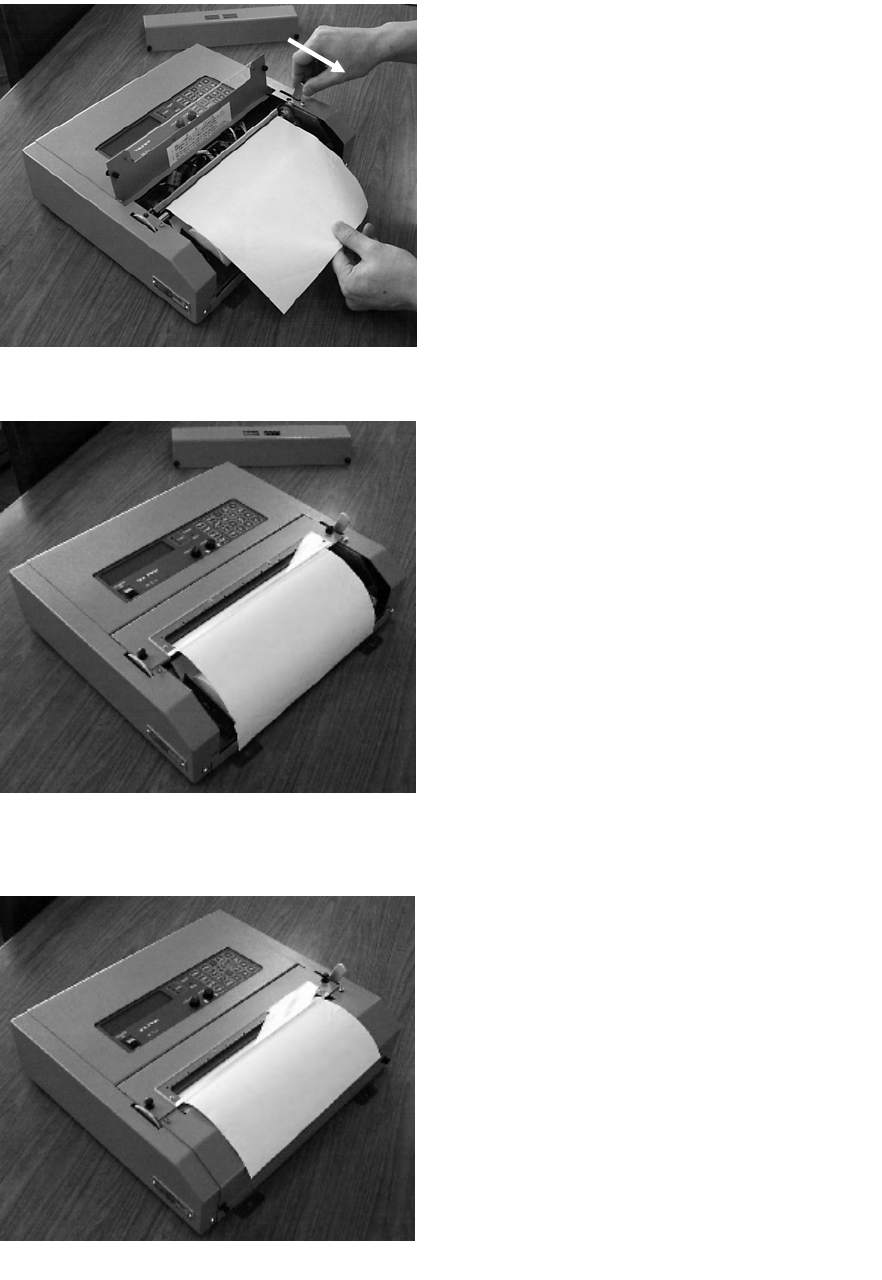
Fig.3
(6) Install the front cover.
At that time, place the end of paper
above the front cover.
(Ref. Fig.6)
Fig.6
(5) Return the paper cutting plate to the
original position.
Fig.5
(4) Pull down ahead the paper feed lever,
pulling the end of paper a little ahead.
(Ref. Fig.4)
Fig.4
③
SP - 1
5.SPECIFICATIONS
5.1 Receiver
Reception : Synthesized double superheterodyne
Frequency range : MF/HF 2.0000 ~ 24.99999 MHz
Mode : F3C
Selectivity : 2.0 kHz at –6 dB
Number of channels : 315 channels
Sensitivity : MF/HF 2µV at 20 dB SINAD
Channel selection : Automatic or manual, digital with ten-key pad
Tuning indicator : 3 LEDs (light emitting diodes)
Display : 32 characters in 2 lines with LCDs (liquid crystal display)
Audio input : Impedance 600Ω, frequency 1900 ± 400 Hz level 0 dBm,
or high impedance
5.2 Recorder
Recording system : Electronic scanning with thermal head
IOC : Index of cooperation – 576 and 288
Recording speed : 60, 90, 120 scans per minute
Gradation : 9 tones (white, 7 gray levels and black)
Recording paper : Thermal paper (257 mm X 60 m)
Line density : 8 dots/mm (total number of dots: 2048)
5.3 Automatic Control
Start/stop : Automatic start or stop by timer program and/or WMO
standard
remote control signal (or manual)
Recording rate : Automatic selection of recording rate (or manual)
IOC : Automatic selection of IOC by WMO start signal (or manual)
Phase : Automatic selection of phase matching by passing signal
(or manual)
5.4 Power, Dimension & Weight
Power source : DC 10 ~ 40 V, max. 28 W
AC 100/115/200/230V, 50 or 60 Hz, max. 30 VA
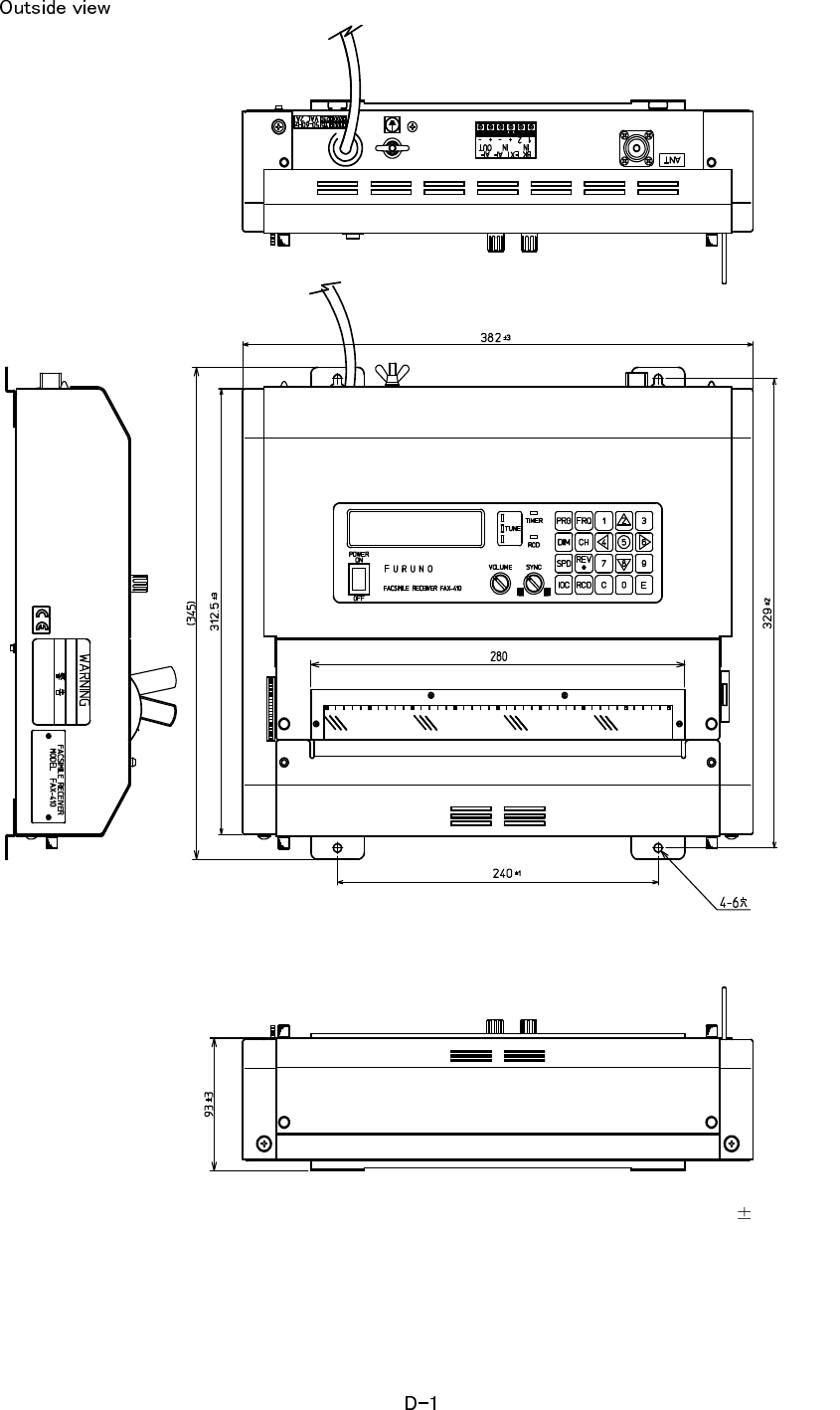
Dimension : 93(H) - 382(W) - 312.5(D) mm
Weight : 7.4 kg ± 0.7 kg (AC type, including recording paper)
6.9 kg ± 0.7 kg (DC type, including recording paper)

SP - 2
TABLE OF FACSIMILE STATION
Table of pre-programmed frequencies and area map
This unit has a ROM (read only memory) which is pre-programmed 150 of
existing frequencies of transmitting stations. Stations and frequencies are shown
in the map and table respectively.
This table is reference data and is subject to change without previous notice.
Area map of sxisting stations
JMH
JFC
JJC
HLL
BAF
3SD
BDF
BMF
ZKLF
VMC
HSW
5YE
PWZ
NMF
CFH
AOK
DDK
ZSJ
SVJ
ATP
■ OXT
VFF
NMC
KVM
NOJ
VMW
■
■
■
NMG
CKN
■
IMB RBV
RBX
6VU
■
GYA
RBW
OXT RCC
VFA
■
CBV
LOR
V
CO
■
SP - 2

SP - 3
FREQUENCY FREQUENCY
[kHz] [kHz]
000 JMH JAPAN 3622.5 050 3SD BEIJING 8461.9
001 JMH JAPAN 7305.0 051 3SD BEIJING 12831.9
002 JMH JAPAN 13597.0 052 3SD BEIJING 16903.9
010 JJC MALAYSIA 8467.5 060 BDF SHANGHAI 3241.0
011 JJC MALAYSIA 12745.5 061 BDF SHANGHAI 5100.0
012 JJC MALAYSIA 16971.0 062 BDF SHANGHAI 7420.0
013 JJC MALAYSIA 17069.6 063 BDF SHANGHAI 11420.0
014 JJC MALAYSIA 22542.0 064 BDF SHANGHAI 18940.0
015 JJC MALAYSIA 17430.0
070 BMF TAIPAI 4616.0
020 JFC JAPAN 4274.0 071 BMF TAIPAI 5250.0
021 JFC JAPAN 6414.5 072 BMF TAIPAI 8140.0
022 JFC JAPAN 8658.0 073 BMF TAIPAI 13900.0
023 JFC JAPAN 13074.0 074 BMF TAIPAI 18560.0
024 JFC JAPAN 16907.5
080 ZKLF AUCKLAND 3247.4
030 HLL SEOUL 5385.0 081 ZKLF AUCKLAND 5807.0
031 HLL SEOUL 5857.5 082 ZKLF AUCKLAND 9459.0
032 HLL SEOUL 7433.5 083 ZKLF AUCKLAND 13550.5
033 HLL SEOUL 9165.0 084 ZKLF AUCKLAND 16340.1
034 HLL SEOUL 13570.0
090 VMC CHARLEVILLE 2628.0
040 BAF BEIJING 5526.9 091 VMC CHARLEVILLE 5100.0
041 BAF BEIJING 8121.9 092 VMC CHARLEVILLE 11030.0
042 BAF BEIJING 10116.9 093 VMC CHARLEVILLE 13920.0
043 BAF BEIJING 14366.9 094 VMC CHARLEVILLE 20469.0
044 BAF BEIJING 16025.9
045 BAF BEIJING 18236.9
FACSIMILE STATION TABLE
STATIONCHANNEL NO. CALL SIGN STATION CALL SIGNCHANNEL NO.

SP - 4
FREQUENCY FREQUENCY
[kHz] [kHz]
100 VMW WILUNA 5755.0 180 6VU DAKAR 4790.5
101 VMW WILUNA 7535.0 181 6VU DAKAR 13667.5
102 VMW WILUNA 10555.0 182 6VU DAKAR 19750.0
103 VMW WILUNA 15615.0
104 VMW WILUNA 18060.0 190 LOR PUERTO BELGRANO 5705.0
191 LOR PUERTO BELGRANO 12672.0
110 VLM CASEY 7470.0
200 PWZ RIO DE JANEIRO 12665.0
120 KVM HONOLULU 9982.5 201 PWZ RIO DE JANEIRO 16978.0
121 KVM HONOLULU 11090.0
122 KVM HONOLULU 16135.0 210 CBV VALPARAISO 4228.0
123 KVM HONOLULU 23331.5 211 CBV VALPARAISO 8677.0
212 CBV VALPARAISO 17146.4
130 HSW BANGKOK 7396.8
131 HSW BANGKOK 17520.0 220 NMG NEW ORLEANS 4317.9
221 NMG NEW ORLEANS 8503.9
140 ATP NEW DELHI 7404.9 222 NMG NEW ORLEANS 12789.9
141 ATP NEW DELHI 14842.0 223 NMG NEW ORLEANS 17146.4
150 GYA PERSIAN GULF 3289.5 230 NMF BOSTON 4235.0
151 GYA PERSIAN GULF 6834.0 231 NMF BOSTON 6340.5
152 GYA PERSIAN GULF 14436.0 232 NMF BOSTON 9110.0
153 GYA PERSIAN GULF 18261.0 233 NMF BOSTON 12750.0
160 5YE NAIROBI 9044.9 240 CFH HALIFAX 4271.0
161 5YE NAIROBI 17447.5 241 CFH HALIFAX 6496.4
242 CFH HALIFAX 10536.0
170 ZSJ CAPE NAVAL 4014.0 243 CFH HALIFAX 13510.0
171 ZSJ CAPE NAVAL 7508.0
172 ZSJ CAPE NAVAL 13538.0
173 ZSJ CAPE NAVAL 18238.0
CALL SIGN STATIONCHANNEL NO. CALL SIGN STATION CHANNEL NO.

SP - 5
FREQUENCY FREQUENCY
[kHz] [kHz]
250 VFF IQALUIT & RESOLUTE 3253.0 340 RBV TASHKENT 3690.0
251 VFF IQALUIT & RESOLUTE 7710.0 341 RPJ TASHKENT 4365.0
342 RBV TASHKENT 5890.0
260 VCO SYDNEY,NOVA SCOTIA 4416.0 343 RBX TASHKENT 7570.0
261 VCO SYDNEY,NOVA SCOTIA 6915.0 344 RCH TASHKENT 9340.0
345 RBV TASHKENT 14982.5
270 VFA INUVIK 8457.8
350 RBX TASHKENT2 3280.0
280 XL17 AIRBORNE ICE T. 4616.0 351 RBX TASHKENT2 5285.0
281 XL17 AIRBORNE ICE T. 6915.1 352 RIJ TASHKENT2 8083.0
282 XL17 AIRBORNE ICE T. 7708.1 353 RCH TASHKENT2 9150.0
354 ROM TASHKENT2 13947.0
290 COST GUARD ICE B. 14770.0
360 RBW MURMANSK 5336.0
300 NOJ KODIAK 2054.0 361 RBW MURMANSK 6445.5
301 NOJ KODIAK 4298.0 362 RBW MURMANSK 7908.8
302 NOJ KODIAK 8459.0 363 RBW MURMANSK 10130.0
303 NOJ KODIAK 12412.5
370 GYA NORTHWOOD 2618.5
310 NMC PT.REYES 4346.0 371 GYA NORTHWOOD 4610.0
311 NMC PT.REYES 8682.0 372 GYA NORTHWOOD 8040.0
312 NMC PT.REYES 12786.0 373 GYA NORTHWOOD 11086.5
313 NMC PT.REYES 17151.2
314 NMC PT.REYES 22527.0 380 DDH HAMBURG 3855.0
381 DDK HAMBURG 7880.0
320 IMB ROMA 4777.5 382 DDK HAMBURG 13882.5
321 IMB ROMA 8146.6
322 IMB ROMA 13597.4 390 OXT SKAMLEBAEK 5850.0
391 OXT SKAMLEBAEK 9360.0
330 SVJ ATHENS 4481.0 392 OXT SKAMLEBAEK 13855.0
331 SVJ ATHENS 8105.0 393 OXT SKAMLEBAEK 17510.0
STATIONCHANNEL NO. CALL SIGN STATION CHANNEL NO. CALL SIGN

SP - 6
FREQUENCY
FREQUENCY
[kHz]
[kHz]
400 RCC MOSCOW 3830.0
401 RCC MOSCOW 5008.0
402 RCC MOSCOW 6987.0
403 RCC MOSCOW 7695.0
404 RCC MOSCOW 10980.0
405 RDD MOSCOW 11617.0
406 RCC MOSCOW 12961.0
410~733 PRIV ×5
CALL SIGN STATION
CHANNEL NO. CALL SIGN STATION
CHANNEL NO.
㧼㧭㧯㧷㧵㧺㧳ޓ㧸㧵㧿㨀
#::
(#:㧔#%
0#/' 176.+0' &'5%4+26+10%1&'ͳ 36;
࡙࠾࠶࠻ 70+6
㩖㨱㩂㩆㩚㩢ฃ↹ⵝ⟎
(#%5+/+.'4'%'+8'4
(#:
੍ຠ 52#4'2#465
▤ࠅ㩕㨷㨺㩇㩨
㧳.#5567$'(75'
#
ઃዻຠ #%%'5514+'5
⸥㍳⚕
4'%14&+0)2#2'4
(82
Ꮏ᧚ᢱ +056#..#6+10/#6'4+#.5
㨻㨺㩇✢
)4170&+0)9+4'
/
หゲ㩖㩩㩡㩂㩨
%1#:2.7)
/2
㩏㩗㩨㩊㨹㩕㩩㩧㩒㩆㩨
5'.(6#22+0)5%4'9
:575
ᐔᐳ㊄
(.#69#5*'4
/
࿑ᦠ &1%7/'06
ขᛒ⺑ᦠ
12'4#6145/#07#.
㧔⇛࿑ߩኸᴺߪޔෳ⠨୯ߢߔޕ&+/'05+105+0&4#9+0)(144'('4'0%'10.;㧕
㧼㧭㧯㧷㧵㧺㧳ޓ㧸㧵㧿㨀
(#:㧔#%
࡙࠾࠶࠻ 70+6
੍ຠ 52#4'2#465
ઃዻຠ #%%'5514+'5
Ꮏ᧚ᢱ +056#..#6+10/#6'4+#.5
࿑ᦠ &1%7/'06
䋨㪁䋩䈲䇮䍞䍼䍮䍎䍘䍎䍢䍼䈮ઃ䈐䇮ᵈᢥ䈪䈐䉁䈞䉖䇯
䋨㪁䋩䇭㪫㪟㪠㪪㩷㪚㪦㪛㪜㩷㪚㪘㪥㪥㪦㪫㩷㪙㪜㩷㪦㪩㪛㪜㪩㪜㪛㪅
䍘㪄䍢䍼⇟ภᧃየ䈱㪲㪁㪁㪴䈲䇮ㆬᛯຠ䈱ઍ䍘䍎䍢䍼䉕䈚䉁䈜䇯
㪚㪦㪛㪜㩷㪥㪬㪤㪙㪜㪩㩷㪜㪥㪛㪠㪥㪞㩷㪮㪠㪫㪟㩷㩹㪁㪁㩹㩷㪠㪥㪛㪠㪚㪘㪫㪜㪪㩷㪫㪟㪜㩷㪚㪦㪛㪜㩷㪥㪬㪤㪙㪜㪩㩷㪦㪝㩷㪩㪜㪧㪩㪜㪪㪜㪥㪫㪘㪫㪠㪭㪜㩷㪤㪘㪫㪜㪩㪠㪘㪣㪅
㧔⇛࿑ߩኸᴺߪޔෳ⠨୯ߢߔޕ&+/'05+105+0&4#9+0)(144'('4'0%'10.;㧕
#::
A-1
㧼㧭㧯㧷㧵㧺㧳ޓ㧸㧵㧿㨀
#::
(#:㧔&%
0#/' 176.+0' &'5%4+26+10%1&'ͳ 36;
࡙࠾࠶࠻ 70+6
㩖㨱㩂㩆㩚㩢ฃ↹ⵝ⟎
(#%5+/+.'4'%'+8'4
(#:
੍ຠ 52#4'2#465
▤ࠅ㩕㨷㨺㩇㩨
).#5567$'(75'
#
ઃዻຠ #%%'5514+'5
⸥㍳⚕
4'%14&+0)2#2'4
(82
Ꮏ᧚ᢱ +056#..#6+10/#6'4+#.5
㨻㨺㩇✢
)4170&+0)9+4'
/
หゲ㩖㩩㩡㩂㩨
%1#:2.7)
/2
㩏㩗㩨㩊㨹㩕㩩㩧㩒㩆㩨
5'.(6#22+0)5%4'9
:575
ᐔᐳ㊄
(.#69#5*'4
/
࿑ᦠ &1%7/'06
ขᛒ⺑ᦠ
12'4#6145/#07#.
㧔⇛࿑ߩኸᴺߪޔෳ⠨୯ߢߔޕ&+/'05+105+0&4#9+0)(144'('4'0%'10.;㧕
㧼㧭㧯㧷㧵㧺㧳ޓ㧸㧵㧿㨀
(#:㧔&%
࡙࠾࠶࠻ 70+6
੍ຠ 52#4'2#465
ઃዻຠ #%%'5514+'5
Ꮏ᧚ᢱ +056#..#6+10/#6'4+#.5
࿑ᦠ &1%7/'06
䋨㪁䋩䈲䇮䍞䍼䍮䍎䍘䍎䍢䍼䈮ઃ䈐䇮ᵈᢥ䈪䈐䉁䈞䉖䇯
䋨㪁䋩䇭㪫㪟㪠㪪㩷㪚㪦㪛㪜㩷㪚㪘㪥㪥㪦㪫㩷㪙㪜㩷㪦㪩㪛㪜㪩㪜㪛㪅
䍘㪄䍢䍼⇟ภᧃየ䈱㪲㪁㪁㪴䈲䇮ㆬᛯຠ䈱ઍ䍘䍎䍢䍼䉕䈚䉁䈜䇯
㪚㪦㪛㪜㩷㪥㪬㪤㪙㪜㪩㩷㪜㪥㪛㪠㪥㪞㩷㪮㪠㪫㪟㩷㩹㪁㪁㩹㩷㪠㪥㪛㪠㪚㪘㪫㪜㪪㩷㪫㪟㪜㩷㪚㪦㪛㪜㩷㪥㪬㪤㪙㪜㪩㩷㪦㪝㩷㪩㪜㪧㪩㪜㪪㪜㪥㪫㪘㪫㪠㪭㪜㩷㪤㪘㪫㪜㪩㪠㪘㪣㪅
㧔⇛࿑ߩኸᴺߪޔෳ⠨୯ߢߔޕ&+/'05+105+0&4#9+0)(144'('4'0%'10.;㧕
#::
A-2
D - 2
Layout diagram
M207-P
A
C Power
supply unit
-
OUT
DC Power
supply unit
FUSE
12-24VDC 7A
Selectable AC or DC
when placing order
Weather Facsimile Receiver FAX-410
BK
IN
EXT
IN
+
-+
BK
A
F
A
F OUT
+ -
FAX-5
Active
antenna
coupler
Option
Whip
antenna(2.6m)
(M205-P)
7C-2V 16m
(5C-2V)
【Caution】
Turn ON switch S1 on RCV board in the main unit for
usin
g
o
p
tional active antenna cou
p
ler FAX-5.
VAC 2A
FUSE
3m
Red +
Black -
3m
(M205-P)
100 115
200 230
Grounding
KIVWire
0.3m
M207-P/ 1 2
Grounding
External
receiver
