G KINDLY ELECTRONIC KDL-K088 Karaoke Microphone Bluetooth Speaker User Manual IM

SHENZHEN G-KINDLY ELECTRONIC CO., LTD Karaoke Microphone Bluetooth Speaker IM

User Manual

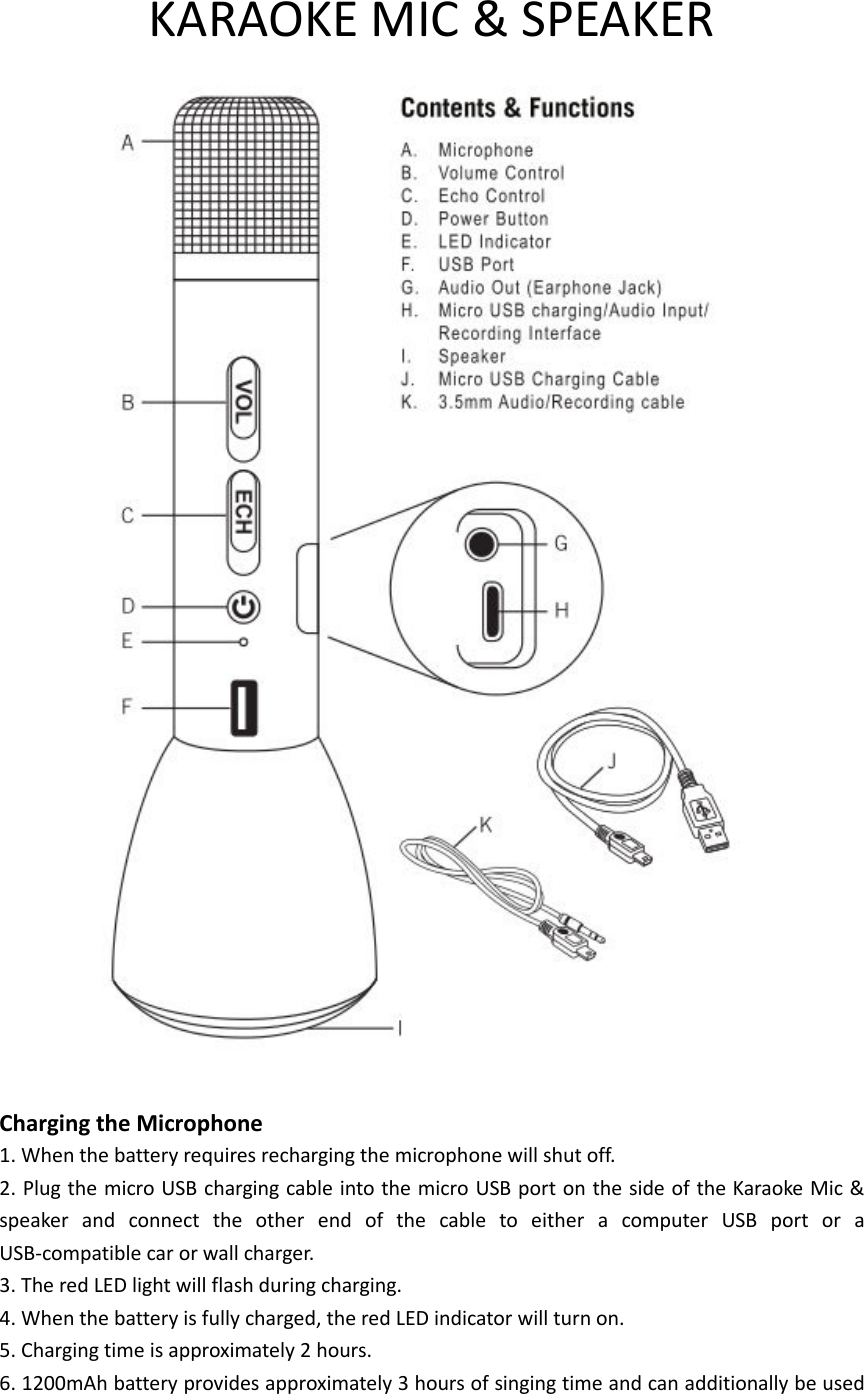
KARAOKE MIC & SPEAKER   Charging the Microphone 1. When the battery requires recharging the microphone will shut off. 2. Plug the micro USB charging cable into the micro USB port on the side of the Karaoke Mic & speaker  and  connect  the  other  end  of  the  cable  to  either  a  computer  USB  port  or  a USB-compatible car or wall charger. 3. The red LED light will flash during charging. 4. When the battery is fully charged, the red LED indicator will turn on. 5. Charging time is approximately 2 hours. 6. 1200mAh battery provides approximately 3 hours of singing time and can additionally be used
as power bank to charge your phone.  Turn On/Off 1. Press the Power Button to turn on and the LED turns blue. 2. Press the Power Button to turn off and the LED turns off.  Bluetooth Connect with a new device 1. Turn on the Karaoke Mic & speaker and enter into Bluetooth mode. 2. Active the Bluetooth feature on your device, and set the device to search for wireless devices. 3.  The  Karaoke  Mic  &  speaker  will  show  on  your  device  as  SL  KARAOKE  MIC.  (If  passcode  is requested, enter 0000 or 1234) 4. The voice prompt will tell you if the pairing is successful. 5. Once your device is paired to the microphone, it will automatically pair with it whenever they are both on, and your device isn’t paired to another wireless device. 6. If using AUX input feature, when the Karaoke Mic & speaker is ON, connect one end of 3.5mm Audio/Recording  Cable  to  the  Micro  USB  port  and  the  other  end  to  the  3.5mm  jack  on  your device. Connecting this cable disables Bluetooth functions.  How to Sing 1. Once you have connected to your Bluetooth enabled device open an audio or karaoke playing source on your device, and begin playback. Note: accompaniment volume can be adjusted via your device 2. Adjust your singing volume and echo on the microphone. 3. Begin singing.  How to Record 1. When the Karaoke Mic & speaker in ON, connect one end of 3.5mm Audio/Recording Cable to the Micro USB port of the Karaoke Mic & speaker. 2.  Connect  the  other  end  to  the  3.5mm  jack  on  your  device.  Connecting  this  cable  disables Bluetooth functions. 3. Open an audio recording app on your device, such as “Sing party” and begin recording. 4. Select your song from the app you used to sing in the instructions above and start singing. 5. When you’re finished, hit stop in the app you used to record yourself.  Power Bank 1. When other devices requires charging, then this device as a power bank. 2. Plug the micro USB charging cable into the standard USB port on the side of this device and connect the other end of the cable to a micro USB port of other devices. 3. The red LED light will be on during charging.
 Specifications Pickup device: Capacitance Output Power: 10mW (headphone output)                           3W (speaker output) Frequency Range: 100Hz – 10KHz Max Sound Pressure:  115dB 1KHz THD 1% Reverb Mode: Echo Sound Reverberation Power Supply: Rechargeable Lithium-ion Battery Battery Capacity: 1200mAh Charging Source: DC 5V  Battery information 1.  Your  device is  powered by  a  rechargeable battery.  The  full performance  of  a  new  battery  is achieved  only  after  two  to  three  complete  charge  and  discharge  cycles.  The  battery  can  be charged and discharged hundreds of times, but it will eventually wear out. 2.  Do  not  leave  a  fully  charged  battery  connected  to  a  charger,  overcharging  may  shorten  its lifetime. If left unused, a fully charged battery will lose its charge over time. 3. Never use any charger that is damaged. 4. Leaving the  device in hot or cold places will reduce the  capacity and lifetime of the battery. Optimal temperature for the battery is between 15  and 25 (59 ). A device with a hot or cold battery may not work temporarily, even when the battery is fully charged. 5.  Do  not  dispose  of  batteries  in  a  fire  as  they  may  explode.  Batteries  may  also  explode  if damaged. 6. Always dispose of batteries according to local regulations. Please recycle when possible. Do not dispose as household waste.  FCC Warning  This device complies with part 15 of the FCC Rules. Operation is subject to the  following two conditions: (1) This  device may not  cause harmful interference, and (2) this device must accept any interference received, including interference that may cause undesired operation.  Any changes or modifications to this unit not expressly approved by the party  responsible  for  compliance  could  void  the  user's  authority  to operate the equipment.   Note:  The  micro  USB  port  only  support  charging  function  and  analog  audio input, not support data transmission connect to PC; and the standard USB port only support charging to other devices, not support data transmission connect to PC.

Navigation menu