G Lab MODELMBT Clock Radio User Manual ModelM manual v1 0 indd
G-Lab GmbH Clock Radio ModelM manual v1 0 indd
G Lab >
User Manual
English
1
1. Read these instructions.
2. Keep these instructions.
3. Heed all warnings.
4. Follow all instructions.
5. Do not use this device near water.
6. Only clean with a dry cloth.
7. Do not block any vents. Install in accordance with the manufac-
turer’s instructions.
8. Do not install near any heat sources such as radiators, heaters,
stoves, or other devices ( including ampliers ) that produce heat.
9. Do not defeat the safety purpose of the polarized or grounding-
type plug. A polarized plug has two blades with one wider than
the other. A grounding type plug has two blades and a third
grounding prong. The wide blade or the third prong are provided
for your safety. If the provided plug does not t into your outlet,
consult an electrician for replacement of the obsolete outlet.
10. Protect the power cord from being walked on or pinched particu-
larly at the plugs, convenience receptacles, and the point where
they exit from the device.
11. Only use attachments/accessories specied by the manufacturer.
12. Use only with the cart, stand, tripod, bracket, or table specied
by the manufacturer, or sold with the device. When a cart is used,
use caution when moving the cart/device combination to avoid
injury from tip-over.
13. Unplug this device during lightning storms or during long periods
of disuse.
14. Refer all servicing to qualied service personnel. Servicing is
required when the device has been damaged in any way, such as
power-supply cord or plug damages, liquid has been spilled or
objects have fallen into the device, the device has been exposed to
rain or moisture, does not operate normally, or has been dropped.
15. Do not install this equipment in a conned or built-in space
such as a book case or similar unit, and maintain well-ventilated
conditions. The ventilation should not be impeded by covering
the vents with items such as newspaper, table-cloths, curtains etc.
16. WARNING: Please refer the information on exterior bottom
enclosure for electrical and safety information before installing or
operating the device.
17. WARNING: To reduce the risk of re or electric shock, do not
expose this device to rain or moisture. The device should not be
exposed to dripping or splashing and objects lled with liquids,
such as vases, should not be placed on the apparatus.
18. CAUTION: Danger of explosion if battery is incorrectly replaced.
Only replace with the same or equivalent type.
19. WARNING: The battery ( battery or batteries or battery pack )
should not be exposed to excessive heat such as sunshine, re
or the like.
20. WARNING: The mains plug/appliance coupler is used as a cut-
off device, the cut-off device should remain readily operable.
21. Correct Disposal of this product. This marking indicates that
this product should not be disposed with other household
wastes throughout the EU. To prevent possible harm to the
environment or human health from uncontrolled waste disposal,
recycle it responsibly to promote the sustainable reuse of mate-
rial resources. To return your used device, please use the return
and collection systems or contact the retailer where the product
was purchased. They can take this product for environmental
safe recycling.
Batteries in the remote control: Keep the remote control battery
away from children. It may cause a re or chemical burn if mis-
handled. Do not recharge, disassemble, heat above 212ºF ( 100ºC ).
Replace only with a battery of the correct type and model number
( CR2025 lithium coin cell battery, 3 V ).
WARNING: DO NOT INGEST BATTERY, CHEMICAL BURN HAZARD
This product contains a coin/button cell battery. If the coin/button
cell battery is swallowed, it can cause severe internal burns in just 2
hours and can lead to death.
Keep new and used batteries away from children. If the battery
compartment does not close securely, stop using the product and
keep it away from children.
If you think batteries might have been swallowed or placed inside
any part of the body, seek immediate medical attention.
Operating Temperatures: 5 – 40 deg ºC / 41 – 104 deg ºF
CAUTION: RISK OF ELECTRIC SHOCK, DO NOT OPEN
ATTENTION: RISQUE DE CHOC ELECTRIQUE-NE PAS OUVRIR
WARNING: To reduce the risk of electric shock, do not remove
cover (or back) as there are no user-serviceable parts inside.
Refer servicing to qualied personnel.
This lightning ash with arrowhead symbol within an equilateral
triangle is intended to alert the user to the presence of non-insulated
“dangerous voltage” within the product’s enclosure that may be of
sufcient magnitude to constitute a risk of electric shock.
The exclamation point within an equilateral triangle is intended
to alert the user to the presence of important operating and mainte-
nance instructions in the literature accompanying the appliance.
Protective earthing terminal. The apparatus should be connected
to a mains socket outlet with a protective earthing connection.
FCC Regulations Warning: Changes or modications to this unit
not expressly approved by the party responsible for compliance
could void the user’s authority to operate the equipment. NOTE:
This equipment has been tested and found to comply with the limits
for a Class B digital device, pursuant to Part 15 of the FCC Rules.
These limits are designed to provide reasonable protection against
harmful interference in a residential installation. This equipment
generates, uses and can radiate radio frequency energy and, if not
installed and used in accordance with the instructions, may cause
harmful interference to radio communications. However, there is no
guarantee that interference will not occur in a particular installation.
If this equipment does cause harmful interference to radio or televi-
sion reception, which can be determined by turning the equipment
off and on, the user is encouraged to try to correct the interference
by one or more of the following measures:
• Reorient or relocate the receiving antenna.
• Increase the separation between the equipment and receiver.
• Connect the equipment into an outlet on a circuit different from
that to which the receiver is connected.
• Consult the dealer or an experienced radio / TV technician for help.
Modications not expressly approved by the manufacturer could
void the user’s authority to operate the equipment under FCC rules.
FCC ID: ZXX-MODELMBT (ZXX: Grantee Code, assigned by the FCC.)
Canada This device complies with Industry Canada licence - exempt
RSS standard(s). Operation is subject to the following two condi-
tions: (1) this device may not cause interference, and (2) this device
must accept any interference, including interference that may cause
undesired operation of the device.
Industrie Canada ( IC ): Nr. 10107A-MODELMBT
CE Conformity
G-Lab GmbH declares that this device complies with the essential require-
ments and other relevant provisions of European Directive 1999 / 5 / EC.
The declaration of conformity may be consulted upon request to
G-Lab GmbH, Zurich, Switzerland or on http://genevalab.com.
0979
This product can be recycled. Products bearing this symbol must
NOT be discarded with normal household waste. At the end of the
product’s life, take it to a collection point designated for recycling
of electrical and electronic devices. Find out more about return and
collection points through your local authority.
The European Directive on Waste Electrical and Electronic
Equipment ( WEEE ) was implemented to dramatically reduce the
amount of waste going to landlls, thereby reducing the
environmental impact on the planet and human health.
Please act responsibly by recycling used products. If this
product is still usable, consider giving it away or selling it.
Used batteries: Please dispose of used batteries
properly, following the local regulations. Do not place the
battery in re.
Geneva® is a registered trademark of G-Lab GmbH.
Apple , iPod, iPhone and iPad are trademarks of Apple Computer, Inc.
registered in the U.S. and other countries.
The EmbracingSound® trademark is owned by Embracing Sound
Experience AB.
The Bluetooth® word mark and logos are registered Trademarks owned by
Bluetooth SIG, Inc.
© 2013 G-Lab GmbH. Manual for Geneva Sound System, Model M ( with
Bluetooth ) & Model M DAB+ ( with Bluetooth ), Version v0.1.
IMPORTANT SAFETY INSTRUCTIONS
2
OVERVIEW
AUDIO SOURCES
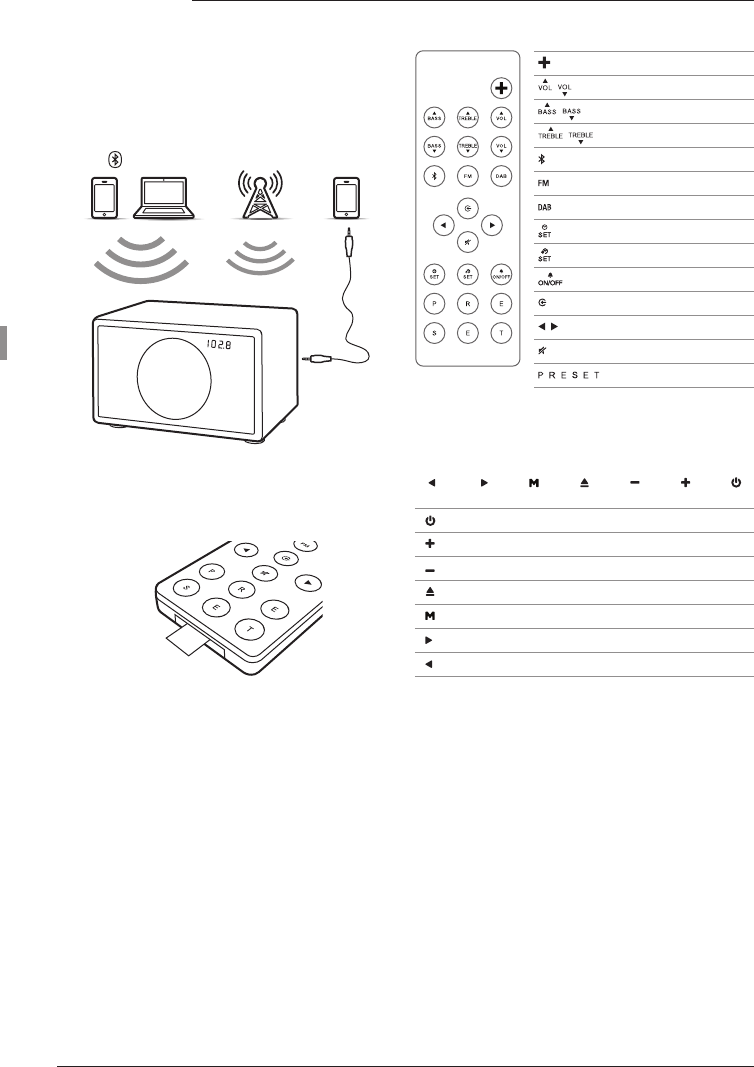
You can play music from the following audio sources:
• FM Radio
• DAB Radio ( available only for Model M DAB+ )
• Mobile phone or computer via Bluetooth
• Other devices with a Line-In cable
Bluetooth
DAB Radio
FM Radio Line-In
GETTING STARTED
1. Remove the protection paper from the remote
control battery compartment.
2. Connect the enclosed external telescopic antenna.
Connect the AC power cable to the AC power plug
on the back panel.
REMOTE CONTROL
TOUCH PANEL
Model M
Power On / Off
Volume control
Bass control
Treble control
Bluetooth
FM
DAB
Set time
Set alarm time
Alarm On / Off
Line - In
DAB & FM frequency, alarm
Mute, Mono / Stereo ( FM )
DAB / FM presets
Power On / Off
Volume +
Volume -
Eject
Mode: Select FM, DAB, Bluetooth, Line-In
Forward
Reverse
3
English
USING THE Model M
SELECTING THE AUDIO SOURCE
The audio source can either be selected with the
touch panel key M or the remote control keys FM,
DAB, ( line-in icon ) and ( bluetooth icon ).
FM RADIO
1. Touch MODE on the remote control until the
display shows an FM frequency or touch FM on
the device.
2. Select a FM station with and :
• Use a single touch: change frequency by 0.1 MHz.
• Hold down for a short time: automatically search
for another station.
Storing a radio station with the presets
1. Select your favorite radio station using the or
key on the remote control or on the touch panel.
2. Select one of the 6 preset keys on the remote
control, and keep pressing it until the correspond-
ing letter on the display starts blinking. The station
has now been stored.
Using the presets
Press one of the preset keys to recall a radio station.
DAB / DAB+ ( MODEL M DAB+ ONLY )
1. Touch MODE on the remote control until the dis-
play shows DAB or touch DAB on the device.
2. Select a DAB station with and .
Model M DAB+ is compatible with DAB, DAB+,
DMR and DMB.
Scan function
When using your Model M for the rst time, the radio
needs to nd available radio stations in your region
( done by using the “Scan” function ). After a scan, the
stations will be automatically stored.
• Within 5 seconds of entering DAB mode, hold down
the button until “Scan” displays.
“Scan” is also needed after traveling to a new location
with different radio stations, or when you move
the radio to a different room where there is different
radio reception.
BLUETOOTH
Mobile phones and computers with Bluetooth can
connect to the Model M and play music. The mobile
phone or computer must support Bluetooth A2DP.
Initial Setup ( “Pairing” ) With iPhone®
1. Press the key on the remote control.
2. Select “Settings” on your iPhone®. Select “General
/ Bluetooth”. Turn on Bluetooth. New Bluetooth
devices are detected automatically. After a few
seconds “GENEVA M ( Not Paired )” will appear.
3. Select “GENEVA M”. The phone is now connecting
( “P” or “Pairing” ) to the Model M.
4. If the phone asks for a PIN: enter “0000”( four zeros ).
5. Now you can play music on an iPhone® and listen
to it on the Model M.
Playing Music
Most phones connect automatically to the Model M
after the initial setup ( “Pairing” ).
1. Press the key on the remote control.
2. Play music on the mobile phone, music will start
playing on Model M automatically.
Pairing guides for other devices and mobile phones
Go to www.genevalab.com and select “Support.”
Status information on the display
S / Search: Searching previously paired devices.
C / Connect: Connection successful.
P / Pairing: If Model M did not make a successful
connection within 20 seconds, Model M will go into
the pairing mode for 2 minutes.
LINE - IN
1. Connect one end of a Line - In cable to the Line - In
plug on the back of Model M. Then connect the
other end to the audio device ( headphone or Line-
Out plug ).
2. Press , the display shows “Line”.
ALARM
Setting the alarm
1. Touch , “A” starts blinking on the display.
2. Set the desired alarm time using and .
3. Touch again to save the alarm time. “A” indi-
cates alarm is now on.
4. Touch to turn Model M off.
Turning the alarm On and Off
1. Turn on Model M, then touch to toggle the alarm.
“A” ( Model M ) or “ON” ( Model M DAB+ ) indicates
that the alarm is on.
2. If the device is off, the alarm can also be toggled by
touching any key on the touch panel.
Muting the alarm
Touch any key on the touch panel to mute the alarm.
The alarm will automatically turn off after 2 minutes if
no key on the touch panel is touched.
Selecting the alarm sound
There are two alarm sounds: radio and a beeping
sound. If you set the alarm and the current mode is
FM or DAB, the FM or DAB radio will play when the
alarm goes off. Otherwise the beeping sound is used.
Setting the clock manually
1. Touch : “C” starts blinking on the display.
2. Use and to set the time.
3. Touch to complete the procedure.
Model M DAB+ sets the time automatically.
Every time Model M DAB+ gets a valid time signal from
a DAB station, it will set the time automatically. If there
are no DAB stations, the time has to be set manually.
Model M ( US Version ): AM / PM Display
The dot to the right of the minute digits indicates AM
or PM: Off = AM, On = PM.
4
TROUBLESHOOTING
The Model M does not turn on when I touch the
button.
Touch with one nger only. Don’t touch the rest of
the touch panel with other ngers. The touch panel
works properly when used with one nger only.
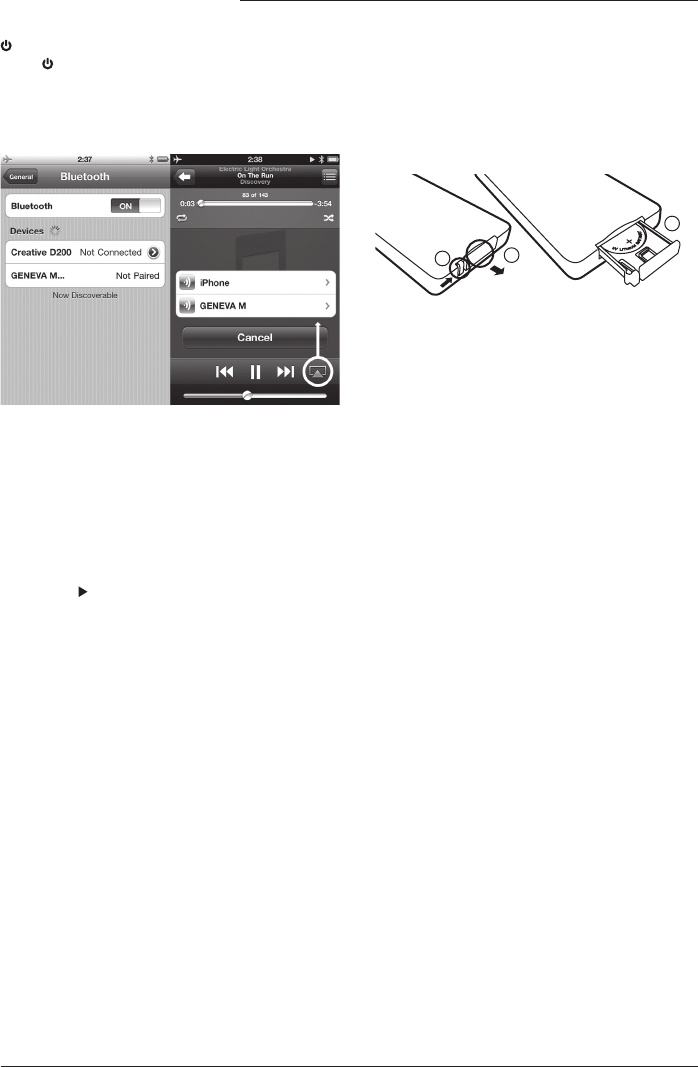
What do the Bluetooth settings look like on the
iPhone®?
Playing
Settings on iPhone®
Why is my mobile phone not connecting?
Please check the Support pages at genevalab.com.
How do I reset Bluetooth?
Up to eight paired Bluetooth devices can be stored.
To clear the memory, perform the following steps:
1. Select Bluetooth on Model M.
2. Within 5 seconds of entering Bluetooth mode, hold
down the button until “RESET” displays.
3. Pair your mobile phone again.
What is the PIN for a Bluetooth connection?
The PIN is: 0000 ( 4 zeros ). Not all computers
or mobile phones require a pin code during initial
setup ( Pairing ).
I have an unreliable connection with dropouts
when listening via Bluetooth.
• Move the mobile phone closer to the Model M.
• Move away or turn off other wireless devices that
can disturb a Bluetooth connection ( for example
WLAN / Wi, other mobile phones etc. ).
How can I change the remote control battery?
1. Push the small lever in the direction of the arrow
with your nger or a small screwdriver.
2. While holding the small lever, slide out the battery
compartment
3. Replace the battery (3V lithium cell, 3V CR2025).
Verify that the battery is inserted with the right
polarity (+ side is facing down).
12
3
How can I erase or overwrite a preset?
Stored presets do not need to be erased — just use
the steps to store a new station in a preset.
Which DAB standards are supported?
DAB, DAB+, DMR and DMB.
• Band 3: 5A ...12D ( 174.928 MHz ... 229.072 MHz ).
• Kanal 13: 13A ...13F ( 230.784 MHz ... 239.200
MHz ).
How can I verify that the remote control works?
Every time a key is pressed on the remote control, a
small red light on the display lights up quickly.
How is it possible to hear the stereo from only one
speaker?
EmbracingSound® is the stereo sound technology
that makes you hear more dimensions of your media
library than ever before. The core of the Embracing-
Sound® technology is to integrate all speakers in a
tailored single box and by using a unique High
Denition Up - Mix engine, all dimensions in your
content is enabled.
Find out more at www.embracingsound.com.
How do I clean the device?
Use a soft, dry cloth to avoid scratching the surface.
Do not use cleaning alcohol, or other solvents to
clean the Cabinet surface as this can both damage
the lacquer and cause electrical failures. Before clean-
ing, unplug the device from the AC power outlet.
SUPPORT
More information and additional troubleshooting
Check the “Support” pages at genevalab.com.
Service and repair
If the product is damaged and needs repair, please
contact your dealer. Visit genevalab.com to nd a
dealer in your area.
Warranty
See the specic terms for your country at
genevalab.com.