G Tech Technology BS01R Bluetooth Stereo Receiver User Manual

G.Tech Technology Ltd. Bluetooth Stereo Receiver

user manual

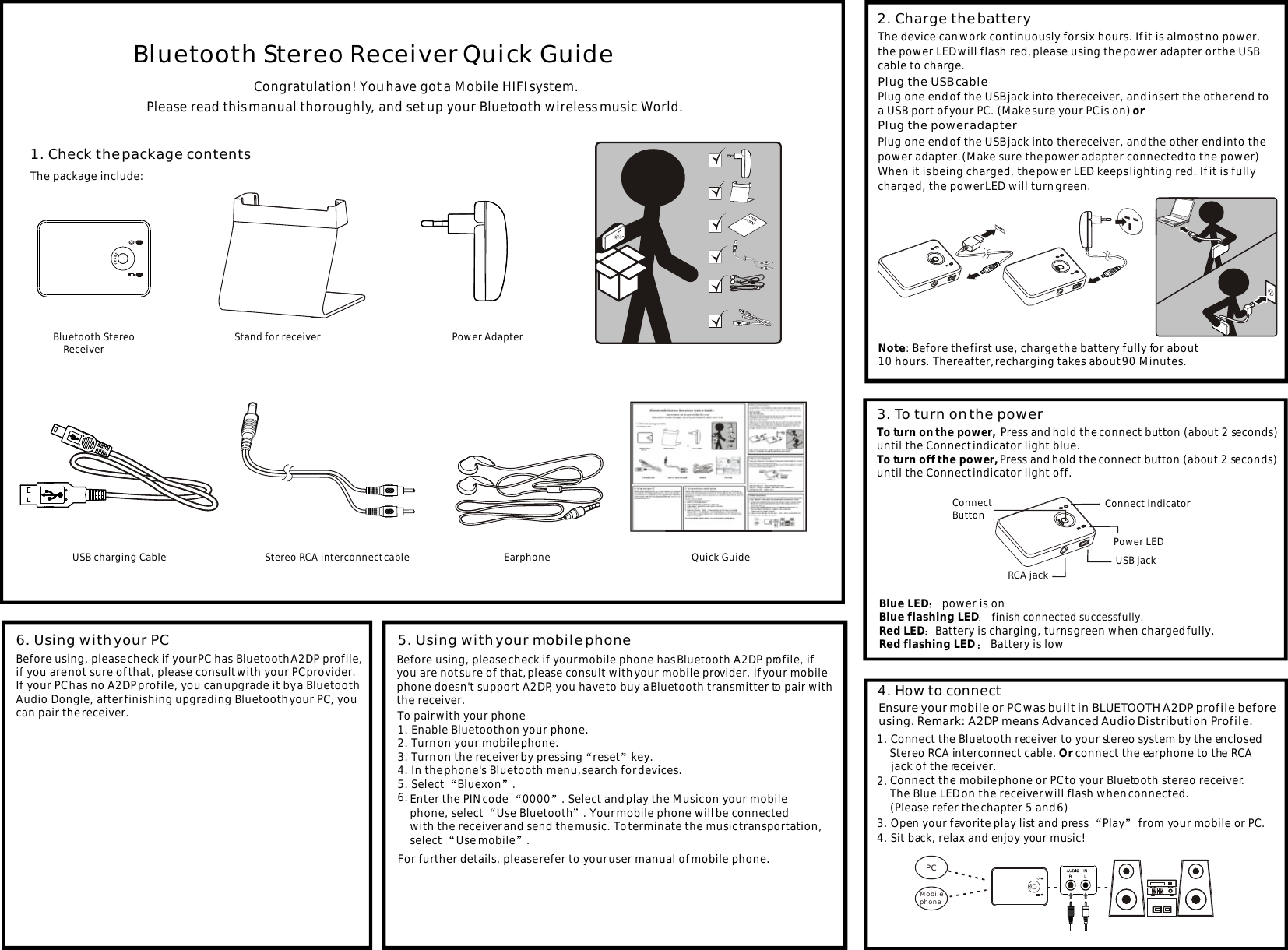
Mobile phone  PCCongratulation! You have got a Mobile HIFI system.Please read this manual thoroughly, and set up your Bluetooth wireless music World.1. Check the package contentsThe package include:                       USB charging Cable                     Power Adapter                        Quick GuideBluetooth Stereo     Receiver                     Stereo RCA interconnect cable Power LEDConnect indicatorConnect ButtonRCA jack USB jackBluetooth Stereo Receiver Quick Guide  To pair with your phone1. Enable Bluetooth on your phone.2. Turn on your mobile phone.3. Turn on the receiver by pressing reset key.4. In the phone's Bluetooth menu, search for devices. 5. Select  Bluexon .6. 5. Using with your mobile phone6. Using with your PC4. How to connect2. Charge the batteryPlug the USB cable Plug the power adapter 3. To turn on the powerTo turn on the power,  Press and hold the connect button (about 2 seconds)until the Connect indicator light blue. To turn off the power, Press and hold the connect button (about 2 seconds) until the Connect indicator light off.Blue LED  power is on Blue flashing LED  finish connected successfully.Red LED Battery is charging, turns green when charged fully.Red flashing LED   Battery is low  2. 1. Connect the Bluetooth receiver to your stereo system by the enclosed      Stereo RCA interconnect cable. Or connect the earphone to the RCA     jack of the receiver.4. Sit back, relax and enjoy your music!Ensure your mobile or PC was built in BLUETOOTH A2DP profile before using. Remark: A2DP means Advanced Audio Distribution Profile.The device can work continuously for six hours. If it is almost no power, the power LED will flash red, please using the power adapter or the USB cable to charge.Plug one end of the USB jack into the receiver, and insert the other end to a USB port of your PC. (Make sure your PC is on) orPlug one end of the USB jack into the receiver, and the other end into the power adapter. (Make sure the power adapter connected to the power)When it is being charged, the power LED keeps lighting red. If it is fully charged, the power LED will turn green.Note: Before the first use, charge the battery fully for about 10 hours. Thereafter, recharging takes about 90 Minutes.3. Open your favorite play list and press  Play  from your mobile or PC.Before using, please check if your mobile phone has Bluetooth A2DP profile, if you are not sure of that, please consult with your mobile provider. If your mobilephone doesn't support A2DP, you have to buy a Bluetooth transmitter to pair withthe receiver.Enter the PIN code  0000 . Select and play the Music on your mobile phone, select  Use Bluetooth . Your mobile phone will be connected with the receiver and send the music. To terminate the music transportation, select Use mobile .For further details, please refer to your user manual of mobile phone.Before using, please check if your PC has Bluetooth A2DP profile,if you are not sure of that, please consult with your PC provider.If your PC has no A2DP profile, you can upgrade it by a Bluetooth Audio Dongle, after finishing upgrading Bluetooth your PC, you can pair the receiver.Connect the mobile phone or PC to your Bluetooth stereo receiver. The Blue LED on the receiver will flash when connected.(Please refer the chapter 5 and 6)                     Earphone                  Stand for receiver
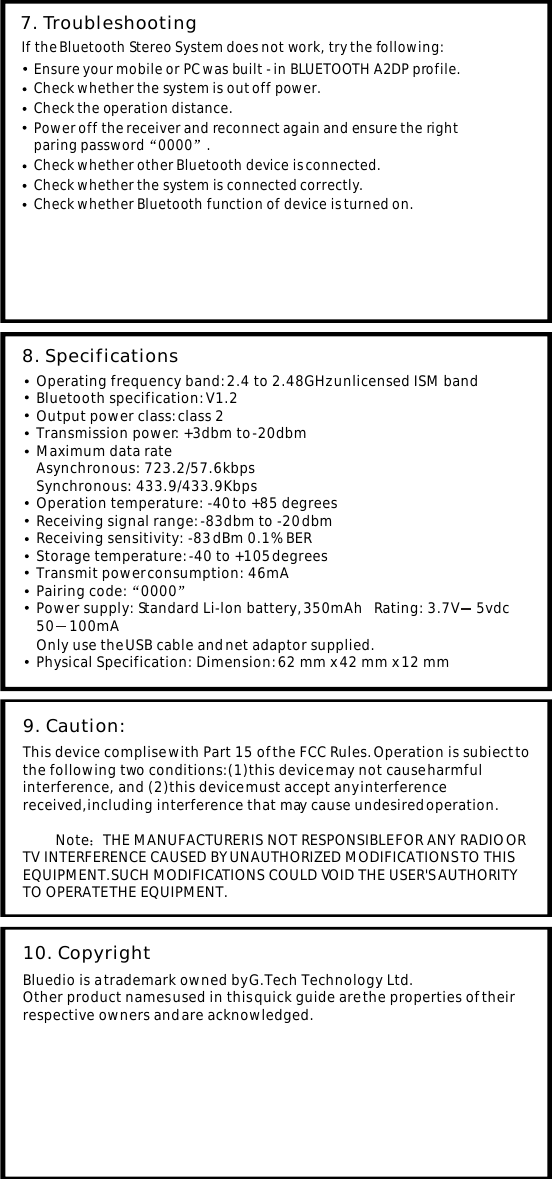
7. Troubleshooting If the Bluetooth Stereo System does not work, try the following: Ensure your mobile or PC was built - in BLUETOOTH A2DP profile.Check the operation distance.Power off the receiver and reconnect again and ensure the rightparing password 0000 .Check whether other Bluetooth device is connected. Check whether the system is out off power.Check whether the system is connected correctly.Check whether Bluetooth function of device is turned on.Operating frequency band: 2.4 to 2.48GHz unlicensed ISM band Bluetooth specification: V1.2 Output power class: class 2 Transmission power: +3dbm to -20dbm Maximum data rateAsynchronous: 723.2/57.6kbpsSynchronous: 433.9/433.9Kbps Operation temperature: -40 to +85 degrees Receiving signal range: -83dbm to -20 dbm Receiving sensitivity: -83 dBm 0.1% BER Storage temperature: -40 to +105 degrees Transmit power consumption: 46mA Power supply: Standard Li-lon battery, 350mAh   Rating: 3.7V     5vdc50    100mA8. SpecificationsPairing code: 0000Only use the USB cable and net adaptor supplied.Physical Specification: Dimension: 62 mm x 42 mm x 12 mm This device complise with Part 15 of the FCC Rules. Operation is subiect to the following two conditions:(1)this device may not cause harmful interference, and (2)this device must accept any interference received,including interference that may cause undesired operation.            Note THE MANUFACTURER IS NOT RESPONSIBLE FOR ANY RADIO OR TV INTERFERENCE CAUSED BY UNAUTHORIZED MODIFICATIONS TO THIS EQUIPMENT.SUCH MODIFICATIONS COULD VOID THE USER'S AUTHORITY TO OPERATE THE EQUIPMENT.9. Caution: Bluedio is a trademark owned by G.Tech Technology Ltd.Other product names used in this quick guide are the properties of their respective owners and are acknowledged.10. Copyright

Navigation menu