G Tech Technology GK660 2.4GHz Wireless Keyboard User Manual

G.Tech Technology Ltd. 2.4GHz Wireless Keyboard Users Manual

Users Manual

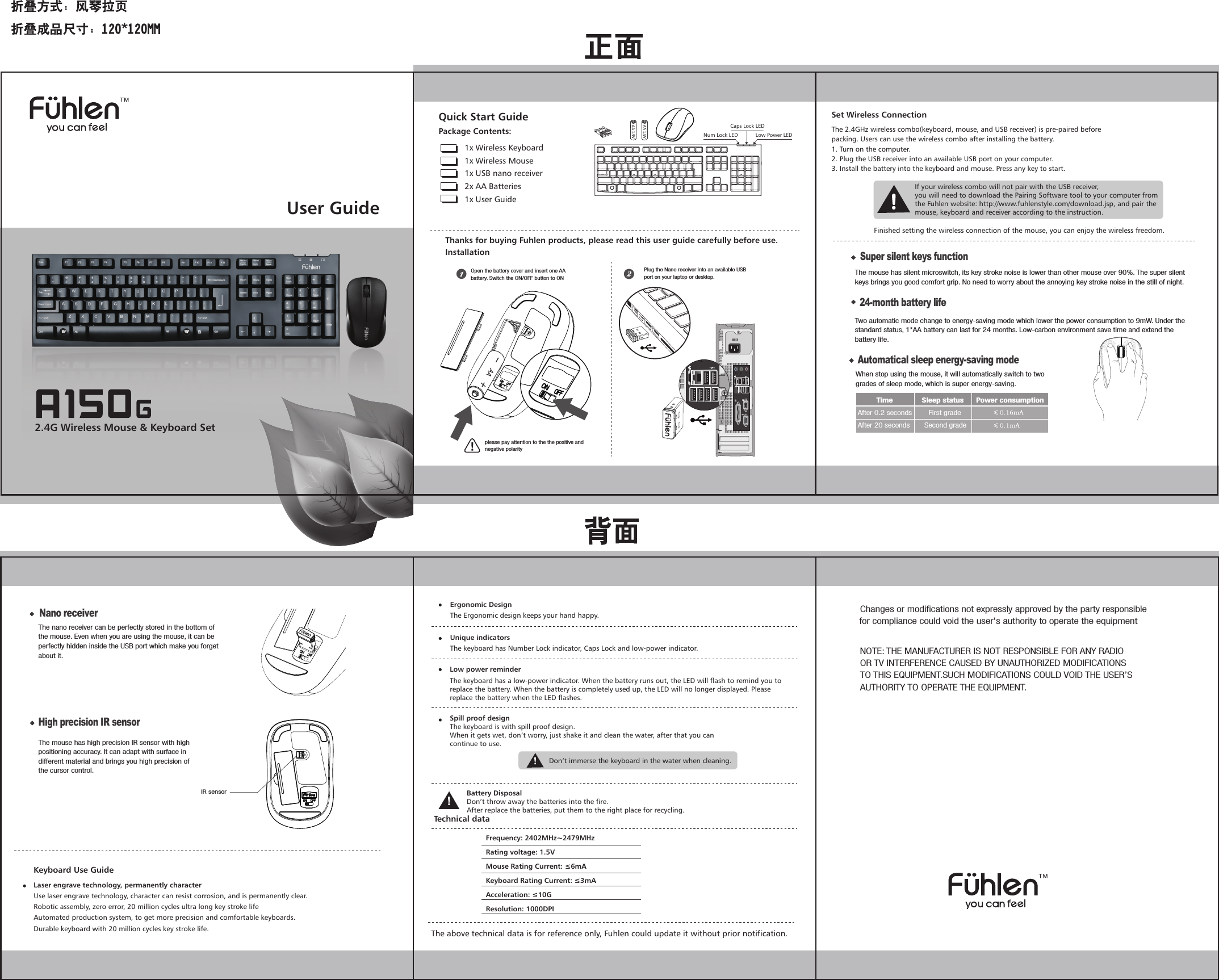
User Guide2.4G Wireless Mouse & Keyboard SetQuick Start GuidePackage Contents:1x Wireless Keyboard 1x Wireless Mouse1x USB nano receiver2x AA Batteries1x User GuideLow Power LEDNum Lock LEDCaps Lock LEDThanks for buying Fuhlen products, please read this user guide carefully before use.InstallationFrequency: 2402MHz~2479MHzRating voltage: 1.5VMouse Rating Current: ≤6mAKeyboard Rating Current: ≤3mAAcceleration: ≤10GResolution: 1000DPITechnical dataErgonomic DesignThe Ergonomic design keeps your hand happy.Unique indicatorsThe keyboard has Number Lock indicator, Caps Lock and low-power indicator.Low power reminderBattery DisposalDon’t throw away the batteries into the fire.After replace the batteries, put them to the right place for recycling.The above technical data is for reference only, Fuhlen could update it without prior notification.The 2.4GHz wireless combo(keyboard, mouse, and USB receiver) is pre-paired beforepacking. Users can use the wireless combo after installing the battery.1. Turn on the computer.2. Plug the USB receiver into an available USB port on your computer.3. Install the battery into the keyboard and mouse. Press any key to start.Set Wireless ConnectionIf your wireless combo will not pair with the USB receiver,you will need to download the Pairing Software tool to your computer fromthe Fuhlen website: http://www.fuhlenstyle.com/download.jsp, and pair themouse, keyboard and receiver according to the instruction.Finished setting the wireless connection of the mouse, you can enjoy the wireless freedom.Laser engrave technology, permanently characterUse laser engrave technology, character can resist corrosion, and is permanently clear.Robotic assembly, zero error, 20 million cycles ultra long key stroke lifeAutomated production system, to get more precision and comfortable keyboards.Durable keyboard with 20 million cycles key stroke life.Keyboard Use GuideThe keyboard has a low-power indicator. When the battery runs out, the LED will flash to remind you to replace the battery. When the battery is completely used up, the LED will no longer displayed. Please replace the battery when the LED flashes.Spill proof designThe keyboard is with spill proof design.When it gets wet, don’t worry, just shake it and clean the water, after that you cancontinue to use.Don’t immerse the keyboard in the water when cleaning.Open the battery cover and insert one AA battery. Switch the ON/OFF button to ONPlug the Nano receiver into an available USB port on your laptop or desktop.please pay attention to the the positive and negative polarity24-month battery lifeTwo automatic mode change to energy-saving mode which lower the power consumption to 9mW. Under the standard status, 1*AA battery can last for 24 months. Low-carbon environment save time and extend the battery life. Nano receiverThe nano receiver can be perfectly stored in the bottom of the mouse. Even when you are using the mouse, it can be perfectly hidden inside the USB port which make you forget about it. Automatical sleep energy-saving modeWhen stop using the mouse, it will automatically switch to two grades of sleep mode, which is super energy-saving.          Time              Sleep status      Power consumptionAfter 0.2 seconds        First grade   After 20 seconds       Second grade   Super silent keys functionThe mouse has silent microswitch, its key stroke noise is lower than other mouse over 90%. The super silent keys brings you good comfort grip. No need to worry about the annoying key stroke noise in the still of night.High precision IR sensorThe mouse has high precision IR sensor with high positioning accuracy. It can adapt with surface in different material and brings you high precision of the cursor control.IR sensorChanges or modifications not expressly approved by the party responsible  for compliance could void the user's authority to operate the equipment  NOTE: THE MANUFACTURER IS NOT RESPONSIBLE FOR ANY RADIO OR TV INTERFERENCE CAUSED BY UNAUTHORIZED MODIFICATIONS TO THIS EQUIPMENT.SUCH MODIFICATIONS COULD VOID THE USER’S AUTHORITY TO OPERATE THE EQUIPMENT.

Navigation menu