G Tech Technology MB217B BT3.0 Wireless Mouse User Manual MB217b

G.Tech Technology Ltd. BT3.0 Wireless Mouse MB217b

User Manual

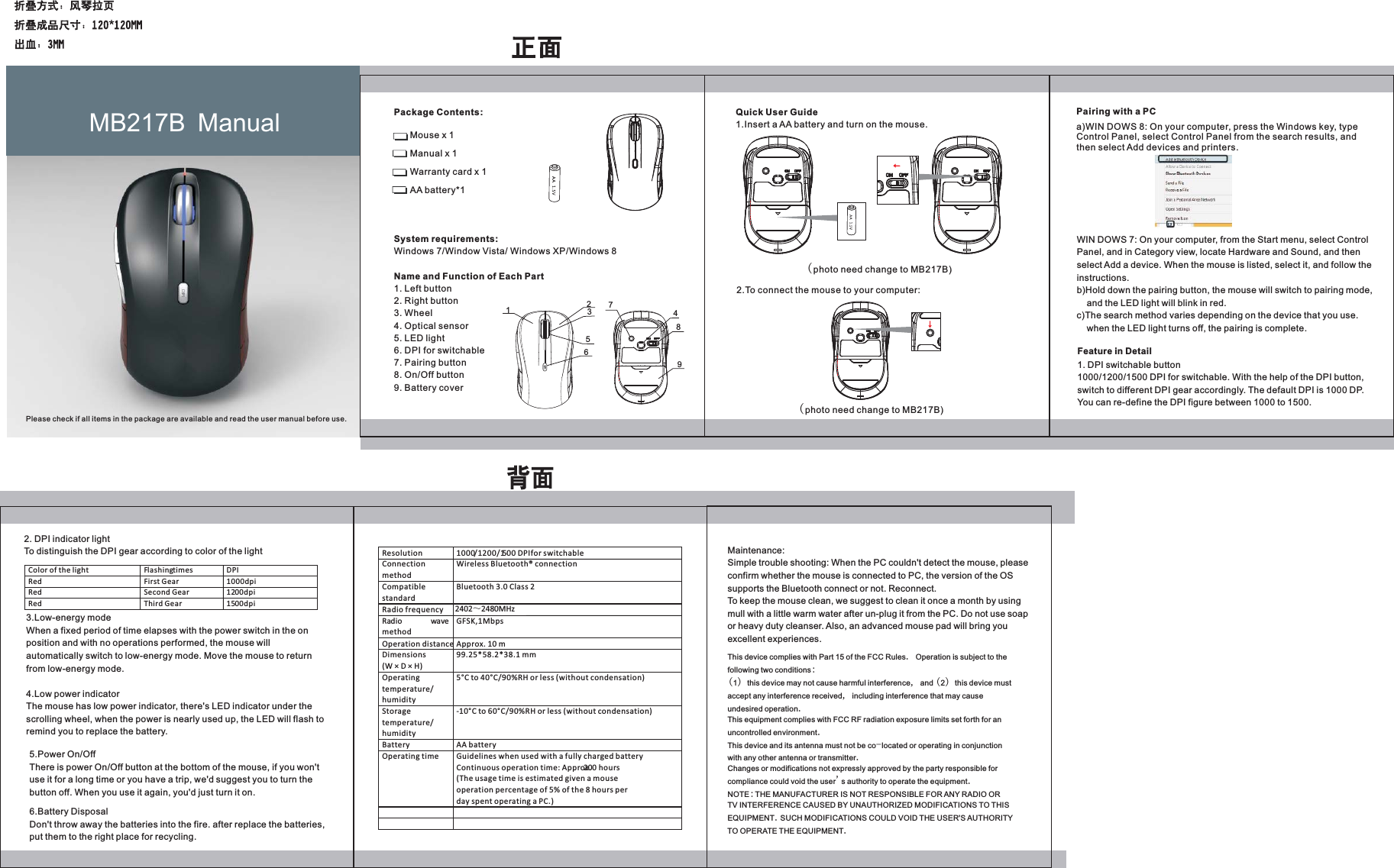
Package Contents: Mouse x 1 Manual x 1 Warranty card x 1 AA battery*1 System requirements: Windows 7/Window Vista/ Windows XP/Windows 8Name and Function of Each Part1. Left button 2. Right button 3. Wheel 4. Optical sensor5. LED light6. DPI for switchable7. Pairing button8. On/Off button9. Battery coverQuick User Guide1.Insert a AA battery and turn on the mouse.(photo need change to MB217B)2.To connect the mouse to your computer:(photo need change to MB217B)Pairing with a PCa)WIN DOWS 8: On your computer, press the Windows key, type Control Panel, select Control Panel from the search results, and then select Add devices and printers.WIN DOWS 7: On your computer, from the Start menu, select Control Panel, and in Category view, locate Hardware and Sound, and then select Add a device. When the mouse is listed, select it, and follow the instructions.b)Hold down the pairing button, the mouse will switch to pairing mode,     and the LED light will blink in red.c)The search method varies depending on the device that you use.     when the LED light turns off, the pairing is complete.3.Low-energy modeWhen a fixed period of time elapses with the power switch in the on position and with no operations performed, the mouse will automatically switch to low-energy mode. Move the mouse to return from low-energy mode.4.Low power indicatorThe mouse has low power indicator, there's LED indicator under the scrolling wheel, when the power is nearly used up, the LED will flash to remind you to replace the battery. Maintenance:Simple trouble shooting: When the PC couldn't detect the mouse, please confirm whether the mouse is connected to PC, the version of the OS supports the Bluetooth connect or not. Reconnect.To keep the mouse clean, we suggest to clean it once a month by using mull with a little warm water after un-plug it from the PC. Do not use soap or heavy duty cleanser. Also, an advanced mouse pad will bring you excellent experiences.MB217B  ManualPlease check if all items in the package are available and read the user manual before use.Feature in Detail1. DPI switchable button1000/1200/1500 DPI for switchable. With the help of the DPI button, switch to different DPI gear accordingly. The default DPI is 1000 DP. You can re-define the DPI figure between 1000 to 1500.2. DPI indicator lightTo distinguish the DPI gear according to color of the light Color of the light Flashing times DPI  Red First Gear 1000dpi Red Second Gear 1200dpi Red  Third Gear  1500dpi   5.Power On/OffThere is power On/Off button at the bottom of the mouse, if you won't use it for a long time or you have a trip, we'd suggest you to turn the button off. When you use it again, you'd just turn it on.6.Battery DisposalDon't throw away the batteries into the fire. after replace the batteries, put them to the right place for recycling.Resolution  1000/1200/1500 DPI for switchable  Connection method Wireless Bluetooth® connection     Compatible standard Bluetooth 3.0 Class 2 Radio frequency 2402~2479MHz Radio wavemethod GFSK,1Mbps Operation distance Approx. 10 m Dimensions (W × D × H) 99.25*58.2*38.1 mm Operating temperature/ humidity 5°C to 40°C/90%RH or less (without condensation) Storage temperature/ humidity -10°C to 60°C/90%RH or less (without condensation) Battery AA battery Operating time Guidelines when used with a fully charged battery Continuous operation time: Approx. 200 hours (The usage time is estimated given a mouse operation percentage of 5% of the 8 hours per day spent operating a PC.)     This device complies with Part 15 of the FCC Rules. Operation is subject to thefollowing two conditions:(1) this device may not cause harmful interference, and (2) this device mustaccept any interference received, including interference that may causeundesired operation.This equipment complies with FCC RF radiation exposure limits set forth for anuncontrolled environment.This device and its antenna must not be co-located or operating in conjunctionwith any other antenna or transmitter.Changes or modifications not expressly approved by the party responsible forcompliance could void the user's authority to operate the equipment.NOTE:THE MANUFACTURER IS NOT RESPONSIBLE FOR ANY RADIO ORTV INTERFERENCE CAUSED BY UNAUTHORIZED MODIFICATIONS TO THISEQUIPMENT.SUCH MODIFICATIONS COULD VOID THE USER'S AUTHORITYTO OPERATE THE EQUIPMENT. DPI1234567892402̚2480MHz

Navigation menu