GENERAL TOOLS and INSTRUMENTS DCS100R Wireless USB Receiver User Manual
GENERAL TOOLS & INSTRUMENTS COMPANY LLC Wireless USB Receiver
User manual
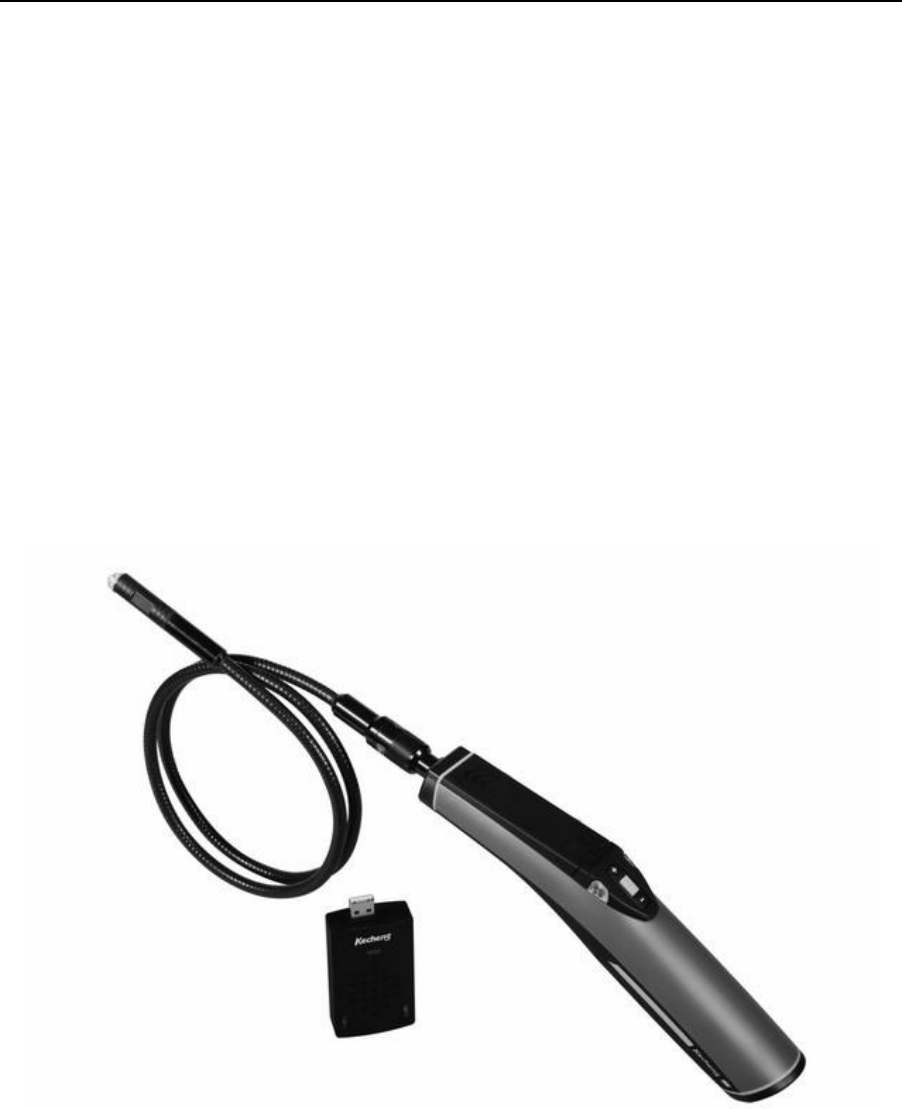
Wireless USB Transmitter/
Wireless USB Receiver
Model: DCS100T/DCS100R
Operation Manual

1
Wireless USB Transmitter/
Wireless USB Receiver
ModelDCS100T/DCS100R
Overview
DCS100T/DCS100R USB wireless video inspection has been designed as a user friendly and economical
way of solving hidden problems and increasing productivity. (eg. Inspect vent pipe and system of air conditioner,
machine equipment, engine and so on).
Wirelessly transmit the image signal between the unit and the receiver. Then the receiver transmit to
computer by USB, which is facilitate for watching and collecting. The camera head is connected to the probe and
with adjustable LED lights, which helps you to reach gaps and holes.The camera head has equipped with several
accessories, which makes it flexible. The magnetic tip is used to pick up small metal objects. The mirror tip is
easy to view the 90 ° angle. The hook is used to grab onto objects.
The product has built-in polymer lithium battery, also could use AC adapter for charging with LED
indication. The receiver has USB 2.0 interface, which is power supplied by USB to computer. It has the
advantages of small sizeclear imagestable performanceeasy operation and portability. It is widely used in
applications such as the industry, the building, the aviation, the vehicles maintenance.
Safety Instructions
Failure to follow the instructions listed below may result in electric shock or personal injury.
Read and understand all instructions prior to any operation.
Do not remove any labels from the tool.
Keep the work area clean and well lit, cluttered and dark areas may cause accidents.
Do not operate the tool with the presence of flammable/explosive gases.
Do not use the product around corrosive chemicals, which can ruin the picture quality.
Keep bystanderschildren and visitors away while operating the tool.
Stay alert, watch what you are doing and use common sense. A moment of inattention will result in serious
personal injury.
Do not overreach. Keep proper footing and balance all the time.
Always wear protective eyewear. Dust masknon-skid safety shoeshard hat or hearing protection must be used
for appropriate conditions.
Do not place this product on any unstable cart or surface. The product may fall causing serial injury to a person
or serious damage to the product.
2
For safety please always keep the video inspection away from any kind of liquid. Liquid increases the risk of
electrical shock and damage to the product.
Do not use this device for personal or medical use.
The unit is not shock-resistant. Do not use it as a hammer or drop it.
Battery precautions
Please use the standard factory power adapter, otherwise will destroy the inside battery.
Plese completely exhaust the power for the first time. And we recommend full charging and full discharging for
the first three times. And the charging time should not less than 12 hours. Fully activate the battery could play
maximum capacity of the built-in battery.
The charging and discharging time differs because the different power from the factory.
Please always keep the charging connector away from the metal and oily objects.
Please fully charging the battery before it is not for use, to make sure the high performance while using.
Don’t compress and puncture the inside battery.
Please stop operating if the inside battery is broken.
Don’t throw the product into fire, which will cause explosion.
Please dispose the battery properly. High temperature will cause the battery to explode. Please follow the local
regulations for disposing the old battery.
Product Configures
3
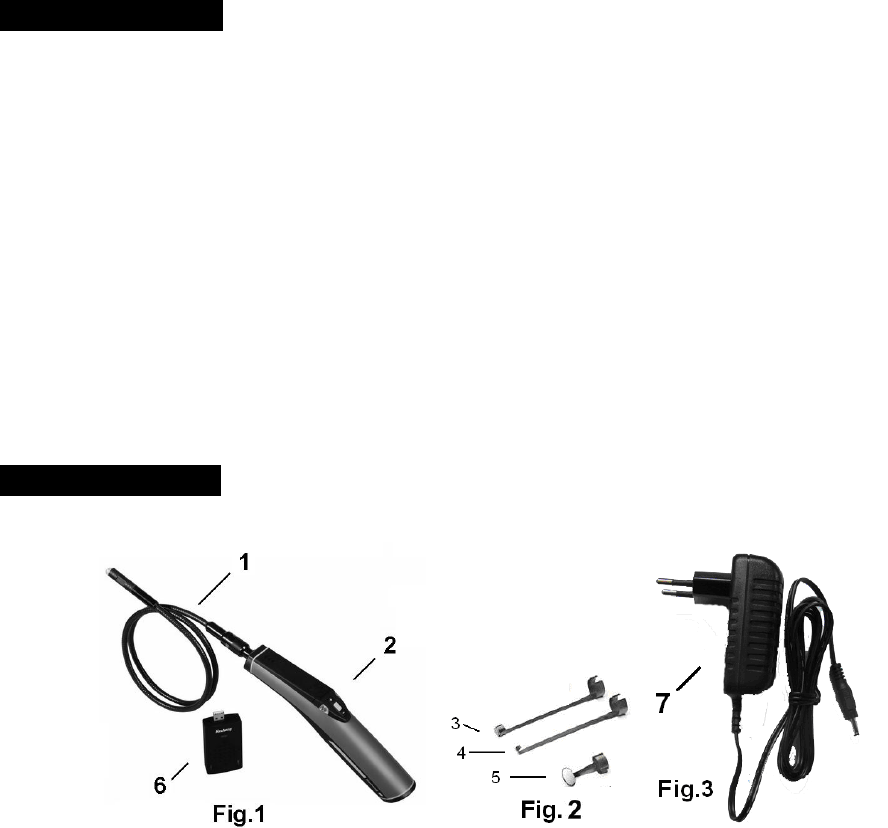
1Camera head and Probe ×1
2The inspecting grip ×1
3Magnetic tip ×1
4Hook tip ×1
5Mirror tip ×1
6Receiver ×1
7DC adapter ×1
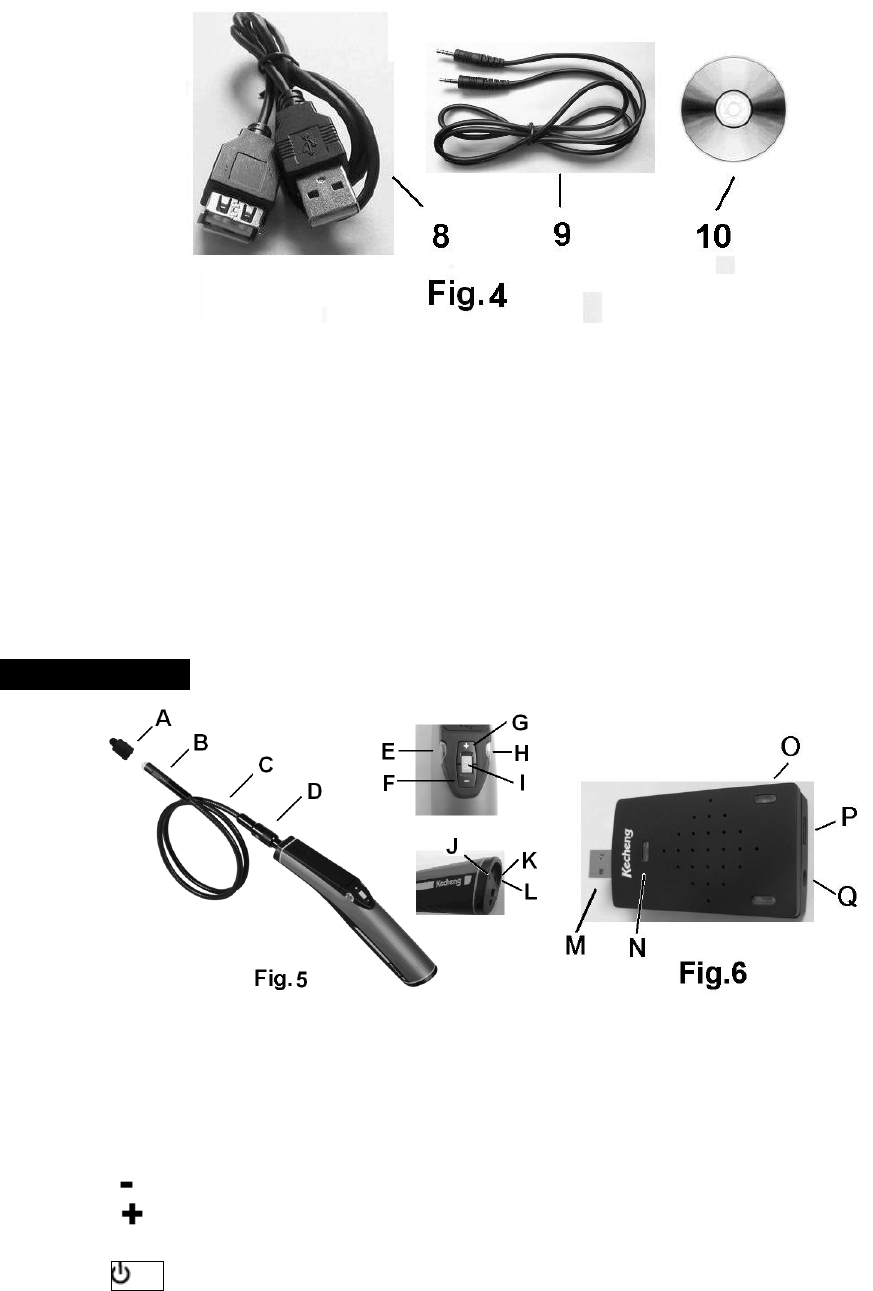
8USB cable ×1
9Signal cable ×1
10CD ROM ×1
Tool components
ACamera protection
BCamera head
CProbe
DProbe connector
EChanel indicationgreen——the flash times corresponding CH1CH4
F——LED brightness decrease key
G——LED brightness increase key
HLow battery indicationred
I/CH——Switch / exchange the wireless transmission chanel
4
JSignal cable interface
KCharging interface
LCharging light indicator
MUSB interface
NWorking light indicator
OChanel light indicator——the flash times corresponding CH1CH4
PCH——Wireless chanel selection
QSignal cable socket
Operation Instructions
Battery Charging
1Connect the DC cable to the tail of the handle L.
2Plug the AC plugs to household power outlet.
3The LED L turns red ,means charging.
4The LED L turns green, means fully charging.
5Pull out the AC plug of adapter.
Connect the grip unit to camera head and probe
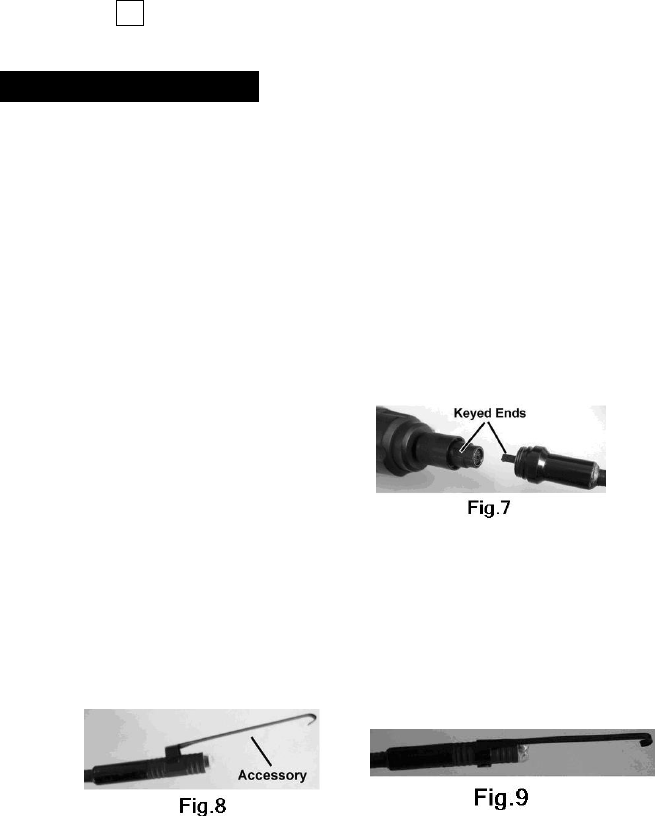
The inspecting grip must be connected to the camera head and probe. To connect the probe to the grip, make
sure the keyed ends are properly aligned. (Fig7). Once they are aligned, finger tighten the nut.
Accessories installation
If you need to use the three accessories as FIG2 (magnetic tiphook tipmirror tip), please accord the steps
followed to connect.
As showed in Fig 8, hold the camera head .Slip the semicircle end of the accessory over the flats of camera
head . Then rotate the accessory 90°to fix ,as shown in Fig9.
Program installation
Your computer should support the follows, then the recevier could connect to computer for use
• P4 1.4GHz or higher CPU
• 256 MB RAM of system memory or above (recommended)
• One available USB port (USB2.0)
• Graphics Card (Must support DirectX 9.0c)
• 1GB Free HD Space
• CD-ROM Drive (For software installation)
5
• Microsoft Windows XP/vista/win7
1Place the CD, find the CD directory from "My Computer", click on "KC-Setup" file, install the drivers;
2Directly connect the receiver to computer ( or use cable), Windows will discover the new device, just one
moment, there will be tips for normal use;
3The CD contains share software of AMCAP, you could copy to your computer and no need installation;You
could another video software also;
Operation methods
1How to operate the grip
aPress /CH key, the grip to power on, the times the green LED flashes means the corresponding chanel
( The default chanel is CH1).
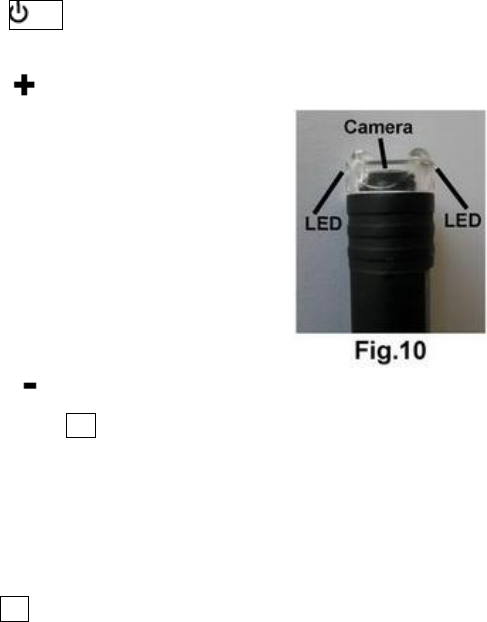
bPress to increase the two LED brightness.Fig.10
c Press decrease the two LED brightness.
dPress CH to choose wireless transmission frequency, every press to choose
CH2——CH3——CH4——CH1 repeatly.The green LED accordingly flshes twice——three times——four
times——once.
2How to operate receiver:
aDirectly connect the USB interface of receiver to computer ( or use USB cable).
bPress CH to choose receiving frequency CH2——CH3——CH4——CH1 repeatly ( the default frequency
is CH1).
cOpen video software, select “KC362 USB Video”to monitor real-time image.
3Connect the grip to receiver
The product could wirelessly transmit the image signal between the grip and the receiver; as well the unit
could transmit by connecting the grip to receiver by cable; While cable transmission, the wireless functions is
useless to ensure the image quality and not interfered from outside.
4This product is designed for hard-to reach distance inspection. Typical applications include HVAC inspection
car inspectioncircuitryvessel and aircraft. While in operation, the product is easy to extend ahead. If there is
distance limitation, the accessories could be used to pick up the ring or screws on the floor.
Operation Pecautions:

6
aPlease read the safety instructions carefully, choose desirable work area for fear causing danger.
bThe probe is flexible to help you operate in hard-to–reach areas. Please don’t insert or bend by force.. Please
do not overbend any part of the probe.Normally, the bending radius should more than 5cm to prevent from
causing permanent damage to the probe.
cDon’t use the probe or camera head to modify surroundings, clear pathways or clogged areas. It couldn’t be
used as a fishing rod or tape.
dThe hand-held display unit is not waterproof .The camera head and its cover are waterproof, but not acid-proof
or fireproof. Don’t touch with these materials or they will ruin the camera head’s protective plastic. Avoid
submersing the camera head into corrosive, oily places or high-temperature objects.
eDon’t place the inspection into anything or anywhere that may contain a live electrical charge. Please check
following methods to avoid injury.
For walls:For inspecting the inside walls, be sure to shut off the circuit breaker to the whole house
before using the tool.
For pipes:If you suspect a metal pipe could contain an electrical charge, have a qualified electrician
to check the pipe before using. A ground circuit, in some cases, can be returned to the cast
aluminium pipes and cause them to be charged.
For automobilesBe sure the automobile is not running during inspection. Metal and liquid under the
hood may be hot. Don’t get oil or gas on the imager head.
Operation Notes
Please don’t operate this product unless the manual has been read and proper training has been completely.
The red LED will on when low battery of the inside battery.
Please be sure to shut off the image software firstly, then turn off the product and pull out the cable before turn
off your computer, which could avoid computercrash.
Don’t use sharp objectsmetal or liquid to touch the signal connector in order to avoid short circuit or product
damage
Don’t let any object compress the signal cable, or placed the signal cable in a humid places.
Don’t place the signal cable on places where people often walk in order to avoid being damaged.
Don’t immerse the grip inspection into water, which will result in electric shock and damage.
Only while the product is assembled well, the camera head is water-proof, but the grip and the receiver isn’t
water-proof.
Don’t use the product if white dew forms inside the camera head.
If the tool couldn’t work well after turning it on. Please stop use and have the unit checked by a
qualified technician.
Store idle product out of reach of children and other untrained persons. The tool is dangerous in the hands of
untrained users.
Maintain the inspection tool with care. If the tool is dropped, check for the breakage ,which may affect the
tools’s operation. If it is damaged, have the tools serviced before using. Many accidents are caused by poorly
maintained products.

7
Use only accessories that are recommended by the manufacturer for your product. Accessories are suitable for
the tool, but may become hazardous when used on another product.
Dry your hands before turning the tool ON or OFF.
Protect against excessive heat. The product should be kept away from heat sources, such as radiatorsheat
registersstoves or other products (including amplifiers) that produce heat. Don’t use the tool near moving
machinery or areas where the temperature is exceed 45 .
Please cover the camera protection while not in use.
Store the product in ventilated and dry places.
Maintenance Instructions
Product service must be performed only by qualified personnel. Performed by untrained personnel could result
in injury.
When servicing the product, only use identical replacement parts. Use of authorized parts or failure to follow
maintenance instructions may create a risk of electrical shock or injury.
Don’t attempt to disassemble the product other than the needs specified on this manual.
Provide proper cleaning: don’t use acetone to clean the product. Gently clean the LCD with a soft dry cloth.
Upon completion of any service or repair, please ask the service technician to check if the tool is in proper
condition.
Stop using the unit if it starts smoking or emitting noxious fumes.
Please ask qualified person under the following conditions:
aIf liquid has been spilled or objects have fallen into product.
bIf product doesn’t operate normally even if you have followed the operation instructions.
cIf the product has been dropped or damaged in any way.
dWhen the product exhibits a distinct change in performance.

8
Trouble Shootings
Problems Causes Solutions
Can’t charge the grip.
Adapter didn’t connect well
with grip power
Please check and try again.
The connect or orcable is
broken.
Replace and try again.
Dead battery. Ask a technician to replace the
batter y.
The computer couldn’t
find new device.
1Loosed cable. Check and connect again.
2The computer is not
configured with USB2.0
interface.
Use proper computer.
3Drivers is not installed. Check and install the drivers.
The computer is on but
without image.
1The chanel set is not right. Set the same receiving and
transmiitting chanel.
2The probe is loosed. Check and connect again.
3Stains on the camera head. Check if exists stains.
The image has spots. Spots on the camera head. Check and clean the camera
head.
LED lighting appears to be
dimmer at maximum Low battery Use adapter for charging.
The grip couldn’t power
on.
The circuit inside grip is in
protection state.
Use adapter for charging to
release.
Low energy of inside battery. Use adapter for charging.
Dead battery Ask a technician to replace the
batter y.

9
Cautions
Don’t drop the product or use by force.
Don’t disassemble the product to avoid failure.
Don’t place the product with corrosive gas or objects.
Don’t expose the product in vibrated high or low temperature.
Store the product in a safe area.
Don’t immerse the product into water, which will result in damage to
product.Please charge the inside grip battery every three month if it is not in use
for long time.
10
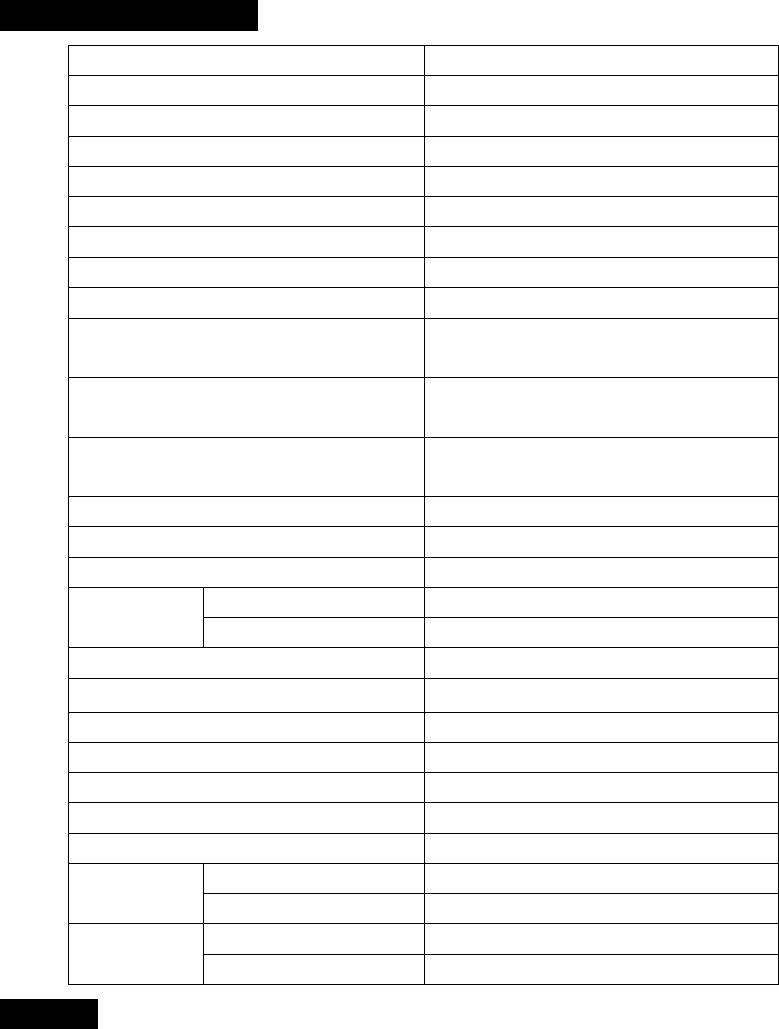
Technical Specifications
Name USB wireless video inspection
Model DCS100T/DCS100R
Recommended use Indoor
Viewable angle 60°
Focal length 50mm
Diameter of camera head 12mmor other size
Connection Standard USB connection
Valid pixels 300 thousand pixels
Image size 640×480
Wireless transmission frequency 2414MHz 2432MHz 2450MHz
2468MHz
Wireless transmission distance Up to 10M; If no obstacles, will more
than 10M.
Accessories Magnet tiphook tipmirror tipUSB
cableSignal cableCD ROM
Probe length 100cm or your requirements
Probe and camera head protection IP67
Light source High lighting LED
Adapter INPUT AC 100240V5060Hz
OUTPUT DC 5.5V 1.5A
Inside battery Polymer Lithium battery
Battery capacity 1200mAh
Charging time of inside battery About 3hours
Battery life About 2hous
Operating temperature 045
Operating humidity RH 5%95% non-condensing
Storage temperature -20+6085%w/o battery
Dimension Grip 266mm×73mm×80mm
Receiver 83mm×42mm×19mm
Weight Grip About 159 gw/o probe
Receiver 35g
Warranty
The product is warranted to be free from defects in materials and workmanship for a period of one year
from the date of purchase.
Notice: The warranty does not apply to the following conditions:
Disassembling the laser tool will void the warranty.
We are not responsible for any damage resulting from abrasion, water, dropping or disassembling.
TipsMost parts of the product could be recycled, please refer to your local regulations for disposing of them
instead of throwing into the dustbin.

11
Warning
This device complies with Part 15 of the FCC Rules. Operation is subject to the following two conditions:
(1) This device may not cause harmful interference and
(2) This device must accept any interference received, including interference that may cause undesired operation
Changes or modifications not expressly approved by the manufacturer responsible for compliance could void the
user’s authority to operate the equipment.
NOTE: This equipment has been tested and found to comply with the limits for a Class B digital device, pursuant to
part 15 of the FCC Rules. These limits are designed to provide reasonable protection against harmful interference
in a residential installation. This equipment generates uses and can radiate radio frequency energy and, if not
installed and used in accordance with the instructions, may cause harmful interference to radio communications.
However, there is no guarantee that interference will not occur in a particular installation. If this equipment does
cause harmful interference to radio or television reception, which can be determined by turning the equipment off
and on, the user is encouraged to try to correct the interference by one or more of the following measures:
—Reorient or relocate the receiving antenna.
—Increase the separation between the equipment and receiver.
—Connect the equipment into an outlet on a circuit different from that to which the receiver is connected.
—Consult the dealer or an experienced radio/TV technician for help.