GENERAL TOOLS and INSTRUMENTS TS05 ToolSmart Infrared Thermometer User Manual TS05 ToolSmart Infrared Thermometer manual5 11

GENERAL TOOLS & INSTRUMENTS COMPANY LLC ToolSmart Infrared Thermometer TS05 ToolSmart Infrared Thermometer manual5 11

User manual
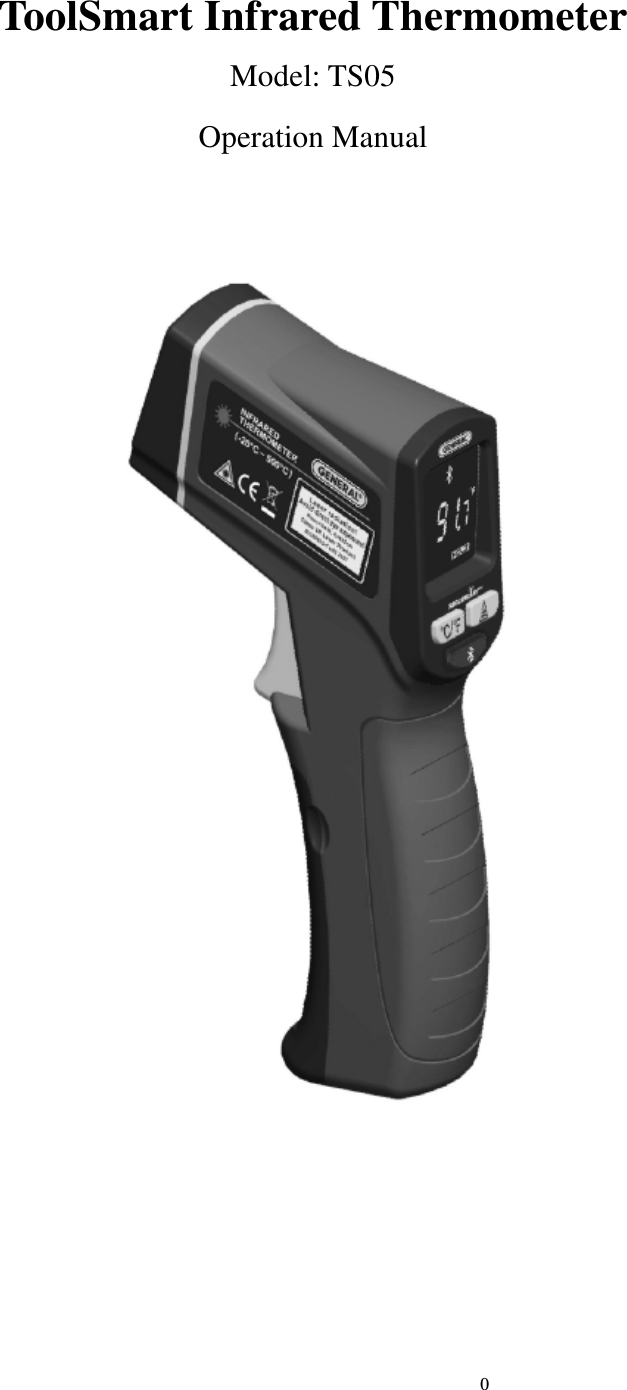
                                                                            0                             ToolSmart Infrared Thermometer Model: TS05   Operation Manual
                                                                            1                             ToolSmart Infrared Thermometer Model::::TS05 Overview TS05 ToolSmart Infrared Thermometer is a non-contact temperature measuring instrument using infrared technology and laser pointer. The instrument with Bluetooth 4.0 wireless transmission function, can bidirectional operation through the APP display, and can perform remote measurement and data transmission .You could use this product to measure the surface temperature, which is not suitable for traditional measuring ( such as moving objects, charged objects, toxic objects or hard-to-reach objects). The instrument features a low consumption design. It has a LCD with black background, a 12:1 proportional  laser  ring  for  accurate  aiming  and  capable  of  auto  holding  the  readings.  It  has  the advantages of rapid measuring, easy operation and portability. It is widely used for applications such as  finding  the  hot  spot  of  electric  connection  and  bearing,  measuring  the  hot  and  high-frequency induction heated objects, monitoring food processing and storage, inspecting temperature for heating &  refrigeration  system,  inspecting  temperature  for  techniques  control  of  metallurgy  industry, inspecting  temperature  during  laying  asphalt  and  fire-control  work,  or  any  other  temperature measuring without compromising the temperature field. It is a good measuring tool for the metallurgy, the  electric  power  plant,  the  chemical  industry,  the  rubber  industry,  the  spinning  and  weaving,  the plastic, the papermaking and the food processing.  TS05 ToolSmart Infrared Thermometer is Class 3R laser product and in compliance with EN60825-1.  Safety Instructions Failure to follow the instructions listed below may cause personal injury. ●Read and understand all instructions prior to any operation. ●Do not remove any labels from the tool. ●Do not operate the tool with the presence of flammable/explosive gases. ●Do not operate the laser tool around children or allow children to operate the laser tool, failure to do so will injure children’s eyes. ●Do not stare into the laser beam. ●Do not project the laser beam directly into eyes of others. ●Do  not  set up the  tool  at eye  level  or  operate  the tool on or  near  a  reflective surface,  as  the  laser could be projected into people’s eyes. ●Do not observe the laser beam by using optical tools such as binoculars, magnifying glass.
                                                                            2                             ●To avoid burning danger; remember that the reflected objects make the measuring temperature lower than the real one. ● Warning     DANGER Class 3R Laser Product Maximum Power Output< 3mW Wavelength: 630-660nm Do not stare into the beam! Avoid direct eye exposure! This tool emits a laser radiation!  This device  complies with part 15 of  the  FCC Rules. Operation is  subject to  the following  two conditions: (1) This device may not cause harmful interference, and (2)  this  device  must  accept  any  interference  received,  including  interference  that  may  cause undesired operation。 Battery Safety Instructions ●Please remove the batteries when clean the product. ●Remove the batteries before long term storage ●Please install the batteries properly as the instructions of the positive and negative charges ●Please dispose the batteries  properly.  High temperature will  cause  explosions  and  do  not  burn  the batteries.  Strap  insulated  tape  around  the  battery  charges  to  avoid  unsafe  contacts  with  other objects.Many countries have regulations regarding battery disposal. Please follow the local regulations of battery disposing. Tool components
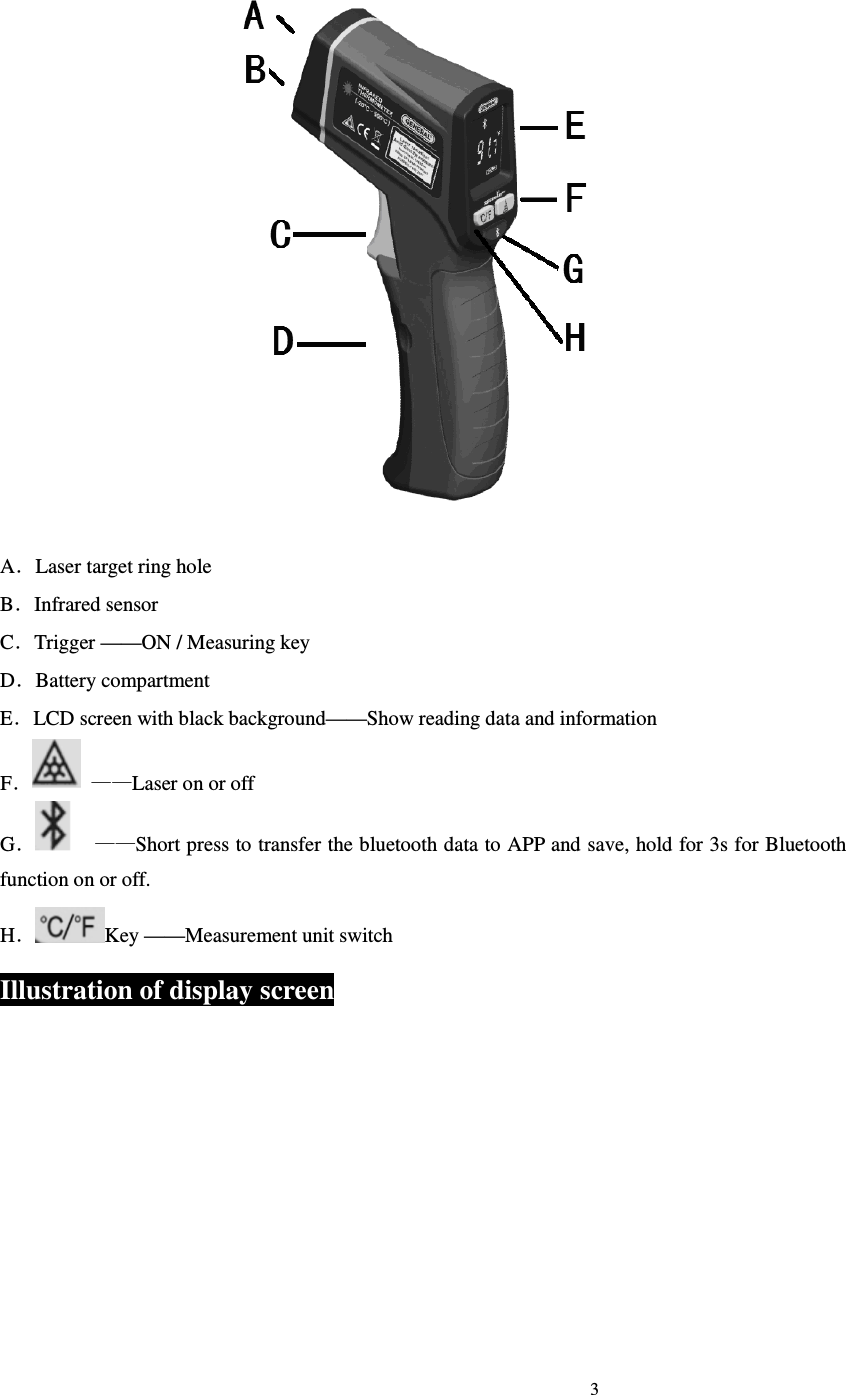
                                                                            3                               A.Laser target ring hole B.Infrared sensor C.Trigger ——ON / Measuring key D.Battery compartment E.LCD screen with black background——Show reading data and information F. ——Laser on or off G.    ——Short press to transfer the bluetooth data to APP and save, hold for 3s for Bluetooth function on or off. H.Key ——Measurement unit switch Illustration of display screen
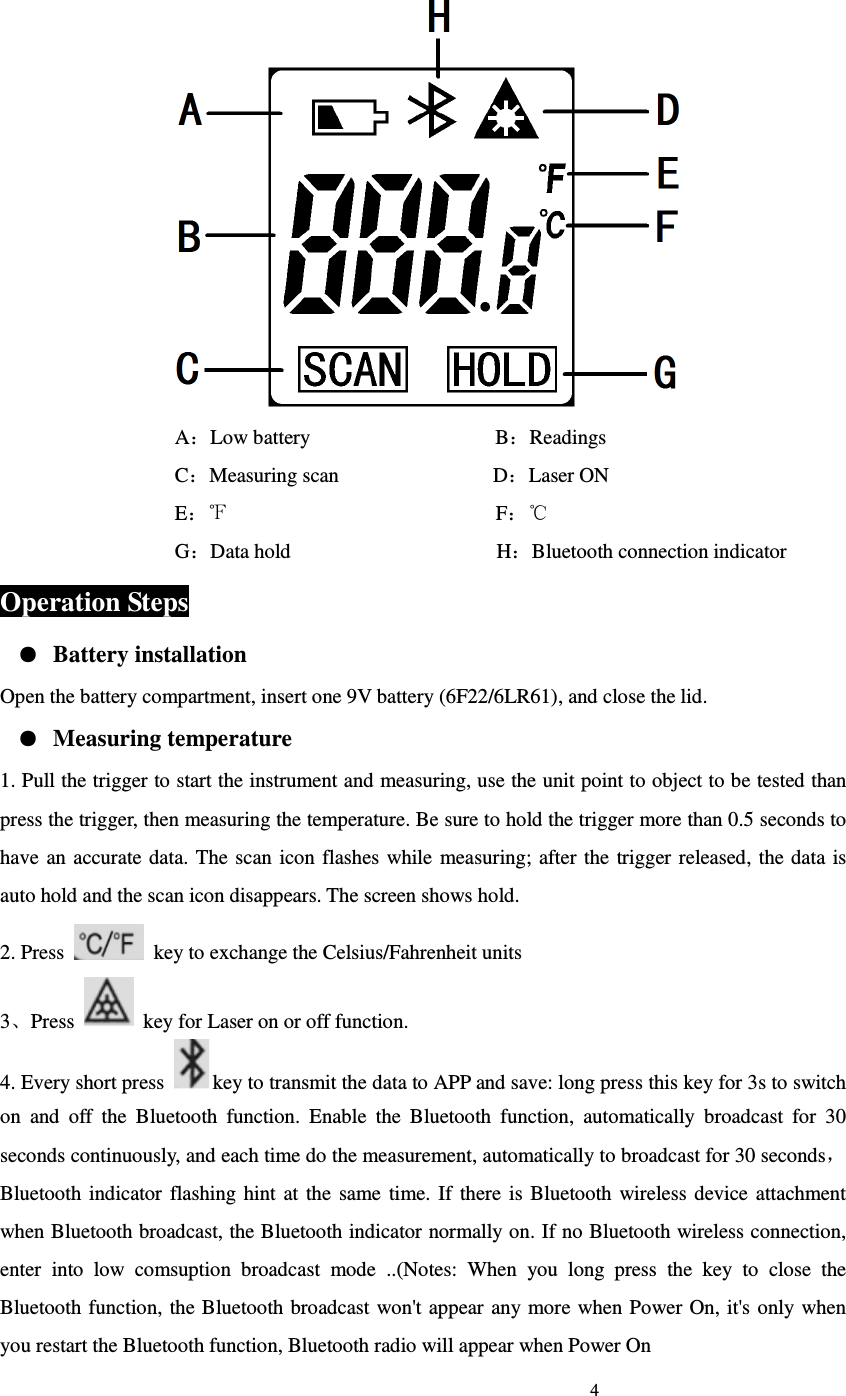
                                                                            4                              A:Low battery                                    B:Readings C:Measuring scan                              D:Laser ON                                   E:                                                    F℉:   ℃                                   G:Data hold                                        H:Bluetooth connection indicator Operation Steps ● Battery installation Open the battery compartment, insert one 9V battery (6F22/6LR61), and close the lid. ● Measuring temperature 1. Pull the trigger to start the instrument and measuring, use the unit point to object to be tested than press the trigger, then measuring the temperature. Be sure to hold the trigger more than 0.5 seconds to have  an accurate data.  The  scan  icon flashes  while measuring;  after the  trigger released, the data  is auto hold and the scan icon disappears. The screen shows hold.   2. Press    key to exchange the Celsius/Fahrenheit units 3、Press    key for Laser on or off function. 4. Every short press  key to transmit the data to APP and save: long press this key for 3s to switch on  and  off  the  Bluetooth  function.  Enable  the  Bluetooth  function,  automatically  broadcast  for  30 seconds continuously, and each time do the measurement, automatically to broadcast for 30 seconds,Bluetooth  indicator  flashing hint  at the  same  time.  If  there  is  Bluetooth  wireless device attachment when Bluetooth broadcast, the Bluetooth indicator normally on. If no Bluetooth wireless connection, enter  into  low  comsuption  broadcast  mode  ..(Notes:  When  you  long  press  the  key  to  close  the Bluetooth function, the Bluetooth broadcast won't appear any more when Power On, it's  only  when you restart the Bluetooth function, Bluetooth radio will appear when Power On
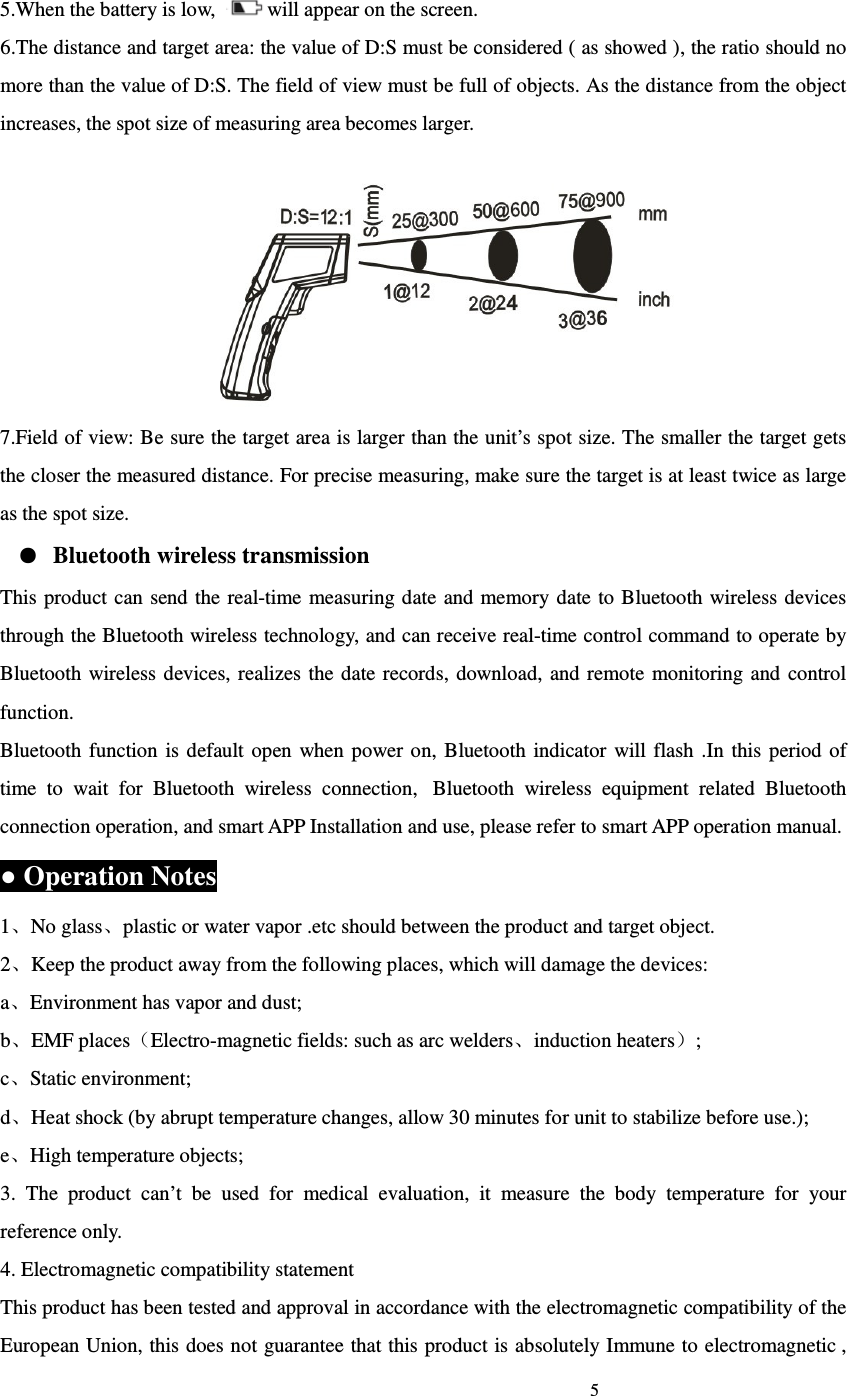
                                                                            5                             5.When the battery is low,  will appear on the screen. 6.The distance and target area: the value of D:S must be considered ( as showed ), the ratio should no more than the value of D:S. The field of view must be full of objects. As the distance from the object increases, the spot size of measuring area becomes larger.    7.Field of view: Be sure the target area is larger than the unit’s spot size. The smaller the target gets the closer the measured distance. For precise measuring, make sure the target is at least twice as large as the spot size. ● Bluetooth wireless transmission This product  can send the real-time measuring date and memory date to Bluetooth wireless devices through the Bluetooth wireless technology, and can receive real-time control command to operate by Bluetooth wireless  devices, realizes the  date  records,  download, and  remote  monitoring  and  control function. Bluetooth  function  is default  open  when  power on, Bluetooth  indicator will  flash  .In  this period of time  to  wait  for  Bluetooth  wireless  connection,   Bluetooth  wireless  equipment  related  Bluetooth connection operation, and smart APP Installation and use, please refer to smart APP operation manual. ● Operation Notes 1、No glass、plastic or water vapor .etc should between the product and target object. 2、Keep the product away from the following places, which will damage the devices: a、Environment has vapor and dust; b、EMF places(Electro-magnetic fields: such as arc welders、induction heaters); c、Static environment; d、Heat shock (by abrupt temperature changes, allow 30 minutes for unit to stabilize before use.); e、High temperature objects; 3.  The  product  can’t  be  used  for  medical  evaluation,  it  measure  the  body  temperature  for  your reference only. 4. Electromagnetic compatibility statement This product has been tested and approval in accordance with the electromagnetic compatibility of the European Union, this does not guarantee  that this product is absolutely Immune to electromagnetic ,
                                                                            6                             please avoid using this product in strong electromagnetic environment. 1.        Please note that changes or modifications not expressly approved by the party responsible for compliance could void the user’s authority to operate the equipment. 2.        Note: This equipment has been tested and found to comply with the limits for a Class B digital device,  pursuant  to  part  15  of  the  FCC  Rules.  These  limits  are  designed  to  provide  reasonable protection against harmful interference in a residential installation. This equipment generates, uses and can radiate radio frequency energy and, if not installed and used in accordance with the instructions, may  cause  harmful  interference  to  radio  communications.  However,  there  is  no  guarantee  that interference  will  not  occur  in  a  particular  installation.  If  this  equipment  does  cause  harmful interference to radio or television reception,  which can be  determined by turning  the equipment off and  on,  the  user  is  encouraged  to  try  to  correct  the  interference  by  one  or  more  of  the  following measures: —Reorient or relocate the receiving antenna. —Increase the separation between the equipment and receiver. —Connect  the  equipment  into  an  outlet  on  a  circuit  different  from  that  to  which  the  receiver  is connected. —Consult the dealer or an experienced radio/TV technician for help. 3.        This  equipment  complies  with  radio  frequency  exposure  limits  set  forth  by  the  FCC  for  an uncontrolled environment. This  equipment  should  be  installed  and  operated  with  a  minimum  distance  of  5  mm  between  the device and the user or bystanders. This device must not be co-located or operating in conjunction with any other antenna or transmitter.  ● Trouble shootings Problems  Causes  Solutions No vision  Dead battery  Check and replace battery. Show“ ”  Low battery  Replace battery Show “OL—”  The  target  temperature lower than range. Choose target within the range Show “OH”  The  target  temperature higher than range. Choose target within the range ● Maintenance   1、Cleaning the  lens:  Abrupt  temperature changes will cause  vapor,  please  clean  after  the  vapor disappears. Blow off loose particles using clean compressed air. Gently brush remaining debris away
                                                                            7                             with a camel’s hair brush. Carefully wipe the surface with a moist cotton swab 2、Keep clean; Avoid drop and wet; the housing could be cleaned with wet sponge. C a u t i o n s ● Don’t drop and use the tool by force. ● Don’t disassemble the tool, (avoid causing trouble). ● Keep the tool dry and clean. ● Don’t place the tool with corrosive gas or objects. ● Avoid dust and water, which may stain the lens. ● Don’t clean the lens by any solvent. ● Don’t immerse the tool into water to avoid damage. ● In case of damage of tool by deterioration of battery. ● Remove the battery when not in use for an extended period of time. Technical Specifications Name  ToolSmart Infrared Thermometer Model  TS05 Measuring range  -40℃~580℃(-40℉~1076℉) Response wavelength  8~14µm Measuring precision ±2 (±3.6 ) or ±2% of reading℃ ℉ (when T>0℃ ±3  (±5.4 ) or ±2% of reading, whichever is greater℃ ℉ (when T ≤0℃) Repetition  1% of reading or 1℃ Response time  500mSec,95% response Optical ratio(D:S)  12:1 Emissivity  0.95 Display resolution  ±0.1℃ Laser wavelength  630~660nm Power of laser  <3mW Laser class  Class 3R Laser switch                            √ Backlight switch                            √ Data hold                            √ Temperature units exchange                            √ Low battery indication                            √ Half light of the backlight  No operation about 20 seconds by default Auto turn off for tool  No operation about 1 minutes by default Bluetooth transfer function  Can  connect  IOS  (iPhone  and  iPad),  Android  and  other intelligent platform based on bluetooth 4.0 Power supply  One 9V battery (6F22/6LR61) Working current  <50mA
                                                                            8                              Operating temperature 0℃~40℃(32℉~104 )℉ Operating humidity  RH 0~75% non-condensing Storage temperature  -20℃~60 (℃-4℉~140 )℉,≤85%(w/o battery) Product dimension  135 mm×170 mm×36mm Product weight  About 158 g  (w/o battery) Warranty The product is warranted to be free from defects in materials and workmanship for a period of one year from the date of purchase on the basis of providing relevant card. Notice: The warranty does not apply to the following conditions: ●Disassembling the laser tool will void the warranty. ●We are not responsible for any damage resulting from abrasion, water, dropping or disassembling. Tips:Most parts of the product could be recycled, please refer to your local regulations for disposing of them instead of throwing into the dustbin.

Navigation menu