GENERAL TOOLS and INSTRUMENTS TS06 ToolSmart Digital Moisture Meter User Manual TS06ToolSmart Digital Moisture Meter 6 3

GENERAL TOOLS & INSTRUMENTS COMPANY LLC ToolSmart Digital Moisture Meter TS06ToolSmart Digital Moisture Meter 6 3

User manual

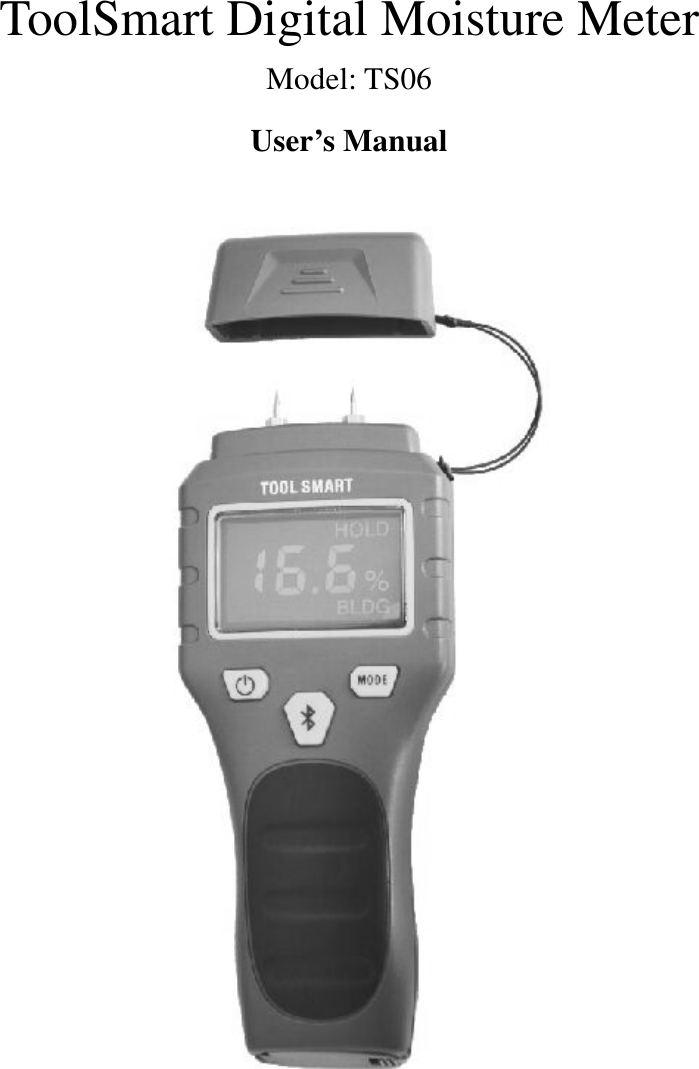
 ToolSmart Digital Moisture Meter Model: TS06 User’s Manual
  ToolSmart Digital Moisture Meter r Model::::TS06 Overview   TS06 ToolSmart Digital Moisture Meter measures the moisture content by detecting the electrical resistivity of the target material using two pins. The unit has adopt low consumption single chip smart design, through the probe head automatically detect wood or building materials moisture content, low-power single-chip intelligent instrument design, screen displays measurement results, with Bluetooth wireless transmission function, through the intelligent platform APP to display the measurement data, remote data transmission. It has advantages of portable size, easy to operate and rapidly measuring, a suitable tool to carry at working field. Safety Instructions           Failure to follow the instructions listed below may cause personal injury. ● Please read this manual thoroughly before operation. ● Please do not remove any labels from the unit. ● Do not operate the tool with in the presence of flammable/explosive gases.   ● Be careful about the pins. ● Don’t allow children to operate the unit. ● Put on the cover while not in use to avoid pins damage. ● The pins are very sharp, be sure to put on the protector after use, otherwise will hurt your body. This device  complies  with  part 15  of  the FCC Rules. Operation is  subject to  the following  two conditions: (1) This device may not cause harmful interference, and (2)  this  device  must  accept  any  interference  received,  including  interference  that  may  cause undesired operation。 Battery Safety Instructions ●Please remove the battery when clean the product. ● Remove the battery when not in use for an extended period of time.
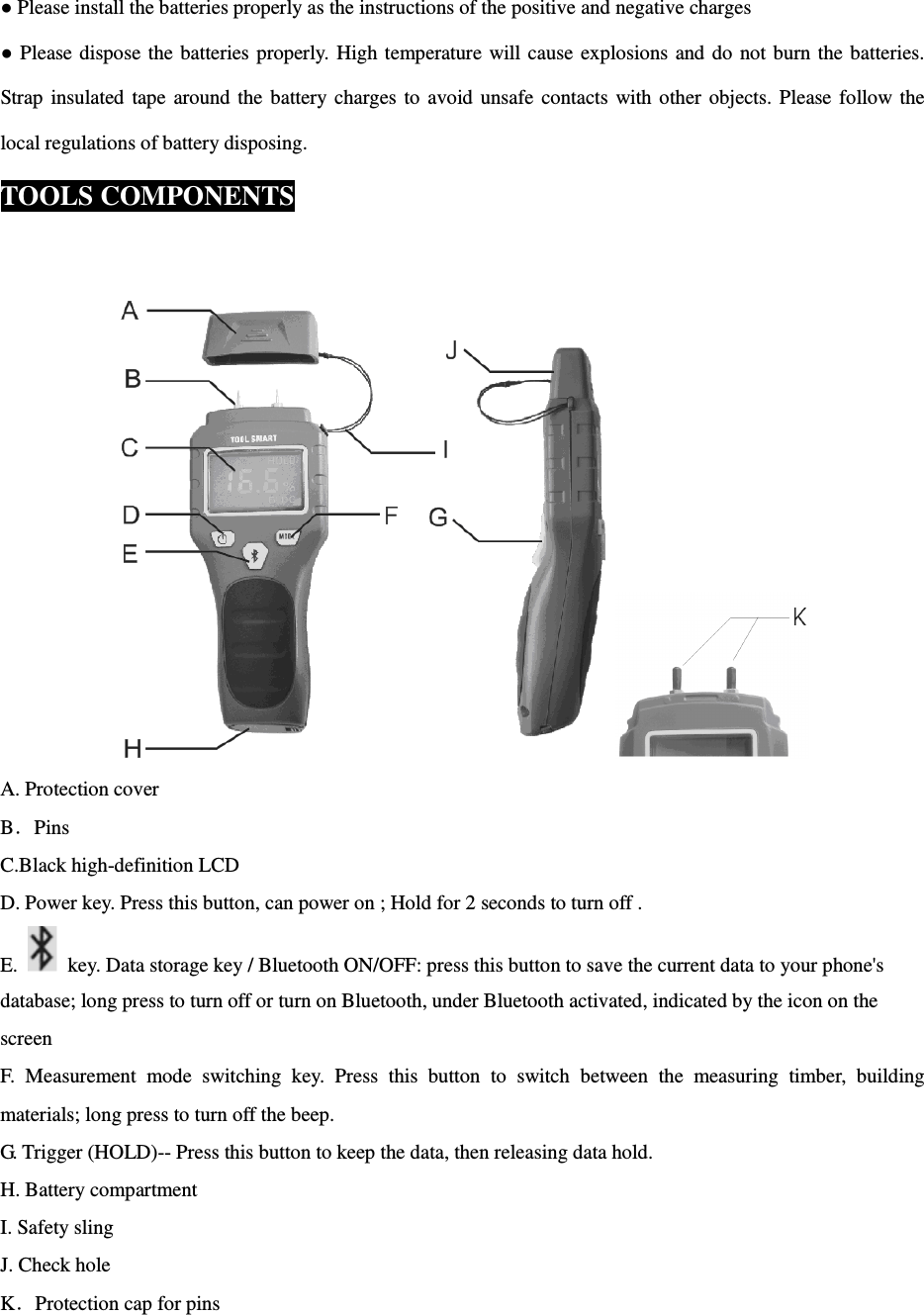
 ● Please install the batteries properly as the instructions of the positive and negative charges ● Please dispose the  batteries properly.  High  temperature will cause  explosions  and  do  not burn the  batteries. Strap  insulated  tape  around the  battery charges  to  avoid  unsafe  contacts  with other  objects.  Please  follow the local regulations of battery disposing. TOOLS COMPONENTS   A. Protection cover B.Pins C.Black high-definition LCD D. Power key. Press this button, can power on ; Hold for 2 seconds to turn off . E.    key. Data storage key / Bluetooth ON/OFF: press this button to save the current data to your phone's database; long press to turn off or turn on Bluetooth, under Bluetooth activated, indicated by the icon on the screen F.  Measurement  mode  switching  key.  Press  this  button  to  switch  between  the  measuring  timber,  building materials; long press to turn off the beep. G. Trigger (HOLD)-- Press this button to keep the data, then releasing data hold. H. Battery compartment I. Safety sling J. Check hole K.Protection cap for pins
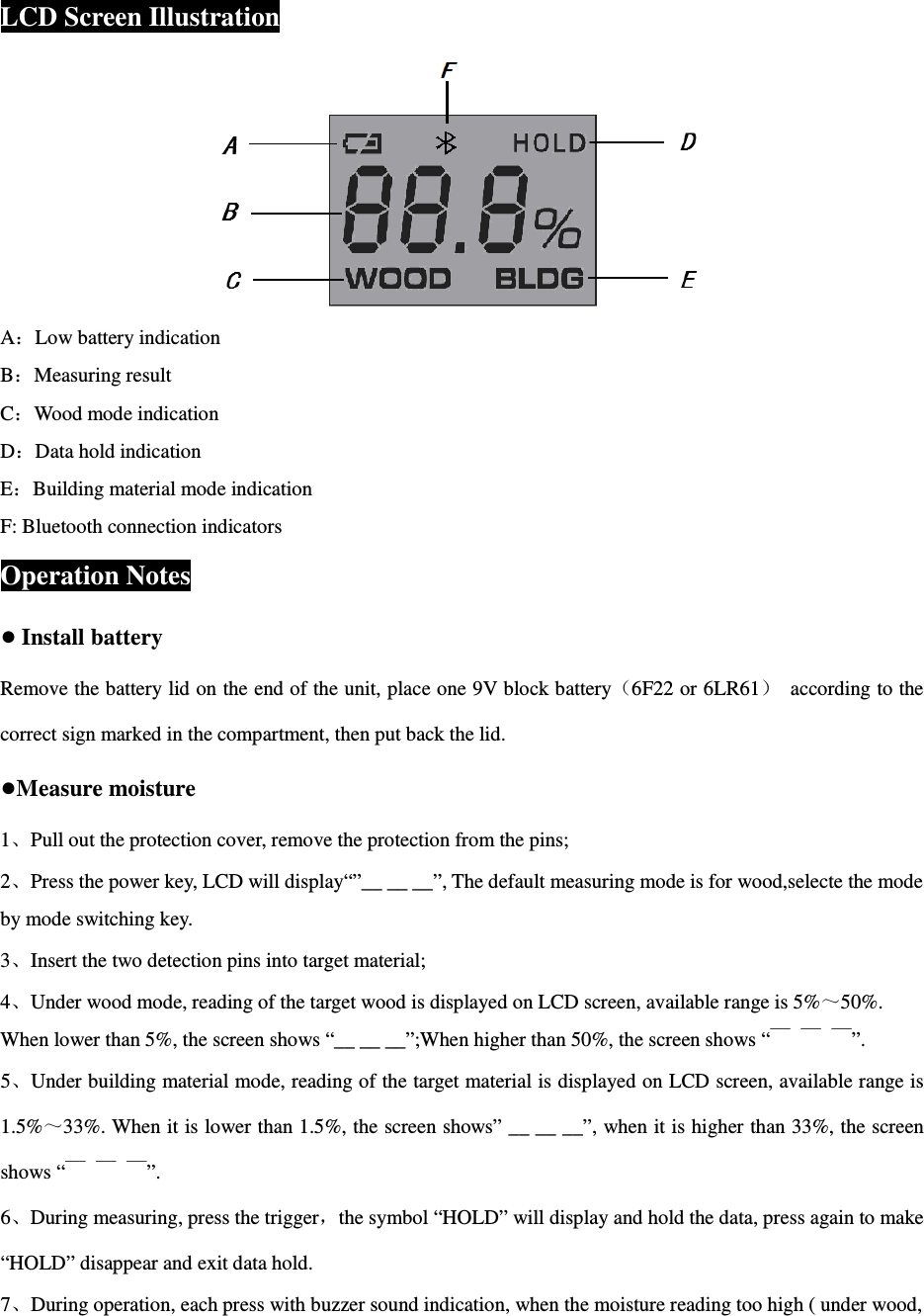
 LCD Screen Illustration  A:Low battery indication B:Measuring result C:Wood mode indication D:Data hold indication E:Building material mode indication F: Bluetooth connection indicators Operation Notes ● Install battery Remove the battery lid on the end of the unit, place one 9V block battery(6F22 or 6LR61)  according to the correct sign marked in the compartment, then put back the lid.   ●Measure moisture 1、Pull out the protection cover, remove the protection from the pins; 2、Press the power key, LCD will display“”__ __ __”, The default measuring mode is for wood,selecte the mode by mode switching key. 3、Insert the two detection pins into target material; 4、Under wood mode, reading of the target wood is displayed on LCD screen, available range is 5%~50%. When lower than 5%, the screen shows “__ __ __”;When higher than 50%, the screen shows “ ̄  ̄  ̄”. 5、Under building material mode, reading of the target material is displayed on LCD screen, available range is 1.5%~33%. When it is lower than 1.5%, the screen shows” __ __ __”, when it is higher than 33%, the screen shows “ ̄  ̄  ̄”. 6、During measuring, press the trigger,the symbol “HOLD” will display and hold the data, press again to make “HOLD” disappear and exit data hold. 7、During operation, each press with buzzer sound indication, when the moisture reading too high ( under wood,
 up to 15.9% or under building material, up to 19.9% ), there will always buzzer sound indication. The sound will be disappeared if the reading is lower; Holding the mode switch key, to turn off the buzzer sound . 8、Each short press the  , inform APP to save the current data; Hold the button for 3 seconds to turn off or turn on Bluetooth function, once Bluetooth enabled, it will automatically broadcast for 30s continuously while the Bluetooth indicator blinks. If the Bluetooth broadcast time period there are a Bluetooth wireless device connected, the Bluetooth indicator is on; If no Bluetooth device is connected, it will enter into low consumption broadcast mode. (Tip: When you hold the button to turn off the Bluetooth function, the Bluetooth broadcast will not appear every time you turn on; only after you re-enable Bluetooth, Bluetooth broadcast will appear after each turn on) 9、Keeping pressing the power button for 2s to turn off the product. ●Accuracy checking    instructions The product has external accuracy checking function; Remove the protection cap, power on the unit, place the 2 pins into the 2 holes at the back of the cover, just now the LCD shows a value within 18.3%±1%; If beyond this range, the accuracy has problem, advise to be repaired. ● Bluetooth wireless transmission This  product  can  be  via  Bluetooth  wireless  technology,  real-time  measurement  of  the  transmission  data  and memory data to a Bluetooth wireless device, and receive a Bluetooth wireless device, real-time control command of this product operation control, data logging, downloads, and remote monitoring and control functions. Product power on default status of the Bluetooth function is turned on, the Bluetooth indicator will flash on the screen, it means waiting for the Bluetooth wireless connection. ● Operation notes ●Please replace the battery when the unit cannot be powered on or low battery indicator is on.   ●Wood moisture values are related to ambient temperature humidity and wood material density. The best way to recognize the right wood moisture content is to measure continuously day after day to obtain the corresponding values and compare to judge. ●Electromagnetic Compatibility Statement: The product has been in accordance with EU EMC tested and approved, this does not guarantee that the product is  absolutely  immune  to  electromagnetic  interference,  avoid  using  this  product  in  strong  electromagnetic environment. ● During operation, if there is any unusual production reaction, please take off the battery and install again.
 1.        Please note that changes or modifications not expressly approved by the party responsible for compliance could void the user’s authority to operate the equipment. 2.        Note: This equipment has been tested and found to  comply with the limits for a Class B digital device, pursuant to part 15 of the FCC Rules. These limits are designed to provide reasonable protection against harmful interference in a residential installation. This equipment generates, uses and can radiate radio frequency energy and,  if  not  installed  and  used  in  accordance  with  the  instructions,  may  cause  harmful  interference  to  radio communications.  However, there  is  no guarantee that  interference  will  not  occur in  a particular  installation.  If this  equipment  does  cause  harmful  interference  to  radio  or  television  reception,  which  can  be  determined  by turning the equipment off and on, the user is encouraged to try to correct the interference by one or more of the following measures: —Reorient or relocate the receiving antenna. —Increase the separation between the equipment and receiver. —Connect the equipment into an outlet on a circuit different from that to which the receiver is connected. —Consult the dealer or an experienced radio/TV technician for help. 3.        This equipment complies with radio frequency exposure limits set forth by the FCC for an uncontrolled environment. This equipment should be installed and operated with a minimum distance of 5 mm between the device and the user or bystanders. This device must not be co-located or operating in conjunction with any other antenna or transmitter.  C a u t i o n s  ● Don’t drop the product or use by force. ● Don’t disassemble the product to avoid failure. ● Keep the tool dry and clean. ● Don’t place the product with corrosive any gas or objects. ● Do not operate the tool in the water and dust, avoid to damage the tool. ● Check the battery regularity, avoid deterioration. ● Remove the battery when not in use for an extended period of time.  Technical Specifications Product name  ToolSmart Digital Moisture Meter Model  TS06 Measuring range  Wood  5~50% Building Material  1.5——33% Measuring accuracy  ±2% Check function  YES
 Key tone function  YES Automatic  power  saving  mode semi-bright backlight time No operation about 20s Auto power off  No operation about 3min Bluetooth transmission function  Can connect IOS (Iphone and Ipad)、Android platform based on 4.0 device Low battery indication  <5.5V Power supply  One  9V  block  battery(6F22  or  6LR6)  not included MAX power consumption  <50mA Working temperature  0℃~50℃ Working humidity  <90%RH non-condensing Storage  -20℃~60℃,≤85% (w/o battery) Dimension  178mm×70mm×42 mm Weight  About 115 g(w/o battery)  WARRANTY       Within one year from the date of purchase, if any quality problem or non-artificial damage, provide warranty service by the relevant documents. Notice: The warranty does not apply to the following conditions: •  Disassembling the laser tool will void the warranty. •  Any damage resulting from, but not limited to wear, water, being dropped or repairs attempted by others. Tips :Most part of the product can be recycled, if you need to deal with this product, please according to local laws and regulations to deal with it, instead of throw it into the dustbin.

Navigation menu