GaoYi Tech B-328BT Bluetooth Car Kit User Manual B 328BT english user manual

GaoYi Tech Limited Bluetooth Car Kit B 328BT english user manual

User Manual

Note: Please read this manual carefully before use B-328BT; please check for any special requirement or restriction about the use of Bluetooth wireless technology in your country B-328BT Installation Guide   &  User Manual                        Features and Functions: * Bluetooth car kit, compatible with all Bluetooth phones. * CVC technology to eliminate noise and restrain echo, enjoy clear speaking. * Support line-in, USB & SD card. * Caller ID show, support call answering & call rejecting, call transferring and last caller number re-dialing. * Voice dialing supported. (If your phone has the function.) * Bluetooth automatically connection. * Built-in Microphone. * Large 1.44 inch LCD display, support full frequency transmitting (87.5-108.0MHz) * Spring handle support all direction circumgyrated. * EQ mode: Normal; Rock; Pop; Classical; Jazz; Country * Circulation mode: All; Single; Folder; Normal; Random * Steering wheel remote control, operating easily and conveniently. (Optional)  Technical Specifications:   Excellent sound quality with full duplex communication DSP (Digital Signal Processing) Technology for echo cancellation and background noise reduction  Supported BT Profiles:             Bluetooth 2.1 +EDR solution (HSP 1.0, HFP 1.5) Bluetooth frequency range:      2.402 ~ 2.480GHz FM transmitting range:        87.5~108.0MHz  Operating voltage range:        DC 12V~24V (car lighter socket) Charger Output Rating:           5V DC, 1.5A Microphone:                  Noise Cancelling Support:            SD, USB Display:             1.44 inch LCD display Audio In:                     2.5mm:
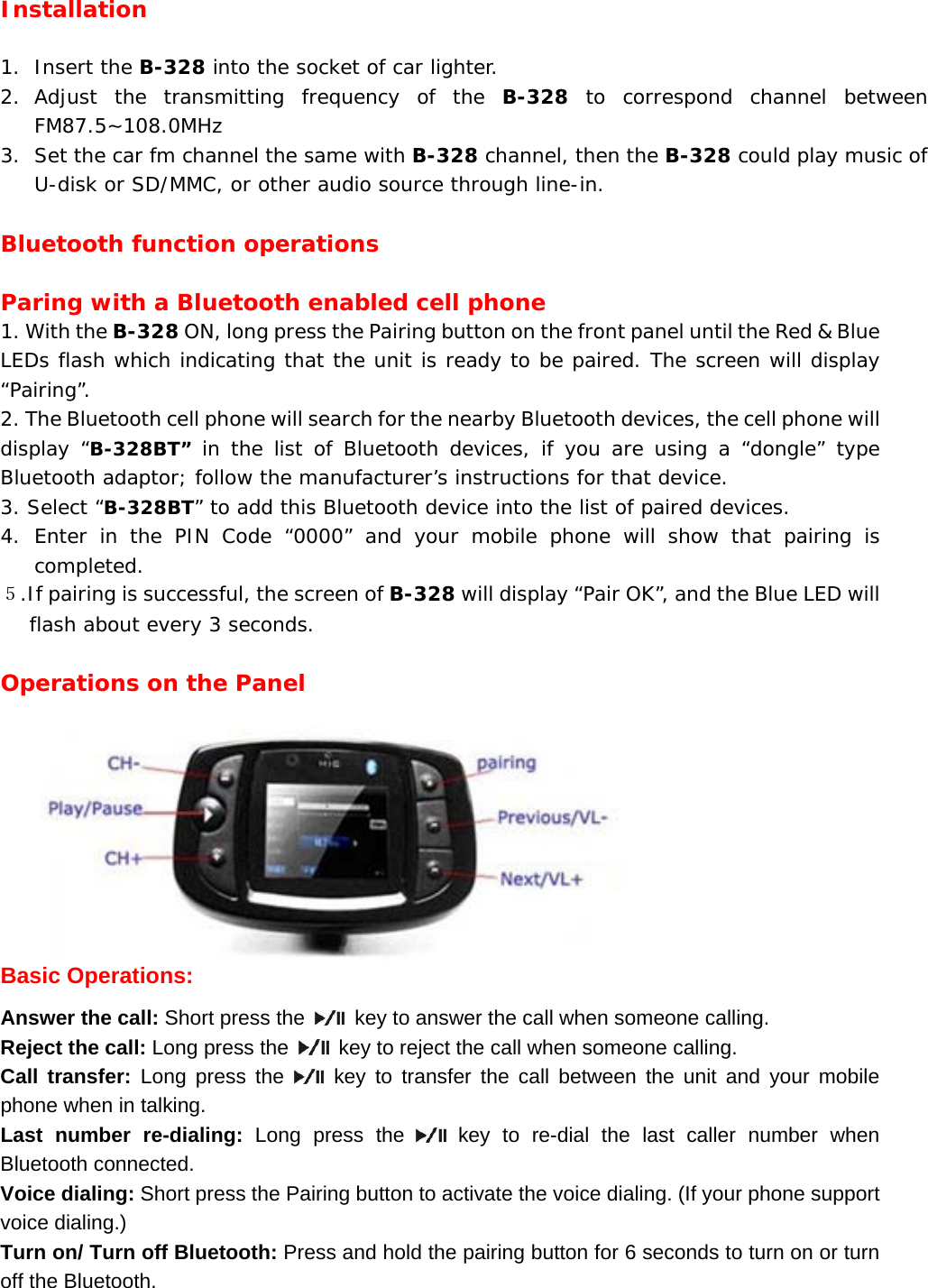
Installation  1. Insert the B-328 into the socket of car lighter. 2. Adjust the transmitting frequency of the B-328 to correspond channel between FM87.5~108.0MHz 3. Set the car fm channel the same with B-328 channel, then the B-328 could play music of U-disk or SD/MMC, or other audio source through line-in.  Bluetooth function operations  Paring with a Bluetooth enabled cell phone 1. With the B-328 ON, long press the Pairing button on the front panel until the Red & Blue LEDs flash which indicating that the unit is ready to be paired. The screen will display “Pairing”. 2. The Bluetooth cell phone will search for the nearby Bluetooth devices, the cell phone will display “B-328BT” in the list of Bluetooth devices, if you are using a “dongle” type Bluetooth adaptor; follow the manufacturer’s instructions for that device. 3. Select “B-328BT” to add this Bluetooth device into the list of paired devices. 4. Enter in the PIN Code “0000” and your mobile phone will show that pairing is completed. 5.If pairing is successful, the screen of B-328 will display “Pair OK”, and the Blue LED will flash about every 3 seconds.   Operations on the Panel                                     Basic Operations: Answer the call: Short press the    key to answer the call when someone calling. Reject the call: Long press the    key to reject the call when someone calling. Call transfer: Long press the   key to transfer the call between the unit and your mobile phone when in talking. Last number re-dialing: Long press the   key to re-dial the last caller number when Bluetooth connected. Voice dialing: Short press the Pairing button to activate the voice dialing. (If your phone support voice dialing.) Turn on/ Turn off Bluetooth: Press and hold the pairing button for 6 seconds to turn on or turn off the Bluetooth.
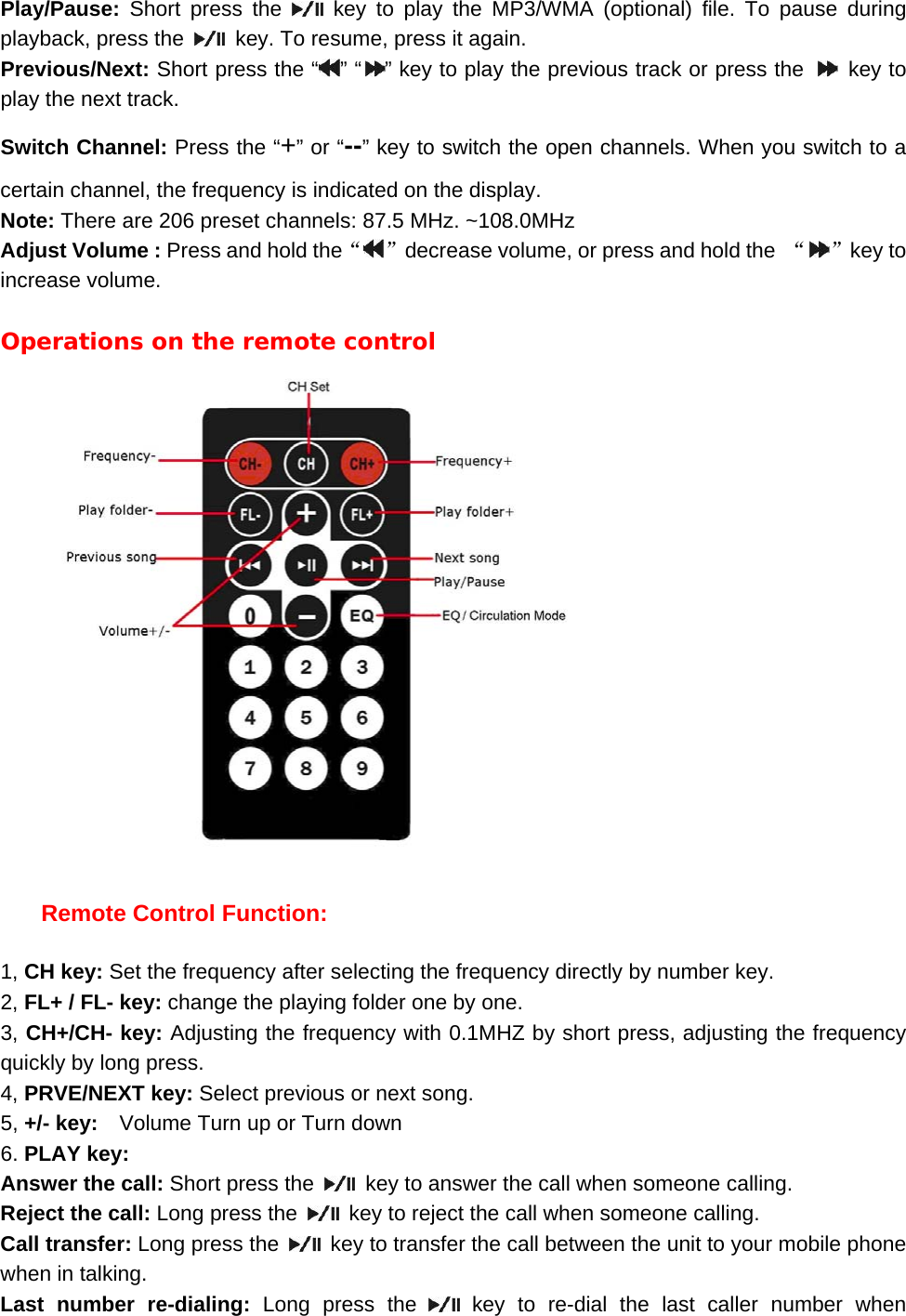
Play/Pause:  Short press the   key to play the MP3/WMA (optional) file. To pause during playback, press the    key. To resume, press it again. Previous/Next: Short press the “ ” “ ” key to play the previous track or press the   key to play the next track. Switch Channel: Press the “+” or “--” key to switch the open channels. When you switch to a certain channel, the frequency is indicated on the display. Note: There are 206 preset channels: 87.5 MHz. ~108.0MHz Adjust Volume : Press and hold the“”decrease volume, or press and hold the  “ ”key to increase volume.  Operations on the remote control      Remote Control Function:  1, CH key: Set the frequency after selecting the frequency directly by number key. 2, FL+ / FL- key: change the playing folder one by one. 3, CH+/CH- key: Adjusting the frequency with 0.1MHZ by short press, adjusting the frequency quickly by long press. 4, PRVE/NEXT key: Select previous or next song. 5, +/- key:    Volume Turn up or Turn down   6. PLAY key:   Answer the call: Short press the    key to answer the call when someone calling. Reject the call: Long press the    key to reject the call when someone calling. Call transfer: Long press the    key to transfer the call between the unit to your mobile phone when in talking. Last number re-dialing: Long press the   key to re-dial the last caller number when
Bluetooth connected. Play/Pause:  Short press the   key to play the MP3/WMA (optional) file. To pause during playback, press the    key. To resume, press it again.  7, Number key: Select song by figure under normal playing state, select frequency after entering into the frequency state. 8, Short press EQ key: Change the playing EQ mode (Rock, Classical, Normal, POP, Jazz, Country) 9, Long press EQ key: Select circulation mode. (ALL, SINGLE, FOLDER, NORMAL, RANDOM)  FCC STATEMENT 1.  This device complies with Part 15 of the FCC Rules. Operation is subject to the following two conditions: (1) This device may not cause harmful interference, and (2) This device must accept any interference received, including interference that may cause undesired operation. 2.  Changes or modifications not expressly approved by the party responsible for compliance could void the user’s authority to operate the equipment.  NOTE: This equipment has been tested and found to comply with the limits for a Class B digital device, pursuant to Part 15 of the FCC Rules. These limits are designed to provide reasonable protection against harmful interference in a residential installation. This equipment generates, uses and can radiate radio frequency energy and, if not installed and used in accordance with the instructions, may cause harmful interference to radio communications. However, there is no guarantee that interference will not occur in a particular installation. If this equipment does cause harmful interference to radio or television reception, which can be determined by turning the equipment off and on, the user is encouraged to try to correct the interference by one or more of the following measures: -- Reorient or relocate the receiving antenna. -- Increase the separation between the equipment and receiver. -- Connect the equipment into an outlet on a circuit different from that to which the receiver is connected. -- Consult the dealer or an experienced radio/TV technician for help. 3. FCC Radiation Exposure Statement: This equipment complies with FCC radiation exposure limits set forth for an uncontrolled environment. In order to avoid the possibility of exceeding the FCC radio frequency exposure limits, Human proximity to the antenna shall not be less than 20cm (8 inches) during normal operation.

Navigation menu