GaoYi Tech B-368BT BLUETOOTH CAR KIT User Manual
GaoYi Tech Limited BLUETOOTH CAR KIT
Users Manual
User Manual
Features:
z With Bluetooth, compatible with you iphone, Power and charge your iPod,
iPhone3G, iPhone4G & iPad, iPad2, simultaneously through the 30-pin dock
connector.
z Support calls receiving, call rejecting and last number re-dialing.
z TTS function; report the caller number in English.
z Flexible goose neck, easily reposit, convenient and safe
z Removable stoppers to keep the device in holder steadily.
z High quality silicon gel on the back & sides to protect your device from being
damaged.
Specifications:
Bluetooth version: Version 2.1, class 2
Transmit distance: 4~6 meters
Working voltage: DC 12V
1. Installation:
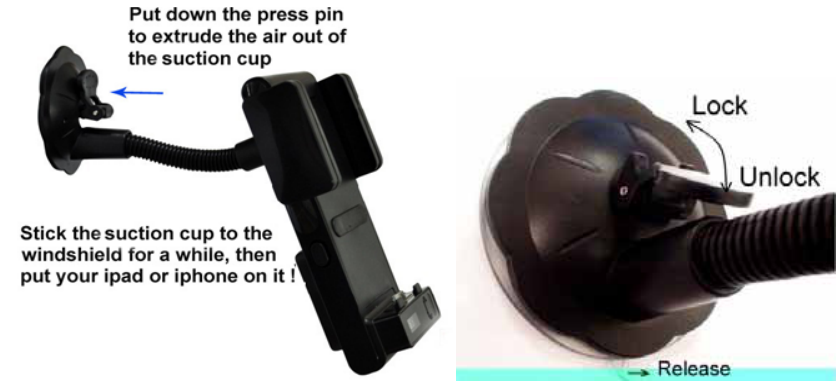
1. Set up the car mount suction cup on the windshield or any other smooth surface
in the car. Just hold it in the position you want and lock it.
2. Connect the car charger and the unit through the mini USB socket.
3. Place your iPod/iPhone/iPad into the holder; adjust the flexible clamp by
pressing the crandle lock release button, and fix your devices steadily.
Bluetooth function operations
Paring with a Bluetooth enabled cell phone
1. With the B-368BT ON, long press the Multi-function button on the front panel
until the Red & Blue LEDs flash, and the screen will display “Pairing”, which
indicating that the unit is ready to be paired.
2. The Bluetooth cell phone will search for the nearby Bluetooth devices, the cell
phone will display “B-368BT” in the list of Bluetooth devices, if you are using a
“dongle” type Bluetooth adaptor; follow the manufacturer’s instructions for that
device.
3. Select “B-368BT” to add this Bluetooth device into the list of paired devices.
4. Enter in the PIN Code “0000” and your mobile phone will show that pairing is
completed.
5.If pairing is successful, the Blue LED will be light all the time.
Basic Operations:
Answer the call: Short press the Multi-function key to answer the call when
someone calling.
Reject the call: Long press the Multi-function key to reject the call when
someone calling.
End the call: Short press the Multi-function button to end the calling.
Call transfer: Long press the Multi-function key to transfer the call between the
unit and your mobile phone when in talking.
Last number re-dialing: short press the Multi-function key twice to re-dial the
last caller number when Bluetooth connected.
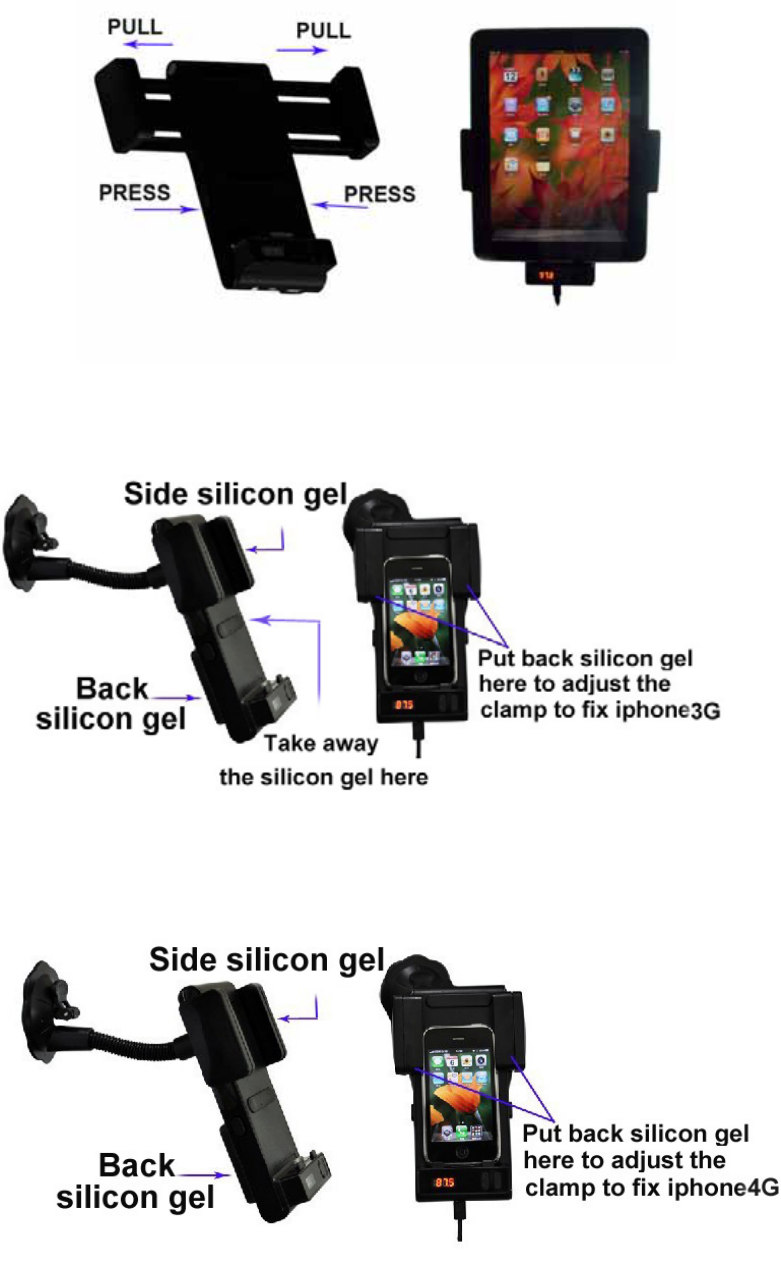
Use with your iPad:
Use with your iPhone 3G:
Use with your iPhone 4G:
FCC STATEMENT
1. This device complies with Part 15 of the FCC Rules.
Operation is subject to the following two conditions:
(1) This device may not cause harmful interference, and
(2) This device must accept any interference received, including interference that may cause
undesired operation.
2. Changes or modifications not expressly approved by the party responsible for compliance could
void the user’s authority to operate the equipment.
FCC ID: X2FB-368BT
NOTE: This equipment has been tested and found to comply with the limits for a
Class B digital device, pursuant to Part 15 of the FCC Rules. These limits are
designed to provide reasonable protection against harmful interference in a
residential installation. This equipment generates, uses and can radiate radio
frequency energy and, if not installed and used in accordance with the
instructions, may cause harmful interference to radio communications. However,
there is no guarantee that interference will not occur in a particular installation.
If this equipment does cause harmful interference to radio or television reception,
which can be determined by turning the equipment off and on, the user is
encouraged to try to correct the interference by one or more of the following
measures:
-- Reorient or relocate the receiving antenna.
-- Increase the separation between the equipment and receiver.
-- Connect the equipment into an outlet on a circuit different
from that to which the receiver is connected.
-- Consult the dealer or an experienced radio/TV technician for help.