Garmin 189 M Gpsmap 8215 Mfd Manual Installation Instructions
174-M-Gpsmap-8008-Mfd-Manual-Installation-Instructions 174-m-gpsmap-8008-mfd-manual-installation-instructions
183-M-Gpsmap-8208-Mfd-Manual-Installation-Instructions 183-m-gpsmap-8208-mfd-manual-installation-instructions
180-M-Gpsmap-8015-Mfd-Manual-Installation-Instructions 180-m-gpsmap-8015-mfd-manual-installation-instructions
177-M-Gpsmap-8012-Mfd-Manual-Installation-Instructions 177-m-gpsmap-8012-mfd-manual-installation-instructions
186-M-Gpsmap-8212-Mfd-Manual-Installation-Instructions 186-m-gpsmap-8212-mfd-manual-installation-instructions
2014-07-05
: Garmin 189-M-Gpsmap-8215-Mfd-Manual-Installation-Instructions 189-m-gpsmap-8215-mfd-manual-installation-instructions garmin pdf
Open the PDF directly: View PDF  .
.
Page Count: 14
- GPSMAP 8000 Series Installation Instructions
- Important Safety Information
- Registering Your Device
- Contacting Garmin Product Support
- Tools Needed
- Mounting the Components
- Cable and Connection Considerations
- Card Reader Connections
- Updating the Device Software
- Specifications
GPSMAP® 8000 Series Installation
Instructions
Important Safety Information
WARNING
See the Important Safety and Product Information guide in the
product box for product warnings and other important
information.
When connecting the power cable, do not remove the in-line
fuse holder. To prevent the possibility of injury or product
damage caused by fire or overheating, the appropriate fuse
must be in place as indicated in the product specifications. In
addition, connecting the power cable without the appropriate
fuse in place will void the product warranty.
CAUTION
Always wear safety goggles, ear protection, and a dust mask
when drilling, cutting, or sanding.
NOTICE
When drilling or cutting, always check what is on the opposite
side of the surface.
Registering Your Device
Help us better support you by completing our online registration
today.
• Go to http://my.garmin.com.
• Keep the original sales receipt, or a photocopy, in a safe
place.
Contacting Garmin Product Support
• Go to www.garmin.com/support and click Contact Support
for in-country support information.
• In the USA, call (913) 397.8200 or (800) 800.1020.
• In the UK, call 0808 2380000.
• In Europe, call +44 (0) 870.8501241.
Tools Needed
• Drill and drill bits
• #2 Phillips screwdriver
• Marine sealant
• Jigsaw
• File and sandpaper
Mounting the Components
Mounting Considerations
NOTICE
This device should be mounted in a location that is not exposed
to extreme temperatures or conditions. The temperature range
for this device is listed in the product specifications. Extended
exposure to temperatures exceeding the specified temperature
range, in storage or operating conditions, may cause device
failure. Extreme-temperature-induced damage and related
consequences are not covered by the warranty.
You can mount the device using one of three methods. You can
use the included bracket and hardware to bail mount the device,
you can use the included template and hardware to flush mount
the device, or you can use the flat-mount kit (sold separately) to
mount the device flat with the dashboard. When selecting a
mounting location, observe these considerations.
NOTE: Not all mounting methods are available for all device
models. See the specific mounting-type section for more details
about your model.
• The location should provide optimal viewing as you operate
your boat.
• The location should allow for easy access to all device
interfaces, such as the keypad, touchscreen, and card
reader, if applicable.
• The location must be strong enough to support the weight of
the device and protect it from excessive vibration or shock.
• To avoid interference with a magnetic compass, the device
should not be installed closer to a compass than the
compass-safe distance value listed in the product
specifications.
• The location must allow room for the routing and connection
of the cables.
Bail Mounting the Device
NOTICE
If you are mounting the bracket on fiberglass with screws, it is
recommended to use a countersink bit to drill a clearance
counterbore through only the top gel-coat layer. This will help to
avoid any cracking in the gel-coat layer when the screws are
tightened.
The bail-mounting hardware (screws and washers or nuts,
washers, and bolts) is not included. The holes on the bail-mount
bracket are 5/16 in. (7.9 mm) in diameter. Before you can bail
mount the device, you must choose mounting hardware that fits
the holes in the bail-mount bracket and securely attaches it to
your specific mounting surface. The size of the pilot hole
required depends on the mounting hardware you choose.
You can bail mount only the eight-inch and 12-inch models. Due
to the size of the 15-inch models, you must install them using
the flush-mount or flat-mount method.
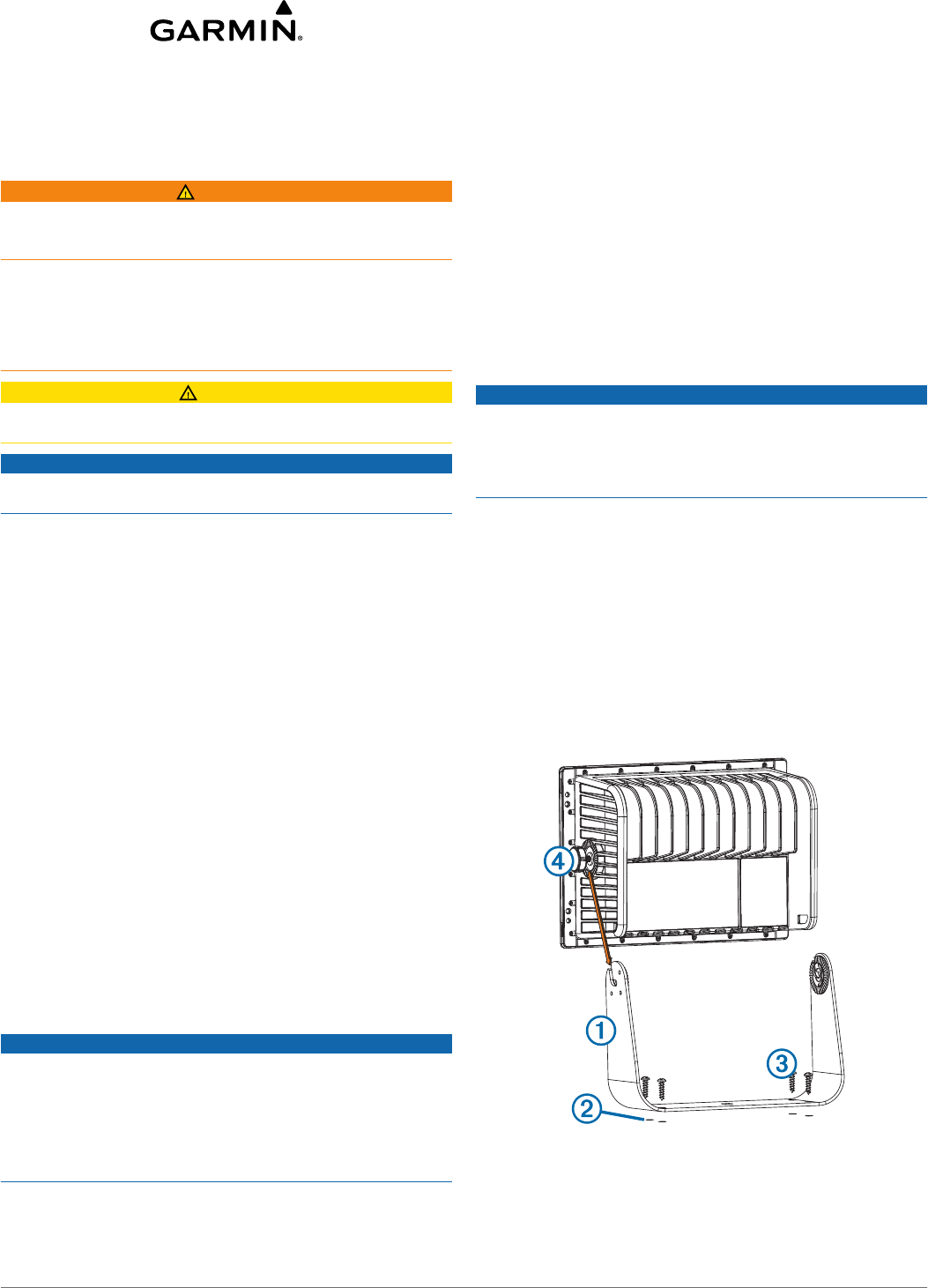
1Using the included bail-mount bracket À as a template, mark
the location of the four pilot holes Á.
2Using a drill bit appropriate for your mounting hardware, drill
the pilot holes.
3Secure the bail-mount bracket to the surface using your
mounting hardware Â.
4Install the bail-mount knobs à on the sides of the device.
December 2012 190-01557-02_0A Printed in Taiwan
5Place the device in the bail-mount bracket, and tighten the
bail-mount knobs.
Securing the Device
You can lock the device to the structure of your boat for added
security (optional).
1Bail-mount the device (page 1).
2Using a coated braided-steel cable (not included) and a lock
(not included), secure the back of the case À to the structure
of the boat.
Flush Mounting the Device
NOTICE
Be careful when cutting the hole to flush mount the device.
There is only a small amount of clearance between the case
and the mounting holes, and cutting the hole too large could
compromise the stability of the device after it is mounted.
The included template and hardware can be used to flush
mount the device in your dashboard. To mount the device so
the screen is flat with the dashboard, you must purchase a flat-
mount kit from your Garmin® dealer.
1Trim the template and make sure it fits in the location where
you want to flush mount the device.
2Remove the protective liner from the back of the template
and adhere it to the location where you want to mount the
device.
3Using a ½ in. (13 mm) drill bit, drill one or more of the holes
inside the corners of the solid line on the template to prepare
the mounting surface for cutting.
4Using a jigsaw, cut the mounting surface along the inside of
the solid line indicated on the template.
5Place the device in the cutout to test the fit.
6If necessary, use a file and sandpaper to refine the size of
the cutout.
7After the device fits correctly in the cutout, ensure the
mounting holes on the device line up with the larger 9/32 in.
(7.2 mm) holes on the template.
8If the mounting holes on the device do not line up, mark the
new hole locations.
9Using a 9/32 in. (7.2 mm) drill bit, drill the larger holes.
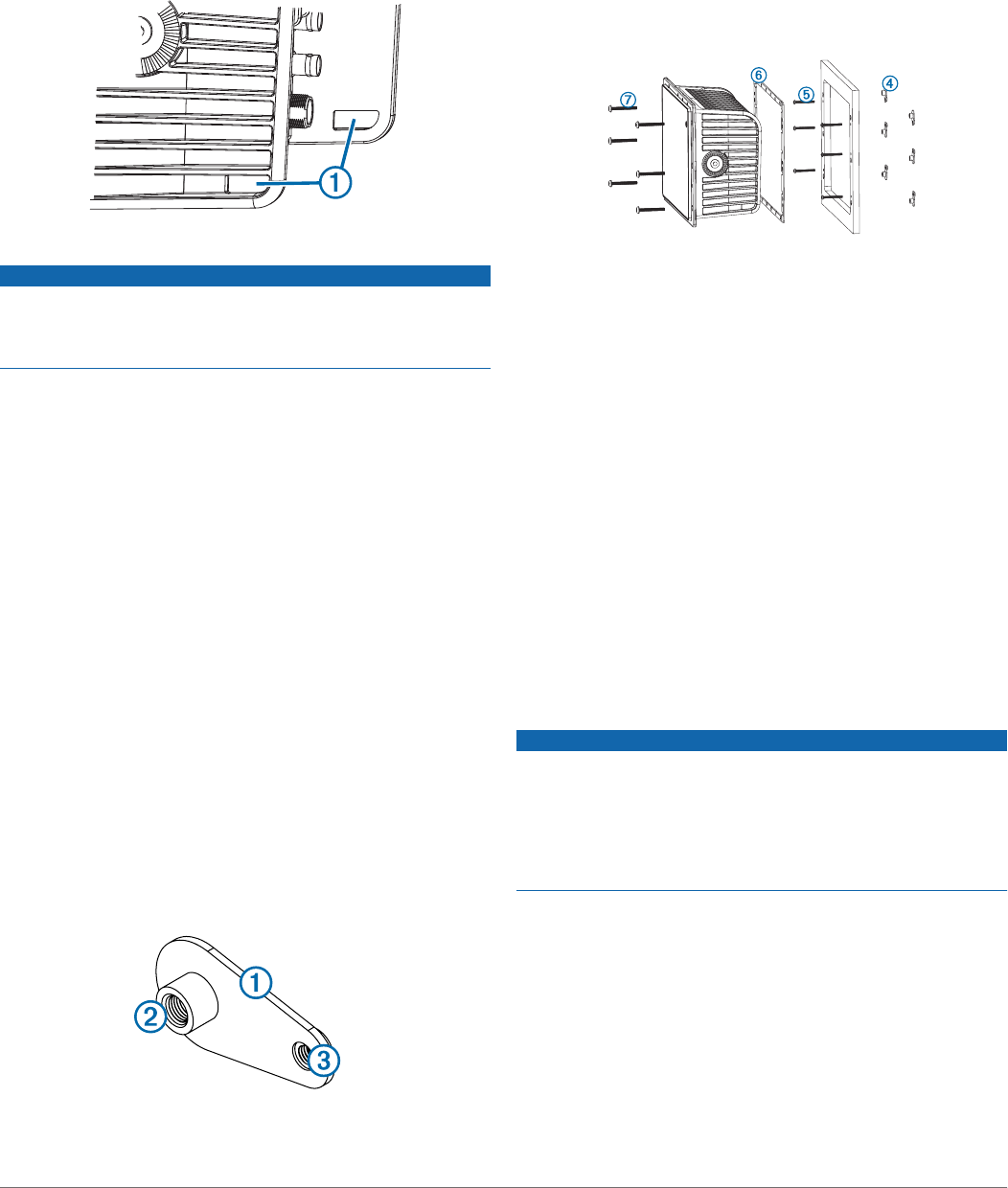
10Starting in one corner of the template, place a nut plate À
over the larger hole Á drilled in step 9.
The smaller 9/64 in. (3.5 mm) hole  on the nut plate should
line up with the smaller hole on the template.
11If the smaller 9/64 in. (3.5 mm) hole on the nut plate does not
line up with the smaller hole on the template, mark the new
hole location.
12Repeat steps 10–11 for each of the nut plates along the
sides of the device as indicated on the template.
13Using a 9/64 in. (3.5 mm) drill bit, drill the smaller holes.
14Remove the template from the mounting surface.
15Starting in one corner of the mounting location, place a nut
plate à on the back of the mounting surface, lining up the
large and small holes.
The raised portion of the nut plate should fit into the larger
hole.
16Secure the nut plate to the mounting surface by fastening an
included M3 screw Ä through the smaller 9/64 in. (3.5 mm)
hole.
17Repeat steps 15–16 for each of the nut plates along the
sides of the device.
18Install the rubber gasket Å on the back of the device.
The pieces of the rubber gasket have adhesive on the back.
Make sure you remove the protective liner before installing
them on the device.
19If you will not have access to the back of the device after you
mount it, connect all necessary cables to the device before
placing it into the cutout.
NOTE: To prevent corrosion of the metal contacts, cover
unused connectors with the attached weather caps.
20Place the device into the cutout.
21Secure the device to the mounting surface using the included
M4 screws Æ.
22Insert the included plugs over each of the M4 screw heads.
23Install the decorative bezel by snapping it in place around the
edges of the device.
Card Reader Mounting Considerations
NOTICE
This device should be mounted in a location that is not exposed
to extreme temperatures or conditions. The temperature range
for this device is listed in the product specifications. Extended
exposure to temperatures exceeding the specified temperature
range, in storage or operating conditions, may cause device
failure. Extreme-temperature-induced damage and related
consequences are not covered by the warranty.
The card reader can be flush mounted in the dashboard using
the included hardware. When selecting a mounting location,
observe these considerations.
• The card reader should be mounted in an accessible
location. You must be able to access the card reader when
necessary to insert and remove memory cards containing
additional mapping and device updates, and to transfer user
data.
• To avoid interference with a magnetic compass, the device
should not be installed closer to a compass than the
compass-safe distance value listed in the product
specifications.
2
• The location must allow room for the routing and connection
of the cables.
Mounting the Card Reader
NOTICE
Be careful when cutting the hole to flush mount the device.
There is only a small amount of clearance between the case
and the mounting holes, and cutting the hole too large could
compromise the stability of the device after it is mounted.
If you are mounting the bracket on fiberglass with screws, it is
recommended to use a countersink bit to drill a clearance
counterbore through only the top gel-coat layer. This will help to
avoid any cracking in the gel-coat layer when the screws are
tightened.
The included template and hardware can be used to flush
mount the device at the selected location.
1Trim the flush-mount template and make sure it fits in the
location where you want to mount the device.
2Remove the protective liner from the back of the template
and adhere it to the location where you want to mount the
device.
3Using a ¼ in. (6 mm) drill bit, drill one or more of the holes
inside the corners of the solid line on the template to prepare
the mounting surface for cutting.
4Using a jigsaw, cut the mounting surface along the inside of
the solid line indicated on the template.
5Place the device in the cutout to test the fit.
6If necessary, use a file and sandpaper to refine the size of
the cutout.
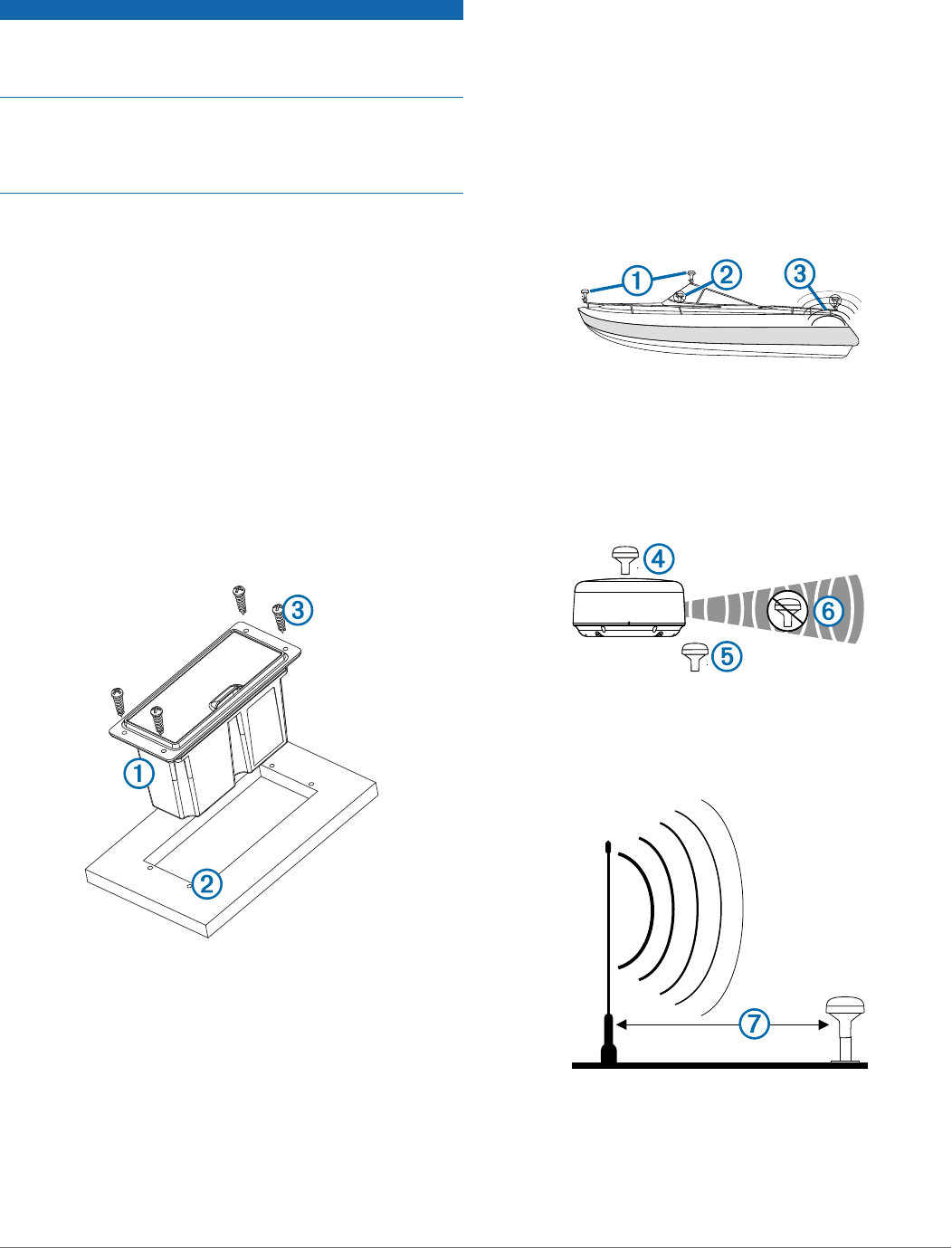
7After the device À fits correctly in the cutout, make sure that
the mounting holes on the device line up with the pilot holes
Á on the template.
8If the mounting holes on the device do not line up, mark the
new pilot-hole locations.
9Using a center punch, indent the pilot holes and drill the
clearance counterbore through the gell-coat layer as advised
in the notice.
10Remove the template from the mounting surface.
11If you will not have access to the back of the device after you
mount it, connect all necessary cables to the device before
placing it into the cutout.
12Place the device into the cutout.
13Secure the device to the mounting surface using the included
screws Â.
14Install the decorative bezel by snapping it in place around the
edges of the device.
Antenna Mounting Considerations
You can mount the antenna on a flat surface, install it under
fiberglass, or attach it to a standard 1 in. OD, 14 threads per
inch, pipe-threaded pole (not included). You can route the cable
outside of the pole or through the pole. For optimal
performance, consider these guidelines when selecting the
antenna mounting location.
• To avoid interference with a magnetic compass, the antenna
should not be mounted closer to a compass than the
compass-safe distance value listed in the product
specifications.
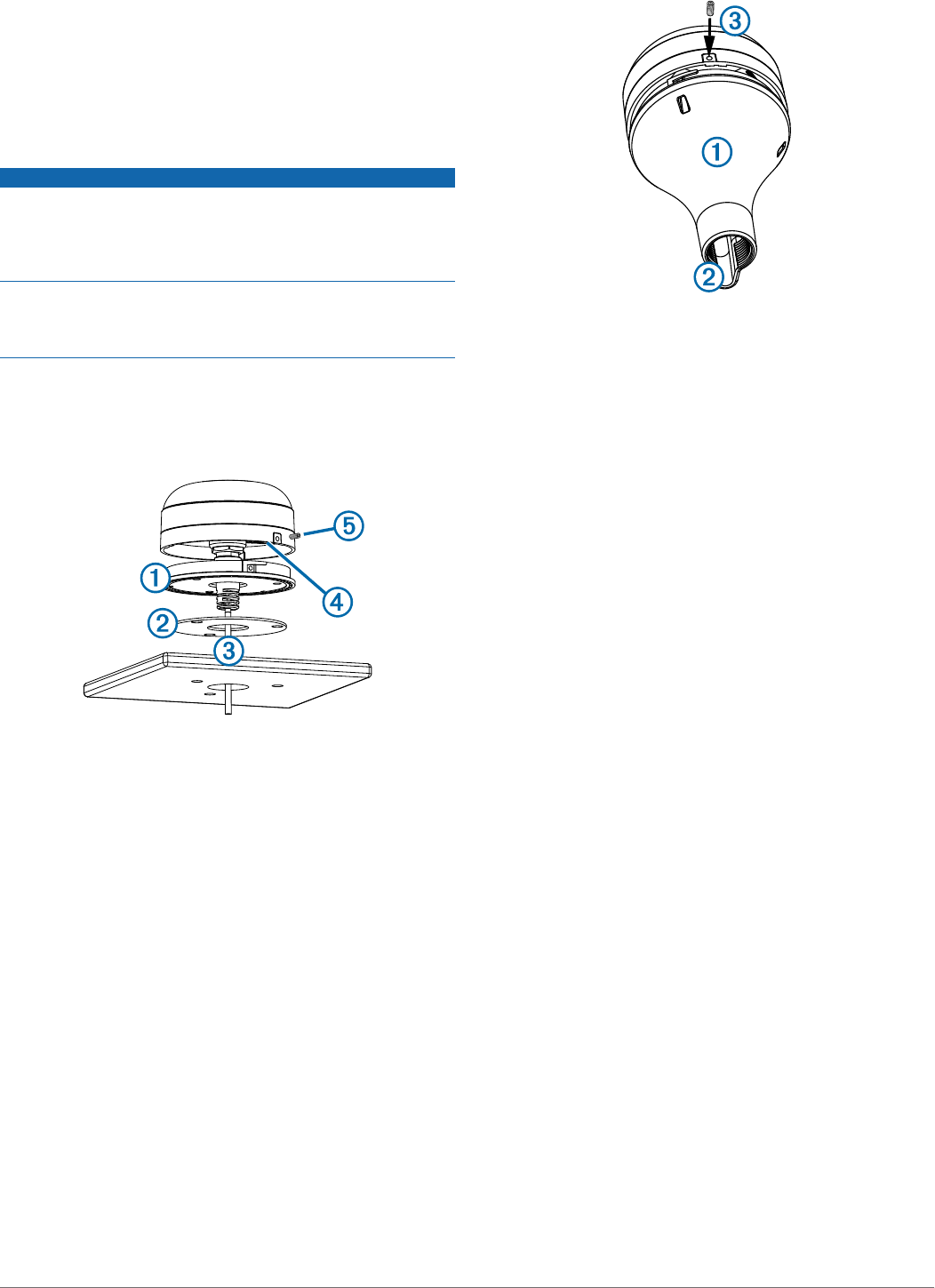
• To ensure the best reception, the antenna should be
mounted in a location that has a clear, unobstructed view of
the sky in all directions À.
• The antenna should not be mounted where it is shaded by
the superstructure of the boat Á, a radome antenna, or the
mast.
• The antenna should not be mounted near the engine or other
sources of Electromagnetic Interference (EMI) Â.
• If a radar is present, the antenna should be mounted above
the path of the radar Ã. If necessary, the antenna may be
mounted below the path of the radar Ä.
• The antenna should not be mounted directly in the path of
the radar Å.
• The antenna should be mounted at least 3 ft. (1 m) away
from (preferably above) the path of a radar beam or a VHF
radio antenna Æ .
• On a sailboat, to prevent inaccurate speed readings caused
by excessive heeling, the antenna should not be mounted
high on the mast.
• The antenna provides more-stable readings when located
nearer to water level.
3
Testing the Mounting Location
1Temporarily secure the antenna in the preferred mounting
location and test it for correct operation.
2If you experience interference with other electronics, move
the antenna to a different location, and test it again.
3Repeat steps 1–2 until the antenna operates correctly.
4Permanently mount the antenna.
Surface Mounting the Antenna
NOTICE
If you are mounting the bracket on fiberglass with screws, it is
recommended to use a countersink bit to drill a clearance
counterbore through only the top gel-coat layer. This will help to
avoid any cracking in the gel-coat layer when the screws are
tightened.
Stainless-steel screws may bind when screwed into fiberglass
and overtightened. Garmin recommends applying an anti-
galling, stainless anti-seize lubricant to the screws before
installing them.
Before you permanently mount the antenna, you must test the
mounting location for correct operation (page 3).
1Using the surface-mount bracket À as your mounting
template, mark the three pilot-hole locations and trace the
cable-hole in the center of the bracket.
2Set the surface-mount bracket aside.
Do not drill through the bracket.
3Drill the three 1/8 in. (3.2 mm) pilot holes.
4Use a 1 in. (25 mm) hole saw to cut the cable hole in the
center.
5Place the seal pad Á on the bottom of the surface-mount
bracket, aligning the screw holes.
6Use the included M4 screws to secure the surface-mount
bracket to the mounting surface.
7Route the cable  through the 1 in. (25 mm) hole and
connect it to the antenna.
8Verify that the large gasket à is in place on the bottom of the
antenna, place the antenna on the surface-mount bracket,
and twist it clockwise to lock it in place.
9Secure the antenna to the mounting bracket with the
included M3 set screw Ä.
10Route the cable away from sources of electronic
interference.
Mounting the Antenna with the Cable Routed Outside the
Pole
Before you permanently mount the antenna, you must test the
mounting location for correct operation (page 3).
1Route the cable through the pole-mount adapter À, and
place the cable in the vertical slot Á along the base of the
pole-mount adapter.
2Screw the pole-mount adapter onto a standard 1 in. OD, 14
threads per inch, pipe-threaded pole (not included).
Do not overtighten the adapter on the pole.
3Connect the cable to the antenna.
4Place the antenna on the pole-mount adapter and twist it
clockwise to lock it in place.
5Secure the antenna to the adapter with the included M3 set
screw Â.
6With the antenna installed on the pole mount, fill the
remaining gap in the vertical cable slot with a marine sealant
(optional).
7Attach the pole to the boat if it is not already attached.
8Route the cable away from sources of electronic
interference.
Mounting the Antenna with the Cable Routed Through the
Pole
Before you permanently mount the antenna, you must test the
mounting location for correct operation (page 3).
1Position a standard 1 in. OD, 14 threads per inch, pipe-
threaded pole (not included) in the selected location, and
mark the approximate center of the pole.
2Drill a hole using a ¾ in. (19 mm) drill bit for the cable to
pass through.
3Fasten the pole to the boat.
4Thread the pole-mount adapter onto the pole.
Do not overtighten the adapter.
5Route the cable through the pole and connect it to the
antenna.
6Place the antenna on the pole-mount adapter and twist it
clockwise to lock it in place.
7Secure the antenna to the adapter with the included M3 set
screw À.
4
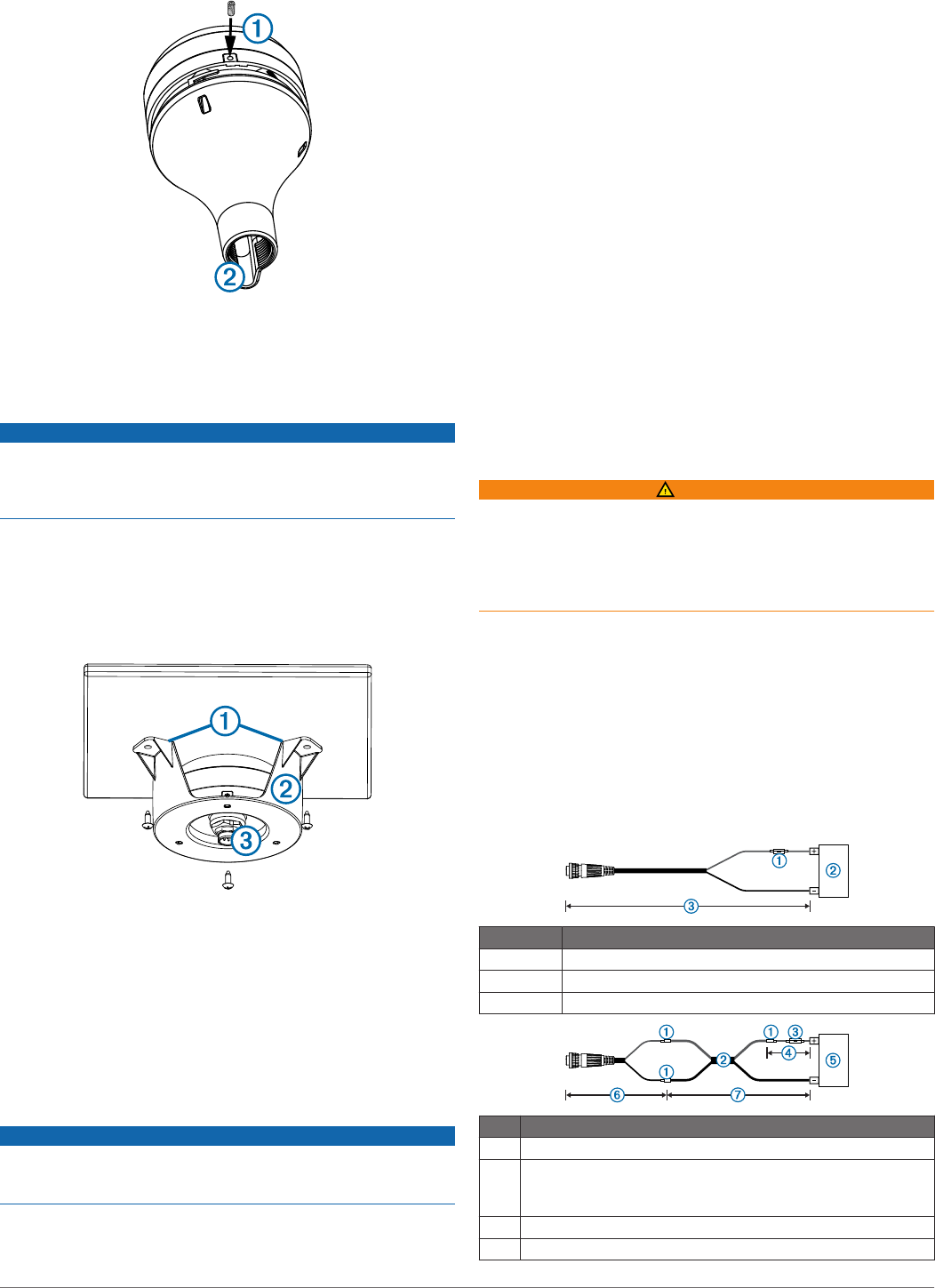
8With the antenna installed on the pole mount, fill the vertical
cable slot Á with a marine sealant (optional).
9Route the cable away from sources of electronic
interference.
Mounting the Antenna Under the Deck
NOTICE
Before attaching the under-deck mounting bracket to the
surface, verify that the supplied screws will not penetrate the
surface. If the supplied screws are too long, you must purchase
surface-appropriate screws to complete the installation.
Before you permanently mount the antenna, you must test the
mounting location for correct operation (page 3).
Because the antenna cannot acquire signals through metal, it
must be mounted under a fiberglass surface only.
1Place the adhesive pads À on the under-deck mounting
bracket Á.
2Place the antenna in the under-deck mounting bracket.
3Adhere the under-deck mounting bracket to the mounting
surface.
4Secure the under-deck mounting bracket to the mounting
surface with screws.
5Connect the cable to the antenna Â.
6Route the cable away from sources of electronic
interference.
Cable and Connection Considerations
NOTICE
A blue rubber seal is included for each DVI port on the device.
This seal must be installed between each DVI port and DVI-
cable connector to avoid damage to the connectors.
• For easer cable routing, the power, NMEA® 0183, and
Garmin Marine Network cables are packaged without the
locking rings installed. You should route the cables before
you install the locking rings.
• After connecting a locking ring to a cable, make sure the ring
is securely connected and the o-ring is in place so the power
or data connection remains secure.
• The device should be connected to the same power source
as the card reader. If this is not possible, the devices must
be connected to the same ground.
Station Connection Considerations
This device can be set up in conjunction with other compatible
Garmin devices to work together as a station. When planning
stations on your boat, observe these considerations.
• Devices prior to the GPSMAP 8000 series and GPSMAP
8500 cannot be used in a station.
• Although it is not necessary, it is recommended that you
install all of the devices you plan to use in one station near
each other.
• No special connections are necessary to create a station, as
long as all of the devices are connected to the Garmin
Marine Network (page 6).
• Stations are created and modified using the device software.
See the owner's manual provided with the device for more
information.
Connecting to Power
WARNING
When connecting the power cable, do not remove the in-line
fuse holder. To prevent the possibility of injury or product
damage caused by fire or overheating, the appropriate fuse
must be in place as indicated in the product specifications. In
addition, connecting the power cable without the appropriate
fuse in place will void the product warranty.
1Route the power cable to the power source and to the
device.
2Connect the red wire to the positive (+) battery terminal, and
connect the black wire to the negative (-) battery terminal.
3Install the locking ring and o-ring on the end of the power
cable.
4Connect the power cable to the device by turning the locking
ring clockwise.
Power Cable Extensions
If necessary, the power cable can be extended using the
appropriate wire gauge for the length of the extension.
Item Description
ÀFuse
ÁBattery
Â6 ft. (1.8 m) no extension
Item Description
ÀSplice
Á• 12 AWG (3.31 mm²) extension wire, up to 15 ft. (4.6 m)
• 10 AWG (5.26 mm²) extension wire, up to 23 ft. (11 m)
• 8 AWG (8.36 mm²) extension wire, up to 36 ft. (11 m)
ÂFuse
Ã8 in. (20.3 cm)
5
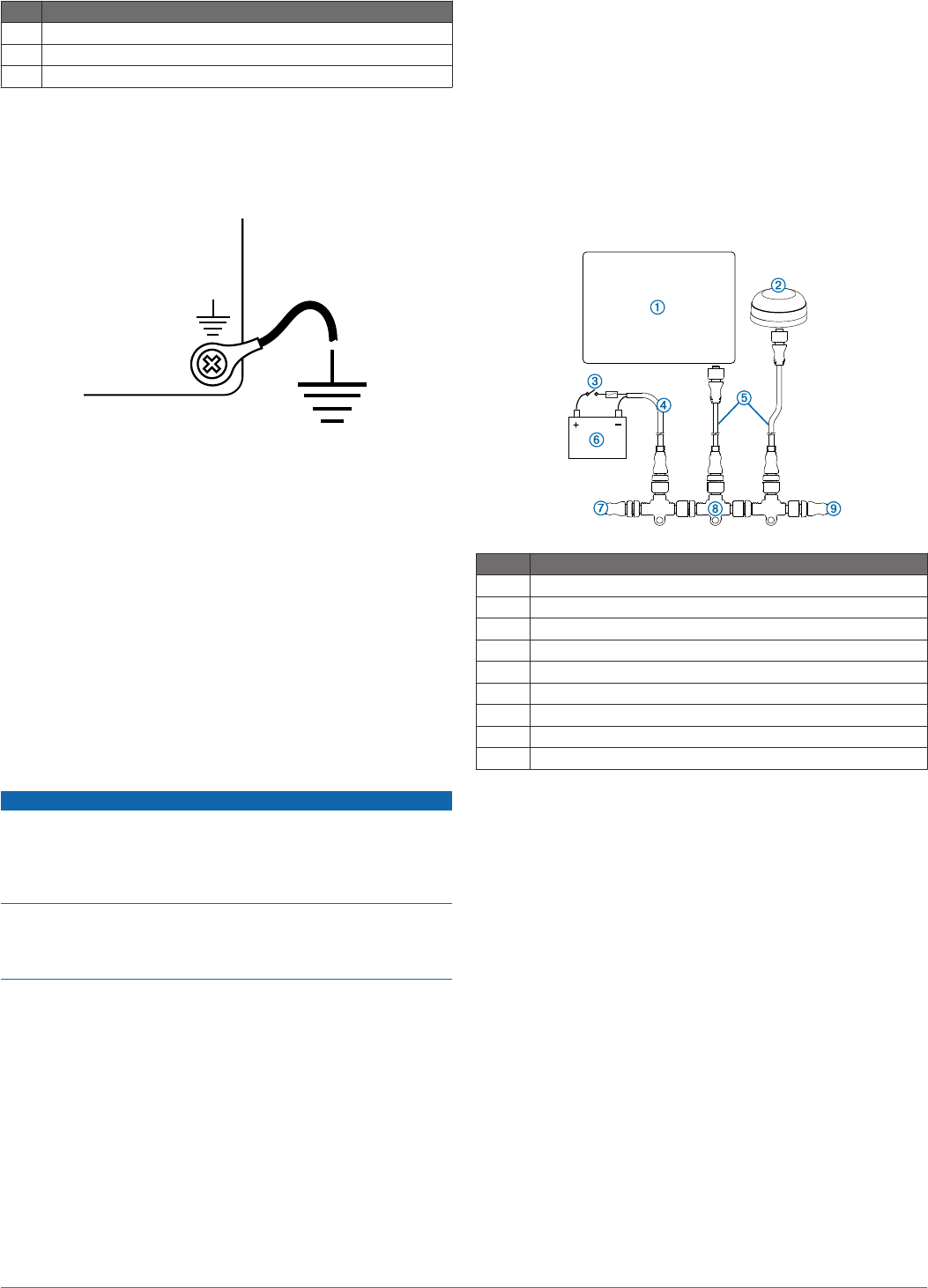
Item Description
ÄBattery
Å8 in. (20.3 cm)
Æ36 ft. (11 m) maximum extension
Additional Grounding Considerations
This device should not need any additional chassis grounding in
most installation situations. If interference is experienced, the
grounding screw on the housing can be used to connect the
device to the water ground of the boat to help avoid the
interference.
Garmin Marine Network Considerations
This device can connect to additional Garmin Marine Network
devices to share data such as radar, sonar, and detailed
mapping. When connecting Garmin Marine Network devices to
this device, observe these considerations.
• A Garmin Marine Network cable must be used for all Garmin
Marine Network connections.
◦ Third-party CAT5 cable and RJ45 connectors must not be
used for Garmin Marine Network connections.
◦ Additional Garmin Marine Network cables and connectors
are available from your Garmin dealer.
• There are four NETWORK ports on the device that each act
as a network switch. Any compatible device can be
connected to any NETWORK port to share data with all
devices on the boat connected by a Garmin Marine Network
cable.
NMEA 2000® Considerations
NOTICE
If you have an existing NMEA 2000 network on your boat, it
should already be connected to power. Do not connect the
included NMEA 2000 power cable to an existing NMEA 2000
network, because only one power source should be connected
to a NMEA 2000 network.
If you are installing the included NMEA 2000 power cable, you
must connect it to the boat ignition switch or through another in-
line switch. NMEA 2000 devices will drain your battery if the
NMEA 2000 power cable is connected to the battery directly.
This device can connect to a NMEA 2000 network on your boat
to share data from NMEA 2000-compatible devices such as a
GPS antenna or a VHF radio. The included NMEA 2000 cables
and connectors allows you to either connect the device to your
existing NMEA 2000 network or create a basic NMEA 2000
network if needed.
If you are unfamiliar with NMEA 2000, you should read the
“NMEA 2000 Network Fundamentals” chapter of the Technical
Reference for NMEA 2000 Products on the included CD-ROM
or click the “Manuals” link on the product page for your device at
www.garmin.com.
The port labeled NMEA 2000 is used to connect the device to a
standard NMEA 2000 network. The ports labeled ENGINE and
HOUSE are reserved for future use and should not be
connected to a standard NMEA 2000 network.
Item Description
ÀNMEA 2000-compatible Garmin device
ÁGPS antenna
ÂIgnition or in-line switch
ÃNMEA 2000 power cable
ÄNMEA 2000 drop cable
Å12 Vdc power source
ÆNMEA 2000 terminator or backbone cable
ÇNMEA 2000 T-connector
ÈNMEA 2000 terminator or backbone cable
NMEA 0183 Connection Considerations
• The installation instructions provided with your NMEA 0183-
compatible device should contain the information you need
to identify the transmitting (Tx) and receiving (Rx) A (+) and
B (-) wires.
• When connecting NMEA 0183 devices with two transmitting
and two receiving wires, it is not necessary for the NMEA
2000 bus and the NMEA 0183 device to connect to a
common ground.
• When connecting a NMEA 0183 device with only one
transmitting (Tx) wire or with only one receiving (Rx) wire,
the NMEA 2000 bus and the NMEA 0183 device must be
connected to a common ground.
Basic NMEA 0183 Connections
These diagrams illustrate basic NMEA 0183 wiring used to connect your device to NMEA 0183-compliant devices. For more
information on the NMEA 0183 capabilities of the device, see page 8.
6
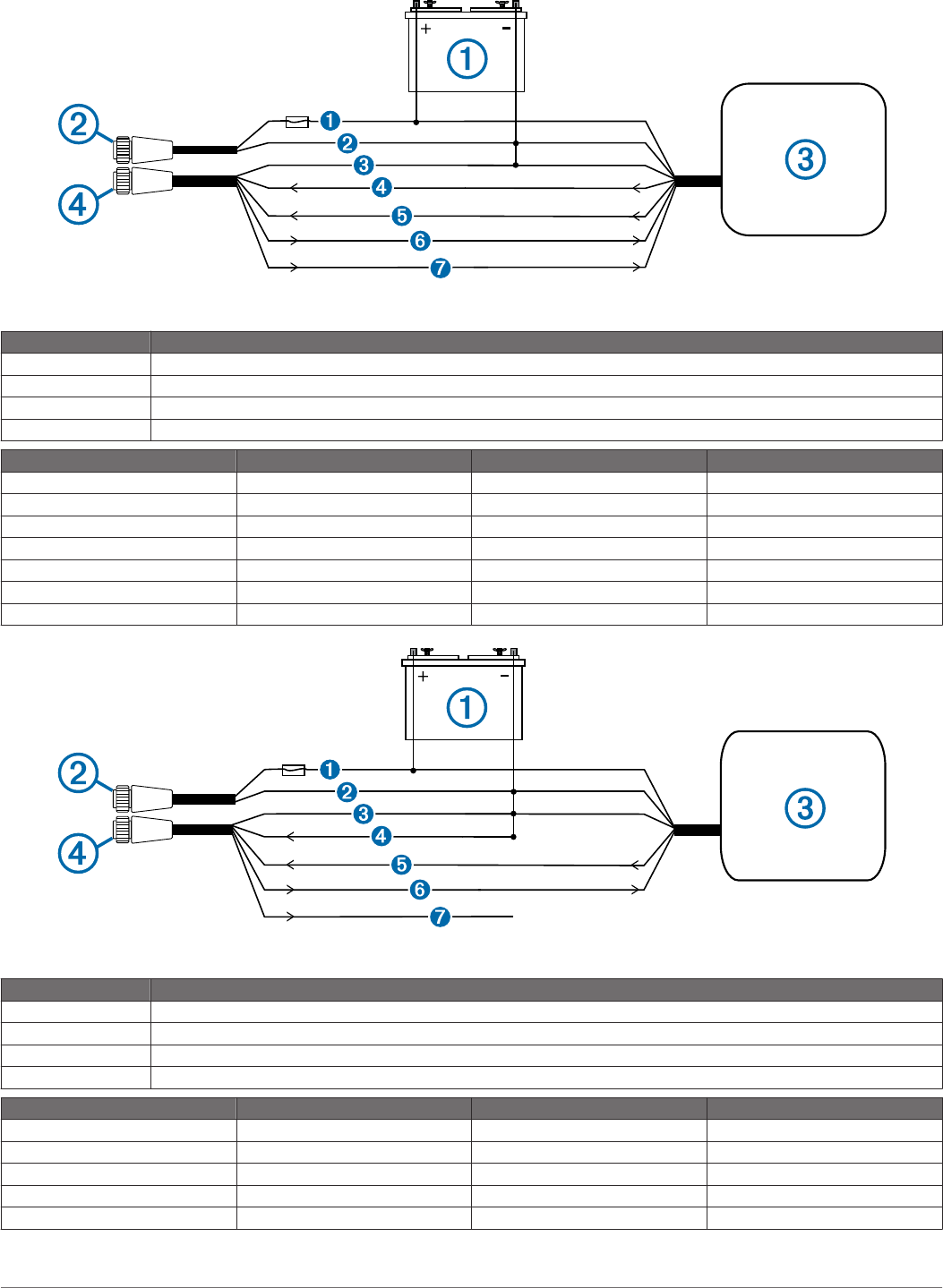
Standard NMEA 0183-Compliant Device
Item Description
À12 Vdc power source
ÁPower cable
ÂNMEA 0183-compliant device
ÃNMEA 0183 cable
Item Garmin Wire Function Garmin Wire Color NMEA 0183 Device Wire Function
ÊPower Red Power
ËPower ground Black Power ground
ÌData ground Black Data ground
ÍReceive A (+) White Transmit A (+)
ÎReceive B (-) Orange/white Transmit B (-)
ÏTransmit A (+) Gray Receive A (+)
ÐTransmit B (-) Pink Receive B (-)
Single-Ended NMEA 0183-Compliant Device
Item Description
À12 Vdc power source
ÁPower cable
ÂNMEA 0183-compliant device
ÃNMEA 0183 cable
Item Garmin Wire Function Garmin Wire Color NMEA 0183 Device Wire Function
ÊPower Red Power
ËPower ground Black Power ground
ÌData ground Black Data ground
ÍReceive B (-) Orange/white N/A
ÎReceive A (+) White Transmit
7
Item Garmin Wire Function Garmin Wire Color NMEA 0183 Device Wire Function
ÏTransmit A (+) Gray Receive
ÐTransmit B (-) Pink N/A
• If the NMEA 0183-compliant device has only one input (RX) wire (no A, B, +, or -), leave the pink wire unconnected.
• If the NMEA 0183-compliant device has only one output (TX) wire (no A, B, +, or -), connect the orange/white wire to ground.
• Consult the installation instructions of your NMEA 0183-compliant device to identify the output A(+) and B(-) wires and input A(+)
and B(-) wires.
• Use 28 AWG, shielded, twisted-pair wiring for extended runs of wire.
• Solder all connections and seal them with heat-shrink tubing.
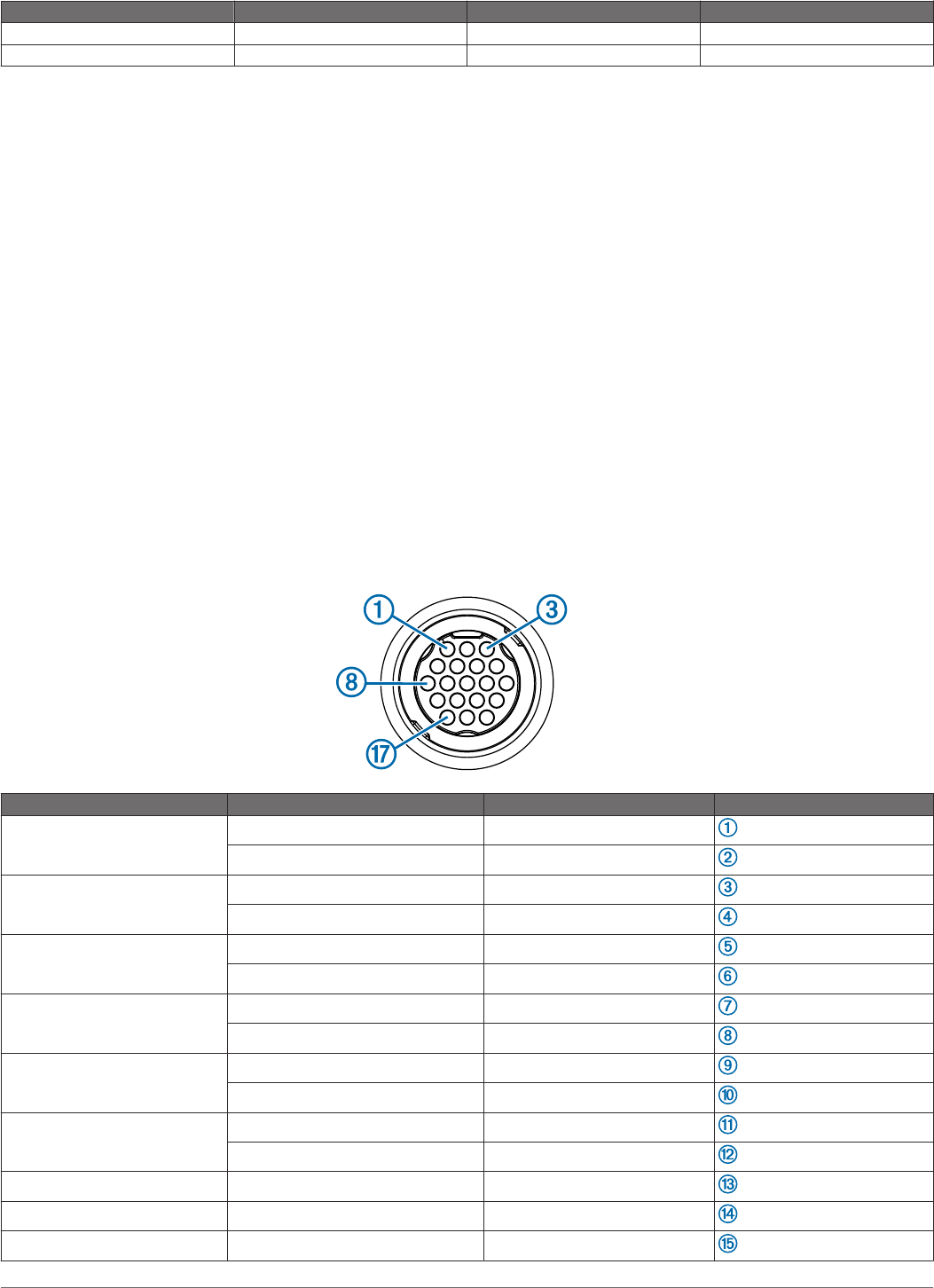
Advanced NMEA 0183 Connections
There are four internal NMEA 0183 input ports (RX ports), and two internal NMEA 0183 output (TX ports) on the included NMEA
0183 data cable. You can connect one NMEA 0183 device per internal RX port to input data to your Garmin device, and you can
connect up to three NMEA 0183 devices in parallel to each internal TX port to receive data output by your Garmin device. Each
internal RX and TX port has 2 wires, labeled A (+) and B (-) according to the NMEA 0183 convention. The corresponding A (+) and
B (-) wires of each internal port should be connected to the A (+) and B (-) wires of your NMEA 0183-compliant device. Refer to the
table and wiring diagrams when connecting the data cable to NMEA 0183 devices.
Consult the installation instructions for your NMEA 0183-compliant device to identify the output (TX) A (+) and B (-) wires and input
(RX) A (+) and B (-) wires. Use 28 AWG, shielded, twisted-pair wiring for extended runs of wire. Solder all connections and seal
them with heat-shrink tubing.
• For two-way communication with a NMEA 0183 device, the internal ports on the NMEA 0183 data cable are not linked. For
example, if the input of the NMEA-compliant device is connected to the internal output port 1 on the data cable, you can connect
the output port of your NMEA 0183-compliant device to any of the internal input ports (port 1, port 2, port 3, or port 4) on the
wiring harness.
• The ground wires on the NMEA 0183 data cable and your NMEA 0183-compliant device must both be connected to ground.
• See page 12 for a list of the approved NMEA 0183 sentences output by and input to your device.
• The internal NMEA 0183 ports and communication protocols are configured on the connected Garmin device. See the NMEA
0183 section or communication configuration section of the owner's manual provided with your Garmin device for more
information.
Port Wire Function Wire Color Pin Number
Input port 1 RX/A (+) White
RX/B (-) Orange/white
Input port 2 RX/A (+) Brown
RX/B (-) Brown/white
Input port 3 RX/A (+) Violet
RX/B (-) Violet/white
Input port 4 RX/A (+) Black/white
RX/B (-) Red/white
Output port 1 TX/A (+) Gray
TX/B (-) Pink
Output port 2 TX/A (+) Blue
TX/B (-) Blue/white
N/A Spare N/A
N/A Spare N/A
N/A Spare N/A
8
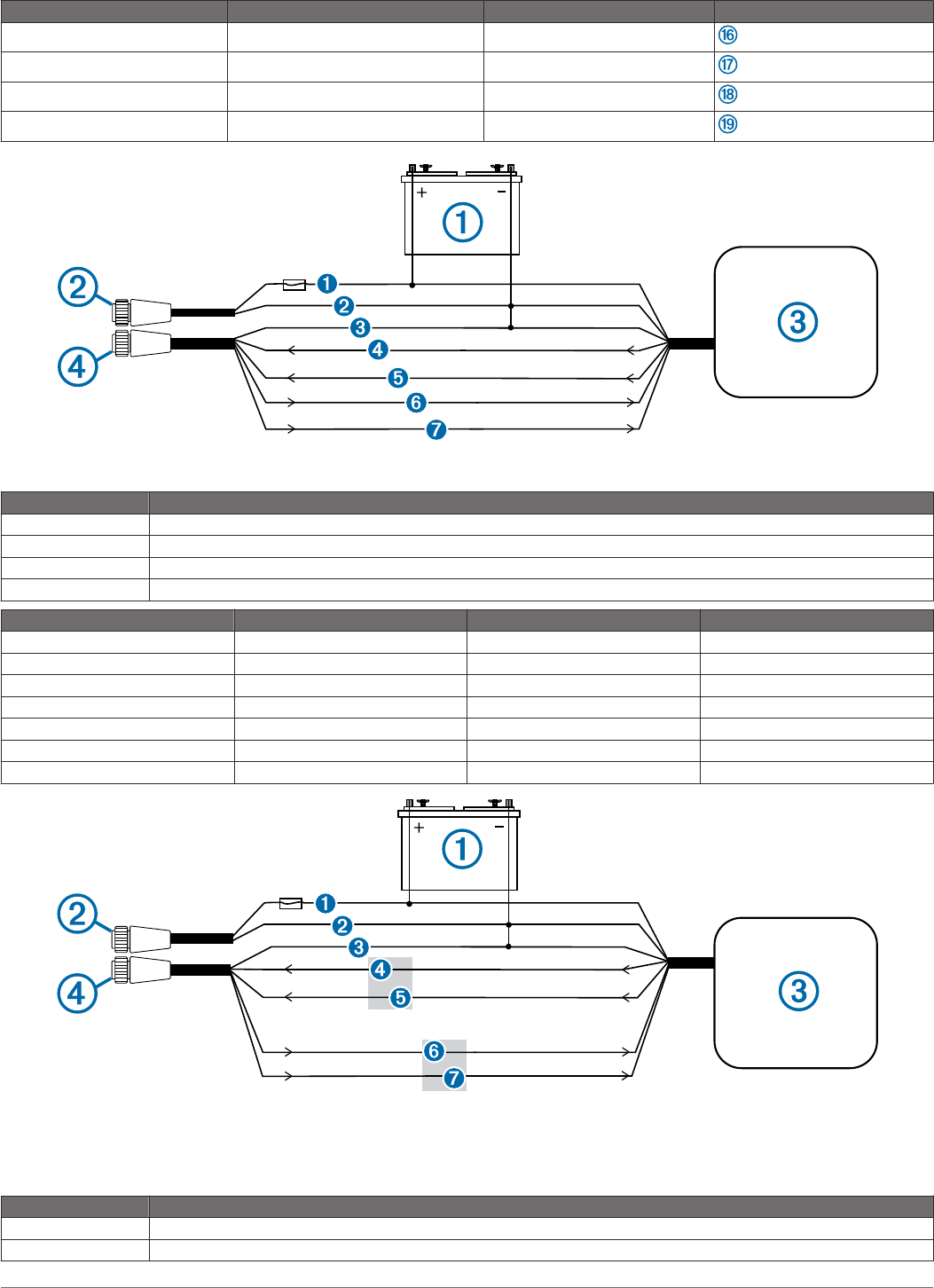
Port Wire Function Wire Color Pin Number
N/A Alarm Yellow
N/A Accessory on Orange
N/A Ground Black
N/A Spare N/A
Standard NMEA 0183-Compliant Device Connected for Two-Way Communication
Item Description
À12 Vdc power source
ÁPower cable
ÂNMEA 0183-compliant device
ÃNMEA 0183 cable
Item Garmin Wire Function Garmin Wire Color NMEA 0183 Device Wire Function
ÊPower Red Power
ËPower ground Black Power ground
ÌData ground Black Data ground
ÍRxA (+) White TxA (+)
ÎRxB (-) Orange/white TxB (-)
ÏTxA (+) Gray RxA (+)
ÐTxB (-) Pink RxB (-)
Standard NMEA 0183-Compliant Device Connected for One-Way Communication
NOTE: This diagram illustrates both sending and receiving connections. Refer to items Ê, Ë, Ì, Í, and Î when connecting the
Garmin device to receive information from a NMEA 0183-compatible device, and refer to items Ê, Ë, Ì, Ï, and Ð when connecting
the Garmin device to transmit information to a NMEA 0183-compatible device.
Item Description
À12 Vdc power source
ÁPower cable
9
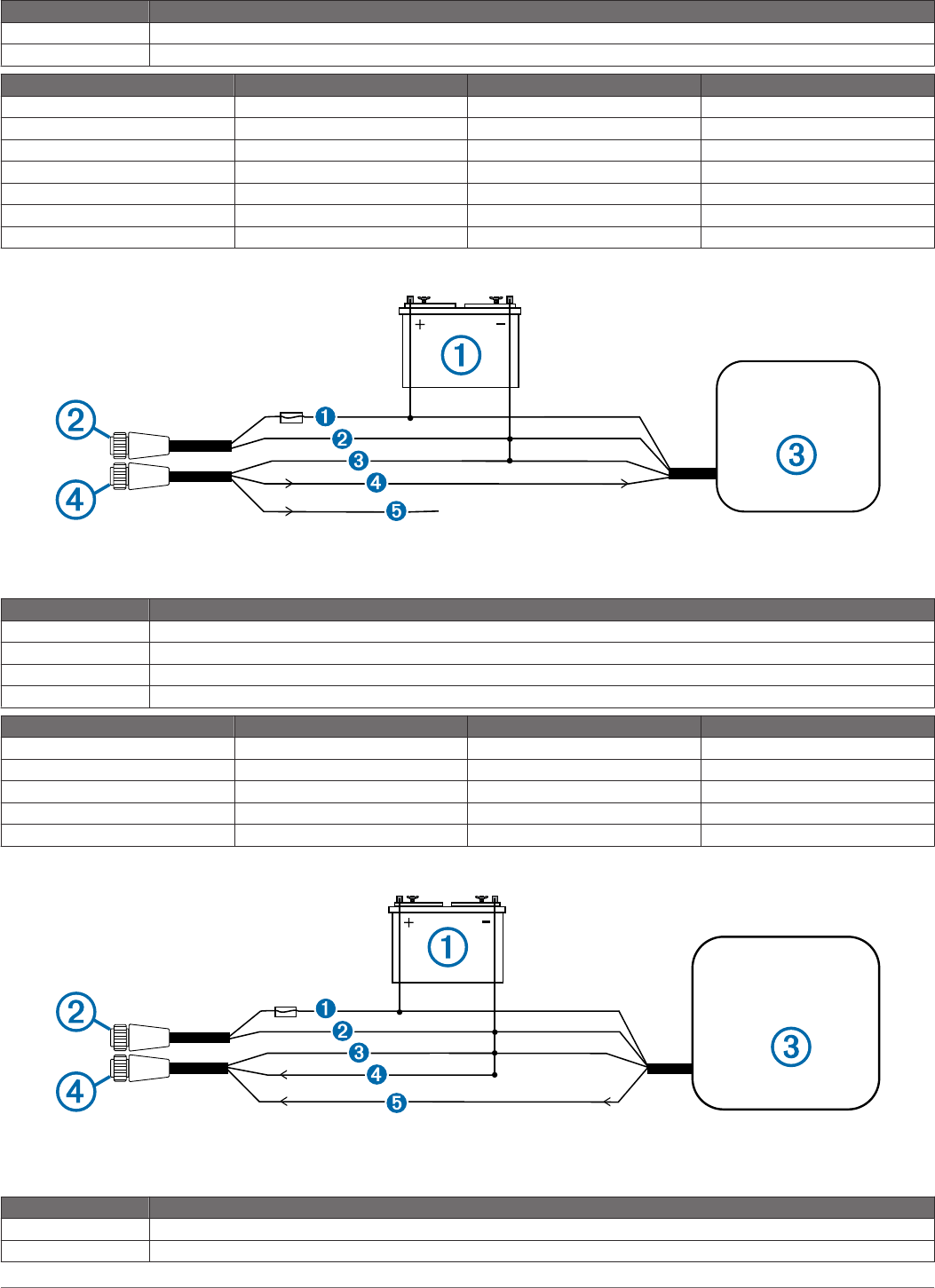
Item Description
ÂNMEA 0183-compliant device
ÃNMEA 0183 cable
Item Garmin Wire Function Garmin Wire Color NMEA 0183 Device Wire Function
ÊPower Red Power
ËPower ground Black Power ground
ÌData ground Black Data ground
ÍRxA (+) White TxA (+)
ÎRxB (-) Orange/white TxB (-)
ÏTxA (+) Gray RxA (+)
ÐTxB (-) Pink RxB (-)
NMEA 0183-Compliant Device With a Single Receiving Wire Connected to Receive Data
Item Description
À12 Vdc power source
ÁPower cable
ÂNMEA 0183-compliant device
ÃNMEA 0183 cable
Item Garmin Wire Function Garmin Wire Color NMEA 0183 Device Wire Function
ÊPower Red Power
ËPower ground Black Power ground
ÌData ground Black Data ground
ÍTxA (+) Gray RxA
ÎTxB (-) Pink N/A
NMEA 0183-Compliant Device With a Single Transmitting Wire Connected to Send Data
Item Description
À12 Vdc power source
ÁPower cable
10
Item Description
ÂNMEA 0183-compliant device
ÃNMEA 0183 cable
Item Garmin Wire Function Garmin Wire Color NMEA 0183 Device Wire Function
ÊPower Red Power
ËPower ground Black Power ground
ÌData ground Black Data ground
ÍRxB (-) Orange/white N/A
ÎRxA (+) White TxA (+)
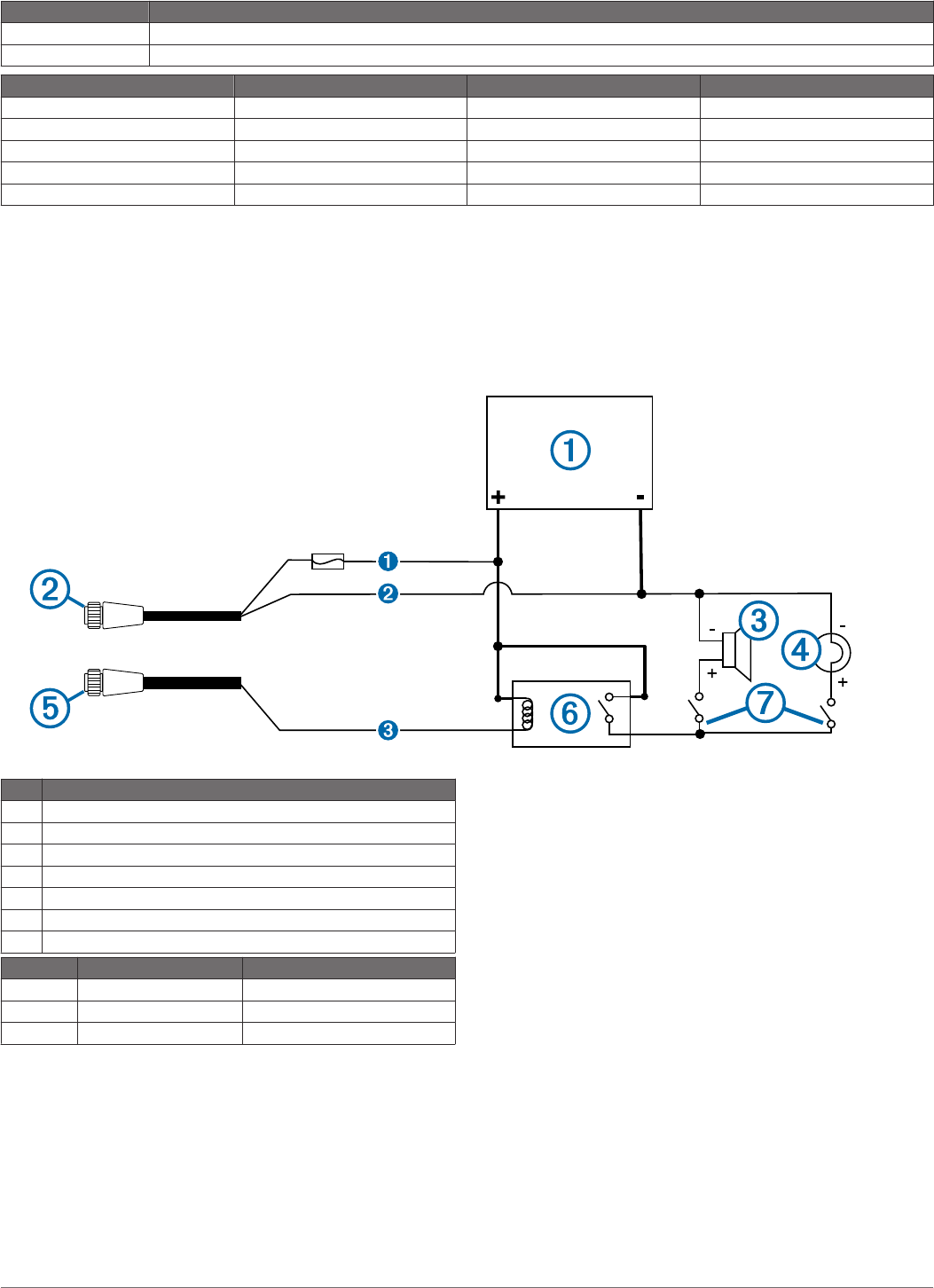
Lamp or Horn Connections
The device can be used with a lamp, a horn, or both, to sound
or flash an alert when the chartplotter displays a message. This
is optional, and the alarm wire does not need to be used in
order for the device to function normally. When connecting the
device to a lamp or horn, observe these considerations.
• The alarm circuit switches to a low-voltage state when the
alarm sounds.
• The maximum current is 100 mA, and a relay is needed to
limit the current from the chartplotter to 100 mA.
• To manually toggle visual and audible alerts, you can install
single-pole, single-throw switches.
Item Description
À10–35 Vdc power source
ÁPower cable
ÂHorn
ÃLamp
ÄNMEA 0183 cable
ÅRelay (100 mA coil current)
ÆToggle switches to enable and disable lamp or horn alerts
Item Wire Color Wire Function
ÊRed Power
ËBlack Ground
ÌYellow Alarm
Video Input and Output Considerations
This device allows video input from composite, component, and
digital video sources, depending on the model, and video output
to a monitor. When connecting video input and output sources,
observe these considerations.
• The eight- and twelve-inch models have two composite-video
ports labeled CVBS 1 IN, and CVBS 2 IN. The fifteen-inch
models have four composite-video ports labeled CVBS 1 IN,
CVBS 2 IN, CVBS 3 IN, and CVBS 4 IN.
• The fifteen-inch models have one component-video port
labeled COMPONENT IN (480i/576i).
◦ The composite- and component-video ports use BNC
connectors. You can use a BNC to RCA adapter to
connect a composite-video source with RCA connectors
to these ports.
◦ The video from sources connected to these ports is
available only for display on the device or additional
monitor connected to the device. Composite or
component video is not shared across the Garmin Marine
Network or NMEA 2000 network.
• The fifteen-inch models have one video port labeled DVI-I
VIDEO IN that accepts video from digital or analog sources
using a DVI-D or DVI-I cable.
◦ If needed, you can use an HDMI to DVI-D converter to
connect an HDMI-compatible source to this device.
◦ If needed, you can use a VGA to DVI-I adapter to connect
a VGA source to this port.
• You can connect a display to the DVI-I VIDEO OUT port to
view a mirror image of the screen on a computer monitor or
HD TV using a DVI-D or DVI-I cable.
◦ If needed, you can use a DVI-D to HDMI adapter to
connect to an HD TV or other HDMI-compatible display.
◦ If needed, you can use a DVI-I to VGA adapter to connect
to a computer monitor or other VGA-compatible display.
• Although it is recommended to use DVI cables sold by
Garmin, high-quality third-party DVI cables may be used.
11
You should test the DVI cable by connecting the devices
before routing the cable.
Card Reader Connections
Connecting to Power
WARNING
When connecting the power cable, do not remove the in-line
fuse holder. To prevent the possibility of injury or product
damage caused by fire or overheating, the appropriate fuse
must be in place as indicated in the product specifications. In
addition, connecting the power cable without the appropriate
fuse in place will void the product warranty.
1Route the power cable to the power source and to the
device.
2Connect the red wire to the positive (+) battery terminal, and
connect the black wire to the negative (-) battery terminal.
3Install the locking ring and o-ring on the end of the power
cable.
4Connect the power cable to the device by turning the locking
ring clockwise.
Connecting the Card Reader to the Garmin Marine
Network
The card reader is not compatible with Garmin chartplotters
prior to the GPSMAP 8000 Series and GPSMAP 8500.
Connect the card reader to a Garmin device on the Garmin
Marine Network using a Garmin Marine Network cable.
Data from cards inserted in the card reader is shared with all
compatible devices on the Garmin Marine Network.
Updating the Device Software
The device may contain a software-update memory card. If so,
follow the instructions provided with the card.
If a software update memory card is not included, go to
www.garmin.com to make sure your device software is up-to-
date.
1If necessary, load the software update onto the memory card
from your computer by following the instructions on
www.garmin.com.
2Turn on the chartplotter.
3Insert the memory card into the card slot.
4Follow the on-screen instructions.
Specifications
Physical Specifications
Device Specification Measurement
Eight-inch
models
Dimensions
(W×H×D)
107/16 × 731/64 × 417/32in. (265 ×
190 × 115 mm)
Display size
(W×H)
647/64 in. × 51/8 in. (171 × 130 mm)
Weight 7.12 lbs (3.23 kg)
Twelve-inch
models
Dimensions
(W×H×D)
137/64 × 923/32 × 313/36in. (333 ×
247 × 97 mm)
Display size
(W×H)
921/32 in. × 7¼ in. (245 × 184 mm)
Weight 10.91 lbs (4.95 kg)
Fifteen-inch
models
Dimensions
(W×H×D)
157/8 × 123/64 × 345/64in. (403 ×
306 × 94 mm)
Display size
(W×H)
1131/32 in. × 863/64 in. (304 × 228
mm)
Weight 16.76 lbs (7.6 kg)
Device Specification Measurement
All models Temperature
range
From 5° to 131°F (from -15° to
55°C)
Material Die case aluminum and
polycarbonate plastic
Power Specifications
Device Specification Measurement
All models Input power 10–35 Vdc
Fuse 7.5 A, 42 V fast-acting
NMEA 2000 LEN 2
NMEA 2000 Draw 75 mA max.
Eight-inch
models
Max. power usage at 10 Vdc 28 W
Typical current draw at 12
Vdc
1.3 A
Max current draw at 12 Vdc 2.8 A
Compass-safe distance 1213/64 (310 mm)
Twelve-inch
models
Max. power usage at 10 Vdc 35 W
Typical current draw at 12
Vdc
1.6 A
Max. current draw at 12 Vdc 3.5 A
Compass-safe distance 187/64 (460 mm)
Fifteen-inch
models
Max. power usage at 10 Vdc 47 W
Typical current draw at 12
Vdc
2.5 A
Max. current draw at 12 Vdc 4.7 A
Compass-safe distance 187/64 (460 mm)
GPS 19x Antenna Specifications
Measurement Specification
Dimensions (diameter x
height)
319/32 in. × 115/16 in. (91.6 × 49.5 mm)
Weight 7.1 oz (201 g)
Temperature range -22° to 176°F (-30° to 80°C)
Case material Fully gasketed, high-impact plastic alloy,
waterproof to IEC 60529 IPX7 standards.
Compass-safe distance 557/64 in. (150 mm)
Power input source 9–16 Vdc
Input current 40 mA at 12 Vdc
NMEA 2000 LEN 2
NMEA 2000 draw 100 mA max
NMEA 2000 PGN Information
Type PGN Description
Transmit and
receive
059392 ISO acknowledgment
059904 ISO request
060928 ISO address claim
126208 NMEA: Command, request, and
acknowledge group function
126464 Transmit and receive PGN list group
function
126996 Product information
129026 COG and SOG : Rapid update
129029 GNSS position data
129540 GNSS satellites in view
130306 Wind data
130312 Temperature
Transmit 127250 Vessel heading
127258 Magnetic variance
128259 Speed: Water referenced
128267 Water depth
12
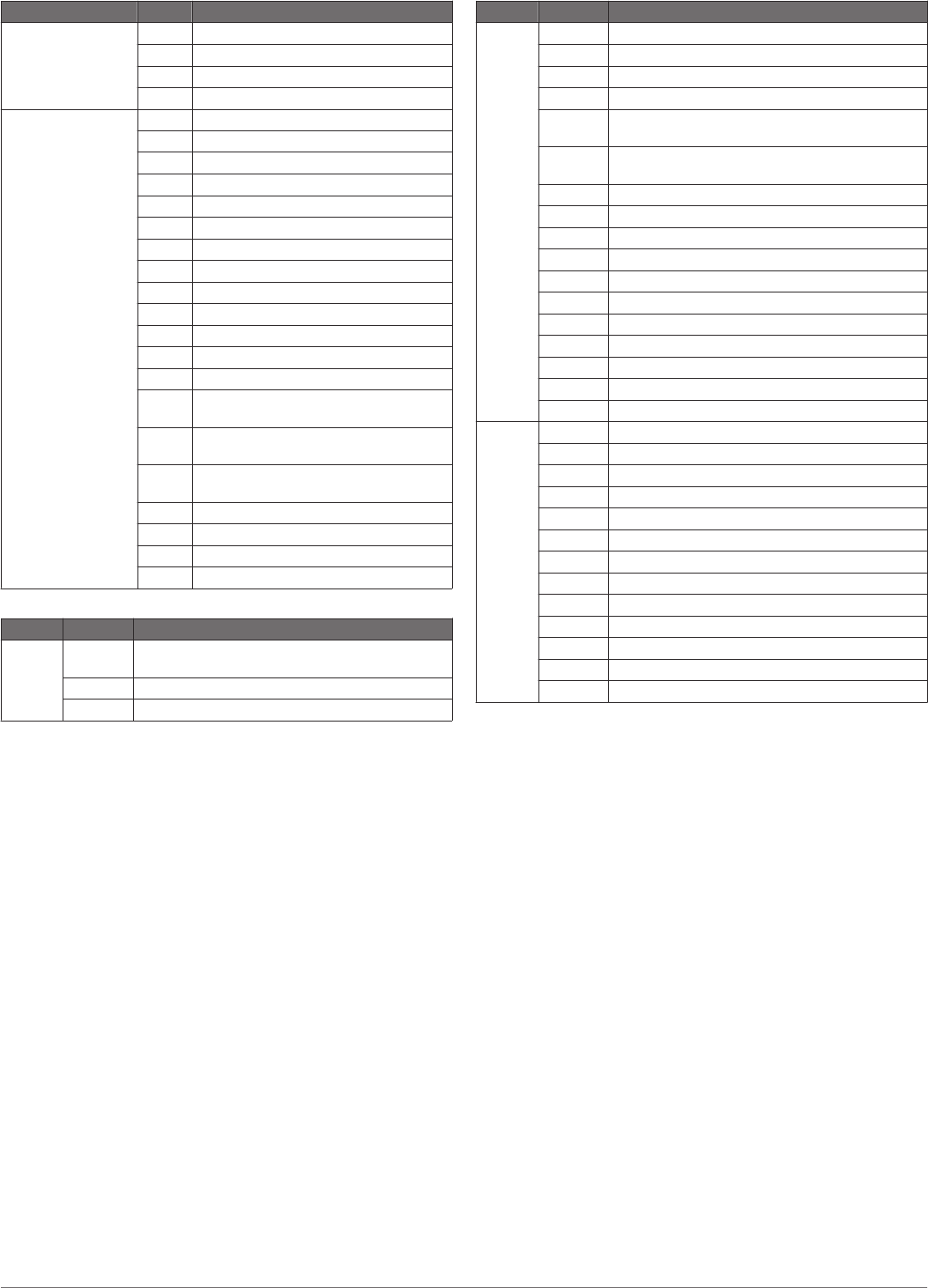
Type PGN Description
129025 Position: Rapid update
129283 Cross track error
129284 Navigation data
129285 Navigation route and waypoint info
Receive 126992 System time
127250 Vessel heading
127489 Engine parameters: Dynamic
127488 Engine parameters: Rapid update
127493 Transmission parameters: Dynamic
127505 Fluid level
128259 Speed: water referenced
128267 Water depth
129025 Position: rapid update
129038 AIS class A position report
129039 AIS class B position report
129040 AIS class B extended position report
129539 GNSS DOPs
129794 AIS class A static and voyage related
data
129809 AIS class B "CS" static data report, part
A
129810 AIS class B "CS" static data report, part
B
130310 Environmental parameters
130311 Environmental parameters
130313 Humidity
130314 Actual pressure
NMEA 0183 Information
Type Sentence Description
Transmit GPAPB APB: Heading or track controller (autopilot)
sentence "B"
GPBOD BOD: Bearing (origin to destination)
GPBWC BWC: Bearing and distance to waypoint
Type Sentence Description
GPGGA GGA: Global positioning system fix data
GPGLL GLL: Geographic position (latitude and longitude)
GPGSA GSA: GNSS DOP and active satellites
GPGSV GSV: GNSS satellites in view
GPRMB RMB: Recommended minimum navigation
information
GPRMC RMC: Recommended minimum specific GNSS
data
GPRTE RTE: Routes
GPVTG VTG: Course over ground and ground speed
GPWPL WPL: Waypoint location
GPXTE XTE: Cross track error
PGRME E: Estimated error
PGRMM M: Map datum
PGRMZ Z: Altitude
SDDBT DBT: Depth below transducer
SDDPT DPT: Depth
SDMTW MTW: Water temperature
SDVHW VHW: Water speed and heading
Receive DPT Depth
DBT Depth below transducer
MTW Water temperature
VHW Water speed and heading
WPL Waypoint location
DSC Digital selective calling information
DSE Expanded digital selective calling
HDG Heading, deviation, and variation
HDM Heading, magnetic
MWD Wind direction and speed
MDA Meteorological composite
MWV Wind speed and angle
VDM AIS VHF data-link message
13

Garmin International, Inc.
1200 East 151st Street
Olathe, Kansas 66062, USA
Garmin (Europe) Ltd.
Liberty House, Hounsdown Business Park
Southampton, Hampshire, SO40 9LR UK
Garmin Corporation
No. 68, Zhangshu 2nd Road, Xizhi Dist.
New Taipei City, 221, Taiwan (R.O.C.)
Garmin®, the Garmin logo, and GPSMAP® are trademarks of Garmin Ltd. or its subsidiaries, registered in the USA and other countries.
NMEA®, NMEA 2000®, and the NMEA 2000 logo are registered trademarks of the National Marine Electronics Association.
© 2012 Garmin Ltd. or its subsidiaries www.garmin.com/support
