Genex Telecom GCT-430 2.4 GHz Cordless Telephone Equipment User Manual 5
Genex Telecom Co., Ltd. 2.4 GHz Cordless Telephone Equipment 5
users manual

5.14 User’s Manual
Refer to Appendix 11.
AirMagic
Owner’s manual
Model GCT-430
2.4 GHz DSST Cordless
Headset mini-phone.
Customer Service NO 1 888 667 - 5559

FCC RF EXPOSURE INFORMATION
Read this information before using your phone
In August 1996 the Federal Communications Commission (FCC) of the United States with its action in Report and
Order FCC 96-326 adopted an updated safety standard for human exposure to radio frequency (RF) electromagnetic
energy emitted by FCC regulated transmitters. Those guidelines are consistent with the safety standard previously set
by both U.S. and international standards bodies. The design of this phone complies with the FCC guidelines and
these international standards.
Use only the supplied or an approved antenna. Unauthorized antennas, modifications, or attachments could impair
call quality, damage the phone, or result in violation of FCC regulations.
Do not use the phone with a damaged antenna. If a damaged antenna comes into contact with
the skin, a minor burn may result. Please contact your local dealer for replacement antenna.
WARNING - FCC Regulations state that any unauthorized changes or modifications to this equipment not expressly
approved by the manufacturer could void the user’s authority to operate this equipment.

PRECAUTION
√√ IMPORTANT
Read this manual before attempting to setup or use this instrument. If contains important information
regarding safe installation and use. Keep this manual for future reference. Also save the carton, packing and
proof of purchase to simplify and accelerate any needed action.
√√ WARNING
1. To prevent fire or shock hazard, do not expose this product to rain or any type of moisture. If accidentally
dropped into water, this product should immediately unplug from the A/C outlet and telephone wall jack.
2. Never install telephone jacks in wet locations unless the jack is specially designed for wet locations.
3. Never touch insulated telephone wires or terminals unless the telephone line has been disconnected at the
network interface.
4. Use caution when installing or modifying telephone lines.
IMPORTANT SAFETY INSTRUCTIONS
When using your telephone equipment, basic safety precautions should always be followed to reduce the risk of live
electric shock, and injury to persons, including the following.
1. Read and understand all instructions.
2. Unplug this product from the outlet before cleaning. Do not use liquid cleaners or aerosol cleaners. Use a
damp cloth for cleaning.
3. Do not use this product near water, for example, near a bathtub, washbowl, kitchen sink, or Laundry tub in a
wet Basement or near a swimming pool.
4. Do not place this product on an unstable cart, stand, or table. The product may fall, causing serious damage
to the product.
5. This product should be operated only from the type of power source indicated on the marking label. If you
are not sure of the type of power supply to your home, consult your dealer.
6. To reduce the risk of electric shock, do not disassemble this product, but take it to a qualified service
contractor. Some service or removing covers may expose you to dangerous voltages or other risks. Incorrect
reassembly can cause electric shock when the appliance is subsequently used.
7. Unplug this product from the wall outlet and refer servicing to qualified service personnel under the following
conditions:
A. When the power supply cord or plug is damaged or frayed.
B. If liquid has been spilled into the product.
C. If the product has been exposed to rain or water.
D. If the product does not operate nor mally by following the operating instruction. Adjust only those controls
that are covered by the operating instructions. Improper adjustments of other controls may result in damage
and will often require extensive work by a qualified technician to restore the product to normal operation.
E. If the product has been dropped or the cabinet has been damaged.
F. If the product exhibits a distinctive change in performance.

FCC NOTICE
THIS DEVICE COMPLIES WITH PART 15 OF THE FCC RULES.
OPERATION IS SUBJECT TO THE FOLLOWING TWO CONDITIONS:
(1) THIS DEVICE MAY NOT CUASE HARMFUL INTERFERENCE, AND
(2) THIS DEVICE MUST ACCEPT AND INTERFERENCE RECEIVED,
INCLUDING INTERFERENCE THAT MAY CUASE UNDERSIED OPERATION.
This equipment has been tested and found to comply with the limits for a Class B digital device, pursuant to part 15 of
the FCC Rules. These limits are designed to provide reasonable protection against harmful interference in a
residential installation. This equipment generates, uses and can radiate radio frequency energy and, if not installed
and used in accordance with the instructions, may cause harmful interference to radio communication. However, there
is no guarantee that interference will not occur in a particular installation. If this equipment does cause harmfu l
interference to radio or television reception, which can be determined by turning the equipment off and on, the user is
encouraged to try to correct the interference by one or more of the following measures:
- Reorient or relocate the receiving antenna.
-Increase the separation between the equipment and receiver.
-Connect the equipment into an outlet on a circuit different from that to which the receiver is connected.
-Consult the dealer of an experienced radio/TV technician for help.
NOTE: The manufacturer is not responsible for any radio or TV interference caused by unauthorized modification to
this equipment. Such modifications could void the user’s authority to operate the equipment.
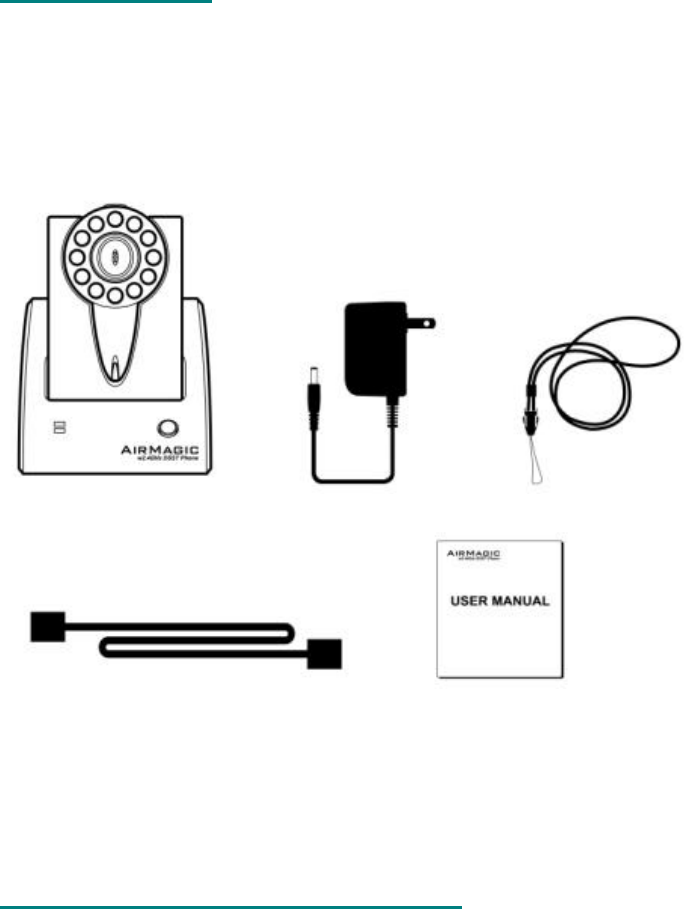
GCT-430 CHECKLIST
1.CT-D430 Base-set and Headset.
2. Necklace
3.AC Adaptor (AC 120V / DC9V, 300mA)
4.Telephone Line Cord
5.User's Manual
GCT-430 Set Wall A/C Adapter Necklace
Tell line User manual
DIGITAL SPREAD SPECTRUM TECHNOLOGY
The GCT-430 features digital Spread Spectrum Technology (DSST), which virtually eliminates noise and other
interference while greatly increasing operating range. DSST uniformly spreads the signal over one of 40 independent
frequency ranges, or channels, for maximum range and clarity. The Base-set and Headset share a pre-assigned
digital code which interfering signals do not have, so any Noise gets filtered out and the user enjoys reliable, crystal-
clear sound quality.

SPREAD SPECTRUM TECHNOLOGY ADVANTAGES
Smart Channel Hopping - During operation, the CT-D430 constantly monitors the transmission for interference. If
interference is detected, the phone automatically scans for and hops to the next clear channel. This hopping is instant
and does not interrupt normal conversation.
Maximum Security - The security code is changed every, selected from one of 2 - 24million different codes making
interception virtually impossible.
INSTALLATION
BASE-SET CONNECTION
1. Plug the telephone line cord into the telephone line jack at the back of the Base-set.
2. Connect the other end of the line cord into a modular telephone outlet located on your wall
POWER CONNECTION
CAUTION: You must use a Class II, AC 120 Volt /DC9 Volt adaptor that delivers at least 300 mA.
1. Plug the AC adapter into a standard AC outlet.
2. Insert the adapter plug into the DC 9V jack on the back of the Base-set.
CHARGING THE BATTERY (FULL CHARGE)
Once the Base-set has power connection, place the Headset in its cradle on the Base-set.
NOTE: THE Li-Polymer battery is continuously charged until the battery is full charged when the Headset is on the
cradle of the Base-set.
PREPARING FOR INITIAL USE
1. Check phone line and power connections.
2. Push the Headset TALK button to confirm that you have a dial tone. If you do not get a dial tone, please refer
to the Troubleshooting chart.
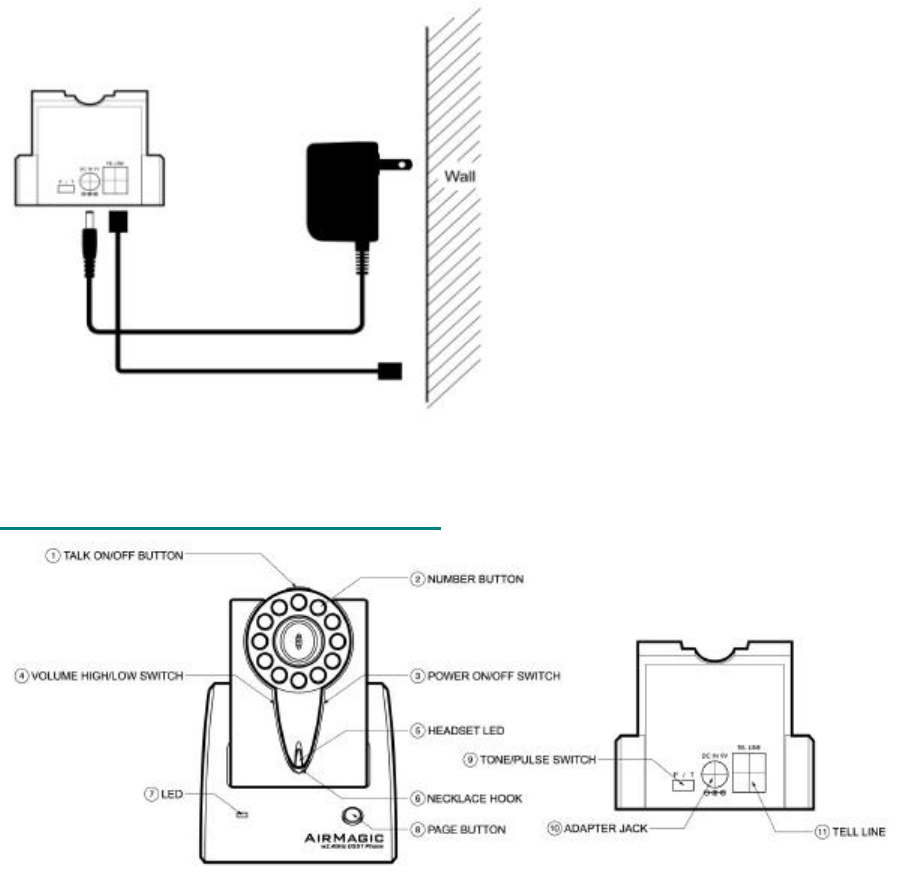
LOCATION OF CONTROL AND FEATURES

Talk on/off button
This button is used to place and receive a call
Number buttons (Keypads)
power on/off switch
User can turn on or off the power of Headset using power switch.
Volume high/low switch
User can choose high or low level of volume
Headset LED
It will flash when headset is active and battery is low.
Necklace Hook
It was designed to connect with necklace.
Base set LED
Green light when receiving a call and red light when placing headset into base-set
Page button
It helps to find the headset when it is away from the base-set
Tone/Pulse Switch
Set the dialing method to tone or pulse dialing
Adapter jack
Connect the base-set to wall adapter
Tell line
Connect the base to the telephone line
HEADSET OPERATION
To Place a Call (TALK Mode)
1. Press the TALK button on the Headset. The IN-USE indicator will light up when it finds a clear channel.
2. Listen for a dial tone.
3. Once you hear the dial tone, enter the telephone number using the keypad on the Headset.
To Receive a Call
When the Headset is on the Base-set:
Since the CT-D430 features "Auto -Answer", simply pick up the Headset from the Base-set cradle when the phone
Rings and start the conversation with the caller.
When the Headset is out of the Base-set:
Press the TALK button on the Headset and start the conversation with the caller.
To End a Call (Standby Mode)
Press the talk button on the headset or return the headset into base-set.
Once the headset is returned to the base-set, headset will automatically resume to standby mode.
2 - 24 Million Combination Digital Security Coding
The GCT-430 uses a digital coding security system to prevent unauthorized use of your telephone line by other nearby
cordless phones. The GCT-430 has 2 - 24 million possible security code combinations, which is randomly generated
every eight times the TALK button is pressed or Headset is picked up from the Base-set.

Channel Operation
40 Independent Channels
Unlike other cordless phones reputed to have hundreds of channels (which is receiving due to channel overlapping),
the GCT-430 features true 430 independent channels.
Overlapping channels may increase the number of channel, but interference also occurs in multiple channels
because of channel overlapping. On the contrary, the GCT-430's 40 independent channels exclusively keep their own
space, allowing the auto scan feature to find the clearest channel before it goes to TALK mode.
Smart Channel Hopping
During operation, the GCT-430 constantly monitors the transmission for interference. If Interference is detected, the
GCT-430 automatically scans and hopes to the next clear channel. This channel hopping is instant and does
interrupt normal conversation.
Resetting Security Code and Channel Information
Communication between the Headset and Base-set may be lost in any of the following situations:
1. After a power failure
2. After relocating the Base-set by disconnecting the AC adaptor.
3. The Headset goes out of range from the Base-set.
Out Of Range Detection
If you use the Headset too far away from the Base-set during a call, the Headset will alert you with
Audible warning beeps. Once you hear these warning beeps, move closer to the Base-set to be within normal
operating range.
NOTE: If you do not move within the normal operating range in several seconds after the first Out-of-Range warning
beeps, the Headset and the Base-set will return to the standby mode.
Low Battery Condition (BATT LED)
If the Headset BATT LED indicator starts flashing, return the Headset to its cradle on the Base-set to charge.

TROUBLE SHOOTING
AirMagic Limited Warranty
• What is covered: All parts defective in material and workmanship
• For how long: ONE year from the purchase date
• What we will do: Pay shipping or transportation charges on sending the unit back to
you.
• What we will not do: Pay shipping or transportation charges on receiving the unit from
you.
• What you must to do: Return product personally with proof of purchase to an authorized
AirMagic dealer, or Return product personally with proof of
purchase directly to AirMagic with following procedures:
1. Contact AirMagic for specific return and shipping instructions
2. Properly pack the product in the original carton for shipping. If you need a
new carton, contact AirMagic for a new carton available at nominal charge.
3. Label and ship, freight prepaid, to the address provided by AirMagic, and
SYMTPOM SOLUTION
No VOICE signal
♦Check for the line cord connectors at both ends that they are pushed in firmly until they
click♦ IF you had a power failure or had unplugged the base-set, replace the headset on
the base-set for two to five seconds to reset the system.
No power on the
headset
♦The headset rechargeable battery pack may need to be charged.
Does not charge
♦Make sure the charging contacts on both the headset and the base-set are in contact
during charging.
♦The charging contacts may need to be cleaned with an alcohol-moistened cloth.
♦The battery pack may need to be discharged first before a full charge.
Range is limited
♦Raise or reposition the bas-set.
Received Signal flutters
or fades
♦The transmitter rechargeable Li-Polymer battery pack may need charging.
♦You may be out of normal operating range. Move closer to the base-set.
place any necessary return authorization number prominently on the
outside of the carton.
(Cartons not bearing a return authorization number, where
required, will be refused.)
Other Conditions:
This warranty is fully transferable provided that the current owner furnished the original proof of purchase from an
authorized AirMagic dealer. THE PROVISION OF THIS WARRANTY ARE IN LIEU OF ANY OTHER WRITTEN
WARRANTY, WHETHER EXPRESSED OR IMPLIED, WRITTEN OR ORAL, INCLUDING ANY WARRANTY OF
MERCHANTABILITY OR FITNESS FOR A PARTICULAR PURPOSE. AIRMAGIC’S MAXIMUM LIABILITY SHALL NOT
EXCEED THE ACTUAL PURCHASING PRICE PAID BY YOU FOR THE PRODUCT. IN NO EVENT SHALL AIRMAGIC
BE LIABLE FOR SPECIAL, INCIDENTAL, CONSEQUENTIAL OR INDIRECT DAMAGES. This warranty does not cover
a defect that has resulted from improper or unreasonable use of maintenance, accident, improper packing, or
unauthorized tampering, alteration or modification as determined solely by us. This warranty is void if the label
bearing the serial number has been removed or defaced.
Other Legal Rights:
This warranty gives you specific legal rights, and you may also have other rights, which vary from country to country or
state to state. Some places do not allow limitations on implied warranties or the exclusion or the limitation of incidental
or consequential damages, so the above limitations or exclusions may not apply to you.