Geotab NFC1 RFID WIRELESS, CONTACTLESS IDENTIFICATION CARD READER User Manual

Geotab Inc. RFID WIRELESS, CONTACTLESS IDENTIFICATION CARD READER

User Manual

    Geotab, Inc. | www.geotab.com | T: (877) 436-8221 | Copyright 2012 – All Rights Reserved | Rev2 - 06/2013  1    IOX-NFC          IOX-NFC  The Geotab GO6™ device is the world’s only expandable plug-&-play vehicle telematics platform that allows for unique IOX™ expandability. Add NFC sales pitch below.  Top Features  Driver ID  Immobilization  ?  ? Harness Technical Specifications Weight  50 g Size   Antenna portion: 45mm x 50mm x 13mm   Connector portion:  and 30mm x 53mm x 15mm  Cables: 1 m, 300mm Housing  Flame retardant black ABS Interfaces  CAN: 500 Kbit/s; Daisy chain; Ground switch Frequency Range  13.56MHz  Power Output  12V/24V Power Consumption    Running Mode: 100mA  Sleeping Mode: 1.1 mA Connectors  Keyed 5-pin mini-USB type-B plug: Daisy chain power and CAN in.  Keyed 5-pin mini-USB type-B socket: Daisy chain power and CAN out.  2-pin grounding socket (molex connector)  Installation   Keyed mini-USB plug connects to GO6™ or another IOX™ harness.   Immobilizer module connects to 2-pin socket     Full Kit picture
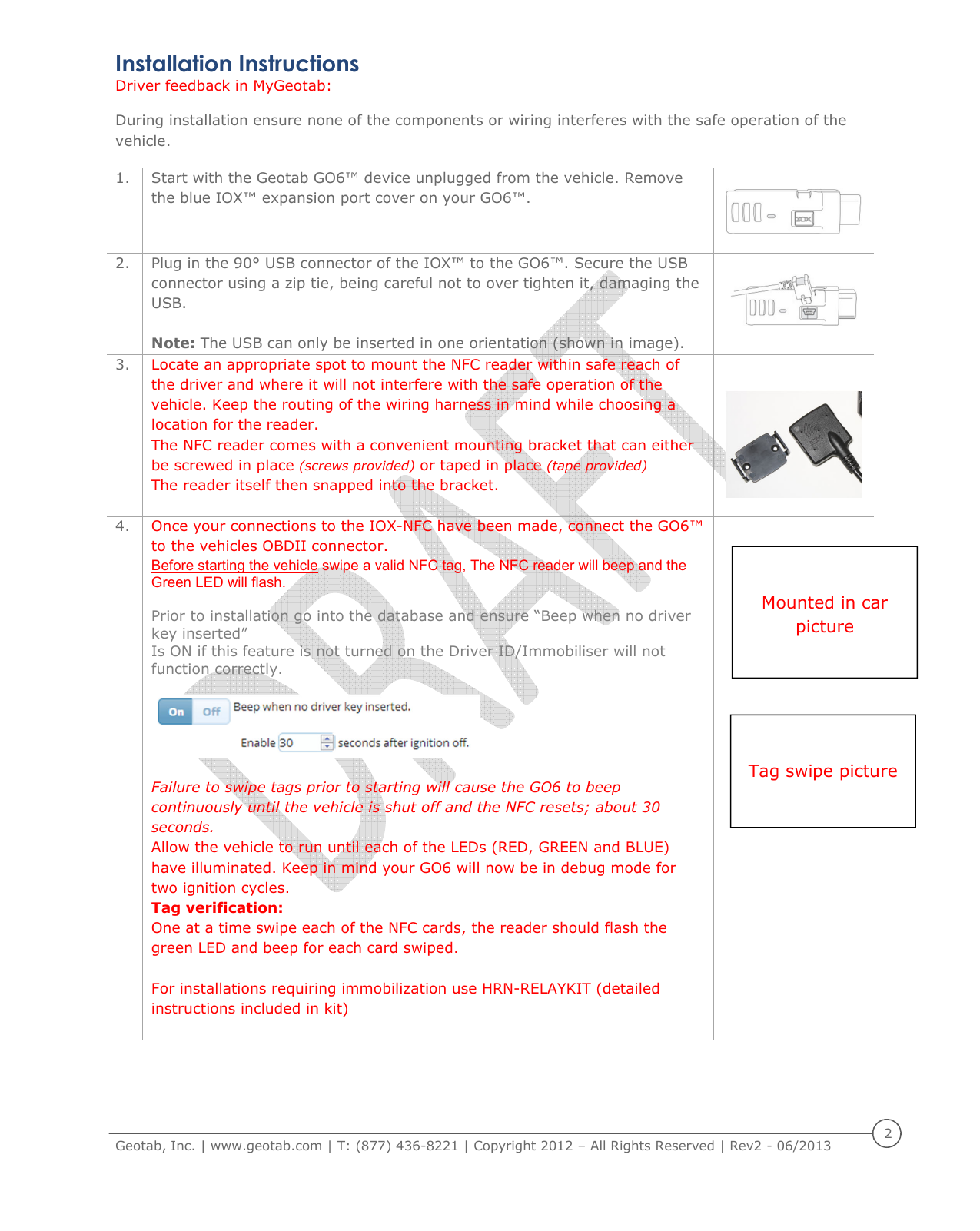
    Geotab, Inc. | www.geotab.com | T: (877) 436-8221 | Copyright 2012 – All Rights Reserved | Rev2 - 06/2013  2  Installation Instructions  Driver feedback in MyGeotab:  During installation ensure none of the components or wiring interferes with the safe operation of the vehicle. 1. Start with the Geotab GO6™ device unplugged from the vehicle. Remove the blue IOX™ expansion port cover on your GO6™.   2. Plug in the 90° USB connector of the IOX™ to the GO6™. Secure the USB connector using a zip tie, being careful not to over tighten it, damaging the USB.  Note: The USB can only be inserted in one orientation (shown in image).   3. Locate an appropriate spot to mount the NFC reader within safe reach of the driver and where it will not interfere with the safe operation of the vehicle. Keep the routing of the wiring harness in mind while choosing a location for the reader.  The NFC reader comes with a convenient mounting bracket that can either be screwed in place (screws provided) or taped in place (tape provided)  The reader itself then snapped into the bracket.   4. Once your connections to the IOX-NFC have been made, connect the GO6™ to the vehicles OBDII connector. Before starting the vehicle swipe a valid NFC tag, The NFC reader will beep and the Green LED will flash.   Prior to installation go into the database and ensure “Beep when no driver key inserted”  Is ON if this feature is not turned on the Driver ID/Immobiliser will not function correctly.    Failure to swipe tags prior to starting will cause the GO6 to beep continuously until the vehicle is shut off and the NFC resets; about 30 seconds. Allow the vehicle to run until each of the LEDs (RED, GREEN and BLUE) have illuminated. Keep in mind your GO6 will now be in debug mode for two ignition cycles. Tag verification:  One at a time swipe each of the NFC cards, the reader should flash the green LED and beep for each card swiped.   For installations requiring immobilization use HRN-RELAYKIT (detailed instructions included in kit)       Tag swipe picture  Mounted in car picture
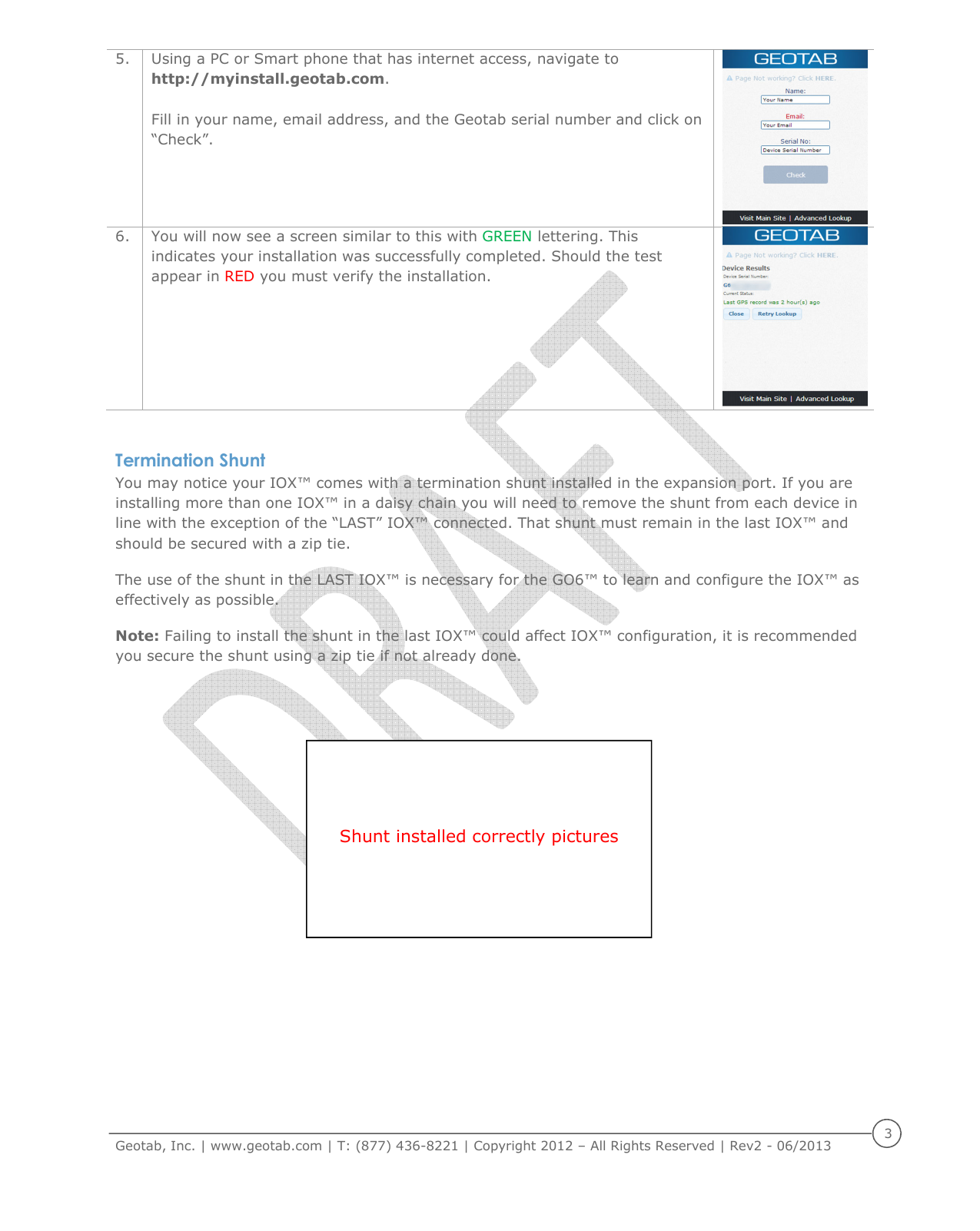
    Geotab, Inc. | www.geotab.com | T: (877) 436-8221 | Copyright 2012 – All Rights Reserved | Rev2 - 06/2013  3  5. Using a PC or Smart phone that has internet access, navigate to http://myinstall.geotab.com.  Fill in your name, email address, and the Geotab serial number and click on “Check”.   6. You will now see a screen similar to this with GREEN lettering. This indicates your installation was successfully completed. Should the test appear in RED you must verify the installation.   Termination Shunt You may notice your IOX™ comes with a termination shunt installed in the expansion port. If you are installing more than one IOX™ in a daisy chain you will need to remove the shunt from each device in line with the exception of the “LAST” IOX™ connected. That shunt must remain in the last IOX™ and should be secured with a zip tie.  The use of the shunt in the LAST IOX™ is necessary for the GO6™ to learn and configure the IOX™ as effectively as possible. Note: Failing to install the shunt in the last IOX™ could affect IOX™ configuration, it is recommended you secure the shunt using a zip tie if not already done.     Shunt installed correctly pictures
    Geotab, Inc. | www.geotab.com | T: (877) 436-8221 | Copyright 2012 – All Rights Reserved | Rev2 - 06/2013  4  Compliance FCC: 2AAFQ-NFC1 This device complies with Part 15 of the FCC rules. Operation is subject to the following two conditions: (1) This device may not cause harmful interference, and (2) This device must accept any interference received, including interference that may cause undesired operation. Note: The manufacturer is not responsible for any radio or TV interference caused by unauthorized modifications to this equipment. Such modifications could void the user’s authority to operate the equipment. IC: 11140A-NFC1 This device complies with Industry Canada licence-exempt RSS standard(s). Operation is subject to the following two conditions: (1) this device may not cause interference, and (2) this device must accept any interference, including interference that may cause undesired operation of the device.
    Geotab, Inc. | www.geotab.com | T: (877) 436-8221 | Copyright 2012 – All Rights Reserved | Rev2 - 06/2013  5  Warnings and Cautions WARNING:  Mapping,  navigation  and  tracking  features  available  through  Geotab  software  is  dependent  on  third  party mapping data and services and the availability and accuracy of the Global Positioning System (“GPS”) operated by the United States government. Both third party data and services as well as GPS is subject to changes which may affect the accuracy or performance  of  mapping,  navigation  and  tracking  information  or  graphics  presented  through  the  use  of  Geotab  software. Geotab products, software and services are not intended for use for primary navigation, route planning or similar purposes, as information presented may be inaccurate, delayed or misinterpreted. Relying on Geotab software for such purposes may result in incorrect navigation leading to unsafe driving situations.  WARNING:  Geotab’s  products  and  related  software  and  services  are  not  designed  or  intended  for  use  in  emergency  or failsafe situations including, without limitation, situations: (A) where failure of same may result in a risk of property damage, death or personal injury; (B) where Geotab’s products, software or services are used to alert others upon the occurrence of certain  vehicular  events  recorded  by  Geotab  in-vehicle  devices;  or  (C)  requiring  fail-safe  controls  or  fail-  proof  delivery  of information, including without limitation any operations involving radioactive or hazardous materials, life support systems or munitions or  weapons.  Communication features  in  Geotab  in-vehicle  devices  may  be  interrupted  or  inoperable  if  a  vehicle travels outside of a network coverage area or where there is a fault or service interruption with the carrier. Communication of data through Geotab in-vehicle devices also requires transmission of data through the internet. Failure in internet access will result in the interruption of communications.  WARNING: Do not attempt to install, reconfigure or remove any product from any vehicle while the vehicle is in motion or otherwise in operation. All installation, configuration or removal must be done only in stationary vehicles which are securely parked. Attempting to service units while being operated could result in malfunctions or accidents, leading to death or serious personal injury.  WARNING: If at any point after a Geotab in-vehicle device is installed, a warning light illuminates on the vehicle dash or the vehicle stalls or has a marked drop in performance, shut off the engine, remove the device, and contact Geotab support.  WARNING: Do  not attempt to  remove  Geotab in-vehicle devices from  the vehicle  in which  they are originally installed for installation  in  another  vehicle.  Not  all  vehicles  are  compatible  with  Geotab  in-vehicle  devices,  and  doing  so  may  result  in unexpected  interactions  with  your  vehicle,  including  sudden  loss  of  power  or  shutdown  of  the  vehicle’s  engine  while  in operation or cause your vehicle to operate poorly or erratically.  WARNING:  All  in-vehicle  devices  and  related  cabling  must  be  securely  fastened  and  kept  clear  of  all  vehicle  controls, including  gas, brake  and  clutch  pedals. You  must  inspect devices  and  cabling on  a  regular  basis  to ensure  all  devices  and cabling  continue  to  be  securely  attached.  Loose  cabling  or  devices  may  impede  the  use  of  vehicle  controls,  resulting  in unanticipated  acceleration,  braking  or  other  loss  of  vehicle  control,  which  could  lead  to  death  or  serious  personal  injury. Improperly  fastened  in-vehicle  devices  may  detach  and  impact  operators  upon  sudden  acceleration  or  deceleration,  which may cause injury.  CAUTION:  Geotab  products  do  not  contain  any  user-serviceable  parts.  Configuration,  servicing,  and  repairs  must  only  be made  by  an  authorized  Geotab  reseller  or  installer.  Unauthorized  servicing  of  Geotab  products  will  void  your  product warranty. Improper installation may also  lead  to  short circuits  and the risk  of  fire, leading  to  personal injury  or significant damage  to  your  vehicle.  Installation  or  servicing  may  also  require  modifications  to  your  vehicle.  Failure  to  comply  with specified procedures or without adequate knowledge of the vehicle may result in damage to your vehicle, which may cause malfunctions of vehicle controls or vehicular environmental systems and result in personal injury.  CAUTION: Geotab in-vehicle devices must be kept clear of debris, water  and other environmental contaminants. Failure to do so may result in units malfunctioning or short-circuiting, causing a fire hazard.  Copyright © Geotab Inc., 2012 All Rights Reserved. No part of this document may be reproduced, copied, modified or adapted without express written authorization from Geotab Inc. Geotab, Geotab GO6, Geotab IOX, GO6 and IOX are either registered trademarks or trademarks of Geotab Inc., in the United  States and/or other countries. GARMIN and IRIDIUM are trademarks, respectively, of GARMIN SWITZERLAND GMBH CORPORATION and IRIDIUM SATELLITE LLC.

Navigation menu